
The Ultimate Guide to AI Productivity: 9 ChatGPT Prompts to Save 5+ Hours Daily

⚡ The Brief
- What it is: A comprehensive guide to using AI-powered tools like ChatGPT to enhance productivity by integrating them into established productivity frameworks.
- Who it’s for: Knowledge workers and professionals seeking to automate tasks, streamline workflows, and significantly boost productivity.
- Key takeaways: Learn how to apply AI to nine productivity systems, leveraging ChatGPT for task management, prioritization, and focused work to save over five hours daily.
- Pricing/Cost: Costs vary based on AI tool subscriptions and usage, but the investment can lead to substantial time savings and increased efficiency.
- Bottom line: By adopting AI-driven productivity methods, professionals can transform their workflows, reclaim time, and achieve unprecedented levels of efficiency.
✓ Instant access✓ No spam✓ Unsubscribe anytime
In the relentless pace of the modern workplace, achieving peak productivity is not just an advantage; it’s a necessity. Knowledge workers are constantly battling distractions, managing overwhelming to-do lists, and struggling to find time for focused, meaningful work. While traditional productivity methods have offered valuable frameworks, their manual implementation can often feel like another task on an already packed schedule. Enter the new frontier of efficiency: AI-powered productivity. By integrating advanced AI like ChatGPT into proven frameworks, professionals can automate, streamline, and amplify their output, saving upwards of five hours every single day. This guide is your comprehensive playbook for this new era, providing not just the theory but the exact, actionable ChatGPT prompts to transform nine legendary productivity systems into supercharged engines for success.
We will explore a curated selection of the most effective productivity methodologies, each re-engineered for the AI age. From the time-tested Pomodoro Technique to the strategic clarity of the Eisenhower Matrix and the focused intensity of Deep Work, you will learn how to leverage ChatGPT as a personal productivity assistant. This isn’t about simply offloading tasks; it’s about creating a dynamic partnership with AI to manage your time, prioritize your efforts, and unlock your full potential. Prepare to revolutionize your workflow, reclaim your time, and achieve a level of productivity you never thought possible. Best ChatGPT Prompts for Productivity
A Comparative Look at 9 Powerful Productivity Frameworks
| Framework Name | Best For | Time Saved (Est. Daily) | Difficulty Level |
|---|---|---|---|
| Pomodoro Technique | Focused work sprints, avoiding burnout | 30-60 mins | Easy |
| Eisenhower Matrix | Prioritizing tasks based on urgency and importance | 60-90 mins | Medium |
| Batch Processing | Handling similar, repetitive tasks efficiently | 45-75 mins | Easy |
| Eat the Frog | Tackling the most challenging task first | 30-60 mins | Medium |
| Time Blocking | Structuring the entire day for maximum focus | 90-120 mins | Hard |
| Deep Work | Achieving a state of distraction-free concentration | 120+ mins | Hard |
| Two-Minute Rule | Overcoming procrastination on small tasks | 20-40 mins | Easy |
| Mind Mapping | Brainstorming and organizing complex ideas | 45-90 mins | Medium |
| Energy Management | Aligning tasks with personal energy levels | 60-100 mins | Hard |
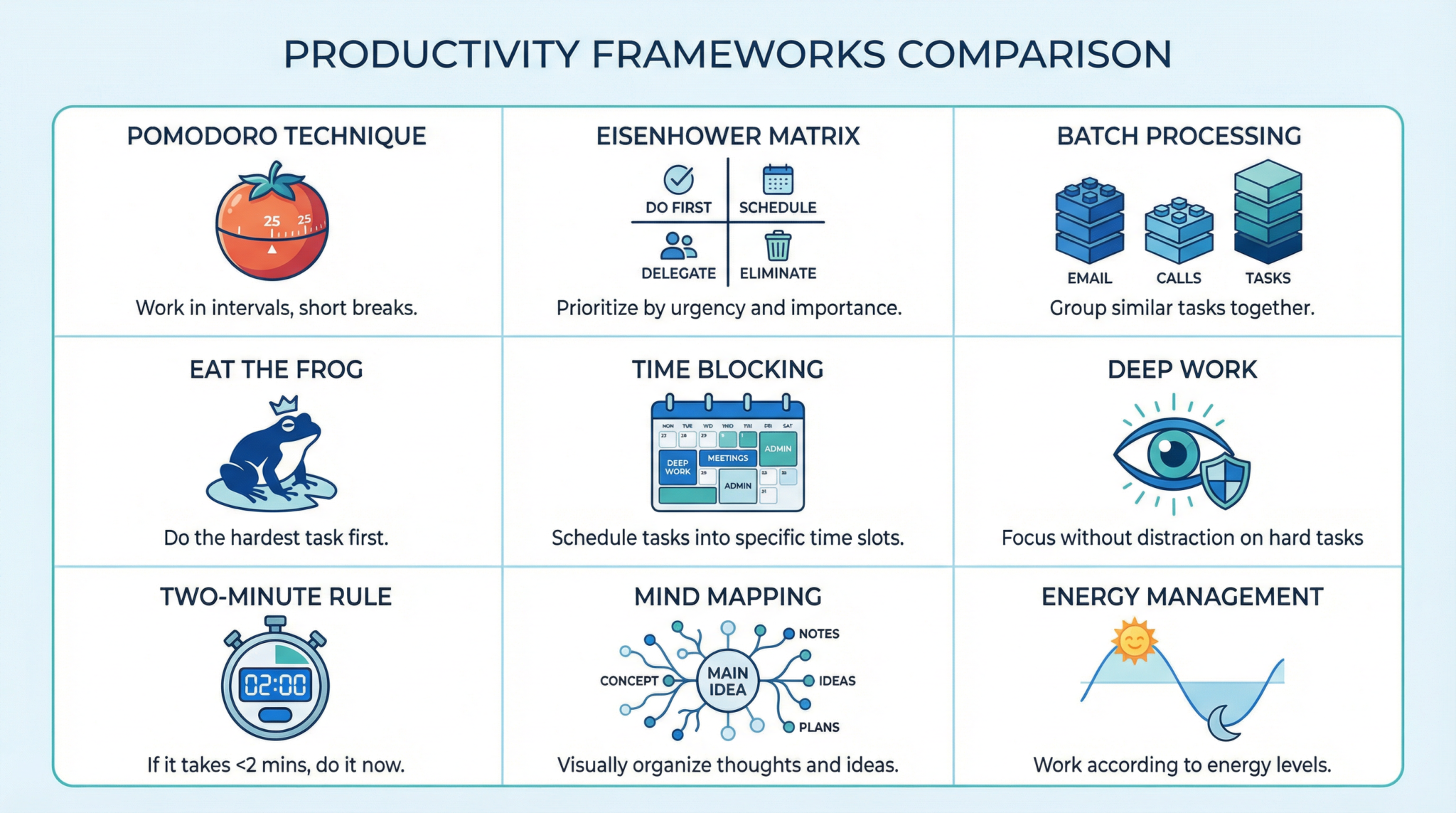
1. The Pomodoro Technique: AI-Powered Focus Sprints
The Pomodoro Technique, developed by Francesco Cirillo in the late 1980s, is a time management method that uses a timer to break down work into intervals, traditionally 25 minutes in length, separated by short breaks. This simple yet profound system is designed to combat procrastination, improve focus, and prevent burnout by creating a sense of urgency and encouraging regular rest. The core idea is that frequent breaks can improve mental agility. In its traditional form, the technique is entirely manual, relying on a kitchen timer and self-discipline. However, by integrating ChatGPT, we can elevate this method from a simple timer to a dynamic and interactive productivity system. ChatGPT can act as your session manager, not only tracking the time but also helping you define your goals for each sprint, summarizing your progress, and providing motivation. It can help you ruthlessly prioritize the single task to focus on during a Pomodoro, ensuring that these short bursts of work are directed at your most important objectives. This AI-driven approach adds a layer of accountability and structure that can be difficult to maintain alone, turning a simple time-tracking method into a powerful tool for focused achievement. 25 Advanced ChatGPT Prompting Techniques2. The Eisenhower Matrix: Strategic Prioritization with AI
The Eisenhower Matrix, a decision-making tool popularized by Stephen Covey and attributed to President Dwight D. Eisenhower, is a framework for categorizing tasks based on urgency and importance. It divides tasks into four quadrants: Urgent & Important (Do), Important & Not Urgent (Schedule), Urgent & Not Important (Delegate), and Not Urgent & Not Important (Delete). This method provides a clear, strategic overview of your priorities, helping you focus on what truly matters rather than getting caught in a cycle of reacting to crises. While the matrix is powerful on its own, many professionals struggle with the subjective nature of categorizing tasks. This is where ChatGPT can be a game-changer. By feeding your to-do list to an AI trained on vast amounts of data, you can get an objective, data-driven analysis of each task’s urgency and importance. ChatGPT can ask clarifying questions to better understand the context of each task, analyze dependencies between tasks, and even suggest which tasks can be delegated or eliminated, freeing up significant mental bandwidth. This transforms the Eisenhower Matrix from a static diagram into a dynamic, intelligent prioritization system. How to Use ChatGPT Agent Mode3. Batch Processing: Eliminating Context-Switching with AI
Batch processing is the practice of grouping similar tasks together and completing them in a single, dedicated session. This method is designed to combat the high cost of context-switching—the mental effort required to shift your focus from one type of task to another. Every time you switch, your brain loses momentum, and it takes time to re-engage, leading to a significant loss of productivity over the course of a day. Common examples of tasks that are perfect for batching include answering emails, making phone calls, or processing invoices. While the concept is simple, identifying and organizing these batches can be a challenge. ChatGPT can act as an intelligent batching assistant. By analyzing your to-do list, it can identify tasks with similar characteristics (e.g., requiring the same software, cognitive state, or level of energy) and group them into logical batches. It can also help you schedule these batches into your day for optimal efficiency, for instance, by grouping all your communication tasks into one block and all your creative tasks into another. This AI-powered approach ensures that you are not just grouping tasks, but doing so in a way that maximizes your focus and minimizes mental friction.4. Eat the Frog: Conquering Your Most Important Task with AI
The “Eat the Frog” method, a concept popularized by Brian Tracy, is a powerful strategy for overcoming procrastination and ensuring that you make progress on your most significant goals every single day. The “frog” is your most important and challenging task—the one you are most likely to procrastinate on, but also the one that will have the greatest positive impact on your life and career. The rule is simple: eat the frog first thing in the morning. By tackling your biggest challenge before all other distractions, you build momentum and create a sense of accomplishment that carries you through the rest of the day. However, identifying the “frog” can be difficult, and summoning the motivation to tackle it can be even harder. This is where ChatGPT can provide critical support. You can use AI to analyze your goals and to-do list to objectively identify which task qualifies as your “frog.” ChatGPT can then help you break that daunting task down into smaller, more manageable steps, creating a clear action plan. It can even act as a motivational coach, providing encouragement and helping you visualize the positive outcomes of completing the task, making the prospect of “eating the frog” far less intimidating and far more achievable.5. Time Blocking: Designing Your Perfect Day with AI
Time blocking is a time management method where you schedule out every part of your day, assigning specific “blocks” of time to particular tasks or activities. Instead of working from a to-do list, you work from a calendar, giving every minute a job. This proactive approach prevents reactive work, protects time for your priorities, and provides a clear, visual plan for your day. While powerful, creating and maintaining a time-blocked schedule can be time-consuming and rigid. This is where an AI assistant like ChatGPT can revolutionize the process. You can provide ChatGPT with your task list, meeting schedule, and personal commitments, and it can generate a complete, optimized time-blocked schedule for you. The AI can factor in your energy levels, the estimated time for each task, and the need for breaks, creating a realistic and sustainable plan. Furthermore, when unexpected events disrupt your schedule, ChatGPT can instantly re-calculate and suggest a new, optimized plan, removing the stress and administrative overhead of manual rescheduling. This turns time blocking from a static, fragile system into a flexible, intelligent framework for intentional living.6. Deep Work: Cultivating Intense Focus with an AI Gatekeeper
Coined by author and professor Cal Newport, “Deep Work” refers to the ability to focus without distraction on a cognitively demanding task. It’s a state of high concentration that allows you to quickly master complex information and produce high-quality results. In a world of constant connectivity and digital noise, the ability to perform deep work is becoming increasingly rare and, therefore, increasingly valuable. The biggest challenge to deep work is managing distractions—the endless stream of emails, notifications, and messages that pull you away from your focus. ChatGPT can be configured to act as an intelligent gatekeeper, protecting your deep work sessions. You can set up a system where ChatGPT fields incoming communications, categorizes them by urgency, and provides polite, automated responses, assuring the sender that you will get back to them later. It can also help you prepare for your deep work sessions by gathering all the necessary research, data, and resources beforehand, so that when you start, you have everything you need at your fingertips. This allows you to fully immerse yourself in the task at hand, confident that your AI assistant is managing the outside world.7. The Two-Minute Rule: Overcoming Procrastination on Small Tasks with AI
The Two-Minute Rule, a concept from David Allen’s “Getting Things Done” (GTD) methodology, is a simple yet powerful tool for overcoming procrastination and building momentum. The rule has two parts: 1) If a task takes less than two minutes to complete, do it immediately. 2) When starting a new habit, it should take less than two minutes to do. This rule is designed to stop you from putting off small tasks that can quickly clutter your to-do list and your mind. While the rule is straightforward, it can be difficult to apply consistently, especially when you’re feeling overwhelmed. ChatGPT can act as your two-minute rule enforcer and facilitator. You can periodically feed your to-do list to the AI and ask it to identify all the tasks that could be completed in under two minutes. It can then present these to you as a rapid-fire checklist, creating a gamified experience of knocking out small wins. For larger goals, ChatGPT can help you apply the second part of the rule by brainstorming a two-minute “gateway habit” that makes starting the larger task feel effortless. This AI-powered application of the rule helps you clear the decks of small tasks and build unstoppable momentum towards your bigger goals.8. Mind Mapping: Visual Brainstorming and Organization with AI
Mind mapping is a visual thinking tool that helps in structuring information, brainstorming, and solving complex problems. It involves creating a diagram with a central concept and radiating branches of related ideas. This non-linear approach mirrors how our brains naturally make associations, making it a highly effective way to explore and organize thoughts. However, creating detailed mind maps can be time-consuming, and translating them into actionable plans can be a separate, laborious step. ChatGPT can supercharge the mind mapping process. You can start by brainstorming a topic with the AI, which can generate a wealth of related ideas, sub-topics, and questions. It can then organize this information into a structured, hierarchical text format that can be easily converted into a visual mind map using various tools. Furthermore, once the mind map is created, ChatGPT can take the structured output and transform it into a project plan, a document outline, or a series of actionable tasks. This seamless integration of brainstorming, organization, and execution makes AI-powered mind mapping an incredibly efficient tool for creative thinking and project planning.9. Energy Management: Aligning Your Work with Your Natural Rhythms using AI
Energy management, not time management, is the key to sustainable high performance. This productivity philosophy, championed by authors like Tony Schwartz, posits that the best results come from aligning your most important tasks with your natural energy levels. It involves recognizing that you have finite energy and that it ebbs and flows throughout the day. By scheduling high-focus, creative tasks during your peak energy periods and saving low-energy, administrative tasks for your slumps, you can produce better work with less effort. The primary challenge of energy management is self-awareness—accurately tracking and understanding your personal energy patterns. ChatGPT can serve as an invaluable energy-tracking and planning partner. You can create a simple daily journal where you rate your energy, focus, and motivation on a scale of 1-10 at different points in the day. After a week of data collection, you can feed this journal to ChatGPT and ask it to analyze your personal energy rhythms. The AI can identify your peak and trough periods and then, using this data, help you create a weekly schedule that is perfectly optimized for your unique biological clock. This data-driven approach to energy management takes the guesswork out of the equation, allowing you to build a truly sustainable and highly productive workflow.
Access 40,000+ AI Prompts for ChatGPT, Claude & Codex — Free!
Subscribe to get instant access to our complete Notion Prompt Library — the largest curated collection of prompts for ChatGPT, Claude, OpenAI Codex, and other leading AI models. Optimized for real-world workflows across coding, research, content creation, and business. Access Free Prompt LibraryFrequently Asked Questions (FAQ)
🕐 Instant∞ Unlimited🎁 Free
Frequently Asked Questions
How does AI enhance traditional productivity methods?
AI enhances traditional productivity methods by automating repetitive tasks, providing intelligent insights, and facilitating better decision-making. Tools like ChatGPT can integrate with frameworks like the Pomodoro Technique or Eisenhower Matrix, streamlining processes and allowing users to focus on high-priority tasks, ultimately saving time and increasing efficiency.
What are the benefits of using ChatGPT for productivity?
Using ChatGPT for productivity offers numerous benefits, including automated task management, enhanced focus through structured prompts, and improved prioritization. By acting as a virtual assistant, ChatGPT helps users streamline workflows, reduce cognitive load, and maintain concentration, leading to significant time savings and increased output.
Can AI tools like ChatGPT replace human decision-making?
AI tools like ChatGPT are designed to augment, not replace, human decision-making. They provide valuable insights, automate routine tasks, and offer recommendations, but the final decisions should be made by humans. AI serves as a powerful assistant, enhancing human capabilities and enabling more informed and efficient decision-making.
What are the best AI tools for productivity in 2026?
In 2026, top AI tools for productivity include GPT-5.4, Claude Opus 4.7, Gemini 3, and Codex. These tools offer advanced capabilities for automation, task management, and decision support. Alternatives like Kling and Runway provide additional options for specific needs, ensuring a comprehensive suite of tools to enhance productivity across various domains.
How do modern prompt engineering techniques improve AI interactions?
Modern prompt engineering techniques, such as chain-of-thought and structured outputs, improve AI interactions by guiding the AI to produce more relevant and coherent responses. Techniques like system/developer prompts and retrieval-augmented generation (RAG) ensure that AI outputs are contextually accurate and aligned with user objectives, enhancing the overall effectiveness of AI tools.
What is the role of AI in time management?
AI plays a crucial role in time management by automating scheduling, prioritizing tasks, and providing reminders. Tools like ChatGPT can help users allocate time effectively, minimize distractions, and focus on high-impact activities. AI-driven insights enable users to optimize their schedules, ensuring maximum productivity and efficient use of time.
