
How to Use OpenAI Codex for Everyday Work: A Complete Non-Developer Guide (2026 Edition)
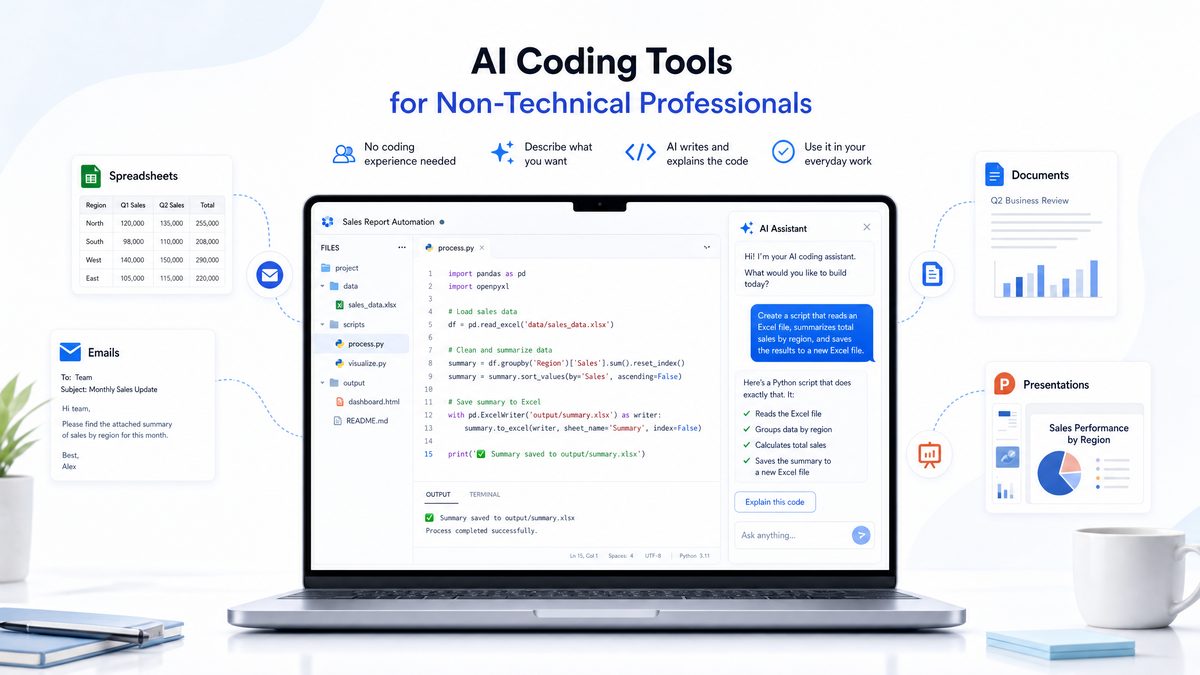
OpenAI Codex has evolved far beyond its original role as a developer-centric code generation tool. As of 2026, Codex serves as a powerful AI assistant tailored to streamline a wide variety of everyday work tasks for professionals without programming expertise. Whether you are managing documents, spreadsheets, emails, or creative content, Codex’s cloud-based intelligence can handle multi-step processes autonomously and intelligently. This comprehensive tutorial walks you through everything you need to know to harness Codex effectively in your daily workflow, complete with setup instructions, real-world applications, and tips to maximize productivity.
1. Understanding OpenAI Codex in 2026: Beyond Code Generation
Originally launched as an AI system designed to translate natural language commands into code, OpenAI Codex has transformed significantly by 2026. No longer confined to software developers, Codex has matured into a versatile AI assistant empowering around 4 million weekly users globally in diverse non-technical roles.
This evolution mirrors broader trends in artificial intelligence, where large language models and sophisticated contextual understanding enable AI to act as collaborative partners across industries. Transitioning from a niche developer tool to a mainstream productivity assistant marks a pivotal milestone in AI adoption.
Key transformations defining Codex today include:
- Multi-Domain Functionality: Codex supports automation in document editing, spreadsheet manipulation, email management, and content creation. It is now indispensable for administrative, marketing, finance, and other business professionals. For example, marketing teams can generate campaign drafts, while finance departments automate financial modeling without writing a single line of code.
- Cloud-Based Autonomous Agents: The Codex agent operates entirely in the cloud to execute complex, multi-step workflows autonomously, enabling task chaining, conditional logic, and data integration across multiple applications. For instance, a workflow might extract data from an email, populate a spreadsheet, generate a summary report, and send it to stakeholders—all without manual input.
- Codex CLI: Launched on April 16, 2025, the Codex Command Line Interface (CLI) provides terminal-based interactions that can read repositories, edit files, and run tests. While primarily enhancing developer productivity, it is also accessible to technically inclined non-developers, bridging the gap for power users seeking automation without deep programming knowledge.
- The Chronicle Feature: This groundbreaking tool captures your digital life by periodically snapshotting your screen and activities, enabling contextual recall and seamless information retrieval. Acting as a digital memory, Chronicle helps users revisit previous work steps and reduces the cognitive load of managing multiple tasks.
- AI “Pets” for Vibe Coding: An innovative feature allowing users to interact with customizable AI companions that assist in coding and creative workflows with personality and contextual awareness. These companions adapt to user preferences, offering technical assistance alongside motivation and engagement during work sessions.
With these advances, Codex is no longer just a programmer’s assistant; it is a comprehensive AI work partner that simplifies and accelerates complex tasks across disciplines. Its ability to understand nuanced instructions and autonomously manage workflows makes it a game-changer for professionals seeking efficiency without learning programming.
2. Setting Up Codex for Non-Technical Workflows: Step-by-Step Guide
Getting started with OpenAI Codex for non-developer tasks is straightforward. This section provides a detailed setup guide tailored for professionals without programming backgrounds, ensuring a smooth onboarding experience.
Step 1: Create an OpenAI Account and Access Codex
- Visit the OpenAI platform and sign up for an account. Choose a plan that suits your usage needs; Codex access is integrated into most tiers, including free trials and enterprise subscriptions. Enterprise plans offer enhanced API limits and priority support for heavy users.
- Log in and navigate to the Codex dashboard, which provides web-based interfaces and API access. The dashboard includes usage analytics, billing information, and a command library optimized for various professional roles.
- For organizations, administrators can set up team accounts, assign roles, and control permissions centrally to ensure secure and compliant usage.
Step 2: Install Codex Apps and Plugins
- Download and install official Codex integrations for applications you use daily, such as Microsoft Word, Excel, Gmail, Google Docs, and Slack. These plugins enable in-app AI assistance, allowing you to invoke Codex commands contextually without switching environments.
- For example, the Codex Word add-in can generate document summaries or reformat content, while the Excel plugin creates formulas or visualizes data based on natural language prompts.
- For advanced users or those preferring command-line interaction, install the Codex CLI tool (available for Windows, macOS, and Linux) by following official installation instructions. The CLI is especially useful for batch processing files or integrating Codex into custom workflows.
- Third-party developers have also created community plugins extending Codex functionality to CRM systems, project management tools, and cloud storage platforms, broadening its applicability.
Step 3: Configure Cloud Agent Permissions
- Authorize the Codex cloud agent to securely access your documents, emails, and other files. This enables autonomous operations like reading emails, extracting data from documents, or updating spreadsheets without manual intervention.
- Security is paramount; Codex employs encrypted connections and complies with standards such as GDPR and HIPAA where applicable. You can configure granular access controls specifying which folders, email accounts, or applications Codex can interact with.
- Set privacy parameters to control data usage, ensuring compliance with organizational policies and personal preferences. Sensitive files can be excluded from AI processing, and activity logs anonymized as needed.
Step 4: Personalize Your AI “Pets”
- Choose and customize your AI “pet” from the Codex interface to receive interactive assistance tailored to your workflow preferences. Select personalities ranging from formal and concise to casual and humorous, matching your work environment.
- These AI companions learn from your interactions, adapting suggestions and communication style over time. For example, content writers may receive creative brainstorming prompts, while project managers get task-oriented reminders.
- Customization options include response frequency, notification preferences, and integration with external calendars or task management apps for proactive assistance.
Step 5: Learn Basic Commands and Templates
- Explore the Codex command library for non-technical tasks, such as “Summarize this document,” “Create a budget spreadsheet,” or “Draft a professional email.” The library is searchable and categorized by task type and industry.
- Create templates for recurring workflows to save time. For example, design a template for monthly financial reports that Codex fills automatically with updated data and formatting.
- Training resources, including interactive tutorials and video guides, are available within the Codex platform to accelerate proficiency without requiring technical skills.
- Leverage community forums and professional networks to share templates and best practices, fostering collaborative learning.
By following these steps, non-technical professionals can quickly onboard Codex and start leveraging its AI capabilities without needing to write or understand code. The setup emphasizes simplicity, security, and customization to fit diverse work styles.
3. Leveraging Codex for Document and Spreadsheet Automation
Document and spreadsheet management are critical components of many professional roles. Codex enhances these tasks through intelligent automation, improving accuracy and efficiency. Its natural language understanding allows users to perform complex operations with simple commands, reducing reliance on manual input and specialized software knowledge.
Document Automation Capabilities
- Content Summarization: Codex reads lengthy documents and generates concise summaries, saving time during research or review. Legal teams can quickly grasp case details, and executives can review key points without reading full reports.
- Language Translation and Localization: Instant translation of documents with contextual adjustments for target audiences. Codex supports over 50 languages and adapts idiomatic expressions to maintain tone and intent, beneficial for multinational corporations and global communication.
- Formatting and Style Consistency: Automatically standardizes fonts, headings, and citation styles across documents, ensuring professional appearance and compliance with corporate branding or publication standards.
- Template Generation: Create legal contracts, proposals, reports, and other documents from simple prompts. For example, instruct Codex to draft a non-disclosure agreement customized for specific jurisdiction and party details.
- Document Comparison and Review: Codex highlights differences between document versions, summarizes changes, and suggests edits, streamlining collaborative workflows.
Spreadsheet Automation Features
- Data Entry and Validation: Codex populates spreadsheets from natural language inputs and validates data against predefined rules. For example, it cross-checks numerical entries against financial policies or flags inconsistent data.
- Formula Generation: Automatically writes complex formulas based on described calculations. Users can say, “Calculate the compound annual growth rate for these revenue figures,” and Codex generates the correct formula and applies it.
- Chart and Graph Creation: Generates visual data representations by specifying chart type and data range. Codex supports bar charts, pie charts, line graphs, heat maps, and more, with customizable labels and colors.
- Data Cleaning: Identifies and corrects inconsistencies, duplicates, or errors within datasets. Codex suggests normalization or categorization strategies to improve data quality.
- Integration with External Data Sources: Codex imports data from APIs, databases, or cloud services, enabling dynamic spreadsheet updates without manual downloads.
Example Workflow: Budget Planning
Using Codex, a finance manager can say, “Create a quarterly budget forecast for marketing expenses,” and the AI generates a spreadsheet with categorized expense lines, applies appropriate formulas for projections, and formats the report for presentation. Codex can also set alerts for budget overruns and simulate different spending scenarios on request.
Similarly, a project coordinator might command, “Generate a resource allocation sheet for the upcoming quarter,” and Codex populates team member details, assigns tasks based on availability, and calculates workload balances.
| Task | Traditional Approach | Codex-Enhanced Approach |
|---|---|---|
| Document Summarization | Manual reading and note-taking (hours) | Instant AI-generated summaries (minutes) |
| Spreadsheet Formula Writing | Manual formula coding, prone to errors | Natural language input converted to accurate formulas |
| Data Cleaning | Manual filtering and error checking | Automated detection and correction via AI |
| Chart Creation | Manual setup and formatting | Command-based automatic generation with customization |
| Data Integration | Manual import/export processes | Real-time API-driven updates |
4. Email Management and Content Creation with Codex
Managing email volumes and producing quality content are frequent challenges for professionals. Codex’s AI capabilities simplify these tasks by automating repetitive processes and enhancing creativity. Its ability to understand context and tone allows for personalized, efficient communication.
Email Management
- Inbox Prioritization: Codex analyzes your emails, flags urgent messages, and suggests responses based on context. It uses natural language processing to detect sentiment and urgency, ensuring that important communications are addressed promptly.
- Automated Replies: Generate draft replies for common queries that can be customized before sending. Customer support agents can rapidly respond to FAQs, while sales teams efficiently send personalized outreach emails.
- Email Summaries: Receive daily digests summarizing key conversations and action items. Codex filters out noise and highlights critical points, managing email overload effectively.
- Scheduling and Follow-Ups: Codex schedules meetings, sends reminders, and tracks pending responses autonomously. It integrates with calendar systems to avoid conflicts and optimizes timing based on recipient availability.
- Spam and Phishing Detection: Codex assists in identifying suspicious emails and can alert users or quarantine messages automatically, enhancing security.
Content Creation
- Blog and Article Drafting: Generate outlines and complete drafts from keywords or topic descriptions. Codex adapts writing style to match brand voice or target audience demographics, supporting content marketing strategies.
- Marketing Copy: Produce persuasive ad copy, social media posts, and email campaigns aligned with brand voice. Codex generates multiple variations for A/B testing and optimizes calls to action.
- Creative Writing Assistance: Enhance storytelling by suggesting plot developments, character descriptions, or style improvements. Authors and content creators benefit from AI-powered brainstorming and editing support.
- SEO Optimization: Codex incorporates keywords naturally and suggests meta descriptions, improving search engine rankings without compromising readability.
- Proofreading and Grammar Checking: Automatic detection and correction of typos, grammar errors, and style inconsistencies ensure polished, professional output.
Example Use Case: Customer Support Emails
A customer service agent handling hundreds of inquiries daily can use Codex to triage emails by categorizing issues such as billing, technical support, or general queries. Codex drafts personalized responses tailored to the customer’s tone and history, escalating complex issues to human agents only when necessary. This saves significant time and enhances customer satisfaction. Additionally, Codex tracks unresolved tickets and suggests follow-up messages to ensure timely resolution.
Sales teams can also generate customized outreach emails based on CRM data, increasing engagement through personalization and context awareness.
5. The Chronicle Feature: Your AI-Powered Digital Memory
The Chronicle feature is one of Codex’s most innovative advancements, designed to capture and organize your digital experiences throughout the day. By snapshotting your screen and activities at regular intervals, Chronicle creates an indexed, searchable archive of your work life, transforming how professionals manage information overload and context switching.
How Chronicle Works
- Periodic Screen Capture: Chronicle takes snapshots of your screen every few minutes, storing visual context without recording sensitive inputs like passwords or personal identification numbers. This ensures privacy while preserving relevant information.
- Activity Tagging: Codex automatically tags snapshots based on application usage, document content, and task type. For example, it recognizes when you work on a spreadsheet, browse emails, or participate in a video conference.
- Contextual Search: Users can search by keywords, dates, or activities to retrieve relevant screenshots, notes, and related documents, reducing time spent hunting for information or reconstructing previous work steps.
- Privacy and Control: Users control when Chronicle is active and can delete snapshots selectively or entirely. Options include pausing recording during sensitive meetings or excluding certain applications.
- Integration with Productivity Tools: Chronicle links captured data with calendar events, task lists, and communication logs for holistic context awareness.
Use Cases for Chronicle
- Recall Complex Workflows: Revisit steps taken during a project without manual note-taking. Designers can review previous iterations and feedback quickly.
- Meeting Follow-Ups: Effortlessly review materials and chat logs from virtual meetings, enabling accurate minutes and action item tracking.
- Research and Reference: Quickly locate critical data points or visuals encountered during work sessions, improving knowledge management.
- Compliance and Auditing: Chronicle provides verifiable records of digital activities useful in regulated industries requiring detailed audit trails.
- Personal Productivity Analysis: Analyze work patterns, identify distractions or inefficiencies, and optimize schedules accordingly.
By offloading the burden of remembering context and details, Chronicle enhances cognitive bandwidth and supports better decision-making.
6. Practical Workflow Examples for Business Professionals
To illustrate Codex’s versatility, here are detailed workflows demonstrating how different non-technical professionals can integrate Codex into their daily routines, showcasing real-world applications that drive productivity and innovation.
Marketing Manager: Campaign Planning and Execution
- Generate campaign briefs from simple descriptions, e.g., “Create a campaign brief targeting millennials for a new eco-friendly product launch.”
- Automate content calendars in spreadsheets, complete with deadlines and assigned team members, optimizing resource allocation and timeline tracking.
- Draft marketing emails and social media posts with tone customization and brand alignment, producing multiple variations for different platforms and audiences.
- Analyze campaign performance by importing data and generating reports with charts and insights like engagement rates, conversion metrics, and channel-level trends.
- Review generated briefs, copy, formulas, and reports before sharing them, especially when source data or brand requirements have changed.
7. Conclusion
Start with one repeatable task, provide clear instructions and source material, and verify the result before it enters a business workflow. Expand only after the process produces consistent, reviewable output.
For everyday work, the most practical approach is to treat Codex as a drafting and automation assistant while keeping people responsible for permissions, sensitive data, and final decisions.
