
The Complete Guide to OpenAI Codex Modes: Plan, Execute, and Review — Choosing the Right Mode for Every Task
The Complete Guide to OpenAI Codex Modes: Plan, Execute, and Review — Choosing the Right Mode for Every Task
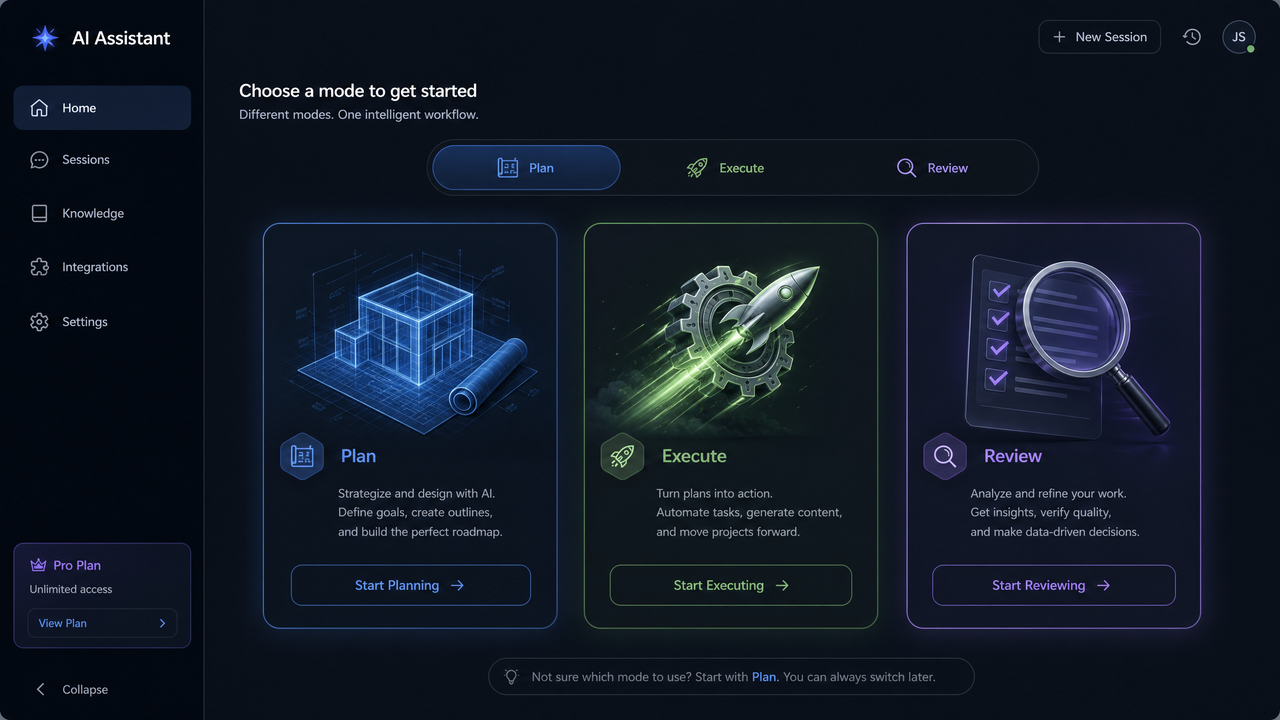
Table of Contents
- Introduction: Why Codex Modes Matter
- How Modes Work Across Desktop App, IDE Extensions, and CLI
- Plan Mode Deep Dive: From Objectives to a Concrete Task Graph
- Execute Mode Deep Dive: Safe, Autonomous Implementation
- Review Mode Deep Dive: Precise, Actionable Code Review
- Switching Between Modes Efficiently
- Best Practices for Each Mode
- Real-World Workflows and End-to-End Examples
- Integration Patterns and Automation
- Governance, Compliance, and Safety
- Troubleshooting and Optimization
- Capability Matrix and Decision Guide
- Conclusion and Next Steps
Introduction: Why Codex Modes Matter
Software development happens in loops: you plan what to do, you implement it, and you review the result. Codex Modes make that loop explicit and tool-supported. Plan mode helps you shape a precise objective and task decomposition. Execute mode performs the change safely and deterministically, with guardrails and observability. Review mode inspects diffs, comments on risks, and proposes patches to raise quality. Together, they provide a shared vocabulary and an operational system that scales from quick scripts to organization-wide initiatives.
Three principles underpin Codex Modes:
- Clarity over cleverness: plan before you build, and make decisions inspectable.
- Automation with accountability: autonomous execution must be observable, reversible, and policy-aware.
- Quality by default: every change is reviewed against explicit rubrics and can be auto-remediated where safe.
This guide explains how to use Plan, Execute, and Review across the desktop app, popular IDE extensions, and the CLI. It goes beyond feature lists to pragmatic workflows, policy patterns, and code examples you can adapt. If you’re building a team-wide rollout strategy, pairing a senior developer with Codex as a co-implementer, or integrating AI review into CI, you’ll find concrete guidance here. For deeper context on eliciting high-signal instructions, see
For a deeper exploration of product management prompts for roadmap planning and PRDs, our comprehensive guide on 30 ChatGPT-5.5 Prompts for Product Managers provides detailed strategies, practical examples, and implementation patterns that complement the techniques discussed in this article.
.
How Modes Work Across Desktop App, IDE Extensions, and CLI
Codex Modes are consistent across three primary surfaces so teams can switch context without rewriting mental models:
- Desktop app: a workspace for multi-file reasoning, long-form plans, and rich artifact previews.
- IDE extensions: tight-in-editor operations, inline diffs, and code-lens controls that minimize context switching.
- CLI: automation-first control plane for CI/CD, ChatOps, and headless batch flows.
At a glance:
- Plan mode is optimized for gathering context, writing objectives, enumerating risks, and producing a machine- and human-readable task graph.
- Execute mode is optimized for applying minimally-scoped changes in a branch or sandbox, running tests, and producing granular commits.
- Review mode is optimized for structured, rubric-based review of staged diffs or pull requests, with explainable suggestions and auto-fixes.
Conceptually, think of Plan as producing a “contract” that Execute fulfills and Review validates. The same artifacts (objective, constraints, acceptance criteria, task graph) flow through all surfaces.
Desktop App
The desktop app exposes modes via a mode switcher along the top of the workspace. Switching modes preserves context (your open repository, current branch, and working documents). Plan mode exposes a document canvas and a task graph panel; Execute mode shows a change queue and test dashboard; Review mode shows diff panes and rule insights. Keyboard-first workflows are supported with global shortcuts (e.g., Cmd/Ctrl+1 for Plan, +2 for Execute, +3 for Review) and command palette entries.
IDE Extensions
IDE extensions present modes through a status bar toggle and command palette actions. Plan mode allows drafting objectives as code fences or .plan files; Execute mode applies edits via code actions and a preview panel; Review mode attaches to your VCS to annotate diffs and PRs inline. Mode transitions are designed to be frictionless: accept a plan bullet to generate a local change, or promote a selected diff into a review thread with one command.
CLI
The CLI subcommands map 1:1 to modes and can be combined into pipelines. Use the CLI for reproducibility, automation, and auditability. Below are typical commands you’ll use.
# Initialize Codex in a repo (creates .codex/ and default config)
codex init

# Plan mode: create or update a plan artifact
codex plan --objective "Add passwordless login with magic links" \
           --context src/auth,tests/auth \
           --acceptance "Login via email within 60s; lockout after 5 failures" \
           --risks "Phishing, token replay" \
           --out .codex/plan.yaml

# Execute mode: apply the plan in an isolated branch and run tests
codex exec --plan .codex/plan.yaml \
           --branch feature/auth-magic-links \
           --sandbox docker \
           --run-tests

# Review mode: review staged diffs or a PR URL with explicit rules
codex review --source diff --ruleset .codex/rules/security.yml \
             --out .codex/review-report.md

# Switch modes in an interactive shell
codex switch execute
All three surfaces honor a shared project configuration (e.g., .codex/config.yaml), and each action emits machine-readable logs for traceability.
Plan Mode Deep Dive: From Objectives to a Concrete Task Graph
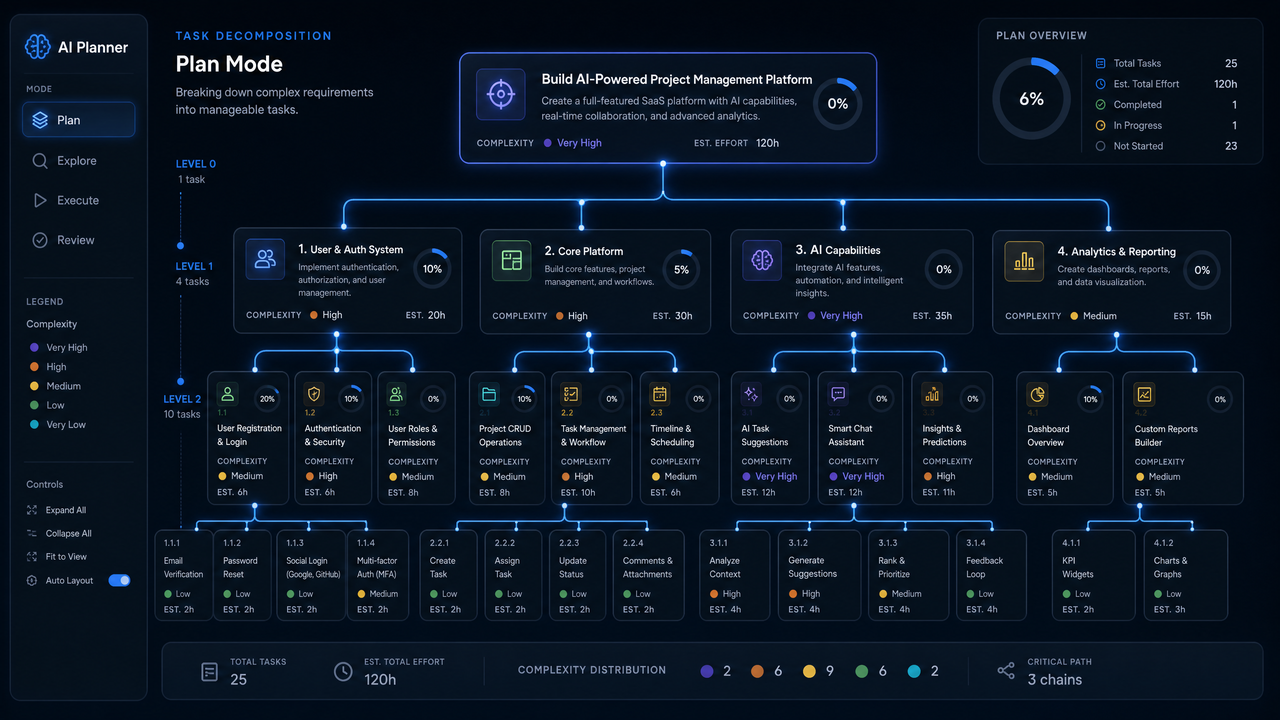
Plan mode transforms a fuzzy idea into a precise, testable change request. It captures objectives, scope boundaries, constraints, dependencies, non-functional requirements, risks, and acceptance tests. The output is a task graph: prioritized, minimally-coupled tasks with clear completion criteria.
Core Inputs
- Objective: a crisp statement of what to achieve, not how.
- Context: source directories, docs, architectural decisions, and external dependencies to consider.
- Constraints: coding standards, security policies, performance minima, and tech stack limitations.
- Acceptance criteria: observable, testable conditions that demonstrate success.
- Risks and mitigations: known pitfalls, attack vectors, migration impacts, and recovery plans.
- Dependencies: services, libraries, or teams that influence design or delivery order.
Plan Artifact Structure
Plans should be both human-friendly and machine-parseable. YAML is a good fit for readability, with optional JSON for automated pipelines. Below is a representative plan.
# .codex/plan.yaml
version: 1
objective: "Introduce passwordless login via email magic links"
context:
  repo: "."
  include:
    - "src/auth"
    - "src/email"
    - "tests/auth"
  exclude:
    - "legacy/"
constraints:
  language: ["TypeScript"]
  frameworks: ["Express", "Jest"]
  security:
    - "JWT tokens must be signed with rotating keys"
    - "Magic links expire within 60 seconds"
    - "Rate-limit requests by IP and email"
non_functional:
  performance:
    p50_latency_ms: 150
    p95_latency_ms: 300
  observability:
    - "Emit audit events for token issuance and verification"
acceptance:
  - "User can request a magic link from /auth/magic"
  - "Link is delivered via SES sandbox in dev; provider in prod"
  - "Clicking link logs the user in and sets a secure, HttpOnly cookie"
  - "After 5 failed verifications per hour, requests are blocked for 1 hour"
risks:
  - id: "R1"
    description: "Token replay within validity window"
    mitigation: "Single-use nonce stored server-side; invalidate on use"
  - id: "R2"
    description: "Email deliverability in dev/test"
    mitigation: "Fallback to console link for local; SES sandbox in staging"
tasks:
  - id: "T1"
    title: "Design token format and storage"
    type: "design"
    deps: []
    done_when:
      - "Spec reviewed"
      - "Test cases enumerated"
  - id: "T2"
    title: "Implement /auth/magic request endpoint"
    type: "code"
    deps: ["T1"]
    done_when:
      - "Endpoint issues token and sends email"
      - "Unit tests pass"
  - id: "T3"
    title: "Implement /auth/magic/verify endpoint"
    type: "code"
    deps: ["T1"]
    done_when:
      - "Single-use verification; sets cookie"
      - "Unit and integration tests pass"
  - id: "T4"
    title: "Add rate limiting"
    type: "code"
    deps: ["T2","T3"]
    done_when:
      - "Exceeded attempts blocked"
      - "Tests cover edge cases"
  - id: "T5"
    title: "Security review and fuzz tests"
    type: "review"
    deps: ["T2","T3","T4"]
    done_when:
      - "All high-risk findings addressed"
deliverables:
  - "plan.yaml"
  - "api-contract.md"
  - "threat-model.md"
branching:
  strategy: "feature-branch"
  branch_name: "feature/auth-magic-links"
test_plan:
  unit: true
  integration: true
  fuzz: ["token parser", "email payload parser"]
budget:
  timebox_hours: 6
  compute_budget_tokens: 200000
Techniques for High-Signal Plans
- Set constraints early: specify languages, frameworks, and policies up front to bound the search space.
- Write acceptance tests as you would for a PR description; they double as automated test outlines.
- Prefer a DAG of tasks: codify deps (“T3 depends on T1”) so Execute can parallelize safely.
- Explicit non-functional requirements: latency, footprint, and observability guide implementation choices.
- List risks with IDs to anchor discussion and to bind mitigations to review checks.
Plan Mode in Practice
In the desktop app, begin with a plan canvas. Paste relevant context (file paths, API docs), draft objectives, and acceptance criteria. Use the built-in graph panel to validate your task DAG. In an IDE, create .codex/plan.yaml or a plan.md scaffold and let the extension propose a DAG given headings and checkboxes. In CLI-first workflows, you can seed a plan from a prompt and refine iteratively.
# Seed a plan from an objective and files
codex plan --objective "Migrate image processing to async jobs" \
           --context src/jobs,src/api \
           --acceptance "No change in API response schema; p95 latency < 300ms" \
           --out .codex/plan.yaml

# Refine with additional constraints and risks
codex plan --in .codex/plan.yaml \
           --constraints security:cis_level=1,perf:p95=300 \
           --risk "R3: job queue backpressure" \
           --write
Reusable Templates
Teams benefit from templated plans for common change types: feature additions, bugfixes, refactors, security patches, and migrations. Store templates under .codex/templates/ and reference them by name.
# .codex/templates/security-patch.yaml
version: 1
objective: ""
context: { repo: "." }
constraints:
  security:
    - "No use of deprecated crypto"
    - "Input validation at trust boundaries"
acceptance:
  - "Reproducer test fails before, passes after"
risks:
  - id: "SEC-1" description: "Regression in auth flow"
tasks:
  - id: "H1" title: "Localize and reproduce vulnerability" type: "analysis"
  - id: "H2" title: "Implement minimal-risk patch" type: "code" deps: ["H1"]
  - id: "H3" title: "Add regression tests" type: "test" deps: ["H2"]
  - id: "H4" title: "Security review" type: "review" deps: ["H2","H3"]
# Instantiate a template
codex plan --template security-patch \
           --objective "Fix SSRF in image proxy" \
           --context src/proxy,tests/proxy \
           --out .codex/plan.yaml
Measuring Plan Quality
- Coverage: percentage of changed files referenced in context.
- Completeness: tasks have done_when criteria and dependency closure.
- Testability: acceptance criteria are executable as tests.
- Risk alignment: each risk has a mitigation and a corresponding review check.
- Budget fit: estimated effort aligns with timebox and compute budget.
A good plan cuts cycle time in Execute and reduces rework in Review. Investing an extra 10 minutes to tighten acceptance criteria typically saves hours later. For broader patterns, see
For a deeper exploration of automated code review with Codex agents, our comprehensive guide on How to Use OpenAI Codex for Automated Code Review provides detailed strategies, practical examples, and implementation patterns that complement the techniques discussed in this article.
.
Execute Mode Deep Dive: Safe, Autonomous Implementation
Execute mode is where code changes happen. The goal is autonomy without surprises: changes are isolated, minimal, well-tested, and reversible. Execute consumes a plan, opens a sandbox or branch, applies changes task-by-task, and emits progress as commits and logs.
Execution Scope and Safety
- Branch isolation: all edits occur in a feature branch unless configured otherwise.
- Sandboxing: filesystem and process access are constrained to approved tools and directories; prefer containerized sandboxes.
- Tool whitelisting: only declared tools (e.g., git, npm, pytest) are allowed; others are denied by policy.
- Secrets hygiene: credentials are sourced from a secure store, never written to disk or logs.
- Budget enforcement: time and token budgets prevent runaway sessions.
Execution Configuration
Define policies in .codex/config.yaml and .codex/policy.yaml. The config declares defaults; the policy enforces guardrails.
# .codex/config.yaml
project:
  name: "web-auth"
  default_branch: "main"
  default_mode: "plan"
exec:
  sandbox: "docker"
  branch_prefix: "feature/"
  allowed_tools:
    - "git"
    - "node"
    - "npm"
    - "jest"
    - "tsc"
  test:
    run: ["npm test", "npm run lint"]
    require_green: true
  commit:
    granularity: "task"
    message_template: "feat(auth): {task_title} ({task_id})"
budgets:
  time_minutes: 45
  tokens: 150000
# .codex/policy.yaml
policies:
  fs_access:
    allow:
      - "src/**"
      - "tests/**"
      - "package.json"
      - "tsconfig.json"
    deny:
      - "**/*.pem"
      - "**/.env*"
  net_access:
    allow: ["registry.npmjs.org"]
    deny: ["*"]
  commands:
    allow: ["git *", "npm *", "node *", "jest *", "tsc *"]
    deny: ["curl *", "wget *", "ssh *"]
  secrets:
    sources: ["env:AWS_SES_KEY", "env:JWT_SECRET"]
    never_log: true
  review_gates:
    required:
      - "tests_green"
      - "security_scan"
Execution Flow
- Resolve the plan and validate dependencies.
- Create or switch to an isolated branch or sandbox.
- For each task, apply minimal edits, update or add tests, and run the declared test suite.
- If all checks pass, commit changes with a task-scoped message; if not, remediate or pause for human input.
- When the plan is complete, open a PR with a summary report and link to artifacts.
# Execute with a plan, containerized, and commit per task
codex exec --plan .codex/plan.yaml \
           --branch feature/auth-magic-links \
           --sandbox docker \
           --commit-per task \
           --run-tests \
           --open-pr
Observability and Logs
Every action emits structured logs that help you audit and debug. Use codex logs and codex trace to inspect execution.
# Tail live logs
codex logs --follow

# Show a detailed trace for a specific task
codex trace --task T3 --format json | jq '.events[] | {ts, action, file, outcome}'
Commit Granularity and Messages
Commit granularity should match task boundaries, and messages should follow your conventional commit standard.
# Example commits produced by Execute
feat(auth): Design token format and storage (T1)

feat(auth): Implement /auth/magic request endpoint (T2)

feat(auth): Implement /auth/magic/verify endpoint (T3)

chore(auth): Add rate limiting with tests (T4)
Test-First and Test-Always
Execute mode adds tests if they’re missing and updates them when APIs evolve. It also runs formatters and linters where configured. Treat failing tests as a hard stop; they either signal an implementation issue or a gap in the plan that requires revision.
# Configure test commands and thresholds
codex exec --plan .codex/plan.yaml \
           --test-cmd "npm test" \
           --coverage-threshold 80 \
           --lint-cmd "npm run lint" \
           --format-cmd "npm run format"
Policy Gates and Approvals
Policies define checks that must pass before changes can exit Execute or merge. You can include human approval gates for high-risk changes.
# Require a human approval for high-risk tasks
codex exec --plan .codex/plan.yaml \
           --require-approval R1 \
           --approver "[email protected]"
Sandboxing Strategies
- Local container: fastest iteration using Docker or Podman with a bind-mounted repo.
- Remote ephemeral VM: consistent environments with pre-baked caches for toolchains.
- Hermetic build: Nix- or Bazel-backed sandboxes for bit-for-bit reproducibility.
# Use a remote sandbox profile
codex exec --plan .codex/plan.yaml \
           --sandbox remote:linux-amd64-20gb \
           --cache restore
Rollback and Recovery
Every change is reversible. Execute mode supports an undo stack and can revert the last task or the entire plan application.
# Revert the last task's changes
codex exec --revert --task T3

# Abort entire plan execution
codex exec --abort --soft # keep working tree for inspection
Collaborative Execution
For large efforts, distribute tasks across contributors and Execute instances. Each instance claims a task, applies changes, and pushes a commit that references the task ID. The plan’s DAG prevents conflicts, and the branch strategy aggregates work into a coordinated PR.
Review Mode Deep Dive: Precise, Actionable Code Review
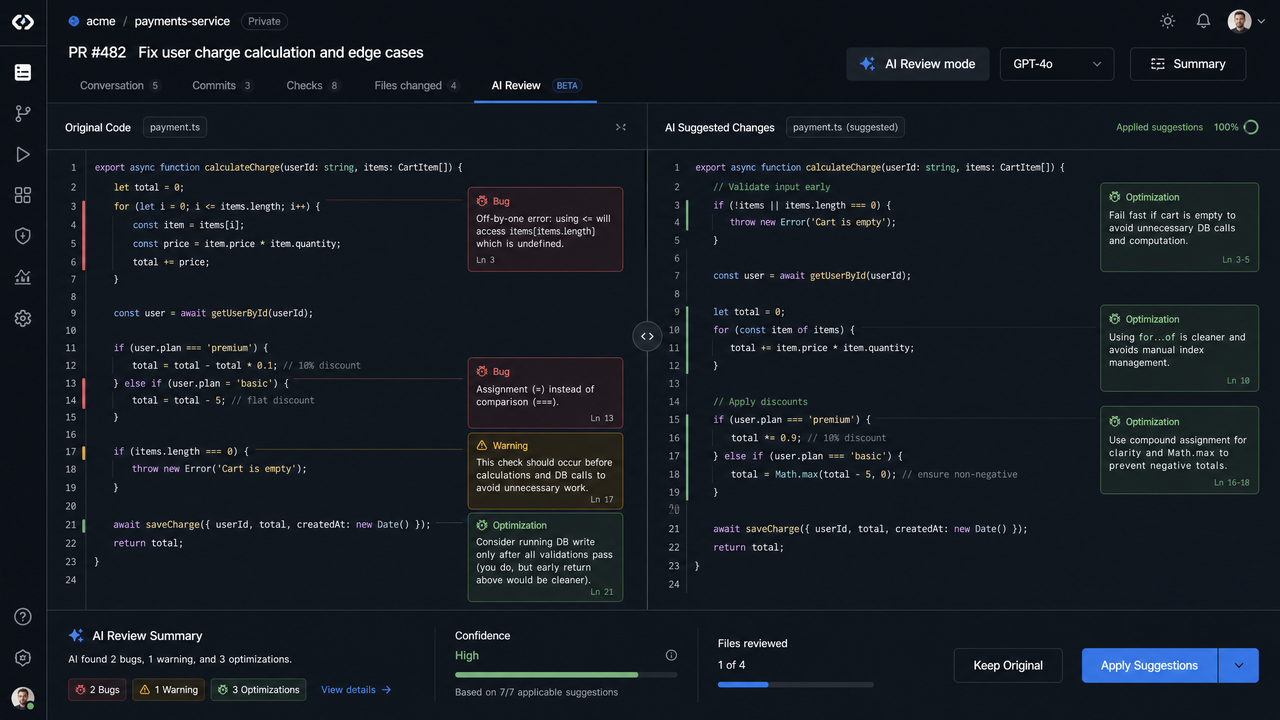
Review mode is the quality gate. It reasons over diffs, inspects code against rules and risks, and produces actionable comments with suggested patches. It integrates with your VCS and CI to run pre-merge checks and continuous sweeps on critical areas (e.g., authentication, cryptography, billing).
Review Sources
- Local diff: uncommitted or staged changes in your working tree.
- Commits: a commit range (e.g., HEAD~3..HEAD) or a single commit.
- Pull requests: remote PR URLs for GitHub, GitLab, or Bitbucket.
- Directory sweep: targeted reviews of certain paths (e.g., src/security/**) on a schedule.
# Review staged diffs with a security ruleset
codex review --source diff \
             --ruleset .codex/rules/security.yml \
             --out .codex/review-report.md

# Review a GitHub PR
codex review --source pr --url https://github.com/org/repo/pull/123 \
             --ruleset .codex/rules/quality.yml \
             --comment --label "codex-review"
Rules, Rubrics, and Risk Ties
Rulesets describe what “good” looks like: security, performance, style, documentation, and test coverage. Tie rules to plan risks to guarantee that mitigations were implemented.
# .codex/rules/security.yml
rules:
  - id: "SEC-JWT-001"
    title: "JWT signing and verification"
    severity: "high"
    checks:
      - "No use of none algorithm"
      - "Verify issuer and audience"
  - id: "SEC-TOKEN-EXPIRY"
    title: "Magic link expiry within 60 seconds"
    severity: "high"
    checks:
      - "Token TTL <= 60 seconds"
tie_risks:
  - risk_id: "R1" enforce: ["SEC-TOKEN-EXPIRY"]
Outputs You Can Act On
Review mode generates a concise summary, line-level comments, and suggested patches for safe auto-fixes. Reports are rendered as Markdown, SARIF for security scanners, or inline PR comments.
# .codex/review-report.md (excerpt)
Summary
- 2 high, 1 medium findings
- 3 suggested patches auto-applicable

Findings
1) SEC-TOKEN-EXPIRY (high)
   src/auth/token.ts:42
   Issue: Token expiry set to 120 seconds (exceeds 60-second policy)
   Suggestion: Reduce to 60 seconds and add regression test

Patch
--- a/src/auth/token.ts
+++ b/src/auth/token.ts
@@ -40,7 +40,7 @@ export function issueMagicToken(email: string): string {
-  const ttl = 120 * 1000;
+  const ttl = 60 * 1000; // Policy: 60-second expiry
   ...
}
Integrating with CI and PR Workflows
Hook Review into CI to block merges on high-severity findings and to post comments automatically. Use labels or check runs to drive triage workflows.
# .github/workflows/codex-review.yml
name: Codex Review
on:
  pull_request:
    types: [opened, synchronize, reopened]
jobs:
  review:
    runs-on: ubuntu-latest
    steps:
      - uses: actions/checkout@v4
      - name: Install Codex CLI
        run: |
          curl -sSL https://example.com/install-codex.sh | bash
      - name: Run Codex Review
        run: |
          codex review --source pr --url ${{ github.event.pull_request.html_url }} \
                       --ruleset .codex/rules/security.yml \
                       --sarif out.sarif \
                       --comment --label "codex-review"
      - name: Upload SARIF
        uses: github/codeql-action/upload-sarif@v3
        with:
          sarif_file: out.sarif
Reducing Noise, Increasing Signal
- Deduplicate comments across commits; prefer one thread per issue.
- Suppress findings outside changed hunks unless they amplify a risk tied to the plan.
- Calibrate severities using your incident history: not all “security” checks are equal in practice.
- Favor patches over prose: where safe, propose code; where risky, explain trade-offs and invite human input.
Human-in-the-Loop Patterns
Reviews aren’t about gatekeeping; they’re about elevating the change. Encourage reviewers to accept safe patches, discuss riskier alterations, and record decisions for future tooling to learn from.
# Example PR comment by Review mode
"Finding SEC-TOKEN-EXPIRY: expiry exceeds policy (60s).
Rationale: Short TTL reduces replay risk. Proposed patch reduces TTL to 60s and adds a unit test.
If you accept, I'll update the integration tests accordingly."
Switching Between Modes Efficiently
Mode switching should be rapid and context-preserving. The system is designed so you can evolve a plan into execution or review with minimal friction.
Desktop App
- Mode switcher: select Plan, Execute, or Review from the top bar; context (repo, branch, open panes) persists.
- Command palette: type “Plan: Create Task Graph,” “Execute: Run Next Task,” or “Review: Annotate Diff.”
- Quick promote: highlight a plan task and choose “Execute This Task,” or pick a diff hunk and choose “Review This Change.”
- Keyboard shortcuts: Cmd/Ctrl+1 (Plan), +2 (Execute), +3 (Review).
IDE Extensions
- Status bar toggle: shows current mode; click to switch.
- CodeLens: above plan headings or task list items, “Execute Task T3” appears; above diffs, “Open in Review.”
- Context handoff: accepted plan checkboxes become Execute tasks; applied edits become Review subjects.
CLI
In CLI and automation, mode switching is explicit via subcommands. You can chain them in one invocation or use an interactive shell.
# Chain modes: plan -> execute -> review in one pipeline
codex plan --objective "Add feature flags" --out .codex/plan.yaml && \
codex exec --plan .codex/plan.yaml --branch feature/flags --run-tests && \
codex review --source diff --ruleset .codex/rules/quality.yml --out review.md

# Interactive shell with mode context
codex shell
> mode plan
> open .codex/plan.yaml
> mode execute
> run --task T2
> mode review
> review --source diff
Defaults and Contextual Modes
Set a project default mode and let heuristics promote you as needed. For example, opening a .plan.yaml suggests Plan mode; staging changes suggests Review mode. You can override heuristics anytime.
# Set default mode
codex config set project.default_mode execute

# Override for a single session
codex switch plan
Best Practices for Each Mode
Plan Mode Best Practices
- Write unambiguous objectives: one sentence, one outcome.
- Enumerate constraints early: language, frameworks, security, and performance.
- Describe acceptance criteria as test assertions; link to existing tests if any.
- Create a DAG, not a list: declare dependencies to enable safe parallelism.
- Quantify non-functional goals: latency, throughput, memory.
- Attach risks to rules: every risk must map to at least one review rule.
- Set budgets: timebox and token caps, so execution remains predictable.
# Acceptance criteria as tests (pseudocode)
describe("Magic link login", () => {
  it("expires tokens after 60s", () => { ... });
  it("sets Secure, HttpOnly cookie", () => { ... });
  it("rate-limits after 5 failures/hour", () => { ... });
});
Execute Mode Best Practices
- One task, one commit: preserves traceability and simplifies rollbacks.
- Test-first changes for public APIs: write or update tests before refactors.
- Small, iterative edits: avoid sweeping changes unless your test coverage is high.
- Prefer auto-generated scaffolds but verify security- and perf-critical code manually.
- Use sandboxes for risky tasks: crypto, parsing, or migrations benefit from hermetic runs.
- Respect budgets: if you hit a budget cap, pause and refine the plan.
# Example: running only impacted tests for speed
codex exec --plan .codex/plan.yaml \
           --impacted-tests only \
           --test-cmd "jest --runTestsByPath $(codex impacted-tests list)"
Review Mode Best Practices
- Start with scope: does the change match the plan’s objective and constraints?
- Apply the rubric: evaluate security, correctness, performance, and maintainability.
- Prefer patches to prose: where safe, propose code suggestions.
- Reduce noise: group similar comments and avoid restating linter output.
- Elevate severe issues: block on high-risk findings and suggest mitigations.
# Simple review rubric (YAML)
rubric:
  scope_alignment: ["Plan objective satisfied", "No unrelated changes"]
  correctness: ["All tests green", "Edge cases covered"]
  security: ["Secrets safe", "Inputs validated", "Authz enforced"]
  performance: ["No hot-path regressions", "Memory bounded"]
  maintainability: ["Docs updated", "Clear commit messages"]
Real-World Workflows and End-to-End Examples
Workflow 1: Deliver a New Feature with Guardrails
Scenario: Add passwordless login using magic links to an Express + TypeScript app. You’ll see the full Plan → Execute → Review loop.
Plan
codex plan --objective "Introduce passwordless login via email magic links" \
           --context src/auth,src/email,tests/auth \
           --acceptance "Login within 60s; secure HttpOnly cookie; rate limit" \
           --risks "Replay within TTL; spam; deliverability" \
           --out .codex/plan.yaml
Refine non-functional requirements and tie risks to rules. Ensure done_when criteria are concrete. Freeze the task graph before execution.
Execute
codex exec --plan .codex/plan.yaml \
           --branch feature/auth-magic-links \
           --sandbox docker \
           --run-tests --commit-per task
During T2, Execute scaffolds a route, generates a token issuer, and stubs SES integration in dev. For T3, it adds verification, sets a cookie, and updates tests. For T4, it wires rate limiting using a shared middleware. Tests are run after each task; failing coverage triggers remediation.
Review
codex review --source diff \
             --ruleset .codex/rules/security.yml \
             --out .codex/review-report.md \
             --apply-safe-patches
Findings include a TTL exceeding policy. Review proposes a patch; you accept it. The final PR includes the plan, execution logs, and the review report.
Workflow 2: Safe Refactor of a Core Module
Scenario: Refactor a JSON schema validator for performance without changing public APIs.
Plan
codex plan --objective "Refactor JSON validator to reduce p95 latency to < 100ms" \
           --context src/validator,tests \
           --constraints "No change to API surface" \
           --acceptance "p95 < 100ms; zero failing tests; memory delta < 10%" \
           --out .codex/plan.yaml
Execute
codex exec --plan .codex/plan.yaml \
           --branch refactor/validator-perf \
           --run-tests --perf-bench "npm run bench:validator -- --json out.json"
Execute measures baseline perf, applies changes like memoization and streaming parse, and benchmarks again. It logs deltas and halts if targets aren’t met.
Review
codex review --source diff --ruleset .codex/rules/performance.yml \
             --out .codex/review-perf.md
Review checks for algorithmic regressions, hot-path allocations, and ensures comments document trade-offs.
Workflow 3: Library Migration Across a Monorepo
Scenario: Migrate a deprecated HTTP client to a supported library across multiple packages.
Plan
codex plan --objective "Migrate request to axios across monorepo" \
           --context packages/**/src \
           --acceptance "No API regressions; tests green; perf stable" \
           --risks "Edge case differences; proxy settings" \
           --out .codex/plan.yaml
Execute
codex exec --plan .codex/plan.yaml \
           --branch chore/migrate-axios \
           --run-tests --parallel 4 --shard-by package
Execute shards tasks by package, updates imports, adapts APIs, and fixes tests. Commits reference package names and tasks. Failures in a shard do not block others.
Review
codex review --source diff --ruleset .codex/rules/compatibility.yml \
             --out .codex/review-migration.md
Review flags subtle behavior changes (timeouts, error objects) and recommends compatibility shims where needed.
Access 40,000+ AI Prompts for ChatGPT, Claude & Codex — Free!
Subscribe to get instant access to our complete Notion Prompt Library — the largest curated collection of prompts for ChatGPT, Claude, OpenAI Codex, and other leading AI models. Optimized for real-world workflows across coding, research, content creation, and business.
Workflow 4: Emergency Security Patch
Scenario: Patch an SSRF vulnerability in an image proxy path with minimal risk.
Plan
codex plan --template security-patch \
           --objective "Mitigate SSRF in image proxy by enforcing allowlist and URL parser" \
           --context src/proxy,tests/proxy \
           --out .codex/plan.yaml
Execute
codex exec --plan .codex/plan.yaml \
           --branch hotfix/ssrf-proxy \
           --sandbox docker --run-tests --require-approval SEC-1
Review
codex review --source diff --ruleset .codex/rules/security.yml \
             --out .codex/review-ssrf.md --block-on high
The review enforces strict rules and blocks merge until a senior approves mitigation details.
Workflow 5: Data Pipeline Update with Backfill
Scenario: Modify a Spark job to include a new attribute and backfill 30 days of data.
Plan
codex plan --objective "Add country_code to user events and backfill 30 days" \
           --context jobs/spark,schemas,tests \
           --acceptance "Schema versioned; idempotent backfill; zero data loss" \
           --risks "Skew, OOM, cost overruns" \
           --out .codex/plan.yaml
Execute
codex exec --plan .codex/plan.yaml \
           --branch feature/events-country-code \
           --sandbox remote:spark-3.4 \
           --dry-run --emit-spark-plan
Execute runs a dry-run MR on a sample and surfaces cost estimates. Once approved, it triggers a controlled backfill with checkpoints.
Review
codex review --source diff --ruleset .codex/rules/data.yml \
             --out .codex/review-data.md
Review confirms schema evolution best practices, partitioning, and lineage docs.
Integration Patterns and Automation
CI Pipelines with Modes
Automate the loop so every change follows a predictable path. A typical pattern: pre-merge Review on PRs, ephemeral Execute for preview environments, and scheduled Review sweeps on sensitive directories.
# .gitlab-ci.yml (excerpt)
stages: [test, review, preview]
review:
  stage: review
  image: alpine:3.19
  script:
    - curl -sSL https://example.com/install-codex.sh | sh
    - codex review --source mr --url $CI_MERGE_REQUEST_PROJECT_URL/merge_requests/$CI_MERGE_REQUEST_IID \
                   --ruleset .codex/rules/quality.yml \
                   --sarif out.sarif --comment
  artifacts:
    paths: [out.sarif]
preview:
  stage: preview
  script:
    - codex exec --plan .codex/plan.yaml --branch $CI_COMMIT_REF_NAME --run-tests
ChatOps
Expose safe commands in chat for rapid iteration. For example, in Slack: “/codex review this PR with security rules,” or “/codex execute T4 from plan.yaml.” Ensure RBAC prevents dangerous operations.
# Pseudo-handler for ChatOps
onCommand("/codex review <url>") {
  ensureRole("reviewer")
  run("codex review --source pr --url <url> --ruleset .codex/rules/security.yml --comment")
}
Pre-commit Hooks
Catch obvious issues before they reach CI by running lightweight Review checks locally.
# .pre-commit-config.yaml
repos:
  - repo: local
    hooks:
      - id: codex-review
        name: Codex Quick Review
        entry: codex review --source diff --ruleset .codex/rules/quick.yml --out .codex/quick-review.md
        language: system
        pass_filenames: false
Make Targets
Standardize developer ergonomics with Make or npm scripts.
# Makefile (excerpt)
plan:
	@codex plan --objective "$$OBJ" --context src,tests --out .codex/plan.yaml

exec:
	@codex exec --plan .codex/plan.yaml --branch "$$BR" --run-tests

review:
	@codex review --source diff --ruleset .codex/rules/quality.yml --out .codex/review.md
Governance, Compliance, and Safety
Policy as Code
Treat execution and review policies as versioned code. Store them in .codex/policy.yaml and .codex/rules/*.yml, require approvals for changes, and audit modifications. Policies travel with the repo and apply consistently across surfaces.
RBAC and Approvals
Not every operation should be universally available. Define roles and map them to capabilities: e.g., Engineers can Plan and Execute in sandboxes; Maintainers can approve policy exceptions; Security can approve high-risk tasks. Approvals attach to tasks or PRs and are recorded in logs.
# .codex/access.yaml
roles:
  engineer:
    allow: ["plan:*", "exec:sandbox", "review:local"]
  maintainer:
    allow: ["plan:*", "exec:*", "review:*", "policy:approve"]
  security:
    allow: ["review:security", "exec:require-approval", "policy:edit"]
users:
  - id: "alice" roles: ["engineer"]
  - id: "bob" roles: ["maintainer"]
  - id: "secops" roles: ["security"]
Secrets and Data Handling
- Never echo secrets: mark env vars as sensitive and mask them in logs.
- Restrict network access: define allowlists for package registries; block outbound calls by default.
- Minimize PII exposure: provide synthetic or redacted datasets for local runs where feasible.
Audit Trails
All mode transitions, commands, and outputs should be logged with timestamps, user IDs, and checksums. Export logs to your SIEM and retain them per your compliance policy. Use deterministic reports (e.g., SARIF, JSON) for cross-tool analysis.
Troubleshooting and Optimization
When Plans Under-Specify Work
Symptoms: Execute stalls, adds speculative changes, or fails tests unexpectedly. Fix by refining acceptance criteria, splitting tasks, and clarifying constraints. A good heuristic: if a task can’t be completed with two or fewer commits, it’s probably too big or under-specified.
# Refine an under-specified plan
codex plan --in .codex/plan.yaml \
           --split T2 --into T2a,T2b \
           --acceptance "Include explicit test cases for errors" \
           --write
When Execute Hits Environmental Issues
Symptoms: tool not found, dependency mismatches, flaky tests. Fix by pinning toolchain versions, using hermetic sandboxes, and caching dependencies. Prefer remote sandboxes for consistency across contributors.
# Diagnose environment with a codex-provided container
codex exec --plan .codex/plan.yaml \
           --sandbox docker:ghcr.io/org/codex-node-20:latest \
           --diag
When Review is Too Noisy
Symptoms: excessive comments, low signal-to-noise, repetitive findings. Fix by scoping to changed hunks, tuning severities, and consolidating findings by rule. Integrate with your linter to avoid duplication.
# Reduce noise with scoped review and tuned severities
codex review --source diff --ruleset .codex/rules/quality.yml \
             --only-changed --min-severity medium --out .codex/review.md
Performance and Cost Optimization
- Cache indexes: pre-index the repo and reuse embeddings for code navigation.
- Shard large plans: parallelize tasks across independent directories or packages.
- Run impacted tests only: use change analysis to shorten feedback loops.
- Tune budgets: lower token/time caps for routine changes; raise them for complex refactors.
# Pre-index repository for faster context
codex index --paths src,tests,docs --out .codex/index.db

# Use index during execution
codex exec --plan .codex/plan.yaml --use-index .codex/index.db
Capability Matrix and Decision Guide
At-a-Glance Matrix
- Plan mode excels at: objective clarity, risk capture, and task DAG creation.
- Execute mode excels at: minimal, reversible changes with tests and policy guardrails.
- Review mode excels at: rubric-based evaluation, diffs, and actionable patches.
Decision Tree
- If you don’t have a crisp objective or acceptance criteria, start in Plan.
- If the change is small, local, and tests are ready, go directly to Execute with a lightweight plan.
- If you have a diff or a PR, use Review to validate quality and compliance.
- For high-risk areas (auth, payments, parsing), always do all three: Plan → Execute → Review.
Mode Combinations
- Plan + Execute: for routine features where review can be lightweight (e.g., docs or UI text changes).
- Execute + Review: for emergency fixes with templated plans.
- Plan + Review: for audits or design reviews where implementation is deferred.
Conclusion and Next Steps
Codex Modes formalize what great engineers already do: clarify objectives, implement safely, and review rigorously. By treating plans as contracts, execution as an auditable process, and reviews as structured quality gates, teams gain speed without sacrificing trust. Start by templatizing common plans, enforcing minimal policies in Execute, and integrating Review into PRs. Expand with sandbox profiles, richer rulesets, and ChatOps as your practices mature. For guidance on building measurement into your rollout, see
For a deeper exploration of enterprise AI governance and compliance tools, our comprehensive guide on How Enterprise AI Governance Is Evolving in 2026 provides detailed strategies, practical examples, and implementation patterns that complement the techniques discussed in this article.
.
Adopt the smallest set of practices that deliver value immediately: a plan template for your top three change types, Execute in a sandboxed branch with commit-per-task, and Review that posts concise, actionable comments. Iterate from there. In weeks, you’ll see fewer surprises, faster merges, and higher confidence across engineering and leadership.
