
Why OpenAI Is Merging Codex and ChatGPT: What the Unified AI Platform Means for Developers and Teams
Why OpenAI Is Merging Codex and ChatGPT: What the Unified AI Platform Means for Developers and Teams
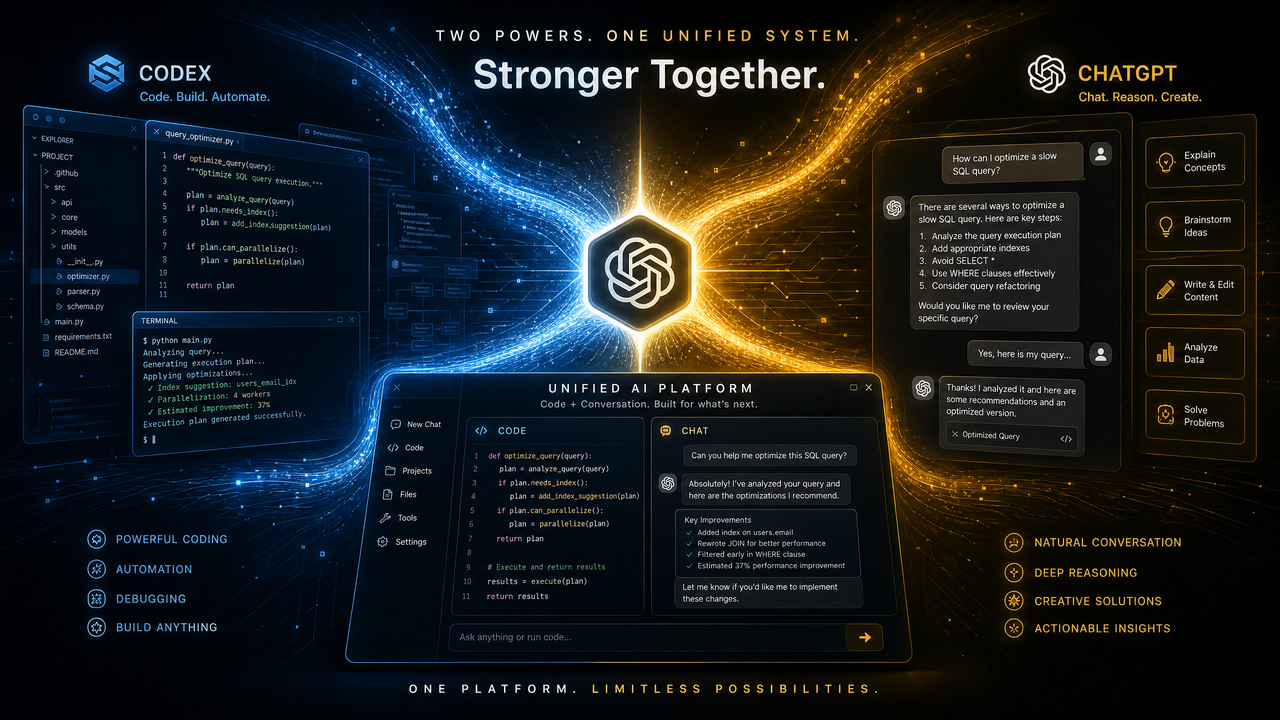
Table of Contents
- Executive Summary
- A Brief History of Codex and ChatGPT
- Why the Merger Makes Strategic Sense
- What Changes for Developers
- Impact on Pricing, Rate Limits, and Access
- How Engineering Teams Should Prepare
- Competitive Implications: Copilot, Cursor, and Claude Code
- Predictions: Where the Unified Platform Is Headed
- Practical Playbooks and Reference Implementations
- FAQ: Common Questions and Troubleshooting
- Closing Thoughts
Executive Summary
OpenAI’s decision to fully merge Codex into ChatGPT creates a single, unified platform for code generation, refactoring, and software reasoning. While Codex pioneered code-focused completion and helped power early developer tools, ChatGPT’s conversational interface, tool-use abilities, and larger context windows have turned into the dominant entry point for programming assistance—internally and externally. The merger clarifies a single product direction, streamlines APIs and pricing, and sets the stage for deeper integration with editors, repositories, and enterprise governance.
The strategic rationale is straightforward: telemetry-driven demand consolidation (97.9% of internal coding workflows have shifted to ChatGPT-style usage), higher capability density in unified models, and simpler governance. For developers, the changes concentrate around model selection (chat-first coding models), function calling for tool use (tests, linters, repo search), structured outputs, and support for larger workspaces. For leaders, the unification improves procurement clarity, reduces integration sprawl, and focuses roadmap bets on a platform that is better at both conversational programming and grounded remediation in real repos.
In this analysis we walk through the history behind the merger, what changes in APIs and pricing, how to prepare your team, competitive implications against GitHub Copilot, Cursor, and Claude Code, and what’s likely to ship next. We also include migration-ready code samples and practical playbooks to keep velocity high while you transition.
For a deeper exploration of enterprise AI governance and compliance tools, our comprehensive guide on How Enterprise AI Governance Is Evolving in 2026 provides detailed strategies, practical examples, and implementation patterns that complement the techniques discussed in this article.
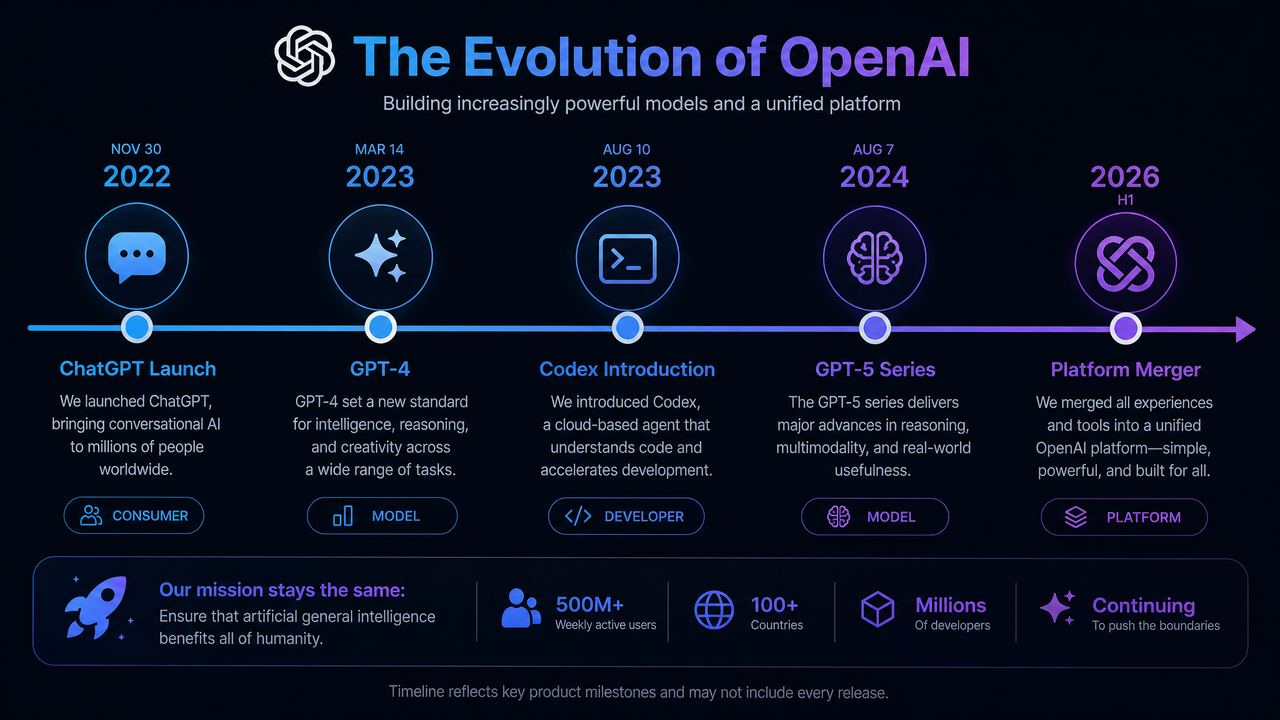
A Brief History of Codex and ChatGPT
Codex origins: from language modeling to code
Codex emerged as a code-specialized descendant of large language models, trained to translate between natural language and source code and to continue code sequences. It excelled at in-file completions, short code snippets, and translating problem statements into working functions. Early developer-facing products—most famously GitHub Copilot—demonstrated huge productivity gains for boilerplate and idiomatic patterns across popular languages like Python, JavaScript, and TypeScript. Codex handled the tight feedback loops of editor-based coding and introduced the industry to AI-assisted development as a mainstream workflow.
But Codex also inherited the limitations of its era: relatively short context windows, limited tool use, and weaker performance on multi-file reasoning. It was strongest when the user’s intent matched learned idioms and when code locality meant dependencies were obvious from nearby lines. As repositories and frameworks evolved—and as teams demanded cross-file, test-aware, and change-aware modifications—pure completion began to show its limits. Workarounds emerged: embeddings-based retrieval to stuff relevant files into prompts, fine-tuning small models for specific codebases, and external tools to lint or run tests around generated code.
ChatGPT origins: conversational UX meets coding
ChatGPT popularized a different development metaphor: ask me what you want and we’ll reason it out together. It handled step-by-step breakdowns, complex transformations, and explanation-heavy tasks. As ChatGPT gained code-oriented upgrades—larger context, system instruction controls, tool use via function calling, and a code execution sandbox—it moved decisively beyond Codex’s single-shot completion strengths. The ability to call tools (e.g., run tests, search repos, lint code), parse tool outputs, and iterate within a single conversational thread let ChatGPT become not just a code generator but a coordinator of tasks.
Another major shift was discoverability. Non-expert developers, managers, and data scientists who didn’t live in the editor could still collaborate on code with ChatGPT. System prompts could set policies; structured outputs could integrate with CI pipelines; and the same conversational thread could jump from requirements clarification to code scaffolding to test generation to deployment planning. In short, ChatGPT turned programming into a collaborative dialogue that could scale across roles.
Convergence pressures that made a merger inevitable
Three forces pushed the platforms together:
- Model capability convergence: the general-purpose models got dramatically better at code, narrowing (and then surpassing) the gap on planning, reasoning, and cross-file changes.
- Operational simplification: maintaining parallel product lines, with distinct pricing and governance, slowed shipping and confused buyers. Procurement teams wanted one contract; developers wanted one SDK.
- Tool-enabled workflows: the rise of function calling, code execution sandboxes, retrieval, and repository-aware agents fit naturally into ChatGPT’s conversational loop rather than Codex’s single-turn completion.
Why the Merger Makes Strategic Sense
97.9% internal adoption as a forcing function
OpenAI’s internal telemetry reportedly showed that 97.9% of coding-related usage had consolidated in ChatGPT-style interactions rather than the legacy Codex endpoints. That ratio is an unmistakable signal: the market voted not just for better code generation, but for a higher-level programming workflow that integrates reasoning, tool use, and dialogue. Organizations don’t want two overlapping products that both produce code; they want one platform that can frame requirements, modify multiple files safely, call tests, and explain trade-offs—all while respecting enterprise controls.
Economics: one stack, fewer SKUs, more capability
Running one family of frontier models, with a single tool-use architecture and unified context handling, concentrates research and operations spend. It simplifies caching strategies, inference scheduling, model rollout, safety review, and telemetry pipelines. Commercially, a single price card with volume tiers is easier to sell and easier to forecast against. Importantly, capability density improves: once the platform can ingest long contexts, orchestrate tools, and produce structured outputs, it can serve code, chat, analysis, and agentic workloads from the same base. That makes memory and safety investments amortize across more use cases.
UX: one interface to rule intent, tools, and context
Developers don’t think in “completion” versus “chat”—they think in goals: fix this bug, refactor this module, explain this stack trace, scaffold a service, write tests. A chat-first interface with high-quality code generation plus tool use brings those goals under one workflow. The model can ask clarifying questions, propose a plan, call tools to validate assumptions, and return diffs and commands. The result is fewer context switches and richer telemetry on what actually helped developers, which in turn leads to better model fine-tuning (or policy tuning) for future sessions.
Governance and safety: fewer moving parts
Enterprises need role-based controls, audit trails, content filters, and safe tool execution. It’s easier to enforce consistent policies with a single platform that logs prompts, tool calls, file diffs, and test outputs in one place. It’s also easier to build organization-wide guidance for prompt design and usage. Unification means one set of data retention options, one place to review incidents, and one permission model for who can run code or touch certain repositories.
What Changes for Developers
APIs, endpoints, and models: the new map
The shift can be summarized in three bullets:
- Model families: code-specialized capabilities are part of general chat models. Choose models advertised as strong at code and reasoning, and configure via system prompts when you need a stricter “coding-only” persona.
- Endpoints: most production use consolidates on chat-style completions and assistants/agents abstractions. Classic completion-style APIs are deprecated for code generation use cases.
- Tools: function calling is the default bridge between the model and your environment (tests, linters, repo search, code execution, deployment simulation). The model proposes calls; your code executes them and returns structured outputs to continue the loop.
In practice, this reduces friction. Instead of juggling a Codex completion endpoint for in-file suggestions and a chat endpoint for design discussions, you can back both with the same chat model and switch prompting style depending on the surface (editor inline vs. conversational pane).
Migration guide: Codex to ChatGPT-style APIs
If you previously targeted Codex-style completions, the work falls into four steps:
- Switch to a chat-capable model with strong code ability.
- Translate prompt templates from “single-shot completion” to a short role-tagged conversation (system, user, assistant). Retain your coding style hints in the system message.
- Adopt function calling for any external operations (run tests, search files, fetch APIs), and for structured outputs (diffs, JSON, AST).
- Introduce streaming to preserve responsiveness for inline completions.
Below are reference snippets for common migration paths.
From code completion to chat with code-focused system prompt (Python)
# pip install openai
from openai import OpenAI

client = OpenAI()

system = (
  "You are a senior software engineer. "
  "When asked to modify code, return a unified diff with minimal context. "
  "Prefer standard library. Be explicit about complexity and edge cases."
)

messages = [
  {"role": "system", "content": system},
  {"role": "user", "content": "Write a Python function to parse ISO8601 durations into seconds. Include tests."}
]

resp = client.chat.completions.create(
    model="gpt-4o",  # choose a chat-capable, code-strong model
    messages=messages,
    temperature=0.2
)

print(resp.choices[0].message.content)
Function calling for repository-aware assistance (JavaScript)
// npm install openai
import OpenAI from "openai";
const openai = new OpenAI();

const tools = [
  {
    type: "function",
    function: {
      name: "repo_search",
      description: "Search repository files by regex and path glob",
      parameters: {
        type: "object",
        properties: {
          query: { type: "string" },
          path: { type: "string" }
        },
        required: ["query"]
      }
    }
  },
  {
    type: "function",
    function: {
      name: "run_tests",
      description: "Run unit tests and return summarized failures",
      parameters: { type: "object", properties: {}, additionalProperties: false }
    }
  }
];

const messages = [
  { role: "system", content: "You are a code assistant. Always propose a plan before changes." },
  { role: "user", content: "Our CI is failing on parseDuration. Find the relevant file and propose a fix." }
];

const first = await openai.chat.completions.create({
  model: "gpt-4o",
  messages,
  tools
});

// tool calls loop
let toolMessages = [];
for (const message of first.choices[0].message.tool_calls ?? []) {
  if (message.function.name === "repo_search") {
    const result = await myRepoSearch(JSON.parse(message.function.arguments));
    toolMessages.push({
      role: "tool",
      tool_call_id: message.id,
      name: "repo_search",
      content: JSON.stringify(result)
    });
  } else if (message.function.name === "run_tests") {
    const result = await myRunTests();
    toolMessages.push({
      role: "tool",
      tool_call_id: message.id,
      name: "run_tests",
      content: JSON.stringify(result)
    });
  }
}

const followUp = await openai.chat.completions.create({
  model: "gpt-4o",
  messages: [...messages, first.choices[0].message, ...toolMessages],
  tools
});

console.log(followUp.choices[0].message.content);
Streaming for inline suggestions (TypeScript)
import OpenAI from "openai";
const client = new OpenAI();

const stream = await client.chat.completions.create({
  model: "gpt-4o-mini",
  messages: [
    { role: "system", content: "Return only code. No commentary." },
    { role: "user", content: "Complete this function: function clamp(x, min, max) {" }
  ],
  stream: true
});

for await (const part of stream) {
  const token = part.choices?.[0]?.delta?.content || "";
  process.stdout.write(token);
}
Structured outputs: diffs as JSON for safe application (Python)
from openai import OpenAI
client = OpenAI()

schema = {
  "type": "object",
  "properties": {
    "plan": {"type": "string"},
    "patches": {
      "type": "array",
      "items": {
        "type": "object",
        "properties": {
          "path": {"type": "string"},
          "unified_diff": {"type": "string"}
        },
        "required": ["path", "unified_diff"]
      }
    }
  },
  "required": ["patches"]
}

resp = client.chat.completions.create(
  model="gpt-4o",
  messages=[
    {"role": "system", "content": "Propose minimal diffs. Never change unrelated code."},
    {"role": "user", "content": "Add input validation to parse_duration in src/timeutil.py and update tests."}
  ],
  response_format={"type": "json_schema", "json_schema": {"name": "patches", "schema": schema}}
)

data = resp.choices[0].message
print(data)
Tool use, function calling, and code execution
Unified ChatGPT-style models treat tools as first-class. For code workflows, your minimum set often includes:
- Repository search: navigate codebase and return file excerpts.
- Tests runner: execute tests and capture structured failures.
- Linter/formatter: ensure style consistency and quick feedback.
- Diff applier: propose and apply patches behind a policy gate.
- Sandbox execution: run code snippets safely for quick checks.
Wrap each capability as a function with a JSON schema. The model will decide when to call it. Return concise, machine-readable outputs; teach the model with system instructions to minimize noisy logs and to summarize failure modes. This moves you from “generate code and hope” to “generate, validate, and iterate.”
Streaming, latency, and structured outputs
Inline editing surfaces require rapid feedback. Use streaming for token-by-token rendering. For larger tasks (multi-file refactors), prefer a two-phase flow:
- Planning pass: get a proposed set of changes with file paths and risks.
- Patches pass: request diffs for a subset, run tests, then iterate.
Structured outputs are key to stability. Use JSON schemas, or diff formats your backend can verify, apply, and roll back. Keep schemas tight. Reject responses that don’t validate; include a retry policy with a brief corrective hint in the system message.
For a deeper exploration of product management prompts for roadmap planning and PRDs, our comprehensive guide on 30 ChatGPT-5.5 Prompts for Product Managers provides detailed strategies, practical examples, and implementation patterns that complement the techniques discussed in this article.
Impact on Pricing, Rate Limits, and Access
Pricing principles of unified models
Unification simplifies the commercial picture: fewer model SKUs, clearer per-token or per-minute pricing, and consolidated enterprise features. Expect tiering across capability classes (lightweight code-capable models for inline use; heavier reasoning models for complex refactors). For budgeting, separate three workloads:
- Inline completions: bursty, latency-sensitive, usually small prompts; cost dominated by output tokens.
- Chat/analysis: moderate prompts and outputs; often includes tool calling overhead.
- Large refactors/evals: long contexts, structured outputs; cost dominated by input tokens and tool cycles.
Vendor unification often unlocks better volume discounts because you’re aggregating usage that would previously split across Codex and ChatGPT. One contract and one set of quotas is usually easier for finance and procurement to manage.
Throughput, rate limits, and batching
Rate limiting strategies converge as well: per-minute tokens, requests per minute, and concurrent streams per org or per API key. The practical tactics are unchanged:
- Batch small prompts where possible; deduplicate similar requests.
- Use embeddings or lightweight heuristics to reduce unnecessary context payloads.
- Cache stable instructions and boilerplate with reusable system messages.
- Prefer streaming for interactivity; prefer non-streamed for deterministic JSON returns.
For large organizations, request org-level quotas with burst capacity for developer peak hours. Log tool call rates—often the hidden driver of spend when tests are expensive.
Cost control strategies that still work
- Guardrails in system prompts: instruct the model to propose a plan first, then diffs for only the files needed.
- Adaptive truncation: shrink context to only files touched by recent commits or failing tests.
- Model routing: use a faster, cheaper model for straightforward changes; escalate to heavier reasoning for complex edits.
- Pre- and post-filters: run linting or type checks before asking for a “fix everything” patch.
- Telemetry-informed limits: cap test runs per session; ask the model to summarize failures and propose targeted tests.
How Engineering Teams Should Prepare
Capability mapping: autocompletion vs. chat vs. agents
Think in layers:
- Autocompletion: IDE-native, keystroke-driven suggestions. Use a lightweight chat model with a code persona and minimal instruction overhead. Keep prompts tiny and cacheable.
- Chat assistant: a sidebar or web app that handles dialogue, architecture questions, and code transformations. Enable function calling for repo search and tests. Expect multi-turn interactions.
- Agents: orchestrated tool sequences with policy controls (who can run tests, who can write to main). Here, define strict schemas, audit logging, and human review checkpoints for diffs.
Map use cases to these layers rather than to “products.” With the merger, it’s one platform with multiple interaction surfaces.
Governance, privacy, and policy
Standardize the following:
- Data retention: choose org-wide defaults and exceptions. Ensure conversations that include source code follow your repository’s classification rules.
- Role-based permissions: control who can trigger tool calls that write to repos, who can run long tests, and who can approve diffs.
- Prompt policy: maintain a centralized library of system prompts for common tasks (bug fix, refactor, test creation). Version them and tie to releases.
- Security: strip secrets from prompts; prefer secure sandboxes for code execution; validate tool outputs rigorously.
Document these decisions. Bake them into your SDK wrapper so teams don’t reinvent policies in each service.
Evaluation harnesses for code models
Evaluation is where teams either compound velocity or compound drift. Build an eval harness that can:
- Replay coding tasks with golden repos and deterministic seeds.
- Measure correctness with tests, static analysis, and runtime assertions.
- Score diffs with heuristic quality checks (complexity delta, dependency change radius, cyclomatic changes).
- Track time-to-fix from first prompt to passing tests.
- Record human intervention: how often did a developer override or correct the model?
Automate A/B tests across model versions and prompt variants. Promote configurations to production only when they outperform baselines. Keep a corpus of your most expensive failures to prevent regressions.
Developer enablement and workflow integration
Adoption succeeds when the assistant is where developers already are. Prioritize:
- IDE integrations: a sidebar for chat and a completion engine sharing caches and repo context.
- PR bots: annotate pull requests with suggestions, risk flags, and test gaps.
- CI hooks: fail fast on invalid diffs; auto-generate migration notes and release candidates.
- Documentation tie-ins: link code suggestions to internal RFCs and style guides.
Train power users; measure impact; iterate prompts and tool schemas. A small enablement team can amplify value across hundreds of engineers.
Competitive Implications: Copilot, Cursor, and Claude Code
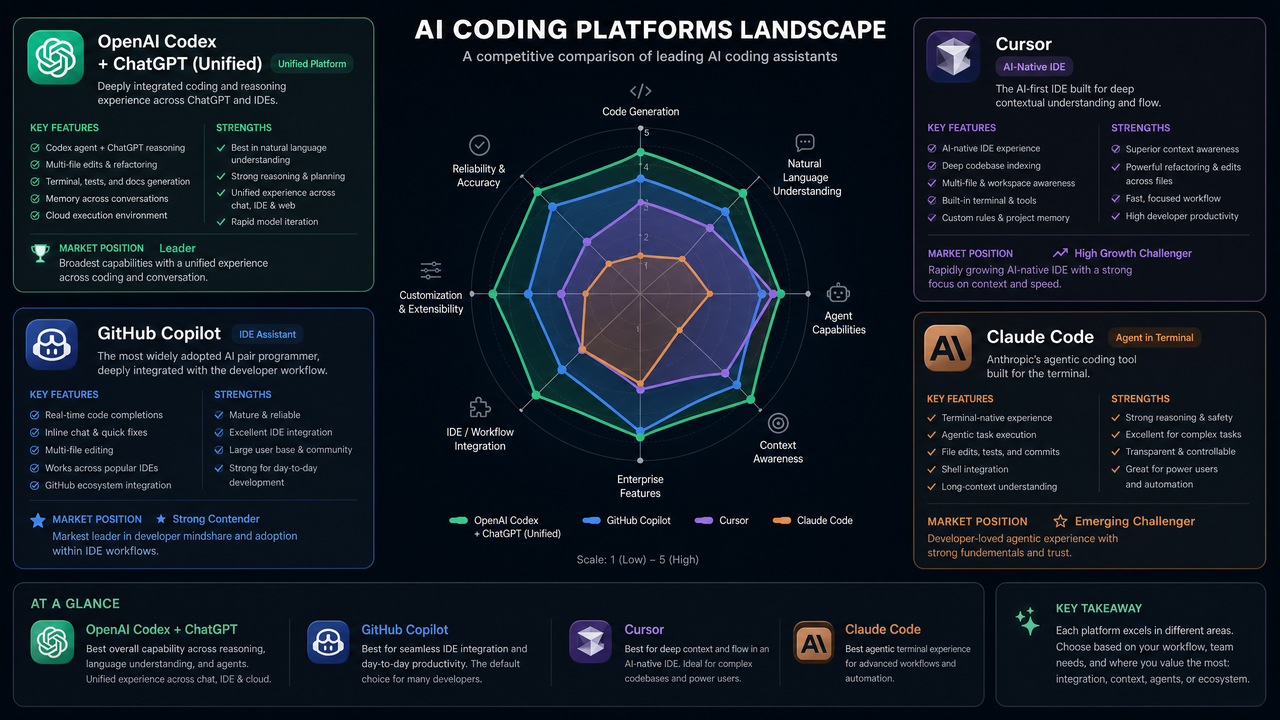
GitHub Copilot and the IDE-native advantage
Copilot remains the default choice for many teams because it’s deeply embedded in the editor, fast at inline suggestions, and increasingly capable in chat form. Its tight link to GitHub repos, issues, and PRs gives it a strong context advantage. The unified OpenAI platform competes by unlocking more sophisticated agentic workflows—especially where function calling to custom tools (internal linters, proprietary test rigs) matters. If you value one-click setup and editor-native ergonomics, Copilot is tough to beat; if you value extensibility and org-specific tools, the unified ChatGPT-style approach often wins in customization and policy control.
Cursor: opinionated pair programmer
Cursor offers a highly opinionated developer experience: context windows tuned around your workspace, commands for refactors, and a focus on quick iteration. It’s popular with startups moving fast on greenfield codebases. The unified platform narrows the gap by standardizing repository-aware agents and by providing structured outputs that can be applied safely. If your team wants a flexible substrate for building a Cursor-like experience internally—complete with your dev stack, your review rules, and your CI—OpenAI’s unified tool-use API is a solid foundation.
Claude Code: large context and safety-centric workflows
Claude’s models are well-regarded for long-context reasoning and cautious, “explain-first” behavior. For multi-file reasoning and code explanation, Claude Code is a strong alternative. The unified ChatGPT-style models counter with breadth of tool use, tight integration in enterprise governance, and strong performance on controlled diffs and structured outputs. Many enterprises will run mixed stacks—e.g., use one vendor for long-context analysis and another for rapid patching—behind a broker that normalizes prompts and policies. Unification on OpenAI’s side reduces integration overhead when OpenAI is in that portfolio.
For a deeper exploration of GPT-5.5-Cyber specialized model for cybersecurity, our comprehensive guide on OpenAI’s GPT-5.5-Cyber provides detailed strategies, practical examples, and implementation patterns that complement the techniques discussed in this article.
Predictions: Where the Unified Platform Is Headed
Multi-agent collaboration in the editor
Expect built-in roles—architect, implementer, tester—that coordinate via tool calls and structured handoffs. Each role will have access-limited tools (e.g., only the tester can run long CI suites). The chat thread becomes the control room where agents negotiate plans and present trade-offs. Developers will steer, accept, or modify plans, with all diffs auditable.
Workspace memory and repository-native reasoning
Unified models will store durable workspace memory: recent changes, conventions, unstable areas, and known flaky tests. Embeddings and fine-grained code maps will let the model reason about impacts across a repo without stuffing everything into a single prompt. Expect native “open project” contexts where the assistant maintains an index of symbols, modules, and dependencies and refreshes incrementally as you work.
Access 40,000+ AI Prompts for ChatGPT, Claude & Codex — Free!
Subscribe to get instant access to our complete Notion Prompt Library — the largest curated collection of prompts for ChatGPT, Claude, OpenAI Codex, and other leading AI models. Optimized for real-world workflows across coding, research, content creation, and business.
Verification, tests, and formal guarantees
Test-aware code generation is the baseline today. The next step is verifiable synthesis: the assistant will emit code plus proofs or contracts for critical modules. Constraint solvers, type systems, and property tests will be invoked automatically. For high-stakes changes (security, safety), the assistant will generate exploit proofs or counterexamples as part of a change request, tightening the loop between generation and assurance.
Realtime pair programming and dev analytics
As the platform matures, real-time collaboration will expand: shared sessions where a developer and the assistant co-edit files, run tests, and annotate logs. Managers will get aggregated, privacy-preserving analytics: which tasks the assistant accelerates, where it struggles, and which prompts lead to review churn. The goal is not surveillance; it’s feedback for improving the assistant and reducing toil.
Practical Playbooks and Reference Implementations
Greenfield: building with the unified API
Here’s a minimal, production-minded scaffold for a repository-aware assistant that proposes diffs and runs tests.
Backend flow (Node.js)
import OpenAI from "openai";
import express from "express";

const openai = new OpenAI();
const app = express();
app.use(express.json());

const tools = [
  {
    type: "function",
    function: {
      name: "repo_search",
      description: "Search repository; returns {matches: [{path, snippet}]}",
      parameters: {
        type: "object",
        properties: {
          query: { type: "string" },
          path: { type: "string" }
        },
        required: ["query"]
      }
    }
  },
  {
    type: "function",
    function: {
      name: "run_tests",
      description: "Run tests; returns {passed: number, failed: number, failures: [{name, log}]}",
      parameters: { type: "object", properties: {} }
    }
  },
  {
    type: "function",
    function: {
      name: "propose_patch",
      description: "Request a diff for a given file path and instruction",
      parameters: {
        type: "object",
        properties: {
          path: { type: "string" },
          instruction: { type: "string" }
        },
        required: ["path", "instruction"]
      }
    }
  }
];

app.post("/assist", async (req, res) => {
  const { question } = req.body;

  const messages = [
    { role: "system", content: "Code assistant. Always propose a brief plan before changes." },
    { role: "user", content: question }
  ];

  const first = await openai.chat.completions.create({
    model: "gpt-4o",
    messages,
    tools
  });

  let history = [...messages, first.choices[0].message];

  while (true) {
    const calls = first.choices[0].message.tool_calls || [];
    if (!calls.length) break;

    for (const call of calls) {
      const { name, arguments: argsStr } = call.function;
      const args = JSON.parse(argsStr || "{}");
      let result = null;

      if (name === "repo_search") result = await repoSearch(args);
      if (name === "run_tests") result = await runTests();
      if (name === "propose_patch") result = await proposePatch(args.path, args.instruction);

      history.push({ role: "tool", tool_call_id: call.id, name, content: JSON.stringify(result) });
    }

    const next = await openai.chat.completions.create({
      model: "gpt-4o",
      messages: history,
      tools
    });

    history.push(next.choices[0].message);
    if (!(next.choices[0].message.tool_calls || []).length) break;
  }

  res.json({ answer: history.at(-1)?.content });
});

app.listen(3000, () => console.log("Assistant on 3000"));

async function repoSearch({ query, path }) {
  // Implement a fast code search over your repo
  return { matches: [] };
}

async function runTests() { return { passed: 0, failed: 0, failures: [] }; }

async function proposePatch(path, instruction) {
  // Return a unified diff string for the given path & instruction
  return { path, unified_diff: "" };
}
Editor integration: streaming suggestions (VS Code extension sketch)
import * as vscode from "vscode";
import OpenAI from "openai";

export function activate(context: vscode.ExtensionContext) {
  const openai = new OpenAI();

  const disposable = vscode.commands.registerCommand("assistant.inlineSuggest", async () => {
    const editor = vscode.window.activeTextEditor;
    if (!editor) return;

    const doc = editor.document;
    const pos = editor.selection.active;
    const prefix = doc.getText(new vscode.Range(new vscode.Position(pos.line, 0), pos));
    const lang = doc.languageId;

    const stream = await openai.chat.completions.create({
      model: "gpt-4o-mini",
      messages: [
        { role: "system", content: `Return only ${lang} code.` },
        { role: "user", content: prefix + "\n" }
      ],
      stream: true
    });

    let suggestion = "";
    for await (const part of stream) {
      suggestion += part.choices?.[0]?.delta?.content || "";
    }

    editor.edit((builder) => {
      builder.insert(pos, suggestion);
    });
  });

  context.subscriptions.push(disposable);
}
Brownfield: migrating an existing Codex integration
Most Codex-era systems followed a template: prompt suffix + file prefix yields a completion. To migrate:
- Wrap your prompt suffix as a user message; move your general guidance to the system message.
- If you previously used stop sequences to curtail completions, now instruct with the system message (“return only code between markers”) and validate on receipt.
- If you relied on temperature tuning for creativity, keep that, but add function calling to ground changes in tests and repo search for reliability.
- Introduce response_format for JSON when you need structured diffs or metadata. Reject and retry on invalid JSON.
Before (Codex-style completion) and After (Chat-style) side-by-side
# BEFORE (pseudo-code, Codex/Completion)
prompt = f"{file_prefix}\n# TODO: add input validation\n"
resp = openai.Completion.create(
  engine="code-davinci-002",
  prompt=prompt,
  max_tokens=256,
  temperature=0.1,
  stop=["\n\n#"]
)
apply(resp.text)

# AFTER (Chat/Tool-use)
messages = [
  {"role": "system", "content": "You return minimal diffs only."},
  {"role": "user", "content": "Add input validation to parse_duration in src/timeutil.py"}
]
resp = client.chat.completions.create(
  model="gpt-4o",
  messages=messages,
  response_format={"type":"json_schema","json_schema":{"name":"patch","schema": {
    "type":"object","properties":{"path":{"type":"string"}, "unified_diff":{"type":"string"}}, "required":["path","unified_diff"]
  }}}
)
patch = json.loads(resp.choices[0].message.content)
apply_patch(patch)
Observability: logging prompts, diffs, and outcomes
Treat your assistant like a production service:
- Log all prompts and responses with PII and secret scrubbing.
- Track tool calls and runtime: repo search latency, test runtimes, diff apply success.
- Correlate with CI: did the generated patch pass? How many review comments followed?
- Surface feedback: let developers rate usefulness and capture freeform notes for retraining or prompt tweaks.
Define SLOs: time-to-first-token for inline suggestions; time-to-first-patch for chat; patch pass rate on first try. Instrument dashboards so regressions are obvious.
FAQ: Common Questions and Troubleshooting
Is autocompletion worse without a dedicated code model?
No, not in practice for most teams. Modern chat-capable models excel at code and, with the right system prompt and minimal instruction overhead, can match or exceed legacy completion quality—especially when you add repository context. The main difference is how you package prompts and handle tool use.
How should I choose between lightweight and heavy models?
Use lightweight for inline completions and simple transforms. Route long-context tasks and cross-file refactors to heavier models. Automate routing with simple heuristics: number of files touched, presence of failing tests, or complexity tags in the prompt.
What about latency?
Use streaming for perception of speed. Cache your system message and boilerplate instructions. Keep tool outputs short and structured. For large tasks, run a planning pass first; developers can approve before the heavier patch pass.
Do I still need embeddings and RAG?
Yes. Repository-aware assistants benefit from a code index so you can retrieve only the most relevant files and symbols into context. This keeps prompts small and results targeted. The unified platform doesn’t remove the need; it makes retrieval easier to orchestrate via function calling.
How do I stop the model from over-editing?
Be explicit: “only modify the specified function; maintain behavior otherwise.” Enforce via structured outputs and a diff validator that rejects changes outside the target region. Include a retry loop with a corrective hint if the model drifts.
What if my company uses multiple vendors?
Abstract behind a broker that normalizes messages, tools, and schemas. Keep policy in one place. Log across vendors uniformly for A/B testing. The unified OpenAI platform reduces internal complexity even if it’s one of several providers.
Can we run the assistant in restricted environments?
Yes, but plan for tool isolation. Route code execution to secure sandboxes and logs through a scrubber. Pre-approve tool scopes so the assistant can’t write to protected branches. Ensure model usage honors your data residency and retention policies.
Closing Thoughts
Merging Codex into ChatGPT is less about retiring a brand and more about acknowledging how developers actually build software today. The winning workflows are conversational, tool-rich, and context-aware. They demand a single platform that can reason, propose, verify, and explain. With 97.9% internal adoption coalescing around ChatGPT-style interactions, unification compresses complexity for both builders and buyers, freeing OpenAI to invest where it matters: deeper repository understanding, better verification, faster inline suggestions, and stronger governance.
For practitioners, the path forward is pragmatic. Migrate completions to chat with careful system prompts. Embrace function calling and structured outputs. Instrument your pipeline end to end. Benchmark, route, and iterate. The result is not only higher quality code changes but also a safer, more auditable development process aligned with how modern teams ship software at scale.
With competition heating up—Copilot in the editor, Cursor pushing opinionated flows, Claude Code excelling at long-context reasoning—the unified platform gives OpenAI a coherent story: one stack, many surfaces, strong tool use, enterprise governance, and a relentless focus on practical developer outcomes. If you align your tooling and practices to that story now, you’ll be ready for the next wave: multi-agent collaboration, workspace memory, and verifiable synthesis as standard parts of the software lifecycle.
