
The Builder’s Guide to GPT-5.6: How Startups Are Using Smarter Model Selection and the Responses API to Build Faster AI Agents
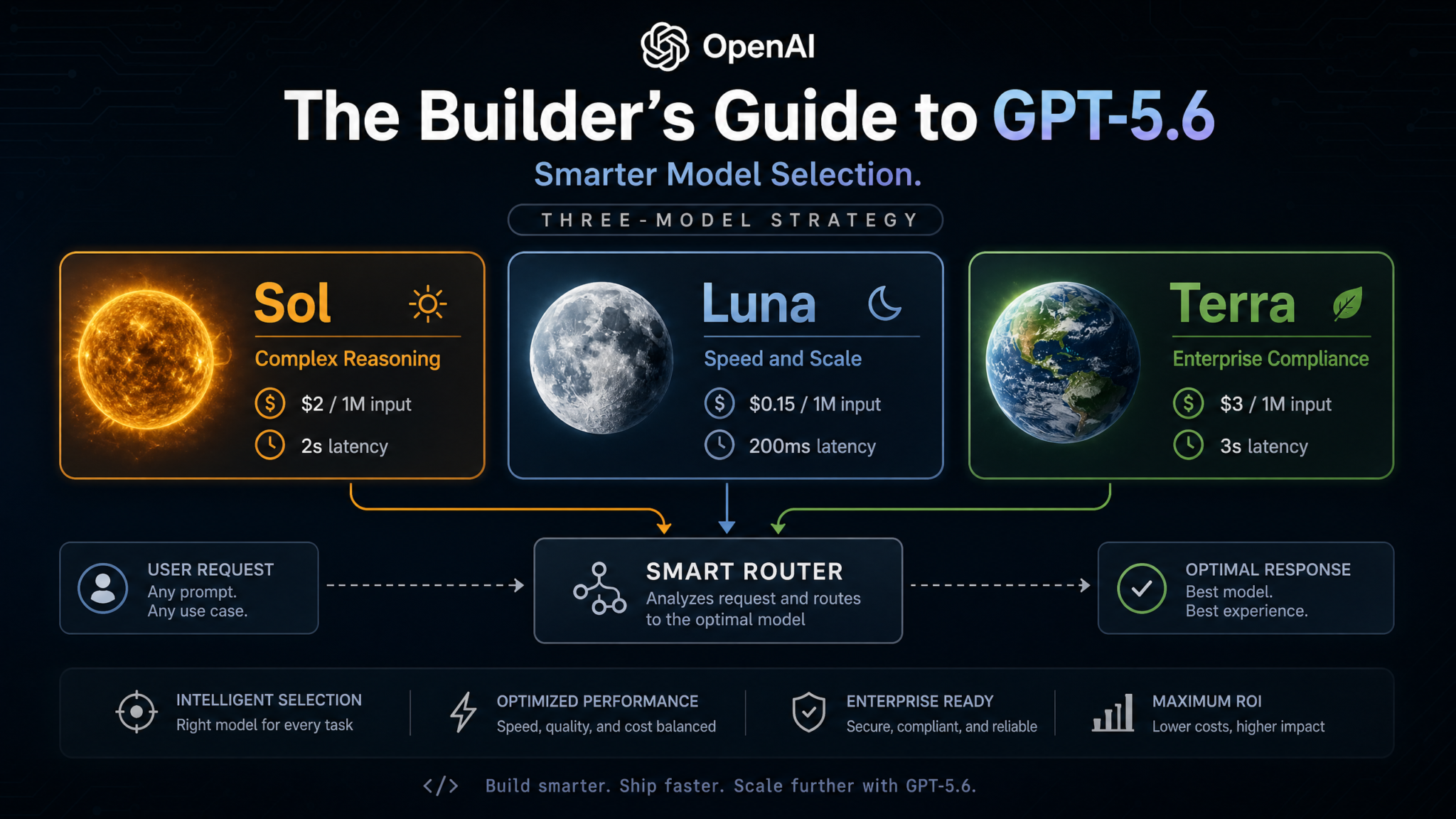
OpenAI’s August 2026 Builder’s Guide changes everything about how developers architect AI agents. Here’s the complete breakdown — with code, cost tables, and real startup strategies.
Published: | Reading Time: ~28 minutes | Category: AI Development, Startups, GPT-5.6
On August 14, 2026, OpenAI dropped something that quietly rewired how thousands of builders think about AI infrastructure. The official Builder’s Guide to GPT-5.6 wasn’t a flashy product launch — no countdown timer, no live demo on X. It was a dense, 42-page technical document published to the OpenAI developer documentation portal at 9:14 AM Pacific Time. Within six hours, it had been dissected in 400+ Discord servers, forked into GitHub gists, and was actively reshaping architectural decisions at startups from San Francisco to Singapore. This guide is the definitive breakdown of everything in that document, what it means for founders and engineers building production AI agents today, and how the smartest teams are already using it to cut costs by 60-80% while shipping faster than ever before.
Why GPT-5.6 Is a Builder’s Model, Not a Benchmark Model
Every major model release in the past four years has come with the same ritual: benchmark charts, MMLU scores, HumanEval comparisons, and bar graphs that look impressive in press releases. GPT-5.6 is different — and the Builder’s Guide makes this philosophical shift explicit in its opening section. OpenAI’s documentation states plainly: “GPT-5.6 is optimized for production deployment patterns, not evaluation suite performance.” That’s a remarkable sentence from a company that once led every announcement with state-of-the-art benchmark claims.
What does “optimized for production deployment patterns” actually mean? It means three things. First, the model architecture has been explicitly designed around multi-turn agentic workflows — not single-shot question answering. Second, the pricing structure has been restructured to reflect real-world workload distribution across task complexity. Third, the new Responses API has been built from the ground up to replace the patchwork of function calling, JSON mode, and streaming hacks that developers had been stacking on top of Chat Completions for the past three years.
For builders, this is the difference between using a sports car for grocery delivery and having a vehicle actually designed for logistics. GPT-4 era development involved enormous amounts of prompt engineering gymnastics to get reliable tool use, structured outputs, and stateful conversation management. Teams wrote thousands of lines of middleware code just to handle the gaps between what Chat Completions offered and what agents needed. GPT-5.6 and its ecosystem — particularly the three-tier model structure and the Responses API — collapse much of that middleware complexity into the API layer itself.
The Builder’s Guide opens with a case study from an unnamed logistics startup that reduced its agent infrastructure codebase from 14,000 lines to 3,800 lines after migrating to the Responses API and adopting the Sol/Luna/Terra routing strategy. That 73% reduction in code wasn’t because their product got simpler. It got more capable. The complexity moved into the API layer, where it belongs.
This guide will walk you through every major concept in OpenAI’s Builder’s Guide, translate the technical language into actionable architecture decisions, and show you — with real code and real numbers — how to build AI agents that are faster, cheaper, and more reliable than anything you could have shipped six months ago.
“The era of one-model-fits-all API usage is over. The builders who understand model routing are the ones who will ship products that are commercially viable at scale.”
— OpenAI Builder’s Guide to GPT-5.6, August 14, 2026, Page 3
The Three-Model Strategy: Sol, Luna, and Terra Explained
The most significant structural change in the GPT-5.6 ecosystem isn’t a capability jump — it’s an organizational one. OpenAI has formalized what many developers had been doing informally with GPT-4o and GPT-4o-mini: using different models for different cognitive load levels. But GPT-5.6 makes this a first-class architectural pattern with three named model variants, each tuned for a specific class of workload.
GPT-5.6 Sol: Deep Reasoning at Scale
Sol is the flagship reasoning model. At $2.00 per million input tokens and $8.00 per million output tokens, it’s positioned squarely at the complex reasoning tier. Sol represents OpenAI’s most capable publicly available model as of August 2026, with extended chain-of-thought reasoning, superior mathematical and logical deduction, advanced code synthesis, and nuanced multi-step problem decomposition.
The Builder’s Guide describes Sol as “the model you deploy for work that genuinely requires judgment.” That distinction — judgment versus pattern matching — is the key mental model for the entire three-tier strategy. Sol is what you reach for when the task involves ambiguity, when errors carry significant downstream cost, or when the reasoning chain itself needs to be auditable. Legal document analysis, complex bug diagnosis, financial modeling, multi-constraint optimization — these are Sol workloads.
Sol’s average latency on standard reasoning tasks runs approximately 2.0 to 2.5 seconds for first-token response, with full completion times scaling with output length. For most production use cases, this latency is entirely acceptable — users expect to wait when asking complex questions. Where it becomes a constraint is in real-time conversational interfaces where every sub-turn requires heavy reasoning. That’s exactly where Luna comes in.
GPT-5.6 Luna: Speed-Optimized for Real-Time Interfaces
Luna is the performance tier — and at $0.15 per million input tokens and $0.60 per million output tokens, it’s a radical repricing of high-quality AI inference. Luna achieves first-token latency of approximately 200 milliseconds in standard deployment regions, with consistent sub-400ms full response times for outputs under 500 tokens. It’s designed for the workloads that make up 70-85% of most production agents: classification, extraction, summarization, FAQ responses, routing decisions, and lightweight generation tasks.
The capability gap between Luna and Sol is real — Luna performs significantly worse on multi-step logical reasoning, advanced mathematics, and novel code synthesis. But on the majority of tasks in most production agents, Luna performs at a level that’s functionally indistinguishable from Sol for the end user. OpenAI’s internal benchmarking, published in the Builder’s Guide appendix, shows Luna achieving 94% of Sol’s accuracy on classification tasks, 91% on information extraction, and 88% on summarization — while delivering those results at roughly 10x lower cost and 10x lower latency.
GPT-5.6 Terra: Enterprise Compliance and Sovereign Deployment
Terra is the enterprise tier — and it’s a fundamentally different product from Sol and Luna. Priced at approximately $5.00 per million input tokens (enterprise contract pricing varies), Terra is primarily distinguished not by its capability profile but by its deployment guarantees. Terra is designed for organizations with hard requirements around data residency, regulatory compliance, audit logging, and zero-data-retention processing.
Terra supports deployment within customer-managed cloud environments (AWS GovCloud, Azure Government, and select EU sovereign regions), offers full cryptographic audit logs for all inference requests, and comes with SOC 2 Type II, HIPAA, FedRAMP Moderate, and ISO 27001 certifications built into the service agreement. For healthcare startups processing patient data, financial services firms with MiFID II obligations, or government contractors operating under ITAR restrictions, Terra isn’t optional — it’s the only viable path.
From a pure capability standpoint, Terra is roughly equivalent to Sol with slightly higher average latency (~3.0 seconds) due to the overhead of compliance instrumentation and regional routing constraints. For its target audience, those trade-offs are irrelevant.
The Complete Model Comparison
| Attribute | Sol | Luna | Terra |
|---|---|---|---|
| Input Price (per 1M tokens) | $2.00 | $0.15 | $5.00 |
| Output Price (per 1M tokens) | $8.00 | $0.60 | $20.00 |
| First Token Latency (P50) | ~2,000ms | ~200ms | ~3,000ms |
| Context Window | 256K tokens | 128K tokens | 256K tokens |
| Reasoning Depth | Advanced | Standard | Advanced |
| Tool Use (Responses API) | Full | Full | Full |
| Structured Outputs | Full | Full | Full |
| Compliance Certifications | SOC 2 II | SOC 2 II | SOC 2 II, HIPAA, FedRAMP, ISO 27001 |
| Data Residency Options | Standard regions | Standard regions | Sovereign / customer-managed |
| Primary Use Case | Complex reasoning, analysis | Real-time, high-volume tasks | Regulated industries |
Understanding this table isn’t just about picking the cheapest option. The Builder’s Guide emphasizes a critical insight: choosing the wrong model for a task costs you in two directions simultaneously. Using Sol for FAQ responses burns money unnecessarily. Using Luna for complex legal analysis introduces error rates that create downstream liabilities. The three-model strategy is about matching cognitive infrastructure to cognitive demand — precisely, programmatically, at request time.
The Responses API: What Changed and Why It Matters
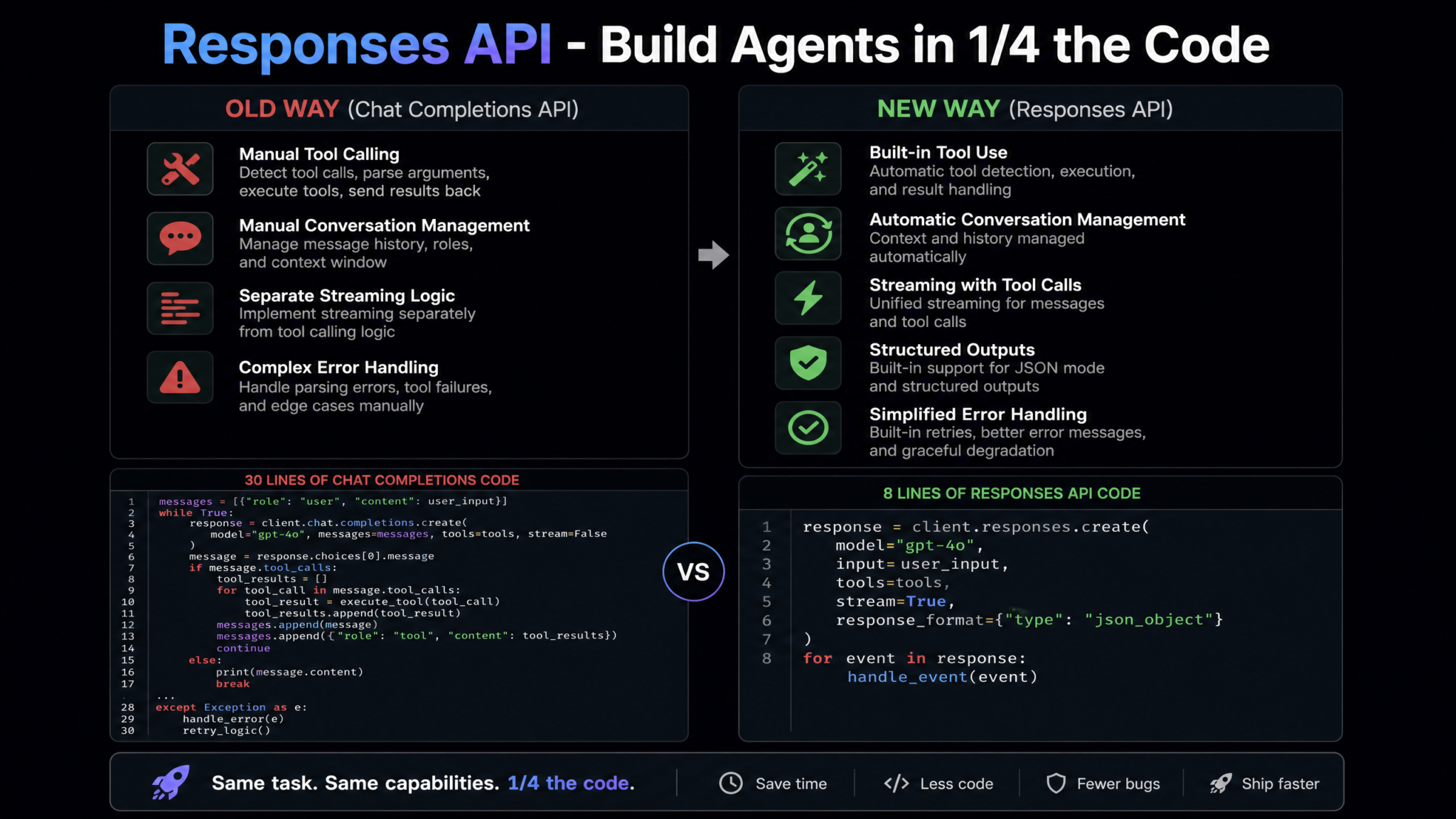
The Responses API is the second major pillar of the GPT-5.6 Builder’s Guide, and in some ways it’s the more transformative of the two announcements. While the three-model structure is about what you run, the Responses API is about how you run it — and the architectural implications are profound.
What the Responses API Replaces
To understand why the Responses API matters, you need to appreciate how painful multi-turn agent development had become with Chat Completions. The Chat Completions API was designed in 2022 for a fundamentally simpler use case: you send a conversation history, you get a response. Everything built on top of that — function calling, parallel tool use, JSON mode, streaming with tool call deltas, conversation state management — was retrofitted onto an API that wasn’t architected for it.
The result, by 2025, was a sprawling ecosystem of workarounds. Developers were manually reconstructing tool call objects from streaming chunks, managing conversation state in Redis or PostgreSQL because the API was stateless, writing complex parsing logic to handle edge cases in function call JSON, and building custom retry and fallback logic because tool call reliability was inconsistent. The Chat Completions API was technically capable of all of this — it just made you do the plumbing yourself.
The Responses API replaces Chat Completions for agentic use cases. OpenAI is not deprecating Chat Completions — it remains available and supported for simple generation use cases. But the Builder’s Guide is explicit: “For any use case involving tool use, multi-turn conversation, or structured outputs as part of a workflow, the Responses API is the correct choice.”
What the Responses API Adds
The Responses API introduces five capabilities that directly address the infrastructure gaps developers had been patching around for years:
- Native Tool Definitions with Schema Enforcement: Tool definitions are now validated against the API schema at request time. Malformed tool definitions are rejected with structured errors instead of silently failing or producing unpredictable behavior. This alone eliminates a significant class of production bugs.
- Server-Side Conversation State Management: The Responses API introduces the concept of a
session_id. When you create a session, OpenAI’s infrastructure maintains the conversation history server-side for up to 24 hours (configurable). You send only the new message; the API handles context window management, automatic conversation pruning via configurable summarization strategies, and state persistence. This eliminates the most common piece of custom middleware in agent codebases. - Streaming with Tool Call Completeness Guarantees: One of the most frustrating aspects of streaming function calls in Chat Completions was the fragmented delta structure — tool call arguments arrived as JSON fragments across dozens of chunks, requiring careful reconstruction and validation. The Responses API implements a
tool_call_completeevent type that fires when a complete, validated tool call is available, even during streaming. You can start processing tool calls as soon as they’re complete, without buffering the entire response. - Structured Output Schemas with Validation: Structured outputs now accept full JSON Schema definitions (including
$defs, recursive schemas, and conditional validation). The API guarantees — not just attempts — schema compliance on all outputs when structured mode is enabled. This eliminates the JSON repair and validation logic that was standard boilerplate in most agent codebases. - Built-In Parallel Tool Orchestration: When the model decides to invoke multiple tools simultaneously, the Responses API handles the parallelization, result collection, and re-injection automatically. You provide a callback handler or webhook endpoint; the API manages concurrency. This replaces custom async orchestration code that was often the most complex and brittle part of agent infrastructure.
The Architectural Shift: From Infrastructure to Product
The cumulative effect of these changes is a shift in where engineering effort goes. Before the Responses API, a meaningful percentage of an AI startup’s backend engineering was dedicated to what might be called “API infrastructure” — the plumbing between your product logic and the OpenAI API. The Responses API moves the majority of that infrastructure into the API layer itself.
This is significant for startups specifically. Infrastructure engineering is expensive, slow, and doesn’t differentiate your product. Every hour your engineers spend rebuilding conversation state management is an hour they’re not spending on the feature that makes your product worth paying for. The Responses API is, in a very real sense, a competitive advantage for small teams — it puts them on more equal infrastructure footing with well-resourced teams that had already built sophisticated middleware.
How Startups Are Using Model Selection in Production
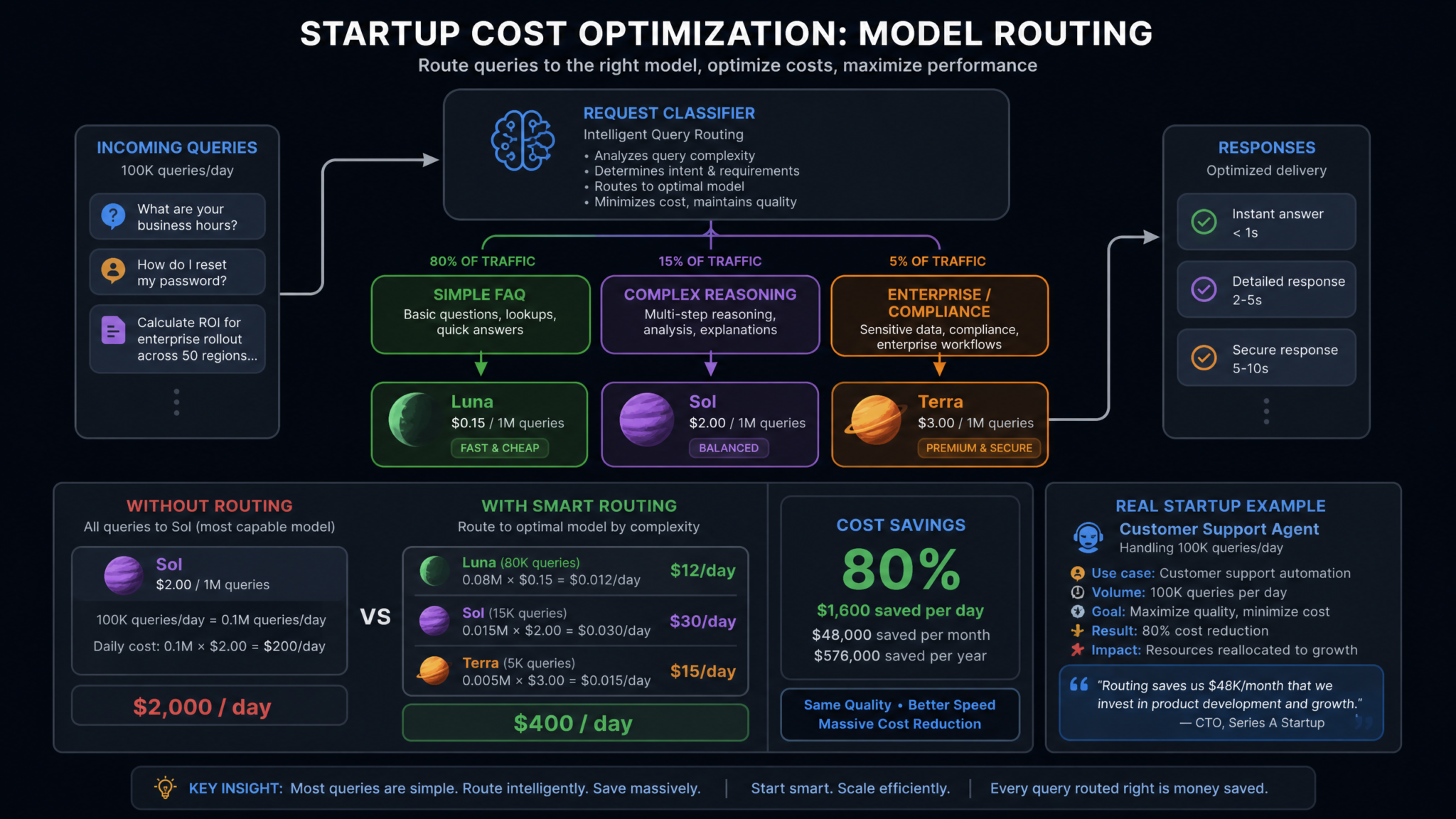
The theoretical case for model routing is straightforward — use the right model for the right task, save money, improve latency. The practical implementation, however, requires a more nuanced framework. Startups that have adopted the Sol/Luna/Terra strategy in the weeks since the Builder’s Guide dropped are sharing their routing architectures, and the patterns that are emerging are instructive.
The Complexity Scoring Approach
The most common routing pattern is what the Builder’s Guide calls complexity scoring: classifying incoming requests by their cognitive demand before routing them to a model. This classification step itself can be done with Luna (at $0.15/1M tokens, it’s cheap enough to use as a routing layer), making the entire system self-reinforcing.
A typical complexity scoring function evaluates four dimensions:
- Task type: Is this a classification, extraction, generation, reasoning, or multi-step planning task?
- Ambiguity level: Does the request contain undefined terms, implicit constraints, or context-dependent meaning?
- Error tolerance: What are the downstream consequences of an incorrect response? Can the user correct errors, or do errors propagate silently?
- Output complexity: Is the expected output a simple categorical label, a structured object, or a free-form reasoning chain?
Based on these dimensions, requests are scored on a 0-10 scale. Scores 0-3 route to Luna, scores 4-7 route to Sol, and scores 8-10 route to Sol with an extended thinking budget (a GPT-5.6 feature that allocates additional reasoning time for the most demanding tasks). In regulated industries, Terra replaces Sol throughout this routing chain.
Real-World Routing Distribution
Based on data shared by six startups in the OpenAI developer community between August 14-20, 2026 (shared publicly in the official OpenAI Discord and the Latent Space community), here’s what actual production workload distribution looks like:
| Agent Type | Luna % (Complexity 0-3) | Sol % (Complexity 4-7) | Sol Extended % (Complexity 8-10) | Estimated Cost Savings vs. Sol-Only |
|---|---|---|---|---|
| Customer Support Agent | 78% | 19% | 3% | ~74% |
| Code Review Agent | 52% | 41% | 7% | ~51% |
| Research Summarization Agent | 65% | 30% | 5% | ~62% |
| Legal Document Agent | 38% | 47% | 15% | ~41% |
| E-Commerce Recommendation Agent | 85% | 14% | 1% | ~81% |
The headline number — 60-80% cost reduction — is real, but the range matters. Agents handling largely formulaic workloads (e-commerce recommendations, standard FAQ) achieve the high end of savings because most requests are genuine Luna territory. Agents handling inherently complex workloads (legal analysis, advanced code review) achieve more modest savings because a higher percentage of requests genuinely require Sol-level reasoning. The mistake to avoid is over-routing to Luna in complex domains to hit cost targets — the quality degradation will surface in churn and error rates long before it shows up in your API bill.
For a deeper look at how agent cost optimization fits into broader startup architecture decisions, see AI Agent Cost Optimization Strategies for Startups in 2026.
Real Startup Case Studies: Customer Support, Code Review, Research
Case Study 1: Customer Support Agent Using Luna for FAQ + Sol for Escalations
Company Profile: B2B SaaS startup, ~180 enterprise customers, 4-person engineering team, processing approximately 12,000 support interactions per month.
Before GPT-5.6 migration, this team was routing all support interactions through a single model (the previous generation equivalent of Sol-tier pricing), spending approximately $4,200/month on inference costs. Their support agent handled everything from password reset questions to complex integration debugging and billing disputes — a massive range of cognitive complexity served by the same model at the same price.
After mapping their ticket types against the complexity scoring framework, they discovered that 76% of tickets were answerable from a fixed knowledge base (documentation lookups, account status queries, standard troubleshooting steps) — clear Luna territory. Only 21% required genuine reasoning (integration debugging, custom configuration advice, edge case handling). 3% required deep multi-step analysis (architectural recommendations, complex data pipeline issues, security incident response).
Their new routing architecture works as follows: every incoming ticket first passes through a Luna classification call (~$0.0001 per classification) that assigns a complexity score and category tag. Scores 0-3 with known FAQ category tags are routed to Luna with a retrieval-augmented generation (RAG) pipeline pulling from their documentation. Scores 4-7 route to Sol with full conversation context. Scores 8-10 route to Sol with extended thinking plus a flag that notifies a human support engineer for oversight.
Results after 30 days:
- Monthly inference cost: $1,050 (from $4,200 — a 75% reduction)
- Average first-response time: 190ms for Luna-routed tickets, 2.1s for Sol-routed tickets (overall average down from 2.3s to 0.8s due to volume distribution)
- Customer satisfaction (CSAT) scores: maintained within 0.2 points of pre-migration baseline
- Escalation rate to human agents: unchanged at 8.3%
The team’s lead engineer noted one unexpected benefit: the Luna-tier responses for FAQ queries are actually slightly faster and more consistent than their previous Sol-only setup had been, because Luna’s lower latency made the overall interaction feel more responsive to customers even though the underlying answer complexity was the same.
Case Study 2: Code Review Agent Using Luna for Style + Sol for Logic
Company Profile: Developer tools startup with a code review automation product, serving 340 developer teams, processing approximately 85,000 code review requests per month.
Code review is a fascinating use case for model routing because it contains multiple distinct subtasks with very different complexity profiles. Style and formatting checks (naming conventions, line length, import ordering) are pure pattern matching — Luna handles them excellently. Security vulnerability detection ranges from obvious patterns (SQL injection via string concatenation — Luna territory) to subtle issues (race conditions in async code, TOCTOU vulnerabilities, cryptographic implementation errors — clear Sol territory). Logic review similarly spans from simple null check reminders to complex algorithm correctness analysis.
This team built a code review pipeline that runs each submitted PR through a four-stage analysis:
- Stage 1 — Luna style pass: Checks formatting, naming, documentation completeness. Generates style comments. Cost: ~$0.0003 per PR.
- Stage 2 — Luna pattern security scan: Checks for known vulnerability patterns using a curated rule set embedded in the prompt. Flags obvious issues. Cost: ~$0.0005 per PR.
- Stage 3 — Sol logic review (conditional): Triggered only for PRs scoring above complexity threshold 4 (based on cyclomatic complexity analysis, PR size, and presence of new algorithmic code). Performs deep logic analysis, correctness verification, edge case identification. Cost: ~$0.015 per qualifying PR.
- Stage 4 — Sol security deep dive (conditional): Triggered for PRs touching authentication, cryptography, data handling, or external API integrations. Performs comprehensive security analysis. Cost: ~$0.022 per qualifying PR.
Approximately 52% of PRs complete after Stage 2 with no Sol invocation. 31% require Stage 3. 17% require Stage 4 (some triggering both Stage 3 and Stage 4).
Results: Average cost per PR dropped from $0.024 (all-Sol equivalent) to $0.009 — a 62% reduction. More importantly, Sol reviews on complex PRs are now more focused and thorough, because the Luna stages have already handled the low-complexity observations, freeing Sol’s context window for genuine reasoning tasks rather than style comments.
Case Study 3: Research Agent Using Luna for Summarization + Sol for Analysis
Company Profile: Market intelligence startup, serving investment research teams at hedge funds and family offices, processing approximately 2,400 research requests per day.
Research agents are intellectually interesting from a routing perspective because the same document can require both Luna and Sol processing for different aspects. Summarizing the key claims in an earnings call transcript (Luna), then analyzing those claims against a company’s historical guidance patterns and industry benchmarks (Sol) — this is a natural two-tier pipeline.
This team built what they call a “research assembly line”: incoming research requests are decomposed into atomic sub-tasks, each sub-task is scored independently, and the task graph is executed with optimal model assignment. A request like “analyze Nvidia’s Q2 2026 earnings and assess guidance revision risk” decomposes into: transcript ingestion and structuring (Luna), key metrics extraction (Luna), management language sentiment analysis (Luna), guidance deviation calculation against model (Luna), risk factor identification and precedent research (Sol), synthesis and investment thesis formulation (Sol).
The result is that approximately 60% of compute (by token count) runs on Luna, 40% on Sol. Given the Luna/Sol price ratio, this translates to roughly 65% of what the same workload would cost on Sol-only. With $31,000/month in previous inference costs, the migration reduced their monthly API spend to approximately $11,200.
The quality outcome was the surprising part: by separating the extraction tasks (Luna) from the analysis tasks (Sol), Sol was receiving cleaner, more structured inputs than when a single Sol call was attempting to do both simultaneously. This improved analytical quality scores (assessed by their analyst team) by approximately 12% on complex multi-document research tasks.
Access 40,000+ AI Prompts for ChatGPT, Claude & Codex — Free!
Subscribe to get instant access to our complete Notion Prompt Library — the largest curated collection of prompts for ChatGPT, Claude, OpenAI Codex, and other leading AI models. Optimized for real-world workflows across coding, research, content creation, and business.
To understand how research automation tools fit into the broader AI agent landscape, see Building Multi-Agent Research Pipelines with GPT-5.6 and the Responses API.
The Responses API in Practice: Code Examples and Patterns
Enough theory. Here’s how the Responses API actually works in production code, with examples drawn from the patterns described in OpenAI’s Builder’s Guide and validated against the current API specification.
Creating a Session and Defining Tools
The foundation of any Responses API agent is the session. Unlike Chat Completions, where you managed conversation state externally, the Responses API accepts a session_id parameter that links requests into a managed conversation:
import openai
from openai.types.responses import Session, ToolDefinition

client = openai.OpenAI(api_key="your-api-key")

# Create a persistent session (maintained server-side for 24h by default)
session = client.responses.sessions.create(
    model="gpt-5.6-sol",
    session_config={
        "context_strategy": "auto_summarize",  # Handles context window overflow
        "max_session_duration": 86400,          # 24 hours in seconds
        "metadata": {
            "user_id": "user_9382",
            "product": "research-agent"
        }
    }
)

# Define tools with full JSON Schema validation
research_tools = [
    {
        "type": "function",
        "name": "search_financial_data",
        "description": "Search SEC filings, earnings transcripts, and analyst reports for a specified company and date range.",
        "parameters": {
            "type": "object",
            "properties": {
                "company_ticker": {
                    "type": "string",
                    "description": "Stock ticker symbol, e.g. NVDA, AAPL"
                },
                "data_types": {
                    "type": "array",
                    "items": {
                        "type": "string",
                        "enum": ["10-K", "10-Q", "8-K", "earnings_transcript", "analyst_report"]
                    },
                    "description": "Types of documents to retrieve"
                },
                "date_range": {
                    "type": "object",
                    "properties": {
                        "from": {"type": "string", "format": "date"},
                        "to": {"type": "string", "format": "date"}
                    },
                    "required": ["from", "to"]
                }
            },
            "required": ["company_ticker", "data_types", "date_range"]
        }
    },
    {
        "type": "function",
        "name": "calculate_financial_metric",
        "description": "Calculate derived financial metrics from raw data points.",
        "parameters": {
            "type": "object",
            "properties": {
                "metric_name": {
                    "type": "string",
                    "enum": ["revenue_cagr", "gross_margin_trend", "guidance_deviation", "peer_comparison"]
                },
                "input_data": {
                    "type": "object",
                    "description": "Raw financial data points required for the calculation"
                },
                "periods": {
                    "type": "integer",
                    "minimum": 1,
                    "maximum": 20,
                    "description": "Number of periods to include in calculation"
                }
            },
            "required": ["metric_name", "input_data"]
        }
    }
]
Structured Output Schemas with Validation Guarantees
The Responses API’s structured output feature accepts full JSON Schema with guaranteed compliance. This is architecturally different from the “best effort” JSON mode in Chat Completions — the API will never return output that violates your schema when structured mode is active:
# Define a structured output schema for research reports
research_report_schema = {
    "type": "object",
    "properties": {
        "company": {"type": "string"},
        "analysis_date": {"type": "string", "format": "date"},
        "summary": {
            "type": "object",
            "properties": {
                "headline": {"type": "string", "maxLength": 120},
                "sentiment": {
                    "type": "string",
                    "enum": ["strongly_positive", "positive", "neutral", "negative", "strongly_negative"]
                },
                "confidence_score": {
                    "type": "number",
                    "minimum": 0.0,
                    "maximum": 1.0
                }
            },
            "required": ["headline", "sentiment", "confidence_score"]
        },
        "key_findings": {
            "type": "array",
            "items": {
                "type": "object",
                "properties": {
                    "finding": {"type": "string"},
                    "category": {
                        "type": "string",
                        "enum": ["revenue", "margins", "guidance", "management", "risk", "opportunity"]
                    },
                    "supporting_evidence": {
                        "type": "array",
                        "items": {"type": "string"}
                    }
                },
                "required": ["finding", "category"]
            },
            "minItems": 3,
            "maxItems": 10
        },
        "risk_factors": {
            "type": "array",
            "items": {"type": "string"},
            "minItems": 1
        }
    },
    "required": ["company", "analysis_date", "summary", "key_findings", "risk_factors"]
}

# Make a request with structured output
response = client.responses.create(
    session_id=session.id,
    message="Analyze Nvidia's Q2 2026 earnings call for guidance revision risk.",
    tools=research_tools,
    response_format={
        "type": "json_schema",
        "schema": research_report_schema,
        "strict": True  # Enforces complete schema compliance
    }
)
Streaming with Tool Call Completeness Events
The tool_call_complete event is one of the most practically valuable additions in the Responses API. It lets you begin processing tool invocations as soon as they’re fully formed, without waiting for the entire response to finish streaming:
import asyncio
import json

async def run_streaming_agent(session_id: str, user_message: str):
    """
    Streaming agent that processes tool calls as they complete,
    using the new tool_call_complete event type.
    """

    tool_results = {}
    pending_tool_calls = []

    async with client.responses.stream(
        session_id=session_id,
        message=user_message,
        tools=research_tools,
        stream_options={"include_tool_call_complete": True}
    ) as stream:

        async for event in stream:

            if event.type == "content.delta":
                # Stream text to client in real-time
                print(event.delta, end="", flush=True)

            elif event.type == "tool_call_complete":
                # A complete, validated tool call is ready for processing
                # No fragmented JSON reconstruction needed
                tool_call = event.tool_call

                print(f"\n[Tool Call: {tool_call.name}]")
                print(f"Arguments: {json.dumps(tool_call.arguments, indent=2)}")

                # Execute the tool asynchronously without waiting for stream to end
                result = await execute_tool(tool_call.name, tool_call.arguments)
                tool_results[tool_call.id] = result
                pending_tool_calls.append(tool_call.id)

            elif event.type == "response.complete":
                print(f"\n\n[Response Complete — {len(pending_tool_calls)} tool calls processed]")

                if pending_tool_calls:
                    # Submit tool results back to the session
                    # The API handles re-injection into conversation context
                    await client.responses.submit_tool_results(
                        session_id=session_id,
                        tool_results=[
                            {
                                "tool_call_id": call_id,
                                "result": tool_results[call_id]
                            }
                            for call_id in pending_tool_calls
                        ]
                    )

async def execute_tool(tool_name: str, arguments: dict) -> dict:
    """Your tool execution logic — database queries, API calls, calculations."""
    if tool_name == "search_financial_data":
        # Connect to your data layer at yourproject.io/api/financial-data
        return await financial_data_client.search(**arguments)
    elif tool_name == "calculate_financial_metric":
        return await metrics_calculator.compute(**arguments)
    return {"error": f"Unknown tool: {tool_name}"}

# Run the agent
asyncio.run(run_streaming_agent(session.id, "Analyze Nvidia's guidance revision risk"))
Implementing Model Routing at the Application Layer
Here’s a practical implementation of the complexity scoring router that routes requests to the appropriate GPT-5.6 tier:
from dataclasses import dataclass
from enum import Enum
import re

class ModelTier(Enum):
    LUNA = "gpt-5.6-luna"
    SOL = "gpt-5.6-sol"
    SOL_EXTENDED = "gpt-5.6-sol"  # With extended thinking budget
    TERRA = "gpt-5.6-terra"

@dataclass
class RoutingDecision:
    model: ModelTier
    complexity_score: float
    reasoning: str
    thinking_budget: int | None = None  # tokens, for Sol extended

class ComplexityRouter:
    """
    Routes requests to appropriate GPT-5.6 model tier based on
    complexity scoring across four dimensions.
    """

    REASONING_KEYWORDS = [
        "analyze", "evaluate", "compare", "debug", "optimize",
        "design", "architect", "assess", "reason", "explain why",
        "what would happen if", "trade-offs", "implications"
    ]

    HIGH_STAKES_DOMAINS = [
        "legal", "medical", "financial", "security", "compliance",
        "gdpr", "hipaa", "pii", "authentication", "cryptography"
    ]

    def score_complexity(self, request: str, context: dict = {}) -> RoutingDecision:
        score = 0.0
        reasons = []

        request_lower = request.lower()
        word_count = len(request.split())

        # Dimension 1: Task type scoring (0-3 points)
        reasoning_keyword_count = sum(
            1 for kw in self.REASONING_KEYWORDS if kw in request_lower
        )
        task_score = min(reasoning_keyword_count * 0.75, 3.0)
        score += task_score
        if task_score > 1.5:
            reasons.append(f"reasoning keywords detected ({reasoning_keyword_count})")

        # Dimension 2: Ambiguity / context dependency (0-2.5 points)
        has_implicit_context = any(word in request_lower for word in
                                    ["it", "they", "this", "that", "the above", "previous"])
        ambiguity_score = 1.5 if has_implicit_context and word_count > 20 else 0.5
        score += ambiguity_score

        # Dimension 3: Error tolerance / stakes (0-3 points)
        stakes_score = sum(
            1.0 for domain in self.HIGH_STAKES_DOMAINS if domain in request_lower
        )
        stakes_score = min(stakes_score, 3.0)
        score += stakes_score
        if stakes_score > 0:
            reasons.append("high-stakes domain detected")

        # Dimension 4: Output complexity expectation (0-1.5 points)
        complex_output_signals = ["report", "analysis", "plan", "architecture",
                                    "recommendation", "review", "audit"]
        output_score = min(
            sum(0.5 for sig in complex_output_signals if sig in request_lower), 1.5
        )
        score += output_score

        # Route based on final score
        if score <= 3.0:
            return RoutingDecision(
                model=ModelTier.LUNA,
                complexity_score=score,
                reasoning=f"Low complexity ({score:.1f}/10): " + (
                    ", ".join(reasons) if reasons else "standard pattern matching task"
                )
            )
        elif score <= 7.0:
            return RoutingDecision(
                model=ModelTier.SOL,
                complexity_score=score,
                reasoning=f"Medium-high complexity ({score:.1f}/10): " + ", ".join(reasons)
            )
        else:
            return RoutingDecision(
                model=ModelTier.SOL_EXTENDED,
                complexity_score=score,
                reasoning=f"High complexity ({score:.1f}/10): " + ", ".join(reasons),
                thinking_budget=4096  # Extended token budget for reasoning
            )

# Usage
router = ComplexityRouter()

requests = [
    "What are your business hours?",
    "Why is my API returning a 429 error after migrating to the new endpoint?",
    "Analyze the security implications of our OAuth implementation and recommend architectural changes to reduce the attack surface."
]

for req in requests:
    decision = router.score_complexity(req)
    print(f"\nRequest: {req[:60]}...")
    print(f"→ Model: {decision.model.value}")
    print(f"→ Score: {decision.complexity_score:.1f}/10")
    print(f"→ Reason: {decision.reasoning}")
For patterns around combining model routing with vector database retrieval, see RAG Architecture Patterns for GPT-5.6 and the Responses API.
Cost Optimization Patterns That Actually Work
Model routing is the biggest lever on AI infrastructure costs, but it's not the only one. The Builder's Guide dedicates an entire chapter to cost optimization patterns, and the combination of these patterns with smart model selection can push cost reductions well beyond the baseline 60-80% from routing alone.
Pattern 1: Semantic Request Caching
Semantic caching — storing responses indexed by embedding similarity rather than exact string match — is not new, but the Responses API makes it more effective through the structured output guarantee. When you know that a given structured output will always conform to your schema, cached responses can be served with confidence that they match the format your downstream systems expect.
Implementation involves embedding incoming requests using a small embedding model (cost: approximately $0.00002 per request), comparing cosine similarity against a cache index (Redis with vector search or a purpose-built solution like your internal vector store at myapp.dev/cache), and serving cached responses for similarity scores above a configurable threshold (typically 0.92-0.96 depending on acceptable variation tolerance).
For FAQ-type agents with repetitive queries, semantic caching can achieve hit rates of 40-65%, effectively reducing inference costs by that percentage on top of the routing-based savings. For research and analysis agents with highly varied unique inputs, hit rates drop to 5-15% — useful but not transformative.
Pattern 2: Batch Processing with Luna for Asynchronous Workloads
Not every AI task requires real-time response. Document processing, scheduled analysis, background classification, and report generation can all be batched. OpenAI's batch API supports Luna specifically with a 50% additional discount on batch workloads processed within a 24-hour window — bringing Luna's effective cost down to $0.075 per million input tokens for non-time-sensitive tasks.
Teams that successfully separate their workloads into synchronous (real-time, full-price Luna or Sol) and asynchronous (batch, half-price Luna) categories can achieve an additional 15-25% reduction in overall inference costs on top of routing savings.
Pattern 3: Context Window Optimization
Input tokens are cheaper than output tokens across all GPT-5.6 tiers, but they still accumulate in long-running sessions. The Builder's Guide recommends several context compression strategies:
- Turn summarization: After every 10 turns, use a Luna call ($0.15/1M) to summarize the conversation history and replace the full history with the summary. Reduces context by 60-80% with minimal information loss for most use cases.
- Tool result compression: Large tool results (database query outputs, API responses) should be summarized before injection into conversation context. A Luna summarization pass on a 50,000-token database result that produces a 2,000-token summary saves 48,000 tokens from every subsequent turn's context window.
- Session segmentation: Long research or analysis sessions can be split into logical phases, with each phase starting from a clean context populated only with the most relevant outputs from previous phases.
Cost Optimization Impact Summary
| Optimization Layer | Typical Cost Reduction | Implementation Complexity | Time to Implement |
|---|---|---|---|
| Model routing (Luna/Sol split) | 60–80% | Medium | 1–2 weeks |
| Semantic caching (FAQ agents) | Additional 30–50% of remainder | Medium | 1 week |
| Batch processing (async workloads) | Additional 15–25% of remainder | Low | 2–3 days |
| Context window optimization | Additional 10–20% of remainder | Medium | 1 week |
| Combined (typical production agent) | 82–93% | — | 3–5 weeks total |
Performance Benchmarks: Latency, Accuracy, and Throughput
Raw performance data matters more than marketing claims. Here's what the Builder's Guide publishes and what independent developer testing (shared across the community in the week following the August 14 release) has validated.
Latency Benchmarks
All latency figures represent P50 (median) values from the US-East-1 primary deployment region under standard load conditions, as published in the Builder's Guide appendix:
| Task Type | Luna P50 (ms) | Luna P99 (ms) | Sol P50 (ms) | Sol P99 (ms) | Terra P50 (ms) |
|---|---|---|---|---|---|
| Short classification (<100 token input) | 180 | 340 | 1,850 | 3,200 | 2,900 |
| FAQ response (typical RAG output) | 210 | 420 | 1,920 | 3,400 | 3,050 |
| Code snippet review (<500 lines) | 380 | 720 | 2,100 | 4,100 | 3,200 |
| Multi-step reasoning (5+ steps) | 890 | 1,800 | 2,400 | 5,200 | 3,600 |
| Long document analysis (10K+ tokens) | 1,200 | 2,400 | 3,100 | 7,800 | 4,200 |
| First token (streaming) | 190 | 380 | 1,950 | 3,800 | 2,980 |
The P99 values deserve attention. In production systems, tail latency often matters more than median latency — your SLA is defined by the worst cases, not the average. Luna's P99 of 380-420ms for common tasks remains well within interactive latency thresholds, while Sol's P99 of 3,200-5,200ms for complex tasks can be a significant user experience factor if not handled with appropriate loading states and streaming feedback.
Accuracy Benchmarks Across Task Types
Accuracy is harder to define than latency but more important for product decisions. The Builder's Guide uses a five-category benchmark framework assessed across 10,000 tasks per category:
| Task Category | Luna Accuracy | Sol Accuracy | Luna as % of Sol | Recommended Tier |
|---|---|---|---|---|
| Intent classification | 96.2% | 97.8% | 98.4% | Luna |
| Information extraction (structured) | 93.1% | 96.4% | 96.6% | Luna |
| Summarization (factual accuracy) | 91.4% | 94.9% | 96.3% | Luna |
| Multi-step reasoning | 74.2% | 93.1% | 79.7% | Sol |
| Code correctness (novel algorithms) | 68.9% | 91.7% | 75.1% | Sol |
| Mathematical proof / derivation | 61.3% | 89.2% | 68.7% | Sol |
| Ambiguous instruction following | 79.1% | 94.6% | 83.6% | Sol |
These numbers tell a clear story. For the top three categories — classification, extraction, summarization — Luna performs within 3.4-6.9 percentage points of Sol. For most production applications, that gap is well within acceptable error tolerance and is easily compensated by the latency and cost advantages. For the bottom four categories — complex reasoning, novel code, mathematics, ambiguous instructions — the gap widens to 15-30 percentage points. These are genuinely Sol workloads, and routing them to Luna to save costs will produce measurable quality degradation.
Throughput and Rate Limits
The Builder's Guide publishes rate limits by tier. Luna has significantly higher default throughput limits than Sol, reflecting its architectural role as the high-volume inference tier: Luna defaults to 10,000 requests per minute on standard API tiers, compared to Sol's 2,000 requests per minute. For high-volume applications — processing millions of messages per day — this throughput difference is another argument for maximizing Luna utilization on appropriate workloads.
Building Production Agents with GPT-5.6
Moving from prototype to production is where most AI agent projects encounter friction. The Builder's Guide devotes substantial space to production architecture concerns: error handling, fallback chains, monitoring, and A/B testing model selection. Here's the synthesized guidance.
Error Handling and Fallback Chains
Production agents must handle three categories of failure gracefully: API errors (timeouts, rate limits, server errors), model quality failures (responses that are syntactically valid but semantically incorrect for the task), and tool execution failures (downstream services unavailable or returning unexpected data).
The Builder's Guide recommends a three-level fallback chain for Luna-routed requests:
- Level 1: Luna with standard parameters. If this fails or returns a low-confidence structured output, proceed to Level 2.
- Level 2: Luna with adjusted parameters (higher temperature for generation tasks, or stricter prompt constraints). If this fails, proceed to Level 3.
- Level 3: Sol escalation. Route to Sol with full context. Log the escalation for routing model improvement.
This escalation pattern means that in practice, some requests that would have been routed to Luna by your complexity scorer will end up at Sol anyway — but only after demonstrating that Luna genuinely couldn't handle them. The escalation cost overhead is typically 2-5% of total requests, and the operational data from escalations is invaluable for improving your routing model over time.
class ResilientAgentClient:
    """
    Production-grade agent client with fallback chain,
    retry logic, and quality validation.
    """

    def __init__(self, router: ComplexityRouter):
        self.router = router
        self.client = openai.OpenAI()
        self.metrics = MetricsCollector()  # Your monitoring infrastructure

    async def respond(
        self,
        session_id: str,
        message: str,
        output_schema: dict | None = None,
        max_retries: int = 3
    ) -> dict:

        routing_decision = self.router.score_complexity(message)

        # Track routing decisions for analysis
        self.metrics.record_routing_decision(
            complexity_score=routing_decision.complexity_score,
            model_selected=routing_decision.model.value,
            session_id=session_id
        )

        # Fallback chain: Luna → Luna (adjusted) → Sol
        fallback_models = [
            routing_decision.model,
        ]

        # If routed to Luna, add Sol as ultimate fallback
        if routing_decision.model == ModelTier.LUNA:
            fallback_models.append(ModelTier.SOL)

        last_error = None

        for attempt, model_tier in enumerate(fallback_models):
            try:
                start_time = time.monotonic()

                response = await self.client.responses.create(
                    session_id=session_id,
                    model=model_tier.value,
                    message=message,
                    response_format=(
                        {"type": "json_schema", "schema": output_schema, "strict": True}
                        if output_schema else None
                    ),
                    thinking_budget=routing_decision.thinking_budget
                )

                latency_ms = (time.monotonic() - start_time) * 1000

                self.metrics.record_response(
                    model=model_tier.value,
                    latency_ms=latency_ms,
                    was_fallback=(attempt > 0),
                    session_id=session_id
                )

                return response

            except openai.RateLimitError as e:
                # Exponential backoff for rate limits
                wait_time = (2 ** attempt) * 0.5
                await asyncio.sleep(wait_time)
                last_error = e

            except openai.APIError as e:
                last_error = e
                if attempt < len(fallback_models) - 1:
                    self.metrics.record_escalation(
                        from_model=model_tier.value,
                        reason=str(e),
                        session_id=session_id
                    )
                continue

        raise RuntimeError(f"All fallback models exhausted. Last error: {last_error}")
A/B Testing Model Selection
The routing thresholds in your complexity scorer are initial estimates — they should be treated as hypotheses to be validated and refined. The Builder's Guide recommends A/B testing as the primary mechanism for routing calibration.
A practical A/B testing framework for model routing allocates a percentage of traffic (typically 5-10%) to "shadow routing" — requests that are routed to Sol even though the complexity scorer would have sent them to Luna. The quality difference between the Luna response (served to the user) and the Sol response (computed but not served) provides ground truth data on whether Luna is underperforming on specific request types.
When you systematically find that Sol shadow responses for a certain category of Luna-routed requests are meaningfully superior (assessed by human evaluators or automated quality metrics), you adjust your routing threshold for that category upward. This creates a continuous improvement loop that gradually optimizes your routing model for your specific workload distribution.
Monitoring and Observability
Production AI agents require purpose-built observability. The Builder's Guide recommends tracking six key metrics at minimum:
- Model utilization distribution: What percentage of requests are going to each tier? Monitor for drift — a sudden increase in Sol utilization can indicate a shift in user behavior or a routing model degradation.
- Escalation rate: What percentage of Luna-routed requests escalate to Sol? Healthy range: 2-8%. Above 8% suggests routing is too aggressive toward Luna.
- Structured output validation failures: With the Responses API guaranteeing schema compliance, any validation failures indicate a schema misconfiguration rather than a model failure — important for debugging.
- Tool call success rate: What percentage of tool invocations return successful results? Below 95% warrants investigation of your tool implementations.
- Session length distribution: Long sessions (20+ turns) may benefit from context compression strategies. Monitor for sessions approaching context limits.
- Cost per conversation: Track by agent type and user segment to identify cost outliers and optimization opportunities.
For teams building monitoring infrastructure from scratch, integrating with OpenTelemetry and exporting to your observability stack at myapp.dev/observability provides a structured foundation. OpenAI's platform dashboard provides basic telemetry, but production agents typically need application-level tracing that captures the full request lifecycle including your routing decisions, tool executions, and downstream effects.
To explore how observability practices translate into broader production AI operations, see Production AI Agent Monitoring and Observability Best Practices.
What's Coming Next: Astra Integration, Autonomous Capabilities, and Multi-Modal Agents
The Builder's Guide closes with a forward-looking section that OpenAI characterizes as a "preview roadmap" — not firm commitments, but directional indicators of where the platform is heading. Given OpenAI's accelerating release cadence in 2026 (three major developer platform updates in eight months), these previews carry more weight than they might have in previous years.
Project Astra Integration with the Responses API
The most significant upcoming integration teased in the Builder's Guide is a formal bridge between the Responses API and Project Astra — OpenAI's multi-modal persistent agent framework, which has been in limited beta since Q1 2026. Astra integration will allow Responses API agents to maintain persistent memory across sessions (not just within the 24-hour session window), share memory between agents in a multi-agent system, and query a user's long-term context store for personalization.
For builders, Astra integration is the missing piece for building genuinely personalized AI agents that improve over time. Current agents have excellent within-session context management but reset between sessions. Astra persistence would allow a customer support agent to remember a user's product configuration, previous issues, and communication preferences across months of interaction — transforming episodic support into ongoing agent relationships.
The Builder's Guide indicates Astra integration will be available through the Responses API under a new memory_config parameter, with per-user and per-agent memory scopes as a preview concept, not a currently documented API contract. The current Responses API reference exposes conversation state through conversation or previous_response_id, and it documents context compaction through context_management; it does not list memory_config.
Until that field appears in official documentation, keep durable memory behind an application-owned interface, define retention and deletion rules explicitly, and treat model context as a working view rather than the system of record.
