
As businesses continue to seek innovative ways to optimize operations and enhance productivity, GPT-5 enterprise integration emerges as a transformative solution. This tutorial provides a comprehensive guide for business teams on deploying GPT-5 within enterprise workflows, covering everything from API integration to measuring ROI. Whether you are a technical lead, project manager, or business strategist, this guide will empower you to harness GPT-5’s capabilities effectively for AI business automation in 2026.
Understanding GPT-5 and Its Enterprise Potential
GPT-5 represents the latest milestone in generative AI technology, offering advanced natural language understanding, contextual awareness, and multimodal capabilities. Its enhanced processing power and refined architecture make it uniquely suited to enterprise environments where scalability, security, and customizability are paramount.
Enterprises can leverage GPT-5 to automate a wide range of business tasks, including customer service, data analysis, document generation, and workflow orchestration. Unlike prior versions, GPT-5 supports dynamic context switching and nuanced prompt engineering, enabling more precise and relevant outputs tailored to complex business scenarios.
Before diving into the technical steps, it’s important to understand the core benefits GPT-5 brings to enterprise workflows:
- Scalable API Integration: Seamlessly embed GPT-5 into existing software and platforms.
- Advanced Prompt Engineering: Craft context-aware instructions for targeted business outcomes.
- Enhanced Security Frameworks: Meet enterprise-grade compliance and data privacy standards.
- Comprehensive Monitoring & Analytics: Measure AI performance and ROI effectively.
These advantages collectively streamline operations and unlock new efficiencies across departments.
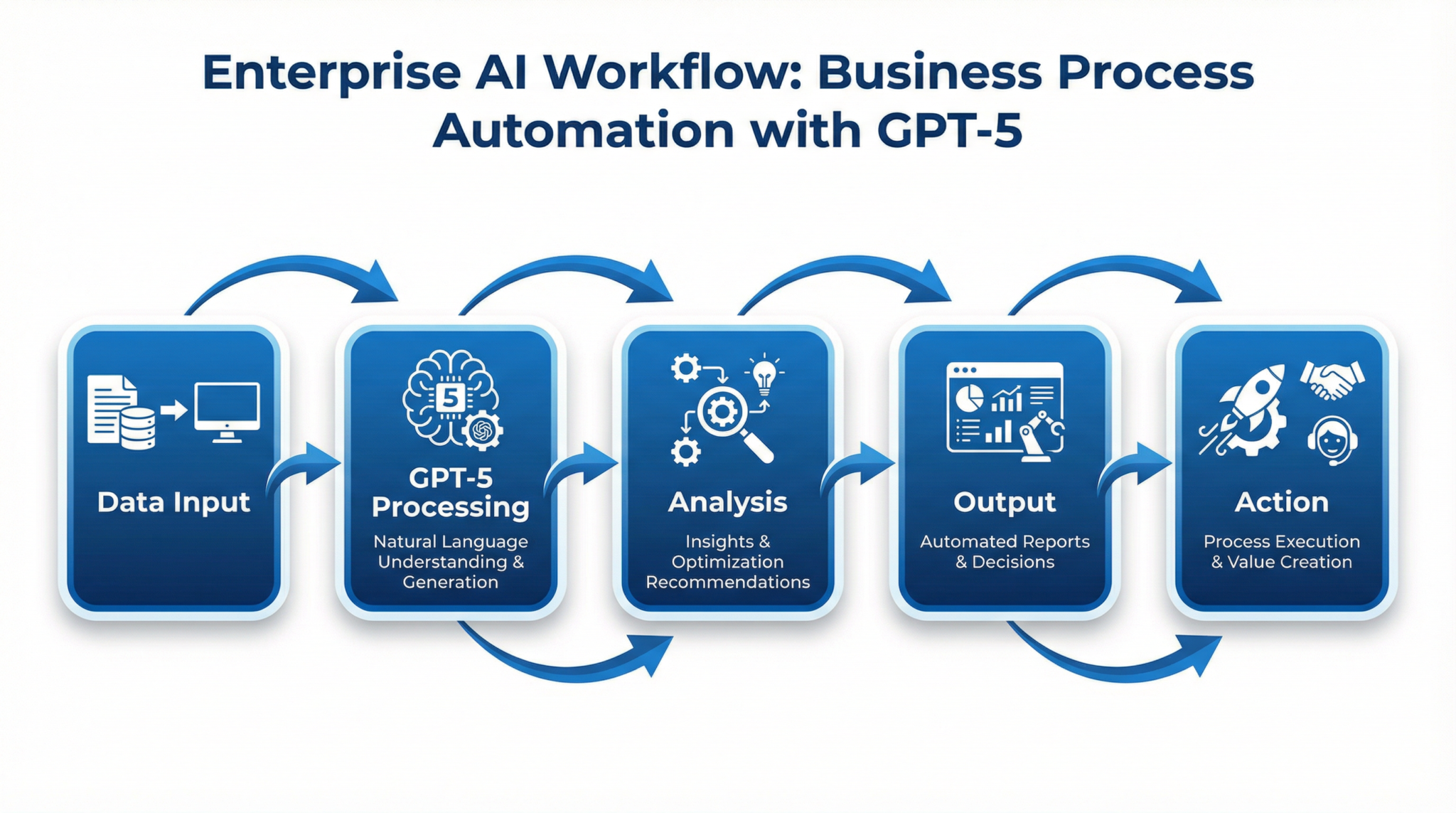
Step 1: Setting Up GPT-5 API Integration for Enterprise Workflows
Integrating GPT-5 into your enterprise systems begins with accessing the official API. OpenAI provides a robust, scalable API endpoint designed specifically for enterprise customers, complete with features such as rate limiting, usage tracking, and enhanced security protocols.
1.1 Obtain Enterprise API Access
Start by applying for GPT-5 enterprise access through OpenAI’s partnership program. Upon approval, you will receive API keys with elevated privileges and service-level agreements (SLAs) tailored to business needs.
1.2 Secure Your API Environment
Protecting API keys and sensitive data is critical. Follow these best practices:
- Store keys in encrypted vaults or environment variables.
- Implement IP whitelisting and OAuth for API authentication.
- Use secure HTTP protocols (HTTPS) with TLS encryption.
1.3 Integrate GPT-5 into Your Workflow Systems
Most enterprises leverage GPT-5 within CRM, ERP, or custom automation platforms. Here’s a high-level integration process:
- Identify the workflow or application requiring AI augmentation (e.g., customer support ticketing).
- Develop middleware or use existing connectors to interface with GPT-5 API endpoints.
- Format requests with appropriate prompt templates and parameters (temperature, max tokens, etc.).
- Handle responses asynchronously to maintain system responsiveness.
1.4 Example API Request Structure
Below is a simplified example of a JSON payload for a GPT-5 text generation request tailored to enterprise use:
{
  "model": "gpt-5-enterprise",
  "prompt": "Analyze the attached quarterly sales data and generate an executive summary.",
  "temperature": 0.3,
  "max_tokens": 500,
  "context": {
    "user_id": "enterprise_user_1234",
    "workflow": "sales_reporting"
  }
}
Note the inclusion of a context object, which helps GPT-5 customize responses based on business-specific metadata.
1.5 Testing and Validation
Before full deployment, conduct thorough testing to validate prompt outputs, API response times, and error handling. Use sandbox environments provided by OpenAI for safe experimentation.
Step 2: Automating Enterprise Workflows with GPT-5
Automation is a primary driver behind GPT-5 adoption in business. By embedding AI into routine processes, enterprises can significantly reduce manual workload while improving consistency and accuracy.
2.1 Identify High-Impact Automation Use Cases
Common GPT-5 automation scenarios include:
- Customer Support: Automate responses to FAQs, ticket triage, and sentiment analysis.
- Document Generation: Create contracts, reports, or marketing materials dynamically.
- Data Insights: Summarize trends, generate forecasts, or produce competitive analysis.
- Internal Communications: Draft emails, meeting notes, or policy updates automatically.
2.2 Workflow Orchestration with GPT-5
Integrate GPT-5 with workflow automation platforms such as Zapier, Microsoft Power Automate, or custom orchestration engines. This enables multi-step processes where AI-generated content triggers subsequent actions.
For example, a customer support workflow might look like this:
- Receive customer query via email or chat.
- Trigger GPT-5 to analyze query intent and draft a response.
- Use sentiment analysis results to escalate or route tickets.
- Log interaction details in CRM automatically.
2.3 Best Practices for Prompt Engineering in Business Tasks
Effective prompt engineering is critical to maximizing GPT-5’s utility. Consider the following strategies:
- Clear Instructions: Specify the task explicitly and provide examples if possible.
- Contextual Information: Incorporate relevant data, such as user role or document type.
- Controlled Creativity: Adjust temperature and max tokens to balance creativity and precision.
- Iterative Refinement: Continuously test and optimize prompts based on output quality.
Utilizing advanced techniques like context design dynamic AI instructions can further refine GPT-5’s responsiveness to complex business scenarios.

Step 3: Ensuring Security and Compliance in GPT-5 Enterprise Deployments
Security is paramount when integrating AI into enterprise workflows, especially when handling sensitive or regulated data. GPT-5 enterprise editions incorporate enhanced security features, but organizations must also implement complementary safeguards.
3.1 Data Privacy and Governance
Enterprises should classify data processed by GPT-5 and enforce policies accordingly:
- Mask or exclude personally identifiable information (PII) where possible.
- Implement access controls and audit logs for AI interactions.
- Use data encryption both at rest and in transit.
3.2 Regulatory Compliance
Ensure GPT-5 usage complies with industry regulations such as GDPR, HIPAA, or CCPA. This may involve:
- Contractual clauses with OpenAI regarding data retention and usage.
- Regular compliance audits of AI-generated outputs and workflows.
- Establishing a risk management framework for AI-enabled decisions.
3.3 Security Hardening and Incident Response
Adopt security best practices including:
- Penetration testing of AI integration points.
- Implementing anomaly detection to monitor unusual API usage.
- Preparing incident response plans specific to AI misuse or data leaks.
Step 4: Measuring ROI and Performance of GPT-5 in Enterprise Workflows
Quantifying the impact of GPT-5 deployment is essential for justifying investment and guiding future AI strategies.
4.1 Key Performance Indicators (KPIs) for AI Automation
Common KPIs include:
- Operational Efficiency: Reduction in task completion time and manual workload.
- Accuracy and Quality: Improvement in output correctness and user satisfaction.
- Cost Savings: Decrease in labor or outsourcing expenses.
- Adoption Rate: User engagement and integration depth.
4.2 Tools for Monitoring and Analytics
OpenAI’s enterprise dashboard offers detailed analytics on API usage, latency, error rates, and token consumption. Additionally, integrating with business intelligence platforms like Tableau or Power BI provides comprehensive visualization of AI impact.
4.3 ROI Comparison Table: GPT-5 vs. Previous AI Models
| Metric | GPT-4 Enterprise | GPT-5 Enterprise | Improvement |
|---|---|---|---|
| Average Response Accuracy | 87% | 94% | +7% |
| API Latency (ms) | 350 | 220 | -37% |
| Task Automation Coverage | 60% | 78% | +18% |
| Cost per 1,000 Tokens | $0.06 | $0.05 | -17% |
| User Satisfaction Score | 4.1/5 | 4.6/5 | +0.5 |
4.4 Leveraging Enterprise AI ROI Case Studies
The ROI question is answered definitively by examining how 41 organizations achieved measurable AI ROI in the Stanford Enterprise AI Playbook, which documents specific productivity gains, cost reductions, and implementation timelines across industries.
Access 40,000+ AI Prompts for ChatGPT, Claude & Codex — Free!
Subscribe to get instant access to our complete Notion Prompt Library — the largest curated collection of prompts for ChatGPT, Claude, OpenAI Codex, and other leading AI models. Optimized for real-world workflows across coding, research, content creation, and business.
Step 5: Advanced Techniques for Optimizing GPT-5 in Business Contexts
To maximize GPT-5’s impact, business teams should employ advanced prompt engineering and context management strategies.
5.1 Dynamic Context Injection
Embedding relevant, up-to-date context into prompts improves output relevance. Use dynamic context variables such as customer profiles, recent transactions, or project-specific data to tailor responses. This approach aligns with
Advanced enterprise deployments benefit from understanding context design and the shift from static prompts to dynamic AI instruction systems, a 2026 paradigm that enables GPT-5 to adapt its behavior based on user role, department context, and real-time data.
methodologies, enabling AI responses that adapt fluidly to changing business conditions.
5.2 Multi-turn Conversations for Complex Tasks
GPT-5 supports extended dialogues, allowing workflows to incorporate multi-turn interactions. This is ideal for tasks like negotiation simulations, technical support, or interview preparation. Structure prompts to maintain state and reference prior conversation turns for continuity.
5.3 Integration with AI Agents and Assistants
For organizations ready to scale beyond individual workflows, the logical next step is building company-wide AI agents with ChatGPT Enterprise and Codex, which covers multi-agent orchestration, department-specific automation, and governance frameworks.
Conclusion
Deploying GPT-5 in enterprise workflows represents a strategic investment that can revolutionize business automation. By following this detailed tutorial, teams can efficiently integrate GPT-5 APIs, automate complex tasks, ensure rigorous security, and accurately measure ROI. With continued refinement of prompt engineering and workflow orchestration, GPT-5 unlocks unprecedented opportunities for smart, scalable AI adoption in 2026 and beyond.

