From Prompts to AI Skills: How to Build Reusable Prompt Workflows for ChatGPT, Claude, and Codex
Access 40,000+ AI Prompts for ChatGPT, Claude & Codex — Free!
Subscribe to get instant access to our complete Notion Prompt Library — the largest curated collection of prompts for ChatGPT, Claude, OpenAI Codex, and other leading AI models. Optimized for real-world workflows across coding, research, content creation, and business.
The Evolution of Prompting: From One-Shot to Reusable AI Skills
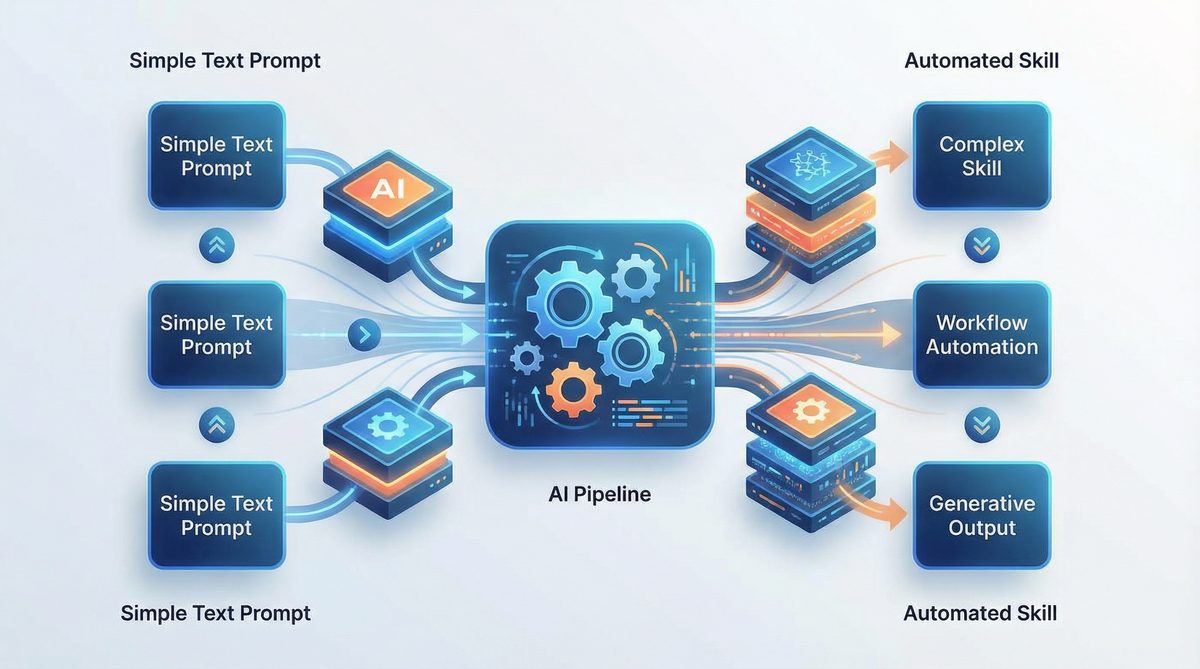
In 2026, prompt engineering has shifted dramatically from the early days of one-shot prompting toward designing reusable AI skills—modular, composable workflows that can be deployed across various AI platforms seamlessly. Initially, prompt engineering focused on crafting a single input to elicit a desirable output. However, this approach proved brittle and inefficient for complex, multi-step tasks.
One-shot prompting, while effective for simple and isolated queries, quickly revealed its limitations as AI applications grew more sophisticated. For example, a single prompt might generate a summary but fail to maintain consistency across multiple related tasks, such as data extraction and formatting. This fragility led to a growing need for designing prompts not as isolated commands but as components within larger, maintainable workflows.
Now, prompt workflows encapsulate a series of logical steps, each with clear roles, context, and constraints, enabling AI models to handle sophisticated scenarios with minimal human intervention. This evolution mirrors software development paradigms, with prompts serving as the “functions” or “modules” of AI automation, fostering reuse, maintenance, and scalability.
These reusable prompt workflows bring a new level of professionalism and engineering discipline to AI application development. They allow teams to collaborate on prompt design, version their prompts, and incorporate them into CI/CD pipelines for AI-driven products. By treating prompts as first-class artifacts, organizations reduce duplication of effort and accelerate the delivery of AI features.
Reusable prompt workflows enable developers and AI practitioners to build AI skills that grow over time, incorporating feedback, iterating on design, and adapting to new domains. They represent a fundamental shift in how AI is integrated into product and business processes.
For instance, a financial services company might start with a prompt that generates quarterly earnings summaries and gradually evolve it into an AI skill that analyzes market trends, produces risk assessments, and even drafts investor communications—all while leveraging the same underlying prompt components.
Prompt Engineering Fundamentals
At the core of building reusable prompt workflows lie four foundational principles: clarity, context, constraints, and iteration. Mastering these is essential for creating robust, maintainable prompts.
Clarity
Clear instructions reduce ambiguity, improve response quality, and simplify debugging. Effective prompts use precise language, avoid vague terms, and explicitly specify the desired format or output style.
Achieving clarity often requires anticipating potential misunderstandings by the AI model and preemptively addressing them. For example, specifying units of measurement, expected tone, or the level of detail can dramatically improve output relevance.
Example:
"Summarize the following article in 3 bullet points, each under 20 words."
Beyond simple directives, clarity also involves structuring prompts to guide the AI’s focus. For instance, using numbered steps or clearly separated sections helps the model parse requirements systematically.
Context
Providing relevant context guides the AI’s understanding and prevents hallucinations. This includes background information, domain-specific terminology, and previous conversation history where applicable.
Context can span multiple dimensions, such as temporal (time-sensitive data), spatial (geographical relevance), or domain-specific knowledge. Incorporating this effectively often requires dynamically embedding related information within the prompt to ground the AI’s responses.
Example:
"You are a cybersecurity analyst. Review this log file and identify potential threats."
In multi-turn conversations or workflows, maintaining context across prompts is crucial to avoid repetitive clarifications or contradictory outputs. Techniques like context window management and summarization of prior interactions help sustain coherent AI behavior.
Constraints
Constraints limit the model’s response scope, ensuring outputs meet requirements such as length, style, or data formats. This is critical for workflows needing structured outputs or integration with downstream systems.
In addition to output formatting, constraints can enforce compliance with ethical guidelines, regulatory standards, or brand voice. For example, a prompt for customer communication might include constraints to avoid certain language or ensure inclusivity.
Example:
"Provide the answer in JSON format with fields: 'name', 'age', and 'occupation'."
Well-defined constraints reduce downstream processing errors and simplify the parsing of AI outputs by automated systems, enabling smoother integration into enterprise workflows.
Iteration
Iterative refinement is a cornerstone of prompt engineering. Testing and adjusting prompts based on model behavior leads to continuous improvement in accuracy and reliability.
Iteration encompasses not only modifying prompt wording but also experimenting with prompt length, example inclusion, and ordering of instructions. Often, subtle changes yield disproportionate improvements in output quality.
Example:
Initial prompt: "Explain blockchain."
Refined prompt: "Explain blockchain technology in simple terms for a high school student."
Adopting a systematic approach to iteration—logging prompt versions, tracking performance metrics, and collecting user feedback—enables teams to evolve prompts into sophisticated AI skills capable of handling edge cases and expanding use scenarios.
For a detailed exploration of the foundational prompt engineering techniques, including the latest best practices in 2026, refer to our comprehensive guide on ChatGPT prompt engineering.
Building Prompt Chains and Multi-Step Workflows
Complex AI tasks often require chaining multiple prompts to structure reasoning, data extraction, or tool use. Prompt chains enable dividing a task into manageable steps, each handled by a dedicated prompt or subworkflow.
Prompt chaining allows the decomposition of tasks that would otherwise overwhelm a single prompt with complexity, length, or conflicting objectives. Each chain link can be independently tested, optimized, and replaced without disrupting the entire workflow.
Consider a research assistant workflow that:
- Extracts key facts from a source document.
- Generates a summary based on extracted facts.
- Formats the summary into a presentation slide outline.
Each step is a reusable prompt module, and the outputs feed into subsequent prompts.
Example: A Three-Step Prompt Chain for Research Summarization
# Step 1: Extract key facts
Prompt: "Extract the top 5 key facts from the following text."

# Step 2: Summarize facts
Prompt: "Summarize these facts into a concise paragraph."

# Step 3: Format as slide outline
Prompt: "Convert the summary into a bulleted slide outline."
This modular approach facilitates parallel development and maintenance. For example, if the summarization method needs improvement, only the second prompt requires adjustment, leaving extraction and formatting intact.
Conditional Branching and Error Handling in Prompt Chains
Advanced prompt chains incorporate logic to handle diverse scenarios, including conditional branching based on intermediate outputs or errors. For instance, if key facts extraction returns insufficient data, the workflow might trigger a fallback prompt requesting additional input or clarification.
Such error handling mechanisms increase the resilience and user-friendliness of AI workflows, making them suitable for production environments where robustness is paramount.
Parallelization and Scalability
Some workflows benefit from parallel execution of prompt chains, especially when processing large datasets or multiple queries simultaneously. Modern AI orchestration platforms support parallelization, enabling prompt modules to run concurrently and aggregate results efficiently.
This capability is essential for scaling AI applications to enterprise-grade volumes and latency requirements.
Prompt chains can be orchestrated manually or via AI workflow automation platforms that support conditional branching, parallelization, and error handling.
For more on designing and deploying complex AI workflows, see our in-depth coverage of AI workflow automation, which details tools and methodologies for building scalable prompt-driven processes.
Creating Portable Prompts Across AI Models
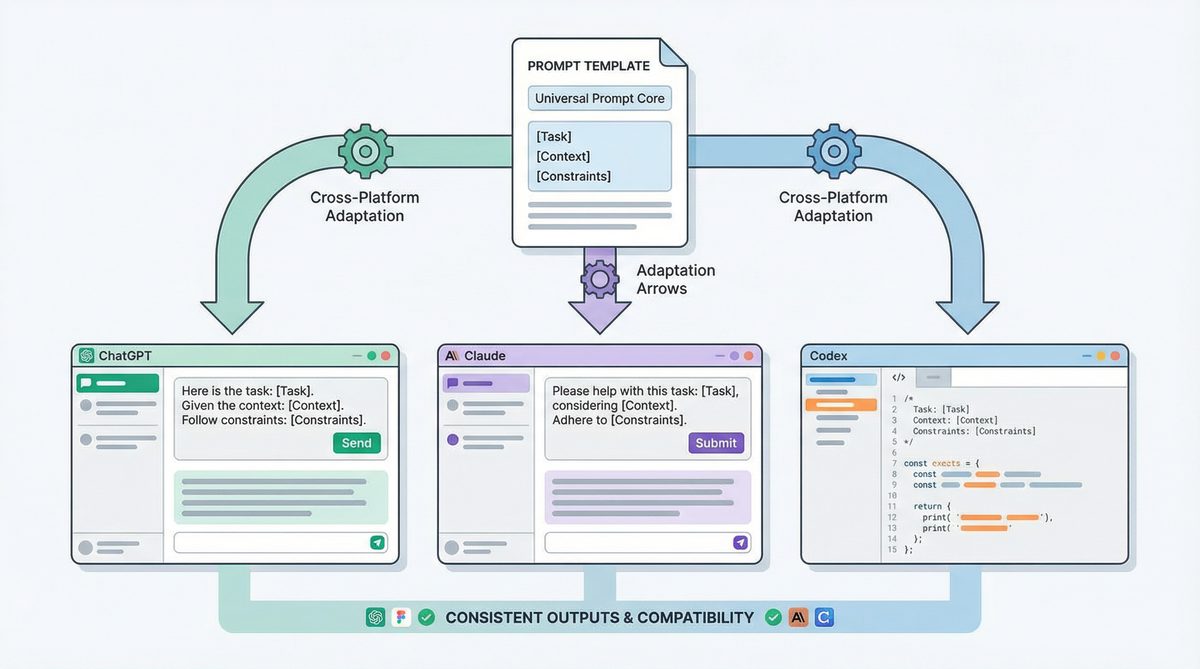
In 2026, AI developers demand prompt templates that work reliably across multiple large language models (LLMs) such as ChatGPT, Claude, and OpenAI Codex. Portability ensures flexibility, mitigates vendor lock-in, and leverages unique model strengths.
Portability also facilitates cross-team collaboration and reuse of prompt assets, reducing the overhead of maintaining multiple model-specific prompt versions. Achieving portability, however, requires careful prompt design that abstracts away from model idiosyncrasies.
Key strategies for portable prompts include:
- Generic phrasing: Avoid model-specific jargon or assumptions.
- Explicit role definitions: Specify the AI’s persona or function clearly.
- Consistent output constraints: Use standard formats like JSON, Markdown, or CSV.
- Minimal reliance on model-specific tokens or system prompts.
Challenges in Prompt Portability
Despite best practices, some challenges persist. Different LLMs may interpret instructions with subtle variations, affecting tone, verbosity, or factual accuracy. Additionally, system prompt mechanisms vary between platforms, requiring adaptation in workflow integration.
Developers often need to maintain a “compatibility layer” or small conditional adjustments within prompt templates to account for these differences, balancing portability with optimal performance.
Example of Portable Prompt Across Models
Below is a portable prompt example for generating a product description:
Prompt:
"You are a marketing specialist. Write a persuasive product description for a wireless noise-cancelling headphone. Limit to 100 words, and highlight battery life and comfort."
This prompt works effectively with ChatGPT, Claude, and Codex, producing comparable outputs with minor differences in style. Adjusting the prompt to include explicit formatting instructions such as bullet points or JSON fields can further enhance portability.
System Prompts vs User Prompts vs Tool-Use Prompts
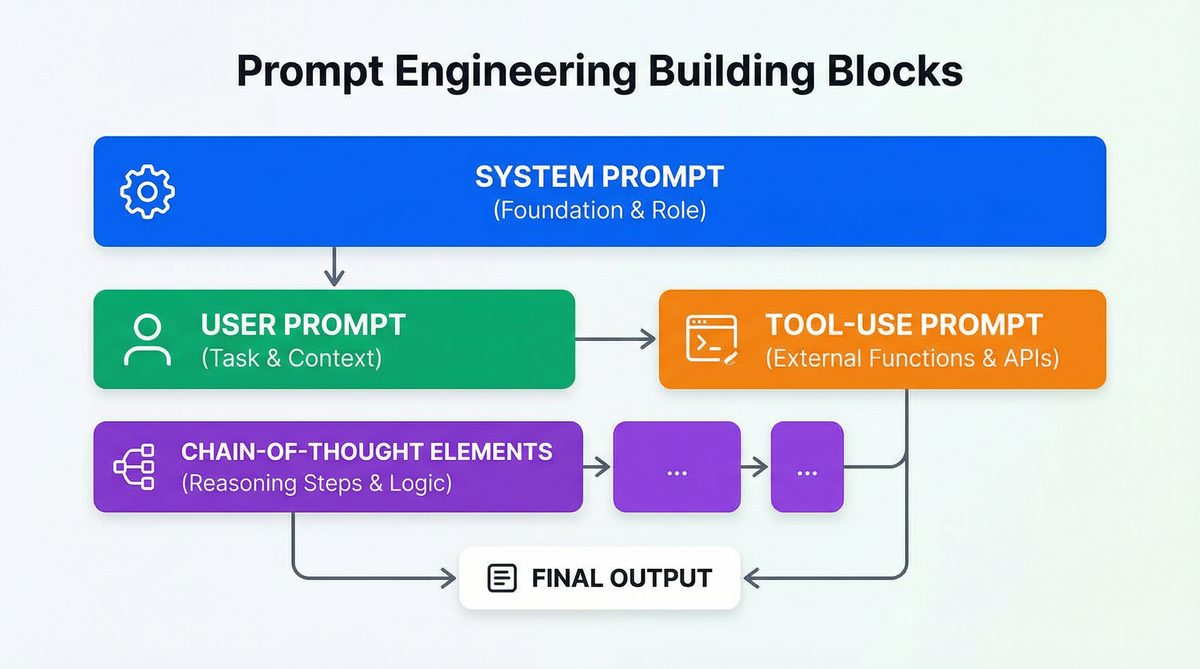
Understanding the distinctions between prompt types is critical for designing reusable workflows.
| Prompt Type | Definition | Purpose | Typical Usage |
|---|---|---|---|
| System Prompt | Defines the AI’s role, tone, and global instructions. | Sets initial context and constraints for all interactions. | “You are a helpful assistant that always responds concisely.” |
| User Prompt | Input from the end-user asking for specific information or actions. | Directs AI to perform a task or answer a question. | “Explain the causes of inflation.” |
| Tool-Use Prompt | Prompts invoking external APIs, databases, or AI tools. | Enable AI to augment reasoning with external data or capabilities. | “Search Wikipedia for the latest statistics on renewable energy.” |
Integrating Prompt Types into Workflows
In practical AI systems, these prompt types interact seamlessly. For example, a system prompt might set the assistant’s overall behavior, while user prompts drive specific queries. Tool-use prompts are dynamically generated or invoked when external data or computational resources are necessary.
Understanding and properly leveraging these distinctions enables more precise control over AI behavior, reducing errors and improving user experience.
Agentic Prompting: Equipping AI with Tools and Reasoning
Agentic prompting is a paradigm where AI models are empowered to autonomously decide when and how to use external tools, APIs, or other AI models to fulfill complex tasks. This requires designing prompts that embed reasoning instructions and tool invocation capabilities.
Agentic AI represents a leap from reactive text generation toward proactive, autonomous problem-solving. Instead of passively responding, the AI evaluates the task requirements, determines knowledge gaps, and orchestrates multiple resources to generate comprehensive answers.
For example, a prompt may instruct an AI to:
- Analyze a user query.
- Determine if external data is needed.
- Invoke an API or database query.
- Integrate results and produce a final answer.
This model of AI behavior supports sophisticated applications such as dynamic research assistants, intelligent customer support agents, and automated data analysts capable of bridging knowledge silos.
Example: Agentic Prompt with Tool Invocation
System prompt:
"You are an AI assistant with access to a weather API. When asked about the weather, query the API with the specified location and date, then summarize the forecast."

User prompt:
"What will the weather be like in New York City tomorrow?"
The AI model internally reasons: detect weather-related query → call the weather API → format and return results. This approach is central to modern AI assistants and automations.
Design Considerations for Agentic Prompting
Effective agentic prompting requires explicit instructions on when and how to invoke tools, as well as error handling for failed API calls or ambiguous queries. Embedding reasoning chains that verify tool outputs before responding enhances reliability.
Security and privacy considerations are also paramount; prompts must limit unauthorized data access and ensure compliance with governance policies when invoking external resources.
For advanced details on agentic prompting and how Claude implements reasoning with tool use, see Claude prompting techniques.
Prompt Templates for Common Tasks
Reusable prompt templates accelerate development by standardizing instructions for frequent use cases. Below are practical templates for key domains.
Coding Assistance
Prompt:
"You are an expert Python developer. Write a function that takes a list of integers and returns a sorted list without duplicates. Include error handling for invalid inputs."
Expanding on this template, developers can incorporate style guides, performance constraints, or even testing hooks. For example, adding instructions to optimize for time complexity or to include type hints enhances prompt utility.
Research Summarization
Prompt:
"Summarize the following scientific abstract in 5 bullet points, emphasizing methodology and key findings."
Additional parameters might specify target audiences (e.g., experts vs. laypersons), highlighting implications or limitations, or requesting citations for key data points.
Content Creation
Prompt:
"Write a 500-word blog post introducing the benefits of electric vehicles for urban commuters. Use a friendly but professional tone."
Content templates can also include SEO keyword integration, calls to action, or adaptation for different platforms such as LinkedIn versus company blogs.
Data Analysis
Prompt:
"Analyze this sales dataset and provide insights on quarterly performance trends. Present the results in a markdown table."
To deepen analysis, prompts can be extended to request anomaly detection, correlation analysis, or forecasting, depending on the use case.
Customer Support Automation
Prompt:
"You are a customer support agent. Respond politely to a user who is frustrated about delayed shipping and provide next steps."
Templates can also be parameterized for varying customer sentiment levels, escalation protocols, or multilingual support.
Each template can be parameterized and incorporated into larger prompt workflows, improving consistency and reducing manual prompt engineering effort.
Testing and Iterating on Prompts Systematically
Systematic testing and iteration are vital for ensuring prompt workflows perform reliably in production. Key methodologies include:
- Test Suites: Create datasets of representative inputs and expected outputs to validate prompt behavior.
- A/B Testing: Compare prompt variants on live or simulated queries to measure improvements.
- Automated Regression: Run periodic tests to detect prompt drift as models evolve.
- Human-in-the-Loop: Incorporate expert review to catch subtle errors and biases.
Metrics and Evaluation Criteria
Effective prompt testing requires clear evaluation metrics, which may include accuracy, relevance, conciseness, and compliance with output format. For example, in a customer support context, metrics might also assess tone appropriateness and conflict resolution effectiveness.
Tools Supporting Prompt Testing
Prompt playgrounds offer interactive environments to experiment with prompt variations and visualize outputs. Version control systems track changes and enable rollback. Logging frameworks capture model outputs in production for continuous monitoring and error analysis.
Combining automated tests with periodic human audits ensures prompt workflows remain robust despite updates to underlying AI models or shifting user requirements.
Growing Prompts Into AI Skills: Portable, Reusable Automations
The concept of “growing prompts into AI skills” describes the process of evolving simple prompt snippets into comprehensive, reusable AI automations embedded within applications or services. These AI skills:
- Encapsulate domain knowledge and task logic.
- Are decoupled from specific model APIs.
- Support parameterization and chaining.
- Integrate with external tools and data sources.
Developing AI skills often involves layering complexity incrementally, starting with basic prompt responses and adding features such as error recovery, user intent detection, and multi-modal inputs.
For example, a customer service AI skill may start as a prompt for answering FAQs and evolve into a multi-modal agent that handles ticket routing, sentiment analysis, and proactive notifications.
Versioning and Collaboration
AI skills benefit from software engineering best practices such as semantic versioning, branching, and peer review. Teams can share AI skills in centralized repositories, enabling reuse and continuous improvement across projects and departments.
Integration with Business Processes
Reusable AI skills are designed to plug into broader business workflows, whether through APIs, chatbots, or embedded interfaces. This integration enhances operational efficiency and allows AI capabilities to scale beyond isolated experimentation.
Advanced Techniques: Few-Shot, Chain-of-Thought, and Tree-of-Thought Prompting
Beyond basic prompting, advanced techniques enhance reasoning and accuracy, especially for complex problem-solving tasks.
Few-Shot Learning
Few-shot prompting provides the model with examples of input-output pairs within the prompt to guide generation. This technique reduces ambiguity and improves precision.
Example:
"Translate English to French:

English: 'Hello, how are you?'
French: 'Bonjour, comment ça va?'

English: 'Thank you very much.'
French:"
Few-shot examples can be carefully curated to cover edge cases or emphasize desired styles. However, including too many examples may exceed token limits or confuse the model, so balance is key.
Chain-of-Thought Prompting
Chain-of-thought (CoT) prompting encourages the model to explicitly articulate reasoning steps before producing a final answer. It improves performance on tasks requiring multi-step logic, such as math problems or code debugging.
Example:
"Question: If a train travels 60 miles in 1 hour, how far does it travel in 3 hours?

Let's think step-by-step:
1. The train travels 60 miles per hour.
2. In 3 hours, it travels 3 × 60 = 180 miles.
Answer: 180 miles."
CoT prompting can be combined with few-shot learning by providing examples of detailed reasoning chains. This synergy often yields superior results on complex reasoning tasks.
Tree-of-Thought Prompting
Tree-of-thought (ToT) prompting extends CoT by exploring multiple reasoning paths in parallel, allowing the model to evaluate alternatives before selecting the best conclusion. This is useful for decision-making and creative tasks.
Example:
"Consider different approaches to solve this puzzle:

- Approach 1: ...
- Approach 2: ...
- Evaluate pros and cons of each before deciding."
Implementing ToT requires managing branching logic and aggregating outputs, often supported by AI orchestration frameworks. This technique enhances creativity and robustness by avoiding premature commitment to a single reasoning path.
How Claude Code and OpenAI Codex Use Structured Prompts Internally
Claude Code and OpenAI Codex leverage structured prompt formats to optimize code generation and reasoning. Unlike natural language-only prompts, these models accept hybrid prompts combining natural language instructions with code snippets, annotations, and explicit metadata.
For instance, Codex uses comment-based directives and input-output examples embedded within the prompt to guide code completion. Claude Code incorporates prompt tokens that signal code language, expected function signatures, and test cases.
Such structured prompts enhance model understanding, reduce ambiguity, and allow for more precise outputs, especially in programming tasks requiring strict syntax and semantics.
Example of Structured Prompting in Code Generation
# Function: Calculate factorial recursively
# Input: integer n >= 0
# Output: integer factorial of n

def factorial(n):
    if n == 0:
        return 1
    else:
        return n * factorial(n-1)
Embedding these annotations within prompts enables Codex and Claude Code to generate accurate, well-documented, and testable code snippets aligned with user intent.
Benefits of Structured Prompts for Developers
Structured prompts facilitate automated testing by including expected outputs and edge case descriptions. They also support integration with IDEs and code review tools, enhancing developer productivity and reducing bugs.
Real-World Examples with Actual Prompt Text
Example 1: Multi-Step Coding Workflow
System prompt:
"You are a senior software engineer. Follow the user's instructions to write, test, and document Python code."

User prompt:
"Write a Python function to calculate the factorial of a number using recursion."

Follow-up prompt:
"Provide 3 test cases for this function with expected outputs."

Follow-up prompt:
"Document the function using Google-style docstrings."
This multi-step workflow ensures not only code generation but also quality assurance and documentation, aligning with software engineering best practices.
Example 2: Research Paper Summarization Chain
Step 1 - Extraction:
"Extract the abstract and key findings from this paper."

Step 2 - Simplification:
"Rewrite the key findings in layman's terms suitable for a general audience."

Step 3 - Formatting:
"Format the simplified findings into a newsletter bullet list."
This chain exemplifies how modular prompts transform complex academic content into accessible formats for broader consumption.
Example 3: Customer Support Agentic Prompt
System prompt:
"You are a virtual customer support assistant with access to the order database and shipping API."

User prompt:
"My order #12345 hasn't arrived yet. Can you check the status?"

Agentic prompt:
"Query the order database for order #12345, retrieve shipping status, and respond with estimated delivery date and any delays."
Here, the AI autonomously integrates external data sources to provide timely and precise customer responses.
Example 4: Data Analysis and Visualization
Prompt:
"Analyze the provided monthly sales data and generate a summary report. Include a line chart of sales trends over six months in Markdown format."
Combining natural language analysis with visual output empowers users to quickly interpret performance metrics without manual chart creation.
Example 5: Cross-Platform Portable Prompt
Prompt:
"You are a professional copywriter. Create a catchy tagline for a new eco-friendly cleaning product. Keep it under 10 words and emphasize sustainability."
Designed with generic phrasing and clear constraints, this prompt performs reliably across multiple LLMs, illustrating portability best practices.
Comparing Prompting Approaches Across Models
| Feature | ChatGPT (GPT-4) | Claude (Anthropic) | OpenAI Codex |
|---|---|---|---|
| Core Strength | Conversational AI, general knowledge, multi-turn dialogue | Safety-focused, aligned reasoning, agentic prompting | Code generation, structured programming tasks |
| Prompt Format | System + User prompts with conversational context | Role-based, safety guardrails, explicit task framing | Hybrid natural language and code snippets with annotations |
| Support for Chain-of-Thought | Strong; widely used in reasoning tasks | Very strong; emphasizes ethical and safe reasoning | Limited; focused on code logic |
| Agentic Prompting | Supported via plugins and external tool calls | Natively integrated with tool-use and reasoning | Supports API calls for code execution |
| Prompt Portability | High, with minor adjustments for system prompt syntax | High, due to explicit role descriptions | Moderate; requires code annotation consistency |
Workflow Design Principles for Reusable Prompt Automation
To build effective prompt workflows in 2026, consider the following design principles:
- Modularity: Separate concerns by creating small, focused prompts that can be recombined.
- Parameterization: Design prompts that accept variable inputs, such as user queries, data snippets, or formatting options.
- Context Management: Maintain or reset context appropriately in multi-turn interactions to avoid confusion.
- Error Handling: Anticipate ambiguous inputs or model failures and design fallback prompts or clarifications.
- Cross-Platform Testing: Validate prompts on all target models to ensure consistent behavior.
- Documentation: Maintain clear prompt documentation, including purpose, input/output formats, and version history.
Modularity in Depth
Modularity enables prompt developers to isolate functionality, making workflows easier to debug and update. For example, a sentiment analysis prompt can be developed independently from a summarization prompt, yet combined seamlessly in an end-to-end workflow.
Reusable prompt modules can also be combined hierarchically, where higher-level workflows orchestrate multiple lower-level modules, supporting complex AI behaviors through composition.
Parameterization Strategies
Parameterizing prompts with placeholders or variables allows the same template to adapt dynamically. For instance, a date variable can tailor a reporting prompt to different time periods without rewriting instructions.
Advanced parameterization may include conditional logic within prompts, adapting instructions based on input values or user roles, enhancing flexibility and personalization.
Context Management Techniques
Effective context management involves deciding when to preserve conversation history and when to reset it to prevent drift or confusion. Techniques include summarizing prior interactions, truncating irrelevant details, or explicitly restating goals at each step.
Context windows differ across models; understanding and optimizing token budgets is critical for sustained coherence in multi-turn workflows.
Error Handling Best Practices
Robust prompt workflows anticipate failure modes such as ambiguous queries, incomplete data, or model hallucinations. Designing fallback prompts, clarification requests, or user confirmations mitigates these risks.
In agentic systems, error handling extends to API failures or inconsistent external data, requiring prompts that detect and respond gracefully to such issues.
Cross-Platform Testing Importance
Rigorous testing across all target models ensures consistent user experiences and reduces surprises in deployment. Automated pipelines can run suite tests on multiple LLMs, flagging divergences for review.
Documentation as a Collaborative Tool
Clear documentation of prompt designs, including intended use cases, input/output schemas, and known limitations, supports collaboration among developers, prompt engineers, and stakeholders. It also facilitates onboarding and knowledge transfer.
Conclusion
Building reusable prompt workflows in 2026 requires mastery of prompt engineering fundamentals, an understanding of multi-step chaining, and the ability to design portable templates compatible across leading AI models. Agentic prompting and advanced reasoning techniques further enhance AI’s autonomy and reliability in complex scenarios.
By growing prompts into AI skills—modular, reusable automations—developers can unlock scalable, maintainable AI-powered solutions that adapt to evolving requirements. Systematic testing, iteration, and cross-model validation ensure robustness and future-proofing in an increasingly heterogeneous AI ecosystem.
This comprehensive approach, supported by concrete examples and practical templates, equips AI practitioners to harness the full potential of large language models in 2026 and beyond.