
50 GPT-5.5 Prompts for DevOps Engineers: CI/CD Pipelines, Infrastructure as Code, Monitoring, and Incident Response
By Markos Symeonides
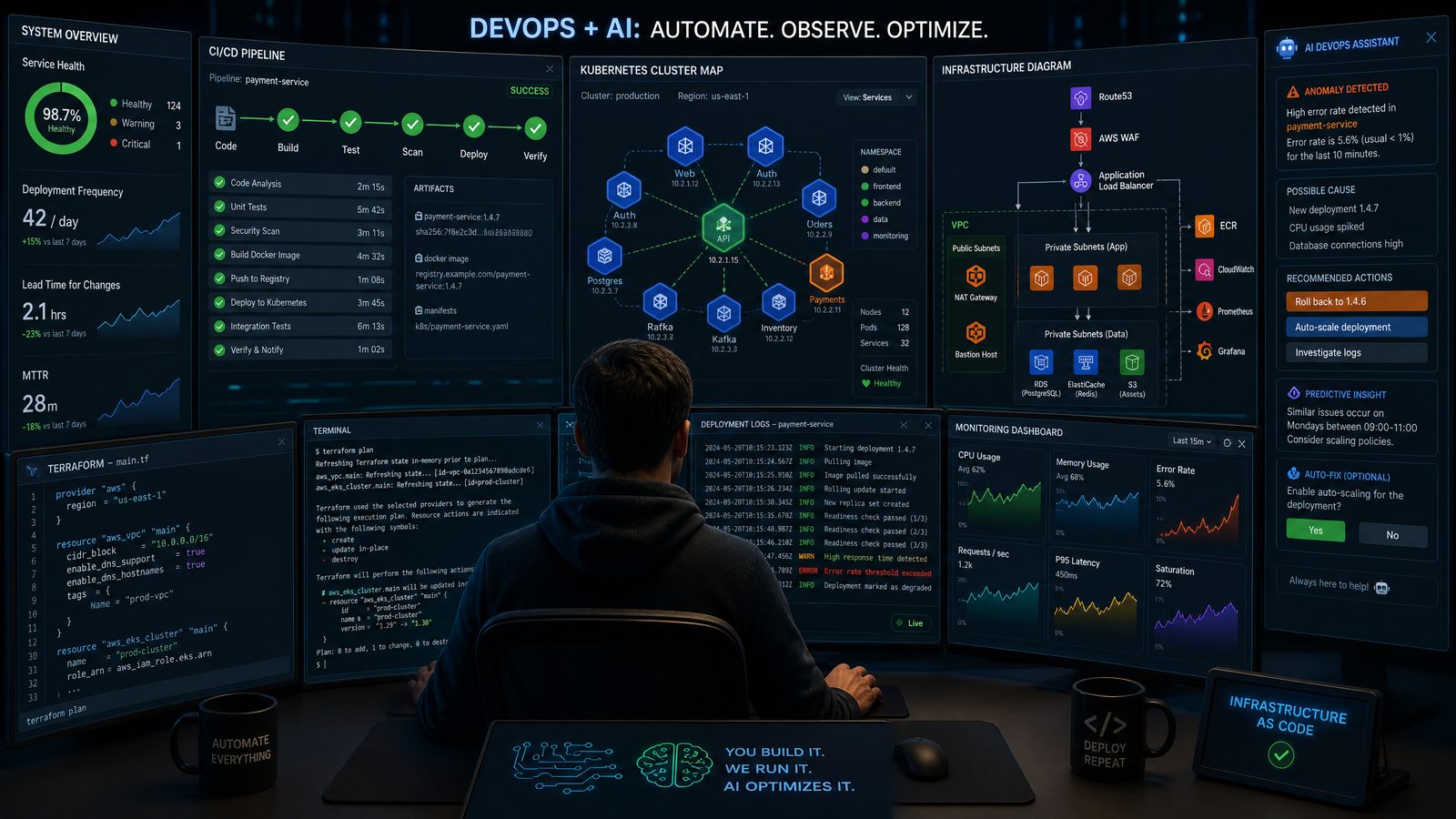
DevOps work is increasingly defined by the ability to translate operational intent into repeatable automation. GPT-5.5 can be a powerful accelerator for that translation layer, especially when prompts are structured with precise context, constraints, target platforms, and expected deliverables. For DevOps engineers, the difference between a vague request and a production-grade prompt can be the difference between a generic YAML snippet and a usable pipeline with security gates, rollback logic, artifact provenance, and measurable deployment controls.
This guide provides 50 practical GPT-5.5 prompts organized into five core DevOps domains: CI/CD pipeline automation, Infrastructure as Code with Terraform and Pulumi, Kubernetes operations, monitoring and observability, and incident response. Each prompt includes three elements: context setup, full prompt text, and expected output format. The goal is not to replace engineering judgment, but to help teams generate stronger first drafts, review complex configurations faster, and standardize operational workflows across environments.
Use these prompts as templates. Replace bracketed variables such as [cloud provider], [service name], [runtime], [region], and [compliance requirement] with your actual environment details. For regulated or production environments, always review GPT-generated code, policy, and runbooks through your normal peer review, security review, and change management process.
How DevOps Engineers Should Prompt GPT-5.5
DevOps prompting works best when you provide operational context before asking for output. GPT-5.5 can reason across architecture, release management, security, observability, and failure modes, but it needs clear boundaries. A good DevOps prompt explains what system is being deployed, where it runs, how it is released, what risks must be controlled, and what format the answer should take.
For example, asking GPT-5.5 to “create a CI/CD pipeline” is too broad. Asking it to “create a GitHub Actions workflow for a Node.js API deployed to Amazon ECS Fargate, with build caching, unit tests, Trivy image scanning, OpenID Connect authentication to AWS, blue-green deployment, and rollback instructions” is significantly more useful. The second prompt tells the model what platform to target, which security model to use, what deployment strategy matters, and what operational behavior is expected.
When prompting for infrastructure or automation, include these details wherever possible:
- Platform: GitHub Actions, GitLab CI, Jenkins, Azure DevOps, Argo CD, Spinnaker, Terraform Cloud, Pulumi Cloud, Amazon EKS, Google Kubernetes Engine, Azure Kubernetes Service, or self-managed Kubernetes.
- Runtime and workload: Node.js, Python, Go, Java, .NET, containerized service, scheduled job, data pipeline, serverless function, or stateful service.
- Environment model: development, staging, production, ephemeral preview environments, multi-region active-active, blue-green, canary, or rolling deployment.
- Security constraints: least privilege IAM, secrets management, SLSA provenance, software bill of materials, vulnerability thresholds, policy-as-code, encryption, network segmentation, or audit logging.
- Reliability constraints: service-level objectives, rollback targets, health checks, error budgets, deployment windows, runbook requirements, or disaster recovery objectives.
- Output format: YAML, HCL, TypeScript, Python, shell script, Helm values, Kustomize patches, PromQL rules, incident timeline, postmortem template, or implementation checklist.
To understand the broader implications of these developments for your AI strategy, our in-depth coverage of Mastering Custom GPTs: How Developers Can Build and Deploy Tailored AI Assistants Using OpenAI’s Latest API Features examines the technical architecture, pricing considerations, and enterprise deployment patterns that define the current generation of AI capabilities.
Prompting Principles for Safe DevOps Automation
GPT-5.5 can produce highly detailed DevOps artifacts, but generated automation should be treated as a proposal, not an automatic source of truth. The best approach is to use GPT-5.5 for drafting, comparison, refactoring, documentation, and operational analysis while preserving human approval for production changes.
Five principles are especially important:
- Ask for assumptions explicitly. Require GPT-5.5 to list its assumptions before generating code. This makes hidden decisions visible, such as default regions, runtime versions, or IAM permissions.
- Specify failure handling. Pipelines and infrastructure code should include rollback behavior, timeout limits, retry logic, and validation steps.
- Request security notes. Ask for least-privilege policies, secret handling guidance, vulnerability scanning, and safe defaults.
- Demand reviewable output. Use structured output: files, commands, checklists, diffs, tables, or runbooks. Avoid free-form prose when you need implementation details.
- Separate generation from execution. Never pipe generated scripts directly into production shells. Review, test, and version changes first.
A strong DevOps prompt often includes a built-in review step. For instance, after asking GPT-5.5 to generate Terraform, ask it to produce a risk analysis, test plan, and list of resources that may be recreated. When generating Kubernetes manifests, ask it to include resource requests, readiness probes, PodDisruptionBudgets, NetworkPolicies, and securityContext settings. When creating alerting rules, ask for severity mapping, runbook references, and alert fatigue risks.
Practical rule: If a generated artifact can change production behavior, require GPT-5.5 to provide validation commands, rollback steps, and a human review checklist in the same response.
Quick Reference: Choosing the Right Prompt Pattern
The following table summarizes which prompt style works best for common DevOps tasks. Use it as a routing guide before selecting one of the 50 prompts below.
| DevOps Task | Best Prompt Pattern | Expected Output | Review Priority |
|---|---|---|---|
| Build and deploy a service | Pipeline generation with platform, runtime, deployment target, and security gates | CI/CD YAML, environment variables, secrets list, validation steps | High: credentials, deployment permissions, rollback logic |
| Create cloud infrastructure | IaC module generation with resource naming, state strategy, tagging, and compliance constraints | Terraform HCL or Pulumi code, variables, outputs, README, plan checklist | Very high: cost, deletion risk, identity, networking |
| Operate Kubernetes workloads | Manifest or Helm generation with probes, resource limits, security context, and rollout policy | YAML manifests, Helm values, kubectl validation commands | High: availability, permissions, cluster policy |
| Improve observability | Telemetry design with SLIs, SLOs, dashboards, alerts, and log fields | PromQL, OpenTelemetry config, dashboard panels, alert rules | Medium-high: alert noise, missing signals, data cost |
| Respond to incidents | Runbook and triage workflow with symptoms, impact, commands, escalation, and communication | Incident checklist, command sequence, status update templates, postmortem outline | Very high: operational safety, customer impact, escalation accuracy |
The prompts that follow are intentionally written in a copy-adapt-run style. Most include operational constraints directly in the prompt text so that GPT-5.5 produces reviewable outputs rather than generic advice. Where code-like structure is useful, the prompts request files, directory layouts, YAML, HCL, commands, or structured tables.
Section 1: 10 GPT-5.5 Prompts for CI/CD Pipeline Automation
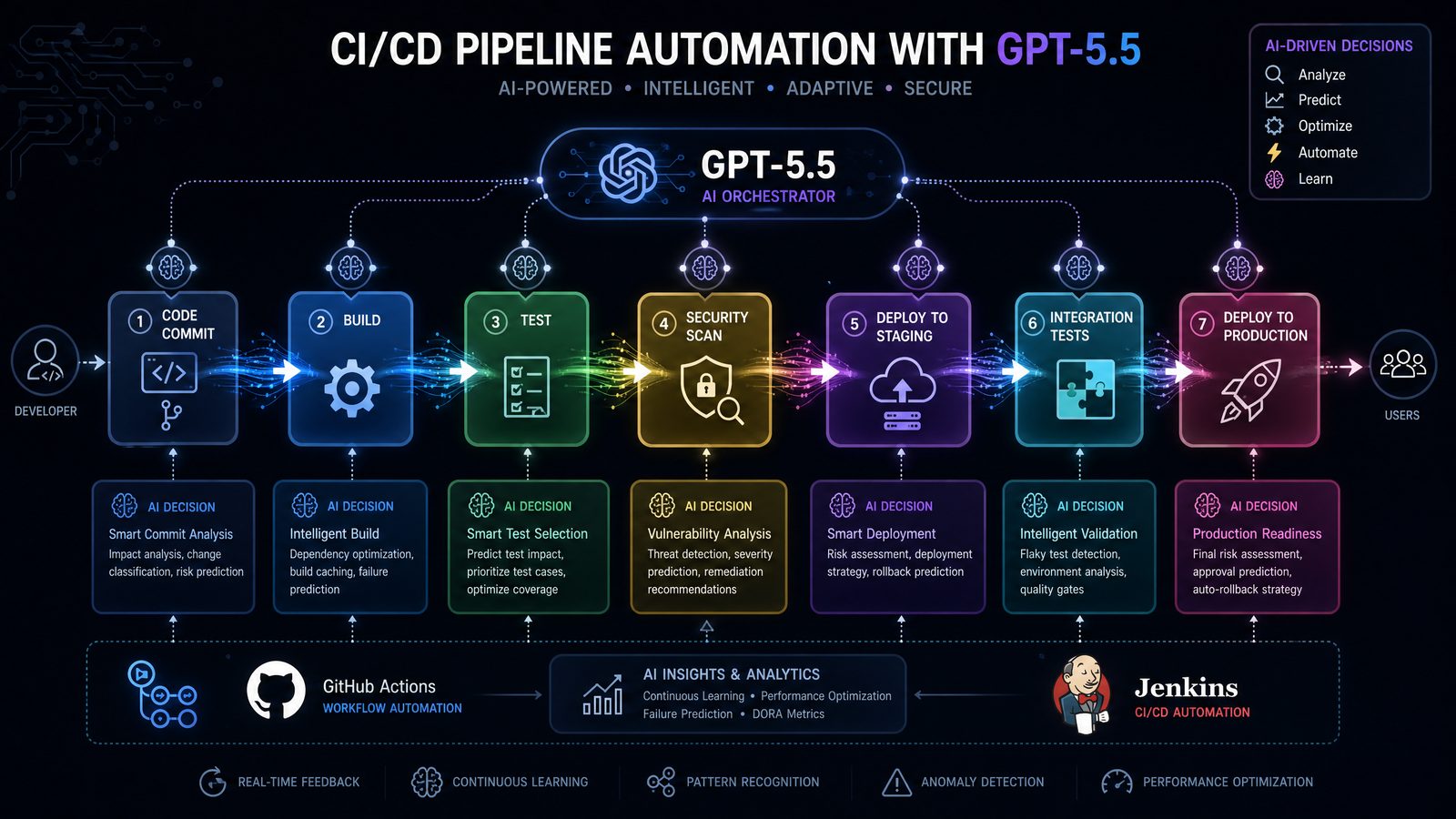
CI/CD is one of the highest-leverage areas for DevOps prompting. GPT-5.5 can help generate pipeline workflows, identify gaps in release controls, refactor old scripts, and standardize deployment processes across repositories. The key is to specify the source control platform, build tool, deployment target, artifact strategy, and security requirements.
1. Generate a Secure GitHub Actions Pipeline for a Containerized API
Context setup: Use this when you need a production-grade GitHub Actions workflow for a containerized service deployed to a cloud container platform.
Full prompt:
Act as a senior DevOps engineer. Generate a GitHub Actions CI/CD workflow for a containerized [runtime] API named [service name]. The repository uses [package manager/build tool], Docker, and deploys to [deployment target]. Requirements:
- Run linting, unit tests, and integration tests
- Build a Docker image with layer caching
- Generate an SBOM
- Scan the image with Trivy and fail on critical vulnerabilities
- Authenticate to [cloud provider] using OIDC, not static credentials
- Push the image to [container registry]
- Deploy to staging automatically on main branch
- Require manual approval for production
- Include rollback instructions
- Use least-privilege permissions

Expected output format:
1. Complete workflow YAML
2. Required repository secrets or variables
3. Required cloud IAM permissions
4. Rollback procedure
5. Security review checklist
2. Convert a Legacy Jenkinsfile to GitLab CI
Context setup: Use this when migrating from Jenkins to GitLab CI while preserving build, test, and deployment stages.
Full prompt:
You are helping migrate a Jenkins pipeline to GitLab CI. I will provide the existing Jenkinsfile below. Convert it into a production-ready .gitlab-ci.yml for [application type]. Preserve the same build, test, packaging, and deployment behavior, but improve security and maintainability where appropriate. Use GitLab environments, artifacts, cache, rules, and protected deployments.

Existing Jenkinsfile:
[paste Jenkinsfile]

Constraints:
- Do not use privileged runners unless unavoidable
- Separate staging and production deployments
- Use environment-scoped variables
- Add vulnerability scanning if practical
- Explain any behavior that cannot be mapped directly

Expected output format:
1. Complete .gitlab-ci.yml
2. Migration notes table
3. Required GitLab variables
4. Runner requirements
5. Risks and validation plan
3. Design a Multi-Environment Release Pipeline
Context setup: Use this prompt to design promotion flow across development, staging, and production.
Full prompt:
Design a CI/CD release pipeline for [service name], a [runtime/framework] application deployed to [platform]. The pipeline must support development, staging, and production environments. Development deploys on feature branch merge, staging deploys on main, and production deploys only after approval. Include versioning, artifact immutability, smoke tests, database migration handling, and rollback strategy.

Expected output format:
1. Pipeline architecture overview
2. Stage-by-stage workflow table
3. Recommended branching and tagging strategy
4. Deployment gate definitions
5. Sample YAML for [GitHub Actions/GitLab CI/Azure DevOps]
6. Rollback and hotfix process
4. Add Supply Chain Security to an Existing Pipeline
Context setup: Use this when your pipeline exists but lacks provenance, signing, scanning, or policy enforcement.
Full prompt:
Review the following CI/CD pipeline and redesign it to improve software supply chain security. Add dependency scanning, secret scanning, SBOM generation, container image scanning, artifact signing, provenance generation, and deployment policy checks. Keep the pipeline practical for a team of [team size] engineers.

Current pipeline:
[paste YAML or describe stages]

Expected output format:
1. Improved pipeline YAML or pseudocode
2. Supply chain control map
3. Tools recommended for each control
4. Required secrets and permissions
5. Rollout plan with minimal disruption
6. Remaining risks
5. Build a Blue-Green Deployment Pipeline
Context setup: Use this for services where downtime must be minimized and a fast traffic switch is required.
Full prompt:
Create a blue-green deployment pipeline for [service name] running on [AWS ECS/EKS/AKS/GKE/Kubernetes/VMs]. The pipeline should deploy the new version to the inactive environment, run health checks and smoke tests, shift traffic only after validation, and preserve the previous version for rollback. Include handling for database migrations and incompatible schema changes.

Expected output format:
1. Architecture explanation
2. Pipeline YAML for [CI/CD platform]
3. Traffic switching commands or configuration
4. Health check and smoke test scripts
5. Database migration strategy
6. Rollback sequence and failure conditions
6. Create a Canary Deployment Workflow
Context setup: Use this for progressive delivery where risk should be reduced by gradually increasing traffic.
Full prompt:
Generate a canary deployment workflow for [service name] deployed to [Kubernetes/service mesh/cloud platform]. The workflow should release to 5%, 25%, 50%, and 100% traffic stages. At each stage, evaluate error rate, latency p95, saturation, and custom business metric [metric name]. Automatically halt or roll back if thresholds are exceeded.

Expected output format:
1. Progressive delivery strategy
2. CI/CD configuration
3. Traffic routing configuration
4. Metric thresholds and PromQL or provider-specific queries
5. Automated rollback logic
6. Operator override procedure
7. Generate a Monorepo Pipeline with Path-Based Builds
Context setup: Use this for monorepos where only changed services should build and deploy.
Full prompt:
Design a CI/CD pipeline for a monorepo containing these services: [list services and paths]. The pipeline should detect changed paths, run only affected tests, build only affected containers, and deploy only changed services. Include shared library dependency handling and a full rebuild option.

Expected output format:
1. Repository assumptions
2. Path filter configuration
3. Pipeline YAML
4. Dependency graph strategy
5. Artifact naming convention
6. Edge cases and validation commands
8. Optimize Pipeline Performance and Caching
Context setup: Use this prompt when builds are too slow or runner minutes are expensive.
Full prompt:
Analyze the following CI/CD pipeline for performance bottlenecks and propose optimizations. Focus on dependency caching, Docker layer caching, parallel jobs, test splitting, artifact reuse, runner sizing, and unnecessary work elimination.

Pipeline:
[paste YAML]

Repository details:
- Runtime: [runtime]
- Build tool: [tool]
- Average build time: [duration]
- Current bottleneck: [known issue]

Expected output format:
1. Bottleneck analysis table
2. Optimized pipeline YAML
3. Cache key strategy
4. Parallelization plan
5. Estimated time savings
6. Risks introduced by caching
9. Create a Database Migration Gate in CI/CD
Context setup: Use this when application releases include schema changes and you need safer migration controls.
Full prompt:
Create a CI/CD stage for database migration safety for [database engine]. The application uses [migration tool]. The stage must detect destructive migrations, require approval for production schema changes, run migrations in staging, verify backward compatibility, and provide rollback guidance.

Expected output format:
1. Pipeline stage YAML
2. Migration validation script
3. Destructive change detection rules
4. Approval workflow
5. Rollback limitations by migration type
6. Developer checklist
10. Create a Release Notes and Deployment Summary Automation
Context setup: Use this to automatically summarize deployments for engineering and business stakeholders.
Full prompt:
Generate an automated release notes workflow for [CI/CD platform]. It should collect merged pull requests, commit messages, issue IDs, container image digest, deployment environment, migration status, and test results. Produce a concise deployment summary for Slack and a detailed release artifact for audit.

Expected output format:
1. Pipeline job YAML
2. Release notes generation script
3. Slack message template
4. Audit artifact format
5. Required permissions
6. Failure handling behavior
Section 2: 10 GPT-5.5 Prompts for Infrastructure as Code with Terraform and Pulumi
Infrastructure as Code is where GPT-5.5 becomes especially useful, but also where review discipline matters most. Terraform and Pulumi can create, modify, or destroy critical resources. Strong prompts should require modular structure, variable definitions, tagging, state considerations, IAM boundaries, and validation steps. When prompting for Terraform, ask for HCL files organized by purpose. When prompting for Pulumi, specify the language and package ecosystem.
11. Generate a Terraform Module for a Production VPC
Context setup: Use this to create a reusable networking module with public and private subnets.
Full prompt:
Act as a cloud infrastructure architect. Generate a Terraform module for a production VPC on [AWS/Azure/GCP]. Requirements:
- Multi-AZ or multi-zone design
- Public and private subnets
- NAT strategy appropriate for production
- Route tables
- Network ACL or firewall rules if applicable
- DNS support
- Consistent tagging
- Variables and outputs
- Minimal but complete README

Expected output format:
1. File tree
2. main.tf
3. variables.tf
4. outputs.tf
5. versions.tf
6. README.md
7. Security and cost notes
12. Create Terraform for an ECS or Kubernetes-Backed Service
Context setup: Use this for infrastructure supporting a containerized application.
Full prompt:
Create Terraform configuration for deploying [service name] on [AWS ECS Fargate/Amazon EKS/AKS/GKE]. Include networking references, IAM roles, log groups, service discovery, autoscaling, load balancer integration, health checks, and environment-specific variables. Assume the container image is published to [registry].

Expected output format:
1. Terraform file layout
2. Complete HCL configuration
3. Variables and outputs
4. Environment tfvars sample for staging and production
5. IAM permission explanation
6. terraform plan review checklist
13. Refactor Flat Terraform into Reusable Modules
Context setup: Use this when your Terraform repository has grown difficult to maintain.
Full prompt:
Refactor the following Terraform configuration into reusable modules. Preserve behavior but improve structure, naming, variable design, outputs, tagging, and environment separation. Avoid unnecessary abstraction.

Terraform code:
[paste HCL]

Expected output format:
1. Proposed module structure
2. Refactored HCL by file
3. Variable and output definitions
4. Migration steps
5. State move commands if needed
6. Risks and validation plan
14. Generate Pulumi TypeScript for Cloud Infrastructure
Context setup: Use this for teams that prefer general-purpose programming languages for IaC.
Full prompt:
Generate Pulumi TypeScript code for [cloud provider] to provision [infrastructure description]. Requirements:
- Use configuration values for environment-specific settings
- Apply consistent resource naming
- Export useful stack outputs
- Use least-privilege IAM where relevant
- Include comments for non-obvious design decisions
- Include package dependencies

Expected output format:
1. Project file tree
2. package.json
3. Pulumi.yaml
4. index.ts
5. Pulumi configuration commands
6. Deployment and destroy safety notes
15. Add Policy-as-Code Guardrails to Terraform
Context setup: Use this to prevent unsafe resources from being merged or applied.
Full prompt:
Design policy-as-code guardrails for a Terraform workflow used by [team/company type]. Policies should prevent public storage buckets, unrestricted security groups, unencrypted databases, missing tags, overly broad IAM policies, and unsupported regions. Target [OPA/Conftest/Sentinel/Checkov].

Expected output format:
1. Policy set overview
2. Policy code
3. CI/CD integration steps
4. Sample pass and fail cases
5. Developer remediation guidance
6. Exceptions process
16. Create a Terraform State Strategy
Context setup: Use this when teams need safe collaboration and environment isolation.
Full prompt:
Design a Terraform state management strategy for [organization/team] managing [number] environments across [cloud provider]. Include backend selection, state locking, workspace versus directory strategy, access controls, state file encryption, drift detection, and recovery procedures.

Expected output format:
1. Recommended state architecture
2. Backend configuration sample
3. Environment layout
4. IAM/access control model
5. Drift detection workflow
6. State recovery runbook
7. Common anti-patterns to avoid
17. Convert Terraform to Pulumi
Context setup: Use this for migration planning or pilot conversions.
Full prompt:
Convert the following Terraform configuration into Pulumi using [TypeScript/Python/Go]. Preserve resource names where safe, map variables to Pulumi config, map outputs to stack exports, and identify any provider-specific differences.

Terraform configuration:
[paste HCL]

Expected output format:
1. Pulumi project structure
2. Converted code
3. Configuration commands
4. Resource mapping table
5. Migration caveats
6. Validation steps before production use
18. Generate Cost-Aware Infrastructure Recommendations
Context setup: Use this before provisioning infrastructure that may have significant cost impact.
Full prompt:
Review this proposed infrastructure design for cost efficiency and reliability. The workload is [workload description] with expected traffic [traffic pattern]. Target cloud is [cloud provider]. Recommend right-sized services, autoscaling settings, storage tiers, logging retention, and cost controls without compromising stated SLOs.

Expected output format:
1. Architecture cost review table
2. Recommended Terraform or Pulumi changes
3. Monthly cost drivers
4. Cost monitoring alerts
5. Trade-offs and risks
6. Implementation checklist
19. Generate Terraform for Secrets and Key Management
Context setup: Use this when creating secure secret storage and encryption resources.
Full prompt:
Generate Terraform for secrets and key management on [AWS/Azure/GCP]. Requirements:
- Customer-managed encryption keys
- Key rotation where supported
- Secret storage for [list secrets]
- IAM access for [workloads/users]
- Audit logging
- Environment separation
- No secret values committed to code

Expected output format:
1. Terraform HCL files
2. Variables and outputs
3. IAM policy explanation
4. Secret injection pattern for workloads
5. Rotation strategy
6. Operational runbook
20. Create a Drift Detection and Remediation Workflow
Context setup: Use this to detect infrastructure changes made outside IaC.
Full prompt:
Create a drift detection workflow for Terraform-managed infrastructure. It should run on a schedule, execute plan in read-only mode, summarize drift, notify [Slack/Teams/email], and require approval before remediation. Include handling for intentional emergency changes.

Expected output format:
1. CI/CD workflow YAML
2. Terraform commands
3. Notification message template
4. Drift severity classification
5. Remediation process
6. Audit trail requirements
Section 3: 10 GPT-5.5 Prompts for Kubernetes Management
Kubernetes prompts should account for scheduling, security, networking, scaling, rollout safety, and cluster policy. A basic Deployment manifest is rarely enough for production. Ask GPT-5.5 to include readiness and liveness probes, resource requests and limits, service accounts, RBAC, PodDisruptionBudgets, NetworkPolicies, and rollout commands. For Helm or Kustomize, specify whether the team prefers chart values, overlays, or raw manifests.
21. Generate Production Kubernetes Manifests for a Service
Context setup: Use this for a production-ready baseline for a stateless service.
Full prompt:
Generate production-ready Kubernetes manifests for [service name], a stateless [runtime] service. Requirements:
- Deployment with rolling update strategy
- Service
- ConfigMap and Secret references
- Resource requests and limits
- Readiness, liveness, and startup probes
- Security context with non-root user
- PodDisruptionBudget
- HorizontalPodAutoscaler
- NetworkPolicy
- ServiceAccount with minimal permissions

Expected output format:
1. YAML manifests separated by file name
2. Explanation of key settings
3. kubectl validation commands
4. Rollout and rollback commands
5. Security review checklist
22. Create a Helm Chart from Raw Kubernetes YAML
Context setup: Use this to package existing manifests into a maintainable Helm chart.
Full prompt:
Convert the following Kubernetes YAML into a Helm chart. Parameterize image repository, tag, replicas, resources, environment variables, ingress, probes, autoscaling, and service configuration. Keep defaults safe for staging and production.

Kubernetes YAML:
[paste manifests]

Expected output format:
1. Helm chart file tree
2. Chart.yaml
3. values.yaml
4. templates files
5. Example staging and production values
6. Helm install, upgrade, and rollback commands
23. Design a Kustomize Overlay Strategy
Context setup: Use this if your team manages environment differences with overlays rather than Helm.
Full prompt:
Design a Kustomize structure for [application name] deployed to dev, staging, and production Kubernetes namespaces. Base manifests should be environment-neutral. Overlays should customize replicas, image tags, resource sizes, ingress hosts, environment variables, and autoscaling thresholds.

Expected output format:
1. Directory tree
2. Base manifests
3. Dev, staging, and production overlays
4. kustomization.yaml files
5. Deployment commands
6. Review notes for environment drift
24. Troubleshoot a Kubernetes CrashLoopBackOff
Context setup: Use this during debugging when a pod repeatedly crashes.
Full prompt:
Act as a Kubernetes SRE. Help troubleshoot a CrashLoopBackOff for pod [pod name] in namespace [namespace]. I will provide kubectl describe output, logs, events, and recent deployment changes. Produce a structured diagnosis and safe remediation plan.

Inputs:
kubectl describe:
[paste output]

kubectl logs --previous:
[paste output]

Recent changes:
[paste changes]

Expected output format:
1. Most likely causes ranked by probability
2. Evidence for each cause
3. Additional commands to run
4. Safe mitigation steps
5. Permanent fix recommendations
6. Prevention checklist
25. Generate Kubernetes NetworkPolicies
Context setup: Use this to move from permissive networking to explicit service communication.
Full prompt:
Create Kubernetes NetworkPolicies for namespace [namespace]. Services and allowed traffic:
[list services, ports, ingress sources, egress destinations]
Default-deny should be enforced for ingress and egress where practical. Include DNS egress if required. Keep policies readable and label-based.

Expected output format:
1. NetworkPolicy YAML files
2. Traffic matrix table
3. Test commands using kubectl or netshoot
4. Rollout strategy to avoid outages
5. Troubleshooting guidance
26. Create an HPA and VPA Scaling Plan
Context setup: Use this to tune Kubernetes autoscaling for workload patterns.
Full prompt:
Design a scaling plan for [service name] on Kubernetes. Current traffic pattern is [traffic description]. Resource usage is [CPU/memory metrics]. Create HPA settings based on CPU, memory, and custom metric [metric]. Also recommend whether VPA should be used and in what mode.

Expected output format:
1. Scaling strategy
2. HPA YAML
3. VPA YAML if appropriate
4. Metrics requirements
5. Load testing plan
6. Risks such as thrashing or under-provisioning
27. Generate Pod Security and RBAC Hardening
Context setup: Use this to reduce Kubernetes privilege exposure.
Full prompt:
Review and harden these Kubernetes manifests for security. Apply least privilege RBAC, non-root containers, read-only root filesystem where possible, dropped Linux capabilities, seccomp profile, safe service account usage, and namespace-level controls.

Manifests:
[paste YAML]

Expected output format:
1. Hardened YAML
2. Security changes table
3. RBAC permission explanation
4. Compatibility risks
5. Validation commands
6. Policy-as-code recommendations
28. Create an Ingress and TLS Configuration
Context setup: Use this for exposing services safely with HTTPS.
Full prompt:
Generate Kubernetes ingress configuration for [service name] using [NGINX Ingress/Traefik/Gateway API/cloud load balancer]. Requirements:
- TLS with cert-manager
- Hostname [hostname]
- Path routing rules
- Request body and timeout settings
- Optional rate limiting
- Health check compatibility
- Security headers if supported

Expected output format:
1. Required manifests
2. cert-manager issuer configuration
3. DNS requirements
4. Validation commands
5. Common failure modes
6. Rollback commands
29. Create a Kubernetes Upgrade Readiness Checklist
Context setup: Use this before upgrading clusters or node pools.
Full prompt:
Create a Kubernetes upgrade readiness checklist for upgrading from version [current] to [target] on [managed provider/self-managed]. Include API deprecation checks, add-on compatibility, node image updates, workload disruption controls, backup requirements, and rollback limitations.

Expected output format:
1. Pre-upgrade checklist
2. API deprecation scan commands
3. Add-on compatibility table
4. Workload risk assessment
5. Upgrade execution plan
6. Post-upgrade validation checklist
30. Generate Argo CD Application Manifests
Context setup: Use this to implement GitOps deployment for Kubernetes applications.
Full prompt:
Create Argo CD Application manifests for [application name]. Source repository is [repo], path is [path], target cluster is [cluster], namespace is [namespace]. Include automated sync policy for non-production, manual sync for production, pruning rules, self-healing guidance, and sync waves for dependencies.

Expected output format:
1. Argo CD Application YAML
2. AppProject YAML if needed
3. Repository structure recommendation
4. Sync policy explanation
5. Rollback process
6. GitOps operational checklist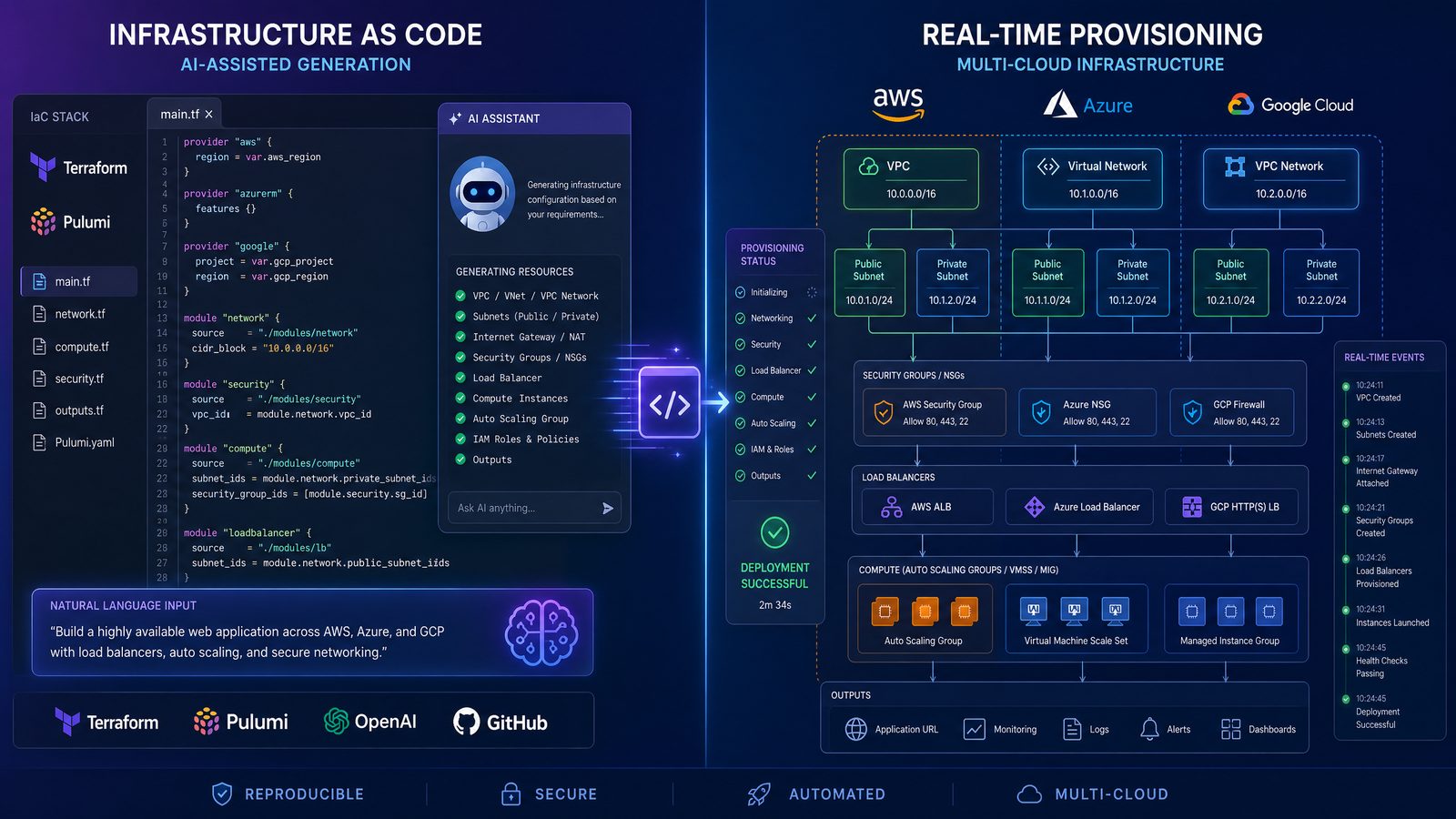
Section 4: 10 GPT-5.5 Prompts for Monitoring, Observability, and SLOs
Monitoring prompts should be built around symptoms, user impact, and measurable objectives rather than tool configuration alone. Observability is not just dashboards; it is the ability to answer operational questions quickly. GPT-5.5 can help design telemetry standards, Prometheus rules, OpenTelemetry collectors, Grafana dashboards, log schemas, and SLO frameworks.
When asking for monitoring output, specify your telemetry stack and the service’s critical user journeys. A checkout service, for example, needs different signals from a batch analytics job. The checkout service may need latency, payment error rate, cart conversion, queue depth, and dependency health. A batch job may need completion time, records processed, retry count, data freshness, and failed partitions.
31. Define SLIs and SLOs for a Production Service
Context setup: Use this to create measurable reliability targets for a service.
Full prompt:
Act as an SRE. Define SLIs and SLOs for [service name], which provides [business function]. Users are affected when [failure modes]. Current telemetry includes [metrics/logs/traces]. Create practical SLIs for availability, latency, correctness, and saturation. Recommend SLO targets and error budget policies.

Expected output format:
1. Service overview assumptions
2. SLI table with measurement method
3. SLO target recommendations
4. Error budget policy
5. Alerting strategy
6. Dashboard panel list
7. Implementation notes for [Prometheus/Datadog/New Relic/CloudWatch]
32. Generate Prometheus Alert Rules
Context setup: Use this to create actionable alerts tied to user impact.
Full prompt:
Generate Prometheus alert rules for [service name]. Available metrics include:
[list metric names]
Create alerts for high error rate, elevated latency, low availability, saturation, pod restarts, queue backlog, and dependency failures. Avoid noisy alerts and include severity levels.

Expected output format:
1. PrometheusRule YAML
2. Alert explanation table
3. Suggested thresholds
4. Runbook annotations
5. Alert fatigue risks
6. Testing commands with promtool
33. Create a Grafana Dashboard Design
Context setup: Use this when you need a dashboard that supports real operations, not just visual metrics.
Full prompt:
Design a Grafana dashboard for [service name] using [Prometheus/Loki/Tempo/CloudWatch/Datadog]. The dashboard should support on-call triage. Include golden signals, dependency health, Kubernetes resource usage, error budget burn, recent deployments, and log correlation.

Expected output format:
1. Dashboard layout by row
2. Panel list with query examples
3. Suggested variables
4. Alert links and runbook links
5. Triage workflow using the dashboard
6. JSON model if practical
34. Generate OpenTelemetry Collector Configuration
Context setup: Use this to standardize metrics, traces, and logs collection.
Full prompt:
Create an OpenTelemetry Collector configuration for [environment] that receives OTLP metrics, traces, and logs from [runtime/services]. Export telemetry to [backend]. Requirements:
- Resource attribute enrichment
- Tail-based sampling for traces if supported
- PII-safe log processing
- Kubernetes metadata enrichment
- Retry and batching
- Separate pipelines for metrics, logs, and traces

Expected output format:
1. Collector configuration YAML
2. Deployment mode recommendation
3. Required environment variables
4. Security considerations
5. Validation commands
6. Cost control recommendations
35. Create a Logging Schema for Microservices
Context setup: Use this to reduce inconsistent logs across services.
Full prompt:
Design a structured logging schema for microservices running on [platform]. Logs should support incident investigation, audit needs, and distributed tracing. Include required fields, optional fields, severity mapping, correlation IDs, user identifiers with privacy controls, error fields, and deployment metadata.

Expected output format:
1. JSON log schema
2. Field descriptions
3. Language-specific logging examples for [language]
4. Redaction rules
5. Query examples for [log platform]
6. Adoption checklist
36. Build an Error Budget Burn Alert Strategy
Context setup: Use this to alert on reliability degradation before monthly SLOs are exhausted.
Full prompt:
Create an error budget burn alerting strategy for [service name] with an availability SLO of [target] over [window]. Use multi-window, multi-burn-rate alerts. Provide PromQL queries and explain how alerts map to page, ticket, and informational severities.

Expected output format:
1. Error budget math explanation
2. PromQL alert rules
3. Severity mapping table
4. Response expectations
5. Dashboard panels
6. Calibration guidance
37. Generate Synthetic Monitoring Checks
Context setup: Use this to monitor user journeys from outside the cluster or cloud environment.
Full prompt:
Design synthetic monitoring checks for [application/service]. Critical user journeys include [journeys]. Checks should run from [regions], validate response content, measure latency, detect authentication failures, and avoid creating bad test data.

Expected output format:
1. Synthetic check plan
2. Test scripts in [Playwright/k6/curl-based tool]
3. Frequency and timeout recommendations
4. Alert thresholds
5. Test data handling approach
6. Maintenance checklist
38. Create CloudWatch Monitoring for an AWS Service
Context setup: Use this for AWS-native monitoring across ECS, Lambda, RDS, ALB, or EKS.
Access 40,000+ AI Prompts for ChatGPT, Claude & Codex — Free!
Subscribe to get instant access to our complete Notion Prompt Library — the largest curated collection of prompts for ChatGPT, Claude, OpenAI Codex, and other leading AI models. Optimized for real-world workflows across coding, research, content creation, and business.
Full prompt:
Create a CloudWatch monitoring setup for [AWS service/workload]. Include metrics, alarms, dashboards, log insights queries, anomaly detection where useful, and notification routing to [SNS/Slack/PagerDuty]. Include Terraform snippets if practical.

Expected output format:
1. Monitoring architecture
2. CloudWatch alarm definitions
3. Dashboard widgets
4. Logs Insights queries
5. Terraform HCL snippets
6. Operational tuning guidance
39. Analyze Alert Noise and Recommend Improvements
Context setup: Use this when on-call teams receive too many low-value alerts.
Full prompt:
Analyze this alert inventory and recommend reductions in alert noise without reducing incident detection quality. Classify alerts as page, ticket, dashboard-only, duplicate, or obsolete. Identify missing user-impact alerts.

Alert inventory:
[paste alert list with frequency and incidents]

Expected output format:
1. Alert classification table
2. Alerts to remove or downgrade
3. Alerts to rewrite
4. Missing alerts to add
5. Routing and escalation changes
6. Implementation sequence
40. Create a Telemetry Cost Optimization Plan
Context setup: Use this when observability costs are rising due to excessive metrics, logs, or traces.
Full prompt:
Create a telemetry cost optimization plan for [observability platform]. Current monthly spend is [amount]. Main data sources are [sources]. We need to reduce cost by [target percentage] while preserving incident response capability and compliance retention.

Expected output format:
1. Cost driver analysis
2. Metrics cardinality reduction plan
3. Log sampling and retention strategy
4. Trace sampling strategy
5. Data tiering recommendations
6. Risk assessment and rollout plan
Section 5: 10 GPT-5.5 Prompts for Incident Response and Operational Resilience
Incident response is a high-stakes use case for GPT-5.5. The model can help structure triage, generate status updates, organize timelines, summarize logs, draft postmortems, and produce remediation checklists. However, during a live incident, prompts must be operationally safe. GPT-5.5 should not be asked to guess blindly or execute risky changes. It should help responders reason through evidence, identify next diagnostic steps, and communicate clearly.
For teams looking to expand their AI prompting capabilities, our comprehensive guide on 50 GPT-5.5 Prompts for Marketing Teams: Campaign Strategy, Content Creation, and Analytics provides battle-tested prompt templates that integrate seamlessly with enterprise workflows and deliver measurable productivity improvements across technical and business teams.
41. Create a Live Incident Triage Plan
Context setup: Use this at the start of an incident to structure investigation safely.
Full prompt:
Act as an incident commander and senior SRE. Help triage a live incident for [service name]. Symptoms are [symptoms]. Impact appears to be [impact]. Recent changes include [changes]. Current telemetry shows [metrics/log excerpts]. Generate a safe triage plan that prioritizes customer impact reduction.

Expected output format:
1. Incident severity recommendation
2. Immediate stabilization actions
3. Top hypotheses ranked by evidence
4. Diagnostic commands and queries
5. Escalation recommendations
6. Customer and internal communication draft
7. Actions to avoid until more evidence is available
42. Generate a Service-Specific Incident Runbook
Context setup: Use this before incidents to document repeatable response steps.
Full prompt:
Create an incident runbook for [service name]. The service runs on [platform], depends on [dependencies], and has SLOs [SLOs]. Common failure modes include [failure modes]. Include detection, diagnosis, mitigation, rollback, escalation, and validation steps.

Expected output format:
1. Runbook overview
2. Severity classification
3. Symptom-to-action table
4. Diagnostic commands
5. Mitigation procedures
6. Rollback procedure
7. Escalation contacts by role
8. Post-incident checklist
43. Summarize Logs and Metrics During an Incident
Context setup: Use this to turn noisy telemetry excerpts into a concise operational summary.
Full prompt:
Summarize the following incident telemetry. Identify patterns, anomalies, likely failure points, and missing data. Do not overstate certainty. Separate facts from hypotheses.

Metrics:
[paste metrics summary]

Logs:
[paste redacted log excerpts]

Traces:
[paste trace observations]

Expected output format:
1. Key facts
2. Anomalies detected
3. Hypotheses ranked by confidence
4. Additional data needed
5. Recommended next queries
6. Potential mitigations and risks
44. Draft Incident Status Updates
Context setup: Use this for clear communication to stakeholders without excessive technical noise.
Full prompt:
Draft incident status updates for [audience: customers/executives/internal engineering] based on the following facts. Keep the message accurate, calm, and concise. Do not speculate beyond the facts.

Facts:
- Incident start time: [time]
- Affected services: [services]
- User impact: [impact]
- Current status: [status]
- Mitigation underway: [mitigation]
- Next update time: [time]

Expected output format:
1. Initial update
2. Follow-up update
3. Resolution update
4. Internal engineering update
5. Phrases to avoid
45. Create a Rollback Decision Framework
Context setup: Use this when teams need to decide whether to roll back, roll forward, or mitigate.
Full prompt:
Create a rollback decision framework for an incident affecting [service name]. Recent deployment [version] may be related, but evidence is incomplete. Define criteria for rollback versus roll-forward versus feature flag disablement. Include database migration considerations and customer impact trade-offs.

Expected output format:
1. Decision tree
2. Evidence checklist
3. Rollback prerequisites
4. Roll-forward conditions
5. Feature flag mitigation path
6. Risk table
7. Communication template for the decision
46. Generate a Postmortem from an Incident Timeline
Context setup: Use this after an incident to turn notes into a blameless postmortem.
Full prompt:
Create a blameless postmortem from the following incident timeline. Focus on contributing factors, detection gaps, response effectiveness, customer impact, and concrete corrective actions. Avoid blaming individuals.

Timeline:
[paste timeline]

Additional context:
[paste impact, metrics, decisions, remediation]

Expected output format:
1. Executive summary
2. Impact assessment
3. Timeline table
4. Root cause and contributing factors
5. What went well
6. What did not go well
7. Corrective actions with owners and due dates
8. Lessons learned
47. Create an Incident Simulation Exercise
Context setup: Use this for game days, tabletop exercises, and on-call training.
Full prompt:
Design an incident simulation exercise for [team] operating [system]. The scenario should test detection, escalation, Kubernetes troubleshooting, rollback, communication, and post-incident review. Make it realistic but safe to run in [staging/lab environment].

Expected output format:
1. Scenario overview
2. Learning objectives
3. Inject timeline
4. Expected responder actions
5. Facilitator guide
6. Success criteria
7. Debrief questions
48. Build a Major Incident Command Checklist
Context setup: Use this to standardize incident command during high-severity events.
Full prompt:
Create a major incident command checklist for [organization/team]. Include roles, severity declaration, communication channels, timeline management, decision logging, customer updates, executive briefings, escalation triggers, and resolution criteria.

Expected output format:
1. First 15 minutes checklist
2. Role assignments
3. Communication cadence
4. Decision log template
5. Escalation matrix
6. Resolution criteria
7. Post-incident handoff checklist
49. Generate Dependency Failure Mitigation Plans
Context setup: Use this when your service depends on external APIs, databases, queues, or third-party providers.
Full prompt:
Create mitigation plans for dependency failures affecting [service name]. Dependencies include [list dependencies]. For each dependency, define symptoms, detection signals, user impact, fallback behavior, circuit breaker strategy, retry policy, queueing behavior, and recovery validation.

Expected output format:
1. Dependency risk table
2. Failure mode analysis
3. Mitigation strategy per dependency
4. Alert recommendations
5. Runbook steps
6. Engineering backlog items to improve resilience
50. Create an Incident Response Automation Backlog
Context setup: Use this after reviewing incidents to identify high-value automation opportunities.
Full prompt:
Review these past incident summaries and create an incident response automation backlog. Identify repetitive manual actions, slow detection points, missing dashboards, risky manual commands, unclear ownership, and communication bottlenecks.

Incident summaries:
[paste summaries]

Expected output format:
1. Automation opportunity table
2. Priority ranking using impact and effort
3. Proposed scripts, runbooks, alerts, or dashboards
4. Safety controls for automation
5. 30-60-90 day implementation roadmap
6. Metrics to measure improvement
Implementation Tips: Turning Prompts into a DevOps Operating System
The most successful DevOps teams do not use GPT-5.5 as a one-off text generator. They turn effective prompts into reusable operational assets. A CI/CD prompt that produces a secure pipeline can become part of a service onboarding checklist. A Terraform module prompt can become a standard for new cloud resources. An incident summary prompt can become part of the incident commander workflow. The compounding value comes from capturing what works and improving it with every review.
Start by creating a shared repository for prompts. Organize it by domain: pipelines, IaC, Kubernetes, observability, security, and incident response. Each prompt should include the intended use case, required inputs, approved platforms, known limitations, and reviewer notes. For high-risk domains such as IAM, networking, and production deployments, include mandatory review steps and links to internal standards.
It is also useful to create service profiles that can be pasted into prompts. A service profile might include runtime, deployment target, database, dependencies, SLOs, owners, repository path, alert routes, and rollback method. This avoids rewriting context every time and improves the quality of GPT-5.5 responses.
Service profile template:
Service name: [name]
Runtime: [language/framework]
Repository: [repo]
Deployment target: [platform]
Environments: [dev/staging/production]
Database: [database]
External dependencies: [dependencies]
Container registry: [registry]
CI/CD platform: [platform]
Observability stack: [metrics/logs/traces tools]
SLOs: [availability/latency targets]
Rollback method: [method]
Security constraints: [requirements]
Compliance constraints: [requirements]
On-call team: [team]
For production use, pair AI-generated artifacts with automated validation. Terraform should pass terraform fmt, terraform validate, security scanning, and plan review. Kubernetes manifests should pass schema validation, policy checks, and staging deployment. Pipeline YAML should be tested in a non-production branch. Prometheus rules should pass promtool check rules. Runbooks should be tested during game days.
DevOps leaders should also define boundaries around sensitive data. Avoid sending secrets, customer personal data, private keys, raw authentication tokens, or proprietary incident details without appropriate controls. Redact logs before analysis. Use synthetic examples when asking for architecture patterns. If using an enterprise AI environment, ensure that retention, training, and access policies match company requirements.
Common Mistakes When Using GPT-5.5 for DevOps
Even strong models can produce flawed infrastructure or automation if the prompt is incomplete. The most common mistake is asking for “best practices” without specifying operational reality. Best practices differ between a two-person startup, a regulated bank, a multi-cloud enterprise, and a high-scale SaaS platform. Always define the context.
Another mistake is accepting generated IAM policies without scrutiny. GPT-5.5 may generate permissions that are broader than necessary if the prompt does not explicitly require least privilege. When requesting IAM, ask for a permission-by-permission explanation and a way to validate whether each permission is required.
DevOps teams also sometimes overlook state and lifecycle risks. Terraform code may be syntactically valid but still cause resource replacement. Kubernetes updates may restart critical workloads during business hours. CI/CD changes may accidentally deploy from untrusted branches. Monitoring changes may create alert storms. Incident response scripts may run destructive commands too quickly. Prompts should therefore request risk analysis as part of the output.
Use the following review checklist before adopting GPT-generated DevOps artifacts:
- Correctness: Does the output match the target platform, runtime, and environment?
- Security: Are secrets protected, permissions minimized, and risky defaults avoided?
- Reliability: Are health checks, rollback, timeouts, and failure modes addressed?
- Maintainability: Is the code organized, documented, and consistent with team standards?
- Cost: Could the proposed design create unnecessary spend?
- Compliance: Are logging, retention, encryption, and access controls aligned with requirements?
- Testability: Are validation commands and safe test paths provided?
- Operational fit: Can the on-call team understand and support the result?
A final mistake is failing to iterate. The first GPT-5.5 response should rarely be the final artifact. Ask follow-up questions: “What are the risks?”, “Make this least privilege”, “Add rollback steps”, “Convert this to a reusable module”, “Show the diff from the original”, “Explain how to test this safely”, or “List assumptions that could be wrong.” Iterative prompting is often where the highest-quality DevOps output emerges.
Conclusion: GPT-5.5 as a DevOps Force Multiplier
GPT-5.5 can materially improve DevOps productivity when used with disciplined prompting and engineering review. The 50 prompts in this guide cover the operational lifecycle: building and securing CI/CD pipelines, generating Infrastructure as Code, managing Kubernetes workloads, improving observability, and responding to incidents. Together, they form a practical foundation for AI-assisted DevOps work.
The real advantage is not simply faster YAML, HCL, or runbook drafting. It is better operational thinking made repeatable. A well-structured prompt forces teams to clarify deployment strategy, failure handling, security controls, observability requirements, and incident procedures. GPT-5.5 can then turn that context into concrete artifacts that engineers can review, test, and refine.
For DevOps engineers, the best workflow is collaborative: provide GPT-5.5 with precise system context, request structured outputs, demand assumptions and risks, validate everything with automated tools, and keep humans in control of production changes. Used this way, GPT-5.5 becomes less of a chatbot and more of an always-available platform engineering assistant: one that helps teams ship faster, operate safer, and learn from every deployment and incident.
