
50 GPT-5.5 Prompts for UX Designers: User Research Synthesis, Persona Generation, Journey Mapping, Accessibility Audits, and Design System Documentation

50 GPT-5.5 Prompts for UX Designers: User Research Synthesis, Persona Generation, Journey Mapping, Accessibility Audits, and Design System Documentation
This collection is a practical, production-tested library of 50 copy-paste ready prompts tailored for UX professionals using GPT-5.5. Each prompt is crafted to accelerate research synthesis, persona creation, journey mapping, accessibility audits, and design system documentation tasks. For every prompt you will find the actual prompt text, an explanation of why it works, the expected inputs that make it produce reliable outputs, and ideas for customization to fit your product, team, or research phase.
Use these prompts as-is or adapt them with product-specific details. Where applicable, we include example JSON response schemas and code snippets to automate ingestion into analysis tools, design systems, or collaboration platforms. This set is intended to be practical: minimal prompt engineering required, maximum repeatability in production workflows.
How to use these prompts in production
- Batch-run prompts in pipeline scripts to synthesize raw research notes into summaries.
- Automate persona generation and export to a design system repository as JSON/YAML.
- Integrate accessibility audit prompts into CI pipelines to generate remediation tasks.
- Use journey-map outputs to auto-generate user stories for backlog refinement.
Quick comparison: problem spaces and prompt outcomes
| Category | Primary Output | Typical Inputs | Common Integrations |
|---|---|---|---|
| User Research Synthesis | Thematic summaries, affinity clusters, prioritized insights | Interview transcripts, survey CSVs, observation notes | Notion, Airtable, Miro |
| Persona Generation | Detailed personas, mental models, goals & pain points | Segmented user data, usage metrics, quotes | Design system repos, Figma, Confluence |
| Journey Mapping | Step-by-step journey stages, touchpoints, KPIs | Session recordings, support logs, funnel data | Jira, Trello, Productboard |
| Accessibility Audits | Audit checklists, prioritized fixes, code snippets | HTML/CSS snippets, component library details | GitHub issues, CI/CD, Lighthouse |
| Design System Documentation | Tokens, component specs, usage guidelines | Existing components, token lists, brand standards | Storybook, Figma, Git |
Two in-depth resources that align with advanced implementation:
For a deeper exploration of related strategies and implementation patterns, our comprehensive guide on The Complete Guide to Codex Sites: How to Build Hosted Web Applications, Dashboards, and Internal Tools from Plain Language Prompts Without Writing Code provides detailed frameworks, step-by-step workflows, and production-ready templates that complement the approaches discussed in this section.
and
For a deeper exploration of related strategies and implementation patterns, our comprehensive guide on Codex Sites Masterclass: 30 Production-Ready Prompts for Building Interactive Dashboards, Client Portals, Data Visualizations, and Automated Reporting Apps provides detailed frameworks, step-by-step workflows, and production-ready templates that complement the approaches discussed in this section.
. These are referenced throughout the prompts where automation or site-generation patterns are relevant.
User Research Synthesis — 10 Production-Ready Prompts
These prompts convert raw qualitative and quantitative research into actionable insights, affinity clusters, and prioritized recommendations. They are optimized for transcripts, survey exports, and field notes. Use them to save analysts’ time while maintaining traceability to source data.
Prompt 1 — Interview Transcript Thematic Summary
Prompt
You are a senior UX researcher. Given the following interview transcript delimited by triple backticks, produce:
1) A concise summary (3–5 sentences) of the participant's overall motivations and context.
2) A list of 5–8 themes with 1–2 illustrative quotes each.
3) A prioritized list of 3 research insights with recommended next steps for product or design.
Return output as JSON with keys: summary, themes (array of {name, quotes}), insights (array of {insight, priority, action}). Transcript:
```[PASTE_TRANSCRIPT_HERE]```
Why this works
The instruction sets clear structure and output schema, reducing ambiguity. Asking for quotes ties themes to evidence, which is essential for auditability. JSON output enables automated ingestion into dashboards or Notion pages.
Expected inputs
- Full interview transcript text or cleaned speech-to-text output.
- Participant metadata as context (optional): role, frequency of use, demographics.
Customization
- Change the number of themes or insight priorities.
- Include a “confidence” score per insight if multiple transcripts are batched.
- Add a tag taxonomy (usability, trust, performance) to each theme.
Prompt 2 — Batch Survey Free-Text Clustering
Prompt
You're a research analyst. Given a CSV column of open-ended survey responses delimited below, return:
1) Top 10 clusters with a short descriptive label.
2) Representative responses (up to 3) per cluster.
3) Cluster frequency and percentage.
4) Suggested follow-up question to investigate each cluster.
Return as CSV with columns: cluster_id, label, frequency, percentage, example1, example2, example3, follow_up_question.
Responses:
```[PASTE_CSV_COLUMN_HERE]```
Why this works
Explicit output format (CSV) makes it easy to import results into Excel/Airtable. Clustering and representative examples provide both quantitative and qualitative context to guide follow-up research.
Expected inputs
- Single-column CSV or newline-separated free-text responses.
- Optional sample size to calibrate clustering sensitivity.
Customization
- Adjust cluster counts and minimum cluster size.
- Ask the model to highlight emerging sentiments (positive/negative/neutral).
Prompt 3 — Affinity Mapping from Notes
Prompt
You are an experienced facilitator. Given the following bulleted field notes, convert them into an affinity map grouping by theme. For each group provide:
- Group label
- 3–8 cards (each a concise sticky-note text)
- Root cause hypothesis
- Suggested prioritization (High/Med/Low) with rationale.
Return as JSON: {groups: [{label, cards:[], hypothesis, priority, rationale}]}
Notes:
```[PASTE_NOTES_HERE]```
Why this works
Affinity mapping requires grouping and hypothesis generation; this prompt asks for both, enabling direct handoff to design sprints. Prioritization with rationale helps stakeholders make trade-offs quickly.
Expected inputs
- Field notes, sticky-note exports, or transcripts of remote workshops.
- Optional: organizational constraints or known metrics to inform prioritization.
Customization
- Include constraint tags (e.g., engineering complexity, legal risk).
- Request an additional “who to interview next” list per high-priority group.
Prompt 4 — Cross-Interview Synthesis and Pattern Discovery
Prompt
Act like a lead researcher. Given multiple interview summaries separated by '---', produce:
1) Cross-cutting patterns and the number of participants that mentioned each.
2) Patterns mapped to business impact (High/Med/Low).
3) Data-backed recommendations for product, design, or research (3–6 items).
Return as markdown with distinct sections.
Interviews:
---
[INTERVIEW_SUMMARY_1]
---
[INTERVIEW_SUMMARY_2]
---
[... ]
Why this works
Cross-interview synthesis surfaces recurring themes and quantifies them. Mapping to business impact guides prioritization. Markdown is useful for human-readable reports in docs or GitHub.
Expected inputs
- Short, pre-summarized interview summaries (~100–300 words each).
- Optionally include product KPIs to map impact.
Customization
- Ask the model to tag themes by user segment or persona.
- Produce a CSV with theme, count, impact for import.
Prompt 5 — Quant + Qual Synthesis (Mixed Methods)
Prompt
You are a senior mixed-methods researcher. Given a dataset of numeric metrics (CSV) and 1–2 pages of qualitative notes, synthesize findings that connect quantitative trends to qualitative explanations. Provide:
- Key metrics to watch (with trend direction)
- Qualitative explanations that plausibly explain each trend
- A/B test / experiment hypotheses (3),
- Data sources needed to validate.
Return as structured JSON.
Numeric CSV:
```[PASTE_CSV_HERE]```
Qual notes:
```[PASTE_NOTES_HERE]```
Why this works
It forces alignment between numbers and narratives, which is critical for recommending experiments. Providing experiment hypotheses makes research outputs immediately actionable.
Expected inputs
- Cleaned CSV with timestamped metrics (e.g., conversion rate, drop-off rates).
- Qualitative observations or interview excerpts.
Customization
- Request specific statistical tests or visualization types to confirm patterns.
- Target experiments to specific user cohorts or funnels.
Prompt 6 — Research Dashboard Feed Generator
Prompt
You are an automation engineer for UX research. Convert the following research notes and metrics into a short "dashboard feed" of 6 bullets:
- 3 metrics with current value, delta, and interpretation
- 3 research highlights with source attribution
Format: bullet list, each bullet <= 2 lines. Notes and metrics below:
Metrics:
[METRICS_BLOCK]
Notes:
[RESEARCH_NOTES]
Why this works
Design stakeholders consume short feeds. The format enforced here supports daily standups and stakeholder emails. It's optimized for ingestion into tools like Slack or product dashboards.
Expected inputs
- Metrics block: metric name, current value, previous value.
- Research notes: 1–5 short items to summarize.
Customization
- Localize the feed for different stakeholder groups (PM, Eng, Design).
- Include links to raw artifacts in the bullet metadata.
Prompt 7 — Heuristic Audit Synthesis
Prompt
Act as a UX auditor. Given a set of interface screenshots (descriptions allowed) and heuristic failures listed below, synthesize them into:
- A prioritized list of 1–2 page problem statements
- Suggested remediation steps with estimated complexity (S/M/L)
- Metrics to track to validate remediation
Return as JSON: {problems: [{title, description, severity, remediation, complexity, validation_metrics}]}
Screenshots/descriptions:
[SCREENSHOT_DESCRIPTIONS]
Why this works
This prompt transforms low-level heuristic violations into concrete problem statements and remediations, enabling product teams to act without manual consolidation.
Expected inputs
- List of observed heuristic issues or screenshot alt-text descriptions.
- Context about product area and known constraints.
Customization
- Adjust severity scales (1–5 or High/Med/Low).
- Request linking to design tickets or sample code fix references.
Prompt 8 — Research Question Prioritization Matrix
Prompt
You're a research strategy lead. Given a backlog of research questions (list below) and constraints (2-week timeline, 4 participants per study), prioritize them using an impact/effort matrix and recommend the top 3 studies to run. Include a one-paragraph plan for each recommended study (method, sample, deliverables).
Questions:
- [QUESTION_1]
- [QUESTION_2]
- ...
Why this works
Translates a long list into a prioritized plan considering constraints; the impact/effort approach is a common, defensible framework for stakeholders.
Expected inputs
- A list of research questions or hypotheses.
- Constraints: timeline, recruitment capacity, budget.
Customization
- Include additional axes (risk, novelty, cross-team dependencies).
- Request recommended recruitment screener snippets for each study.
Prompt 9 — Participant Quote Canonicalization
Prompt
You're a UX research assistant. From the following raw quotes (one per line), canonicalize them into concise, anonymized, and shareable quotes (max 20 words), preserving emotional tone. Also tag each with sentiment (positive/neutral/negative) and affinity theme. Output JSON: [{quote, sentiment, theme}].
Raw quotes:
[RAW_QUOTES]
Why this works
Canonicalized quotes are crucial for slide decks and personas. The sentiment and theme tags accelerate thematic analysis and presentation creation.
Expected inputs
- Raw quotes from interviews or surveys.
- Optional theme taxonomy to guide tags.
Customization
- Enforce length limits, language tone (formal/informal), or translation for multilingual datasets.
- Return an estimate of frequency for each canonical quote.
Prompt 10 — Research Report Executive Summary
Prompt
You're an experienced research writer. Given the following detailed research report content (findings, methods, transcripts, and appendices), produce a 250–350 word executive summary for executives that includes: top 3 findings, recommendation bullets, and immediate risks. Preserve references to supporting artifacts with bracketed links (e.g., [artifact_1]).
Report:
[PASTE_FULL_REPORT]
Why this works
Executives need concise, evidence-backed summaries. Providing artifact references enables traceability without embedding verbose details.
Expected inputs
- A full research report or compiled notes.
- Identifiers for artifacts and appendices.
Customization
- Adjust target word count or audience (VP, CEO, product board).
- Ask for a one-slide visual summary suggestion to expedite presentation creation.
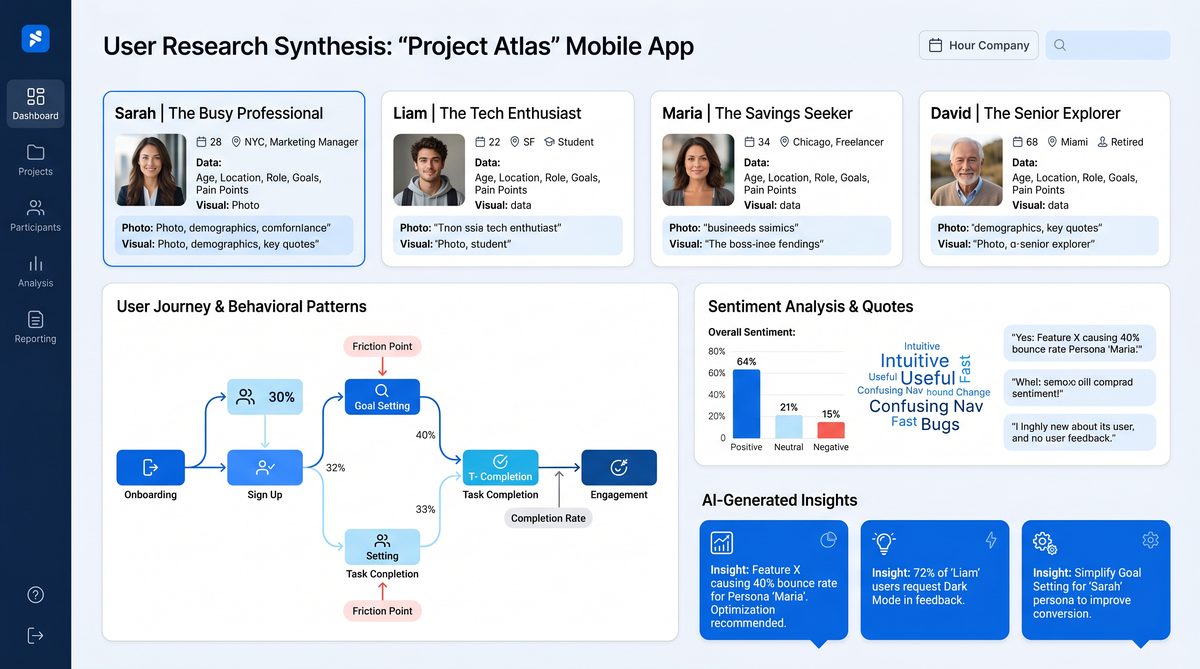
Persona Generation — 10 Copy-Paste Prompts
Personas convert research into human-centered archetypes that guide design decisions. These prompts produce personas with different levels of fidelity, from quick proto-personas to validated, data-linked personas ready for documentation.
Prompt 11 — Proto-Persona from Survey Segments
Prompt
You're a UX designer creating proto-personas. Given the following segmented survey metrics (age range, usage frequency, top tasks, NPS by segment), produce 3 proto-personas with:
- Name, age range, occupation
- Primary goal and secondary goal
- Top 3 pain points (with quotes)
- Typical day/use case
Return as JSON: {personas: [{id, name, age_range, occupation, goals:[], pain_points:[], day_scenario}]}.
Segments:
[SEGMENT_DATA]
Why this works
Proto-personas bridge quantitative segmentation and qualitative narrative. JSON makes it easy to insert into persona templates or system components.
Expected inputs
- Aggregated segment metrics and representative quotes.
Customization
- Increase persona count to reflect additional segments.
- Add fields such as tech proficiency or channel preferences.
Prompt 12 — Validated Persona with Evidence Links
Prompt
As a research lead, create validated personas based on the following interviews and analytics snippets. For each persona include:
- A summary paragraph
- Evidence: 3–5 citations linking to interview IDs, quotes, or analytics slices
- Key metrics to target (e.g., retention, task success)
Return as Markdown, each persona in a collapsible-like section starting with 'Persona: NAME'.
Input:
[INTERVIEW_SUMMARIES_AND_METRICS]
Why this works
Validated personas require explicit evidence. This prompt enforces traceability and connects personas to measurable KPIs for product planning.
Expected inputs
- Interview summary blocks and relevant metric snippets.
Customization
- Produce a persona-card image suggestion (e.g., illustration, color palette).
- Request personas formatted for a specific tool (Confluence, Notion).
Prompt 13 — Persona Empathy Map Generator
Prompt
You're a facilitator. For the persona data below, generate a complete empathy map with sections: Says, Thinks, Does, Feels, Pain, Gain. Provide 4–6 bullets for each and one insight connecting sections. Return JSON.
Persona:
[PERSONA_SHORT_DESC]
Why this works
Empathy maps help teams align on user mindset. Returning JSON lets you programmatically create sticky notes in Miro or other whiteboard tools.
Expected inputs
- A persona summary or representative quotes.
Customization
- Localize language or adjust granularity for product teams (detailed or high-level).
- Add channels (web, mobile) per empathy map field.
Prompt 14 — Persona Naming and Backstory Builder
Prompt
You're a UX copywriter. Given persona bullet data, create:
- A memorable name and one-sentence tagline
- A short backstory (3–4 sentences) that explains how product fits their life
- 3 illustrative micro-moments (scenarios)
Return as plain text for inclusion in persona cards.
Data:
[PERSONA_BULLETS]
Why this works
Names and narratives make personas memorable. Micro-moments provide practical scenarios to ground design decisions.
Expected inputs
- Bullleted persona attributes such as goals, frustrations, devices used.
Customization
- Switch tone to playful, formal, or research-first to match your org culture.
Prompt 15 — Persona to User Stories Converter
Prompt
You're a product manager. For the persona below, generate 6 user stories prioritized for an MVP. For each user story include acceptance criteria and suggested success metric (e.g., activation rate).
Persona:
[PERSONA_BLOCK]
Why this works
This prompt converts persona insight into backlog-ready items, reducing friction between research and delivery teams.
Expected inputs
- A persona card and description with primary goals.
Customization
- Target a specific release or epic to constrain story scope.
- Request mapping of stories to user journey stage (onboarding, retention).
Prompt 16 — Persona Segmentation Matrix
Prompt
As a strategist, take the following user attributes and produce a 2x2 segmentation matrix. Provide names for each quadrant, 3 bullets describing each segment, and one primary metric to prioritize per quadrant. Attributes:
- Attribute A: [e.g., frequency]
- Attribute B: [e.g., decision autonomy]
Why this works
2x2 segmentation simplifies target selection and prioritization, producing clear go-to-market guidance for feature prioritization.
Expected inputs
- Two attributes (quantitative or qualitative) and data ranges or categories.
Customization
- Use other matrix types (BCG, RICE) or multi-dimensional clustering if needed.
Prompt 17 — Cross-Platform Persona Behavior Mapping
Prompt
You're a UX researcher. Map the persona's behavior across channels (mobile web, iOS app, desktop, call center). For each channel include:
- Typical tasks
- Pain points specific to that channel
- Channel-specific recommendations
Present as a table.
Persona:
[PERSONA_SUMMARY]
Why this works
Channel-specific behaviors directly inform experience design and prioritization of cross-platform fixes.
Expected inputs
- Persona summary and any channel analytics if available.
Customization
- Add device types (tablet, kiosk) or geographic considerations.
Prompt 18 — Accessibility-Sensitive Persona Creation
Prompt
You are an inclusive design specialist. Generate 3 personas that intentionally include a range of accessibility needs (visual, motor, cognitive). For each persona include accommodations, assistive tech used, and design considerations (WCAG level suggestions).
Persona context:
[PRODUCT_AND_CONTEXT]
Why this works
Incorporating accessibility into persona work ensures design systems and flows are informed by diverse needs from the start.
Expected inputs
- Product type and typical tasks, industry compliance requirements.
Customization
- Align accommodations to specific standards (WCAG 2.2, Section 508).
Prompt 19 — Persona Validation Checklist
Prompt
You're a UX research validator. Given personas below, produce a validation checklist with 8 items to confirm each persona is representative (recruitment targets, behavioral metrics, product use cases). Include suggested validation thresholds (e.g., percent of sample).
Personas:
[PERSONA_LIST]
Why this works
A checklist operationalizes persona validation and helps PMs/Researchers confirm whether personas are ready for strategic use.
Expected inputs
- Persona definitions and existing sample sizes or analytics data.
Customization
- Adjust threshold targets based on company stage (startup vs enterprise).
Prompt 20 — Persona Export JSON for Design Systems
Prompt
You're a developer partnering with design. Convert the persona card below into a standardized JSON schema suitable for storing in a design system. Include fields: id, name, avatar (placeholder), tagline, goals[], pain_points[], tech_stack[], accessibility_tags[], metric_targets[]. Use snake_case keys.
Persona:
[PERSONA_CARD]
Why this works
Structured persona JSON enables automation: exporting to Storybook, populating Figma templates, or seeding onboarding experiments.
Expected inputs
- Persona card content with bullet items editable by the engineering team.
Customization
- Add org-specific metadata (owner, last_validated_date, source_ids).
- Change key naming convention to camelCase or PascalCase if desired.
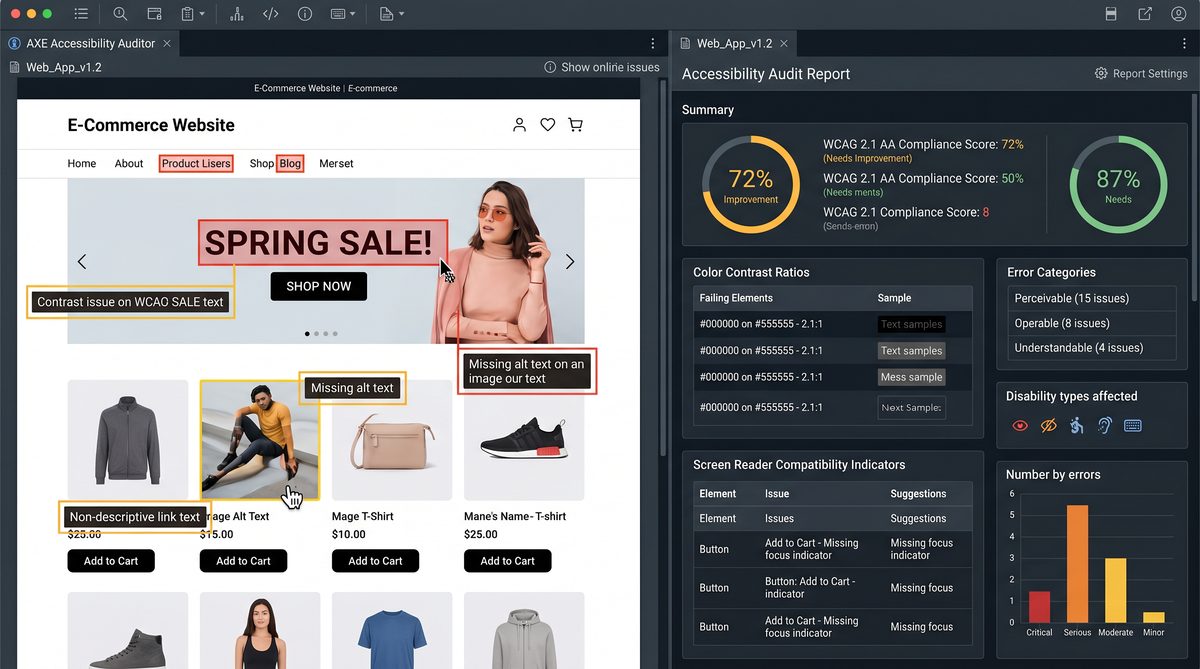
Journey Mapping — 10 Production Examples and Templates
Journey mapping prompts produce stepwise flows, touchpoint inventories, service blueprints, and opportunity spaces. They help teams translate user needs into prioritized design interventions and backlog items.
Prompt 21 — Baseline User Journey from Interview Data
Prompt
You're a journey mapping specialist. From the following concatenated interview excerpts, produce a baseline user journey for the 'first 7 days after sign-up'. Include steps, user goal at each step, touchpoints, emotions (scale -2 to +2), and friction points. Output as JSON array of steps: [{step_number, title, goal, touchpoints, emotion, friction}].
Excerpts:
[EXCERPTS]
Why this works
It converts qualitative narratives into a temporal map focused on a critical timebound window (onboarding), enabling targeted improvements with measurable KPIs.
Expected inputs
- Interview excerpts or first-hand user stories covering onboarding.
Customization
- Change time horizon (e.g., first session, first 90 days).
- Include channel prevalence for each touchpoint.
Prompt 22 — Opportunity Map for Journey Stage
Prompt
Act as a product designer. Given the journey stage "checkout" with the following pain points, produce an opportunity map with columns: Pain Point, Underlying Cause, Design Opportunity, Success Metric, Estimated Effort. Return as CSV.
Pain points:
- [PAIN_POINT_1]
- [PAIN_POINT_2]
Why this works
Opportunity maps convert frustrations into concrete opportunities prioritized by impact and effort, ready for implementation planning.
Expected inputs
- List of pain points and any analytic evidence (drop-off rates).
Customization
- Ask to include engineering complexity estimates or privacy/legal risk tags.
Prompt 23 — Service Blueprint Creator
Prompt
You're a service designer. For the following user journey steps, create a service blueprint with lanes: User Actions, Frontstage (touchpoints), Backstage (systems and teams), and Metrics. For each lane provide 1–2 concise items per step. Return as a structured table.
Steps:
1) [STEP_1]
2) [STEP_2]
3) ...
Why this works
Service blueprints make cross-functional dependencies explicit, aligning teams around operational changes required to improve user experiences.
Expected inputs
- Defined user journey steps and known systems/teams.
Customization
- Include compliance or localization lanes if the product crosses jurisdictions.
Prompt 24 — Emotional Arc Visualization Data
Prompt
You're a UX analyst. From the following session transcripts, extract an emotional score per discrete step (scale 0-10) and provide a CSV with columns: session_id, step_label, emotion_score, evidence_quote. Sessions:
[SESSIONS]
Why this works
Quantifying emotional arcs across sessions produces data suitable for visualizing trends and identifying the most impactful moments in the journey.
Expected inputs
- Session transcripts with clear step delineation or timestamps.
Customization
- Change scoring scale or add sentiment confidence levels based on quote strength.
Prompt 25 — Friction Severity and Root Cause Table
Prompt
You're a UX researcher. For the following list of friction points, provide a severity rating (1–5), root cause, likely impacted user segments, and proposed first remediation step. Return in Markdown table.
Friction points:
- [FP1]
- [FP2]
Why this works
This prompt helps quickly triage issues and allocate engineering/design resources where they'll have the most effect on retention and satisfaction.
Expected inputs
- List of friction points or user complaints.
Customization
- Replace severity scale with business-impact categories for exec audiences.
Prompt 26 — Channel-Specific Journey Variant Generator
Prompt
You are a UX strategist. Given the base journey below, produce a variant optimized for 'mobile-first' and another for 'support-assisted' experiences. For each variant, list 6 changes prioritized by user impact and provide one prototype suggestion.
Base journey:
[BASE_JOURNEY_DESCRIPTION]
Why this works
Creates pragmatic variations that teams can A/B test or prototype rapidly. Prioritization by impact ensures focus on high-value changes.
Expected inputs
- Base journey with steps and touchpoints.
Customization
- Add target user segments or performance constraints (low bandwidth).
Prompt 27 — Journey to KPI Mapping
Prompt
You're a product analyst. Map each journey step below to one primary KPI and one secondary KPI. Provide a one-sentence rationale for each mapping.
Journey steps:
[STEP_LIST]
Why this works
Directly ties qualitative journey work to quantitative measures, enabling teams to evaluate success post-implementation.
Expected inputs
- Clear list of steps and organizational KPIs available for mapping.
Customization
- Include suggested instrumentation events for analytics platforms.
Prompt 28 — Micro-Journey Design for Key Task
Prompt
You're a product designer focused on micro-interactions. For the key task '[TASK_NAME]', produce a micro-journey with 5 steps, expected user emotion at each step, and one microcopy suggestion (CTA text) per step. Output as JSON.
Context:
[TASK_CONTEXT]
Why this works
Micro-journeys help designers refine specific tasks (e.g., payment flow) and make microcopy decisions consistent with emotional intent.
Expected inputs
- Task name and short context including constraints (regulatory, performance).
Customization
- Ask for variations in microcopy tone for A/B testing purposes.
Prompt 29 — Journey-Based Accessibility Risk Map
Prompt
You're an accessibility lead. Map potential accessibility risks across the given journey steps (e.g., problematic controls, content complexity). For each risk include severity, WCAG reference, and remediation suggestion. Return as a table.
Journey:
[PASTE_JOURNEY]
Why this works
Combines journey thinking with accessibility audits to prevent exclusionary designs early in the flow.
Expected inputs
- Journey steps with touchpoints and components used.
Customization
- Scope the output to a specific WCAG level (AA/AAA) or platform (mobile).
Prompt 30 — Journey Map Export for Presentation
Prompt
You're a visual storyteller. Using the journey steps below, produce a slide-ready text block for each stage with a headline (<=6 words), two supporting bullets, and a recommended visual metaphor. Deliver as a numbered list.
Journey steps:
[STEPS]
Why this works
Preparing slide-ready text speeds up stakeholder presentations and ensures the visual metaphor is tied to the narrative, improving communication effectiveness.
Expected inputs
- List of journey steps and intended audience for the presentation.
Customization
- Request icons or color suggestions matching brand guidelines.
Accessibility Audits — 10 Practical Prompts
Use these prompts to conduct fast, structured accessibility reviews, create remediation plans, and generate code-level fixes aligned to WCAG standards. They are crafted to minimize false positives and provide actionable remediation guidance for engineering teams.
Prompt 31 — Component Accessibility Audit
Prompt
You are an accessibility engineer. For the following UI component code (HTML/CSS/JS block), perform an accessibility audit. Provide:
- List of issues with WCAG references
- Severity (High/Medium/Low)
- Suggested code fixes with small code snippets
Return as JSON: {issues:[{issue, wcag, severity, snippet}]}
Component code:
```html
[PASTE_COMPONENT_CODE]
```
Why this works
Combines code-level analysis with WCAG mapping, delivering developer-friendly fixes and minimizing back-and-forth between design and engineering.
Expected inputs
- Complete component markup and styling, ideally a small self-contained snippet.
Customization
- Request tests (e.g., Axe rules) to be added to CI or sample jest/axe snapshots.
Prompt 32 — Page-Level Accessibility Summary
Prompt
You're an accessibility auditor. Given the page HTML or a list of elements and roles, summarize accessibility risks, prioritize top 5 fixes, estimate dev hours per fix, and provide success criteria for QA.
Page:
[PASTE_HTML_OR_ELEMENT_LIST]
Why this works
This high-level summary helps product managers budget fixes into sprints and gives QA concrete success criteria for verification.
Expected inputs
- Page HTML or component list with descriptions.
Customization
- Return results in a ticket-ready format for GitHub/GitLab issues.
Prompt 33 — Contrast Ratio Checker
Prompt
You're an automated accessibility assistant. For the following list of color pairs (foreground/background hex), return contrast ratio, WCAG pass/fail for AA (normal & large) and AAA, and remediation suggestions.
Colors:
#RRGGBB / #RRGGBB
#RRGGBB / #RRGGBB
...
Return CSV with columns: fg, bg, ratio, AA_normal, AA_large, AAA, suggestion.
Why this works
Simple color pair checks are common in design system audits. CSV makes it easy to load into spreadsheets and generate tasks for designers.
Expected inputs
- Color pairs in hex or CSS color names.
Customization
- Ask for suggested accessible color alternatives generated algorithmically (e.g., nearest color with ≥4.5:1 contrast).
Prompt 34 — Keyboard Navigation Audit
Prompt
Act as an accessibility QA. For the described page and interactive controls, provide a step-by-step keyboard-only interaction script and list possible focus order issues or traps. Provide remediation code patterns (e.g., tabindex management).
Page description:
[PAGE_AND_CONTROLS]
Why this works
Keyboard navigation issues are often overlooked but critical. A script provides a reproducible way to validate fixes and avoid focus traps.
Expected inputs
- Page summary and list of interactive controls (dropdowns, modals).
Customization
- Include screen-reader-specific recommendations (ARIA roles, live regions).
Prompt 35 — Screen Reader Walkthrough Script
Prompt
You're a screen reader expert. Given the DOM outline or component list, provide a read-aloud script (NVDA/VoiceOver) that reflects what a user hears, identifying confusing semantics and suggested ARIA improvements. Output as numbered steps.
DOM outline:
[DOM_LIST]
Why this works
Simulates the screen reader experience to reveal where semantics are missing or misordered. Provides specific ARIA suggestions for engineers to implement.
Expected inputs
Access 40,000+ AI Prompts for ChatGPT, Claude & Codex — Free!
Subscribe to get instant access to our complete Notion Prompt Library — the largest curated collection of prompts for ChatGPT, Claude, OpenAI Codex, and other leading AI models. Optimized for real-world workflows across coding, research, content creation, and business.
- Component hierarchy, headings, landmarks, and form control labels.
Customization
- Target a specific assistive technology and version for precise phrasing nuances.
Prompt 36 — Accessibility Remediation Roadmap
Prompt
You are an accessibility program manager. Based on the following audit findings list, produce a 3-month remediation roadmap with sprint-level tasks, owners, dependencies, and estimated story points. Ensure highest risk items are scheduled first.
Findings:
- [FINDING_1]
- [FINDING_2]
Why this works
Transforms an audit into a time-bound plan that can be tracked in agile tools. Prioritization by risk keeps user impact central.
Expected inputs
- Comprehensive list of audit findings with severity indicators.
Customization
- Map story points to your team's estimation scale (T-shirt sizes, numeric points).
Prompt 37 — WCAG Mapping for New Feature
Prompt
You're an accessibility consultant. For the new feature described below, map relevant WCAG success criteria and provide implementation notes to meet Level AA. Include example code for semantic HTML and ARIA where applicable.
Feature:
[FEATURE_DESCRIPTION]
Why this works
Early WCAG mapping saves costly rework by embedding accessibility considerations into feature design and engineering specs.
Expected inputs
- Feature description including UI components used and interactions.
Customization
- Request specific language or legal references for enterprise contracts.
Prompt 38 — Accessibility Regression Test Generator
Prompt
You're a test engineer. Generate automated regression test cases for accessibility for the component below. Provide: test description, steps, expected results, and sample code snippets for Cypress + axe-core integration.
Component:
[COMPONENT_DESCRIPTION]
Why this works
Provides concrete, implementable test cases and snippets, accelerating CI integration and preventing regressions in accessibility.
Expected inputs
- Component behavior and states (e.g., dropdown open/closed, error/valid states).
Customization
- Target specific test frameworks (Playwright, Jest, Puppeteer).
Prompt 39 — Accessible Microcopy Recommendations
Prompt
You're a UX writer knowledgeable about accessibility. For the form and error states described, produce accessible microcopy for labels, error messages, and helper text. Include reasoning for each suggestion and any ARIA attributes recommended.
Form:
[FORM_FIELDS_AND_ERRORS]
Why this works
Accessible microcopy reduces ambiguity for screen reader users and improves form completion rates. Including ARIA recommendations ensures technical feasibility.
Expected inputs
- List of fields, typical user inputs, and validation rules.
Customization
- Localize text for different languages and cultural contexts.
Prompt 40 — Accessibility KPI Dashboard Design
Prompt
You're a product analytics lead. Design a dashboard to track accessibility KPIs over time. Suggest 6 metrics, recommended visualizations, and alert thresholds. Output as a JSON schema for a dashboard generator.
Context:
[ORG_CONTEXT]
Why this works
Operationalizes accessibility monitoring and enables teams to detect regressions and improvements over time.
Expected inputs
- Organizational goals and existing analytics capabilities.
Customization
- Include data sources and event names for instrumentation teams.
Design System Documentation — 10 Prompts for Clear, Consistent Systems
Design systems need unambiguous documentation and machine-readable artifacts. These prompts help you generate token definitions, component specs, usage guidelines, accessibility rules, and automated changelogs.
Prompt 41 — Design Token Catalog Generator
Prompt
You're a design system engineer. Given the following brand attributes and example colors, generate a design token catalog in JSON with categories: color, typography, spacing, elevation, borderRadius. For color tokens include semantic names and contrast mapping to white/black. Use this JSON schema: {tokens: {color:{name:{value, usage, contrast_against_white, contrast_against_black}}, ...}}.
Brand attributes:
- Primary: #0057D9
- Accent: #00C1A3
- Neutral palette: [#111111, #333333, #777777, #f5f5f5]
Why this works
Generates a machine-readable token catalog consistent with modern design systems (Style Dictionary, Theo), enabling direct sync to code and design tools.
Expected inputs
- Brand color hexes, typography specs, spacing scale preferences.
Customization
- Change token naming conventions (semantic vs atomic) and output format (YAML, SCSS variables).
Prompt 42 — Component Documentation Template
Prompt
You're a documentation engineer. Produce a comprehensive component documentation template for "Primary Button" that includes: purpose, anatomy, accessibility, states, variations, usage examples, code snippets (React + CSS module), do's & don'ts, and test cases. Return as markdown sections.
Component: Primary Button
Why this works
Provides a repeatable template across components, improving consistency and helping teams onboard to the design system quickly.
Expected inputs
- Component name and any existing design guidelines or code patterns.
Customization
- Adjust code snippets for your stack (Vue, Angular, Lit).
Prompt 43 — Component Migration Plan
Prompt
You are a platform engineer. For the following legacy component library, produce a migration plan to a modern component system with steps: audit, tokenization, component refactor, testing, release. Include estimated tasks per step and rollback strategy.
Legacy components:
- [COMPONENT_LIST]
Why this works
Migrations are complex; this prompt provides a concrete plan and risk mitigations aligned with engineering workflows.
Expected inputs
- List of legacy components, current tech stack, and deployment cadence.
Customization
- Map migration to release windows and provide parallel-run recommendations.
Prompt 44 — Accessibility Rules for Component Library
Prompt
You're an accessibility engineer. For the following list of components, produce component-level accessibility rules with required ARIA attributes, keyboard behavior, and example markup. Output JSON: {component: {rules:[], examples:[]}}.
Components:
- Modal
- Dropdown
- Data table
Why this works
Embedding accessibility rules at the component level reduces implementation drift and improves compliance in distributed teams.
Expected inputs
- Component list and any current accessibility deficiencies.
Customization
- Include automated test snippets for each rule (e.g., Axe, e2e tests).
Prompt 45 — Component Usage Patterns and Anti-Patterns
Prompt
You're a senior designer. For the "Card" component provide 5 usage patterns (with short examples) and 5 anti-patterns explaining why they harm UX. Include a one-line replacement pattern for each anti-pattern.
Component: Card
Why this works
Explicit anti-patterns help teams avoid common misuses that undermine system consistency and accessibility.
Expected inputs
- Component behavior and intended uses in product context.
Customization
- Include imagery or layout constraints (e.g., grid, list).
Prompt 46 — Auto-Generated Changelog for Design System
Prompt
You're a release manager. Given a list of changes since the last release (feature additions, fixes, breaking changes), generate a semantic changelog grouped by 'Added', 'Changed', 'Fixed', 'Removed'. Provide migration notes for breaking changes.
Changes:
- [CHANGE_1]
- [CHANGE_2]
Why this works
Automation-ready changelogs maintain clear communication across design and engineering teams and minimize integration errors.
Expected inputs
- List of PR summaries or change descriptions.
Customization
- Format output for GitHub release notes or internal docs.
Prompt 47 — Component API Spec from Usage Examples
Prompt
You are a docs engineer. Given multiple usage examples of a component (snippets), reverse-engineer a recommended public API for the component with prop names, types, default values, and descriptions. Output as JSON Schema.
Examples:
[USAGE_SNIPPETS]
Why this works
Drives consistent developer experience by standardizing APIs around common usage and reduces guesswork for new integrators.
Expected inputs
- Representative code snippets showing state usage and props.
Customization
- Target specific frameworks or typing systems (TypeScript interface, Flow).
Prompt 48 — Design Decision Record (DDR) Generator
Prompt
You're an engineering architect. For the design system decision described, create a Design Decision Record including: context, decision, options considered, consequences, and migration plan. Use this template: Title, Status, Decision, Rationale, Implications, Review date.
Decision description:
[DECISION_DESCRIPTION]
Why this works
DDR templates ensure decisions are documented formally, enabling asynchronous team alignment and historical traceability.
Expected inputs
- A concise description of the architectural/design decision and constraints.
Customization
- Link to proposal artifacts or RFCs in the DDR output.
Prompt 49 — Pattern Library Onboarding Checklist
Prompt
You're a design ops lead. Create an onboarding checklist for new designers and engineers to learn and contribute to the pattern library: 12 steps including environment setup, token usage, commit conventions, and accessibility rules.
Context:
[TEAM_SIZE_AND_STACK]
Why this works
A structured onboarding reduces ramp time and prevents common mistakes that degrade the design system's integrity.
Expected inputs
- Team size, primary technologies, and contribution workflow.
Customization
- Include links to internal training or mentorship contacts.
Prompt 50 — Design System Health Report
Prompt
You're a design system steward. Given usage data (component adoption rates, incident reports, PR velocity) create a quarterly health report: Executive summary, adoption trends, top 5 risks, recommended investments, and stakeholder action items. Return as markdown with sections.
Data:
[USAGE_DATA_BLOCK]
Why this works
Regular health reports align leadership and justify investment. By synthesizing data into risks and actions, the DS team can secure funding and resources more effectively.
Expected inputs
- Adoption metrics, incident or bug counts, and contribution velocity data.
Customization
- Adjust reporting cadence, KPI definitions, or stakeholder audiences.
Automation and Integration Examples
Below are practical code snippets to automate prompt execution and ingestion of outputs into typical design & research tooling.
Example: Batch-run prompts and store JSON responses into Airtable using Node.js
const OpenAI = require("openai");
const Airtable = require("airtable");
const fs = require("fs");

const openai = new OpenAI({ apiKey: process.env.OPENAI_API_KEY });
const base = new Airtable({ apiKey: process.env.AIRTABLE_API_KEY }).base('appXXXX');

async function runPromptAndStore(promptText, tableName) {
  const resp = await openai.chat.completions.create({
    model: "gpt-5.5",
    messages: [{ role: "user", content: promptText }]
  });
  const content = resp.choices[0].message.content;
  // assuming content is JSON
  const parsed = JSON.parse(content);
  await base(tableName).create([{ fields: { JSON: JSON.stringify(parsed) } }]);
  return parsed;
}

(async () => {
  const prompt = fs.readFileSync('./prompts/interview_summary.txt','utf8');
  const result = await runPromptAndStore(prompt, 'ResearchSummaries');
  console.log('Stored:', result);
})();
Example: Parsing GPT JSON output to create Jira tickets
const jiraClient = require('jira-connector');
const parsed = /* JSON from prompt output */;
parsed.insights.forEach(async (insight) => {
  await jiraClient.issue.createIssue({
    fields: {
      project: { key: 'PROD' },
      summary: `Research Insight: ${insight.insight.slice(0,60)}`,
      description: `Priority: ${insight.priority}\n\nAction: ${insight.action}`,
      issuetype: { name: 'Task' }
    }
  });
});
Best Practices & Considerations
These prompts are powerful but require discipline. Below are best practices to ensure high-quality outputs and responsible use.
1. Provide high-quality inputs
Garbage in, garbage out: transcripts should be cleaned of filler tokens if possible; CSVs must be well-formed. Add participant metadata to improve persona validity. For code audits, provide the exact file blocks needed for context.
2. Use schema enforcement
When automating, require JSON, CSV, or explicit schema outputs in prompts. This reduces parsing errors and increases reliability for CI pipelines.
3. Attach provenance
Always store links or references to source artifacts (interview IDs, recording timestamps, PR numbers) in outputs. This preserves traceability and auditability of automated recommendations.
4. Validate and human-review critical outputs
Automated persona or accessibility recommendations should be reviewed by a researcher or accessibility specialist before roll-out. Use these prompts to accelerate human work, not replace domain expertise.
5. Rate-limit and privacy
Be careful with sensitive PII (personal identifiable information). Prefer anonymized transcripts and quotes. For PII removal automation, insert a preprocessing step to redact names, emails, and other identifiers before sending to the model.
6. Version prompts and store templates
Maintain a prompt registry. Track versions of prompts that perform well and document examples of inputs and outputs to ensure reproducible results across teams.
Appendices
Appendix A — Example JSON schema for research synthesis (for automation)
{
  "summary": "string",
  "themes": [
    {
      "name": "string",
      "quotes": ["string"]
    }
  ],
  "insights": [
    {
      "insight": "string",
      "priority": "High|Med|Low",
      "action": "string",
      "confidence": 0.0
    }
  ],
  "provenance": {
    "source_ids": ["interview_001"],
    "generated_at": "ISO8601"
  }
}
Appendix B — Sample prompt template for internal use
Use this template to create new prompts that fit your organization's schema requirements:
Role: [Researcher/Designer/Engineer]
Task: [What you want the model to produce]
Input format: [How you will supply data — CSV/JSON/Plain text]
Output format: [JSON/CSV/Markdown]
Constraints: [Length, Tone, Schema]
Example:
- Input: [example]
- Output: [example]
Conclusion
This collection of 50 production-tested GPT-5.5 prompts empowers UX teams to scale research syntheses, produce evidence-backed personas, map and quantify user journeys, run practical accessibility audits, and maintain rigorous design system documentation. Use the prompts as building blocks — enforce schemas, attach provenance, and maintain human review for critical decisions. For automation patterns and site-generation tactics that complement these prompts, consult
For a deeper exploration of related strategies and implementation patterns, our comprehensive guide on Codex Rate Limit Banking and Flexible Resets: The Complete Guide to Optimizing Your Development Throughput provides detailed frameworks, step-by-step workflows, and production-ready templates that complement the approaches discussed in this section.
and
For a deeper exploration of related strategies and implementation patterns, our comprehensive guide on Codex Sites Prompts Masterclass: 40 Advanced Prompts for Building SaaS Dashboards, Internal Tools, and Client Portals provides detailed frameworks, step-by-step workflows, and production-ready templates that complement the approaches discussed in this section.
to connect your prompt outputs into scalable, reproducible workflows.
