
GPT-5.5 Instant Prompting Guide: How to Get the Best Results from ChatGPT’s New Default Model
The release of GPT-5.5 Instant marks a significant evolution in conversational AI, ushering in a model that prioritizes conciseness, context-awareness, and adaptability. Unlike its predecessors, this iteration addresses common user pain points such as verbosity and irrelevant follow-up questioning, while introducing groundbreaking features like Memory Sources and enhanced visual reasoning capabilities. For developers, tech professionals, and power users alike, mastering how to tailor prompts to the unique strengths of GPT-5.5 Instant is crucial for unlocking its full potential.
This comprehensive guide explores the latest behavioral patterns, advanced prompting techniques, and practical workflows designed to maximize efficiency and accuracy when using GPT-5.5 Instant. Whether you’re integrating this AI into enterprise applications or leveraging it for creative projects, understanding these strategies will help you achieve superior results.
[IMAGE_PLACEHOLDER_HEADER]
Understanding GPT-5.5 Instant’s New Behavior Patterns
GPT-5.5 Instant is engineered to deliver sharper, more relevant responses without the excessive verbosity historically associated with large language models. This behavioral shift is the result of several architectural refinements and innovative training methodologies emphasizing precision and deep user intent comprehension. These improvements not only enhance the user experience but also unlock new possibilities for integration into enterprise workflows where clarity and efficiency are paramount.
Conciseness and Reduced Verbosity
A key behavioral change is a marked reduction in unnecessary elaboration. GPT-5.5 Instant responds with brevity, focusing on actionable information rather than exhaustive explanations. For example, where GPT-4 might have generated 300+ words outlining a topic, GPT-5.5 Instant typically condenses this to 150–200 words without sacrificing clarity or informativeness. This conciseness is achieved by training the model on datasets emphasizing succinctness and by incorporating reinforcement learning from human feedback focused on brevity.
Consider a prompt asking for an explanation of microservices architecture:
- GPT-4 style response: A detailed exposition covering historical context, technical definitions, pros and cons, and case studies, often exceeding 400 words.
- GPT-5.5 Instant style response: A focused summary outlining key characteristics, benefits, and typical use cases within 150–200 words, ideal for quick understanding.
This behavioral adjustment benefits professionals who require rapid comprehension, saving time and reducing cognitive load.
Fewer Unnecessary Follow-Up Questions
Previous iterations sometimes prompted users with redundant clarifications, disrupting workflow and increasing cognitive load. GPT-5.5 Instant’s improved intent recognition reduces these occurrences by approximately 40%, enabling smoother, more efficient interactions. This is particularly beneficial in environments where interruptions cause significant inefficiencies, such as coding sessions or research analysis.
The model achieves this by enhanced context inference algorithms that better predict when user input lacks sufficient specificity versus when it can confidently proceed. For example, in a software troubleshooting scenario, the model is less likely to ask generic questions like “Can you specify the error message?” if the prompt already includes that data.
Improved Decision-Making on Web Search Utilization
GPT-5.5 Instant is better equipped to decide when to invoke web search capabilities. This decision-making is based on a refined assessment of query specificity and temporal relevance, ensuring web searches are triggered primarily for up-to-date or obscure information rather than general knowledge that the model already possesses. This reduces unnecessary external calls and speeds up response times.
For instance, if asked about the latest quarterly results of a specific company, GPT-5.5 Instant will initiate a web search automatically. Conversely, for general questions on programming concepts, it will rely on its internal knowledge base. This selective invocation improves both accuracy and efficiency.
Enhanced Visual Reasoning
Visual reasoning has been significantly upgraded. GPT-5.5 Instant can interpret complex images, diagrams, and screenshots with higher accuracy and provide detailed analyses or instructions based on visual inputs. This capability supports use cases in design review, troubleshooting, and educational content creation.
For example, a developer can upload a UI wireframe and ask the model to suggest usability improvements, or a network engineer can provide a topology diagram to identify potential points of failure. The model’s ability to parse handwritten notes and technical schematics also opens new avenues for AI-assisted documentation and knowledge extraction.
Less Overformatting and Controlled Styling
Another behavioral refinement is the reduction in gratuitous use of emojis, bullet points, and other formatting elements. GPT-5.5 Instant favors clean, professional output unless explicitly requested, making responses more suitable for formal or enterprise environments. This feature is complemented by enhanced personalization controls that allow users to define response style preferences.
This controlled styling ensures that outputs can be directly integrated into reports, emails, or presentations without extensive manual editing. For example, a financial analyst requesting a summary of market trends will receive a neatly formatted, professional paragraph instead of bullet-heavy or overly casual text.
Stronger Factual Accuracy and Verification Needs
While GPT-5.5 Instant boasts improved factual accuracy, it is not infallible. This advancement shifts the verification paradigm, encouraging users to adopt targeted fact-checking strategies rather than blanket skepticism. For instance, the model now flags uncertain information proactively, helping users identify which parts require external validation.
Developers working with sensitive data or regulated information should still implement verification layers. The model’s confidence indicators and explicit uncertainty flags provide valuable cues for when human review or automated fact-checking tools should be engaged. This enhances trustworthiness without compromising responsiveness.
[IMAGE_PLACEHOLDER_SECTION_1]
Prompting for Concise, Actionable Responses
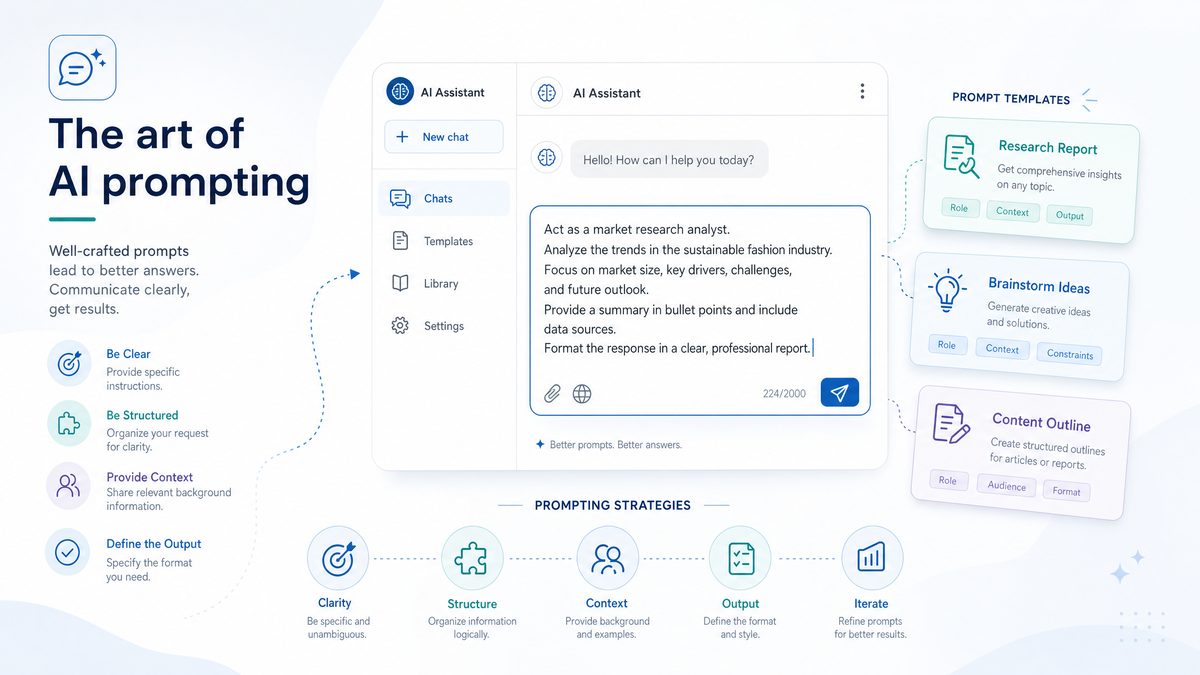
Given GPT-5.5 Instant’s tendency toward brevity, users must craft prompts that maximize clarity and specificity to obtain the most useful outputs. This section outlines techniques for eliciting concise and actionable answers across different query types, ensuring that the model’s responses align with practical needs.
Use Direct, Specific Language
Ambiguous prompts increase the likelihood of incomplete or overly general responses. Instead, use direct instructions that specify the desired output format, length, and depth. For example:
- Less effective: “Tell me about blockchain.”
- More effective: “Provide a 3-point summary of blockchain technology’s main advantages for financial services.”
Specific language guides the model in filtering irrelevant information and focusing on the core request. This approach is particularly important when working with complex or multidisciplinary topics where the model might otherwise generate broad overviews.
Set Explicit Length and Format Constraints
Specify word counts, bullet points, or numbered lists when appropriate. GPT-5.5 Instant respects these constraints more reliably than previous models. Examples include:
- “Explain quantum computing in less than 150 words.”
- “List 5 main features of the Python programming language in bullet points.”
These constraints assist in tailoring outputs for specific use cases, such as executive summaries, emails, or slide decks, where space and attention are limited.
Request Actionable Steps or Recommendations
To get responses that can be immediately utilized, frame prompts around tasks or decisions. For example:
- “Suggest 3 practical strategies for improving website SEO performance.”
- “Outline a step-by-step plan to migrate a database from MySQL to PostgreSQL.”
By focusing on actionable content, users can integrate model outputs into workflows without additional interpretation or extrapolation, enhancing productivity.
Leverage Personalization Controls
GPT-5.5 Instant allows users to adjust tone, style, and verbosity through prompt modifiers or interface settings. Incorporate these preferences directly into prompts to tailor responses to your audience or use case. For example:
- “Explain the concept of Kubernetes in a formal, executive summary style.”
- “Describe machine learning to a beginner with simple language and minimal jargon.”
These controls support diverse professional requirements, from technical documentation to client-facing communications.
Examples of Effective Concise Prompts
| Prompt | Expected GPT-5.5 Instant Response Style |
|---|---|
| “Summarize the latest trends in AI ethics in 5 bullet points.” | Five succinct, clearly labeled bullet points highlighting key trends, such as bias mitigation, transparency, and regulation. |
| “Provide a brief comparison of REST vs GraphQL APIs.” | A concise paragraph or table outlining the fundamental differences, use cases, and performance considerations. |
| “List 3 common cybersecurity threats for small businesses.” | Three clearly enumerated cybersecurity threats with brief descriptions. |
[INTERNAL_LINK]
Leveraging Memory Sources for Contextual Conversations
GPT-5.5 Instant introduces an advanced Memory Sources feature, enabling the model to reference previous interactions and external files seamlessly. This contextual awareness transforms the user experience by maintaining continuity across sessions and integrating diverse data inputs.
What Are Memory Sources?
Memory Sources encompass chat history, uploaded documents, and connected services such as Gmail. These inputs inform the model’s responses, allowing it to draw on relevant past content without needing repetitive user input. For example, GPT-5.5 Instant can recall a prior conversation about project deadlines stored in chat memory or extract data from a spreadsheet uploaded earlier.
This persistent memory capability is a marked improvement over prior models which typically treated each interaction as stateless or limited within-session context. In professional environments, this means ongoing projects, client details, or research materials can be referenced dynamically without re-uploading or re-explaining.
How Memory Sources Enhance Prompting
- Sustained Context: The model maintains awareness of ongoing topics, reducing the need to restate background information. This is especially useful for multi-day projects or long-term client interactions.
- Dynamic Data Integration: Real-time referencing of attached files or emails enhances response accuracy and relevance. For instance, the model can pull specific figures from a financial report or check dates from a calendar invite.
- Personalized Interactions: Memory of user preferences and past instructions enables tailored suggestions and tone adjustments, improving user satisfaction and efficiency.
Best Practices for Using Memory Sources
- Explicitly reference memory when needed: Include phrases like “Based on our last discussion…” or “Refer to the attached project plan.” This helps the model prioritize relevant information and avoid confusion.
- Organize uploaded files clearly: Name documents descriptively and provide context in prompts to help the model locate pertinent information quickly. For example, “Using the Q2 financial report,” rather than simply “Using the spreadsheet.”
- Manage privacy and security: Be mindful of sensitive data in memory sources and use model settings to control data retention and access. Employ encryption and access controls when integrating with external services.
Example Prompts Using Memory Sources
- “Using the budget spreadsheet uploaded earlier, summarize the Q2 expenditure trends.”
- “Based on the email chain about the product launch, draft a status update for the marketing team.”
- “Recall the requirements we discussed last week and generate a prioritized task list.”
Effectively leveraging Memory Sources can significantly reduce repetitive input and enable more natural, human-like conversations with the model, fostering enhanced productivity and collaboration.
[IMAGE_PLACEHOLDER_SECTION_2]
Visual Reasoning Prompts: Getting More from Image Uploads
GPT-5.5 Instant’s enhanced visual reasoning capabilities enable sophisticated analysis of images, diagrams, screenshots, and other visual inputs. This section details how to construct prompts that leverage this feature effectively, expanding the model’s utility beyond text-only interactions.
Supported Visual Input Types
- Photographs and screenshots — useful for UI analysis, bug reports, or visual documentation.
- Charts, graphs, and infographics — for data interpretation, trend analysis, and report generation.
- Technical diagrams and schematics — including network topologies, circuit diagrams, and architectural blueprints.
- Handwritten notes and annotated images — enabling digitization of manual records or brainstorming sessions.
Prompting Strategies for Visual Reasoning
- Provide clear context: Describe the image’s purpose or what you want analyzed. For example, specify “This is a sales performance chart for Q1 2024.”
- Ask specific questions: Target particular elements, data points, or relationships within the image. For instance, “Identify the month with the highest sales and explain potential causes.”
- Request step-by-step explanations: For complex visuals, ask the model to break down its interpretation to ensure clarity and comprehensive understanding.
- Use sequential analysis for large images: If the image contains multiple sections or layers, prompt the model to analyze each segment individually to improve accuracy.
Examples of Effective Visual Prompts
- “Analyze the attached sales chart and identify the quarter with the highest revenue growth.”
- “Explain the workflow depicted in this process diagram and suggest potential bottlenecks.”
- “Interpret the handwritten notes in this image and convert them into a structured meeting summary.”
- “Review the network topology diagram for security vulnerabilities and recommend improvements.”
- “Summarize the key data trends from the attached infographic on renewable energy adoption.”
Limitations and Workarounds
While GPT-5.5 Instant has improved visual comprehension, image resolution and clarity affect accuracy. For highly detailed visuals, supplement prompts with descriptive text or segment images into smaller parts for sequential analysis. Low-quality or blurry images may yield incomplete or incorrect interpretations.
Additionally, complex diagrams with domain-specific notations (such as electrical schematics) may require supplementary textual explanation to achieve optimal results. Combining visual and textual inputs is a recommended best practice to maximize accuracy and detail.
[INTERNAL_LINK]
When and How to Trigger Web Search
GPT-5.5 Instant integrates web search more judiciously than prior models, engaging external queries primarily when the internal knowledge base is insufficient or out-of-date. Understanding when and how to prompt for web searches maximizes this feature’s utility, ensuring access to real-time and comprehensive information.
Automatic vs. Manual Web Search Triggers
| Trigger Type | Behavior | Use Case |
|---|---|---|
| Automatic | The model independently decides to perform a web search when it detects data gaps or time-sensitive queries. | General information requests where recency is critical, e.g., “Latest stock prices for Tesla.” |
| Manual | The user explicitly instructs the model to perform a web search or verify facts. | When precise or exhaustive research is required, e.g., “Search for recent developments in renewable energy.” |
Prompting for Effective Web Search
- Include clear instructions such as “Please perform a web search for…” to explicitly trigger external queries.
- Specify the scope and timeframe, e.g., “Find articles from the past month on…” to narrow search results and improve relevance.
- Request source citations or summaries of multiple viewpoints for balanced information, enhancing the credibility of responses.
- Use follow-up prompts to delve deeper into search results or clarify ambiguous information.
Example Prompts Triggering Web Search
- “Search the web and summarize the latest security vulnerabilities discovered in Windows 11.”
- “Provide current market trends for electric vehicles based on recent news.”
- “Verify the accuracy of the following claim using up-to-date sources.”
- “Find recent academic papers published on climate change mitigation strategies.”
- “Lookup the latest legislation updates affecting data privacy in the EU.”
Proper use of web search integration enables GPT-5.5 Instant to stay current and provide authoritative answers, particularly important in fast-evolving domains like cybersecurity, finance, and policy.
Advanced Prompting Techniques for Professional Workflows
GPT-5.5 Instant’s refined capabilities make it a powerful tool for complex, domain-specific tasks. This section explores advanced techniques to optimize prompts for professional and enterprise workflows, enabling users to extract maximum value from the model.
Multi-Turn Prompt
