
Codex Sites: How OpenAI’s New Plugin Lets You Build and Deploy Full Web Apps From a Single Prompt

By Markos Symeonides
Published for ChatGPT AI Hub, June 2026.
OpenAI Turns Codex Into a Hosted App Builder
OpenAI launched Codex Sites on June 2, 2026, introducing a new plugin for Codex that can create, save, deploy, and inspect full web applications hosted by OpenAI. The release extends Codex beyond code generation and repository assistance into an end-to-end application workflow: a user describes a product idea, internal tool, dashboard, game, or website, and Codex produces a working JavaScript or TypeScript application with a hosted URL, ChatGPT-based sign-in, and team sharing controls.
The announcement is notable because it moves OpenAI closer to a vertically integrated software creation environment. Until now, AI coding assistants have largely helped developers write code, explain code, refactor files, generate tests, or scaffold projects that still needed to be pushed to GitHub, deployed through a platform such as Vercel or Netlify, and connected to authentication and collaboration systems. Codex Sites collapses much of that path into a single ChatGPT-connected workflow, at least for approved Business and Enterprise users during the preview period.
In practical terms, Codex Sites is not just a code snippet generator. It is a hosted environment where Codex can generate a working app, save the project state, deploy it to OpenAI infrastructure, inspect the running output, and iterate based on user feedback. A manager can ask for a customer health dashboard, a product operations lead can request an internal triage tool, or a developer can draft a lightweight prototype, and Codex can build the initial application without requiring a separate deployment pipeline.
The launch also clarifies OpenAI’s broader direction for Codex in 2026. Codex is increasingly positioned as an agentic software teammate rather than a text completion model embedded in an editor. With Sites, the agent does not merely suggest implementation details; it creates a running artifact that colleagues can access through an OpenAI-hosted URL, protected by Sign-in with ChatGPT and workspace sharing. That makes the product particularly relevant for enterprise teams looking to shorten the distance between an idea and a usable internal application.
However, Codex Sites is still a preview-stage product with important limitations. It is available only to Business and Enterprise ChatGPT plans, not to Plus or free accounts. It currently supports JavaScript and TypeScript only, lacks custom domain support, and does not provide unrestricted public URLs. OpenAI is clearly targeting controlled workplace use cases first, rather than consumer publishing, public SaaS launches, or production-grade web hosting at internet scale.
For teams ready to maximize their Codex Sites deployments, our comprehensive prompts masterclass provides 40 battle-tested prompts specifically designed for building SaaS dashboards, internal administration tools, and interactive web applications using the Sites plugin. Codex Sites Prompts Masterclass: 40 Advanced Prompts for Building SaaS Dashboards, Internal Tools, and Interactive Web Apps
What Codex Sites Is
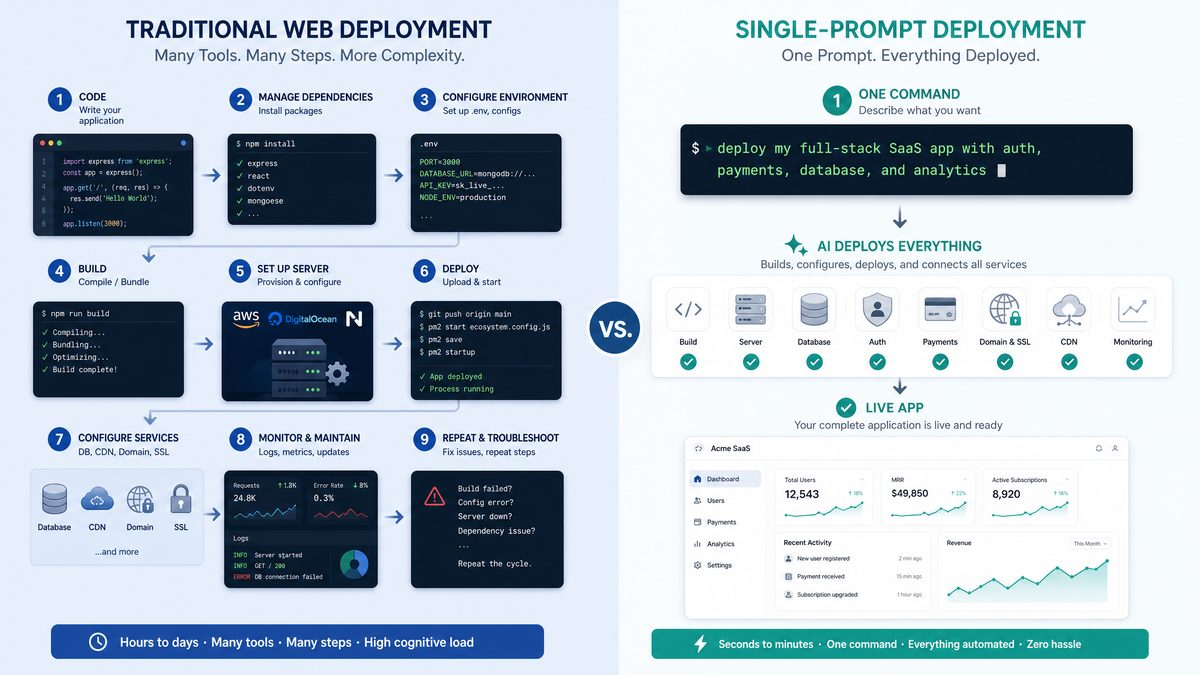
Codex Sites is a plugin that gives Codex the ability to build and host web-based software directly inside OpenAI’s ecosystem. Users can request websites, web apps, dashboards, internal tools, utilities, and simple games. Codex then generates a full-stack JavaScript or TypeScript project, deploys it to a hosted OpenAI URL, and makes it available for authenticated team use. The plugin is designed around outcomes rather than files: the user describes what the application should do, and Codex handles the initial architecture, interface, implementation, and deployment loop.
The term “Sites” may understate the product’s scope. A static landing page is one possible use case, but the plugin is aimed at richer applications. OpenAI describes it as capable of creating apps that include data input forms, charts, interactive components, authentication, shared team access, and inspection of the deployed result. For enterprise users, the highest-value use cases are likely to be internal dashboards, lightweight workflow applications, approval tools, reporting interfaces, knowledge-base front ends, and operational prototypes that do not justify a full engineering sprint at inception.
Codex Sites is also distinct from traditional no-code builders because it is code-first under the hood. Rather than assembling applications from prebuilt drag-and-drop widgets alone, Codex generates JavaScript or TypeScript. That matters for teams that want extensibility, maintainability, and developer review. A no-code builder may be easier for nontechnical users to manipulate visually, but it often abstracts away implementation details. Codex Sites, by contrast, begins from natural language but produces conventional web application code, giving technical teams a clearer path to inspection, refinement, and eventual migration if needed.
The plugin’s hosted environment is central to the announcement. Many AI tools can create a React component or generate a Next.js scaffold, but the user must still run local commands, install dependencies, resolve build errors, provision hosting, and manage environment variables. Codex Sites reduces that operational friction by giving Codex a deployment target from the outset. The result is a working URL rather than a folder of files waiting for a developer to package and ship.
OpenAI is positioning the product as part of ChatGPT’s Business and Enterprise value proposition. Because access is limited to paid workplace plans, Codex Sites is not being introduced as a mass-market website builder for hobbyists. Instead, it fits the pattern of enterprise AI tools that combine generation, governance, identity, and collaboration. The inclusion of Sign-in with ChatGPT and team sharing indicates that OpenAI expects apps to circulate within organizations, where access control and workspace membership matter more than public search visibility.
How Codex Sites Works From Prompt to Hosted App
The basic workflow begins with a prompt or plan. A user can describe the application in plain language, provide a structured specification, paste requirements from a project brief, or iterate conversationally with Codex. The request might be broad, such as “Build a dashboard for tracking weekly sales pipeline by region,” or detailed, including field names, user roles, chart types, validation rules, and sample data. Codex interprets the intent, chooses an application structure, generates the code, deploys it, and returns a hosted URL.
A realistic enterprise prompt might look like this:
Build an internal customer escalation tracker for our support managers.

Requirements:
- Use TypeScript.
- Include a table of open escalations with customer name, severity, owner, status, next action, and due date.
- Add filters for severity, owner, and overdue items.
- Include a form for creating a new escalation.
- Show a summary dashboard with counts by severity and status.
- Require Sign-in with ChatGPT.
- Allow sharing with members of my ChatGPT Business workspace.
- Use sample data for now, but structure the app so we can connect a real data source later.
Codex Sites then generates the application, including the user interface, state management, data model, sample data, and routing necessary for the first version. In the preview, the generated applications are limited to JavaScript and TypeScript, which means teams should expect common web stacks rather than arbitrary back-end languages. The emphasis is on fast, browser-based software that can be reviewed quickly by a team, not on replacing every production application architecture.
After generating the app, Codex deploys it to an OpenAI-hosted URL. This is one of the most important differences from earlier code-assistant workflows. The user does not need to copy code into a repository, run a build locally, select a deployment provider, or configure a new hosting project before evaluating the result. The application can be opened immediately, tested in context, and shared with colleagues who have the appropriate workspace access.
Codex can also inspect the deployed app. That closes a loop that has historically been difficult for AI coding tools. If a user says, “The chart is too crowded,” “The mobile layout is broken,” or “The form should show validation errors before submission,” Codex can reason about the live output and apply changes. Inspection gives the assistant a feedback channel beyond static code, making it more capable of addressing visual and behavioral issues that only appear once the app is running.
The addition of Sign-in with ChatGPT gives Codex Sites a built-in identity layer. For internal workplace apps, authentication is often a disproportionate source of setup overhead. A prototype may take one hour to build but several more hours to wire to identity providers, roles, and access rules. By using ChatGPT sign-in and workspace sharing, OpenAI gives teams a default access model appropriate for preview-stage internal use. This does not eliminate the need for enterprise identity governance in mature deployments, but it makes early-stage collaboration faster.
Team sharing is equally important. In many organizations, prototypes fail to gain traction because only the creator can run them locally or because sharing requires ad hoc deployment steps. Codex Sites makes the prototype shareable as soon as it exists. A product manager can generate an app, send the hosted URL to stakeholders in the same ChatGPT Business or Enterprise workspace, gather feedback, and ask Codex to revise the implementation. The workflow is closer to collaborative document editing than traditional software deployment.
Enterprise teams leveraging Codex for complex multi-hour workflows will benefit from our production-ready prompts masterclass, which covers 40 advanced prompts for code refactoring, automated testing, CI monitoring, and incident response automation across persistent agent sessions. Codex Enterprise Prompts Masterclass: 40 Production-Ready Prompts for Long-Running Agent Workflows
Access, Availability, and Preview Restrictions

Codex Sites is currently available only to ChatGPT Business and ChatGPT Enterprise customers. OpenAI has not made the plugin available to ChatGPT Plus subscribers or free users at launch. That access model reflects both commercial strategy and operational caution. Hosted app generation can consume compute, storage, deployment, and security review resources, and OpenAI is limiting the preview to environments where administrative controls, billing relationships, and workspace policies are already in place.
The absence of Plus and free access will disappoint individual developers, indie hackers, and students who might have expected Codex Sites to become an instant personal app generator. For now, OpenAI appears to be prioritizing organizations that can use the tool for internal productivity, governed experimentation, and team-based development. That makes sense given the product’s current limitations: without public URLs or custom domains, Codex Sites is less useful for launching a consumer-facing startup site and more useful for building internal applications that live inside a company’s ChatGPT workspace.
OpenAI describes the product as preview-stage, and that label should be taken seriously. Preview products are generally intended for evaluation, controlled pilots, and feedback-driven iteration rather than unrestricted production reliance. Enterprises should expect capabilities, quotas, security controls, supported frameworks, and deployment behavior to evolve. Teams adopting Codex Sites should document which workflows depend on it and avoid assuming that every preview detail will remain stable.
The preview also suggests that OpenAI is testing how much of the application lifecycle users are willing to delegate to an AI agent. Generating code is one challenge; hosting and operating user-created apps introduces additional concerns around isolation, data access, abuse prevention, compliance, and lifecycle management. By limiting availability to Business and Enterprise users, OpenAI can observe usage patterns in more controlled settings and refine guardrails before considering broader release.
What Users Can Build With Codex Sites
Codex Sites is best understood as a rapid application environment for the long tail of workplace software. Every enterprise has dozens or hundreds of small software needs that are too specific for off-the-shelf SaaS and too low-priority for formal engineering roadmaps. These include approval trackers, operational dashboards, onboarding checklists, sales calculators, analytics viewers, policy lookup tools, incident review forms, and lightweight project portals. Codex Sites gives teams a way to produce first versions of these tools without waiting for a full development cycle.
Dashboards are likely to be one of the earliest high-frequency use cases. A sales operations team could ask Codex to build a quarterly pipeline dashboard with filters by region and account segment. A support team could request a severity dashboard showing ticket counts, aging, and escalation owners. A finance team could generate a budget variance viewer using uploaded sample data. Even if the initial version relies on static or mock data, it can clarify requirements and provide a visual artifact that stakeholders can evaluate.
Internal tools are another strong fit. Many businesses rely on spreadsheets for processes that would benefit from structured interfaces: intake forms, review queues, status trackers, prioritization matrices, inventory lists, and exception handling workflows. Codex Sites can convert those needs into simple applications with forms, tables, filters, and summary views. For teams that lack dedicated internal tools engineering capacity, this could reduce reliance on fragile spreadsheets and one-off scripts.
Codex Sites can also build small games and interactive experiences. While that may sound less enterprise-focused, game-like simulations can be useful for training, onboarding, security awareness, and product education. A compliance team might create a scenario-based training game; a product team might generate an interactive demo that explains a workflow; a learning and development group might build quizzes with progress tracking. Because the plugin creates JavaScript and TypeScript web apps, interactive browser experiences are a natural fit.
For developers, Codex Sites may become a front door for prototyping rather than a replacement for professional engineering. A developer can ask for a working proof of concept, inspect the generated structure, iterate on user experience, and then decide whether to harden, export, or rebuild the app in a production environment. The value is not only speed but also exploratory breadth: teams can test more ideas before committing engineering resources to the few that matter.
Current Limitations: No Custom Domains, No Public URLs, JavaScript and TypeScript Only
The most important limitation is that Codex Sites does not currently support custom domains. Users cannot point a company domain such as tools.yourcompany.io or dashboard.yourcompany.io to a Codex Sites application. That prevents the plugin from replacing conventional hosting platforms for branded web properties, external customer portals, or public-facing SaaS applications. For now, Codex Sites apps live at OpenAI-hosted URLs and are best treated as workspace-hosted internal artifacts.
OpenAI also does not currently provide public URLs for unrestricted internet access. The hosted URL is not the same as a public launch endpoint intended for anonymous visitors. Access is tied to ChatGPT sign-in and team sharing. This design reduces risk during preview and aligns with enterprise internal use cases, but it limits Codex Sites for marketing sites, public documentation, customer onboarding pages, open demos, and community tools. Organizations that need public reach will still need Vercel, Netlify, Cloudflare Pages, AWS, Azure, Google Cloud, or comparable infrastructure.
The JavaScript and TypeScript-only constraint is another practical boundary. Modern web development is heavily centered on JavaScript and TypeScript, so this limitation will be acceptable for many front-end and full-stack web apps. However, it excludes Python back ends, Ruby on Rails applications, Java services, Go APIs, .NET stacks, PHP applications, and other enterprise architectures. Teams with established platform standards should evaluate whether Codex Sites is a prototyping tool, an internal utility environment, or a bridge into their primary engineering stack.
The preview stage means teams should also assume limited guarantees around long-term hosting behavior, compliance certifications, observability, export options, dependency management, scaling, and incident response compared with mature deployment platforms. OpenAI may provide enterprise-grade controls over time, but organizations should not treat preview-generated sites as mission-critical systems unless their own risk assessment supports that decision.
There are also open questions around data integration. Codex Sites can build applications and use sample or user-provided data, but enterprise value often depends on secure connections to systems of record such as Salesforce, ServiceNow, Snowflake, Databricks, Jira, Workday, or internal APIs. The strength of Codex Sites will depend partly on how OpenAI handles secrets, connectors, permissions, audit trails, and data boundaries. A prototype dashboard is useful; a governed dashboard connected to enterprise systems is transformative but requires stronger controls.
Enterprise Implications: Prototyping, Internal Tools, and Developer Bottlenecks
For enterprise leaders, the core value of Codex Sites is cycle-time compression. Many software ideas spend weeks in discussion before a usable prototype appears. Requirements are captured in documents, debated in meetings, converted into tickets, prioritized against other work, and eventually implemented by developers. Codex Sites allows teams to turn a rough plan into a working artifact in minutes or hours, changing the nature of early-stage product and process discovery.
This has immediate implications for rapid prototyping. Stakeholders often struggle to evaluate abstract requirements, but they can respond quickly to a working interface. A legal operations team may not know exactly what an intake tool should include until it sees a first version. A revenue operations team may refine dashboard metrics only after interacting with filters and charts. Codex Sites supports this exploratory process by making prototypes cheap enough to discard or rebuild.
Internal tool backlogs may also shrink. Engineering teams are frequently asked to build small administrative tools that are valuable but not strategically differentiated. These requests compete with customer-facing product work, reliability initiatives, security improvements, and platform modernization. If Codex Sites can handle a meaningful portion of low-risk internal applications, developers can focus on higher-leverage systems while still advising on architecture, security, and integration.
However, the phrase “reducing developer bottlenecks” should not be confused with removing developers from the process. Enterprises will still need engineers to review generated code, establish guardrails, manage data integrations, define security patterns, and decide when a prototype should graduate into a production system. Codex Sites changes developer involvement from building every first draft to supervising, hardening, and scaling the applications that prove valuable.
The most successful enterprise deployments will likely create clear tiers. Tier one may include disposable prototypes and mock-data demos built directly in Codex Sites. Tier two may include internal workspace tools with limited data sensitivity and team sharing. Tier three may include production applications that are rebuilt or migrated to standard enterprise platforms after validation. This tiered approach prevents preview-stage convenience from becoming unmanaged shadow IT.
Governance will be critical. If every employee can generate internal apps, organizations need policies for naming, ownership, data classification, access reviews, retention, and decommissioning. A dashboard built in 20 minutes can still expose sensitive information if connected carelessly to business data. Enterprise administrators should evaluate Codex Sites alongside existing policies for SaaS creation, low-code platforms, AI usage, and internal software approval.
Comparison: Codex Sites vs Traditional Deployment Platforms
Codex Sites competes indirectly with platforms such as Vercel, Netlify, and Replit, but it does not replace them feature-for-feature in its current preview. The key distinction is that Codex Sites begins with an AI agent and a prompt, while traditional deployment platforms begin with code, repositories, build settings, and hosting configuration. That makes Codex Sites faster for creating a first working version, but less flexible for production-grade public deployment.
| Capability | Codex Sites | Vercel | Netlify | Replit | Enterprise Takeaway |
|---|---|---|---|---|---|
| Primary workflow | Prompt Codex to generate, deploy, inspect, and revise an app inside OpenAI’s hosted environment. | Deploy from Git repositories and framework-based projects, especially front-end and full-stack JavaScript apps. | Deploy static sites, Jamstack apps, serverless functions, and front-end projects from repositories or direct uploads. | Build and run code in an online development environment with hosting and collaboration features. | Codex Sites prioritizes idea-to-prototype speed; traditional platforms prioritize deployment control and production operations. |
| AI generation | Native Codex-driven generation from prompts and plans, with iterative inspection of the running app. | AI features may assist development, but hosting is centered on developer-managed code and repositories. | AI assistance is not the core deployment model; platform value is build, deploy, and hosting workflow. | AI-assisted coding is integrated with the browser IDE and project environment. | Codex Sites is more agentic at creation time; Replit is closest among alternatives for integrated AI coding. |
| Supported languages | JavaScript and TypeScript only during preview. | Strong JavaScript and TypeScript support, with broader framework and serverless options depending on runtime. | Broad static and front-end ecosystem support, plus serverless functions and edge capabilities. | Supports many languages in development environments, including JavaScript, Python, Go, Java, and others. | Codex Sites is narrower today and best suited for web-native prototypes and internal tools. |
| Custom domains | Not supported during preview. | Supported, including production domain workflows. | Supported, including DNS and domain management workflows. | Supported depending on plan and deployment configuration. | Public brand presence still requires traditional hosting platforms. |
| Public URLs | No unrestricted public URLs during preview; access is tied to ChatGPT sign-in and team sharing. | Designed for public production deployments and preview URLs. | Designed for public sites, previews, and production deployments. | Supports hosted projects and public sharing depending on configuration. | Codex Sites is currently strongest for internal distribution, not public launches. |
| Authentication | Includes Sign-in with ChatGPT and workspace-oriented team sharing. | Developers integrate authentication providers or platform-adjacent services. | Developers integrate authentication separately or use compatible identity services. | Authentication depends on app implementation and Replit features. | Codex Sites reduces authentication setup for internal ChatGPT workspace apps. |
| Operational maturity | Preview-stage product with evolving limits and controls. | Mature production platform with enterprise features, observability integrations, and deployment workflows. | Mature platform for static, Jamstack, and web application delivery. | Mature cloud development environment with education, prototyping, and deployment strengths. | Enterprises should use Codex Sites for evaluation and internal tools while retaining standard production platforms. |
| Best fit | Fast internal prototypes, dashboards, workflow tools, and team-shared applications generated from prompts. | Production web apps, SaaS front ends, Next.js projects, and high-control deployments. | Marketing sites, documentation, static sites, Jamstack apps, and serverless front ends. | Learning, collaborative coding, quick apps, prototypes, and browser-based development. | Codex Sites expands the top of the funnel for software ideas; traditional platforms remain essential for public and production delivery. |
How Codex Sites Compares With Vercel, Netlify, and Replit
Vercel remains the strongest comparison for teams building modern React and Next.js applications, especially those that need production-grade deployments, custom domains, preview environments, edge functions, analytics, and integration with Git-based engineering workflows. Codex Sites may generate a useful prototype faster, but Vercel offers the operational foundation required for public applications and serious product development. In many teams, the likely workflow will be to prototype in Codex Sites and then rebuild or migrate proven concepts into a Vercel-backed repository.
Netlify is similarly mature but has a different historical center of gravity, with deep strengths in static sites, Jamstack workflows, front-end deployments, serverless functions, forms, and content-driven websites. Codex Sites is more conversational and agentic, but Netlify provides the deployment tooling expected by marketing, documentation, and developer relations teams that need public URLs, custom domains, build hooks, branch deploys, and integration with content systems. Codex Sites does not yet compete with Netlify for public web publishing.
Replit is the closest alternative in spirit because it combines coding, collaboration, AI assistance, and hosting inside a browser-based environment. Replit has long appealed to learners, indie developers, and teams that want to spin up projects quickly without local setup. Codex Sites differs by being embedded in OpenAI’s ChatGPT workplace environment and by focusing on prompt-to-hosted-app generation with ChatGPT sign-in. Replit offers broader language flexibility and a more conventional development environment, while Codex Sites offers a tighter natural-language-to-deployment loop for Business and Enterprise users.
The comparison also reveals what OpenAI is not trying to do at launch. Codex Sites is not a drop-in replacement for CI/CD platforms, cloud infrastructure, or production application hosting. It is a new category of AI-native app generation and controlled hosting. Its value is highest before a software idea has become a formal engineering project. Once the application requires public access, custom domains, complex data integrations, compliance-specific controls, load testing, detailed observability, or multi-environment release management, traditional platforms remain necessary.
For enterprises, the strategic question is not whether Codex Sites beats Vercel, Netlify, or Replit in a feature checklist. The question is whether it changes the economics of deciding what to build. If non-engineering teams can generate credible prototypes before asking developers for help, engineering organizations receive clearer requirements and fewer speculative requests. That could improve prioritization even if the final production system is deployed elsewhere.
The Future of No-Code and Low-Code Development
Codex Sites is part of a broader shift from visual no-code to agentic low-code. Traditional no-code platforms gave users canvases, components, workflows, and database tables. They reduced the need to write code but required users to learn the platform’s mental model. Agentic tools such as Codex Sites invert that process: the user describes the goal, and the system creates the application structure. Instead of dragging components onto a page, the user negotiates requirements with an AI agent.
This does not mean visual builders will disappear. Many business users still benefit from explicit controls, schema editors, workflow diagrams, and permission panels. But the center of gravity is moving toward intent-driven creation. A user should not need to know whether a dashboard requires a reducer, a query layer, a charting library, or a form validation library. They should be able to state the desired business outcome and review the generated result. Codex Sites is a clear example of that philosophy applied to deployable web software.
The most important consequence may be an expansion of who participates in software creation. Product managers, operations specialists, analysts, designers, and subject-matter experts can create working artifacts without waiting for developers to translate every idea. That does not eliminate engineering discipline; it moves some early creative work closer to the domain experts who understand the problem. Developers then become reviewers, platform architects, and production owners for the subset of generated applications that deserve long-term investment.
There is also a cultural implication. Organizations have spent years trying to become more agile, but many still rely on documents and meetings to evaluate software ideas. Codex Sites makes software itself a more common medium for discussion. Instead of debating whether a process dashboard should include a priority score, a team can generate two versions and compare them. Instead of imagining an onboarding portal, HR can test a working draft. This could make internal innovation more empirical and less dependent on abstract specifications.
At the same time, agentic low-code raises the risk of unmanaged proliferation. If app generation becomes effortless, companies may accumulate hundreds of semi-maintained tools with unclear ownership. The history of spreadsheets, Access databases, and shadow SaaS shows that convenience can create long-term governance burdens. Codex Sites will need strong administrative features, auditability, lifecycle controls, and integration with enterprise identity if it becomes a mainstream internal software layer.
Security, Compliance, and Governance Questions
Security teams will evaluate Codex Sites through several lenses: who can create apps, who can access them, what data they can contain, how long they persist, how code is stored, how dependencies are managed, and whether generated applications can connect to sensitive systems. The built-in Sign-in with ChatGPT model is a useful starting point, but enterprise security requires more than authentication. It requires policy enforcement, logging, review workflows, and clear separation between low-risk prototypes and business-critical applications.
Data classification is likely to be a central policy issue. A mock-data sales dashboard is low risk; a dashboard connected to customer contracts, health information, payment records, or employee performance data is not. Enterprises should define what types of data may be used in Codex Sites during preview and require additional review for regulated or confidential information. Even if the application itself is internally shared, generated code and hosted environments must be assessed under the organization’s data handling rules.
Dependency security is another concern. JavaScript and TypeScript ecosystems rely heavily on third-party packages. If Codex Sites generates applications using external libraries, enterprises will want visibility into dependency versions, licenses, vulnerabilities, and update paths. Mature software development organizations already use software composition analysis and dependency scanning; equivalent transparency will be important if Codex Sites apps become more than disposable prototypes.
Code review also remains relevant. AI-generated code can be useful and correct, but it can also contain flawed assumptions, weak validation, accessibility issues, inefficient state management, or insecure patterns. Enterprises should decide when generated apps require developer review and when they may be used as low-risk internal prototypes. The review standard should depend on data sensitivity, user base, business impact, and integration complexity.
OpenAI’s decision to restrict Codex Sites to Business and Enterprise plans suggests that administrative control is part of the intended product path. Over time, customers will likely expect workspace-level settings for enabling or disabling site creation, limiting sharing, approving external data connections, retaining logs, exporting code, and managing app lifecycle. Those controls will determine whether Codex Sites remains a novelty or becomes a governed enterprise platform.
What Developers Should Do Now
Developers should treat Codex Sites as an opportunity to reshape the intake and prototyping process rather than as a threat to professional software engineering. The tool can reduce repetitive first-draft work, but it increases the importance of architectural judgment. Teams should define which categories of applications are appropriate for Codex Sites and which should go directly into standard engineering workflows. Clear guidance will prevent confusion and reduce the risk of business teams creating tools that later become difficult to support.
A practical first step is to create internal prompt templates for common use cases. For example, an engineering enablement team could provide templates for dashboards, CRUD tools, approval workflows, and data review interfaces. These templates should include requirements for accessibility, validation, error handling, sample data labeling, and security expectations. Better prompts will produce better prototypes and make review easier.
Developers should also test export and migration paths as OpenAI makes them available or clarifies the workflow. A prototype is most valuable when it can inform production development. Teams should determine whether generated code can be reviewed, copied, versioned, or adapted into existing repositories. If migration is cumbersome, Codex Sites may remain useful for discovery but less useful as a starting point for production code.
Another smart move is to establish a review rubric. A Codex Sites app that only visualizes mock data may need minimal review. An app that collects employee input may need privacy review. An app that connects to customer data may need security assessment and engineering ownership. By creating a rubric early, organizations can embrace speed without compromising accountability.
Developers should also pay attention to accessibility and usability. AI-generated interfaces can look polished while missing keyboard navigation, semantic structure, contrast standards, responsive behavior, or assistive technology compatibility. If Codex Sites becomes a source of internal tools, accessibility review should not be optional. Internal users deserve the same quality standards as external customers.
What Business Leaders Should Watch
Business leaders should watch whether Codex Sites changes how teams allocate engineering capacity. If operations, finance, support, sales, and HR teams can generate working internal tools safely, engineering organizations may spend less time on speculative prototypes and more time on platform leverage. The productivity gain will not come from replacing developers; it will come from reducing handoffs, shortening feedback loops, and improving requirement quality before developers engage deeply.
Leaders should also measure adoption carefully. The right metrics are not simply the number of generated apps. More useful measures include time from idea to prototype, percentage of prototypes discarded before engineering investment, reduction in spreadsheet-based workflows, stakeholder satisfaction, developer review time, and the number of prototypes that successfully graduate into governed systems. These metrics will reveal whether Codex Sites creates durable value or just more software clutter.
Procurement and IT teams should evaluate Codex Sites in the context of the broader low-code stack. Many enterprises already use platforms such as Microsoft Power Apps, Retool, Appsmith, ServiceNow App Engine, Airtable, or internal developer portals. Codex Sites may complement these tools rather than replace them. Its distinctive advantage is prompt-driven generation inside ChatGPT; its weakness is the preview-stage limitation around public hosting, custom domains, and language flexibility.
Change management will matter. If employees are allowed to create apps, they need training on appropriate use, data boundaries, and escalation paths. A short enablement program can prevent common mistakes, such as using real sensitive data in prototypes, sharing tools too broadly, or assuming AI-generated logic is automatically correct. The most effective organizations will combine enthusiasm with disciplined operating rules.
Why This Launch Matters
Codex Sites matters because it turns AI coding from an assistant experience into a hosted application experience. The user no longer stops at “here is the code.” The user gets “here is the running app.” That shift changes expectations for AI development tools. If a model can reason about requirements, generate a project, deploy it, inspect the result, and revise the implementation, then the unit of output becomes functioning software rather than text.
The launch also strengthens OpenAI’s position in enterprise software workflows. ChatGPT is already used for writing, research, analysis, customer support, and coding assistance. Codex Sites adds a tangible application layer that can live inside the same workspace. For organizations standardizing on ChatGPT Business or Enterprise, that creates a new reason to view OpenAI not just as a model provider but as a workplace software platform.
At the same time, the limitations are significant enough to keep expectations grounded. Codex Sites is not ready to replace traditional deployment platforms, public web hosting, or professional software engineering. No custom domains, no public URLs, JavaScript and TypeScript-only support, and preview-stage maturity all constrain its current role. The right interpretation is that OpenAI has launched a powerful internal prototyping and app-generation environment, not a complete production cloud platform.
The next phase will depend on how quickly OpenAI expands the product. Custom domains would make Codex Sites more relevant to public-facing apps. Public URL options would widen its audience. Broader language support would attract more engineering teams. Enterprise connectors would make dashboards and internal tools dramatically more useful. Administrative controls would determine whether CIOs and CISOs can approve broad deployment. Each of these improvements would move Codex Sites from preview curiosity toward strategic enterprise infrastructure.
The Bottom Line
Codex Sites is one of OpenAI’s most consequential developer-facing releases of 2026 because it compresses application creation, deployment, authentication, sharing, and iteration into a single AI-assisted workflow. Launched on June 2, 2026, the plugin allows Codex to build and host websites, web apps, dashboards, internal tools, and games from prompts or plans, with OpenAI-hosted URLs and Sign-in with ChatGPT for controlled team access.
For Business and Enterprise ChatGPT customers, the immediate opportunity is rapid prototyping and internal tool creation. Teams can turn rough ideas into working software quickly, reduce pressure on engineering backlogs, and use live applications as a better medium for feedback. For developers, the tool is best viewed as an accelerator for discovery and first drafts, not as a replacement for code review, architecture, security, or production operations.
The constraints are equally clear. Codex Sites is not available to Plus or free users, does not support custom domains, does not provide unrestricted public URLs, supports only JavaScript and TypeScript in preview, and should be adopted with appropriate governance. Companies that treat it as a controlled prototyping environment will benefit sooner than those that expect it to behave like a mature public deployment platform.
In the larger no-code and low-code market, Codex Sites signals a shift toward AI-native software creation. The future is unlikely to be purely drag-and-drop or purely code-centric. It will be conversational, iterative, code-generating, and increasingly connected to hosted execution environments. OpenAI’s new plugin is an early but important step in that direction: a system where a single prompt can become a real, shareable application, and where the boundary between describing software and deploying software becomes much thinner.
Access 40,000+ AI Prompts for ChatGPT, Claude & Codex — Free!
Subscribe to get instant access to our complete Notion Prompt Library — the largest curated collection of prompts for ChatGPT, Claude, OpenAI Codex, and other leading AI models. Optimized for real-world workflows across coding, research, content creation, and business.
