
OpenAI Rolls Out MCP Support for ChatGPT Enterprise: What Model Context Protocol Means for Your Organization
By Markos Symeonides
Executive Summary: ChatGPT Enterprise Moves From AI Assistant to Integration Layer
OpenAI’s rollout of full MCP support for ChatGPT Enterprise and ChatGPT Edu marks a major shift in how organizations can connect generative AI to their internal systems. With Model Context Protocol support and developer mode, companies can now build, test, and publish MCP-powered connectors that allow ChatGPT to securely interact with enterprise tools, data sources, workflows, and operational systems.
The practical implication is significant: instead of treating ChatGPT as a standalone conversational interface, enterprises can now position it as a controlled, extensible orchestration layer across internal knowledge bases, SaaS platforms, ticketing systems, data warehouses, developer environments, HR platforms, finance tools, and proprietary business applications.
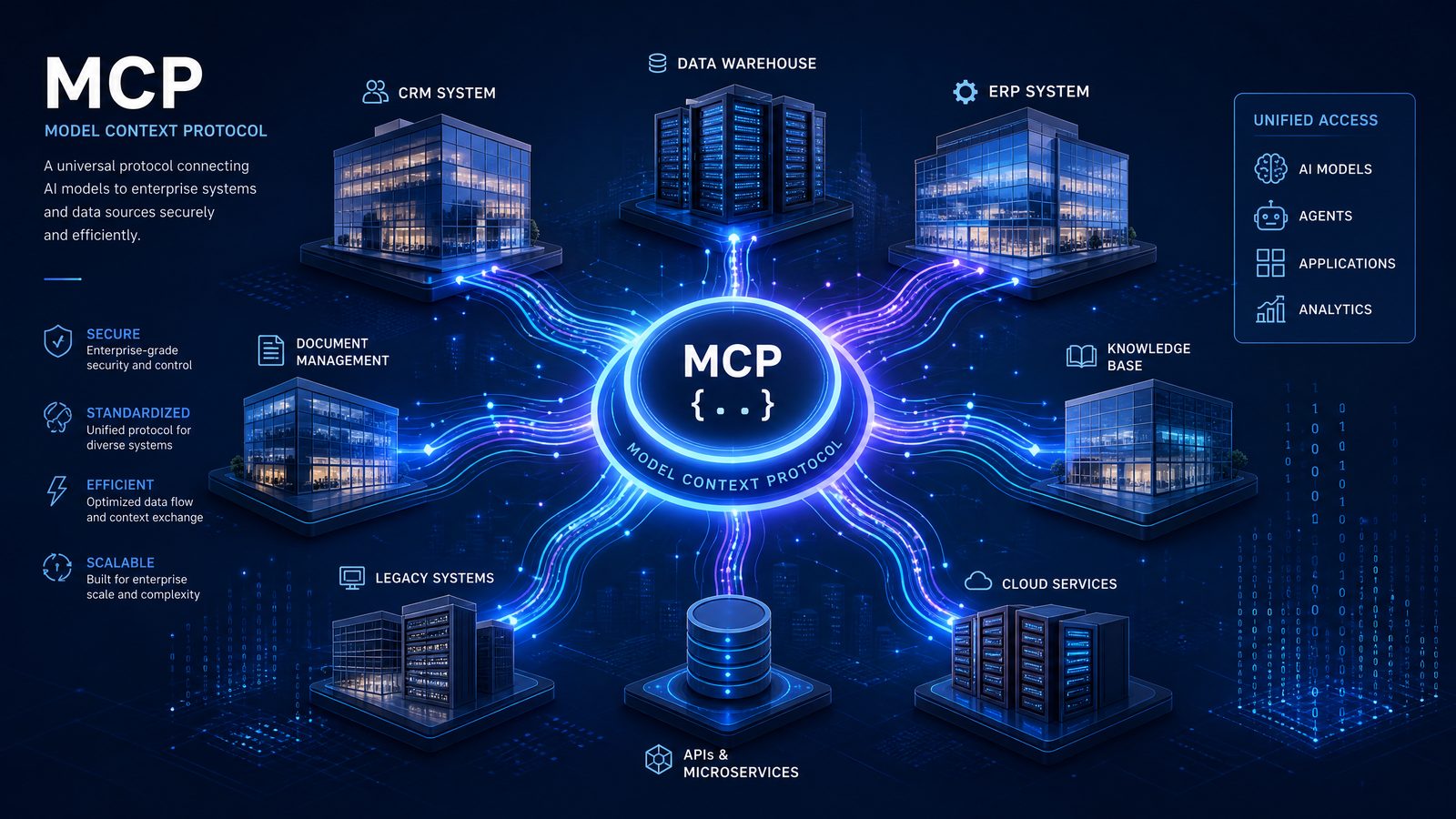
MCP is designed to standardize how AI systems access context and invoke tools. For enterprise AI teams, that means fewer custom one-off integrations, clearer governance patterns, and a more reusable architecture for connecting models to business systems. In the same way APIs standardized web application interoperability, MCP is emerging as a common integration language for AI agents and assistants.
For CIOs, CTOs, AI platform teams, security leaders, and business transformation executives, the announcement raises urgent questions:
- How should an organization evaluate MCP for enterprise AI integration?
- What kinds of internal systems should be connected first?
- How can teams build MCP servers without introducing security or compliance risk?
- What does developer mode mean for experimentation, testing, and controlled rollout?
- How should enterprises govern connectors that can expose data or trigger actions?
The short answer: MCP support gives organizations a more structured way to move from isolated AI pilots to operational AI systems. The longer answer is that success depends on disciplined architecture, strong identity controls, clear data boundaries, robust testing, and business-led use case prioritization.
For teams already investing in ChatGPT Enterprise, this is not merely a feature update. It is a new integration model that could define how AI becomes embedded in everyday knowledge work.
What OpenAI Announced: Full MCP Support and Developer Mode for Enterprise and Edu
OpenAI’s announcement centers on bringing full Model Context Protocol support to ChatGPT Enterprise and ChatGPT Edu, including a developer mode designed for building and validating MCP-powered connectors before making them broadly available to users.
In practical terms, the announcement introduces a pathway for enterprise developers to connect ChatGPT to internal and external systems through MCP servers. These servers expose capabilities, resources, and tools in a structured way that ChatGPT can understand and use during a conversation, subject to organizational permissions and configuration.
Developer mode is especially important because enterprise integration is rarely a single-step process. Organizations need to prototype connectors, verify authentication behavior, test tool invocation, inspect how context is presented to the model, and evaluate whether responses remain accurate, secure, and aligned with business policy. Developer mode gives technical teams a more controlled environment for that work.
The new workflow can be summarized as follows:
- Design the connector: Identify the business system, data source, or workflow ChatGPT should access.
- Build an MCP server: Implement resources, prompts, and tools that expose approved capabilities.
- Test with developer mode: Validate authentication, responses, tool calls, error handling, and policy behavior.
- Review governance requirements: Confirm access control, logging, data classification, and compliance boundaries.
- Publish to users: Make the connector available to approved teams inside ChatGPT Enterprise or Edu.
- Monitor and iterate: Track usage, refine tool schemas, improve prompts, and retire unsafe or low-value capabilities.
This workflow is more mature than simply pasting API credentials into an AI app or relying on browser-level automation. It creates an integration surface that enterprise teams can inspect, version, audit, and manage.
The timing is notable. Enterprises have spent the last two years moving from AI experimentation to deployment. Many began with private ChatGPT workspaces, internal policies, and knowledge retrieval. The next phase is tool use: letting AI not only answer questions but perform tasks across systems. MCP support directly addresses that transition.
Organizations evaluating this announcement should view it through two lenses. First, MCP can reduce integration fragmentation by creating a common protocol for connecting tools to AI systems. Second, ChatGPT Enterprise now becomes a more serious interface for operational workflows, provided companies implement the right controls.
Why MCP Matters: A Standard Protocol for AI Context and Tool Use
MCP, or Model Context Protocol, is an open protocol for connecting AI applications to external systems. Its purpose is to standardize how models discover available tools, retrieve context, and interact with data or services. Instead of each AI application requiring bespoke integrations for each system, MCP provides a shared structure that developers can implement once and reuse across compatible AI clients.
At a conceptual level, MCP has three core ideas:
- Resources: Data or documents made available to the AI system, such as files, database records, tickets, policies, or product information.
- Tools: Functions the AI system can call, such as creating a support ticket, querying a CRM, updating a project status, or retrieving a customer record.
- Prompts: Reusable instructions or workflow templates exposed by the MCP server to guide the model through specific tasks.
This structure is particularly useful for enterprise AI integration because it separates the AI interface from the underlying business systems. The model does not need unrestricted database access or direct knowledge of every internal API. Instead, it sees a curated set of capabilities defined by developers and governed by the organization.
For example, a finance MCP connector might expose a tool called get_vendor_invoice_status rather than granting ChatGPT broad access to the entire accounts payable database. An IT service management connector might expose create_incident_ticket and search_known_issues rather than allowing arbitrary writes to the ticketing platform.
This abstraction matters for security, compliance, and reliability. A well-designed MCP connector can enforce input validation, apply user-level authorization, redact sensitive fields, log tool calls, and return structured data that is easier for the model to interpret accurately.
For readers tracking enterprise AI architecture, MCP should be understood as part of a broader movement toward agentic systems that can reason, retrieve context, and take actions. The protocol does not eliminate the need for API design, data governance, or human approval. But it gives organizations a more consistent foundation for implementing those controls.
To understand the broader implications of these developments for your AI strategy, our in-depth coverage of Mastering Custom GPTs: How Developers Can Build and Deploy Tailored AI Assistants Using OpenAI’s Latest API Features examines the technical architecture, pricing considerations, and enterprise deployment patterns that define the current generation of AI capabilities.
How MCP-Powered Connectors Work Inside ChatGPT Enterprise
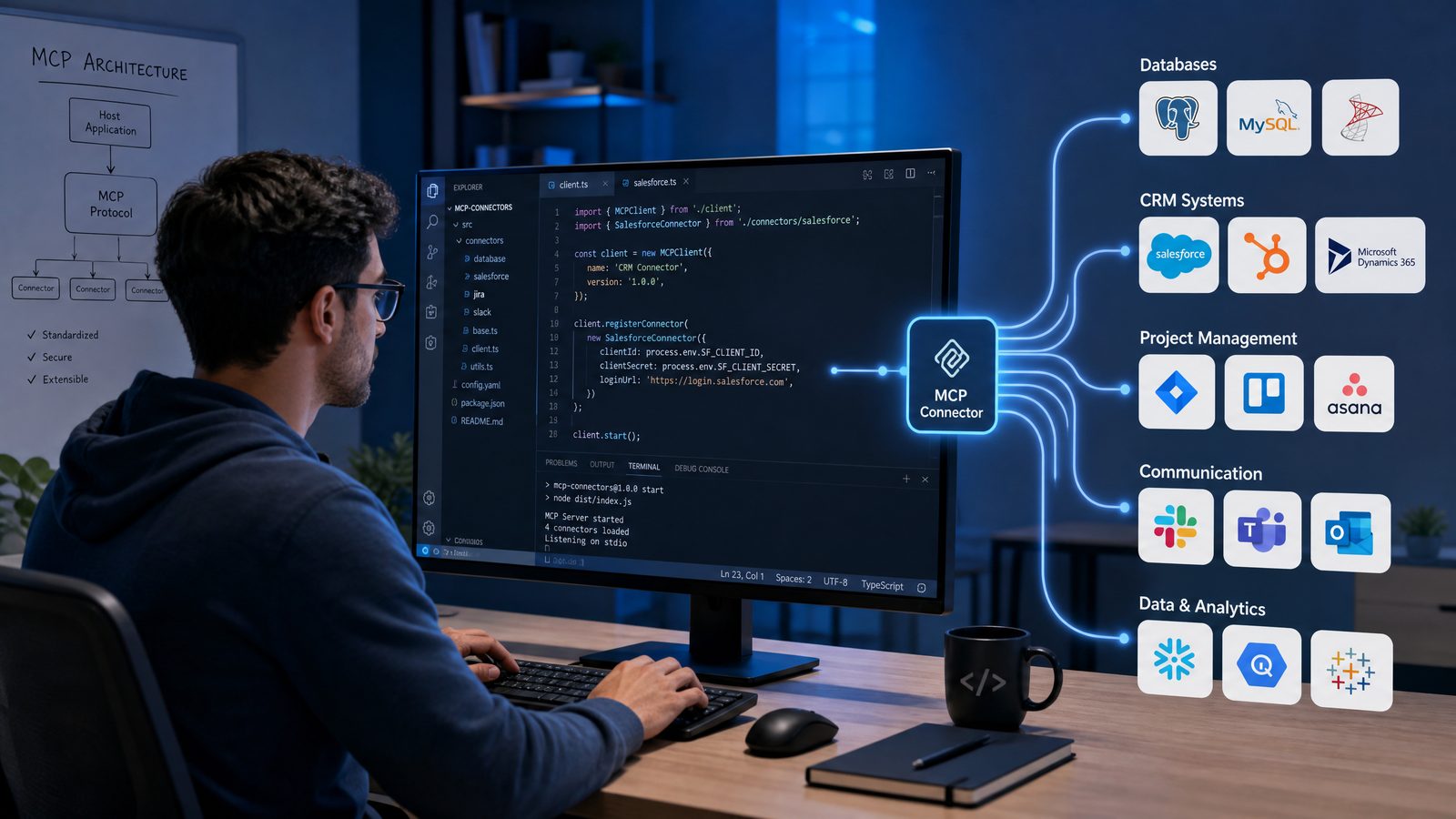
An MCP-powered connector acts as a bridge between ChatGPT and a business system. The connector is implemented as an MCP server, which advertises capabilities to ChatGPT in a structured way. When a user asks a question or requests an action, ChatGPT can determine whether one of the available tools or resources is relevant, request permission where required, and call the tool with appropriate arguments.
Consider a sales operations scenario. A user might ask:
Summarize open renewal risks for Acme Corp, check the latest support escalations, and draft a customer success action plan for the account owner.
Without connectors, ChatGPT can only rely on information provided by the user in the conversation or uploaded files. With MCP connectors, ChatGPT could potentially query a CRM, support platform, customer success system, and internal knowledge base through approved tools. The final response could combine live account data, recent support incidents, contract dates, and playbook guidance.
The technical flow usually looks like this:
- The user submits a request in ChatGPT Enterprise.
- ChatGPT evaluates the user’s intent and available MCP tools.
- If a connector is relevant, ChatGPT prepares a tool call using the schema exposed by the MCP server.
- The MCP server authenticates and authorizes the request.
- The server calls the underlying system, such as a CRM API or internal service.
- The MCP server returns structured results to ChatGPT.
- ChatGPT uses the returned context to produce an answer, plan, summary, or next-step recommendation.
A strong connector should not simply expose raw system access. It should translate enterprise complexity into safe, understandable operations. For instance, a human resources connector should not provide a generic run_hr_query tool that can search any employee field. Instead, it might expose narrower tools such as get_my_remaining_leave_balance, search_public_policy_documents, or submit_address_change_request, each with strict authorization logic.
That design discipline is what turns MCP from a technical protocol into an enterprise governance mechanism. The connector becomes the boundary where access rules, business logic, validation, and auditability can be enforced.
From an end-user perspective, the result is a more capable ChatGPT experience. Employees do not need to learn each system’s interface to retrieve information or initiate common workflows. From an IT perspective, the organization gains a programmable integration layer that can be reviewed and managed centrally.
Developer Mode: Why It Matters for Building, Testing, and Publishing Connectors
Developer mode is the feature that makes MCP support operationally useful for enterprise teams. Building a connector is not just about writing code. It requires controlled experimentation: how should a tool be named, what arguments should it accept, what should it return, how should errors be handled, and how does the model behave when data is incomplete or ambiguous?
Developer mode gives technical teams a way to test those questions before exposing a connector to a broader audience. This is essential in enterprise environments where a poorly designed integration can create confusion, leak sensitive information, trigger unintended actions, or undermine user trust.
Important developer mode activities include:
- Tool schema validation: Ensuring tool names, descriptions, parameters, and response formats are clear enough for reliable model use.
- Authentication testing: Confirming that the connector respects user identity, group membership, and application-level permissions.
- Scenario testing: Running realistic user prompts to see when ChatGPT chooses a tool and how it handles results.
- Error testing: Checking behavior when systems time out, return partial results, or reject a request.
- Data exposure review: Verifying that sensitive records, regulated fields, and confidential content are not returned improperly.
- Human approval flows: Testing whether actions such as sending messages, updating records, or creating transactions require confirmation.
One of the most common mistakes in AI tool integration is exposing too much capability too early. Developer mode can help teams avoid that by encouraging iterative rollout. Start with read-only tools. Add narrow write actions later. Require human confirmation for consequential operations. Monitor real usage. Refine tool descriptions as failure modes appear.
Here is a practical prompt template an enterprise AI team can use during developer testing:
Connector test prompt:
You are testing the {connector_name} MCP connector.

User goal:
{describe_business_task}

Available tools:
{list_tool_names_and_descriptions}

Test cases:
1. Complete the task when all required data is available.
2. Ask a clarifying question when the user request is ambiguous.
3. Refuse or escalate when the user lacks permission.
4. Explain what went wrong when the source system is unavailable.
5. Require confirmation before taking any action that changes records.

Evaluation criteria:
- Correct tool selection
- No unauthorized data exposure
- Clear reasoning in the final response
- Accurate handling of missing or conflicting data
- Human approval before write operations
This style of evaluation is important because MCP connectors are not static API integrations. They operate in conversation, where users may ask broad, vague, or compound questions. The connector must be predictable even when the user is not precise.
Developer mode also supports a healthier separation between experimentation and production. AI platform teams can create a staging environment for connectors, run internal red-team exercises, involve business owners in validation, and then publish only the capabilities that meet organizational standards.
Enterprise AI Integration: From Knowledge Retrieval to Action-Oriented Workflows
Most early enterprise deployments of generative AI focused on knowledge retrieval. Employees asked questions against policy documents, internal wikis, contracts, technical manuals, or research libraries. That remains valuable, but MCP support expands the opportunity from information access to workflow execution.
The distinction is important. Retrieval answers questions. Tool orchestration gets work done.
With MCP connectors, ChatGPT Enterprise can become a front end for multi-system workflows. A procurement analyst might check supplier risk, review contract terms, compare purchase orders, and draft a vendor communication. An engineer might query incident logs, search source documentation, create a bug ticket, and summarize root-cause hypotheses. A legal operations team might retrieve clause history, compare negotiation positions, and generate a matter update from approved records.
The highest-value use cases often share three characteristics:
- They require context from multiple systems: The user currently switches between several applications to complete the task.
- They involve repetitive knowledge work: The workflow requires reading, summarizing, comparing, drafting, or classifying information.
- They benefit from structured action: The process ends with a ticket, update, report, recommendation, or approval request.
Organizations should not begin by trying to connect every system. A better approach is to prioritize workflows where ChatGPT can reduce friction without creating excessive operational risk. The best early connectors are often read-heavy, high-frequency, and tightly scoped.
| Enterprise Function | Potential MCP Connector | Early Use Case | Risk Level | Recommended Starting Scope |
|---|---|---|---|---|
| IT Service Management | Service desk or incident platform | Search known issues, summarize incidents, draft ticket updates | Medium | Read-only search plus draft-only ticket creation |
| Sales | CRM | Summarize account history and renewal risk | Medium | Account lookup and opportunity summaries |
| HR | Policy knowledge base and HR case system | Answer policy questions and prepare HR case drafts | High | Public policy retrieval only, no employee record access |
| Engineering | Code repository and issue tracker | Summarize pull requests and create bug reports | Medium | Repository metadata and issue creation with confirmation |
| Finance | ERP or expense system | Check invoice status and explain variance reports | High | Read-only status queries with strict role-based access |
| Customer Support | Support ticketing and knowledge base | Summarize customer issues and suggest approved responses | Medium | Knowledge retrieval and draft responses, no automatic sending |
The table highlights a key principle: scope matters more than ambition. A narrowly designed connector that reliably handles a valuable workflow is preferable to a broad connector that exposes too much and behaves unpredictably.
Enterprise AI integration succeeds when it aligns technical capability with business process ownership. The sales operations team should help define CRM connector behavior. The security team should review incident response connectors. HR leaders should approve policy-answering boundaries. Finance controllers should define what invoice or budget data can be surfaced and to whom.
MCP gives the architecture. The organization must still supply the process discipline.
Building an MCP Connector: Practical Architecture and Code Considerations
Building an MCP connector starts with a clear contract: what should ChatGPT be allowed to know, and what should it be allowed to do? Once that boundary is defined, developers can implement an MCP server that exposes a small set of well-described tools and resources.
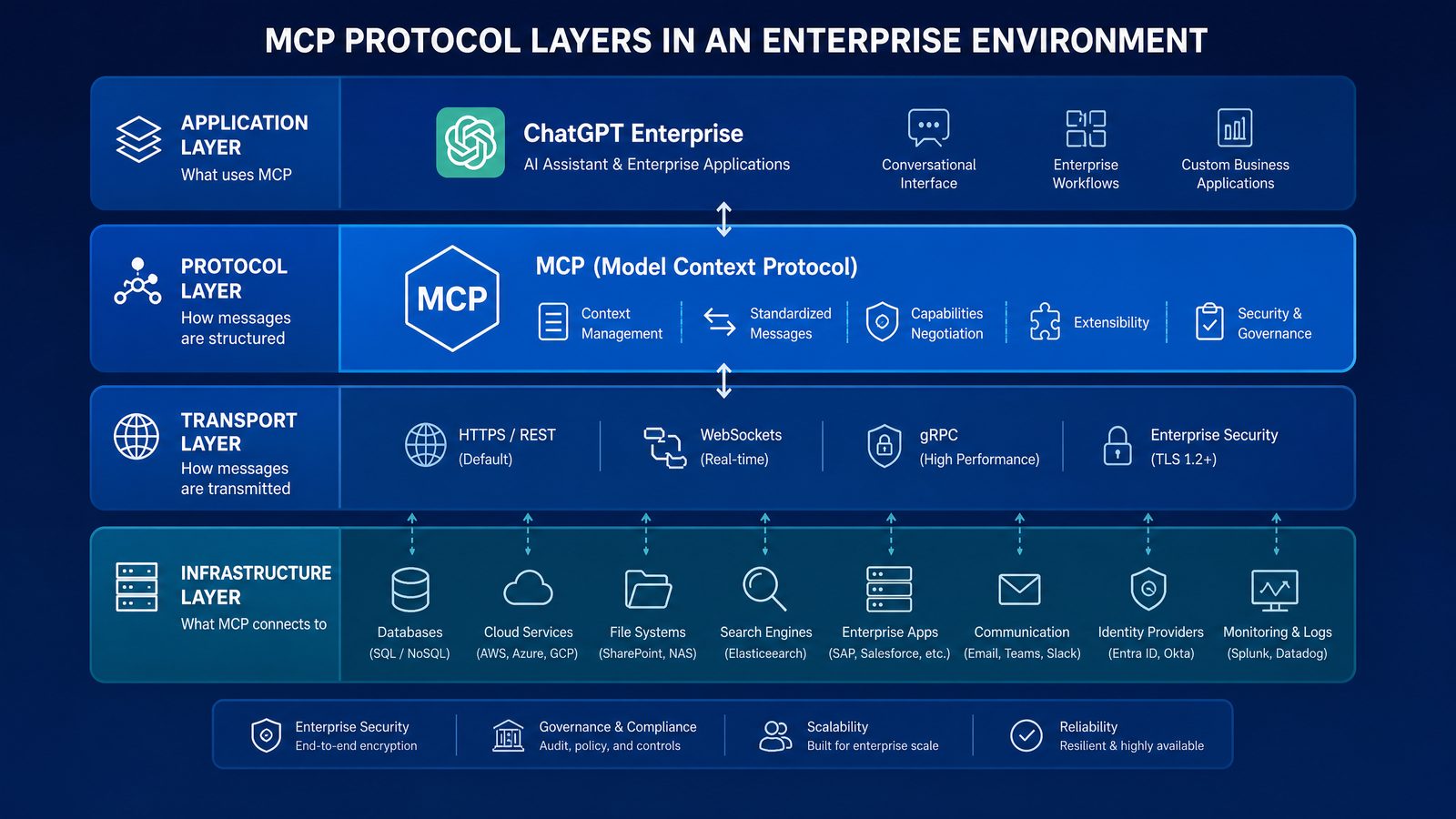
A typical enterprise MCP connector architecture includes:
- ChatGPT Enterprise client: The user-facing AI interface where employees ask questions and approve actions.
- MCP server: The integration layer that exposes tools, resources, and prompts.
- Identity provider: The system that validates user identity and group membership, often through SSO and OAuth-based flows.
- Business system API: The underlying system of record, such as CRM, ERP, ticketing, document management, or internal services.
- Policy enforcement layer: Logic that validates permissions, filters data, blocks unsafe actions, and logs activity.
- Monitoring and audit pipeline: Observability for tool calls, failures, latency, user activity, and unusual access patterns.
Below is a simplified TypeScript-style illustration of how a narrowly scoped connector might expose a tool for searching internal support articles. The code is intentionally compact, but the key ideas are enterprise-grade: strict input schema, user-aware authorization, controlled API access, and structured return values.
import { McpServer } from "@modelcontextprotocol/sdk/server/mcp";
import { z } from "zod";
import { getUserFromSession, canAccessKnowledgeBase } from "./auth";
import { searchArticles } from "./knowledge-api";
import { auditLog } from "./audit";

const server = new McpServer({
  name: "support-knowledge-connector",
  version: "1.0.0"
});

server.tool(
  "search_support_articles",
  {
    query: z.string().min(3).max(200),
    product: z.enum(["platform", "mobile", "billing", "security"]).optional(),
    maxResults: z.number().min(1).max(10).default(5)
  },
  async ({ query, product, maxResults }, context) => {
    const user = await getUserFromSession(context.session);

    if (!await canAccessKnowledgeBase(user)) {
      await auditLog({
        userId: user.id,
        tool: "search_support_articles",
        outcome: "denied",
        reason: "insufficient_permissions"
      });

      return {
        content: [{
          type: "text",
          text: "You do not have permission to search the support knowledge base."
        }]
      };
    }

    const results = await searchArticles({
      query,
      product,
      limit: maxResults,
      accessGroups: user.groups
    });

    await auditLog({
      userId: user.id,
      tool: "search_support_articles",
      outcome: "success",
      query,
      resultCount: results.length
    });

    return {
      content: [{
        type: "json",
        json: {
          results: results.map(article => ({
            title: article.title,
            summary: article.summary,
            approvedAnswer: article.approvedAnswer,
            lastReviewedAt: article.lastReviewedAt,
            sourceId: article.id
          }))
        }
      }]
    };
  }
);

server.start();
Several design choices in this connector are worth noting:
- The tool is specific: It searches support articles, not the entire enterprise knowledge environment.
- The schema constrains input: Query length, product categories, and result counts are limited.
- Authorization happens server-side: The connector does not rely on the model to decide access rights.
- Returned fields are curated: The model receives approved answers and metadata, not raw unrestricted records.
- Audit logging is built in: Both denied and successful access attempts are recorded.
For action-oriented tools, an additional confirmation layer should be used. Consider a connector that creates an incident ticket. The tool should return a draft or require explicit user confirmation before writing to the system of record. A safe workflow might look like this:
Prompt behavior for write actions:
Before creating, updating, deleting, sending, or escalating any record:

1. Summarize the proposed action.
2. Identify the target system and affected record.
3. Display the exact fields that will be changed.
4. Ask the user to confirm.
5. Proceed only after explicit confirmation.
6. Report the final system response and record ID.
In production, developers should also implement rate limiting, structured error codes, retry logic, secrets management, and test coverage for permission boundaries. MCP makes integration easier to standardize, but it does not remove the need for secure software engineering.
Security, Governance, and Compliance: The Real Test for Enterprise Adoption
The strongest argument for MCP in the enterprise is not just convenience. It is governability. A standardized connector layer allows organizations to define how AI systems interact with internal tools in ways that can be reviewed, tested, and monitored. However, MCP connectors also create new risk surfaces if deployed carelessly.
Security teams should evaluate MCP connectors across several dimensions:
- Authentication: How does the connector know which user is making the request?
- Authorization: Does the connector enforce the same permissions as the source system?
- Data minimization: Does the connector return only the fields needed for the task?
- Action control: Are write operations restricted, confirmed, and logged?
- Prompt injection resistance: Can hostile content from a document or ticket manipulate tool behavior?
- Auditability: Can administrators reconstruct who accessed what, when, and why?
- Compliance alignment: Are regulated data classes handled according to legal and industry requirements?
Prompt injection deserves special attention. If ChatGPT retrieves a document through an MCP connector, that document may contain text instructing the model to ignore policies, reveal secrets, or call tools improperly. Enterprise connectors must treat retrieved content as untrusted input. Business logic should remain server-side, and tools should not allow retrieved text to override authorization rules.
For high-risk systems, organizations should consider a tiered connector model:
| Connector Tier | Capability | Use Case | Control Requirement |
|---|---|---|---|
| Tier 1 | Public or low-sensitivity read-only retrieval | Search approved help articles, product docs, public policy documents | Basic access logging and content review |
| Tier 2 | Internal read-only data with role-based access | CRM summaries, incident search, project status reporting | SSO, authorization checks, field filtering, audit logs |
| Tier 3 | Draft write actions requiring confirmation | Create tickets, prepare emails, draft CRM updates | Explicit confirmation, change preview, rollback guidance |
| Tier 4 | High-impact transactional actions | Approve payments, modify contracts, provision access | Human approval workflow, segregation of duties, enhanced monitoring |
This tiering approach helps AI governance boards and platform teams evaluate connectors consistently. It also prevents every connector from being treated as equally risky. A read-only documentation connector does not require the same governance as a finance connector that can initiate payment-related workflows.
Organizations should also maintain a connector registry. Each connector should have an owner, business purpose, data classification, permission model, list of exposed tools, review date, and incident contact. This registry becomes critical as MCP adoption grows and multiple teams begin building integrations.
Enterprise teams evaluating their AI infrastructure investments should review our analysis in OpenAI Frontier Platform: The Complete Enterprise Guide to Building, Deploying, and Managing AI Agents at Scale, which provides a framework for assessing ROI, managing risk, and scaling AI capabilities across distributed organizations.
Tool Orchestration: How ChatGPT Can Coordinate Multi-Step Workflows
The real value of MCP emerges when ChatGPT can coordinate multiple tools in a single workflow. A user does not want to think in terms of systems and APIs. They want a business outcome: resolve an issue, prepare a report, investigate a discrepancy, onboard a customer, or brief an executive.
Tool orchestration allows ChatGPT to break a request into steps, retrieve context from different sources, call the right tools, and synthesize a useful response. MCP provides the connective tissue for those interactions.
Consider an IT operations workflow:
Investigate why the checkout service had elevated latency this morning, summarize the likely cause, and draft an incident update for the engineering channel.
To complete that task, ChatGPT may need access to several systems:
- An observability platform for latency metrics and error rates
- An incident management system for active and recent incidents
- A deployment system for recent releases
- A code repository for merged changes
- A communication platform for drafting the update
With MCP connectors, each system can expose specific tools. ChatGPT can use those tools in sequence: query metrics, check deployments, retrieve incident notes, compare timing, draft a summary, and ask the user for confirmation before posting.
Access 40,000+ AI Prompts for ChatGPT, Claude & Codex — Free!
Subscribe to get instant access to our complete Notion Prompt Library — the largest curated collection of prompts for ChatGPT, Claude, OpenAI Codex, and other leading AI models. Optimized for real-world workflows across coding, research, content creation, and business.
A well-designed orchestration flow might follow this pattern:
Operational investigation prompt:
You are assisting with an IT incident investigation.

Steps:
1. Identify the affected service and time window.
2. Query monitoring data for latency, errors, and saturation.
3. Check recent deployments in the same time window.
4. Search incident records for related alerts.
5. Summarize likely causes with confidence levels.
6. Draft an internal update using approved incident language.
7. Do not post or send the update until the user confirms.

Output format:
- Situation summary
- Evidence reviewed
- Likely cause
- Recommended next action
- Draft communication
- Open questions
The key challenge is reliability. Multi-tool workflows increase the chance of partial data, conflicting results, or incorrect assumptions. Enterprises should design connectors to return timestamps, source identifiers, confidence signals, and error details. The model should be encouraged to distinguish between verified facts and hypotheses.
Tool orchestration also changes the role of employees. Instead of manually gathering information from several dashboards, the user becomes a reviewer and decision-maker. ChatGPT does the synthesis work; the human validates, approves, and applies judgment.
This model is especially powerful in domains where time matters. Security operations, customer escalations, executive reporting, compliance reviews, and engineering incidents all involve fast synthesis across fragmented systems. MCP-powered connectors can reduce time-to-context, but only if the organization designs the toolchain with precision.
Choosing the First Connectors: A Practical Roadmap for Organizations
Enterprises should resist the temptation to start with the most complex or politically visible system. The best first MCP connectors are those that deliver measurable value with manageable risk. An effective selection framework weighs business impact, technical feasibility, security sensitivity, and workflow frequency.
A practical roadmap may look like this:
Phase 1: Read-Only Knowledge and Search
Start with approved content repositories: internal documentation, support knowledge bases, product manuals, engineering runbooks, or policy libraries. These connectors help employees find trusted answers faster while limiting the risk of unintended system changes.
Success metrics include reduced search time, higher self-service resolution, fewer duplicate support questions, and increased use of approved knowledge sources.
Phase 2: Role-Based Business Data Retrieval
Next, connect systems where structured business data can improve decision-making: CRM summaries, project management tools, incident records, customer support tickets, or procurement status. These connectors require stronger identity mapping and field-level filtering.
Success metrics include faster account preparation, shorter incident review cycles, improved reporting accuracy, and reduced manual data gathering.
Phase 3: Draft Actions With Human Confirmation
Once teams trust read workflows, introduce draft write actions: creating ticket drafts, preparing CRM notes, generating project updates, drafting customer responses, or preparing approval requests. The system should clearly show what will be changed and require explicit confirmation.
Success metrics include reduced administrative work, faster handoffs, higher process consistency, and fewer incomplete records.
Phase 4: Controlled Workflow Automation
Only mature organizations should move toward higher-impact automation. This can include multi-step workflows with approval gates, escalation paths, and integration with business process management systems. At this stage, AI becomes part of the operating model rather than a productivity add-on.
Success metrics include cycle-time reduction, improved compliance evidence, lower operational backlog, and measurable productivity gains in targeted workflows.
When choosing first connectors, ask these questions:
- Does this workflow happen frequently enough to justify integration?
- Can the connector be narrowly scoped?
- Is the data well-structured and reliable?
- Are permissions already well-defined in the source system?
- Can the organization tolerate occasional AI uncertainty if humans remain in control?
- Is there a clear business owner who will validate outputs?
The answers will help separate strong candidates from risky experiments. A connector without a business owner is likely to drift. A connector without clear permissions is likely to create governance friction. A connector for messy, low-quality data may undermine trust no matter how elegant the MCP implementation is.
What IT, Security, and Business Leaders Should Do Now
OpenAI’s MCP support for ChatGPT Enterprise and Edu should trigger concrete planning inside organizations that are serious about AI adoption. This is not the time for unmanaged experimentation across dozens of disconnected teams. It is the time to establish a repeatable connector program.
IT leaders should begin by defining an enterprise MCP reference architecture. This should cover hosting patterns, approved SDKs, identity integration, secrets management, logging, monitoring, and deployment pipelines. The goal is to make connector development fast but not uncontrolled.
Security leaders should create a risk assessment process for MCP connectors. Not every connector requires a full security review, but every connector should be classified. The review should address data sensitivity, permission enforcement, tool actions, third-party dependencies, and incident response expectations.
Business leaders should identify high-friction workflows where AI-assisted integration can produce measurable outcomes. The best candidates are often hiding in operational teams: sales operations, support, finance operations, legal operations, compliance, HR shared services, and engineering productivity groups.
AI platform teams should create a shared connector lifecycle:
- Intake: Business team proposes a connector and describes the target workflow.
- Assessment: IT, security, and data owners classify risk and feasibility.
- Design: Developers define tools, resources, prompts, and access boundaries.
- Build: The connector is implemented using approved engineering standards.
- Test: Developer mode is used for scenario testing, red-team testing, and business validation.
- Approve: Governance stakeholders review the connector before release.
- Publish: The connector becomes available to approved users or groups.
- Monitor: Usage, failures, access patterns, and user feedback are reviewed.
- Improve: Tool schemas, permissions, and workflows are refined over time.
There is also a people dimension. Employees need to understand what connectors can and cannot do. A ChatGPT response generated with connector data should make source context clear. Users should know when they are viewing retrieved records, AI-generated summaries, or pending actions that require approval.
Organizations should also update acceptable use policies. MCP connectors may enable ChatGPT to interact with systems that were previously outside the AI environment. Policies should define approved data classes, prohibited use cases, review obligations, and escalation paths for suspicious outputs or access issues.
Finally, procurement and vendor management teams should monitor the broader ecosystem. As MCP adoption grows, software vendors are likely to ship their own MCP servers or connector packages. Enterprises will need criteria for evaluating vendor-provided connectors, including transparency, update cadence, security posture, and compatibility with internal governance requirements.
Competitive Impact: MCP and the Future of Enterprise AI Platforms
OpenAI’s embrace of MCP support in ChatGPT Enterprise raises the competitive stakes in the enterprise AI market. The battle is no longer only about model quality. It is increasingly about integration depth, governance, user experience, and the ability to orchestrate tools across complex business environments.
Enterprise buyers are asking different questions than they did during the first wave of generative AI adoption. Earlier evaluations focused on whether the model could write, summarize, code, and reason. Now buyers want to know whether the AI platform can connect to internal systems securely, respect permissions, support audit requirements, integrate with developer workflows, and deliver measurable operational outcomes.
MCP support helps OpenAI answer those questions by giving ChatGPT Enterprise a standardized integration path. It also puts pressure on enterprise software vendors to expose AI-ready interfaces. A system that cannot be safely accessed by AI assistants may become less useful in workflows where employees expect conversational orchestration.
This does not mean every enterprise will standardize exclusively on one AI platform. Many large organizations will operate multiple AI environments: ChatGPT Enterprise for general productivity and advanced reasoning, domain-specific copilots inside business applications, internal agent frameworks for custom automation, and developer tools for software engineering. MCP could serve as a bridge across that fragmented landscape if broadly adopted.
The strategic question is whether MCP becomes a durable interoperability layer for enterprise AI. If it does, organizations that invest early in MCP-ready architecture may gain flexibility. They could build connectors once and use them across multiple compatible AI clients, reducing vendor lock-in and integration duplication.
However, standardization is not automatic. Enterprises should track implementation differences, security models, administrative controls, and vendor-specific extensions. A protocol can reduce fragmentation, but governance and operational maturity still determine whether integration works at scale.
For OpenAI, the move strengthens ChatGPT Enterprise as more than a chatbot. It positions the product as a work interface capable of connecting knowledge, reasoning, and action. For customers, the opportunity is substantial, but so is the responsibility to deploy connectors with care.
Conclusion: MCP Support Turns ChatGPT Enterprise Into a Governed AI Integration Platform
OpenAI’s rollout of full MCP support with developer mode for ChatGPT Enterprise and Edu is one of the more important enterprise AI developments of the year because it addresses a central barrier to adoption: integration. Organizations do not need AI systems that only generate polished text. They need AI systems that can securely work with the tools, data, and processes that run the business.
Model Context Protocol offers a promising framework for that transition. By standardizing how ChatGPT discovers tools, retrieves context, and interacts with systems, MCP can help enterprises move beyond scattered pilots toward reusable AI infrastructure. Developer mode adds the practical environment teams need to build, test, and refine connectors before release.
The organizations that benefit most will not be those that connect the most systems the fastest. They will be the ones that choose high-value workflows, design narrow and safe connectors, enforce identity and authorization, log tool activity, require confirmation for consequential actions, and continuously measure business impact.
For enterprise leaders, the next step is clear: treat MCP connectors as part of your AI platform strategy, not as isolated developer experiments. Establish a connector lifecycle. Build a registry. Start with read-only workflows. Expand into draft actions. Reserve high-impact automation for mature governance environments.
ChatGPT Enterprise is becoming a more capable interface for enterprise work. MCP is the mechanism that can connect that interface to the systems where work actually happens. Used wisely, it can reduce context switching, accelerate decision-making, and turn generative AI into a practical layer for business execution. Used carelessly, it can create new risks around access, automation, and trust.
The difference will come down to architecture, governance, and disciplined implementation. OpenAI has opened the door. Now enterprises must decide how to build through it.
