
Codex Workflow Automation Masterclass: 30 Production-Ready Prompts for Building Multi-Step Pipelines, Scheduled Reports, and Cross-Platform Integrations
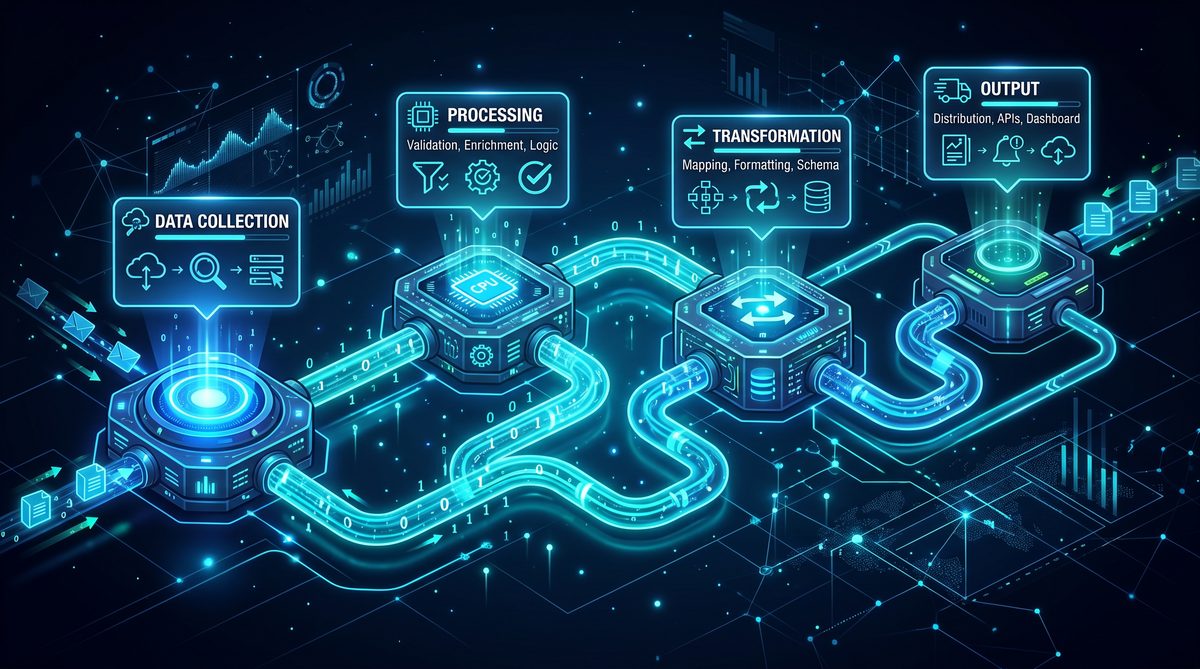
Masterclass: 30 Production-Ready Prompts for Codex Desktop App — Building Multi-Step Automation Pipelines, Scheduled Reporting Jobs, and Cross-Platform Integrations
This masterclass is a focused, practitioner-grade guide for designing, authoring, and operationalizing production-ready prompts in the Codex Desktop App to drive agentic workflows, chained prompts, API-driven integrations, robust error handling, and cron-like scheduling. The material synthesizes orchestration patterns, prompt design patterns, and operational guardrails you can apply immediately to build automation pipelines that are maintainable, auditable, and resilient.
Throughout this guide you will find 30 field-tested prompts organized into discrete sections: Pipeline Orchestration, Scheduled Report Generation, Multi-Platform Sync, and Error Handling & Recovery (including monitoring and observability patterns). Each prompt is accompanied by implementation notes, expected behavior, and operational considerations for running them in a production Codex environment.
Core Principles: Agentic Workflows, Prompt Chaining, and API Integrations
Before we dive into concrete prompts, we need to align on foundational principles that ensure your automations behave like reliable, inspectable software components rather than ad-hoc scripts. Use the principles below as a checklist when authoring prompts that will run in the Codex Desktop App.
- Explicit Roles: Every prompt must define the agent’s role, scope of authority (read, write, execute, send), and any boundaries (time limits, resource quotas). This facilitates least-privilege operations.
- Stepwise Decomposition: Break complex tasks into numbered sub-steps. This enables partial completion, idempotency, and easier retries when failures occur.
- Stateful Prompt Chaining: Use structured state objects (JSON) passed between prompt steps. Treat these objects as canonical records to rehydrate workflow state on restart.
- API Contracts & Type Safety: Include explicit request/response schemas for external API calls. Codex prompts should validate schema conformance before relying on values.
- Observability & Logging: Each prompt should emit structured logs (timestamp, step, status, correlation_id). Design for integration with log sinks and monitoring tools.
- Error Classification: Differentiate transient vs. permanent errors and encode retry/backoff strategies into prompts.
- Secrets Management: Never inline secrets in prompt text. Use references to a secure secrets vault and include instructions to fetch tokens at runtime.
- Scheduling Semantics: For cron-like schedules, include calendar semantics (timezone, business days) and safe execution guards (overlap prevention, concurrency limits).
These principles underpin every example prompt in this guide. Where applicable, prompts include explicit JSON templates, error handling clauses, and scheduling metadata to make them production-ready in Codex.
For teams focused heavily on data transformation and analytical workflows, the companion article
The workflow automation patterns in this masterclass build directly upon the data analysis foundations established in our Codex Data Analysis Masterclass. That companion guide provides 30 production-ready prompts specifically designed for automated reporting, dashboard generation, and business intelligence workflows, giving you the analytical building blocks that feed into the multi-step pipelines covered here. Codex Data Analysis Masterclass: 30 Production-Ready Prompts.
provides a deep-dive into schema-driven ETL pipelines, query composition, and best practices for working with large datasets inside Codex. That article covers sample data contracts, pattern libraries for incremental aggregation, and examples of embedding analytical tests that you can reuse in these automation pipelines.
Section 1 — Pipeline Orchestration (10 Prompts)
This section focuses on orchestrating multi-step pipelines using agentic prompt chains. Use these prompts to create, manage, and audit complex workflows that interact with internal APIs, perform transformations, and coordinate downstream tasks.
Design pattern highlighted: “Controller Prompt + Step Agents.” A high-level controller prompt orchestrates step agents that each perform a single responsibility (fetch, transform, validate, persist, notify).
-
Prompt 1 — Create a New Versioned Pipeline (Controller)
Role: Pipeline Controller agent. Purpose: Create a new named pipeline version in the Codex workspace and register its step definitions.

Inputs:
- pipeline_name (string)
- steps (array of objects, each with id, description, type, input_schema, output_schema)
- schedule (optional: cron expression)
- owner (user id or email)
- description (optional)

Behavior:
1. Validate pipeline_name uniqueness. If a conflict exists, return an error with suggestions for suffixes.
2. Validate each step's input_schema/output_schema for valid JSON Schema; if invalid, return a detailed schema error.
3. Save the pipeline metadata to /pipelines/{pipeline_name}/versions with a new semantic version tag (major.minor.patch).
4. Emit a JSON object with pipeline_id, version, created_at, and a human-readable summary.

Security: Do not store secrets in pipeline metadata. Return URIs to secret references only.

Output: JSON with pipeline_id, version, uri, and validation report.
Notes: Use this prompt to bootstrap reproducible pipeline artifacts. Ensure the Codex runtime enforces schema validation prior to persistence.
-
Prompt 2 — Execute Pipeline (Controller) with Step-Level Timeouts
Role: Execution Orchestrator agent. Purpose: Execute a specified pipeline version with strict per-step timeouts and step retries.

Inputs:
- pipeline_id
- version
- run_parameters (key-value)
- correlation_id (optional)
- step_timeout_seconds (default 120)
- max_retries_per_step (default 2)
- retry_backoff_seconds (strategy: exponential with jitter)

Behavior:
1. Fetch pipeline definition and verify version match.
2. For each step in pipeline.steps:
   a. Invoke step agent with step.input_schema validated against run_parameters.
   b. Enforce step_timeout_seconds; if exceeded, mark step as failed (transient) and apply retry logic.
   c. After successful step, persist state snapshot (state key includes step_id and correlation_id).
3. If a step fails permanently (schema mismatch, 4xx API error), abort and return structured failure.
4. On complete success, emit run_summary with timings and per-step logs.

Output: run_id, status, start_time, end_time, step_results (array)
Notes: This execution prompt is the canonical entrypoint for runs triggered manually or via scheduler. It is intentionally deterministic: given the same inputs and pipeline version, it should follow the same decision path unless an external API produces non-deterministic output.
-
Prompt 3 — Step Agent: API Fetch with Schema Validation
Role: Step agent. Purpose: Call an external API endpoint, validate response against output_schema, and return standardized data.

Inputs:
- request_spec:
  - method (GET/POST)
  - url
  - headers (may include references to secrets: "x-api-key": "secret://vault/key")
  - params/body
- output_schema (JSON Schema)
- retry_policy (max_attempts, backoff_seconds)

Behavior:
1. Resolve any "secret://" references by calling local secret resolver (do not reveal contents).
2. Perform HTTP call with timeout and retries as specified.
3. On 2xx, parse response JSON and validate against output_schema.
4. If validation succeeds, return {status: "success", data, headers, meta}.
5. If validation fails, mark as permanent failure with validation error details.
6. On network errors or 5xx, follow retry_policy and return structured transient failure if max attempts exhausted.

Output: status, data, validation_report
Notes: Keep API fetch agents idempotent and side-effect-free. Use conditional requests and ETags when supported to reduce downstream processing.
-
Prompt 4 — Step Agent: Transform & Enrich
Role: Transform agent. Purpose: Accept validated input, perform deterministic transformations, enrich with third-party lookup, and produce output conforming to output_schema.

Inputs:
- input_data
- transform_rules (expressed as sequence of named operations: map, filter, aggregate, lookup)
- output_schema

Behavior:
1. Validate input_data against declared input_schema.
2. Apply transform_rules in order. Each rule is atomic and returns a deterministic result.
3. For lookups, call designated lookup step agent; cache results for the run to reduce external calls.
4. After transformation, validate resulting data against output_schema.
5. Return transformed_data and a delta_report describing applied transformations.

Output: transformed_data, delta_report
Notes: Define transform operations as reusable primitives to enable maintainability and testability.
-
Prompt 5 — Step Agent: Persistence with Upsert Semantics
Role: Persistence agent. Purpose: Persist pipeline results to a durable store using idempotent upsert semantics and optimistic concurrency.

Inputs:
- target_table (or collection)
- records (array)
- key_fields (array)
- write_mode (upsert/insert/replace)
- concurrency_token (optional)

Behavior:
1. For upsert, compute primary key based on key_fields.
2. Attempt a write with optimistic concurrency if concurrency_token provided; on conflict, return conflict info.
3. Emit per-record write status and total metrics (inserted, updated, skipped).
4. Retry transient storage errors with exponential backoff; on permanent errors return details.

Output: write_summary, failed_records (if any)
Notes: Persistence prompts should never silently swallow failures. Provide hooks to send non-blocking notifications on partial failures.
-
Prompt 6 — Step Agent: Post-Run Notification & Audit
Role: Notifier agent. Purpose: Send structured run summary to channels (email, Slack, webhook) and push audit record to an audit-log endpoint.

Inputs:
- run_id
- recipients (array of emails or channel ids)
- notification_template_id
- audit_endpoint (URL)
- run_summary (object)

Behavior:
1. Render notification_template with run_summary placeholders.
2. Send notifications asynchronously to minimize run latency.
3. Push audit entry to audit_endpoint; ensure audit entry contains correlation_id and signed integrity checksum of the run_summary.
4. Retry transient notification failures using retry policy.

Output: notification_status, audit_write_status
Notes: Notifications should be scoped — only include sensitive details when recipients have appropriate access. Use redaction policies.
-
Prompt 7 — Controller: Branching Logic & Conditional Step Execution
Role: Decision agent. Purpose: Given run state, evaluate conditional expressions to select which steps run next.

Inputs:
- state (object)
- conditions (array of {id, expression (logical), true_steps, false_steps})
- expression_language (default: safe subset of JavaScript or CEL)

Behavior:
1. Evaluate conditions in deterministic order using a sandboxed evaluator. Do not allow arbitrary code execution.
2. Select steps to enqueue based on boolean results.
3. Return an ordered execution plan with metadata on why each step was selected.

Output: execution_plan, evaluation_log
Notes: Maintain an audit trail for every decision for post-mortem analysis. Limit condition complexity to maintain readability.
-
Prompt 8 — Controller: Parallel Step Fan-Out & Join
Role: Parallel orchestrator. Purpose: Run a set of independent steps in parallel, aggregate results, and proceed to join logic with failure handling.

Inputs:
- parallel_steps (array)
- join_strategy (fail_fast vs gather_all)
- aggregator_spec (function or template to combine results)

Behavior:
1. Launch each parallel_step as isolated execution contexts.
2. Monitor progress and capture per-step logs.
3. If join_strategy is fail_fast, abort remaining runs on first permanent failure and return partial results.
4. If gather_all, wait for all and then apply aggregator_spec to form combined result.

Output: parallel_results, aggregated_output, partial_failures
Notes: Implement maximum concurrency limits to avoid resource exhaustion. Use idempotent step agents so retried runs are safe.
-
Prompt 9 — Controller: Dry-Run & Validation Mode
Role: Dry-run validator. Purpose: Validate an execution plan end-to-end without performing side-effects, returning a detailed simulation report.

Inputs:
- pipeline_id
- version
- run_parameters
- simulate_external_responses (optional: provide mock responses)
- allow_warnings (boolean)

Behavior:
1. Walk pipeline steps without performing external calls. Where external responses are required, use simulate_external_responses or stubs.
2. Validate schemas, timeouts, and authorization checks.
3. Emit a simulation report with predicted run time, cost estimate (if supported), and risk flags.

Output: simulation_report, risk_score
Notes: Use dry-runs as part of CI pipelines before promoting pipelines to production.
-
Prompt 10 — Controller: Rollback and Compensation
Role: Compensation agent. Purpose: Execute compensating actions when a pipeline run cannot complete, to leave systems in a consistent state.

Inputs:
- run_id
- compensation_plan (ordered array of compensating step definitions)
- idempotency_keys
- timeout_policy

Behavior:
1. Execute compensation_plan steps sequentially or in parallel as specified.
2. Record success/failure of each compensation step with detailed logs.
3. If partial compensation occurs, emit a remediation ticket with suggested manual steps.

Output: compensation_summary, unresolved_items
Notes: Compensation is essential for long-running pipelines that alter external systems. Define compensating actions as first-class step types when designing pipelines.
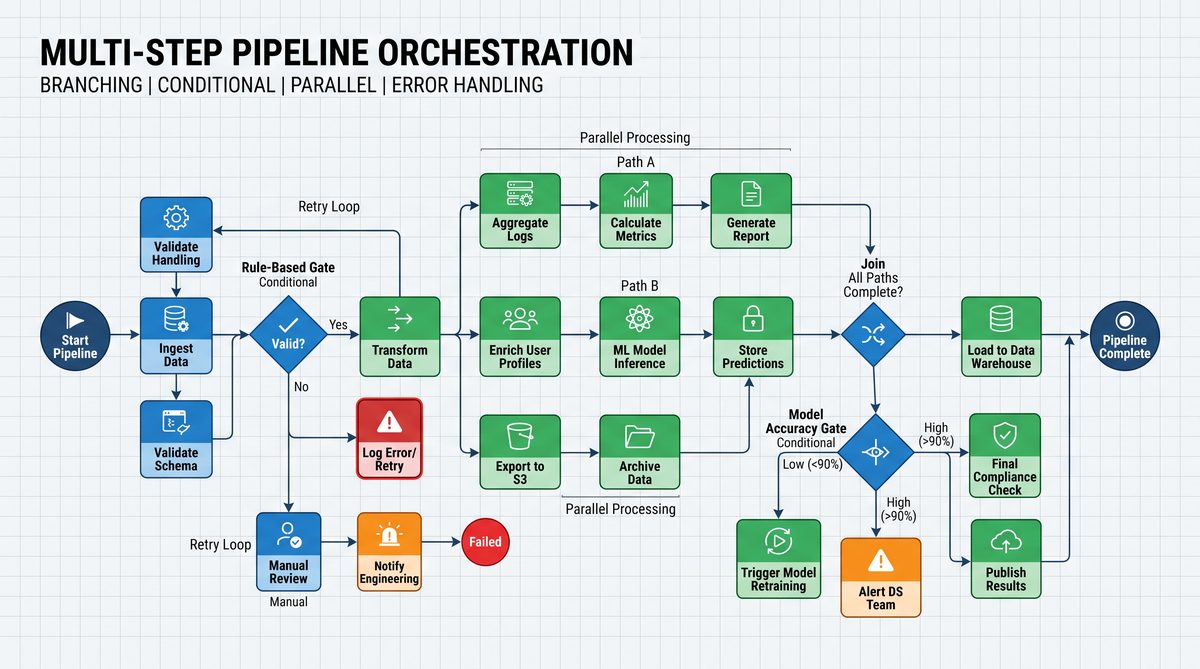
Above you saw core orchestration primitives. These building blocks will be reused throughout scheduled jobs and integrations sections to ensure consistent behavior across your Codex automation lifecycle.
Section 2 — Scheduled Report Generation (8 Prompts)
Scheduled jobs are a common use case for Codex automations: nightly ETL, weekly executive reports, daily syncs, and compliance audits. The prompts below encode robust scheduling semantics, retry behavior, and safe concurrency paradigms modeled on cron semantics.
Scheduling pattern highlighted: “Coordinator + Job Runner + Observability Hook”. The Coordinator accepts cron-like expressions and converts them into safe, timezone-aware runs. The Job Runner executes the job with guardrails and emits heartbeat events.
-
Prompt 11 — Scheduler: Register a Cron Job with Calendar Awareness
Role: Scheduler agent. Purpose: Register a cron job in the Codex scheduler with calendar semantics and non-overlapping execution guards.

Inputs:
- job_name
- cron_expression (standard 5-field or extended 6/7-field)
- timezone (IANA, e.g., "America/Los_Angeles")
- business_day_rules (optional: skip_holidays true/false)
- max_concurrency (default 1)
- owner

Behavior:
1. Validate cron_expression and timezone.
2. Register job with a scheduler service that prevents overlapping runs if max_concurrency=1.
3. Return job_id and next_run_time in UTC and local timezone.

Output: job_id, next_run_time
Notes: Use calendar-aware schedules for reports that must respect business days and holidays.
-
Prompt 12 — Job Runner: Heartbeats, Locking, and Graceful Shutdown
Role: Job Runner. Purpose: Execute a scheduled report job while emitting heartbeats, acquiring locks, and handling graceful shutdowns.

Inputs:
- job_id
- run_id
- heartbeat_interval_seconds (default 30)
- lock_ttl_seconds (default 300)

Behavior:
1. Acquire distributed lock for job_id; if lock cannot be acquired, abort gracefully with reason "already_running".
2. Emit heartbeats to scheduler at heartbeat_interval_seconds to indicate liveness.
3. On receiving shutdown signal (SIGTERM) attempt graceful stop: finish current step and persist state snapshot.
4. Release lock on completion.

Output: start_time, end_time, final_status, heartbeat_log
Notes: Heartbeats and locks prevent concurrent runs and allow safe restarts after platform upgrades.
-
Prompt 13 — Report Generator: Data Aggregation with Delta Processing
Role: Report builder. Purpose: Aggregate data incrementally (delta) to compute daily metrics and store report artifacts.

Inputs:
- source_table
- last_processed_cursor (timestamp or incremental id)
- aggregation_spec (measures, dimensions, filters)
- output_artifact_location (s3:// or file store)
- retention_policy

Behavior:
1. Query source_table for records > last_processed_cursor.
2. Apply aggregation_spec and compute metrics.
3. Persist artifact to output_artifact_location with run metadata and checksum.
4. Update last_processed_cursor and emit artifact_uri.

Output: artifact_uri, new_cursor, metrics_summary
Notes: Delta processing minimizes compute and makes jobs more reliable for large datasets.
-
Prompt 14 — Report Formatter: Multi-Format Export (CSV, Excel, PDF)
Role: Formatter agent. Purpose: Convert a canonical report artifact into multiple formats with accessibility metadata.

Inputs:
- artifact_uri (canonical JSON)
- formats (array: csv, xlsx, pdf)
- localization (locale, currency)
- accessibility_options (include_alt_text, table_summaries)

Behavior:
1. Fetch canonical artifact and validate schema.
2. Produce each requested format ensuring numeric/datetime locale rules are applied.
3. Generate checksums and post-processing metadata for each artifact.
4. Upload formatted artifacts and return URIs.

Output: formatted_artifacts (array of {format, uri, checksum})
Notes: Prefer canonical JSON as the single source of truth; formatters should be stateless workers.
-
Prompt 15 — Delivery: Scheduled Email & Archive with Expiry
Role: Delivery agent. Purpose: Email report to recipients and archive to long-term storage with retention rules.

Inputs:
- artifact_uris
- recipients
- subject_template
- archive_location
- retention_days

Behavior:
1. Validate recipients and resolve group aliases.
2. Send email with attachments or secure download links (prefer links when files are large).
3. Archive artifacts to archive_location, attach retention metadata, and schedule deletion job at retention_days.
4. Return delivery_status and archive_reference.

Output: delivery_status, archive_reference
Notes: When sending sensitive data, default to secure links with short-lived tokens rather than attachments.
-
Prompt 16 — Alert Rule: Threshold-Based Report Alerts
Role: Alert agent. Purpose: Evaluate report metrics and trigger alerts based on threshold rules.

Inputs:
- metrics (from report)
- rules (array: {metric, comparator, threshold, severity})
- alert_channels

Behavior:
1. Evaluate rules deterministically.
2. If rule violated, create an alert event with severity and suggested remediation.
3. Send alert to alert_channels and log to incident tracker.

Output: alerts_created (array), alert_ids
Notes: Store rule history to allow retrospective analysis of false positives.
-
Prompt 17 — Backfill Orchestrator: Re-run for Historical Windows
Role: Backfill agent. Purpose: Orchestrate backfill runs across a date range with rate limiting to avoid overloading data sources.

Inputs:
- pipeline_id
- version
- start_date
- end_date
- concurrency_limit
- rate_limit_per_minute

Behavior:
1. Partition the date range into windows that pipeline supports.
2. Enqueue runs observing concurrency and rate limits.
3. Track per-run status and provide a combined progress report.

Output: backfill_job_id, progress_url
Notes: Backfills should be cancellable and restartable with idempotency keys.
-
Prompt 18 — Scheduler: Failure Escalation & Auto-Retry Policy
Role: Escalation agent. Purpose: Apply escalation workflows for scheduled job failures, including auto-retries and human escalation.

Inputs:
- run_id
- failure_classification (transient/permanent)
- retry_policy (attempts, backoff)
- escalation_contacts

Behavior:
1. If failure_classification is transient and retries remain, schedule retry per policy.
2. If retries exhausted or permanent failure, create an incident and notify escalation_contacts with run context.
3. Provide remediation suggestions and links to run logs.

Output: escalation_status, incident_id
Notes: Automate majority of transient recovery but ensure human-in-the-loop for systemic failures.
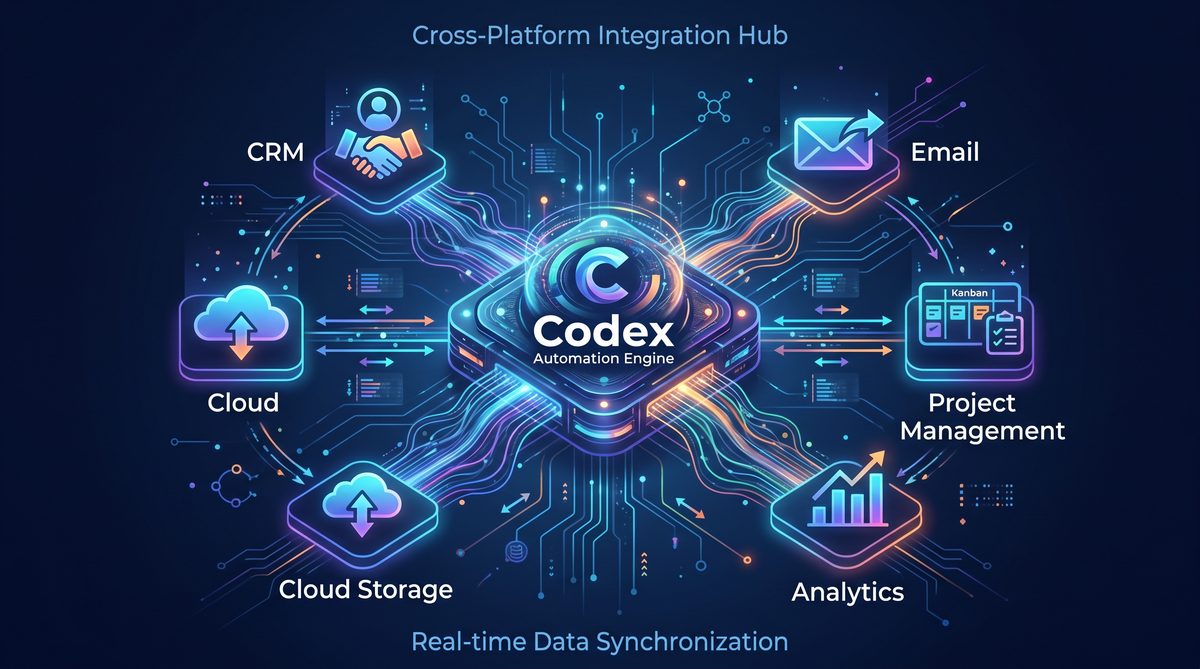
Scheduled reporting jobs are where observability and safety provide the most value — these prompts codify both guardrails and operational flexibility so your reports run reliably at scale.
Section 3 — Multi-Platform Sync (6 Prompts)
Cross-platform integrations often require mapping schemas, handling throttling, reconciling conflicts, and documenting side effects. The prompts below are tailored to patterns for syncing between SaaS platforms, CRMs, data warehouses, and messaging systems.
-
Prompt 19 — Bidirectional Sync: Change Capture and Reconciliation
Role: Sync agent. Purpose: Perform incremental, bidirectional sync of records between System A (source) and System B (target) with conflict resolution strategy.

Inputs:
- source_api_spec
- target_api_spec
- sync_key (unique id)
- last_sync_cursor
- conflict_resolution (source_wins/target_wins/merge_strategy)
- batch_size

Behavior:
1. Fetch delta from source since last_sync_cursor and delta from target if supported.
2. For each record, determine if conflict exists based on last_modified timestamps.
3. Apply conflict_resolution; if merge_strategy, call user-defined merge function.
4. Write changes with idempotency keys and persist new cursor.

Output: sync_summary (processed, conflicts_resolved, errors)
Notes: Reconciliation jobs should produce a reconciliation report highlighting unresolved conflicts requiring manual review.
-
Prompt 20 — Webhook Listener & Router
Role: Webhook agent. Purpose: Receive inbound webhooks, validate signatures, normalize payloads, and route to appropriate pipeline.

Inputs:
- raw_payload
- headers (include signature)
- routing_rules (map event types to pipelines)
- validation_spec (signature method, public keys)

Behavior:
1. Validate webhook signature and origin.
2. Normalize payload to canonical event schema.
3. Route event to pipeline runner using routing_rules with correlation_id.
4. Acknowledge request immediately with 2xx and process asynchronously.

Output: ack_status, routed_to_pipeline
Notes: Acknowledge webhooks quickly to avoid sender timeouts; perform heavy work asynchronously.
-
Prompt 21 — Throttling & Backpressure Manager
Role: Throttle manager. Purpose: Enforce API rate limits and apply adaptive backpressure to prevent downstream service issues.

Inputs:
- external_api_descriptor (rate limits, burst)
- current_metrics (requests_per_minute, error_rate)
- policies (queue_limit, drop_strategy)

Behavior:
1. Track current usage against external API limits.
2. If approaching limits, slow down request issuance using token bucket algorithm, or queue up to queue_limit.
3. If error_rate exceeds thresholds, enter degraded mode and optionally switch to read-only mode.
4. Emit metrics and actionable alerts.

Output: throttle_status, decision_log
Notes: Throttling logic must be centralized to avoid service-wide spikes.
-
Prompt 22 — Schema Mapper: Cross-System Field Mapping
Role: Mapper agent. Purpose: Map fields from source schema to target schema with transformation rules and fallback strategies.

Inputs:
- source_schema
- target_schema
- mapping_rules (explicit field mappings, functions, fallbacks)
- validation_rules

Behavior:
1. Validate mapping_rules completeness; suggest missing mappings using heuristic matching.
2. For each record, apply mapping_rules and validate against target_schema.
3. If mapping fails, create a mapping exception record for manual review.

Output: mapped_records, exceptions
Notes: Maintain a mapping registry and version mappings separately for traceability.
-
Prompt 23 — Secure Token Refresh & Secret Rotation
Role: Secrets agent. Purpose: Refresh integration tokens automatically and rotate secrets without downtime.

Inputs:
- integration_id
- refresh_endpoint
- rotation_window_days
- rollback_tokens (optional)

Behavior:
1. Periodically check token expiry and proactively refresh tokens within rotation_window_days.
2. Update integration credentials atomically: deploy new token and validate by making a health-check call.
3. If health-check fails, rollback to previous token and alert on rotation failure.

Output: rotation_log, current_token_reference
Notes: Automate token rotations to minimize secret sprawl and human error.
-
Prompt 24 — Reconciliation Report Generator for Cross-System Matches
Role: Reconciler agent. Purpose: Periodically generate reconciliation reports that detail record mismatches with actionable diffs.

Inputs:
- left_system_query
- right_system_query
- join_keys
- tolerance_rules (numeric deltas, date tolerances)

Behavior:
1. Execute queries and perform outer join by join_keys.
2. Produce a reconciliation report with diffs, mismatch counts, and sample records.
3. Persist reconciliation artifact and notify owners.

Output: reconciliation_artifact_uri, mismatch_summary
Notes: Use reconciliation as a strong signal for integration health and surface long-tail mismatches.
Section 4 — Error Handling, Observability & Recovery (6 Prompts)
Error handling and observability separate a production system from a brittle prototype. These prompts provide patterns for classifying, surfacing, and resolving errors, and for integrating with monitoring systems.
-
Prompt 25 — Error Classifier: Tag and Prioritize Failures
Role: Error classifier. Purpose: Classify errors from a run into buckets (transient, permanent, partial, permission) and assign severity.

Inputs:
- error_object (type, code, message, stack)
- run_context
- classification_rules

Behavior:
1. Apply classification_rules to error_object.
2. Tag error with severity, likely root cause, and recommended action.
3. Record error into central error index for future analysis.

Output: classified_error (with tags and suggested remediation)
Notes: Use automated classification to reduce noisy alerts and accelerate remediation.
-
Prompt 26 — Auto-Retry Manager with Circuit Breaker
Role: Retry manager. Purpose: Execute retries with circuit breaker semantics for external dependencies.

Inputs:
- operation_callable (step id, function)
- retry_policy (max_attempts, backoff, jitter)
- circuit_breaker_policy (failure_threshold, cooldown_period)

Behavior:
1. Run operation_callable. On failure, increment failure counter.
2. If failure count exceeds threshold, open circuit breaker and stop attempts for cooldown_period.
3. After cooldown, half-open to test the operation; if successful, close the circuit; if not, reopen.

Output: attempt_log, final_status
Notes: Circuit breakers protect downstream services from cascading failures and should be centralized per external dependency.
-
Prompt 27 — Structured Logging Formatter & Exporter
Role: Logging agent. Purpose: Format logs into a structured JSON schema and export to sink (Elasticsearch, Datadog).

Inputs:
- raw_logs (array)
- schema (log schema)
- sinks (array of sink descriptors)
- redact_rules (patterns to redact)

Behavior:
1. Normalize each raw_log into structured schema; redact sensitive fields per redact_rules.
2. Batch logs and export to sinks with retries.
3. Return export summary.

Output: export_summary
Notes: Structured logs enable searchable traces and reduce mean time to resolution.
-
Prompt 28 — Run Replayer: Deterministic Replay for Debugging
Role: Replayer agent. Purpose: Given a persisted run snapshot, re-execute the pipeline in a sandbox for debugging without affecting production state.

Inputs:
- run_snapshot_uri
- sandbox_config (mock endpoints, simulated quotas)
- replay_options (step_range to replay)

Behavior:
1. Load run snapshot and replay steps using mock endpoints as configured.
2. Capture diffs between original run and replayed outputs.
3. Produce a debugging report with stack traces and variable dumps.

Output: replay_report, diffs
Notes: Replayer is invaluable for diagnosing nondeterministic behavior and reproducing subtle bugs.
-
Prompt 29 — Incident Triage Assistant (Human-in-the-Loop)
Role: Triage assistant. Purpose: When an incident is triggered, gather context, summarize probable causes, and prepare an initial incident document for engineers.

Inputs:
- incident_id
- recent_run_logs
- related_alerts
- owning_team

Behavior:
1. Aggregate run logs, error classifications, and recent config changes.
2. Produce an incident summary with timeline, likely root causes, impact estimate, and next steps.
3. Suggest priority runbooks and a list of engineers to contact.

Output: incident_summary_document
Notes: This prompt reduces cognitive load during incident response and ensures consistent post-incident artifacts.
-
Prompt 30 — Postmortem Template Generator and Lessons Learned Persistor
Role: Postmortem assistant. Purpose: Generate a structured postmortem document from incident artifacts and persist lessons learned.

Inputs:
- incident_summary
- run_history
- remediation_actions
- retrospective_notes

Behavior:
1. Generate a postmortem document using a company-standard template (timeline, root cause, impact, remediation, owner, ETA).
2. Persist the document to knowledge base and tag with incident metadata for searchability.
3. Emit action items and assign owners.

Output: postmortem_uri, action_item_ids
Notes: Linking postmortems to pipeline versions and run snapshots increases institutional memory and improves future reliability.
Operationalization, Security, and Best Practices
Production-readiness is as much about process and policy as it is about prompt content. Apply the recommendations below across all prompts and pipelines.
Testing and Continuous Validation
Implement unit tests for step agents and end-to-end integration tests for pipelines. Use the Dry-Run prompt (Prompt 9) and Replayer (Prompt 28) in CI to validate changes to pipeline definitions before production rollout.
Secret Management and Least Privilege
Never embed secrets directly in prompts. Use a secrets resolver that returns a token reference only at runtime. Combine short-lived tokens with automated rotation (Prompt 23) and audit every access to secrets.
Observability and Auditing
Emit structured logs and metrics from every step. Ensure that each log contains a correlation_id and run metadata. Hook your logging exports into a central observability platform and create dashboards for key reliability metrics: success rate, mean time to recovery, and error classification distribution.
Change Management and Versioning
Version pipeline definitions and step agents. Keep immutable run artifacts so you can replay and audit historic behavior. Promote pipelines through environments (dev -> staging -> prod) with gating rules and automated approvals tied to Dry-Run outcomes.
Access Controls and Governance
Define roles and capabilities in your Codex environment: who can create pipelines, who can execute production runs, and who can rotate credentials. Enforce access via role-based policies and integrate with your identity provider for single sign-on and audit trails.
Performance and Cost Controls
Use rate limiting, batching, and delta processing to minimize cost. The Scheduler and Backfill prompts include cost estimation hooks — use them during planning to set realistic budgets and alerts for cost anomalies.
For customer success managers and operations staff that require ready-made prompt sets for day-to-day interactions and CSM workflows, see the companion curated prompt collection that targets customer lifecycle management and operational playbooks. The article
Cross-platform integrations become particularly powerful when combined with customer-facing workflows. Our collection of 50 GPT-5.5 prompts for Customer Success Managers provides the downstream application layer for the automation pipelines built in this masterclass, covering churn prediction models, automated onboarding sequences, health scoring algorithms, and renewal strategy frameworks that can be triggered by the scheduled workflows you create here. 50 GPT-5.5 Prompts for Customer Success Managers.
provides a practical library of prompts for account health checks, churn prediction reviews, and automated outreach templates that integrate seamlessly with Codex-based automation pipelines. This cross-reference helps teams align the operational automation in this guide with customer-facing automations and playbooks.
Appendix — Implementation Patterns, JSON Templates, and Example Run
The appendix contains reusable JSON templates and an example of a minimal pipeline run using the prompts above. Use these templates as a starting point to automate the pipeline creation and execution process.
Example: Minimal Pipeline JSON Skeleton
{
  "pipeline_name": "daily-sales-report",
  "version": "1.0.0",
  "steps": [
    {
      "id": "fetch-sales",
      "type": "api_fetch",
      "input_schema": {"type":"object","properties":{"start_date":{"type":"string"}}},
      "output_schema": {"type":"array","items":{"type":"object"}}
    },
    {
      "id": "aggregate-metrics",
      "type": "transform",
      "input_schema": {"type":"array"},
      "output_schema": {"type":"object","properties":{"total_revenue":{"type":"number"}}}
    },
    {
      "id": "persist-report",
      "type": "persistence",
      "input_schema": {"type":"object"}
    },
    {
      "id": "notify",
      "type": "notify",
      "input_schema": {"type":"object"}
    }
  ],
  "schedule": "0 6 * * *",
  "owner": "[email protected]"
}
Example Run Flow
1) Use Prompt 1 to register the pipeline. 2) Use Prompt 11 to schedule it nightly. 3) The scheduler triggers Prompt 12, which acquires a lock and starts the run. 4) The Execution Orchestrator (Prompt 2) walks steps: API fetch (Prompt 3), Transform (Prompt 4), Persist (Prompt 5), and Notify (Prompt 6). 5) On completion Prompt 6 notifies stakeholders and Prompt 27 exports logs. 6) If a transient error occurs, Prompt 26 manages retries; if an incident is raised, Prompt 29 summarizes it and Prompt 30 records the postmortem.
Final Tips for Production-Ready Prompt Design in Codex
- Prefer explicit input schemas and output schemas for every prompt to limit ambiguity and enable automated validation.
- Design prompts to be idempotent by default; require explicit non-idempotent steps for destructive actions (delete, write override).
- Use descriptive correlation IDs and include them in every log and audit event to enable traceability across systems.
- Keep prompts modular: small, single-responsibility prompts compose more reliably than large monolith prompts.
- Instrument cost and resource usage as first-class metrics to detect runaway processes early.
- Automate canary runs and phased rollouts for changes to critical pipelines.
Adopt these patterns and the 30 prompts in this guide as a living library. Extend them with domain-specific logic and test them under production-like loads before wide deployment.
