
How to Set Up ChatGPT Connectors for Automated Workflows: Integrating Slack, Google Drive, Jira, and 20+ Third-Party Apps with Scheduled Tasks
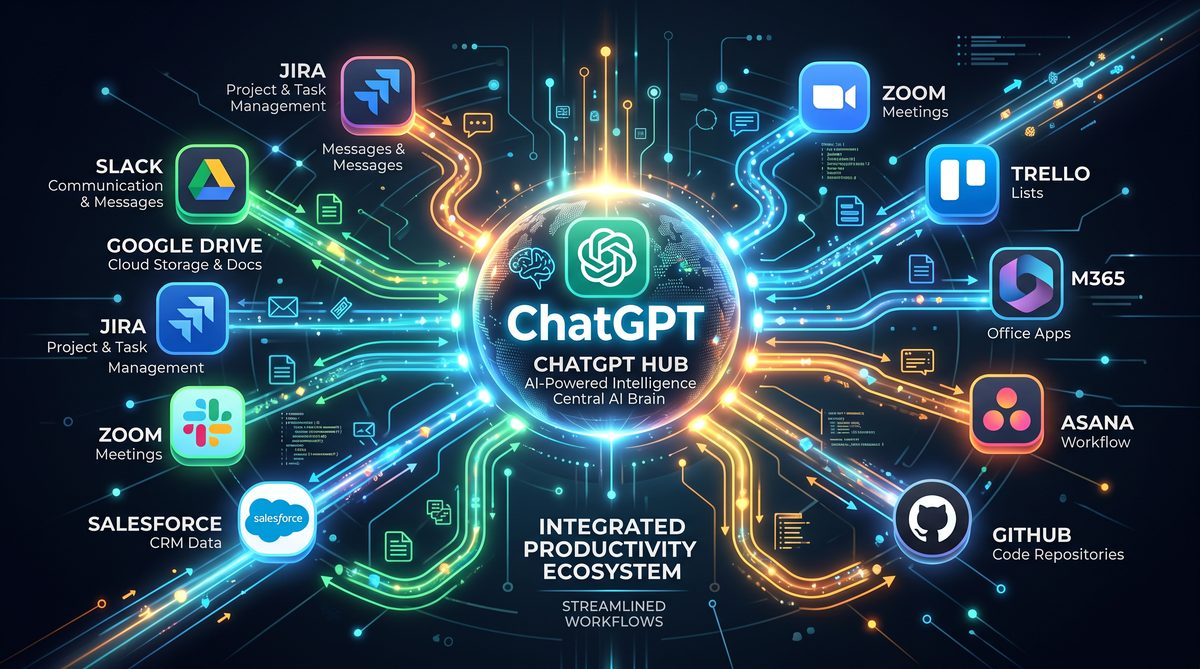
Implementing ChatGPT Connectors with Scheduled Tasks for Agentic Background Workflows: Slack, Google Drive, Jira, and Beyond
This comprehensive tutorial describes, step by step, how to integrate the newly released ChatGPT Connectors with a Scheduled Tasks system to run agentic background workflows. It covers connector configuration, authentication patterns, YAML and JSON configuration examples, multi-step workflow composition, webhook handling, observability, secret management, and operational best practices for production deployments.
Target audience: platform engineers, SREs, AI engineers, and integration specialists who will build automated background agents that orchestrate Slack, Google Drive, Jira, and other third-party APIs via the ChatGPT Connectors framework and the Scheduled Tasks orchestration provided by the platform.
Overview and Architectural Patterns
Before diving into concrete setup steps, it is important to establish the architecture and operational patterns for agentic background workflows enabled by ChatGPT Connectors and Scheduled Tasks. At a high level, a Scheduled Tasks platform triggers an “agent run” on a schedule or via external events. Each agent run uses one or more Connectors to interact with third-party services. The system must coordinate authentication, request shaping, retries, state management, and artifact storage while preserving least privilege and enabling observability.
Core components
- Scheduled Tasks orchestrator — triggers agent runs, tracks state, retries, and schedules.
- ChatGPT Connectors layer — standardized connector adapters for Slack, Google Drive, Jira, email, and custom HTTP services.
- Agent runtime — executes multi-step workflows, routes connector calls, performs transformations, and persists intermediate artifacts to storage.
- Secrets and identity management — stores OAuth tokens, service account keys, and rotates secrets (e.g., HashiCorp Vault, AWS Secrets Manager).
- Observability pipeline — logs, traces, metrics, and alerting for failures and SLA breaches.
Security and governance patterns
Security is central: authenticate connectors using OAuth 2.0 or service accounts, enforce fine-grained scopes, validate inbound webhooks, and manage token rotation. Use ephemeral credentials or short-lived tokens where possible, and store long-lived refresh tokens in a secure secret store. Apply the principle of least privilege for every connector integration.
In the example sections we will provide concrete configuration files and code snippets to operationalize these patterns.
Design choices for scaling agentic background workflows
- Use isolated runtime instances per scheduled job for fault isolation and RBAC enforcement.
- Limit concurrency per connector to respect third-party rate limits; implement global rate limiters and token bucket algorithms.
- Sharded worker pools for long-running tasks to allow controlled parallelism with backpressure management.
- Use durable state stores (e.g., PostgreSQL or DynamoDB) for workflow checkpoints, enabling resume and retry semantics.
With architecture and security patterns established, we now move to concrete setup steps for the major connectors used in the example workflow: Slack, Google Drive, and Jira.
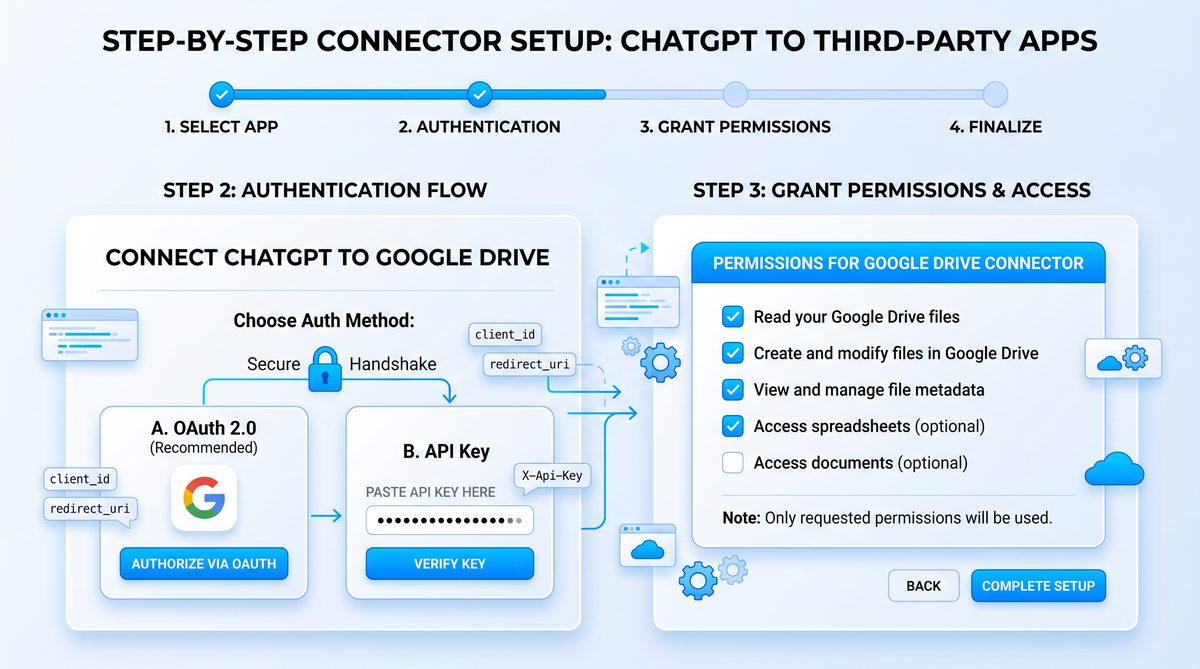
Step 1 — Provisioning and Authenticating Connectors
Each connector requires a distinct authentication model. We will provide recommended OAuth scopes, service account setups, and webhook verification approaches for Slack, Google Drive, and Jira. For production use, prefer organization-managed OAuth apps or service accounts with explicit approval flows.
Slack connector: OAuth app and bot token
Recommended steps to provision a Slack app and configure the ChatGPT Connector for Slack:
- Create a Slack App in your workspace via https://api.slack.com/apps.
- Under OAuth & Permissions, add minimal scopes your agent needs (examples below) and set Redirect URL to your connector or auth callback endpoint.
- Install the app to the workspace and securely store the OAuth tokens (bot token and optionally user token) in your secrets manager.
- Configure event subscriptions if you need inbound Slack triggers; validate the signing secret for webhook verification.
Slack recommended scopes
- chat:write — post messages as the app
- channels:read — list public channels
- groups:read — list private channels (if needed)
- files:read and files:write — read or upload files
- reactions:read — examine reactions if implementing sentiment/action detection
Slack connector configuration example (YAML)
connector:
  name: slack
  type: slack
  settings:
    client_id: ${SLACK_CLIENT_ID}
    client_secret: ${SLACK_CLIENT_SECRET}
    signing_secret: ${SLACK_SIGNING_SECRET}
    redirect_uri: https://ops.example.com/connectors/slack/callback
    default_channel: "#reports"
    scopes:
      - chat:write
      - channels:read
      - files:read
      - files:write
Best practices — Slack
- Validate request signature using the signing_secret for all inbound events, rejecting requests older than a configurable skew (e.g., 5 minutes) to prevent replay attacks.
- Store tokens in encrypted secret stores; never commit tokens into code repositories. Use dynamic pull at runtime via secret-fetching libraries.
- Implement token refresh logic for user-level tokens and use bot tokens for application-level actions where possible.
- Rate limit outgoing messages and implement exponential backoff on 429 responses. Use the Retry-After header where provided.
Google Drive connector: Service account or OAuth2
Google Drive can be accessed either via a service account (recommended for enterprise-managed content in G Suite) or via OAuth 2.0 if acting on behalf of individual users. Service accounts are simpler for fully automated background jobs.
Service account provisioning
- Create a Google Cloud project and enable the Drive API.
- Create a service account and grant domain-wide delegation if accessing user Drive data in a G Suite domain.
- Generate a JSON service account key and store it securely in your secrets manager.
- Grant the necessary Drive scopes to the service account or impersonate a user via domain delegation.
Google Drive connector configuration (JSON)
{
  "connector": {
    "name": "google_drive",
    "type": "google_drive",
    "settings": {
      "service_account_key_secret": "secret://prod/google-drive-service-account",
      "scopes": [
        "https://www.googleapis.com/auth/drive.readonly",
        "https://www.googleapis.com/auth/drive.file"
      ],
      "impersonate_user": "[email protected]",
      "default_query": "mimeType != 'application/vnd.google-apps.folder'"
    }
  }
}
Best practices — Google Drive
- Prefer service accounts with domain delegation for automation. Use impersonation to provide proper auditability.
- Do not store raw service account JSON in plaintext. Use a secrets manager and grant read access only to the agent runtime role.
- Scope down Drive access to only required directories using ACLs and folder-level permissions.
- Use paginated list operations and file filters to limit data retrieval and conserve quota.
Jira connector: OAuth or API token
Jira Cloud supports API tokens, and Jira Server/Data Center often uses basic auth or OAuth 1.0a. We recommend Atlassian’s API tokens or OAuth for cloud. For sensitive automation, create a dedicated service account user with constrained project permissions.
Jira connector configuration (YAML)
connector:
  name: jira
  type: jira
  settings:
    base_url: https://yourcompany.atlassian.net
    auth:
      method: api_token
      username: [email protected]
      api_token_secret: secret://prod/jira-api-token
    default_project: PROJ
    default_issue_type: Task
    scopes:
      - browse:project
      - create:issue
      - edit:issue
Best practices — Jira
- Create a dedicated service user for automation to ensure traceability of changes.
- Restrict the service user’s project access to only the projects required by the workflow.
- Use robust schema validation on created issues to prevent malformed fields from causing workflow failures.
- Observe rate limits and use exponential backoff on 429 responses; capture and surfacing error details for triage.
With connectors provisioned, the next step is to wire them into the Scheduled Tasks system and define a multi-step workflow that represents a realistic agentic background task.
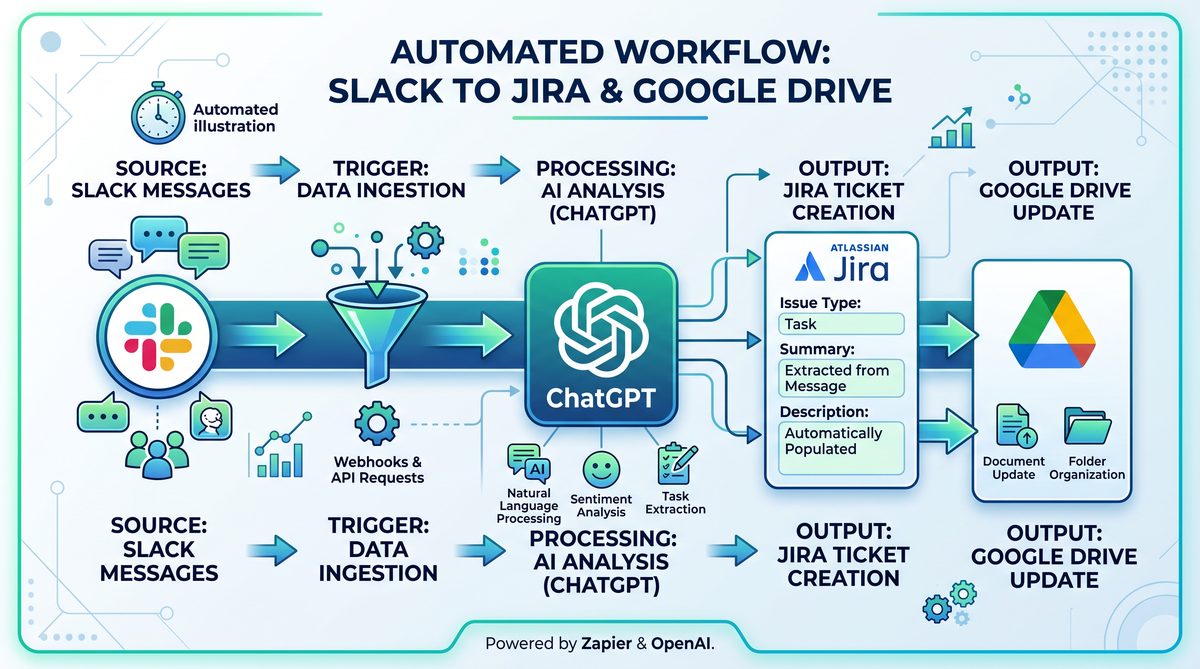
Step 2 — Defining Scheduled Tasks and Workflow Spec
The Scheduled Tasks system will launch an agent run according to a schedule or event. Workflows can be declared as YAML/JSON specifications that the agent runtime interprets. We will define an example weekly workflow named “weekly-sync-report” that:
- Fetches a set of documents from Google Drive (folder: Weekly Reports).
- Summarizes each document using the ChatGPT Connectors’ LLM capabilities.
- Posts a consolidated summary to a Slack channel and uploads artifacts to Drive.
- Creates Jira tickets for action items extracted from the summary.
- Saves a structured artifact (JSON) with the aggregated metadata for audit and compliance.
Scheduled Tasks job configuration (YAML)
jobs:
  - id: weekly-sync-report
    name: Weekly Sync and Summarize
    schedule: "0 6 * * 1"  # Every Monday at 06:00 UTC
    timezone: "UTC"
    max_retries: 2
    retry_backoff_seconds: 120
    concurrency_limit: 1
    timeout_seconds: 3600
    task_definition:
      workflow: "/workflows/weekly-sync-report.yaml"
      environment:
        - name: ENV
          value: production
        - name: LOG_LEVEL
          value: info
      secret_references:
        - secret: secret://prod/google-drive-service-account
        - secret: secret://prod/slack-bot-token
        - secret: secret://prod/jira-api-token
Workflow definition (workflow YAML)
Below is a declarative workflow that describes the multi-step pipeline. The agent runtime supports a step-based DSL with input and output piping, branching, and error handlers.
id: weekly-sync-report
name: Weekly Sync and Summarize
description: |
  Fetch all documents from the Weekly Reports folder, summarize using LLM,
  post the consolidated summary to Slack, create Jira tickets for action items,
  and persist artifacts to Google Drive and the audit bucket.
variables:
  drive_folder_id: "0BxxExampleWeeklyFolderId"
  slack_channel: "#reports"
  jira_project: "PROJ"
steps:
  - id: list_reports
    type: connector.call
    connector: google_drive
    operation: files.list
    inputs:
      q: "parents in ['${{ variables.drive_folder_id }}'] and trashed=false"
      fields: "files(id,name,mimeType,webViewLink,modifiedTime)"
    outputs:
      files: $.data.files

  - id: fetch_and_summarize
    type: foreach
    iterate: $.steps.list_reports.outputs.files
    concurrency: 4
    body:
      - id: download
        type: connector.call
        connector: google_drive
        operation: files.get
        inputs:
          fileId: ${{ item.id }}
          alt: media
        outputs:
          content: $.data

      - id: summarize
        type: llm.call
        model: gpt-4o-mini
        inputs:
          prompt: |
            Summarize the following document. Provide a concise summary, list of action items with owners if present, and priority for each action (high, medium, low).
            Document content:
            ${{ steps.download.outputs.content }}
          max_tokens: 600
        outputs:
          summary: $.data.text
          action_items: $.data.metadata.action_items

      - id: upload_summary
        type: connector.call
        connector: google_drive
        operation: files.create
        inputs:
          name: "summary-${{ item.name }}.txt"
          parents:
            - ${{ variables.drive_folder_id }}
          content: ${{ steps.summarize.outputs.summary }}
        outputs:
          summary_file_id: $.data.id

  - id: aggregate
    type: transform.aggregate
    inputs:
      items: $.steps.fetch_and_summarize.outputs
    outputs:
      aggregated_summary: $.data.aggregated_summary
      aggregated_action_items: $.data.aggregated_action_items

  - id: post_to_slack
    type: connector.call
    connector: slack
    operation: chat.postMessage
    inputs:
      channel: ${{ variables.slack_channel }}
      text: |
        Weekly Summary:
        ${{ steps.aggregate.outputs.aggregated_summary }}
      attachments:
        - type: file
          name: "weekly-summary.json"
          content: ${{ steps.aggregate.outputs.aggregated_action_items }}
    outputs:
      ts: $.data.ts
      channel: $.data.channel

  - id: create_jira_issues
    type: foreach
    iterate: ${{ steps.aggregate.outputs.aggregated_action_items }}
    concurrency: 2
    body:
      - id: create_issue
        type: connector.call
        connector: jira
        operation: issue.create
        inputs:
          project: ${{ variables.jira_project }}
          summary: ${{ item.title }}
          description: ${{ item.description }}
          issuetype: Task
          priority: ${{ item.priority }}
          assignee: ${{ item.assignee }}
        outputs:
          issue_key: $.data.key

  - id: persist_artifact
    type: connector.call
    connector: google_drive
    operation: files.create
    inputs:
      name: "weekly-artifact-${{ execution.id }}.json"
      parents:
        - ${{ variables.drive_folder_id }}
      content: ${{ {
        "job_id": "${{ execution.id }}",
        "aggregated_summary": "${{ steps.aggregate.outputs.aggregated_summary }}",
        "issues_created": "${{ steps.create_jira_issues.outputs }}",
        "slack_message": "${{ steps.post_to_slack.outputs }}"
      } }}
    outputs:
      artifact_id: $.data.id

on_error:
  strategy: retry
  max_attempts: 2
  notify:
    - channel: "#alerts"
      message: "Weekly Sync failed for ${{ execution.id }}: ${{ error.message }}"
Explanation of key workflow concepts
Important DSL primitives in the example:
- connector.call — issue a standard call to a configured connector; the runtime converts the input into a connector-specific API call and handles authentication.
- foreach — iterate over a list with support for controlled concurrency and isolation of side effects.
- llm.call — perform a text generation or summarization using the underlying LLM via the ChatGPT Connectors layer; the runtime attaches context and manages token limits.
- transform.aggregate — reduce per-document outputs into a single consolidated artifact that will be posted to Slack and used to open Jira tickets.
- on_error — an error policy for the entire workflow; local step-level error handlers can also be defined.
Connecting the workflow to the Scheduled Tasks job
When you deploy the YAML job definition to the Scheduled Tasks system, the orchestration controller will validate the workflow and test connector accesses if preflight is enabled. It will then schedule and spawn agent runs according to the cron schedule. The job configuration can reference secrets so the runtime can fetch connector credentials at execution time.
Step 3 — Authentication Best Practices and Secret Management
Secure handling of connector credentials and tokens is essential. Below are the recommended patterns to protect credentials, minimize blast radius, and automate rotation.
Use a centralized secrets manager
Store all OAuth client secrets, service account keys, and API tokens in a central secrets manager (e.g., HashiCorp Vault, AWS Secrets Manager, Google Secret Manager). Grant the Scheduled Tasks runtime a narrowly-scoped role to fetch only the required secrets for a job. Example secret reference patterns were used in earlier YAML snippets (secret://prod/google-drive-service-account).
Short-lived credentials and token rotation
Where possible, mint short-lived credentials (e.g., GCP short-lived service account impersonation, AWS STS tokens). For OAuth refresh tokens that cannot be short-lived, rotate them periodically. Implement an automated rotation job that:
- Fetches the current refresh token from Vault.
- Performs a refresh or reauthorization to obtain a new refresh token / access token pair.
- Validates new token capabilities and stores the new token with a new version in the secrets manager.
- Rolls the new token into the Scheduled Tasks runtime on next job run (use a versioned secret reference to control rollout).
Least privilege and scoped service accounts
Always define and enforce the minimum scopes required by the workflow. For Google Drive, do not request full drive if read-only contents from a specific folder suffice. For Slack, create a bot with just chat:write and files:read/write if the bot does not need to manage channels. For Jira, restrict project access and grant create/edit only in the target projects.
Validating inbound webhooks and callback endpoints
Connectors may require inbound HTTP endpoints for event subscriptions (e.g., Slack events, Jira webhooks). Secure these endpoints with signature validation and token-based verification:
- Slack: validate X-Slack-Signature using the signing secret and timestamp checks.
- Jira: use a shared secret or HMAC signature verification where supported.
- General webhooks: use certificate pinning (if feasible), mTLS for inbound requests, or HMAC based on a secret stored in the secrets manager.
Example signature verification code (pseudocode)
// Pseudocode: verify Slack signature
function verifySlackSignature(headers, body, signingSecret) {
  const timestamp = headers['x-slack-request-timestamp'];
  if (Math.abs(now() - parseInt(timestamp)) > 300) throw new Error('stale request');

  const sigBase = `v0:${timestamp}:${body}`;
  const expected = 'v0=' + hmac_sha256(signingSecret, sigBase);
  return secureCompare(expected, headers['x-slack-signature']);
}
Secret injection: environment vs. runtime fetch
Avoid embedding tokens into container images or code. Prefer dynamic secret fetch at runtime. Two common models:
- Environment variable injection at runtime via the scheduler: the orchestration system retrieves secrets and injects them as env vars for the job’s container. This is convenient but requires the orchestrator to be a trusted component with limited scope.
- Runtime secret retrieval via a sidecar: the job accesses a local sidecar (or secret agent) that fetches secrets from Vault using a short-lived token. This model decouples the orchestrator from secret storage and is preferable for high-security environments.
Auditability and access control
Ensure secrets managers maintain audit trails of secret access and changes. Use versioned secrets and restrict secret read access to the specific runtime role that owns the job. Rotate access tokens on role changes and revoke secrets when decommissioning jobs.
Step 4 — Implementation Details: API Shapes, Transformations, and Error Handling
This section covers the exact request/response shapes, response mapping, and robust error handling patterns for the connectors.
Mapping connector responses to workflow outputs
Connector adapters normalize diverse provider responses into a common shape. Each connector.call step emits a standardized {status, data, error} envelope. Example normalized response:
{
  "status": "success",
  "data": {
    "id": "fileId123",
    "name": "report.docx",
    "mimeType": "application/vnd.openxmlformats-officedocument.wordprocessingml.document",
    "content": "base64-encoded content or raw text if small"
  },
  "meta": {
    "request_id": "abc-123",
    "provider_status_code": 200,
    "latency_ms": 250
  }
}
Error handling and retry semantics
Implement the following layered retry policy:
- Step-level transient retry (internal): retry limited transient errors (network timeouts, connection resets) with exponential backoff and jitter.
- Connector-level retries: respect provider-specific Retry-After headers for rate limiting.
- Workflow-level retries: the Scheduled Tasks system can retry entire runs per job max_retries and backoff settings.
Sample retry policy (JSON)
{
  "retry_policy": {
    "transient_errors": ["ECONNRESET", "ETIMEDOUT", "EAI_AGAIN"],
    "max_attempts": 3,
    "initial_delay_ms": 500,
    "backoff_multiplier": 2,
    "max_delay_ms": 60000,
    "jitter_ratio": 0.1
  }
}
Idempotency and safe retries
To enable safe retries for actions such as creating Jira issues or posting to Slack, include idempotency keys. The connector layer should accept an idempotency key generated by the workflow runtime and pass it to the provider when supported. Store idempotency keys and results in the checkpoint to avoid double-posting.
Jira create issue with idempotency (pseudo-headers)
POST /rest/api/3/issue
Headers:
  X-Idempotency-Key: job-123-step-create-issue-
Body:
  {
    "fields": { "project": { "key": "PROJ" }, "summary": "Task", "issuetype": {"name": "Task"} }
  }
Pagination and incremental processing
Large data sets require incremental processing. For Google Drive, use page tokens; for Slack, use cursor-based pagination. The workflow should checkpoint the last processed cursor so subsequent runs only process new items.
Sample incremental fetch loop (pseudocode)
cursor = null
while True:
  resp = drive.files.list(q="...", pageToken=cursor, pageSize=100)
  process(resp.files)
  cursor = resp.nextPageToken
  if not cursor:
    break
Observability: logging, metrics, tracing
Instrument every step with structured logs (JSON) that include trace_id, job_id, step_id, and connector metadata. Emit metrics for success/failure counts, latencies, and retries. Correlate traces across the Scheduled Tasks orchestrator, agent runtime, and connector outbound calls to build end-to-end spans.
Suggested metrics
- workflow_runs_started_total
- workflow_runs_failed_total{job_id}
- connector_requests_total{connector}
- connector_request_latency_seconds_bucket
- secrets_access_total and secrets_access_failure_total
For debugging, capture sample payloads (redacting PII) when failures occur and store them as artifacts associated with the execution. Integrate with an error aggregation tool (e.g., Sentry) for alerting on elevated failure rates.
Step 5 — End-to-End Example: Weekly Report Workflow Walkthrough
This end-to-end walkthrough shows runtime behavior, input/outputs for each step, and how connectors interact to achieve the goal.
Scenario
Every Monday, the agent collects the last week’s progress documents from Google Drive, summarizes them using an LLM, posts a consolidated summary to Slack, and opens Jira tasks for any action items discovered. Each stage has failure handlers and emits artifacts to Drive for auditability.
Execution timeline and checkpoints
- Scheduler fires at 06:00 UTC and creates an execution record with id exec-2026-06-21-0001 and a trace_id.
- Step list_reports runs, returns 12 files. It stores a cursor/timestamp checkpoint for incremental runs.
- fetch_and_summarize iterates with concurrency 4:
- download retrieves file content; large files are streamed; the runtime stores a temporary artifact location in the job sandbox.
- summarize calls LLM with the document body and structured prompt; the LLM returns a summary and a structured “action_items” metadata field.
- upload_summary stores the summary text back to Drive and returns file IDs.
- aggregate consolidates all per-document summaries and merges action items.
- post_to_slack posts a message with aggregated content and uploads the JSON artifact using files.upload. For idempotency, the runtime provides an idempotency key created from the job_id and artifact checksum.
- create_jira_issues creates issues for each action item and stores returned keys.
- persist_artifact writes a top-level artifact JSON to Drive containing the run summary, created issue keys, and Slack message info.
- Execution completes and the scheduler marks the run as succeeded and emits metrics and an archival artifact reference.
Sample LLM prompt engineering for summarization
Prompt: |
  You are an assistant that extracts summaries and action items from technical documents.
  For the input document, produce a JSON object with keys:
    - summary: concise 3-5 sentence summary
    - action_items: an array of {title, description, assignee, priority}
  Document:
  {{document_text}}
Sample aggregated artifact (JSON)
{
  "job_id": "exec-2026-06-21-0001",
  "run_time": "2026-06-21T06:00:00Z",
  "files_processed": 12,
  "aggregated_summary": "This week we completed the API gateway rollout, addressed latency in the auth service, and started the migration of the analytics ETL pipeline.",
  "aggregated_action_items": [
    {
      "title": "Investigate auth latency spike",
      "description": "Root cause analysis for latency between 2026-06-17 and 2026-06-18",
      "assignee": "[email protected]",
      "priority": "High",
      "created_issue": "PROJ-456"
    }
  ],
  "slack_message": {
    "channel": "#reports",
    "ts": "1624458000.000200",
    "permalink": "https://slack.com/archives/C12345678/p1624458000000200"
  },
  "jira_issues": [
    "PROJ-456"
  ]
}
Observability artifacts
For each run, the runtime uploads:
- Structured run log: exec-
-logs.json (redacted) - Aggregated artifact JSON file as shown above
- Per-file summaries, stored next to source in Drive
Failure mode and remediation example
Failure: Slack API returns 429 due to messaging rate limits during post_to_slack. The connector returns an error with provider_status_code: 429 and a Retry-After header of 30s. The step-level retry policy triggers exponential backoff and retries up to 3 times, after which the workflow marks the step as failed and the workflow-level on_error strategy retries the full job as configured.
Remediation steps an operator can take:
- Check connector_request_latency_seconds and connector_requests_total to identify spikes.
- Inspect exec logs for idempotency keys to ensure duplicate posts were not created.
- If rate-limited persistently, increase message batching and reduce concurrency for Slack posts in future runs.
Step 6 — Testing, CI/CD, and Sandboxing
Testing agentic background workflows is critical. Use a layered testing strategy: unit tests for transformation functions, connector integration tests against provider sandboxes or mocked APIs, and end-to-end tests against staging environments with domain-safe test data.
Unit testing
Mock connector adapters and test the workflow DSL interpreter. Validate transformations, idempotency key generation, and error handling logic. Use deterministic samples for LLM prompts and validate JSON outputs using schemas.
Integration testing
Create test instances of Slack, Google Drive, and Jira (or use provider sandbox accounts). Example approach:
- Provision a staging Google Drive folder and a service account restricted to that folder.
- Install a Slack app into a test workspace with a #staging-reports channel.
- Create a Jira project for staging automation and a test user for issue creation.
CI/CD pipeline
Include configuration linting, connector schema validation, and workflow schema validation as pre-merge checks. When a workflow is deployed, run a preflight that validates secret references and optionally executes a dry-run that fetches metadata only (no writes) to validate permissions.
Local sandbox and replay
Support local sandbox playback by capturing a recorded run’s inputs and provider responses (recorded with redaction). Replaying recorded responses during local development enables deterministic tests without hitting provider APIs.
Step 7 — Operational Considerations and Runbook
Operational readiness includes automated alerts, runbooks, and escalation policies. Below is a sample runbook for failed scheduled runs and connector errors.
Key alerts to configure
- High failure rate of workflow runs (e.g., >5% of runs failing in 1 hour)
- connector_request_latency above threshold or sustained 5xx responses from a provider
- Secrets access failures — any inability to retrieve secrets for jobs
- Quota exhaustion alerts for third-party APIs
Sample runbook steps for a failed run
- Identify the failed run ID and trace_id in the scheduler UI or logs.
- Examine structured logs and error envelopes attached to the run.
- If the failure is a provider rate limit, consult provider dashboards (Slack/Jira/Google) for quota status and errors.
- If authentication failed, verify secret version and rotation status in your secrets manager; validate token scopes and expiration.
- For data integrity issues, locate the last successful checkpoint and, if safe, re-run the job from that checkpoint using a dry-run to validate results before replay.
- If permanent failures occur, escalate to the service owner and open a post-mortem capturing root cause and mitigation plan.
Scaling tips
- For a large number of source files, increase concurrency for download/summarize but throttle connector.write operations to avoid pushing provider limits.
- Use a separate worker pool for heavy LLM calls to prevent blocking small, quick jobs.
- Implement circuit breakers for connectors: stop invoking a connector for a configurable period after repeated failures to avoid cascading issues.
Troubleshooting and Common Pitfalls
Below are common issues and how to resolve them.
Invalid OAuth redirect or misconfigured scopes
Symptoms: authorization flow fails with “redirect_uri_mismatch” or token lacks required scopes. Resolution: Verify the registered Redirect URL exactly matches the one configured in the connector settings and that the app has the scopes requested by the workflow. Reinstall the app or reauthorize to grant newly requested scopes.
Rate limits leading to retries and eventual failures
Symptoms: repeated 429 responses and high retry counts. Resolution: reduce concurrency, add batching, honor Retry-After headers, and consider spreading operations across time windows. Implement exponential backoff and add a circuit-breaker if provider is temporarily unavailable.
Token rotation causing auth failures
Symptoms: sudden 401/403 across many jobs. Resolution: ensure your token rotation job is functional and that the runtime reads the updated token version. Check secrets manager for latest version and validate the runtime’s access policy to the secret. Roll back to a known good token if necessary.
Unexpected LLM outputs or hallucinations
Symptoms: LLM summarizes incorrectly or invents facts. Resolution: strengthen prompts with clear instructions and examples, use extraction-first prompts requiring structured JSON output, add validation layers that schema-validate the LLM’s output and reject malformed results. For high-assurance tasks, require human-in-the-loop review for certain outputs before making external changes (e.g., opening Jira issues).
Related Internal Resources
For teams building desktop integrations or embedding connector functionality into client apps, see the internal guide on the architecture and packaging of the
The connector architecture in ChatGPT’s scheduled tasks shares fundamental design principles with the Codex Desktop App’s plugin system. Our comprehensive tutorial on using the new Codex Desktop App for full-stack development covers the computer use capabilities, in-app browser integration, persistent memory across sessions, and the plugin workflow system that enables developers to extend Codex’s native functionality. How to Use the New Codex Desktop App for Full-Stack Development.
. That article outlines how desktop agents can securely delegate short-lived credentials and presents patterns for local caching, background sync, and secure IPC between the local app and the cloud-based Scheduled Tasks system.
If your agentic workflows include audio or voice-based interactions (for example, summarizing audio transcripts or kicking off voice-initiated runs), consult the article on
Beyond text-based connectors, ChatGPT’s automation capabilities extend into voice-driven workflows through the Advanced Voice Mode API. Our complete implementation guide for building real-time voice agents with GPT-5.5 walks through the WebSocket architecture, streaming audio processing, interrupt handling, and production deployment patterns for creating conversational AI systems that integrate with existing telephony infrastructure. How to Build Real-Time Voice Agents with ChatGPT’s Advanced Voice Mode.
which explains how to stream audio to the LLM, manage real-time session state, and securely connect real-time voice channels with background scheduled runs for asynchronous follow-up tasks such as Jira ticket creation and Slack notifications.
Appendix: Practical Examples and Quick Reference
CRON expressions quick reference
- Every day at 06:00 UTC: 0 6 * * *
- Every Monday at 06:00 UTC: 0 6 * * 1
- First day of month at 03:00 UTC: 0 3 1 * *
YAML vs JSON: when to use which
Use YAML for human-edited workflow files for readability; use JSON for programmatic generation and APIs. The scheduler accepts both, but keep resource limits and line-length considerations in mind for large embedded artifacts.
Sample minimal connector config for a custom HTTP API
connector:
  name: custom_http
  type: http
  settings:
    base_url: https://api.example.com
    auth:
      type: bearer_token
      token_secret: secret://prod/custom-api-token
    retry_policy:
      max_attempts: 3
      initial_delay_ms: 200
Checklist before production deployment
- Secrets stored and access controlled in secrets manager
- Preflight connector permission validation completed
- Rate limit and retry policies configured
- Observability and alerts enabled
- Runbook and escalation paths documented
- CI tests for workflow and connectors passing
