
3 Enterprise Security Checks Before Deploying ChatGPT Work — Data Governance, Access Control, and Audit Compliance
Enterprise Security Considerations for Deploying ChatGPT Work
On July 9, 2026, ChatGPT Work launched with a bold promise: to carry out multistep office work across connected apps, files, websites, and even the desktop. That level of autonomy—accessing internal documents, browsing the web, executing code, and interacting with services—creates an unprecedented productivity lever. It also introduces an equally unprecedented security imperative. As organizations contemplate or accelerate deployment, the fundamental question is no longer if an AI assistant can help knowledge workers, but how to do so without compromising data, operations, or regulatory commitments.
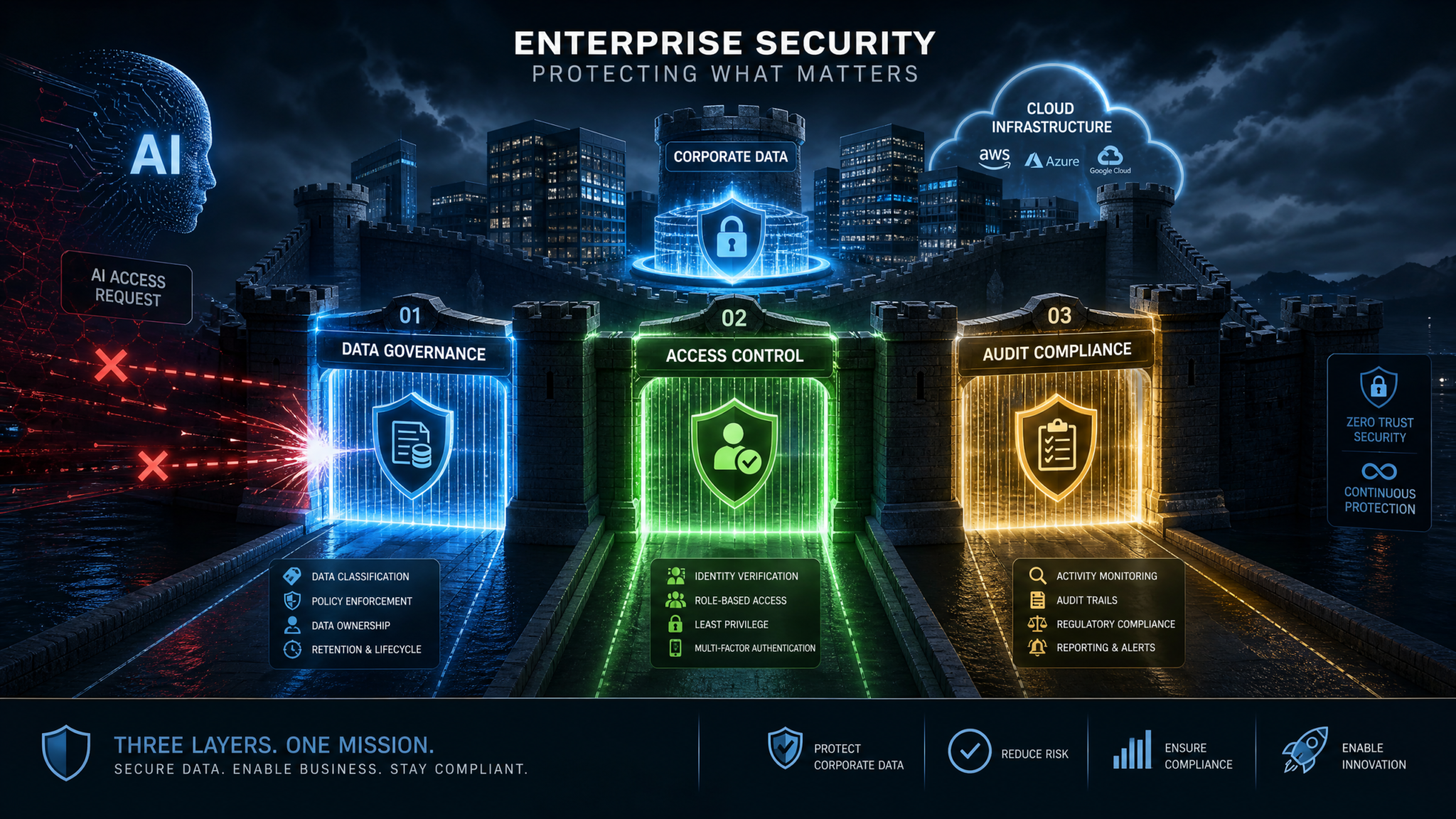
Across industries, teams are moving from pilot experiments to scaled rollouts. The stakes are rising: a single misconfigured connector could expose sensitive files, a mishandled browsing session could import malicious prompts, or a lax approval workflow could trigger unintended changes to production systems. Recognizing this, TechRepublic identified three critical security checks that enterprises need to get right: Data Governance, Access Control, and Audit & Compliance. This article operationalizes those checks for ChatGPT Work—translating them into prescriptive controls, reference architectures, and a practical 30/60/90-day implementation plan.
ChatGPT Work’s Enterprise/Education offerings add admin controls and compliance features designed for these realities. Admins can centrally govern data retention, workspace policies, model capabilities, and connector permissions, while users can benefit from safer defaults such as approval modes and sandboxed code execution. The “writes” approval mode in the Codex CLI provides granular permission control over outbound changes. Meanwhile, Model Context Protocol (MCP) authentication flows add layered security to tool access, combining identity, authorization scopes, and just-in-time consent. For regulated industries, data residency and processing pathways must be designed from the outset to meet stringent localization and processor obligations.
Introduction: The Security Imperative
Enterprise deployment of ChatGPT Work is not a simple software rollout. It is a shift in how work is performed—by an assistant capable of chaining actions across systems. With that shift, the enterprise attack surface changes in four ways:
- Scope expansion: The assistant can browse, read, and write across many applications and data repositories, compounding potential blast radius if something goes wrong.
- Decision delegation: The assistant can propose or take actions on the user’s behalf, requiring new guardrails such as approval modes, granular scopes, and explainability.
- New inputs, new risks: Web browsing and third-party tools introduce supply-chain and prompt-injection risks that bypass traditional email/web filtering layers.
- Opaque failure modes: Without explicit logging and review workflows, assistants can make silent, cascading errors that are hard to detect after the fact.
Addressing these risks demands a layered approach. The three critical checks from TechRepublic—Data Governance, Access Control, and Audit & Compliance—serve as the backbone of a secure deployment blueprint. Each check interacts with the others: a data governance rule is only effective if access controls enforce it; audit logs are only useful if they capture the right events from access-controlled actions on governed data.
In this featured article, we translate principles into practice with concrete patterns, policy snippets, and controls you can deploy today. You will find:
- A clear access model for ChatGPT Work: where the assistant runs, how it connects, and which boundaries matter most.
- Prescriptive controls for data classification, DLP policies, retention, and cross-border data flows.
- Robust access control patterns: RBAC, connector permissions, approval modes (including Codex CLI “writes”), MCP authentication layers, and least-privilege design.
- An audit and compliance playbook: logging schemas, monitoring, and governance aligned with SOC 2/ISO 27001 controls and GDPR/HIPAA considerations.
- A 30/60/90-day implementation roadmap and a reusable risk assessment framework with scoring matrices and example risk register entries.
Understanding ChatGPT Work’s Access Model
Before setting policies, understand what ChatGPT Work can access and how. At its core, ChatGPT Work is a managed AI assistant that can analyze prompts, reference enterprise data, browse the web, execute code in a sandbox, and invoke connectors to enterprise systems. Depending on admin configuration and user grants, it can also orchestrate tasks on the local desktop, including reading/writing files and controlling applications. This versatility is the source of tremendous value—and the reason careful scoping is essential.
Core Capabilities and Security Touchpoints
- Files and repositories: Access to cloud drives (e.g., enterprise content systems), wikis, knowledge bases, databases, and version control. Security touchpoint: document scopes, labeling, DLP, and approval for write operations.
- Web browsing: Retrieval-augmented analysis of external sources for research, synthesis, or verification. Security touchpoint: safe browsing policies, prompt injection defenses, content moderation, and egress controls.
- Code execution: Running code snippets for data processing, analysis, or automation in a sandboxed environment. Security touchpoint: sandbox limits, package allowlists, network egress, secrets isolation, and “writes” approvals before affecting external systems.
- Connected services: Interacting with email, calendars, ticketing, CRM, ERP, HRIS, CI/CD, and more via connectors. Security touchpoint: connector scopes, service principals, MCP authentication flows, and just-in-time approval for sensitive actions.
- Desktop and local apps: Automating tasks on the user’s machine or virtual desktop. Security touchpoint: endpoint policy, watermarking, screenshot redaction, application allowlists, and time-bounded permissions.
Enterprise/Edu tenants gain centralized controls for these surfaces. Admins can define who may enable browsing, connect services, or execute code; enforce data retention and workspace policies; and restrict cross-tenant data flows. For regulated industries, data residency constraints and processing pathways can be enforced to match legal obligations.
Access and Trust Boundaries
When modeling security, draw explicit boundaries between the following planes:
- Identity and authorization plane: Who (user, service principal, assistant) can do what, where, and when. Enforced via SSO, RBAC, MCP authentication flows, and approval modes.
- Data plane: What data is read, transformed, generated, and written. Governed by data classification, DLP, retention, and data residency policies.
- Execution plane: Where code runs and how tools are invoked. Governed by sandbox configurations, egress controls, and “writes” approval workflows.
- Observability plane: What gets logged, monitored, and alerted. Governed by audit policies, SIEM integration, and compliance evidence collection.
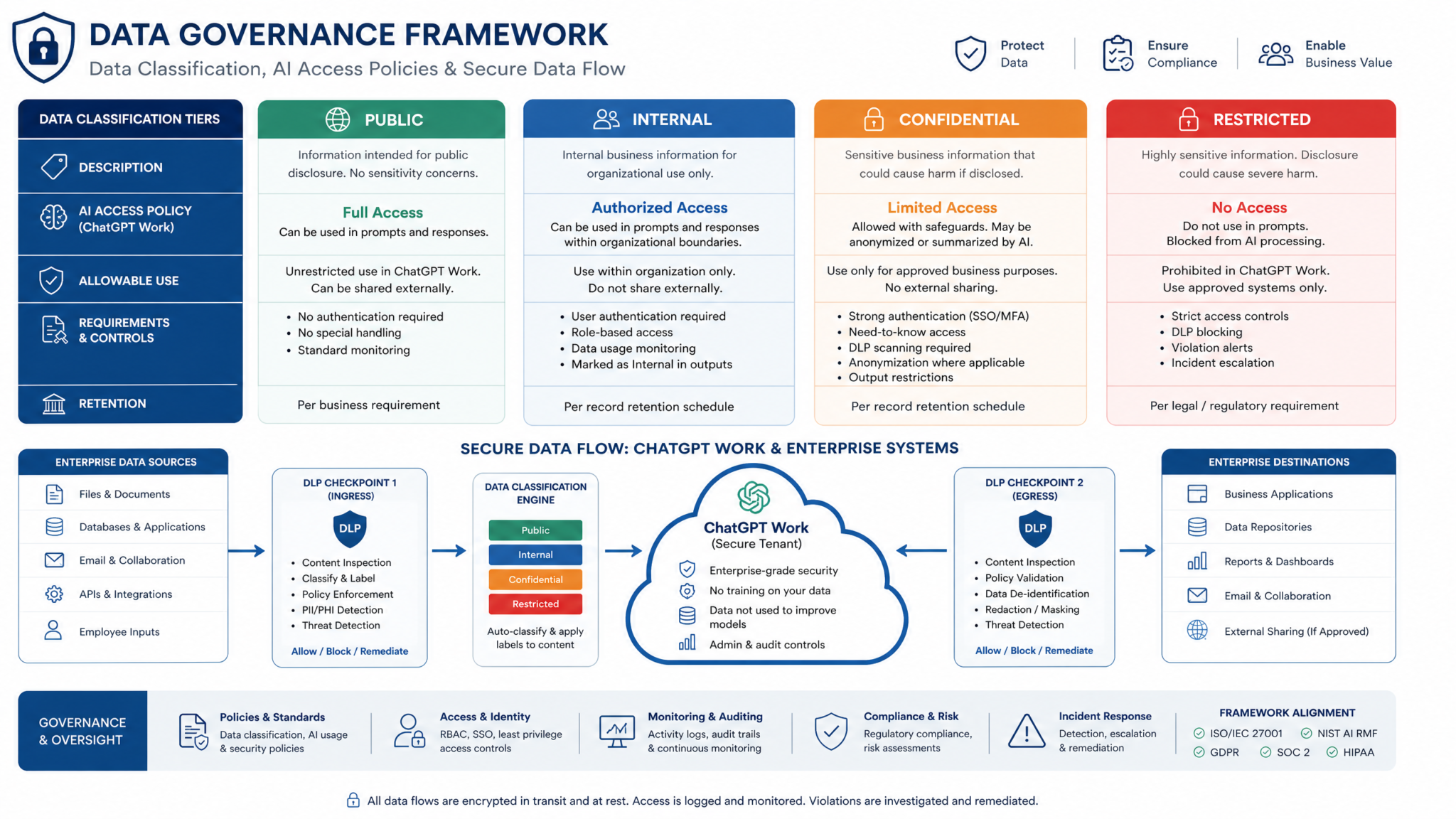
These planes intersect across the assistant’s operations. For example, a user asks the assistant to update a spreadsheet in a shared drive. The identity plane confirms the user’s rights and the connector scope; the data plane evaluates DLP rules against the data involved; the execution plane ensures any code is sandboxed and a “writes” approval is enforced; the observability plane records a tamper-evident log of the invoked action, result, and approvals.
MCP Authentication Flows for Tool Access
Model Context Protocol (MCP) defines how tools present capabilities, request authentication, and consume authorization scopes in a standardized, assistant-friendly way. In practice, MCP flows enable:
- Explicit scope grants at connect time: Users or admins can approve read-only vs read-write scopes per tool.
- Token isolation per user and per workspace: Reduces lateral movement if a token is compromised.
- Step-up authentication for high-risk actions: The assistant can require MFA or manager approval before proceeding.
- Short-lived tokens and rotation: Decreases window of exposure.
When you design your connector set, prefer MCP-enabled tools with strong, standards-based auth (OAuth 2.0/OIDC), enforce granular scopes, and configure conditional access by risk level. MCP’s explicit scoping is one of the most important controls you have—treat it as your first line of defense when enabling new capabilities.
The “Writes” Approval Mode in Codex CLI
Many teams will rely on code-based automations exposed to ChatGPT Work, particularly for data transformations, CI/CD interactions, or document generation. The Codex CLI’s “writes” approval mode is a critical guardrail: it requires human approval for any operation that would create, modify, or delete resources outside the sandbox. This prevents an assistant from silently pushing a code commit, sending an email, or moving a file without explicit consent.
At a high level, “writes” approval intercepts outbound actions that are state-changing. The assistant can stage them, summarize the intent in human-readable form, and ask for approval via the CLI or a centralized workflow. You can also layer policy conditions—only allow auto-approval in non-production environments, during business hours, or for resources below a sensitivity threshold.
Data Residency and Processing Pathways
For regulated industries (finance, healthcare, public sector), data residency is a primary concern. Residency requirements typically encompass:
- Storage location: Where user inputs, model outputs, logs, and artifacts are stored at rest.
- Processing location: Where model inference and tool execution occur, including temporary copies in memory or cache.
- Cross-border flows: Whether data transits or is mirrored across jurisdictions for performance, resilience, or vendor operations.
Make these decisions and document them prior to enabling production workloads. Confirm contractually through your DPA and by technical enforcement via regional controls, routing policies, key management (region-locked KMS), and conditional access. For certain sectors, partner with your legal and privacy teams to establish a defensible basis for processing under GDPR or equivalent regimes—especially for special category data or PHI. Where possible, adopt pseudonymization and minimization patterns to reduce residency risk.
Threat Landscape at a Glance
| Capability | Primary Risks | Key Controls |
|---|---|---|
| File access | Data exfiltration, overexposure from mis-scoped shares, stale permissions | Classification labels, DLP, least privilege, MCP scopes, access reviews |
| Web browsing | Prompt injection, malicious content ingestion, misinformation | Content filters, source allowlists/denylists, RAG source pinning, human-in-the-loop |
| Code execution | Sandbox escape, secret leakage, unauthorized changes | Sandbox resource limits, package allowlists, network egress control, “writes” approval |
| Connected services | Scope creep, token theft, unauthorized actions | MCP auth flows, per-tool scopes, step-up MFA, short-lived tokens |
| Desktop automation | Keystroke capture risks, screen data exposure | App allowlists, watermarking, screenshot redaction, session time limits |
For a deeper exploration of this topic, our comprehensive article on The ChatGPT Dreaming Memory Optimization Playbook — 10 Prompts for Training Your AI to Remember What Matters provides detailed analysis, practical examples, and implementation strategies that complement the concepts discussed in this section.
Security Check 1: Data Governance
Data governance is the foundation of secure AI operations. If you do not know what data you have, how it is classified, and where it can move, no downstream control will reliably prevent leakage or misuse. Start by codifying a classification schema, then implement DLP, retention, and cross-border controls that map to business risk and regulation.
Data Classification for AI Workflows
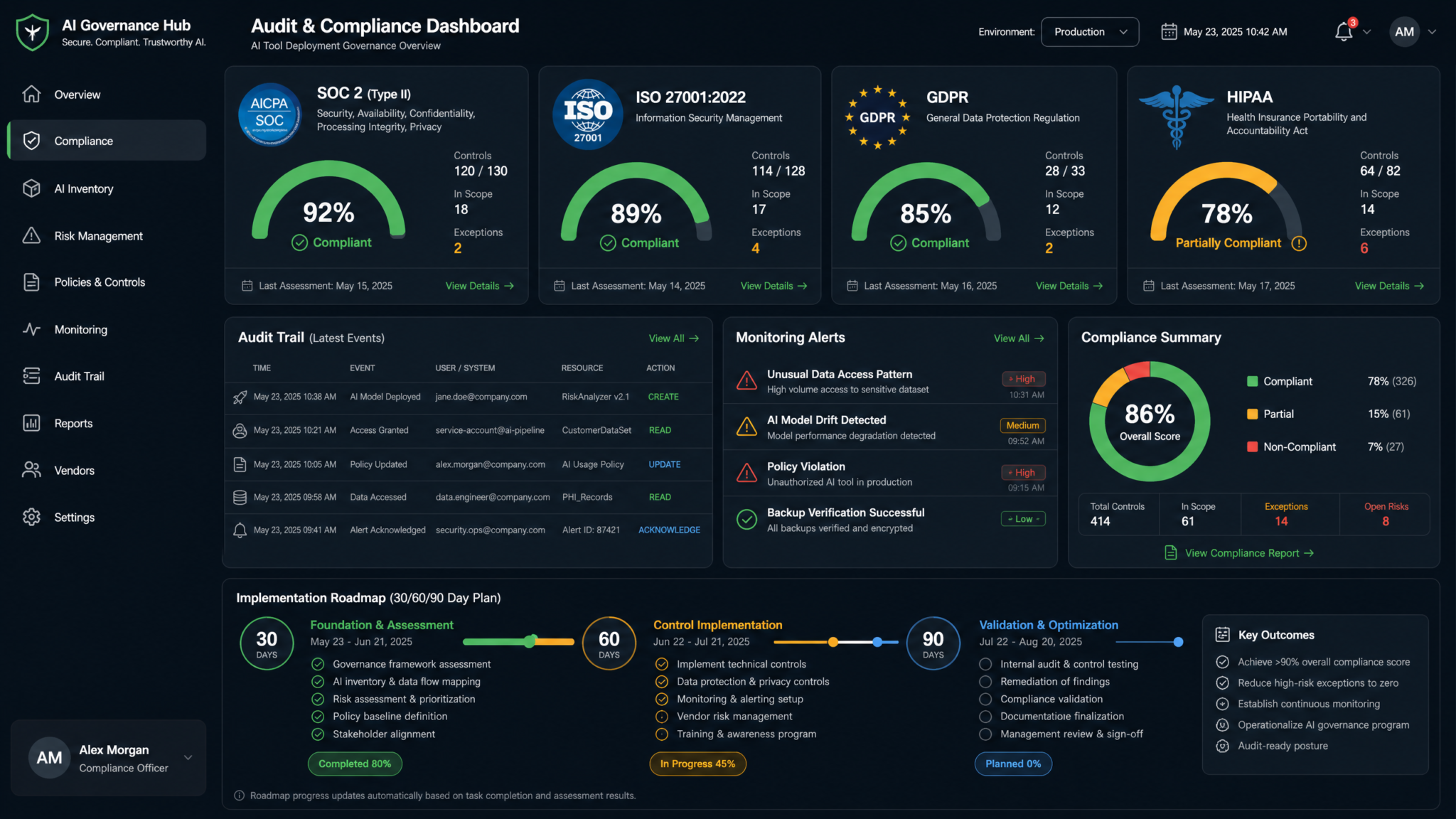
You likely have an existing data classification standard (e.g., Public, Internal, Confidential, Restricted). Extend it with AI-relevant tags and explicit handling rules for prompts, outputs, tool calls, and logs. Consider a two-axis model: sensitivity and handling constraints (e.g., “No cross-border processing”).
| Classification | Examples | AI Handling Rules | Approval Requirements |
|---|---|---|---|
| Public | Published marketing materials, press releases | May be used as prompt context or output; browsing permitted | No approvals required |
| Internal | Non-public internal guides, process docs | Context allowed; outputs may be shared internally; restrict external browsing sources if quoting | Writes approval for external publication |
| Confidential | Customer lists, financial forecasts, source code | Context allowed under need-to-know; outputs must remain internal; disable web quoting; require MCP read-only scopes by default | Manager approval for write operations and external sharing |
| Restricted | PHI, cardholder data, trade secrets | Pseudonymize; confine to regional processing; disallow browsing; prohibit external tool invocation except vetted ones | Dual approval and DLP pre-check; legal sign-off for any external transfer |
Make classification technical: apply labels to documents, data stores, connectors, and even prompt contexts. Ensure the assistant can read labels through connectors so downstream DLP engines can enforce rules consistently.
Data Loss Prevention (DLP) Policies Tailored to Assistants
DLP for AI must address both prompts and outputs, and the tool calls in between. Implement layered DLP:
- Pattern-based detection: Recognize PII/PHI, financial identifiers, source code fingerprints, and proprietary keywords.
- Contextual detection: Combine classification labels, data lineage, and user role context to reduce false positives.
- Action-aware enforcement: Differentiate between read, summarize, transform, and externalize operations.
- Human-in-the-loop: For borderline cases, route to approval rather than outright block.
Example DLP policy fragment for an assistant-aware gateway:
{
  "policyVersion": "2026-07-01",
  "rules": [
    {
      "name": "Block Restricted data to external tools",
      "when": {
        "data.labels": ["Restricted"],
        "tool.target": "external",
        "operation": ["write", "share"]
      },
      "actions": ["block", "alert_secops"]
    },
    {
      "name": "Pseudonymize PHI in prompts",
      "when": {
        "pattern.PHI": true,
        "context.model": "chatgpt-work"
      },
      "actions": ["mask", "route_for_review"]
    },
    {
      "name": "Require approval for Confidential outbound email",
      "when": {
        "data.labels": ["Confidential"],
        "tool.name": "email",
        "operation": "send"
      },
      "actions": ["request_manager_approval", "log"]
    }
  ]
}
Position DLP where it sees the whole conversation: in the assistant layer, at the connector proxy, and at egress. Avoid single-point enforcement. Integrate with your SIEM for visibility and tuning.
Retention and Deletion Rules
Retention should be explicit for prompts, outputs, tool call metadata, and logs. Balance utility (reproducibility, knowledge reuse) with privacy and regulatory needs.
- Prompts and outputs: Retain only as long as necessary for the workflow; allow teams to opt into shorter retention for sensitive functions; apply legal hold when required.
- Tool call metadata: Keep minimal metadata longer for auditability (tool, scope, user, timestamps, approvals, resource identifiers), but avoid storing content beyond necessity; hash or tokenize sensitive fields.
- Sandbox artifacts: Auto-delete intermediate files after task completion; for reproducibility, retain hashed references, not raw dumps.
- Regional retention: Honor residency settings; do not mirror content outside designated regions.
Example retention configuration expressed as policy-as-code:
policies:
  retention:
    prompts_outputs:
      default_days: 90
      restricted_days: 7
      confidential_days: 30
      legal_hold: override
    tool_metadata:
      default_days: 365
      content_storage: "metadata_only"
      fields_hashed: ["resource_path", "email_subject"]
    sandbox_artifacts:
      cleanup_on_complete: true
      max_hours: 4
      exception_by_project:
        - "analytics-lab"
    residency:
      region: "eu-west"
      cross_region_replication: false
Cross-Border Data Flows and Localization
Map every data flow an assistant may trigger: reading an APAC drive, invoking a US-hosted ticketing tool, calling an EU-based CRM API, or browsing a global website. For each flow, record roles, purposes, legal basis, and technical safeguards.
- Data mapping: Maintain a living diagram of flows with system owners; use automated discovery to catch new connectors.
- Legal basis: For GDPR, define controller/processor roles, SCCs if applicable, and DPA coverage; for sectoral laws (HIPAA, GLBA), confirm contractual obligations and special handling.
- Technical enforcement: Region-pinned models, region-specific connectors, IP allowlisting, and conditional access bound to geography.
- Minimization and pseudonymization: Transform personal data to tokens before using as assistant context when feasible; keep re-identification keys region-local.
A simple, defensible stance for early deployments: keep Restricted and Confidential data within a single region; allow Internal/Public data to be processed cross-region if needed for performance; never export PHI/PCI to external web tools.
Operationalizing Governance: Workflows and Training
Policies must be enforced and understood. Build governance into everyday workflows:
- Prompt templates with guardrails: Provide templates that automatically insert disclaimers, classification tags, and scope hints to guide safe behavior.
- Inline feedback: When DLP blocks an action, explain why and offer remediation steps (e.g., use pseudonymized data, request approval, or switch to a read-only operation).
- Role-based training: Teach managers how to approve “writes,” analysts how to pseudonymize data, and engineers how to scope connectors with MCP.
- Quarterly access and data reviews: Revalidate connector scopes, decommission unused tools, and archive stale workspaces.
For a deeper exploration of this topic, our comprehensive article on The ChatGPT Dreaming Memory Optimization Playbook — 10 Prompts for Training Your AI to Remember What Matters provides detailed analysis, practical examples, and implementation strategies that complement the concepts discussed in this section.
Security Check 2: Access Control
Access control determines what the assistant can do, where, and on whose behalf. The principle of least privilege is obvious; implementing it across assistants, connectors, code, and desktops is less so. Use RBAC for human roles, approval modes for risky actions, MCP authentication flows for tool security, and connector permissions scoped to the minimum necessary. Codify all of it as policy.
Role-Based Access Control (RBAC) for Assistants
Define roles aligned to job functions, not individuals. Avoid custom snowflake permissions; use composable role bundles. Example role taxonomy for ChatGPT Work:
| Role | Primary Use | Model/Tool Capabilities | Approval Requirements |
|---|---|---|---|
| Viewer | Read and summarize content | Read-only connectors; browsing allowed; no code execution | No write approvals (writes not permitted) |
| Analyst | Transform and analyze data | Code execution sandbox; read connectors; limited writeback to staging areas | “Writes” approvals for writeback; manager approval for external shares |
| Operator | Operational workflows (tickets, calendars, email) | Operational connectors with constrained scopes; templates for actions | Just-in-time approvals for outbound changes; step-up MFA for bulk actions |
| Developer | Automations and CI/CD interactions | Code execution with package allowlist; VCS read; non-prod write scopes | “Writes” approvals; change advisory approval for prod |
| Admin | Policy and workspace configuration | Tenant settings; role and connector management | Dual control for policy changes; privileged access workstation |
Implement time-bound elevation for exceptional access (e.g., 4 hours), with mandatory logging and manager approval.
Approval Modes: Codex CLI “Writes” and Beyond
“Writes” approval mode is your central safety net for state-changing operations. Make it the default for all roles except Viewer. For developers and operators, gate “writes” by environment or dataset sensitivity.
Example: enabling “writes” approval in a Codex CLI project configuration:
# codex.yaml
project: "finance-automation"
approval:
  mode: "writes"        # alternatives: "always", "never"
  require:
    - human_approval    # require a human to approve before execution
    - change_summary    # assistant must produce a diff/summary of effects
  auto_approve:
    conditions:
      - env == "dev" && data_label in ["Public", "Internal"]
  deny_if:
    - data_label == "Restricted"
notifications:
  approvers:
    - group: "finops-managers"
  channels:
    - "teams:#finops-approvals"
At runtime, the assistant attempts a write; Codex intercepts it, assembles a human-readable change summary, and routes it to designated approvers. If approved, the action executes; otherwise, it is canceled and logged. For unattended automations, combine “writes” with synthetic approvals via change windows and guardrail policies to reduce friction without sacrificing safety.
MCP Authentication Flows: Layering Trust
An MCP-enabled tool advertises its capabilities and required scopes. The assistant requests access, prompting a flow like: authenticate via the enterprise IdP, consent to specific scopes, and receive a short-lived token. You can enrich this with conditional access—step-up MFA for high-risk scopes, network location checks, device posture, and risk signals.
Best practices for MCP tool access:
- Per-user tokens scoped to minimal privileges; avoid shared service tokens unless strictly necessary with strong compensating controls.
- Rotate tokens frequently; revoke on role change; monitor token use patterns for anomalies.
- Mandate OIDC/OAuth 2.0 with PKCE; for API keys, wrap in a vault-issued, short-lived token and limit by IP and rate.
- Use proof-of-possession tokens when available to bind tokens to the requesting client.
Example MCP tool manifest excerpt expressing scopes and auth requirements:
{
  "tool": "crm",
  "capabilities": ["read_contacts", "update_opportunities", "create_tasks"],
  "auth": {
    "type": "oauth2",
    "scopes": ["contacts.read", "opportunities.write:staging", "tasks.create"],
    "step_up": {
      "for": ["opportunities.write:production"],
      "requirements": ["mfa", "manager_approval"]
    },
    "token_lifetime_minutes": 30
  },
  "policies": {
    "deny_if": ["data_label:Restricted"],
    "allow_in": ["region:eu-west"]
  }
}
Connector Permissions and Least Privilege
Connectors are a frequent weak link because they feel convenient. Treat each connector like a production system:
- Service principals: Prefer service principals with limited scopes over user-delegated credentials for shared automations.
- Resource scoping: Restrict access to specific drives, folders, repositories, or mailboxes. Avoid “tenant-wide” permissions unless absolutely required and monitored.
- Environment separation: Distinct connectors for dev, staging, and prod with non-overlapping credentials and audit trails.
- Egress and IP control: Use connector proxies with IP allowlisting and TLS inspection where permitted to monitor and enforce policy.
- Change control: All scope changes require change tickets, dual approval, and post-change review.
Connector permission review checklist:
- List all enabled connectors and their scopes; map to data classifications they can touch.
- Verify residency alignment for each connector’s data plane.
- Evaluate each “write” capability; ensure approval mode is enforced for state-changing actions.
- Confirm token lifetime and rotation policies; validate revocation works.
- Run simulated misuse: attempt out-of-scope access and confirm alerts/blocks occur.
Sandboxing Code Execution
When the assistant executes code, isolate it. Apply layered constraints:
- Resource limits: CPU, memory, runtime duration, and storage quotas to prevent runaway jobs.
- Network controls: Default deny egress; allowlist only necessary endpoints; no inbound connections.
- Filesystem isolation: Ephemeral, per-run workspaces; no shared state between runs.
- Dependency hygiene: Package allowlists, pinned versions, and vulnerability scanning; block unsafe system calls.
- Secrets isolation: No secrets in environment variables accessible to code; use short-lived tokens from a broker.
Example sandbox policy snippet:
execution:
  sandbox:
    cpu_limit: "2"
    memory_limit_mb: 2048
    runtime_timeout_sec: 90
    fs_ephemeral: true
    network:
      egress_default: "deny"
      allowlist:
        - "api.internal.example.com:443"
        - "storage.eu-west.example.com:443"
    packages:
      allowlist:
        - "pandas==2.2.2"
        - "numpy==2.0.0"
        - "requests==2.32.3"
      block_native_extensions: true
    syscalls:
      block:
        - "ptrace"
        - "mount"
        - "unshare"
    secrets:
      broker: "vault"
      token_ttl_minutes: 10
Endpoint Controls for Desktop Automation
Desktop automation combines power and risk. Strengthen endpoints before enabling it:
- Device posture: Require managed devices, disk encryption, EDR, and current patches.
- Screen privacy: Enable watermarking and optional screenshot redaction during assistant-driven automation.
- App allowlists: Limit automation to approved applications, blocking sensitive consoles or admin tools.
- Session controls: Time-limit assistant automation sessions; auto-lock on inactivity; log all actions.
- Network segmentation: Route automation traffic through secure gateways; limit lateral movement.
Separation of Duties and Break-Glass
For high-risk changes, require dual control—one person to request, another to approve. Maintain a break-glass role with emergency access path, protected by hardware-backed MFA, with automatic session recording and immediate post-incident review.
For a deeper exploration of this topic, our comprehensive article on The Complete AI Tools Stack for 2026: 10 Tools Evaluated provides detailed analysis, practical examples, and implementation strategies that complement the concepts discussed in this section.
Security Check 3: Audit & Compliance
Auditability is non-negotiable. If you cannot reconstruct what the assistant did, on whose behalf, and with what data, you cannot meet your obligations under SOC 2, ISO 27001, GDPR, HIPAA, or internal governance. Build observability in from day one.
What to Log
Log events at four layers while minimizing sensitive content:
- Identity events: User sign-ins, role changes, connector grants, MCP consent, token issuance/revocation, step-up MFA events.
- Assistant actions: Prompts (hashed or redacted), tool calls, browsing requests, code execution start/stop, “writes” approval requests and outcomes, connector resource paths (masked if sensitive).
- Data interactions: Classification labels accessed, DLP matches and actions, region of processing, data movement across regions.
- System health: Sandbox resource usage, error rates, timeouts, dependency loads, policy evaluation results.
Example log schema (minimized content):
{
  "ts": "2026-07-15T12:34:56Z",
  "tenant": "acme-eu",
  "user": "[email protected]",
  "session_id": "sess-9f2a",
  "action": "tool_call",
  "tool": "drive",
  "operation": "write",
  "resource": "drive://finance/q3-forecast.xlsx",
  "data_labels": ["Confidential"],
  "prompt_hash": "sha256:...ab12",
  "approval": {
    "mode": "writes",
    "status": "approved",
    "approver": "[email protected]",
    "change_summary": "Update Q3 forecast totals in sheet 'Summary'"
  },
  "mcp": {
    "scopes": ["files.read", "files.write:staging"]
  },
  "geo": {
    "region": "eu-west",
    "cross_border": false
  },
  "dlp": {
    "matched": false
  },
  "result": "success",
  "trace_id": "trace-a1b2c3"
}
SIEM Integration and Monitoring
Forward assistant logs to your SIEM and data lake. Normalize fields, enrich with user and asset context, and build detections specific to AI workflows.
- Anomalous tool usage: Unusual rise in write operations, new connectors used by a role for the first time, or actions outside business hours.
- Approval anomalies: Frequent denials for a specific user or project; “writes” auto-approved across sensitive datasets.
- DLP escalations: Repeated near-misses indicating a need for training or tighter policy.
- Geographic drift: Processing outside expected regions; sudden cross-border flows.
Example Splunk query for unexpected approvals on Restricted data:
index=ai_assistant sourcetype=chatgpt_work action=tool_call approval.status=approved
| where like(data_labels, "%Restricted%")
| stats count by user, tool, operation
| where count > 0
Example Sigma-like detection for excessive write attempts without approval:
Access 40,000+ AI Prompts for ChatGPT, Claude & Codex — Free!
Subscribe to get instant access to our complete Notion Prompt Library — the largest curated collection of prompts for ChatGPT, Claude, OpenAI Codex, and other leading AI models. Optimized for real-world workflows across coding, research, content creation, and business.
title: Excessive Unapproved Writes
logsource:
  product: chatgpt-work
detection:
  selection:
    action: "tool_call"
    operation: "write"
    approval.status: "denied"
  timeframe: 1h
  condition: selection | count() > 10
fields:
  - user
  - tool
  - resource
level: high
SOC 2 and ISO 27001 Alignment
Use assistant-specific control mappings when preparing audits. A concise mapping approach:
| Control Domain | Control Objective | Assistant-Specific Implementation | Evidence |
|---|---|---|---|
| Access Control (SOC 2 CC6.x / ISO A.9) | Least privilege and user access reviews | RBAC roles; MCP scopes; quarterly connector reviews; time-bound elevation | Role matrix; access review tickets; connector scope exports |
| Change Management (SOC 2 CC8.x / ISO A.12) | Controlled changes to production | “Writes” approval; change windows; environment separation for connectors | Approval logs; change calendar; sandbox policy files |
| Logging & Monitoring (SOC 2 CC7.x / ISO A.12.4) | Security events recorded, monitored | Assistant action logs with trace IDs; SIEM detections; alert runbooks | Log samples; SIEM dashboards; incident drill reports |
| Data Protection (SOC 2 CC6.6 / ISO A.8, A.10) | Protect sensitive data in transit/at rest | DLP on prompts/outputs; encryption; residency enforcement; pseudonymization | DLP policy docs; KMS config; residency settings screenshots |
| Vendor Risk (SOC 2 CC3.x / ISO A.15) | Manage third-party risk | MCP tool vetting; connector DPAs; security questionnaires | Vendor reviews; DPAs; penetration test summaries |
Auditors will look for control design and operating effectiveness. Proactively collect screenshots, configuration exports, and sample logs. Schedule quarterly control validations—e.g., simulate a DLP block, verify alerting and ticket creation occur as documented.
GDPR, HIPAA, and Other Regulatory Considerations
Regulatory compliance hinges on clear role definitions and technical safeguards.
- GDPR: Determine whether your organization is the controller of business data accessed by the assistant and the vendor acts as a processor. Execute a DPA specifying processing instructions, security measures, subprocessor lists, and residency. For special category data, use pseudonymization and strict access controls; consider data minimization policies that prevent inclusion in prompts where not necessary.
- HIPAA: If the assistant may handle PHI, ensure a Business Associate Agreement (BAA) is in place. Enforce minimum necessary access, audit PHI-related actions, and prefer on-region processing. Use explicit labeling for PHI sources; block web browsing for PHI contexts.
- Sector-specific regimes (e.g., SOX, GLBA, CJIS): Map assistant controls to existing control frameworks, focusing on change approvals, access logging, and restricted data handling.
Data residency sits at the heart of many regulators’ expectations. Combine contractual commitments with technical enforcement. Avoid cross-border processing for Restricted data by default, and document the exceptions and approvals for any deviation.
eDiscovery, Legal Hold, and Records Management
Assistants generate artifacts—summaries, decisions, code, and messages—that may be subject to discovery. Align records management:
- Declare record types: Which assistant outputs are records? Capture them in sanctioned repositories.
- Legal holds: Ensure prompts/outputs and relevant metadata can be placed on hold without content alteration.
- Searchability: Maintain indices of metadata and hashed content references to enable targeted discovery.
- Privacy: Avoid storing raw sensitive prompts/outputs when not necessary; use hashed pointers and rehydration only under strict access.
Implementation Roadmap: 30/60/90-Day Plan
A practical path to production reduces risk and accelerates value. Use this 90-day roadmap to sequence decisions, build controls, and launch with confidence.
Days 0–30: Foundations and Pilot
- Program setup:
- Executive sponsor, product owner, and security lead assigned.
- Define success metrics: time saved per task, policy violation rate, approval turnaround.
- Identity and access:
- Integrate SSO with the enterprise IdP; enable conditional access policies.
- Design RBAC roles and time-bound elevation path; define approval groups.
- Data governance:
- Finalize AI-extended classification schema; align labels across content systems.
- Draft assistant-aware DLP policies; stand up a policy-as-code repo.
- Define retention policies for prompts, outputs, tool metadata, and logs.
- Residency and processing:
- Select primary processing region(s) aligned to regulatory needs.
- Configure region locks and cross-border restrictions.
- Connectors and MCP:
- Inventory initial connectors; prefer MCP-enabled tools with granular scopes.
- Create dev/staging connectors separate from prod; document scopes.
- Approval workflows:
- Default “writes” approval mode for all projects except Viewer-only trials.
- Define approver groups; integrate notifications (email/Teams/Slack).
- Logging and monitoring:
- Enable assistant logging; integrate with SIEM; build first detections.
- Define alert thresholds for DLP, approvals, and anomalous usage.
- Pilot:
- Run a controlled pilot with 2–3 teams (e.g., Finance Ops, Customer Support, IT Helpdesk).
- Collect telemetry and feedback; iterate DLP and approval policies weekly.
Days 31–60: Harden and Expand
- Security hardening:
- Implement sandbox egress controls and package allowlists.
- Enforce device posture for desktop automation; enable screen privacy features.
- Policy refinement:
- Tune DLP to cut false positives; add contextual rules based on pilot data.
- Refine “writes” auto-approval conditions for low-risk environments.
- Training and change management:
- Role-based training sessions for approvers, admins, and end users.
- Create prompt templates with embedded classification guidance.
- Compliance alignment:
- Collect evidence for SOC 2/ISO 27001 mappings; formalize control procedures.
- Confirm DPA/BAA coverage for connectors; update vendor risk register.
- Scale the pilot:
- Add 2–3 more teams with varied data sensitivities; validate regional processing paths.
- Run tabletop exercises for incident response involving assistant misuse or data leakage.
- Observability and detection:
- Expand detections (e.g., repeated denials, off-hours actions, geo drift).
- Implement dashboards for approvals, DLP actions, and connector usage.
Days 61–90: Production Rollout
- Production readiness:
- Finalize RBAC, DLP, and retention as code; tag releases and store in version control.
- Enable break-glass role with strong controls and post-use review automation.
- Operationalization:
- Publish runbooks for common alerts, DLP hits, and approval backlogs.
- Establish weekly ops review and monthly risk committee for assistant operations.
- Performance and cost:
- Set quotas and budgets per workspace; monitor cost per approved write and per successful task.
- Right-size sandbox resources; archive stale workspaces automatically.
- Audit preparation:
- Compile evidence pack: configs, logs, change tickets, training records.
- Conduct an internal audit dry run; remediate gaps.
- Go-live:
- Enable production connectors; enforce residency; activate enhanced monitoring.
- Celebrate success with a safe-usage guide and ongoing education plan.
Roadmap Metrics
| Metric | Target by Day 30 | Target by Day 60 | Target by Day 90 |
|---|---|---|---|
| DLP false positive rate | < 10% | < 5% | < 3% |
| Approval turnaround (median) | < 4 hours | < 1 hour | < 15 minutes |
| Connector scope reviews completed | 50% | 90% | 100% + quarterly schedule |
| Incidents with full replayability | 80% | 95% | 100% |
| Residency violations | 0 critical | 0 | 0 |
Risk Assessment Framework
Adopt a repeatable framework to identify, score, and treat risks arising from ChatGPT Work. Your framework should combine threat modeling with a quantitative or qualitative scoring method and map to concrete controls.
Threat Modeling for Assistants
Begin with common scenarios:
- Prompt injection via web browsing: A malicious site embeds instructions that hijack the assistant’s behavior and exfiltrates data through covert channels.
- Over-permissioned connector: A drive connector grants tenant-wide write access; a misprompt causes a bulk file move.
- Code execution breakout attempt: An insecure package tries to read host secrets or open outbound connections to untrusted endpoints.
- Insider misuse: A user leverages the assistant to aggregate restricted data they can access individually but not collectively.
- Token theft: MCP token intercepted due to misconfigured redirect URI; attacker uses it to perform actions on behalf of the user.
- Cross-border leakage: An output containing PHI is routed through a non-compliant region due to fallback behavior.
- Supply-chain compromise: A third-party tool publishes a malicious update that increases its scopes silently.
Map each scenario to STRIDE (or equivalent) to ensure coverage: spoofing (identity), tampering (data changes), repudiation (lack of logs), information disclosure (data leakage), denial of service (resource abuse), and elevation of privilege (scope creep).
Risk Scoring
Use a simple 5×5 matrix combining likelihood and impact, then compute residual risk after controls. Calibrate with real incident data over time.
| Risk | Likelihood (1–5) | Impact (1–5) | Inherent Score | Key Controls | Residual Score | Owner |
|---|---|---|---|---|---|---|
| Prompt injection via browsing | 4 | 4 | 16 | Source allowlists, RAG pinning, content filters, human-in-the-loop | 6 | SecEng |
| Over-permissioned connector | 3 | 5 | 15 | MCP scopes, quarterly reviews, environment separation | 5 | IAM |
| Unauthorized writes | 3 | 4 | 12 | “Writes” approval, dual control, SIEM detections | 4 | AppSec |
| Sandbox escape | 2 | 5 | 10 | Syscall blocks, egress deny, package allowlists | 3 | Platform |
| Token theft | 3 | 4 | 12 | PKCE, short-lived tokens, conditional access, PoP tokens | 4 | IAM |
| Cross-border leakage | 2 | 5 | 10 | Residency lock, DLP region checks, routing policies | 3 | Privacy |
| Insider aggregation | 3 | 4 | 12 | Confidential group-based DLP, query result size caps, anomaly detection | 5 | DataGov |
| Supply-chain compromise | 2 | 5 | 10 | Tool vetting, signatures, rollback, minimal scopes | 4 | TPRM |
| Approval fatigue | 4 | 3 | 12 | Risk-based auto-approvals, batching, staffing, UX improvements | 5 | PMO |
| Privacy rights violations | 2 | 5 | 10 | Data mapping, DSAR workflows, minimization | 4 | Privacy |
Controls Library and Mapping
Create a control library mapped to frameworks (ISO 27001 Annex A, SOC 2 TSC, NIST 800-53) and to assistant features. Example mappings:
- AC-2 (Account Management): RBAC roles, quarterly access reviews, MCP token governance.
- AC-6 (Least Privilege): Minimal connector scopes, “writes” approval, time-bound elevation.
- AU-2/6 (Audit & Review): Assistant action logging, SIEM detections, quarterly control validation.
- SC-7 (Boundary Protection): Sandbox egress deny, connector proxies, IP allowlisting.
- SI-7 (Software, Firmware, and Information Integrity): Tool signing, version pinning, rollback plans.
- PL-8 (Information Security Architecture): Documented access model and trust boundaries for assistants.
Testing and Assurance
- Red team scenarios: Prompt injection labs, connector scope escalation, token theft drills, and “writes” bypass attempts.
- Pentest cadence: Quarterly for assistant-facing services; after any major connector addition or policy change.
- Chaos exercises: Randomly deny approvals or simulate connector outages to test resilience and runbook completeness.
- KPIs and KRIs: Track policy violations per 1,000 actions, residual risk scores, mean time to approve, and false positive rates.
Business Continuity and Resilience
Because assistants perform critical workflows, plan for outages or compromised states:
- Fail closed for high-risk actions: If approval service is unavailable, block sensitive writes by default.
- Graceful degradation: Maintain read-only summarization and drafting while connectors are offline.
- RTO/RPO targets: Define for assistant services; ensure logs and metadata are replicated regionally in compliance with residency.
- Backup and restore: Back up policy repos, RBAC configs, and connector manifests; test restore quarterly.
Third-Party Risk Management (TPRM)
Every connector and tool is a vendor risk. Require security questionnaires, review penetration test summaries, confirm incident response SLAs, and verify data residency statements. Prefer MCP-enabled tools with signed manifests and transparent scope declarations. Maintain a tool inventory with owners, data classes touched, and review dates.
Putting It All Together: A Secure-by-Design Architecture
Combine the above into a cohesive architecture:
- SSO and conditional access at the front door; RBAC determines user capabilities.
- Assistant enforces DLP and classification-aware prompts/outputs; region locks ensure residency.
- MCP authentication flows govern tool access with granular scopes and step-up MFA.
- Codex CLI “writes” approval wraps all state-changing operations with human review and clear change summaries.
- Code executes in a sandbox with tight egress controls and dependency hygiene.
- Connector proxies provide IP allowlisting, TLS inspection (as permitted), and consistent policy enforcement.
- SIEM ingests normalized logs; detections drive alerts and orchestrated responses; evidence feeds compliance.
Build policies as code in version control. Changes are proposed via pull requests, tested in staging workspaces, and promoted to prod after approvals and canary validations. Treat assistant configuration with the same rigor as application infrastructure.
Operational Runbooks and Examples
Runbook: Investigating a DLP Block
- Alert received: DLP blocked a write to email with data labeled “Confidential.”
- Triage: Check user role, intent summary, and data lineage; verify residency alignment.
- Containment: If needed, temporarily revoke connector scope via MCP.
- Resolution: Coach user on pseudonymization or request approval for exception.
- Lessons learned: Update prompt templates and DLP tuning to reduce recurrence.
Runbook: Unexpected Cross-Border Processing
- Alert received: Processing region drift detected for a Restricted dataset.
- Validate: Confirm regional controls; check recent config changes; correlate with outages or failover.
- Mitigate: Enforce hard block for Restricted data cross-border; re-route to approved region.
- Report: Notify privacy and legal; record incident details; evaluate regulatory obligations.
- Prevent: Add pre-execution region check in DLP; enhance canary tests for routing logic.
Runbook: Excessive Denied “Writes”
- Alert received: A user triggered 20 denied writes within one hour.
- Investigate: Review prompt context and intent summaries; assess for malicious behavior or training need.
- Contain: Temporarily restrict write capabilities; require manager approval for all actions.
- Educate: Provide targeted training; adjust approval UX to reduce confusion.
- Follow-up: Add detection to catch similar patterns early.
Reference Configurations
Policy-as-Code Repository Structure
policies/
  rbac/
    roles.yaml
    approvers.yaml
  dlp/
    rules.json
    classifiers/
      phi.yml
      pci.yml
      source_code.yml
  residency/
    regions.yml
    routing.yml
  approvals/
    codex/
      defaults.yaml
      finance-automation.yaml
  sandbox/
    defaults.yml
    analytics-lab.yml
  logging/
    schema.json
    siem_mappings.yml
Sample RBAC Roles
roles:
  viewer:
    connectors:
      - drive.read
      - wiki.read
    browsing: true
    code_execution: false
  analyst:
    connectors:
      - drive.read
      - drive.write:staging
      - bi.read
    browsing: true
    code_execution: true
  operator:
    connectors:
      - email.send
      - calendar.modify
      - tickets.modify:queue=support
    browsing: limited
    code_execution: false
  developer:
    connectors:
      - vcs.read
      - ci.write:nonprod
    browsing: true
    code_execution: true
  admin:
    connectors: []
    browsing: false
    code_execution: false
    admin_rights: true
Connector Proxy Allowlist
proxy:
  allowlist:
    - "*.corp.example.com:443"
    - "api.crm.example.com:443"
    - "storage.eu-west.example.com:443"
  denylist:
    - "*.pastebin.com:*"
    - "*.anonfiles.*:*"
  tls:
    min_version: "1.3"
    sni_enforce: true
People and Process: Making Security Usable
Strong controls fail if they block productivity. Build empathetic security:
- Explainability: Require change summaries with “writes” so approvers understand impact quickly.
- Progressive trust: Start with strict approvals, then ease friction with risk-based automation as teams demonstrate maturity.
- Feedback loops: Provide in-product explanations for DLP or scope blocks with one-click guidance to request appropriate access.
- Metrics-driven tuning: Use false positive metrics and approval SLAs to adjust policies weekly in early phases.
Common Pitfalls and How to Avoid Them
- Overly broad connector scopes: Avoid “read/write all” permissions; instead, scope to folders or projects and escalate only with justifications.
- Logging sensitive content: Log metadata, not raw content; hash where possible; gate raw content access under strict controls.
- Approval overload: Combine batch approvals for repetitive low-risk changes; set clear windows; distribute approvers across time zones.
- Shadow connectors: Inventory and require registration of all connectors; disable unregistered ones by default.
- Ignoring training: Users need to know how to prompt safely, recognize risky sources, and use approvals efficiently.
Measuring Success
Define success with both security and productivity measures:
- Security: Zero critical incidents, decreasing DLP false positives, on-time access reviews, residency adherence.
- Productivity: Increased tasks automated per user, reduced turnaround time for approvals, higher satisfaction scores from pilot teams.
- Compliance: Clean internal audit findings, evidence completeness, and on-time regulatory deliverables.
Future-Proofing Your Deployment
As ChatGPT Work evolves, anticipate changes:
- Finer-grained MCP scopes and just-in-time consent prompts to further reduce blast radius.
- Smarter approval systems that learn from past decisions to reduce friction for low-risk, high-volume tasks.
- Expanded data residency options, including customer-managed keys and per-project processing pins.
- Industry-specific guardrails for finance, healthcare, and public sector built into policy templates.
Design your architecture for adaptability: policy-as-code, versioned configurations, and testable changes in staging environments.
Conclusion
ChatGPT Work’s July 9, 2026 launch marks a turning point: autonomous assistance that acts across apps, files, websites, and desktops can transform enterprise productivity. But with that power comes a heightened responsibility to secure the assistant’s access, data handling, and actions. By internalizing the three critical security checks highlighted by TechRepublic—Data Governance, Access Control, and Audit & Compliance—you can build a deployment that is both safe and scalable.
Start with classification and DLP that understand assistant contexts; enforce residency where the law and risk demand. Implement RBAC, MCP-based tool security, connector least privilege, and the Codex CLI’s “writes” approval mode to ensure state-changing actions never occur silently. Close the loop with comprehensive logging, SIEM-driven monitoring, and compliance mappings that prove control effectiveness. With a disciplined 30/60/90-day plan and a living risk framework, your organization can unlock ChatGPT Work’s multistep capabilities while preserving the confidentiality, integrity, and availability of your systems and data.
Security is not a hurdle to productivity—it is the foundation that makes scaled, autonomous assistance possible. Build it in from day one, measure relentlessly, and evolve your controls as the platform and your use cases mature.
