
The Complete Guide to Codex Multi-Agent Orchestration — Sub-Agents, Collaboration, and Concurrency
Codex Multi-Agent Orchestration System (v0.144.0): A Complete Guide to Sub-Agents, Collaboration Tools, Synchronization, and Enterprise-Grade Operations
Introduction
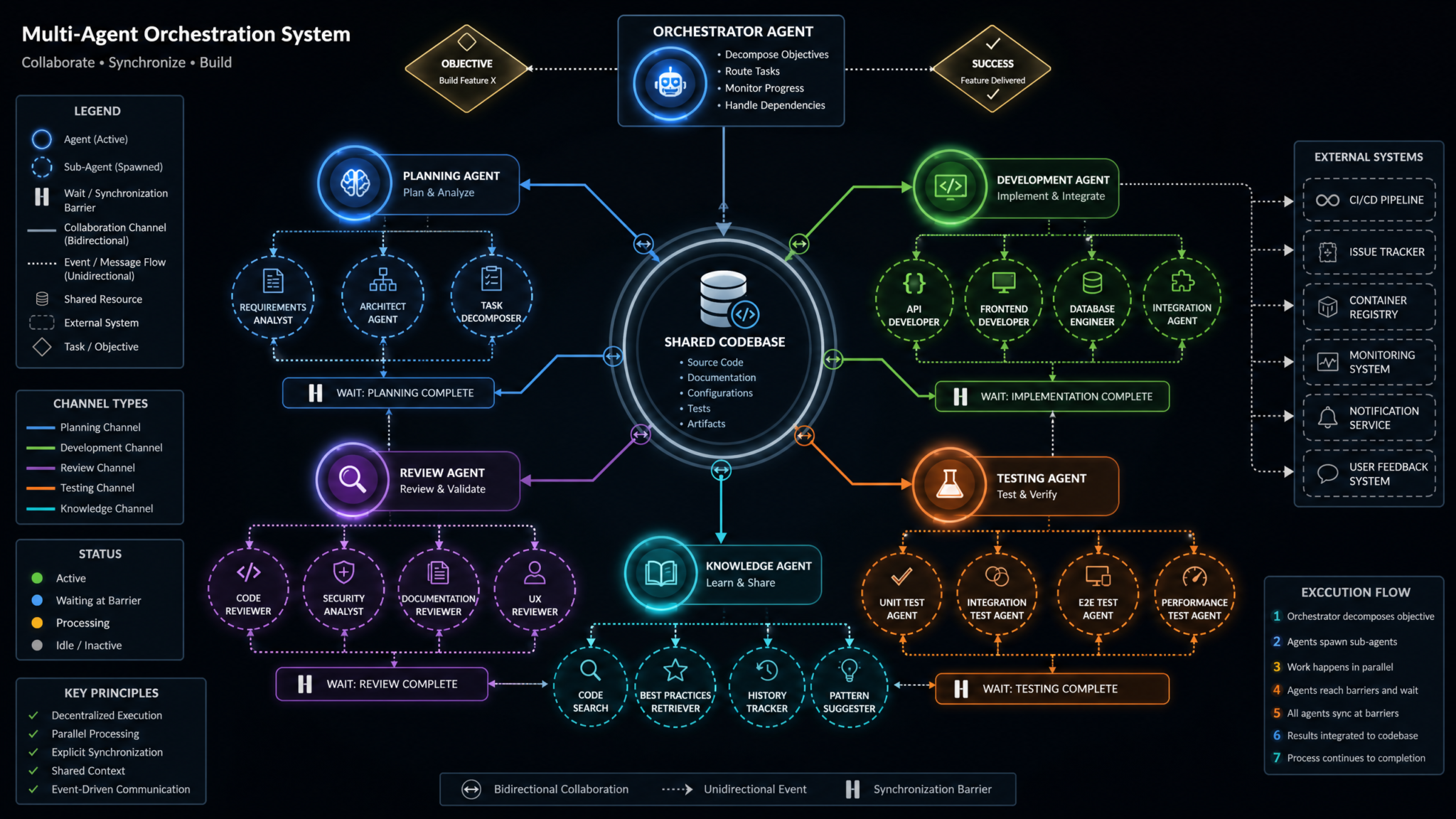
Codex’s multi-agent orchestration system allows teams to move beyond single-threaded, monolithic automations and adopt a pattern where specialized agents work in concert to execute complex tasks. Version 0.144.0 delivers a pivotal set of orchestration primitives: canonical sub-agent activity items, collaboration (collab) tool call items, and collab wait items. Together, these constructs formalize how parent agents spawn sub-agents for parallel work, how those agents coordinate changes to shared artifacts like codebases, and how they synchronize at well-defined barriers to ensure consistency and correctness.
Whether you are building a CI/CD automation, a code review assistant, or a fully autonomous test and release pipeline, multi-agent orchestration lets you partition responsibilities across roles, improve throughput with concurrency, and maintain control using explicit synchronization points. However, introducing concurrency also introduces cost and complexity. Codex’s “Ultra reasoning” tier can deliver better quality on difficult tasks, but concurrent invocations of high-capacity models will escalate usage quickly. To maintain operational predictability, you must design concurrency budgets, guardrails, and monitoring from the outset. Fortunately, Codex 0.144.0 also brings connector runtime latency metrics that provide visibility into the performance and reliability of your external integrations and tools, enabling robust observability and capacity planning.
In this guide, you will learn how the new activity items work, how to construct safe and efficient multi-agent flows, how to tune concurrency without runaway usage, how to enforce synchronization with collab wait items, and how to monitor your system using connector runtime latency metrics. You’ll see detailed enterprise scenarios, practical code examples, and prescriptive best practices you can apply immediately in production.
For a deeper exploration of this topic, our comprehensive article on 15 Battle‑Tested Prompts for Developers in 2026 [Copy/Paste Templates, Benchmarks, and Deployment Tips] provides detailed analysis, practical examples, and implementation strategies that complement the concepts discussed in this section.
Understanding Multi-Agent Architecture
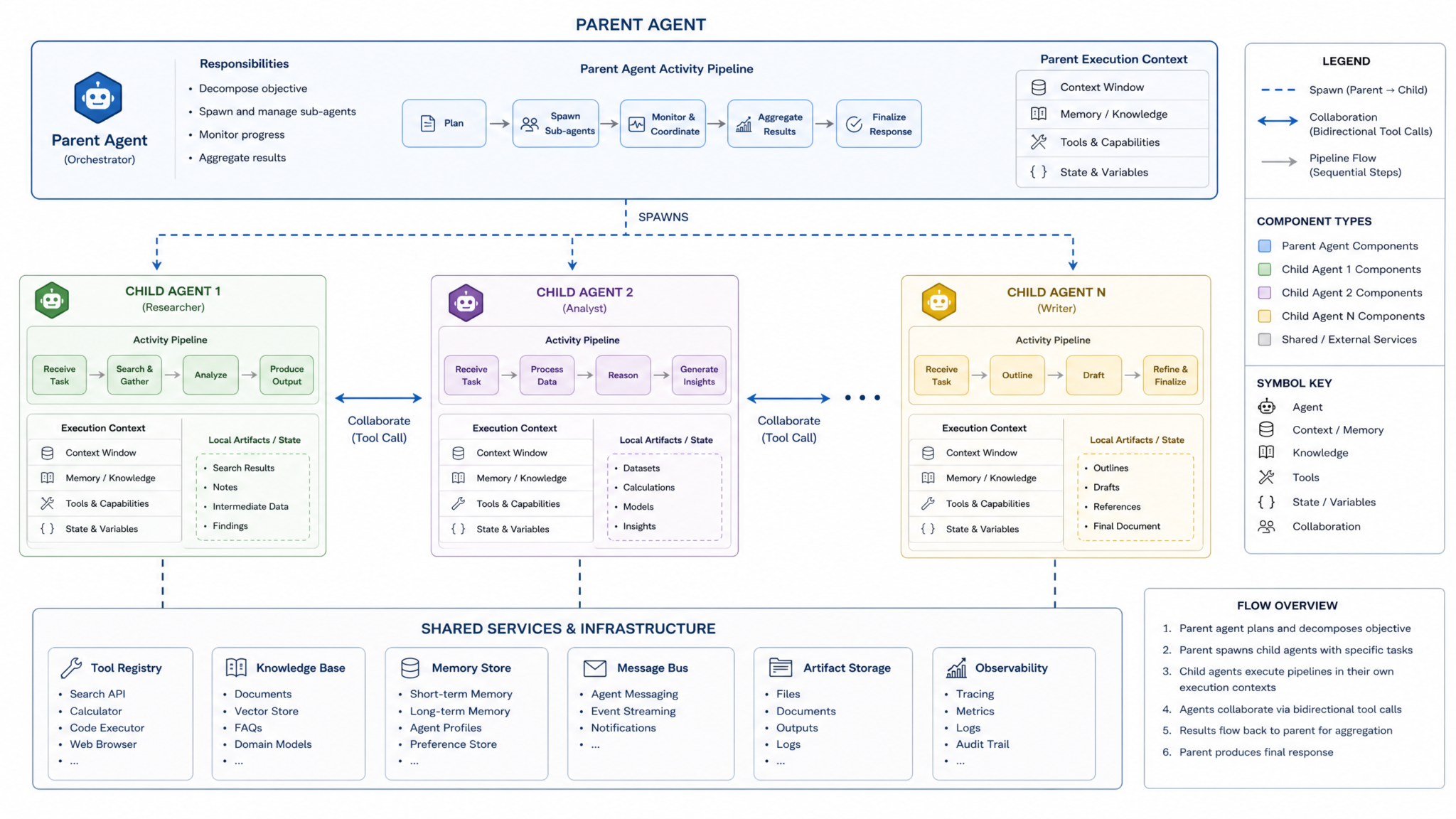
Multi-agent orchestration is a systems pattern where a parent agent decomposes an objective into sub-tasks and delegates them to sub-agents, which may operate concurrently. The architecture separates planning, execution, and coordination, assigning each role explicit responsibilities and guardrails. This separation lets your system scale horizontally, increase throughput, and align specialized agents to specialized tools and datasets.
The core abstractions in Codex 0.144.0 embed this pattern directly in the activity log, so your orchestrations are not just operationally correct but also auditable and debuggable. The new canonical items—sub-agent activity items, collab tool call items, and collab wait items—standardize how parallelism, shared-state coordination, and synchronization are expressed and observed.
Core Concepts and Terminology
Before diving into the new items, establish a common vocabulary used throughout this guide:
- Parent activity: The top-level workflow instance that defines an objective and holds the orchestration state.
- Sub-agent: A specialized agent spawned by the parent to execute a delimited unit of work, potentially in parallel with other sub-agents.
- Activity item: A canonical, persisted record describing a discrete step in the run (e.g., a sub-agent spawn, a tool call, or a synchronization wait).
- Collaboration tools: Tools that operate on shared artifacts or systems—most often code repositories, issue trackers, build systems, and test frameworks.
- Synchronization: The act of aligning concurrent agents at a defined barrier to ensure ordering, atomicity of commits, or validation before proceeding.
- Connector runtime latency metrics: Telemetry that measures execution latency for external connectors/tools integrated into agent workflows, enabling monitoring and SLOs.
Why Canonical Activity Items Matter
Without a canonical representation of orchestration events, debugging multi-agent workflows is guesswork. Canonical activity items offer:
- Auditability: Trace who did what, when, and why—all preserved in the activity stream.
- Deterministic recovery: On failure, idempotent replays and compensations are possible when activity items encode inputs, outputs, and states.
- Observability: Items carry identifiers, timing data, and correlation keys that integrate naturally with logs, metrics, and distributed tracing.
- Policy enforcement: With a standard schema, you can write global policies (e.g., rate limits, approvals) that apply uniformly to all items of a given type.
Activity Item Types at a Glance
Codex 0.144.0 formalizes three item types central to multi-agent orchestration:
| Item Type | Purpose | Side Effects | Concurrency Semantics | Typical Fields | Common Failure Modes |
|---|---|---|---|---|---|
| Sub-agent activity | Spawn a specialized agent to perform a sub-task | Isolated to sub-task unless it calls tools | Runs in parallel with other sub-agents | id, parent_activity_id, agent_id, task_spec, status, started_at, completed_at | Timeouts, tool errors inside sub-agent, budget exceedance |
| Collab tool call | Operate on shared artifacts (e.g., codebase, issues) | May mutate shared state (branches, files, comments) | Concurrent calls require conflict management | id, tool_name, target, inputs, outputs, status, latency_ms | Conflicts, permission errors, connector latency spikes |
| Collab wait | Synchronize agents at a barrier or precondition | None (control-plane only) | Fan-in/fan-out coordination, gates progression | id, wait_group, expected, arrived, policy, timeout_ms | Deadlock risk, timeout, late arrivals |
Lifecycle of a Multi-Agent Run
A typical run proceeds as follows:
- Plan: The parent agent decomposes the objective into sub-tasks and determines which can run in parallel versus which require sequencing.
- Spawn: The parent creates sub-agent activity items, each referencing a sub-task specification and a target agent profile.
- Execute: Sub-agents perform work, often calling collaboration tools. Their progress and outputs are captured in activity items.
- Synchronize: When a precondition is needed (e.g., “all patches created” or “tests passed”), the parent (or a coordinator sub-agent) inserts a collab wait item to block until criteria are met or time out.
- Validate: After synchronization, a verifier agent performs checks and either proceeds or triggers compensations/rollbacks.
- Complete: The parent aggregates results, updates artifacts (e.g., merges), and finalizes the activity with a comprehensive audit trail.
Sub-Agent Activity Items
Sub-agents are the concurrency workhorses. Codex 0.144.0 introduces canonical sub-agent activity items, which standardize the structure, lifecycle states, and metadata for spawning and supervising sub-agents.
Structure of a Sub-Agent Activity Item
The following JSON illustrates a representative schema for a sub-agent activity item. Field names or auxiliary attributes may differ slightly in your SDK, but the core concepts—identity, lineage, state, timing, and budgeting—are consistent.
{
  "type": "sub_agent_activity",
  "id": "act_92b3d5",
  "parent_activity_id": "act_root_001",
  "correlation_id": "corr_refactor_batch_12",
  "agent_id": "agent_unit_test_fixer",
  "task_spec": {
    "objective": "Fix flaky tests in module 'payments/settlement'",
    "inputs": {
      "repo": "[email protected]/org/app.git",
      "branch": "refactor/batch-12",
      "test_glob": "payments/settlement/**",
      "budget_tokens": 120000
    },
    "constraints": {
      "max_tool_calls": 30,
      "max_parallel_tools": 2,
      "ttl_ms": 540000
    }
  },
  "status": "running",
  "attempt": 1,
  "policy": {
    "on_timeout": "cancel",
    "on_failure": "retry_with_backoff",
    "max_retries": 2
  },
  "started_at": "2026-07-15T09:12:01.201Z",
  "completed_at": null,
  "resource_usage": {
    "tokens_input": 3845,
    "tokens_output": 928,
    "tool_call_count": 6
  },
  "annotations": {
    "shard_key": "module:payments/settlement",
    "priority": "high"
  }
}
Key properties and their implications:
- correlation_id: Groups a set of related sub-agents. Use it to implement wait groups and aggregate reporting.
- task_spec.budget_tokens: Encodes a strict upper bound to prevent runaway usage when Ultra reasoning is enabled.
- constraints.max_parallel_tools: Prevents a single sub-agent from saturating tools, helping fair-share scheduling.
- policy.on_timeout / on_failure: Dictate compensating actions, enabling predictable failure behavior.
Lifecycle States
Sub-agent activity items progress through a standard state machine:
- pending: Allocated but not yet scheduled for execution.
- running: The sub-agent is active and may issue tool calls.
- blocked: Waiting for prerequisites (e.g., an upstream collab wait).
- retrying: A transient failure is being retried per policy.
- completed: Work finished and outputs were persisted.
- canceled: The work was explicitly canceled or timed out.
- failed: A terminal failure occurred and recovery could not proceed.
Because these states are canonical, your dashboards and alerts can be agent-agnostic. For example, alert on an elevated proportion of blocked or retrying states within a correlation_id—an early signal of systemic contention or flakiness.
Sharding Work Across Sub-Agents
Parallelization requires an explicit sharding strategy. Common sharding keys include:
- Source tree partitions (e.g., path prefixes in a monorepo).
- Service boundaries (e.g., microservice directories or modules).
- Issue cohorts (e.g., issues labeled “needs-tests” or “api-contract”).
- Test suites (e.g., splitting by test glob or historical runtime).
A practical sharding example for a repository-wide refactor:
// Pseudocode: spawn N sub-agents by repo path prefix
const shards = [
  "app/core/**", "app/payments/**", "app/checkout/**",
  "services/auth/**", "services/catalog/**", "services/search/**"
];

for (const pathGlob of shards) {
  createActivityItem({
    type: "sub_agent_activity",
    parent_activity_id: root.id,
    correlation_id: "corr_refactor_batch_12",
    agent_id: "agent_refactorer",
    task_spec: {
      objective: `Refactor deprecated API usage under ${pathGlob}`,
      inputs: { repo: REPO, branch: BRANCH, path_glob: pathGlob },
      constraints: { max_tool_calls: 25, ttl_ms: 1800000 }
    },
    annotations: { shard_key: `path:${pathGlob}` }
  });
}
Choose shard boundaries that minimize cross-shard conflicts. For example, changes confined to module-local files will rarely collide, while signature updates to shared interfaces are high risk and may require serial coordination or feature-flag strategies.
Error Handling and Compensation
Plan for partial failure. When one sub-agent in a correlation group fails, you have three primary strategies:
- Independent completion: Allow successful shards to merge; record failures for rerun. Best for tasks with weak coupling.
- Rollback-on-failure: Revert all shards if any fail. Best for strongly coupled changes where atomic visibility is crucial.
- Quarantine and retry: Isolate failing shards into a follow-up batch after triage.
Codex’s canonical sub-agent activity items carry sufficient metadata to implement these strategies. Use a collab wait barrier to collect per-shard status, then execute merges/rollbacks accordingly.
Budgeting and the Ultra Reasoning Warning
Concurrency multiplies cost. If you enable high-capacity models or “Ultra reasoning” for analysis-heavy tasks, spawning 10 sub-agents at once can multiply compute usage 10x. To manage this:
- Set task_spec.budget_tokens and enforce per-sub-agent limits.
- Use a tiered model strategy: Ultra for planning and review, balanced or faster models for execution and tests.
- Cap parallelism globally via a concurrency budget per parent activity.
- Escalate to Ultra only after a cheaper pass indicates complexity (e.g., static analysis flags intricate patterns).
Codex provides metrics and item-level accounting to implement budget alarms and automatic de-escalation when usage surges.
Collaboration Tool Calls
Collaboration tools let agents operate on shared artifacts—repositories, issue trackers, CI servers, or documentation portals. Version 0.144.0 introduces collab tool call items as first-class citizens in the activity stream, making side effects auditable and enabling precise conflict and latency analysis.
Structure of a Collab Tool Call Item
A representative collab tool call item includes:
{
  "type": "collab_tool_call",
  "id": "act_tool_45eab1",
  "parent_activity_id": "act_92b3d5",
  "correlation_id": "corr_refactor_batch_12",
  "tool_name": "git.apply_patch",
  "target": {
    "repo": "[email protected]/org/app.git",
    "branch": "refactor/batch-12",
    "path_glob": "services/catalog/**"
  },
  "inputs": {
    "patch": "diff --git a/services/catalog/... (truncated)"
  },
  "outputs": {
    "commit_id": "a19f0de",
    "files_changed": 12
  },
  "status": "completed",
  "latency_ms": 1248,
  "attempt": 1,
  "started_at": "2026-07-15T09:13:08.122Z",
  "completed_at": "2026-07-15T09:13:09.370Z",
  "actor": "agent_refactorer"
}
Notable attributes:
- tool_name and target: Identify exactly what artifact was acted upon.
- inputs and outputs: Essential for reproducibility and rollbacks.
- latency_ms: Enables per-tool latency tracking and outlier detection. This value feeds aggregate connector runtime latency metrics.
Coordinating Changes to Shared Codebases
When multiple sub-agents modify the same repository concurrently, consistency risks arise: conflicts, clobbered changes, and inconsistent build states. Codex’s collab tool call items, in combination with collab wait items, provide the building blocks for safe coordination:
- Branch-per-shard model: Each sub-agent commits to a dedicated branch. A merge coordinator agent later reconciles and merges in a deterministic order.
- Patch queuing: Use a queue with optimistic concurrency checks (e.g., rebasing on the latest mainline) to gate patch application.
- Code ownership: Consult CODEOWNERS to route reviews to appropriate reviewer agents or human approvers.
- Lock-striping: Apply coarse locks at directory or module granularity to prevent write/write conflicts when the risk is high.
In practice, prefer isolation via branch-per-shard for most refactors and rely on a post-processing merge phase at a collab wait barrier. Only use locking when it is not feasible to isolate changes (e.g., cross-cutting API signature updates).
Examples of Common Collaboration Tool Calls
Common tools across software delivery pipelines:
- git.create_branch, git.apply_patch, git.commit, git.push, git.merge
- ci.run_pipeline, ci.get_artifact, ci.cancel_job
- issue.create, issue.comment, issue.label, pr.create, pr.update_status
- test.run_suite, test.collect_report, test.quarantine_test
- docs.publish_page, docs.create_change_request
Example: create a branch and push a patch safely:
// Pseudocode sequence
createActivityItem({
  type: "collab_tool_call",
  tool_name: "git.create_branch",
  target: { repo: REPO, branch: "refactor/batch-12-catalog" },
  inputs: { from: "main" }
});

createActivityItem({
  type: "collab_tool_call",
  tool_name: "git.apply_patch",
  target: { repo: REPO, branch: "refactor/batch-12-catalog", path_glob: "services/catalog/**" },
  inputs: { patch: PATCH_TEXT }
});

createActivityItem({
  type: "collab_tool_call",
  tool_name: "git.push",
  target: { repo: REPO, branch: "refactor/batch-12-catalog" }
});
Conflict Detection and Resolution
Tools should be configured to detect conflicts early and surface them to the activity stream. Patterns include:
- Optimistic merging: Attempt rebase; on conflict, emit a “needs-rebase” status and defer to a rebase agent.
- File-level locking: Use advisory locks per high-risk file sets; time out locks quickly to avoid deadlocks.
- Semantic merges: Apply AST-aware patching tools for languages with robust tooling (e.g., Go, Java) to reduce spurious conflicts.
When a collab tool call fails, the sub-agent should capture the error context (files, hunks) and either attempt an automated fix or escalate to a conflict-resolution agent. Codex’s canonical items ensure the failure and remediation steps are linked by correlation_id for clear traceability.
Idempotency and Safety
All collab tool calls that mutate shared state should be idempotent or have a compensating action. For example:
- git.apply_patch: Use a patch-id check to avoid double-applying the same change.
- issue.comment: Include a stable comment tag so duplicate comments can be deduplicated.
- ci.run_pipeline: Use a run key composed of commit_id and pipeline name.
Codex item policies can enforce idempotency keys, and connectors should return structured errors that enable callers to distinguish between “already applied” versus “transient failure.”
Wait Items and Synchronization
Codex 0.144.0 introduces collab wait items to provide explicit synchronization points. These items coordinate parallel agents, ensuring that downstream steps proceed only when defined preconditions are satisfied.
Structure of a Collab Wait Item
At minimum, a collab wait item contains:
{
  "type": "collab_wait",
  "id": "act_wait_88c0a9",
  "parent_activity_id": "act_root_001",
  "correlation_id": "corr_refactor_batch_12",
  "wait_group": "wg_patches_ready",
  "policy": {
    "expected": 6,
    "condition": "status==completed",
    "timeout_ms": 900000,
    "on_timeout": "proceed_with_quorum",
    "quorum": 5
  },
  "arrived": 6,
  "status": "released",
  "started_at": "2026-07-15T09:14:01.111Z",
  "completed_at": "2026-07-15T09:20:35.073Z"
}
Semantics:
- expected: Number of sub-agents expected to reach the wait group. Drives barrier release conditions.
- condition: Predicate over sub-agent status and/or outputs, such as “tests_passed==true”.
- timeout_ms and on_timeout: Ensure the system cannot deadlock; on timeout, you can proceed with quorum, cancel, or escalate.
Fan-Out, Fan-In, and Pipelined Gates
Common synchronization topologies:
- Fan-out: Parent spawns N sub-agents in parallel.
- Fan-in barrier: A collab wait item releases when all or a quorum of sub-agents meet success criteria.
- Pipelined gates: Chains of wait items; for example, “all patches created” → “all tests passed” → “all reviews approved.”
These forms make complex flows explicit, and activity items document timing, enabling you to measure critical path and detect bottlenecks.
Deadlock Avoidance
Synchronizing agents can deadlock without careful design. Prevent issues with these practices:
- Timeouts on all waits with predictable on_timeout policies.
- No circular waits: Ensure the DAG has a partial order; a sub-agent should not wait on a group that depends on itself.
- Bounded lock scope: Any locking logic must have a short TTL and exponential backoff for retries.
- Quorums: Permit partial success to proceed when the task can tolerate it; treat stragglers as follow-up work.
Example: Gate a Merge on Test Success
Suppose each sub-agent creates a branch and a pull request. A test coordinator agent triggers CI for each branch. A collab wait item releases once all PRs report tests passed or a quorum is reached:
// Wait for tests to pass across shards
createActivityItem({
  type: "collab_wait",
  correlation_id: "corr_refactor_batch_12",
  wait_group: "wg_ci_pass",
  policy: {
    expected: 6,
    condition: "pr.status.tests == 'passed'",
    timeout_ms: 720000,
    on_timeout: "proceed_with_quorum",
    quorum: 5
  }
});

// If released, proceed to merge in a deterministic order
if (waitReleased("wg_ci_pass")) {
  mergeCoordinator.mergeByRiskScore({
    strategy: "low-risk-first",
    weights: { file_conflict_rate: 0.6, lines_changed: 0.2, test_flakiness: 0.2 }
  });
}
Concurrency Controls and Limits
Concurrency accelerates throughput, but it also multiplies load on models and tools. To prevent runaway usage—especially with Ultra reasoning—enforce controls at multiple levels: per-sub-agent budgets, group-level concurrency caps, and global rate limits per connector.
Levers for Concurrency Management
| Lever | Scope | What It Controls | Typical Value | When to Use |
|---|---|---|---|---|
| budget_tokens | Sub-agent | Max tokens the agent can consume | 30k–150k | Guardrail for Ultra reasoning tasks |
| max_parallel_sub_agents | Parent activity | Number of concurrent child agents | 2–12 | Bound concurrency per objective |
| max_parallel_tools | Sub-agent | Concurrent tool calls within an agent | 1–3 | Prevent single-agent tool starvation |
| connector_rate_limit | Connector | RPS for external API calls | Per API contract | Respect upstream limits, avoid bans |
| queue_depth | Global | Max outstanding activities awaiting scheduling | 256–10k | Backpressure under surge |
| ttl_ms | Sub-agent/tool/wait | Max wall time for the item | 5–60 minutes | Prevent indefinite hangs |
Configuring Concurrency Budgets
Define budgets declaratively near the orchestration code:
{
  "orchestration_policy": {
    "max_parallel_sub_agents": 6,
    "max_parallel_tools_per_agent": 2,
    "default_ttl_ms": 900000,
    "connector_limits": {
      "git": { "rps": 4, "burst": 8 },
      "ci": { "rps": 2, "burst": 4 },
      "issue": { "rps": 1, "burst": 2 }
    },
    "usage_budgets": {
      "planning_model": { "tokens": 45000 },
      "execution_model": { "tokens": 120000 },
      "review_model": { "tokens": 60000 }
    }
  }
}
When an activity would exceed a budget, fail fast with a policy-guided error that can trigger fallback logic (e.g., reduce parallelism, downgrade model, or prompt for human approval).
Cost Estimation and Guardrails
Estimate usage as a function of concurrency and typical task sizes. For example, if each sub-agent uses 20k tokens on average and you run 8 in parallel, the expected burn is 160k tokens per fan-out. Add 20–30% headroom for retries, tool errors, and outliers. With Ultra reasoning, apply a multiplier reflecting the model’s unit cost. Implement guardrails:
- Hard caps: Block new spawns when a parent’s token burn approaches a threshold.
- Soft caps: Decrease concurrency dynamically as usage nears the budget.
- Alerts: Fire when a run crosses expected variance bounds, using connector latency metrics to rule out external slowness as the cause.
Backpressure and Fairness
Under sustained load, saturating all connectors or all model capacity harms latency and error rates. To maintain fairness and SLOs:
- Leaky bucket or token bucket rate limiting per connector.
- Priority queues: Assign higher priority to human-in-the-loop approvals; defer background refactors.
- Age-based scheduling: Slightly favor older items to prevent starvation.
- Hedged requests: For flaky connectors, issue a second request after a percentile SLA breach; cancel the loser to cap tail latency.
Monitoring with Latency Metrics
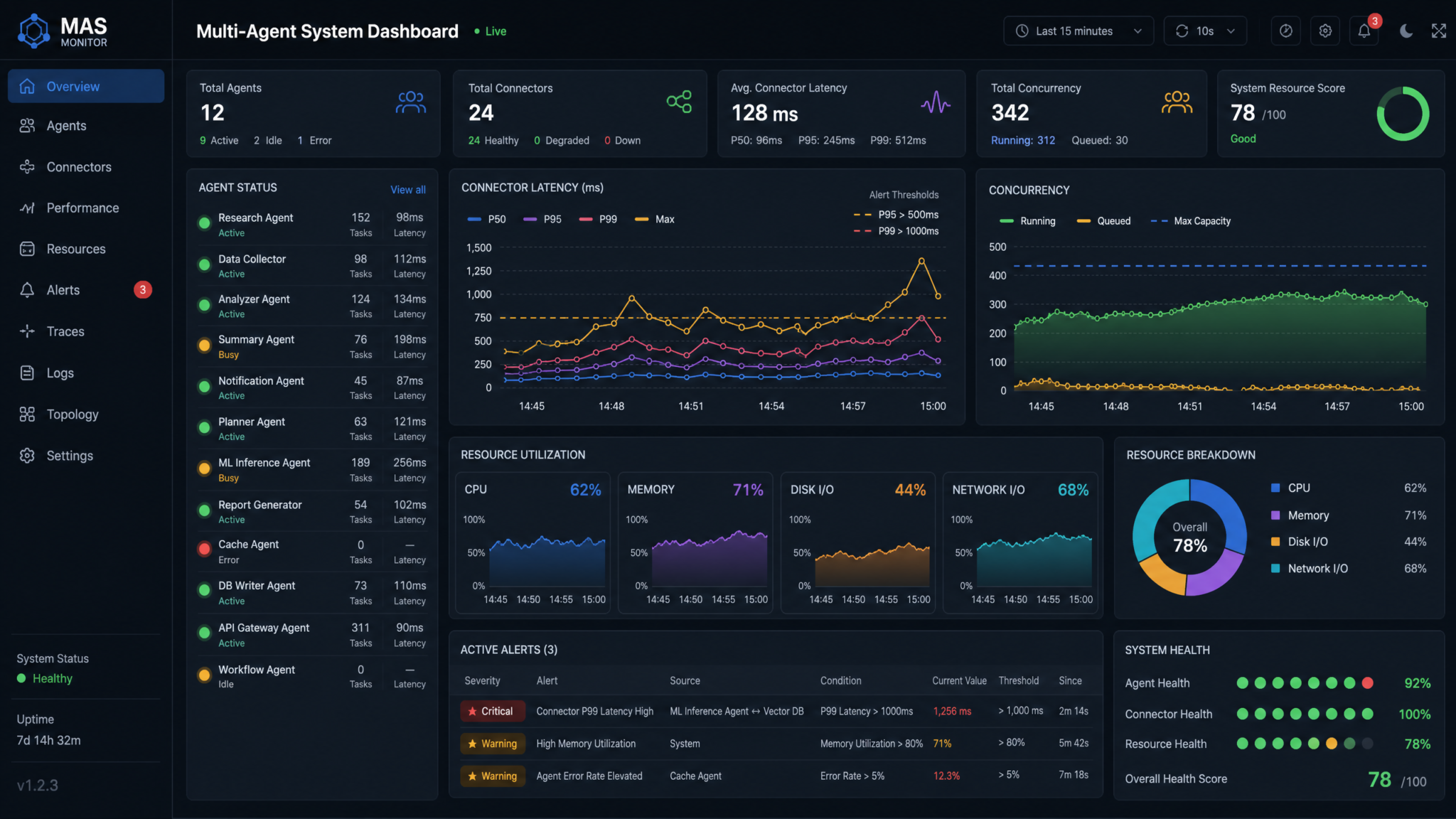
Observability is indispensable in concurrent systems. Codex now exposes connector runtime latency metrics, unlocking fine-grained visibility into how long external tool calls take and how they contribute to overall critical path.
Connector Runtime Latency Metrics
Connector runtime latency metrics typically include:
- Per-connector latency histograms (e.g., git, ci, issue, docs).
- Status-labeled counts (success, retryable_failure, permanent_failure).
- Correlations by activity_id, correlation_id, and tool_name for traceability.
Recommended metric schema:
| Metric | Description | Type | Unit | Labels | Recommended SLO |
|---|---|---|---|---|---|
| connector_runtime_latency_ms | Wall time of a connector invocation | Histogram | ms | connector, tool_name, status, org_id | p95 < 1500 ms for git.apply_patch |
| connector_invocations_total | Count of connector calls | Counter | calls | connector, tool_name, status | Error rate < 1% |
| activity_item_latency_ms | Duration of sub-agent/tool/wait items | Histogram | ms | type, agent_id, status | p95 < 5 min for sub-agent activities |
| orchestration_queue_depth | Number of schedulable items waiting | Gauge | items | queue, priority | < 100 under normal load |
Dashboards and PromQL Examples
Build dashboards that link activity items to connector latency to separate compute-bound from I/O-bound bottlenecks. Example PromQL queries:
# p95 latency per connector and tool over 15m
histogram_quantile(
  0.95,
  sum by (le, connector, tool_name) (rate(connector_runtime_latency_ms_bucket[15m]))
)

# Error rate per connector
sum by (connector) (rate(connector_invocations_total{status=~"retryable_failure|permanent_failure"}[15m]))
/
sum by (connector) (rate(connector_invocations_total[15m]))

# Sub-agent activity duration by agent_id
histogram_quantile(
  0.95,
  sum by (le, agent_id) (rate(activity_item_latency_ms_bucket{type="sub_agent_activity"}[30m]))
)
Augment dashboards with per-correlation views: group all items sharing correlation_id to visualize a run as a Gantt-like timeline and to quickly see where time was spent—planning, tool calls, waiting, retries.
Alerting Policies
Effective alerts are specific, actionable, and noise-resistant:
- Latency SLO breach: Alert when connector_runtime_latency_ms p95 exceeds threshold for 3 consecutive periods.
- Error bursts: Alert when retryable failures exceed 5% for 10 minutes on a single connector.
- Deadlock suspicion: Alert when a collab wait item remains pending past timeout_ms minus a grace period.
- Usage surge: Alert when parent activity token burn rate exceeds planned slope by 50% for 5 minutes.
For a deeper exploration of this topic, our comprehensive article on 15 Battle‑Tested Prompts for Developers in 2026 [Copy/Paste Templates, Benchmarks, and Deployment Tips] provides detailed analysis, practical examples, and implementation strategies that complement the concepts discussed in this section.
Enterprise Use Cases
The primitives in Codex 0.144.0 map naturally to enterprise software delivery concerns. Below are five detailed scenarios demonstrating how sub-agents, collab tool calls, and collab wait items interoperate to deliver robust automation at scale.
Scenario 1: End-to-End CI/CD Flow with Parallel Build and Test
Objective: Automate building, testing, and deploying microservices across a monorepo, with strict gates on quality and synchronization before deployment.
Architecture:
- Planner agent: Determines impacted services and decomposes tasks.
- Build sub-agents: One per impacted service; compile and package artifacts.
- Test sub-agents: One per service; run unit, integration, and contract tests.
- Verificator agent: Aggregates test results; enforces quality thresholds.
- Deployer agent: Performs canary then full rollout once gates release.
Flow:
- Planner computes the impact set and spawns build sub-agents using sub-agent activity items, each constrained by budget_tokens and max_parallel_tools.
- Each build sub-agent issues collab tool calls: ci.run_pipeline for build, ci.get_artifact for outcomes, git.commit version bumps as needed.
- A collab wait item wg_build_complete waits for all builds to reach status “succeeded” or times out with a quorum policy if a non-critical service lags.
- On release of wg_build_complete, planner spawns test sub-agents (unit, integration, contract per service). These call test.run_suite and upload artifacts.
- A second collab wait item wg_tests_pass gates deploy; policy requires zero critical test failures and permits quarantine of known flaky tests.
- Deployer performs canary using collab tool calls to deploy tooling; a watchdog monitors connector runtime latency to ensure no deploy-time slowness (e.g., registry hiccups) extends the critical path.
Key considerations:
- Parallelism is highest in build/test phases; keep Ultra reasoning confined to planner and edge-case analyzers.
- Use connector runtime latency metrics to distinguish CI slowness from agent compute overhead when p95 jumps.
- Employ collab waits with quorum for non-critical services so one slow shard does not block the entire release.
Scenario 2: Autonomous Code Review with Multi-Agent Collaboration
Objective: Scale code reviews by deploying reviewer sub-agents specializing in different concerns (style, performance, security), coordinating on PRs in parallel, and synchronizing on overall approval.
Architecture:
- Router agent: Assigns PRs to reviewer sub-agents.
- Style reviewer: Lints, enforces style guides, suggests small fixes.
- Performance reviewer: Flags hot paths and regression risks.
- Security reviewer: Checks for known vulnerabilities, secrets, and policy violations.
- Moderator agent: Aggregates reviews, resolves conflicts, finalizes the decision.
Flow:
- Router spawns three sub-agent activity items (style, performance, security) per PR, each operating concurrently.
- Sub-agents use collab tool calls issue.comment to post structured feedback and git.apply_patch for low-risk autofixes on a dedicated “review/suggestions” branch.
- Moderator inserts a collab wait wg_reviews, policy expected=3 and condition “all status==approved OR any status==rejected.”
- On approval, moderator uses git.merge to integrate suggestions and pr.update_status to approve; on rejection, it compiles required changes and reassigns as a new iteration.
Key considerations:
- Ensure comments are idempotent; tag each with a stable machine-readable identifier.
- Limit autofix scope to prevent large, risky changes; require a separate approval if the diff crosses a threshold.
- Apply connector runtime latency metrics to the issue tracker to sustain responsive feedback loops.
Scenario 3: Large-Scale API Refactor Across a Monorepo
Objective: Replace a deprecated API across dozens of services with minimal disruption and high assurance.
Architecture:
- Discovery agent: Identifies call sites and clusters them by module and risk.
- Refactor sub-agents: One per shard; edit code, run local tests, and open PRs.
- Compatibility checker: Ensures new API semantics hold; runs contract tests and cross-service integration checks.
- Merge coordinator: Determines merge order and manages conflicts.
Flow:
- Discovery uses static analysis and emits a correlation_id for the batch; planner spawns refactor sub-agents by module shards.
- Refactorers use collab tool calls to create branches, apply patches using AST-aware transforms, and run test.run_suite locally for a quick pass.
- A collab wait wg_prs_open ensures all PRs are open before triggering broader CI and cross-service tests.
- Compatibility checker executes integration suites; another wait wg_integration_pass ensures safety before merges.
- Merge coordinator merges in order of lowest risk first; if conflicts occur, dedicated rebase agents resolve them, with conflict metadata emitted in tool call items.
Key considerations:
- Partition changes to minimize cross-shard conflicts; weigh modules by historical conflict rate.
- Use quorum policies to proceed when a small number of low-use services lag; schedule them for follow-up.
- Track connector runtime latency for git and CI to spot infrastructure hot spots during the campaign.
Scenario 4: Parallel Test Orchestration and Flaky Test Remediation
Objective: Reduce test cycle time while improving reliability by isolating flaky tests and auto-fixing common failure modes.
Architecture:
- Test planner: Chooses sharding strategy (by suite, by historical runtime).
- Executor sub-agents: Run tests with isolation; report structured results.
- Flake triage agent: Analyzes failure signatures, quarantines known flakes, proposes fixes.
- Stability gate: Synchronization barrier to ensure failure rates are within thresholds.
Flow:
- Planner spawns N executor sub-agents; each calls test.run_suite and pushes artifacts.
- Collab tool calls to issue tracker log a flake with tags and attach logs.
- A collab wait wg_stability enforces p50 and p95 failure rates below targets; on timeout, proceed_with_quorum if flakes are quarantined.
- Triage agent applies safe patches (timeouts, retries in tests) via git.apply_patch under a “tests/quarantine” branch and opens PRs.
Key considerations:
- Ultra reasoning is reserved for complex flake diagnosis; most runs should use fast models.
- Connector latency to the CI system often dominates; a histogram view identifies whether to change shard sizes or CI capacity.
- Ensure collab wait predicates account for quarantined tests to prevent endless gatekeeping.
Scenario 5: Secure Release with Policy Enforcement and Audit
Objective: Enforce security, compliance, and policy checks in parallel before a release, with auditable gates that block deploys unless criteria are met.
Architecture:
- Policy planner: Enumerates required checks per release (license scanning, SAST, secrets, SBOM).
- Scanner sub-agents: One per check type; invoke vendor or in-house tools.
- Risk assessor: Aggregates findings; uses rules to determine release eligibility.
- Release gate: Collab wait barrier that requires all critical checks to pass or be waived with approval.
Flow:
- Planner spawns sub-agents for license scan, SAST, dependency audit, container scan, and secret detection.
- Each sub-agent performs collab tool calls to scanning connectors; tool outputs attach to the activity stream and to an audit artifact.
- A collab wait wg_security enforces zero high-severity findings; on any hit, block and file issues with assignees and SLAs.
- Risk assessor summarizes; if waivers exist with required approvals, proceed; else, fail the release.
Key considerations:
- Connector runtime latency metrics can be volatile on external scanning services; hedge requests or increase timeouts during known busy windows.
- Ensure collab wait items record waivers and approval metadata so audits reconstruct the decision trail.
- Parallelize scans to reduce wall time but stay within outbound rate limits to avoid throttling.
Best Practices for Multi-Agent Workflows
Model and Tool Role Specialization
Separate concerns across agents:
- Planner: Uses richer reasoning to decompose work; low tool usage.
- Executors: Use faster, economical models; heavy tool usage.
- Reviewers/Verifiers: Use balanced models; selective Ultra reasoning for contentious diffs.
Mapping roles to models prevents unnecessary Ultra reasoning usage across the fleet.
Determinism and Reproducibility
Make runs repeatable and debuggable:
- Pin tool versions and inputs; include digests in activity items.
- Use idempotency keys for all collab tool calls that mutate state.
- Serialize randomness: seed any randomized step and record the seed in annotations.
Data and Credential Hygiene
Operate under least privilege with tight scoping:
- Short-lived tokens per sub-agent; revoke on completion.
- Separate read and write credentials for verification vs. mutation steps.
- Mask secrets in logs; store sensitive outputs in encrypted artifact stores.
Human-in-the-Loop Controls
Introduce approvals where risk warrants:
- Require human approval for large diffs, schema migrations, or production deploys.
- Include diff summaries and risk scores in review prompts to speed up decisions.
- Use collab wait items to encode human approval as a barrier release condition.
Failure Handling and Retries
Design for transient vs. permanent failures:
Access 40,000+ AI Prompts for ChatGPT, Claude & Codex — Free!
Subscribe to get instant access to our complete Notion Prompt Library — the largest curated collection of prompts for ChatGPT, Claude, OpenAI Codex, and other leading AI models. Optimized for real-world workflows across coding, research, content creation, and business.
- Exponential backoff for connector timeouts and 5xxs.
- No retry on 4xx unless policy indicates a remedial step (e.g., refreshing auth).
- Partial rollback: Prefer targeted reverts over blanket rollbacks when safe.
Observability-Driven Operations
Make monitoring first-class:
- Emit structured logs tied to activity and correlation IDs.
- Track connector runtime latency and activity durations; set SLOs and alerts.
- Build dashboards that display wait groups and their release conditions to spot synchronization bottlenecks.
Incremental Rollouts
Avoid big-bang changes:
- Start with a small number of shards; expand as confidence grows.
- Use feature flags to decouple deploy from release.
- Dry runs: Execute the plan with collab tool calls in “no-op” mode to validate predictions before mutating state.
Security and Compliance
Bake in security from the start:
- Enforce code signing for all commits by agents.
- Maintain an audit trail of who/what changed state and under which policy.
- Apply data residency policies; keep sensitive repositories on dedicated runners and connectors.
For a deeper exploration of this topic, our comprehensive article on The Real Cost of AI Coding Agents in 2026 — Codex, Claude Code, Cursor, and GitHub Copilot Compared provides detailed analysis, practical examples, and implementation strategies that complement the concepts discussed in this section.
Performance Optimization
Critical Path Analysis
Use collab wait items and connector runtime latency metrics to map the critical path. Reduce total wall time by:
- Shortening long poles: Identify the slowest connector/tool and address its p95/p99 with caching, parallelism, or vendor tuning.
- Parallel stage design: Move non-dependent checks earlier to run concurrently.
- Batching small tasks: Aggregate many tiny tool calls into a single batch operation to amortize overhead.
Caching and Reuse
Effective caches reduce both cost and time:
- Result cache: Cache static analysis results keyed by commit SHA and path_glob.
- Artifact cache: Store build artifacts for unchanged modules; sub-agents fetch instead of rebuild.
- Prompt template cache: Reuse compiled prompts and retrieval results across shards with similar context.
Ensure cache entries are immutable and versioned; record cache hits/misses in annotations to evaluate cache effectiveness.
Model Strategy Optimization
Adopt a tiered approach:
- Plan with a capable model once; broadcast a compact, executable plan to many fast executor sub-agents.
- Escalate only on ambiguity or failure: If an executor encounters a complex code path, escalate that shard to a stronger reviewer.
- Cap tokens per step: Break tasks into smaller prompts with tighter budgets to avoid runaway generations.
Shard Size Tuning
Shard too small and overhead dominates; shard too large and conflicts and latency climb. Tune by measuring:
- Per-shard activity_item_latency_ms: Seek a p95 that balances throughput and stability.
- Connector p95: If CI latency dominates, create fewer, larger shards to reduce CI pipeline fan-out.
- Conflict rate: If conflicts spike, shrink shards around hot files or interfaces.
Queueing and Scheduling Policies
Adjust policies as load fluctuates:
- Dynamic concurrency: Scale max_parallel_sub_agents based on recent error and latency trends.
- Surge handling: Temporarily increase queue_depth during traffic spikes while holding rate limits steady.
- Preemption: Allow high-priority items to leapfrog the queue with strict quotas to protect fairness.
Resilience in Tooling
Strengthen connectors to avoid cascading failures:
- Circuit breakers: Open on sustained error rate spikes; route work to fallback paths.
- Hedged requests: Launch a duplicate to an alternate region after a latency threshold; cancel the slower one.
- Bulkheads: Isolate connectors so one misbehaving API cannot starve others of resources.
Developer Experience and Debuggability
Make it easy to understand and fix issues:
- Human-readable annotations on items: include shard_key, risk scores, and decision rationales.
- Replay tooling: Given a correlation_id, reproduce a run in a staging environment with the same inputs.
- Policy simulation: Run with “policy simulate mode,” where actions are logged but not executed, to validate guardrails.
Cost Control Tactics
Keep budgets healthy even as concurrency grows:
- Downshift under load: If connector latency rises, reduce parallelism automatically; avoid wasting tokens on idle waits.
- Cap retries: Especially for Ultra reasoning steps; better to triage than to burn budget on repeated failures.
- Economize context: Use retrieval to supply only relevant code/context, not entire repositories.
Putting It All Together: A Reference Pattern
To consolidate the concepts, consider a reference orchestration for a repository-wide refactor:
- Create a parent activity with correlation_id batch_refactor_2026_07.
- Planner enumerates shards and assigns risk scores; stores this as annotations.
- Spawn sub-agent activities with shard-specific task_spec and budgets.
- Each sub-agent performs collab tool calls to create branches, apply patches, run smoke tests, and open PRs.
- Insert collab wait wg_prs_open expecting N arrivals.
- Trigger CI across PRs; insert collab wait wg_ci_pass with quorum N-1 to tolerate a laggard.
- Merge coordinator orders merges by risk; resolves conflicts via specialized agents.
- Final verifier agent checks metrics and tags release candidates; parent activity completes.
All along, connector runtime latency metrics and activity latencies populate dashboards; alerts help maintain SLOs. Budgets constrain usage, preventing Ultra reasoning from exploding costs. Canonical items preserve a full audit trail for compliance and retrospectives.
Practical Schemas and Policies
Unified Activity Policy Block
Embed a consistent policy block across item types for uniform behavior:
{
  "policy": {
    "ttl_ms": 900000,
    "on_timeout": "cancel",             // or "proceed_with_quorum"
    "max_retries": 2,
    "retry_backoff": { "initial_ms": 1000, "factor": 2.0, "max_ms": 30000 },
    "idempotency_key": "hash(inputs)",
    "require_human_approval": false,
    "audit_tags": ["release_2026_07", "risk_low"]
  }
}
Security Posture for Collaboration Tools
Guard access to shared systems:
- Scoped tokens per repo/branch; segregate sandbox vs. production repos.
- Write windows: Limit when agents may merge to avoid collisions with peak developer hours.
- Mandatory review: Enforce human or reviewer-agent sign-off before merges that touch high-risk directories.
Migration to Codex 0.144.0 Primitives
If you are upgrading from a pre-0.144.0 system, re-map your orchestration events to the canonical items for consistency:
- Sub-agent spawns → sub_agent_activity items; include task_spec, budgets, and annotations.
- Repository/CI/Issue API calls → collab_tool_call items with clear tool_name and target objects.
- Ad hoc synchronization flags → collab_wait items with explicit policies and timeouts.
During the migration window, run dual-logging (legacy + canonical) to validate parity. Once stable, deprecate legacy events and adjust dashboards to focus on connector runtime latency and activity histograms as your primary signals.
Troubleshooting Guide
Symptom: High Total Runtime Despite Low Connector Latency
Likely causes and fixes:
- Over-sharding overhead: Reduce the number of shards; batch small changes.
- Model overuse: Too many steps use Ultra reasoning; confine to planning and edge cases.
- Long waits: Tighten collab wait criteria or move validations earlier in parallel.
Symptom: Frequent Merge Conflicts
Likely causes and fixes:
- Shard boundary overlaps: Recut shards along module boundaries; apply ownership locks on hot files.
- Merge order: Merge low-risk shards first; recalc conflicts after each merge using a collab wait gate.
- Tool semantics: Switch to semantic patching tools for code with high churn.
Symptom: Connector Throttling and 429 Errors
Likely causes and fixes:
- Exceeded rate limits: Tighten connector_rate_limit; add jitter to retries.
- Bursting from parallel sub-agents: Stagger starts; set max_parallel_tools_per_agent=1 temporarily.
- Vendor incident: Use metrics to fail open for non-critical steps or re-route to a secondary endpoint.
Symptom: Collab Waits Timing Out
Likely causes and fixes:
- Unreachable expected count: Adjust expected to match actual spawned sub-agents.
- Too strict predicates: Relax conditions or allow quorum to proceed.
- Silent failures: Ensure sub-agents emit final status; add heartbeats for long-running tasks.
Governance and Compliance
Enterprises require clear accountability for automated changes. Canonical items and collab waits make it feasible to satisfy governance controls:
- Separation of duties: Different agents handle planning, execution, and approval; collab waits enforce approval gates.
- Comprehensive audit trails: Each step records inputs, outputs, identities, and timestamps.
- Change management: Link activity items to change requests and incidents; enforce SLAs on remediation with collab wait barriers.
Capacity Planning with Metrics
Connector runtime latency metrics enable scenario testing and capacity planning:
- What-if analyses: Simulate doubling shard count and estimate added load on CI and git connectors from historical p95s.
- SLO budgeting: Allocate error and latency budgets per connector to maintain overall release SLOs.
- Scaling triggers: Increase runner pools or adjust shard sizes when p95 surpasses thresholds for a rolling window.
Reference Comparison: Item Types and Their Operational Profiles
| Aspect | Sub-Agent Activity | Collab Tool Call | Collab Wait |
|---|---|---|---|
| Primary Concern | Compute and decision-making | Mutation of shared state | Coordination and gating |
| Latency Drivers | Model inference, context size | Network/connector performance | Arrival of other agents |
| Failure Handling | Retries, fallback models | Backoff, hedging, idempotency | Timeout, quorum, cancellation |
| Observability | activity_item_latency_ms | connector_runtime_latency_ms | wait duration, arrivals vs. expected |
| Typical Policies | budget_tokens, ttl_ms | rate limits, idempotency keys | expected, condition, on_timeout |
| Common Pitfalls | Overuse of Ultra reasoning | Throttling, conflicts | Deadlocks, mis-specified quorum |
FAQ
How do sub-agent activity items interact with collab waits?
Sub-agents emit terminal statuses (completed, failed, canceled). A collab wait’s policy predicates evaluate these statuses (and optionally outputs) to determine release. Use correlation_id to associate sub-agents with the correct wait group.
Can I mix serial and parallel phases in one run?
Yes. Compose phases using collab waits as gates. Fan out sub-agents, wait for a predicate, then proceed serially for steps that require exclusive access (e.g., merges), then fan out again for post-merge validations.
How do I prevent runaway costs with Ultra reasoning?
Constrain Ultra reasoning to planning and review. Set per-agent budget_tokens, limit max_parallel_sub_agents, and monitor token burn rates. Automate downgrades or pause spawns when budgets are near exhaustion.
What do connector runtime latency metrics cover?
They measure the end-to-end wall time of connector invocations. Use them to build latency histograms, error rates, and SLOs per tool. Correlate with activity latencies to identify critical path bottlenecks.
Conclusion
Codex 0.144.0 marks a significant maturation of multi-agent orchestration with canonical sub-agent activity items, collaboration tool call items, and collab wait items. These primitives deliver the structure required to safely scale parallel work across specialized agents while maintaining auditability, determinism, and control. They integrate naturally with the new connector runtime latency metrics, enabling deep observability into tool performance and its impact on critical paths.
With these capabilities, enterprises can confidently orchestrate complex workflows—CI/CD pipelines, autonomous code reviews, large-scale refactors, test and flake management, and secure releases—at scale. The keys to success are deliberate sharding, explicit synchronization, rigorous budgeting (especially when using Ultra reasoning), and metrics-driven operations. By adhering to the best practices outlined in this guide, you can turn multi-agent concurrency from a source of risk into a durable competitive advantage for software delivery.
For a deeper exploration of this topic, our comprehensive article on 15 Battle‑Tested Prompts for Developers in 2026 [Copy/Paste Templates, Benchmarks, and Deployment Tips] provides detailed analysis, practical examples, and implementation strategies that complement the concepts discussed in this section.
