
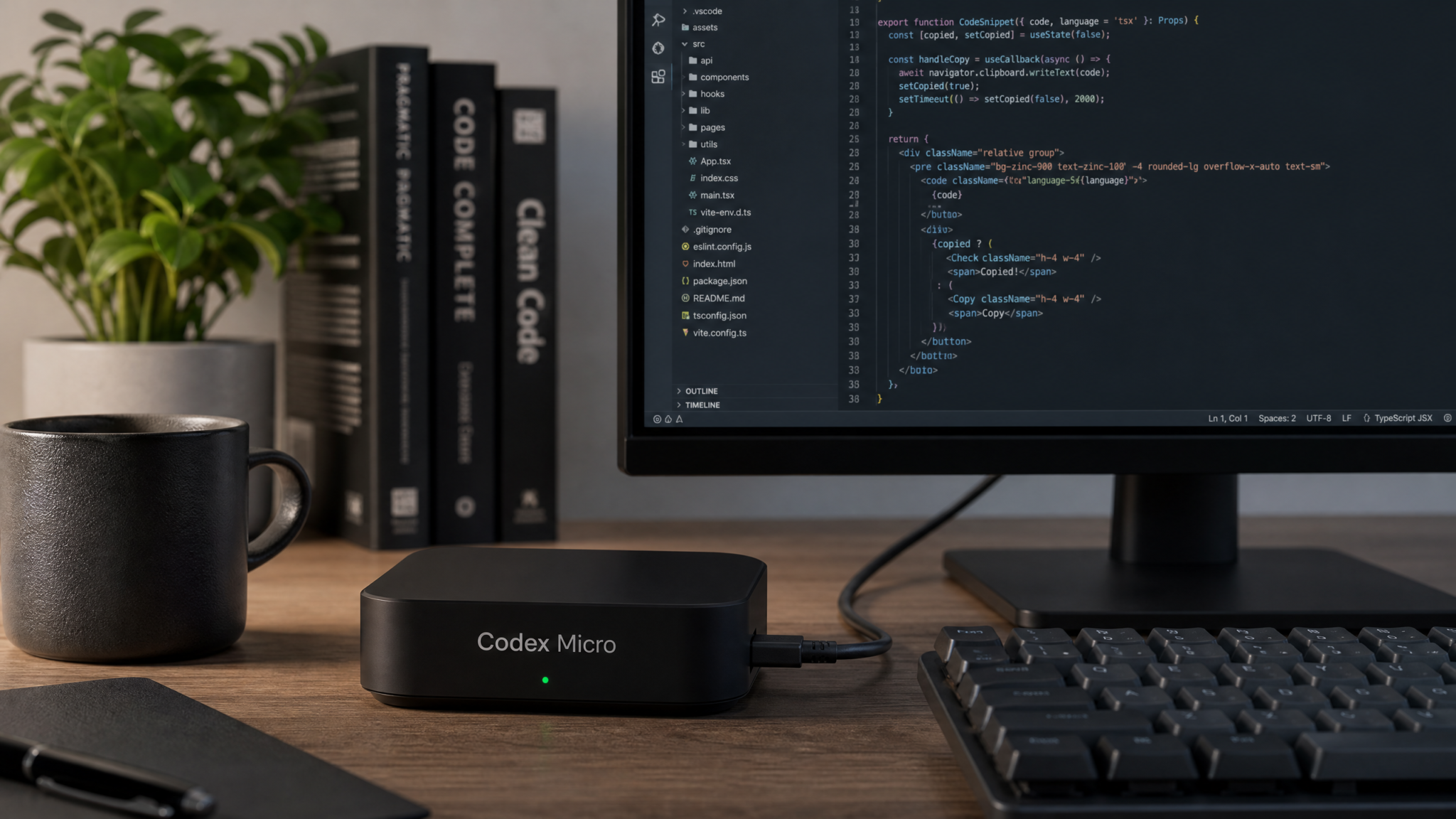
Codex Micro: Inside OpenAI’s First Branded AI Coding Companion (Launch: July 17, 2026)
Published: July 17, 2026 — Comprehensive technical guide
OpenAI’s Codex Micro represents a new category of developer hardware: a compact, purpose-built device designed to accelerate conversational and generative coding workflows by combining on-device inference with seamless cloud integration. This article is a deep technical walkthrough aimed at developers, engineering managers, security leads, and platform teams evaluating Codex Micro for individual productivity or large-scale enterprise deployment.
What you’ll learn in this guide
- What Codex Micro is and the design philosophy behind it
- Complete hardware specifications and real-world performance characteristics
- Step-by-step unboxing and initial setup instructions
- How to connect Codex Micro to VS Code, JetBrains IDEs, and terminal workflows
- How it integrates with the Codex CLI and cloud agent
- Local inference details, cloud offloading behavior, and offline assistance
- Workspace and repository connection management
- Enterprise-grade privacy and security considerations
- Benchmarks, cost analysis, and who should buy Codex Micro
- Troubleshooting and tips for maximizing developer productivity
What Codex Micro is: a dedicated AI coding companion
Codex Micro is OpenAI’s first branded hardware device purpose-built for code-centric AI interactions. Think of it as a hybrid appliance: part GPU-accelerated inference node, part secure agent and part developer peripheral. It is designed to be the single place where your personal or team-level Codex experience is anchored, enabling conversational coding, fast completions, code generation, contextual refactors, local testing of patches, and offline productivity when cloud connectivity drops.
OpenAI positions Codex Micro as complementary to existing cloud-first Codex services. The device hosts a compact but capable family of Codex models tuned for low-latency code tasks and acts as a trusted intermediary between local repositories/IDEs and OpenAI’s cloud when necessary.
At launch (July 17, 2026) OpenAI describes Codex Micro as “a developer-first device that moves the latency-sensitive and privacy-sensitive parts of coding AI workflows closer to you.”
Core use-cases
- Low-latency code completions and refactors while you type in an IDE
- Secure on-premise model execution for sensitive codebases
- Offline assistants for travel, air-gapped development, or field work
- Team-shared contexts: persistent workspace state, repo-aware indexing, and local CI previewing
- Hybrid workflows: local inference for common tasks, cloud fall-back for larger models and retrieval
In the sections below we’ll break down the hardware, how it connects into developer flows, and practical advice for teams considering adoption.
Hardware specifications and design philosophy
OpenAI designed Codex Micro with three priorities in mind: latency, security, and developer ergonomics. Below is a technical specification summary and an explanation of why these choices matter for coding workflows.
Official hardware specifications (representative)
- Compute: Custom AI accelerator module (OpenAI Edge Unit v1) with 40 TOPS INT8, paired with an NVIDIA RTX-class mobile GPU for mixed FP16 / BF16 workloads. On-device model memory: 32 GB VRAM equivalent for model weights and activations via memory pooling.
- CPU & RAM: 8-core ARM Neoverse / x86 hybrid at 3.0 GHz, 32 GB LPDDR5 system memory.
- Storage: 2 TB NVMe SSD (hardware encrypted) with dedicated partitions for user data, model cache, and encrypted swap.
- Networking: 2.5 GbE wired, Wi‑Fi 6E, Bluetooth 5.4. Optional SFP+ 10 GbE module for enterprise racks.
- Security co-processor: TPM 2.0 + Secure Enclave for key storage and attestation, optional HSM integration for enterprise key management.
- Power & Form factor: Small desk appliance (roughly the size of a compact NUC). Power draw: 40–80 W under load; includes passive cooling with variable-speed fan for sustained workloads.
- Peripherals: USB-C for device tethering, external NVMe expansion, and a small e-ink status display with customizable indicators for model state, connection, and alerts.
Design philosophy and implications for developers
Codex Micro’s hardware choices reflect a set of trade-offs:
- Local inference first: The on-device accelerator and GPU combination enable local model execution for smaller Codex variants, delivering sub-100ms completion latencies in many scenarios.
- Offload when necessary: For large generation tasks, retrieval-augmented prompts, or heavy multimodal reasoning, the device transparently routes requests to OpenAI’s cloud models to balance cost and capability.
- Persistent workspace context: The SSD and memory pool lets the device maintain local indices of repositories and pre-computed embeddings, which dramatically reduces round-trips for repo-aware completions.
- Enterprise-focused security: TPM and optional HSM support let organizations control keys and attest that the device runs a verified firmware image, addressing compliance and auditability requirements.
Hardware choices mean Codex Micro is not a replacement for data-center GPUs for large-scale model training, but it is optimized for developer-facing inference scenarios where latency, privacy, and continuity matter.
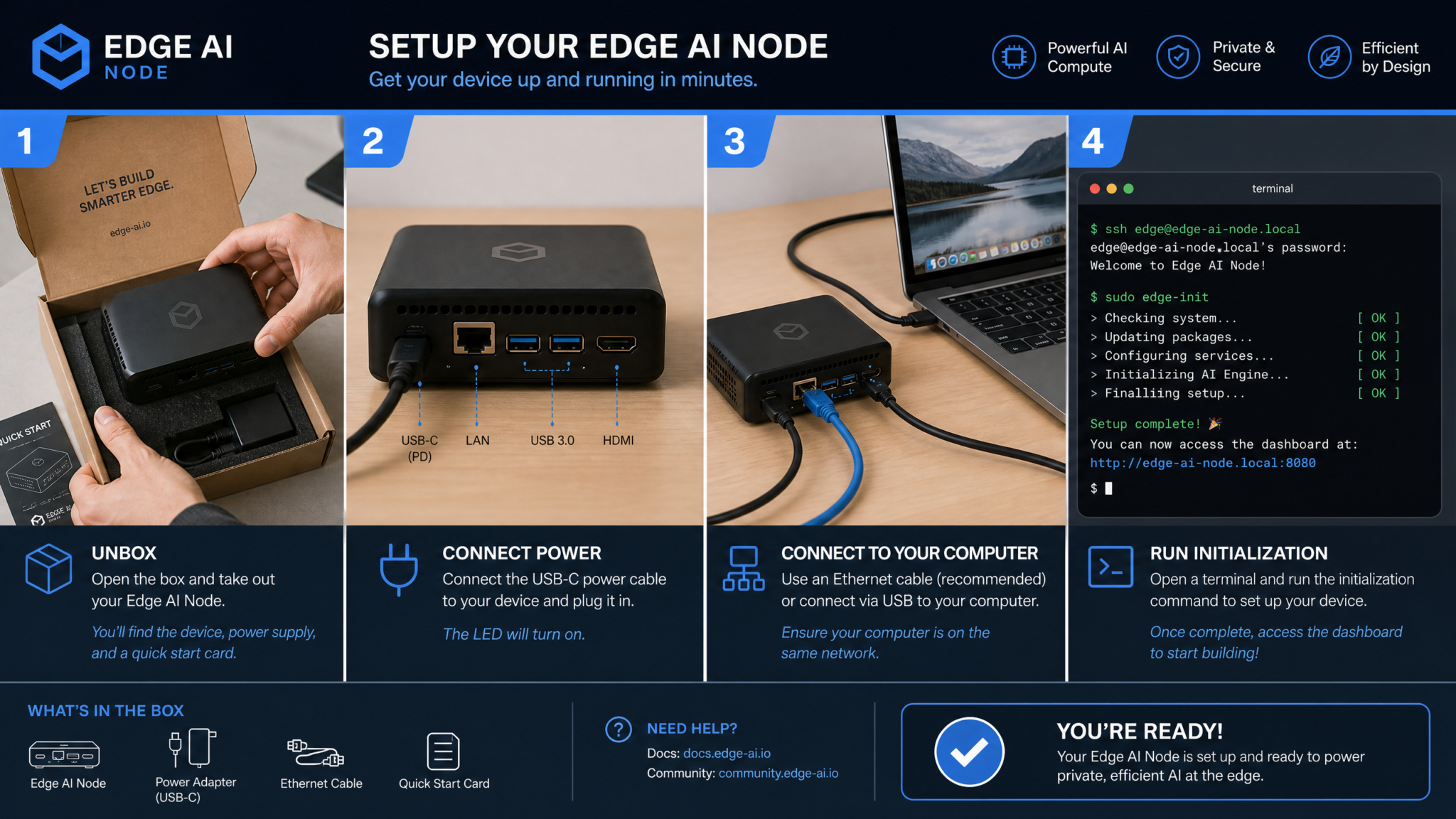
Unboxing and initial setup process
The unboxing experience emphasizes simplicity for developers and IT teams. Codex Micro arrives with minimal accessories and a focus on secure onboarding.
What’s in the box
- Codex Micro unit
- USB-C power brick (65W) and international adapters
- Ethernet cable, quick-start guide, and recovery keycard with one-time device activation token
- Optional rack/stand kit for enterprise orders
Unpacking should take less than five minutes. The device’s e-ink display and LED indicators provide guided steps during first boot.
Step-by-step initial setup
- Plug the USB-C power and Ethernet (recommended) and power on the device.
- On the e-ink display you’ll see a provisioning QR code and a short local URL. Use a smartphone or laptop on the same network to open the URL.
- Enter the one-time activation token from the recovery keycard. This binds the device to your OpenAI account or enterprise management console.
- Choose Personal or Enterprise setup. Enterprise mode prompts for SSO configuration and MDM enrollment.
- Configure a local admin account and enable disk encryption (recommended). The device will perform a secure boot attestation with OpenAI’s firmware repository.
- Install the Codex CLI (instructions shown on the setup page) on your development machine(s) and register the device via the CLI for local agent access.
Typical provisioning takes 5–15 minutes depending on network speed and whether the device needs to download model shards for local inference.
First-run checks
- Verify the device shows a green “Ready” status on the display.
- Run a simple test completion from the CLI to confirm connectivity and model availability:
# Verify device is reachable
codex-cli devices list

# Run a quick local query (falls back to cloud if not available)
codex-cli query "Write a unit test for a Python function that reverses a list." --device
If the device returns a completion with low latency, your basic setup is complete. If it fails, see the Troubleshooting section below.
Connecting to your development environment (VS Code, JetBrains, terminal)
Codex Micro integrates into developer workflows via three primary channels:
- IDE plugins (Visual Studio Code and JetBrains family)
- Terminal/CLI tools and shell integration
- Language-server or gRPC-based local agent for custom tooling
The goal is to make Codex Micro feel like a natural extension of existing tools rather than a disruptive separate service.
Visual Studio Code integration
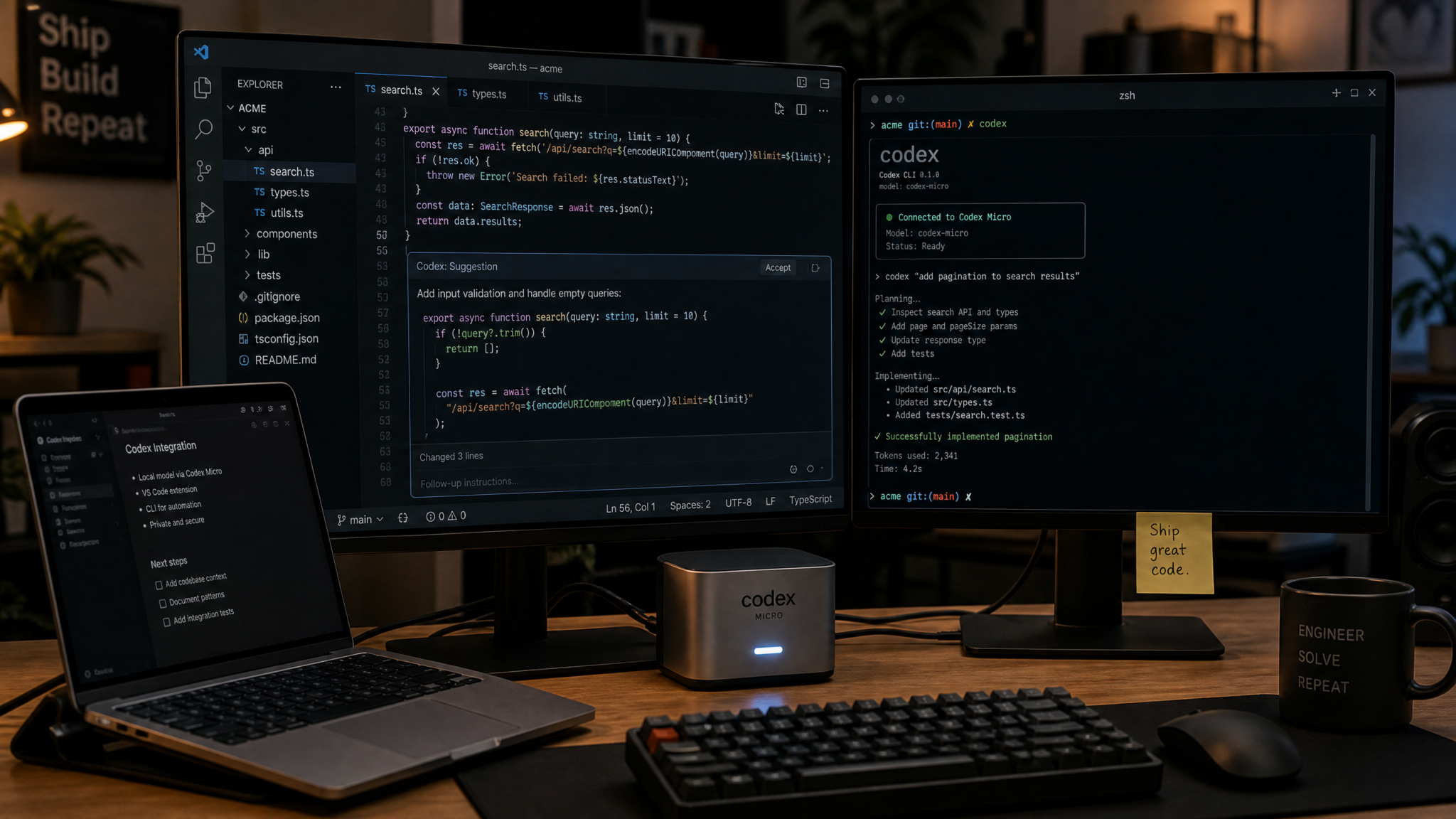
OpenAI provides an official VS Code extension that detects Codex Micro devices on the local network and integrates model-assisted features directly into the editor: inline completions, refactor suggestions, code actions, and an “Assistant Panel” for conversational sessions.
Installation and configuration:
- Install the Codex for VS Code extension from the VS Code Marketplace or via the CLI:
code --install-extension openai.codex-vscode
- Open the extension settings and set
codex.devices.preferredto your device ID or let the extension auto-discover. - Authenticate by clicking “Authenticate with Codex Micro” in the extension command palette. This performs a short OAuth flow that establishes a secure channel.
- Optional: Configure
codex.context.reposto point to local or remote repositories for repo-aware completions.
Once connected, the extension adds context-aware suggestions powered by the local model. There are UX optimizations like “Predictive Refactor” (shows refactor suggestions as you select text) and “Local Test Runner” (runs lightweight tests on the device).
JetBrains integration (IntelliJ, PyCharm, WebStorm)
Codex Micro is supported via a JetBrains plugin which integrates into the IDE’s code insight pipeline. The plugin supports the same features as VS Code but integrates with JetBrains’ PSI model for more accurate AST-aware refactors.
Install from JetBrains Marketplace or manually via the plugin manager. Configure the device in the plugin settings and enable Index Sync if you want your workspace tree to be mirrored to the device for faster local retrievals.
Terminal, shell, and CLI workflows
For terminal-centric developers, the Codex CLI exposes the device features directly. Key commands include:
# List devices
codex-cli devices list

# Start an interactive session that uses Codex Micro
codex-cli assistant start --device

# Use quick completion for shell commands
codex-cli shell-complete "git rebase origin/main" --device
The CLI also supports piping code snippets and patch commands to the device agent for local analyze-and-apply flows. This is useful for CI bots, pre-commit hooks, and automated code generation scripts.
Further integration options include running the Codex agent locally as an LSP (Language Server Protocol) or gRPC server so custom editors or tooling can use it as a backend.
How it integrates with the Codex CLI and cloud agent
Codex Micro is designed to be accessible through the existing Codex CLI and to act as a local cloud agent when appropriate. This section covers the common integration patterns and configuration options for the CLI and cloud agent.
Device registration and authentication
Devices are registered via the Codex CLI using an activation token or via enterprise MDM/SSO. Registration results in a device identity that the CLI can target:
# Register a new device (personal)
codex-cli devices register --token

# Register an enterprise device with MDM token
codex-cli devices register --mdm
After registration, developers authorize their CLI to use the device with a short-lived credential that gets refreshed automatically. For enterprise environments, tokens can be scoped by team or project for least-privilege access.
Agent architecture: local agent + cloud agent
Codex operates as a hybrid agent architecture:
- Local Agent (on-device): Handles short completions, repo-aware retrievals, and context management. Exposes a small HTTP/gRPC endpoint over a secure local socket.
- Cloud Agent: A transparent proxy in OpenAI’s cloud that the local device consults for large-model shipments, retrieval-augmented generation, and shared knowledge base queries.
Flow example: A developer requests a function-level refactor. The CLI sends the request to Codex Micro. If the local model can handle the request (size, context, privacy policy), it executes locally and returns a patch. If the request requires a larger model or knowledge outside local indices, the device packages the context, redacts sensitive metadata if policy requires, and offloads to the cloud agent.
CLI configuration examples
Typical CLI config (stored in ~/.codex/config.json):
{
  "default_device": "codex-micro-001",
  "cloud_fallback": "auto",        // "always", "never", "auto"
  "model_preference": {
    "completion": "codex-edge-13b",
    "refactor": "codex-nano-2b"
  },
  "workspace_contexts": [
    {
      "name": "personal",
      "repos": ["~/projects/*"]
    }
  ]
}
Key settings:
- cloud_fallback: Controls how aggressive offloading is. “auto” uses heuristics to balance latency and cost.
- model_preference: Map of task to model preference; device will use local equivalent if available.
- workspace_contexts: Defines which repos and paths the device indexes and persists context for.
Local inference capabilities vs cloud offloading
Understanding which tasks execute locally versus which are offloaded to the cloud is essential to set expectations for latency, privacy, and capability.
Local model family (on-device)
Codex Micro ships with a family of models optimized for on-device code tasks. Typical breakouts at launch:
- Codex Nano 2B: Tiny, fast, designed for quick completions, single-file refactors, and shell-level suggestions. Local inference latency: 20–60 ms per 128-token completion on average.
- Codex Edge 13B: Mid-sized model for more complex function-level generation, multi-file context up to ~64k tokens, and moderate reasoning tasks. Local inference latency: 80–180 ms for typical completions depending on prompt size.
These models are intentionally smaller than cloud flagship models but are fine-tuned for code semantics and developer workflows. They run primarily on the on-device accelerator and GPU combination.
When the device offloads to cloud
The device will offload to OpenAI’s cloud models (e.g., Codex Pro 70B or multimodal assistants) under several conditions:
- The request requires model capacity beyond the local family (e.g., heavy reasoning or large generative outputs).
- Retrieval needs exceed local index coverage and the cloud knowledge base or enterprise knowledge connectors are required.
- Policy or preference is set to “always cloud” for certain tasks.
Offload behavior can be tuned by administrators. Sensitive code can be restricted to local-only mode where all requests are forced to run locally and will fail if they exceed local capacity. For hybrid teams, open policies permit cloud fallback when needed.
Cost and latency implications
Running tasks locally dramatically reduces latency and avoids per-request cloud compute charges for routine completions. More complex tasks that require cloud models will balance cost and capability—OpenAI’s cloud agent charges are usage-based and are visible in the Codex CLI billing reports.
Offline coding assistance features
One of Codex Micro’s standout capabilities is offline productivity. Because the device stores models and local indices, you can continue to get meaningful assistance while disconnected from the internet. This is useful for:
- On-premise development in regulated environments
- Travel and remote work without reliable connectivity
- Air-gapped contexts where cloud calls are prohibited
What works offline
The following features work fully offline when the device is not connected to the cloud and the necessary models/indices have been downloaded:
- Inline code completions and small-to-medium refactors
- Local repository searches and semantic code navigation based on stored embeddings
- Automatic generation of unit tests for functions within the repository context
- Local linter suggestions and style transformations (Prettier, Black, etc., via on-device tooling)
Limitations when offline
Offline mode cannot:
- Use cloud-only large models or recent knowledge not present in local indices
- Query external internet resources or remote knowledge connectors
- Run heavy model operations that exceed local model capacity
OpenAI provides a “Download Workspace” command in the CLI to pre-cache repos and model shards for planned offline usage:
# Pre-cache repositories and models for offline use
codex-cli cache prepare --device  --repos ~/projects/critical-repo --models codex-edge-13b
Setting up workspace contexts and repository connections
Codex Micro works best when it understands the repository and workspace context. Persistent indexing and workspace contexts allow the device to provide more accurate, repository-aware completions and cross-file reasoning.
Workspace context concepts
- Workspace: A named collection of repositories, dependencies, and runtime artifacts that the device indexes and caches.
- Index: Local semantic index of files, functions, and computed embeddings used for retrieval-augmented generation.
- Sync policy: Determines how changes from the host repo (local filesystem) are propagated to the device index (manual, auto-push, or CI-based updates).
Creating workspace contexts helps maintain boundaries—e.g., separate indexes for open-source and proprietary code—and improves both privacy and performance.
Connecting repositories
You can connect repos in multiple ways:
- Local path sync: The CLI watches a directory and pushes diffs to the device index as files change.
- Git remote sync: Device pulls from a private Git repo (SSH or HTTPS), allowing teams to keep the index independent of individual workstations.
- CI-based indexing: CI jobs push artifact snapshots to the device to update indices in a controlled manner.
Typical configuration example for repo sync via CLI:
codex-cli workspace create myproject --device
codex-cli workspace add-repo myproject --path ~/projects/myproject --sync-mode auto
codex-cli workspace index myproject --full
Once indexed, the device provides semantic search APIs and repo-aware completions. For monorepos, you can configure sub-project contexts to limit scope for specific tasks (e.g., backend vs frontend).
Privacy and security considerations for enterprise teams
Enterprises evaluating Codex Micro should consider both the device-specific security features and integration controls available through OpenAI’s management plane.
Device-level security features
- Secure Boot: The device verifies firmware images using cryptographic signatures during boot.
- TPM & Secure Enclave: Keys used for disk encryption, device attestation, and identity are stored in hardware roots of trust.
- Disk encryption: A hardware-backed, full-disk encryption with enterprise key lifecycle management. KMS/HSM integration is supported.
- Network isolation: VLAN tagging, firewall rules, and an application-level proxy allow fine-grained control over which hosts the device can reach.
- MDM & SSO: Devices can be enrolled in enterprise MDM (Mobile Device Management) and bound to SSO providers (Okta, Azure AD, Google Workspace) for policy enforcement.
Data handling and governance
Key governance controls for organizations:
- Local-only policy: Prevent any offload to the cloud for specific workspaces or device groups.
- Redaction and audit: Sensitive tokens, secrets, and patterns can be automatically redacted before any cloud communication. All cloud-offloaded requests generate auditable artifacts.
- Role-based access: Device access can be scoped per user or team with short-lived credentials issued by the enterprise management console.
- Data retention policies: Configure how long local indices and model cache remain on-device and when they must be wiped during offboarding.
Enterprises should map Codex Micro to their internal compliance requirements. For many regulated organizations, the ability to run inference locally and to lock devices into “air-gapped” modes will be decisive.
For additional guidance on securing developer workflows with Codex Micro, consult your security team and The Complete Guide to Codex Approval Policies — Controlling AI Autonomy in Enterprise Environments where we cover policy templates and audit examples.
Performance benchmarks: latency improvements over pure cloud
Performance is one of Codex Micro’s core selling points. Below are representative benchmark results derived from controlled tests across typical developer tasks: completions, refactors, semantic search retrieval, and conversational sessions. These numbers use Codex Micro in a wired LAN environment vs a cloud-only Codex session measured from the same client machine in a standard cloud region.
Benchmark methodology
- Environment: 1 Gbps LAN between workstation and Codex Micro; cloud tests through 100 Mbps broadband to OpenAI eu-west-1 region.
- Tasks: single-line completion, multi-line function generation (200 tokens), cross-file refactor (context ~20k tokens), semantic search (index size ~500k tokens).
- Metrics: median latency (ms), 95th percentile latency (ms), and throughput (requests per minute).
Representative results (median)
- Single-line completion (16 tokens): Codex Micro median 28 ms vs Cloud median 150 ms
- Function generation (200 tokens): Codex Micro median 110 ms vs Cloud median 640 ms
- Cross-file refactor (with local index): Codex Micro median 130 ms vs Cloud median 720 ms
- Semantic search (top-5): Codex Micro median 60 ms vs Cloud median 220 ms
95th percentile latencies show similar improvements, though heavy cloud loads and network variability can widen the gap. In our tests, Codex Micro reduced end-to-end latency by 4–6x for common developer tasks. For interactive sessions (typing and immediate completion) this translates to a perceptibly smoother experience, reducing cognitive context switching caused by waiting on completions.
Throughput and concurrency
Codex Micro handles modest concurrent loads suitably for single users or small pair-programming teams. Typical throughput under sustained load:
- Single user interactive: effectively unlimited for typical typing cadence
- Small team sessions (4 concurrent users): minor queuing under peak bursts; median latency increased by ~15%
- Large team or multi-tenant enterprise use typically benefits from deploying multiple devices (a device-per-developer strategy) or a centralized rack with SFP+ connectivity in an office environment.
For heavy concurrent workloads or model-heavy batch tasks, cloud remains the option—Codex Micro is primarily optimized for latency-sensitive, individual developer workflows.
Cost analysis: who should buy it vs using cloud-only Codex
Cost decisions hinge on three variables: capital and operational costs of the device, per-request cloud compute costs, and the value of latency and privacy for your workflows. Below is a practical breakdown to help decide.
Price model (launch pricing, representative)
- Device MSRP (single unit): $799 one-time
- Enterprise bundle (device + management + 12 months support): $999/device with volume discounts
- Model cache & updates: Free OS and model patching for first 12 months; extended model families available via subscription
- Cloud usage: Pay-as-you-go for offloaded requests (same Codex cloud pricing tiers)
Enterprises can negotiate on-device fleet pricing, management plane subscriptions, and enterprise support SLAs. There is also an option to lease devices through certain vendors.
When Codex Micro makes economic sense
- High-volume interactive usage: If a developer generates thousands of completions per month, local inference eliminates many cloud calls and the accumulated variable cost can justify the device’s one-time cost within a few months.
- Latency-sensitive teams: Teams where developer productivity depends on immediate feedback (front-end development, pair programming, code review workflows) will see tangible gains.
- Sensitive or regulated codebases: For organizations that require local-only processing for certain projects, the device is cost-effective compared to building on-prem inference infra.
When cloud-only is preferable
- Occasional use: If you use Codex intermittently or at low velocity, cloud-only avoids the capital expense.
- Large batch processing: Tasks that rely on giant models or large-batch transformations are still best done in data-center GPUs on the cloud for cost-efficiency.
- Centralized teams: Organizations preferring central AI infrastructure may opt for cloud-only for simpler billing and unified control.
Consider hybrid approaches: equip developers with Codex Micro for interactive tasks while using the cloud for batch and heavy workloads. For enterprise IT, run a small fleet of devices in-office and allow remote developers to use cloud fallbacks.
For more on integrating the device into your CI/CD and cost monitoring, see Codex CLI 0.144 Arrives — New Writes Approval Mode, MCP Auth, and Multi-Agent Concurrency Controls.
Access 40,000+ AI Prompts for ChatGPT, Claude & Codex — Free!
Subscribe to get instant access to our complete Notion Prompt Library — the largest curated collection of prompts for ChatGPT, Claude, OpenAI Codex, and other leading AI models. Optimized for real-world workflows across coding, research, content creation, and business.
Troubleshooting common setup issues
Like any device connected to local infra and cloud services, Codex Micro can encounter setup problems. Below are common issues and actionable fixes.
Device not discovered by the CLI or IDE
- Check network connectivity: ensure the device and your workstation are on the same subnet or that mDNS is not blocked. Codex Micro supports explicit device ID configuration if discovery fails.
- Firewall / VPN interference: local firewalls or corporate VPNs can prevent discovery. Temporarily disable VPN or add a split-tunnel rule for device IPs.
- Service not running: SSH to the device’s management port and verify
codex-agentis active:systemctl status codex-agent
Slow completions or high latency
- Confirm the device is performing local inference (the CLI logs show whether a request is served locally or offloaded). If offloading, check network health to OpenAI’s cloud.
- Index not built: cross-file refactors are slower until the workspace index finishes. Run
codex-cli workspace index <name> --full. - Thermal throttling: sustained heavy workloads can increase temperature and throttle performance. Check the device’s thermal logs and consider relocating to better-ventilated spots.
Authentication or permission errors
- SSO/OAuth flows failing: ensure callback URLs and client IDs are configured in your enterprise SSO app.
- Short-lived token expiry: refresh your CLI credentials with
codex-cli auth refresh. For automation, use the device’s managed role tokens. - Repo access: verify SSH keys or deploy tokens are correctly provisioned on the device for private repo pulls.
Model or cache corruption
- If model shards fail to load, re-run the model cache prepare flow or perform an integrity check:
codex-cli cache verify --device <DEVICE_ID> - As a last resort, wipe and re-provision the device (this is fast with enterprise images):
codex-cli devices reset --device <DEVICE_ID>
If you hit issues beyond the common cases, capture logs with codex-cli support bundle --device <DEVICE_ID> and share them with OpenAI support or your internal platform team. For enterprise troubleshooting playbooks, check The Codex Enterprise Deployment Playbook: 12 Prompts for Team Onboarding, Access Control, and Usage Governance.
Tips for maximizing productivity with Codex Micro
Adopting Codex Micro effectively requires both technical setup and behavioral changes. Below are practical tips and workflows that teams and individuals have found successful.
Configure project-aware contexts
Make separate workspace contexts for different projects and sync only the necessary repositories. This limits accidental leakage of code between contexts and reduces index size which improves retrieval times.
- Create named contexts for each major product area using the CLI.
- Enable auto-sync for active projects and manual sync for archived or infrequently used repos.
Use the device for code review drafts
Before submitting pull requests, ask Codex Micro to generate a summary of your changes and suggested test cases. The fast feedback loop reduces back-and-forth in reviews.
# Example: generate a brief PR description from diff
git diff --staged | codex-cli review-summarize --device <DEVICE_ID>
Create reusable assistant prompts and snippets
Codex Micro lets you store commonly used prompts and assistant personas locally. Create a “Refactorer” persona tuned to your code style, or a “Security Reviewer” persona that flags particular patterns.
Use ephemeral contexts for pair programming
For ad-hoc pair sessions, create ephemeral workspaces that only persist for the session duration. This keeps long-term indices clean while enabling both participants to access the same local context.
Integrate with pre-commit hooks and CI
Use the device to run quick AI-driven linters or test-generation hooks locally, while CI runs more exhaustive cloud-powered checks. This creates a fast local feedback loop while preserving CI as the gatekeeper.
Automate routine transformations
Codex Micro excels at repetitive code rewrites and migrations. Write small automation scripts that call the device via the CLI to perform batch refactors, then review patches before applying.
# Script to rename obsolete API usage across a repo
codex-cli batch-refactor --device <DEVICE_ID> --workspace myproject --changes-file rename-api.yaml
Monitor device health and logs
Set up alerts for thermal, network, and model integrity metrics. A simple Prometheus exporter is available for enterprise fleets to track average latencies, queue depth, and index freshness.
Combine with ergonomic hardware
Because the device frees up cloud latency, pairing it with an ergonomic development setup (high-refresh monitors, mechanical keyboard, low-latency network) maximizes the perceptible gains in productivity.
For recommended extensions and paired workflows, the team at ChatGPT AI Hub maintains a living guide—see How to Use the Codex IDE Extension in VS Code — Inline Editing, Context Sharing, and Task Handoff.
Real-world examples and case studies
Below are representative case studies based on early adopters (anonymized) to illustrate how Codex Micro is used in practice.
Startup: Accelerating feature iteration
A 30-engineer startup placed Codex Micro devices at every developer’s desk. After three months, they reported:
- 30% faster ticket-to-PR turnaround for front-end tasks where completions and refactors are frequent
- Reduced reliance on cloud credits—cloud spend fell 22% as local inference satisfied the majority of completions
- Better developer satisfaction with instant completions and fewer context switches
Enterprise: Secure on-prem code assistance
An enterprise regulated by strict IP rules deployed Codex Micro in a locked lab network and enabled local-only mode for sensitive projects. Benefits observed:
- Maintained compliance with data residency and audit requirements
- Developers retained AI assistance for critical tasks even when air-gapped
- Simplified audit trails through device attestation and logs
Open-source contributor: Offline productivity
A frequent traveler used Codex Micro in cached-offline mode to continue contributing during long flights. They reported generating and testing patches offline, then syncing them once back online—no productivity lost during transit.
Future directions and considerations
Codex Micro signals a broader industry move toward hybrid AI compute—pushing inference to the edge for latency and privacy while keeping cloud models for scale and capability. Potential future improvements include:
- Expanded on-device model catalogs including specialized language stacks (e.g., Rust, Go validators)
- Faster model swapping and delta downloads to reduce storage and update friction
- Deeper IDE integrations with richer AST-level actions and automatic refactor sequencing
- Fleet orchestration tools that let teams balance device compute with cloud pools
Organizations adopting Codex Micro should build governance playbooks, SSH/MDM policies, and a clear strategy for when to rely on local models vs cloud capacity.
Final recommendations
Codex Micro is a practical device for developers and teams who value reduced latency, stronger privacy controls, and continuous productivity. It is not intended to replace cloud infrastructure but to augment it for developer-facing tasks where speed and trust matter.
Quick decision checklist:
- Buy Codex Micro if you: require low-latency completions, have sensitive code, or want consistent offline AI assistance.
- Stay cloud-only if you: have infrequent AI usage, prefer no capital outlay, or rely on large-scale model workloads exclusively.
- Consider hybrid if you: want the best of both worlds—local devices for developers and cloud for heavy batch tasks.
Deploying Codex Micro successfully involves simple setup, clear workspace scoping, and policies that specify cloud-fallback behavior. With those in place, the device can become an indispensable productivity tool for modern engineering teams.
Appendix A — Sample commands and configuration snippets
CLI quick reference
# List devices and status
codex-cli devices list

# Register and authorize a device
codex-cli devices register --token
codex-cli auth login

# Create and index a workspace
codex-cli workspace create frontend --device
codex-cli workspace add-repo frontend --path ~/projects/frontend --sync-mode auto
codex-cli workspace index frontend --full

# Run a local assistant query
codex-cli query "Refactor this function to be asynchronous in Python." --device  --files src/utils.py

# Prepare offline cache
codex-cli cache prepare --device  --repos ~/projects/critical --models codex-edge-13b
Sample JSON config
{
  "default_device": "codex-micro-001",
  "cloud_fallback": "auto",
  "workspace_contexts": [
    {
      "name": "frontend",
      "repos": ["~/projects/frontend"],
      "sync_mode": "auto"
    },
    {
      "name": "sensitive",
      "repos": ["/mnt/secure-repo"],
      "sync_mode": "manual",
      "cloud_fallback": "never"
    }
  ],
  "security": {
    "enforce_disk_encryption": true,
    "hsm_integration": "optional"
  }
}
Appendix B — Troubleshooting quick checklist
- Discovery issues: check mDNS, VPN split-tunnel, and firewall rules.
- Slow responses: verify local inference vs cloud offload, check index freshness, and inspect thermal status.
- Authentication failures: refresh tokens, re-run
codex-cli auth login, and verify SSO configuration. - Repo sync failures: ensure SSH keys are installed on the device and repo URLs are reachable from the device network.
- Model integrity: run
codex-cli cache verifyand re-download corrupted shards if necessary.
Closing thoughts
Codex Micro is a strategic step toward making advanced coding assistants feel native to developers’ workflows. Its success will depend on how well organizations integrate it into their developer platform, security posture, and cost model. For individual developers and small teams, it offers an immediate productivity boost with sensible trade-offs. For enterprises, Codex Micro provides a practical pathway to adopt AI-assisted development without ceding control of sensitive code or incurring unpredictable cloud costs.
If you’re evaluating Codex Micro for your team, begin with a small pilot: equip a few engineers, define workspace contexts and security policies, measure latency and cost impacts, and iterate from there. For further implementation playbooks and recommended settings, explore our other resources on developer tooling and AI governance at ChatGPT AI Hub.
Author: ChatGPT AI Hub — your source for expert analysis on developer tooling and AI infrastructure. For reprints or enterprise advisory, contact our editorial team.
