
The ChatGPT Quick Chats Playbook: 15 One-Shot Prompts for Instant Answers Without Context Overhead
The ChatGPT Quick Chats Playbook: 15 One-Shot Prompts for Instant Answers Without Context Overhead
Every second you spend typing background information into ChatGPT before asking a simple question is a second you didn’t need to spend. If you’ve ever caught yourself writing three paragraphs of context just to ask what a word means or how to write a quick SQL query, you already understand the inefficiency that ChatGPT Quick Chats are designed to eliminate. Quick Chats are lightweight, context-free interactions built for speed — the conversational equivalent of grabbing a sticky note instead of opening a full project file. In this playbook, you’ll learn exactly how Quick Chats work, when to use them instead of full conversation threads, and you’ll get 15 battle-tested one-shot prompts organized by use case so you can pull instant value from ChatGPT without any preamble overhead.
What Are ChatGPT Quick Chats?
ChatGPT Quick Chats represent a deliberate interaction mode where you strip away all non-essential context and deliver a self-contained, single-turn prompt that requires no prior conversation history to answer correctly. The philosophy is simple: not every interaction with an AI assistant demands a rich conversational scaffold. Sometimes you need a number, a definition, a formatted snippet, or a yes/no with a one-sentence rationale — and the fastest path to that answer is a clean, atomic question with zero noise.
Unlike extended project conversations where ChatGPT benefits from memory of your goals, tech stack, writing style, or organizational preferences, Quick Chats are intentionally stateless. You aren’t building toward anything. You’re retrieving one piece of information or generating one small artifact and moving on. Think of them as the difference between commissioning a custom painting (a full conversation) versus pulling a print off a shelf (a Quick Chat). Both have value; they serve completely different needs.
The term “Quick Chat” has also taken on a specific UI meaning in some ChatGPT interfaces and integrations, where a dedicated input mode allows users to open a lightweight prompt window without creating a named conversation thread. Whether you’re using this as a formal interface feature or simply adopting the philosophy of one-shot, context-free prompting, the efficiency principles remain identical. The key characteristics of a genuine Quick Chat are:
- Self-contained: The prompt carries all necessary information within itself
- Single-turn: Designed to be answered completely in one response
- Narrow scope: Addresses one specific task, not a multi-part project
- No context dependency: Doesn’t require ChatGPT to remember previous messages
- Immediately actionable output: The answer can be used directly without additional processing
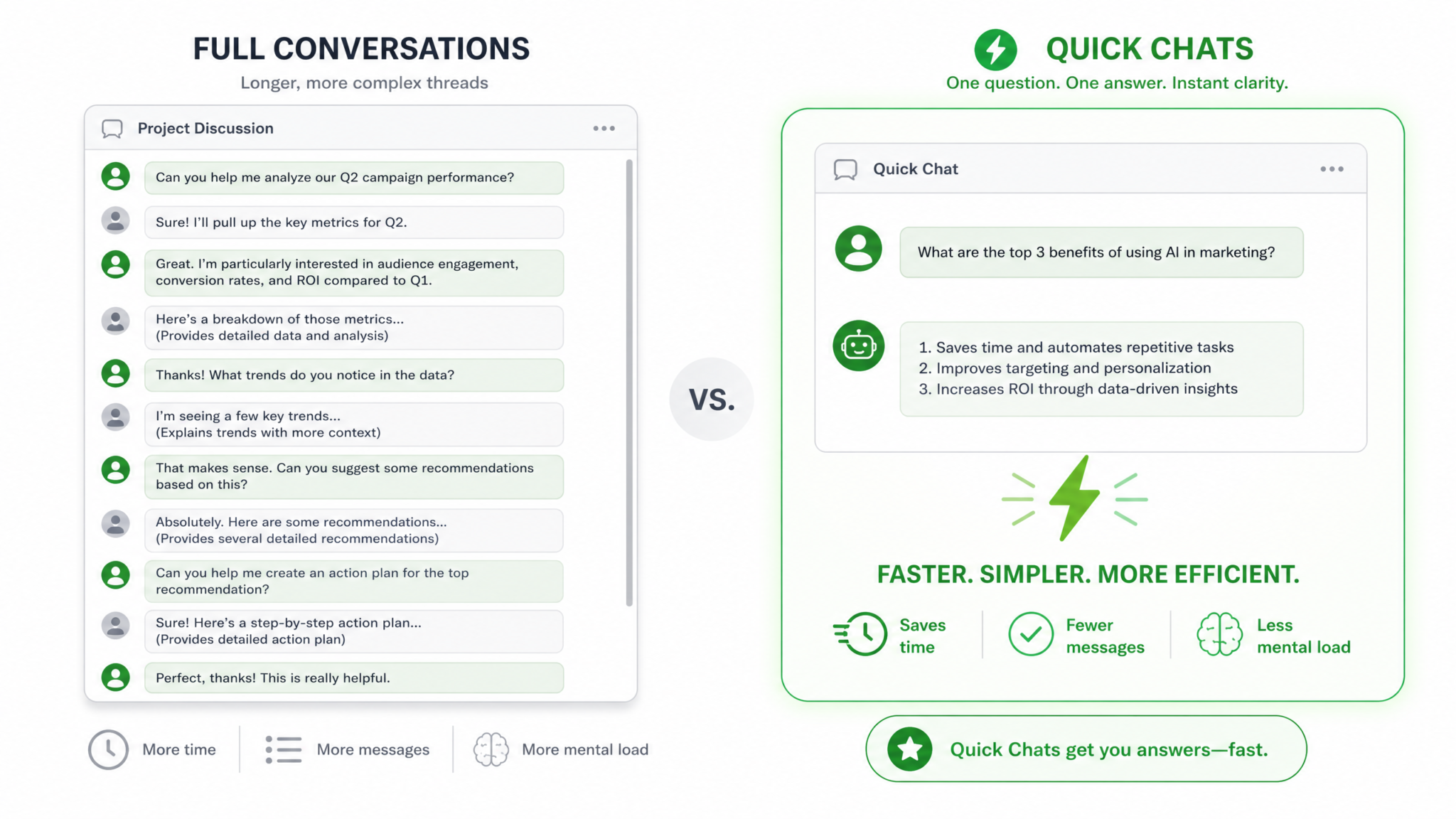
Quick Chats vs. Full Conversations: Knowing the Difference
One of the most common inefficiencies power users develop over time is treating every ChatGPT interaction as if it were a project briefing. They open a new chat, explain their background, describe their goals, set constraints, and then finally ask the actual question — even when the question has absolutely no dependence on any of that context. Recognizing which interaction type you actually need before you start typing is one of the highest-leverage habits you can develop.
Here’s a practical decision matrix to help you identify which mode fits your current need:
| Factor | Quick Chat | Full Conversation |
|---|---|---|
| Task complexity | Single, atomic task | Multi-step or iterative task |
| Context required | None or fully self-contained | Significant background needed |
| Expected turns | 1 (maybe 2) | 3 or more |
| Output format | Number, definition, snippet, short list | Document, plan, analysis, draft |
| Reuse value | Use once and discard | Reference repeatedly |
| Personalization needed | None | High (tone, brand, role-specific) |
| Time pressure | Immediate need | Can invest time for quality |
| Iteration likely | No | Yes |
The clearest signal that you need a Quick Chat rather than a full conversation is when you can explain your entire need in one sentence and the answer wouldn’t change regardless of who you are or what project you’re working on. “What is the formula for compound interest?” doesn’t change based on your name or your industry. “Write me a compound interest calculator for my fintech startup’s onboarding wizard” very much does.
Another key differentiator is what you plan to do with the answer. Quick Chat outputs are typically plug-and-play: you get the result, you use it, you move on. Full conversation outputs usually require refinement, revision, or integration into a larger body of work. If you find yourself thinking “I’ll probably need to ask a follow-up,” you’re already outside Quick Chat territory.
How Quick Chats Save Tokens and Reduce Latency
From a technical standpoint, every token in a ChatGPT conversation costs something — either in API cost (if you’re using the API directly), in processing time, or in the cognitive overhead of reading and parsing a verbose exchange. When you frame a prompt efficiently as a one-shot Quick Chat, you eliminate the compounding token cost that occurs when lengthy conversation histories are re-sent with every new message in a thread.
In ChatGPT’s architecture, when you’re inside a multi-turn conversation, the model processes the entire conversation history with each new response. A 20-message thread where the early messages contain extensive background context means that background is being re-processed every single turn. By contrast, a Quick Chat prompt that carries only what’s needed for the immediate task is radically leaner. Consider this comparison:
| Interaction Type | Approximate Tokens Processed | Latency Impact |
|---|---|---|
| 5-message conversation with context | ~800–1,500 tokens | Moderate |
| 15-message project conversation | ~3,000–6,000 tokens | High |
| Well-crafted Quick Chat prompt | ~50–200 tokens | Minimal |
The latency reduction is real and perceptible. A clean, short prompt with a focused output instruction generates a response faster than a long prompt with excessive preamble. This matters enormously in professional workflows where you might be asking ChatGPT dozens of questions per hour. Multiply even a five-second latency savings by 40 questions, and you’ve recovered over three minutes — not counting the time you saved by not writing the context in the first place.
For teams using ChatGPT via the API, token efficiency has direct cost implications. A well-optimized Quick Chat prompt that achieves the same result as a verbose equivalent while using 60% fewer input tokens isn’t just faster — it’s measurably cheaper to operate at scale. Organizations building internal tools on top of ChatGPT’s API should treat prompt efficiency as a first-class engineering concern, not an afterthought.
There’s also a cognitive efficiency dimension that’s easy to overlook. When you discipline yourself to write Quick Chat prompts, you force yourself to clarify exactly what you need before you ask. That mental act of distillation frequently reveals that you already know the answer, or that the question you were about to ask isn’t actually the question you need answered. Quick Chat discipline sharpens your thinking, not just your prompts.
The Anatomy of a Perfect One-Shot Prompt
A great one-shot prompt has a predictable structure, even when that structure is compressed into a single sentence. Understanding the components helps you construct Quick Chat prompts on the fly without having to consciously think through each element every time.
The Four Core Components
- Task verb: The action you want performed (calculate, define, convert, write, list, compare)
- Subject matter: The specific thing the task is being applied to
- Constraints or parameters: Any non-negotiable limits (language, format, length, version)
- Output format signal: How you want the answer delivered (one sentence, table, code block, bullet list)
Not every Quick Chat prompt needs all four components explicitly stated. Sometimes the task verb and subject matter are sufficient because the expected format is obvious. But when you’re prompting for technical output, ambiguous formats, or answers where length matters, all four components become essential.
Quick Chat Prompt Templates
Here are structural templates you can apply across use cases:
[Task verb] [subject] in [format/language/unit] — [constraint].
Example: Convert 847 milliliters to fluid ounces — round to 2 decimal places.

[Task verb] [subject]: [key parameter 1], [key parameter 2].
Example: Write a Python function: input is a list of integers, output is the median.

Define [term] in one sentence suitable for [audience].
Example: Define "idempotency" in one sentence suitable for a junior developer.

Give me a [framework/checklist/comparison] for [specific decision].
Example: Give me a 3-item checklist for deciding whether to normalize a database table.
Notice what’s absent from every one of these templates: no “Hello ChatGPT,” no “I’m working on a project where,” no “Could you please help me with.” These social pleasantries cost tokens and add zero information. ChatGPT does not need to be warmed up, greeted, or told that you’re hoping it can assist. Start with the task verb. Every word before the task verb is overhead.
Understanding the full range of prompt engineering strategies that complement the Quick Chat approach is valuable for any serious ChatGPT user. Readers who want to deepen their understanding of structured prompting techniques beyond one-shot interactions will find that a thorough guide to advanced ChatGPT prompt engineering strategies covering chain-of-thought, role prompting, and output formatting provides essential foundational knowledge for building a complete AI interaction toolkit. Advanced ChatGPT Prompt Engineering Strategies
Use Case 1: Quick Calculations (3 Prompts)
Calculation Quick Chats are among the highest-value applications of the one-shot approach. You need a number. You have the inputs. You just want the output. These prompts work because math problems are inherently self-contained — the answer is entirely determined by the inputs you provide, with no context dependency whatsoever.
Prompt #1: Percentage Change Calculator
Calculate the percentage change from 4,250 to 5,890. Show the formula,
the calculation, and the result rounded to 2 decimal places.
Why it works: This prompt includes all three inputs ChatGPT needs (start value, end value, desired precision) plus an output format instruction (show the formula and calculation). The “show the formula” instruction is a Quick Chat efficiency trick: it forces step-by-step transparency so you can verify the math isn’t hallucinated, without requiring you to ask a follow-up. You’ve anticipated the follow-up and embedded it in the original prompt.
Expected output structure: Formula → Substituted values → Calculated result → Rounded answer. Approximately 3–5 lines. No follow-up needed.
Real-world scenario: Your sales team hit $5,890 in monthly revenue, up from $4,250. You need to put the growth rate in a Slack message before your next meeting starts. You open Quick Chat, fire this prompt, paste the answer, and continue. Total time: under 20 seconds.
Prompt #2: Compound Interest One-Liner
Compound interest: principal $12,000, annual rate 6.5%, compounded quarterly,
5 years. Give me the final amount and total interest earned only — no explanation.
Why it works: The “no explanation” instruction is deliberate. It signals that you already understand the concept — you just need the numbers. This is one of the most powerful Quick Chat modifiers available. When you know you won’t need to understand the “how,” eliminate the explanation entirely. The result is a response that fits in two lines, requires no scrolling, and contains exactly the information you need.
Expected output structure: Final amount: $X. Total interest earned: $X. Done.
Real-world scenario: You’re comparing investment scenarios mid-conversation with a financial advisor and need to quickly verify a number they mentioned. You don’t want a lecture on compound interest — you want the figure.
Prompt #3: Unit Conversion with Context
Convert 155 pounds to kilograms and stone. Round kilograms to 1 decimal place,
express stone as whole stone plus pounds. One-line answer per unit.
Why it works: Multiple output formats are specified upfront. “One-line answer per unit” prevents ChatGPT from generating a paragraph with embedded numbers that require parsing. The output format instruction aligns the answer format with how you’ll use it — if you’re filling in two different form fields, you want two cleanly separated answers.
Real-world scenario: You’re building an international user profile system and need to test how weight values display in both metric and imperial-stone formats. You run this prompt, get the exact test values, and move on.
Use Case 2: Instant Definitions (3 Prompts)
Definition Quick Chats have a nuance that pure calculation prompts don’t: the right answer depends on audience and context. A definition of “latency” for a network engineer differs fundamentally from one intended for a marketing executive. Smart definition prompts embed this audience signal directly, ensuring you get a definition you can use immediately without editing.
Prompt #4: Technical Term for Non-Technical Audience
Define "idempotency" in exactly 2 sentences for a non-technical product manager
who needs to explain it to a client. Plain language only — no jargon.
Why it works: Three constraints work together here — sentence count (2), audience (non-technical product manager), downstream use (explaining to a client), and language register (plain, no jargon). Each constraint eliminates a dimension of ambiguity. The result is a definition you can paste directly into an email or Slack message without rewording.
Expected output: A two-sentence definition using an analogy or real-world example, free of technical vocabulary. Ready to copy-paste.
Prompt #5: Business Term with Example
Define "contribution margin" in one sentence, then give one concrete numerical
example. Format: Definition: [sentence]. Example: [sentence with numbers].
Why it works: The explicit format instruction (Definition: [sentence]. Example: [sentence with numbers].) is a Quick Chat power move. You’re not just asking for information — you’re specifying the exact template the response should follow. This eliminates the variation in how ChatGPT might choose to present the information, making every Quick Chat response predictably formatted and easy to scan.
Prompt #6: Disambiguation Definition
Define "deprecation" in the context of software development only (not financial
depreciation). One sentence. Then list 3 real-world examples of deprecated features.
Why it works: Disambiguation is one of the most underused Quick Chat techniques. Many terms have multiple meanings across domains, and without disambiguation, ChatGPT may deliver a general or financial definition when you need the software engineering one. The parenthetical “(not financial depreciation)” is a three-word investment that prevents an off-target response entirely.
Use Case 3: Format Conversions (3 Prompts)
Format conversion is perhaps the most mechanically perfect Quick Chat use case. You have data in Format A. You need it in Format B. There’s no judgment call, no creativity, no ambiguity about what “good” looks like — the conversion is either correct or it isn’t. These prompts are also highly repeatable: once you have a working format conversion prompt template, you can reuse it indefinitely by swapping the data.
Prompt #7: JSON to Markdown Table
Convert this JSON to a markdown table. Include all fields as columns.
Sort rows alphabetically by the "name" field.

[{"name":"Zara","role":"Designer","level":"Senior"},
{"name":"Marcus","role":"Engineer","level":"Mid"},
{"name":"Aisha","role":"Product","level":"Lead"}]
Why it works: The data is entirely self-contained within the prompt. The transformation instruction is unambiguous (JSON → markdown table). The sort instruction (alphabetically by name) adds one small piece of processing that would otherwise require a follow-up. The output is immediately usable in any markdown-compatible documentation platform, README, or wiki page.
Prompt #8: Camel Case to Snake Case
Convert these variable names from camelCase to snake_case.
Output as a two-column table: Original | Converted.

getUserProfile, calculateTotalRevenue, isEmailVerified,
sendWelcomeNotification, updateUserPreferences
Why it works: The two-column table format instruction makes this immediately usable as a reference during a refactoring session. You can keep this output visible and work through your codebase systematically. The prompt handles 5 items in one shot — far faster than converting them mentally or one-at-a-time.
Prompt #9: Date Format Converter
Convert these dates to ISO 8601 format (YYYY-MM-DD).
List each result on a new line in format: [original] → [converted].

March 7th, 2024
11/30/23
7 January 2025
Aug 15 '24
Why it works: Mixed-format date conversion is a surprisingly common pain point in data work and content migration. The arrow notation ([original] → [converted]) keeps the original and converted values visually linked so you can verify accuracy at a glance. This is a Quick Chat that saves a Google search for each individual format, multiplied by however many dates you have.
Format conversion prompts like these work hand-in-hand with the broader category of ChatGPT productivity applications. Understanding how these structured one-shot prompts fit into a comprehensive daily workflow strategy is something that anyone building a sustainable AI-assisted working practice should explore deeply. The techniques for integrating ChatGPT Quick Chats into a real professional workflow — including organizing prompt libraries, setting up quick-access shortcuts, and tracking which prompts deliver consistent results — are covered thoroughly in a practical guide to building a ChatGPT productivity system for daily professional use. ChatGPT Productivity System for Daily Professional Use
Use Case 4: Quick Code Snippets (3 Prompts)
Code snippet Quick Chats are where prompt precision pays its most visible dividends. Vague code prompts produce vague code. Precisely specified code prompts produce directly usable snippets. The critical parameters for code Quick Chats are: language, version (where relevant), input type, output type, and any hard constraints like “no external libraries” or “must handle null input.”
Prompt #10: Utility Function
Python 3.10+. Write a function that takes a list of dictionaries, each with
a "date" key (ISO 8601 string) and a "value" key (float), and returns the
dictionary with the most recent date. Handle empty list by returning None.
No external libraries. Include a 3-line docstring.
Why it works: Every parameter is specified. Language and version — no ambiguity about which Python features are available. Input type — list of dictionaries with typed keys. Output type — single dictionary or None. Edge case — empty list. Library constraint — prevents a solution that imports pandas or dateutil when you just need stdlib. Docstring requirement — so the output is production-ready, not just functional. This prompt takes 15 seconds to write and saves 10 minutes of Stack Overflow searching and debugging.
def get_most_recent(records: list[dict]) -> dict | None:
    """
    Returns the dictionary with the most recent ISO 8601 date value.
    Compares using string sorting (valid for ISO 8601).
    Returns None if the input list is empty.
    """
    if not records:
        return None
    return max(records, key=lambda r: r["date"])
Prompt #11: Regex Pattern
Write a regex pattern that matches valid US phone numbers in these formats:
(555) 867-5309, 555-867-5309, 5558675309, +1-555-867-5309.
Output: just the pattern in a code block, then a one-line explanation of
each capturing group.
Why it works: Regex is notoriously difficult to write from memory, and the wrong pattern silently fails on edge cases. By providing the exact format variants you need to match, you’re giving ChatGPT the test cases within the prompt itself. The “one-line explanation per capturing group” instruction ensures you understand the pattern you’re deploying, which is critical for maintenance. This is a safety-first Quick Chat technique.
Prompt #12: SQL Query
PostgreSQL. Write a query to find the top 5 customers by total order value
in the last 90 days. Tables: orders (id, customer_id, total, created_at),
customers (id, name, email). Include customer name and email in results.
Alias total as "total_spent". No subqueries — use CTEs if needed.
Why it works: Database-specific dialect (PostgreSQL), exact table and column names, a business logic constraint (last 90 days), required output columns, a column alias requirement, and a structural constraint (no subqueries). Each of these parameters eliminates a decision ChatGPT would otherwise make independently — and that might not align with your environment or style guide. The output is ready to paste into a query editor.
Code snippet Quick Chats become dramatically more powerful when you have a library of well-tested prompt templates for your specific tech stack. Building that library systematically, tagging prompts by language and use case, and refining them based on output quality over time is a practice that compounds in value. For developers who want to understand how to structure a complete ChatGPT coding assistant workflow — including how to handle debugging, documentation generation, and code review through efficient prompting — exploring dedicated resources on developer-specific ChatGPT workflows is highly recommended. The intersection of one-shot efficiency and developer productivity is explored in detail in a comprehensive resource on using ChatGPT as a coding assistant for professional software development teams. Using ChatGPT as a Coding Assistant for Software Development Teams
Access 40,000+ AI Prompts for ChatGPT, Claude & Codex — Free!
Subscribe to get instant access to our complete Notion Prompt Library — the largest curated collection of prompts for ChatGPT, Claude, OpenAI Codex, and other leading AI models. Optimized for real-world workflows across coding, research, content creation, and business.
Use Case 5: Rapid Decision Frameworks (3 Prompts)
Decision framework Quick Chats are perhaps the most cognitively sophisticated application of the one-shot approach, because they don’t just retrieve information — they structure thinking. A good decision framework prompt delivers a mental scaffolding that you can immediately apply to a problem, without needing ChatGPT to know anything about your specific situation beyond what you provide in the prompt itself.
Prompt #13: Build vs. Buy Decision
Give me a 5-question checklist to decide whether to build or buy a software
tool for an internal business need. Each question should be answerable Yes/No.
After each question, specify which answer (Yes or No) points toward "Build"
and which points toward "Buy". Format as a numbered list.
Why it works: This prompt produces a reusable decision tool, not a one-time answer. The Yes/No format and directional interpretation after each question mean you can immediately apply this checklist to any build-vs-buy scenario you’re currently facing. You’ve essentially requested the output of an hour-long strategic meeting in one prompt, formatted for instant application.
Sample output structure:
- Does this capability represent a core competitive differentiator for your business? (Yes → Build, No → Buy)
- Is there a commercially available solution that meets at least 80% of your requirements out of the box? (Yes → Buy, No → Build)
- Do you have the engineering bandwidth to build and maintain this over the next 2+ years? (Yes → Build, No → Buy)
- Would a third-party vendor having access to your data represent an unacceptable security or compliance risk? (Yes → Build, No → Buy)
- Is the total cost of ownership for a commercial solution higher than your estimated build cost over 3 years? (Yes → Build, No → Buy)
Prompt #14: Prioritization Framework
Create a simple 2x2 prioritization matrix for feature requests using
"User Impact" (High/Low) and "Implementation Effort" (High/Low) as axes.
For each of the 4 quadrants, give: quadrant name, recommended action,
and one example of what belongs there. Plain text, no actual grid —
describe each quadrant as a labeled section.
Why it works: The “plain text, no actual grid” instruction is a deliberate format choice. ASCII grids in ChatGPT responses rarely render cleanly across different interfaces and can break copy-paste workflows. Requesting labeled sections instead produces output that works universally. This is a Quick Chat formatting principle: always specify the output format that will be easiest to use downstream, not the format that seems most intuitive.
Prompt #15: Risk Assessment Framework
Give me a 3-tier risk classification system (Low, Medium, High) for evaluating
whether to proceed with a vendor partnership. For each tier: define the risk
level in one sentence, list 3 specific indicators that place a vendor in that
tier, and specify the recommended due diligence action. Output as 3 clearly
labeled sections.
Why it works: This is a masterclass in embedding structure within a Quick Chat prompt. By specifying three parallel components for each tier (definition, indicators, action), you’re ensuring the output has internal consistency. When ChatGPT knows it needs to produce the same type of information for each tier, the result is a genuinely usable framework document rather than a loosely structured response you’d need to reformat.
Real-world scenario: You’re meeting with a new vendor in 30 minutes. You need a quick mental model for how risky this partnership might be. You fire this prompt during your commute, read the framework, and walk into the meeting with a clear evaluation structure in your head. The conversation is more productive and the post-meeting decision is faster.
10 Tips for Maximizing Quick Chat Efficiency
Having the right prompts is necessary but not sufficient. How you build, deploy, and refine your Quick Chat practice determines whether it becomes a genuine productivity multiplier or just a slightly faster way to do what you were already doing. These ten tips address the habits, tools, and mental frameworks that separate casual Quick Chat users from expert ones.
Tip 1: Build a Personal Quick Chat Library
Maintain a document (Notion, Obsidian, even a text file) of your highest-performing Quick Chat prompts organized by use case. Every time a Quick Chat prompt produces a perfect first-try result, save it. Over six months, you’ll have a library of 50+ optimized prompts that you can deploy instantly. The compounding value of a personal prompt library is enormous — you stop iterating on prompt structure and start doing the actual work faster.
Tip 2: Use Output Format Instructions Aggressively
Never leave the output format to chance when the format matters. “One sentence,” “numbered list,” “two-column table,” “code block only,” “no explanation” — these format modifiers take three words to write and completely eliminate the need for formatting follow-ups. If you find yourself reformatting ChatGPT responses more than occasionally, it’s a signal that your Quick Chat prompts lack sufficient output format instructions.
Tip 3: Anticipate and Embed Follow-Up Questions
Before you send a Quick Chat prompt, ask yourself: “What would I ask next if the answer is incomplete?” Then embed that question in your original prompt. If you’re asking for a calculation, add “show the formula.” If you’re asking for a code snippet, add “include a usage example.” If you’re asking for a definition, add “use a real-world analogy.” One prompt with an embedded follow-up eliminates a full conversation turn.
Tip 4: Use Negative Constraints to Prevent Unwanted Output
Some of the most powerful Quick Chat instructions are about what you don’t want. “No explanation,” “no caveats,” “no examples,” “no preamble,” “don’t list limitations” — these negative constraints are incredibly effective at producing lean, directly usable output. Use them whenever you encounter a specific type of ChatGPT verbosity that routinely irritates you in a given category of prompt.
Tip 5: Specify Audience for Any Communication-Related Output
Even in a Quick Chat, the phrase “for a [specific audience]” does enormous work. “Explain this for a 12-year-old,” “define this for a senior engineer,” “summarize this for a C-suite executive” — each of these completely transforms the vocabulary, analogies, and depth of the response. Without audience specification, ChatGPT defaults to a middle-ground register that often fits no one perfectly.
Tip 6: Set a Character or Word Limit for Definitions and Explanations
For any Quick Chat requesting a definition, explanation, or summary, consider adding an explicit length constraint: “in under 50 words,” “in exactly 2 sentences,” “in one paragraph of 3–4 sentences.” Length constraints force precision. A ChatGPT response that wanders because there was no length signal is a response that will require editing — which defeats the purpose of a Quick Chat.
Tip 7: Use “Only” as a Filter Word
The word “only” is one of the most powerful scope-limiting words in a Quick Chat prompt. “Output only the result,” “include only the code, no explanation,” “list only the cons,” “give me only the SQL query” — “only” is a one-word instruction that eliminates entire categories of unwanted content. Use it whenever you need to carve away peripheral content that ChatGPT might otherwise include by default.
Tip 8: For Code Prompts, Always Specify Language and Version
This is non-negotiable for code Quick Chats. “Python” and “Python 3.10+” are not the same instruction. “JavaScript” and “JavaScript ES2022 with native fetch” are not the same instruction. Missing version constraints can produce code that technically works but uses deprecated syntax or unavailable APIs in your target environment. Two words (the version number) can save an hour of debugging.
Tip 9: Test and Calibrate Your Prompt Templates
When you develop a Quick Chat prompt template (like your compound interest calculator or JSON-to-table converter), test it with 3–5 different input values before relying on it in production. Quick Chat prompts are meant to be reusable, and a template that breaks on edge cases isn’t truly a Quick Chat asset — it’s a prompt that requires monitoring. Invest 5 minutes upfront in validation to save repeated frustration later.
Tip 10: Know Your Default Verbosity Patterns and Counter Them
Spend a week noticing which types of ChatGPT responses are reliably too long, too qualified, or too structured for your needs in a given use case. Then add a standing counter-instruction to your templates for that use case. If ChatGPT always adds a safety caveat to medical-adjacent calculations, add “no medical caveats, I understand this is not medical advice.” If it always explains its regex methodology at length, add “no explanation of the matching logic.” Systematic counter-instructions are permanent efficiency gains.
When NOT to Use Quick Chats
Intellectual honesty demands acknowledging that Quick Chats, for all their efficiency, are the wrong tool in a meaningful range of scenarios. Deploying them outside their ideal use case can produce outputs that seem efficient to generate but require so much post-processing that you’d have been better off with a full conversation from the start.
Avoid Quick Chats When the Answer Requires Personalization
If the quality of the answer depends on knowing something specific about you, your organization, your style, your constraints, or your prior decisions, a Quick Chat will produce a generic answer that may look useful but doesn’t actually fit your situation. Writing a performance review, drafting a negotiation email, creating a project plan — these all depend on context that a one-shot prompt can’t adequately supply. Force-fitting them into Quick Chat format produces plausible-sounding output that requires extensive revision.
Avoid Quick Chats for Exploratory or Generative Work
When you don’t yet know exactly what you need — when you’re in an exploratory mode, trying to discover options, generate ideas, or map out a problem space — the iterative nature of a full conversation is a feature, not a bug. Quick Chats are retrievive; full conversations are generative. If your goal is discovery rather than retrieval, invest in a proper conversation.
Avoid Quick Chats for High-Stakes Decisions
A Quick Chat decision framework (like Prompt #13–15 above) is valuable as a starting scaffold, but it should not be your final input for genuinely high-stakes decisions. Quick Chats are optimized for speed, which means they sacrifice depth. For decisions with significant financial, legal, or strategic consequences, the speed-vs-depth trade-off is clearly wrong. Use Quick Chats to get your thinking structured, then invest in a deeper analysis.
Avoid Quick Chats When You’ll Need to Reference the Output Later
Quick Chats are ephemeral by design. If you need to return to an output, build on it, or cross-reference it with other work, it should be in a named conversation that you can search, scroll, and link to. The moment an output has ongoing reference value, it should live in a conversation thread with a descriptive title, not in a Quick Chat window you’ll struggle to find tomorrow.
Conclusion
The ChatGPT Quick Chats playbook isn’t a philosophy about simplifying AI interactions — it’s a practical system for matching the right interaction format to the right task type, and then executing that format with precision. Quick Chats save tokens, reduce latency, sharpen your thinking, and let you operate at a pace that actually matches the speed of modern professional work. But only if you use them well.
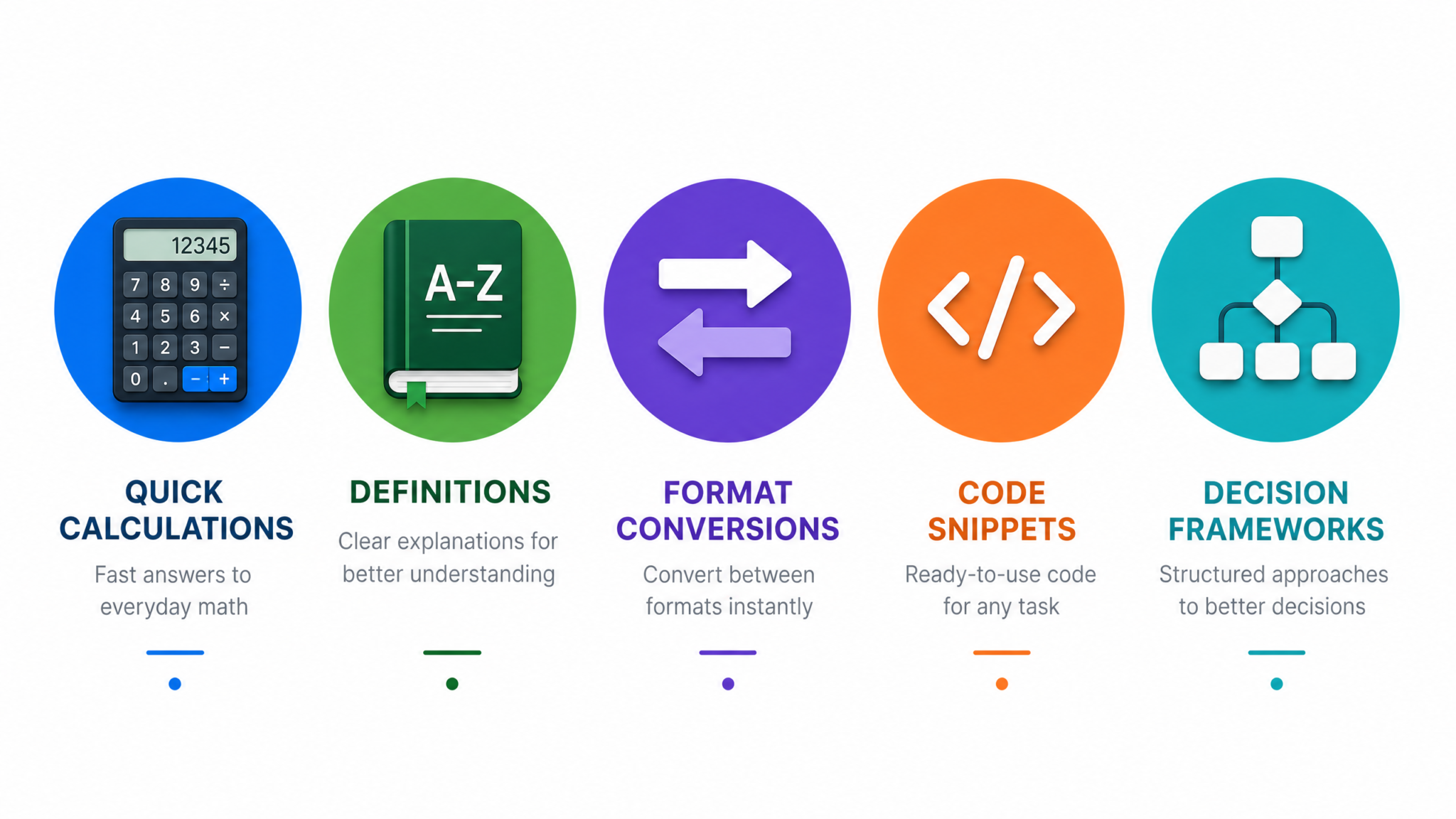
The 15 prompts in this playbook represent five distinct categories of atomic, self-contained tasks where the Quick Chat approach delivers its maximum value: calculations that need only the inputs and the formula, definitions calibrated to a specific audience, format conversions that are purely mechanical, code snippets specified with enough precision to be production-ready, and decision frameworks that structure thinking without requiring situational context.
Across all five categories, the underlying principles are consistent. Start with the task verb. Specify format, audience, language, and constraints explicitly. Use negative instructions to eliminate unwanted content. Embed your likely follow-up questions in the original prompt. Build a library of templates that improve with use. And critically — know when to reach for a full conversation instead.
The difference between a casual ChatGPT user and a power user isn’t which model they use or how long their prompts are. It’s the precision of their mental model for when each interaction mode is appropriate, and the depth of their library of prompts refined through real-world use. The playbook you’ve just read gives you both the framework and the starting templates. What you do with them over the next six months is what actually determines the productivity gains you’ll realize.
Start with the three prompts that match your most frequent daily needs. Run them. Save the ones that produce perfect first-try results. Refine the ones that don’t. In thirty days, you’ll have a personal Quick Chat library tuned to your specific work — and you’ll be spending far less time writing context and far more time using answers.
