
ChatGPT Projects Feature Complete Guide: How to Organize Conversations, Files, and Custom Instructions for Complex Workflows
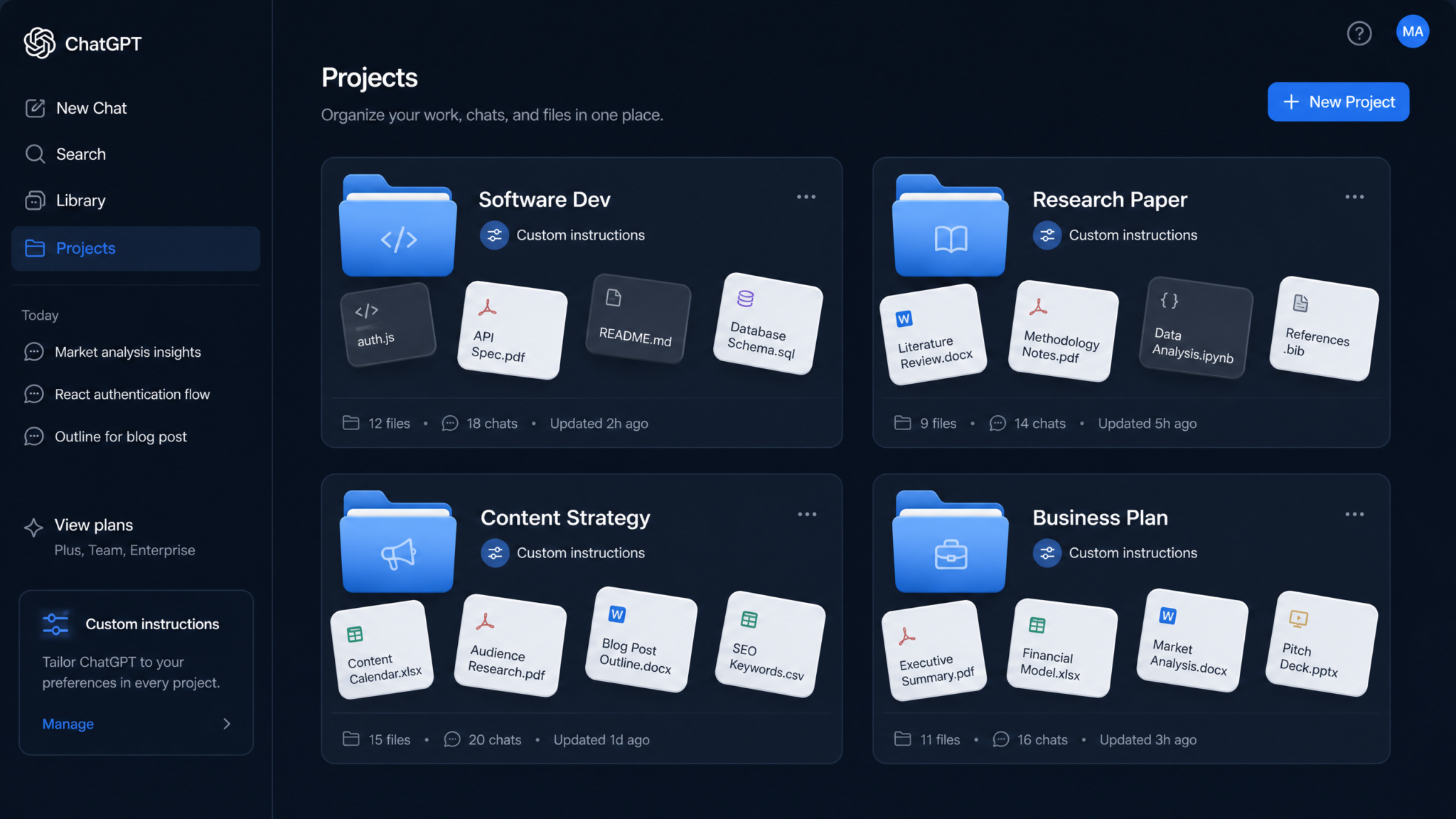
If you have ever lost a critical conversation buried under dozens of unrelated chats, spent ten minutes re-explaining your project context to ChatGPT before getting anything useful, or wished you could attach your entire codebase so the model always “knows” your app — the Projects feature was built for exactly those pain points. Launched as part of OpenAI’s push toward persistent, context-aware AI workspaces, ChatGPT Projects transforms the way power users, developers, researchers, and business professionals interact with the model. Instead of treating every conversation as a blank slate, Projects lets you create dedicated workspaces that carry your files, custom instructions, and conversation history as a unified, always-accessible context. This guide covers every dimension of the feature: how it works under the hood, how to configure it for maximum effectiveness, and how to apply it across real-world professional workflows including software development, academic research, content creation, and business intelligence.
1. What ChatGPT Projects Are — And What They Are Not
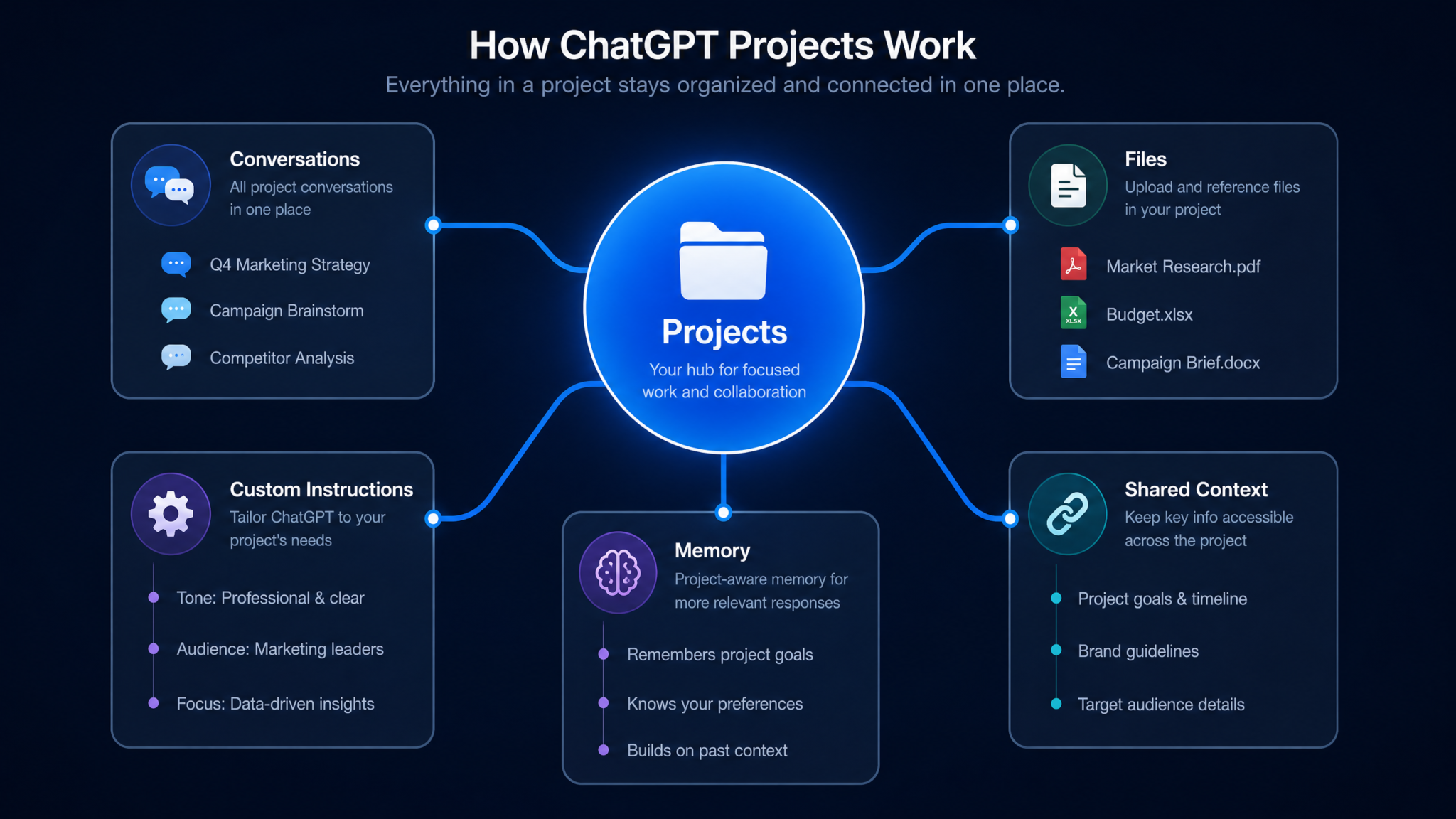
ChatGPT Projects is a workspace-level feature available to ChatGPT Plus, Team, and Enterprise subscribers. At its core, a Project is a named container that groups together three distinct types of persistent information: uploaded files and documents, custom instructions specific to that project, and conversations that happen within the project’s scope. When you open a conversation inside a Project, ChatGPT has access to everything you have placed in that container — without you having to paste, re-upload, or re-explain anything.
Think of a Project as a well-organized filing cabinet for your AI collaboration. Instead of one enormous drawer labeled “All Chats” (your default conversation history), you now have labeled drawers for “Mobile App Backend,” “Q4 Market Research,” “Brand Voice Guidelines,” and so on. Each drawer holds its own relevant documents and carries a sticky note on the front that tells ChatGPT how to behave when working in that context.
It is equally important to clarify what Projects are not. They are not a replacement for dedicated vector databases or retrieval-augmented generation (RAG) pipelines for enterprise-scale data. They are not a multi-user real-time collaborative editor in the style of Google Docs. They do not grant ChatGPT the ability to execute code against your live files or browse your uploaded documents with semantic search in the same way a fully custom RAG system would. What they do provide is a meaningfully richer context window for your interactions — one that persists between sessions without manual effort.
2. How Projects Differ from Regular Conversations
Understanding the architectural difference between a standard conversation and a Project conversation is essential before you invest time building out your workspaces. The table below summarizes the key distinctions:
| Feature | Regular Conversation | Project Conversation |
|---|---|---|
| Custom Instructions | Global settings only | Per-project overrides global settings |
| File Persistence | Expires after conversation ends | Persists across all project conversations |
| Conversation Organization | Flat chronological list | Grouped under project header |
| Context Continuity | Starts fresh each new chat | Shared file context always available |
| Model Persona | Default or global persona | Project-specific persona and tone |
| Collaboration | Not shareable (personal chats) | Shareable in Team/Enterprise tiers |
| Storage Allocation | Temporary per-message uploads | Dedicated persistent storage pool |
The most consequential difference is file persistence. In a regular conversation, if you upload a PDF of your API documentation and the conversation ends, the next time you start a fresh chat that document is gone. You re-upload, you re-orient the model, you lose momentum. Inside a Project, that same PDF lives in the project’s file library and is automatically injected into the context of every conversation you open within that project. The cognitive overhead of “resetting” the model disappears.
The second major difference is per-project custom instructions. Your global custom instructions apply everywhere, but a Project can override or extend them. Your global instructions might say “I am a software engineer who prefers concise answers.” Your “iOS App — SwiftUI” project instructions can add: “All code must use SwiftUI 5.0 syntax, target iOS 17+, follow the MVVM pattern, and use async/await for concurrency. Never suggest UIKit alternatives.” That level of specificity would be impractical to maintain globally but is enormously valuable scoped to a single project.
ChatGPT Custom Instructions Advanced Guide
3. Creating and Configuring Your First Project
Creating a Project takes under two minutes. In the left sidebar of the ChatGPT interface, you will find a “Projects” section with a “+ New Project” button. Clicking it opens a configuration panel where you name the project and optionally set its icon color — a small but useful visual differentiation when you are managing a dozen projects simultaneously.
After naming the project, you land on its main view, which has three primary sections: the file library on the left panel, the custom instructions panel accessible via the project settings icon, and the conversation list that populates as you use the project. The first meaningful configuration steps are:
- Write your project-level custom instructions before uploading anything. Instructions prime the model’s behavior and should be written before you start asking questions.
- Upload foundational documents — the files that define your project’s baseline context.
- Start your first conversation inside the project with an orientation message that tests whether the model is correctly referencing your uploaded files.
Naming Conventions That Scale
If you are a solo professional, a simple descriptive name like “Client — Meridian Healthcare — Rebrand 2025” works perfectly. For teams, adopt a structured naming convention immediately: [Type] — [Client/Project] — [Phase/Year]. Examples: DEV — Payments API — v2 Migration, RESEARCH — Competitive Analysis — Q4 2025, CONTENT — Blog Pipeline — Tech Vertical. Consistent naming makes projects scannable and prevents the organizational chaos you were trying to escape in the first place.
Icon Colors as a Workflow System
ChatGPT Projects allows you to assign color-coded icons. Many power users turn this into a category system: red for urgent active projects, blue for research, green for content, yellow for client work. It is a minor feature with outsize value when your sidebar has 20+ projects.
4. Adding Files and Documents to Project Context
The file library is the heart of a Project. When you upload files to a project, they become part of the persistent context that ChatGPT can reference across every conversation in that workspace. Understanding what to upload, how to structure it, and what the model actually does with it will determine whether your project context is an asset or clutter.
What Counts as Good Project Context Material
The best files to add to a project are those that define the parameters and constraints of your work rather than the work product itself. Consider these categories:
- Reference documents: API documentation, technical specifications, style guides, regulatory frameworks, research papers, brand guidelines
- Structural artifacts: Database schemas, system architecture diagrams (as text or PDF), class hierarchies, sitemap documents
- Constraint documents: Budget parameters, timeline documents, target audience personas, compliance requirements
- Knowledge base files: Previously generated summaries, prior research notes, meeting transcripts that establish project history
What you should not upload as permanent project files are things that change frequently and would create stale context: live data exports, version-controlled code files that you update daily, or working drafts that will be superseded. Those belong in individual conversations, uploaded fresh when relevant.
Organizing Your File Library
ChatGPT’s file library within a project does not yet support folder nesting, so your naming conventions do the organizational work. Prefix files logically: ARCH_system_overview.pdf, API_payment_endpoints.pdf, SCHEMA_database_v3.sql, STYLE_brand_voice_guide.pdf. When the model references a file in its response, it typically cites the filename, so descriptive names make responses more useful.
How ChatGPT Uses Uploaded Files
When you send a message inside a Project, ChatGPT does not load every uploaded file in full into its context window simultaneously (that would quickly hit token limits). Instead, it uses the files as retrievable reference material, pulling relevant sections into context when your query demands it. This means highly dense, well-structured files with clear headings perform better than sprawling, poorly formatted documents. If your 80-page technical specification is organized with clear section headers, the model can navigate to the relevant section; if it is a wall of undifferentiated text, retrieval quality degrades.
5. Setting Per-Project Custom Instructions
Per-project custom instructions are arguably the most powerful underutilized capability in the entire Projects feature. They allow you to define, in natural language, exactly how ChatGPT should behave, what it should know about your context, what constraints it must respect, and what output format it should default to — all specific to one project without affecting your experience elsewhere.
The Anatomy of Excellent Project Instructions
Great project instructions cover five dimensions:
- Role definition: What is ChatGPT’s role in this project? (“You are a senior backend engineer reviewing code for our Node.js microservices platform.”)
- Technical context: What tech stack, framework, or domain knowledge applies? (“The project uses TypeScript 5.2, Express 4.x, PostgreSQL 15, and is deployed on Railway.”)
- Behavioral constraints: What should it always/never do? (“Always suggest error handling for database queries. Never recommend external libraries not already in our package.json unless I explicitly ask.”)
- Output format defaults: How should responses be structured? (“Default to providing code in full functions with TypeScript type annotations. Include a brief explanation above each code block.”)
- Audience and communication style: Who will read the output and how should it be written? (“Responses should assume senior-level engineering familiarity. Skip basic explanations.”)
Example: Software Project Instructions
You are a senior full-stack engineer working on myapp.dev, a SaaS project management tool.

Stack: React 18, TypeScript, Vite, TailwindCSS (frontend); Node.js, Express, Prisma ORM, PostgreSQL (backend); hosted on Render.

Rules:
- All React components use functional components with hooks
- State management uses Zustand (no Redux, no Context API for global state)
- All API routes include Zod validation
- Database queries go through Prisma, never raw SQL unless performance-critical
- Follow the file structure in ARCH_project_structure.pdf

Defaults:
- TypeScript strict mode is ON
- Provide complete, runnable code (no truncation)
- Flag potential security issues with a ⚠️ prefix
This level of specificity means you never waste a message re-explaining your stack. Every conversation inside this project starts with the model already oriented as your project’s collaborator.
Layering Project Instructions with Global Instructions
Your global custom instructions and project instructions work in a layered fashion. Global instructions set your baseline identity (“I am a software engineer, I prefer direct answers, I work primarily in English”). Project instructions extend and, where there is conflict, override those globals. If your global instruction says “keep responses concise” but your project instruction says “provide complete, runnable code,” the project instruction takes precedence within that workspace.
ChatGPT System Prompt Engineering Techniques
6. Organizing Conversations Within Projects
Every conversation you start within a project appears in the project’s conversation list, grouped in the sidebar under that project’s header. This grouping is itself a significant organizational improvement, but there are practices that make the conversation list genuinely navigable over weeks and months of use.
Name Conversations Descriptively and Immediately
ChatGPT auto-generates conversation titles based on the first message, but these auto-titles are often too generic. Rename conversations manually using the three-dot menu. Effective naming patterns include the date and topic: 2025-01-15 — Auth middleware refactor, 2025-01-20 — Competitor pricing analysis first draft. This creates a built-in work log and makes any conversation retrievable in seconds.
One Conversation Per Distinct Task
The most common organizational mistake is treating a Project conversation like a document that you append to indefinitely. A 200-message conversation becomes as hard to navigate as a monolithic codebase. Instead, start a new conversation for each distinct task or problem. The shared file context means you do not lose continuity — the model still has access to all your project files. You gain a clean slate for each task and a searchable history of your individual work items.
Archiving vs. Deleting Completed Conversations
Completed task conversations still have value as reference material — you can scan them to remember decisions made, code written, or analysis done. Rather than deleting them, rename them with a [DONE] or [ARCHIVED] prefix so they sink visually below active conversations: [DONE] 2025-01-10 — Database migration planning. This keeps your active project conversation list clean while preserving institutional memory.
7. Using Projects for Software Development
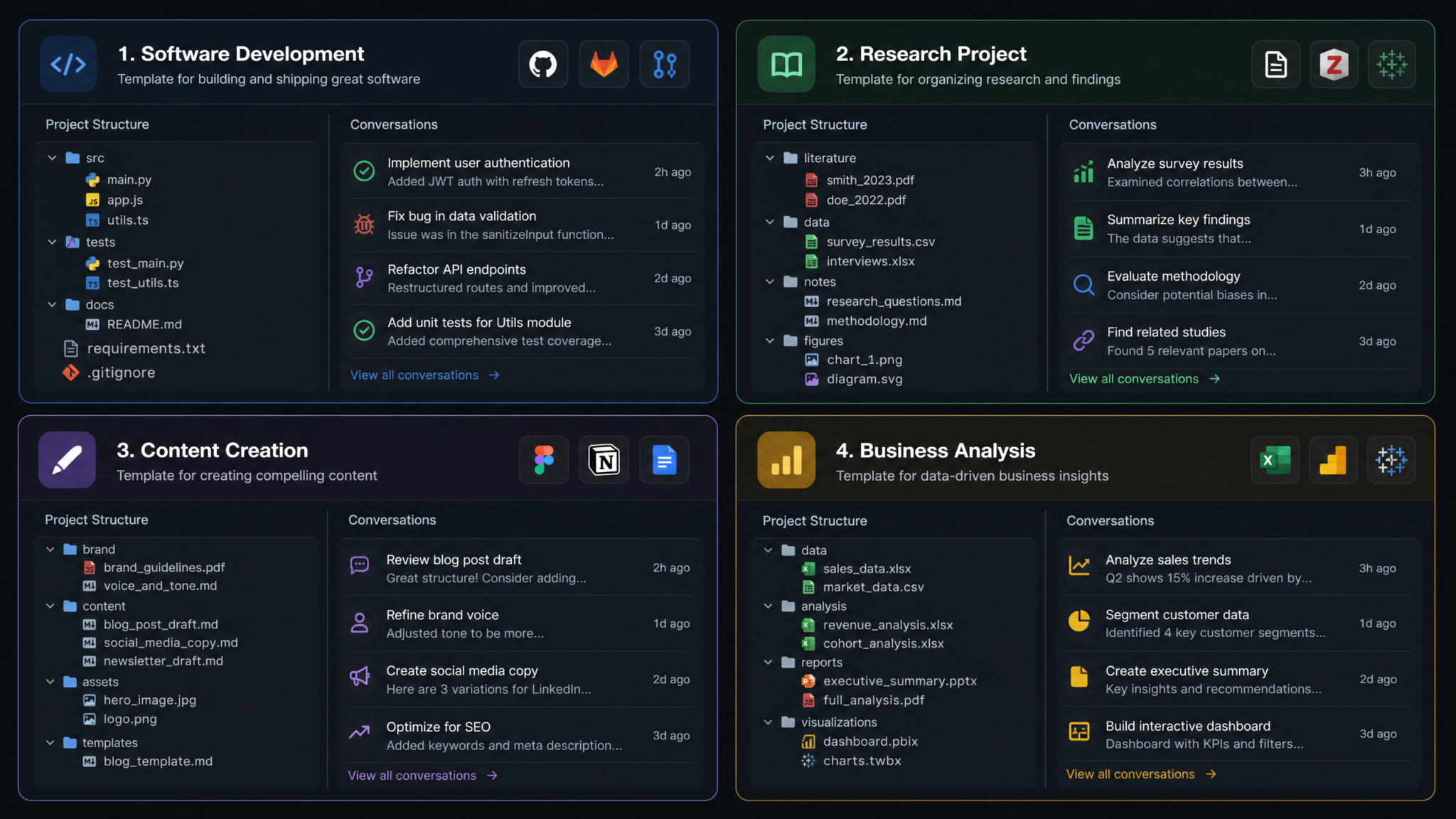
Software development is one of the highest-value use cases for ChatGPT Projects, precisely because the context requirements are so demanding. A developer working on a non-trivial application needs the model to know the architecture, the conventions, the dependencies, and the current problem — simultaneously. Projects make this achievable without constant re-priming.
What to Upload for a Development Project
package.jsonor equivalent dependency manifest (so the model knows exactly what libraries are available)- Database schema file (
schema.prisma,schema.sql, or an exported ERD as PDF) - Architecture overview document — a written description of how services communicate
- Coding standards document — even a brief one covering naming conventions and file structure
- API specification (OpenAPI/Swagger YAML or a PDF export)
A Practical Development Workflow
Consider a developer building a SaaS invoicing application at yourproject.io. Their project contains the schema file, the package.json, a markdown file describing the folder structure, and a PDF of the API spec. Their project instructions define the stack and coding conventions.
Now, when they need to implement a new feature — say, recurring invoice generation — they open a new conversation inside the project: “I need to add recurring invoice functionality. A recurring invoice should be created based on a schedule defined in the subscription table. Show me the Prisma query to fetch due subscriptions and the service function to generate the invoices.”
Without Projects, they would spend the first 300 words of that conversation explaining the schema, the ORM, the conventions. With Projects, ChatGPT already has all of that and jumps straight to writing production-relevant code. The schema is right there in the project files. The conventions are in the custom instructions. The conversation reaches useful output in the very first response.
Code Review Conversations
Keep a dedicated conversation within your development project titled “Code Review Log” and use it to paste code snippets for review against your project’s architectural standards. Because the model knows your conventions from both the uploaded standards document and the project instructions, its code review comments are meaningful — flagging a deviation from your Zustand state management pattern, for example, rather than generically suggesting Redux.
ChatGPT Code Generation Best Practices for Developers
8. Using Projects for Academic and Market Research
Researchers — whether academic, journalistic, or market-focused — deal with a common challenge: synthesizing large bodies of material into coherent analysis. A research Project turns ChatGPT into a persistent research assistant that has read your source material and can engage with it conversationally across multiple sessions.
Building a Research Paper Collection
For an academic literature review, upload your key source PDFs directly into the project. For a project on, say, large language model evaluation methodologies, your file library might contain the ten most relevant papers you have identified. Your project instructions establish your role (“You are a research assistant helping me write a literature review on LLM evaluation for a PhD dissertation”) and your methodological constraints (“I follow APA 7th edition. My dissertation argues that current benchmarks inadequately measure compositional reasoning. Always frame paper summaries relative to this central argument”).
Now your conversations become focused analytical sessions: “Summarize how [paper filename] characterizes compositional reasoning benchmarks and identify where it supports or contradicts my thesis.” “Compare the evaluation approaches in [paper A] and [paper B]. What are the methodological differences?” These questions get precise, contextually aware answers that would take far longer to construct from scratch in a fresh conversation.
Market Research Projects
For competitive market research, your project files might include: competitor landing pages exported as PDFs, your own product specs, an industry report, and a customer interview summary document. Project instructions define your analytical lens: “You are a market research analyst. Our product is a B2B invoicing tool targeting freelancers with under $500K ARR. When analyzing competitor information, always structure findings using these categories: pricing model, target segment, key differentiators, weaknesses, and threat level to us.”
Every analysis conversation automatically applies that lens. You do not re-explain the framework. You ask: “Based on the competitor files, what pricing model patterns are most common and where is there potential differentiation?” and receive a structured competitive analysis, not a generic market overview.
9. Using Projects for Content Creation and Brand Management
Content teams face an acute version of the context problem: maintaining brand voice, style consistency, audience awareness, and editorial standards across dozens of pieces produced by one or multiple contributors. A content creation Project addresses all of this simultaneously.
The Brand Guidelines Foundation
Every content creation Project should begin with a comprehensive brand guidelines document as its first upload. This document should contain: brand voice descriptors (with examples of on-brand and off-brand language), tone guidelines for different content types, target audience personas with psychographic detail, prohibited language and competitor naming policies, and any legal or compliance boilerplate requirements.
The project instructions then operationalize these guidelines: “You are a content writer for [Brand]. Every piece of content must reflect our brand voice: direct, technically credible, warm but not casual, never hyperbolic. Our audience is senior product managers at mid-market SaaS companies. Avoid jargon like ‘game-changing,’ ‘revolutionary,’ or ‘best-in-class.’ Always end articles with a concrete, actionable takeaway.”
Managing a Content Calendar Within Projects
Upload a content calendar as a project file — even a simple CSV or markdown table of planned topics, their target keywords, target personas, and publication dates. Now you can ask: “I need to write the article scheduled for Week 3 targeting the ‘product roadmap prioritization’ keyword for the VP of Product persona. Outline the article structure first.” The model knows your brand guidelines, your calendar context, and your audience — it can move directly into execution.
Maintaining Consistency Across Multiple Writers
In a Team plan context, a content project shared with multiple team members becomes a living style guide enforcement tool. Each writer works within the same project, with the same guidelines always present in context. Inconsistencies that normally creep in across a five-person content team — varying formality levels, inconsistent use of Oxford comma, mixed tone — are systematically reduced because every conversation is anchored to the same foundational context.
10. Using Projects for Business Analysis and Data Work
Business analysts and data professionals can use Projects to maintain persistent analytical context around a specific domain — a business unit, a product line, a market segment — and build a cumulative understanding over time rather than starting from scratch with each analysis request.
Setting Up a Data Analysis Project
Upload your data dictionary (the document defining what each field in your datasets means), any relevant data model diagrams, the business metrics glossary (“MRR is calculated as…”, “Churn rate is defined as…”), and any standing reports that establish baseline performance context. For a project focused on subscription revenue analytics, this might include: the metrics glossary, the database schema for the subscription tables, last quarter’s board summary for baseline context, and a document describing how cohorts are defined in your business.
Project instructions define the analytical context: “You are a business analyst for a B2B SaaS company with approximately $8M ARR. When analyzing metrics, always contextualize against our benchmark definitions in the uploaded glossary. Structure analytical outputs with an Executive Summary (3 bullet points max), a detailed findings section, and recommended actions. Assume the audience is the CFO and CPO.”
Iterative Analysis Conversations
Unlike a one-off analytical question, a Project enables genuinely iterative analysis. Conversation 1 explores revenue trends. Conversation 2 digs into cohort retention. Conversation 3 models the impact of a proposed pricing change. Each conversation starts with the full data context already loaded — the schema, the glossary, the baseline — and benefits from the model’s awareness of the analytical work done in previous conversations (if you reference them in your prompts or carry forward key findings via a running summary document).
11. Project Templates for Common Workflows
One of the most effective efficiency strategies is developing reusable project templates — a standard set of instructions and a standard set of documents — that you replicate when starting similar projects. Below are template specifications for five common professional workflows.
Template 1: Software Feature Development
- Files: package.json, database schema, folder structure doc, API spec
- Instructions focus: Stack definition, coding conventions, output format (full runnable code), security flagging
- Conversation structure: Separate conversations per feature/bug/refactor task
Template 2: Content Marketing Workflow
- Files: Brand voice guide, persona documents, content calendar, competitor messaging analysis
- Instructions focus: Brand voice enforcement, SEO keyword awareness, article structure defaults, prohibited language list
- Conversation structure: One conversation per article, named with article title and date
Template 3: Academic Literature Review
- Files: Key source papers (PDF), research question document, theoretical framework notes
- Instructions focus: Citation format, thesis framing, analytical lens definition, output length norms
- Conversation structure: Per-paper analysis conversations, synthesis conversations, writing draft conversations
Template 4: Client Consulting Engagement
- Files: Client brief, discovery interview transcripts, industry background doc, deliverable templates
- Instructions focus: Client context and constraints, deliverable format standards, confidentiality reminders, communication tone for client-facing output
- Conversation structure: Phase-based conversations (Discovery Analysis, Strategy Development, Deliverable Drafting)
Template 5: Product Development Research
- Files: Customer interview summaries, competitive analysis, product roadmap, user persona documents
- Instructions focus: Jobs-to-be-done framing, output structured for product decisions, insight vs. opinion distinction
- Conversation structure: Problem discovery, solution ideation, validation analysis, roadmap planning
12. Sharing and Collaboration Features
The collaboration dimension of ChatGPT Projects varies significantly by subscription tier, and understanding these differences is essential for teams considering the feature as a shared infrastructure tool.
Plus (Individual) Plans
Projects on individual Plus plans are private to the account holder. There is no built-in sharing mechanism. However, individual users can still benefit from “collaboration” in an asynchronous, manual sense: exporting key conversations, sharing document templates with team members who build their own parallel projects, or maintaining a project whose outputs are shared via other channels.
Team Plans
ChatGPT Team plan users can share Projects with other members of their Team workspace. When a Project is shared, collaborators can access the project’s file library and open new conversations within it, but conversation histories are per-user rather than shared in real-time. Think of it as a shared context library with individual workspaces rather than a true multi-user simultaneous collaboration environment.
Enterprise Plans
Enterprise deployments offer the most robust collaboration infrastructure, including administrative controls over who can create, access, and modify Projects within an organization. Enterprise admins can establish shared Projects that function as standardized knowledge bases — ensuring every member of a team works with the same foundational context, reducing inconsistency and onboarding friction.
Access 40,000+ AI Prompts for ChatGPT, Claude & Codex — Free!
Subscribe to get instant access to our complete Notion Prompt Library — the largest curated collection of prompts for ChatGPT, Claude, OpenAI Codex, and other leading AI models. Optimized for real-world workflows across coding, research, content creation, and business.
Practical Collaboration Workflow for Teams
Even in the Team tier, a shared Project delivers substantial collaborative value. A marketing team’s shared “Brand Content” Project ensures every writer has access to the same voice guidelines, persona documents, and style rules. A development team’s shared “Platform Architecture” Project means any engineer can ask architecture questions without the senior architect being a bottleneck for institutional knowledge. The shared file library democratizes context.
ChatGPT Team Plan vs Enterprise Plan Feature Comparison
13. Storage Limits and Supported File Types
Working effectively within the Projects feature requires understanding its technical constraints so you can design your project structure accordingly rather than encountering limits at an inconvenient moment.
File Size and Storage Limits
As of the current implementation, individual file uploads within a Project are subject to a size limit (typically aligned with ChatGPT’s standard file upload limit of around 512MB per file, though this may vary and is subject to change by OpenAI). The more operationally relevant constraint is the total project storage, which on Plus plans sits around 10GB across all projects, shared with your general file storage. Team and Enterprise plans receive larger allocations.
For most professional workflows, these limits are more than sufficient. A typical project — even a well-resourced research project with 20 PDFs and several documentation files — will rarely approach 500MB of total storage. The constraint becomes relevant primarily when working with large data files, high-resolution design assets, or extensive codebases where you are tempted to upload entire repositories rather than structured documentation.
Supported File Types
| File Type | Supported | Best Use in Projects |
|---|---|---|
| ✅ Yes | Research papers, reports, documentation, brand guides | |
| DOCX / DOC | ✅ Yes | Specifications, meeting notes, guidelines |
| TXT / Markdown | ✅ Yes | Code conventions, structured notes, schemas |
| CSV / Excel | ✅ Yes (with Code Interpreter) | Data sets, content calendars, metrics baselines |
| Python / JavaScript / SQL | ✅ Yes | Reference code, schema files, query templates |
| Images (PNG, JPG) | ✅ Yes | Architecture diagrams, UI mockups, design assets |
| ZIP archives | ⚠️ Limited | Not recommended for project library |
| Video / Audio | ❌ No | Transcripts recommended instead |
Optimizing Files for Project Context
File format significantly affects how well ChatGPT can reference your uploaded documents. Plain text and well-structured PDFs with proper headings produce better retrieval results than scanned image-based PDFs, presentation decks with text-as-image, or Excel files with complex merged cell structures. When you have a choice, prefer well-formatted PDF over scanned document, and markdown/plain text over complex formatted Word documents for technical reference material.
14. Migrating Existing Conversations into Projects
One of the first questions experienced ChatGPT users ask when they discover Projects is: “What do I do with the hundreds of relevant conversations already in my chat history?” The answer requires a practical strategy because there is no automatic batch migration tool.
The Migration Framework
Approach migration in three tiers based on the value and recency of existing conversations:
- Active work conversations (high priority): Conversations you reference regularly or are likely to continue. These warrant manual migration effort.
- Reference conversations (medium priority): Conversations containing useful analysis, code, or research that you occasionally need to consult.
- Historical archive (low priority): Old conversations that are unlikely to be revisited. Leave these in the general conversation history.
Migrating an Active Conversation
For active work conversations, the most effective migration approach is:
- Create the relevant Project with appropriate custom instructions and initial file uploads.
- In the old conversation, ask ChatGPT to generate a comprehensive summary document: “Create a detailed project state document covering: all decisions made, all code written with file paths, all open questions, and current progress. Format it as a structured markdown document.”
- Copy the output, save it as a
PROJECT_STATE_[date].mdfile, and upload it to the new project’s file library. - Start a new conversation inside the project and reference the state document to re-orient the model.
This approach is vastly more efficient than trying to summarize manually or pasting conversation snippets ad hoc. The model is excellent at generating structured state summaries of its own prior conversations.
Extracting Reusable Context from Old Conversations
Many valuable conversations contain embedded knowledge that belongs in your project’s permanent file library rather than in a state document. Code snippets that represent architectural decisions, analysis frameworks you developed, persona definitions you refined through dialogue — these should be extracted and saved as standalone reference files. Ask ChatGPT directly: “Extract all the architectural decisions we made in this conversation and format them as a structured decision log.” Then save the output as a project file.
15. Best Practices for Project Organization
Synthesizing the approaches across all use cases, a set of universal best practices emerges for maintaining effective, sustainable project organization over time.
The Single Responsibility Principle for Projects
Just as a well-designed software function should do one thing well, a well-designed Project should have a single clear purpose. The temptation to create a “General Work” project is real but counterproductive — you end up with a context mix that is too broad to be useful. If two workstreams require different custom instructions or different file sets, they should be different Projects. The overhead of maintaining separate projects is far lower than the cost of degraded, unfocused context quality.
Regular File Library Audits
Schedule a monthly file library review for active projects. Remove or update files that have become stale: the API spec from six months ago that no longer reflects current endpoints, the competitor analysis from before a major market change, the persona document that was revised after customer research. Stale context is actively harmful — it causes the model to give advice based on outdated constraints.
Maintain a Project README
Create a README.md file for each project — a brief document that you maintain describing the project’s purpose, its current phase, key files and what they contain, and any important notes about the project instructions. This serves as both documentation and as a useful file for the model to reference when it needs to orient itself to the project’s overall structure.
Use the Project for Output Review, Not Just Input
Many users treat Projects as input repositories — they upload context and ask questions. The more powerful practice is also using Projects for output review. Open a dedicated “Quality Review” conversation where you paste generated content back and ask the model to review it against the project’s own standards: “Review this against our brand guidelines file. Flag any voice inconsistencies, prohibited language, or deviations from our audience targeting.”
Keep Custom Instructions Versioned
When you modify project instructions significantly, save the previous version in a text file in the project library before changing them. This creates a record of how your project’s behavioral parameters evolved, which is useful when you want to understand why outputs from three months ago had a different character than today’s.
16. Power User Tips for Maximizing Project Context
Beyond the foundational practices, experienced project users develop advanced techniques that significantly amplify the value of the feature. These are the approaches that differentiate users who get adequate value from Projects and those who consider the feature genuinely transformative.
Tip 1: Build a Living Context Document
Create a file called CONTEXT_CURRENT.md that you update regularly with the most current state of the project: current sprint goals, recent decisions, current blockers, active assumptions. This file becomes the dynamic layer on top of your more static reference files. At the start of each work session, reference it: “Review CONTEXT_CURRENT.md and summarize where we are before we begin today’s work.” This creates a ritual that aligns the model’s working context with your own at the start of each session.
Tip 2: Use Constraint Files to Prevent Repeated Mistakes
If you notice the model repeatedly making the same type of error in your project — suggesting an anti-pattern you have explicitly rejected, recommending a library that conflicts with your setup, proposing an architecture that does not fit your constraints — create a CONSTRAINTS_AND_ANTIPATTERNS.md file that explicitly documents these rejected approaches and why. Upload it to the project. This converts your correction history into preventive context.
Tip 3: Layer Multiple Specialist Instruction Profiles Within One Project
If your project requires switching between distinct modes — say, a product development project where you sometimes need engineering analysis, sometimes marketing copy, sometimes financial modeling — use a trigger phrase system in your project instructions. “When I say [ENGINEERING MODE]: respond as a senior software architect. When I say [MARKETING MODE]: respond as a brand strategist familiar with our guidelines. When I say [FINANCE MODE]: respond as a financial analyst using our metrics definitions.” This gives you mode-switching without project-switching.
Tip 4: Use Projects for Prompt Engineering and Testing
Create a dedicated Project for prompt engineering work itself. Upload your most successful system prompts, maintain a log of prompt iterations and their results, store your prompt evaluation criteria. Use this project to develop and refine prompts that you will then implement elsewhere. Having a dedicated space for meta-level AI workflow development is a mark of sophisticated AI tooling practice.
Tip 5: Synthesize Across Conversations Periodically
Every two to four weeks in an active long-running project, open a new synthesis conversation: “Review the summaries of our last ten conversations in this project and identify: (1) key decisions made, (2) recurring issues or blockers, (3) what we were planning to do next, and (4) any context that should be added to the project files.” This meta-review keeps you oriented in long-running projects and surfaces documentation that should be formalized.
Tip 6: Exploit Custom Instructions for Persona Specificity
The more specific your project instructions define the model’s expertise level and professional identity, the more effectively it plays that role. Instead of “You are a marketing expert,” write “You are a growth marketing specialist with 12 years of B2B SaaS experience, deep expertise in product-led growth motions, and familiarity with our specific market position as described in our brand document.” Specificity breeds relevance.
Tip 7: Pre-load Common Analysis Frameworks as Files
If you regularly apply a specific analytical framework — Jobs-to-be-Done, Porter’s Five Forces, the RICE prioritization method, a specific financial modeling approach — write a detailed description of that framework and how you apply it, and upload it as a project reference file. Your instructions then point to it: “When conducting competitive analysis, apply the framework described in ANALYSIS_COMPETITIVE_FRAMEWORK.md.” The model applies your specific, customized version of the framework rather than a generic textbook interpretation.
Tip 8: Build Cross-Project Reference Architecture
For users managing multiple related projects — say, multiple client engagements in the same industry — develop a shared knowledge base document that you include in all related project libraries. An industry glossary, a regulatory framework summary, a shared set of persona definitions. This cross-project reference layer means that common knowledge lives in one place (one file you maintain) rather than being duplicated imperfectly across multiple projects.
ChatGPT Memory Feature vs Projects: When to Use Each
Tip 9: Treat Project Instructions as a Product
The single most impactful investment you can make in your ChatGPT Projects workflow is treating your project instructions as a product that deserves iteration, testing, and refinement. Start with a first-draft instruction set, run ten conversations against it, identify where the model’s output deviates from your needs, and refine the instructions in response. Apply the same improvement methodology you would to any software configuration: observe, measure deviation, hypothesize fix, test, iterate. Users who iterate their project instructions over time achieve dramatically better results than users who set instructions once and never revisit them.
Tip 10: Document the Project’s Own Reasoning About Itself
One underexplored power-user technique: ask the model to reason about your project setup itself. “Given the project instructions and files, what types of questions will you be able to answer most effectively? What types of questions will be outside your useful range? What additional files or context would most improve your usefulness in this project?” This meta-analysis surfaces gaps in your project setup that you might not notice through use alone, turning the model into a collaborator in designing its own context.
Conclusion: Projects as an Infrastructure Investment
The framing that best captures ChatGPT Projects is this: they transform ChatGPT from a conversational tool into a professional infrastructure layer. The difference between a skilled professional who uses ChatGPT with well-configured Projects and one who uses standard conversations is not a 10% productivity improvement — it is a categorical difference in the quality, consistency, and depth of what they can accomplish with the tool.
The investment required to set up a well-configured Project — writing thorough instructions, organizing your reference documents, establishing naming conventions — typically pays back within the first week of use. The elimination of context re-loading alone saves meaningful time. The improvement in output quality from precise, always-present constraints is harder to quantify but consistently reported by power users as the most valuable benefit.
The users who get the most from Projects are those who approach them with the same intentionality they bring to any professional system: thoughtful initial design, regular maintenance, and continuous refinement based on observed results. Projects reward the investment you put into them with compounding returns — each improvement to your instructions and file library makes every future conversation in that workspace more effective.
As OpenAI continues to develop the Projects feature — with likely improvements to collaborative capabilities, file retrieval, and context management — users who build sophisticated project workflows now will be positioned to seamlessly adopt those enhancements. The architecture of how you organize your AI collaboration today is the foundation on which more powerful future capabilities will be built.
