
20 ChatGPT Prompts for Proven Productivity Methods: Pomodoro, Time Blocking, GTD, Eisenhower Matrix, and SMART Goals Automated
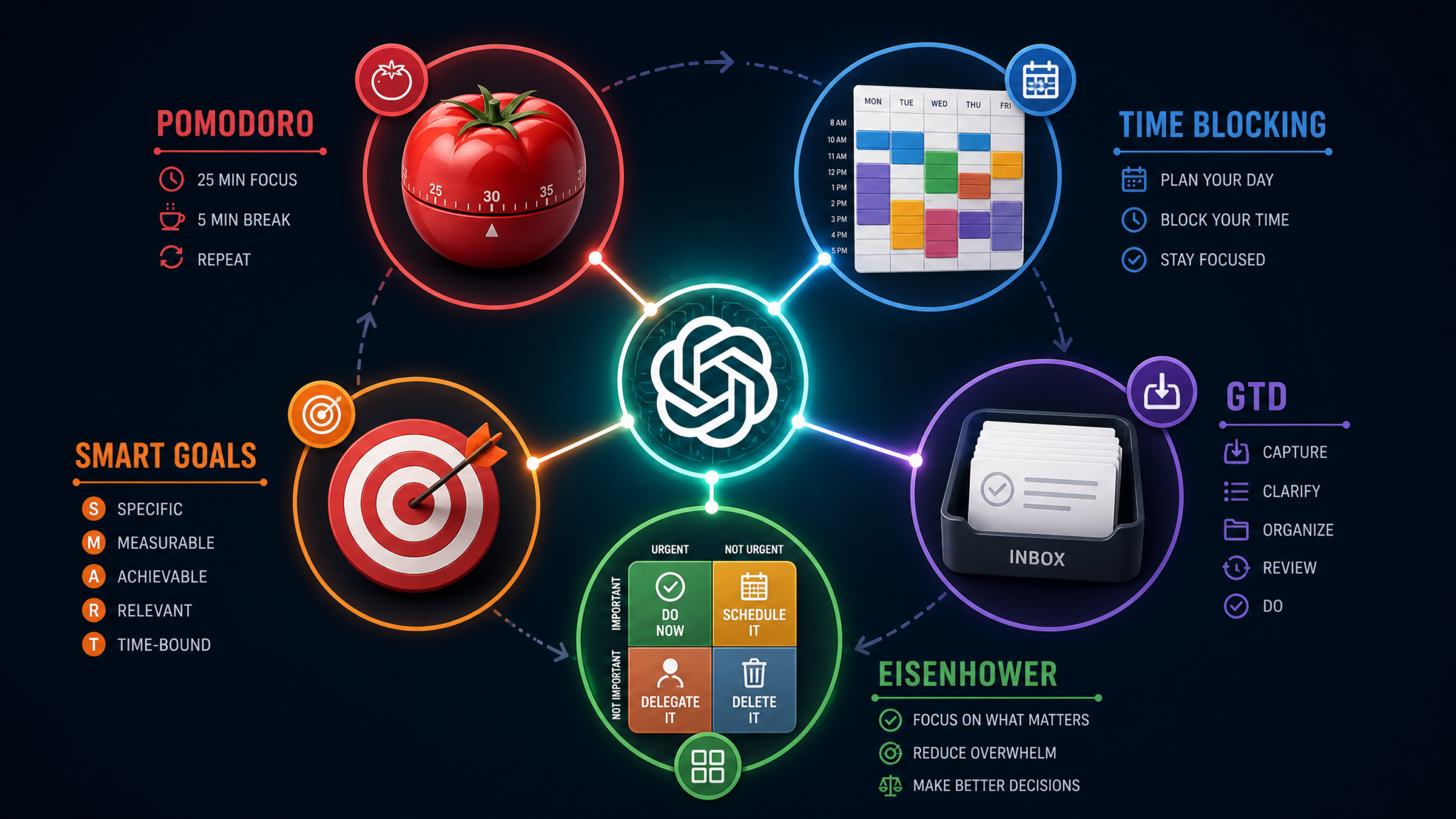
Most people know about the Pomodoro Technique, Getting Things Done, and the Eisenhower Matrix. They’ve read the books, watched the YouTube summaries, maybe even bought the productivity planners. But knowing a framework and actually running it every single day are two entirely different problems. The gap between understanding a system and operationalizing it is where most productivity efforts die — not from lack of motivation, but from lack of a reliable execution partner. ChatGPT closes that gap. This masterclass gives you 20 battle-tested prompts that transform ChatGPT from a general-purpose assistant into a dedicated productivity coach for five of the most proven time management systems ever developed. Each prompt is engineered to set up, run, review, and optimize your workflow — turning abstract methodology into daily, measurable action.
Why ChatGPT Is the Missing Layer in Your Productivity Stack
Productivity frameworks have a dirty secret: they require consistent cognitive overhead to maintain. GTD demands weekly reviews that most people skip after week three. Time blocking requires 20–30 minutes of calendar planning before a week even starts. The Pomodoro Technique needs someone — or something — to hold you accountable between sessions. Historically, that overhead fell entirely on the individual, and individual willpower is a finite and unreliable resource.
ChatGPT changes the equation in three specific ways:
- Zero-friction personalization: A productivity book gives you a framework. ChatGPT gives you a framework built around your actual projects, your actual work style, and your actual constraints. The difference is the difference between a map of a city and GPS with your destination already entered.
- On-demand accountability without judgment: Research published in the American Journal of Lifestyle Medicine found that people who have a specific accountability appointment with a partner achieve their goals at a 95% rate, compared to 65% for those who merely commit to a plan. ChatGPT provides a frictionless accountability partner available at any hour.
- System maintenance automation: The hardest part of any productivity system isn’t the initial setup — it’s the weekly reviews, the recalibration after a bad week, the optimization cycles. All of this can be prompted and guided by ChatGPT, removing the meta-work of managing your management system.
Each of the 20 prompts in this guide follows a four-phase architecture: Setup → Execute → Review → Optimize. This mirrors the continuous improvement loop that separates people who use productivity systems for two weeks from people who build their entire career around them. Before diving into the prompts, note that these work best when you paste them into a persistent ChatGPT conversation dedicated to your productivity system — not a throwaway chat. The context accumulates and the quality of responses compounds over time.
Best ChatGPT Custom Instructions for Productivity and Deep Work
Pomodoro Technique: 4 Prompts to Automate Deep Work Cycles
Francesco Cirillo developed the Pomodoro Technique in the late 1980s using a tomato-shaped kitchen timer. The core mechanic is deceptively simple: 25 minutes of focused work followed by a 5-minute break, with a longer 15–30 minute break after every four cycles. The technique’s genius lies in making time tangible and defeating the perfectionism that prevents starting. A 2016 study from the University of Illinois found that brief mental breaks significantly improve focus over long tasks — validating the mechanism Cirillo discovered empirically decades earlier.
Prompt 1: Pomodoro Initial Setup — Configure Your System
You are my dedicated Pomodoro productivity coach. I need you to help me set up a personalized Pomodoro system.

Here is my context:
- My primary work type: [describe your work — coding, writing, design, sales calls, research, etc.]
- My typical available work window: [e.g., 9 AM – 12 PM and 2 PM – 5 PM]
- My biggest focus challenge: [e.g., context switching, social media, meetings interrupting flow, etc.]
- My energy pattern: [e.g., high energy mornings, afternoon slump, second wind at night]

Based on this, please:
1. Recommend whether I should use standard 25/5 Pomodoros or a modified interval (e.g., 50/10, 90/20) and explain why for my specific work type
2. Design a Pomodoro session template I should use before each work block, including a "pre-Pomodoro ritual" checklist of 3–5 steps
3. Create a distraction capture protocol — a specific phrase and process I should use when a distracting thought hits during a session
4. Define my "Pomodoro rules" — 5 personal rules tailored to my context that I commit to following
5. Suggest which tasks from my work type should NEVER be started mid-Pomodoro and which ones are ideal for single-session completion

Format the output as a structured personal Pomodoro constitution I can save and reference daily.
Why This Prompt Works
Generic Pomodoro advice treats everyone identically, but a software engineer’s optimal interval differs dramatically from a content writer’s or a sales professional’s. This prompt forces ChatGPT to reason about your specific cognitive demands, energy patterns, and distraction profile. The “Pomodoro constitution” framing is deliberate — it creates a document with the weight of a commitment rather than a casual suggestion list.
Expected Output
You should receive a personalized document containing your recommended interval timing with justification, a 3–5 step pre-session ritual, a distraction handling phrase (something like “Park it and return”), five specific rules tailored to your work type, and a categorized task list showing Pomodoro-compatible vs. incompatible tasks.
Customization Tips
- If you work in a noisy open office, add: “I work in an open office and cannot control ambient noise or interruptions from colleagues.”
- For remote workers with kids at home: “My environment has unpredictable 5–15 minute interruptions that I cannot eliminate entirely.”
- Add your specific software tools: “I use Notion for task tracking and Google Calendar for scheduling.”
Prompt 2: Pomodoro Daily Execution — Run the Method
I'm about to start my Pomodoro work session for today. Act as my Pomodoro session manager.

Today's date: [date]
Available work time: [start time] to [end time]
Today's task list (paste your tasks here):
[Task 1]
[Task 2]
[Task 3]
[Task 4 — etc.]

My energy level right now (1-10): [number]
Any known interruptions today: [e.g., 11 AM call for 30 minutes, lunch at 1 PM]

Please:
1. Calculate exactly how many Pomodoros I can complete in my available window, accounting for all known interruptions and buffer time
2. Assign each task a Pomodoro estimate (how many sessions it will likely require) and flag any task that seems under-estimated — tell me if I'm being unrealistic
3. Sequence the tasks in optimal order based on my energy level, deadline urgency, and cognitive load (hardest work first if energy is 7+, easier work first if below 6)
4. Create a minute-by-minute session plan showing exactly what I work on during each Pomodoro and when my breaks fall
5. Give me a single "focus phrase" for today — one sentence that captures what success looks like by end of day
6. Identify the ONE task that, if completed today, would make everything else feel secondary

Output this as my daily Pomodoro battle plan.
Why This Prompt Works
The daily execution prompt solves the most common Pomodoro failure mode: people know the technique but don’t plan their sessions in advance, leading to the first Pomodoro being wasted deciding what to work on. By feeding in your actual task list and constraints, you get a specific, realistic plan rather than a theoretical framework.
Expected Output
A structured daily plan with numbered Pomodoro sessions, time stamps, assigned tasks, break windows, a prioritized task sequence, your daily focus phrase, and a single “anchor task” that anchors the day’s purpose.
Customization Tips
- Add “I have ADHD and tend to underestimate task completion time by 50%” to get more conservative estimates.
- Include: “Flag any task on this list that doesn’t belong in a Pomodoro session and should be delegated or deleted.”
Prompt 3: Pomodoro Weekly Review — Assess Progress
It's the end of my work week and I need to conduct my Pomodoro weekly review. Act as my analytical productivity coach.

This week's data:
- Total Pomodoros planned: [number]
- Total Pomodoros completed: [number]
- Days I followed the system: [number out of 5]
- Most productive day: [day]
- Least productive day: [day]
- Tasks completed fully: [list them]
- Tasks started but not finished: [list them]
- Tasks not touched: [list them]
- Most common interruption type: [describe]
- Average energy level across the week (1-10): [number]

Please provide:
1. A completion rate analysis — what my Pomodoro completion percentage means about my planning accuracy and realistic capacity
2. Pattern identification — based on which days worked and which didn't, identify at least 2 patterns in my performance
3. A "gap analysis" between what I planned and what actually happened, with specific hypotheses about WHY the gaps exist (not generic advice — reason from my specific data)
4. Three specific metrics I should track differently next week to get better data
5. An honest assessment of whether I'm using Pomodoro correctly or just timing myself doing the same unfocused work I always did
6. Next week's adjusted session plan based on what we learned — including recommended changes to my intervals, task sequencing strategy, or break protocols
Why This Prompt Works
The weekly review is the most skipped component of any productivity system, yet it’s where compound improvement happens. By providing concrete data points, you force the model to reason analytically rather than generically. The question about whether you’re “using Pomodoro correctly” in point 5 is particularly powerful — it catches the common mistake of treating a timer app as productivity while the underlying work quality remains unchanged.
Prompt 4: Pomodoro Optimization — Improve the System
I've been using the Pomodoro Technique with ChatGPT assistance for [X weeks/months]. It's time to optimize my system. Here's my honest self-assessment:

What's working well: [describe 2-3 specific wins]
What's still frustrating: [describe 2-3 persistent problems]
My current interval: [e.g., 25/5]
My average daily Pomodoros completed: [number]
My biggest unreached goal during this period: [describe]

Please act as a productivity systems engineer and:
1. Diagnose whether my frustrations are system problems (wrong framework) or execution problems (right framework, wrong habits)
2. Suggest one significant modification to my current Pomodoro setup — something more substantial than "try 30 minutes instead of 25"
3. Identify whether I should consider integrating Pomodoro with another productivity framework (e.g., pairing it with Time Blocking or GTD) and specifically how that integration would work
4. Design a 30-day Pomodoro improvement challenge with weekly milestones that would measurably advance my productivity
5. Give me the three leading indicators I should watch weekly to know if my system is improving before the results are obvious
Why This Prompt Works
Optimization prompts force honest diagnosis. Most people assume their productivity problems are execution failures when they’re often system design failures — the wrong framework for their work type, the wrong interval for their cognitive style, or a missing integration with their existing tools.
Time Blocking: 4 Prompts to Own Your Calendar
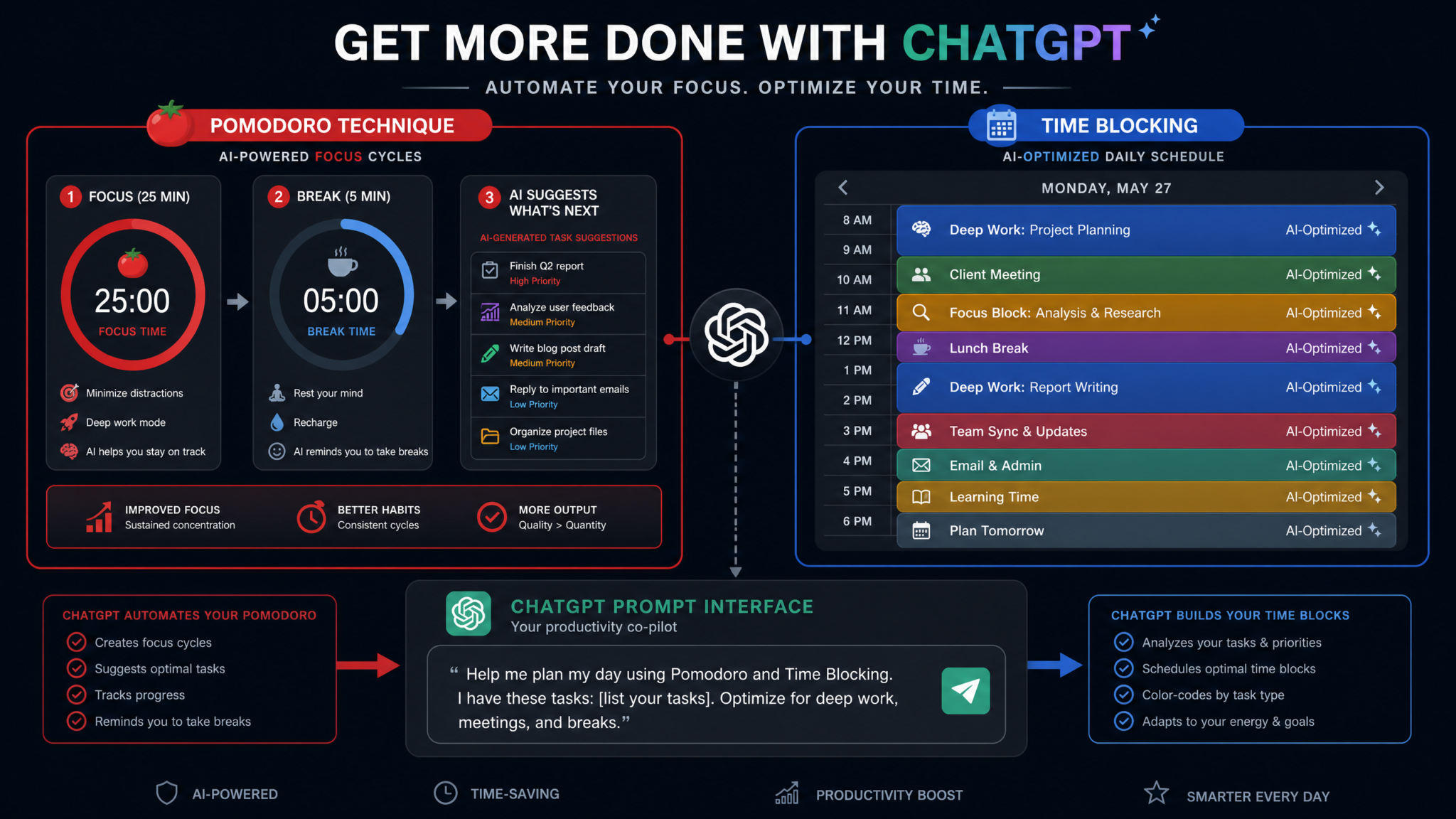
Time blocking — the practice of scheduling specific tasks into dedicated calendar blocks rather than working from a to-do list — is used by Bill Gates, Elon Musk, and Cal Newport, who wrote extensively about its mechanisms in Deep Work. The core insight is that a to-do list answers what to do but never answers when, and that ambiguity creates the reactive, interruption-driven workday most knowledge workers experience. A 2019 Atlassian study found that employees spend 31 hours per month in unproductive meetings and lose up to 40% of productive time to task switching — both problems that time blocking directly addresses.
Prompt 5: Time Blocking Initial Setup — Configure Your System
You are my time blocking architect. Help me design a complete time blocking system from scratch.

My professional context:
- Job role/work type: [describe]
- Average number of meetings per week: [number]
- Meetings I control vs. meetings I can't avoid: [describe the split]
- My three most important recurring responsibilities: [list them]
- My single most important long-term project right now: [describe]
- My work hours: [e.g., 8 AM – 6 PM, with flexibility]
- Tools I use: [Calendar app, task manager, etc.]

Please design:
1. A weekly time block template with named block categories (e.g., "Deep Work," "Admin," "Communication," "Strategic Thinking," "Buffer") — explain the purpose and ideal duration of each block type for my role
2. A "non-negotiable block" list — the 3-5 blocks that should appear on every week regardless of what else happens, with justification for each
3. Rules for how to handle meeting requests that land inside a deep work block — give me a specific script I can use to reschedule without damaging professional relationships
4. A "minimum viable week" design — the absolute floor of time blocking I should do even during my most chaotic weeks
5. A block-naming convention I should follow so I can analyze my calendar data at the end of each month
6. Instructions for how to "audit" my existing calendar to identify time theft — the recurring commitments that don't belong on my calendar at all
Why This Prompt Works
The meeting conflict script in point 3 is what makes this prompt practically useful. Most time blocking advice tells you to protect your blocks but never tells you how to handle the social dynamics of declining a meeting. Getting a specific, role-appropriate script removes the activation energy that causes people to abandon their blocks the moment a calendar invite arrives.
Prompt 6: Time Blocking Daily Execution — Run the Method
It's [day of week], [date]. I need to build my time blocked schedule for today.

My fixed commitments today (meetings, appointments I cannot move):
[List each with start time and duration]

My task list for today:
[Paste your full task list]

My energy forecast:
- Morning (8–12): [High/Medium/Low]
- Afternoon (12–5): [High/Medium/Low]

Unexpected items that came in since yesterday: [describe any new urgent requests]

My non-negotiable deep work project right now: [project name and what specifically needs to happen today]

Please:
1. Build a complete hour-by-hour time blocked schedule for my entire workday, placing every task from my list into a specific block with a specific start time
2. Flag any scheduling conflicts and resolve them with a specific recommendation
3. Identify any task on my list that should NOT be on today's schedule — either defer it, delegate it, or delete it — and tell me which
4. Create transition rituals between my blocks — specific 2-3 minute activities that help me shift cognitive modes (e.g., deep work to admin)
5. Set a "hard stop" time for today and tell me what I'll need to carry over to tomorrow — be specific about what not finishing today costs me and what it costs me to work past my planned end time
6. Give me a "daily anchor" — the one block that defines whether today was a success, regardless of everything else
Why This Prompt Works
The transition rituals in point 4 address a real neurological need. Context switching between deep cognitive work and administrative tasks without a transition costs approximately 23 minutes of refocusing time, according to research from the University of California Irvine. A prompted ritual — even two minutes of deliberate shutdown behavior — dramatically reduces this cost.
Prompt 7: Time Blocking Weekly Review — Assess Progress
Weekly time blocking review time. Here's what actually happened this week versus what I planned:

Planned deep work hours: [number]
Actual deep work hours: [number]
Meetings that invaded deep work blocks: [number and describe them]
Blocks I completed as planned: [percentage estimate]
Biggest calendar derailment this week: [describe]
Task that kept getting bumped to the next day: [name it]
One thing I protected successfully that I'm proud of: [describe]

Questions I need answered:
1. What does my deep work ratio (planned vs. actual) tell me about my calendar control, and what's a realistic target for next week?
2. Which specific meeting or commitment is most responsible for my calendar fragmentation? What is one concrete action I could take to reduce its impact?
3. Am I falling into "fake time blocking" — where I have blocks on the calendar but I'm actually doing reactive work inside them? How would I know if I am?
4. Design next week's template with specific adjustments based on this week's patterns
5. Give me one uncomfortable truth about my time blocking data that I might be avoiding
Why This Prompt Works
“Fake time blocking” in question 3 is a phenomenon Cal Newport describes as one of the most common failure modes — people create the visual appearance of a structured schedule but continue behaving reactively within it. Naming this pattern explicitly prompts ChatGPT to look for evidence of it in your reported data.
Prompt 8: Time Blocking Optimization — Improve the System
I want to advance my time blocking practice from basic to expert level. I've been doing it for [X weeks] with mixed results.

My current biggest limitation: [describe — e.g., too many meetings, inability to estimate task duration, energy crashes in the afternoon, etc.]

My calendar tool: [Google Calendar / Outlook / Notion / etc.]

Please design:
1. An advanced time blocking architecture that includes "task batching" — group my recurring task types into batch categories and explain how batching them reduces cognitive overhead
2. A "defensive scheduling" strategy — specific tactics to protect my blocks from organizational culture pressure (team expectations of instant availability, etc.)
3. A personal time audit framework I can run monthly — specific questions to ask myself when reviewing a month of calendar data
4. How to build a "time blocking score" — a simple 1-10 metric I can calculate each week that tells me whether my calendar is getting better or worse
5. Advanced integration with [my calendar tool] — specific features I should be using that most people ignore
Getting Things Done (GTD): 4 Prompts to Clear Your Mental RAM
David Allen’s Getting Things Done, published in 2001, introduced a system built on one central insight: your brain is for having ideas, not storing them. When you hold open loops — unresolved commitments, unprocessed information, undone tasks — in your head, you consume cognitive bandwidth that should be used for actual thinking. GTD’s five-step process (Capture, Clarify, Organize, Reflect, Engage) externalizes your mental inventory into a trusted system. The problem is that GTD is complex to implement correctly, and most people implement a version that’s either too simple (just a list of projects) or too elaborate (a Rube Goldberg machine of contexts, tags, and labels they never consult). ChatGPT can run the clarification and organization steps in real time.
How to Build a Complete Personal Knowledge Management System with ChatGPT
Prompt 9: GTD Initial Setup — Configure Your System
You are a certified GTD coach and systems designer. Help me build a complete, personalized GTD implementation.

My context:
- Professional role: [describe]
- Primary work domains (e.g., client work, internal projects, professional development, admin): [list them]
- Personal life domains I want to include: [e.g., health, finances, family, home maintenance]
- Tool I'll use as my GTD system: [Notion / Todoist / Things 3 / Obsidian / plain text / etc.]
- My biggest problem right now: [e.g., inbox zero never stays achieved, I have 47 "projects" but none are moving, I forget about things until they're urgent]

Please design:
1. My complete GTD "areas of responsibility" map — all the domains of my life and work that need to be represented in my system, organized hierarchically
2. My "contexts" list — the specific @contexts I should use based on my actual work patterns (not the generic @phone, @computer defaults — customize them to how I actually work)
3. A weekly review checklist customized to my specific domains — every question I should ask myself during the Friday review
4. My "someday/maybe" categories — the specific buckets I should use to capture future possibilities without polluting my active project list
5. The exact capture workflow I should use when something enters my life — a decision tree that ends with the item in exactly the right place in my system
6. A "GTD health check" rubric — 10 questions I can ask monthly to diagnose whether my system is degrading
Why This Prompt Works
The decision tree in point 5 is the core of GTD, and most people never build an explicit version of it. They rely on vague memories of Allen’s flowchart from the book, leading to inconsistent processing and, eventually, a system they stop trusting. A personalized, explicit decision tree removes ambiguity from every capture event.
Prompt 10: GTD Daily Execution — Run the Method
I need to process my GTD inbox. Act as my GTD clarification partner.

Here is everything in my capture inbox right now — raw, unprocessed:
[Paste everything — emails you've flagged, notes you've written, texts, random thoughts, tasks you remembered, etc.]

For each item, please:
1. Apply the GTD clarification questions: Is it actionable? If yes, what is the very next physical action? If it takes less than 2 minutes, flag it as "do now." If it requires multiple steps, it's a project — define the project outcome and identify the very next action.
2. Assign each item to the correct GTD list: Next Actions, Projects, Waiting For, Someday/Maybe, or Reference
3. Flag any item that is vague or ambiguous and ask me a clarifying question — don't guess, ask
4. After processing, give me:
   - My "today's short list" — the 3-5 most important next actions to engage with today
   - Any items that appear to be urgent but aren't actually important (the common GTD trap of urgency theater)
   - Any project that has been sitting without a next action — flag these as "stalled projects"

Format the output as a clean, processable table I can copy directly into my GTD tool.
Why This Prompt Works
The GTD inbox processing step is where most practitioners stall. Pasting your raw capture list and having ChatGPT apply the full clarification workflow takes 3 minutes instead of 30 and consistently produces more accurate categorizations than people do when self-processing — especially for items involving tasks they’re unconsciously avoiding.
Prompt 11: GTD Weekly Review — Assess Progress
It's Friday afternoon. Time for my GTD weekly review. Guide me through the complete process.

I'll answer your questions as we go. Start by asking me about each of the following review areas, one at a time, waiting for my response before moving to the next:

1. Inbox zero check — am I starting the review with a cleared inbox?
2. Next Actions review — for each of my contexts, are the next actions still valid and current?
3. Projects list review — for each active project, is there a next action assigned? Is the project still active?
4. Waiting For list — is anything overdue? Do I need to follow up?
5. Someday/Maybe — is anything ready to move to active projects? Is anything ready to delete?
6. Calendar review — what's coming up in the next 2 weeks that requires prep?
7. Mind sweep — what's on my mind that isn't captured yet?

After I respond to each section, provide:
- A quick diagnostic (is this area healthy or does it need attention?)
- One specific action I should take right now to improve this area
- A "system health score" for this section (1-5)

At the end, give me an overall GTD system health report and the single most important improvement I should make to my system before next Friday's review.
Why This Prompt Works
The interactive structure — asking one question at a time and waiting for responses — mirrors how a skilled coach would run a review session. It prevents the common failure of answering all questions superficially in one go. The section health scores create accountability over time and make it easy to track whether the system is improving.
Prompt 12: GTD Optimization — Improve the System
I need an honest GTD system audit. I've been running GTD for [X months]. Here's the state of my system:

Current project count: [number — be honest]
Average age of items on my Someday/Maybe list: [rough estimate]
Last time I did a complete weekly review: [date]
Number of contexts I'm actually using regularly: [number out of how many I created]
The part of GTD I consistently skip: [be honest]
The part that's genuinely working: [describe]

Based on this data, please:
1. Diagnose the specific GTD anti-patterns I'm exhibiting — name them precisely (e.g., "project proliferation," "context collapse," "review avoidance")
2. Recommend a simplified GTD variant that matches my actual behavior patterns — give it a name and describe how it differs from orthodox GTD
3. Identify which GTD components I should drop entirely and which I must keep for the system to function
4. Design a "GTD minimum viable practice" for weeks when I'm overwhelmed — what's the absolute minimum I need to do to keep the system alive?
5. Propose a 90-day GTD re-commitment plan with specific monthly milestones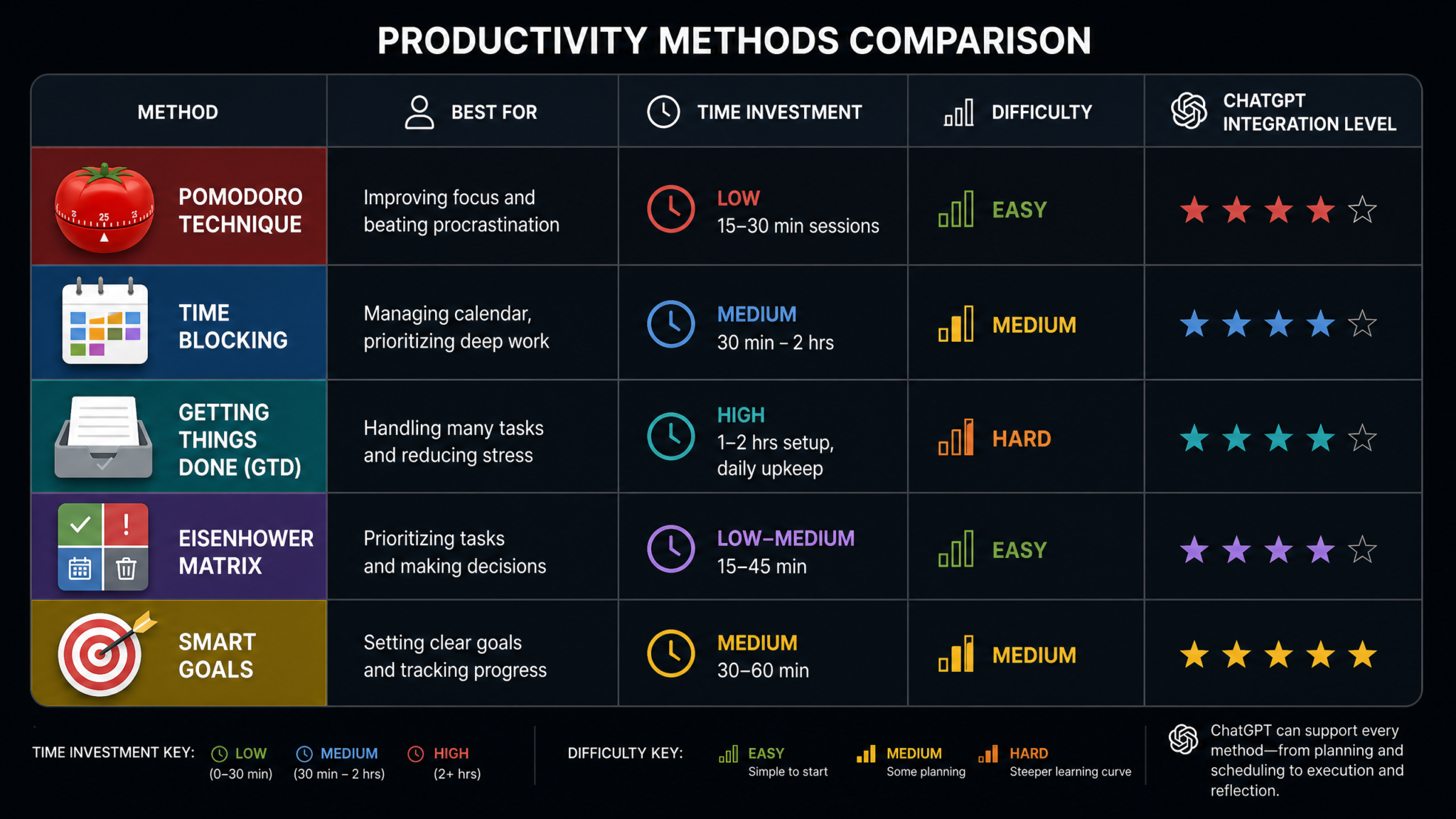
Eisenhower Matrix: 4 Prompts to Master Prioritization
Attributed to President Dwight D. Eisenhower and popularized by Stephen Covey in The 7 Habits of Highly Effective People, the Eisenhower Matrix divides tasks into four quadrants based on urgency and importance: Do (urgent + important), Schedule (not urgent + important), Delegate (urgent + not important), and Eliminate (not urgent + not important). Its power is diagnostic — most knowledge workers are chronically over-indexed in Quadrant 1 (crisis management) and almost completely absent from Quadrant 2 (strategic work), which is where career-defining projects, relationships, and health habits live. Studies of executive time allocation consistently find that high performers spend 65–70% of their time in Quadrant 2 activities compared to just 15–20% for average performers.
ChatGPT Decision-Making Prompts for Strategic Business Thinking
Prompt 13: Eisenhower Matrix Initial Setup — Configure Your System
You are a strategic prioritization coach specializing in the Eisenhower Matrix. Help me build a personalized Eisenhower system.

My professional context: [describe your role]
My most important long-term professional goal: [describe]
My most important long-term personal goal: [describe]
The type of work that feels urgent but I suspect isn't actually important: [describe]
The type of work I know is important but I keep deferring: [describe]

Please design:
1. My personal "importance definition" — given my role and goals, write a specific definition of "important" that applies to me (not the generic definition — make it contextual and precise enough that I could use it to judge any task in 10 seconds)
2. My personal "urgency definition" — same approach, with guidance on how to distinguish real urgency from manufactured urgency (other people's emergencies, social pressure, etc.)
3. A set of 10 "litmus test questions" I can apply to any task to determine which quadrant it belongs in — make them yes/no questions that create a reliable classification
4. My personal Quadrant 2 categories — the specific types of work that should be living in my "Schedule" quadrant but probably aren't receiving enough time
5. A "delegation audit" framework — since most individual contributors either delegate too little or delegate to the wrong people, give me a decision framework for the Delegate quadrant specific to my role
6. Warning signs that I've slipped into chronic Quadrant 1 living — behavioral indicators I should watch for
Why This Prompt Works
The most common reason the Eisenhower Matrix fails in practice is that people don’t have a personal, concrete definition of “important.” Without it, everything feels important, and the matrix becomes useless. Forcing an explicit, role-specific definition in point 1 is the single most valuable thing this prompt does.
Access 40,000+ AI Prompts for ChatGPT, Claude & Codex — Free!
Subscribe to get instant access to our complete Notion Prompt Library — the largest curated collection of prompts for ChatGPT, Claude, OpenAI Codex, and other leading AI models. Optimized for real-world workflows across coding, research, content creation, and business.
Prompt 14: Eisenhower Matrix Daily Execution — Run the Method
I need to run my task list through the Eisenhower Matrix for today. Act as my prioritization partner.

Today's raw task list (everything I think I need to do today — include everything):
[Paste full list — include tasks that feel guilty to admit, tasks people asked you to do, tasks you've been putting off, etc.]

My most important current long-term goal: [remind the AI]
Any hard deadlines today: [list them]
Any tasks I'm avoiding for non-strategic reasons (anxiety, perfectionism, not knowing where to start): [be honest]

Please:
1. Classify every item into Q1, Q2, Q3, or Q4 using my personal importance and urgency definitions
2. For every Q3 item: suggest exactly who I should delegate it to, or if I have no one to delegate to, suggest how to handle it in under 10 minutes
3. For every Q4 item: make the case for eliminating it entirely and tell me what I would lose by deleting it (often nothing)
4. Flag any item I've listed as Q1 that you suspect is actually Q3 masquerading as Q1 — explain your reasoning
5. Build me a prioritized "today's agenda" from the Q1 and Q2 items only, sequenced by importance
6. Identify the single Q2 item on my list that will have the highest long-term impact if I complete it today, even if it doesn't feel urgent
Why This Prompt Works
Point 4 — identifying Q3 items disguised as Q1 — is where this prompt earns its value. The vast majority of workplace “urgency” is socially constructed: other people’s priorities leaking into your quadrant assignment through guilt, status dynamics, and response time expectations. An outside analysis of your specific list often catches these misclassifications immediately.
Prompt 15: Eisenhower Matrix Weekly Review — Assess Progress
Weekly Eisenhower review. Here's an honest accounting of how I spent my time this week:

Estimate how much time I spent in each quadrant (be honest, not aspirational):
- Q1 (Urgent + Important / Crisis mode): [X hours]
- Q2 (Not Urgent + Important / Strategic work): [X hours]
- Q3 (Urgent + Not Important / Delegation candidates): [X hours]
- Q4 (Not Urgent + Not Important / Elimination candidates): [X hours]
- Total work hours this week: [X hours]

The crisis or fire that dominated my week: [describe]
The Q2 project I made progress on: [describe — or admit if none]
The Q3 task I did myself instead of delegating: [describe and why]
Something I eliminated or nearly eliminated: [describe]

Please provide:
1. My quadrant distribution percentages and what they reveal about my current productivity archetype (Crisis Manager, Strategic Thinker, Delegate-Avoidant, etc.)
2. The specific source of my Q1 load — is it genuinely non-preventable crises or is it deferred Q2 work coming due? This distinction matters enormously.
3. A calculated estimate: if I shifted just 2 hours per week from Q1/Q3 into Q2 over the next 12 months, what would be the compounding effect on my most important goal?
4. One specific behavior change that would most effectively shift my quadrant distribution next week
Prompt 16: Eisenhower Matrix Optimization — Improve the System
I want to engineer a systematic shift toward spending more time in Quadrant 2. Based on my usage so far:

My current Q2 percentage: [X%]
My target Q2 percentage in 90 days: [X%]
The main barrier to increasing Q2 time: [describe — organizational culture, lack of systems, unclear goals, etc.]
My role's specific Q2 activities that most people in my position neglect: [describe what you know you should be doing but aren't]

Design:
1. A "Q2 protection strategy" — specific organizational and scheduling tactics to shield Q2 time from Q1 encroachment in my specific work environment
2. A "Q1 reduction plan" — how to systematically prevent Q1 crises from forming by addressing their Q2 root causes
3. A personal delegation development plan — if lack of delegation is keeping me in Q3 work, give me a 4-week skill-building plan for becoming a more effective delegator
4. The Eisenhower Matrix applied to my digital life — how to apply Q1-Q4 logic to my email inbox, meeting calendar, and notification settings
5. A 90-day quadrant rebalancing roadmap with monthly check-in milestones
SMART Goals: 4 Prompts to Build Goals That Actually Happen
SMART Goals — Specific, Measurable, Achievable, Relevant, and Time-bound — were introduced by George T. Doran in a 1981 issue of Management Review and have since become arguably the most widely taught goal-setting framework in the world. Despite near-universal recognition, research consistently shows that 92% of people fail to achieve their goals, according to the University of Scranton. The reason isn’t that SMART is wrong — it’s that most people apply SMART superficially, producing goals that technically check the criteria boxes while remaining fundamentally vague, unmotivating, or disconnected from daily behavior. ChatGPT can run the SMART analysis rigorously and then build the execution architecture that transforms a well-formed goal into a daily action system.
ChatGPT Prompts for Personal Development Planning and Career Growth
Prompt 17: SMART Goals Initial Setup — Configure Your System
You are an elite performance coach specializing in goal architecture. Help me build a complete SMART goals system.

My life areas I want to set goals in (select the ones relevant to me):
- Career/Professional: [describe current situation and desired direction]
- Financial: [describe current situation and desired direction]
- Health/Fitness: [describe current situation and desired direction]
- Relationships: [describe current situation and desired direction]
- Learning/Skills: [describe current situation and desired direction]
- Personal project: [describe]

My time horizon for this goal-setting exercise: [90 days / 6 months / 1 year]

My goal-setting history: [be honest — have past goals worked? Do you tend to set too many? Too few? Do you abandon goals at the first obstacle? Do you set safe goals to guarantee success?]

Please:
1. Before writing any goals, diagnose my goal-setting personality type based on my history and tell me the specific failure mode I'm most likely to encounter
2. For each life area I've listed, help me draft ONE SMART goal — challenge me if my initial framing is too vague, too safe, or not genuinely motivating
3. For each goal, run the full SMART test as a checklist: is it Specific enough? How exactly will it be Measured? Is "Achievable" calibrated correctly (not too easy, not paralyzing)? Is it Relevant to what I actually want in life? Is the Time constraint realistic and binding?
4. Create a "goal dependency map" — which of my goals support each other, which compete for the same resources, and where potential conflicts exist
5. Write a personal goal statement for my most important goal that I could read daily and feel genuinely motivated — not corporate language, not performance review language, language that sounds like me
Why This Prompt Works
The goal-setting personality diagnosis in point 1 is essential groundwork. An overachiever who sets paralyzing stretch goals needs different coaching than an underconfident person who sets safe goals. A person who abandons goals at the first obstacle needs a different resilience structure than someone who rigidly pursues outdated goals past the point of relevance. Diagnosing the pattern before setting the goals prevents repeating historical failure modes.
Expected Output
A personalized goal-setting failure mode analysis, SMART-formatted goals for each life area with full criteria analysis, a goal dependency map identifying synergies and conflicts, and a personal goal statement written in your authentic voice.
Customization Tips
- Add: “I’ve tried SMART goals before and always fail at the ‘Measurable’ criterion because I don’t know how to quantify non-numeric goals like ‘improve relationships’ — please specifically address this.”
- Include: “I tend to set annual goals in January and never look at them again — build in forced review mechanisms.”
Prompt 18: SMART Goals Daily Execution — Run the Method
I need to connect my SMART goals to today's specific actions. Act as my goal-to-action translator.

My active SMART goals:
Goal 1: [paste the full SMART goal with its metric and deadline]
Goal 2: [paste the full SMART goal with its metric and deadline]
Goal 3: [paste the full SMART goal with its metric and deadline]

Today's date: [date]
Days remaining until each goal's deadline:
- Goal 1: [X days]
- Goal 2: [X days]
- Goal 3: [X days]

My current progress on each goal (measured against your defined metric):
- Goal 1: [X% complete / current metric value]
- Goal 2: [X% complete / current metric value]
- Goal 3: [X% complete / current metric value]

Please:
1. Calculate whether I am on pace for each goal — not a feel-good estimate, a mathematical assessment based on days remaining and progress to date
2. For any goal where I'm behind pace, identify the most likely reason (not enough daily action? Wrong strategy? Goal needs recalibration?)
3. Translate each goal into exactly ONE concrete action I should take today — make it specific enough that I can't misinterpret it
4. Design a "minimum daily commitment" for each goal — the absolute smallest action that still counts as forward progress, for days when everything goes wrong
5. Give me a daily goal tracking format I should fill in each evening — no more than 5 minutes, but comprehensive enough to catch problems early
Why This Prompt Works
The mathematical pace check in point 1 is the most valuable element. Most people have no idea whether they’re on track until they’re two weeks from a deadline and catastrophically behind. Running a simple pace calculation (daily progress required vs. actual daily progress to date) is the equivalent of checking your GPS mid-journey instead of waiting until you’ve driven two hours in the wrong direction.
Prompt 19: SMART Goals Weekly Review — Assess Progress
Weekly SMART goals review. Here's my progress data:

For each active goal, tell me:

Goal 1: [name]
- Target metric: [what you're measuring]
- Starting value: [where you began]
- Current value: [where you are now]
- Target value: [where you need to be]
- Deadline: [date]
- Actions taken this week: [list specifically what you did]
- Biggest obstacle encountered: [describe]

[Repeat the same structure for Goal 2 and Goal 3]

Please provide:
1. A goal-by-goal progress report with percentage to target and projected completion date at current pace
2. For any goal where I'm off pace: a diagnosis of whether this is a strategy problem (wrong approach), a commitment problem (right approach, insufficient action), or a goal calibration problem (the goal itself needs revision)
3. The "adjacent possible" for each goal — what's the next milestone I'm close enough to reach this week that would create momentum?
4. A recommended adjustment to any goal that the data suggests needs recalibrating — be willing to recommend making a goal harder if I'm achieving it too easily
5. My "goal portfolio health score" (1-10) with specific reasoning
Prompt 20: SMART Goals Optimization — Improve the System
I want to graduate from basic SMART goals to an advanced goal architecture. I've completed [X] goal cycles over [X months].

My goal achievement rate: [X out of Y goals fully achieved]
My most commonly abandoned goal category: [career/health/financial/personal]
The pattern in goals I actually complete: [describe what successful goals have in common]
The pattern in goals I abandon: [describe what failed goals have in common]

Please design:
1. An advanced goal architecture that layers SMART goals within a larger framework — specifically, connect my SMART goals upward to a 3-year vision and downward to weekly milestones
2. A "goal autopsy" for my most significant failed goal — based on the pattern data I've given you, provide a specific theory about why it failed and what would have made the difference
3. A redesigned measurement system — if tracking goals has felt like a chore, suggest an alternative measurement approach that would feel natural and provide leading-indicator data rather than just lagging results
4. Goal stacking opportunities — where my different goal areas could be designed to reinforce each other (e.g., exercise goals that also advance focus and thus career goals)
5. A personal goal-setting philosophy statement — 3-5 sentences that capture my approach to goals based on everything I've learned about my patterns, to be read before setting any new goal
Why This Prompt Works
The goal autopsy in point 2 treats failed goals as data rather than personal failures. The specific pattern analysis — looking at what your successful goals have in common versus your failed ones — produces insight that generic advice cannot replicate. Over multiple cycles, this optimization prompt builds a personal theory of achievement that becomes increasingly accurate and actionable.
Comparison Table: All 5 Methods at a Glance
Choosing the right productivity framework — or the right combination — depends on your work type, your primary productivity failure mode, and how much system maintenance you’re willing to invest. The table below synthesizes the key characteristics of each method to help you make an informed choice.
| Framework | Best Use Case | Primary Problem Solved | Weekly Time Investment | ChatGPT Integration Difficulty | Weakest At | Ideal User Profile |
|---|---|---|---|---|---|---|
| Pomodoro Technique | Deep individual work requiring sustained focus: writing, coding, research, design | Procrastination, perfectionism, distraction, task initiation | Low — 10–15 min setup daily | Easy — Daily execution prompts are self-contained and fast | Collaborative work, meetings, tasks requiring variable time chunks, creative brainstorming | Freelancers, writers, developers, students, anyone who struggles to start working |
| Time Blocking | Complex professional roles with multiple competing demands and calendar control | Reactive workdays, context switching, meeting sprawl, no strategic work time | Medium — 30–45 min weekly planning plus 15 min daily review | Medium — Requires calendar integration data and role-specific customization | Unpredictable environments, roles where others control your schedule, task granularity below the hour level | Managers, executives, knowledge workers with calendar autonomy, entrepreneurs |
| Getting Things Done (GTD) | High-volume information work with many projects, inputs, and commitments across multiple areas of life | Cognitive overload, forgotten commitments, anxiety about open loops, inbox overwhelm | High — 60–90 min weekly review plus daily capture processing | Medium-High — GTD inbox processing with ChatGPT is powerful but requires detailed input | Simple work environments, tasks that need deep focus more than organization, users who resist complexity | Project managers, executives, entrepreneurs, anyone managing 10+ active projects simultaneously |
| Eisenhower Matrix | Professionals overwhelmed by reactive work who struggle to identify and protect strategic priorities | Misaligned effort, inability to say no, chronic crisis management, strategic neglect | Low-Medium — 10–20 min daily classification plus weekly audit | Easy-Medium — Daily task classification is fast; the value compounds over weeks of pattern data | Task execution management, time scheduling, capturing ideas and commitments | Leaders and managers under organizational pressure, anyone who confuses busyness with productivity |
| SMART Goals | Anyone setting medium-to-long-term professional or personal objectives, quarterly planning, annual reviews | Vague aspirations that never translate to action, goal abandonment, misaligned effort, lack of progress measurement | Medium — 30–60 min initial setup quarterly plus 15–20 min weekly review | Medium — Most powerful when used with quantified progress data across multiple review cycles | Daily tactical execution, handling incoming work, managing cognitive load in real time | Ambitious professionals, anyone doing annual/quarterly planning, people rebuilding after a setback |
Which Method Should You Start With?
Start with Pomodoro if your primary problem is procrastination and you can’t sustain focus for more than 20 minutes.
Start with Eisenhower Matrix if you’re always busy but never feel like you’re making progress on what actually matters.
Start with Time Blocking if your calendar is controlling you rather than the other way around.
Start with GTD if you have more than 10 active projects and a persistent feeling that important things are slipping through the cracks.
Start with SMART Goals if you don’t have clear goals at all, or if your goals exist only in your head.
How to Stack Multiple Systems Together
The most sophisticated productivity practitioners don’t use a single framework exclusively — they layer complementary systems that address different levels of the productivity hierarchy. Here’s how the five frameworks relate to each other and how to build a stacked system using ChatGPT as the integration layer:
The Three Levels of Productivity
- Level 1 — Direction: Knowing what you’re trying to achieve and why. Framework: SMART Goals.
- Level 2 — Prioritization: Deciding which work to do given limited time and energy. Frameworks: Eisenhower Matrix + GTD.
- Level 3 — Execution: Actually doing the work with focused attention. Frameworks: Time Blocking + Pomodoro Technique.
A fully stacked system works as follows: SMART Goals define your 90-day targets. Each week, the Eisenhower Matrix filters your entire task load to identify what actually deserves attention. GTD captures everything and ensures nothing important is forgotten while keeping your mental RAM clear. Time Blocking schedules the Eisenhower Q2 work into protected calendar slots. And within those blocks, the Pomodoro Technique manages your moment-to-moment focus and energy.
The Recommended Stacking Order for Beginners
- Month 1: SMART Goals only. Establish direction before building any execution system.
- Month 2: Add Eisenhower Matrix. Now you have direction and a daily prioritization filter.
- Month 3: Add Pomodoro Technique. Introduce focused execution blocks within your highest-priority work.
- Month 4: Add Time Blocking. Now schedule your Pomodoro sessions and Eisenhower Q2 work explicitly on your calendar.
- Month 5+: Add GTD if you have high project volume. This is the most complex system and should come last.
Adding all five systems simultaneously is a common mistake that produces a complicated meta-system that itself becomes a distraction. Each system added should make you more productive, not more focused on managing your productivity management.
Complete Beginner’s Guide to Building a Personal Productivity System with AI
Using ChatGPT as the Integration Layer
Once you’re running multiple systems, ChatGPT’s most powerful role is integration: translating outputs from one framework into inputs for another. A weekly integration prompt might look like this: “Here are my SMART Goal progress metrics, my Eisenhower quadrant distribution for last week, and my Pomodoro completion rate. Synthesize these three data sources and give me a unified diagnosis of my productivity system’s health.” The cross-framework analysis that results is more valuable than any single-system review — it reveals whether your daily execution is actually moving your most important goals forward, which is the only question that ultimately matters.
Maintaining the System Long-Term
Productivity systems don’t fail because they’re wrong — they fail because they require consistent maintenance and most people’s lives change faster than their systems adapt. The optimization prompts in this guide are specifically designed to prevent this. Running Prompt 4 (Pomodoro), Prompt 8 (Time Blocking), Prompt 12 (GTD), Prompt 16 (Eisenhower), or Prompt 20 (SMART Goals) every 4–6 weeks ensures your system evolves with your work rather than calcifying into a ritual that no longer fits your actual life.
The 20 prompts in this guide aren’t a one-time setup — they’re a recurring operating system. The people who get compound returns from these frameworks are those who run the review and optimization cycles consistently, treating each iteration as data rather than failure. With ChatGPT as your execution partner, the activation energy for those cycles drops from 90 minutes of effortful self-analysis to a 10-minute conversation that often produces more insight than the extended version ever did.
Productivity mastery isn’t about finding the perfect system — it’s about building a personal relationship with a system that evolves with you. These 20 prompts give you the infrastructure to do exactly that.
