
How to Build a ChatGPT Edu Deployment for Your University: Complete IT Administrator Playbook
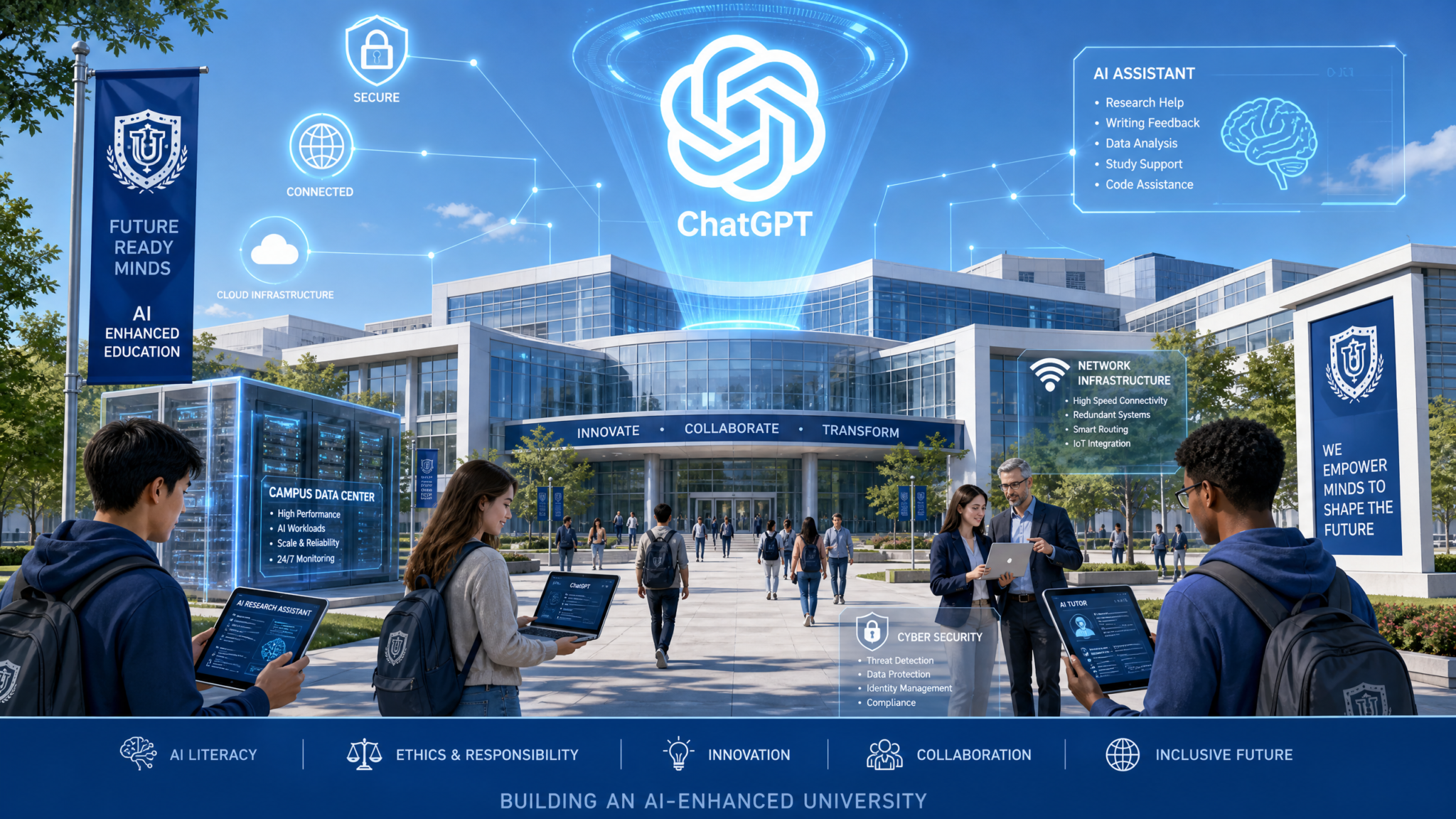
When Stanford University’s Office of the Vice Provost for Teaching and Learning quietly began piloting ChatGPT Edu across select departments in early 2026, the rollout was not spontaneous. It was the product of eighteen months of infrastructure planning, policy drafting, stakeholder alignment, and technical configuration. MIT followed weeks later with a deployment covering 11,400 students and 1,000 faculty. By mid-2026, over 200 institutions had launched or were actively staging ChatGPT Edu environments — and the gap between those who did it well and those who scrambled to recover from security incidents, FERPA violations, or budget overruns was, almost uniformly, a matter of preparation. This playbook gives university IT administrators the exact framework used by institutions at the forefront of that wave: a five-phase deployment methodology covering technical architecture, access control, faculty enablement, student policy, and continuous monitoring — with configuration templates, policy language, and real-world lessons you can use today.
Understanding ChatGPT Edu: What University IT Teams Are Actually Working With
ChatGPT Edu is not simply an enterprise ChatGPT license with a university logo applied to the login screen. It is a purpose-built tier of OpenAI’s platform designed to address the specific governance, compliance, and pedagogical requirements of higher education institutions. Understanding exactly what differentiates it from ChatGPT Team or ChatGPT Enterprise is the foundation of intelligent deployment planning.
Key Differentiators from Other OpenAI Tiers
- Data Training Exclusion by Default: Conversations from institution-managed workspaces are excluded from model training without requiring users to opt out individually. This is critical for FERPA compliance and research confidentiality.
- Custom GPT Deployment at Scale: Administrators can build, review, and deploy Custom GPTs institution-wide — enabling a department to create a “Research Methods Tutor” or “Campus Writing Assistant” that all students can access without additional configuration on their end.
- Advanced Model Access: ChatGPT Edu includes access to GPT-4o and reasoning models like o3, giving students and faculty the most capable tools OpenAI offers rather than a degraded academic version.
- Centralized Billing and Seat Management: IT finance teams can manage per-seat costs, set department-level allocations, and receive itemized usage reports — a critical feature for grant-funded research environments.
- Priority Support SLA: Enterprise-grade support with a named OpenAI contact and response time commitments, essential when a mid-semester outage affects 20,000 concurrent users.
The Institutional Context of the 2026 Rollouts
The 2026 acceleration was driven by several converging factors. OpenAI formalized dedicated higher education agreements with EDUCAUSE partners, giving institutions negotiating leverage on data processing agreements (DPAs). Simultaneously, accrediting bodies began issuing guidance that acknowledged AI-assisted learning as a legitimate pedagogical modality — removing a significant compliance ambiguity that had caused many legal counsel teams to stall deployment approvals. Stanford’s public announcement of its ChatGPT Edu rollout created an institutional FOMO dynamic: peer institutions accelerated their own timelines to remain competitive in student recruitment narratives around technology access.
MIT’s deployment, which IT Director of Academic Technology Claire Okafor described in a 2026 EDUCAUSE presentation as “the most technically complex rollout we’ve done since moving to cloud-based LMS infrastructure,” served as a proof of concept that even research-intensive institutions with heightened data sensitivity requirements could deploy responsibly. Their documented architecture — including air-gapped research workspace configurations and granular per-PI data governance controls — became a reference document shared widely across the R1 university community.
Pre-Deployment Planning: Stakeholders, Budget, and Data Governance
Institutions that experience the smoothest deployments share one characteristic: they treat ChatGPT Edu as an institutional infrastructure project, not an IT procurement exercise. That means governance comes before configuration.
Building Your Steering Committee
Your deployment steering committee should include representation from at least the following functional areas, with clearly documented decision rights for each:
| Stakeholder Role | Decision Rights | Primary Concerns |
|---|---|---|
| CIO / VP of IT | Architecture approval, vendor contract sign-off | Security posture, integration complexity |
| General Counsel / Privacy Officer | DPA approval, FERPA compliance sign-off | Data residency, subprocessor agreements |
| Provost / Academic Affairs | Pedagogical policy, academic integrity framework | Faculty autonomy, assessment integrity |
| Dean of Students | Student AUP, accessibility accommodations | Equity of access, student wellness |
| Faculty Senate Representative | Advisory on classroom policy | Academic freedom, workload implications |
| CISO / Information Security | Security configuration standards | Threat model, audit requirements |
| Budget / Finance | Seat allocation, cost center assignment | Budget predictability, ROI measurement |
| Disability Services | Accessibility feature requirements | ADA compliance, assistive technology compatibility |
Budget Framework: What Institutions Actually Spend
Based on publicly available EDUCAUSE benchmarking data and institutional procurement disclosures from 2025–2026, universities deploying ChatGPT Edu at scale should plan for the following cost categories:
- License Fees: ChatGPT Edu is priced per seat per year under enterprise agreement. Larger institutions have negotiated volume discounts at thresholds of 5,000, 10,000, and 25,000 seats. Budget for phased seat activation — purchasing full enrollment on day one is a predictable source of budget waste.
- Integration Development: SSO/SAML integration, LMS plugin development (Canvas, Blackboard, Brightspace), and custom GPT development typically require 200–400 hours of IT staff or contractor time in year one.
- Training and Change Management: Faculty workshop facilitation, help documentation creation, and IT support staff upskilling. Budget 8–12 hours of instructional design time per department onboarded.
- Monitoring Infrastructure: Audit log storage, SIEM integration, and analytics dashboard development. Often absorbable into existing infrastructure costs if your institution already runs a SIEM platform.
- Ongoing Administration: Estimate 0.3–0.5 FTE for ongoing workspace administration, policy updates, and tier-one support escalation management for institutions under 15,000 seats.
Data Governance Pre-Requisites
Before any technical configuration begins, your legal and privacy team must complete three documents:
- Executed Data Processing Agreement (DPA) with OpenAI: The DPA defines OpenAI’s role as a data processor, specifies subprocessors, establishes data retention and deletion obligations, and includes breach notification timelines. Verify that the DPA explicitly covers FERPA-designated education records. OpenAI provides an education-specific DPA template, but your institution’s counsel should review and potentially redline data residency and subprocessor disclosure clauses.
- Data Classification Matrix: Document which categories of institutional data may and may not be input into ChatGPT Edu by different user roles. At minimum, categorize: PII, student academic records, research data under IRB protocol, export-controlled research, and personnel records as prohibited unless specific workspace controls are in place.
- Data Residency Confirmation: ChatGPT Edu Enterprise agreements allow institutions to request data processing within specific geographic regions. U.S. institutions should confirm U.S. data residency; EU institutions must confirm EU data residency for GDPR compliance. Get this in writing from your OpenAI account representative before signing.
Academic Integrity Framework Before You Touch a Config File
The single most common deployment mistake IT administrators make is treating academic integrity as a faculty affairs problem that doesn’t intersect with technical configuration. In reality, your access control architecture, audit logging design, and custom GPT deployment decisions all have direct academic integrity implications. Building the integrity framework first allows you to make technically informed decisions rather than retrofitting policy constraints onto a system that wasn’t designed to support them.
The Three-Policy Model
Leading institutions have converged on a three-tier policy architecture:
- Tier 1 — Prohibited Use: Uses explicitly banned institution-wide regardless of course or context. Includes: submitting AI-generated work as one’s own without disclosure, using AI to complete assessments where the instructor has explicitly prohibited AI, and using AI to circumvent plagiarism detection systems.
- Tier 2 — Regulated Use: Uses permitted only with instructor authorization and student disclosure. Includes: AI-assisted drafting, AI-generated code with human review, AI-generated research summaries with primary source verification. Instructors must explicitly enable Tier 2 uses in their syllabi.
- Tier 3 — Open Use: Uses fully permitted without disclosure. Includes: using AI for personal study, brainstorming, accessibility support, language translation, and non-assessed research assistance.
Citation Requirements as Policy Infrastructure
Your institution needs a standardized AI citation format before deployment, not after. The APA 7th Edition supplement for AI citations (updated in 2025) provides a workable baseline. Your institution should adapt this into a campus-wide standard that specifies: the model version used, the date of the conversation, the nature of the prompt, and the nature of the AI’s contribution. AI citation standards and academic writing guidelines for students The citation standard should be embedded in the student AUP and referenced in every Custom GPT’s system prompt that is deployed for academic use.
Detection Limitations — What IT Administrators Must Communicate to Faculty
AI detection tools have documented false positive rates that disproportionately affect non-native English speakers and students with certain writing disabilities. Your institution’s use of any AI detection tool must be reviewed by legal counsel for potential ADA implications and should never be used as sole evidence in academic integrity proceedings. This is not just an ethical position — it is an emerging legal exposure. Several institutions faced student grievances in 2025–2026 related to AI detection false positives. Your deployment documentation should include explicit guidance to faculty that AI detection outputs are investigative starting points, not conclusions.
Phase 1: Technical Setup — SSO, Network, Data Residency, API, and Custom GPTs
SSO/SAML Configuration
ChatGPT Edu supports SAML 2.0 and OIDC for single sign-on. SAML 2.0 integration with your institution’s identity provider (Shibboleth, Azure AD, Okta, or Ping Identity) is the recommended path for most universities due to existing federation infrastructure through InCommon.
Below is a representative SAML configuration outline for Azure AD integration:
<!-- Azure AD Enterprise Application - ChatGPT Edu SAML Config -->
<EntityDescriptor entityID="https://auth.openai.com/saml/metadata">
  <SPSSODescriptor>
    <AssertionConsumerService
      Binding="urn:oasis:names:tc:SAML:2.0:bindings:HTTP-POST"
      Location="https://auth.openai.com/saml/consume"
      index="1" />
    <NameIDFormat>
      urn:oasis:names:tc:SAML:1.1:nameid-format:emailAddress
    </NameIDFormat>
  </SPSSODescriptor>
</EntityDescriptor>

<!-- Required Attribute Claims -->
<!-- email: user.mail -->
<!-- department: user.department -->
<!-- role: user.extensionAttribute1 (values: faculty|student|staff|researcher) -->
<!-- employeeType: user.employeeType -->
The role attribute claim is critical — it is what powers your Phase 2 RBAC configuration. Ensure your identity provider is populating this attribute from your authoritative HR/SIS system (Banner, Workday, PeopleSoft) rather than from a manually maintained directory group. Manual groups drift; authoritative system feeds stay accurate as students enroll, faculty go on sabbatical, and roles change mid-year.
Shibboleth Configuration for InCommon-Federated Institutions
# /etc/shibboleth/shibboleth2.xml excerpt
<SSO entityID="https://auth.openai.com/saml/metadata">
  SAML2
</SSO>

# Attribute release policy - attribute-filter.xml excerpt
<AttributeFilterPolicy id="ChatGPTEdu">
  <PolicyRequirementRule xsi:type="Requester"
    value="https://auth.openai.com/saml/metadata" />
  <AttributeRule attributeID="mail">
    <PermitValueRule xsi:type="ANY" />
  </AttributeRule>
  <AttributeRule attributeID="eduPersonAffiliation">
    <PermitValueRule xsi:type="ANY" />
  </AttributeRule>
  <AttributeRule attributeID="eduPersonEntitlement">
    <PermitValueRule xsi:type="Value"
      value="urn:your-institution.edu:chatgpt-edu:licensed" />
  </AttributeRule>
</AttributeFilterPolicy>
Network Configuration
Document and communicate to your network team the following requirements before go-live:
- Allowlisted Domains:
chatgpt.com,api.openai.com,auth.openai.com,cdn.openai.com, and*.openai.comfor CDN-served assets. If your institution uses SSL inspection, you must add these domains to your inspection bypass list or users will encounter certificate errors. - Proxy Considerations: Authenticated web proxies can break SAML authentication flows. Test thoroughly in your proxy environment. Institutions using Zscaler or BlueCoat should validate SAML redirect handling specifically.
- Bandwidth Planning: OpenAI’s infrastructure handles compute-intensive operations server-side, so bandwidth requirements are primarily for text and file transfer. However, GPT-4o’s multimodal capabilities (image upload, voice interaction) increase per-session bandwidth. Plan for 50–150 KB/s per concurrent active session for multimodal usage patterns.
- Guest Network Isolation: Explicitly configure ChatGPT Edu SSO to reject authentication from devices on your guest wireless network. SSO enforcement is your mechanism for ensuring only licensed users access institutional workspaces.
Custom GPT Deployment for Academic Use Cases
Custom GPTs deployed institution-wide are among ChatGPT Edu’s highest-value features for academic environments. The following system prompt template demonstrates best practices for an academic Custom GPT:
You are the [University Name] Academic Writing Assistant, deployed by the
Office of Academic Technology. You assist students with writing development,
not writing completion.

CORE BEHAVIORS:
- Provide feedback, suggestions, and explanations — do not write complete
  paragraphs or sections for the student unless they are using you in a
  Tier 3 context explicitly confirmed in this conversation.
- When a student asks you to write something for them, redirect to coaching:
  ask what they are trying to argue, what evidence they have, and what
  structural challenge they are facing.
- Always remind students to disclose AI assistance per the [University Name]
  AI Citation Policy when submitting work.
- Do not access, reproduce, or summarize content behind paywalls.
- If a student indicates they are in distress, refer them to
  [University Name] Counseling Services at [campus-specific number].

PROHIBITED ACTIONS:
- Do not generate complete essays, research papers, or assignment submissions.
- Do not assist with take-home exam questions when identified as such.
- Do not reproduce copyrighted course materials in full.

VERSION: 2026.1 | LAST REVIEWED: [Date] | CONTACT: [email protected]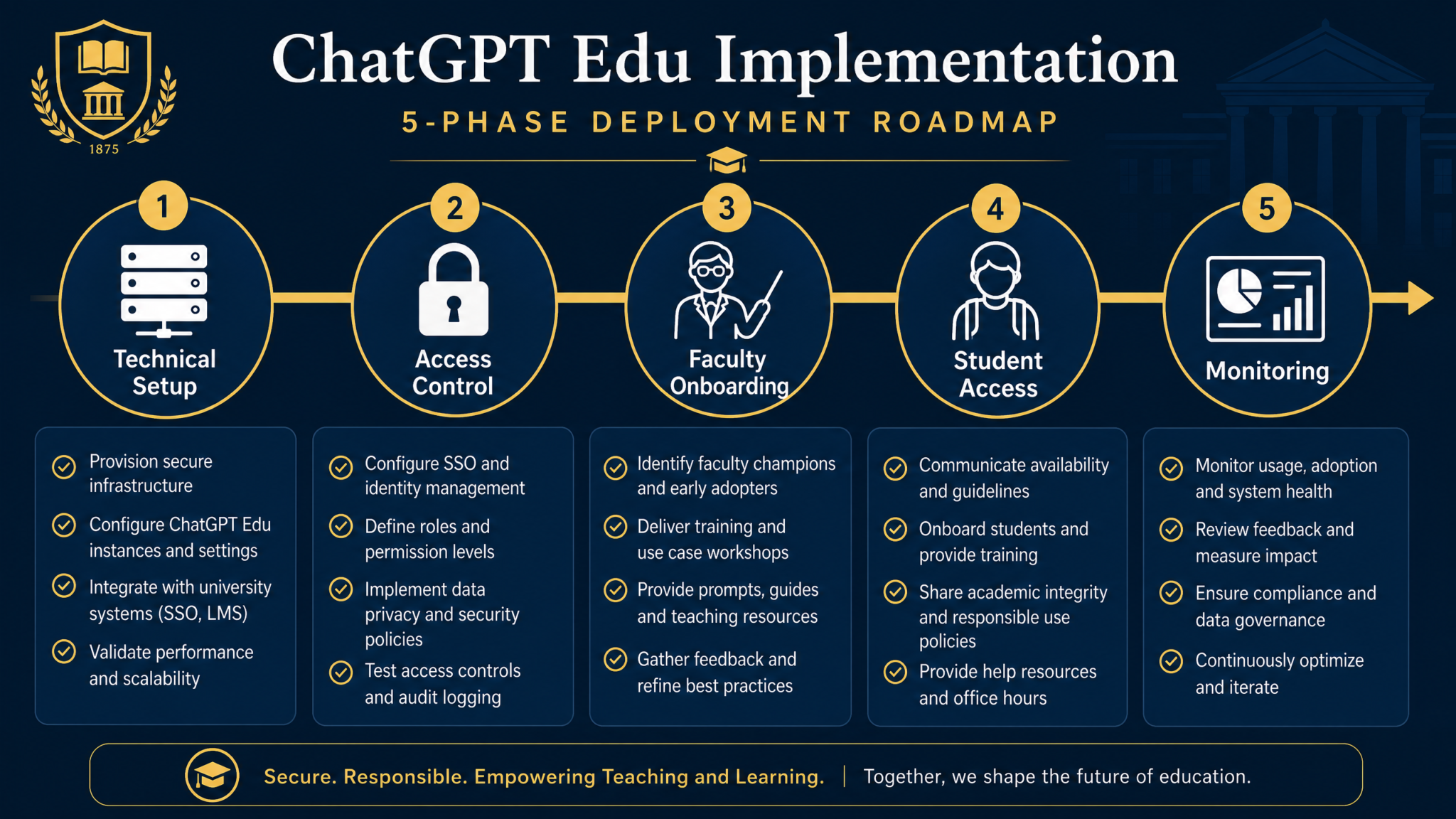
Maintain a Custom GPT registry in your institution’s service catalog. Each registered GPT should document: owning department, last review date, model version pinned, data handling classification, and approved user roles. Custom GPT development best practices for enterprise deployments GPTs should be reviewed for policy compliance at minimum annually and before any major model version transition.
Phase 2: Access Control — RBAC, Quotas, Content Filtering, and Audit Logging
Role-Based Access Control Architecture
ChatGPT Edu’s workspace management system supports role differentiation at the workspace and feature level. Design your RBAC matrix before provisioning begins. The following represents a recommended baseline architecture:
| Role | GPT-4o Access | o3 Access | Custom GPT Creation | File Upload | API Access | Usage Quota |
|---|---|---|---|---|---|---|
| Undergraduate Student | Yes | No | No (use only) | Yes (10 MB) | No | Standard |
| Graduate Student | Yes | Yes | No (use only) | Yes (50 MB) | Request-based | Enhanced |
| Faculty | Yes | Yes | Yes (dept-scoped) | Yes (100 MB) | Yes (limited) | High |
| Researcher (PI) | Yes | Yes | Yes (project-scoped) | Yes (500 MB) | Yes (full) | Unrestricted* |
| IT Administrator | Yes | Yes | Yes (institution-wide) | Yes | Yes (full) | Administrative |
*Researcher unrestricted quotas are cost-center allocated to grant accounts; budget alerts required.
Content Filtering Configuration
ChatGPT Edu’s default content filtering is appropriate for most academic use cases, but specific research contexts may require adjustment. The process for modifying content filtering thresholds requires direct engagement with your OpenAI account representative and documented institutional justification — it is not a self-service configuration.
Research contexts that commonly require content filtering adjustment include: biomedical research involving descriptions of pathogens, criminology and forensic science programs, clinical psychology and psychiatry training, and investigative journalism programs. For each such context, document the following before requesting adjustment:
- The specific research or instructional purpose
- The user population that requires the adjustment (role-scoped, not institution-wide)
- Existing ethical oversight (IRB approval, faculty advisor oversight, etc.)
- Institutional monitoring controls in place
Audit Logging Configuration
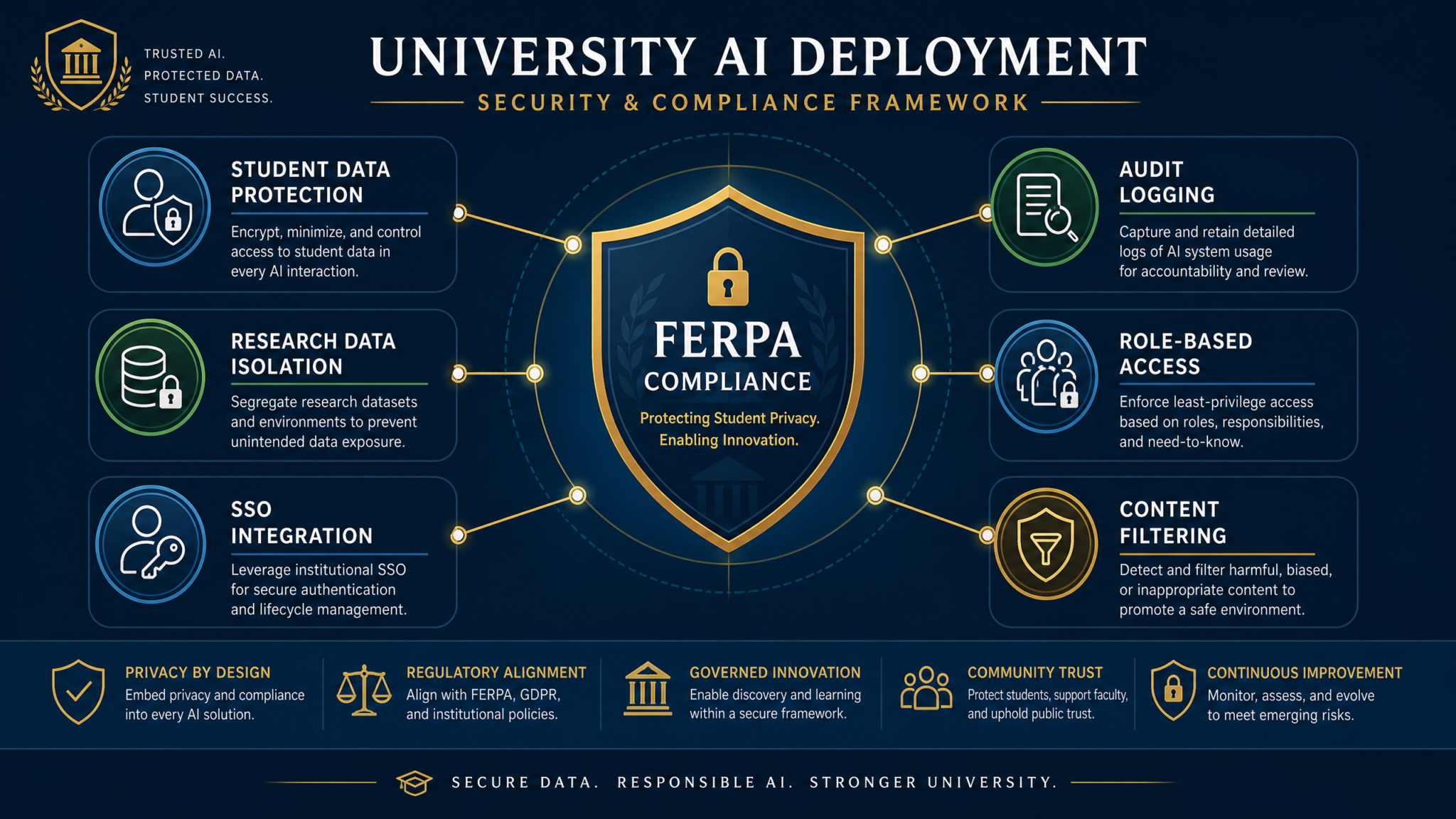
Audit logs are your mechanism for FERPA compliance documentation, security incident investigation, and academic integrity investigation support. ChatGPT Edu provides audit log export via the admin console and API. Configure log export to your institution’s SIEM within 72 hours of workspace activation — not after an incident occurs.
Minimum audit log retention requirements by context:
- Standard academic use: 90 days, consistent with most institutions’ LMS log retention policies
- Academic integrity investigation: Preserve relevant logs for duration of formal proceedings plus 3 years
- Research use: Retain for duration of research project plus 7 years per federal research data retention requirements
- Security incidents: Preserve relevant logs per your institutional incident response policy (typically 3–7 years)
Do not log conversation content by default in your SIEM — this creates a secondary store of potentially FERPA-protected information with its own compliance requirements. Log metadata (user ID, timestamp, workspace, model used, file upload events, session duration) and retrieve conversation content only through OpenAI’s admin console under appropriate legal authority.
Phase 3: Faculty Onboarding — Training, Workshops, and Assessment Redesign
Faculty adoption is the single largest determinant of ChatGPT Edu deployment ROI. Institutions that invest in structured faculty onboarding see 3–4x higher active usage rates within the first semester compared to those that send a “here’s your login” email and declare victory.
The Three-Track Training Model
Not all faculty need the same training. Design three tracks based on self-identified comfort level and departmental context:
- Track A — Foundations (90 minutes, mandatory for all faculty): What ChatGPT Edu is and is not, institutional policy and academic integrity framework, basic usage, Custom GPT access, and how to report concerns. Delivered as a synchronous workshop in the semester before deployment.
- Track B — Pedagogical Integration (half-day workshop, opt-in): Designing AI-compatible assessments, building prompts for learning support, using Custom GPTs in course design, assignment disclosure and citation frameworks. Co-facilitated by instructional design staff and a faculty champion from a peer department.
- Track C — Advanced and Research Use (full-day, invitation-based): API access for research workflows, Custom GPT creation for research assistance, data governance for research contexts, evaluating model outputs for research validity. Facilitated by IT academic technology staff with documented AI research experience.
Assessment Redesign as Faculty Support
The most common faculty concern about ChatGPT Edu deployment is assessment validity: “How do I know students are actually learning if they can use AI?” This is a legitimate pedagogical challenge, and the IT administrator’s role is to provide infrastructure support for faculty who want to redesign assessments — not to dictate pedagogy.
Practical support mechanisms include:
- Offering dedicated “Assessment Redesign Office Hours” with instructional design staff for 90 days post-deployment
- Curating and sharing assessment approaches from peer institutions that have published their AI-era assessment frameworks (MIT OpenCourseWare published several in 2026)
- Providing LMS integration that allows faculty to create AI-restricted assessment zones — areas of the LMS where ChatGPT Edu SSO does not function, for institutions that want proctored AI-free assessment capability
Faculty Champion Program
Identify 1–2 early adopters per college or school who receive advanced training and light administrative privileges (the ability to deploy department-scoped Custom GPTs). These faculty champions become peer support resources, reducing tier-one support load on IT and providing discipline-specific guidance that IT staff cannot credibly offer. Building an AI faculty champion program in higher education Compensate champions with course release, stipend, or professional development funds — the program fails when it is treated as pure volunteerism.
Phase 4: Student Access — AUP, Citation Requirements, and Accessibility
Acceptable Use Policy Template
The following represents a baseline AUP structure that institutions should adapt with input from student government, legal counsel, and the Dean of Students office:
[UNIVERSITY NAME] ChatGPT Edu Acceptable Use Policy — Student Version
Scope: This policy applies to all students accessing ChatGPT Edu through [University Name]’s institutional workspace at chatgpt.com using your @university.edu credentials.
Permitted Uses: Study support, research assistance, writing feedback, language translation, accessibility support, coding assistance, brainstorming, and any use explicitly authorized by your course instructor.
Disclosure Requirement: When you use ChatGPT Edu in completing any assessed coursework, you must disclose that use according to the [University Name] AI Citation Standard, unless your instructor has explicitly waived this requirement in writing.
Prohibited Uses: Submitting AI-generated work as your own without disclosure; using AI to complete assessments where AI use is prohibited by your instructor; inputting another person’s personally identifiable information; inputting protected research data; attempting to circumvent the workspace’s content or access controls; sharing your institutional login credentials.
Privacy Notice: Your usage is logged for security and compliance purposes. Conversation metadata is retained for 90 days. Conversation content may be accessed by authorized administrators in connection with formal academic integrity or security investigations, subject to applicable law.
Violations: Violations of this policy may constitute violations of the [University Name] Academic Integrity Policy and/or the Student Code of Conduct, and may result in sanctions up to and including academic dismissal.
Citation Standard Implementation
Embed the citation requirement into the student experience, not just the policy document. Configure institution-deployed Custom GPTs to include a citation reminder in responses to any prompt that relates to assessed work. Train your help desk to provide citation format guidance as a standard query response. Include the AI citation standard in your institution’s style guide alongside MLA, APA, and Chicago.
A recommended citation format for institutional adoption:
OpenAI. (2026). ChatGPT Edu [GPT-4o model]. [University Name] Institutional Workspace.
Prompt: "[Brief description of prompt type, not full text]."
Conversation date: [Month Day, Year].
Retrieved via [University Name] SSO authentication.
Accessibility Requirements
ChatGPT Edu’s web interface meets WCAG 2.1 AA standards as of the 2026 platform version. However, institutional deployment introduces accessibility obligations beyond the platform itself:
- Screen Reader Compatibility: Verify that your SSO login flow (including any custom portal pages your institution has built) is screen reader compatible. OpenAI’s native interface is compatible; institutional customizations may introduce barriers.
- Voice Input Support: ChatGPT’s voice mode is a significant accessibility feature for students with motor disabilities or dyslexia. Ensure your network configuration does not block the WebRTC or WebSocket connections that voice mode requires.
- Alternative Access: Students who cannot use the standard web interface (due to assistive technology incompatibility, documented technology access barriers, etc.) should have an expedited path to alternative support through your Disability Services office. Document this path before deployment launches.
- Language Access: ChatGPT’s multilingual capabilities are a legitimate academic accessibility tool for students learning in their second or third language. Your AUP and faculty training should address language translation use as a permitted accessibility accommodation while maintaining the distinction between translation assistance and academic work substitution.
Phase 5: Monitoring — Analytics, Cost Optimization, KPIs, and Incident Response
Key Performance Indicators for IT Leadership
Define your success metrics before launch so you can report deployment ROI to institutional leadership. A balanced KPI framework should cover technical performance, adoption, and academic impact:
Access 40,000+ AI Prompts for ChatGPT, Claude & Codex — Free!
Subscribe to get instant access to our complete Notion Prompt Library — the largest curated collection of prompts for ChatGPT, Claude, OpenAI Codex, and other leading AI models. Optimized for real-world workflows across coding, research, content creation, and business.
| KPI Category | Metric | Target (Year 1) | Measurement Source |
|---|---|---|---|
| Adoption | Monthly Active Users / Total Licensed Seats | >60% | OpenAI Admin Console |
| Adoption | Faculty-deployed Custom GPTs | 1 per 5 departments | Custom GPT Registry |
| Cost Efficiency | Cost per active user per month | Below enterprise baseline | Finance / Admin Console |
| Security | Policy violation incidents | <0.5% of active users | Security Incident Log |
| Support | Tier-1 tickets per 100 active users | Declining month-over-month | ITSM Platform |
| Academic Impact | Faculty satisfaction score (survey) | >3.8 / 5.0 | Semester survey |
Cost Optimization Strategies
ChatGPT Edu costs scale with seat count and usage tier. Institutions routinely overspend in year one due to over-provisioning. Implement these cost controls:
- Phased Seat Activation: Activate undergraduate student seats in cohorts aligned with onboarding events (orientation, first day of class) rather than purchasing all seats at contract signing. This reduces the gap between licensed and active seats.
- Usage-Based Seat Review: Monthly review of seats with zero activity in the prior 30 days. Seats that remain inactive for 60 days should be flagged for deprovisioning (with user notification). Implement this as an automated report from the admin console rather than a manual audit.
- Researcher Quota Management: Researchers using the o3 reasoning model for complex analysis tasks generate significantly higher per-session costs than standard GPT-4o use. Implement budget alerts at 75% and 90% of each PI’s allocated quota. Optimizing ChatGPT API costs for institutional research workflows
- Model Version Guidance: Train faculty and students on appropriate model selection — not every task requires the highest capability model. A student checking grammar does not need o3; a researcher synthesizing 200 papers might. Include model selection guidance in your faculty training materials.
Incident Response Plan for AI-Specific Incidents
Your existing information security incident response plan likely does not cover AI-specific incident types. Add the following playbooks to your incident response documentation:
- Data Exfiltration via Prompt: A user inputs protected data (student records, research data) into ChatGPT Edu in violation of policy. Response: Identify scope via audit logs, assess whether data residency controls mitigated risk, notify privacy officer, evaluate whether FERPA breach notification obligations apply.
- Compromised Institutional Account: A student’s institutional credentials are compromised and used to access ChatGPT Edu. Response: Disable account via IdP, review ChatGPT Edu session logs for the compromised account, assess whether any institutional data was accessed, follow standard account compromise procedures.
- Unauthorized Custom GPT Deployment: A user circumvents role controls and deploys a Custom GPT outside of approved governance. Response: Remove GPT from institutional workspace, review GPT’s system prompt and knowledge files for policy violations, investigate access control gap that permitted deployment.
- Academic Integrity Mass Event: Detection of coordinated use of ChatGPT Edu across multiple students for a single assessment in potential violation of course AI policy. Response: Preserve audit log snapshot, coordinate with academic integrity office, provide log data under appropriate institutional authority.
Security Deep Dive: FERPA, Student Data, and IP Protection
FERPA Compliance Architecture
FERPA (Family Educational Rights and Privacy Act) applies to education records, which include any information directly related to a student and maintained by an educational institution. The core FERPA risk in a ChatGPT Edu deployment is faculty or staff inputting education records into the system in ways not covered by the DPA’s data processor designation.
FERPA-compliant deployment requires that OpenAI is operating as a “school official” with legitimate educational interest, as defined under 34 CFR §99.31(a)(1). Your DPA should explicitly establish this relationship. The DPA must confirm that OpenAI: uses student data only for the purposes specified in the agreement, does not further disclose student data, and allows the institution to maintain control over data access and deletion.
Practical FERPA controls to implement at the configuration level:
- Block bulk export of student data files via file upload controls (not self-service — this requires working with your OpenAI account representative)
- Configure admin console alerts for file uploads above a defined size threshold (bulk student record uploads are detectable this way)
- Train faculty explicitly that uploading class rosters, grade files, or individual student information to ChatGPT Edu is prohibited without specific authorization from your privacy officer
- Document and limit which institutional roles are authorized to create Custom GPTs with knowledge bases — a faculty member uploading a student roster as a GPT knowledge file is a FERPA violation
Research IP and Export Control
Sponsored research creates additional data governance complexity. Research funded by federal agencies (NSF, NIH, DARPA) may be subject to Controlled Unclassified Information (CUI) handling requirements. Export-controlled research under EAR or ITAR cannot be processed on commercial cloud platforms without specific authorization. Your deployment documentation must explicitly state that ChatGPT Edu is not approved for CUI, ITAR, or EAR-controlled research data, and that researchers requiring AI assistance with such work must engage your research computing office for an approved alternative path.
For non-export-controlled but commercially sensitive research (pre-publication findings, proprietary methodologies, industry-sponsored research with confidentiality agreements), the DPA’s training exclusion and data residency provisions provide a reasonable risk profile for most institutions — but researchers should disclose AI tool use to their sponsored research offices and industry partners as a matter of contract compliance. AI tool use governance for university research computing environments
Lessons from Stanford’s Deployment
Stanford’s ChatGPT Edu rollout in early 2026 was notable both for its scale and for the unusually transparent post-deployment documentation that Stanford’s Office of the Vice Provost for Teaching and Learning published. Several specific lessons have proven widely applicable:
Lesson 1: The Faculty Autonomy Tension Is Real and Must Be Addressed Proactively
Stanford’s steering committee spent significant time on a question that no purely technical deployment guide addresses: faculty governance of AI in their own classrooms versus institutional policy uniformity. Their resolution — a three-tier policy framework similar to the model described earlier in this playbook — was reached only after a Faculty Senate working group produced a formal recommendation. IT administrators at other institutions who try to shortcut this governance process by deploying first and consulting the Faculty Senate second have consistently encountered significant pushback that delays full deployment by one to two semesters.
Lesson 2: Student Communication Must Precede Technical Deployment
Stanford deployed student communication — including AUP distribution, citation standard publication, and an FAQ — six weeks before the technical deployment went live for students. Institutions that deploy technically and then communicate policy simultaneously (or afterward) generate a disproportionate support ticket volume and create a window of unintentional policy violation by students who are genuinely unaware of the rules. Six weeks is sufficient; six days is not.
Lesson 3: Custom GPT Governance Requires a Dedicated Process
Within the first three months of Stanford’s deployment, faculty had created over 40 Custom GPTs for course-specific use. Without a governance process, approximately 12 of these GPTs contained system prompts that violated portions of the institutional AI policy (primarily around assessment-related use disclosures). Stanford implemented a Custom GPT review process mid-deployment — building this process before deployment would have been significantly less disruptive. Institutions should establish a Custom GPT submission and review workflow before granting faculty GPT creation rights.
Lesson 4: The Help Desk Preparation Gap Is Underestimated
Stanford’s IT help desk reported that ChatGPT Edu-related tickets in the first month of student deployment represented approximately 8% of total ticket volume — significantly higher than projected. The primary ticket categories were: SSO login issues (35%), questions about what is and is not permitted under the AUP (30%), citation format questions (20%), and technical capability questions (15%). The 30% of tickets that were policy questions, not technical issues, should be reducible through better pre-deployment student communication and an accessible FAQ. Train your help desk on policy content, not just technical troubleshooting.
Lesson 5: Accessibility Was an Afterthought That Created a Catch-Up Problem
Stanford’s Disability Services office was not included in the deployment steering committee until three months into the pilot. This resulted in a post-deployment retrofit of voice mode enablement documentation, a delayed FAQ for students using assistive technology, and a remediation project for accessibility gaps in a custom student portal page. Including Disability Services in your steering committee from the planning phase avoids this entirely.
Common Pitfalls and How to Avoid Them
Pitfall 1: Treating DPA Signature as FERPA Compliance Completion
The DPA is necessary but not sufficient for FERPA compliance. FERPA compliance requires ongoing operational controls: user training, data handling restrictions, audit log monitoring, and breach response readiness. Institutions that sign the DPA and consider compliance complete routinely discover mid-year that faculty have been uploading student records in ways the DPA’s processor designation does not cover.
Pitfall 2: Single Workspace for All User Types
Deploying all user types (undergraduate students, graduate students, faculty, researchers, staff) in a single undifferentiated workspace makes RBAC, quota management, and audit log analysis significantly harder. Use ChatGPT Edu’s workspace segmentation capabilities to create at minimum: a Student workspace, a Faculty and Staff workspace, and a Research workspace with distinct governance controls for each.
Pitfall 3: Ignoring the Model Version Deprecation Risk
Custom GPTs pinned to a specific model version will be affected when OpenAI deprecates that version. Build a model version review into your Custom GPT governance calendar — at minimum annually, and whenever OpenAI announces a deprecation timeline. Notify faculty GPT owners 90 days before a deprecation affects a deployed GPT.
Pitfall 4: Building Monitoring Without a Response Process
Audit logs, usage dashboards, and anomaly alerts are only valuable if someone reviews them and a defined process exists for acting on what they reveal. IT teams that build monitoring infrastructure without defining escalation paths and response procedures end up with rich audit data and no institutional capacity to use it. Define your monitoring review cadence, responsible parties, and escalation thresholds before your monitoring infrastructure goes live.
Pitfall 5: Underestimating Semester-Boundary Provisioning Complexity
Student enrollment changes significantly between semesters. Students graduate, withdraw, take leaves of absence, or change enrollment status. Your provisioning process must be connected to an authoritative enrollment system with automated deprovisioning — not a manual process. A student who withdraws in October should lose institutional ChatGPT Edu access as part of standard offboarding, just as they lose LMS access and library database access.
Scaling Guide: From Pilot to Institution-Wide Deployment
Pilot Phase Design (Months 1–4)
A well-designed pilot limits scope while generating the data needed to inform full deployment. Recommended pilot parameters:
- Scope: 2–4 departments representing diverse disciplinary contexts (recommend one STEM, one humanities, one professional school, one graduate-only program)
- Scale: 200–500 student seats, 20–50 faculty seats
- Duration: One full academic semester minimum (pilot that runs only 6 weeks generates insufficient usage data)
- Instrumentation: Define pilot evaluation metrics before launch; survey faculty and students at weeks 4, 8, and end-of-semester; review support ticket volume and category weekly
- Governance Test: Run one simulated academic integrity investigation against your audit log infrastructure during the pilot to verify your log retention and retrieval process works before you need it for a real case
Controlled Expansion Phase (Months 5–8)
After a successful pilot, expand to all graduate programs and willing undergraduate departments before full institution-wide deployment. This phase tests your provisioning automation at moderate scale, generates faculty champion capacity in more departments, and allows you to refine your help desk training based on real ticket data from the pilot.
Full Deployment Phase (Months 9–12)
Full institution-wide deployment should coincide with the start of an academic semester (fall semester preferred for maximum lead time with new students). Deploy in the following sequence:
- Activate provisioning automation connected to SIS (verify with a test cohort one week before semester start)
- Send student communication six weeks before semester start
- Complete Track A faculty training for all remaining faculty before semester start
- Enable student workspace access at semester start (not before — reduces premature support volume)
- Activate enhanced monitoring posture for the first four weeks of the semester
- Hold a post-launch review with steering committee at weeks 4 and 12
Year 2 and Beyond: Continuous Improvement Architecture
ChatGPT Edu deployment is not a project that ends at go-live. Build these recurring processes into your operational calendar:
- Quarterly: Custom GPT registry review, usage quota and cost review, RBAC audit against current enrollment data
- Semester: Faculty and student satisfaction surveys, support ticket trend analysis, academic integrity incident pattern review, policy update consultation with steering committee
- Annual: DPA review and renegotiation window, security penetration test of SSO integration, full RBAC and access control review, model version and API capability assessment, benchmarking against peer institutions via EDUCAUSE community
- Event-triggered: OpenAI platform updates, model deprecation announcements, security vulnerability disclosures, changes to FERPA guidance, significant academic integrity incidents
Multi-Campus and Consortium Deployment Considerations
University systems and consortia (UC system, CSU system, Big Ten Academic Alliance members) can leverage shared DPA negotiation, shared Custom GPT development costs, and shared IT training resources while maintaining campus-level workspace governance. If your institution is part of a system or consortium, check whether a system-level ChatGPT Edu agreement exists before negotiating independently — system-level agreements consistently achieve better pricing and DPA terms than individual institutional negotiations.
For consortia deploying a shared workspace, establish clear documentation of which governance decisions are system-level and which are campus-level. Data residency, DPA terms, and minimum security configuration are appropriate system-level standards. Custom GPT deployment, faculty training design, and academic integrity policy implementation should remain campus-level decisions that reflect each institution’s academic culture and governance structure.
Conclusion: The Deployment That Pays Dividends
ChatGPT Edu deployment at the scale Stanford, MIT, and their peers have demonstrated is achievable for virtually any institution with the right planning framework. The institutions that have done it well share a common profile: they treated deployment as a governance and change management project with a technical component, rather than a technology procurement with a training addendum. They invested in stakeholder alignment before SSO configuration. They wrote policy before purchasing seats. They built incident response processes before incidents occurred.
The five-phase methodology in this playbook is not a theoretical framework — it reflects patterns extracted from institutions that have navigated this process and shared their lessons with the broader higher education community. Your institution’s specific context (size, governance culture, research mission, existing IT infrastructure) will require adaptation of specific elements. But the sequence — governance before configuration, pilot before scale, monitoring before incidents — is consistent across successful deployments regardless of institutional type.
The students enrolling today will spend their careers in environments where AI tools are as foundational as spreadsheets. The institution that deploys ChatGPT Edu thoughtfully, with appropriate governance and genuine pedagogical intent, is not just managing a technology platform — it is building the framework within which students learn to use powerful tools responsibly. That is an institutional mission worth getting right. Measuring the academic impact of AI tools in university learning environments
