
OpenAI Secure MCP Tunnel Explained: Connect ChatGPT to Private Servers Without Public Exposure
OpenAI Secure MCP Tunnel: Architecture, Authentication Boundaries, and When to Use It
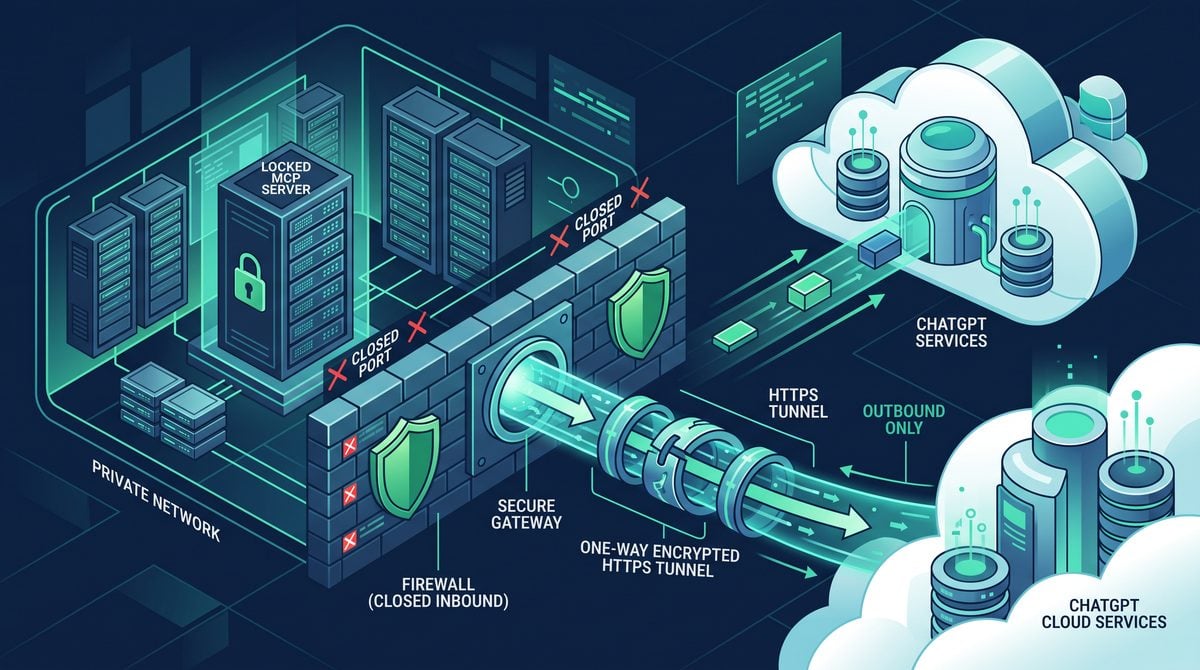
OpenAI’s Secure MCP Tunnel is designed to make a locally running Model Context Protocol (MCP) server available to OpenAI-hosted products and workflows without exposing that server directly to the public internet. Rather than requiring an inbound port, public DNS record, reverse proxy, VPN route, or firewall exception, the tunnel client running near the MCP server creates an outbound HTTPS connection to OpenAI. Requests from an authorized OpenAI connector are carried back through that already-established connection to the local MCP listener. This architecture is attractive for developer tools, internal systems, test environments, and local services that must remain non-public while still being reachable by a remote Codex or connector workflow.
The security value of the tunnel is real, but it is important to understand its exact trust model. A tunnel keeps the MCP listener private from unsolicited network traffic; it does not automatically preserve every kind of local-only authentication boundary. In particular, strict local bearer-token handling is not a supported tunnel control when the OpenAI connector forwards an Authorization header through OpenAI to the local MCP server. Teams that require a token to remain exclusively on the developer machine, never traverse OpenAI infrastructure, and never be associated with a remote connector request should use a direct local MCP configuration such as stdio or loopback HTTP for the relevant Codex workload. The tunnel is best understood as a secure reachability mechanism with explicit, narrower final-hop controls—not as a universal replacement for local-only credential isolation.
What the Secure MCP Tunnel Solves
MCP gives AI clients a standard way to discover tools, retrieve resources, and invoke operations exposed by an MCP server. In a direct deployment, an MCP server may run locally over standard input/output, on a loopback HTTP endpoint, or on a network-accessible HTTP endpoint. Each transport creates a different connectivity and security model.
Local transports are simple when the AI client and MCP server run on the same machine. A Codex process can launch a subprocess and communicate through stdio, or it can call an HTTP server bound to 127.0.0.1. Neither option needs a remote path. By contrast, a cloud-hosted workflow cannot directly call a developer laptop’s loopback interface. It is isolated by NAT, host firewalls, private addressing, and the absence of a publicly routable endpoint.
Historically, teams solved this problem using one of several approaches:
- Opening an inbound firewall port and publishing a public HTTPS endpoint.
- Placing a reverse proxy or API gateway in front of the server.
- Creating a VPN, mesh network, bastion route, or zero-trust access path.
- Using SSH reverse tunnels or third-party tunneling products.
- Moving the MCP server into a cloud environment reachable by the remote client.
Every option can be appropriate in the right environment, but each imposes operational work. A public endpoint requires certificate management, DNS, bot and vulnerability scanning defenses, access-control design, logging, patching, and carefully scoped firewall rules. VPN and mesh approaches require identity management and endpoint administration. SSH-based tunnels often become difficult to inventory, rotate, and supervise at scale.
The OpenAI Secure MCP Tunnel changes the network direction. Instead of OpenAI initiating a new connection toward the local listener, the local tunnel client initiates an authenticated outbound HTTPS connection to OpenAI. The connection is established from inside the developer’s or organization’s network, usually through outbound TCP port 443—the same general path used by many ordinary web applications and API clients. The service can then route connector requests through that existing tunnel session.
That design addresses a narrow but valuable problem: making an MCP endpoint reachable to an authorized remote OpenAI workflow while keeping the listener unaddressable from the public internet. It is not equivalent to making the entire host private in every sense. It does not erase the risk of an overly powerful MCP tool, an improperly authenticated connector, compromised local credentials, malicious tool arguments, or unsafe server-side business logic. It does, however, remove the need to accept arbitrary inbound connections from the internet.
Privacy of the listener versus secrecy of every request attribute
A recurring source of confusion is the phrase “private MCP server.” In the tunnel context, private means the MCP listener does not need to expose an externally reachable IP address and inbound port to callers. Internet scanners cannot discover it through public address-space scanning because the listener is not listening on a public address. An attacker cannot simply connect to https://public-host.company.com/mcp because no such endpoint is required for tunnel operation.
Private reachability does not mean that all request metadata and headers are confined to the localhost process boundary. Connector-originated traffic is relayed through OpenAI’s tunnel service. As a result, headers that are intentionally forwarded—including connector authentication material in the relevant architecture—cross OpenAI as part of the routed request. This distinction matters most for bearer tokens and compliance requirements. A team can correctly claim that the MCP listener is not publicly exposed while still needing to recognize that a connector-forwarded Authorization value travels through OpenAI on its way to the final local hop.
Within OpenAI Secure MCP Tunnel Explained: Connect ChatGPT to Private Servers Without Public Exposure, the Model Context Protocol Security Best Practices decision connects directly to OpenAI Rolls Out MCP Support for ChatGPT Enterprise: What Model Context Protocol Means for Your Organization. That linked article specifically examines rolls Out MCP Support for ChatGPT Enterprise: What Model Context Protocol Means for Your Organization, giving teams concrete background for applying the present article’s Model Context Protocol Security Best Practices recommendations without duplicating this workflow’s scope.
Tunnel-Client Architecture and Request Lifecycle
The official tunnel-client model consists of three principal planes: the local MCP service, the tunnel client, and OpenAI-hosted connector and tunnel infrastructure. Treating those as separate components helps clarify where network exposure ends, where authentication is evaluated, and where data is visible in transit.
| Component | Primary Responsibility | Network Position | Key Security Concern |
|---|---|---|---|
| Local MCP server | Implements tools, resources, prompts, and business logic | Developer workstation, internal host, VM, or private network | Tool authorization, input validation, secrets, side effects |
| Tunnel client | Establishes outbound tunnel and proxies tunnel traffic to the MCP listener | Near the MCP server | Credential protection, destination constraints, process hardening |
| OpenAI tunnel service | Associates remote connector traffic with an active tunnel session | OpenAI infrastructure | Identity, routing, authorization, encrypted transport |
| Connector / Codex workflow | Initiates MCP operations through configured access | OpenAI-hosted or client environment, depending on workflow | User authorization, connector scopes, auditability |
1. Local listener startup
The MCP server starts first. In a tunnel-based setup, it is generally best to bind it to loopback—such as 127.0.0.1 or ::1—or to another tightly restricted internal interface. Binding to all interfaces with 0.0.0.0 undermines much of the tunnel’s defense-in-depth benefit. The tunnel does not require the MCP server itself to be internet-reachable, so there is no reason to make it publicly reachable merely for tunnel operation.
A local HTTP MCP server may be available at an address such as:
http://127.0.0.1:8787/mcpAlternatively, an MCP service can run behind a local TLS listener:
https://127.0.0.1:9443/mcpThe exact URI and transport details depend on the MCP server implementation and tunnel-client configuration. The essential point is that the tunnel client has a local upstream target, and that target should be reachable only from the intended host or network identity.
2. Tunnel-client registration and outbound session establishment
The tunnel client authenticates to OpenAI using the credential and setup mechanism defined for the tunnel product. After authentication and tunnel registration, it establishes an outbound HTTPS connection. In practice, long-lived tunnel systems may use an HTTPS-based streaming or upgraded connection mechanism while retaining the security properties of TLS over outbound port 443. The important architectural fact is directionality: the connection originates from the network containing the MCP service.
This outbound session gives OpenAI a route to the tunnel client without OpenAI needing to initiate a new inbound TCP connection to the user’s host. Many enterprise egress policies permit outbound HTTPS through proxy inspection, gateway policy, or allowlisted destinations, while rejecting unsolicited inbound connections. The tunnel is therefore compatible with environments where an inbound rule would be unacceptable or impossible.
The tunnel client should be treated as a security-sensitive local agent. It has access to a local upstream endpoint and credentials that allow it to associate with a tunnel session. Run it under a dedicated operating-system account where possible, avoid sharing its configuration directory with unrelated processes, and restrict who can modify its environment variables, launch arguments, and local configuration files.
3. Connector request initiation
An OpenAI connector or configured workflow initiates an MCP operation. At a protocol level, this can include discovery actions such as listing tools and invocation actions such as calling a tool with structured arguments. The request is associated with the intended tunnel. OpenAI authenticates and authorizes the connector side according to the connector configuration and product controls.
At this stage, there are two distinct authorization questions:
- May this connector or user access the tunnel? This is a remote, OpenAI-side access-control question.
- May the resulting request perform this operation against the MCP server? This is ultimately an application and MCP-server authorization question.
Strong deployments answer both questions independently. Tunnel access should not be treated as a blanket grant to every local capability. An MCP server that can deploy infrastructure, modify source code, query customer systems, or access production databases should expose narrowly scoped tools and enforce its own authorization policy before performing side effects.
4. Request forwarding through the established session
OpenAI routes the connector request through the active tunnel session. The tunnel client receives the proxied request and forwards it to the configured local MCP upstream. From the local server’s perspective, the immediate peer is generally the tunnel client or local proxy path, not the original remote connector. This means traditional network-source checks—such as “only accept connections from a certain remote IP”—are not meaningful for distinguishing individual OpenAI connector users at the MCP listener.
The server receives the MCP request, evaluates any authentication presented at the final hop, applies tool-level authorization, executes the requested operation, and returns a result. The response follows the reverse path: local MCP server to tunnel client, tunnel client to OpenAI over the outbound session, and OpenAI to the connector workflow.
5. Session continuity and failure behavior
If the outbound tunnel session stops, the remote tunnel route stops working. The local MCP server may still be running, but it is no longer reachable through the tunnel. This is a desirable fail-closed property for remote access: loss of the client’s outbound authenticated connection does not trigger OpenAI to attempt an inbound fallback route to the local host.
Operationally, a tunnel client should have health monitoring and controlled restart behavior. Teams should distinguish between:
- the MCP server process being healthy,
- the tunnel client process being healthy,
- the outbound connection being established,
- the connector being authorized to use the tunnel, and
- the requested tool being authorized by the MCP server.
These are separate conditions. A successful local curl to a loopback endpoint does not prove that the tunnel is registered. A healthy tunnel does not prove that a connector grant is present. An authorized connector request does not prove that the server should allow a sensitive tool call.
How Outbound HTTPS Keeps the MCP Listener Private and Avoids Inbound Firewall Rules
The tunnel’s core network property is simple: it reverses who dials whom. In a public server model, a remote client establishes a new connection to a server-side listening socket. The firewall must allow that incoming connection. In a tunnel model, the local agent establishes a connection outward, and responses or routed request frames return through connection state that the local network already recognizes.
Traditional inbound deployment
Remote client
    |
    | New inbound HTTPS connection
    v
Public DNS / public IP / firewall rule
    |
    v
Reverse proxy or MCP server
    |
    v
MCP tools
In that design, the local or cloud perimeter must accept inbound traffic. Even if TLS and authentication are correct, the endpoint is visible to internet scanning, denial-of-service attempts, protocol fuzzing, and accidental misconfiguration. A reverse proxy can greatly reduce risk, but it remains a service that must be operated.
Secure tunnel deployment
Local MCP server <-- loopback or restricted local network --> Tunnel client
                                                               |
                                                               | Outbound HTTPS/TLS
                                                               v
                                                        OpenAI tunnel service
                                                               |
                                                               v
                                                      Authorized connector
There is no requirement for a public DNS record resolving to the local host. There is no requirement for a public IP. There is no requirement to open a listening firewall port for OpenAI. The tunnel client makes the outbound connection, and OpenAI uses that session to relay authorized traffic.
Stateful firewalls typically track an outbound TCP flow and allow return packets for that established flow. The tunnel design relies on this common behavior while still requiring organizations to apply their own egress policy. “No inbound rule required” is not identical to “no firewall policy required.” Security teams may still need to allow outbound access to the required OpenAI service domain, permit TLS traffic through an explicit proxy, inspect outbound connections according to policy, or define a constrained egress rule for the tunnel-client host.
Why NAT is not a substitute for architecture
Network Address Translation often prevents unsolicited inbound access to a workstation, but NAT alone is not a reliable security design. A host may later be moved to a public cloud subnet, a router may have port forwarding enabled, an IPv6 address may be globally routable, or a local service may bind to a broad interface unexpectedly. The tunnel architecture avoids relying on accidental reachability properties. The intended design explicitly uses an outbound session and can keep the local listener bound to loopback.
Defense-in-depth controls around the local listener
Even though inbound internet access is not required, the local listener should still be secured. A recommended baseline includes:
- Bind the MCP listener to
127.0.0.1,::1, or a dedicated private interface. - Use host firewall rules that reject unexpected inbound access to the MCP port.
- Run the MCP server and tunnel client with least-privilege operating-system identities.
- Keep the tunnel client’s upstream target fixed and avoid arbitrary proxy destinations.
- Use local TLS and mTLS when the environment requires cryptographic authentication on the final hop.
- Keep tool capabilities small, explicit, and independently authorized.
- Log sensitive operations without storing secrets or complete credentials.
The tunnel removes one network exposure class. It does not make it safe to expose tools that execute arbitrary shell commands, read unrestricted files, or run destructive infrastructure operations without meaningful policy checks.
Within OpenAI Secure MCP Tunnel Explained: Connect ChatGPT to Private Servers Without Public Exposure, the AI Agent Tool Permission Design decision connects directly to How to Use MCP Tool Search in OpenAI Codex: Setting Up Dynamic Tool Discovery for AI Agents. That linked article specifically examines use MCP Tool Search in OpenAI Codex: Setting Up Dynamic Tool Discovery for AI Agents, giving teams concrete background for applying the present article’s AI Agent Tool Permission Design recommendations without duplicating this workflow’s scope.
Authentication and Data-Flow Matrix
The most important implementation detail for security architects is the difference between tunnel authentication, connector authentication, and final-hop MCP authentication. They answer different questions and operate at different points in the path. Conflating them produces incorrect assurances, especially around bearer tokens.
| Control or Credential | Who Uses It | Where It Is Evaluated | Does It Cross OpenAI? | What It Protects |
|---|---|---|---|---|
| Tunnel-client credential | Tunnel client and OpenAI | OpenAI tunnel service | Yes, by definition of client-to-service authentication | Establishes and binds the outbound tunnel session |
| Connector identity and permissions | OpenAI user, connector, workflow, and OpenAI services | OpenAI-side connector controls | Managed within the connector service path | Determines whether remote use of the tunnel is permitted |
Connector-forwarded Authorization |
Connector and local MCP server | Local MCP server on final hop | Yes | Can authenticate the request to the MCP server, but is not local-only |
MCP_EXTRA_HEADERS |
Tunnel client and local MCP server | Local MCP server on final hop | No; injected by the local client for the local upstream request | Static shared header control for the final hop |
| mTLS client certificate | Tunnel client and local TLS MCP server | Local TLS endpoint | No, when TLS terminates locally between client and MCP server | Cryptographically authenticates the local tunnel client to the MCP server |
| Tool-specific authorization | MCP server and its back-end systems | Application layer | Depends on the tool implementation and data path | Restricts actions, resources, tenants, and side effects |
Data flow, hop by hop
Consider a connector that invokes an MCP tool through a secure tunnel. The logical request path is:
- A user or automated workflow acts through an authorized OpenAI connector.
- OpenAI validates connector-side identity and access according to the configured integration.
- OpenAI routes the request through the tunnel associated with the local tunnel client.
- The outbound tunnel session carries the request to the tunnel client.
- The tunnel client sends the request to the configured MCP upstream on the final local hop.
- The MCP server validates applicable final-hop authentication and authorizes the requested tool operation.
- The response returns through the same reverse route.
There can be encryption on multiple links. The tunnel’s outbound connection is protected by HTTPS/TLS between the tunnel client and OpenAI. The final hop can independently use HTTP on loopback, HTTPS, or mutual TLS, depending on the server and deployment. Encryption, however, is not the same thing as a local-only trust boundary. If a connector’s bearer credential is forwarded as a request header through the OpenAI path, TLS protects it in transit but does not make it invisible to the intermediary architecture that must carry and route it.
Authentication matrix by security objective
| Security Objective | Best-Fit Control | Why | Important Limitation |
|---|---|---|---|
| Prevent public internet access to MCP listener | Secure MCP Tunnel plus loopback binding | No public listener or inbound firewall rule is needed | Local processes may still access loopback unless separately controlled |
| Ensure only an approved remote connector can reach the tunnel | Connector access configuration and OpenAI-side identity controls | Applies access control before traffic is routed | Does not replace MCP tool authorization |
| Require a static secret at the local MCP endpoint | MCP_EXTRA_HEADERS |
Tunnel client adds a known header on the final hop | Static shared secret; not per-user identity and requires rotation |
| Authenticate tunnel client process to local MCP server | mTLS | Server validates a client certificate on the local TLS connection | Does not identify the original remote human or connector user by itself |
| Keep bearer credential strictly on developer machine | Direct stdio or loopback HTTP configuration |
No remote connector forwarding path is involved | Not suitable for remote hosted access without another architecture |
| Authorize specific high-risk actions | Server-side policy, scopes, approvals, and back-end IAM | Evaluates intent and target close to the protected resource | Requires deliberate MCP server design |
What “Authorization crosses OpenAI” means in practice
When a connector-forwarded Authorization header is used as the credential that the local MCP server validates, that header is part of a request transiting OpenAI’s connector and tunnel path. It is not a token that stays only in a local Codex process and gets checked only by a server bound to localhost. The distinction is architectural, not merely semantic.
This does not imply that the header is publicly exposed. It is carried over authenticated, encrypted service connections. It does mean that a security requirement phrased as “the bearer token must never leave the local machine” cannot be satisfied by this particular forwarded-auth path. Teams must not document such a setup as local-only bearer authentication, because the credential has a broader transit boundary.
For many use cases, that is acceptable. A connector may need to pass a purpose-specific credential to a protected internal MCP server. The organization may authorize OpenAI as a processor for that data path, set retention and governance policies accordingly, and rotate credentials on a schedule. For other use cases—such as developer machine secrets, certain regulated data environments, or systems with strict no-third-party-transit requirements—it is not acceptable. The correct solution is to select a direct local transport or redesign the authorization model.
Why Strict Local-Only Bearer-Token Handling Is Not Supported Through the Tunnel
Strict local-only bearer-token handling means more than “the server runs on localhost.” It means the bearer token is held and presented entirely within the local trust boundary: for example, a local Codex process reads a token from the operating system keychain or an environment variable and presents it to http://127.0.0.1:8787/mcp. The remote service does not receive, route, transform, or have access to that bearer credential. This is a strong and sometimes mandatory boundary.
The secure tunnel’s connector-forwarding model does not provide that property for connector-provided Authorization. The connector’s authorization header is forwarded through OpenAI to reach the local MCP endpoint. Therefore, while the token may be encrypted during transit and handled within controlled service infrastructure, it is not local-only.
The key distinction: local possession versus remote forwarding
Suppose a local MCP server implements this check:
Authorization: Bearer local-development-secretIn a direct loopback setup, Codex and the MCP server may both run on the same workstation:
Codex process --> 127.0.0.1:8787/mcp
      |
      +-- reads local-development-secret from local secure storage
Here, the token is never sent to OpenAI as part of the MCP HTTP request. It exists in the local client process and local server process only, subject to the workstation’s own operating-system security posture.
In a tunnel-based connector flow, if that same bearer token is supplied as connector authorization and forwarded to the MCP endpoint, the path is different:
Connector --> OpenAI connector service --> tunnel session --> tunnel client --> local MCP serverThe token is part of the routed request. It reaches the local server, but it has crossed the OpenAI service boundary first. Calling it “local-only” would be inaccurate.
Why header forwarding cannot create a local-only secret
It can be tempting to reason that because the local tunnel client makes the final connection to 127.0.0.1, any header received by the MCP server is local. At the socket layer, the final peer may indeed be local. At the credential lifecycle layer, however, the origin and transit path still matter. A forwarded header is not created exclusively by a local process for local use; it is passed through a remote connector system.
This is especially important when bearer tokens confer broad authority. Bearer credentials are possession-based: whoever possesses the value can use it until it expires or is revoked. The security boundary therefore includes every system that handles the value. If an organization’s policy says that a token may only be present on a managed workstation and may not enter a hosted service path, connector forwarding is incompatible with that policy.
What not to assume
- Do not assume TLS alone makes a forwarded bearer credential local-only.
- Do not assume binding the MCP server to loopback changes the transit path of connector authentication.
- Do not assume tunnel authentication and MCP bearer authentication are the same credential or provide the same guarantee.
- Do not assume a final-hop shared header supplies end-user identity.
- Do not assume mTLS proves which remote connector user initiated a request.
- Do not assume an inbound firewall rule is the only meaningful network security control.
Appropriate alternatives when strict-local auth is mandatory
If strict-local bearer handling is a hard requirement, the most appropriate solution is generally a direct local MCP configuration for the Codex workload that needs that property. Two common forms are:
- stdio: Codex launches or communicates with an MCP server through process standard input and output. There is no TCP listener at all, so no local HTTP bearer header is necessarily needed. The operating system process boundary and executable permissions become central controls.
- Loopback HTTP: Codex communicates with an MCP server bound to
127.0.0.1or::1. A bearer token can be injected by the local client from locally managed storage. The request never needs to travel through a remote connector path.
These options are not interchangeable with remote hosted connector access. They solve a different problem: local execution with strict local credential containment. If a remote OpenAI workflow must invoke the tool, the organization must decide whether connector-forwarded credentials, static final-hop credentials, mTLS, or a separate service architecture fits its requirements.
Within OpenAI Secure MCP Tunnel Explained: Connect ChatGPT to Private Servers Without Public Exposure, the Codex MCP Server Configuration Guide decision connects directly to Codex MCP Integration Masterclass: 30 Production-Ready Prompts for Building Enterprise Connectors and Tool Orchestration. That linked article specifically examines codex MCP Integration Masterclass: 30 Production-Ready Prompts for Building Enterprise Connectors and Tool Orchestration, giving teams concrete background for applying the present article’s Codex MCP Server Configuration Guide recommendations without duplicating this workflow’s scope.
Narrower Final-Hop Controls: Static MCP_EXTRA_HEADERS and MCP-Side mTLS
The absence of strict local-only bearer-token support in connector forwarding does not mean the final local hop is unauthenticated or uncontrollable. The tunnel-client architecture provides narrower controls that are useful when properly understood: static extra headers injected by the tunnel client and mutual TLS between the tunnel client and the local MCP server.
These mechanisms address different objectives. Static headers provide a shared request secret or fixed routing metadata. mTLS authenticates the tunnel client to the local TLS endpoint cryptographically. Neither is a substitute for remote user identity or fine-grained tool authorization, but both can significantly reduce the chance that an unrelated local process can successfully call the MCP listener.
Static final-hop headers with MCP_EXTRA_HEADERS
MCP_EXTRA_HEADERS is a mechanism for configuring headers that the tunnel client adds when it makes the final request to the local MCP upstream. The exact configuration format should follow the official tunnel-client documentation for the version in use, but conceptually it supports a pattern like this:
MCP_EXTRA_HEADERS='{"X-MCP-Local-Key":"s3cure-static-value","X-Environment":"developer-workstation"}'The local MCP server can require the static value before accepting requests:
POST /mcp HTTP/1.1
Host: 127.0.0.1:8787
X-MCP-Local-Key: s3cure-static-value
X-Environment: developer-workstation
This header is added on the tunnel client’s local upstream request. It is not the same as connector-forwarded Authorization. Properly implemented in the final-hop client configuration, it can remain in the local environment rather than being supplied by the remote connector. That makes it useful as a local shared-secret gate.
What static headers are good for
- Requiring a local secret that only the tunnel client configuration and MCP server configuration know.
- Adding fixed environment labels, deployment identifiers, or routing hints.
- Protecting against accidental requests from a browser, unrelated local script, or local process that lacks the header.
- Supporting simple legacy server middleware that expects a shared API key header.
- Creating a second independent control in addition to connector-side authorization.
What static headers are not good for
- Identifying a specific remote end user.
- Representing a unique per-request or per-session authorization decision.
- Replacing credential rotation, secret storage, and audit procedures.
- Protecting against a local attacker who can read the tunnel-client environment or configuration.
- Guaranteeing that every request originated from a particular human rather than any actor permitted to use the tunnel.
A static header is a shared secret. Its effective security depends on entropy, storage, rotation, and access controls. Generate a high-entropy value rather than using an easily guessed development string. Keep it out of source control, shell history, screenshots, and unredacted logs. Use a managed secret store or protected environment injection mechanism where available.
For example, a Node.js MCP server middleware check might look like this:
import crypto from "node:crypto";

function fixedTimeEqual(left, right) {
  const a = Buffer.from(left || "");
  const b = Buffer.from(right || "");
  return a.length === b.length && crypto.timingSafeEqual(a, b);
}

export function requireTunnelHeader(req, res, next) {
  const supplied = req.get("X-MCP-Local-Key");
  const expected = process.env.MCP_LOCAL_SHARED_KEY;

  if (!expected || !fixedTimeEqual(supplied, expected)) {
    return res.status(401).json({ error: "Unauthorized" });
  }

  next();
}
This protects the server only if the secret remains protected. It should be paired with loopback binding and host-level access restrictions rather than treated as the sole control.
MCP-side mTLS for final-hop client authentication
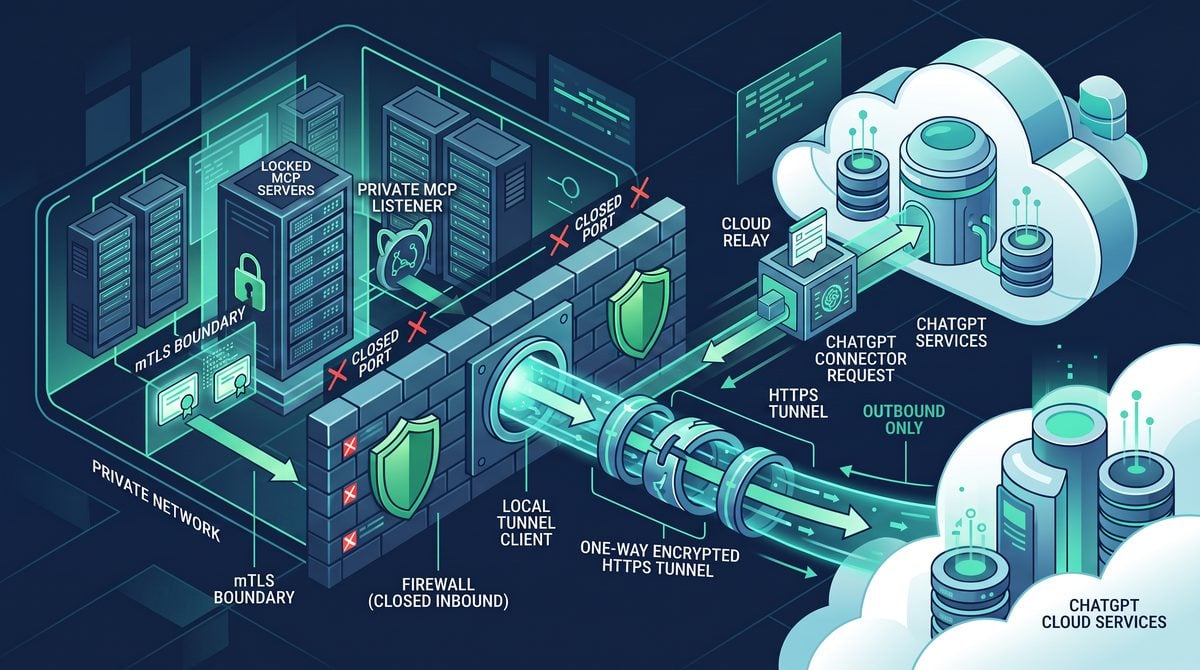
Mutual TLS is often stronger than a static header for authenticating the local tunnel client to the local MCP server. In ordinary server-side TLS, the client validates the server certificate. In mTLS, the server also validates a certificate presented by the client. The local MCP server can therefore require the tunnel client to prove possession of a private key associated with an approved certificate.
Conceptually, the final hop becomes:
OpenAI tunnel service
        |
        | encrypted outbound tunnel session
        v
Tunnel client -- mTLS --> https://127.0.0.1:9443/mcp
                          ^
                          |
                    MCP server validates
                    tunnel-client certificate
The client certificate and its private key remain on the machine or environment hosting the tunnel client. The MCP server trusts only a dedicated certificate authority or a specifically pinned client certificate. An unrelated local process cannot complete the TLS handshake unless it also has access to a valid private key.
mTLS security properties
| Property | mTLS Result | Operational Consideration |
|---|---|---|
| Authenticates local tunnel client to MCP server | Strong, certificate-based proof of private-key possession | Protect private key with file permissions, keystore, or hardware-backed storage where possible |
| Encrypts final local hop | Yes, if using HTTPS between tunnel client and server | Loopback traffic may still merit encryption in shared-host or compliance-sensitive environments |
| Identifies original remote user | No, not by itself | Use connector identity and application-layer authorization for user-level policy |
| Prevents local unauthorized callers | Helps substantially | Does not stop a local root/admin adversary who can steal credentials or alter processes |
| Supports revocation and rotation | Yes, with disciplined PKI operations | Manage certificate expiry, trust bundles, replacement, and emergency revocation |
A conceptual server configuration may require a trusted client CA and enforce certificate verification. The precise syntax varies by implementation, but the relevant elements are consistent:
tls:
  cert_file: /etc/mcp/tls/server.crt
  key_file: /etc/mcp/tls/server.key
  client_ca_file: /etc/mcp/tls/tunnel-client-ca.crt
  require_client_certificate: true
The tunnel client is configured to use a client certificate and private key for the upstream connection:
upstream:
  url: https://127.0.0.1:9443/mcp
  tls_client_cert: /var/lib/tunnel-client/client.crt
  tls_client_key: /var/lib/tunnel-client/client.key
  tls_ca_cert: /var/lib/tunnel-client/mcp-server-ca.crt
These snippets are illustrative. Use the actual tunnel-client and MCP-server option names supported by your deployment. Do not copy field names into production without validating them against the released documentation and your chosen server runtime.
Combining static headers and mTLS
Using both controls can be reasonable. mTLS proves that the final-hop caller possesses a trusted certificate. A static header can provide an additional shared-secret check, deployment label, or simple application middleware compatibility layer. Their protections overlap partially but not completely:
- mTLS is resistant to passive header observation because the credential is a private key used in the handshake rather than a repeated header value.
- A static header can be rotated independently and inspected by application middleware.
- Neither mechanism tells the MCP server which individual remote user issued the request unless separate identity assertions and validation are designed into the application.
- Both mechanisms should be paired with least-privilege tool design and server-side authorization.
For highly sensitive tools, treat tunnel reachability, mTLS, and static-header validation as admission controls only. The tool should still ask whether the operation is permitted: which repository, account, tenant, environment, file path, command, or deployment target is in scope? A secure transport cannot make an overbroad tool safe.
Tunnel vs Direct Local MCP Configuration for Codex Workloads
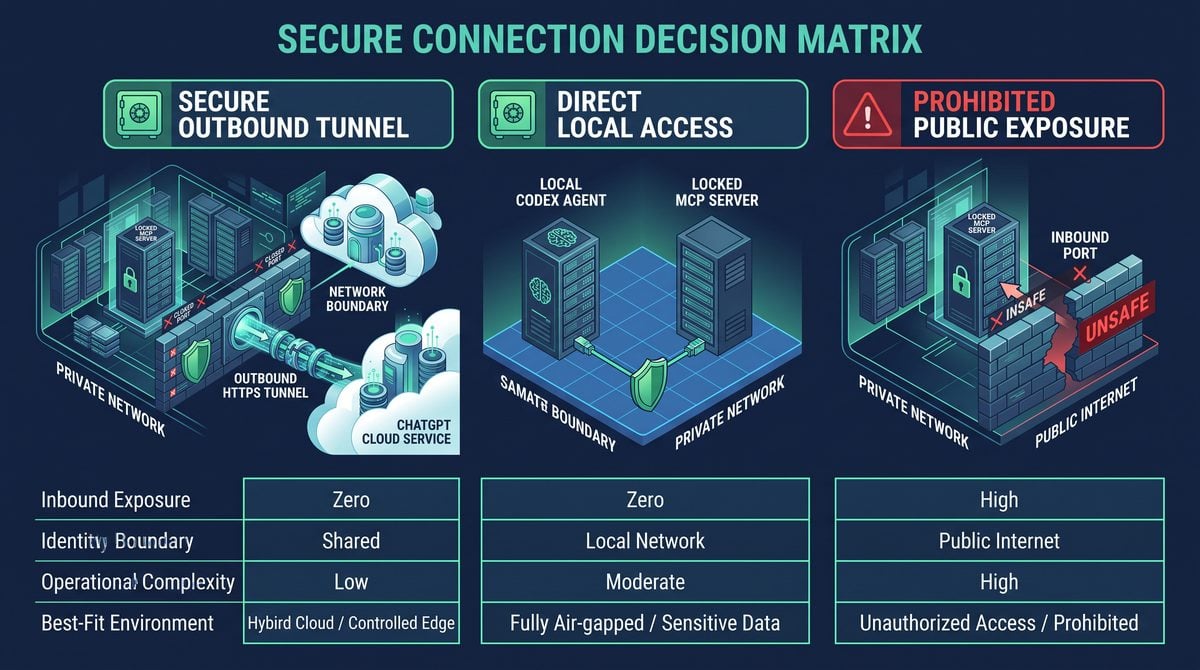
Choosing between a secure tunnel and direct local MCP configuration should begin with workload location and credential-boundary requirements. The decision is not about which approach is universally more secure. It is about matching the transport to the actual execution model.
Use the tunnel when a remote OpenAI connector or hosted workflow needs to reach an MCP server that runs inside a private local or internal environment, and when the organization accepts the connector and tunnel data path. Use direct local configuration when Codex itself runs alongside the MCP server and the workload requires credentials to remain strictly local.
| Scenario | Recommended Transport | Reasoning | Primary Caveat |
|---|---|---|---|
| Local Codex CLI uses a local filesystem or git MCP server | stdio |
No HTTP listener, no remote path, excellent local containment | Subprocess lifecycle and executable supply-chain security matter |
| Local Codex uses a local service requiring an HTTP API | Loopback HTTP | Bearer token can remain in local process boundary | Secure the loopback port from other local users/processes as needed |
| Hosted connector needs access to developer workstation MCP tools | Secure MCP Tunnel | Private listener remains non-public; no inbound firewall rule | Connector-forwarded Authorization is not local-only |
| Hosted connector accesses durable enterprise tools | Managed remote MCP service or tunnel, depending on locality | Choose based on where protected resources reside | Production systems usually need stronger IAM and audit controls |
| Requirement: token must never transit OpenAI | Direct stdio or loopback HTTP |
Maintains strict local credential boundary | Remote hosted invocation is incompatible with this requirement |
| Requirement: connector can reach local tool but local process authentication is needed | Tunnel with mTLS and/or static final-hop headers | Adds local final-hop admission controls | Does not create per-user local-only bearer semantics |
When stdio is the best choice
stdio is frequently the strongest option for a purely local Codex workload. The MCP client launches the server executable and communicates over its standard streams. There is no HTTP port to bind, no localhost socket to discover, and no web-header credential to manage unless the server itself uses one internally.
A conceptual local Codex configuration might identify a command and environment values:
{
  "mcp_servers": {
    "workspace-tools": {
      "command": "node",
      "args": ["/Users/alex/dev/workspace-mcp/dist/server.js"],
      "env": {
        "WORKSPACE_ROOT": "/Users/alex/dev/myapp"
      }
    }
  }
}
The exact Codex configuration format can vary by product and version. The architectural point remains: the Codex process and MCP server communicate locally through a subprocess pipe. If a secret is required, the launcher can retrieve it from local secure storage and pass it only to the child process or local IPC mechanism.
Use stdio when the tool is fundamentally workstation-bound: file operations, local git state, IDE context, local build artifacts, a hardware device, or a developer-specific sandbox. It is especially appropriate when a tool needs access to secrets that policy prohibits from entering a hosted connector path.
When loopback HTTP is the best choice
Loopback HTTP is useful when the MCP server is already an HTTP service, when multiple local processes need to use it, or when HTTP middleware, streaming, health checks, and local TLS are valuable. Bind the service to loopback rather than all interfaces:
Access 40,000+ AI Prompts for ChatGPT, Claude & Codex — Free!
Subscribe to get instant access to our complete Notion Prompt Library — the largest curated collection of prompts for ChatGPT, Claude, OpenAI Codex, and other leading AI models. Optimized for real-world workflows across coding, research, content creation, and business.
HOST=127.0.0.1
PORT=8787
MCP_AUTH_TOKEN="$(security find-generic-password -s myapp-mcp-token -w)"
node server.js
A local Codex client can then send a bearer credential directly to the loopback listener. The token can remain entirely on the machine. This is the right pattern for strict-local authentication requirements, provided that the threat model also considers other local processes. On multi-user machines or shared build hosts, loopback alone does not always prevent a different local account or privileged process from attempting a connection. Use operating-system isolation, local TLS/mTLS, host firewall controls, socket permissions where supported, or a switch to stdio when the requirement is stronger.
When the tunnel is the right choice
The tunnel is appropriate when the caller is not local. Typical cases include an OpenAI-hosted connector workflow that needs temporary access to a developer environment, an internal MCP service operating behind a corporate firewall, or a private development system that should not receive public inbound traffic. The tunnel allows a controlled remote path while avoiding public exposure and inbound firewall changes.
It is particularly useful for environments where public ingress is operationally expensive or forbidden, but outbound HTTPS is acceptable. The local host can remain behind NAT. The MCP service can stay bound to loopback. Security teams can maintain a simpler network posture because no public listener or reverse-proxy endpoint has to be created for the local MCP server.
However, the tunnel should not be selected merely because it sounds more secure than loopback. If Codex and the server are both local, adding a remote tunnel path creates unnecessary complexity and expands the credential/data transit boundary. Use the shortest, most direct transport that satisfies the actual workload.
A practical decision tree
- Is the MCP client running on the same host as the MCP server?
- If yes, prefer
stdioor loopback HTTP. - If no, continue.
- If yes, prefer
- Must the remote workflow access a service that cannot accept public inbound traffic?
- If yes, the secure tunnel is a strong candidate.
- If no, a managed remote MCP endpoint may be simpler operationally.
- Must a bearer token remain exclusively local and never traverse OpenAI?
- If yes, do not use connector-forwarded authorization through the tunnel for that workload.
- Use direct local
stdioor loopback HTTP instead.
- Does the local MCP server need to authenticate the tunnel client itself?
- If yes, use MCP-side mTLS, optionally complemented by static
MCP_EXTRA_HEADERS.
- If yes, use MCP-side mTLS, optionally complemented by static
- Can the tool cause material side effects?
- If yes, add server-side authorization, constrained schemas, confirmation workflows, and detailed audit logging regardless of transport.
Within OpenAI Secure MCP Tunnel Explained: Connect ChatGPT to Private Servers Without Public Exposure, the Secure AI Coding Workflow Architecture decision connects directly to How to Manage Design Decisions When Using AI Coding Agents: Complete Guide to Preventing Architecture Drift with Claude Code, Cursor, and Codex. That linked article specifically examines manage Design Decisions When Using AI Coding Agents: Complete Guide to Preventing Architecture Drift with Claude Code, Cursor, and Codex, giving teams concrete background for applying the present article’s Secure AI Coding Workflow Architecture recommendations without duplicating this workflow’s scope.
Deployment Patterns and Configuration Examples
The following patterns illustrate how to design deployments without confusing connectivity with authorization. They intentionally separate the local server, the tunnel client, and the policy layer.
Pattern 1: Developer workstation, remote connector, local project tools
A developer runs an MCP server that can inspect a single checked-out repository, run read-only tests, and query a local development database. An OpenAI connector needs access during an assisted debugging session. The organization does not want to open an inbound port on the workstation.
Recommended design:
- Bind the MCP server to
127.0.0.1. - Run the tunnel client under the developer’s managed account or a dedicated local service account.
- Permit outbound HTTPS according to organization egress policy.
- Restrict connector access to approved users or workflows.
- Use a static
MCP_EXTRA_HEADERSshared secret or mTLS on the final hop. - Expose only repository-scoped tools; avoid generic shell execution.
- Require explicit confirmation before writes, deployments, or external network actions.
The server might offer tools such as search_repository, read_build_log, and run_unit_tests. It should not offer a broad run_command(command: string) interface unless there are strong sandboxing and allowlisting controls. A narrow tool schema is a more reliable security control than asking an AI client to behave cautiously.
Pattern 2: Local-only Codex workflow with machine-confined token
A developer uses Codex locally to interact with an MCP server that accesses a local signing key, a hardware security module integration, or a development secret that must not traverse a remote connector. The proper design is direct local transport.
Recommended design:
- Use
stdiowhere possible. - If HTTP is necessary, bind only to
127.0.0.1or a Unix-domain socket where supported. - Retrieve the bearer credential locally from a keychain, secret manager, or protected file.
- Do not configure that bearer credential as connector-forwarded authorization.
- Do not route the MCP request through the secure tunnel for this strict-local workload.
This pattern provides a cleaner compliance story: the credential is handled by local processes only. It also reduces latency and dependencies because no tunnel session is necessary.
Pattern 3: Internal service on a private VM
An MCP server runs on an internal virtual machine with access to a private service network. A remote connector needs controlled access to a limited set of internal support tools. The VM cannot expose a public ingress endpoint.
Recommended design:
- Run the MCP server on a private interface or loopback behind a local proxy.
- Run the tunnel client as a dedicated system service with a dedicated identity.
- Use mTLS from the tunnel client to the local MCP server.
- Use service-account permissions that allow only the data required by the MCP tools.
- Implement application authorization based on tenant, environment, and operation.
- Send audit events to a centralized logging system with credential redaction.
This design avoids making the VM a public API target. It does not eliminate the need for internal IAM. If a tool can access customer records, the MCP service should require scoped identifiers and enforce tenant boundaries rather than relying solely on the fact that a connector reached the tunnel.
Pattern 4: Production operations tools
For production-impacting tasks—deployments, database changes, payment actions, incident controls, or identity administration—a tunnel can provide private connectivity, but it should rarely be the only guardrail. Production tools should use multiple layers:
- Connector access restricted to approved operators and groups.
- MCP tool schemas that constrain environments and resources.
- Independent server-side authorization against enterprise IAM.
- Short-lived credentials or signed approvals for high-risk operations.
- Human confirmation or change-ticket verification for destructive actions.
- Immutable audit records with actor, request, target, outcome, and correlation ID.
- Rate limits and anomaly detection.
For example, a deployment tool should not accept arbitrary shell code. A safer interface is:
{
  "tool": "deploy_release",
  "arguments": {
    "service": "billing-api",
    "environment": "staging",
    "version": "2026.08.22-rc.4",
    "change_ticket": "CHG-48219"
  }
}
The server can allow only approved services, deny production unless a separate approval is present, verify the change ticket, and use its own service identity to perform the deployment. This approach limits blast radius even if a connector is misused.
Operational Security, Logging, and Incident Response
A tunnel deployment should be operated as a small security-sensitive system, not as a disposable developer convenience. The tunnel client, local MCP server, connector configuration, and underlying host all participate in the trust boundary.
Secrets management
There may be several credential categories in a deployment: tunnel-client credentials, static final-hop header values, mTLS private keys, back-end service credentials, and optionally connector-forwarded authorization. Inventory them separately. Each has a different exposure path and rotation method.
| Secret Type | Preferred Storage | Rotation Trigger | Do Not Do This |
|---|---|---|---|
| Tunnel-client credential | Protected service configuration or secret manager | Scheduled rotation, suspected host compromise, offboarding | Commit to repository or place in shared shell profile |
| Static MCP header secret | Environment injection, protected config, local secret store | Scheduled rotation or exposure in logs/configuration | Use a short human-readable password |
| mTLS private key | Restricted filesystem permissions, keystore, or hardware-backed store | Certificate expiry, key compromise, device replacement | Make key readable by all users or include in container image |
| Back-end service credential | Workload identity or secret manager | Least-privilege lifecycle and application compromise | Return it in MCP tool output or logs |
| Connector-forwarded bearer token | Connector-side authorized credential configuration | Expiry, revocation, scope change, policy updates | Describe it as local-only or reuse it for unrelated systems |
Logging without credential leakage
Logging should make tunnel and MCP activity diagnosable while avoiding accidental collection of secrets. At minimum, record connection lifecycle events, tunnel registration status, request timestamps, tool names, result status, latency, correlation identifiers, and authorization outcomes. Redact or omit:
Authorizationheaders and bearer values.- Static header secret values configured through
MCP_EXTRA_HEADERS. - Cookies, session identifiers, API keys, signed URLs, and private keys.
- Raw tool arguments when they may contain customer data, source code, or credentials.
- Full tool output when it may contain secrets or regulated records.
A useful audit event structure can look like this:
{
  "timestamp": "2026-08-22T14:38:11Z",
  "event": "mcp.tool.invoke",
  "request_id": "req_7ab3e1",
  "tunnel_id": "tunnel_dev_42",
  "tool": "run_unit_tests",
  "authorization_result": "allowed",
  "target_scope": "myapp.dev",
  "duration_ms": 1842,
  "result": "success"
}
The event identifies the operation and its outcome without storing the request’s authorization material. If request payload inspection is needed for debugging, use a gated and time-limited diagnostic mode with additional redaction controls.
Host hardening
The tunnel client can reach a local MCP service, so a compromise of the tunnel-client host may have consequences beyond ordinary desktop compromise. Apply standard host controls:
- Patch the operating system, tunnel client, runtime, and MCP dependencies promptly.
- Use disk encryption and screen lock on developer workstations.
- Restrict local administrator access.
- Use endpoint detection and response appropriate to the environment.
- Run services under non-admin accounts with minimal filesystem permissions.
- Limit MCP server access to only necessary directories, databases, and network destinations.
- Review startup items and service definitions for unexpected modifications.
On shared CI runners or multi-tenant build machines, a tunnel to a privileged MCP service deserves special caution. Another job or local process may be able to inspect environment variables, contact loopback services, or interfere with filesystem-based credentials if isolation is weak. Prefer dedicated runners, isolated containers with carefully scoped mounts, workload identity, and mTLS in these settings.
Availability and egress proxy considerations
Because the tunnel depends on an outbound HTTPS session, egress filtering and proxy behavior affect reliability. Organizations should validate:
- Whether the tunnel client can reach required OpenAI service endpoints through the corporate proxy.
- Whether TLS interception is permitted and compatible with the tunnel client.
- Whether long-lived HTTPS connections are terminated by idle timeouts.
- Whether reconnect behavior is observable and bounded.
- Whether DNS resolution and certificate validation work consistently in the target environment.
A secure design should fail closed when the tunnel is unavailable. Avoid implementing an automatic fallback that opens a public inbound port or switches the local MCP service to a broad network bind. Such fallback behavior can turn a transient connectivity issue into a material exposure.
Incident response actions
If a tunnel credential, static header secret, mTLS private key, or host is suspected to be compromised, respond according to the affected control:
- Disable or revoke the affected tunnel or connector access where possible.
- Stop the tunnel client if immediate containment is needed.
- Rotate tunnel-client credentials and static final-hop secrets.
- Revoke and reissue the mTLS client certificate if its private key may be exposed.
- Review MCP server logs and connector audit events for suspicious tool use.
- Inspect the host for persistence, unauthorized configuration changes, and secret access.
- Review downstream systems for actions performed through exposed tool capabilities.
- Restore access only after validating configuration, host integrity, and least-privilege scopes.
Incident plans should explicitly state that rotating a static MCP_EXTRA_HEADERS value does not revoke a connector’s permission to use the tunnel, and revoking connector access does not automatically repair a compromised local host. Each layer needs its own containment action.
Within OpenAI Secure MCP Tunnel Explained: Connect ChatGPT to Private Servers Without Public Exposure, the Enterprise AI Security Logging and Governance decision connects directly to 3 Enterprise Security Checks Before Deploying ChatGPT Work — Data Governance, Access Control, and Audit Compliance. That linked article specifically examines 3 Enterprise Security Checks Before Deploying ChatGPT Work — Data Governance, Access Control, and Audit Compliance, giving teams concrete background for applying the present article’s Enterprise AI Security Logging and Governance recommendations without duplicating this workflow’s scope.
Decision Framework and Common Mistakes
The most effective deployments begin with a written statement of the security objective. “We need secure MCP access” is too vague. The organization should identify whether it needs private reachability, local credential containment, end-user identity propagation, local client authentication, production authorization, or all of these. Different controls satisfy different objectives.
Security requirement mapping
| Requirement Statement | Correct Design Response | Incorrect Assumption to Avoid |
|---|---|---|
| “The MCP service must not be internet reachable.” | Use tunnel with loopback/restricted binding and no inbound public rule. | “NAT alone makes it private.” |
| “Only approved connector users may reach the service.” | Configure connector identity and access controls. | “A static local header identifies the user.” |
| “Only the tunnel client may call the local MCP listener.” | Use mTLS and optionally a static final-hop header. | “Loopback means no local process can connect.” |
| “The bearer token must never leave the machine.” | Use direct local stdio or loopback HTTP for the Codex workload. | “Forwarded Authorization through a tunnel remains local-only.” |
| “A connector request must not be able to deploy anywhere.” | Implement tool-level allowlists, IAM, approval checks, and scoped schemas. | “Tunnel access is sufficient authorization.” |
Mistake 1: Treating the tunnel as a public API gateway replacement
The tunnel avoids public ingress, but it is not automatically a full API-management solution. If an MCP server serves many users, requires quotas, has complex OAuth delegation, needs regional availability, or is a durable production integration, a managed remote service behind an enterprise gateway may be more suitable. The tunnel is strongest when it bridges a private or local environment to authorized OpenAI access without exposing inbound network surface.
Mistake 2: Passing broad credentials through a connector without scope reduction
If connector-forwarded authorization is acceptable, use the narrowest token possible. Prefer audience-bound, short-lived, scope-limited credentials rather than a long-lived administrator token. A token that can only invoke read-only repository search is far safer than a token that can administer every cloud account. The tunnel’s private networking model should not become a reason to relax credential hygiene.
Mistake 3: Using static headers as identity
A static MCP_EXTRA_HEADERS value proves only that the caller on the final hop knows the configured shared value. In a tunnel architecture, that typically means the request passed through the configured local tunnel client. It does not tell the MCP server whether Alice, Bob, an automation workflow, or a compromised connector initiated the request. For user-level policy, use connector controls and application authorization designed for identity and claims.
Mistake 4: Overlooking local adversaries
Loopback binding is excellent for preventing remote network access, but it is not an absolute process-isolation mechanism. Malware running as the same user, a local administrator, or another process in a weakly isolated shared environment may be able to call the endpoint, read configuration, or intercept secrets. mTLS, OS accounts, filesystem permissions, sandboxing, and dedicated machines can improve the boundary. Where practical, stdio eliminates the network listener entirely.
Mistake 5: Exposing arbitrary command execution
An MCP tool that accepts arbitrary command text can turn prompt injection, user error, connector compromise, or authorization bugs into full host compromise. Prefer declarative and constrained interfaces. Instead of:
{ "tool": "shell", "arguments": { "command": "any command string" } }Prefer:
{
  "tool": "run_test_suite",
  "arguments": {
    "suite": "unit",
    "package": "api"
  }
}
The server can map accepted values to predefined commands in a controlled working directory. This is safer regardless of whether the request arrives through stdio, loopback HTTP, or a tunnel.
Mistake 6: Confusing encrypted transport with data residency or handling guarantees
HTTPS/TLS is essential, but it does not answer every governance question. If data or credentials pass through OpenAI as part of connector forwarding, legal, privacy, retention, and vendor-risk requirements may apply. Teams should document the actual path and consult their approved organizational policies. The correct language is specific: “the local MCP listener is not publicly exposed and is reached through an outbound encrypted tunnel,” not “all data remains only on the local machine” when that is not true.
Frequently Asked Questions
Does Secure MCP Tunnel require opening an inbound firewall port?
No. The tunnel client establishes an outbound HTTPS connection to OpenAI, so the local MCP listener does not need a public inbound firewall rule for OpenAI to reach it through the tunnel. Your organization may still need an outbound egress rule, proxy configuration, or destination allowlisting for the tunnel client.
Can I bind my MCP server to localhost when using the tunnel?
Yes, and that is generally the preferred design. The tunnel client runs near the MCP server and forwards traffic to the configured local upstream. Binding to 127.0.0.1 or ::1 helps ensure that the server is not reachable directly from other network hosts.
Is a connector-forwarded Authorization bearer token local-only?
No. In the tunnel architecture, connector-forwarded Authorization crosses OpenAI as part of the connector and tunnel request path before reaching the local MCP endpoint. It may be protected in transit, but it does not satisfy a requirement that the bearer token never leave the local machine.
What should I use if my Codex workload requires a token to stay on the developer machine?
Use a direct local MCP configuration. Prefer stdio when possible. Use loopback HTTP when an HTTP service is required, with the server bound to localhost and the token injected by the local Codex process from local secure storage. Do not use connector-forwarded authorization through the tunnel for that strict-local requirement.
What does MCP_EXTRA_HEADERS protect?
MCP_EXTRA_HEADERS provides static headers that the tunnel client adds on the final hop to the local MCP server. The server can validate a shared secret header before processing requests. This is useful as a local admission control, but it is not per-user identity and should not be treated as a replacement for tool-level authorization or credential rotation.
Is mTLS better than a static header?
mTLS generally provides stronger final-hop client authentication because the MCP server validates the tunnel client’s certificate and proof of private-key possession. Static headers are simpler and can be useful as an additional control. For sensitive environments, mTLS plus tightly scoped MCP tools and application authorization is often a stronger design than a static shared secret alone.
Does mTLS identify the original OpenAI user?
No. mTLS on the local hop identifies the tunnel client certificate to the local MCP server. It does not by itself identify the remote connector user who initiated the request. Remote identity and entitlement should be handled through connector controls and, where needed, authenticated application-level claims and authorization.
Should production MCP servers use a secure tunnel?
They can, if private reachability is the requirement and the operational model is appropriate. But production deployments need more than a tunnel: least-privilege service identities, scoped tool schemas, server-side authorization, approvals for sensitive changes, logging, monitoring, certificate and secret rotation, and incident response. For broadly shared enterprise services, a managed remote MCP deployment may be operationally preferable.
Can a tunnel protect against prompt injection?
No. The tunnel protects network reachability by avoiding public inbound exposure. Prompt injection is an application and agent-safety problem. Mitigate it with narrow tool permissions, explicit confirmation for side effects, argument validation, resource allowlists, isolated execution, and independent authorization checks.
Conclusion
OpenAI Secure MCP Tunnel provides a practical architecture for connecting authorized OpenAI workflows to MCP services that remain private inside a workstation, private network, or internal environment. Its central mechanism is an outbound HTTPS connection initiated by the local tunnel client. Because OpenAI routes requests through that already-established session, the local MCP listener does not need public DNS, a publicly reachable IP address, or an inbound firewall rule.
The tunnel’s value should be described precisely. It protects private reachability and reduces public attack surface. It does not make connector-forwarded bearer tokens local-only: connector Authorization traverses OpenAI before reaching the local MCP server. Organizations with a strict requirement that bearer credentials never leave the local machine should use direct stdio or loopback HTTP MCP configurations for local Codex workloads.
For tunnel deployments that need stronger final-hop controls, use the controls that match their actual purpose. Static MCP_EXTRA_HEADERS can provide a locally injected shared-secret gate. MCP-side mTLS can authenticate the tunnel client to the local MCP server cryptographically. Neither replaces connector-side permissions, tool-level authorization, least-privilege design, or rigorous operational security. The strongest MCP systems combine private connectivity with narrow tools, explicit authorization, protected credentials, observability, and a transport choice that matches where the client runs and where sensitive credentials are allowed to travel.
Within OpenAI Secure MCP Tunnel Explained: Connect ChatGPT to Private Servers Without Public Exposure, the MCP Deployment Security Checklist decision connects directly to Codex CLI 0.144 Arrives — New Writes Approval Mode, MCP Auth, and Multi-Agent Concurrency Controls. That linked article specifically examines codex CLI 0.144 Arrives — New Writes Approval Mode, MCP Auth, and Multi-Agent Concurrency Controls, giving teams concrete background for applying the present article’s MCP Deployment Security Checklist recommendations without duplicating this workflow’s scope.
