

The July 2026 Codex update introduces a major shift in how AI agents find and use capabilities at runtime: Model Context Protocol (MCP) tools now use tool search by default. Instead of registering a static list of tools for each session, Codex resolves tools dynamically based on the agent’s intent, the user’s request, and context supplied by your application. This tutorial explains what MCP tool search is, why it matters, how it differs from static tool registration, and how to set it up for real projects. You will walk away with concrete code examples, provider-specific configuration patterns, best practices for metadata and descriptions, and a troubleshooting playbook—all geared toward building safer, smarter, and more maintainable AI systems.
Dynamic discovery solves a recurring problem in AI operations: the proliferation of tools across teams, providers, environments, and microservices. Static registration often results in brittle, duplicated configurations and an explosion of “glue code” to keep tool lists in sync. MCP tool search replaces that friction with discovery, ranking, and selection—powered by a standardized protocol and a search engine that can mix lexical, semantic, and policy-aware filtering. The result is a more adaptive agent runtime: one that can discover the right capability on demand without you hardwiring every tool into the prompt.
In this tutorial we will cover:
- What MCP tool search is and how it changes the agent architecture landscape.
- How tool search differs from static tool registration.
- Step-by-step setup for projects using Codex with MCP providers.
- Provider-specific configuration for databases, APIs, and file systems.
- Best practices for tool descriptions, tags, and metadata quality.
- Multi-agent workflows that delegate discovery and execution intelligently.
- Performance considerations and caching strategies that keep latency low.
- Troubleshooting common issues you’ll likely encounter in production.
- Real-world end-to-end examples: databases, REST APIs, and file systems.
What Is MCP Tool Search?
MCP (Model Context Protocol) defines a standard way for tools—provided by services like databases, file systems, analytics platforms, and internal APIs—to advertise their capabilities to AI agents. Each tool describes what it does, the inputs it accepts, the outputs it returns, and metadata such as tags, scopes, and example invocations. In the July 2026 Codex update, tools are no longer primarily registered as a static list when you create an agent session; instead, Codex queries providers at runtime to find the best-fitting tools based on the user’s intent and provided context.
Conceptually, tool search is like a “package manager” for capabilities, queried on demand. It returns a ranked set of candidate tools and their descriptors for the agent to consider. The agent then chooses, plans, and executes the best match—or asks for clarification if the candidates aren’t specific enough.
Key attributes of MCP tool search:
- Intent-aware: The query to the MCP search endpoint reflects the user’s instruction, agent role, and contextual signals (like domain, data schemas, or environment).
- Provider-agnostic: It spans multiple MCP providers (e.g., a database provider, an HTTP provider, a file-system provider), unifying discovery across them.
- Metadata-driven: Descriptions, tags, scopes, input/output schemas, and examples significantly influence ranking and selection.
- Policy-aware: Search results can be filtered and re-ranked using organization policies, auth scopes, and risk profiles.
- Adaptive: As your environment evolves—new APIs, new tables, deprecations—agents keep working without code changes to update a static tool list.
Why It Matters
In production, you rarely have one agent and one tool. You might have dozens of providers, each bundling multiple tools exposed to multiple agents across teams. Static registration means updating prompt manifests, redeploying services, and chasing all the little mismatches that can break an agent’s flow (e.g., outdated schemas, renamed endpoints, or removed tables). Dynamic tool search moves that operational burden into a discovery layer. Agents learn about capabilities as they need them, and you can improve coverage or quality simply by improving metadata and provider-side indexing.
For engineering teams, this change delivers the following benefits:
- Reduced maintenance: No more manual tool curation per agent session.
- Faster iteration: Add a tool in a provider; it becomes discoverable immediately.
- Better safety posture: Enforce guardrails and scopes at search time, preventing unsafe or out-of-scope tools from ever reaching the agent.
- Improved user experience: Agents respond with more relevant and up-to-date capabilities because discovery is fresh.
- Cross-environment consistency: The same search configuration can route to dev, staging, or production providers with environment-aware metadata.
How Tool Search Differs from Static Tool Registration
Static registration meant that when you initialized an agent, you passed the finite set of tools it could use. The agent never saw anything else, which meant you had tight control but limited flexibility. Tool search flips the model: the agent issues a search query, receives candidates, and picks the one to execute. You still have control, but now it’s exercised through metadata quality, search policies, and ranking strategies instead of manual whitelists.
| Aspect | Static Tool Registration | Tool Search (Default) |
|---|---|---|
| Discovery | Manual, preselected tools | Dynamic, runtime search across providers |
| Scalability | Brittle with many tools | Scales via indexing, ranking, filtering |
| Adaptability | Requires redeploys for changes | Updates propagate via provider metadata |
| Safety | Whitelists reduce exposure but are static | Policy-aware filtering before agent sees tools |
| Contextuality | Limited; same tools in all contexts | Search conditioned on user/agent/task context |
| Maintenance | High; drift and duplication | Lower; centralize metadata and search config |
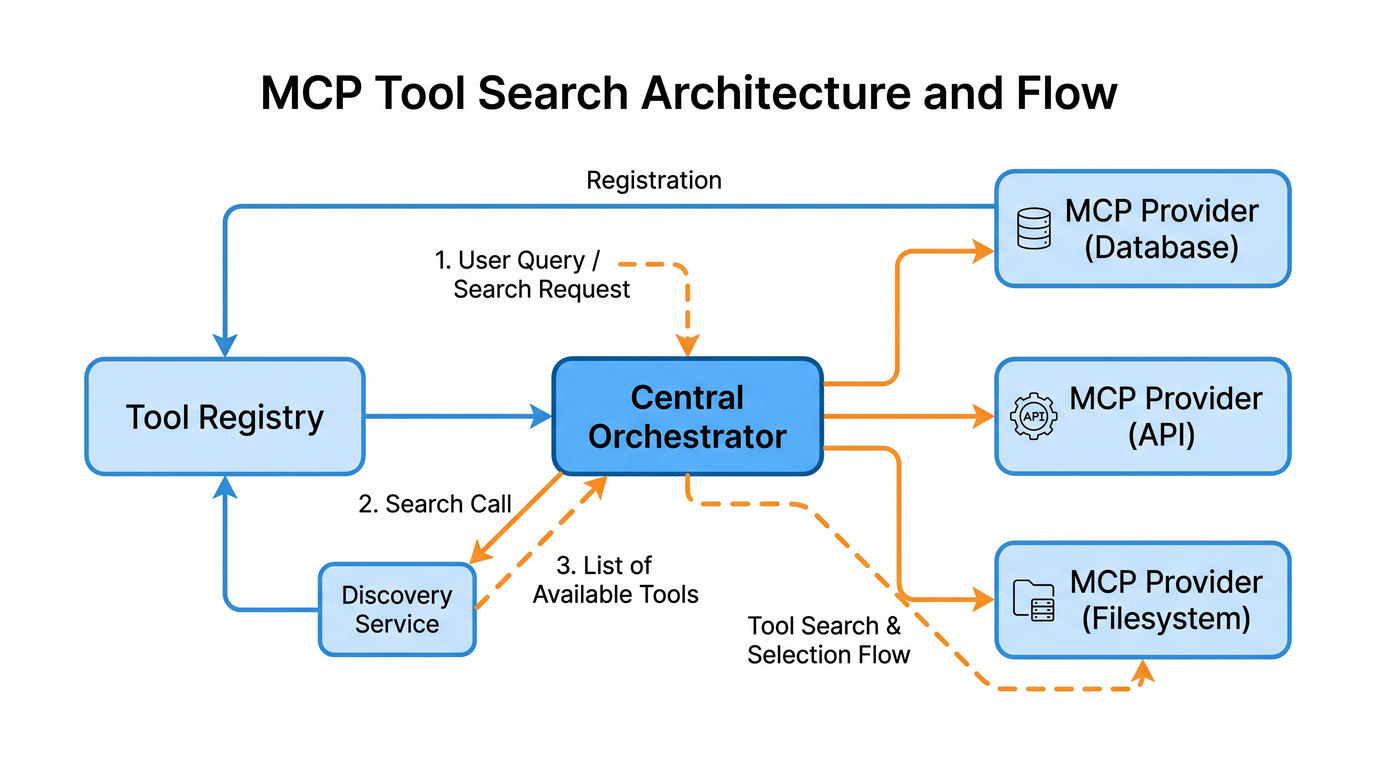
Architecture Overview
At a high level, MCP tool search introduces a late-binding discovery loop:
- A user asks the agent to perform a task (e.g., “pull total revenue by region for Q2”).
- The agent converts intent and context into a tool search query.
- MCP providers respond with candidate tools (e.g., sql.query, sql.describe_table).
- The agent evaluates candidates, possibly asking follow-up questions to disambiguate.
- The agent selects a tool, composes parameters, executes it, and uses results to continue.
This loop repeats as tasks evolve. Importantly, the search process is shaped by:
- Provider indexes: Generated from tool manifests, schemas, and documentation.
- Metadata quality: Descriptions, tags, and examples materially influence ranking.
- Policies and scopes: Filters ensure only safe tools emerge for a given session.
- Caching: To keep latency low, search results and descriptors are cached with short TTLs.
Prerequisites
- Access to Codex with MCP tool search enabled by default (July 2026 update).
- At least one MCP provider configured (e.g., database, HTTP, filesystem).
- SDK or API client compatible with your runtime (Node.js, Python, or server-side frameworks).
- Credentials and environment variables for provider authentication.
Step-by-Step Setup Guide
This section walks through enabling tool search, connecting providers, issuing queries, and executing tools. Code examples are illustrative; consult your SDK for final method names and options.
1) Enable MCP Tool Search at Session Start
Codex defaults to tool search in the July 2026 update, but you can still configure behavior explicitly. Here is a minimal Node.js-style example to make that intent clear and to set defaults for ranking strategy and safety policies.
// Node.js (TypeScript) - illustrative example
import { Codex } from "@openai/codex"; // Example package name; use your SDK
import { LruCache } from "./cache";     // Your local LRU cache implementation

const codex = new Codex({ apiKey: process.env.OPENAI_API_KEY });

const session = await codex.startSession({
  // MCP is enabled by default; make it explicit for clarity
  mcp: {
    toolSearch: {
      enabled: true,
      // Strategy hints; consult your SDK for supported values
      strategy: "hybrid",        // "lexical" | "semantic" | "hybrid"
      topK: 8,
      threshold: 0.45,           // Minimum relevance score
      policy: {
        // Allow only tools within these scopes for this session
        allowedScopes: ["reporting.read", "analytics.query", "files.read"],
        // Block high-risk categories at search time
        deniedTags: ["admin", "mutation", "destructive"],
      }
    },
    providers: [
      // Configure providers; see sections below
      { name: "postgres-reporting", type: "database", endpoint: process.env.DB_MCP_URL },
      { name: "http-commerce", type: "http", endpoint: process.env.HTTP_MCP_URL },
      { name: "fs-shared", type: "filesystem", endpoint: process.env.FS_MCP_URL }
    ]
  }
});

// Optional: preload a lightweight cache for tool descriptors
const toolCache = new LruCache({ max: 512, ttlMs: 60_000 });
For Python users:
# Python - illustrative example
from codex import Codex  # Example import
from cache import LruCache

codex = Codex(api_key=os.environ["OPENAI_API_KEY"])

session = codex.start_session({
    "mcp": {
        "toolSearch": {
            "enabled": True,
            "strategy": "hybrid",
            "topK": 8,
            "threshold": 0.45,
            "policy": {
                "allowedScopes": ["reporting.read", "analytics.query", "files.read"],
                "deniedTags": ["admin", "mutation", "destructive"]
            }
        },
        "providers": [
            {"name": "postgres-reporting", "type": "database", "endpoint": os.environ["DB_MCP_URL"]},
            {"name": "http-commerce", "type": "http", "endpoint": os.environ["HTTP_MCP_URL"]},
            {"name": "fs-shared", "type": "filesystem", "endpoint": os.environ["FS_MCP_URL"]}
        ]
    }
})

tool_cache = LruCache(max=512, ttl_ms=60_000)
2) Issue a Tool Search Query
When a user asks a question, translate it into a tool search query. Codex can handle this implicitly, but you can also call search directly for observability, caching, or UI integration.
// Node.js - illustrative example
const userRequest = "Get total revenue by region for Q2 and save to a CSV";

const searchContext = {
  domain: "analytics",
  hints: ["sql", "reporting", "csv"],
  // Optional: schema or business terms to steer matching
  glossary: ["revenue", "region", "quarter", "orders", "payments"]
};

const candidates = await session.tools.search({
  query: userRequest,
  context: searchContext
});

// Cache descriptors for quick reuse
for (const tool of candidates.tools) {
  toolCache.set(tool.id, tool);
}

console.log("Top candidates:", candidates.tools.map(t => ({ name: t.name, score: t.score })));
Expected payload (shape may vary slightly by SDK):
{
  "tools": [
    {
      "id": "postgres-reporting:sql.query",
      "name": "sql.query",
      "provider": "postgres-reporting",
      "description": "Execute parameterized SQL queries against the reporting database.",
      "input_schema": {
        "type": "object",
        "properties": {
          "sql": { "type": "string" },
          "params": { "type": "array", "items": { "type": "string" } },
          "row_limit": { "type": "integer", "default": 5000 }
        },
        "required": ["sql"]
      },
      "output_schema": {
        "type": "object",
        "properties": {
          "rows": { "type": "array", "items": { "type": "object" } },
          "columns": { "type": "array", "items": { "type": "string" } }
        }
      },
      "tags": ["sql", "read", "analytics"],
      "scopes": ["analytics.query", "reporting.read"],
      "score": 0.81,
      "examples": [
        { "input": { "sql": "SELECT count(*) FROM orders WHERE created_at > $1", "params": ["2026-04-01"] } }
      ]
    },
    {
      "id": "fs-shared:files.write_csv",
      "name": "files.write_csv",
      "provider": "fs-shared",
      "description": "Write an array of rows to a CSV file in the shared workspace.",
      "tags": ["files", "csv", "write"],
      "score": 0.67
    }
  ]
}
3) Execute a Selected Tool
Once you have candidates, your agent or planner decides which to use and in what sequence. Here we run sql.query and then write the result to CSV.
// Node.js - illustrative example

// 1) Discover tools (as shown above) and choose top-ranked sql.query
const sqlTool = candidates.tools.find(t => t.name === "sql.query");

// 2) Call describe_table for clarity if needed
const describe = await session.tools.execute("postgres-reporting:sql.describe_table", {
  table: "orders"
});

// 3) Compose a safe, parameterized query
const result = await session.tools.execute(sqlTool.id, {
  sql: `
    SELECT region, SUM(total_amount) AS revenue
    FROM orders
    WHERE created_at >= $1 AND created_at < $2
    GROUP BY region
    ORDER BY revenue DESC
  `,
  params: ["2026-04-01", "2026-07-01"]
});

// 4) Write the CSV
const csvPath = `/reports/revenue_by_region_Q2_2026.csv`;
await session.tools.execute("fs-shared:files.write_csv", {
  path: csvPath,
  rows: result.rows
});

console.log("Report saved:", csvPath);
4) Observe and Log
Observability is essential. Log search queries, selected tools, and execution metrics—omitting sensitive data.
// Pseudocode for observability
log.info("tool.search", {
  query: userRequest,
  context: searchContext,
  candidates: candidates.tools.slice(0, 3).map(t => ({ id: t.id, score: t.score }))
});

log.info("tool.execute", {
  id: sqlTool.id,
  latencyMs: result.metrics?.latencyMs,
  rowCount: result.rows?.length
});
Configuring Tool Search for Different MCP Providers
Providers advertise capabilities via manifests, and many expose configuration options to improve indexing and search. Below are common patterns you can adapt.
General Provider Configuration
Most providers support a minimal manifest that includes:
- name, type, endpoint
- auth configuration (e.g., bearer tokens, OAuth, or key-based)
- tools with descriptions, input/output schemas, tags, scopes
- search-specific hints: synonyms, domain, examples, and sample queries
# Example provider manifest (YAML)
name: postgres-reporting
type: database
endpoint: ${DB_MCP_URL}
auth:
  method: bearer
  token: ${DB_MCP_TOKEN}
search:
  domain: analytics
  synonyms:
    - "revenue: gm, sales_total, total_amount"
    - "customers: clients, buyers"
  boost:
    tags:
      analytics: 1.2
      sql: 1.0
      mutation: 0.5  # de-emphasize writes
tools:
  - name: sql.query
    description: Execute parameterized SQL against the reporting database. Use for reads.
    tags: ["sql", "analytics", "read"]
    scopes: ["analytics.query", "reporting.read"]
    input_schema:
      type: object
      properties:
        sql: { type: string }
        params: { type: array, items: { type: string } }
        row_limit: { type: integer, default: 5000 }
      required: ["sql"]
    output_schema:
      type: object
      properties:
        rows: { type: array, items: { type: object } }
        columns: { type: array, items: { type: string } }
  - name: sql.describe_table
    description: Return columns and types for a given table in the reporting database.
    tags: ["sql", "schema", "metadata"]
    scopes: ["reporting.read"]
    input_schema:
      type: object
      properties:
        table: { type: string }
      required: ["table"]
Database Providers (PostgreSQL/Analytics)
Databases often expose a family of tools: query, schema inspection, explain plans, and constrained mutations (e.g., temp tables). For analytics-focused agents, limit default scopes to read-only and add very clear descriptions to nudge ranking away from mutation tools unless explicitly required.
- Boost schema and metadata tools (e.g., describe_table) to improve the agent’s safety and accuracy.
- Document time windows, business logic, and common groupings in the provider search hints.
- Provide examples of parameterized queries, never string-concatenated SQL.
// Example: provider-side search hint to boost time-window queries
search:
  glossary:
    - "quarter: Q1=Jan-Mar, Q2=Apr-Jun, Q3=Jul-Sep, Q4=Oct-Dec"
    - "region: NA, EMEA, APAC, LATAM"
  examples:
    - query: "total revenue by region for last quarter"
      tools: ["sql.query", "sql.describe_table"]
HTTP/REST Providers
For REST APIs, expose tools per endpoint or per logical action. Good descriptions mention HTTP verbs, path parameters, typical filters, rate limits, and authentication scopes. Include request/response schemas whenever possible.
# Example: commerce API provider
name: http-commerce
type: http
endpoint: ${HTTP_MCP_URL}
auth:
  method: oauth2
  token_url: ${OAUTH_TOKEN_URL}
  client_id: ${OAUTH_CLIENT_ID}
  client_secret: ${OAUTH_CLIENT_SECRET}
search:
  domain: commerce
  boost:
    tags:
      read: 1.2
      write: 0.8
tools:
  - name: http.get_orders
    description: "List orders with optional status and date filters. Use for analytics imports."
    tags: ["orders", "read", "list"]
    scopes: ["orders.read"]
    input_schema:
      type: object
      properties:
        status: { type: string, enum: ["open", "closed", "refunded"] }
        created_after: { type: string, format: "date-time" }
        created_before: { type: string, format: "date-time" }
        limit: { type: integer, default: 100 }
      additionalProperties: false
    output_schema:
      type: object
      properties:
        items: { type: array, items: { type: object } }
        next_cursor: { type: string }
  - name: http.post_refund
    description: "Create a refund for an order. Requires approval scope. Use with care."
    tags: ["orders", "write", "refund"]
    scopes: ["orders.refund.approve"]
Filesystem Providers
File tools are often utility tools, discovered as secondary steps (“save to CSV” or “read a JSON config”). Be explicit in descriptions about file roots, size limits, and content types to improve decision-making.
# Example: filesystem provider
name: fs-shared
type: filesystem
endpoint: ${FS_MCP_URL}
search:
  domain: utilities
  boost:
    tags:
      csv: 1.4
      write: 1.0
tools:
  - name: files.read_text
    description: "Read a UTF-8 text file from the shared workspace."
    tags: ["files", "read", "text"]
    scopes: ["files.read"]
    input_schema:
      type: object
      properties:
        path: { type: string }
        max_bytes: { type: integer, default: 1048576 }
      required: ["path"]
  - name: files.write_csv
    description: "Write an array of objects as CSV to the shared workspace directory."
    tags: ["files", "write", "csv"]
    scopes: ["files.write"]
    input_schema:
      type: object
      properties:
        path: { type: string }
        rows: { type: array, items: { type: object } }
      required: ["path", "rows"]
Best Practices for Tool Descriptions and Metadata
High-quality metadata is the difference between sharp, reliable discovery and noisy, ambiguous results. Treat descriptions as documentation and indexing input at once.
- Name with verbs and domain nouns: sql.query, files.write_csv, http.get_orders.
- Start descriptions with a clear, active sentence about what the tool does.
- Include disambiguating detail: read-only vs write, time windows, authentication scopes, size or rate limits.
- Add 1–3 realistic examples. They help semantic matchers tremendously.
- Use tags consistently. Examples: “read”, “write”, “analytics”, “metadata”, “schema”, “csv”.
- Use scopes to model permissions. Search can filter or de-prioritize tools outside the session’s allowed scopes.
- Be strict about input/output schemas. Add enum values, formats (date-time), and min/max constraints.
- Mark deprecations. Include a replacement tool name.
# Example of a strong metadata block for an analytics query tool
tools:
  - name: sql.query_agg
    description: |
      Execute parameterized SQL aggregation queries. Use for GROUP BY and summary stats.
      Read-only. Returns rows and columns; does not mutate data.
    tags: ["sql", "read", "analytics", "aggregate"]
    scopes: ["analytics.query"]
    input_schema:
      type: object
      properties:
        sql: { type: string, description: "Parameterized SQL with $1, $2, ..." }
        params: { type: array, items: { type: string } }
        row_limit: { type: integer, default: 5000, maximum: 25000 }
      required: ["sql"]
    examples:
      - input:
          sql: "SELECT region, SUM(total_amount) AS revenue FROM orders WHERE created_at >= $1 AND created_at < $2 GROUP BY region"
          params: ["2026-04-01", "2026-07-01"]
Handling Tool Discovery in Multi-Agent Workflows
Multi-agent systems complicate discovery: one agent’s search may not reflect the needs of another, and naive parallel searches can increase latency or cost. Design roles and responsibilities explicitly.
- Coordinator agent: Orchestrates searches and planning. It performs broad discovery, filters candidates using organizational policy, and hands off execution to specialists.
- Specialist agents: Database, API, or file agents that execute well-defined tools with minimal discovery. They receive a narrowed candidate list or a selected tool.
- Shared caches: Keep a process-wide or distributed cache of search results keyed by (normalized-intent, provider, scope).
- Blackboard pattern: Maintain a shared “task board” where agents post discovered candidates, chosen tools, and partial results for others to reuse.
- Context passing: When a downstream agent performs a search, pass along relevant context (schemas, customer IDs, date ranges) to improve ranking.
// Pseudocode for a coordinator + specialist pattern

// 1) Coordinator performs a broad search
const coordCandidates = await session.tools.search({
  query: "Sync yesterday's closed orders to analytics DB and export as CSV",
  context: { domain: "commerce-analytics", hints: ["orders", "etl", "csv"] }
});

// 2) Coordinator filters candidates by phase
const dbPhase = coordCandidates.tools.filter(t => t.tags.includes("sql"));
const apiPhase = coordCandidates.tools.filter(t => t.tags.includes("orders"));
const filePhase = coordCandidates.tools.filter(t => t.tags.includes("csv"));

// 3) Coordinator hands off to specialist agents with narrowed sets
await dbAgent.executeWithCandidates(dbPhase, { task: "insert_orders", date: "2026-07-05" });
await apiAgent.executeWithCandidates(apiPhase, { task: "list_closed_orders", date: "2026-07-05" });
await fileAgent.executeWithCandidates(filePhase, { task: "write_csv" });

Performance Considerations and Caching Strategies
Dynamic discovery should not mean slow. With the right caching and configuration, tool search adds only a small, predictable overhead.
- Client-side cache: Cache top search results for popular intents for a short TTL (e.g., 30–120 seconds). Key by a normalized intent signature (e.g., task, domain, scopes).
- Descriptor cache: Cache tool descriptors by ID for longer TTL (e.g., 5–15 minutes), invalidating when provider versions change.
- Warmup: On startup, prime the cache with common searches or tool descriptors in the background.
- Batched searches: In multi-agent flows, batch related searches or share results via a blackboard to avoid duplicate queries.
- Policy pruning: Apply allowedScopes/deniedTags filters client-side before invoking search if known, reducing result sets and ranking work.
- Pagination: If providers return many tools, request topK first and expand only if necessary.
- Hybrid ranking: Use “hybrid” (lexical + semantic) for robust results on diverse vocabularies; switch to lexical-only for predictable, low-latency internal taxonomies.
// Example: simple LRU with two tiers of caches

class TwoTierCache {
  constructor() {
    this.searchCache = new LruCache({ max: 1024, ttlMs: 90_000 }); // short TTL
    this.descriptorCache = new LruCache({ max: 4096, ttlMs: 10 * 60_000 }); // long TTL
  }
  getSearch(key) { return this.searchCache.get(key); }
  setSearch(key, val) { this.searchCache.set(key, val); }
  getDescriptor(id) { return this.descriptorCache.get(id); }
  setDescriptor(id, val) { this.descriptorCache.set(id, val); }
}

function normalizeIntent(intent, context, scopes) {
  return JSON.stringify({
    task: intent.toLowerCase().replace(/\s+/g, " ").trim(),
    domain: context?.domain,
    scopes: (scopes || []).sort()
  });
}
Search Strategy Tuning
Choose a strategy per domain:
- Lexical: Fast and deterministic. Works best with standardized naming (sql.query, files.write_csv).
- Semantic: Best when user phrasing is variable or when synonyms are common.
- Hybrid: Combines both; usually the default and recommended for general-purpose agents.
// Session-level tuning
const session = await codex.startSession({
  mcp: {
    toolSearch: {
      enabled: true,
      strategy: "hybrid",
      topK: 6,
      threshold: 0.50,
      policy: { allowedScopes: ["analytics.query", "files.read", "files.write"] }
    },
    providers: [...]
  }
});

// Per-query override (e.g., when user uses very specific jargon)
const candidates = await session.tools.search({
  query: "POST /orders/refunds create refund for order 12345",
  strategy: "lexical",
  topK: 4,
  context: { domain: "commerce" }
});
Caching and Invalidations
- Invalidate on provider version change: Providers should expose a version or etag; include it in cache keys.
- Stale-while-revalidate: Return cached results immediately and refresh in the background.
- Partial caching: Cache only the top descriptors; long tails often add noise.
- Respect provider cache headers if included in search responses.
// Example: version-aware cache key
const providerVersion = await session.providers.version("postgres-reporting"); // hypothetical
const key = `${normalizeIntent(userRequest, searchContext)}::${providerVersion}`;
const cached = twoTier.getSearch(key);
Troubleshooting Common Issues
Dynamic discovery is powerful, but you’ll encounter edge cases. Here’s a quick guide.
Access 40,000+ AI Prompts for ChatGPT, Claude & Codex — Free!
Subscribe to get instant access to our complete Notion Prompt Library — the largest curated collection of prompts for ChatGPT, Claude, OpenAI Codex, and other leading AI models. Optimized for real-world workflows across coding, research, content creation, and business.
- No tools returned
- Check allowedScopes: If the session scopes exclude everything relevant, the search result may be empty.
- Lower the threshold: A too-high threshold can exclude borderline matches.
- Add tags/synonyms: Providers might need better metadata for your domain terms.
- Confirm provider connectivity: Auth or network errors can silently collapse results to empty.
- Wrong tool selected
- Improve descriptions: Make explicit when a tool is read vs write.
- Use deniedTags: Block “mutation” tools unless the user intent clearly requests them.
- Add examples: Show typical inputs for the intended use case; semantic matchers benefit.
- Slow searches
- Enable client caches with short TTLs.
- Reduce topK or switch to lexical for hot paths.
- Batch or reuse searches in multi-agent workflows.
- Optimize provider indexes: Remove deprecated tools and reduce noisy synonyms.
- Schema mismatch errors at execution
- Validate arguments against input_schema before calling tools.
- Use describe_* tools to confirm table or endpoint details.
- Add format and enum constraints in schemas to catch errors earlier.
- Overly broad matches
- Increase threshold and add domain hints in the search context.
- Tighten tags and scopes at the provider level.
- Use policy to down-rank generic utility tools unless specifically requested.
- Stale or deprecated tools appear
- Mark tools as deprecated with a replacement field in the provider manifest.
- Set lower boost for deprecated tags; purge from index when possible.
- Include versioning in descriptors and display it in your observability dashboards.
- Security violations or unexpected mutations
- Ensure allowedScopes excludes mutation scopes by default for analytics sessions.
- Add a policy denying high-risk tags (e.g., “admin”, “delete”).
- Require confirmation prompts before executing tools with “write” or “refund” tags.
Real-World Examples
Let’s assemble end-to-end flows using three common provider types: databases, REST APIs, and file systems. These examples tie together discovery, selection, execution, caching, and policy strategies.
Example 1: Connecting to a Database for Analytics
Task: “Calculate average order value and top 10 regions by revenue for last quarter. Save the results as two CSV files in the shared workspace.”
// Step 1: Search for relevant tools
const intent = "Calculate AOV and top 10 regions by revenue for last quarter and save CSVs";
const ctx = { domain: "analytics", hints: ["sql", "csv"] };
const candidates = await session.tools.search({ query: intent, context: ctx });

// Step 2: Choose sql.query and files.write_csv
const sqlQuery = candidates.tools.find(t => t.name === "sql.query");
const writeCsv = candidates.tools.find(t => t.name === "files.write_csv");

// Step 3: Use describe_table to confirm column names
await session.tools.execute("postgres-reporting:sql.describe_table", { table: "orders" });

// Step 4: Calculate last quarter dates (you might do this app-side)
const start = "2026-04-01";
const end = "2026-07-01";

// Step 5: Execute two queries
const aovResult = await session.tools.execute(sqlQuery.id, {
  sql: `
    SELECT AVG(total_amount) AS average_order_value
    FROM orders
    WHERE created_at >= $1 AND created_at < $2
  `,
  params: [start, end]
});

const topRegions = await session.tools.execute(sqlQuery.id, {
  sql: `
    SELECT region, SUM(total_amount) AS revenue
    FROM orders
    WHERE created_at >= $1 AND created_at < $2
    GROUP BY region
    ORDER BY revenue DESC
    LIMIT 10
  `,
  params: [start, end]
});

// Step 6: Write CSV files
await session.tools.execute(writeCsv.id, {
  path: "/reports/avg_order_value_Q2_2026.csv",
  rows: aovResult.rows
});

await session.tools.execute(writeCsv.id, {
  path: "/reports/top_regions_Q2_2026.csv",
  rows: topRegions.rows
});

console.log("Analytics CSVs saved.");
Tips for database metadata:
- Add tags “aggregate”, “summary”, and “read” to your query tools to steer ranking.
- Include an example with date filtering and GROUP BY to improve match scoring for analytics intents.
- Expose “explain” and “describe_table” tools; search tends to surface them in planning steps.
Example 2: Pulling Orders from a Commerce API and Writing to CSV
Task: “Export closed orders from the last 24 hours to CSV.”
// Step 1: Search for order listing and CSV tools
const intent = "Export closed orders from last 24 hours to CSV";
const ctx = { domain: "commerce", hints: ["orders", "csv", "export"] };
const candidates = await session.tools.search({ query: intent, context: ctx });

const listOrders = candidates.tools.find(t => t.name === "http.get_orders");
const writeCsv = candidates.tools.find(t => t.name === "files.write_csv");

if (!listOrders) throw new Error("No listing tool found. Check provider metadata and scopes.");

// Step 2: Execute the list endpoint with filters
const now = new Date();
const yesterday = new Date(now.getTime() - 24 * 3600 * 1000);

const ordersPage = await session.tools.execute(listOrders.id, {
  status: "closed",
  created_after: yesterday.toISOString(),
  created_before: now.toISOString(),
  limit: 100
});

// Step 3: Accumulate pages if needed
let items = ordersPage.items || [];
let cursor = ordersPage.next_cursor;

while (cursor) {
  const page = await session.tools.execute(listOrders.id, {
    status: "closed",
    created_after: yesterday.toISOString(),
    created_before: now.toISOString(),
    limit: 100,
    cursor
  });
  items = items.concat(page.items || []);
  cursor = page.next_cursor;
}

// Step 4: Write CSV
await session.tools.execute(writeCsv.id, {
  path: "/reports/closed_orders_last_24h.csv",
  rows: items
});

console.log(`Wrote ${items.length} orders to CSV.`);
Tips for HTTP providers:
- Include pagination fields in the output schema and examples.
- Use scopes to separate read vs refund vs admin; search should default to read-only for exports.
- Add enum values for status filters so the agent doesn’t guess invalid states.
Example 3: Reading Configuration from a File and Querying a Database
Task: “Read thresholds from a config file and query anomalies greater than the threshold.”
// Step 1: Search for file read and SQL tools
const candidates = await session.tools.search({
  query: "Read anomaly threshold from config and query high anomalies",
  context: { domain: "analytics", hints: ["config", "sql", "threshold"] }
});

const readText = candidates.tools.find(t => t.name === "files.read_text");
const sqlQuery = candidates.tools.find(t => t.name === "sql.query");

if (!readText || !sqlQuery) throw new Error("Missing required tools.");

// Step 2: Read config
const configText = await session.tools.execute(readText.id, { path: "/configs/anomaly.yaml" });

// Parse YAML (app-side)
const threshold = parseYaml(configText.content).threshold || 100;

// Step 3: Query high anomalies
const result = await session.tools.execute(sqlQuery.id, {
  sql: `
    SELECT id, metric, value, detected_at
    FROM anomalies
    WHERE value >= $1
    ORDER BY detected_at DESC
    LIMIT 500
  `,
  params: [String(threshold)]
});

// Step 4: Show or persist results
console.log(`Found ${result.rows.length} anomalies over threshold.`);
Advanced Discovery Patterns
As your catalog grows, consider these patterns to keep discovery precise and safe.
- Domain partitioning: Assign providers and tools to clear domains (analytics, commerce, operations). Use the search context domain to bias results.
- Scoped sessions: Create sessions per role with different allowedScopes, so a support agent never sees refund tools while a finance agent can.
- Two-step search: First, find a “schema” or “describe” tool; second, refine search with concrete field names surfaced by the schema tool.
- Reranking by telemetry: Maintain a lightweight feedback loop where successful tool executions slightly boost the tool for similar intents.
- Low-latency path: For hot paths, keep a short list of “pinned” tools as a fallback when search fails, while still preferring search results when available.
Designing Metadata for High-Fidelity Matching
Good metadata anticipates how users ask for tasks. Some tips:
- Write like the user: “List closed orders” not “Enumerate processed_order resources.”
- Add synonyms and business terms at the provider level to align with everyday language.
- Keep descriptions short but information-dense. The first sentence matters most.
- Use tags for verbs and nouns: read, write, list, query, csv, report, schema, refund.
- Use numeric constraints in schemas (e.g., limit max 1000) to curtail risky invocations.
# Anti-pattern vs improved description
# Anti-pattern:
description: "Performs operations on order objects."

# Improved:
description: "List orders with optional status and date filters. Read-only; returns items and next_cursor."
Security, Governance, and Auditability
Tool search can enforce safety before the agent sees a tool. Combine scopes, tags, and policy rules to implement least privilege.
- Scopes: Model capabilities (analytics.query, orders.read, refunds.approve). Default sessions to read-only scopes where possible.
- Denied tags: admin, mutation, destructive; easy to block at search time.
- Provenance: Log provider name, tool ID, version, and etag for every execution.
- PII-aware filtering: Mark tools that can reveal PII and make them discoverable only in PII-cleared sessions.
- Consent prompts: For any write or refund action, require an explicit confirmation step.
// Example policy embedded in session creation
const session = await codex.startSession({
  mcp: {
    toolSearch: {
      enabled: true,
      policy: {
        allowedScopes: ["analytics.query", "files.read", "files.write"],
        deniedTags: ["admin", "delete", "drop", "truncate"]
      }
    },
    providers: [...]
  }
});
Observability and Metrics
Track these signals to monitor and improve discovery quality:
- Search volume and latency per provider.
- Candidate set sizes and topK coverage.
- Selection accuracy: fraction of runs where the first-choice tool succeeds.
- Execution latency and error rates by tool ID.
- Cache hit ratios by cache tier.
- Fallback rates: how often pinned tools or manual overrides are used.
// Pseudocode metric hooks
metrics.observe("mcp.search.latency_ms", durationMs, { provider: "postgres-reporting" });
metrics.count("mcp.search.candidates", candidates.tools.length);
metrics.count("mcp.search.cache_hit", cacheHit ? 1 : 0);
metrics.count("mcp.tool.execute.success", 1, { tool: sqlQuery.id });
metrics.count("mcp.tool.execute.error", 1, { tool: sqlQuery.id, code: err.code });
End-to-End Multi-Agent ETL Example
Scenario: A coordinator agent discovers tools and assigns to three specialists: an API puller, a database loader, and a file exporter.
// 1) Coordinator discovers
const intent = "ETL closed orders from API to reporting DB and save daily CSV";
const ctx = { domain: "etl", hints: ["orders", "sql", "csv"] };
const discovered = await session.tools.search({ query: intent, context: ctx });

// 2) Partition candidates
const apiTools = discovered.tools.filter(t => t.provider === "http-commerce");
const dbTools = discovered.tools.filter(t => t.provider === "postgres-reporting");
const fsTools = discovered.tools.filter(t => t.provider === "fs-shared");

// 3) API Specialist pulls pages
const getOrders = apiTools.find(t => t.name === "http.get_orders");
// ... (paging loop from earlier example) ...
const orders = await pullClosedOrders(getOrders);

// 4) DB Specialist inserts into a staging table
const dbInsert = dbTools.find(t => t.name === "sql.insert_batch" || t.tags.includes("load"));
if (dbInsert) {
  await session.tools.execute(dbInsert.id, { table: "stg_orders", rows: orders });
}

// 5) DB Specialist runs aggregation
const dbQuery = dbTools.find(t => t.name === "sql.query");
const agg = await session.tools.execute(dbQuery.id, {
  sql: `
    SELECT region, COUNT(*) AS order_count, SUM(total_amount) AS revenue
    FROM stg_orders
    GROUP BY region
    ORDER BY revenue DESC
  `
});

// 6) File Specialist exports
const toCsv = fsTools.find(t => t.name === "files.write_csv");
await session.tools.execute(toCsv.id, { path: "/reports/daily_orders.csv", rows: orders });
await session.tools.execute(toCsv.id, { path: "/reports/daily_agg.csv", rows: agg.rows });
Provider-Specific Tips and Gotchas
- PostgreSQL
- Tag write tools with “mutation” and ensure policy excludes them for read-only sessions.
- Surface schema discovery tools to reduce hallucinated column names.
- Limit result sizes by default; expose row_limit in input schema.
- HTTP/REST
- Rate limits: Document them; add retry hints or backoff configuration to tool descriptions.
- Auth scopes: Reflect them accurately; discovery should fail closed when scope is missing.
- Stable naming: http.get_orders, http.get_order_by_id, http.post_refund.
- Filesystem
- Path safety: Clarify root directories and path normalization rules in descriptions.
- Size limits: Provide max_bytes and mime types to guide selection.
- CSV semantics: State how arrays and nested objects are handled.
Testing and Validation
- Unit-test metadata: Validate that all tools have non-empty descriptions, tags, and schemas with constraints.
- Golden searches: Create a set of representative queries and snapshot the topK results to detect regressions.
- Execution dry-runs: For destructive tools, require a “dry_run: true” flag in schema and test that behavior.
- Policy tests: Confirm deniedTags and allowedScopes prune expected tools.
// Example: golden search test (pseudo)
const queries = [
  "list closed orders",
  "export orders to csv",
  "describe orders table",
  "aggregate revenue by region"
];
for (const q of queries) {
  const res = await session.tools.search({ query: q, context: { domain: "commerce-analytics" } });
  assert(res.tools.length > 0, `No tools for: ${q}`);
  snapshot(q, res.tools.slice(0, 5).map(t => t.id));
}
Migration Checklist: Static Registration to Tool Search
- Inventory tools across providers and domains.
- For each tool: add or improve description, tags, scopes, schemas, and examples.
- Define session-level policies: allowedScopes, deniedTags, default strategy, topK, threshold.
- Add a client-side cache with short TTL for search results and a longer TTL for descriptors.
- Implement observability: log searches, selections, and executions (with privacy in mind).
- Roll out incrementally: enable search for read-only agents first, then expand to more complex roles.
Frequently Asked Questions
- Can I still force a specific tool? Yes. You can pin or directly execute a known tool ID. Tool search remains available for fallback or validation.
- What if two tools have identical descriptions? Use tags, scopes, and domains to differentiate. Add examples and unique input constraints.
- Does discovery leak sensitive tools? Policy filtering ensures out-of-scope tools never appear. Use scopes and denied tags aggressively.
- Is semantic search expensive? Hybrid search is typically efficient, and caching mitigates repeated costs. Use lexical-only for deterministic internal namespaces.
- How do I handle breaking changes? Version tools and manifests. Include deprecation fields, and keep old versions discoverable but down-ranked until migration completes.
Putting It All Together: A Reusable Search Helper
// A small helper that wraps search with policy, caching, and fallbacks
async function discoverTools(session, intent, context, options = {}) {
  const { topK = 6, threshold = 0.5 } = options;
  const key = normalizeIntent(intent, context, session.policy?.allowedScopes || []);
  const cached = twoTier.getSearch(key);
  if (cached) return cached;

  const res = await session.tools.search({
    query: intent,
    context,
    topK,
    threshold,
    strategy: options.strategy || "hybrid"
  });

  // Filter deprecated tools client-side as a second layer
  const filtered = {
    ...res,
    tools: res.tools.filter(t => !(t.tags || []).includes("deprecated"))
  };
  twoTier.setSearch(key, filtered);
  return filtered;
}

// Usage:
const candidates = await discoverTools(session, "export closed orders to csv", { domain: "commerce" });
Appendix: Metadata Templates
Use these templates to standardize high-quality tool descriptors across teams.
# Read-only Query Tool
name: sql.query
description: |
  Execute a parameterized, read-only SQL query. Use for SELECT statements and aggregations.
  Returns rows and columns; does not mutate data.
tags: ["sql", "read", "analytics"]
scopes: ["analytics.query", "reporting.read"]
input_schema:
  type: object
  properties:
    sql: { type: string, description: "Parameterized SQL with $1, $2, ..." }
    params: { type: array, items: { type: string } }
    row_limit: { type: integer, default: 5000, maximum: 25000 }
  required: ["sql"]
examples:
  - input:
      sql: "SELECT COUNT(*) AS total FROM orders WHERE created_at >= $1 AND created_at < $2"
      params: ["2026-04-01", "2026-07-01"]

# HTTP GET List Tool
name: http.get_orders
description: "List orders filtered by status and date windows. Read-only; paginated."
tags: ["orders", "read", "list"]
scopes: ["orders.read"]
input_schema:
  type: object
  properties:
    status: { type: string, enum: ["open", "closed", "refunded"] }
    created_after: { type: string, format: "date-time" }
    created_before: { type: string, format: "date-time" }
    limit: { type: integer, default: 100, maximum: 1000 }
    cursor: { type: string }
  additionalProperties: false
output_schema:
  type: object
  properties:
    items: { type: array, items: { type: object } }
    next_cursor: { type: string }

# Filesystem CSV Writer
name: files.write_csv
description: "Write an array of flat objects to a CSV file in the shared workspace."
tags: ["files", "write", "csv"]
scopes: ["files.write"]
input_schema:
  type: object
  properties:
    path: { type: string }
    rows: { type: array, items: { type: object } }
    delimiter: { type: string, default: "," }
  required: ["path", "rows"]
Appendix: Policy and Scoping Examples
// Read-only analytics session
const roSession = await codex.startSession({
  mcp: {
    toolSearch: {
      enabled: true,
      policy: {
        allowedScopes: ["analytics.query", "reporting.read", "files.read", "files.write"],
        deniedTags: ["mutation", "refund", "admin"]
      }
    },
    providers: [...]
  }
});

// Finance session (can refund with confirmation)
const financeSession = await codex.startSession({
  mcp: {
    toolSearch: {
      enabled: true,
      policy: {
        allowedScopes: ["analytics.query", "orders.read", "refunds.approve", "files.read", "files.write"],
        deniedTags: ["admin", "delete"]
      },
      // Additional runtime confirmation hook (hypothetical)
      confirmation: {
        requireForTags: ["refund", "write"]
      }
    },
    providers: [...]
  }
});
Checklist: Production Readiness
- All tools have clear descriptions, tags, scopes, and strict schemas.
- Session policy denies high-risk tags for general-purpose agents.
- Caches implemented with TTL-based invalidation and provider version awareness.
- Observability in place: search queries, candidates, selection, execution, errors.
- Golden search tests for your top 20 business intents.
- Fallbacks defined for critical paths (pinned tools or manual overrides).
- Consent prompts for any write/refund actions.
- Documentation for teams on how to add and maintain provider metadata.
Conclusion
MCP tool search by default is more than a convenience—it’s a reframe of how AI agents connect to the world. By shifting from static, brittle registration to dynamic, metadata-driven discovery, you reduce operational overhead, close safety gaps with policy-aware filtering, and give agents the flexibility to adapt as your systems evolve. The success of this approach rests on two pillars: high-quality provider metadata and measured, observable search configuration. With the patterns in this tutorial—clear descriptions, tight scopes, short-lived caches, and role-specific sessions—you can deploy agents that are both powerful and predictable.
Where to Go Next
Explore complementary guides and references to deepen your implementation:
-
For a deeper exploration of related concepts, our comprehensive guide on The Codex Microservices Playbook: 20 Prompts for Designing, Implementing, and Te provides detailed strategies and practical implementation steps that complement the techniques discussed in this article.
-
For a deeper exploration of related concepts, our comprehensive guide on Why ChatGPT’s Futures Class of 2026 Signals OpenAI’s Pivot to Develo provides detailed strategies and practical implementation steps that complement the techniques discussed in this article.
-
For a deeper exploration of related concepts, our comprehensive guide on The Codex Database Engineering Playbook: 20 Prompts for Schema Design, Query Opt provides detailed strategies and practical implementation steps that complement the techniques discussed in this article.
As you roll out tool search across your environment, start with read-only analytics, measure performance and accuracy, and iterate on metadata quality. When you’re confident in your policies and observability, expand to more complex workflows and multi-agent orchestration. With robust discovery in place, your agents will keep pace with your systems—no static tool lists required.
Pro tip: Treat your MCP provider manifests as living documentation. Small, regular metadata improvements produce outsized gains in discovery quality.
Access 40,000+ AI Prompts for ChatGPT, Claude & Codex — Free!
Subscribe to get instant access to our complete Notion Prompt Library — the largest curated collection of prompts for ChatGPT, Claude, OpenAI Codex, and other leading AI models. Optimized for real-world workflows across coding, research, content creation, and business.
