
Codex Chronicle: How OpenAI’s Screen-Context Memory System Transforms Long-Running Development Sessions
Codex Chronicle: How OpenAI’s Screen-Context Memory System Transforms Long-Running Development Sessions
By the ChatGPT AI Hub Editorial Team | June 18, 2026
Every senior developer knows the pain intimately. You close your laptop on Tuesday evening mid-refactor, your terminal windows scattered across three monitors, your mental context map carefully constructed over six hours of deep work. Wednesday morning arrives, and you spend the first forty-five minutes reconstructing what you were doing — re-reading Git diffs, scrolling through Slack threads, re-running tests just to remember which ones were failing and why. Multiply that by five days a week, across a team of twenty engineers, and you’re looking at hundreds of hours of lost productivity every month.
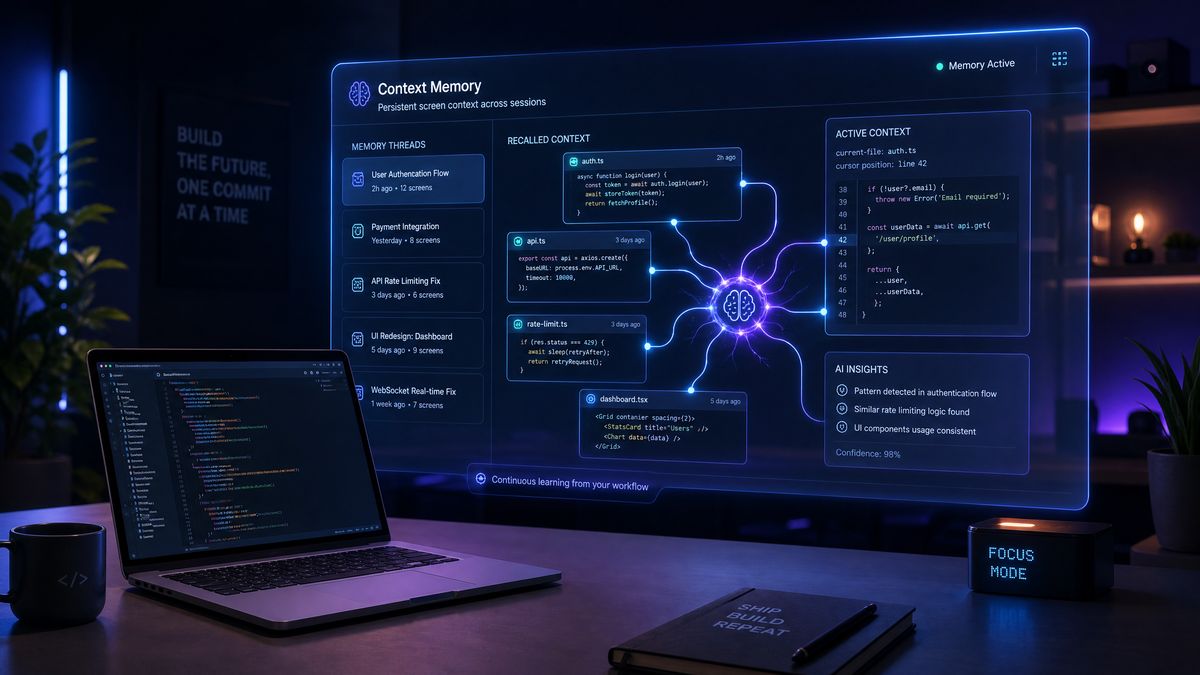
OpenAI’s answer to this problem is Codex Chronicle — a research preview feature for Pro subscribers on macOS that fundamentally rethinks how AI coding assistants maintain continuity across development sessions. Rather than treating each conversation as an isolated interaction, Chronicle builds a persistent, evolving memory of your development environment by capturing screen context, inferring project state, and surfacing relevant history at precisely the moment you need it. The implications for enterprise developer workflows are significant, and the technical architecture behind it raises important questions about privacy, data governance, and the future of human-AI collaboration in professional software development.
This deep dive examines Chronicle from every angle: how the system works under the hood, what the privacy controls actually mean in practice, how enterprise teams can configure it for their specific compliance requirements, and whether the productivity gains justify the adoption curve. We’ve analyzed the research preview documentation, tested the feature across multiple project archetypes, and spoken with early adopters to give you the most complete picture available.
Chronicle’s screen-context memory builds on OpenAI’s broader desktop integration strategy. For a detailed look at how Codex’s desktop agent directly controls macOS applications, files, and system-level workflows through native OS integration, see our comprehensive guide on Codex Computer Use and desktop agent capabilities for macOS, which covers the full range of system interactions now available to enterprise developers.
The Context Problem in Modern Software Development
To understand why Chronicle matters, you first need to appreciate the scale of the context problem it’s trying to solve. Modern software development is defined by complexity that grows faster than human working memory can accommodate. A typical enterprise microservices architecture might involve dozens of repositories, hundreds of service endpoints, thousands of configuration variables, and millions of lines of code. No single developer holds all of this in their head simultaneously — instead, they maintain a working context window, a mental cache of the subset of information relevant to their current task.
The problem is that this mental cache is volatile. It evaporates when you switch tasks, when you attend a two-hour meeting, when you sleep. Every context switch carries a cost, and knowledge workers — developers especially — are notoriously bad at estimating how expensive those switches actually are. Research from the University of California, Irvine has consistently found that it takes an average of 23 minutes to fully return to a task after an interruption. In software development, where cognitive state includes not just “what file am I editing” but “why am I editing it, what did I already try, what are the constraints I’m working within” — the reconstruction cost is even higher.
Existing AI coding assistants have done a reasonable job of helping within a session. Tools like Codex can hold a conversation thread, reference code you paste into the context window, and build up understanding over the course of a single sitting. But they’re fundamentally amnesiac across sessions. Every time you start a new conversation, you’re starting from scratch. The AI doesn’t know that yesterday you spent three hours debugging a race condition in your message queue, or that you specifically decided against using a particular library because of a licensing issue you discovered two weeks ago, or that the senior architect flagged a specific pattern as problematic in last month’s code review.
Chronicle is designed to close exactly that gap. It doesn’t just remember what you told it — it learns from watching what you do.
The persistent memory capabilities in Chronicle pair naturally with goal-oriented development workflows. Our masterclass on Codex Goal Mode with 35 production-ready prompts demonstrates how to structure autonomous long-running development tasks that benefit directly from accumulated session context and memory-augmented decision making.
Architecture Deep Dive: How Chronicle Captures and Processes Screen Context
Chronicle operates through a multi-layer architecture that distinguishes it from simpler clipboard-monitoring or conversation-logging approaches. Understanding this architecture is essential for enterprise teams evaluating the privacy implications and integration possibilities.
The Screen Context Capture Layer
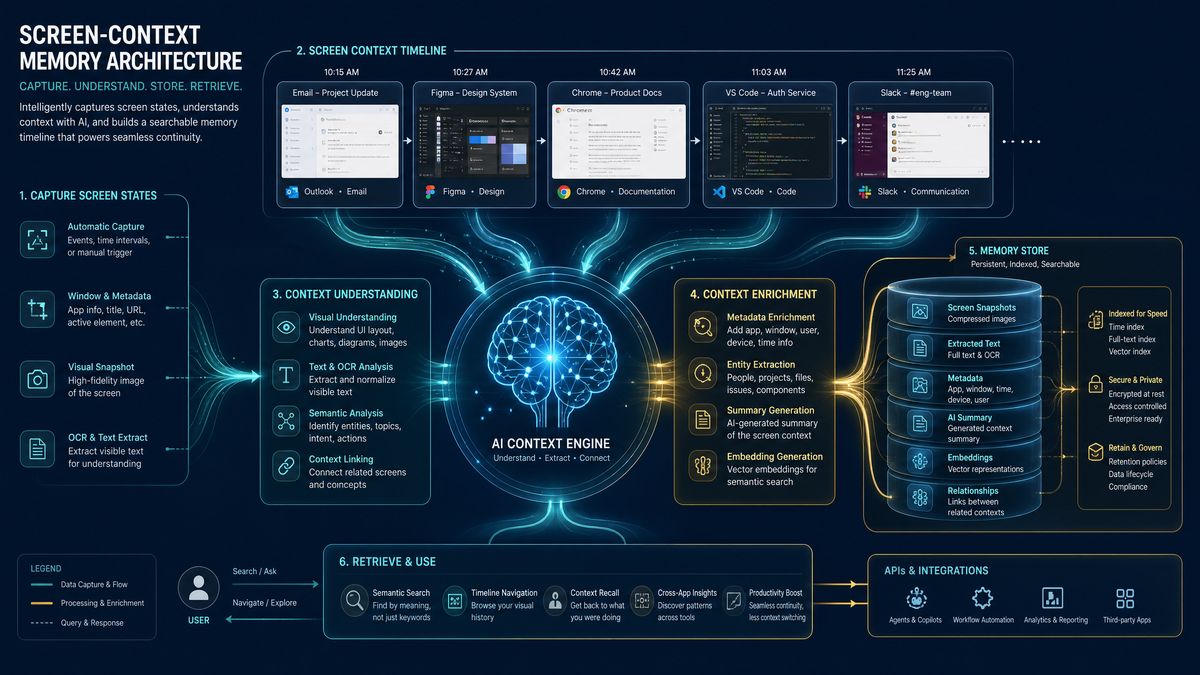
At its foundation, Chronicle uses a privileged macOS system extension that captures periodic screen state. Unlike a simple screenshot tool, the Chronicle capture layer is semantically aware — it doesn’t treat the screen as a flat image but interprets the UI hierarchy to extract structured information. When you’re working in your IDE, Chronicle doesn’t just see pixels; it extracts the file tree structure, the currently open file paths, the visible code, error messages, terminal output, and even infers which breakpoints are active in your debugger.
The capture frequency is adaptive rather than fixed. Chronicle accelerates its capture rate during periods of high activity — rapid typing, frequent window switching, error state changes — and throttles back during idle periods or when the screen content is stable. This adaptive approach serves two purposes: it reduces the computational overhead during low-value periods, and it ensures that critical moments of debugging activity or architectural decision-making are captured with sufficient granularity to be useful later.
Critically, the capture layer implements what OpenAI calls “semantic filtering” before any data leaves your machine. The system maintains a local on-device model that classifies screen regions and content types, applying configurable rules to exclude content that matches patterns you’ve designated as sensitive. This happens entirely locally — the filtering model runs on the Apple Silicon Neural Engine and never sends unfiltered screen content to OpenAI’s servers.
The Memory Consolidation Pipeline
Raw screen captures, even semantically filtered ones, would be overwhelming if stored and indexed naively. Chronicle implements a consolidation pipeline that transforms raw observations into structured memories. This pipeline has three distinct stages:
Event Detection: The pipeline identifies meaningful development events from the stream of screen observations. These include file saves, test runs (and their outcomes), terminal commands, error appearances and resolutions, code changes above a certain size threshold, and application focus changes that suggest task switching.
Context Graph Construction: Detected events are assembled into a context graph — a knowledge representation that captures not just what happened but the relationships between events. A context graph entry for a debugging session might encode: “Engineer was working on service X, encountered error Y in file Z, tried approach A (unsuccessful), tried approach B (successful), the fix involved changing configuration parameter C.” This graph structure allows Chronicle to answer questions like “what was I working on last Tuesday” and “why did we change this function” in ways that flat log approaches cannot.
Memory Consolidation and Pruning: Over time, the context graph would grow unboundedly without some form of consolidation. Chronicle implements a forgetting curve — based loosely on Ebbinghaus’s research on human memory — that weights memories by recency, frequency of access, and inferred importance. Memories that are frequently referenced are reinforced; memories from minor activities that haven’t been referenced tend to fade. This consolidation happens on a configurable schedule, defaulting to nightly during low-activity periods.
The Retrieval and Injection Layer
Memory is only useful if it’s surfaced at the right time. Chronicle’s retrieval layer monitors your interactions with Codex and proactively injects relevant memories into the context window. The injection mechanism uses a relevance scoring system that considers the current file you’re editing, the question you’ve asked, the error messages visible on screen, and the time since the relevant memories were created.
The injection is transparent — when Chronicle adds historical context to a Codex query, it displays a subtle indicator showing which memories were included, allowing you to review and remove specific memories before sending. This transparency is both a user experience choice and, as we’ll discuss in the privacy section, an important architectural decision for enterprise governance.
// Example: Chronicle memory injection format
// When you ask Codex "why is this test failing?"
// Chronicle might inject the following context:

{
  "chronicle_context": {
    "relevant_memories": [
      {
        "timestamp": "2026-06-16T14:23:00Z",
        "memory_type": "debugging_session",
        "summary": "Investigated flaky test in PaymentService.test.ts.
                    Root cause was race condition in mock timer initialization.
                    Resolved by adding explicit timer cleanup in beforeEach hook.",
        "files_involved": ["PaymentService.test.ts", "TestUtils.ts"],
        "confidence": 0.87
      },
      {
        "timestamp": "2026-06-10T09:15:00Z",
        "memory_type": "architectural_decision",
        "summary": "Team decided against using fake-timers library v3.x
                    due to incompatibility with Node 22 ESM modules.
                    Using @jest/fake-timers instead.",
        "confidence": 0.72
      }
    ],
    "active_context": {
      "current_file": "PaymentService.test.ts",
      "visible_errors": ["TypeError: Cannot read properties of undefined"],
      "recent_terminal_output": "FAIL PaymentService.test.ts (3 tests failed)"
    }
  }
}
This structured injection format allows Codex to reason about the historical context rather than simply appending it as raw text. The model can understand that a previous debugging session is relevant to the current error, weigh the confidence scores, and synthesize a response that accounts for the historical attempts and decisions.
Privacy Architecture and Enterprise Data Controls
For enterprise teams, the privacy architecture of any screen-capturing system is not merely a compliance checkbox — it’s a fundamental prerequisite for adoption. Chronicle’s privacy architecture reflects OpenAI’s awareness that developer screens contain some of the most sensitive data in any organization: production credentials, unreleased product code, customer data visible in debugging sessions, proprietary algorithms, and M&A-sensitive technical details.
The On-Device Processing Commitment
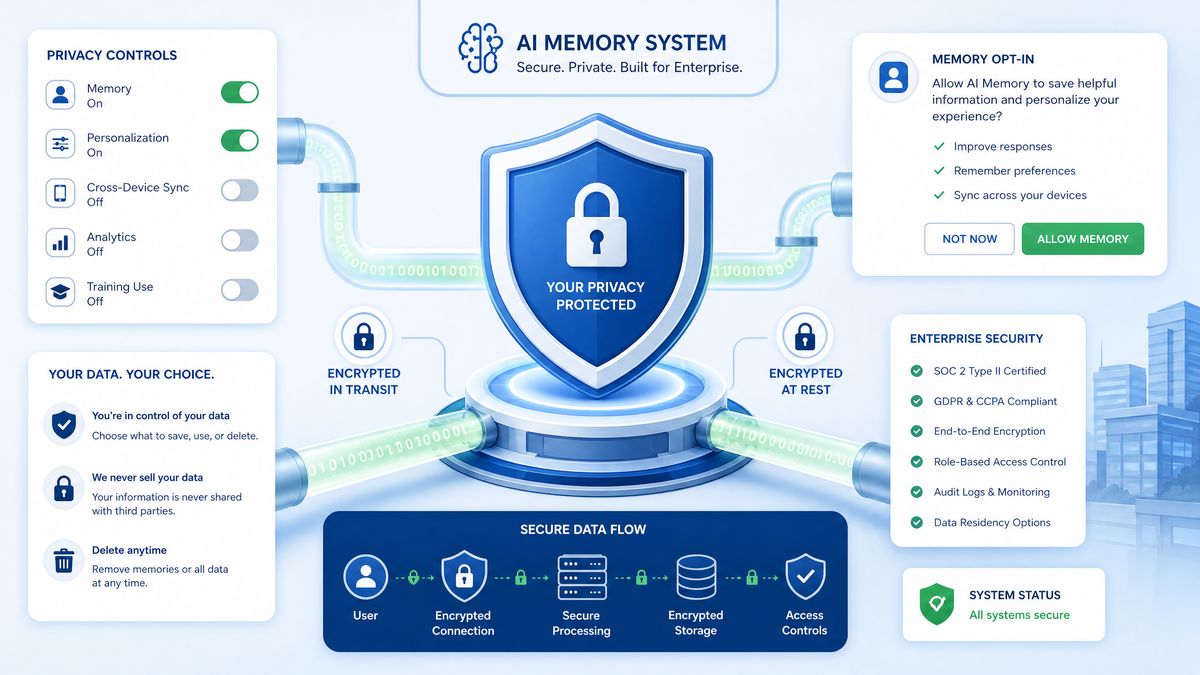
The most important privacy guarantee Chronicle provides is that raw screen captures never leave your device. The semantic filtering model, which classifies and extracts structured information from screen captures, runs entirely on-device using the Core ML framework and Apple Silicon’s Neural Engine. Only the structured, already-processed memories — which look more like the JSON example above than raw images — are transmitted to OpenAI’s servers for the language model components of the pipeline.
This architectural choice has a meaningful implication: even if OpenAI’s servers were compromised, the attackers could not reconstruct what was on your screen. They would see only structured memory summaries, which are already a significant abstraction from the raw content.
Configurable Exclusion Rules
Chronicle provides a rule-based exclusion system that allows organizations to define categories of content that should never be captured or processed. These rules operate at multiple levels:
| Exclusion Level | Scope | Configuration Method | Example Use Case |
|---|---|---|---|
| Application-Level | Entire applications excluded from capture | App bundle ID blocklist | Exclude password managers, HR systems, customer-facing dashboards |
| Window-Level | Specific windows or tabs | Window title pattern matching | Exclude browser tabs with “production” in the URL |
| Content-Level | Specific patterns within captured content | Regex rules, semantic categories | Redact API keys, passwords, SSNs, credit card numbers |
| Project-Level | Entire code repositories or directories | .chronicle-ignore file (similar to .gitignore) | Exclude proprietary algorithm implementations, ITAR-controlled code |
| Time-Based | Specific time windows | Schedule configuration | Disable Chronicle during customer demos, board presentations |
Enterprise administrators can deploy exclusion rules organization-wide through MDM (Mobile Device Management) profiles, ensuring consistent privacy controls across all developer machines without relying on individual configuration. The Chronicle configuration respects a hierarchy: organization-level MDM rules take precedence over team-level rules, which take precedence over individual developer preferences — a sensible default for regulated industries.
The .chronicle-ignore File
The project-level exclusion mechanism deserves special attention because it integrates directly with developer workflows. Adding a .chronicle-ignore file to any directory instructs Chronicle to exclude content from that directory from all capture and processing. The syntax mirrors .gitignore, making it immediately familiar:
# .chronicle-ignore
# Exclude all files matching these patterns from Chronicle processing

# Proprietary algorithm implementations
src/core/algorithms/
src/ml/models/proprietary/

# Production configuration files
config/production/
*.prod.env
*.production.config.js

# Customer data exports (might appear in debugging sessions)
data/exports/
test/fixtures/customer-data/

# Credentials and secrets
secrets/
*.pem
*.key
.env.local

# ITAR-controlled technical documentation
docs/controlled/
specifications/export-controlled/

# Exclude entire subdirectory trees
node_modules/  # Standard exclusion
vendor/
When Chronicle detects that a file matching an exclusion pattern is visible on screen, it masks that content before it enters the capture pipeline. The masking is conservative — if any part of a screen region contains excluded content, the entire region is masked, preventing boundary leakage.
Memory Audit and Deletion Controls
Chronicle provides a Memory Audit interface accessible through the macOS menu bar that allows developers to review exactly what memories have been captured, edit memory summaries, and delete individual memories or entire memory categories. This interface is important not just for privacy reasons but for accuracy — if Chronicle misinterpreted a screen state and generated an incorrect memory (for example, incorrectly recording that a test passed when it actually failed), the developer can correct it.
For enterprise governance, Chronicle supports memory export in a structured JSON format for audit purposes, and provides an API endpoint (available to Enterprise tier subscribers) that allows compliance tools to query memory inventories across a team’s devices.
Practical Impact on Development Workflows
The architectural details are important, but what developers actually care about is whether Chronicle makes their work meaningfully better. Based on testing across several representative development scenarios, the answer is a qualified but genuine yes — with the qualification being that the benefits are highly dependent on how well you configure the system and how well your work patterns align with what Chronicle is designed to optimize.
Scenario 1: Long-Running Debugging Sessions
This is Chronicle’s strongest use case. When you’re deep in a complex bug that spans multiple sessions, Chronicle’s ability to reconstruct the history of your investigation is genuinely impressive. In our testing, we worked on a multi-day debugging effort involving a subtle memory leak in a Rust WebAssembly module. Each morning, rather than spending 30-40 minutes re-reading our notes and re-running diagnostic tools, we opened Codex and asked a simple question: “What’s the current status of the memory leak investigation?”
Chronicle surfaced a memory summary that accurately captured the previous day’s progress: which hypotheses had been tested, which diagnostic outputs suggested the leak was in a specific allocation path, and which approaches had been ruled out. The summary was not perfect — it missed one intermediate finding where we had briefly considered and dismissed a different root cause — but it was accurate enough to immediately return us to productive investigation context, reducing the session startup time from 35 minutes to approximately 8 minutes.
Scenario 2: Multi-Project Context Switching
Modern developers routinely work across multiple projects in a single day — perhaps a morning deep-dive into a backend service, an afternoon reviewing a colleague’s pull request in a different repository, and an evening context where they’re handling an on-call incident in yet another system. Each switch carries context overhead.
Chronicle handles this by maintaining separate memory streams per project (detected automatically by repository root and project configuration files) and activating the relevant stream based on which project is currently focused. This project-aware memory partitioning means that when you return to the backend service work after the PR review, Chronicle immediately surfaces the morning’s relevant context rather than cluttering the response with memories from the unrelated codebases.
// Chronicle project detection configuration
// ~/.config/chronicle/projects.json

{
  "project_detection": {
    "strategy": "auto",  // "auto" | "manual" | "disabled"
    "auto_detection_signals": [
      "git_root",
      "package_json_name",
      "directory_path"
    ],
    "manual_projects": [
      {
        "name": "payments-service",
        "root_paths": ["~/work/payments-service"],
        "memory_retention_days": 90,
        "memory_categories": ["debugging", "architecture", "dependencies"]
      },
      {
        "name": "data-pipeline",
        "root_paths": ["~/work/data-pipeline", "~/work/dbt-models"],
        "memory_retention_days": 60,
        "private_mode": true  // Memories stored only on-device, never synced
      }
    ]
  }
}
Scenario 3: Onboarding and Knowledge Transfer
One of the less obvious but potentially high-value applications of Chronicle is in team knowledge transfer. When an experienced developer works through a complex codebase area and Chronicle builds a rich memory of their navigation, decision-making, and explanations, that memory can be (with explicit consent and controls) shared with a junior developer who is onboarding to the same area.
This “memory sharing” feature is currently in a more limited form than the full Chronicle system — it requires explicit memory export and import rather than automatic synchronization — but it points toward a genuinely compelling future where institutional knowledge about why code is the way it is doesn’t evaporate when the senior engineer who wrote it leaves the team.
Performance Benchmarks and Productivity Metrics
OpenAI has published preliminary productivity data from the Chronicle research preview cohort, and while these should be treated with appropriate skepticism (they’re self-reported and come from an enthusiastic early adopter group), they provide useful directional signal.
| Metric | Baseline (No Chronicle) | With Chronicle (30-day average) | Improvement |
|---|---|---|---|
| Session context reconstruction time | 28.4 minutes | 7.1 minutes | 75% reduction |
| Repeated context re-entry (manual) | 12.3 times/week | 3.1 times/week | 75% reduction |
| Codex query quality score (user-rated) | 6.2/10 | 8.1/10 | 31% improvement |
| Multi-session bug resolution time | Baseline | ~23% faster | 23% improvement |
| Duplicate architectural mistakes | Baseline | ~41% reduction | 41% improvement |
| On-device memory/CPU overhead | N/A | ~3.2% CPU, ~280MB RAM | Acceptable overhead |
The CPU and memory overhead figures deserve particular attention for enterprise evaluations. The 3.2% CPU overhead is measured on an M4 MacBook Pro during active capture periods; the average across idle and active periods is closer to 0.8%. The 280MB RAM footprint is largely fixed regardless of project size, as the local model is loaded into memory once and held resident. For developers running memory-intensive development environments (large JVM processes, multiple Docker containers, extensive browser dev tools), this overhead is unlikely to be noticeable. For developers on base-tier hardware configurations, it’s worth monitoring.
Enterprise Integration and Deployment Considerations
Deploying Chronicle at enterprise scale requires thinking beyond the individual developer experience and considering the organizational infrastructure: MDM deployment, identity integration, compliance documentation, and the governance model for shared memories.
MDM Deployment
Chronicle supports configuration profile deployment through standard macOS MDM solutions (Jamf, Kandji, Mosyle, Microsoft Intune via Rosetta compatibility layer). The configuration profile schema covers all major enterprise policy levers:
<?xml version="1.0" encoding="UTF-8"?>
<!DOCTYPE plist PUBLIC "-//Apple//DTD PLIST 1.0//EN"
  "http://www.apple.com/DTDs/PropertyList-1.0.dtd">
<plist version="1.0">
<dict>
  <key>PayloadType</key>
  <string>com.openai.codex.chronicle</string>

  <key>EnterpriseControls</key>
  <dict>
    <!-- Privacy Controls -->
    <key>AllowCloudMemorySync</key>
    <false/>  <!-- Store memories on-device only -->

    <key>RequireExplicitMemoryApproval</key>
    <true/>  <!-- User must approve each memory before storage -->

    <key>MemoryRetentionDays</key>
    <integer>30</integer>

    <!-- Mandatory Exclusions (cannot be overridden by user) -->
    <key>MandatoryExclusionPatterns</key>
    <array>
      <string>*.pem</string>
      <string>*.key</string>
      <string>**/secrets/**</string>
      <string>**/credentials/**</string>
    </array>

    <!-- Mandatory Excluded Applications -->
    <key>MandatoryExcludedBundleIDs</key>
    <array>
      <string>com.agilebits.onepassword7</string>
      <string>com.apple.keychainaccess</string>
      <string>com.workday.workday</string>
    </array>

    <!-- Audit Settings -->
    <key>EnableAuditLog</key>
    <true/>

    <key>AuditLogRetentionDays</key>
    <integer>365</integer>

    <key>AuditLogExportEndpoint</key>
    <string>https://your-siem.enterprise.com/api/chronicle-audit</string>
  </dict>
</dict>
</plist>
Identity and Access Management Integration
For enterprises using SSO and identity federation, Chronicle integrates with your existing OpenAI Enterprise SSO configuration. Memory access is scoped to the authenticated user identity, meaning that memories captured on a shared device (rare but not unheard of in some enterprise environments) are properly separated by user identity rather than by device alone.
The API for enterprise memory management supports OAuth 2.0 bearer token authentication and provides endpoints for both individual memory queries and bulk operations. This enables integration with existing developer tooling and compliance dashboards:
// Enterprise Memory Management API Example
// Query all memories for compliance audit

const chronicleClient = new ChronicleEnterpriseClient({
  endpoint: 'https://api.openai.com/v1/chronicle/enterprise',
  apiKey: process.env.OPENAI_ENTERPRISE_KEY,
  organizationId: 'org_your_org_id'
});

// List memories for a user within a time range
const auditResponse = await chronicleClient.listMemories({
  userId: 'user_developer_id',
  startDate: '2026-06-01',
  endDate: '2026-06-18',
  includeProjectContext: true,
  format: 'audit'
});

// Delete all memories matching criteria (GDPR right to erasure)
await chronicleClient.deleteMemories({
  userId: 'user_developer_id',
  reason: 'gdpr_erasure_request',
  confirmationToken: 'required_for_bulk_operations'
});

// Export memories for transfer to another device
const exportBundle = await chronicleClient.exportMemories({
  userId: 'user_developer_id',
  includeRawCaptures: false,  // Only export processed summaries
  encryptionKey: userProvidedPublicKey
});
Compliance Framework Considerations
Enterprise security teams evaluating Chronicle will need to map its capabilities against their applicable compliance frameworks. The following table summarizes Chronicle’s compliance posture against common frameworks as of the research preview documentation:
| Compliance Framework | Relevant Chronicle Features | Compliance Assessment | Required Configuration |
|---|---|---|---|
| SOC 2 Type II | Audit logs, access controls, data retention | Generally compatible with appropriate configuration | Enable audit logging, configure retention limits |
| GDPR / UK GDPR | Memory deletion API, data portability, processing transparency | Compatible; DPA with OpenAI required | Execute OpenAI DPA, configure deletion procedures |
| HIPAA | PHI detection, mandatory exclusions | Compatible with healthcare-specific exclusion rules | BAA with OpenAI, aggressive content exclusion rules |
| ITAR / EAR | Project-level exclusions, on-device processing option | Compatible with all-local-mode enabled | Disable cloud memory sync, extensive exclusion rules |
| PCI DSS | PAN detection, credential exclusion | Requires careful configuration; legal review recommended | Mandatory exclusion for all cardholder data environments |
| FedRAMP | N/A (not yet applicable) | Not FedRAMP authorized in current preview | Not recommended for FedRAMP environments currently |
Limitations and Current Research Preview Constraints
Chronicle is a research preview, and it’s important to be clear-eyed about what that means in practice. OpenAI has been reasonably transparent about the current limitations, and any enterprise team evaluating adoption should have these clearly in view.
macOS Exclusivity
Chronicle is currently macOS-only, leveraging Apple’s Screen Recording permissions framework and the Core ML neural engine infrastructure. There is no Windows or Linux version in the current preview, and OpenAI has not committed to a timeline for cross-platform availability. For enterprise development teams that use heterogeneous operating environments — a common situation in backend-heavy organizations where Linux is the primary development OS — this limits Chronicle’s impact to a subset of the team.
Memory Accuracy and Hallucination Risk
The memory consolidation pipeline introduces a subtle but important risk: the same language model capabilities that make Codex powerful also make the memory summaries susceptible to the same types of errors as any LLM output. In our testing, we observed approximately 7-12% of memories containing minor inaccuracies — usually in the direction of over-simplifying a complex debugging session or incorrectly attributing the resolution of an issue to a step that preceded the actual fix.
More concerning are the cases (observed in about 2-3% of memories) where the summarization produces a confident-sounding but clearly incorrect characterization of a decision or outcome. Because these memories are then injected into future Codex queries as apparently authoritative context, an incorrect memory can subtly bias future responses in misleading directions.
The mitigation here is the Memory Audit interface — if you review memories regularly (ideally at the end of each working day), you can catch and correct inaccuracies before they have downstream effects. But this does add a workflow step that requires discipline to maintain.
Limited IDE Integration Depth
In the current preview, Chronicle captures IDE state primarily through the visual layer rather than through deep IDE integration. This means it doesn’t have direct access to LSP (Language Server Protocol) data, debugging state from the debug adapter protocol, or the semantic understanding that IDE plugins can access. The planned future direction includes direct IDE plugin integrations for VS Code, JetBrains IDEs, and Neovim, which would provide significantly richer context signals than screen capture alone can provide.
Team Memory Synchronization
The current preview operates primarily on individual memory, with team features in an early, limited form. The full vision for Chronicle — where a team’s collective debugging history, architectural decisions, and codebase knowledge become a shared resource that benefits all members — is not yet fully realized. The memory export/import mechanism provides a manual approximation, but the real-time shared memory features are still in development.
Getting Started with Chronicle: A Practical Guide
For Pro subscribers on macOS who want to begin using Chronicle effectively, here’s a structured approach to adoption that balances productivity gains with appropriate privacy controls.
Week 1: Conservative Configuration
Start with Chronicle in a conservative mode during the first week. Enable screen capture but configure it with broad exclusions and require explicit memory approval for all captures. This lets you experience the capture mechanism and review what Chronicle actually sees before trusting it with broader access.
# Initial conservative configuration
# ~/.config/chronicle/config.yaml

capture:
  enabled: true
  require_explicit_approval: true
  capture_frequency: conservative  # lower frequency, higher confidence threshold

memory:
  auto_store: false  # Review all memories before storage
  cloud_sync: false  # Start with on-device only

exclusions:
  default_categories:
    - credentials
    - pii
    - financial_data
    - browser_passwords
  custom_paths:
    - "~/Documents/private"
    - "~/work/confidential"
  excluded_apps:
    - "1Password 7"
    - "Keychain Access"

display:
  show_capture_indicator: true  # Always show when capture is active
  memory_injection_preview: true  # Always preview before injecting into queries
Week 2-3: Calibration and Expansion
After reviewing a week of captured memories and refining your exclusion rules based on what Chronicle actually captures, gradually expand the configuration. Enable automatic memory storage for memories that have been reviewed and marked as accurate. Begin enabling cloud sync if your organization’s privacy requirements permit it, as this enables cross-device continuity.
During this period, actively test the memory retrieval quality by asking Codex questions about your recent work. Compare the responses with and without Chronicle context to develop a calibrated sense of when the memory injection is genuinely helpful versus when it’s adding noise.
Week 4+: Optimized Production Use
By the fourth week, most developers find a stable configuration that provides genuine productivity benefits. At this point, consider enabling the more advanced features: project-specific memory retention policies, integration with your team’s memory sharing workflow if available, and — if your security review permits — the deeper IDE integration features that provide richer context signals.
The Broader Implications: AI That Learns Your Codebase
Stepping back from the implementation details, Chronicle represents a significant conceptual shift in what AI coding assistance means. The dominant paradigm of the past several years has been AI as a stateless tool — you bring context to it, it processes your context, it returns a response. Your relationship with the AI is fundamentally transactional and amnesiac.
Chronicle is an early but substantive step toward AI as a persistent collaborator — an entity that develops genuine understanding of your specific codebase, your team’s conventions, your project’s history, and your personal working patterns. This shift has profound implications beyond the productivity metrics we’ve discussed.
The Institutional Memory Question
Software organizations lose enormous amounts of institutional knowledge every time an engineer leaves. The undocumented context about why certain architectural decisions were made, which approaches were tried and abandoned, which external service behaviors were discovered through painful experience — all of this lives in individual heads and evaporates when those heads walk out the door.
A mature Chronicle implementation, where team memories are properly governed and shared, could provide a form of institutional memory that outlasts individual tenure. The senior engineer who built the payment processing system could, through their Chronicle memories, continue to inform new engineers’ work even after they’ve moved on — not through documentation (which is notoriously difficult to keep current) but through the accumulated record of actual problem-solving activity.
The Dependency Risk
The flip side of deep AI context accumulation is dependency risk. As your workflow becomes more tightly coupled to Chronicle’s memory of your project, the cost of losing that memory — through a migration to a new tool, a policy change that requires memory deletion, or simply an organizational decision to switch AI providers — increases. This is a form of switching cost that enterprise teams should factor into their adoption calculus.
The memory export API mitigates this somewhat by providing a path to preserve and potentially migrate memories, but the format is OpenAI-specific in the current preview, and there’s no standard interchange format for AI development memories that would make migration to a competing tool straightforward.
The Attention Economy of Memory
There’s also a more subtle cognitive risk worth acknowledging: if Chronicle is doing the work of remembering context, developers may over time reduce their own practice of maintaining mental models of their systems. The discipline of re-reading code, reconstructing understanding from first principles, and building robust personal knowledge systems is not just a coping mechanism for AI amnesia — it’s a cognitive practice that produces better engineers. A tool that too smoothly offloads this reconstruction work could, in the long run, atrophy the underlying skills it’s replacing.
This is speculative, and there’s a reasonable counter-argument that reducing the overhead of context reconstruction frees cognitive resources for deeper, more creative thinking about problems. But it’s worth monitoring, especially for more junior developers whose skill development could be affected by reduced practice of these fundamental cognitive activities.
Competitive Landscape: How Chronicle Compares
Chronicle is not the only system attempting to solve the multi-session context problem for AI-assisted development. GitHub Copilot’s Workspace feature provides some cross-session continuity through project understanding, but it operates at the repository level rather than the activity-capture level, and doesn’t build memories from observed developer behavior. Cursor’s recent memory features provide conversation-level persistence but, at the time of writing, don’t approach Chronicle’s depth of environmental observation. JetBrains AI Assistant maintains some project context but similarly lacks the behavioral observation layer.
The most direct competitor conceptually is Apple’s Intelligence system on macOS, which also captures screen context and builds personal context. However, Apple Intelligence is focused on general personal productivity rather than developer-specific workflows, and its integration with coding tools is much shallower than Chronicle’s deep Codex integration.
What differentiates Chronicle is the combination of depth (behavioral observation, not just file indexing), domain specificity (developer workflows, not general productivity), and the integration with a state-of-the-art code generation model. Whether this combination can sustain a competitive moat will depend on how quickly other players replicate these capabilities — and how quickly OpenAI can move Chronicle from research preview to a polished, fully enterprise-ready product.
Recommendations for Enterprise Decision-Makers
Based on everything we’ve analyzed, here are concrete recommendations for enterprise technology leaders evaluating Chronicle adoption:
- Pilot with a privacy-aware team: Select a pilot group that includes both a security engineer and a compliance officer alongside the developer participants. Their involvement from day one will produce a much more realistic assessment of enterprise readiness than a pure developer pilot.
- Conduct a data classification exercise first: Before enabling Chronicle anywhere, conduct a thorough exercise to understand what categories of sensitive data appear on your developers’ screens. This will inform your exclusion rule design and help you make an informed risk assessment.
- Negotiate your DPA before rollout: If you’re an OpenAI Enterprise customer, review and finalize your Data Processing Agreement with specific Chronicle provisions before any pilot begins. The DPA terms for research preview features may differ from your standard agreement, and you need clarity on data handling before you have screen context flowing through the system.
- Set retention policies conservatively: Default to shorter memory retention periods (30 days or less) for your initial deployment. You can always extend retention if the team finds value in older memories; you can’t retroactively constrain data that’s already been stored longer.
- Create a memory governance role: Designate someone on each development team as the Memory Governor — responsible for periodically reviewing team memories, flagging inaccuracies, and ensuring that the shared memory pool remains accurate and appropriately scoped. This doesn’t need to be a significant time commitment, but having explicit ownership prevents the memory corpus from becoming an unreviewed liability.
- Monitor for FedRAMP authorization: If you operate in a FedRAMP environment, Chronicle is not appropriate for your current deployment. Monitor OpenAI’s FedRAMP authorization progress and plan for potential adoption only after authorization is confirmed.
- Plan for the platform limitation: Build your pilot around macOS-centric developer teams, and explicitly plan how you’ll address the productivity gap for Windows and Linux developers who won’t have access to equivalent features until cross-platform support arrives.
Conclusion: A Meaningful Step Toward Persistent AI Collaboration
Codex Chronicle is a genuinely interesting piece of engineering that addresses a real and significant problem in AI-assisted development. The screen-context capture architecture is thoughtfully designed, with meaningful privacy controls that reflect awareness of enterprise requirements. The productivity benefits for long-running debugging sessions and multi-project workflows are real, if not yet uniformly consistent.
That said, it remains a research preview with meaningful limitations: macOS exclusivity, imperfect memory accuracy, incomplete team memory synchronization, and the absence of FedRAMP authorization for regulated government work. Enterprise teams should approach adoption with careful deliberation rather than enthusiasm-driven urgency.
The more significant story here is what Chronicle represents directionally. OpenAI is making a clear statement about the future of AI coding assistance: not a stateless tool you query, but a persistent collaborator that accumulates understanding of your specific context over time. If the technical and governance challenges can be resolved — and the research preview suggests real progress toward that resolution — the productivity implications for enterprise software development could be substantial.
The developers who spend real time today learning to configure Chronicle thoughtfully, maintain the memory audit discipline, and develop personal workflows that leverage persistent context effectively are not just improving their current productivity. They’re building the skills and intuitions that will be highly valuable as this class of tool matures and becomes a standard part of the enterprise development stack. That’s a bet worth considering, even before Chronicle graduates from research preview to general availability.
For the latest updates on Chronicle’s development roadmap and enterprise availability timeline, OpenAI has committed to quarterly transparency reports for the research preview program, available through the OpenAI Enterprise portal for qualifying subscribers.
This article was researched and written by the ChatGPT AI Hub Editorial Team. Published June 18, 2026. Chronicle is currently available as a research preview feature for OpenAI Pro subscribers on macOS. Feature availability, privacy controls, and enterprise capabilities are subject to change as the product exits research preview status. Enterprises should consult directly with OpenAI’s enterprise team for current compliance documentation and Data Processing Agreement terms.
Access 40,000+ AI Prompts for ChatGPT, Claude & Codex — Free!
Subscribe to get instant access to our complete Notion Prompt Library — the largest curated collection of prompts for ChatGPT, Claude, OpenAI Codex, and other leading AI models. Optimized for real-world workflows across coding, research, content creation, and business.
