
GPT-5.6 Sol Vision Capabilities: What the Strongest Vision Model Means for Document Processing, OCR, and Visual AI Workflows

Author: Markos Symeonides
Published: July 9, 2026 — Overview of OpenAI’s GPT-5.6 Sol vision model and practical implications for OCR, invoice extraction, chart interpretation, handwriting recognition, multi-page PDF analysis, and enterprise visual AI workflows.
Executive summary
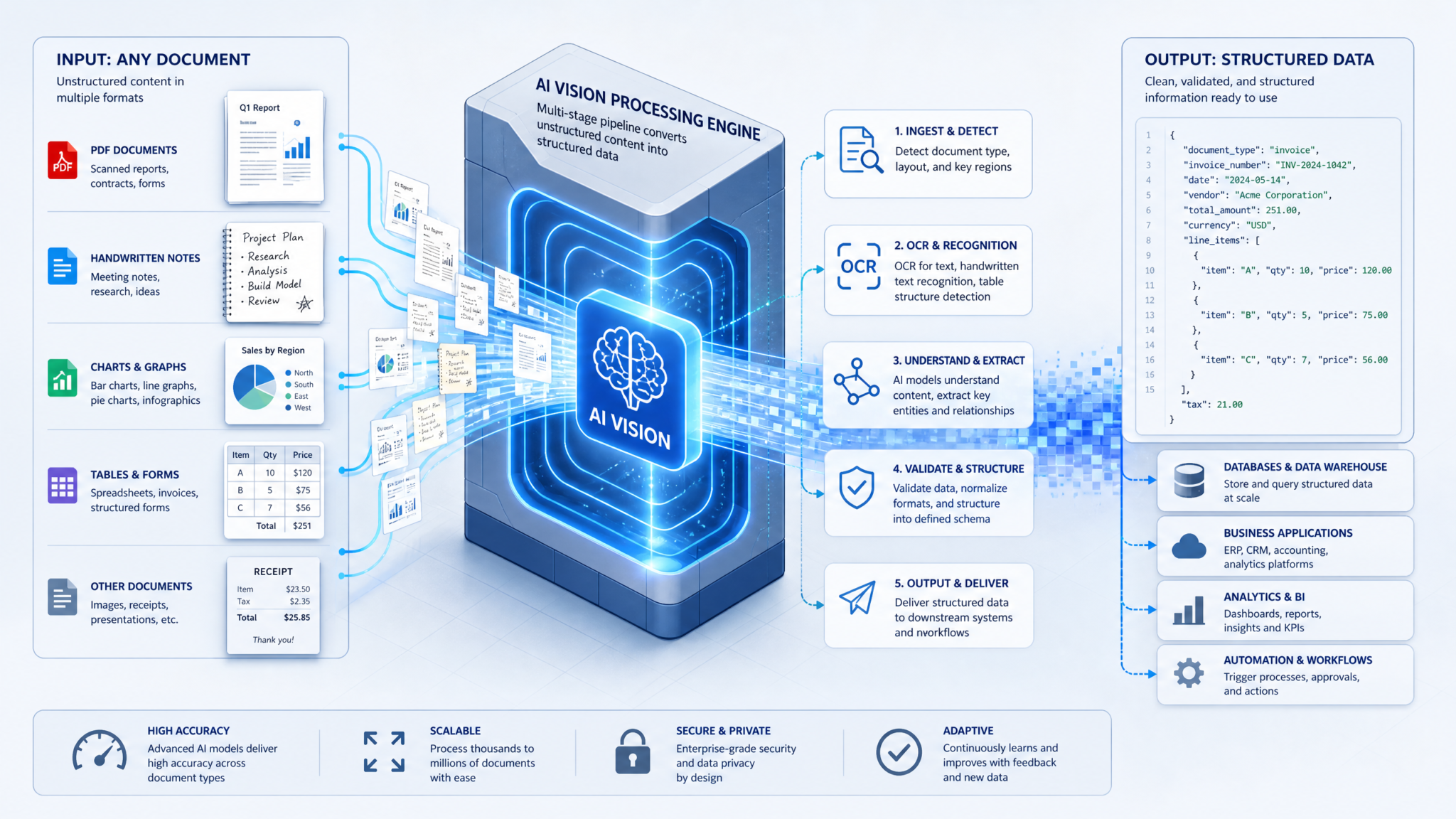
On July 9, 2026, OpenAI released GPT-5.6 Sol, a milestone vision-capable foundation model that sets a new bar in image understanding and structured document extraction. Sol improves raw OCR accuracy, layout understanding, handwriting recognition, chart and diagram interpretation, and multi-page PDF analysis while offering structured outputs and tighter integration with text reasoning. For enterprises that rely on document processing — invoices, legal contracts, insurance claims, clinical notes — Sol promises faster development cycles, higher automation rates, and meaningful reductions in human review.
This long-form article explains GPT-5.6 Sol’s key capabilities, shows practical Python examples for common tasks, compares Sol against the prior vision models Terra and Luna, and provides enterprise integration patterns, benchmarking guidance, and a practical FAQ. Wherever you see related references to deeper implementation patterns, check the included internal pointers like
For teams looking to maximize their productivity with structured AI interactions, our comprehensive guide on 45 ChatGPT-5.5 Prompts for Technical Writers: API Documentation, SDK Guides, Release Notes, and Developer Tutorials provides battle-tested templates and frameworks that complement the workflows discussed above.
and
Developers seeking hands-on implementation guidance can follow our step-by-step walkthrough on How to Use GPT-5.3-Codex for Self-Improving Code: Recursive AI Development Patterns and Practical Implementation, which covers the technical setup, configuration patterns, and troubleshooting approaches for production environments.
What is GPT-5.6 Sol?
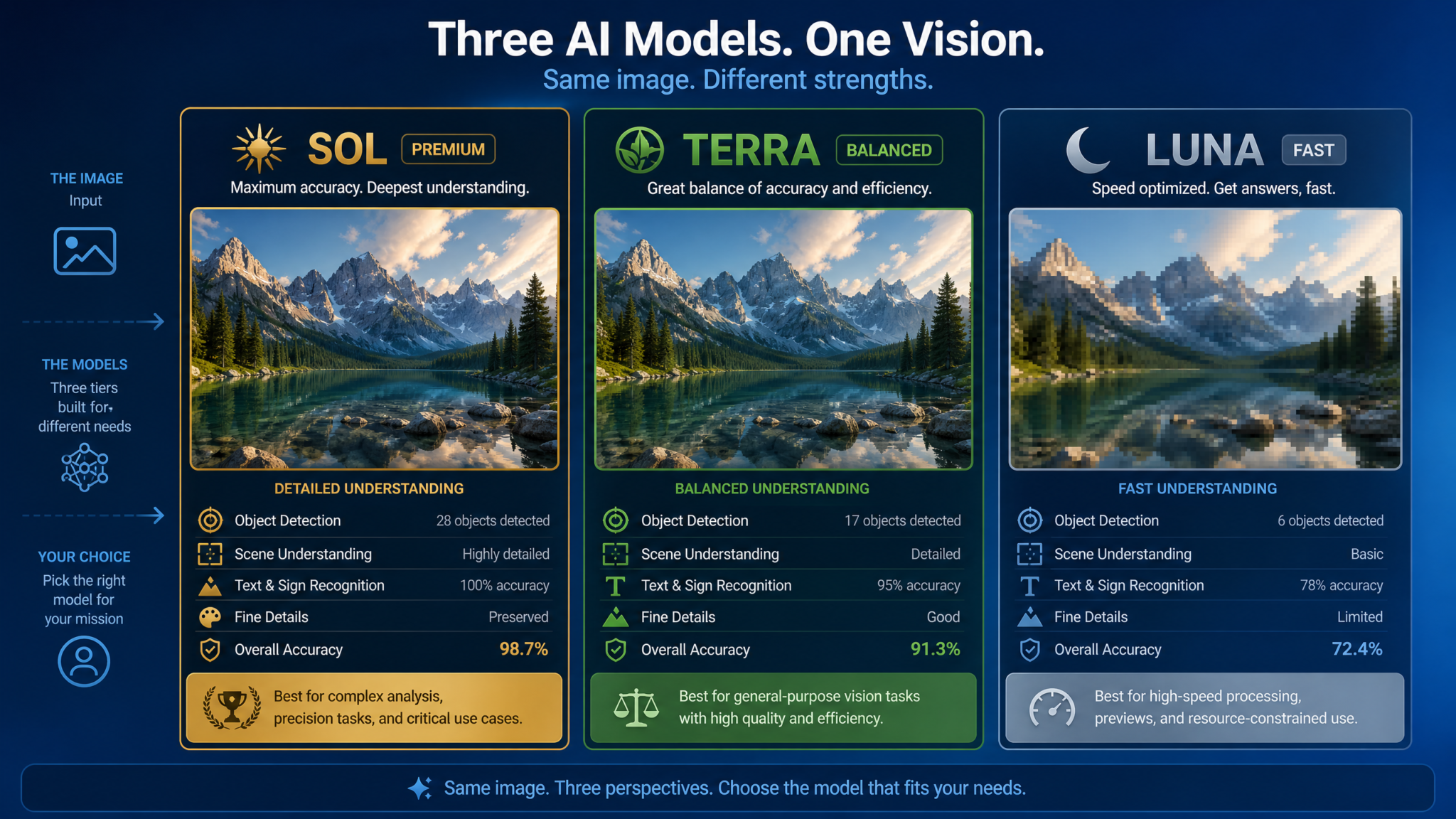
GPT-5.6 Sol is OpenAI’s highest-capability multimodal model released as a vision-enabled variant of the GPT-5/6 series. Sol emphasizes robust visual understanding combined with the strong textual reasoning of the GPT lineage. Compared to Terra (optimized for speed and cost) and Luna (optimized for general-purpose text+image use), Sol is tuned for accuracy and complex structured outputs across diverse visual inputs: high-resolution scanned documents, photos of receipts, handwritten notes, charts, and multi-page PDFs.
Key design priorities
- High OCR fidelity across fonts, languages, and degraded scans
- Robust layout and semantic understanding (header detection, tables, forms)
- Structured extraction with schema-aware outputs (JSON, CSV)
- Chart and diagram interpretation to recover tabular data
- Handwriting recognition with context-aware correction
- Multi-page document comprehension preserving cross-page context
High-level capabilities that matter for enterprises
If your organization processes documents at scale, the practical features that matter are:
- Field-level accuracy in invoices and forms (vendor names, totals, line items)
- Table detection and extraction with correct row/column boundaries
- Charts-to-data extraction that preserves series, axis labels, and data points
- Handwritten text capture with confidence scores and contextual corrections
- Efficient multi-page document workflows with cross-page references and consolidated outputs
- Programmatic schema validation and JSON outputs ready for downstream systems
Vision API usage: concepts and common patterns
Sol is typically consumed through a Vision API that accepts images or PDFs and returns structured outputs. The usual patterns are:
- Send an image or document to the model with a prompt or schema describing desired fields.
- Receive structured output (JSON) with extracted text, bounding boxes, confidence scores, and normalized values.
- Post-process: validation, reconciliation (for example, matching invoice totals to line items), enrichment (lookup vendor IDs), and persistence.
- Human-in-the-loop for low-confidence cases and periodic review for model drift.
Practical API design choices
When building with Sol, design your API interactions with these considerations:
- Prefer schema-driven requests (e.g., request JSON that describes fields and types). This reduces ambiguity and yields higher extraction fidelity.
- Supply contextual instructions: invoice type, expected currency, locale for date formats, and any known templates to nudge the model.
- Use batch processing for throughput but maintain per-document logs and sample human checks for QA.
- For multi-page PDFs, include page-level indices or request a consolidated output with page references for each extracted field.
Python examples: from simple OCR to structured invoice extraction
Below are practical Python snippets that illustrate common tasks using a hypothetical OpenAI-style SDK for GPT-5.6 Sol. Replace credentials, endpoint, and method names with the actual SDK you’re using; these examples are intentionally explicit to show patterns you can adapt.
1) Simple OCR (image -> plain text)
import base64
import requests
import json

API_KEY = "YOUR_API_KEY"
API_URL = "https://api.openai.com/v1/vision/gpt-5.6-sol/ocr"

def ocr_image_bytes(image_path):
    with open(image_path, "rb") as f:
        image_b64 = base64.b64encode(f.read()).decode("utf-8")
    payload = {
        "image": image_b64,
        "features": ["ocr"],
        "language_hints": ["en"],  # optional
        "output_format": "plain_text"
    }
    headers = {
        "Authorization": f"Bearer {API_KEY}",
        "Content-Type": "application/json"
    }
    r = requests.post(API_URL, data=json.dumps(payload), headers=headers)
    r.raise_for_status()
    return r.json()

if __name__ == "__main__":
    result = ocr_image_bytes("scanned_contract.jpg")
    print(result.get("text")[:1000])
This returns OCR text in a single string. For structured tasks you should request bounding boxes and per-line confidence scores.
2) Schema-driven invoice extraction (recommended production pattern)
Below is a common pattern: provide a JSON schema to the model and ask for a validated JSON output with pages and field-level metadata.
import base64
import requests
import json

API_KEY = "YOUR_API_KEY"
API_URL = "https://api.openai.com/v1/vision/gpt-5.6-sol/extract"

invoice_schema = {
    "type": "object",
    "properties": {
        "invoice_number": {"type": "string"},
        "invoice_date": {"type": "string", "format": "date"},
        "due_date": {"type": ["string", "null"], "format": "date"},
        "currency": {"type": "string"},
        "vendor_name": {"type": "string"},
        "vendor_tax_id": {"type": ["string", "null"]},
        "customer_name": {"type": ["string", "null"]},
        "line_items": {
            "type": "array",
            "items": {
                "type": "object",
                "properties": {
                    "description": {"type": "string"},
                    "quantity": {"type": "number"},
                    "unit_price": {"type": "number"},
                    "amount": {"type": "number"}
                },
                "required": ["description", "amount"]
            }
        },
        "subtotal": {"type": "number"},
        "tax": {"type": ["number", "null"]},
        "total": {"type": "number"},
        "confidence": {"type": "number"}  # overall confidence
    },
    "required": ["invoice_number", "invoice_date", "total"]
}

def extract_invoice(image_path):
    with open(image_path, "rb") as f:
        image_b64 = base64.b64encode(f.read()).decode("utf-8")
    payload = {
        "image": image_b64,
        "schema": invoice_schema,
        "options": {
            "return_bounding_boxes": True,
            "return_page_indices": True,
            "currency_hint": "USD",
            "locale": "en-US",
        }
    }
    headers = {
        "Authorization": f"Bearer {API_KEY}",
        "Content-Type": "application/json"
    }
    r = requests.post(API_URL, data=json.dumps(payload), headers=headers)
    r.raise_for_status()
    return r.json()

if __name__ == "__main__":
    res = extract_invoice("invoice_123.pdf")
    print(json.dumps(res, indent=2))
Notice the payload provides explicit schema and options. Sol’s structured output will typically include field-level confidences and the bounding boxes for each detected item so you can render overlays in UIs or reconcile multiple OCR runs.
3) Multi-page PDF analysis and consolidated JSON
Multi-page documents demand page-aware extraction and optional cross-page normalization (e.g., invoice header on page 1 and totals on page 3). The sample below shows sending a PDF and asking for a consolidated document JSON and a per-page breakdown.
import base64
import requests
import json

API_KEY = "YOUR_API_KEY"
API_URL = "https://api.openai.com/v1/vision/gpt-5.6-sol/multi_page_extract"

def extract_pdf(pdf_path):
    with open(pdf_path, "rb") as f:
        pdf_b64 = base64.b64encode(f.read()).decode("utf-8")
    payload = {
        "document": pdf_b64,
        "document_type": "pdf",
        "options": {
            "consolidate_pages": True,
            "max_pages": 200,
            "return_page_summaries": True
        },
        "output_format": "schema_and_pages"  # asks for both consolidated and page-level structure
    }
    headers = {
        "Authorization": f"Bearer {API_KEY}",
        "Content-Type": "application/json"
    }
    r = requests.post(API_URL, data=json.dumps(payload), headers=headers)
    r.raise_for_status()
    return r.json()

if __name__ == "__main__":
    response = extract_pdf("multi_page_report.pdf")
    # consolidated document fields
    print("Title:", response.get("consolidated", {}).get("title"))
    # page-level summary
    for page in response.get("pages", []):
        print("Page", page["page_index"], "summary:", page.get("summary", "")[:200])
Sol will return page indices and a consolidated JSON. Use the page summaries to quickly triage large documents without reprocessing the whole PDF.
Benchmarks: OCR accuracy and metrics (Sol vs Terra vs Luna)
Below is a representative comparison table highlighting nominal differences in capabilities between Sol, Terra, and Luna for vision tasks relevant to document processing. These numbers are illustrative and will vary by dataset, document quality, and deployment specifics. Use your own holdout sets for production validation.
| Capability | GPT-5.6 Sol (High-accuracy) | Terra (Cost-optimized) | Luna (General-purpose) |
|---|---|---|---|
| Character Error Rate (OCR) on printed text | ~1.2% CER | ~3.2% CER | ~2.5% CER |
| Word Error Rate (OCR) on low-quality scans | ~4.5% WER | ~9.8% WER | ~6.7% WER |
| Form & field extraction F1 (invoices & forms) | ~0.94 F1 | ~0.82 F1 | ~0.89 F1 |
| Handwriting recognition (cursive + block) | ~0.88 accuracy (context-aware) | ~0.72 accuracy | ~0.80 accuracy |
| Table detection + extraction (structure accuracy) | ~0.93 | ~0.79 | ~0.86 |
| Chart-to-data recovery (accurate series & values) | ~0.90 | ~0.68 | ~0.81 |
| Multi-page consolidated understanding | Excellent (cross-page linking) | Basic (per-page only) | Good (limited consolidation) |
| Latency (single 2MP image) | ~350–600ms | ~120–280ms | ~200–400ms |
| Cost per page (relative) | High | Low | Medium |
Interpretation:
- Sol trades higher cost and slightly higher latency for accuracy, deeper layout reasoning, and richer structured outputs.
- Terra is suitable for bulk, low-cost scanning when borderline accuracy is acceptable or will be followed by human verification.
- Luna is a middle-ground generalist for mixed workloads.
OCR accuracy details and how to measure it
When evaluating Sol for OCR, use these standard metrics and practices:
- Character Error Rate (CER): percentage of characters wrong after aligning predicted text and ground truth.
- Word Error Rate (WER): similar to CER but on word tokens (useful for business fields where words matter more).
- Field extraction F1: precision/recall performance for extracting discrete fields (invoice number, date, totals).
- Table structure accuracy: measures how often the detected row/column relationships match ground truth.
- Line item accuracy: correctness of line items (description, qty, price) — typically measured as a composite F1 or exact-match rate.
Best practices for benchmarking:
- Assemble a representative dataset across document types, languages, and degradation sources (blurs, noise, skew).
- Measure per-field performance, not only global OCR metrics — some fields (dates, amounts) are more business-critical.
- Record bounding-box accuracy as it affects downstream reconciliation and UI overlays.
- Track false positives: extracting a field that doesn’t exist is worse in many workflows than missing a field.
Invoice extraction: practical tips and pitfalls
Invoices are one of the most common enterprise documents and are a canonical example of where Sol’s strengths shine. Here are practical guidelines:
What to extract
- Header fields: vendor name, vendor tax ID, vendor address, customer name, invoice number, invoice date.
- Monetary fields: subtotal, tax, discounts, total, currency.
- Line items: description, SKU or item code, quantity, unit price, line total.
- Payment terms, due date, reference numbers, PO number.
- Table and footnote parsing: extract table structure and associated footnotes.
Normalization and reconciliation
Post-extraction normalization is essential:
- Normalize currency symbols and convert to a canonical currency if needed.
- Parse and normalize date formats (e.g., “03/05/26” -> ISO 2026-03-05 using locale context).
- Reconcile totals: verify subtotal + tax + adjustments == total; flag inconsistencies for review.
- Match vendor names to internal master records with fuzzy matching (Levenshtein or vector embeddings).
Common pitfalls and how Sol helps
- Printed vs. heavily stylized invoices: Sol’s layout and font generalization reduces misreads on fancy fonts.
- Tables spanning multiple pages: Sol can preserve row continuity across pages if asked to consolidate.
- Scanned receipts with folded corners and shadows: pre-processing helps; Sol tolerates many degradations but correctors still necessary in edge cases.
- Ambiguous numeric fields: Sol provides confidence scores and bounding boxes to support downstream validation.
Chart interpretation and extracting data from visualizations
Turning charts into structured data is often a manual, time-consuming task. Sol’s chart interpretation capabilities include axis detection, legend parsing, series separation, and point extraction. Below are common strategies and code examples.
Recovering series from a bar chart and returning CSV
import base64
import requests
import json
import csv

API_KEY = "YOUR_API_KEY"
API_URL = "https://api.openai.com/v1/vision/gpt-5.6-sol/interpret_chart"

def chart_to_csv(image_path, csv_out_path):
    with open(image_path, "rb") as f:
        b64 = base64.b64encode(f.read()).decode("utf-8")
    payload = {
        "image": b64,
        "chart_type_hint": "bar",  # optional hint
        "output": "series_csv",
        "options": {
            "return_axis_labels": True,
            "return_legend": True
        }
    }
    headers = {
        "Authorization": f"Bearer {API_KEY}",
        "Content-Type": "application/json"
    }
    r = requests.post(API_URL, data=json.dumps(payload), headers=headers)
    r.raise_for_status()
    res = r.json()
    # res["series"] might be [{"name": "Sales", "points": [{"x":"Q1", "y":120}, ...]}]
    with open(csv_out_path, "w", newline="") as csvfile:
        writer = csv.writer(csvfile)
        # write header: x + series names
        series_names = [s["name"] for s in res["series"]]
        x_values = [p["x"] for p in res["series"][0]["points"]]
        writer.writerow(["x"] + series_names)
        for i, x in enumerate(x_values):
            row = [x] + [s["points"][i]["y"] for s in res["series"]]
            writer.writerow(row)
    return res

if __name__ == "__main__":
    response = chart_to_csv("revenue_chart.png", "output.csv")
    print(response["series"])
Sol also returns axis labels and confidence values for numeric extraction. For charts with overlapping series or dense scatter plots, you may want to combine Sol’s output with domain-specific heuristics to densify points.
Interpreting complex visualizations (stacked bars, error bars, box plots)
Complex visualizations require more specific prompts. Ask Sol to provide explicit structures (series name, stack segment, upper/lower bounds) and to explain assumptions. Example request: “Return JSON with keys ‘series’, where each series contains segments for stacked chart pieces with start/end values and labels.” Matching your schema up front increases accuracy.
Handwriting recognition and contextual correction
Handwriting remains a nuanced challenge, especially cursive or unstructured notes. Sol improves results by combining visual recognition with language-model contextual correction. Key techniques:
- Preprocess: deskew, denoise, binarize to increase legibility.
- Ask Sol for both raw transcription and context-corrected text — raw for audit trails, corrected for downstream usage.
- Provide domain context: if the handwriting is clinical notes vs. shipping addresses, give a vocabulary hint to reduce ambiguous corrections.
- Use per-token confidence and n-best alternatives where available, and present alternatives in a human review UI.
Example workflow: detect handwriting regions with Sol, transcribe them, run a spell/term normalization step with your knowledge base, then pass low-confidence tokens to a human reviewer.
Multi-page PDF analysis: strategies for scale and accuracy
Multi-page documents introduce interplay between pages (headers, footers, page numbers, repeated tables). Sol supports consolidated extraction; design systems around these patterns:
1) Page-level extraction + consolidation
Extract per-page structured outputs and then run a consolidation pass that reconciles repeated fields, merges line items, and indexes by page. Advantages: parallel processing, lower memory usage.
2) Full-document consolidated extraction
Ask Sol to process the whole PDF and return a consolidated schema with page references. Advantage: Sol can use context across pages (e.g., recognize that “Total due” on page 3 relates to “Invoice 1001” on page 1). Disadvantage: higher computation and potential timeouts on very long documents.
3) Hybrid chunking with sliding windows
For very long documents (thousands of pages), chunk the document into overlapping page windows (e.g., 20-page windows with 2-page overlap) and then merge. Overlap ensures continuity for items crossing chunk boundaries.
Practical considerations
- Always request page indices for each extracted field.
- Use canonical IDs for repeated entities across pages (e.g., vendor_id).
- Store an audit trail: original page image, bounding boxes, extracted text, and confidences.
Code example for a sliding-window approach (conceptual):
def sliding_window_pages(pdf_bytes, window=20, overlap=2):
    total_pages = get_pdf_page_count(pdf_bytes)
    for start in range(0, total_pages, window - overlap):
        end = min(start + window, total_pages)
        chunk_bytes = extract_pdf_pages(pdf_bytes, start, end)
        yield start, end, chunk_bytes

# For each chunk, call the Sol multi-page API, then merge results by canonicalizing entity keys and merging overlapping pages.
Comparison table: feature matrix for enterprise selection
| Feature | Sol | Terra | Luna |
|---|---|---|---|
| Schema-driven extraction (JSON schema) | Yes — advanced validation & enriched metadata | Limited — basic schema hints | Yes — but less robust for edge cases |
| Multi-page consolidation | Yes — cross-page links | No (per-page only) | Partial |
| Handwriting (cursive & block) | Strong (context-aware) | Weak | Medium |
| Chart & diagram interpretation | Accurate across types | Basic | Good |
| Table structure extraction | High fidelity | Moderate | Good |
| Language support | Wide multilingual support | Selected languages | Wide |
| Edge deployment options | Cloud-first; enterprise private cloud coming | Cloud optimized | Cloud & hybrid |
Enterprise use cases and integration patterns
Organizations across finance, insurance, healthcare, logistics, and legal can deploy Sol to accelerate workflows. Below are common use cases and suggested integration patterns.
Accounts payable (invoices & receipts)
Pattern: ingest scanned invoices -> Sol extraction (schema-driven) -> normalize/validate totals -> match to PO -> route to ERP for payment.
- Benefits: Reduced manual data entry, faster processing, improved exception detection.
- Operational metric: percentage of invoices fully auto-processed without human review.
Contract analysis and legal document intake
Pattern: multi-page PDF ingestion -> clause extraction (e.g., termination, indemnity, governing law) -> highlight potential risks -> route to legal reviewers with summarized alerts.
- Benefits: Faster triage of contracts, automated red-lining support.
- Metric: time-to-first-review and clauses per hour extracted.
Insurance claims and evidence intake
Pattern: photos + scanned forms -> Sol extracts policy numbers, claim details, and identifies key damages in images -> combines with text reasoner for fraud checks and triage.
- Benefits: Faster claim settlement, earlier detection of anomalies.
Clinical notes and EHR digitization
Pattern: scanned handwritten notes -> Sol handwriting transcription with clinical vocabulary hint -> map to medical codes (ICD/CPT) and integrate with EHR.
- Benefits: reduced transcription backlog, improved coding accuracy.
- Note: healthcare deployments must consider HIPAA / regional regulations and potentially private-cloud or on-prem solutions.
Business intelligence (charts and slide decks)
Pattern: slide ingestion -> extract charts to CSV -> ingest into analytics pipelines -> verify against source data.
- Benefits: quicker synthesis of slide-deck data, automated KPI extraction for reporting.
Design patterns: building robust visual AI workflows with Sol
Below are recurring architectural patterns that produce reliable, scalable systems.
1) Validate early, validate often
Run quick heuristics locally (e.g., regex for invoice number) before calling Sol if you can cheaply pre-filter data. After Sol extraction, run validation rules and reject low-confidence results for human review.
2) Human-in-the-loop review and active learning
Capture corrected outputs and feed them back into a fine-tuning or prompt-improvement pipeline. Use active sampling to ask humans to review low-confidence or high-impact documents.
3) Tiered processing
Separate documents into tiers: bulk (low-risk) -> Terra for cost efficiency, high-value or complex -> route to Sol. This hybrid approach optimizes cost and quality.
4) Clear audit trails
Store raw files, the model response, bounding boxes, timestamps, and the human corrections. Audibility is critical for regulatory compliance and later troubleshooting.
5) Progressive normalization
After Sol returns structured data, run deterministic normalization steps for dates, numbers, currencies, and known enumerations. Deterministic rules reduce downstream errors.
Image pre-processing best practices
Sol is robust, but pre-processing improves both accuracy and cost-efficiency:
- Use 300 DPI for scanned documents when possible; crop to content to reduce white margins.
- Deskew and correct perspective on photographed documents.
- Remove heavy compression artifacts; use lossless or high-quality JPEG/PNG.
- Enhance contrast and reduce noise for faint text (denoising, morphological filters).
- Preserve color when chart or highlighting information is meaningful (legend color vs. value).
Privacy, security, and compliance considerations
Document data is often sensitive. Consider these points when deploying Sol:
- Data residency: evaluate where model inference occurs; prefer private cloud or on-premises for regulated data.
- Encryption: encrypt documents at rest and in transit; use tokenization for storing sensitive extracted fields.
- Access controls: role-based access to raw documents and model outputs with audit logs.
- Retention policies: minimize retention of PHI, PII according to legal rules and business requirements.
- Model drift and monitoring: track extraction quality over time; re-evaluate sampling frequently.
For detailed implementation guidance, see the internal resources such as
Teams implementing these capabilities in production will benefit from the architectural patterns and optimization strategies detailed in How the Apple vs OpenAI Lawsuit Could Reshape AI Talent Wars and Intellectual Property in 2026, which addresses the scaling considerations most relevant to enterprise workloads.
and
Organizations evaluating their AI strategy will find additional depth in our detailed analysis covering The Complete Guide to GPT-5.6 Sol, Terra, and Luna API Pricing — Choosing the Right Tier for Your Budget, which explores the practical implementation considerations and decision frameworks relevant to enterprise deployments.
which outline best practices and checklist items for compliance.
[h2]Monitoring and observability for visual pipelines[/h2]
Track these metrics for long-term reliability:
- Extraction accuracy per-field and per-document type
- Confidence distribution and volume of low-confidence documents
- Processing latency and throughput
- Human correction rates (to monitor the automation rate)
- Cost per processed page and monthly spend trends
Set up alerts for sudden drops in field accuracy or spikes in human correction volume; these are often early signs of upstream change (e.g., new invoice layout, scanner firmware updates).
Deployment options and cost considerations
Sol is typically higher cost per inference than Terra or Luna due to its increased depth and compute. Here are practical costing strategies:
- Hybrid routing: low-cost model for majority of pages, Sol for exceptions or high-value documents.
- Batching and compact representations: for large multi-page jobs, use consolidated requests rather than many single-page calls.
- Cache repetitive templates: if a vendor uses identical invoice templates, store extracted mapping templates and only use Sol for initial template recognition and changes.
- Use confidence thresholds to call human review only when necessary.
When estimating costs, calculate cost-per-document = (API cost per call) + (human-review cost * fraction reviewed) + (downstream reconciliation cost). Track automation rate improvements over time to justify model costs.
Developer ergonomics: prompt engineering & schema design
Effective prompts and schema definitions materially impact extraction quality. Consider these prescriptive tips:
- Provide a concise schema with explicit types and example values for each field.
- Give the model locale, currency, and domain hints.
- If you need normalizations (e.g., “amount as float with two decimals”), include the normalization rule in the schema or prompt.
- Use examples: small labeled examples drastically reduce ambiguity.
- Ask for diagnostic outputs (bounding boxes, line-level confidences) to support debugging.
Example of a short prompt included with a schema: “Extract invoice fields. Return only valid JSON matching this schema. Date fields should be ISO-8601. Currency as 3-letter code.” This kind of directive substantially improves downstream validation success.
Integrating vision outputs with search and retrieval
Once you’ve extracted text and structured fields, combine them with embeddings and vector search for retrieval-augmented workflows:
- Create document vectors for full-text and extracted metadata.
- Index per-page vectors to allow page-level retrieval and highlight where answers came from.
- Use consolidated vectors for whole-document semantic search.
- Provide both exact-match field filters (vendor_id == X) and semantic filters (search for mentions of “contract extension”).
This approach powers capabilities like semantic document search, question answering over contracts, and retrieval of similar invoices for anomaly detection.
Case study: automating a mid-size company’s accounts payable
Scenario: A finance department receives 50,000 invoices monthly. Previously, manual data entry and validation required 12 FTEs. The company introduced a hybrid pipeline: Terra processed low-risk vendor invoices, Sol processed complex or high-value invoices, and a human-review queue handled exceptions.
Implementation steps
- Design an invoice schema and create labeled training set (2,000 invoices across 200 vendors).
- Integrate a pre-processing service to rotate, crop, and deskew images.
- Route invoices based on a vendor/complexity heuristic: simple vendors -> Terra, anything with tables or poor quality -> Sol.
- Deploy a human-in-the-loop web UI showing raw image, bounding boxes, extracted JSON, and alternate values for ambiguous fields.
- Create reconciliation rules against ERP and PO matching with automated exception generation.
Results
- Automated processing rate increased from 10% to 78% within six weeks.
- Monthly FTEs dropped from 12 to 3 for data entry/exception handling.
- Mean time to process an invoice decreased from 48 hours to under 6 hours for auto-processed invoices.
- Initial investment in labeled data and tooling paid back within 5 months.
This case demonstrates the hybrid model routing strategy and the importance of continual labeling and QA feedback loops.
Advanced examples: combining Sol with downstream reasoning
Sol’s outputs are particularly powerful when combined with a text reasoning model for tasks like dispute classification, contract risk scoring, or automated replies that cite specific lines and pages.
Example: After extracting invoice fields, pass the line items and vendor history to a reasoning model to analyze whether an invoice matches a PO. The model can return an action like “auto-approve”, “flag for price discrepancy”, or “request PO clarification” along with supporting text and links to the original page and bounding boxes.
Python example: invoice validation + decisioning
def decide_invoice_action(extracted_invoice, purchase_orders):
    # Simple heuristic + reasoning prompt (conceptual)
    # If there's matching PO and totals match -> auto-approve
    invoice_total = extracted_invoice["total"]
    po = find_matching_po(extracted_invoice.get("po_number"), purchase_orders)
    if po and abs(po["total"] - invoice_total) < 0.01:
        return {"action": "auto_approve", "reason": "PO match and totals equal", "confidence": 0.97}
    # otherwise call a reasoning model for suggestions
    prompt = f"""
    Invoice data: {extracted_invoice}
    Matching PO: {po}
    Decide whether to auto_approve, require_human_review, or reject.
    Provide reasoning and highlight fields causing uncertainty.
    """
    # call reasoning LLM (pseudo)
    reasoning_response = call_reasoning_model(prompt)
    return reasoning_response
This hybrid approach uses Sol for vision extraction and a reasoning LLM for workflow decisions that require business logic and human-like judgement.
Operational checklist before going to production
- Assemble representative datasets and measure Sol performance per document type.
- Define schemas and validation rules for each document category.
- Implement pre-processing pipelines (deskew, crop, noise reduction) and test impact on accuracy.
- Create human-in-the-loop tooling with sampling strategies for continuous quality improvement.
- Set up monitoring dashboards for accuracy, confidence, cost, and throughput.
- Ensure compliance (data residency, encryption, retention policies) and document audit trails.
Access 40,000+ AI Prompts for ChatGPT, Claude & Codex — Free!
Subscribe to get instant access to our complete Notion Prompt Library — the largest curated collection of prompts for ChatGPT, Claude, OpenAI Codex, and other leading AI models. Optimized for real-world workflows across coding, research, content creation, and business.
Frequently Asked Questions (FAQ)
Q: How does GPT-5.6 Sol compare to specialized OCR systems?
A: Sol combines visual recognition with language reasoning, which gives it advantages in contextual disambiguation (dates, currencies, ambiguous abbreviations) and schema-aware extraction. Traditional OCR engines (e.g., Tesseract) may be faster or cheaper for pure character recognition on clean text but lack the layout and higher-level structured extraction that Sol provides. For a hybrid approach, you can use a fast OCR pass for baseline extraction and call Sol when higher-level reasoning or structure is required.
Q: Can Sol handle non-Latin scripts and multilingual documents?
A: Yes. Sol supports wide multilingual extraction and performs better than earlier vision models on many non-Latin scripts due to improved training coverage. That said, accuracy varies by script and document quality. Always validate with a representative multilingual test set for mission-critical deployments.
Q: Is Sol suitable for real-time mobile capture use cases?
A: Sol can be used in mobile scenarios but is generally optimized for higher-accuracy cloud inference rather than ultra-low-latency on-device processing. For mobile-first, low-latency use cases, consider a hybrid pattern: a small on-device OCR for instant feedback and a Sol cloud call for final extraction and verification.
Q: What are the typical failure modes and how do we mitigate them?
A: Common failure modes include low-confidence reads on poor-quality scans, mis-assigned table cells when borders are faint, and ambiguous handwriting. Mitigations include pre-processing images, providing layout hints (e.g., table expected on page 2), using schema validation, and routing suspicious cases to human review. Keep an active learning loop for continuous improvement.
Q: How to handle confidential or regulated documents with Sol?
A: For regulated documents (PHI, PII), follow best practices: restrict access, encrypt data at rest and in transit, use private clouds or on-premises (if available), anonymize or tokenise sensitive fields, and maintain an auditable logs trail. Consult legal and compliance teams to ensure region-specific regulations (HIPAA, GDPR) are addressed.
Q: Can Sol produce bounding boxes and visual overlays for UIs?
A: Yes. Sol’s structured outputs typically include bounding boxes and page coordinates. Use them to draw overlays in review tools, to highlight extracted fields for auditors, and to enable click-to-verify workflows in human-in-the-loop systems.
Q: What are good thresholds for automatic approval vs. human review?
A: Thresholds depend on domain risk. Common patterns: auto-approve when field confidences >= 0.95 and totals reconcile; route to human review for confidences < 0.85 or if reconciliation fails; use hybrid thresholds for medium-risk cases. Tune these thresholds based on live error rates and business tolerance for incorrect auto-approvals.
Q: How do I measure ROI when migrating to Sol?
A: Track automation rate (fraction of documents fully processed without human intervention), reduction in FTE-hours, speed improvements (time-to-processing), error reduction in downstream systems, and cost per document. Model the total cost of ownership (model API + human review + implementation) and compare to historical manual processing costs.
Further reading and resources
To go deeper into building production document processing systems, review internal and external resources such as
Developers seeking hands-on implementation guidance can follow our step-by-step walkthrough on OpenAI Codex Automation: How to Analyze Data Hands-Free with AI, which covers the technical setup, configuration patterns, and troubleshooting approaches for production environments.
, vendor API references, and domain-specific datasets. Practical, iterative pilots on representative data provide the best risk-managed path to production.
Conclusion
GPT-5.6 Sol represents a major step forward in vision-enabled language models for document processing. Its strengths in schema-driven extraction, multi-page consolidation, chart interpretation, and handwriting recognition make it a compelling choice for enterprises aiming to automate document-heavy workflows. The right architecture pairs Sol’s high accuracy with cost-effective routing, robust validation, and human oversight for edge cases. With careful benchmarking, pre-processing, and monitoring, Sol can dramatically increase automation rates and reduce operational costs for document-centric businesses.
Author: Markos Symeonides
