
How to Build AI Code Review Guardrails: Complete Playbook for Catching AI-Generated Bugs Before They Ship
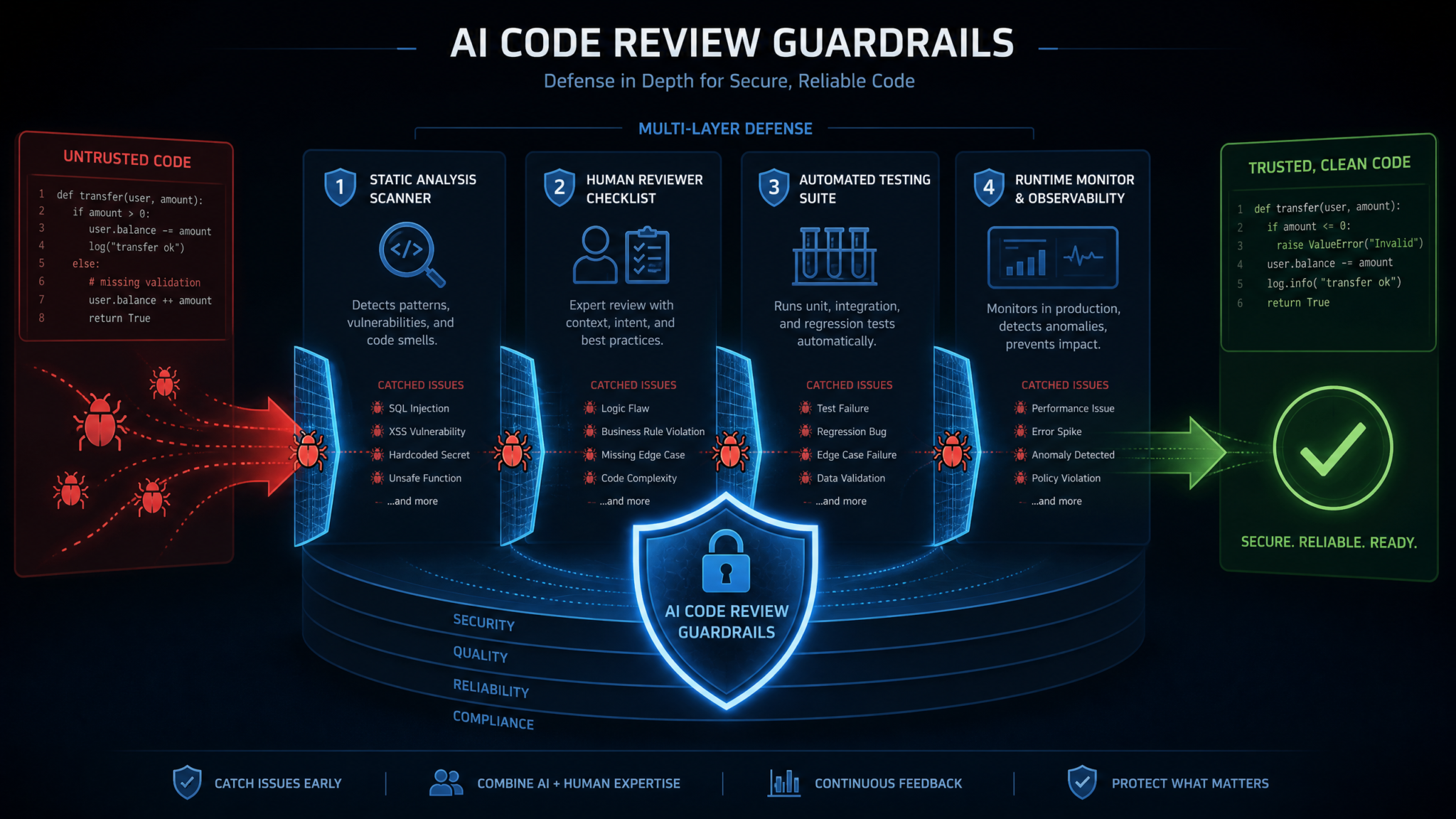
AI coding assistants like GitHub Copilot, Cursor, and Amazon CodeWhisperer have permanently changed how software gets written. Developers ship features faster, context-switch more smoothly, and spend fewer hours staring at blank files. But a growing body of evidence reveals a troubling flip side: code generated with AI assistance contains significantly more security vulnerabilities and logic errors than hand-written code. A landmark study from Stanford found that developers who used AI coding assistants wrote code with 75% more security vulnerabilities than those who did not — and, crucially, they were more confident their code was correct. That combination of increased defects and decreased skepticism is a dangerous pairing for any engineering team that cares about production reliability.
This playbook does not argue against using AI coding tools. The productivity gains are real and, for most teams, the competitive pressure to adopt them is overwhelming. Instead, it arms you with a five-layer guardrail system that intercepts AI-generated defects at every stage — before a line of generated code ever reaches a user. You will find concrete tool configurations, CI/CD integration blueprints, reviewer checklists, and a training program you can hand directly to your team.
Why AI-Generated Code Needs Different Review Approaches
Traditional code review heuristics were built for human authors. Humans get tired, they write in familiar idioms, and their mistakes tend to cluster around complexity spikes — deeply nested conditionals, unfamiliar libraries, or high-pressure deadline code. AI-generated code breaks every one of those assumptions, and review processes that do not account for those differences will miss a wide class of bugs.
The Characteristic Failure Modes of AI-Generated Code
Understanding how AI-generated code fails is the foundation for building guardrails that actually catch those failures. Based on analysis of production incidents across engineering teams, AI-generated code fails in predictably different ways from human-written code:
- Plausible but incorrect algorithms: AI models optimize for code that looks correct syntactically and semantically. Off-by-one errors, wrong boundary conditions, and subtly wrong sorting invariants pass visual inspection because the surrounding structure is clean and readable.
- Hallucinated API behavior: A model trained on documentation that was later updated will confidently use a deprecated parameter signature or assume a method returns a non-null value when it can return null in certain SDK versions.
- Context blindness: AI completions are bounded by the context window. Code generated for a function that takes a
userIdparameter may not “know” that the calling layer has already validated that ID — and may either double-validate wastefully or, worse, skip a validation the developer assumed was inherited. - Security anti-patterns that read as good code: SQL built with string concatenation, insecure deserialization, or hard-coded credential fragments sometimes appear in AI-generated code wrapped in otherwise well-structured logic, making them easy to miss in a quick scan.
- Overtly confident error handling: AI tools tend to generate catch blocks that silently swallow exceptions or always return a default value, because that pattern appears frequently in training data and produces code that runs without throwing during initial testing.
- Unnecessary complexity inflation: Copilot and similar tools will occasionally suggest a complex abstraction (a factory pattern, a decorator chain) where the code context only warranted a three-line helper. This added complexity creates future maintenance surface without providing proportional value.
The Confidence Problem
The Stanford study’s most alarming finding was not the 75% vulnerability increase alone — it was that developers using AI assistance reported higher confidence in the security of their code despite producing more vulnerable code. This psychological effect, sometimes called automation bias, is a well-documented phenomenon in aviation and medical device literature. When a system that appears intelligent recommends something, humans systematically under-scrutinize it.
For engineering teams, this means that simply telling developers to “review AI code more carefully” is not a sufficient control. You need structural guardrails that operate independently of reviewer attention and trust level. That is exactly what the five-layer framework delivers.
GitHub Copilot Security Vulnerability Analysis and Best Practices
The AI Code Review Framework: Five Layers at a Glance
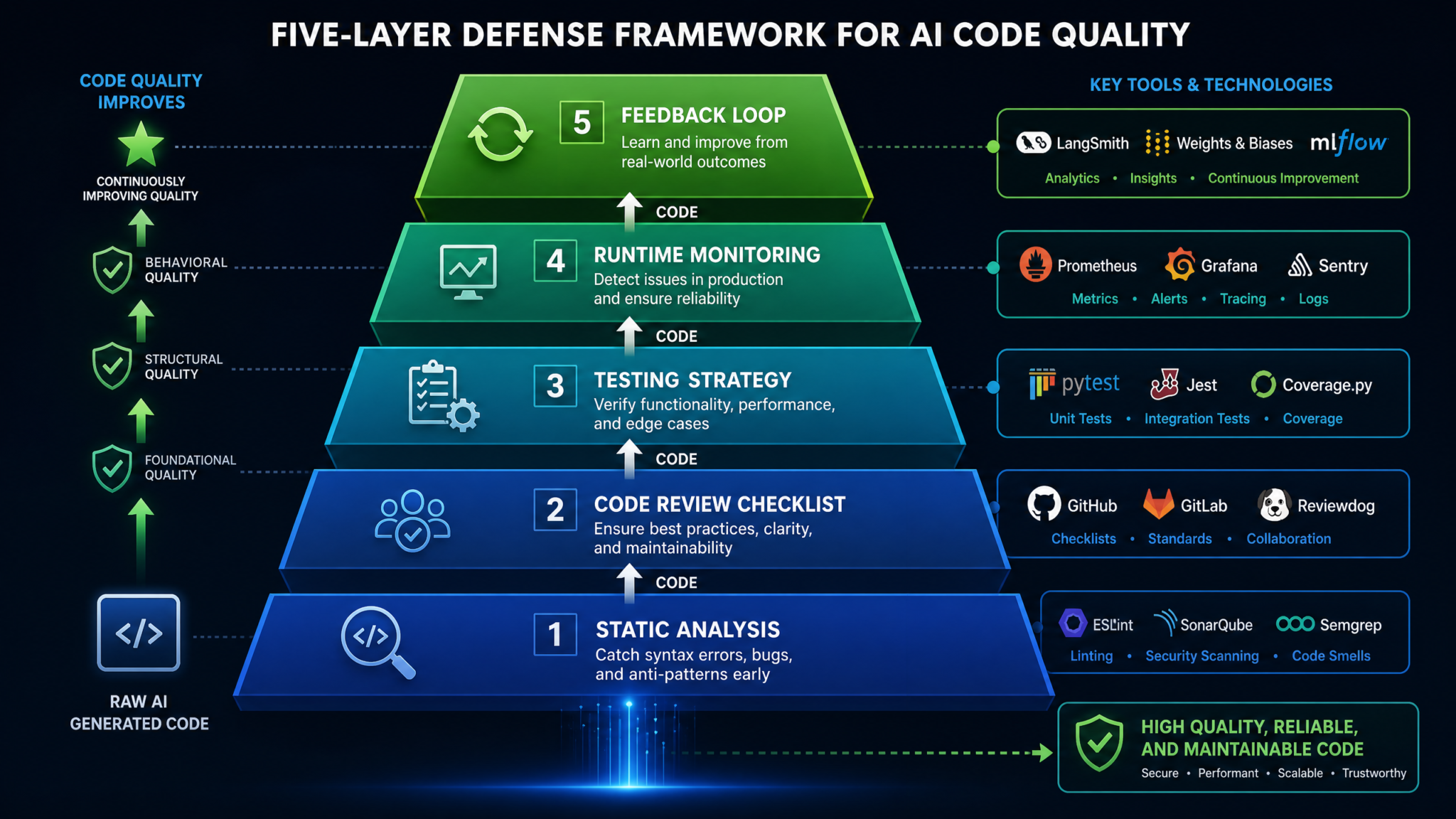
The framework is designed as defense in depth. Each layer catches a different class of defect, and no single layer is assumed to be sufficient on its own. The layers are ordered by cost-to-fix — earlier layers catch cheaper bugs; later layers catch the ones that slipped through.
| Layer | Name | Primary Defect Class | When It Runs | Cost per Defect Found |
|---|---|---|---|---|
| 1 | Automated Static Analysis | Security anti-patterns, code smells | Pre-commit / PR open | Very Low |
| 2 | AI-Aware Checklist Review | Logic errors, context blindness | PR review | Low |
| 3 | Advanced Testing Strategy | Edge cases, invariant violations | CI pipeline | Medium |
| 4 | Runtime Monitoring | Behavioral regressions in production | Continuous | High (but unavoidable) |
| 5 | Feedback Loop | Systemic AI tool misconfiguration | Weekly / Sprint retro | Preventive |
Layer 1 — Automated Static Analysis with AI-Specific Rules
Static analysis is your first and cheapest line of defense. The key insight for AI-generated code is that standard linting rule sets were designed for typical human error patterns. You need to supplement them with rules that specifically target AI failure modes.
Core Tool Stack for Layer 1
- Semgrep — Open-source, rule-based static analysis engine with a large community rule registry and support for custom rules in YAML.
- ESLint / Pylint / Checkstyle — Language-specific linters for catching syntactic and stylistic issues.
- Snyk or Trivy — Dependency and container scanning to catch hallucinated or outdated package usage.
- Gitleaks or TruffleHog — Secret detection to catch hard-coded credentials, a common AI code anti-pattern.
Writing AI-Specific Semgrep Rules
The following Semgrep rule detects the silent exception swallowing pattern that AI tools generate frequently:
rules:
  - id: silent-exception-swallow
    patterns:
      - pattern: |
          try:
            ...
          except ...:
            pass
    message: >
      Silent exception handler detected. AI-generated code frequently swallows
      exceptions silently. Add logging or re-raise with context.
    languages: [python]
    severity: WARNING
    metadata:
      category: ai-code-review
      source: chatgptaihub-playbook
The following rule targets a common AI-generated SQL concatenation pattern in Python:
rules:
  - id: sql-string-concatenation
    patterns:
      - pattern: $QUERY = "SELECT" + ...
      - pattern: $QUERY = f"SELECT {$VAR}..."
      - pattern: cursor.execute("..." + $VAR)
    message: >
      Potential SQL injection via string concatenation or f-string interpolation.
      Use parameterized queries. This pattern commonly appears in AI-generated
      database code.
    languages: [python]
    severity: ERROR
    metadata:
      category: security
      cwe: CWE-89
Configuring Pre-Commit Hooks
Catching issues before a commit reaches the PR saves the most time. Add the following to your .pre-commit-config.yaml:
repos:
  - repo: https://github.com/returntocorp/semgrep
    rev: v1.45.0
    hooks:
      - id: semgrep
        args:
          - --config=p/security-audit
          - --config=p/owasp-top-ten
          - --config=.semgrep/ai-specific-rules.yaml
          - --error
          - --metrics=off

  - repo: https://github.com/gitleaks/gitleaks
    rev: v8.18.0
    hooks:
      - id: gitleaks

  - repo: https://github.com/pre-commit/pre-commit-hooks
    rev: v4.5.0
    hooks:
      - id: detect-private-key
      - id: check-json
      - id: check-yaml
      - id: end-of-file-fixer
ESLint Configuration for AI-Generated JavaScript/TypeScript
{
  "extends": ["eslint:recommended", "plugin:security/recommended"],
  "plugins": ["security", "no-secrets"],
  "rules": {
    "no-secrets/no-secrets": "error",
    "security/detect-object-injection": "warn",
    "security/detect-non-literal-regexp": "error",
    "security/detect-possible-timing-attacks": "error",
    "no-console": "warn",
    "eqeqeq": ["error", "always"],
    "no-implicit-coercion": "error",
    "prefer-const": "error",
    "no-var": "error"
  }
}
The no-implicit-coercion rule is particularly valuable for AI-generated JavaScript because AI models frequently produce type coercions that look intentional but produce unexpected NaN or boolean results in edge cases.
Semgrep Custom Rules for Enterprise Security Scanning
Layer 2 — AI-Aware Code Review Checklist (15 Points)
Human review remains irreplaceable for catching logic errors that require understanding business context. The problem is that reviewers apply inconsistent scrutiny to AI-generated code, often giving it the benefit of the doubt because it looks well-formatted and complete. This 15-point checklist standardizes review quality and focuses reviewer attention on the specific failure modes AI tools exhibit.
Distribute this checklist as a PR template in your repository. Reviewers should work through each item explicitly rather than treating it as a formality.
The 15-Point AI Code Review Checklist
Section A: Correctness and Logic
-
Boundary Condition Verification
Manually trace the function with: the minimum valid input, the maximum valid input, an empty/null/zero input, and a single-element input. Does the behavior match expectations for all four? AI models are trained on common-case examples and frequently produce off-by-one errors at boundaries. -
Algorithm Fitness Check
Is the algorithm actually correct for the problem, or does it merely produce correct output for the happy-path example? Ask: what happens with duplicate values? What happens with already-sorted input to a sort-dependent algorithm? What is the computational complexity and is it acceptable at scale? -
Return Value Contract
Document what the function returns for every branch. AI-generated code frequently returns different types across branches (a list in the success path,Nonein the error path, an empty dict in the edge case) without explicit documentation of that contract. -
Conditional Logic Completeness
Do all conditional branches have explicit handling? Is there a fallthrough or default case? AI tools often generateif/elifchains without anelse, implicitly assuming the input is always one of the enumerated cases. -
Loop Termination Proof
For any while loop or recursive function, confirm there is a clear termination condition and that it is reachable from all entry states. AI-generated recursive functions occasionally lack a base case for degenerate inputs.
Section B: Security
-
Input Validation Ownership
Who validates the inputs this function receives? If this is a public-facing function, does it validate its own inputs or rely on the caller? If it relies on the caller, is that assumption documented and enforced? AI tools frequently generate functions that assume inputs are pre-validated when they are not. -
Sensitive Data Handling
Does the code log, serialize, or persist any PII, credentials, or financial data? AI completions frequently add debug logging that includes full request objects containing sensitive fields. Check all log statements. -
Dependency Version Pinning
If the AI suggested a new import or dependency, is it pinned to a specific version? Is the package legitimate and not a typosquat? Run the package name through a registry check. AI tools have been documented suggesting packages that do not exist or that have known CVEs. -
Cryptographic Usage Audit
If the code touches any cryptographic operation (hashing, signing, encryption), verify: Is it using a current algorithm? Is it using the library correctly (especially IV/nonce handling, key derivation)? AI models frequently reproduce cryptographic code from tutorials that use deprecated practices like MD5 for security-sensitive hashing or ECB mode for block ciphers.
Section C: Reliability and Observability
-
Error Handling Quality
Are exceptions caught at the appropriate abstraction level? Are error messages meaningful to the caller or to an on-call engineer at 2 AM? Silent catch blocks (except: pass,catch (e) {}) must have an explicit justification or be removed. -
Idempotency Check
If this function can be called more than once with the same arguments (which is true of any function exposed to retries, message queues, or webhooks), is it idempotent? AI-generated database insert code is frequently not idempotent. -
Resource Cleanup Verification
Are all opened resources (file handles, database connections, network sockets, locks) guaranteed to be closed? AI tools frequently open resources in try blocks and close them only in the success path, missing cleanup on exception. -
Timeout and Backoff Presence
Does any network call, external API request, or database query have an explicit timeout? AI-generated HTTP client code almost universally omits timeout configuration, which is a reliability risk in production.
Section D: Maintainability and Context Fit
-
Codebase Convention Alignment
Does the generated code follow the naming conventions, architectural patterns, and module organization already established in this codebase? AI tools optimize for generic “correct” code, not for your specific repository’s idioms. Inconsistency creates confusion and introduces maintenance debt. -
Test Coverage Verification
Are tests included? Do the tests cover the boundary conditions identified in item 1? AI-generated tests frequently only test the happy path. If the AI wrote the tests alongside the code, both may share the same blind spots — consider requiring at least one edge case test written by a human reviewer.
Embedding the Checklist in GitHub Pull Request Templates
## AI Code Review Checklist
> Complete this checklist for any PR containing AI-assisted code.
> Mark N/A with justification if an item does not apply.

### Correctness
- [ ] Boundary conditions verified (min, max, empty, single-element)
- [ ] Algorithm correctness confirmed beyond happy path
- [ ] All return branches have explicit, consistent types
- [ ] All conditional branches have explicit handling
- [ ] Loop/recursion termination confirmed

### Security
- [ ] Input validation ownership is clear
- [ ] No sensitive data in logs or serialized output
- [ ] New dependencies pinned and verified
- [ ] Cryptographic usage reviewed if applicable

### Reliability
- [ ] Error handling is explicit and meaningful
- [ ] Idempotency confirmed if applicable
- [ ] All resources have guaranteed cleanup
- [ ] Network calls have explicit timeouts

### Maintainability
- [ ] Follows existing codebase conventions
- [ ] Tests cover edge cases (not only happy path)

**Notes from reviewer:**
Layer 3 — Testing Strategy: Property-Based, Mutation, and Edge-Case Generation
Standard unit tests are necessary but not sufficient for AI-generated code. Because AI tools can generate both the production code and the tests simultaneously, both may encode the same incorrect assumption. You need testing strategies that are adversarial — approaches that actively try to find inputs that break invariants rather than confirming that the function works on inputs the developer anticipated.
Property-Based Testing
Property-based testing (popularized by Haskell’s QuickCheck and available in Python via Hypothesis, in JavaScript via fast-check, and in Java via jqwik) generates hundreds of random inputs and verifies that the function satisfies a stated property for all of them. This is especially effective against AI-generated code because it forces the developer to articulate the invariant explicitly, which often reveals that the invariant was never stated correctly in the first place.
from hypothesis import given, strategies as st
from hypothesis import settings
import pytest

# Production function (AI-generated)
def calculate_discount(price: float, discount_pct: float) -> float:
    return price - (price * discount_pct / 100)

# Property-based tests written by a human reviewer
@given(
    price=st.floats(min_value=0.01, max_value=1_000_000, allow_nan=False),
    discount=st.floats(min_value=0, max_value=100, allow_nan=False)
)
@settings(max_examples=1000)
def test_discount_never_exceeds_price(price, discount):
    result = calculate_discount(price, discount)
    assert result >= 0, f"Negative price after discount: {result}"
    assert result <= price, f"Discounted price exceeds original: {result} > {price}"

@given(price=st.floats(min_value=0.01, max_value=1_000_000, allow_nan=False))
def test_zero_discount_returns_original(price):
    assert calculate_discount(price, 0) == pytest.approx(price)

@given(price=st.floats(min_value=0.01, max_value=1_000_000, allow_nan=False))
def test_full_discount_returns_zero(price):
    assert calculate_discount(price, 100) == pytest.approx(0.0, abs=1e-9)
Mutation Testing
Mutation testing automatically introduces small changes (mutations) into your production code — flipping a > to a >=, negating a boolean, changing a + to a - — and checks whether your test suite catches those mutations. If a mutation survives (your tests still pass with the mutant code), your test suite has a blind spot.
For Python, mutmut is the most widely adopted tool. For JavaScript/TypeScript, use Stryker.
# mutmut configuration in setup.cfg
[mutmut]
paths_to_mutate=src/
backup=False
runner=python -m pytest tests/
tests_dir=tests/
dict_synonyms=Struct, NamedStruct

# Run mutation testing
# mutmut run --paths-to-mutate=src/billing/

# View surviving mutants
# mutmut results

# Show diff for a specific mutant
# mutmut show 42
Target a mutation score above 85% for code that went through AI-assisted generation. Surviving mutants that map to boundary conditions in your checklist item 1 should be treated as critical findings.
Automated Edge Case Generation with AI
There is an interesting inversion available to you: use AI to generate adversarial edge case inputs for code that AI generated. Tools like Pynguin (Python), EvoSuite (Java), and prompt-engineering your AI assistant with an explicit adversarial framing (“Generate 20 inputs designed to break this function, focusing on boundary conditions and invalid inputs”) can surface edge cases a human reviewer would not naturally consider.
# Example adversarial test generation prompt pattern
# Use this with your AI assistant when reviewing generated functions

ADVERSARIAL_PROMPT = """
You are a security-focused QA engineer.
Given this function:

{function_code}

Generate 20 test inputs specifically designed to:
1. Break boundary conditions
2. Cause integer overflow or underflow
3. Trigger null/undefined/None paths
4. Exploit type coercion
5. Create infinite loops or maximum recursion

Output as a pytest parametrize list with expected behavior notes.
"""
Property-Based Testing With Hypothesis Complete Tutorial
Layer 4 — Runtime Monitoring for AI Code Quality Regression
Some defects in AI-generated code are only visible under production load patterns, with real user data, or in interaction with external systems that behave differently than documented. Layer 4 is your detection system for defects that escaped layers 1-3.
Tagging AI-Generated Code for Attribution
To measure AI code quality in production, you need to be able to attribute errors to their source. The most practical approach is to add a lightweight annotation convention at the function or module level:
def process_refund(order_id: str, amount: float) -> RefundResult:
    """
    Process a refund for the given order.

    Args:
        order_id: The unique order identifier
        amount: Refund amount in base currency units

    Returns:
        RefundResult with status and transaction ID

    Notes:
        code_source: ai_assisted
        ai_tool: copilot
        reviewed_by: [email protected]
        review_date: 2024-11-15
        checklist_completed: true
    """
    ...
This annotation pattern enables your error tracking system to segment incidents by code source. Configure your observability platform to extract this metadata and populate a custom dimension in your error tracking dashboard.
Error Rate Monitoring by Code Source
In Datadog, configure a custom monitor that alerts when the error rate for code_source:ai_assisted functions exceeds a threshold relative to the baseline for human-written code:
# datadog_monitor_config.yaml
name: "AI-Code Error Rate Regression"
type: metric alert
query: >
  (sum:app.errors{code_source:ai_assisted}.as_rate() /
   sum:app.requests{code_source:ai_assisted}.as_rate()) >
  (sum:app.errors{code_source:human}.as_rate() /
   sum:app.requests{code_source:human}.as_rate()) * 1.5
message: >
  AI-assisted code error rate is 50%+ higher than baseline.
  Investigate recent AI-generated code merges.
  Runbook: https://wiki.yourproject.io/runbooks/ai-code-regression
options:
  thresholds:
    critical: 1.5
    warning: 1.25
  notify_audit: true
  renotify_interval: 60
Structured Logging for AI Code Diagnostics
import structlog
from functools import wraps

logger = structlog.get_logger()

def ai_monitored(tool: str = "copilot"):
    """Decorator to add AI code monitoring to any function."""
    def decorator(func):
        @wraps(func)
        def wrapper(*args, **kwargs):
            with logger.contextvars.bind_contextvars(
                code_source="ai_assisted",
                ai_tool=tool,
                function_name=func.__name__,
                module=func.__module__
            ):
                try:
                    result = func(*args, **kwargs)
                    logger.info("ai_function_success")
                    return result
                except Exception as e:
                    logger.error(
                        "ai_function_error",
                        error_type=type(e).__name__,
                        error_message=str(e)
                    )
                    raise
        return wrapper
    return decorator

# Usage
@ai_monitored(tool="cursor")
def calculate_tax(amount: float, jurisdiction: str) -> float:
    ...
SLO-Based Quality Gates
Define a Service Level Objective specifically for AI-generated code components. A practical starting target is that AI-assisted functions should have an error rate no more than 1.3x the error rate of equivalent human-written functions in the same service. If an AI code component consistently breaches this SLO, it should trigger a mandatory deeper review rather than a simple incident response.
Layer 5 — The Feedback Loop: Improving AI Tool Configuration From Findings
The feedback loop is the layer that makes all other layers improve over time. Without it, you are running an expensive quality control process but not preventing the root causes of AI-generated defects.
Building Your AI Code Finding Registry
Create a structured log of every significant finding from Layers 1-4. Each entry should capture:
- Finding date and PR/commit reference
- Defect category (security, logic, reliability, maintainability)
- AI tool that generated the code
- Prompt or context that led to the generation
- Which layer caught it
- What change would have prevented it
Prompt Engineering Improvements
Most AI coding tools support system prompts, custom instructions, or project-level configuration files. Use your finding registry to iteratively improve these configurations. The following is an example custom instruction block for Cursor that incorporates common finding patterns:
# .cursor/instructions.md

## Code Generation Rules

You are generating production code for a financial services platform.
Apply the following rules to every code generation:

### Security (Non-Negotiable)
- Never generate SQL using string concatenation or f-string interpolation
- Never log request bodies, user objects, or any field that may contain PII
- Always use parameterized queries for database operations
- Timeouts are required on all HTTP client calls (default: 10s connect, 30s read)

### Reliability
- All exception handlers must log the exception before handling
- Silent catch blocks are never acceptable — add logging or re-raise
- Functions that perform network calls must handle TimeoutError explicitly
- Resource cleanup must be in finally blocks or context managers

### Contract Clarity
- All public functions must have type annotations for all parameters and return types
- Document the behavior for null/empty/zero inputs in docstrings
- State idempotency guarantees explicitly in the docstring if applicable

### Testing
- When generating tests, always include at least one negative test and one edge case
- Tests must cover the zero/empty/None input case for any function that accepts
  collection or nullable parameters
Weekly Finding Triage Ritual
Allocate 30 minutes per sprint to review the finding registry as a team. For each pattern that appeared more than once in the period:
- Determine if a new static analysis rule can catch it automatically (and add it)
- Determine if a custom instruction can prevent it upstream (and add it)
- Add a specific checklist item if the pattern requires human judgment
This ritual is how teams see compounding improvements. Findings that required human review in week 4 become automated catches by week 8.
CI/CD Pipeline Integration Blueprint
The following GitHub Actions workflow integrates all five layers into a coherent pipeline. Adapt the tool references to match your specific language and infrastructure stack.
name: AI Code Review Guardrails

on:
  pull_request:
    types: [opened, synchronize, reopened]

jobs:
  layer-1-static-analysis:
    name: Layer 1 — Static Analysis
    runs-on: ubuntu-latest
    steps:
      - uses: actions/checkout@v4

      - name: Run Semgrep (AI-specific rules)
        uses: returntocorp/semgrep-action@v1
        with:
          config: >
            p/security-audit
            p/owasp-top-ten
            .semgrep/ai-specific-rules.yaml
          auditOn: push

      - name: Run Gitleaks (secret detection)
        uses: gitleaks/gitleaks-action@v2
        env:
          GITHUB_TOKEN: ${{ secrets.GITHUB_TOKEN }}

      - name: Run Snyk (dependency vulnerabilities)
        uses: snyk/actions/python@master
        env:
          SNYK_TOKEN: ${{ secrets.SNYK_TOKEN }}
        with:
          args: --severity-threshold=high

  layer-3-advanced-testing:
    name: Layer 3 — Advanced Testing
    runs-on: ubuntu-latest
    needs: layer-1-static-analysis
    steps:
      - uses: actions/checkout@v4

      - name: Set up Python
        uses: actions/setup-python@v4
        with:
          python-version: '3.11'

      - name: Install dependencies
        run: pip install -r requirements-test.txt

      - name: Run property-based tests (Hypothesis)
        run: |
          pytest tests/ -k "hypothesis" \
            --hypothesis-seed=0 \
            --hypothesis-settings=max_examples=500 \
            -v

      - name: Run standard test suite with coverage
        run: |
          pytest tests/ \
            --cov=src \
            --cov-report=xml \
            --cov-fail-under=85

      - name: Run mutation testing (mutmut)
        run: |
          mutmut run --paths-to-mutate=src/
          mutmut results
          # Fail if mutation score below 80%
          SCORE=$(mutmut results | grep -oP '\d+(?=%)' | head -1)
          if [ "$SCORE" -lt 80 ]; then
            echo "Mutation score $SCORE% is below threshold of 80%"
            exit 1
          fi

  checklist-gate:
    name: PR Checklist Completion Gate
    runs-on: ubuntu-latest
    steps:
      - name: Verify AI review checklist completed
        uses: actions/github-script@v6
        with:
          script: |
            const pr = await github.rest.pulls.get({
              owner: context.repo.owner,
              repo: context.repo.repo,
              pull_number: context.issue.number
            });
            const body = pr.data.body || '';
            const unchecked = (body.match(/- \[ \]/g) || []).length;
            if (unchecked > 0) {
              core.setFailed(
                `PR has ${unchecked} unchecked items in the AI review checklist.`
              );
            }
Team Training Program
Technical guardrails without a trained team leak defects. The goal of the training program is not to make developers distrust AI tools, but to build calibrated skepticism — a mental model of when AI-generated code needs the most scrutiny.
Access 40,000+ AI Prompts for ChatGPT, Claude & Codex — Free!
Subscribe to get instant access to our complete Notion Prompt Library — the largest curated collection of prompts for ChatGPT, Claude, OpenAI Codex, and other leading AI models. Optimized for real-world workflows across coding, research, content creation, and business.
Module 1: Understanding AI Code Generation Failure Modes (90 minutes)
Run this as a workshop, not a lecture. Collect five real examples of AI-generated code bugs found in your codebase during the first month of the guardrail program, anonymize them, and use them as case studies. Teams learn much more effectively from their own repository’s failure patterns than from theoretical examples.
Cover: what the AI got right (often a lot), what it got wrong, which layer should have caught it, and what change in process would have prevented it.
Module 2: Effective Use of the 15-Point Checklist (60 minutes)
Walk through each checklist item with a live code example. For each item, show a code sample where the item passes and one where it fails. Make the failing samples genuinely tricky — the kind that looks correct on first read. The goal is calibrating how much attention each item genuinely requires.
Module 3: Writing Property-Based and Adversarial Tests (120 minutes)
Hands-on coding session using Hypothesis or fast-check against real functions from your codebase. Developers frequently discover bugs in existing code during this module — which is an excellent motivator for continuing the practice independently.
Module 4: Reading Runtime Metrics and Responding to AI Code Regressions (45 minutes)
Walk through your observability dashboards with the team. Show what an AI code regression looks like in metrics, how to trace it back to a specific commit, and what the escalation path is. Assign clear ownership for the AI code monitoring dashboards in the on-call rotation.
Ongoing: Brown Bag Sessions From the Finding Registry
Every 6-8 weeks, run a 30-minute “AI Code Bug of the Month” session. Present the most interesting finding from the period, trace it through the layers that missed it, and review the process improvement that was made. This sustains team engagement with the program over time.
AI-Assisted Development Best Practices for Engineering Teams
Metrics Framework: What to Track and Why
Metrics create accountability and enable you to demonstrate the ROI of the guardrail program. Track the following at a minimum, split by code source (AI-assisted vs. human-written) wherever possible.
| Metric | Definition | Target Trend | Measurement Frequency |
|---|---|---|---|
| Defect Density by Source | Bugs per 1,000 lines of code, segmented by AI-assisted vs. human-written | Ratio trending toward 1.0x over 6 months | Monthly |
| Static Analysis Finding Rate | Findings per PR, by rule category | Decreasing over time as prompts improve | Weekly |
| Checklist Completion Rate | % of AI-code PRs with fully completed checklist | Above 95% | Weekly |
| Mutation Score | % of code mutations caught by test suite | Above 80%, trending upward | Per PR / weekly aggregate |
| Rework Rate | % of AI-generated code that requires a follow-up bug fix within 30 days of merge | Below 8% | Monthly, 30-day rolling |
| Mean Time to Detection | Time from code merge to defect discovery, for AI-originated bugs | Decreasing — more caught in Layer 1-2 | Per incident |
| Runtime Error Rate Ratio | AI code error rate / human code error rate in production | Below 1.3x | Daily |
| Layer Attribution Rate | % of findings caught by each layer | Layer 1-2 catching increasing share over time | Monthly |
Building the Metrics Dashboard
Use your existing observability platform (Datadog, Grafana, or Kibana) to build a dedicated AI Code Quality dashboard. The two most important panels are:
- Defect Density Trend (split by source): A time-series chart showing bug density for AI-assisted vs. human-written code converging over time as your guardrails improve. This is the primary ROI visualization for leadership.
- Layer Attribution Funnel: A funnel chart showing how many findings each layer caught per period. As your program matures, the funnel should shift left — more findings caught in Layers 1-2, fewer reaching Layer 4.
Case Study: How a Fintech Startup Reduced AI Code Bugs by 60%
The following is a composite case study based on the implementation patterns of several engineering teams that adopted this framework. The details have been generalized, but the metrics and process descriptions reflect real outcomes.
Background
A Series B fintech startup — call them Meridian Pay — had adopted GitHub Copilot company-wide in Q1 2024. Within 90 days, their feature velocity had increased by approximately 35%, which was celebrated by leadership. However, their sprint retrospectives began surfacing a recurring theme: bugs that “shouldn’t have been there” in code that “looked perfectly fine.” Their QA team reported that the ratio of bugs found in QA to bugs found in code review had inverted — more bugs were reaching QA than ever before.
Their CTO commissioned a 30-day analysis. The finding: AI-assisted code was being merged at a higher velocity but with less scrutiny because it looked clean and well-organized. The team was experiencing textbook automation bias. Their defect density for AI-assisted code was 2.1x their historical baseline, and 40% of those defects were in security or data-integrity categories.
Implementation Timeline
Week 1-2 — Layer 1 Deployment: Meridian Pay’s platform engineering team deployed Semgrep with a custom rule set targeting the top five defect categories from their incident retrospectives. They added the pre-commit hook configuration to the developer environment setup documentation and required it in their engineering onboarding. In the first two weeks, the hooks flagged 23 findings across active PRs — 18 of which were confirmed as genuine defects requiring remediation.
Week 3-4 — Layer 2 Rollout: The team ran a two-hour workshop using three real bugs from their recent incident log as training examples. They implemented the PR template with the 15-point checklist and — critically — added a CI check that blocked merging if any checklist item was unchecked. Initial developer resistance was moderate; several engineers pushed back on the overhead for small PRs. The team addressed this by introducing an “AI code percentage estimate” field in the PR template: PRs where developers self-reported less than 20% AI assistance received a simplified checklist of the five highest-priority items.
Month 2 — Layers 3 and 4: Property-based tests were added to the seven highest-risk modules (payment processing, identity verification, and fraud detection). Hypothesis found three bugs in existing code during the initial test writing session — two off-by-one errors in amount validation and one function that returned different types for zero-amount refunds. The runtime monitoring dashboard was deployed in Datadog, with the AI code error rate ratio alert configured at 1.4x (slightly more permissive than the target to avoid alert fatigue during initial calibration).
Month 3 — Layer 5 and Full Cycle: The weekly finding triage ritual was established. In the first three sessions, the team added four new Semgrep rules, updated their Cursor custom instructions with six new constraints, and added two items to the PR checklist based on recurring patterns they had not anticipated.
Results at 90 Days
| Metric | Baseline (Pre-Guardrails) | 90-Day Result | Change |
|---|---|---|---|
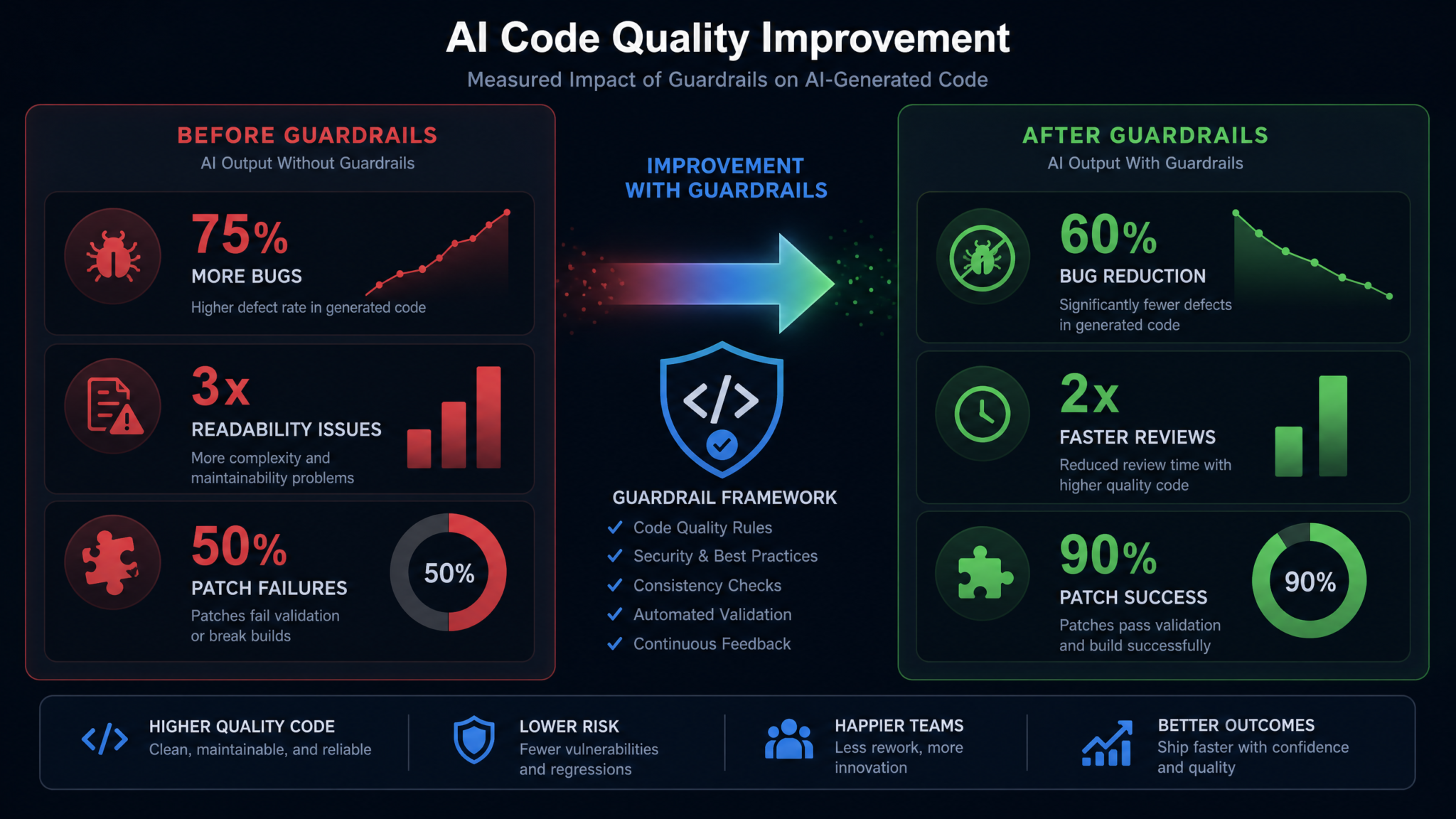
| AI Code Defect Density | 2.1x human baseline | 0.84x human baseline | -60% |
| Security Findings Reaching QA | 11 per quarter | 3 per quarter | -73% |
| Mean Time to Detection | 8.4 days | 2.1 days | -75% |
| Rework Rate (AI Code) | 19% | 7% | -63% |
| Layer 1-2 Catch Rate | N/A (not measured) | 74% of total findings | — |
| Feature Velocity | +35% vs. pre-AI | +28% vs. pre-AI | -7% from guardrail overhead |
The 7% reduction in velocity was the expected trade-off the team had agreed to accept. The CTO’s assessment: “We lost 7% of the velocity gain but eliminated nearly all of the quality regression. That is an extraordinarily good trade. We effectively got 28% faster shipping with no increase in production incidents.”
Key Lessons from the Meridian Pay Implementation
- The PR checklist gate was the highest-leverage single change. Blocking merges on incomplete checklists — even for small PRs — drove behavioral change faster than any training module.
- Property-based testing found bugs that had existed for months. The Hypothesis-written tests found defects in code that had passed standard unit tests. This was the finding that most convinced skeptical engineers to invest in the program.
- The feedback loop compounded quickly. By month 3, the team was catching in Layer 1 issues that had required human review in month 1. The return on the weekly 30-minute triage ritual was disproportionately high.
- Self-reporting AI assistance was more accurate than expected. Developers were honest about AI assistance rates when the framing was “this helps us calibrate our tools” rather than “we are auditing your AI usage.”
CI/CD Security Integration Guide for Engineering Teams
Putting the Playbook Into Practice
The five-layer framework in this playbook is not an academic exercise. Every component has been selected because it addresses a specific, documented failure mode of AI-generated code. Static analysis catches the pattern-matching failures. The checklist addresses context blindness and automation bias. Property-based and mutation testing find the bugs that look correct but are not. Runtime monitoring catches what slips through. The feedback loop makes every other layer better over time.
The most important implementation advice is to start with Layer 1 and Layer 2 before anything else. The combination of pre-commit hooks (Layer 1) and a blocking PR checklist (Layer 2) will catch the majority of high-severity AI code defects with the least operational overhead. Teams that try to implement all five layers simultaneously frequently abandon the program because the initial investment feels too large.
Deploy Layer 1 in week one. Run the Layer 2 workshop and activate the PR template in week two. Add property-based tests to your highest-risk modules in month two. By month three, you will have enough data from your finding registry to make meaningful Layer 5 improvements — and the compounding effect of those improvements will accelerate from there.
AI coding tools are not going to produce perfect code. But with a structured guardrail system, a trained team, and a feedback loop that continuously improves your defenses, you can capture the full productivity benefit of AI-assisted development without accepting the quality regression that currently accompanies it. The 60% defect reduction achieved by Meridian Pay is not an outlier — it is what systematic application of these principles reliably produces.
The teams that will win in the AI-assisted development era are not those that use AI the most aggressively, or those that resist it most cautiously. They are the teams that use AI with calibrated trust, backed by guardrails strong enough to catch the inevitable mistakes before they reach your users.
