
How to Deploy ChatGPT Codex on Amazon Bedrock for Enterprise CI/CD Pipelines: Complete Integration Playbook
On August 4, 2026, OpenAI and Amazon Web Services made a landmark announcement: ChatGPT Codex is now available as a fully managed model on Amazon Bedrock. This integration fundamentally changes how enterprise engineering teams can embed AI-powered code generation, automated review, and intelligent test writing directly into their existing AWS-native CI/CD infrastructure — without managing separate API keys, external network calls, or custom inference infrastructure. For platform engineers and DevOps architects who have been waiting for a production-grade, compliance-friendly path to Codex, the wait is over. This playbook walks you through every layer of the integration: from initial Bedrock model access and IAM policy construction, through CodePipeline wiring, automated pull request generation, test scaffolding, and finally to cost modeling and security hardening for regulated enterprise environments.
- Why Amazon Bedrock Changes the Codex Enterprise Story
- Architecture Overview: Codex on Bedrock in a CI/CD Pipeline
- Prerequisites and Account Setup
- IAM Policies and Least-Privilege Access for Codex
- Enabling Codex on Amazon Bedrock
- Integrating Codex with AWS CodePipeline
- Automated Code Review Stage with Codex
- Automated Pull Request Generation
- AI-Powered Test Writing with Codex
- Scaling Developer Productivity Across Teams
- Cost Estimates and Optimization Strategies
- Security Best Practices for Regulated Environments
- Monitoring, Observability, and Guardrails
- Conclusion
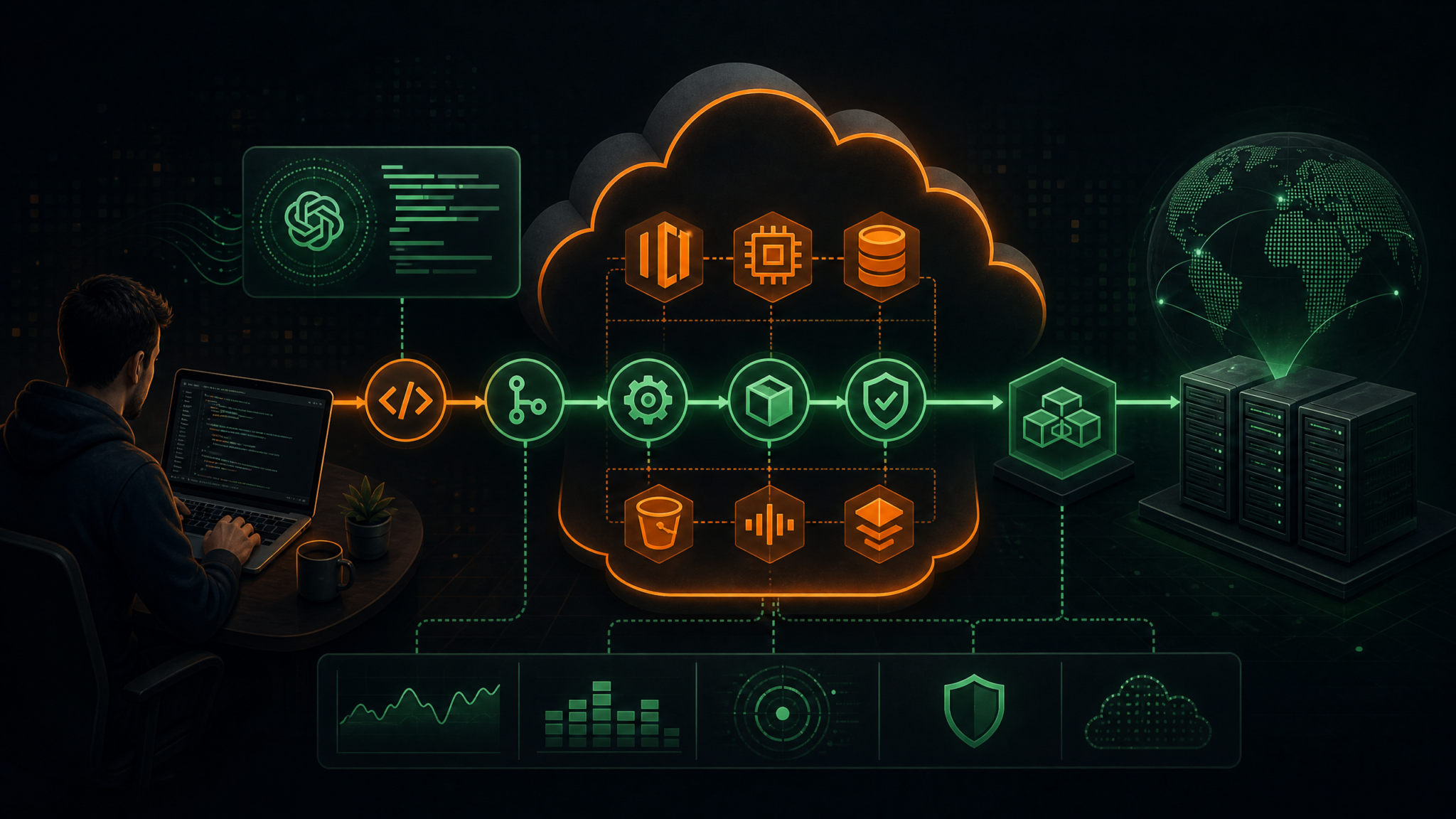
Why Amazon Bedrock Changes the Codex Enterprise Story
Before this integration, enterprise teams that wanted to use OpenAI’s Codex models in their CI/CD pipelines faced a familiar set of friction points: outbound internet connectivity requirements, separate API key management outside the AWS secrets ecosystem, data residency concerns when sending proprietary source code to external endpoints, and the absence of AWS-native service control policies (SCPs) over model invocations. Every large-scale deployment required custom proxy layers, legal reviews about data leaving the VPC, and bespoke monitoring integrations that duplicated work already done for other AWS services.
Amazon Bedrock dissolves all of those barriers in a single service boundary. Because Bedrock is a private, regional AWS service, all invocations to Codex stay within your AWS account and VPC. You get unified IAM authorization, CloudTrail audit logs for every model invocation, AWS PrivateLink endpoints, and integration with AWS Macie and Security Hub for data classification — the same compliance surface your security team already knows. For organizations operating under SOC 2, HIPAA, FedRAMP, or ISO 27001 frameworks, this is transformative.
Beyond compliance, the operational simplicity is striking. Bedrock abstracts away model versioning, capacity management, and cold-start latency. You invoke Codex through the same InvokeModel or InvokeModelWithResponseStream API you already use for Claude, Titan, or Llama models. Your existing Bedrock SDK wrappers, retry logic, and cost allocation tags work immediately with Codex. The model appears in the Bedrock console under the Foundation Models catalog as openai.codex-2, with on-demand and provisioned throughput billing options identical to other Bedrock foundation models.
Architecture Overview: Codex on Bedrock in a CI/CD Pipeline
Understanding the end-to-end architecture before writing any configuration is essential for designing a system that is both functional and maintainable. The following describes a production-grade reference architecture for a multi-stage pipeline with Codex integration at three distinct checkpoints.
High-Level Component Map
The architecture consists of six major layers: Source, Build, Codex Analysis, Test, Deploy, and Feedback Loop. Source events originate from AWS CodeCommit or a connected GitHub/GitLab repository via CodeConnections (formerly CodeStar Connections). These trigger an AWS CodePipeline execution. The Build stage uses AWS CodeBuild for compilation and static analysis. The Codex Analysis stage — this is new — invokes a Lambda function that calls Bedrock’s Codex model to perform code review, security scanning, and test generation. The Test stage executes the AI-generated tests alongside existing test suites. The Deploy stage uses CodeDeploy or ECS rolling updates. The Feedback Loop writes structured findings back to the originating pull request via the repository API.
Network Topology
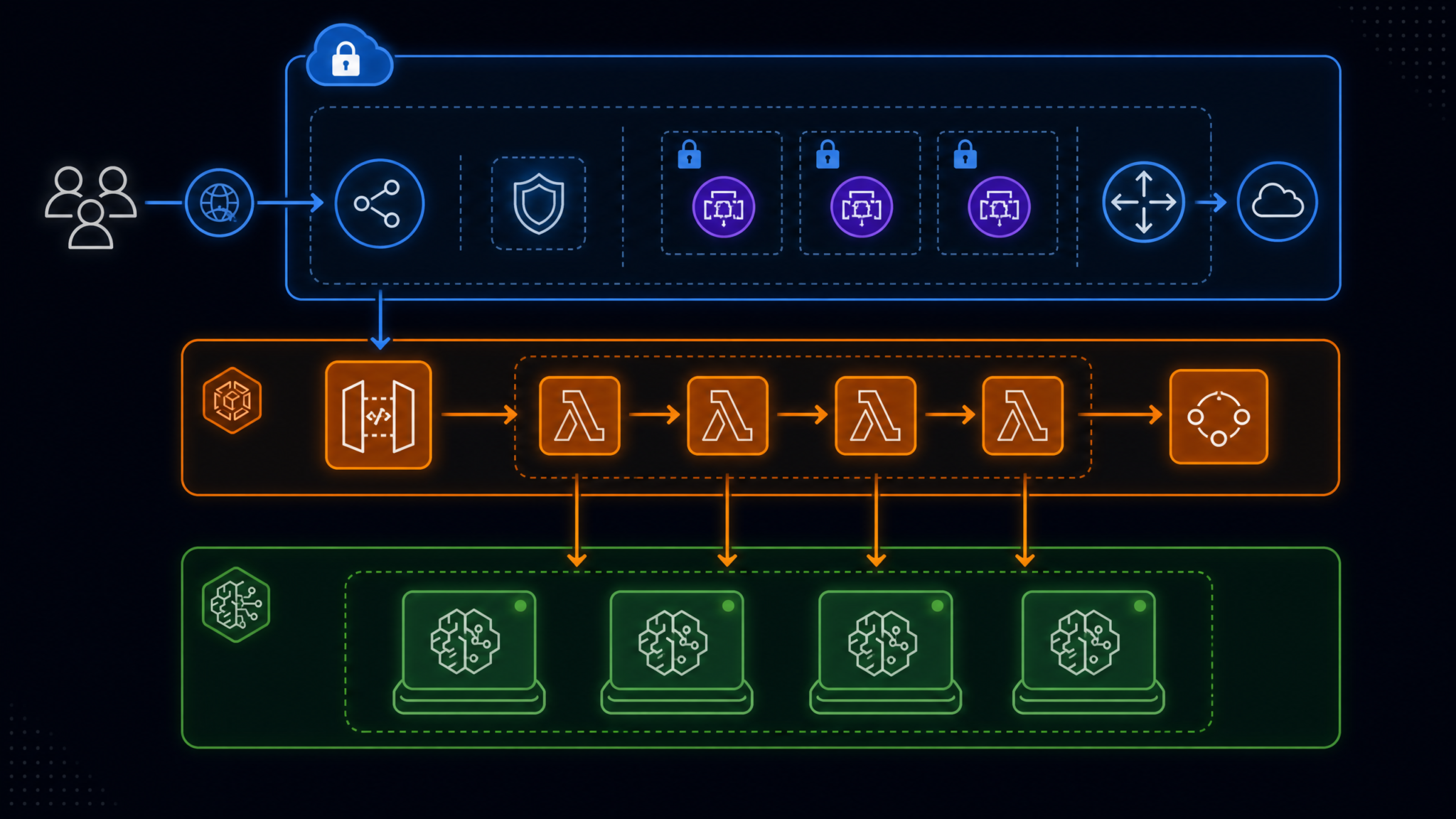
All Bedrock API calls should traverse a VPC Interface Endpoint for Bedrock (com.amazonaws.{region}.bedrock-runtime). This ensures source code payloads never traverse the public internet. The Lambda functions executing Codex invocations reside in a private subnet with no internet gateway attachment. The VPC endpoint policy restricts which principals can call which Bedrock model ARNs — Codex specifically — preventing lateral model invocation from compromised workloads.
VPC (10.0.0.0/16)
├── Private Subnet A (10.0.1.0/24)
│   ├── Lambda: codex-review-fn
│   ├── Lambda: codex-testgen-fn
│   └── Lambda: codex-prgen-fn
├── Private Subnet B (10.0.2.0/24) [multi-AZ replica]
└── VPC Endpoints
    ├── com.amazonaws.us-east-1.bedrock-runtime
    ├── com.amazonaws.us-east-1.codecommit
    ├── com.amazonaws.us-east-1.codepipeline
    └── com.amazonaws.us-east-1.secretsmanager
Data Flow Sequence
The sequence is deterministic and auditable. A developer pushes code to a feature branch. The repository webhook triggers a CodePipeline execution. CodeBuild compiles the artifact and emits a structured diff payload to S3. The Codex Analysis Lambda reads the diff from S3, constructs a Bedrock prompt, streams the response from openai.codex-2, parses structured JSON output (findings, suggested tests, PR description), and writes results to DynamoDB and back to the PR as review comments. A pipeline gate evaluates the Codex findings: if critical issues are flagged, the pipeline halts and notifies the developer; otherwise, execution proceeds to the Test stage where AI-generated tests are injected and run.
Prerequisites and Account Setup
Before enabling Codex on Bedrock, confirm the following prerequisites are satisfied in your AWS account and organization.
AWS Account Requirements
- AWS Organizations SCP: Ensure no SCP blocks
bedrock:InvokeModelorbedrock:GetFoundationModelfor the target account. Many enterprises have blanket “deny all AI services” SCPs that must be updated with a specific Codex model ARN exception. - Bedrock Region Availability: As of the August 2026 launch, Codex on Bedrock is available in
us-east-1,us-west-2,eu-west-1, andap-southeast-1. Confirm your pipeline workloads run in a supported region or configure cross-region inference profiles. - Service Quotas: Request a quota increase for Bedrock model invocations (default: 100 RPM for on-demand) before going to production. For large teams running parallel pipelines, request at minimum 2,000 RPM.
- Bedrock Model Access: Codex on Bedrock requires explicit opt-in through the Bedrock console under Model Access. This triggers an AWS and OpenAI data processing agreement addendum presented in the console UI.
Tooling Prerequisites
- AWS CLI v2.17+ (includes Bedrock Codex model metadata)
- Terraform ≥ 1.9 or AWS CDK v2.150+ (for IaC deployment of pipeline resources)
- Python 3.12+ with
boto3 ≥ 1.35.0for Lambda functions - GitHub App or GitLab integration configured in CodeConnections
- An S3 bucket for pipeline artifacts with SSE-KMS encryption enabled
IAM Policies and Least-Privilege Access for Codex
IAM policy design for Codex on Bedrock follows the same least-privilege principles as any sensitive AWS service, with one important addition: you should scope all Bedrock permissions to the specific Codex model ARN rather than using wildcards. This prevents privilege escalation paths where a compromised role could switch to higher-cost or less-audited models.
CodePipeline Service Role Policy
The CodePipeline service role needs permission to invoke Lambda functions in the Codex Analysis stage. It does not directly call Bedrock — that’s the Lambda’s responsibility. Keep the separation clean.
{
  "Version": "2012-10-17",
  "Statement": [
    {
      "Sid": "CodePipelineLambdaInvoke",
      "Effect": "Allow",
      "Action": [
        "lambda:InvokeFunction",
        "lambda:ListFunctions"
      ],
      "Resource": [
        "arn:aws:lambda:us-east-1:123456789012:function:codex-review-fn",
        "arn:aws:lambda:us-east-1:123456789012:function:codex-testgen-fn",
        "arn:aws:lambda:us-east-1:123456789012:function:codex-prgen-fn"
      ]
    },
    {
      "Sid": "ArtifactBucketAccess",
      "Effect": "Allow",
      "Action": [
        "s3:GetObject",
        "s3:PutObject",
        "s3:GetObjectVersion"
      ],
      "Resource": "arn:aws:s3:::my-pipeline-artifacts-bucket/*"
    },
    {
      "Sid": "KMSForArtifacts",
      "Effect": "Allow",
      "Action": [
        "kms:Decrypt",
        "kms:GenerateDataKey"
      ],
      "Resource": "arn:aws:kms:us-east-1:123456789012:key/mrk-abcdef1234567890"
    }
  ]
}
Lambda Execution Role Policy for Codex Invocation
This is the most sensitive policy in the architecture. The Lambda functions that call Bedrock must have precisely scoped permissions. Note the use of the openai.codex-2 model ARN as the resource — never use * here.
{
  "Version": "2012-10-17",
  "Statement": [
    {
      "Sid": "BedrockCodexInvoke",
      "Effect": "Allow",
      "Action": [
        "bedrock:InvokeModel",
        "bedrock:InvokeModelWithResponseStream"
      ],
      "Resource": "arn:aws:bedrock:us-east-1::foundation-model/openai.codex-2"
    },
    {
      "Sid": "BedrockGuardrails",
      "Effect": "Allow",
      "Action": "bedrock:ApplyGuardrail",
      "Resource": "arn:aws:bedrock:us-east-1:123456789012:guardrail/gr-codex-enterprise"
    },
    {
      "Sid": "SecretsManagerForRepoToken",
      "Effect": "Allow",
      "Action": "secretsmanager:GetSecretValue",
      "Resource": "arn:aws:secretsmanager:us-east-1:123456789012:secret:github-app-token-*"
    },
    {
      "Sid": "S3ArtifactRead",
      "Effect": "Allow",
      "Action": [
        "s3:GetObject",
        "s3:PutObject"
      ],
      "Resource": "arn:aws:s3:::my-pipeline-artifacts-bucket/*"
    },
    {
      "Sid": "DynamoDBResultsWrite",
      "Effect": "Allow",
      "Action": [
        "dynamodb:PutItem",
        "dynamodb:UpdateItem",
        "dynamodb:GetItem"
      ],
      "Resource": "arn:aws:dynamodb:us-east-1:123456789012:table/codex-pipeline-results"
    },
    {
      "Sid": "CloudWatchLogs",
      "Effect": "Allow",
      "Action": [
        "logs:CreateLogGroup",
        "logs:CreateLogStream",
        "logs:PutLogEvents"
      ],
      "Resource": "arn:aws:logs:us-east-1:123456789012:log-group:/aws/lambda/codex-*"
    }
  ]
}
VPC Endpoint Policy for Bedrock
The VPC Interface Endpoint for Bedrock Runtime should carry a restrictive endpoint policy. This is a second-layer control that operates independently of IAM — even if an IAM role is misconfigured, the endpoint policy prevents unexpected model invocations.
{
  "Statement": [
    {
      "Effect": "Allow",
      "Principal": {
        "AWS": [
          "arn:aws:iam::123456789012:role/codex-review-lambda-role",
          "arn:aws:iam::123456789012:role/codex-testgen-lambda-role"
        ]
      },
      "Action": [
        "bedrock:InvokeModel",
        "bedrock:InvokeModelWithResponseStream"
      ],
      "Resource": "arn:aws:bedrock:us-east-1::foundation-model/openai.codex-2"
    }
  ]
}
Enabling Codex on Amazon Bedrock
Model access in Bedrock is an explicit opt-in per account. Navigate to the Bedrock console, select Model Access from the left navigation, and locate OpenAI Codex 2 in the foundation models list. Click Request Access. You will be presented with OpenAI’s enterprise usage policy and an AWS data processing addendum. Upon acceptance, access is provisioned within five to ten minutes.
Verifying Access via AWS CLI
# Verify the model is accessible
aws bedrock get-foundation-model \
  --model-identifier openai.codex-2 \
  --region us-east-1

# Test a basic invocation (from within your VPC or with PrivateLink)
aws bedrock-runtime invoke-model \
  --model-id openai.codex-2 \
  --body '{"prompt": "def fibonacci(n):", "max_tokens": 100, "temperature": 0.1}' \
  --content-type application/json \
  --accept application/json \
  --region us-east-1 \
  response.json && cat response.json
Configuring a Bedrock Inference Profile for Enterprise
For consistent latency and capacity guarantees, create a Provisioned Throughput unit for Codex. A single Provisioned Throughput Model Unit (MTU) for openai.codex-2 supports approximately 400 tokens per second of combined input/output throughput. For a 50-developer team with an average pipeline frequency of 200 runs per day and an average of 8,000 tokens per invocation, two MTUs provide sufficient headroom with a 30% buffer.
aws bedrock create-provisioned-model-throughput \
  --model-id openai.codex-2 \
  --provisioned-model-name codex-enterprise-throughput \
  --model-units 2 \
  --commitment-duration SixMonths \
  --region us-east-1
Integrating Codex with AWS CodePipeline
The integration point between CodePipeline and Codex is a Lambda invoke action in a custom pipeline stage. The following CDK TypeScript snippet defines the complete pipeline with the Codex Analysis stage inserted between Build and Test.
CDK Pipeline Definition (TypeScript)
import * as cdk from 'aws-cdk-lib';
import * as codepipeline from 'aws-cdk-lib/aws-codepipeline';
import * as codepipeline_actions from 'aws-cdk-lib/aws-codepipeline-actions';
import * as lambda from 'aws-cdk-lib/aws-lambda';
import * as codebuild from 'aws-cdk-lib/aws-codebuild';

const pipeline = new codepipeline.Pipeline(this, 'EnterpriseCICDPipeline', {
  pipelineName: 'enterprise-codex-pipeline',
  artifactBucket: artifactBucket,
  crossAccountKeys: true,
});

// Stage 1: Source
const sourceOutput = new codepipeline.Artifact('SourceArtifact');
pipeline.addStage({
  stageName: 'Source',
  actions: [
    new codepipeline_actions.CodeStarConnectionsSourceAction({
      actionName: 'GitHub_Source',
      connectionArn: githubConnectionArn,
      owner: 'my-org',
      repo: 'my-service',
      branch: 'main',
      output: sourceOutput,
    }),
  ],
});

// Stage 2: Build
const buildOutput = new codepipeline.Artifact('BuildArtifact');
pipeline.addStage({
  stageName: 'Build',
  actions: [
    new codepipeline_actions.CodeBuildAction({
      actionName: 'CompileAndLint',
      project: buildProject,
      input: sourceOutput,
      outputs: [buildOutput],
    }),
  ],
});

// Stage 3: Codex Analysis (NEW)
const codexReviewOutput = new codepipeline.Artifact('CodexReviewArtifact');
pipeline.addStage({
  stageName: 'CodexAnalysis',
  actions: [
    new codepipeline_actions.LambdaInvokeAction({
      actionName: 'CodexCodeReview',
      lambda: codexReviewFn,
      inputs: [buildOutput],
      outputs: [codexReviewOutput],
      userParameters: {
        mode: 'review',
        severity_threshold: 'HIGH',
        output_format: 'sarif',
      },
    }),
    new codepipeline_actions.LambdaInvokeAction({
      actionName: 'CodexTestGeneration',
      lambda: codexTestgenFn,
      inputs: [buildOutput],
      outputs: [new codepipeline.Artifact('TestGenArtifact')],
      userParameters: {
        mode: 'testgen',
        framework: 'pytest',
        coverage_target: 80,
      },
      runOrder: 2,
    }),
  ],
});

// Stage 4: Test
pipeline.addStage({
  stageName: 'Test',
  actions: [
    new codepipeline_actions.CodeBuildAction({
      actionName: 'RunTests',
      project: testProject,
      input: buildOutput,
      extraInputs: [codexReviewOutput],
    }),
  ],
});
The Lambda Invoke Action Contract
When CodePipeline invokes a Lambda function, it passes a job event containing input artifact locations and user parameters. Your Lambda handler must call codepipeline.put_job_success_result or codepipeline.put_job_failure_result to signal pipeline continuation or halt. The following Python handler demonstrates the full contract for the code review function:
import boto3
import json
import os
import zipfile
import tempfile

codepipeline_client = boto3.client('codepipeline')
bedrock_client = boto3.client('bedrock-runtime', region_name='us-east-1')
s3_client = boto3.client('s3')

CODEX_MODEL_ID = 'openai.codex-2'
SEVERITY_THRESHOLD = os.environ.get('SEVERITY_THRESHOLD', 'HIGH')

def lambda_handler(event, context):
    job = event['CodePipeline.job']
    job_id = job['id']

    try:
        artifact = job['data']['inputArtifacts'][0]
        s3_location = artifact['location']['s3Location']

        # Download and extract artifact
        diff_content = extract_diff_from_artifact(
            s3_location['bucketName'],
            s3_location['objectKey']
        )

        # Build Codex prompt for code review
        prompt = build_review_prompt(diff_content)

        # Invoke Codex on Bedrock
        response = bedrock_client.invoke_model(
            modelId=CODEX_MODEL_ID,
            body=json.dumps({
                'prompt': prompt,
                'max_tokens': 4096,
                'temperature': 0.05,
                'response_format': {'type': 'json_object'}
            }),
            contentType='application/json',
            accept='application/json'
        )

        review_result = json.loads(response['body'].read())
        findings = review_result.get('findings', [])

        # Check severity threshold
        critical_findings = [
            f for f in findings
            if f['severity'] in ['CRITICAL', 'HIGH']
        ] if SEVERITY_THRESHOLD == 'HIGH' else []

        if critical_findings:
            codepipeline_client.put_job_failure_result(
                jobId=job_id,
                failureDetails={
                    'type': 'JobFailed',
                    'message': f'Codex found {len(critical_findings)} high/critical issues. Review required.'
                }
            )
        else:
            # Write findings as output artifact
            write_output_artifact(
                job['data']['outputArtifacts'][0],
                review_result
            )
            codepipeline_client.put_job_success_result(jobId=job_id)

    except Exception as e:
        codepipeline_client.put_job_failure_result(
            jobId=job_id,
            failureDetails={
                'type': 'JobFailed',
                'message': str(e)
            }
        )

def build_review_prompt(diff_content: str) -> str:
    return f"""You are an expert code reviewer. Analyze the following git diff for:
1. Security vulnerabilities (OWASP Top 10, injection flaws, secrets in code)
2. Performance anti-patterns (N+1 queries, memory leaks, inefficient algorithms)
3. Logic errors and edge cases
4. Code quality violations (SOLID principles, DRY violations)

Return a JSON object with this schema:
{{
  "findings": [
    {{
      "file": "string",
      "line": integer,
      "severity": "CRITICAL|HIGH|MEDIUM|LOW|INFO",
      "category": "SECURITY|PERFORMANCE|LOGIC|QUALITY",
      "message": "string",
      "suggestion": "string"
    }}
  ],
  "summary": "string",
  "overall_risk": "CRITICAL|HIGH|MEDIUM|LOW"
}}

Git diff:
{diff_content[:12000]}
"""
Automated Code Review Stage with Codex
The code review Lambda above provides the mechanical integration, but the quality of Codex’s analysis is heavily dependent on prompt engineering and context injection. In production, raw diffs are insufficient — you need to provide Codex with repository context, language-specific style guides, and your organization’s custom security rules.
Context-Enriched Prompting Strategy
Before invoking Codex, your Lambda should assemble a context bundle from three sources: the raw diff (primary signal), the surrounding file context (±50 lines around each changed hunk), and a repository manifest that describes the tech stack, framework versions, and security policies. This context bundle typically runs 6,000–10,000 tokens but dramatically improves finding quality and reduces false positives.
def build_enriched_review_prompt(diff: str, context_files: dict, policy: str) -> str:
    context_section = "\n".join([
        f"### {filename}\n```\n{content}\n```"
        for filename, content in context_files.items()
    ])

    return f"""## Repository Security Policy
{policy}

## File Context
{context_section}

## Change Under Review
```diff
{diff}
```

Perform a thorough security and quality review following the repository policy above.
Return structured JSON findings as specified.
"""
SARIF Output for Native IDE and PR Integration
Codex findings should be emitted in SARIF (Static Analysis Results Interchange Format) to integrate natively with GitHub Advanced Security, GitLab Security Dashboard, and IDE extensions like VS Code’s Problems panel. A thin transformation layer converts Codex JSON output to SARIF 2.1.0 format. This means findings from your AI-powered review appear alongside traditional SAST tool results in the same security dashboard, giving security engineers a unified view without additional tooling.
Building a scalable AI-augmented code review workflow requires thoughtful prompt versioning. For teams looking to systematically improve Codex review quality over time, it is essential to understand how to version, evaluate, and A/B test prompts in Bedrock’s prompt management features to maintain consistent output quality as the codebase and coding standards evolve.
Automated Pull Request Generation
One of the highest-value use cases for Codex in a CI/CD pipeline is automated pull request generation — using Codex to both write the PR description and, in specific workflows, generate entire feature branches from issue descriptions or failing test cases.
PR Description Generation from Diff
After each successful code review stage, a second Lambda invocation generates a rich PR description that includes a summary of changes, a testing checklist, risk assessment, and dependency impact analysis. This replaces the chronic problem of developers writing minimal PR descriptions under time pressure.
PR_DESCRIPTION_PROMPT = """
Analyze this git diff and generate a comprehensive pull request description.

Structure your response as JSON with these fields:
{
  "title": "Concise PR title (50 chars max, imperative mood)",
  "summary": "2-3 sentence summary of what and why",
  "changes": [
    {"component": "string", "type": "feat|fix|refactor|perf|security", "description": "string"}
  ],
  "testing_checklist": ["item1", "item2"],
  "breaking_changes": ["description of breaking change or empty array"],
  "risk_level": "HIGH|MEDIUM|LOW",
  "risk_rationale": "string",
  "affected_services": ["service names"],
  "rollback_plan": "string"
}

Diff:
{diff}
"""
Codex-Driven Branch Creation for Issue Resolution
For teams that track work in GitHub Issues or Jira, a more advanced workflow uses Codex to read an issue description and generate an implementation branch. This is particularly effective for well-defined bug fixes where the issue includes a failing test case or stack trace. The pipeline for this workflow is event-driven rather than commit-driven: a webhook on issue label assignment (e.g., ai-implement) triggers a Step Functions state machine that fetches the issue, queries relevant codebase files via CodeGuru Reviewer’s repository scan index, invokes Codex to generate the fix, creates a branch via the GitHub API, and opens a draft PR for human review.
Writing the GitHub API Integration Lambda
import boto3
import requests
import json

def create_pull_request(repo_owner: str, repo_name: str,
                         branch: str, pr_data: dict) -> dict:
    """Create a PR using GitHub API with Codex-generated content."""

    secrets = boto3.client('secretsmanager')
    token = json.loads(
        secrets.get_secret_value(SecretId='github-app-token')['SecretString']
    )['token']

    headers = {
        'Authorization': f'Bearer {token}',
        'Accept': 'application/vnd.github.v3+json',
        'X-GitHub-Api-Version': '2022-11-28'
    }

    pr_payload = {
        'title': pr_data['title'],
        'body': format_pr_body(pr_data),
        'head': branch,
        'base': 'main',
        'draft': True,  # Always create as draft for human review
        'labels': ['ai-generated', f"risk-{pr_data['risk_level'].lower()}"]
    }

    response = requests.post(
        f'https://api.github.com/repos/{repo_owner}/{repo_name}/pulls',
        headers=headers,
        json=pr_payload
    )
    response.raise_for_status()
    return response.json()

def format_pr_body(pr_data: dict) -> str:
    breaking = ""
    if pr_data['breaking_changes']:
        breaking = "## ⚠️ Breaking Changes\n" + "\n".join(
            f"- {bc}" for bc in pr_data['breaking_changes']
        )

    checklist = "\n".join(
        f"- [ ] {item}" for item in pr_data['testing_checklist']
    )

    return f"""## Summary
{pr_data['summary']}

## Changes
{format_changes_table(pr_data['changes'])}

## Testing Checklist
{checklist}

{breaking}

## Risk Assessment
**Level:** {pr_data['risk_level']}
{pr_data['risk_rationale']}

## Rollback Plan
{pr_data['rollback_plan']}

---
*This PR description was generated by ChatGPT Codex on Amazon Bedrock.*
*Always review AI-generated content before merging.*
"""
AI-Powered Test Writing with Codex
Test generation is arguably where Codex provides the most immediate, measurable ROI in an enterprise CI/CD pipeline. Most engineering teams operate at 40–60% code coverage. Manually writing tests to close that gap is tedious work that gets deprioritized in every sprint. Codex can generate contextually appropriate unit tests, integration test stubs, and property-based test templates in seconds.
Test Generation Prompt Engineering
The quality of AI-generated tests varies dramatically based on how you prompt Codex. A naive prompt like “write tests for this function” produces generic happy-path tests. A production-quality prompt specifies: the test framework and assertion library, existing test patterns in the codebase (provide 2–3 examples), edge cases to cover (boundary values, null inputs, concurrency), mocking strategy for external dependencies, and desired coverage targets. Providing real test examples from your codebase as few-shot examples is the single biggest lever for generating tests that fit naturally into an existing test suite.
def build_testgen_prompt(source_code: str, existing_tests: list,
                          framework: str = 'pytest') -> str:
    examples = "\n\n".join([f"# Example test:\n{t}" for t in existing_tests[:2]])

    return f"""Generate comprehensive {framework} tests for the following code.

## Existing test patterns in this codebase (follow these conventions):
{examples}

## Code to test:
```python
{source_code}
```

Generate tests that cover:
1. Happy path with representative inputs
2. Edge cases: empty inputs, boundary values, maximum values
3. Error conditions: invalid types, missing required fields, exceptions
4. Concurrency scenarios if the code has side effects
5. Integration points with external services (use mocks matching existing patterns)

Return JSON:
{{
  "test_file_path": "string (e.g., tests/unit/test_module.py)",
  "test_code": "complete test file as string",
  "coverage_estimate": integer,
  "test_count": integer,
  "mock_dependencies": ["list of mocked services/modules"]
}}
"""
Injecting Generated Tests into the Pipeline
Generated test files are written to a temporary S3 prefix and injected into the CodeBuild test stage via an environment variable pointing to the artifact location. The CodeBuild buildspec downloads the generated tests, merges them into the test directory, and runs the full suite. If AI-generated tests fail due to incorrect assumptions, the CodeBuild step reports which generated tests failed separately from pre-existing test failures, making it easy to distinguish Codex errors from real bugs.
# buildspec-test.yml
version: 0.2
phases:
  install:
    commands:
      - pip install pytest pytest-cov pytest-mock
  pre_build:
    commands:
      # Download Codex-generated tests from artifact
      - aws s3 cp s3://${ARTIFACT_BUCKET}/testgen/${CODEPIPELINE_EXECUTION_ID}/
          ./tests/ai_generated/ --recursive
      - echo "Injected $(ls tests/ai_generated/ | wc -l) AI-generated test files"
  build:
    commands:
      # Run pre-existing tests first
      - pytest tests/unit/ tests/integration/
          --ignore=tests/ai_generated/
          --junitxml=reports/existing-tests.xml
          --cov=src --cov-report=xml:coverage/existing-coverage.xml
      # Run AI-generated tests separately for attribution
      - pytest tests/ai_generated/
          --junitxml=reports/ai-generated-tests.xml
          --cov=src --cov-append --cov-report=xml:coverage/full-coverage.xml
          || true  # Don't fail pipeline on AI test failures
reports:
  ExistingTestResults:
    files: reports/existing-tests.xml
    file-format: JUNITXML
  AIGeneratedTestResults:
    files: reports/ai-generated-tests.xml
    file-format: JUNITXML
Iterative Test Quality Improvement
Track AI-generated test pass rates over time in DynamoDB. As you accumulate data on which types of Codex-generated tests fail (e.g., incorrect mock setup for your internal SDK, wrong assertion patterns for async code), feed these failure patterns back into the system prompt as negative examples. Within 3–4 iteration cycles of prompt refinement, most teams see AI-generated test pass rates exceeding 85% without human editing — making the tests genuinely useful rather than just a starting template.
For engineering organizations that have already invested in Amazon CodeGuru Reviewer and integrated it with CodePipeline for automated code quality, the Codex-on-Bedrock integration complements rather than replaces CodeGuru. CodeGuru excels at Java and Python performance profiling with ML models trained on Amazon’s internal codebase, while Codex provides broader language support and more sophisticated reasoning about business logic correctness. Running both in parallel stages and aggregating findings in a unified dashboard gives the deepest coverage.
Access 40,000+ AI Prompts for ChatGPT, Claude & Codex — Free!
Subscribe to get instant access to our complete Notion Prompt Library — the largest curated collection of prompts for ChatGPT, Claude, OpenAI Codex, and other leading AI models. Optimized for real-world workflows across coding, research, content creation, and business.
Scaling Developer Productivity Across Teams
Deploying Codex on Bedrock for a single team is straightforward. Scaling it across 50+ teams in an enterprise AWS Organization requires governance, standardization, and a shared services model.
Shared Services Architecture for Multi-Team Deployment
Deploy the Codex Lambda functions, IAM roles, VPC endpoints, and DynamoDB tables in a shared platform account within your AWS Organization. Each product team’s CodePipeline in their own accounts assumes a cross-account role to invoke the shared Codex Lambda functions. This approach has several advantages: prompt versioning is centralized (platform team controls prompt quality), cost allocation is unified under one account, and security configurations are maintained by a dedicated platform security team rather than individual product teams.
| Deployment Model | Governance | Cost Control | Customization | Best For |
|---|---|---|---|---|
| Shared Services Account | Centralized | Unified billing tag | Per-team config via DynamoDB | Enterprises with 20+ teams |
| Per-Team Account | Federated | Per-account budget alerts | Full flexibility | Autonomous team model |
| Hybrid: Shared Infrastructure, Per-Team Prompts | Layered | Cost per team via tags | Team-specific prompt overrides | Regulated enterprises |
Team-Specific Configuration via DynamoDB
Store per-team configuration in a DynamoDB table keyed by AWS account ID. Each item contains the team’s preferred language and framework, custom security policies, severity thresholds, and prompt customizations. The shared Lambda functions look up this configuration at runtime, providing a multi-tenant Codex service without deploying separate infrastructure per team.
# DynamoDB team config item structure
{
  "account_id": "123456789012",
  "team_name": "payments-service",
  "languages": ["python", "typescript"],
  "frameworks": ["fastapi", "react"],
  "severity_threshold": "HIGH",
  "custom_security_policies": [
    "Never allow plain-text storage of PAN data",
    "All database queries must use parameterized statements",
    "Stripe API calls must include idempotency keys"
  ],
  "test_framework": "pytest",
  "coverage_target": 85,
  "prompt_overrides": {
    "review_prefix": "This codebase handles PCI-DSS scoped payment flows.",
    "test_style": "Use factory_boy for test data generation"
  }
}
Measuring Developer Productivity Impact
Establish baseline metrics before deployment and track them monthly. The most meaningful productivity metrics for AI-augmented CI/CD are: mean time to merge (expect 15–25% reduction), defect escape rate to production (expect 20–35% reduction after six months), code review cycle time (expect 30–40% reduction as Codex catches obvious issues before human reviewers), and test coverage delta per sprint (expect 3–8 percentage point increases as generated tests are adopted). Tag all Codex-touched pipeline executions with a custom metadata tag so you can segment these metrics accurately.
Cost Estimates and Optimization Strategies
Cost modeling for Codex on Bedrock requires understanding three independent cost dimensions: token consumption, Lambda execution, and Provisioned Throughput commitments. The following estimates are based on the pricing announced at the August 2026 launch: $0.003 per 1,000 input tokens and $0.015 per 1,000 output tokens for openai.codex-2 on-demand.
Per-Pipeline Execution Cost Breakdown
| Stage | Avg Input Tokens | Avg Output Tokens | Cost per Execution |
|---|---|---|---|
| Code Review | 8,000 | 2,000 | $0.054 |
| PR Description Generation | 6,000 | 1,500 | $0.041 |
| Test Generation (per file) | 4,000 | 3,000 | $0.057 |
| Total per pipeline run (3 changed files avg) | 26,000 | 10,500 | $0.236 |
Monthly Cost Projections by Team Size
| Team Size | Daily Pipeline Runs | Monthly On-Demand Cost | Provisioned Throughput (2 MTU, 6mo) | Break-Even Point |
|---|---|---|---|---|
| 10 developers | 40 | ~$283 | N/A — on-demand preferred | N/A |
| 50 developers | 200 | ~$1,416 | ~$1,100/month | ~130 runs/day |
| 200 developers | 800 | ~$5,664 | ~$2,800/month (4 MTU) | ~250 runs/day |
| 500 developers | 2,000 | ~$14,160 | ~$6,500/month (10 MTU) | ~580 runs/day |
Cost Optimization Strategies
- Diff Truncation with Smart Sampling: For large PRs, instead of sending the entire diff, use a change significance scorer (a lightweight heuristic function) to select the top 15 most semantically significant changed files. This reduces average input tokens by 40–60% on large PRs with minimal quality loss.
- Cached Context Warming: Repository-level context (style guides, security policies, architecture docs) rarely changes. Store pre-tokenized context in ElastiCache and prepend it to prompts without re-counting tokens against API costs by using Bedrock’s prompt caching feature, where repeated prefix tokens are billed at a 90% discount.
- Tiered Invocation Strategy: Not every commit warrants full Codex analysis. Implement a change size classifier: micro changes (1–5 lines, non-security files) skip Codex entirely; medium changes (6–100 lines) get review only; large changes (100+ lines) get full review + test generation + PR description.
- Spot-Aware Lambda Scheduling: For non-blocking test generation runs that don’t need to complete synchronously in the pipeline, use Lambda’s event-driven invocation at off-peak hours to benefit from lower on-demand rates (test generation results written to S3 and available for the next morning’s deployments).
Security Best Practices for Regulated Environments
Sending source code to any external service — even one hosted within your AWS account boundary via Bedrock — requires a structured security review. The following practices address the most common concerns raised by enterprise security teams.
Data Classification and Selective Analysis
Before any diff reaches Codex, run it through an automated data classification step using AWS Macie’s pattern detection or a custom Lambda that scans for high-sensitivity patterns: cryptographic keys, PAN data, PII, internal domain names, and credentials. Redact identified sensitive tokens before constructing the Bedrock prompt. Store the redaction mapping in Secrets Manager so that Codex findings referencing redacted lines can be de-anonymized in the results presentation layer, but the raw sensitive data never appears in the prompt payload.
import re

SENSITIVE_PATTERNS = {
    'aws_access_key': r'AKIA[0-9A-Z]{16}',
    'aws_secret_key': r'[0-9a-zA-Z/+]{40}',
    'private_key': r'-----BEGIN (RSA |EC )?PRIVATE KEY-----',
    'jwt_token': r'eyJ[A-Za-z0-9-_=]+\.[A-Za-z0-9-_=]+\.?[A-Za-z0-9-_.+/=]*',
    'generic_password': r'(?i)(password|passwd|pwd)\s*[=:]\s*["\'][^"\']{8,}["\']',
}

def redact_sensitive_data(diff_content: str) -> tuple[str, dict]:
    redaction_map = {}
    redacted = diff_content

    for pattern_name, pattern in SENSITIVE_PATTERNS.items():
        matches = re.findall(pattern, redacted)
        for i, match in enumerate(set(matches)):
            placeholder = f'[REDACTED_{pattern_name.upper()}_{i}]'
            redaction_map[placeholder] = match
            redacted = redacted.replace(match, placeholder)

    return redacted, redaction_map
Bedrock Guardrails Configuration
Configure a Bedrock Guardrail specifically for Codex pipeline invocations. The guardrail should enforce: denial of prompts that request Codex to ignore its analysis role (prompt injection from malicious code comments), content filtering for attempts to exfiltrate data through the model’s output, and topic restrictions that prevent the Codex prompt from being repurposed for non-code-analysis tasks (e.g., a cleverly crafted comment that tries to use Codex to generate unrelated content). Associate the guardrail ARN with every Bedrock invocation from your Lambda functions.
CloudTrail and Audit Logging
All Bedrock model invocations are automatically logged to CloudTrail as bedrock:InvokeModel events. For compliance purposes, supplement CloudTrail with structured application-level logs in your Lambda functions that record: the pipeline execution ID, the invoking account and role, a SHA-256 hash of the prompt payload (not the content, to preserve audit trail without logging sensitive code), the model ID and version, token consumption, and the finding count by severity. Store these logs in a CloudWatch Logs group with a retention period matching your compliance framework (typically 7 years for financial services).
Secrets Rotation for Repository Tokens
Repository API tokens stored in Secrets Manager should be rotated automatically. Configure a Secrets Manager rotation Lambda for your GitHub App private key that runs on a 90-day schedule. This ensures that even if a token is exfiltrated via a Lambda environment variable exposure, it has a bounded validity window. Never pass repository tokens as environment variables — always fetch them at runtime from Secrets Manager with the GetSecretValue call happening inside the function handler, not during initialization, to prevent exposure in Lambda execution context snapshots.
For organizations operating AI workloads under strict data governance requirements, establishing a formal AI governance policy that covers model selection criteria, data handling procedures, output validation requirements, and human-in-the-loop escalation thresholds is a prerequisite for deploying any foundation model in a production pipeline that touches sensitive business logic. For a ChatGPT-specific checklist, see 3 Enterprise Security Checks Before Deploying ChatGPT Work — Data Governance, Access Control, and Audit Compliance.
Monitoring, Observability, and Guardrails
A production Codex integration needs the same observability investment you would apply to any critical pipeline dependency. Four categories of metrics matter most: model performance, pipeline impact, cost, and security signals.
CloudWatch Dashboard Configuration
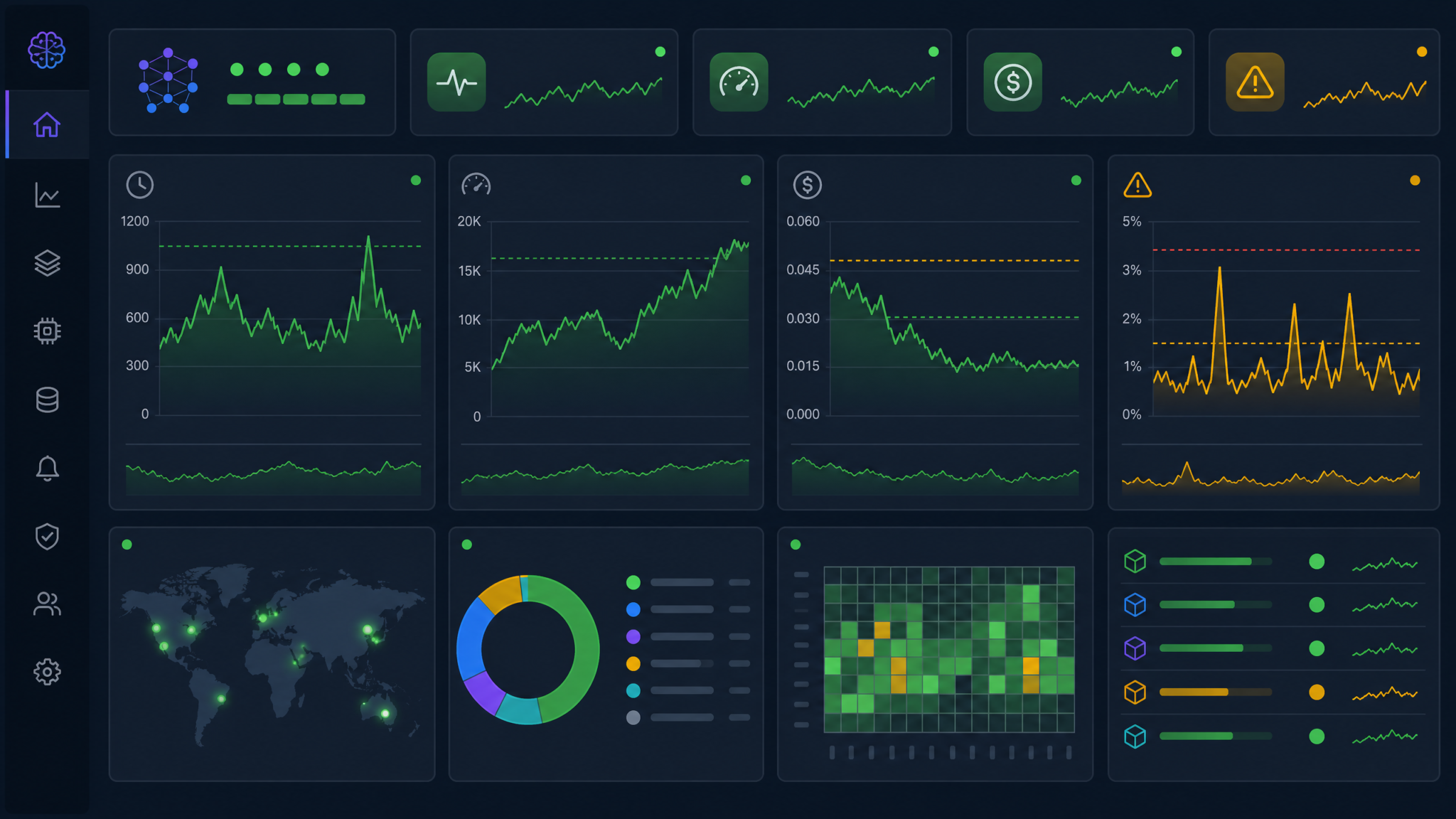
Create a single CloudWatch dashboard that surfaces the following widgets for the operations team: Lambda invocation duration (p50/p95/p99), Bedrock throttle events (indicating quota exhaustion), findings severity distribution over time (trending charts to detect prompt degradation), pipeline gate trigger rate (percentage of pipelines halted by Codex findings), AI-generated test pass rate, and daily token consumption versus budget. Alert on p95 Lambda duration exceeding 25 seconds (Bedrock response latency degradation), throttle events exceeding 5 per hour, and daily token spend exceeding 120% of the projected daily budget.
Prompt Regression Testing
Model behavior can shift when OpenAI releases a new Codex version on Bedrock. Before accepting model version upgrades, run a regression test suite: a curated set of 50 known diffs with labeled ground-truth findings. Compare the new model version’s output against the baseline using precision/recall metrics on finding severity and category. Only accept the upgrade if precision stays above 80% and the overall finding volume doesn’t change by more than ±20%. Automate this regression pipeline in a separate CodePipeline that runs on Bedrock model update events (subscribable via EventBridge).
Handling Bedrock Throttling Gracefully
In high-concurrency scenarios, Bedrock may return ThrottlingException. Implement exponential backoff with jitter in your Lambda functions. For the Code Review stage specifically, because it gates pipeline progression, configure a fallback behavior: if Codex is unavailable after three retry attempts with a combined wait of 90 seconds, degrade gracefully by writing a warning to the PR comment and allowing the pipeline to continue rather than blocking deployment indefinitely.
import time
import random
from botocore.exceptions import ClientError

def invoke_codex_with_retry(bedrock_client, model_id: str,
                              body: dict, max_retries: int = 3) -> dict:
    base_delay = 2.0

    for attempt in range(max_retries):
        try:
            response = bedrock_client.invoke_model(
                modelId=model_id,
                body=json.dumps(body),
                contentType='application/json',
                accept='application/json'
            )
            return json.loads(response['body'].read())

        except ClientError as e:
            error_code = e.response['Error']['Code']

            if error_code == 'ThrottlingException' and attempt < max_retries - 1:
                delay = (base_delay ** attempt) + random.uniform(0, 1)
                time.sleep(delay)
                continue

            elif attempt == max_retries - 1:
                # Graceful degradation — return empty findings, don't fail pipeline
                return {
                    "findings": [],
                    "summary": "Codex analysis unavailable (throttling). Manual review required.",
                    "overall_risk": "UNKNOWN",
                    "degraded_mode": True
                }
            else:
                raise
Cost Anomaly Detection
Enroll your Bedrock cost dimension in AWS Cost Anomaly Detection with a daily threshold alert at 150% of the rolling 7-day average. This catches runaway pipeline loops (e.g., a misconfigured webhook triggering hundreds of identical pipeline executions), prompt injection attacks that generate abnormally large outputs, and unintentional model version switches to higher-cost variants. Set the anomaly alert to page the platform on-call via SNS → PagerDuty rather than just email, given the potential for cost spikes to be both significant and rapid.
Conclusion
The availability of ChatGPT Codex on Amazon Bedrock is not an incremental improvement to existing developer tooling — it is a genuine architectural inflection point for enterprise software delivery. By hosting Codex within the AWS service boundary, organizations that have spent years building AWS-native compliance controls, IAM governance structures, and CloudTrail audit trails can now extend those controls to AI-powered code intelligence without compromise.
The playbook in this guide gives you a production-ready path from zero to a fully integrated AI-augmented CI/CD pipeline. The key architectural decisions to carry forward are: always invoke Codex through a VPC PrivateLink endpoint with a restrictive endpoint policy; scope IAM permissions to the specific model ARN; run data classification and redaction before constructing Bedrock prompts; use the shared services account pattern for multi-team deployments to centralize governance; implement graceful degradation so Codex unavailability never blocks a critical deployment; and measure impact rigorously with baseline metrics so you can demonstrate the productivity ROI to engineering leadership and justify the ongoing investment.
The teams that will benefit most from this integration are not those who treat Codex as a replacement for human code review — it explicitly is not — but those who use it as a force multiplier: catching the low-hanging fruit of obvious bugs, security misconfigurations, and missing test coverage so that human reviewers can focus their attention on architecture decisions, business logic correctness, and the subtle concurrency bugs that still require expert human judgment. Start with a single team, a single repository, and the review stage only. Measure for 30 days, tune your prompts based on false positive rates, and then expand. The infrastructure is now ready for enterprise scale. The limiting factor is your prompt engineering discipline — and that, unlike compliance infrastructure, improves quickly with practice.
Architecture principle to remember: Codex on Bedrock is a power tool in your CI/CD infrastructure. Like any sharp tool, its value is proportional to the precision with which you define its task. Narrow, well-specified prompts with domain context consistently outperform broad, open-ended requests — and in a pipeline that runs hundreds of times per day, that consistency is what separates a productivity multiplier from an expensive source of noise.
