
How to Choose an AI Coding Assistant in 2026: Decision Framework for Copilot, Cursor, Claude Code, Codex, and Windsurf
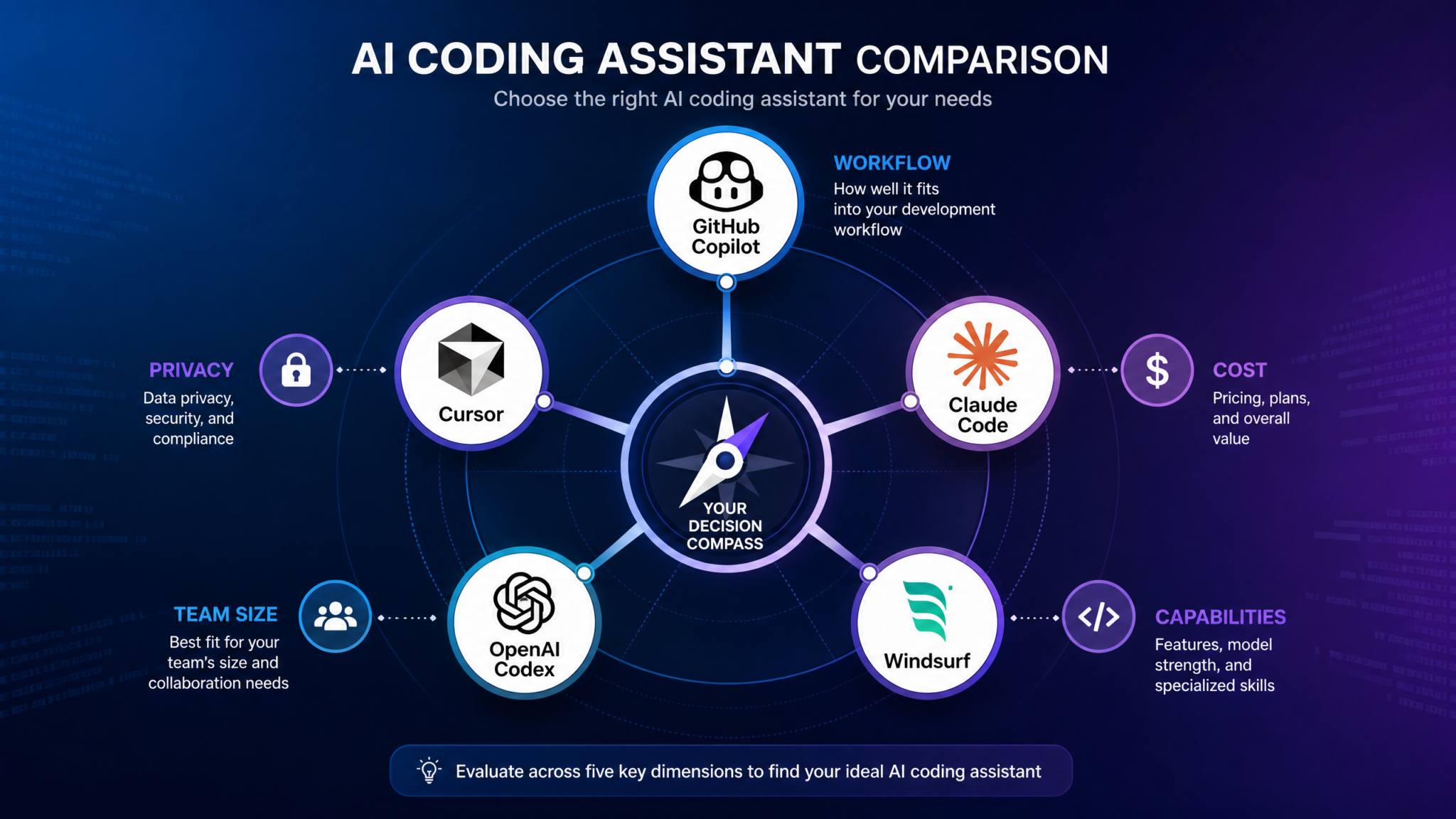
The AI coding assistant market has matured into something genuinely complex. What began as autocomplete on steroids has evolved into a competitive landscape of agentic systems, multi-file editors, and enterprise-grade platforms — each with distinct strengths, pricing structures, and philosophical approaches to how humans and AI should collaborate on code. In 2026, 84% of professional developers report using AI coding tools daily, according to the Stack Overflow Developer Survey. Yet the same survey reveals a striking contradiction: only 29% say they trust AI-generated code without review. That gap — between adoption and trust — is precisely why choosing the right tool matters more than ever. The wrong choice doesn’t just waste money; it shapes your team’s habits, your codebase’s quality, and your organization’s security posture for years.
The AI Coding Assistant Landscape in 2026
Three years ago, the question was simply “should we use AI coding tools?” That debate is over. The real question in 2026 is far more granular: which tool, for which workflow, for which team, at what cost, with what security guarantees? The market has bifurcated into two distinct product philosophies that will shape your choice before you even evaluate individual features.
The IDE-Native Augmentation school — represented most prominently by GitHub Copilot — argues that the best AI assistant is the one invisible enough to enhance your existing workflow without disrupting it. The IDE stays the same; the AI wraps around it. The AI-Native Environment school — represented by Cursor and Windsurf — flips this: build the editor from the ground up around AI, and you unlock interaction patterns that augmentation tools structurally cannot support.
Meanwhile, agentic tools like Claude Code and OpenAI Codex CLI operate from a third premise entirely: the terminal is the natural habitat of serious engineers, and an AI that can execute, test, iterate, and commit autonomously is categorically different from one that merely suggests text inside an editor.
Understanding these philosophical differences isn’t just academic. They translate directly into concrete capability gaps. An augmentation tool like Copilot will never rewrite a 47-file service architecture in a single session — not because the underlying model lacks capability, but because the product architecture doesn’t support that workflow. Conversely, an agentic CLI tool might be overkill, and genuinely risky, for a junior developer who needs guardrails more than autonomy.
Market Share and Adoption Signals
The 2026 AI Developer Tools Report from Redmonk and JetBrains offers a useful snapshot of where the market actually stands:
| Tool | Primary User Segment | Daily Active Users (Est.) | Enterprise Penetration | Satisfaction Score (NPS) |
|---|---|---|---|---|
| GitHub Copilot | Enterprise / Teams | 1.8M+ | 68% | +42 |
| Cursor | Individual / Startup | 620K+ | 22% | +71 |
| Claude Code | Senior / Agentic | 380K+ | 31% | +68 |
| OpenAI Codex CLI | Power Users / Automation | 210K+ | 18% | +55 |
| Windsurf | Individual / Startup | 290K+ | 14% | +73 |
These numbers carry an important lesson: NPS scores for the newer, AI-native tools (Cursor, Windsurf) consistently outperform the market leader in satisfaction, even as Copilot dominates in raw adoption. Satisfaction and adoption diverge when enterprise procurement decisions are driven by existing vendor relationships — Microsoft/GitHub for organizations already on Azure — rather than pure developer preference. This is a gap worth understanding if you’re making an independent choice rather than inheriting an enterprise contract.
Decision Dimension 1: Workflow Integration
Before any benchmark score or pricing tier matters, you need to answer a foundational question: where does your actual coding work happen, and how deeply do you want AI woven into that environment? Workflow integration breaks down into four sub-factors that will immediately narrow your choices.
IDE-Native vs. Standalone vs. Terminal-Based
IDE-native tools (Copilot in VS Code, JetBrains, Neovim; Codeium in similar environments) install as extensions into your existing editor. The advantage is zero friction adoption — your keybindings, themes, debugger configurations, and muscle memory remain intact. The disadvantage is that the AI operates within constraints the IDE wasn’t designed to break. Multi-file refactoring, for instance, requires the extension to orchestrate file reads and writes through the IDE’s API, which is slower and more limited than direct filesystem access.
AI-native standalone editors (Cursor, Windsurf) fork VS Code’s codebase and rebuild the editor with AI as a first-class citizen. Cursor’s Composer mode and Windsurf’s Cascade agent have direct filesystem access, can spin up terminal processes, read error output, and iterate — all within a coherent session context. The tradeoff is that you’re adopting a new editor, which has real onboarding costs and potential compatibility issues with obscure IDE extensions.
Terminal-based agentic tools (Claude Code, Codex CLI) operate outside any editor entirely. They read your codebase, execute commands, run tests, and write files — autonomously. This is the most powerful mode of operation but also the highest-risk and highest-ceiling option. It requires experienced developers who can review agent actions critically and understand when to intervene.
Context Window: The Hidden Capability Multiplier
Context window size is frequently misunderstood as a raw benchmark number. What matters in practice is usable context — how much of your actual project the tool can hold in working memory during a session. A tool with a 200K token context window that summarizes aggressively may deliver less relevant suggestions than a tool with a 100K window that uses smart retrieval to surface precisely the right files.
| Tool | Max Context Window | Retrieval Strategy | Multi-File Awareness | Codebase Indexing |
|---|---|---|---|---|
| GitHub Copilot | 128K tokens | Semantic + neighbor files | Limited (manual @file) | Partial (enterprise) |
| Cursor | 200K tokens | Codebase RAG + embeddings | Strong (Composer) | Full local index |
| Claude Code | 200K tokens | Direct filesystem read | Native (file I/O) | On-demand |
| Codex CLI | 128K tokens | Directory tree + grep | Moderate | None (stateless) |
| Windsurf | 200K tokens | Cascade agent + RAG | Strong (Cascade) | Full local index |
Multi-File Editing: Where Tools Diverge Most Dramatically
Multi-file editing capability is arguably the single most important practical capability gap in the current market. For context: the average non-trivial feature implementation touches 4-12 files across a modern codebase. An AI assistant that can only operate on the currently open file is fundamentally limited in its ability to implement features end-to-end.
Cursor’s Composer and Windsurf’s Cascade represent the current state of the art for editor-based multi-file editing. Both can accept a natural language instruction like “implement JWT refresh token rotation including the middleware, the token service, the database schema migration, and update all affected test files” — and execute across all of those files in a single coherent session. Claude Code in agentic mode does the same thing from the terminal, with the added ability to run the tests it writes and iterate on failures automatically.
Decision Dimension 2: Privacy and Security
For many teams, privacy and security concerns aren’t just a dimension to weigh — they’re a hard gate. A single compliance requirement can eliminate multiple tools from consideration before any capability evaluation begins. Getting clear on your security requirements upfront will save significant evaluation time.
The Cloud vs. Local Processing Spectrum
Every AI coding tool on this list processes code on remote servers by default. The key variables are: which servers, where are they located, what data is retained, and how long? These questions have different answers for each tool and, critically, for each pricing tier within the same tool.
| Tool | Default Data Retention | Zero Retention Option | Self-Hosted Option | SOC 2 Type II | GDPR Compliant | HIPAA BAA Available |
|---|---|---|---|---|---|---|
| GitHub Copilot | 28 days (suggestions) | Yes (Enterprise) | No | Yes | Yes | Yes (Enterprise) |
| Cursor | 30 days | Yes (Business+) | Partial (model swap) | Yes | Yes | Limited |
| Claude Code | Per Anthropic API policy | Yes (API tier) | No (Claude hosted) | Yes | Yes | Yes (Enterprise API) |
| Codex CLI | Per OpenAI API policy | Yes (API tier) | No | Yes | Yes | Yes (Enterprise API) |
| Windsurf | 30 days | Yes (Teams+) | No | Yes | Yes | In progress |
Self-Hosted and Air-Gapped Deployments
If your organization operates in a regulated industry — defense contracting, healthcare infrastructure, financial services with strict data residency requirements — the cloud-only nature of most leading tools may be disqualifying. The current market has limited genuinely self-hosted options for cutting-edge models. The practical paths for air-gapped or self-hosted deployments in 2026 are:
- Ollama + Continue.dev: Run open-weight models (Deepseek Coder V3, CodeLlama 70B, Qwen2.5-Coder) locally via Ollama, with the Continue extension providing IDE integration. Performance is significantly below frontier models, but all processing is fully local.
- GitHub Copilot Enterprise with Azure Private Link: Available for organizations with Azure Government or sovereign cloud contracts. Processing remains in Microsoft’s infrastructure but within compliant boundaries.
- Cursor with custom model endpoint: Cursor’s Business tier supports BYOM (Bring Your Own Model) configuration, allowing you to point the editor at a self-hosted model endpoint while retaining Cursor’s interface. This requires significant MLOps infrastructure but delivers local-model privacy with a polished UI.
Code Training Opt-Out: A Critical Default to Check
Every tool on this list defaults to not using your code to train future models at the enterprise tier — but the defaults differ significantly at individual and team tiers. Always verify and configure training opt-out settings before your team begins using any AI coding tool, even at the free tier. Code containing proprietary algorithms, unreleased product logic, or customer data patterns should never be used as training material without explicit organizational consent.
AI Coding Tool Security Audit Checklist for Engineering Teams
Decision Dimension 3: Cost and Value
Pricing structures for AI coding tools have grown significantly more complex since 2023. The naive comparison of headline monthly prices obscures important variables: token limits, model tier access, seat pricing structures, and the hidden cost of tool-switching friction. A rigorous ROI framework requires examining all of these.
Pricing Tier Comparison (2026 Rates)
| Tool | Free Tier | Individual | Team/Business | Enterprise | Usage Limits at Individual Tier |
|---|---|---|---|---|---|
| GitHub Copilot | 2,000 completions/mo | $10/mo | $19/user/mo | $39/user/mo | Unlimited completions, 50 chat requests/day |
| Cursor | 200 fast requests | $20/mo | $40/user/mo | Custom | 500 fast requests/mo, unlimited slow |
| Claude Code | Via free API credits | API-based ($3-15/MTok) | API + Teams plan | Custom API | Pay-per-token (no subscription cap) |
| Codex CLI | Free (open source) | API-based ($1.50-6/MTok) | API usage | Enterprise API | Pay-per-token |
| Windsurf | Limited free | $15/mo | $35/user/mo | Custom | Unlimited base model, 500 premium/mo |
The Real Cost: A Developer-Hour ROI Framework
Headline pricing comparisons miss the most important cost variable: the value of developer time saved. A $40/month tool that saves 2 hours per week for a developer billing at $150/hour delivers $1,200/month in recovered time — a 30x ROI. Conversely, a $10/month tool that generates so much low-quality output that developers spend an extra 30 minutes per day reviewing and rejecting suggestions can become a net productivity negative.
The framework below provides a structured ROI calculation based on published productivity research from McKinsey’s 2025 Software Engineering Productivity study and GitHub’s own Copilot impact analysis:
- Baseline measurement: Track time spent on boilerplate generation, test writing, documentation, and debugging for one sprint without AI assistance.
- Productivity lift estimate: Apply conservative productivity lift factors (boilerplate: 40-60%, test generation: 30-50%, documentation: 55-70%, debugging: 15-25%) rather than vendor-provided best-case numbers.
- Quality adjustment factor: Subtract time spent reviewing, correcting, and rejecting AI output. For senior developers this averages 15-20% of generation time; for juniors it can reach 40-60%.
- Annualized value: Multiply net time saved by fully-loaded developer cost, annualized.
- Breakeven threshold: The tool should deliver positive ROI within 90 days or the workflow fit is likely wrong.
For a concrete example: a team of 8 developers at $130K average fully-loaded cost ($62.50/hour) that achieves a conservative 15% net productivity gain recovers approximately $156,000 in annual value against a $40/user/month tool cost of $3,840 annually — a 40x return. Even at a pessimistic 5% net gain, the ROI remains strongly positive.
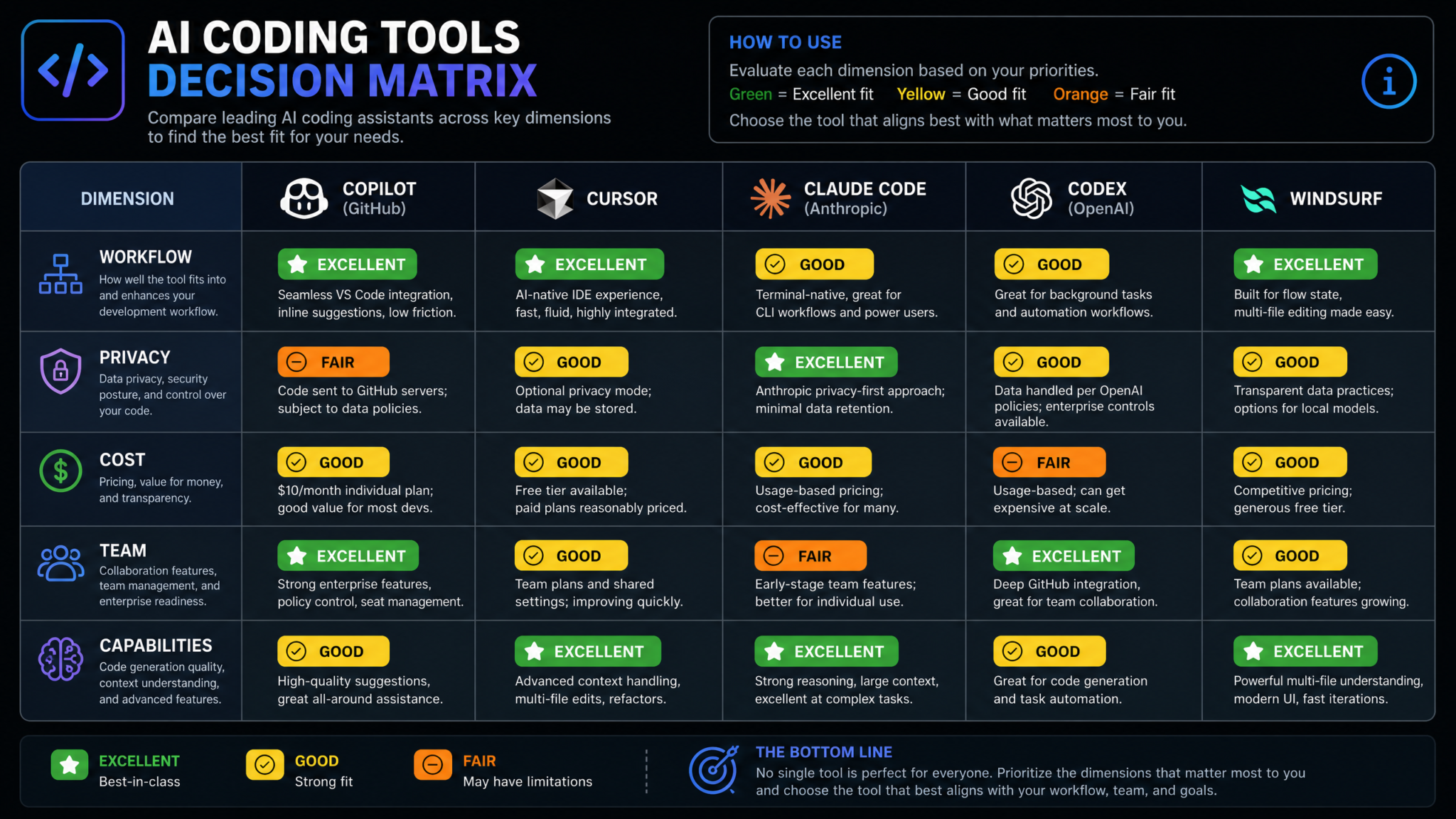
Decision Dimension 4: Team Size and Collaboration
AI coding tools that feel transformative for individual developers frequently create unexpected friction at team scale. The collaboration features — shared context, code review integration, knowledge base synchronization, permission management — become as important as raw generation quality once you have more than 3-4 developers working on a shared codebase.
Solo Developer: Optimize for Speed and Capability
For solo developers and indie hackers, the decision is simple: maximize capability and minimize cost. The constraints of team coordination, compliance, and enterprise procurement don’t apply. Solo developers should strongly consider Cursor or Windsurf at the individual tier, supplemented by Claude Code for complex multi-file tasks. The combination costs $35-55/month and delivers capabilities that would have required a junior team member three years ago.
Particularly for solo developers building full-stack applications, Windsurf’s Cascade agent has proven remarkably effective at the “describe a feature in plain language, have the agent implement it across frontend and backend simultaneously” workflow. This isn’t magic — you still need to review, understand, and own the code — but it dramatically compresses the implementation cycle for routine features.
Small Teams (2-20 Developers): Prioritize Shared Context
Small teams face a specific challenge that individual tools don’t address: shared codebase context. When multiple developers are working on the same codebase with AI assistance, consistency of AI suggestions matters. If your AI assistant doesn’t understand your team’s architectural decisions, naming conventions, and established patterns, it will generate plausible but inconsistent code that creates review overhead and technical debt.
GitHub Copilot’s enterprise features — specifically custom instructions, organizational knowledge bases, and fine-tuning on private repositories — are genuinely valuable at this scale. Cursor’s codebase indexing creates local consistency but doesn’t synchronize across team members without explicit configuration. The emerging pattern for high-performance small teams in 2026 is:
- Shared
.cursorrulesor equivalent configuration files committed to the repository, establishing project-specific AI behavior guidelines - Standardized prompt templates for common tasks (e.g., “implement a new API endpoint following our error handling patterns”)
- AI-assisted code review as a first pass, with human review focused on architecture and security rather than style and syntax
Enterprise Teams (20+ Developers): Governance and Auditability First
At enterprise scale, the individual capability of the AI tool becomes secondary to governance, auditability, and security. Procurement teams need to answer: What code did our AI tools generate? Who used them? What was accepted into the codebase? Can we trace a security vulnerability to an AI suggestion?
Currently, GitHub Copilot Enterprise offers the most mature answer to these questions. Its audit logging, suggestion acceptance tracking, and integration with GitHub’s existing security tooling (Dependabot, CodeQL, Secret Scanning) creates a coherent governance picture. The premium in enterprise pricing reflects this auditability infrastructure rather than superior raw generation quality.
Enterprise AI Coding Policy Templates and Governance Frameworks
Code Review Integration
An underappreciated use case for AI coding tools is automated first-pass code review. All five major tools can be configured to review pull requests, but the quality and depth of review varies significantly:
- GitHub Copilot: Native pull request review through GitHub’s interface, with organization-specific review guidelines. Strongest integration with existing GitHub workflows.
- Claude Code: Exceptionally strong at detailed code review when pointed at a diff. The model’s reasoning capabilities make it effective at identifying subtle logic errors, security issues, and architectural concerns that pure code completion models miss.
- Cursor/Windsurf: Review functionality exists but is secondary to their primary editor-based workflow; less seamlessly integrated with PR-based review processes.
Decision Dimension 5: Technical Capabilities
Raw technical capability is where most evaluations start — and where marketing claims diverge most significantly from real-world performance. The following benchmark analysis draws on HumanEval+, SWE-bench Verified, and the BigCodeBench results from Q1 2026, supplemented by independent evaluations from Epoch AI and the developers at aider.chat’s aider-leaderboard.
Benchmark Performance Comparison
| Tool / Model | HumanEval+ (%) | SWE-bench Verified (%) | BigCodeBench (%) | MBPP+ (%) | Aider Leaderboard (Whole Edit) |
|---|---|---|---|---|---|
| GitHub Copilot (GPT-4.5) | 91.2 | 43.1 | 71.8 | 89.4 | 67.3 |
| Cursor (Claude 3.7 Sonnet) | 93.4 | 49.0 | 74.2 | 91.1 | 72.1 |
| Claude Code (Claude 3.7 Sonnet) | 93.4 | 49.0 | 74.2 | 91.1 | 72.1 |
| Codex CLI (o3-mini) | 88.7 | 41.2 | 68.9 | 87.3 | 63.8 |
| Windsurf (SWE-1) | 90.1 | 44.3 | 72.4 | 88.9 | 69.2 |
A critical caveat: these benchmark scores measure the underlying models on standardized tasks, not the real-world performance of the tools. The practical gap between tools with similar model scores can be significant, determined by context injection quality, retrieval accuracy, prompt engineering around the model, and UX factors that affect how effectively developers interact with the system.
Language and Framework Coverage
All five tools support the major programming languages competently. The meaningful differentiation is in depth of support for specialized domains: infrastructure-as-code (Terraform, Bicep), low-level systems code (Rust, C++), data science workflows (Jupyter, R), and mobile development (Swift, Kotlin).
Agentic Capabilities: The Next Frontier
The most significant technical capability gap in 2026 is agentic depth — the ability to autonomously plan and execute multi-step coding tasks without continuous human steering. This is distinct from simple multi-file editing. True agentic coding involves: reading documentation to understand a library, writing implementation code, running tests, interpreting failure messages, modifying the implementation, re-running tests, and committing only when tests pass.
Detailed Tool Profiles
GitHub Copilot: The Enterprise Standard
Best for: Organizations on GitHub/Azure infrastructure, teams requiring enterprise governance, developers who want AI assistance without changing their editor.
GitHub Copilot in 2026 bears only a passing resemblance to the inline autocomplete tool that launched in 2021. The current product is a full AI development companion spanning code completion, multi-turn chat, pull request review, code explanation, security scanning integration, and enterprise knowledge base integration.
The Copilot Workspace feature — allowing natural language task specification with AI-generated implementation plans before any code is written — represents a genuine advancement in how developers scope and initiate work. For teams using GitHub issues and pull requests as their primary workflow, the integration between issue description → Copilot Workspace plan → implementation → review is genuinely seamless.
Strengths:
- Best-in-class GitHub and Azure ecosystem integration
- Mature enterprise governance: audit logs, usage policies, organization-wide settings
- Multi-IDE support across VS Code, JetBrains IDEs, Neovim, Visual Studio, Eclipse
- GPT-4.5 + o3-mini model access depending on task type
- Custom instructions for organizational coding standards
Weaknesses:
- Chat and completion UX lags behind Cursor and Windsurf in fluidity
- Multi-file editing through Copilot Edits is capable but less autonomous than Cursor Composer
- Innovation pace has slowed relative to AI-native competitors
- Business tier pricing ($19/user/month) becomes expensive at scale relative to value
Ideal workflow: A 50-person engineering team at a financial services company with existing GitHub Enterprise contracts, SOC 2 audit requirements, and a preference for not adopting a new editor. Copilot’s governance features justify the price premium, and the integration with their existing CI/CD and security tooling adds measurable value beyond raw code generation.
Cursor: The Developer’s Darling
Best for: Individual developers and small teams who want the most capable day-to-day AI-native coding environment, particularly for full-stack web development.
Cursor’s NPS of +71 — the highest in the market — reflects something important: developers who switch to Cursor tend to stay. The product’s combination of a familiar VS Code-based interface with genuinely powerful AI-native features creates an adoption curve where discomfort lasts one week and loyalty lasts years.
The Composer/Agent mode is Cursor’s crown jewel. A developer can open Composer, write “refactor our authentication system to use short-lived JWTs with Redis-backed refresh token rotation, update all relevant tests, and add the necessary environment variables to our docker-compose configuration” — and Cursor will read the relevant files, generate a complete implementation plan, execute across all affected files, and present a diff for review. This workflow compresses hours of work into minutes, repeatedly.
Strengths:
- Best-in-class Composer multi-file editing workflow
- Supports multiple frontier models (Claude 3.7 Sonnet, GPT-4.5, Gemini 2.0 Flash)
- Local codebase indexing for accurate context retrieval
- VS Code extension compatibility (migrate your existing setup with minimal friction)
- Active development velocity: meaningful feature releases monthly
Weaknesses:
- No self-hosted option; all inference runs through Cursor’s infrastructure
- Fast request limits at Individual tier ($20/month) can be exhausted in heavy use
- Enterprise governance features still maturing
- HIPAA Business Associate Agreement not yet fully available
Ideal workflow: A 5-person startup building a SaaS product at startup.io where speed of iteration is the primary competitive advantage. The team uses Cursor’s shared .cursorrules configuration to encode their architecture decisions and coding standards, ensuring AI suggestions stay consistent across the team.
Claude Code: The Senior Engineer’s Power Tool
Best for: Senior and principal engineers, complex multi-step tasks, codebases requiring deep reasoning, teams comfortable with terminal-based workflows.
Claude Code is categorically different from the other tools in this comparison. It’s not an IDE extension. It’s not an AI-native editor. It’s an autonomous agent that operates from your terminal, reads your entire codebase, executes commands, runs tests, and iterates — with you supervising rather than steering at each step.
The philosophical bet underlying Claude Code is that the most powerful interaction model for experienced engineers is delegation, not suggestion. You don’t want the AI to suggest what the next line of code should be; you want to describe a complex task at a high level and have the AI handle the implementation details while you review the results and make architectural decisions.
Claude Code’s particular strength is reasoning about complex, ambiguous tasks. When asked to debug a subtle race condition, refactor a legacy module with unclear interfaces, or implement a feature that requires understanding domain semantics rather than just syntax patterns, Claude 3.7 Sonnet’s extended thinking mode produces analysis that feels qualitatively different from pattern-matched code completion.
Access 40,000+ AI Prompts for ChatGPT, Claude & Codex — Free!
Subscribe to get instant access to our complete Notion Prompt Library — the largest curated collection of prompts for ChatGPT, Claude, OpenAI Codex, and other leading AI models. Optimized for real-world workflows across coding, research, content creation, and business.
Strengths:
- Most capable reasoning model for complex, ambiguous engineering tasks
- Genuine autonomous operation: can run tests, interpret failures, iterate
- 200K context window with direct filesystem access (no retrieval approximation)
- Permission system prevents accidental irreversible actions
- Pay-per-use pricing is cost-efficient for intermittent heavy use
Weaknesses:
- No IDE interface; requires comfort with terminal-based workflows
- Token costs can spike significantly for large codebase operations
- Requires careful prompt design to get consistent, high-quality results
- Less suitable for rapid inline code completion compared to editor-native tools
Ideal workflow: A principal engineer at enterprise-scale.io leading a major architectural migration — moving a monolithic Rails application to a microservices architecture. They use Claude Code to analyze dependency graphs, generate migration plans, implement service extraction patterns across 200+ files, and run integration tests — tasks that would take weeks of manual work compressed into days of supervised agentic execution.
OpenAI Codex CLI: The Automation Specialist
Best for: Developers building automation pipelines, scripting complex tasks, and integrating AI coding capabilities into CI/CD workflows programmatically.
Codex CLI occupies a specific niche: it’s the most composable AI coding tool, designed to be integrated into scripts, shell pipelines, and automated workflows rather than used interactively. As an open-source tool that wraps OpenAI’s models, it can be embedded into makefiles, pre-commit hooks, CI/CD pipelines, and custom automation scripts with minimal friction.
The tool’s three execution modes — suggest (proposes changes, requires confirmation), auto-edit (applies file changes, asks before shell commands), and full-auto (executes all actions autonomously in a sandbox) — provide a coherent safety gradient that matches automation risk to capability requirement.
Strengths:
- Open source: inspect, modify, and self-host the wrapper code
- Excellent for automation and pipeline integration
- Sandboxed execution model provides safety for automated contexts
- Supports multiple OpenAI models (o3, o3-mini, GPT-4.5)
- Lowest barrier to entry:
npm install -g @openai/codex
Weaknesses:
- Less polished for interactive use compared to Claude Code
- Codebase context retrieval is less sophisticated than competitors
- Lower SWE-bench scores relative to Claude-based tools
- No built-in codebase indexing; relies on directory traversal
Windsurf: The Focused Challenger
Best for: Individual developers and small teams who want Cursor’s AI-native experience with a more streamlined interface and competitive pricing, particularly for front-end and full-stack development.
Windsurf (built by Codeium) entered the AI-native editor market as a direct challenger to Cursor, and in several respects it has matched or exceeded its competitor. The Cascade agent is Windsurf’s standout feature — an agentic system that maintains a persistent action log of what it’s done during a session, allowing developers to review and undo agent actions at a granular level. This explainability feature directly addresses the trust gap (that 71% of developers who don’t fully trust AI output) by making the agent’s reasoning transparent and reversible.
Windsurf’s SWE-1 model, a proprietary model fine-tuned specifically for software engineering tasks, powers its baseline completions and shows strong performance on SWE-bench (44.3%) that exceeds Copilot while approaching Claude-based competitors. The hybrid approach — proprietary SWE-focused model for common tasks, frontier model access (Claude, GPT-4) for complex ones — provides a good balance of speed and quality across different use cases.
Strengths:
- Cascade agent with transparent action log and undo capability
- Competitive pricing ($15/month individual, $35/user team)
- Strong front-end and React/Next.js workflow optimization
- SWE-1 proprietary model offers fast, task-specific performance
- Clean, focused interface with less visual complexity than Cursor
Weaknesses:
- Smaller ecosystem and extension compatibility vs. Cursor
- Enterprise governance features less mature than GitHub Copilot
- HIPAA BAA in progress, not yet available
- Smaller community means fewer shared configurations and tutorials
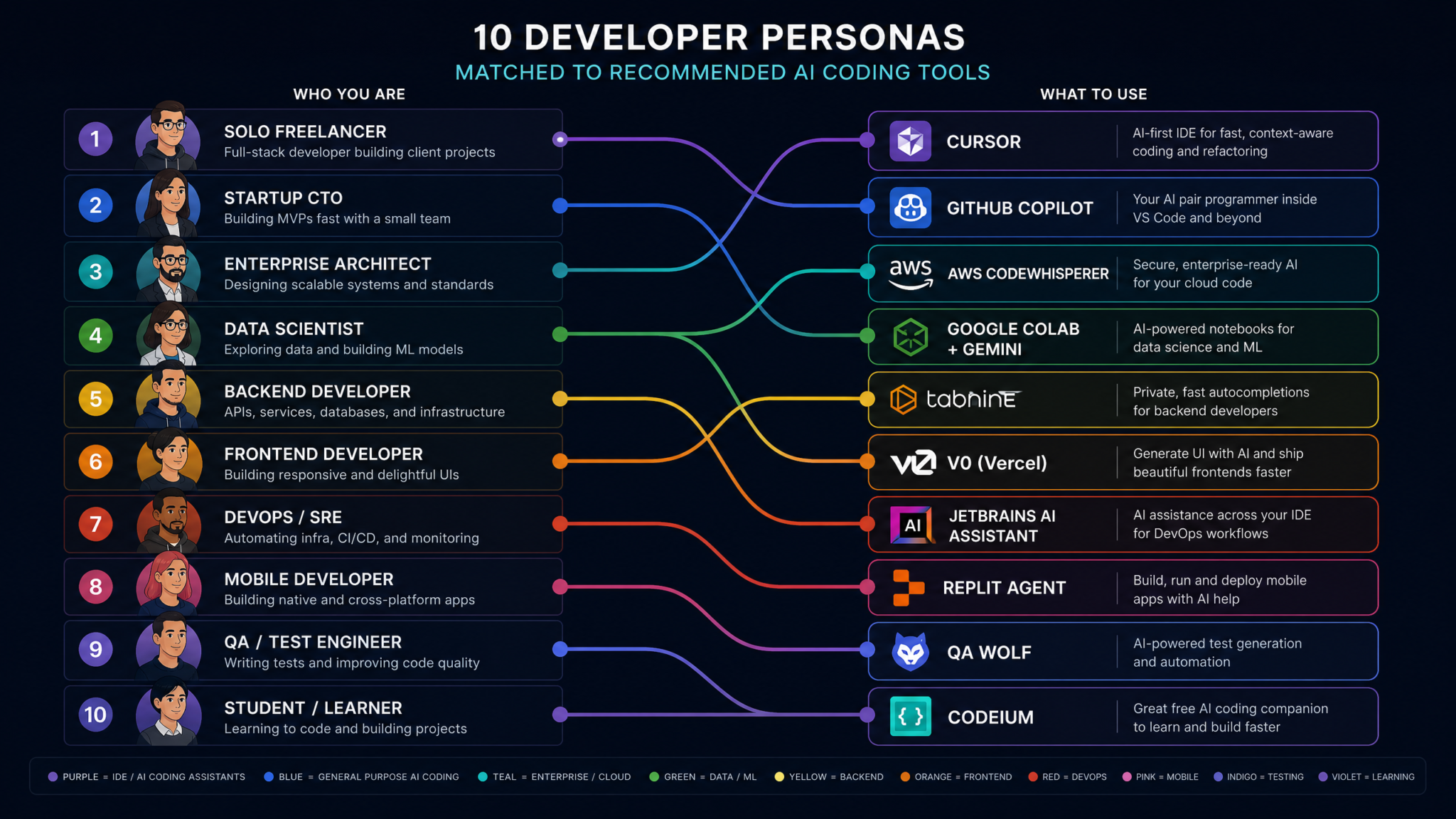
Decision Matrix: 10 Developer Personas Matched to Tools
The following matrix maps ten distinct developer personas to their optimal tool choice, with primary recommendation and justified alternatives. These personas represent the most common profiles that contact us for AI tooling guidance, distilled from hundreds of team evaluations.
| Persona | Primary Tool | Strong Alternative | Avoid | Key Rationale |
|---|---|---|---|---|
| Solo SaaS founder (full-stack, speed-focused) | Windsurf | Cursor | Codex CLI | Best feature/price ratio; Cascade agent accelerates feature implementation cycles |
| Senior engineer at a Series B startup | Cursor | Claude Code | Copilot only | Composer’s multi-file power + model choice flexibility matches complex work |
| Principal/Staff engineer, architectural work | Claude Code | Cursor | Codex CLI | Extended thinking + autonomous operation for complex reasoning tasks |
| Junior developer at mid-size tech company | GitHub Copilot | Windsurf | Claude Code | Guardrails, inline suggestions, and familiar IDE reduce risk of misplaced trust |
| Enterprise engineering manager (50+ devs) | GitHub Copilot Enterprise | Cursor Business | Codex CLI | Audit logging, policy controls, and GitHub integration justify premium |
| DevOps / Platform engineer | Claude Code | Codex CLI | Windsurf | Terminal-native workflow, infrastructure code expertise, automation pipeline integration |
| Data scientist / ML engineer | Cursor | GitHub Copilot | Codex CLI | Jupyter integration, Python ecosystem depth, notebook-aware context |
| Security engineer / AppSec | GitHub Copilot Enterprise | Claude Code (audit mode) | Free tier of any tool | Needs audit logs, code vulnerability scanning integration, zero retention guarantee |
| Open source maintainer | Windsurf (free/individual) | Codex CLI (open source) | Enterprise-only tools | Cost efficiency for high-volume non-commercial work; Codex CLI for automation |
| Regulated industry developer (healthcare/finance) | GitHub Copilot Enterprise | Cursor Business + self-hosted model | Windsurf (BAA pending) | HIPAA BAA availability and mature compliance documentation required |
How to Use This Matrix
Treat these recommendations as a starting point, not a final verdict. Two variables can flip the recommendation for almost any persona: existing tooling ecosystem and personal workflow preferences. A principal engineer who has invested 10 years in a custom Neovim configuration may rationally choose Copilot’s Neovim integration over switching editors, even knowing Cursor’s Composer is more capable. Switching costs are real and should be quantified explicitly (see the Migration Guide below).
Similarly, if your organization is already paying for GitHub Enterprise — which includes Copilot’s base tier — the incremental cost of upgrading to Copilot Business or Enterprise may be lower than adopting a competing tool, even if the competing tool has superior raw capability. Total cost of ownership, including procurement overhead and security review time, favors incumbents more than capability comparisons suggest.
Migration Guide: Switching Tools Without Losing Momentum
The most overlooked cost in AI coding tool decisions is migration: the time, attention, and productivity lost during transition. Teams frequently underestimate this and then use migration pain as a reason to avoid switching even when a clearly superior tool is available. A structured migration approach can cut this cost by 60-70%.
Phase 1: Parallel Evaluation (Weeks 1-2)
Never migrate without running the new tool in parallel with your existing workflow first. The goal of Phase 1 is to identify the 3-5 tasks where the new tool delivers meaningfully better results than your current tool. These become your internal case studies and your team’s adoption motivation. Without concrete, personal examples of improvement, migrations stall in habit friction.
During parallel evaluation:
- Use the new tool for one specific task type (e.g., writing tests, or implementing new endpoints) rather than all coding tasks
- Keep notes on where the tool succeeds, fails, and surprises you
- Identify 2-3 “wow moments” that make the transition worth the friction
Phase 2: Configuration Migration (Week 3)
The most painful migration step is replicating your context — your AI tool’s understanding of your codebase conventions, preferred patterns, and team standards. This is not automatic. For each major tool category:
Migrating to Cursor from Copilot: Create a comprehensive .cursorrules file that captures your team’s coding standards, architectural patterns, naming conventions, preferred libraries, and anti-patterns to avoid. This file is version-controlled and shared across your team. A well-crafted .cursorrules file of 200-400 lines delivers a step-change improvement in suggestion relevance.
Migrating to Claude Code from an IDE-based tool: The mental model shift is the biggest migration challenge. Move from thinking “the AI should help me write the next line” to “I should describe the complete task and review the result.” This shift typically takes 2-3 weeks of deliberate practice before it feels natural.
Migrating to GitHub Copilot Enterprise: Configure organization-level custom instructions and, if using the enterprise tier, consider submitting a repository for fine-tuning. Ensure all developers configure their privacy settings correctly and complete the required compliance training if your organization has a formal AI usage policy.
Phase 3: Team Rollout (Weeks 4-6)
Team migrations fail when they rely on individual developers to self-onboard. A structured approach significantly improves adoption quality:
- Identify 2-3 internal champions: Power users who’ve completed the parallel evaluation and can demonstrate the tool’s value to peers
- Host workflow-specific demos: Not “here’s the tool” but “here’s how we use it for our specific test-driven development workflow”
- Create a shared prompt library: A repository of effective prompts for common team tasks (implementing a new API endpoint, writing unit tests for a service, refactoring a legacy module)
- Set a 30-day check-in: Gather structured feedback on friction points and resolve them before they become entrenched frustrations
Phase 4: Measuring Migration Success
You can’t manage what you can’t measure. Track these metrics before, during, and after migration:
- Pull request cycle time: Time from branch creation to merge (AI tools should reduce this)
- Test coverage delta: AI tools typically increase test coverage by making test writing faster; watch for increases without quality
- Code review iteration count: If AI-generated code is lower quality, review iterations increase; this is an important leading indicator
- Developer-reported satisfaction (simple 1-5 weekly survey): Subjective but sensitive to migration friction
- Tool acceptance rate: For tools that track suggestion acceptance, a rate below 20% suggests poor context fit
Developer Productivity Metrics Framework for AI-Augmented Teams
The Final Framework: A 3-Step Selection Process
After profiling all five tools, analyzing ten developer personas, and building out the decision dimensions, the selection framework distills to three questions that, answered honestly, lead to the right tool for your context with high reliability.
Step 1: What Is Your Non-Negotiable Constraint?
Identify whether you have a hard constraint that eliminates options before capability evaluation:
- HIPAA BAA required → GitHub Copilot Enterprise or Claude Code Enterprise API
- Air-gapped / no cloud code transmission → Ollama + Continue.dev (not any of these five)
- Must stay in current IDE → GitHub Copilot
- Cost must be under $10/user/month → Free tiers of Copilot or Windsurf; or reconsider scope
- No non-negotiable constraints → proceed to Step 2
Step 2: What Is Your Primary Workflow Pattern?
Identify your dominant coding workflow pattern:
- Inline completion and chat within existing editor → GitHub Copilot
- Multi-file feature implementation and agentic editing → Cursor or Windsurf
- Complex, autonomous task execution and large-scale refactoring → Claude Code
- Automation pipeline integration and scripted workflows → Codex CLI
Step 3: What Is Your Team’s Trust and Experience Level?
The trust gap (only 29% of developers trust AI output without review) is real and correlates with experience level and workflow fit. Match the tool’s autonomy level to your team’s ability to critically review AI output:
- Junior developers or teams new to AI tools: Start with lower-autonomy tools (Copilot’s inline completion) and graduate to higher-autonomy tools as trust is established through experience
- Experienced developers who understand the codebase deeply: Higher-autonomy tools (Claude Code, Cursor Composer) deliver more value because the developer can effectively supervise agent actions
- Mixed-experience teams: A tiered approach — Copilot for junior developers, Cursor or Claude Code for senior developers — is worth the management overhead of supporting multiple tools
The Bottom Line
There is no universally correct answer to “which AI coding assistant should I use in 2026.” There are only answers that fit or don’t fit specific constraints, workflows, team sizes, and experience levels. The 84% of developers who use AI tools daily but only 29% who trust the output isn’t a reason to avoid AI coding tools — it’s a call for more thoughtful selection and configuration of the right tool for each context.
The developers getting the most value from AI coding assistants in 2026 share three characteristics: they chose tools that match their specific workflow rather than following general hype, they invested in proper configuration (rules files, shared prompts, codebase context), and they developed critical review habits that let them leverage AI’s speed while catching its failures. These are skills and choices, not luck — and this framework gives you the foundation to make them deliberately.
The goal isn’t to find the best AI coding assistant. It’s to find the best AI coding assistant for your specific workflow, team, codebase, and trust model. Those are different problems, and conflating them leads to both underinvestment and overconfidence.
As the models continue to improve — and they will, dramatically, over the next 12-18 months — the differentiating factors between tools will shift from raw model capability to workflow integration depth, security architecture, and team collaboration features. The framework in this guide is designed to remain valid as capabilities evolve, because it focuses on how you work rather than which model scores highest on a benchmark. Build your selection process on stable foundations, and you’ll be positioned to make smart tool choices through whatever capability advances come next.
