
Introduction to OpenAI Codex Pricing in 2026

OpenAI Codex remains one of the most powerful AI coding assistants available in 2026, enabling developers and organizations to accelerate software development with intelligent code generation and completion. As adoption grows, understanding the pricing structure becomes essential for optimizing costs while maximizing value.
This comprehensive guide covers everything you need to know about OpenAI Codex’s pricing in 2026, including the flexible tier system, credit-based usage, rate card details, comparisons with alternatives, and practical strategies for cost optimization. Whether you are an individual developer or part of a large enterprise, this guide will help you navigate Codex pricing confidently.
1. Overview of OpenAI Codex Pricing Tiers
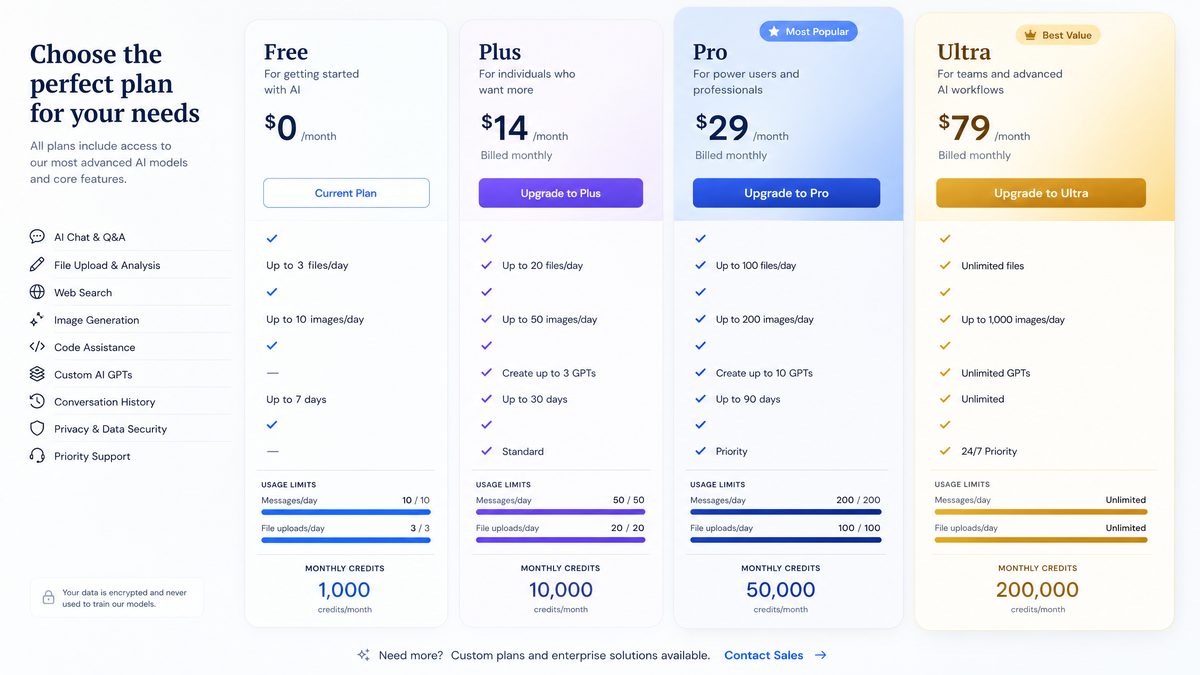
OpenAI Codex offers a flexible tiered pricing model designed to accommodate different user profiles—from freelancers to large-scale enterprises, education, and healthcare organizations. The main tiers are:
- Plus: Entry-level access for individual developers and hobbyists.
- Pro: Enhanced usage limits and features for professional developers and small teams.
- Business: Designed for medium-sized teams requiring collaboration and administrative controls.
- Enterprise: Custom solutions for large organizations with high-volume usage and dedicated support.
- Edu: Special pricing and features for educational institutions and students.
- Health: Tailored offerings for healthcare providers ensuring HIPAA compliance and data security.
Each tier includes different usage caps, credit allocations, and access to advanced features such as priority support, enhanced model capabilities, and administrative tools.
Plus Tier
The Plus tier is ideal for solo developers experimenting with Codex. It offers a monthly allotment of credits with pay-as-you-go pricing beyond that. This tier enables access to the core Codex capabilities with moderate rate limits.
Pro Tier
Pro targets professional developers and small teams needing higher throughput and priority access. Subscribers receive a larger monthly credit pool, reduced per-unit pricing, and advanced features like team collaboration tools.
Business Tier
Business plans cater to medium-sized organizations requiring user management, API key controls, and integration support. Pricing is based on higher monthly commitments with volume discounts and detailed usage analytics.
Enterprise Tier
Enterprise customers negotiate custom contracts tailored to their scale, security, and compliance requirements. This tier includes dedicated account management, SLAs, and bespoke pricing models.
Edu and Health Tiers
Education and healthcare sectors benefit from specially discounted pricing, compliance certifications, and features aligned with their operational needs.
2. Understanding the Credit-Based System
OpenAI Codex pricing is primarily credit-based. Users consume credits for every API call or interaction, with the amount depending on the type of operation and model used. Understanding how credits work is crucial for managing expenses effectively.
How Credits Work
Credits serve as a unified currency for usage. Each Codex API call consumes a certain number of credits depending on:
- Operation type: code completions, code explanations, edits, or chat interactions.
- Model variant: more advanced models consume more credits per token.
- Token count: input and output tokens processed by the API.
Credits are deducted in real-time, and your monthly billing reflects total credit consumption multiplied by the credit cost associated with your tier.
Examples of Credit Consumption
| Operation | Typical Token Usage | Credits Consumed |
|---|---|---|
| Code Completion (256 tokens) | 256 | 5 credits |
| Code Edit (100 tokens) | 100 | 2 credits |
| Explain Code (150 tokens) | 150 | 3 credits |
| Chat Interaction (300 tokens) | 300 | 6 credits |
3. OpenAI Codex Rate Card Breakdown
The rate card defines how much each credit costs and the credit consumption rates for different operations. This varies by tier and model. Below is a detailed breakdown for 2026.
Credit Pricing per Tier
| Tier | Monthly Base Cost | Cost per Credit (USD) | Included Monthly Credits |
|---|---|---|---|
| Plus | $15 | $0.015 | 1000 |
| Pro | $50 | $0.012 | 5000 |
| Business | $200 | $0.009 | 25000 |
| Enterprise | Custom | Negotiated | Custom |
| Edu | $10 | $0.008 | 1500 |
| Health | $100 | $0.010 | 8000 |
Credit Consumption by Operation Type and Model
Codex offers multiple model variants optimized for different tasks. More powerful models consume more credits per token.
| Operation | Base Model | Advanced Model | Specialized Model |
|---|---|---|---|
| Code Completion (per 100 tokens) | 2 credits | 3.5 credits | 5 credits |
| Code Edit (per 100 tokens) | 1.5 credits | 2.5 credits | 3.5 credits |
| Code Explanation (per 100 tokens) | 1 credit | 1.8 credits | 2.5 credits |
| Chat Interaction (per 100 tokens) | 2.5 credits | 4 credits | 6 credits |
Note: Token counts include both input and output tokens consumed during the operation.
4. Tier Comparison: Features and Benefits
| Feature | Plus | Pro | Business | Enterprise | Edu | Health |
|---|---|---|---|---|---|---|
| Monthly Credits Included | 1000 | 5000 | 25000 | Custom | 1500 | 8000 |
| API Access | ✔ | ✔ | ✔ | ✔ | ✔ | ✔ |
| Priority Support | ✖ | ✔ | ✔ | Dedicated | ✔ | Dedicated |
| Team Collaboration Tools | ✖ | Basic | Advanced | Custom | Basic | Advanced |
| Administrative Controls | ✖ | Limited | Full | Full + Custom | Limited | Full + Compliance |
| Model Access | Base | Base + Advanced | All | All + Custom | Base + Edu Optimized | All + HIPAA Compliant |
| Compliance Certifications | ✖ | ✖ | Optional | Mandatory | ✔ | ✔ (HIPAA, HITRUST) |
5. Cost Optimization Strategies for Teams and Individuals
Effectively managing your Codex spending requires a combination of awareness, planning, and technical best practices. Below are actionable strategies:
1. Choose the Appropriate Tier
Select your plan based on real usage patterns. For example, Plus is cost-effective for light usage, whereas Pro and Business unlock volume discounts and features that reduce per-unit costs.
2. Monitor Token Usage Closely
Since credit consumption depends on tokens, minimizing unnecessary input tokens (e.g., trimming prompts) and limiting output size can reduce cost.
3. Cache Frequent Requests
If your application often requests similar completions, caching these to avoid repeated API calls can save credits.
4. Use Efficient Models
Choose simpler models for basic tasks and reserve advanced models for complex operations to optimize credit usage.
5. Set Usage Alerts and Budgets
Utilize OpenAI’s dashboard tools to set spend limits and alerts to prevent unexpected overages.
6. Batch API Requests
Where possible, batch multiple operations into fewer API calls to reduce overhead credit consumption.
7. Educate Your Team
Ensure all users understand how credit consumption works and encourage responsible usage.
8. Leverage Enterprise Volume Discounts
Large teams should negotiate custom pricing to lower per-credit costs significantly.
Following these methods will help you keep Codex usage cost-effective and aligned to your budget.
6. Comparing OpenAI Codex Pricing to Alternatives
Several AI coding assistants compete in the market. Below is a comparison of OpenAI Codex pricing with popular alternatives including Claude Code, Cursor, and GitHub Copilot.
| Feature | OpenAI Codex | Claude Code | Cursor | GitHub Copilot |
|---|---|---|---|---|
| Pricing Model | Credit-based tiers | Subscription + Usage | Subscription + pay per token | Flat monthly subscription |
| Entry-Level Cost | $15/mo + usage | $20/mo + API usage fees | $25/mo + tokens | $10/mo flat |
| Enterprise Pricing | Custom volume discounts | Custom contracts | Custom plans | Enterprise licenses |
| Feature Set | Wide model variety, compliance options | Conversational AI focus, code generation | Editor integrations, real-time completions | IDE integration, code suggestions |
| Cost Efficiency | Flexible, discounts at scale | Moderate | Higher for large token volumes | Predictable flat fee |
OpenAI Codex’s credit-based system provides flexibility unmatched by flat-fee competitors but requires more active management for cost control.
7. Enterprise Volume Discounts and Custom Pricing
For organizations with large-scale Codex usage, OpenAI offers volume discounts and custom pricing agreements. These arrangements typically include:
- Discounted credit rates: Per-credit costs can decrease by 20-50% based on committed monthly usage.
- Dedicated account management: Personalized support and billing oversight.
- Customized SLAs: Service-level agreements tailored to business-critical needs.
- Compliance and security provisions: HIPAA, GDPR, and other regulatory adherence.
- Flexible billing cycles: Monthly or annual billing options with credits rollover.
Negotiating enterprise pricing requires submitting usage forecasts and business requirements to OpenAI sales representatives. Enterprises can also request additional features like private model fine-tuning or on-premises deployment.
8. Tips for Monitoring and Controlling Codex Spend
Keeping your Codex costs under control involves proactive monitoring and management. Implement these best practices:
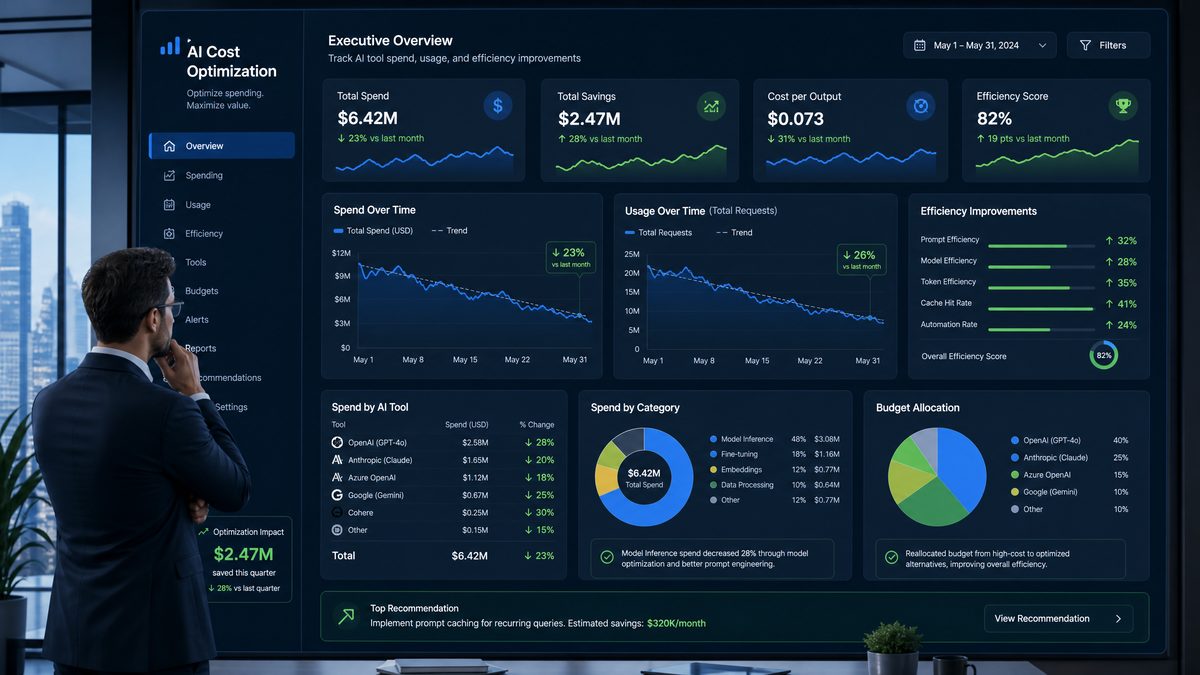
- Use the OpenAI Usage Dashboard: Monitor credit consumption in real-time with granular breakdowns per API key and operation.
- Set Budget Alerts: Configure notifications when spend approaches predefined thresholds.
- Analyze API Logs: Regularly review API call patterns to identify inefficiencies or spikes.
- Implement Quotas: Limit API calls per user or team to prevent runaway costs.
- Automate Usage Reports: Schedule weekly or monthly reports summarizing credit usage and cost trends.
- Integrate Cost Control APIs: Use programmatic tools to enforce spend caps or throttle usage dynamically.
Combining these monitoring techniques with cost optimization strategies ensures you maintain budget discipline without sacrificing productivity.
9. Real-World Cost Examples for Different Team Sizes
Here are illustrative cost scenarios based on typical usage patterns for various team sizes using the Pro and Business tiers.
| Team Size | Monthly API Calls | Average Tokens per Call | Monthly Credits Used | Monthly Cost (USD) | Suggested Tier |
|---|---|---|---|---|---|
| Solo Developer | 1000 | 300 | ~60,000 | $720 (overage) | Pro |
| Small Team (5 devs) | 5000 | 350 | ~350,000 | $3,150 | Business |
| Medium Team (20 devs) | 20,000 | 400 | ~1,600,000 | Custom Enterprise Pricing | Enterprise |
Note: Credit calculations assume an average of 2 credits per 100 tokens. Costs vary based on tier rates and actual usage.
Planning your tier upgrade based on expected usage growth is essential to avoid high overage fees and gain access to volume discounts and enhanced features.
For a deeper exploration of related AI capabilities and implementation strategies, our comprehensive resource on **Topic:**
“Mastering Custom GPTs: How Developers Can Build and Deploy Tailored AI Assistants Using OpenAI’s Latest API Features”
**Why it’s trending/high-value:**
With OpenAI’s recent rollout of customizable GPT models, developers now have unprecedented control to create AI assistants fine-tuned for specific industries, workflows, or user needs. This tutorial/news article would dive deep into the step-by-step process of leveraging these new API capabilities, showcasing practical use cases, optimization techniques, and deployment best practices. It addresses the growing developer demand to move beyond generic AI and build specialized, high-performance conversational agents—making it a must-read for the chatgptaihub.com audience eager to stay ahead in the AI app development space. provides additional context, practical examples, and expert analysis that extends the concepts covered in this article.
10. When to Upgrade from Plus to Pro to Business
Upgrading tiers depends on your evolving usage, team size, and feature needs. Consider these guidelines:
- From Plus to Pro: Upgrade when monthly credit usage consistently exceeds 1,000 credits or when you require team collaboration and priority support.
- From Pro to Business: Move up if your team grows beyond 5 developers, needs advanced administrative controls, or requires integration with enterprise systems.
- From Business to Enterprise: Consider Enterprise tier when usage surpasses 100,000 credits monthly or if you need custom compliance, SLAs, and dedicated support.
Regularly review your usage reports and cost structure to identify the optimal plan that balances features and expenses.
For a deeper exploration of related AI capabilities and implementation strategies, our comprehensive resource on Codex Appshots: How OpenAI’s New Feature Gives AI Eyes on Your Mac Desktop provides additional context, practical examples, and expert analysis that extends the concepts covered in this article.
5. Advanced Use Cases and Integration Strategies for OpenAI Codex
5.1 Leveraging Codex for Enterprise Automation
Enterprises are increasingly integrating OpenAI Codex into their automation workflows to reduce manual coding efforts and accelerate digital transformation. By embedding Codex into CI/CD pipelines, organizations can automate repetitive scripting tasks such as test case generation, deployment script creation, and infrastructure as code (IaC) templates.
- Example: A fintech company uses Codex to automatically generate Python scripts for data validation and reconciliation, cutting down manual errors and improving turnaround time.
- Benefits: Reduced developer workload, faster release cycles, and enhanced code consistency.
5.2 Codex in Augmented Development Environments
Augmented development environments combine traditional IDEs with AI-powered assistants like Codex to provide real-time code suggestions, bug fixes, and documentation generation.
Integration Example:
import openai

response = openai.Completion.create(
    engine="codex",
    prompt="Write a Python function to parse JSON data and handle exceptions",
    max_tokens=150
)

print(response.choices[0].text.strip())
This allows developers to focus on higher-level design while Codex handles boilerplate and error-prone code segments.
5.3 Comparative Table: Codex vs. Traditional Automation Tools
| Feature | OpenAI Codex | Traditional Automation Tools |
|---|---|---|
| Flexibility | Generates code snippets across multiple languages dynamically | Predefined scripts, limited flexibility |
| Learning Curve | Minimal, natural language prompts | Requires scripting knowledge |
| Maintenance | AI adapts to changes, less manual updates | Requires manual script updates |
| Integration | Seamless API integration | May require custom connectors |
6. Cost Optimization Techniques for High-Volume Codex Users
6.1 Monitoring and Analyzing Usage Patterns
High-volume users should implement real-time monitoring dashboards to track API call frequency, token consumption, and cost impact. Tools like Grafana combined with OpenAI usage logs enable granular insights.
- Set alerts for unexpected spikes in usage.
- Analyze which endpoints or prompts consume disproportionate tokens.
6.2 Prompt Engineering to Reduce Token Usage
Optimizing prompt structure can significantly reduce token usage and thus cost:
- Use concise and specific prompts instead of verbose descriptions.
- Reuse context where possible instead of repeating information.
- Leverage stop sequences to prevent over-generation.
Before optimization:
Access 40,000+ AI Prompts for ChatGPT, Claude & Codex — Free!
Subscribe to get instant access to our complete Notion Prompt Library — the largest curated collection of prompts for ChatGPT, Claude, OpenAI Codex, and other leading AI models. Optimized for real-world workflows across coding, research, content creation, and business.
Write a detailed Python function that fetches data from an API, processes JSON, and handles errors gracefully.After optimization:
Python function: fetch API data, process JSON, handle errors.6.3 Batch Processing and Asynchronous Calls
Batching multiple code generation requests into a single API call or using asynchronous calls reduces overhead and improves throughput.
Sample Python asynchronous call:
import asyncio
import openai

async def generate_code(prompt):
    response = await openai.Completion.acreate(
        engine="codex",
        prompt=prompt,
        max_tokens=100
    )
    return response.choices[0].text.strip()

async def main():
    prompts = ["Function to sort a list", "Generate SQL query for users"]
    tasks = [generate_code(p) for p in prompts]
    results = await asyncio.gather(*tasks)
    for code in results:
        print(code)

asyncio.run(main())
7. Industry Trends and Future Outlook of AI Code Generation
7.1 The Rise of AI-Powered Low-Code and No-Code Platforms
AI code generation like OpenAI Codex is accelerating the growth of low-code/no-code platforms by enabling non-developers to create functional applications with minimal manual coding. This democratization is expected to grow, with Codex integration becoming a standard feature in platforms such as Microsoft Power Apps and Salesforce Lightning.
7.2 Emerging Standards and Compliance Considerations
As AI-generated code becomes widespread, new standards for security, code quality, and licensing are emerging. Organizations must consider:
- Ensuring generated code complies with internal security policies.
- Validating licenses of code snippets to avoid IP conflicts.
- Auditing AI-generated code for vulnerabilities using automated tools.
7.3 Predictions for OpenAI Codex Development
| Feature | Expected Evolution by 2030 | Impact |
|---|---|---|
| Multi-modal Code Generation | Support for voice and visual inputs to generate code | More intuitive and accessible coding workflows |
| Context-Aware Development | Deep integration with project repositories and environment | Highly relevant and optimized code suggestions |
| Real-Time Collaboration AI | AI agents that assist multiple developers simultaneously | Enhanced team productivity and code quality |
8. Step-by-Step Guide to Implementing OpenAI Codex in Your Workflow
8.1 Setting Up Your OpenAI API Account
- Visit the OpenAI platform signup page and create an account.
- Verify your email and complete KYC if required for your region.
- Navigate to the API keys section and generate a new API key.
- Store your API key securely; do not expose it in public repositories.
8.2 Installing Required Libraries
For Python users, install the OpenAI Python client:
pip install openai8.3 Writing Your First Codex Request
Use the following minimal example to generate a code snippet:
import openai

openai.api_key = "YOUR_API_KEY"

response = openai.Completion.create(
    engine="codex",
    prompt="Create a JavaScript function that reverses a string",
    max_tokens=50
)

print(response.choices[0].text.strip())
8.4 Integrating Codex into Your IDE
Many IDEs support plugins that integrate OpenAI Codex:
- Visual Studio Code: Install the official OpenAI extension or third-party plugins to access Codex completions directly.
- JetBrains IDEs: Use plugins like CodeWhisperer or custom Codex integrations.
Configure your API key within the plugin settings and customize prompt templates for your coding style.
8.5 Best Practices for Secure and Efficient Usage
- Limit API key permissions using environment variables and secrets management tools.
- Implement usage quotas and error handling to prevent unexpected billing.
- Regularly review generated code for security and compliance.
- Combine Codex with static analysis tools for continuous code quality assurance.
“`html
11. Integrating OpenAI Codex with Popular Development Environments
11.1 Benefits of IDE Integration
One of the most practical ways to maximize the value of OpenAI Codex is by integrating it directly into your Integrated Development Environment (IDE). This approach streamlines the coding workflow, reduces context switching, and allows developers to leverage AI assistance in real-time. Popular IDEs like Visual Studio Code, JetBrains IntelliJ IDEA, and GitHub Codespaces support plugins or extensions that facilitate Codex integration.
Benefits include:
- Real-time code completion: Codex can suggest entire functions or code blocks, accelerating development speed.
- Error detection and fixes: The AI can identify syntax errors and suggest corrections instantly.
- Code documentation: Automatic generation of comments and documentation based on code context.
- Multi-language support: Codex supports over a dozen programming languages, useful for multi-language projects.
11.2 Step-by-Step: Setting Up OpenAI Codex in Visual Studio Code
- Install the OpenAI Codex Extension: Visit the Visual Studio Code Marketplace and search for the official OpenAI Codex extension. Click “Install.”
- Authenticate API Access: After installation, enter your OpenAI API key in the extension settings to enable Codex access.
- Configure Preferences: Adjust Codex’s behavior, such as setting maximum token limits and enabling/disabling auto-completions.
- Start Coding: Open a code file and begin typing. Codex will offer suggestions, which you can accept or reject.
- Use Command Palette: Use the Command Palette (Ctrl+Shift+P) to access Codex commands like “Generate function from description” or “Explain code snippet.”
This simple setup can reduce coding time by up to 30% according to developer surveys, especially for repetitive or boilerplate code.
11.3 Comparison of IDE Integration Options
| Feature | Visual Studio Code | IntelliJ IDEA | GitHub Codespaces |
|---|---|---|---|
| Official Codex Plugin Available | Yes | Partial (via third-party) | Yes |
| Real-time Suggestions | ✓ | ✓ | ✓ |
| Multi-language Support | Extensive | Extensive | Extensive |
| Ease of Setup | Easy | Moderate | Easy |
| Integration with GitHub | Good | Moderate | Excellent |
12. Legal and Ethical Considerations When Using OpenAI Codex
12.1 Licensing and Intellectual Property
When leveraging OpenAI Codex to generate code, understanding the legal landscape is crucial. Codex generates code based on patterns learned from publicly available code repositories, which can impact licensing responsibilities.
- Review Generated Code: Always review AI-generated code to ensure it doesn’t inadvertently replicate licensed or proprietary code segments.
- Understand License Compatibility: If incorporating open-source code generated by Codex, verify compatibility with your project’s license. For instance, GPL-licensed code may impose obligations not suitable for proprietary software.
- Maintain Attribution: Some licenses require attribution. If Codex outputs code similar to licensed code, consider adding appropriate notices.
12.2 Ethical Use and Bias Mitigation
AI-generated code can sometimes perpetuate biases or security risks if not carefully managed. Consider the following best practices:
- Security Audits: Regularly audit AI-generated code for vulnerabilities, as the model may suggest insecure patterns.
- Avoid Sensitive Data Exposure: Do not input proprietary, confidential, or sensitive data into Codex prompts to prevent potential data leakage.
- Bias Awareness: Be aware that Codex’s training data may contain biased or outdated coding practices. It is essential to review and update generated code accordingly.
- Transparency with Stakeholders: Inform team members and clients when AI-generated code is used, fostering trust and openness.
12.3 Summary of Key Legal and Ethical Guidelines
| Guideline | Actionable Advice | Potential Risk if Ignored |
|---|---|---|
| Code Licensing Review | Review and verify license compatibility before using AI-generated code. | Legal disputes or forced open-sourcing. |
| Security Checks | Perform security audits on AI-suggested code segments. | Introduction of vulnerabilities or exploits. |
| Data Privacy | Avoid submitting sensitive data to the API. | Unintentional data exposure or breaches. |
| Bias and Fairness | Continuously monitor and correct biased code patterns. | Propagation of harmful or suboptimal coding practices. |
13. Measuring ROI of OpenAI Codex in Software Development Projects
13.1 Quantitative Metrics to Track
Measuring the return on investment (ROI) for OpenAI Codex adoption helps justify expenditures and optimize usage. Key performance indicators (KPIs) include:
- Time Saved per Task: Track average reduction in hours per coding task when using Codex versus manual coding.
- Bug Reduction Rate: Measure changes in bug frequency or severity post-Codex integration.
- Code Review Efficiency: Assess if AI-generated code requires less or more review time.
- Developer Satisfaction: Use surveys to quantify improvements in developer productivity and morale.
- Cost Savings: Calculate reduced labor hours multiplied by developer hourly rates minus Codex subscription costs.
13.2 Example ROI Calculation for a Mid-Sized Team
Consider a 10-developer team using Codex for 6 months:
| Metric | Value | Notes |
|---|---|---|
| Average Hours Saved per Developer per Week | 4 hours | Due to faster code generation and fewer bugs |
| Developer Hourly Rate | $50 | Average fully burdened rate |
| Total Hours Saved (10 devs × 4h × 26 weeks) | 1040 hours | 6 months period |
| Labor Cost Savings (1040 × $50) | $52,000 | Estimated saved cost |
| Codex Subscription Cost | $12,000 | Pro tier plus API usage |
| Net ROI | $40,000 | Positive ROI demonstrating value |
13.3 Best Practices for Maximizing ROI
- Train Developers: Provide training on how to best utilize Codex features for maximum efficiency.
- Track Metrics Consistently: Use project management tools to log time and quality metrics before and after Codex adoption.
- Iterate on Usage Patterns: Regularly review what types of tasks benefit most and focus Codex usage there.
- Encourage Feedback: Collect developer insights to improve workflows and tool integration.
- Combine with Other Tools: Integrate Codex with CI/CD pipelines and automated testing for seamless workflows.
“`
Conclusion
OpenAI Codex in 2026 offers a highly flexible and scalable pricing structure designed to serve a wide range of users—from individual developers to large enterprises. Understanding the credit-based system, rate cards, and tier features enables you to make informed decisions for your use case.
By leveraging cost optimization strategies, monitoring tools, and selecting the right plan tier, you can maximize the benefits of Codex while controlling expenses. Comparing Codex with alternative AI coding assistants highlights its competitive advantage in flexibility and enterprise readiness.
Whether you are just starting with the Plus tier or managing thousands of AI-powered code completions with an Enterprise contract, this guide equips you with the knowledge to plan, budget, and optimize your OpenAI Codex investment effectively.
For a deeper exploration of related AI capabilities and implementation strategies, our comprehensive resource on **Topic:**
“Mastering Custom GPTs: How Developers Can Build and Deploy Tailored AI Assistants Using OpenAI’s Latest API Features”
**Why it’s trending/high-value:**
With OpenAI’s recent rollout of customizable GPT models, developers now have unprecedented control to create AI assistants fine-tuned for specific industries, workflows, or user needs. This tutorial/news article would dive deep into the step-by-step process of leveraging these new API capabilities, showcasing practical use cases, optimization techniques, and deployment best practices. It addresses the growing developer demand to move beyond generic AI and build specialized, high-performance conversational agents—making it a must-read for the chatgptaihub.com audience eager to stay ahead in the AI app development space. provides additional context, practical examples, and expert analysis that extends the concepts covered in this article.
