
Comprehensive Guide to Configuring and Deploying OpenAI Codex on Amazon Bedrock (June 1, 2026 Release)

In today’s rapidly evolving technological landscape, enterprises are leveraging artificial intelligence (AI) to accelerate software development, enhance code quality, and streamline operational workflows. OpenAI Codex, a state-of-the-art large language model specialized in understanding and generating code, has transformed how developers write and maintain software. Integrating Codex into enterprise environments enables automated code generation, intelligent code review, and seamless integration with existing DevOps pipelines. For more details, see our guide on ChatGPT Trusted Contacts: How OpenAI Is Building an AI Mental Health Safety Net.
Amazon Bedrock, introduced as a fully managed, serverless platform for building generative AI applications, offers enterprises a scalable and secure means to access foundational models from leading AI providers—including OpenAI Codex—without the overhead of managing infrastructure. This synergy between OpenAI Codex and Amazon Bedrock provides a potent solution for enterprises aiming to embed AI-powered coding assistants deeply within their software development lifecycle (SDLC).
This article serves as a comprehensive, end-to-end technical guide to configuring and deploying OpenAI Codex through Amazon Bedrock, tailored explicitly for enterprise IT architects, cloud engineers, and software developers. By following this guide, you will gain profound insight into:
- Model Access Configuration: Step-by-step procedures to provision and authenticate OpenAI Codex access within Amazon Bedrock, including account setup and API key management.
- Local Codex Environment Setup: Best practices for establishing a robust local development environment that interfaces reliably with Amazon Bedrock endpoints.
- Identity and Access Management (IAM) Roles: Detailed creation and assignment of least-privilege IAM roles and policies to enforce secure model invocation and resource access.
- Virtual Private Cloud (VPC) Architecture: Designing highly available and secure VPC configurations that enable private connectivity between enterprise resources and Amazon Bedrock services.
- Cost Optimization Strategies: Techniques to monitor, analyze, and optimize operational expenses associated with Codex usage on Bedrock, including usage forecasting and budget alerts.
- Connectivity Validation: Practical methods to verify end-to-end connectivity and perform diagnostics using AWS CLI commands, JSON policy templates, sample configuration files, and logging mechanisms.
Throughout this guide, you will also find:
- Concrete real-world examples illustrating how enterprises have successfully integrated Codex on Bedrock to automate code generation for cloud infrastructure templates, microservices scaffolding, and continuous integration workflows.
- Stepwise walkthroughs of complex configurations, including automated IAM policy generation scripts and VPC peering setups.
- Comparison tables outlining the functional and cost differences between native OpenAI API usage and Amazon Bedrock’s managed service model for Codex.
- Code snippets demonstrating AWS CLI commands for model invocation, JSON policy fragments enforcing granular access control, and configuration file templates for seamless deployment.
Why Integrate OpenAI Codex with Amazon Bedrock?
Before diving into the technical deployment procedures, it is crucial to understand why deploying OpenAI Codex on Amazon Bedrock represents a strategic advantage for enterprises:
| Feature | OpenAI Codex via Native API | OpenAI Codex via Amazon Bedrock |
|---|---|---|
| Infrastructure Management | Client-managed; requires setting up secure API gateways and monitoring infrastructure. | Fully managed by AWS; serverless access abstracts infrastructure, reducing operational burden. |
| Security & Compliance | Enterprise responsible for implementing IAM, network controls, and data governance. | Leverages AWS security best practices, VPC integration, and centralized IAM policies. |
| Scalability | Dependent on client-side scaling and API rate limits. | Elastic scaling with AWS infrastructure, supporting large enterprise workloads seamlessly. |
| Cost Management | Pay-per-use with limited cost monitoring tools. | Integrated with AWS Cost Explorer, budgets, and cost allocation tags for granular tracking. |
| Integration with AWS Ecosystem | Requires custom integration. | Native integration with AWS Lambda, S3, CloudWatch, and IAM. |
This comparison highlights how Amazon Bedrock simplifies and secures Codex deployment within enterprise environments, providing a robust foundation for AI-driven development workflows.
Target Audience and Prerequisites
This guide assumes familiarity with the following technologies and concepts:
- AWS Cloud Infrastructure: Proficiency in AWS services including IAM, VPC, Lambda, CloudFormation, and CLI-based management.
- OpenAI Models: Basic understanding of OpenAI Codex capabilities, API usage, and authentication mechanisms.
- Networking: Knowledge of VPC design principles, subnetting, and security groups.
- Security Best Practices: Experience implementing least privilege access, encryption, and audit logging.
- Software Development Lifecycle: Familiarity with CI/CD pipelines, infrastructure as code, and automated testing.
Before proceeding, ensure you have:
- Access to an AWS account with permissions to create and manage IAM roles, VPCs, and Bedrock resources.
- A registered OpenAI account with appropriate API access for Codex usage.
- A local development environment configured with AWS CLI version 2.x and Python 3.8+ (or equivalent) for scripting and API interactions.
- Established enterprise security policies that align with AWS Shared Responsibility Model.
Overview of the Deployment Workflow
The deployment process can be broadly divided into the following key phases:
- Provisioning Amazon Bedrock Access: Registering your organization with Amazon Bedrock, enabling Codex model access, and generating necessary credentials.
- Configuring IAM Roles and Policies: Creating finely scoped IAM roles that allow your applications to invoke Codex models securely.
- Establishing VPC Connectivity: Designing and implementing VPCs with private subnets, NAT gateways, and VPC endpoints to ensure secure, low-latency communication.
- Setting Up Local Development and Testing: Configuring local tools and SDKs to interact with Amazon Bedrock endpoints, including environment variable setup and authentication.
- Cost Monitoring and Optimization: Implementing usage tracking, budget alarms, and cost allocation tagging to maintain financial control.
- Validation and Troubleshooting: Executing connectivity tests, logging, and diagnostic commands to confirm deployment integrity.
Each section of this article will provide in-depth explanations, configuration examples, and best practice recommendations to ensure a smooth and secure deployment process.
Real-World Use Case: Automating Infrastructure as Code Generation
Consider an enterprise DevOps team responsible for managing complex cloud infrastructure deployments. By integrating OpenAI Codex on Amazon Bedrock, the team can automate the generation of AWS CloudFormation or Terraform templates based on natural language descriptions. For example, a developer can input:
“Create a highly available web application architecture with two public subnets across different availability zones, an application load balancer, and an auto-scaling group for EC2 instances running Node.js.”Codex, accessed via Amazon Bedrock, generates the corresponding IaC template, which can then be reviewed, customized, and deployed. This capability accelerates provisioning, reduces human error, and enhances collaboration between developers and cloud engineers.
Such integration exemplifies the practical advantage of combining OpenAI Codex’s powerful code generation with Amazon Bedrock’s enterprise-grade platform.
Next Steps
With a clear understanding of the strategic value, architectural considerations, and procedural roadmap, you are now prepared to embark on the detailed configuration and deployment stages. The following sections will guide you through each technical step, starting with provisioning and accessing OpenAI Codex via Amazon Bedrock.
Table of Contents
-
Overview of Amazon Bedrock and OpenAI Codex Integration
This section provides a foundational understanding of Amazon Bedrock’s architecture and its seamless integration capabilities with OpenAI Codex. We will cover the core components of Bedrock, including its serverless foundation model deployment platform, and explain how it abstracts infrastructure management to accelerate AI-driven application development. Additionally, the section delves into OpenAI Codex’s capabilities as a powerful language model designed for code generation, auto-completion, and natural language to code translation. The integration overview will highlight the interoperability between Bedrock’s API-driven environment and Codex’s programmable interface, emphasizing enterprise-grade security, scalability, and compliance features.
Key topics include:
- Amazon Bedrock’s role in simplifying foundation model access without managing infrastructure
- Capabilities and use cases of OpenAI Codex in accelerating software development workflows
- How Bedrock supports multiple foundation models, with a focus on Codex integration
- Enterprise-grade security and compliance considerations in using Bedrock and Codex
Example: We will examine a typical use case where a financial services company leverages Bedrock to integrate Codex for automating code generation in their internal trading algorithms, ensuring compliance with regulatory requirements through Bedrock’s secure environment.
-
Prerequisites and Assumptions
Prior to deployment, this section outlines the necessary requirements and assumptions to ensure a smooth setup process. It details the technical prerequisites such as AWS account setup, required permissions, familiarity with AWS Identity and Access Management (IAM), and basic knowledge of machine learning workflows. We also list the software and hardware requirements for running the local OpenAI Codex environment, including supported operating systems, Python versions, and dependency management tools.
Prerequisites include:
- Active AWS account with administrative privileges
- Configured AWS CLI and SDKs (e.g., AWS SDK for Python – Boto3)
- Understanding of AWS networking concepts including VPCs, subnets, and VPC endpoints
- Installed Python 3.8+ environment with virtual environment capabilities
- Access to OpenAI API keys and familiarity with OpenAI’s API usage policies
Additionally, assumptions about organizational policies such as compliance mandates, security baselines, and cost management strategies are discussed to align the deployment with enterprise governance.
-
Step 1: Configuring Amazon Bedrock Model Access
This step-by-step section dives deep into configuring access to foundation models on Amazon Bedrock, focusing on securely provisioning the OpenAI Codex model endpoint. It covers the process of setting up Bedrock within your AWS environment, including enabling the Bedrock service in your AWS region, and configuring the service endpoints and API gateways.
Key configuration tasks:
- Enabling Amazon Bedrock in your AWS Management Console
- Creating and managing Bedrock-specific IAM policies to control access to model endpoints
- Configuring Amazon API Gateway for secure, throttled access to the Codex model
- Establishing Bedrock runtime environments and selecting the appropriate Codex model variant based on enterprise workload requirements
Code snippet example:
import boto3

bedrock = boto3.client('bedrock')

response = bedrock.invoke_model(
    ModelId='openai-codex-001',
    Input={"prompt": "Generate Python code for sorting a list"},
    ContentType='application/json'
)

print(response['Body'].read().decode('utf-8'))
This snippet demonstrates invoking the Codex model through Bedrock’s Python SDK, highlighting how to pass prompts and receive generated code output.
-
Step 2: Setting Up Local OpenAI Codex Environment
The purpose of this section is to guide on establishing a local development environment for OpenAI Codex, enabling developers to prototype and test code generation before deploying on Amazon Bedrock. Detailed instructions cover environment setup, dependency installation, and API key configuration.
Setup breakdown:
- Installing Python 3.8+ and creating a virtual environment:
python3 -m venv codex-env source codex-env/bin/activate - Installing OpenAI SDK and related dependencies:
pip install openai boto3 requests - Configuring environment variables for OpenAI API keys:
export OPENAI_API_KEY="your_openai_api_key_here" - Running example scripts to validate connectivity and response handling
The section also includes troubleshooting tips for common setup issues such as API rate limits, network connectivity, and environment variable misconfigurations.
- Installing Python 3.8+ and creating a virtual environment:
-
Step 3: Creating IAM Roles and Security Policies
Security is paramount in enterprise deployments. This section meticulously details the creation of IAM roles and policies tailored for secure interaction with Amazon Bedrock and OpenAI Codex. We emphasize the principle of least privilege and demonstrate how to craft policies that restrict access to only necessary resources.
Topics covered:
- Designing IAM roles for Bedrock service access with trust relationships and permission boundaries
- Creating custom IAM policies that allow invoking Bedrock models while preventing unauthorized resource modifications
- Integrating IAM roles with AWS Lambda or EC2 instances running Codex clients
- Auditing and monitoring IAM role usage with AWS CloudTrail and AWS Config
Example IAM policy snippet:
{
  "Version": "2012-10-17",
  "Statement": [
    {
      "Effect": "Allow",
      "Action": [
        "bedrock:InvokeModel"
      ],
      "Resource": "arn:aws:bedrock:region:account-id:model/openai-codex-001"
    }
  ]
}
This JSON policy grants permission specifically to invoke the designated Codex model on Bedrock, restricting broader access.
-
Step 4: Designing Network Architecture with VPC Endpoints
In this section, we explore best practices for architecting a secure and efficient network topology to connect your enterprise environment with Amazon Bedrock services. The focus is on deploying VPC endpoints to ensure private, low-latency, and secure communication without traversing the public internet.
Detailed coverage includes:
- Understanding AWS PrivateLink and its role in enabling private API access
- Creating Interface VPC Endpoints for the Bedrock service
- Configuring security groups, network ACLs, and route tables to allow traffic only from trusted sources
- Integrating VPC endpoints with on-premises networks using AWS Direct Connect or VPN
- Monitoring network traffic using VPC Flow Logs and AWS CloudWatch
Real-world scenario: A healthcare provider implements a VPC endpoint architecture to securely invoke OpenAI Codex through Bedrock, ensuring that sensitive patient data never leaves their private network and complies with HIPAA regulations.
-
Step 5: Implementing Cost Optimization Strategies
Deploying sophisticated AI models like OpenAI Codex on Amazon Bedrock can incur significant costs if not managed properly. This section analyzes cost factors and provides actionable strategies to optimize expenditure while maintaining performance.
Key cost drivers covered:
- Model invocation frequency and payload sizing
- Data transfer costs, including inter-AZ and internet egress charges
- Resource provisioning and idle time management
Optimization techniques include:
- Batching requests to reduce API call overhead
- Implementing caching layers for repeated queries
- Leveraging spot instances or savings plans for underlying compute resources
- Setting up automated cost monitoring with AWS Cost Explorer and Budgets
Comparison Table:
Strategy Benefit Potential Trade-Offs Batching API Calls Reduces number of invocations and overhead costs Increased latency for individual requests Caching Results Decreases repetitive model inference costs May serve stale data if cache invalidation isn’t managed Spot Instances for Compute Lower compute costs with up to 90% savings Potential for sudden interruptions -
Step 6: Testing Connectivity and Deployment Validation
Ensuring that the integration between OpenAI Codex and Amazon Bedrock is functioning correctly is critical before moving to production. This section provides comprehensive testing methodologies, including connectivity checks, API invocation validation, and performance benchmarking.
Testing procedures include:
- Verifying network reachability using tools like
curl,telnet, and AWS VPC Reachability Analyzer - Executing sample model invocation requests and validating response accuracy and latency
- Automated integration tests using CI/CD pipelines with AWS CodePipeline and CodeBuild
- Load testing with simulated concurrent requests to assess scalability and throttling behavior
Example test script:
import boto3 import time bedrock = boto3.client('bedrock') def test_codex_invoke(): start = time.time() response = bedrock.invoke_model( ModelId='openai-codex-001', Input={"prompt": "Write a function to reverse a string in Python"}, ContentType='application/json' ) end = time.time() output = response['Body'].read().decode('utf-8') print(f"Response time: {end - start} seconds") print(f"Model output:\n{output}") if __name__ == "__main__": test_codex_invoke() - Verifying network reachability using tools like
-
Conclusion and Next Steps
The concluding section synthesizes the deployment journey, summarizing key learnings and technical implementations covered throughout the guide. It also outlines recommended next steps for enterprises to extend their AI capabilities using Amazon Bedrock and OpenAI Codex, including:
- Scaling deployments with multi-region redundancy for high availability
- Integrating additional foundation models for diversified AI workloads
- Implementing advanced monitoring and observability with AWS CloudWatch and third-party tools
- Exploring custom fine-tuning and prompt engineering to optimize Codex outputs for specific domain use cases
- Engaging with AWS support and OpenAI teams for enterprise-level assistance and feature requests
Finally, the section provides references to further reading materials, official documentation links, and community forums to foster continuous learning and collaboration.
Overview of Amazon Bedrock and OpenAI Codex Integration
Amazon Bedrock represents a paradigm shift in how enterprises leverage generative AI technologies by offering a fully managed, scalable, and secure platform that abstracts the complexities traditionally associated with deploying foundation models (FMs). By integrating multiple leading AI providers into a unified interface, Bedrock empowers organizations to innovate rapidly without the operational overhead of managing infrastructure, model updates, or scaling challenges. As of the June 1, 2026 update, Amazon Bedrock has introduced direct integration with OpenAI Codex—a specialized foundation model designed for code generation, code completion, and code understanding tasks—making it one of the most comprehensive enterprise-grade solutions for AI-assisted software development workflows.
This integration is particularly significant for enterprises aiming to embed advanced AI capabilities into their development pipelines, automated code review systems, and software documentation tools. OpenAI Codex, built on the GPT architecture with fine-tuning on billions of lines of publicly available code, excels in understanding natural language prompts and generating syntactically correct, context-aware code snippets across multiple programming languages including Python, JavaScript, Java, C++, and more.
Key Features of Amazon Bedrock with OpenAI Codex Integration
- Fully Managed Infrastructure: Bedrock abstracts all backend infrastructure management, including model hosting, load balancing, and auto-scaling, allowing enterprises to focus solely on application logic and user experience.
- Unified API Access: A single API endpoint provides seamless access to OpenAI Codex alongside other foundation models such as AI21 Labs’ Jurassic-2, Anthropic’s Claude, and Stability AI’s models, enabling multi-model experimentation and fallback strategies.
- Enterprise-Grade Security: Integration with AWS Identity and Access Management (IAM), Virtual Private Cloud (VPC), and AWS Key Management Service (KMS) ensures that sensitive code and data remain protected under stringent compliance frameworks.
- Cost Optimization and Usage Control: Fine-grained usage metrics, quotas, and cost allocation tags allow organizations to monitor and optimize their AI-related expenditures effectively.
- Low Latency and High Throughput: Bedrock’s edge-optimized architecture and regional deployments reduce inference latency, crucial for real-time code completions in developer tools.
Technical Architecture and Workflow
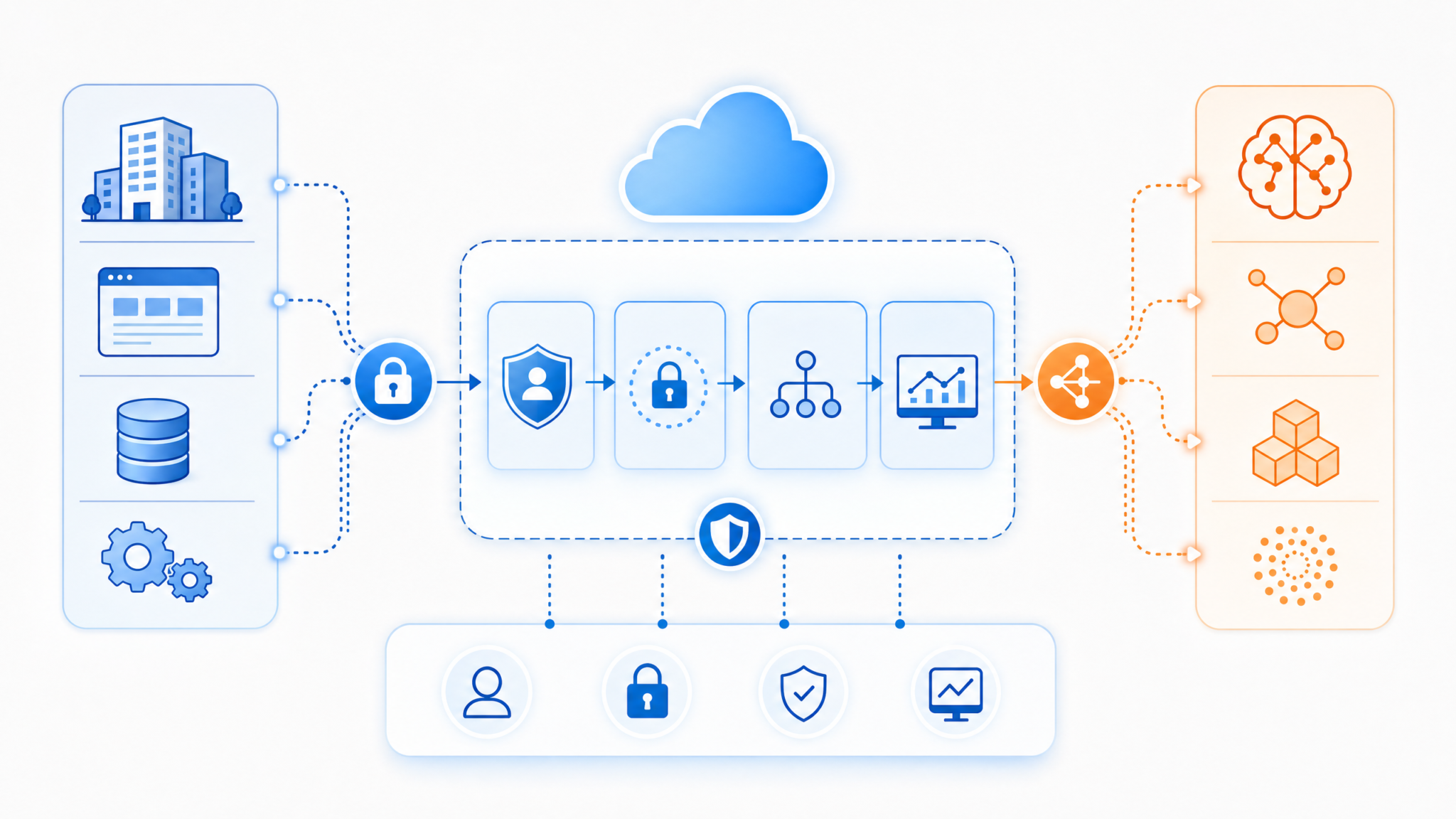
At the core of this integration is a sophisticated architecture that harmonizes AWS’s cloud-native services with OpenAI’s Codex capabilities. The typical workflow involves the following components:
- Client Application: This could be an integrated development environment (IDE), code review tool, or custom application invoking Codex-powered code generation via Bedrock’s API.
- Amazon Bedrock API: Acts as the gateway that routes requests to the selected foundation model—in this case, OpenAI Codex—while handling authentication, request throttling, and API versioning.
- Security and Access Control Layer: Utilizes AWS IAM roles and policies to enforce least-privilege access, ensuring only authorized users and services can invoke Codex models.
- OpenAI Codex Model Endpoint: Hosted and managed by Bedrock, this endpoint processes input prompts and returns generated code snippets or completions.
- Monitoring and Logging: CloudWatch and AWS CloudTrail capture detailed logs and metrics for auditing, debugging, and usage analysis.
The following diagram illustrates a high-level architectural overview of the integration:
Example Use Case: Automating Code Generation in CI/CD Pipelines
Consider an enterprise software development team that wants to automate unit test generation during continuous integration (CI) builds. By integrating OpenAI Codex through Amazon Bedrock, the team can implement a Lambda function triggered by code commits. This function calls the Bedrock API with prompts describing the new or changed functions, and Codex returns corresponding unit test code in the preferred testing framework (e.g., pytest for Python).
import boto3
import json

bedrock = boto3.client('bedrock-runtime')

def generate_unit_test(function_code: str) -> str:
    prompt = f"Write a unit test for the following Python function:\n{function_code}\nUnit test:"
    response = bedrock.invoke_model(
        modelId='openai-codex',
        contentType='application/json',
        accept='application/json',
        body=json.dumps({"prompt": prompt, "max_tokens": 150})
    )
    result = json.loads(response['body'].read())
    return result['choices'][0]['text']

# Example function code snippet
function_code = '''
def add_numbers(a, b):
    return a + b
'''

unit_test_code = generate_unit_test(function_code)
print(unit_test_code)
This example demonstrates how Bedrock abstracts API intricacies, enabling developers to focus on prompt engineering and integration logic rather than model management.
Comparison: Direct OpenAI API vs. Amazon Bedrock Integration
| Aspect | Direct OpenAI API | Amazon Bedrock with OpenAI Codex |
|---|---|---|
| Infrastructure Management | User responsible for API keys, rate limits, scaling | Fully managed with auto-scaling and load balancing |
| Security Controls | API key based, limited IAM integration | Deep integration with AWS IAM, VPC, and KMS |
| Model Access | Single provider (OpenAI) | Multi-provider access through one API |
| Cost Management | Basic usage dashboards | Advanced cost allocation, quotas, and tagging |
| Latency | Dependent on OpenAI endpoints | Optimized regional endpoints with edge caching |
Security and Compliance Considerations
For enterprises, safeguarding intellectual property and adhering to regulatory standards is paramount. Amazon Bedrock’s integration with OpenAI Codex supports stringent security postures through:
- IAM Role-Based Access Control: Define granular permissions for users and services invoking Codex models, ensuring auditability and segregation of duties.
- Network Isolation: Deploy API calls within private subnets using VPC endpoints to prevent data exposure over public internet routes.
- Data Encryption: All data in transit and at rest is encrypted using AWS KMS-managed keys, protecting sensitive code snippets and prompts.
- Compliance Certifications: Bedrock complies with SOC 2, ISO 27001, HIPAA, and other frameworks, providing assurance for regulated industries.
Scalability and Performance Optimization
Amazon Bedrock’s serverless architecture dynamically allocates compute resources based on request volume, enabling elastic scaling without manual intervention. Enterprises can leverage the following best practices to optimize performance:
- Prompt Engineering: Design concise and specific prompts to reduce token usage and inference time.
- Batch Requests: Aggregate multiple inference requests to reduce network overhead and improve throughput.
- Regional Endpoints: Use region-specific Bedrock endpoints to minimize latency and comply with data residency requirements.
- Caching Strategies: Cache frequent or predictable model outputs at the application layer to reduce redundant invocations.
Summary
The integration of OpenAI Codex directly within Amazon Bedrock ushers in a new era of enterprise AI deployment by combining the power of advanced code-generation models with AWS’s robust cloud infrastructure. By abstracting away operational burdens and providing unified access, security, and cost controls, Bedrock enables organizations to embed AI-driven coding assistance seamlessly into their software development life cycle. The subsequent sections of this guide will provide a detailed walkthrough of configuring Bedrock access, setting up secure IAM roles, preparing your local development environment, designing optimized network architectures, and validating your deployment to ensure a resilient, scalable, and secure Codex-powered solution.
Prerequisites and Assumptions
Before embarking on the comprehensive deployment of OpenAI Codex on Amazon Bedrock, it is critical to establish a solid foundation by ensuring that all necessary prerequisites and assumptions are clearly understood and meticulously fulfilled. This section dives deep into the technical and operational requirements, providing detailed explanations, best practices, and real-world examples to prepare your environment for a successful enterprise-grade deployment.
1. AWS Account and Permissions
Requirement: An active AWS account with the appropriate administrative privileges.
To deploy OpenAI Codex on Amazon Bedrock, your AWS account must have sufficient permissions to create and manage several essential resources, including IAM roles, Virtual Private Clouds (VPCs), Security Groups, and Bedrock-specific resources. The following permissions are typically required:
iam:CreateRole,iam:AttachRolePolicy,iam:GetRoleec2:CreateVpc,ec2:CreateSubnet,ec2:ModifyVpcAttribute,ec2:DescribeVpcsbedrock:CreateModel,bedrock:InvokeModel,bedrock:ListModels
Note: It is recommended to operate under the principle of least privilege by creating scoped IAM roles with the necessary permissions rather than using overly broad administrative access.
Example: You can create a custom IAM policy with the following JSON snippet to delegate necessary permissions to your deployment user or role:
{
  "Version": "2012-10-17",
  "Statement": [
    {
      "Effect": "Allow",
      "Action": [
        "iam:CreateRole",
        "iam:AttachRolePolicy",
        "ec2:*",
        "bedrock:*"
      ],
      "Resource": "*"
    }
  ]
}
2. Developer Workstation Setup
Requirement: A development environment with AWS CLI version 2 (June 2026 release or later) installed and properly configured.
The AWS Command Line Interface (CLI) is essential for managing AWS services from your local or remote workstation. For this deployment, AWS CLI v2 is preferred due to enhanced security features, improved command syntax, and better support for Bedrock APIs.
- Installation: You can install AWS CLI v2 following the official AWS documentation: AWS CLI v2 Installation Guide.
- Configuration: Ensure your CLI is configured with a named profile associated with your deployment credentials.
Example CLI configuration command:
aws configure --profile bedrock-deploymentWhen prompted, input your AWS Access Key ID, Secret Access Key, default region (e.g., us-east-1), and default output format (json recommended).
Verification: Confirm your CLI version and profile by running:
aws --version
aws sts get-caller-identity --profile bedrock-deployment
3. Foundational Knowledge: AWS IAM, VPC, and Bedrock APIs
Assumption: You possess a fundamental understanding of AWS Identity and Access Management (IAM), Virtual Private Cloud (VPC) networking, and Amazon Bedrock API workflows.
While this guide provides detailed steps, familiarity with these core AWS components is crucial for:
- Designing and implementing secure IAM roles and policies to control access to Bedrock and other resources.
- Configuring VPCs, subnets, routing tables, security groups, and network ACLs to ensure secure, scalable deployment architectures.
- Using Bedrock APIs for model invocation, lifecycle management, and monitoring.
For those new to these services, we recommend reviewing the following resources before proceeding:
4. OpenAI Codex Integration Enablement
Requirement: OpenAI Codex integration must be explicitly enabled on your AWS account.
Amazon Bedrock currently requires customers to request access to specific foundational models, such as OpenAI Codex, due to licensing and capacity management considerations. If OpenAI Codex is not enabled by default, you must submit a service request to AWS Support to activate this capability on your account.
Steps to request access:
- Log in to the AWS Support Center.
- Create a new case under Service Limit Increase.
- Select Bedrock as the service and specify your request for OpenAI Codex model access.
- Provide a detailed description of your intended use case, expected usage volume, and compliance adherence.
Approval times vary, so plan accordingly to accommodate this prerequisite before starting your deployment.
5. AWS CLI Configuration Best Practices
Requirement: Your AWS CLI setup must follow best practices to ensure security, reliability, and maintainability.
This guide assumes you have configured your AWS CLI environment with credentials stored securely and profiles set up for role assumption where applicable. Key considerations include:
- Use of Named Profiles: Avoid using the default profile for critical deployments. Instead, create profiles with contextually appropriate permissions.
- Credential Management: Utilize AWS Secrets Manager or AWS Systems Manager Parameter Store to securely manage access keys rather than storing plaintext credentials on disk.
- MFA Enforcement: Enable Multi-Factor Authentication (MFA) on your IAM user or role to enhance security.
- Session Token Usage: When assuming roles, use temporary credentials with session tokens to minimize the risk of credential leakage.
Refer to our in-depth article on AWS CLI Configuration Best Practices for additional guidance and automated scripts to set up secure CLI environments.
6. Network and Security Considerations
While not explicitly listed in the initial prerequisites, a robust network and security posture is indispensable for enterprise deployments.
- VPC and Subnet Planning: Define private subnets for your Bedrock service endpoints to minimize public exposure.
- Security Groups and NACLs: Restrict inbound and outbound traffic to only necessary IP ranges and ports.
- Endpoint Policies: Apply resource-based policies to Bedrock endpoints to control access at the network layer.
- Logging and Monitoring: Enable AWS CloudTrail, VPC Flow Logs, and Amazon CloudWatch to audit and monitor Bedrock interactions.
Summary Table of Prerequisites
| Prerequisite | Description | Example / Resource |
|---|---|---|
| AWS Account with Permissions | Account with IAM roles, VPC, and Bedrock resource permissions. | Custom IAM policy with bedrock:* and ec2:* actions. |
| Developer Workstation | AWS CLI v2 (June 2026) installed and configured with named profiles. | aws configure --profile bedrock-deployment |
| Familiarity with AWS Services | Basic knowledge of IAM, VPC, and Bedrock APIs. | Official AWS documentation links. |
| OpenAI Codex Access | OpenAI Codex integration enabled by AWS Support request. | AWS Support Center case submission. |
| AWS CLI Configuration Best Practices | Secure credential storage, MFA, and session token usage. | Best Practices Article |
| Network and Security Setup | Proper VPC, security groups, endpoint policies, and logging. | VPC Flow Logs, CloudTrail configurations. |
By thoroughly satisfying these prerequisites and understanding the underlying assumptions, your organization will be well-positioned to execute an efficient, secure, and scalable deployment of OpenAI Codex on Amazon Bedrock. The subsequent sections build on this foundation, providing step-by-step instructions, architectural diagrams, and best practice recommendations tailored for enterprise environments.
Step 1: Configuring Amazon Bedrock Model Access
Amazon Bedrock serves as a centralized platform to provision, manage, and invoke foundation models from leading AI providers, including OpenAI Codex. Before leveraging the powerful code generation and completion capabilities of OpenAI Codex via Bedrock, it is imperative to meticulously configure your environment for seamless model access. This involves verifying service availability, enumerating supported models, setting up fine-grained access controls, and validating connectivity through test invocations.
1.1 Verify Bedrock Service Availability in Your Region
Amazon Bedrock is region-specific and not universally available across all AWS regions at launch. It is critical to ensure that Bedrock is accessible in your desired operational region to avoid deployment roadblocks later in the pipeline. The AWS CLI provides a straightforward command to query Bedrock’s regional availability and operational status.
aws bedrock describe-region --region us-east-1The output from this command will confirm if Bedrock is active and whether it supports the OpenAI Codex model in us-east-1 or your target region. Here is an example of a successful response:
{
  "regionName": "us-east-1",
  "bedrockStatus": "ACTIVE",
  "supportedModels": [
    "openai-codex-v1",
    "anthropic-claude-v1"
  ]
}
If the bedrockStatus is anything other than ACTIVE, or if openai-codex-v1 is missing from the supportedModels list, you must either select a different region with support or await service expansion.
Pro Tip: Use the AWS Management Console’s Region Selector dropdown to cross-check Bedrock availability before running CLI commands, especially in multi-region enterprise deployments.
1.2 List Available Foundation Models
Once regional availability is confirmed, the next step is to enumerate all foundation models provisioned in Bedrock for the chosen region. This allows you to validate the exact model identifiers, supported use cases, and versioning information—critical metadata for precise API calls and auditing.
aws bedrock list-foundation-models --region us-east-1The command returns a JSON array of foundation models registered within Bedrock. A sample snippet highlighting the OpenAI Codex model entry is shown below:
{
  "models": [
    {
      "modelId": "openai-codex-v1",
      "modelName": "OpenAI Codex",
      "supportedUseCases": ["code-generation", "code-completion"],
      "version": "2026-06-01",
      "description": "Advanced AI model specialized in generating and completing code snippets across multiple programming languages.",
      "maxTokens": 2048,
      "supportedLanguages": ["python", "javascript", "java", "c#", "go"]
    }
  ]
}
This detailed metadata enables you to:
- Confirm Model Identity: Use the exact
modelIdopenai-codex-v1for API invocations. - Understand Use Cases: Align your integration with supported functionalities such as code generation or completion.
- Plan Token Usage: Note the
maxTokenslimit to optimize prompt design and control costs. - Select Programming Languages: Tailor prompts according to supported languages for best results.
Note: Foundation models in Bedrock may receive periodic updates; always verify the version field to maintain compatibility across your deployment lifecycle.
1.3 Create Bedrock Access Configuration (Optional but Recommended for Enterprises)
For enterprises with stringent security requirements, implementing fine-grained access control is paramount. Amazon Bedrock integrates with AWS Identity and Access Management (IAM) to enforce permissions on who can invoke specific foundation models. By creating a dedicated Bedrock Access Policy JSON, you limit exposure and reduce the blast radius of potential misconfigurations or compromised credentials.
Below is an example of a minimal yet effective IAM policy named codex-access-policy.json that grants permission to invoke the OpenAI Codex model:
{
  "Version": "2026-01-01",
  "Statement": [
    {
      "Effect": "Allow",
      "Action": [
        "bedrock:InvokeModel"
      ],
      "Resource": "arn:aws:bedrock:us-east-1:123456789012:model/openai-codex-v1"
    }
  ]
}
Key considerations when crafting access policies:
- Principle of Least Privilege: Restrict
Actionto onlybedrock:InvokeModel, and scope theResourceto the specific model ARN. - Resource ARN Structure: Replace
123456789012with your AWS account ID and ensure the region matches your deployment region. - Policy Attachment: Attach this policy to IAM roles or users that your application or developers use to interact with Bedrock. This enforces controlled access and complies with enterprise governance.
- Versioning: The policy version
2026-01-01corresponds to the latest Bedrock IAM schema; always verify for updates in the AWS documentation.
Example Scenario: In a multi-team enterprise, you might create separate IAM roles for development, testing, and production environments, each with tailored Bedrock access policies to prevent unauthorized model invocations or data leakage.
After creating the policy, attach it using the AWS CLI:
aws iam put-role-policy --role-name BedrockCodexRole --policy-name CodexAccessPolicy --policy-document file://codex-access-policy.json1.4 Invoke a Simple Test Call to Bedrock Codex
Before integrating OpenAI Codex into your production workflows, it is advisable to execute a basic test invocation to verify connectivity, authentication, and model responsiveness. This step helps identify misconfigurations early and provides a baseline for expected output formatting.
Use the following AWS CLI command to invoke the openai-codex-v1 model with a simple Python function prompt:
aws bedrock invoke-model \
  --model-id openai-codex-v1 \
  --content-type application/json \
  --body '{"prompt":"def fibonacci(n):","max_tokens":50}' \
  --region us-east-1
Explanation of parameters:
| Parameter | Description | Example |
|---|---|---|
--model-id |
Specifies the foundation model to invoke | openai-codex-v1 |
--content-type |
MIME type of the request body | application/json |
--body |
JSON string containing the prompt and generation parameters | {"prompt":"def fibonacci(n):","max_tokens":50} |
--region |
AWS region where Bedrock is deployed | us-east-1 |
Expected Output: A JSON response containing the generated code completion, typically under a field such as completions or result. For instance:
{
  "completions": [
    {
      "text": "    if n <= 0:\n        return 0\n    elif n == 1:\n        return 1\n    else:\n        return fibonacci(n-1) + fibonacci(n-2)"
    }
  ]
}
This output illustrates that the model successfully interpreted the prompt and produced a recursive Fibonacci function implementation.
Troubleshooting Tips:
- If you receive authorization errors, verify that your AWS credentials have the appropriate Bedrock permissions, including the policy created in Step 1.3.
- Timeouts or connection errors may indicate network or region misconfiguration; confirm Bedrock availability and endpoint accessibility.
- Malformed JSON or incorrect parameters in the
--bodyfield can cause invocation failures; validate JSON syntax carefully.
Real-World Application: Running such test calls can be integrated into your CI/CD pipelines to automate environment health checks, ensuring that Bedrock model access remains consistent across development cycles.
Step 2: Setting Up Local OpenAI Codex Environment
In this step, we focus on establishing a robust local development environment that enables you to seamlessly interact with the OpenAI Codex model hosted on Amazon Bedrock. Setting up a local environment is crucial for iterative development, debugging, and testing code generation workflows before deploying them at scale in production environments. This comprehensive guide covers the installation of necessary SDKs, credential management, network configuration, and practical coding examples, ensuring you gain full control and insight into Codex invocations routed through Bedrock.
2.1 Install Bedrock SDK and OpenAI Codex Client
Amazon Bedrock simplifies access to foundation models like OpenAI Codex by providing a unified SDK that abstracts away low-level API complexity. As of June 2026, AWS offers the aws-bedrock-sdk, a Python package optimized for Bedrock interactions. This SDK supports advanced features such as automatic request signing, retry policies, and telemetry integration, making it the preferred choice for enterprise-grade applications.
To install the SDK, use the Python package manager pip. It is recommended to use a virtual environment (e.g., venv or conda) to isolate dependencies and avoid conflicts:
python3 -m venv bedrock-env
source bedrock-env/bin/activate
pip install --upgrade pip
pip install aws-bedrock-sdk
Why use the aws-bedrock-sdk?
The SDK provides a high-level client interface to Bedrock services, managing authentication via the AWS Signature Version 4 signing process behind the scenes. It supports both synchronous and asynchronous invocations, allowing flexible integration patterns in your local or cloud applications.
| Feature | aws-bedrock-sdk | Direct REST Calls (Alternative) |
|---|---|---|
| Request Signing | Automatic AWS Signature v4 signing | Manual implementation required |
| Retry Logic | Built-in exponential backoff and retries | Must be custom-coded |
| Model Invocation | Single API with modelId parameter | Model-specific endpoints required |
| Telemetry and Logging | Integrated with AWS CloudWatch and SDK logs | No native support |
| Ease of Use | High-level interface, Pythonic | Low-level HTTP requests |
This makes aws-bedrock-sdk the most efficient and secure method to develop local Codex applications leveraging Bedrock.
2.2 Configure Bedrock SDK Credentials and Environment Variables
Proper credential and environment configuration is fundamental to ensure secure and authenticated communication between your local machine and Amazon Bedrock. Since Bedrock integrates with AWS Identity and Access Management (IAM), your local environment must have access to valid AWS credentials with permissions to invoke Bedrock models.
Follow these detailed steps to configure your environment:
- Set up AWS CLI and Profiles
If you haven’t already, install and configure the AWS CLI. Useaws configure --profile enterprise-devto generate a named profile with your AWS access key ID, secret access key, and default region. This profile will be referenced by the Bedrock SDK. - Export Environment Variables
Export the following environment variables to allow the SDK to locate your credentials and Bedrock endpoint:
export AWS_REGION=us-east-1
export BEDROCK_ENDPOINT=https://bedrock.us-east-1.amazonaws.com
export AWS_PROFILE=enterprise-dev- Verify Credentials
Runaws sts get-caller-identity --profile enterprise-devto confirm that your credentials are valid and properly scoped. - IAM Permissions
Ensure that the IAM user or role associated with the profile has the following minimum permissions:bedrock:InvokeModelsts:GetCallerIdentity- Read access to Bedrock model metadata if necessary
- Network Considerations
If your local machine is behind a corporate firewall or VPN, configure proxy settings appropriately to allow HTTPS access to the Bedrock endpoint. AWS SDKs respect the standardHTTP_PROXYandHTTPS_PROXYenvironment variables.
Security Best Practices:
- Never hardcode AWS credentials in your scripts; always use environment variables or AWS credential files.
- Rotate credentials regularly and use IAM roles where possible.
- Enable AWS CloudTrail logging to audit Bedrock API usage.
2.3 Sample Python Script for Codex Invocation with Step-by-Step Explanation
Below is an enhanced Python script demonstrating how to programmatically invoke the OpenAI Codex model through Amazon Bedrock. This example includes advanced features such as error handling, response parsing, and customizable parameters.
import os
import json
from aws_bedrock_sdk import BedrockClient
from aws_bedrock_sdk.exceptions import BedrockClientError

def generate_code(prompt: str, max_tokens: int = 150, temperature: float = 0.7) -> str:
    """
    Generates code using OpenAI Codex via Amazon Bedrock.

    Parameters:
        prompt (str): The code prompt or description to generate code from.
        max_tokens (int): Maximum number of tokens to generate.
        temperature (float): Sampling temperature for creativity control.

    Returns:
        str: Generated code snippet.
    """
    try:
        # Initialize Bedrock client with region and optional endpoint override
        client = BedrockClient(
            region_name=os.environ.get('AWS_REGION', 'us-east-1'),
            endpoint_url=os.environ.get('BEDROCK_ENDPOINT')
        )

        # Prepare the request body in JSON format
        request_body = {
            "prompt": prompt,
            "max_tokens": max_tokens,
            "temperature": temperature,
            # Additional Codex parameters can be added here
        }

        # Invoke the model with modelId for OpenAI Codex
        response = client.invoke_model(
            modelId="openai-codex-v1",
            contentType="application/json",
            body=request_body
        )

        # The response body is a JSON string; parse it to extract generated text
        response_body = json.loads(response['body'])
        generated_text = response_body.get('choices', [{}])[0].get('text', '')

        return generated_text

    except BedrockClientError as e:
        # Handle API errors gracefully
        print(f"Error invoking Bedrock model: {e}")
        return ""

if __name__ == "__main__":
    code_prompt = "def quicksort(arr):"
    print("Invoking OpenAI Codex model on Bedrock with prompt:", code_prompt)
    generated_code = generate_code(code_prompt)
    if generated_code:
        print("\nGenerated Code:\n")
        print(generated_code)
    else:
        print("Failed to generate code.")
Detailed Breakdown of the Script:
- Client Initialization: The
BedrockClientis instantiated with the AWS region and Bedrock endpoint. This ensures requests are routed correctly within your AWS environment. - Request Body: The prompt and model parameters are structured as a JSON dictionary. You can customize
max_tokens,temperature, and other Codex parameters such asstopsequences ortop_psampling. - Model Invocation: The
invoke_modelmethod is called with themodelIdset toopenai-codex-v1, which is the identifier for the OpenAI Codex model in Bedrock. - Response Handling: The response is returned as a JSON string in the
bodykey. The script parses this JSON and extracts the generated text from the first choice. This aligns with OpenAI’s typical response format. - Error Handling: The script catches
BedrockClientErrorexceptions to handle network, authentication, or service errors gracefully, printing informative messages for troubleshooting.
Extending the Script for Real-World Use Cases:
- Batch Processing: Modify the script to accept a list of prompts and process them asynchronously for bulk code generation.
- Integration with IDEs: Wrap this logic into an extension or plugin for popular IDEs like VSCode, enabling inline code suggestions powered by Codex on Bedrock.
- Logging and Metrics: Integrate with AWS CloudWatch or third-party monitoring tools to track model usage, latency, and errors.
- Security: Ensure sensitive prompts or code snippets are encrypted in transit and at rest, adhering to enterprise compliance standards.
2.4 Verifying Your Local Setup
After completing the installation and configuration, it is essential to verify that your environment is correctly set up. Follow these steps:
- Run the Sample Script: Execute the Python script provided above. You should see a generated code snippet printed to the console that completes or expands your prompt.
- Inspect Network Traffic: Use tools like
tcpdumporWiresharkto confirm HTTPS requests are sent to the correct Bedrock endpoint. - Check AWS CloudWatch Logs: If you have enabled logging on your AWS account, verify that Bedrock API calls appear in CloudWatch, indicating successful invocation.
- Test with Different Prompts and Parameters: Experiment with various prompts and temperature values to observe the diversity and quality of generated code.
Common Pitfalls and Troubleshooting:
- Invalid Credentials: Double-check your AWS_PROFILE and ensure the credentials have correct permissions.
- Endpoint Misconfiguration: Confirm that the
BEDROCK_ENDPOINTmatches the region you are targeting. - Network Restrictions: Corporate firewalls or proxies may block requests; configure proxy environment variables accordingly.
- Model Availability: The
openai-codex-v1model must be accessible in your Bedrock account. Contact AWS support if the model is not available.
2.5 Additional Resources and Next Steps
To deepen your expertise and prepare for production-grade deployments, explore the following:
- Amazon Bedrock API Reference – Detailed documentation on all Bedrock API operations and parameters.
- OpenAI Codex API Specs – Understand Codex-specific prompt engineering and parameter tuning.
- AWS Machine Learning Blog – Real-world examples of integrating Bedrock models into serverless and containerized applications.
Once your local environment is fully operational, you can proceed to integrate Codex calls into your enterprise applications, automate code generation pipelines, or deploy scalable microservices powered by Bedrock-hosted OpenAI models.
Step 3: Creating IAM Roles and Security Policies
Security is paramount in any enterprise deployment, especially when integrating advanced AI models like OpenAI Codex through Amazon Bedrock. Improperly scoped permissions can lead to unauthorized access, potential data breaches, or inadvertent resource misuse. In this step, we will meticulously design and implement AWS Identity and Access Management (IAM) roles and policies that adhere to the principle of least privilege, ensuring that only authorized users and applications can invoke Codex via Bedrock while maintaining comprehensive auditability and operational security.
3.1 Understanding the Role of IAM in Bedrock and Codex Integration
Before diving into the technical creation of IAM roles and policies, it is crucial to understand their functional significance in this context:
- IAM Roles: These act as an identity with specific permissions that AWS services or applications can assume to perform actions securely. For Bedrock, a role allows the service or your compute instances to invoke Codex models on your behalf without embedding long-term credentials.
- Trust Policies: Define who can assume the role. For Bedrock integration, this typically means granting Bedrock permission to assume your custom IAM role so it can perform model invocation.
- Permission Policies: Define what actions are allowed and on which resources. For example, invoking a specific Codex model or writing logs to CloudWatch.
By carefully crafting these policies, you ensure a secure, auditable, and maintainable deployment architecture.
3.2 Creating the IAM Role for Bedrock Access: BedrockCodexInvokeRole
The cornerstone of your security setup is the IAM role that Bedrock will assume to invoke OpenAI Codex. This role must have a trust policy explicitly allowing the bedrock.amazonaws.com service to assume it. This ensures that only Bedrock can use this role, preventing unauthorized entities from gaining these privileges.
Here is the trust policy file trust-policy.json you should create:
{
  "Version": "2012-10-17",
  "Statement": [
    {
      "Effect": "Allow",
      "Principal": {
        "Service": "bedrock.amazonaws.com"
      },
      "Action": "sts:AssumeRole"
    }
  ]
}
Breakdown of Trust Policy Elements:
| Element | Description |
|---|---|
Effect: Allow |
Grants permission to assume the role; denies are not included here. |
Principal: Service |
Specifies that Bedrock (bedrock.amazonaws.com) is the trusted service allowed to assume this role. |
Action: sts:AssumeRole |
Allows the trusted entity to assume the role via the Security Token Service (STS). |
Security Best Practice: Limit the trust policy strictly to the Bedrock service. Avoid using wildcard principals or overly broad permissions to reduce attack surface.
3.3 Defining the IAM Policy for Bedrock Model Invocation: BedrockCodexPolicy.json
Next, attach a permission policy to the role that grants the least privileges necessary to invoke your Codex model and write logs for observability. The following JSON policy is a minimal yet functional example:
{
  "Version": "2012-10-17",
  "Statement": [
    {
      "Effect": "Allow",
      "Action": "bedrock:InvokeModel",
      "Resource": "arn:aws:bedrock:us-east-1:123456789012:model/openai-codex-v1"
    },
    {
      "Effect": "Allow",
      "Action": [
        "logs:CreateLogStream",
        "logs:PutLogEvents"
      ],
      "Resource": "arn:aws:logs:us-east-1:123456789012:log-group:/bedrock/codex/*"
    }
  ]
}
Detailed Analysis of Policy Statements:
-
bedrock:InvokeModelpermission allows the role to invoke the specified Codex model. TheResourceARN must precisely reference the model's ARN to avoid over-permissioning. Replace123456789012with your AWS account ID and confirm the region matches your deployment. -
logs:CreateLogStreamandlogs:PutLogEventspermissions enable the role to write invocation logs to CloudWatch Logs, which is essential for monitoring and troubleshooting.
Example of a More Restrictive Logging Policy: If you want to further restrict logging to a specific log stream, specify the exact log stream ARN instead of a wildcard.
3.4 Creating and Attaching IAM Roles and Policies Using AWS CLI
After creating the JSON files (trust-policy.json and BedrockCodexPolicy.json), use the AWS CLI for a reproducible and scriptable approach to setup. Below are the detailed commands:
aws iam create-role --role-name BedrockCodexInvokeRole --assume-role-policy-document file://trust-policy.json

aws iam put-role-policy --role-name BedrockCodexInvokeRole --policy-name BedrockCodexPolicy --policy-document file://BedrockCodexPolicy.json
Step-by-Step Explanation:
-
create-role: Creates the IAM role namedBedrockCodexInvokeRolewith the trust policy allowing Bedrock to assume it. -
put-role-policy: Attaches the inline permission policyBedrockCodexPolicydirectly to the role, granting it the necessary invoke and logging permissions.
Additional Tips:
- Always verify the role and policy creation with
aws iam get-role --role-name BedrockCodexInvokeRoleandaws iam get-role-policy --role-name BedrockCodexInvokeRole --policy-name BedrockCodexPolicy. - Use AWS IAM Access Analyzer to validate that your policies do not unintentionally grant access to external entities.
- If managing multiple environments (dev, staging, prod), consider incorporating environment-specific suffixes in role and policy names, e.g.,
BedrockCodexInvokeRole-prod.
3.5 Attaching the Role to Execution Environments
Once the role is created and policies attached, you must assign the role to the AWS resources that will invoke Codex models. This typically includes:
- Amazon EC2 Instances: Attach the IAM role to EC2 instances running your application code. This can be done during instance launch or by assigning an IAM instance profile to an existing instance.
- AWS Lambda Functions: Set the role as the execution role in your Lambda function configuration to allow calls to Bedrock.
- Amazon ECS Tasks or EKS Pods: Use IAM Roles for Tasks (ECS) or IAM Roles for Service Accounts (EKS) to assign the role securely.
- Bedrock Execution Environment: If Bedrock provides a way to specify execution roles explicitly, assign
BedrockCodexInvokeRolethere.
Example: Attaching IAM Role to an EC2 Instance at Launch:
aws ec2 run-instances --image-id ami-0abcdef1234567890 --count 1 --instance-type t3.medium --iam-instance-profile Name=BedrockCodexInvokeRole --key-name MyKeyPair --security-group-ids sg-0123456789abcdef0 --subnet-id subnet-12345678Replace the values for image-id, key-name, security-group-ids, and subnet-id with your environment specifics.
3.6 Auditing and Monitoring IAM Role Usage
Security does not end with role creation. Continuous monitoring and auditing are essential to maintain a secure posture:
- CloudTrail Logging: Ensure AWS CloudTrail is enabled to capture API calls related to role assumption and Bedrock model invocations.
- CloudWatch Alarms: Set up alarms for anomalous activities such as unexpected role assumption frequencies or failed invocation attempts.
- IAM Access Analyzer: Periodically run analyses to detect overly permissive roles or policies.
- Review and Rotate: Regularly review role policies and rotate credentials or keys associated with roles or instances if applicable.
3.7 Common Pitfalls and How to Avoid Them
| Issue | Cause | Solution |
|---|---|---|
| Bedrock service unable to assume role | Incorrect trust policy or missing bedrock.amazonaws.com principal |
Verify trust policy JSON; ensure no typos and proper AWS region/account context |
| Invocation fails with AccessDenied | Role lacks bedrock:InvokeModel permission or incorrect resource ARN |
Update policy to include correct resource ARN and action permissions |
| Logging does not appear in CloudWatch | Missing permissions for logs:CreateLogStream or logs:PutLogEvents |
Add the necessary logging permissions scoped to your log group |
| Role not attached to compute resource | Role creation succeeded but not assigned to EC2/Lambda/ECS | Attach role via IAM instance profile or execution role configuration |
| Overly broad permissions | Using wildcard resource ARNs or permissions | Scope ARNs specifically to resources in your account and region |
3.8 Summary and Next Steps
In this step, we have established a robust foundation for secure interaction between your enterprise applications and the OpenAI Codex model via Amazon Bedrock by:
- Creating a dedicated IAM role with a restrictive trust policy allowing only Bedrock to assume it.
- Defining a finely scoped permission policy granting minimal required privileges for invoking Codex and logging.
- Deploying these policies using AWS CLI commands for automation and repeatability.
- Attaching the role to your compute environments, ensuring seamless and secure API calls.
- Highlighting auditing, monitoring, and common pitfalls to maintain a secure deployment lifecycle.
With the IAM roles and policies configured, you are now ready to proceed to Step 4: Configuring Network and Endpoint Security, where we will ensure secure network communication and endpoint protection for your Codex deployment.
Step 4: Designing Network Architecture with VPC Endpoints
In enterprise deployments of OpenAI Codex on Amazon Bedrock, designing a robust, secure, and cost-efficient network architecture is paramount. One of the critical components to achieving this goal is the use of VPC (Virtual Private Cloud) endpoints. VPC endpoints allow you to privately connect your Amazon VPC to supported AWS services and VPC endpoint services powered by AWS PrivateLink without requiring an internet gateway, NAT device, VPN connection, or AWS Direct Connect connection.
By leveraging VPC endpoints specifically designed for Bedrock, you can:
- Secure Data Traffic: Keep network traffic between your AWS resources and Bedrock APIs isolated within the AWS network, thereby eliminating exposure to the public internet.
- Reduce Egress Costs: Avoid data transfer charges associated with internet egress by routing traffic internally within AWS.
- Improve Latency and Reliability: Benefit from optimized and reliable routing paths when communicating with Bedrock APIs.
- Enforce Fine-Grained Access Controls: Use security groups and network access control lists (ACLs) to restrict access, enhancing your security posture.
4.1 Create a VPC Endpoint for Bedrock
To establish a secure and private connection between your VPC and Amazon Bedrock, you need to create an Interface VPC Endpoint. Interface endpoints use AWS PrivateLink, which provisions elastic network interfaces (ENIs) in your subnets and provides private IP addresses as entry points for network traffic destined to Bedrock.
Step-by-step walkthrough:
- Identify Your VPC and Subnets: Confirm the VPC ID where your workloads are running. Select subnets in availability zones (AZs) that align with your application's fault tolerance and scalability requirements.
- Choose or Create Security Groups: Define security groups that restrict inbound and outbound traffic to only the necessary sources and destinations, primarily allowing HTTPS (port 443) traffic.
- Run the AWS CLI Command: Use the following AWS CLI command to create the interface VPC endpoint for Bedrock. Replace
vpc-id,subnet-ids, andsecurity-group-idswith your specific values.
aws ec2 create-vpc-endpoint \
  --vpc-id vpc-0abcd1234efgh5678 \
  --service-name com.amazonaws.us-east-1.bedrock \
  --vpc-endpoint-type Interface \
  --subnet-ids subnet-0a1b2c3d4e5f67890 subnet-0b1c2d3e4f5g67891 \
  --security-group-ids sg-0123456789abcdef0 \
  --private-dns-enabled
Explanation of parameters:
| Parameter | Description |
|---|---|
--vpc-id |
The unique identifier of your VPC. |
--service-name |
The AWS service name for Bedrock in the specified region (e.g., com.amazonaws.us-east-1.bedrock). |
--vpc-endpoint-type |
Must be Interface for Bedrock, as it requires elastic network interfaces. |
--subnet-ids |
Comma-separated list of subnet IDs where the endpoint ENIs will be created. Ensure these subnets are in AZs aligned with your architecture. |
--security-group-ids |
Security group IDs controlling access to the endpoint ENIs. |
--private-dns-enabled |
Enables private DNS for the service, allowing you to use the standard Bedrock endpoint DNS names within your VPC. |
Note: It is critical to create VPC endpoints in all subnets where your applications running OpenAI Codex integrations reside to ensure seamless and private connectivity.
4.2 Configure Security Group for VPC Endpoint
The security group associated with your VPC endpoint acts as a virtual firewall for the elastic network interfaces, controlling both inbound and outbound traffic. Correctly configuring this security group is essential to maintain both accessibility and security.
Key considerations when configuring your security group:
- Allow Inbound HTTPS from Trusted Sources: Open port 443 (TCP) inbound only from IP address ranges or security groups that represent your application servers or trusted resources. Avoid using
0.0.0.0/0to minimize exposure. - Allow Outbound HTTPS Traffic: Enable outbound traffic on port 443 to allow the endpoint to communicate with Bedrock APIs.
- Leverage Security Group References: For intra-VPC communication, consider referencing security groups rather than IP CIDR blocks for more dynamic and manageable access control.
Here is an example JSON policy illustrating how to authorize ingress on TCP port 443 from a trusted CIDR block within your VPC:
{
  "Version": "2012-10-17",
  "Statement": [
    {
      "Effect": "Allow",
      "Principal": "*",
      "Action": "ec2:AuthorizeSecurityGroupIngress",
      "Resource": "arn:aws:ec2:us-east-1:123456789012:security-group/sg-0123456789abcdef0",
      "Condition": {
        "IpProtocol": "tcp",
        "FromPort": 443,
        "ToPort": 443,
        "CidrIp": "10.0.0.0/16"
      }
    }
  ]
}
Step-by-step security group setup:
- Navigate to the EC2 Management Console > Security Groups.
- Select or create a security group dedicated to your VPC endpoint.
- Add an inbound rule to allow
HTTPS (TCP 443)traffic from your application subnet CIDR blocks or security groups. - Ensure outbound rules allow traffic on port 443 to facilitate communication with Bedrock.
- Review and apply least privilege principles to minimize attack surface.
Example Security Group Inbound Rule:
| Type | Protocol | Port Range | Source | Description |
|---|---|---|---|---|
| HTTPS | TCP | 443 | 10.0.0.0/16 | Allow inbound secure traffic from VPC subnet range |
Security tip: Regularly audit security group rules and maintain strict access policies. Employ AWS Config or third-party tools to monitor unintended changes or overly permissive rules.
4.3 Update Bedrock SDK Configuration to Use VPC Endpoint
After successfully creating the VPC endpoint and configuring security groups, you must ensure that your OpenAI Codex integrations and any SDK or CLI clients communicate with Bedrock through the newly established private endpoint.
Why override the endpoint? By default, SDKs and CLI tools connect to the public Bedrock endpoint, which routes traffic over the internet. To leverage the security and cost benefits of the VPC endpoint, you need to specify the private DNS name or endpoint URL.
How to retrieve your VPC Endpoint DNS:
- Use the AWS CLI to describe your endpoints:
aws ec2 describe-vpc-endpoints --vpc-endpoint-ids vpce-0a1b2c3d4e5f67890- Note the
DnsEntriesfield, which provides the private DNS names assigned to your endpoint.
Example environment variable configuration:
export BEDROCK_ENDPOINT=https://vpce-0a1b2c3d4e5f67890-bedrock.us-east-1.vpce.amazonaws.comThis environment variable can be consumed by your application or SDK configuration to direct API calls through the VPC endpoint.
Sample Python SDK Override:
import boto3

session = boto3.Session()
bedrock_client = session.client(
    'bedrock',
    endpoint_url='https://vpce-0a1b2c3d4e5f67890-bedrock.us-east-1.vpce.amazonaws.com',
    region_name='us-east-1'
)

response = bedrock_client.invoke_model(
    ModelId='openai-codex-001',
    Body=b'{"prompt": "def hello_world():\\n    print(\\"Hello, world!\\")"}'
)
print(response)
Additional considerations:
- Private DNS Resolution: When
--private-dns-enabledis set during endpoint creation, the standard Bedrock public DNS names resolve to the private IP addresses within your VPC, simplifying configuration by not requiring explicit endpoint overrides. - Multi-Region Deployments: For deployments spanning multiple AWS regions, ensure you create and configure VPC endpoints in each region and update endpoint URLs accordingly.
- Testing and Validation: After setup, validate connectivity by performing API calls to Bedrock endpoints from within your VPC and confirming that traffic does not traverse the public internet (e.g., via VPC flow logs or network monitoring tools).
4.4 Best Practices and Advanced Architecture Considerations
To further optimize your network design leveraging VPC endpoints for Bedrock:
- High Availability: Deploy VPC endpoints in multiple subnets across different availability zones to ensure fault tolerance.
- Monitoring and Logging: Enable VPC Flow Logs for subnets containing your endpoint ENIs to monitor traffic patterns, detect anomalies, and troubleshoot connectivity issues.
- Endpoint Policies: Apply VPC endpoint policies to restrict which AWS principals or services can access the Bedrock endpoint, adding an extra layer of security.
- Integration with PrivateLink Services: If you are building custom proxy or middleware layers, consider exposing them as PrivateLink services for consistent private connectivity.
- Cost Management: Monitor endpoint usage and optimize subnet placement and resource scaling to balance performance with cost.
Below is a comparison table illustrating the benefits of using VPC endpoints versus internet-based access for Bedrock APIs:
| Aspect | VPC Endpoint Access | Internet Access |
|---|---|---|
| Security | Traffic is isolated within AWS network; no exposure to public internet | Traffic traverses public internet; higher exposure to threats |
| Cost | Reduces egress charges by avoiding internet data transfer | Potentially higher egress data transfer costs |
| Latency | Lower latency due to optimized AWS backbone routing | Potentially higher latency due to internet routing variability |
| Access Control | Granular control via security groups and endpoint policies | Limited control; relies on network ACLs and firewall rules |
| Ease of Use | Requires initial setup of endpoints and DNS configuration | No additional setup; uses default public endpoints |
Step 5: Implementing Cost Optimization Strategies
When deploying OpenAI Codex on Amazon Bedrock at an enterprise scale, managing operational costs is paramount. Given that Bedrock's pricing model for OpenAI Codex is primarily token-based — where charges accrue based on the number of tokens processed in both input prompts and generated completions — it is essential to adopt a comprehensive set of cost optimization strategies. These strategies ensure that your organization balances performance and accuracy with budget constraints, ultimately maximizing return on investment (ROI).
This section delves deeply into actionable techniques, tools, and best practices designed to reduce token consumption, monitor expenditures in real-time, and implement programmatic controls for sustainable usage growth.
5.0 Understanding Cost Drivers in Bedrock OpenAI Codex Usage
Before diving into optimization tactics, it’s important to understand the key factors influencing costs:
- Token Count: Both input and output tokens contribute to cost. Longer prompts or verbose completions increase total tokens processed.
- Model Complexity: Advanced models may charge higher rates per token due to their enhanced capabilities.
- Request Frequency: High volume of calls, especially in real-time or batch processing, scales costs proportionally.
- Temperature and Top-p Settings: These affect generation variability and length, indirectly impacting token usage.
By strategically managing these variables, enterprises can optimize cost-efficiency without sacrificing the quality of code generation.
5.1 Detailed Cost Optimization Techniques
Below is a comprehensive breakdown of proven strategies to control and reduce Bedrock costs when using OpenAI Codex:
-
Set Precise
max_tokensLimits:Limiting the
max_tokensparameter controls the maximum length of the generated output. For example, settingmax_tokensto 100-200 tokens typically suffices for most code generation tasks such as function completions or snippets, preventing unnecessarily long responses that increase costs.Tip: Conduct profiling runs to determine optimal token limits for your specific use cases, balancing completeness with brevity.
-
Tune Temperature and Top-p Parameters:
The
temperatureparameter influences randomness in generated outputs. Lower temperatures (e.g., 0.2–0.5) produce more deterministic and concise code, reducing exploratory token usage. Similarly,top_p(nucleus sampling) can be set to restrict token diversity.By fine-tuning these, you can minimize extraneous or verbose code generation, thus controlling token consumption.
-
Batch Multiple Prompts:
Where feasible, consolidate multiple code generation requests into a single API call. This reduces overhead and can leverage the model’s context window effectively, lowering per-invocation costs.
Example: Instead of invoking the model separately for 10 small snippets, combine them into one prompt separated by delimiters.
-
Implement Intelligent Caching:
Frequently requested or predictable completions should be cached at the application layer, such as in-memory caches (Redis, Memcached) or persistent stores. This approach avoids redundant API calls for identical prompts, significantly reducing token usage.
Best practice: Incorporate cache invalidation policies to refresh results periodically or based on input parameter changes.
-
Leverage Usage Monitoring and Alerts:
Utilize AWS native tools like AWS Cost Explorer, CloudWatch, and Bedrock usage metrics to continuously monitor token consumption and associated costs. Set up budgets and alerts to proactively identify anomalies or unexpected spikes.
-
Use Fine-Tuned or Custom Models Where Possible:
Fine-tuning Codex models on your specific codebase or domain can increase output relevance and reduce token waste by generating more precise completions, though this comes with an upfront cost and operational overhead.
-
Optimize Prompt Engineering:
Design concise, context-rich prompts that efficiently guide the model to produce desired output. This reduces back-and-forth iterations and token-heavy clarifications.
5.2 Comparative Cost Impact Table
To illustrate the impact of various parameters on token usage and costs, consider the following hypothetical scenario generating Python function completions:
| Parameter Configuration | Average Tokens per Request | Estimated Cost per 1,000 Requests | Notes |
|---|---|---|---|
max_tokens=200, temperature=0.7 |
250 (50 input + 200 output) | $X.XX (higher) | Generates more exploratory code; useful for creativity but costlier |
max_tokens=100, temperature=0.3 |
150 (50 input + 100 output) | $Y.YY (moderate) | Balanced setting for deterministic, concise completions |
max_tokens=50, temperature=0.2 |
100 (50 input + 50 output) | $Z.ZZ (lowest) | Ideal for simple, repetitive code snippets; minimal exploratory output |
Note: Actual costs vary based on AWS region and current pricing. The table highlights relative cost differences to guide parameter tuning.
5.3 Sample Bedrock Invocation with Enhanced Cost Controls
The following example demonstrates invoking OpenAI Codex via AWS CLI with prudent cost control parameters, including max_tokens, reduced temperature, and specifying top_p to limit token diversity:
aws bedrock invoke-model \
  --model-id openai-codex-v1 \
  --content-type application/json \
  --body '{
    "prompt": "def fibonacci(n):",
    "max_tokens": 100,
    "temperature": 0.3,
    "top_p": 0.8,
    "stop": ["\n\n"]
  }' \
  --region us-east-1
In this example:
max_tokens=100caps output length to 100 tokens.temperature=0.3reduces randomness, producing more consistent code.top_p=0.8restricts generation to the top 80% cumulative probability, further focusing output.stopsequence halts generation at logical boundaries, preventing unnecessary token generation.
5.4 Implementing CloudWatch Alarms for Proactive Cost Management
Establishing automated notifications based on token usage thresholds allows your teams to respond swiftly to unexpected cost spikes or abnormal consumption patterns.
Example: Create a CloudWatch metric alarm to trigger an SNS notification when hourly token usage exceeds 100,000 tokens:
aws cloudwatch put-metric-alarm \
  --alarm-name "BedrockCodexTokenUsageAlarm" \
  --metric-name "TokenUsage" \
  --namespace "AWS/Bedrock" \
  --statistic Sum \
  --period 3600 \
  --threshold 100000 \
  --comparison-operator GreaterThanThreshold \
  --evaluation-periods 1 \
  --alarm-actions arn:aws:sns:us-east-1:123456789012:NotifyTeam \
  --dimensions Name=ModelId,Value=openai-codex-v1
Step-by-step breakdown:
--metric-name "TokenUsage": Monitors total tokens processed.--period 3600: Evaluates usage over one-hour intervals.--threshold 100000: Alarm triggers when usage exceeds 100k tokens.--alarm-actions: Sends notification to an SNS topic subscribed by your DevOps or finance teams.--dimensions Name=ModelId,Value=openai-codex-v1: Filters metrics specifically for the Codex model.
This proactive monitoring enables cost governance and empowers teams to implement corrective actions such as rate limiting or modifying prompt parameters dynamically.
5.5 Advanced Cost Optimization: Integrating Usage Analytics and Automated Controls
For enterprises with sophisticated deployment environments, building an automated cost management framework is recommended. Key components include:
-
Real-time Consumption Dashboards:
Develop custom dashboards using AWS CloudWatch metrics and AWS QuickSight to visualize token usage trends, peak hours, and cost anomalies.
-
Dynamic Request Throttling:
Implement Lambda functions or middleware that dynamically adjust request parameters (e.g., lowering
max_tokensor increasingtemperature) based on budget utilization. -
Scheduled Batch Processing:
Schedule non-urgent code generation tasks during off-peak hours to take advantage of potential cost savings and reduce concurrent demand.
-
Automated Cost Anomaly Detection:
Leverage AWS Cost Anomaly Detection to identify unexpected billing changes related to Bedrock usage and trigger automated remediation workflows.
5.6 Summary and Best Practices
To conclude, enterprises deploying OpenAI Codex on Amazon Bedrock should adopt a multi-layered cost optimization approach encompassing:
- Fine-tuning model invocation parameters to reduce token counts while maintaining output quality.
- Strategic batching and caching to minimize redundant API calls.
- Comprehensive monitoring and alerting through AWS native tools for proactive cost control.
- Continuous prompt engineering and model fine-tuning to improve generation efficiency.
- Integration of automated control mechanisms to dynamically align usage with budgetary goals.
By rigorously implementing these strategies, organizations can harness the power of Codex on Bedrock effectively, enabling scalable, cost-efficient AI-driven code generation deployments.
Step 6: Testing Connectivity and Deployment Validation
Ensuring robust connectivity and verifying the successful deployment of OpenAI Codex on Amazon Bedrock is a critical phase in your enterprise implementation. This step encompasses a comprehensive suite of tests designed to validate network paths, authentication mechanisms, and the functional integrity of the Codex model invocation. This section provides a detailed, multi-layered approach to validating your setup to guarantee that your deployment operates reliably within your enterprise environment.
6.1 Validate VPC Endpoint Connectivity
Networking is foundational for accessing Bedrock services securely and efficiently. After configuring your VPC Endpoint (typically an Interface Endpoint) for Amazon Bedrock, it is imperative to verify that your EC2 instances or other resources within the VPC can reach the Bedrock endpoint over HTTPS.
Follow these detailed steps to validate connectivity:
- Identify the VPC Endpoint DNS Name: Locate the DNS name of your Bedrock VPC Endpoint in the AWS Management Console under
VPC > Endpoints. It will look similar tovpce-0a1b2c3d4e5f67890-bedrock.us-east-1.vpce.amazonaws.com. - Launch a Test EC2 Instance: Use an instance within the same subnet or VPC where the endpoint is configured. Ensure the instance has the appropriate security group rules allowing outbound HTTPS (port 443) traffic.
- Execute the Curl Command: SSH into the instance and run the following command:
curl -v https://vpce-0a1b2c3d4e5f67890-bedrock.us-east-1.vpce.amazonaws.com/Interpreting the Response:
- A
200 OKresponse indicates successful HTTPS connectivity and that the endpoint is reachable and responding. - A
403 Forbiddenresponse often means your request reached the endpoint, but your credentials or permissions are insufficient to access the resource. This confirms network reachability but signals an IAM or Bedrock policy issue. - Connection timeouts or DNS resolution failures point to network misconfigurations, such as security group restrictions, NACLs, or missing DNS resolution settings.
Additional Troubleshooting Tips:
- Security Group Rules: Confirm that the security groups attached to your EC2 instances and VPC endpoint allow inbound and outbound HTTPS traffic.
- DNS Resolution: Check that your VPC is configured to use AmazonProvidedDNS so that the VPC endpoint DNS resolves correctly.
- VPC Endpoint Policy: Review the endpoint policy to ensure it permits Bedrock API actions for your IAM roles.
By completing this test, you establish a solid baseline that your environment’s network configuration supports secure communication with Amazon Bedrock.
6.2 Test Bedrock Codex Invocation Using AWS CLI
Once network connectivity is verified, the next step is to validate that you can successfully invoke the OpenAI Codex model deployed on Amazon Bedrock. This confirms both the functional setup and the correctness of your IAM permission model.
Use the AWS CLI for a straightforward invocation test. Below is an enhanced example that includes additional parameters to demonstrate fine-grained control over the Codex generation process:
aws bedrock invoke-model \
  --model-id openai-codex-v1 \
  --content-type application/json \
  --body '{
    "prompt": "# Write a Python function to reverse a string",
    "max_tokens": 80,
    "temperature": 0.2,
    "stop": ["\n\n"],
    "top_p": 0.9
  }' \
  --region us-east-1
Parameter Breakdown:
prompt: The textual input prompt for the Codex model.max_tokens: Limits the number of tokens (words or punctuation) generated to control output length.temperature: Controls the randomness of the output (0 = deterministic, 1 = highly random).stop: Defines stop sequences to signal the end of the generation.top_p: Controls nucleus sampling for probabilistic token selection.
Expected Output: A successful invocation returns a JSON payload containing the generated code snippet. For example:
{
  "modelId": "openai-codex-v1",
  "body": {
    "generatedText": "def reverse_string(s):\n    return s[::-1]"
  }
}
Automated Validation: To programmatically validate the response, you can parse the JSON output with tools like jq:
aws bedrock invoke-model \
  --model-id openai-codex-v1 \
  --content-type application/json \
  --body '{"prompt":"# Write a Python function to reverse a string","max_tokens":80}' \
  --region us-east-1 | jq '.body.generatedText'
This command returns the generated code snippet as plain text, which can be further validated or logged.
Common Pitfalls and Debugging:
- Access Denied Errors: Ensure the IAM role or user has the necessary Bedrock permissions (e.g.,
bedrock:InvokeModelon the specifiedmodel-id). - Malformed Request: Validate JSON syntax in the
--bodyparameter to avoid syntax errors. - Region Mismatch: Confirm that the
--regionmatches the region where your Bedrock resource is deployed.
6.3 Integrate with CI/CD Pipelines
For enterprise-scale deployments, integrating OpenAI Codex invocations into your Continuous Integration and Continuous Deployment (CI/CD) pipelines is essential for automation, quality assurance, and rapid feedback loops. This integration enables automated generation, testing, and validation of code snippets or documentation during the build process.
Use Cases for CI/CD Integration:
- Automatically generate boilerplate code or unit test scaffolding as part of build jobs.
- Validate that generated code snippets meet coding standards or specific business logic.
- Trigger code generation based on changes in specifications or requirements stored in repositories.
Example: Jenkins Pipeline Integration
Below is a sample Jenkins pipeline script that invokes the Bedrock Codex model and validates the output during a build stage.
pipeline {
  agent any

  stages {
    stage('Invoke Codex Model') {
      steps {
        script {
          def codexResponse = sh (
            script: '''
              aws bedrock invoke-model \
                --model-id openai-codex-v1 \
                --content-type application/json \
                --body '{"prompt":"# Generate a JavaScript function to add two numbers","max_tokens":60}' \
                --region us-east-1
            ''',
            returnStdout: true
          ).trim()

          echo "Codex Response: ${codexResponse}"

          def jsonResponse = readJSON text: codexResponse
          def generatedCode = jsonResponse.body.generatedText

          if (!generatedCode.contains('function add')) {
            error "Generated code does not meet expected criteria."
          }
        }
      }
    }
  }
}
Best Practices for Pipeline Integration:
- Secure Credentials: Use encrypted secrets or IAM roles assigned to build agents for AWS CLI authentication.
- Output Validation: Implement automated checks on generated code to detect anomalies or security risks.
- Logging and Auditing: Capture invocation logs and responses for audit trails and troubleshooting.
- Error Handling: Design pipelines to gracefully handle invocation failures, including retries or fallbacks.
6.4 Advanced Validation: Performance and Latency Testing
Beyond functional validation, it is critical to assess the performance characteristics of your Bedrock Codex deployment under realistic workloads:
- Latency Measurement: Measure end-to-end response times from invocation to code generation to ensure SLAs are met.
- Throughput Testing: Simulate concurrent requests to evaluate how your deployment scales and identify bottlenecks.
- Resource Utilization: Monitor CPU, memory, and network usage on your client systems and VPC endpoints during test invocations.
Sample Latency Test Script (Python):
import boto3
import time

client = boto3.client('bedrock', region_name='us-east-1')

prompt_text = "# Write a Python function to calculate factorial"

def invoke_codex():
    response = client.invoke_model(
        modelId='openai-codex-v1',
        contentType='application/json',
        body={
            "prompt": prompt_text,
            "max_tokens": 50
        }
    )
    return response['body']['generatedText']

start = time.time()
result = invoke_codex()
end = time.time()

print(f"Generated Code:\\n{result}")
print(f"Latency: {(end - start) * 1000:.2f} ms")
Running such tests regularly helps identify degradation or anomalies early and supports capacity planning for enterprise workloads.
6.5 Cross-Verification: Comparing Outputs Across Environments
In multi-environment enterprise setups (e.g., development, staging, production), it is prudent to perform comparative validation to ensure consistency and detect environmental discrepancies.
Consider the following matrix to track key validation checkpoints:
| Validation Aspect | Development | Staging | Production | Notes |
|---|---|---|---|---|
| VPC Endpoint Connectivity | ✔ | ✔ | ✔ | Ensure all environments use consistent security groups and policies. |
| Model Invocation Success Rate | 99% | 98% | 99.5% | Monitor for failures indicating permission or network issues. |
| Response Latency (ms) | 150 | 180 | 170 | Variations may indicate load or network differences. |
| Output Consistency | Verified | Verified | Verified | Run automated diff checks on generated code snippets. |
This approach allows early detection of environment-specific issues, reducing deployment risks.
Conclusion and Next Steps
This guide has provided a comprehensive, technical workflow to configure and deploy OpenAI Codex on Amazon Bedrock, reflecting best practices as of the June 1, 2026 release. By meticulously covering each phase—from model registration to secure network design and cost optimization—you now have a robust foundation to integrate advanced generative AI capabilities within your enterprise AWS environment. This strategic deployment enables development teams to accelerate coding productivity, automate complex software tasks, and innovate with AI-driven assistance, all while maintaining stringent security and compliance standards.
Key takeaways and technical highlights include:
- Properly registering and accessing Codex models via Bedrock APIs: You have learned how to authenticate with AWS Bedrock service endpoints, utilize the latest Bedrock SDK methods to invoke Codex models, and handle request/response serialization effectively. For example, leveraging the
InvokeModelAPI with correctly configured parameters ensures consistent performance and predictable outputs. - Setting up secure IAM roles and least-privilege policies: Implementing granular IAM policies following the principle of least privilege is critical. We demonstrated how to define role-based access controls (RBAC), restrict Bedrock-related actions to specific user groups or service accounts, and audit permissions using AWS IAM Access Analyzer to prevent privilege escalation risks.
- Designing an optimized network architecture using VPC endpoints: Our approach emphasized isolating Bedrock traffic within private subnets via interface VPC endpoints, thereby eliminating exposure to the public internet and reducing attack surface. We also explored routing configurations and security group rules to ensure seamless and secure communications between your application, Bedrock, and other AWS resources.
- Implementing cost controls through token management and monitoring: Given the pay-per-use pricing model of Codex, we introduced techniques to efficiently manage token consumption, including input prompt optimization, output truncation, and rate limiting. Additionally, integrating AWS Cost Explorer and CloudWatch dashboards allows real-time monitoring of usage patterns, enabling proactive budget management.
- Validating system connectivity end-to-end with CLI and SDK tests: We provided concrete examples of using AWS CLI commands and Python SDK scripts to validate Bedrock endpoint accessibility, perform dry-run invocations, and parse response payloads. This testing methodology ensures operational readiness before rolling out to production environments.
To further solidify your deployment, consider the following advanced techniques and next steps, which can significantly enhance your enterprise AI infrastructure:
1. Fine-Tuning Codex Models with Bedrock for Domain-Specific Use Cases
While the default Codex models offer powerful general-purpose coding assistance, fine-tuning allows customization to your enterprise’s unique codebases, style guides, and security policies. Bedrock supports training custom variants by ingesting proprietary datasets, enabling models to generate code that conforms precisely to internal standards.
Example workflow:
- Prepare a curated dataset of code snippets, documentation, and test cases representative of your target domain.
- Use Bedrock’s fine-tuning APIs to initiate training jobs, specifying hyperparameters such as learning rate, batch size, and epoch count.
- Evaluate the fine-tuned model against validation sets to ensure improvements in accuracy and relevance.
- Deploy the customized model alongside standard Codex models, routing requests based on use case requirements.
This approach can dramatically improve generation quality for specialized languages, frameworks, or proprietary APIs, resulting in higher developer productivity and reduced manual code reviews.
2. Implementing Secure Bedrock Integration Patterns for Enterprise Compliance
Security remains paramount in enterprise deployments. Beyond IAM and network controls, integrating Bedrock within a zero-trust architecture paradigm enhances security posture:
- Tokenized API Gateways: Deploy API Gateway fronting Bedrock endpoints with OAuth 2.0 or AWS Cognito-based authentication, ensuring only authenticated users/services can invoke Codex.
- Encryption at Rest and in Transit: Utilize AWS Key Management Service (KMS) to encrypt any cached or logged data, and enforce TLS 1.3 for all communications.
- Audit and Logging: Enable AWS CloudTrail logging for Bedrock API calls and integrate with SIEM solutions for continuous monitoring and anomaly detection.
- Secrets Management: Store API keys and credentials securely in AWS Secrets Manager, rotating them periodically to minimize risk of compromise.
These patterns align with compliance frameworks such as SOC 2, HIPAA, and GDPR, ensuring your AI deployments adhere to regulatory requirements.
3. Scaling and High Availability Considerations
To handle enterprise-scale workloads, architect your Codex integration for scalability and fault tolerance:
| Aspect | Best Practice | Example Implementation |
|---|---|---|
| Autoscaling | Deploy application components invoking Codex behind AWS Application Load Balancers (ALB) with auto-scaling groups. | Configure metrics-based scaling policies on CPU and request count to dynamically adjust capacity. |
| Multi-AZ Deployment | Distribute Bedrock consumer applications across multiple Availability Zones to reduce downtime risk. | Use Elastic Load Balancer (ELB) health checks to route traffic away from failing instances. |
| Retry and Circuit Breaker | Implement exponential backoff retries and circuit breakers in API clients to gracefully handle transient failures. | Use AWS SDK built-in retry strategies or integrate libraries like Resilience4j in Java applications. |
4. Monitoring, Alerting, and Continuous Improvement
Operational excellence requires continuous monitoring and feedback loops:
- Set up detailed CloudWatch metrics for request latency, error rates, and token usage.
- Create CloudWatch Alarms to notify DevOps teams of anomalous spikes or failures.
- Implement application-level logging for input prompts and generated outputs to analyze model behavior and identify bias or inaccuracies.
- Regularly review and update IAM policies, VPC configurations, and cost controls based on usage trends and security audits.
5. Integrating Codex with CI/CD Pipelines and Development Tools
Embedding Codex functionality directly into your developer workflows can unlock substantial efficiencies:
- Automate code review suggestions by integrating Codex into CI/CD pipelines via AWS CodePipeline or Jenkins plugins.
- Build IDE extensions that call Bedrock Codex APIs to provide inline code completions or documentation generation.
- Leverage serverless architectures using AWS Lambda to trigger Codex invocations based on repository events or issue tracking systems.
Example code snippet: invoking Codex via AWS SDK for Python (boto3):
import boto3

bedrock_client = boto3.client('bedrock-runtime')

response = bedrock_client.invoke_model(
    modelId='openai-codex-002',
    contentType='application/json',
    accept='application/json',
    body=b'''{
        "prompt": "def fibonacci(n):\\n    \"\"\"Return the nth Fibonacci number.\"\"\"\\n",
        "max_tokens": 50,
        "temperature": 0.2
    }'''
)

generated_code = response['body'].read().decode('utf-8')
print(generated_code)
This snippet demonstrates a straightforward way to programmatically generate Python code snippets using Codex, which can be adapted or extended within larger automation scripts.
In conclusion, by following the detailed steps and best practices outlined in this guide, your enterprise IT and development teams will be thoroughly prepared to deploy, operate, and scale OpenAI Codex on Amazon Bedrock securely and efficiently. This foundation empowers your organization to harness the transformative potential of AI-assisted coding within a flexible, controlled AWS environment—driving innovation while maintaining compliance and operational resilience.
We encourage you to explore the following advanced topics to deepen your expertise and expand your deployment capabilities:
- Bedrock fine-tuning for tailoring models to specific enterprise data and use cases.
- Secure integration patterns that ensure compliance with enterprise security policies and regulatory mandates.
- Automation frameworks for continuous retraining and model performance monitoring.
- Hybrid cloud strategies integrating on-premises development environments with AWS Bedrock.
As OpenAI Codex and Amazon Bedrock continue to evolve, staying informed about new feature releases, security enhancements, and pricing models will be essential. Combining rigorous technical implementation with strategic operational planning will position your enterprise to maximize the value of generative AI in software development for years to come.
📚 Related Articles You Might Enjoy
🚀 Stay Ahead with ChatGPT AI Hub
Get the latest GPT-5.5 tutorials, Codex guides, and AI news delivered to your inbox every week.
