
⚡ The Brief
- What it is: A comprehensive guide on advanced prompting techniques for GPT-5.4, tailored for professionals, coders, and data analysts.
- Who it’s for: Developers, data analysts, and professionals looking to enhance their productivity and precision using GPT-5.4.
- Key takeaways: Learn 25 advanced techniques including contextual layering, dynamic role-playing, and prompt chaining to optimize GPT-5.4 outputs.
- Pricing/Cost: The guide itself is free, but access to GPT-5.4 may involve subscription or usage fees depending on the provider.
- Bottom line: Mastering these techniques will significantly elevate your ability to utilize GPT-5.4 effectively in various professional scenarios.
✓ Instant access✓ No spam✓ Unsubscribe anytime
Mastering GPT-5.4: 25 Advanced Prompting Techniques for Professionals, Coders, and Data Analysts
Introduction to GPT-5.4 Advanced Prompting
The release of GPT-5.4 marks a significant evolution in natural language processing capabilities, offering enhanced understanding, nuanced context retention, and sophisticated response generation. For professionals, coders, and data analysts, mastering the art of prompting GPT-5.4 can unlock unprecedented productivity, creativity, and precision in their workflows.
This guide provides 25 advanced techniques tailored specifically for GPT-5.4, complete with practical examples spanning professional communication, coding tasks, and data analysis challenges. Whether you are drafting complex reports, debugging code, or extracting insights from datasets, these techniques will empower you to harness GPT-5.4’s full potential.
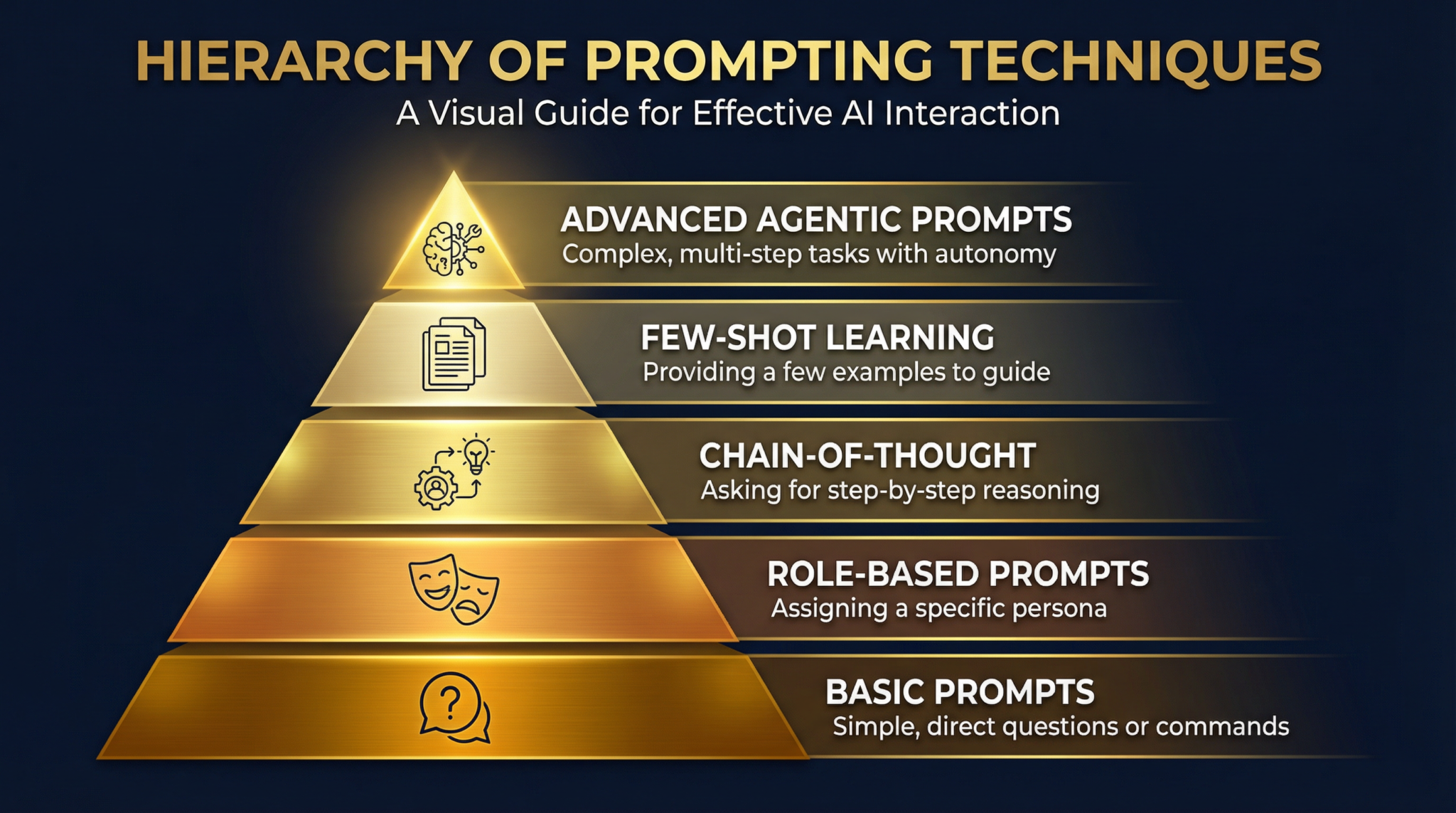
1. Contextual Layering for Complex Instructions
Layering context within your prompt enables GPT-5.4 to understand multifaceted instructions more effectively. This involves gradually building the prompt with background information, followed by specific tasks.
Example (Professional Work):
Prompt: “You are an expert project manager. The team is behind schedule due to supply chain delays. Draft an email to stakeholders explaining the situation, the mitigation plan, and the revised timeline.”
This layered context ensures GPT-5.4 comprehends the role, problem, and expected output.
2. Dynamic Role-Playing for Specialized Outputs
Assigning GPT-5.4 a specific role or persona tailors the response style and technical depth.
Example (Coding):
Prompt: “You are a senior Python developer specializing in machine learning. Provide a clean, commented script to preprocess a CSV dataset with missing values and categorical variables.”
This guides GPT-5.4 to generate code with appropriate expertise and clarity.
3. Progressive Refinement for Iterative Improvements
Use multi-step prompting to refine outputs progressively. Start with a broad request, then iteratively ask for improvements or expansions.
Example (Data Analysis):
Prompt 1: “Summarize the key trends in this sales dataset.”
Prompt 2 (follow-up): “Expand on the regional sales differences with possible explanations.”
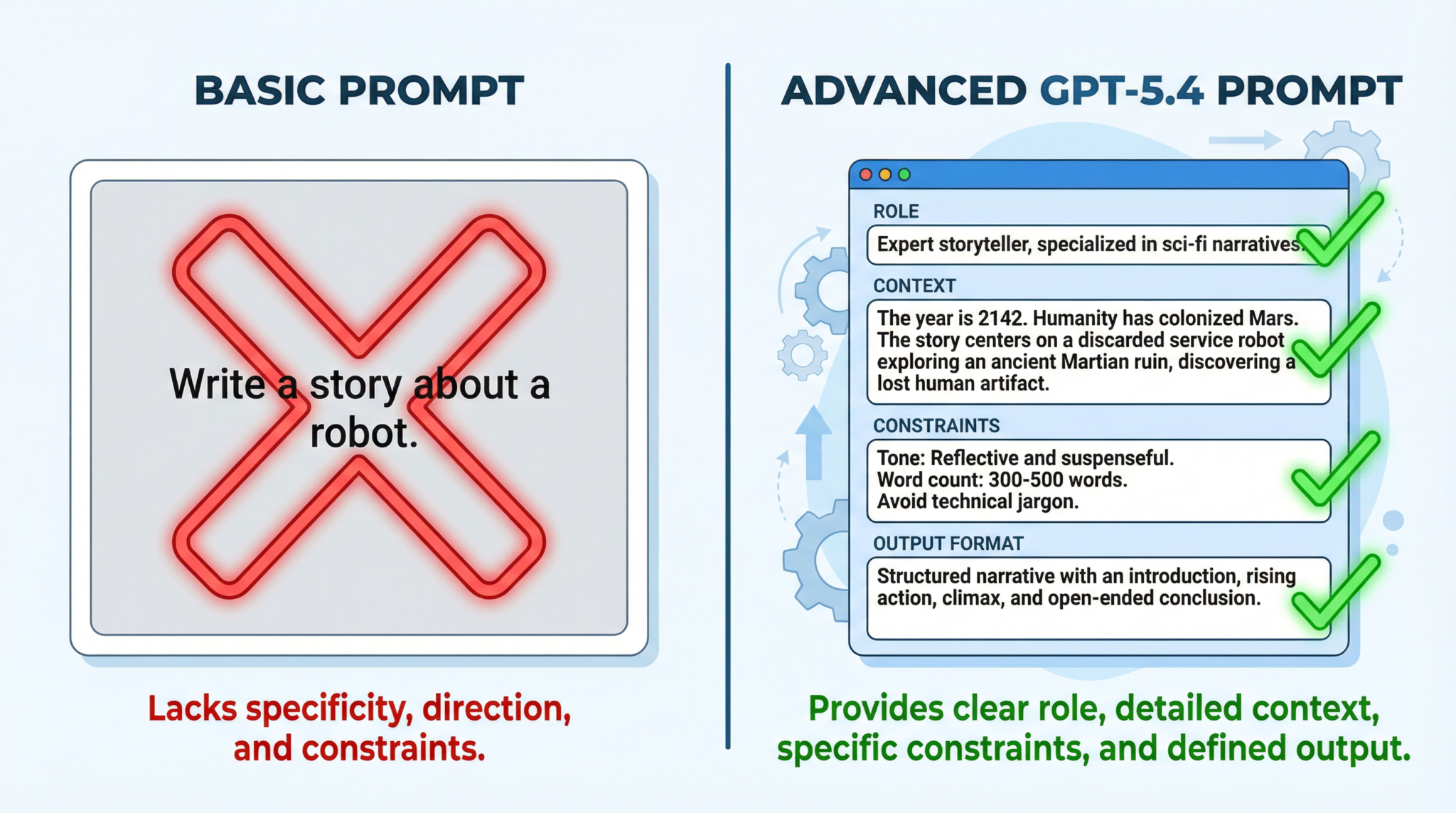
4. Embedding Constraints to Guide Responses
Specify limits such as word count, tone, or formatting to control the response.
Example (Professional Work):
Prompt: “Write a formal executive summary of the quarterly report in no more than 250 words, highlighting only financial metrics.”
5. Multi-Modal Prompt Integration
Though GPT-5.4 primarily processes text, you can simulate multi-modal understanding by describing images, charts, or code snippets in the prompt for contextual analysis.
Example (Data Analysis):
Prompt: “Given a bar chart showing monthly revenue growth with peaks in June and November, analyze potential causes for these spikes.”
6. Prompt Chaining for Workflow Automation
Chain multiple prompts to automate complex workflows by passing outputs as inputs to subsequent prompts.
Example (Coding):
- Prompt 1: “Generate a Python function to clean text data by removing punctuation and converting to lowercase.”
- Prompt 2: “Using the function from Prompt 1, write a script to tokenize and count word frequency in a text file.”
7. Leveraging Temperature and Top-p Settings
Adjusting the temperature (creativity) and top-p (nucleus sampling) parameters optimizes GPT-5.4’s response style—from deterministic to creative.
Example (Professional Work):
Set a low temperature (0.2) for concise, factual reports, or a higher temperature (0.7) for brainstorming creative marketing slogans.
8. Code Generation with Context Preservation
Feed GPT-5.4 relevant code snippets and ask for additions or modifications, ensuring it maintains style and logic consistency.
Example (Coding):
Prompt: “Here is a function to compute Fibonacci numbers recursively. Modify it to use memoization for efficiency.”
9. Data Analysis via Structured Query Prompts
Frame data analysis requests like queries, specifying dataset structure, columns, and desired outputs to get precise insights.
Example:
Prompt: “Given a dataset with columns Date, Sales, Region, generate monthly sales summaries by region and identify the top-performing month.”
10. Advanced Summarization for Large Documents
Break down large documents into sections and prompt GPT-5.4 to summarize each before creating an overall summary.
Example (Professional Work):
“Summarize each chapter of the attached annual report, then provide an executive summary combining key findings.”
11. Custom Syntax for Domain-Specific Language
Create and define custom tags or markers within prompts to instruct GPT-5.4 to respond in specific formats or with specialized vocabulary.
Example (Coding):
Prompt: “Using <SQL> and </SQL> tags, generate a query to select customers with orders above $1000.”
12. Multi-Turn Dialogue Memory Utilization
Use GPT-5.4’s improved memory across turns to build extended conversations or debugging sessions.
Example (Coding):
“We started with a sorting algorithm. Now optimize it for large datasets.” GPT-5.4 retains prior context for continuity.
13. Error Diagnosis and Debugging Prompts
Feed error messages or problematic code sections and ask GPT-5.4 to identify and fix bugs.
Example (Coding):
Prompt: “This Python code throws an IndexError. Please diagnose and correct it.”
14. Augmenting Creativity in Content Generation
Encourage GPT-5.4 to generate novel ideas or perspectives by framing prompts as open-ended questions and using higher creativity settings.
Example (Professional Work):
Prompt: “Suggest five innovative approaches to improve remote team collaboration.”
15. Data Visualization Description Generation
Describe charts or graphs in detail and request GPT-5.4 to generate alt text or narrative descriptions for accessibility.
Example (Data Analysis):
Prompt: “Generate an accessible description for a line graph showing steady growth in Q1 followed by a sharp decline in Q2.”
16. Ethical and Bias-Aware Prompting
Explicitly instruct GPT-5.4 to avoid biased or harmful content and promote inclusivity.
Example:
Prompt: “Write a job advertisement that is gender-neutral and inclusive.”
17. Multi-Language Prompting and Translation
Leverage GPT-5.4’s multilingual capability to translate or generate content in multiple languages.
Example:
Prompt: “Translate the following marketing copy into Spanish and provide a culturally adapted version.”
18. Summarizing Code Logic for Documentation
Ask GPT-5.4 to explain code functionality in plain language for documentation purposes.
Example (Coding):
Prompt: “Explain how this JavaScript function manages user authentication.”
19. Automating Report Generation
Provide raw data or analysis outputs and instruct GPT-5.4 to generate comprehensive, formatted reports.
Example (Data Analysis):
Prompt: “Based on this dataset of quarterly sales, generate a detailed report including charts, key insights, and recommendations.”
20. Scenario Simulation and Forecasting
Request simulations of hypothetical situations to support decision-making and forecasting.
Example (Professional Work):
Prompt: “Simulate the impact on revenue if product prices increase by 10% and customer churn rises by 5%.”
21. Prompt Templates for Reusability
Create modular prompt templates that can be customized with variables for repeated tasks.
Example:
Template: “As a {role}, please {task} focusing on {focus}.”
Replace variables for different roles and tasks.
22. Leveraging External Databases with GPT-5.4
Integrate GPT-5.4 with external APIs or databases by formatting prompts as queries or data requests.
Example:
Prompt: “Using the company CRM data, generate a list of top 10 clients to target for upselling.”
23. Multi-Objective Optimization in Prompts
Request GPT-5.4 to balance several goals simultaneously, for example, maximizing clarity while minimizing length.
Example (Professional Work):
Prompt: “Write a concise summary of project risks that is easy to understand for non-technical stakeholders.”
24. Meta-Prompting for Self-Improvement
Ask GPT-5.4 to critique its own output and suggest improvements iteratively.
Example:
Prompt: “Review the previous summary for completeness and clarity, then provide an improved version.”
25. Real-Time Collaboration and Co-Creation
Use GPT-5.4 in collaborative workflows by sharing prompts and outputs in real time for brainstorming and editing.
Example:
Teams can use GPT-5.4 to co-create marketing copy, with prompts evolving based on group feedback.
Access 40,000+ AI Prompts for ChatGPT, Claude & Codex — Free!
Subscribe to get instant access to our complete Notion Prompt Library — the largest curated collection of prompts for ChatGPT, Claude, OpenAI Codex, and other leading AI models. Optimized for real-world workflows across coding, research, content creation, and business.
Conclusion: Elevate Your GPT-5.4 Experience
Mastering these 25 advanced GPT-5.4 prompting techniques will dramatically increase your efficiency and output quality across professional writing, coding, and data analysis. By layering context, controlling style and scope, leveraging iterative refinement, and integrating domain-specific knowledge, GPT-5.4 becomes not just a tool but a powerful partner in your work.
Remember to experiment with parameter tuning and prompt chaining to tailor GPT-5.4’s responses perfectly to your use case. Incorporate ethical guidelines and multi-language capabilities to expand your reach and impact. With practice and creativity, you can unlock the full potential of GPT-5.4 and revolutionize how you approach everyday challenges.
Explore our complete guide to GPT-5.4 to understand the model these prompting techniques are optimized for, and integrate these strategies into your workflows today.
For developers who want to apply these prompting techniques specifically to coding workflows, our Prompt Engineering for Developers guide covers how to structure prompts for code generation, debugging, and refactoring tasks, building on the foundational techniques covered in this article.
© 2026 ChatGPT AI Hub. All rights reserved.
🕐 Instant∞ Unlimited🎁 Free
Frequently Asked Questions
What is contextual layering in GPT-5.4 prompting?
Contextual layering involves structuring prompts with layered information, starting with background context and gradually introducing specific tasks. This technique helps GPT-5.4 process complex instructions more effectively, enhancing the accuracy and relevance of its responses in professional and technical tasks.
How does dynamic role-playing improve GPT-5.4 outputs?
Dynamic role-playing assigns specific roles or personas to GPT-5.4, guiding it to generate responses from a particular perspective. This technique is useful for specialized outputs, such as simulating expert advice or tailoring responses to different audience needs, enhancing the tool's versatility and precision.
What is prompt chaining and how is it used?
Prompt chaining involves linking multiple prompts in a sequence to automate workflows or complex tasks. Each prompt builds on the previous one, allowing GPT-5.4 to maintain context and continuity. This method is particularly effective for tasks requiring iterative processing or multi-step operations, such as report generation or data analysis.
Can GPT-5.4 be used for real-time collaboration?
Yes, GPT-5.4 supports real-time collaboration by facilitating co-creation and interactive sessions. Users can engage with the model to brainstorm ideas, refine content, or develop solutions collaboratively, enhancing productivity and innovation in team environments through seamless integration of AI capabilities.
How does GPT-5.4 handle multi-language prompting?
GPT-5.4 is equipped to handle multi-language prompting, enabling it to process and generate text in various languages. This feature supports translation tasks, cross-cultural communication, and global content creation, making it a versatile tool for international applications and diverse linguistic needs.
What are the ethical considerations in GPT-5.4 prompting?
Ethical considerations include ensuring bias-aware prompting and maintaining data privacy. Users should design prompts that minimize bias and adhere to ethical guidelines, fostering responsible AI use. GPT-5.4's advanced capabilities require careful management to prevent misuse and ensure fair, transparent interactions.
