
OpenAI Codex 2026: Remote SSH, Hooks, and Mobile Steering — Complete Developer Guide
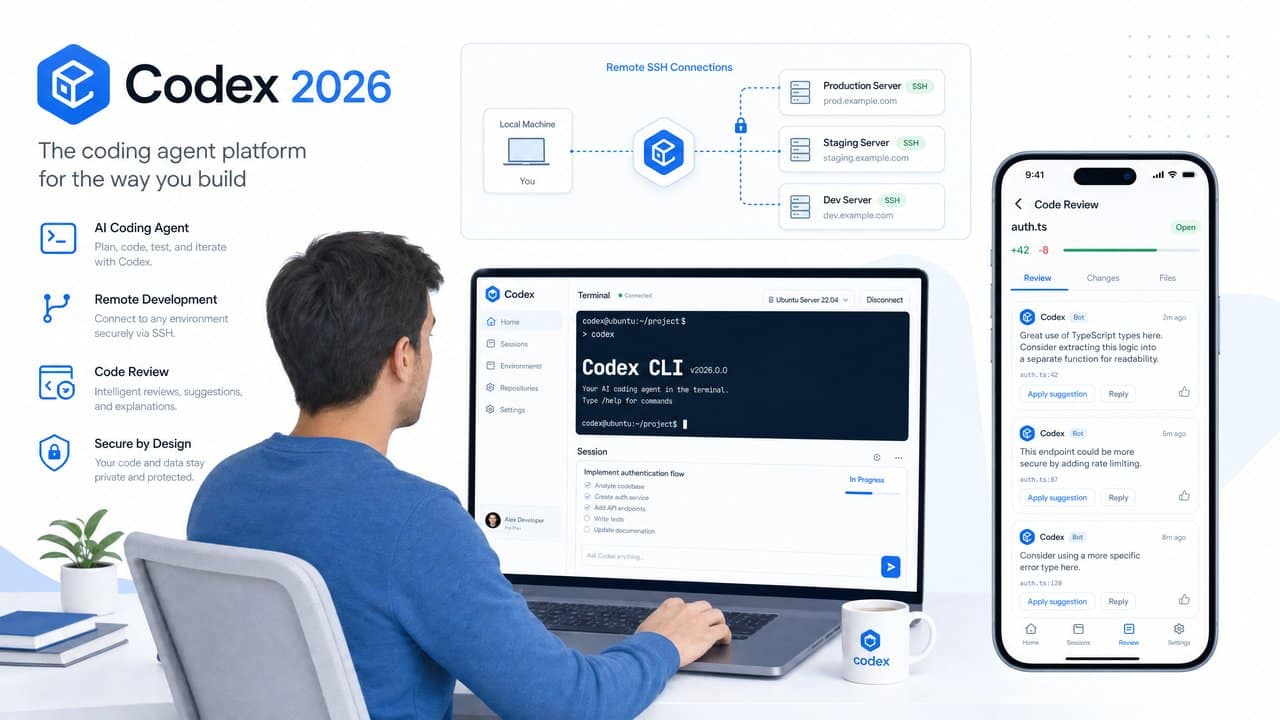
OpenAI Codex 2026 Relaunch: Mastering Remote SSH, Hooks, and Mobile Steering
In May 2026, OpenAI unveiled a groundbreaking relaunch of the Codex platform, advancing its agentic coding capabilities with robust features designed for modern developer workflows. This update includes native support for secure Remote SSH connections, a flexible system of Codex Hooks for scanning secrets and validating code, and an innovative mobile steering integration via the new ChatGPT mobile app. Together, these features transform the way developers interact with AI coding agents, enabling remote, secure, and real-time control over complex, long-running tasks.
This comprehensive tutorial will guide you through the new functionalities introduced in OpenAI Codex 2026, focusing on hands-on steps for setting up Remote SSH, configuring Codex Hooks, and leveraging mobile steering to oversee agent tasks from your smartphone. Whether you are a software engineer, DevOps professional, or AI enthusiast, mastering these capabilities will significantly enhance your productivity and control in agentic programming scenarios.
Understanding the OpenAI Codex 2026 Architecture and Feature Set
Understanding the OpenAI Codex 2026 Architecture and Feature Set
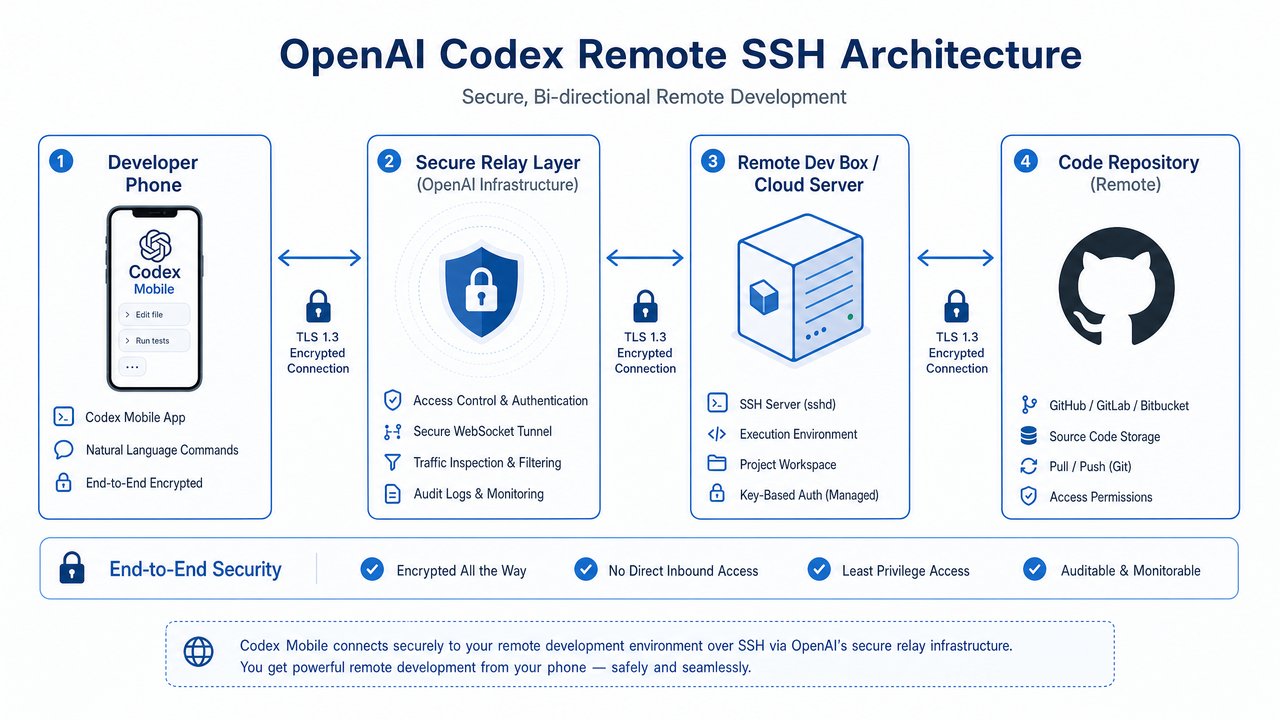
OpenAI Codex 2026 represents a major evolution of the agentic coding platform, significantly enhancing its capabilities by integrating advanced network security measures, real-time interactivity features, and highly extensible validation frameworks. These improvements not only enable more robust and secure AI-assisted development workflows but also enhance the user experience by allowing continuous control and monitoring across devices. Below, we provide a comprehensive exploration of the core architecture and a detailed overview of the May 2026 feature set, illustrating how these advancements work together to empower modern software engineering.
Agentic Coding Platform Overview
At its core, Codex 2026 functions as a highly autonomous AI coding agent designed to interpret natural language instructions and transform them into executable code that can be debugged, tested, and deployed. This autonomous behavior is enabled through a modular architecture composed of several critical components, each optimized for specific functions within the overall system:
- Language Model Core: The heart of Codex 2026 is a GPT-5-based language model, meticulously fine-tuned for code understanding and generation tasks. This model incorporates billions of parameters and is pre-trained on a diverse dataset of programming languages, frameworks, and documentation. Its architecture leverages transformer layers optimized for code syntax, semantic understanding, and contextual reasoning, enabling it to generate syntactically correct, efficient, and context-aware code across multiple languages.
- Execution Environment: To ensure safety and correctness, Codex 2026 utilizes isolated sandboxed environments where all generated code is executed and tested. These sandboxes mimic real-world runtime environments, supporting containerization and virtualization technologies such as Docker and lightweight VMs. This sandboxing approach prevents malicious or erroneous code from impacting host systems, while also allowing for dynamic resource allocation and environment configuration based on project requirements.
- Agent Controller: Serving as the orchestration layer, the Agent Controller manages task queues, supervises error handling, and coordinates interactions with the execution environment and external systems. It implements sophisticated scheduling algorithms to prioritize tasks, maintains state persistence for long-running jobs, and provides rollback mechanisms in case of failures. Additionally, it exposes monitoring hooks and telemetry data to facilitate debugging and performance analysis.
- Integration APIs: Codex 2026 offers a comprehensive set of interfaces that allow seamless integration with external systems such as remote servers (via SSH), continuous integration/continuous deployment (CI/CD) pipelines, cloud platforms, and mobile devices. These APIs are RESTful and support WebSocket connections for real-time data streaming, enabling Codex agents to be embedded within diverse development ecosystems and organizational workflows.
Architecturally, Codex 2026 is designed with scalability and modular extensibility in mind. The system leverages microservices deployed on Kubernetes clusters, ensuring high availability and fault tolerance. Communication between components is secured via mutual TLS, and authentication is handled through OAuth 2.0 and JWT tokens to safeguard user data and codebases.
May 2026 Feature Highlights
The May 2026 update introduces several groundbreaking features that significantly expand the platform’s security, interactivity, and adaptability. These features are designed to address common challenges in AI-assisted programming, such as maintaining secure remote workflows, enforcing organizational coding policies, and enabling developer oversight regardless of location.
- Remote SSH Connectivity: One of the standout enhancements is the introduction of secure, persistent SSH tunnels that allow Codex agents to operate directly on remote servers. This feature enables real-time code deployment, on-the-fly diagnostics, and environment management without requiring manual intervention or insecure workarounds.
Technical Details: Codex establishes SSH connections using industry-standard cryptographic protocols, supporting key-based authentication, multi-factor authentication (MFA), and integration with existing enterprise identity providers (IdPs) via SAML or LDAP. The persistent tunnels automatically recover from network interruptions, maintaining session continuity. Developers can configure access controls and audit logging to comply with internal security policies.
Example Workflow:
- Configure SSH credentials and target server details via the Codex dashboard or API.
- Initiate a Codex agent task that deploys code to the remote server through the established SSH tunnel.
- Monitor deployment progress and logs in real time from the Codex interface or mobile app.
- Execute remote commands or gather diagnostics as needed to validate the deployment.
# Example: Setting up a persistent SSH tunnel codex-cli ssh connect --host remote-server.example.com --user deployer --key ~/.ssh/id_rsa --persistent # Deploy code via Codex agent codex-cli deploy --agent-id 12345 --target remote-server.example.com --path /var/www/myapp - Codex Hooks Framework: This new pluggable system allows developers and organizations to inject custom validation logic during critical stages of the code generation lifecycle. Hooks can be configured to run before or after code generation, or prior to execution within the sandbox, enabling powerful use cases such as secret scanning, compliance checks, style enforcement, and security policy adherence.
Architecture & Extensibility: The Hooks Framework supports multiple hook types, including synchronous and asynchronous hooks, and is built on an event-driven architecture. Hooks are defined as modular plugins written in languages such as Python or JavaScript and can be versioned and managed via a centralized registry.
Sample Hook Configuration (YAML):
hooks:
  - name: SecretScanner
    stage: pre-execution
    script: secret_scanner.py
  - name: StyleEnforcer
    stage: post-generation
    script: style_enforcer.js
Sample Secret Scanning Hook (Python):
import re

def run_hook(code_snippet):
    # Regex pattern to detect AWS secret keys (example)
    secret_pattern = r'AKIA[0-9A-Z]{16}'
    matches = re.findall(secret_pattern, code_snippet)
    if matches:
        raise Exception(f"Secret keys detected: {matches}")
    return True
Benefits: By embedding custom logic directly into the generation and execution pipeline, organizations can enforce coding standards, prevent accidental exposure of sensitive information, and automate quality assurance seamlessly.
- Mobile Steering via ChatGPT App: Recognizing the need for developer mobility and continuous oversight, Codex 2026 integrates tightly with the ChatGPT mobile app to provide remote steering capabilities for long-running agent tasks.
Features Include:
- Real-time updates on task status, including progress bars and detailed logs.
- Screenshot sharing from remote execution environments to visualize GUI applications or rendered outputs.
- Terminal log streaming to review command outputs and debug information.
- Interactive command issuance to pause, resume, cancel, or modify running tasks.
Use Case Scenario: A developer initiating a complex build and deployment sequence can approve intermediate steps, troubleshoot errors, or adjust parameters directly from their smartphone without needing direct desktop access.
Integration Example: Developers receive push notifications for task milestones and can open detailed dashboards within the ChatGPT app to interact with agents.
{
  "taskId": "abc123",
  "status": "running",
  "logs": [
    "Build started...",
    "Compiling module A...",
    "Warning: Deprecated API usage detected."
  ],
  "actions": {
    "pause": true,
    "cancel": true,
    "sendCommand": true
  }
}
This relaunch of OpenAI Codex marks a transformative step toward making AI-assisted programming not only more powerful but also more secure, interactive, and adaptable to the complex realities of modern software development. In the next sections, we will dive deeper into each feature with hands-on tutorials, configuration guides, and case studies to help you leverage the full potential of Codex 2026.
Setting Up Remote SSH with OpenAI Codex 2026
Ready to Master OpenAI Codex 2026?
Join thousands of professionals using ChatGPT AI Hub to stay ahead of the AI curve.
Setting Up Remote SSH with OpenAI Codex 2026
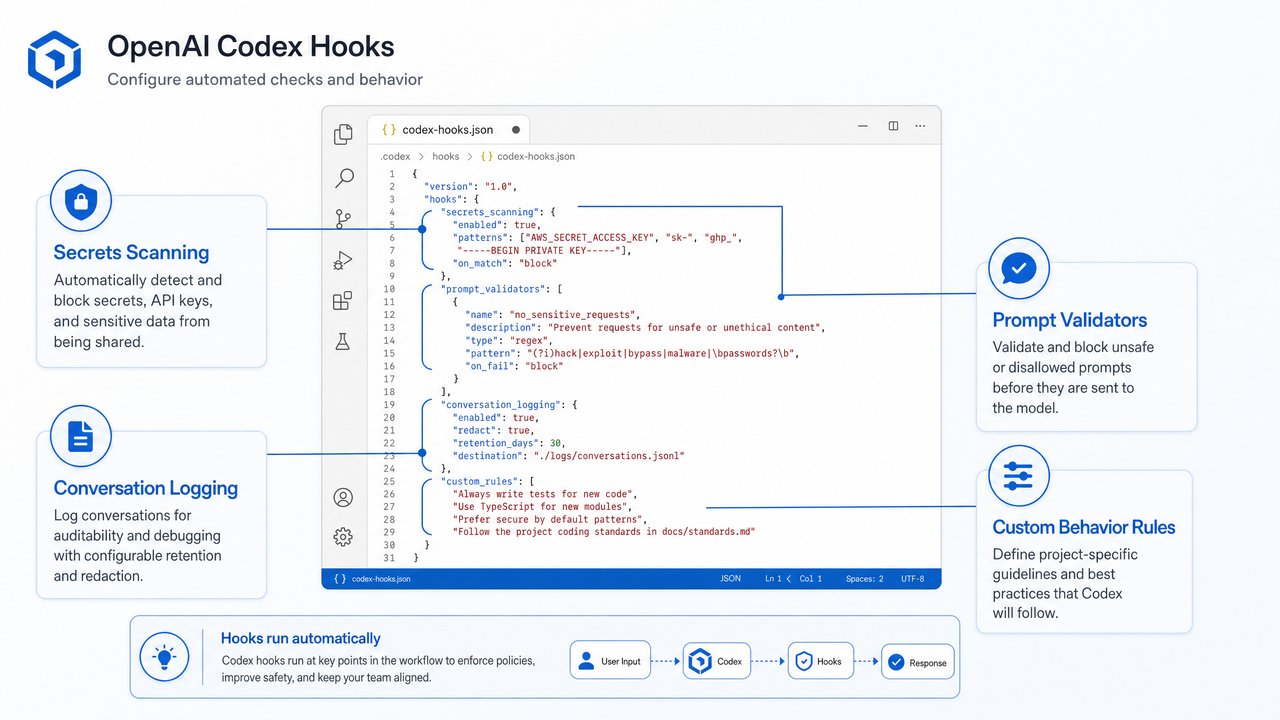
The 2026 relaunch of OpenAI Codex introduces a groundbreaking feature: the ability for Codex agents to establish secure Remote SSH connections. This enhancement enables the AI to execute code, perform diagnostics, and deploy software directly on your infrastructure without requiring manual intervention. By leveraging Remote SSH, developers and operations teams can automate complex workflows, conduct real-time troubleshooting, and orchestrate deployments across distributed environments — all while maintaining rigorous security standards.
This section provides an in-depth guide to setting up and utilizing Remote SSH with OpenAI Codex 2026, covering prerequisites, detailed configuration steps, security best practices, and advanced use cases such as multi-hop SSH agent hopping.
Prerequisites for Remote SSH Setup
Before configuring Remote SSH with Codex, ensure that the following prerequisites are met to guarantee a smooth and secure connection:
- SSH Access Credentials: You must have valid SSH access credentials for the target remote server. This typically includes either a private key (recommended for security) or a password. The private key should be protected with a strong passphrase and managed securely.
- OpenAI Codex CLI or SDK: Install the latest Codex CLI tool or SDK version 6.0 or higher. These versions include native support for SSH features, enabling seamless integration between your local environment and remote servers.
- Network Configuration: The remote server must be configured to accept incoming SSH connections from the Codex platform IP ranges. If direct access is restricted, you may need to set up a VPN or proxy tunnel that allows Codex agents to route traffic securely to the remote host.
- Codex Agent Permissions: Your Codex agent must be authorized within your OpenAI account to initiate SSH connections. This includes assigning appropriate roles and permissions in your OpenAI management console to restrict access only to necessary hosts and operations.
- Firewall and Security Group Settings: Verify that firewalls, security groups (especially in cloud environments like AWS, GCP, Azure), and intrusion detection systems permit SSH traffic on port 22 (or custom ports if configured).
- SSH Key Format Compatibility: Ensure your SSH keys are in a format supported by Codex. The recommended format is OpenSSH (RFC 4716). If using PuTTY or other key types, convert them using tools like
puttygen.
Step-by-Step: Configuring Remote SSH in Codex
Follow these detailed steps to configure and verify remote SSH connections with Codex agents:
- Generate or Provide SSH Keys:
If you do not already possess an SSH key pair, generate one using the native
ssh-keygenutility. This process creates a public/private key pair to facilitate secure, passwordless authentication.ssh-keygen -t rsa -b 4096 -C "[email protected]" -f ~/.ssh/id_rsa_codexThis command generates a 4096-bit RSA key pair with a comment for identification. When prompted, you can assign a passphrase for enhanced security.
Next, upload the public key (
~/.ssh/id_rsa_codex.pub) to the remote server’s~/.ssh/authorized_keysfile for the user account that Codex agents will access:ssh-copy-id -i ~/.ssh/id_rsa_codex.pub [email protected]Alternatively, manually append the public key contents to
~/.ssh/authorized_keyson the server. - Register SSH Credentials with the Codex CLI:
Use the Codex CLI to securely store your SSH private key, associating it with a convenient alias for future reference. This step ensures that Codex agents can retrieve and use the credentials without exposing sensitive key material in plain text.
codex ssh add --alias my-remote-server --host 192.168.1.100 --user ubuntu --key ~/.ssh/id_rsa_codexCommand Breakdown:
--alias: A user-friendly label identifying the remote server.--host: The IP address or domain name of the remote server.--user: The username on the remote machine to log in as.--key: Path to the private SSH key file.
Behind the scenes, Codex encrypts and stores these credentials in your local Codex configuration, leveraging OS-level keychain services where available.
- Verify Connectivity:
Before running any remote tasks, test that Codex can successfully connect to the target server:
codex ssh test --alias my-remote-serverUpon success, you will see a confirmation message along with server details such as OS version, uptime, and SSH server version.
If the connection fails, check for common issues such as network firewalls, incorrect credentials, or SSH daemon status on the remote server.
- Attach a Codex Agent to the Remote Host:
When initiating coding or deployment tasks, specify the SSH alias so that the commands execute remotely:
codex run --ssh my-remote-server --task "Deploy web application"This command instructs the Codex agent to open an interactive SSH session to
my-remote-server, execute the deployment commands, and stream the output back to your local environment or mobile app interface in real-time.Codex supports both synchronous execution (waiting for command completion) and asynchronous workflows (triggering background tasks with callback notifications).
Security Considerations for Remote SSH
OpenAI Codex 2026 incorporates multiple layers of security designed specifically for Remote SSH operations to ensure confidentiality, integrity, and auditability:
- Encrypted Tunnels: All SSH sessions leverage industry-standard cryptographic protocols (AES-256, ChaCha20) and key exchange algorithms (ECDH) to establish secure tunnels, protecting data from interception or tampering.
- Scoped Permissions: Codex agents operate under minimally privileged user accounts on remote hosts, preventing unauthorized access or privilege escalation. Role-based access controls (RBAC) within the Codex platform restrict SSH operations to designated servers and tasks.
- Session Auditing & Logging: Every command executed and corresponding output during an SSH session is logged in detail. These logs are accessible via the OpenAI dashboard, enabling security teams to perform comprehensive audits, forensic analysis, and compliance reporting.
- Key Management Practices: Codex discourages the use of password-based SSH authentication in favor of key pairs. Additionally, private keys are stored encrypted and never transmitted in plain text.
- IP Whitelisting: Users can configure IP whitelists ensuring that Codex agents only initiate SSH connections from approved IP ranges, mitigating the risk of unauthorized access.
- Multi-Factor Authentication (MFA): To further secure agent access, MFA can be enforced at the OpenAI account level and integrated with SSH sessions through PAM modules or custom hooks.
- Timeouts and Session Limits: Idle SSH sessions are automatically terminated after configurable timeouts to reduce exposure from unattended connections.
By combining these security measures, Codex 2026 enables safe remote execution even in highly regulated environments such as financial services, healthcare, and government sectors.
Advanced Use Case: Dynamic SSH Agent Hopping
Many enterprise networks enforce strict segmentation by placing critical systems behind bastion hosts or jump servers — intermediary machines that act as controlled gateways. To accommodate such architectures, Codex 2026 supports dynamic multi-hop SSH connections, allowing agents to traverse multiple hosts transparently.
This feature is particularly useful when the target server is not directly accessible from the Codex platform but can be reached through one or more jump hosts.
Configuring Multi-Hop SSH with Codex CLI
To configure agent hopping, define each hop as a separate SSH alias and specify the chaining via the --via parameter:
codex ssh add --alias jump-host --host jump.example.com --user admin --key ~/.ssh/jump_key
codex ssh add --alias target-server --host 10.0.0.5 --user ubuntu --key ~/.ssh/target_key --via jump-host
In this example:
jump-hostrepresents the bastion server accessible from Codex.target-serveris the final destination inside the private network.- The
--via jump-hostoption instructs Codex to first establish an SSH connection tojump-host, then use it as a proxy to reachtarget-server.
Behind the Scenes: How Multi-Hop Works
Codex agents implement multi-hop SSH by leveraging SSH’s ProxyJump or ProxyCommand functionality. This involves establishing a chain of encrypted tunnels, each forwarding traffic to the next hop until reaching the target host.
This approach maintains end-to-end encryption and session integrity while enabling access to deeply nested or isolated network segments.
Running Remote Tasks via Multi-Hop
Once configured, invoke Codex tasks targeting the multi-hop alias just like a single-hop connection:
codex run --ssh target-server --task "Run security audit scripts"Codex transparently handles the intermediate connection, providing seamless remote execution without requiring manual SSH proxy setup.
Best Practices for Multi-Hop SSH
- Use Dedicated Keys Per Hop: Assign unique SSH keys to each jump host and target server to limit credential exposure.
- Monitor Bastion Hosts: Since jump hosts provide gateway access, enable enhanced logging and intrusion detection on these machines.
- Keep Software Updated: Regularly patch SSH servers and clients to mitigate vulnerabilities.
- Limit Agent Permissions: Restrict Codex agent capabilities on jump hosts to only what is necessary for forwarding.
Through dynamic SSH agent hopping, OpenAI Codex 2026 empowers developers and IT teams to securely automate operations across complex, segmented infrastructures — unlocking new possibilities for AI-driven infrastructure management.
Implementing Codex Hooks: Secrets Scanning and Validation Pipelines
Implementing Codex Hooks: Secrets Scanning and Validation Pipelines
The Codex Hooks system introduces a robust and extensible mechanism to inject custom logic at multiple critical stages throughout the code generation and execution lifecycle. This extensibility layer empowers developers and DevOps teams to automate security checks, enforce corporate coding standards, validate generated outputs, and ensure compliance before code ever reaches production environments. By integrating hooks, organizations can elevate their software delivery pipelines with automated quality assurance and security validation, reducing manual intervention and mitigating risks associated with leaked secrets or non-compliant code.
Hook Types and Their Lifecycle Points
Codex Hooks operate by triggering user-defined scripts or executables at predefined lifecycle points in the code generation and execution workflow. These lifecycle stages provide natural checkpoints for injecting validation, scanning, or transformation logic. The table below summarizes the primary hook types, their trigger points, purposes, and common use cases:
| Hook Type | Trigger Point | Purpose | Example Use Cases |
|---|---|---|---|
| Pre-Generation | Before code generation begins | Validate input prompts, sanitize requests, enforce policy constraints |
|
| Post-Generation | Immediately after code generation, before any execution | Analyze generated code, scan for secrets and vulnerabilities, enforce style guides |
|
| Pre-Execution | Right before executing the generated code in the runtime environment | Validate execution safety, environment readiness, and code permissions |
|
| Post-Execution | After code execution completes | Analyze outputs, capture logs, update monitoring dashboards, flag errors |
|
Understanding these hook types and their trigger points allows teams to design comprehensive validation pipelines that embed quality and security checks throughout the automated code lifecycle.
Configuring a Sample Secret Scanning Hook
One of the most critical uses of Codex Hooks is to prevent the accidental inclusion of sensitive information such as cloud provider credentials, passwords, or API tokens in generated source code. Below is a detailed example demonstrating how to configure a post-generation hook to scan the generated code for common secret patterns using Python scripting.
The configuration uses a YAML-based format that Codex Hooks natively supports. The hook reads the generated code from stdin, applies regex matching to identify suspicious strings, and outputs errors or warnings accordingly. A non-zero exit code halts the pipeline, preventing unsafe code from proceeding.
hooks:
  - name: secret-scanner
    type: post-generation
    script: |
      import re
      import sys

      # Read the generated code from standard input
      code = sys.stdin.read()

      # Define regex patterns to detect AWS Access Keys and hardcoded passwords
      aws_key_pattern = r'AKIA[0-9A-Z]{16}'
      password_pattern = r'password\s*=\s*["\'].*?["\']'

      # Scan for AWS Access Keys
      if re.search(aws_key_pattern, code):
          print("Error: AWS Access Key detected in generated code!", file=sys.stderr)
          sys.exit(1)  # Halt further processing

      # Scan for hardcoded passwords and emit a warning
      if re.search(password_pattern, code):
          print("Warning: Hardcoded password detected in generated code.", file=sys.stderr)

      # If no critical secrets found, print success message
      print("Secret scan passed successfully.")
Step-by-step workflow to deploy this hook:
- Save the above YAML configuration into a file named
secret_scanner.yaml. - Register the hook with the Codex CLI tool:
codex hooks add --file secret_scanner.yaml- Trigger code generation tasks as usual. After each generation, the secret scanning hook automatically inspects the output.
- If an AWS key is detected, the hook outputs an error message and aborts the pipeline, preventing potentially sensitive code from advancing.
- If hardcoded passwords are found, a warning is logged, but the pipeline continues, allowing developers to review and remediate.
This example illustrates how straightforward it is to embed critical security checks into your automated workflows and enforce best practices consistently.
Integrating Validators for Coding Standards
Beyond security, maintaining high code quality is vital for long-term maintainability and collaboration. Codex Hooks allow seamless integration of popular linters and static analysis tools as part of pre-execution or post-generation validations. These integrations ensure generated code adheres to organizational style guides and coding standards before deployment.
For example, consider integrating eslint for JavaScript or pylint for Python:
- ESLint Integration (JavaScript Pre-Execution Hook):
hooks:
  - name: eslint-validator
    type: pre-execution
    script: |
      import subprocess
      import sys

      # Write the generated code to a temporary file
      with open('generated_code.js', 'w') as f:
          f.write(sys.stdin.read())

      # Run ESLint on the generated code
      result = subprocess.run(['eslint', 'generated_code.js'], capture_output=True, text=True)

      if result.returncode != 0:
          print("ESLint errors detected:", file=sys.stderr)
          print(result.stdout, file=sys.stderr)
          sys.exit(result.returncode)

      print("ESLint validation passed.")
- Pylint Integration (Python Post-Generation Hook):
hooks:
  - name: pylint-validator
    type: post-generation
    script: |
      import subprocess
      import sys

      with open('generated_code.py', 'w') as f:
          f.write(sys.stdin.read())

      result = subprocess.run(['pylint', 'generated_code.py'], capture_output=True, text=True)

      if result.returncode != 0:
          print("Pylint issues found:", file=sys.stderr)
          print(result.stdout, file=sys.stderr)
          sys.exit(result.returncode)

      print("Pylint validation passed.")
By embedding linters as hooks, teams can programmatically enforce style consistency and catch potential code issues early, significantly improving overall code quality and maintainability.
Hook Execution Flow and Error Handling
When multiple hooks are configured at the same lifecycle stage, Codex executes them sequentially in the order they were registered. This predictable execution order allows complex validation and scanning workflows to be composed modularly.
The following describes the detailed execution semantics and best practices for error handling in Codex Hooks:
- Sequential Execution: Hooks within the same lifecycle stage execute one after another, with each receiving the output or context from the previous step if applicable.
- Exit Codes: Hooks must return exit code
0upon success. Any non-zero exit code signals an error state that immediately halts the pipeline, preventing subsequent hooks or execution steps. - Output Streams: Hooks can print informational messages to
stdout, while warnings and errors should be directed tostderrfor clear differentiation. - Logging and Reporting: When a hook fails, Codex captures the error messages and reports them through the agent’s user interface or CLI, enabling developers to quickly identify and remediate issues.
- Retries and Fallbacks: Teams can implement retry logic or fallback hooks externally, but Codex itself treats any failure as a hard stop to maintain pipeline integrity.
This strict error handling model ensures that only code which passes all configured validations and security scans proceeds to execution or deployment, thereby enforcing a “fail-fast” approach that increases confidence in automated workflows.
For more detailed information on configuring and managing Codex Hooks, refer to the comprehensive documentation at [INTERNAL_LINK: Codex Hooks].
Mobile Steering with the ChatGPT App: Real-Time Task Monitoring and Control
Mobile Steering with the ChatGPT App: Real-Time Task Monitoring and Control
The ChatGPT mobile app integration introduced in 2026 marks a significant leap forward in how developers and teams manage AI-driven workflows, particularly those powered by Codex agents. This innovative feature enables users to steer long-running, complex AI tasks directly from their smartphones, offering unprecedented real-time control, visibility, and interaction. Whether you are in a meeting, commuting, or simply away from your workstation, mobile steering empowers you to stay connected and responsive to your AI workflows without delay.
Capabilities of Mobile Steering
The mobile steering functionality is designed to provide a rich, interactive experience that mimics the depth of control traditionally available only from desktop environments. Key capabilities include:
- Live Terminal Outputs: Stream command-line outputs as they are generated by the agent. This allows developers to monitor logs, track progress, and immediately identify errors or unexpected behavior without having to access a remote console or SSH session. The output is delivered with minimal latency, ensuring that the mobile interface remains synchronized with the agent’s execution.
- Task Approvals and Prompts: Many AI workflows include critical decision points that require user input. With mobile steering, notifications are pushed instantly to your device when the agent encounters such checkpoints. You can approve, reject, or modify the proposed action directly in the app, streamlining workflows that otherwise would require desktop intervention.
- Screenshot Sharing: For tasks involving UI automation or environment interaction, agents can capture screenshots and send them to your mobile device. This visual feedback helps verify that the agent is interacting correctly with applications or websites, aiding in troubleshooting or validation without needing remote desktop access.
- Interactive Commands: Beyond passive monitoring, the app allows you to send commands, code snippets, or configuration changes directly to the running agent session. This bi-directional communication facilitates rapid iteration, debugging, and task steering, all from the convenience of your phone.
Setting Up Mobile Steering
Getting started with mobile steering involves a straightforward setup process that connects your Codex environment with the ChatGPT mobile app. Follow these detailed steps to enable seamless integration:
- Install the ChatGPT Mobile App: Ensure you have the latest version of the ChatGPT app (version 2026.05 or later) installed on your iOS or Android device. The app is available from the Apple App Store and Google Play Store. This version includes the mobile steering interface and notification capabilities.
- Authenticate with OpenAI Credentials: Log into the ChatGPT app using the same OpenAI account credentials you use for Codex. This ensures secure linkage between your mobile device and your agent sessions.
- Initiate a Codex Task with Mobile Steering Enabled: On your development machine or server, launch your Codex agent task with the
--mobile-steerflag. For example:
codex run --ssh my-remote-server --task "Run integration tests" --mobile-steerThis command starts the specified task on the remote server via SSH and enables mobile steering for that session. As soon as the task begins, you will receive a push notification on your mobile device, informing you that monitoring and control are available.
Interacting with Tasks on Mobile
Once connected, the ChatGPT mobile app presents a dedicated interface optimized for managing and interacting with your running tasks. The interface is designed for clarity and responsiveness, enabling efficient multitasking and remote management. Key elements include:
- Logs Panel: This scrollable view streams terminal output and error messages in real-time. You can filter logs by severity or search for specific keywords, making it easier to pinpoint issues or review progress.
- Approval Requests: When the agent encounters a decision point, the app displays a prompt with clear options such as Approve, Deny, or Request Changes. These prompts are designed to be actionable with a single tap or swipe, reducing response latency.
- Screenshot Viewer: A built-in image viewer lets you inspect screenshots sent by the agent. This is especially useful for validating UI automation tasks or confirming that environment states meet expected conditions. Screenshots can be zoomed, annotated, or shared with team members directly within the app.
- Command Input: The app provides an input field where you can type commands, paste code snippets, or adjust configurations. Commands are transmitted securely and executed in the agent session immediately, providing a seamless feedback loop.
This level of interactivity reduces turnaround time for debugging and approvals, enabling developers to maintain high productivity levels regardless of their physical location. By integrating mobile steering into everyday workflows, teams can accelerate deployment cycles, quickly resolve issues, and maintain continuous oversight of critical AI-driven processes.
Security and Privacy in Mobile Steering
Security and privacy are paramount when enabling remote control of AI agents, especially over mobile networks. The mobile steering feature incorporates multiple layers of protection to safeguard sensitive data and operations:
- End-to-End Encryption: All communications between the Codex agent, the ChatGPT app, and OpenAI servers are encrypted using industry-standard TLS 1.3 protocols. This ensures that logs, commands, screenshots, and approvals remain confidential and tamper-proof during transmission.
- Secure Data Storage: Session data, including logs and screenshots, are stored encrypted both on the device and on OpenAI’s cloud infrastructure. Data retention policies comply with user consent and regulatory standards, giving you control over what information is stored and for how long.
- Multi-Factor Authentication (MFA): To prevent unauthorized access, the app supports MFA mechanisms such as authenticator apps, biometrics (Face ID, Touch ID), and hardware tokens. MFA is especially recommended for accounts with access to critical tasks.
- Session Timeout and Revocation: Idle sessions automatically time out after configurable periods, requiring re-authentication to resume control. Additionally, users can revoke device access remotely via their OpenAI account dashboard.
- Audit Logging: All user interactions, approvals, and commands sent via mobile steering are logged with timestamps and user identifiers. This audit trail is essential for compliance, troubleshooting, and forensic analysis.
By combining these security measures, the mobile steering feature offers a robust and trustworthy platform for managing AI agent workflows on the go, ensuring that your development and operational environments remain protected at all times.
Comparative Analysis: OpenAI Codex 2026 vs. Previous Versions
Comparative Analysis: OpenAI Codex 2026 vs. Previous Versions
Understanding the evolution of OpenAI Codex from its 2024 baseline release to the comprehensive 2026 relaunch provides valuable insight into how AI-assisted coding platforms are rapidly advancing to meet modern development demands. This comparative analysis delves deeply into the key feature enhancements, architectural improvements, and expanded capabilities introduced in the 2026 iteration. By breaking down each major attribute, we can appreciate the strategic leaps made to enhance security, usability, and integration across diverse environments.
To begin, the following table presents a side-by-side comparison of critical features, highlighting both the limitations of the 2024 Codex release and the transformative upgrades made by 2026:
| Feature | Codex 2024 | Codex 2026 Relaunch |
|---|---|---|
| Remote Execution | Local sandbox only | Secure Remote SSH with multi-hop support |
| Validation Hooks | Basic prompt filters | Extensible Codex Hooks system with lifecycle triggers |
| Mobile Integration | None | Full mobile steering with live logs, approvals, and commands |
| Security | Limited to API key management | Encrypted tunnels, session auditing, MFA support |
| User Interactivity | Primarily desktop CLI/web | Multi-platform: CLI, web dashboard, and mobile app |
1. Remote Execution: From Local Sandboxes to Secure Multi-Hop SSH
One of the most prominent leaps in Codex 2026 is the introduction of secure remote execution capabilities. Whereas the 2024 version confined code execution strictly to local sandboxes—isolated environments on a user’s machine or server—the 2026 relaunch enables developers to execute code remotely via SSH connections.
- Local Sandbox Limitations (2024): While local sandboxes provided a safe environment to test code snippets, they lacked flexibility when dealing with remote servers or cloud environments. This limitation meant developers needed to manually transfer code or rely on external tools for remote deployment.
- Secure Remote SSH with Multi-Hop (2026): The 2026 Codex introduces a fully integrated remote execution system leveraging SSH tunnels, including support for multi-hop connections. This means developers can securely chain SSH connections through intermediate hosts, enabling access to complex network topologies without exposing sensitive credentials.
Technical Architecture: The multi-hop SSH support is achieved through dynamic port forwarding and agent forwarding, allowing Codex to orchestrate commands seamlessly on remote machines without storing private keys locally. Additionally, robust encryption protocols ensure end-to-end confidentiality of all transmitted data.
Example Workflow:
codex remote exec --host prod-server.company.com --multi-hop "jump1.company.com,jump2.company.com" --command "deploy.sh"
This command triggers Codex to establish SSH connections sequentially through jump1.company.com and jump2.company.com before reaching the target prod-server.company.com to execute the deployment script.
2. Validation Hooks: Transitioning from Basic Filters to Extensible Lifecycle Triggers
Validation and prompt filtering in Codex 2024 were rudimentary, relying primarily on basic static filters to prevent unsafe or inappropriate inputs from being processed. While this provided a minimal safeguard, it lacked flexibility and contextual awareness.
The 2026 update revolutionizes this aspect by introducing an extensible hooks system integrated deeply into the Codex lifecycle. These hooks allow developers and administrators to inject custom validation logic at multiple stages, including:
- Pre-prompt validation: Inspect and modify user inputs before they are processed.
- Post-prompt validation: Analyze generated code snippets for compliance and security.
- Execution hooks: Enforce environment-specific constraints before code execution.
Example Hook Implementation: Below is a sample Node.js hook that validates generated code to prevent any invocation of dangerous system commands like rm -rf:
module.exports = function validateDangerousCommands(code) {
  const forbiddenPatterns = [/rm\s+-rf/, /shutdown/, /reboot/];
  for (const pattern of forbiddenPatterns) {
    if (pattern.test(code)) {
      throw new Error('Forbidden command detected in generated code.');
    }
  }
  return code;
};
By leveraging this hooks system, organizations can tailor Codex’s behavior to their unique compliance, security, and operational policies with fine-grained control.
3. Mobile Integration: Empowering Developers On-the-Go
Another critical gap in the 2024 version was the absence of any mobile platform support. Codex 2026 addresses this by introducing a dedicated mobile app and corresponding APIs designed to enable full-featured mobile steering of coding tasks.
- Live Logs: Real-time streaming of execution logs directly to mobile devices, allowing developers to monitor builds, tests, or deployments remotely.
- Approvals and Commands: Implement workflows requiring manual approval can now be handled through push notifications and interactive prompts on mobile, facilitating faster decision-making.
- Command Issuance: Developers can trigger commands, modify scripts, or rerun tasks from their phone, ensuring continuous productivity even away from the desk.
This mobile-first approach is pivotal in a world where remote work and distributed teams are prevalent, offering unmatched flexibility and responsiveness.
4. Security Enhancements: Beyond API Key Management
Security is a paramount concern in AI-assisted coding platforms. While the 2024 Codex release offered basic API key management for access control, it lacked comprehensive security features required for enterprise-grade deployments.
Codex 2026 introduces a multi-layered security infrastructure incorporating:
- Encrypted Tunnels: All remote execution traffic is encrypted end-to-end using state-of-the-art protocols like TLS 1.3 combined with SSH encryption, ensuring confidentiality and integrity.
- Session Auditing: Detailed logs of all user sessions, commands executed, and responses generated are maintained for compliance and forensic analysis.
- Multi-Factor Authentication (MFA): Integration with common MFA providers (e.g., TOTP apps, hardware tokens) enhances login security and reduces risk of unauthorized access.
- Role-Based Access Control (RBAC): Fine-grained permission settings enable admins to restrict actions and access based on user roles and project requirements.
These upgrades collectively provide a robust security posture, making Codex 2026 suitable for sensitive production environments.
5. User Interactivity: Expanding Platforms and Interfaces
The 2024 Codex primarily targeted desktop users through its command-line interface (CLI) and web dashboard. While functional, this limited the contexts in which developers could interact with the system.
With the 2026 relaunch, user interactivity has been expanded to a full multi-platform experience encompassing:
- Enhanced CLI: Improved command syntax, autocomplete, and context-sensitive help make the CLI more intuitive and efficient.
- Modern Web Dashboard: Redesigned with responsive layouts, drag-and-drop capabilities, and real-time collaboration features.
- Mobile Application: As discussed, the mobile app enables management and monitoring from anywhere.
This comprehensive platform support ensures developers can choose the most suitable interface for their workflow without sacrificing functionality.
Summary
In summary, the 2026 relaunch of OpenAI Codex marks a significant milestone by addressing the core limitations of the 2024 baseline. Through secure remote execution with multi-hop SSH, an extensible validation hooks framework, comprehensive mobile integration, enhanced security protocols, and multi-platform user interfaces, Codex 2026 establishes itself as a versatile and enterprise-ready AI coding assistant.
Organizations adopting Codex 2026 can expect improved developer productivity, tighter security compliance, and greater operational flexibility—key factors that align with the evolving needs of modern software development.
[INTERNAL_LINK: Remote SSH Setup]
Best Practices for Leveraging OpenAI Codex 2026 Features
Best Practices for Leveraging OpenAI Codex 2026 Features
Security Hygiene
Maintaining robust security hygiene is paramount when working with OpenAI Codex 2026 features, especially given the increased integration with development pipelines and cloud-based environments. Implementing stringent security measures helps protect sensitive data, prevent unauthorized access, and ensure compliance with both internal policies and external regulations.
-
Rotate SSH keys regularly and use hardware tokens where possible:
SSH keys are the foundation for secure access to remote servers and services. Regularly rotating these keys minimizes the risk of compromised credentials being exploited. It is recommended to implement a key rotation schedule—for example, every 60 to 90 days—depending on your organizational policy.
Additionally, hardware security tokens (such as YubiKeys or smartcards) provide an extra layer of security by storing cryptographic keys in tamper-resistant hardware, making them significantly harder to extract or misuse. Integration with hardware tokens can be done via OpenSSH’s support for FIDO2/U2F standards, which Codex 2026 supports natively, enabling seamless authentication workflows.
-
Configure hooks to scan not only for secrets but also for compliance violations:
Pre-commit and pre-push hooks are essential tools for maintaining code quality and security. Beyond scanning for hardcoded secrets like API keys or passwords, hooks should be extended to detect compliance violations, such as usage of deprecated libraries, license conflicts, or insecure coding patterns.
For example, integrating static analysis tools like Bandit for Python security checks, ESLint for JavaScript code quality, or custom scripts that enforce organizational coding standards can be automated within hooks. Codex 2026 allows for customizable hook scripting with enhanced performance, enabling complex validation logic without significant overhead.
-
Enable multi-factor authentication on all OpenAI accounts and mobile devices:
Multi-factor authentication (MFA) is a critical security control to prevent unauthorized access even if passwords are compromised. For OpenAI accounts, enabling MFA using authenticator apps, hardware tokens, or biometric verification adds a significant security barrier.
Furthermore, mobile devices that interface with Codex 2026 features—such as those used for mobile steering or notifications—should also have MFA enabled. This ensures that any actions triggered from these devices are verified and reduces the risk of account compromise through stolen or lost devices.
Efficient Workflow Integration
To maximize productivity when leveraging OpenAI Codex 2026, it’s important to integrate its capabilities seamlessly into existing development and operational workflows. This minimizes context switching and promotes continuous delivery with enhanced developer experience.
-
Use mobile steering to monitor CI/CD pipeline tasks during off-hours:
Mobile steering is a new feature in Codex 2026 that allows developers and DevOps teams to monitor and interact with CI/CD pipelines remotely via mobile devices. This capability is especially valuable for teams supporting 24/7 operations, enabling quick response to pipeline failures or approvals without needing a desktop environment.
To implement this effectively, set up secure mobile access through VPNs or zero-trust network access (ZTNA), and configure push notifications for critical pipeline events. You can also use mobile steering to trigger pipeline reruns, approve deployments, or inspect logs, thereby reducing downtime and accelerating issue resolution.
-
Automate hook configurations as part of your repository’s infrastructure-as-code:
Managing hooks manually across multiple repositories can be error-prone and time-consuming. By defining hook configurations declaratively in infrastructure-as-code (IaC) tools such as Terraform, Ansible, or even as part of your repository’s configuration files (e.g., YAML or JSON), you can easily enforce consistent security and quality policies.
Codex 2026 supports dynamic hook templating and versioning, allowing you to define reusable hook modules that can be updated and rolled out automatically. This approach also facilitates auditability and compliance by maintaining a version-controlled record of all hook configurations.
-
Leverage multi-hop SSH for accessing siloed environments without exposing broad network access:
Many organizations use segmented network architectures to isolate sensitive environments. Multi-hop SSH allows users to securely connect through a series of trusted jump hosts to reach these isolated environments without exposing them directly to the broader network.
OpenAI Codex 2026 enhances support for multi-hop SSH by automating connection setups and providing seamless credential forwarding. For example, a developer can initiate a session on their local machine that automatically chains through multiple bastion hosts, maintaining end-to-end encryption and audit logging. This reduces operational complexity while maintaining strict access controls.
Performance Optimization
Optimizing the performance of integrations with OpenAI Codex 2026 ensures smooth developer experiences and efficient resource utilization, especially when handling large codebases or high-frequency operations.
-
Cache frequently used SSH connections to reduce latency:
Establishing new SSH connections can add latency due to handshake overhead. Codex 2026 allows for persistent SSH connection caching via control master sockets, enabling multiple sessions to reuse a single underlying connection.
Implementing connection caching reduces delays in operations such as remote command execution, file transfers, or hook validations. For instance, developers can configure their SSH clients with the following snippet in
~/.ssh/config:Host * ControlMaster auto ControlPath ~/.ssh/controlmasters/%r@%h:%p ControlPersist 10mThis setup maintains the connection for 10 minutes after the last session closes, significantly improving responsiveness.
-
Batch hook validations for large codebases to optimize runtime:
Running hooks on every file change in a large repository can introduce significant delays. Instead, batch processing hook validations by grouping changed files or scheduling batch runs can vastly improve efficiency.
For example, using Codex 2026’s enhanced hook framework, you can configure hooks to trigger on commit ranges or pull request diffs, validating only the necessary files. Additionally, asynchronous hook execution and parallelization can leverage multi-core processors to reduce runtime.
-
Use mobile notifications judiciously to avoid alert fatigue during long tasks:
While mobile notifications are valuable for keeping teams informed, excessive alerts can cause alert fatigue, leading to missed critical messages. Careful configuration of notification thresholds, aggregation of related alerts, and user-specific notification preferences are essential.
For instance, Codex 2026 supports customizable notification rules that can aggregate repetitive pipeline status updates into summary messages, deliver critical alerts only, and allow users to snooze or mute notifications during off-hours or focus periods.
Useful Links
Useful Links
To help you effectively navigate and utilize OpenAI Codex and its related technologies, we have compiled a comprehensive list of essential resources. These links cover official documentation, practical guides, development tools, security practices, and platform-specific development environments. Whether you are a beginner seeking foundational knowledge or an experienced developer looking for advanced integrations, these resources will support your journey.
-
OpenAI Codex Official Documentation
This is the primary resource for understanding everything about OpenAI Codex. It provides in-depth technical details about the Codex API, including how to authenticate requests, utilize different endpoints, and optimize your prompts for the best results. The documentation also covers versioning, rate limits, and error handling techniques to ensure robust integration.
Key topics covered include:
- Introduction to Codex capabilities and supported languages
- How to construct and format prompts for code generation
- Examples of code completion, translation, and analysis
- Best practices for handling API responses and managing sessions
- Detailed explanation of Codex-specific parameters like “temperature” and “max_tokens”
-
Remote SSH with OpenAI Codex Guide
This guide explains how to leverage OpenAI Codex capabilities over secure shell (SSH) connections for remote development scenarios. It is especially useful for developers who want to integrate Codex into remote servers or cloud environments, enabling real-time code generation and assistance without compromising security.
Highlights of the guide include:
- Step-by-step instructions to set up SSH keys and configure secure access
- Sample scripts demonstrating how to invoke Codex commands remotely
- Best practices for maintaining session persistence and handling network interruptions
- Security considerations to prevent unauthorized access and data leaks
-
Codex Hooks Framework Reference
The Hooks Framework is an extensibility mechanism allowing developers to integrate custom workflows and event-driven actions within Codex-powered applications. This reference provides detailed documentation on creating, managing, and deploying hooks for automating tasks such as linting, testing, or code formatting triggered by Codex outputs.
Core aspects covered include:
- Defining hook points and event triggers
- Writing custom hook scripts in supported languages
- Integrating with third-party Continuous Integration (CI) tools
- Debugging and monitoring hook executions
-
ChatGPT Mobile App Announcement
This official blog post announces the launch of the ChatGPT mobile application, which brings advanced conversational AI capabilities powered by OpenAI models to Android and iOS devices. It covers features, user experience highlights, and future roadmap insights.
Why this is relevant for developers:
- Understanding how conversational AI can be integrated into mobile apps
- Insights into user interface design for AI-driven chat experiences
- Potential opportunities for mobile SDKs and API integrations
-
OpenAI Codex SDK GitHub Repository
This repository contains the official Software Development Kit (SDK) for OpenAI Codex, providing libraries, sample code, and tools to accelerate your development process. The SDK supports multiple programming languages and offers abstractions that simplify authentication, request handling, and response parsing.
Features of the SDK include:
- Pre-built client libraries for Python, JavaScript/TypeScript, and more
- Example projects demonstrating common use cases like code generation and refactoring
- Utilities for managing API keys and environment configurations
- Active community discussions and issue tracking for support
-
OpenAI Security Best Practices
Security is paramount when integrating AI services into your applications. This resource outlines OpenAI’s recommended security practices to protect your API keys, safeguard user data, and ensure compliance with privacy regulations.
Topics covered include:
- Secure storage and rotation of API credentials
- Implementing role-based access controls in multi-user environments
- Data encryption techniques during transmission and at rest
- Strategies for detecting and mitigating abuse or anomalous usage patterns
- Compliance considerations for GDPR, CCPA, and other privacy laws
-
Android Developer Studio (for mobile integration)
Android Studio is the official integrated development environment (IDE) for Android application development. It is crucial for developers aiming to build mobile apps that leverage OpenAI Codex or ChatGPT functionalities on Android devices.
Key features for mobile AI integration:
- Powerful code editor with advanced refactoring tools
- Built-in emulator to test AI-driven features across various device configurations
- Support for Kotlin and Java, the primary Android development languages
- Integration with Gradle build system for managing dependencies and build variants
- Tools for debugging network requests and monitoring API interactions
-
Apple Xcode (for iOS mobile development)
Xcode is Apple’s official IDE for iOS and macOS application development. It provides all the necessary tools to create high-quality mobile applications that can integrate with OpenAI’s AI models, including Codex and ChatGPT.
Important aspects for AI-powered iOS apps:
- Swift and Objective-C support for flexible development options
- Interface Builder for designing intuitive UI/UX tailored to AI interactions
- Simulator for testing AI features on multiple iPhone and iPad device configurations
- Instruments for profiling performance and analyzing network usage
- Support for integrating RESTful APIs and WebSocket connections to communicate with OpenAI services
By exploring these resources, developers can gain a holistic understanding of how to harness OpenAI’s advanced language models effectively, maintain secure and scalable architectures, and build compelling AI-powered applications across multiple platforms.
Related Articles
Conclusion
Related Articles
Conclusion
The OpenAI Codex 2026 relaunch represents a groundbreaking leap forward in the domain of AI-assisted software development. This latest iteration integrates multiple cutting-edge features—most notably, secure remote execution, extensible validation through hooks, and unprecedented mobile interactivity. Collectively, these enhancements empower developers and organizations to streamline the entire software development lifecycle with heightened security, adaptability, and real-time responsiveness. By harnessing these capabilities, development teams can accelerate innovation, reduce operational risks, and deliver higher-quality software products with greater efficiency.
Key Innovations in Codex 2026
- Secure Remote Execution: The platform now supports robust remote SSH capabilities that enable developers to execute code safely on remote servers or cloud environments without compromising sensitive credentials or exposing infrastructure to vulnerabilities. This feature ensures that sensitive operations can be performed remotely while maintaining strict access controls and audit trails, an essential requirement for enterprise-grade applications.
- Extensible Validation with Codex Hooks: Codex Hooks introduce a modular, event-driven mechanism to insert custom validation, compliance checks, or business logic at various stages of the development pipeline. This extensibility allows teams to enforce coding standards, automate quality assurance, and integrate third-party verification tools seamlessly—thus embedding governance directly within the development process.
- Unprecedented Mobile Interactivity: The relaunch brings full-featured mobile SDKs and responsive interfaces, enabling developers to monitor, manage, and even execute complex workflows directly from mobile devices. This ubiquitous access facilitates continuous development and operational agility, particularly valuable for distributed teams and fast-paced environments.
Architectural Overview and Workflow Integration
The Codex 2026 platform is architected around a modular agentic system that orchestrates intelligent AI agents responsible for different facets of software development—from code generation and validation to deployment and monitoring. This decoupled architecture supports asynchronous workflows and scalable parallel processing, making it suitable for both individual developers and large-scale DevOps teams.
Here is a high-level workflow demonstrating how these components interact:
| Step | Component | Functionality | Example Use Case |
|---|---|---|---|
| 1 | Code Generation Agent | Generates initial code snippets or modules based on natural language prompts or templates. | Generating boilerplate code for a new microservice. |
| 2 | Codex Hooks Validator | Applies custom validation rules and compliance checks using user-defined hooks. | Enforcing security policies such as input sanitization or dependency versioning. |
| 3 | Remote Executor | Deploys and runs code securely on remote environments over SSH, capturing execution results and logs. | Running integration tests on a remote staging server. |
| 4 | Mobile Interaction Layer | Provides real-time notifications, control interfaces, and workflow steering via mobile apps. | Approving deployment pipelines or responding to alerts while away from the desk. |
Step-by-Step Guide to Unlocking Codex 2026’s Potential
To fully leverage the power of Codex 2026, it is crucial to follow a structured approach. Below is a recommended workflow to maximize productivity and security:
- Initial Setup and Authentication: Configure your development environment by installing the Codex 2026 CLI and SDKs. Set up secure SSH keys for remote execution and authenticate agents using OAuth or API tokens.
- Define and Register Codex Hooks: Develop custom validation hooks tailored to your project’s needs. Register these hooks within the Codex platform to ensure they trigger automatically during code commits or deployment phases.
- Implement Remote Execution Pipelines: Configure remote servers with appropriate access controls and integrate them into Codex workflows. Validate connectivity and test execution of sample scripts remotely.
- Enable Mobile Interactivity: Install mobile clients and configure push notifications. Customize dashboards to monitor active workflows and receive alerts in real time.
- Continuous Monitoring and Feedback: Utilize Codex’s telemetry and logging features to track performance, detect anomalies, and iteratively improve AI agents and hooks based on usage data.
Comprehensive Code Example: Automated Compliance Validation with Codex Hooks
Below is a detailed example demonstrating how to implement a Codex Hook that validates Python code to ensure all functions include docstrings, a common compliance requirement in professional codebases.
# codex_hook.py
from codex_hooks import HookBase, register_hook

class DocstringValidator(HookBase):
    def validate(self, code: str) -> bool:
        import ast

        try:
            tree = ast.parse(code)
        except SyntaxError:
            return False  # Invalid syntax

        for node in ast.walk(tree):
            if isinstance(node, ast.FunctionDef):
                if not ast.get_docstring(node):
                    self.log(f"Function '{node.name}' is missing a docstring.")
                    return False
        return True

    def log(self, message: str):
        print(f"[DocstringValidator] {message}")

# Register the hook with Codex
register_hook('pre-deployment', DocstringValidator())
This hook can be integrated into your CI/CD pipeline to prevent code without proper documentation from being deployed, thus maintaining code quality and facilitating future maintenance.
Industry Context and Future Outlook
The introduction of Codex 2026 aligns with broader industry trends emphasizing AI augmentation, security-first development practices, and remote-first workflows. As enterprises increasingly adopt AI-driven development tools, platforms like Codex 2026 set new standards for how intelligent agents can collaborate with human developers to enhance productivity while mitigating risk.
Looking ahead, we anticipate further enhancements such as deeper integration with popular DevOps tools (e.g., Kubernetes, Terraform), expanded support for multi-cloud environments, and advanced AI-driven code refactoring and optimization capabilities. Staying current with Codex’s evolving features will be critical for organizations aiming to maintain a competitive edge.
By embracing the capabilities described in this tutorial and continuously refining your workflows, you position yourself and your team to confidently navigate the rapidly evolving landscape of AI-driven programming, unlocking innovation and operational excellence at unprecedented scale.
Stay Updated with the Latest AI News
Subscribe to ChatGPT AI Hub for daily tutorials, guides, and breaking AI news.
