
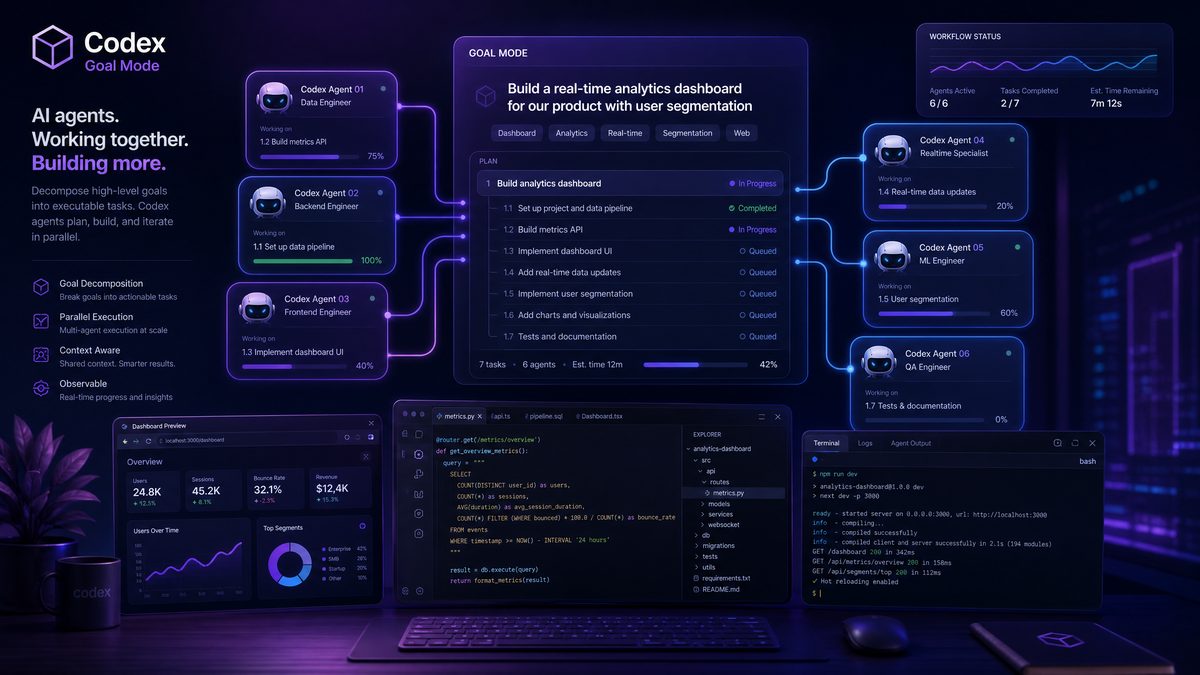
OpenAI’s June 2026 enterprise update to Codex represents the most significant architectural shift the platform has undergone since its initial release. This isn’t an incremental feature drop — it’s a fundamental reimagining of how AI-assisted development operates at organizational scale. Goal Mode, multi-agent orchestration, remote locked deployment, and a completely overhauled admin analytics dashboard collectively move Codex from a sophisticated autocomplete engine into a genuine autonomous development platform capable of managing complex, multi-step engineering tasks across distributed teams.
Enterprise customers who have been running Codex in production environments will recognize the pain points this update addresses directly: context fragmentation across long sessions, lack of centralized governance over AI-generated code, inability to chain dependent tasks intelligently, and the persistent challenge of deploying Codex securely in regulated industries. The June 2026 update tackles all of these simultaneously, and the implementation details matter enormously for teams planning their migration and governance strategies.
This analysis covers every significant change in the update, with configuration examples, architectural diagrams in prose, and concrete guidance for enterprise architects and engineering managers responsible for deploying these capabilities responsibly.
Goal Mode: Persistent Intent Across Complex Engineering Tasks
Goal Mode is the headline feature of the June 2026 update, and it requires a fundamental mental model shift from how most engineers currently interact with Codex. In standard prompting, every interaction is essentially stateless from an intent perspective — you describe what you want, Codex responds, and the next prompt starts fresh in terms of the overarching objective. Goal Mode introduces a persistent, structured intent layer that sits above individual prompts and governs how Codex interprets, prioritizes, and sequences all subsequent actions within a session or workflow.
The Architecture of Goal Mode
When you activate Goal Mode, you define a Goal Specification Object (GSO) — a structured declaration that includes the primary objective, success criteria, constraints, and optionally a set of sub-goals with dependency relationships. The GSO persists for the lifetime of the goal, and every subsequent prompt is interpreted in the context of advancing that goal rather than as an isolated instruction. Codex maintains an internal goal state that tracks progress against each success criterion, flags when actions would violate constraints, and automatically sequences sub-goals based on their dependency graph.
The GSO is defined in JSON and can be passed programmatically via the API or interactively through the updated TUI. Here is a representative Goal Specification for a non-trivial engineering task:
{
  "goal_id": "gso-2026-migrate-auth-service",
  "title": "Migrate authentication service to OAuth 2.1 with PKCE",
  "primary_objective": "Replace legacy session-based authentication in the user-service module with a fully compliant OAuth 2.1 implementation using PKCE flow, maintaining zero downtime during migration",
  "success_criteria": [
    {
      "criterion_id": "sc-001",
      "description": "All existing authentication tests pass without modification",
      "validation_type": "automated_test",
      "test_command": "pytest tests/auth/ -v --tb=short"
    },
    {
      "criterion_id": "sc-002",
      "description": "PKCE challenge generation meets RFC 7636 specifications",
      "validation_type": "compliance_check",
      "standard": "RFC-7636"
    },
    {
      "criterion_id": "sc-003",
      "description": "No direct database credential access in authentication path",
      "validation_type": "static_analysis",
      "tool": "semgrep",
      "ruleset": "p/owasp-top-ten"
    }
  ],
  "constraints": [
    "Do not modify the public API contract for /auth/login or /auth/refresh",
    "Maintain backward compatibility with existing JWT token format for 90 days",
    "All new code must include type annotations",
    "Maximum cyclomatic complexity of 10 per function"
  ],
  "sub_goals": [
    {
      "id": "sg-001",
      "title": "Audit existing authentication codebase",
      "depends_on": [],
      "outputs": ["auth_audit_report.md"]
    },
    {
      "id": "sg-002",
      "title": "Design OAuth 2.1 integration layer",
      "depends_on": ["sg-001"],
      "outputs": ["oauth_design.md", "interface_contracts.py"]
    },
    {
      "id": "sg-003",
      "title": "Implement PKCE flow handlers",
      "depends_on": ["sg-002"],
      "outputs": ["src/auth/pkce.py", "src/auth/oauth_client.py"]
    },
    {
      "id": "sg-004",
      "title": "Write migration tests and compatibility layer",
      "depends_on": ["sg-003"],
      "outputs": ["tests/auth/test_oauth21.py", "src/auth/compat.py"]
    }
  ],
  "context": {
    "codebase_path": "/workspace/user-service",
    "language": "python",
    "framework": "FastAPI",
    "python_version": "3.12"
  }
}
With this GSO active, every subsequent prompt Codex receives is automatically contextualized. If you ask “add error handling to the token refresh endpoint,” Codex knows you mean within the OAuth 2.1 implementation, understands that the public API contract must not change, and will automatically check that any new code meets the type annotation constraint before presenting it. This eliminates the constant re-contextualization overhead that makes complex multi-session engineering tasks so friction-heavy with standard prompting.
How Goal Mode Differs From Standard Prompting in Practice
The behavioral differences between Goal Mode and standard prompting become most apparent in three scenarios: constraint enforcement, progress tracking, and context recovery after interruption. In standard prompting, if you ask Codex to do something that contradicts an earlier decision, it will typically comply without comment. In Goal Mode, constraint violations are surfaced explicitly with a structured warning that explains which constraint is at risk and proposes an alternative approach that achieves the intent without the violation.
Progress tracking in Goal Mode surfaces through the updated TUI’s goal status panel, which displays each sub-goal’s state (pending, in-progress, blocked, completed, validated), the current success criteria validation status, and a dependency graph visualization. This is particularly valuable for engineering managers who need visibility into AI-assisted work without reading every code change — the goal status panel provides a structured summary of what has been accomplished and what remains.
Context recovery is where Goal Mode delivers its most dramatic productivity improvement. When you return to a complex task after an interruption — whether that’s a few hours or a few days — loading the GSO immediately restores full context. Codex reads the goal state, reviews what sub-goals have been completed, checks which success criteria have been validated, and resumes from exactly where the work left off. This eliminates the “re-onboarding” problem that plagues long-running AI-assisted development tasks.
Goal Mode API Integration
For teams integrating Codex programmatically into their CI/CD pipelines or internal tooling, Goal Mode exposes a dedicated API surface. The goal lifecycle endpoints allow you to create, update, pause, resume, and archive goals programmatically. The goal state endpoint returns a structured JSON object with current progress metrics, making it straightforward to build dashboards or trigger downstream workflows based on goal completion.
# Creating a goal via the Codex Enterprise API
import codex_enterprise as codex

client = codex.EnterpriseClient(
    api_key=os.environ["CODEX_ENTERPRISE_API_KEY"],
    org_id=os.environ["CODEX_ORG_ID"]
)

# Load GSO from file
with open("goals/migrate-auth-service.json") as f:
    gso = json.load(f)

# Create goal and get goal handle
goal = client.goals.create(
    specification=gso,
    workspace_id="ws-prod-user-service",
    assigned_agent_pool="senior-backend-agents",
    notification_webhook="https://hooks.internal/codex-goal-updates"
)

print(f"Goal created: {goal.goal_id}")
print(f"Estimated completion: {goal.estimated_completion}")
print(f"Sub-goals queued: {len(goal.sub_goals)}")

# Poll goal state
state = client.goals.get_state(goal.goal_id)
for sg in state.sub_goals:
    print(f"  {sg.id}: {sg.status} - {sg.title}")
Browser Improvements for Web-Aware Coding Tasks
The June 2026 update significantly expands Codex’s browser integration capabilities, addressing one of the most frequently requested enterprise features: the ability to incorporate live web context into coding tasks without manual copy-paste workflows. The new browser module operates through a sandboxed Chromium instance that Codex can control programmatically when executing web-aware tasks.
Web Context Injection
The most practically useful browser improvement is Web Context Injection (WCI), which allows Codex to fetch and parse documentation, API specifications, and reference implementations from the web and incorporate them directly into its working context. When you’re implementing against a third-party API, for instance, Codex can now fetch the current API documentation, parse the endpoint specifications, extract authentication requirements, and use that live information rather than relying on potentially outdated training data.
WCI operates through a declarative context manifest that you include in your goal specification or as a standalone prompt annotation:
# Web context annotation in a Codex prompt
# @web-context: https://api.stripe.com/docs/api/payment_intents
# @web-context: https://stripe.com/docs/api/errors
# @web-context-freshness: 1h  # Cache for 1 hour

Implement a PaymentIntent creation service that handles all documented
error codes from the Stripe API. Include proper retry logic for
rate limit errors (429) and network errors, and surface user-friendly
messages for card decline codes.
Codex fetches the specified URLs, extracts the relevant technical content using its document parsing pipeline, and incorporates that information into its context window. The freshness directive controls caching behavior — for rapidly changing documentation, you can set this to zero to always fetch live content.
Browser-Based Testing and Validation
The browser module also enables a new class of validation capability: browser-based integration testing. When Codex generates frontend code or API implementations that interact with web interfaces, it can now spin up a headless browser session, execute the generated code against a local or staging environment, and validate the behavior against expected outcomes. This closes the loop between code generation and functional validation in a way that was previously impossible without manual testing steps.
This capability integrates directly with Goal Mode’s success criteria — you can define browser-based validation criteria that Codex will execute automatically as part of goal completion verification. A success criterion like “the login flow completes successfully in under 3 seconds on a simulated 3G connection” can now be validated automatically using the browser module’s network throttling capabilities.
Security Boundaries for Browser Access
Enterprise deployments require careful configuration of browser access boundaries. The June 2026 update introduces a Browser Access Policy (BAP) that administrators configure at the organization level. The BAP defines allowed domains, blocked domains, maximum session duration, screenshot retention policies, and network egress rules. This policy is enforced at the sandbox level, not at the application level, making it genuinely tamper-resistant.
# browser_access_policy.yaml
version: "2026-06"
policy_id: "bap-enterprise-default"

allowed_domains:
  - "*.github.com"
  - "*.gitlab.com"
  - "docs.python.org"
  - "developer.mozilla.org"
  - "*.readthedocs.io"
  - "pypi.org"
  - "npmjs.com"
  - "*.stripe.com"  # Example: approved third-party API docs

blocked_domains:
  - "*.social-media.com"
  - "pastebin.com"
  - "*.file-sharing.com"

network_policy:
  max_requests_per_session: 50
  max_session_duration_minutes: 30
  allow_javascript_execution: true
  allow_form_submission: false
  allow_file_download: false

data_retention:
  screenshots: false
  page_content_cache_hours: 4
  audit_log_days: 90

egress:
  allowed_ip_ranges: []  # Empty means all public IPs allowed
  blocked_ip_ranges:
    - "10.0.0.0/8"    # Block internal network access
    - "172.16.0.0/12"
    - "192.168.0.0/16"
The blocked IP ranges in the egress policy are particularly important — they prevent the browser module from being used to probe internal network resources, a security concern that would otherwise make browser-capable AI tools unacceptable in enterprise environments with sensitive internal infrastructure.
Remote Locked Use: Security Architecture and Enterprise Deployment
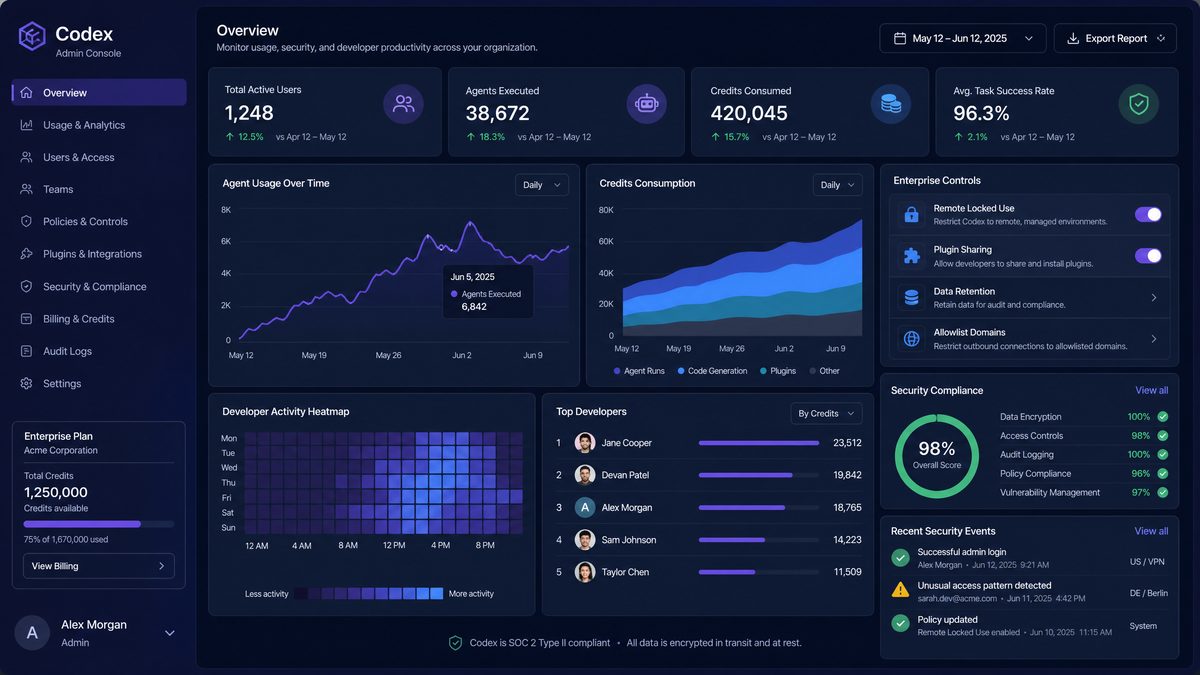
Remote Locked Use (RLU) is the June 2026 update’s answer to one of the most persistent enterprise security concerns about AI coding tools: the risk of sensitive code, credentials, or intellectual property being transmitted to external services in ways that aren’t fully controlled or audited. RLU provides a deployment model where Codex’s inference operates within your own infrastructure boundary, with cryptographic guarantees about data residency and transmission.
How Remote Locked Use Works
In RLU mode, Codex operates in a split architecture. The model weights and inference engine run within your organization’s infrastructure — either in your cloud VPC or on-premises hardware that meets OpenAI’s certification requirements. The only communication with OpenAI’s infrastructure is for model updates, licensing validation, and telemetry that you explicitly opt into. All prompt data, generated code, goal specifications, and session content remain within your infrastructure boundary.
The “locked” aspect of RLU refers to the cryptographic attestation mechanism. When you deploy an RLU instance, it generates a hardware-bound attestation key pair. Every session includes a signed attestation that the inference is occurring on the certified hardware within your declared infrastructure boundary. This attestation is verifiable by both your internal security team and by OpenAI for compliance purposes, without requiring OpenAI to see the actual session content.
RLU deployment requires hardware that meets OpenAI’s June 2026 certification requirements. Currently certified configurations include:
- NVIDIA H100 or H200 clusters with at least 8 GPUs (minimum 640GB VRAM for the Codex Enterprise model)
- AMD MI300X clusters with equivalent VRAM capacity
- AWS Nitro Enclaves on p4d.24xlarge or p5.48xlarge instances
- Azure Confidential Computing instances with NVIDIA A100 GPUs
- GCP Confidential VMs on a3-highgpu-8g instances
RLU Configuration and Deployment
Deploying an RLU instance involves three phases: infrastructure provisioning, model deployment, and attestation registration. The following example covers the Kubernetes-based deployment path, which is the most common enterprise deployment pattern:
# codex-rlu-deployment.yaml
apiVersion: apps/v1
kind: Deployment
metadata:
  name: codex-rlu-inference
  namespace: ai-infrastructure
  labels:
    app: codex-rlu
    security-tier: locked
spec:
  replicas: 2
  selector:
    matchLabels:
      app: codex-rlu
  template:
    metadata:
      labels:
        app: codex-rlu
        attestation-required: "true"
    spec:
      nodeSelector:
        nvidia.com/gpu.product: "NVIDIA-H100-SXM5-80GB"
        codex.openai.com/rlu-certified: "true"
      tolerations:
        - key: "nvidia.com/gpu"
          operator: "Exists"
          effect: "NoSchedule"
      containers:
        - name: codex-inference
          image: openai-enterprise/codex-rlu:2026.06.0
          resources:
            limits:
              nvidia.com/gpu: 8
              memory: "1200Gi"
            requests:
              nvidia.com/gpu: 8
              memory: "1200Gi"
          env:
            - name: CODEX_LICENSE_KEY
              valueFrom:
                secretKeyRef:
                  name: codex-enterprise-secrets
                  key: license-key
            - name: CODEX_ORG_ID
              valueFrom:
                secretKeyRef:
                  name: codex-enterprise-secrets
                  key: org-id
            - name: RLU_ATTESTATION_KEY_PATH
              value: "/etc/codex/attestation/private.pem"
            - name: RLU_DATA_RESIDENCY_REGION
              value: "us-east-1"
            - name: RLU_TELEMETRY_OPT_IN
              value: "false"
            - name: RLU_MODEL_UPDATE_SCHEDULE
              value: "weekly"  # Options: daily, weekly, manual
          volumeMounts:
            - name: attestation-keys
              mountPath: /etc/codex/attestation
              readOnly: true
            - name: model-storage
              mountPath: /models
            - name: session-scratch
              mountPath: /tmp/codex-sessions
      volumes:
        - name: attestation-keys
          secret:
            secretName: codex-rlu-attestation-keys
        - name: model-storage
          persistentVolumeClaim:
            claimName: codex-model-storage-pvc
        - name: session-scratch
          emptyDir:
            medium: Memory  # In-memory only, never persisted to disk
            sizeLimit: "64Gi"
Security Implications for Regulated Industries
RLU fundamentally changes the compliance posture for organizations in regulated industries — financial services, healthcare, defense contracting, and government — that have been unable to adopt AI coding tools due to data residency requirements or concerns about training data contamination. With RLU, the compliance analysis is straightforward: code never leaves your infrastructure, period. The attestation mechanism provides the audit trail that compliance teams require, and the split architecture means you can apply your existing data classification and handling policies to the Codex deployment without negotiating special arrangements with OpenAI.
For SOC 2 Type II compliance, the RLU deployment model maps cleanly to existing controls. The attestation logs satisfy CC6.1 (logical and physical access controls) and CC7.2 (system monitoring). The in-memory session scratch volume eliminates the persistent storage concerns that typically require additional controls for AI tools.
Teams looking to expand their AI capabilities should explore our comprehensive collection of production-tested prompts. Our guide on Codex Plugins Prompts Masterclass: 35 Advanced Prompts for Sites, GitHub Integration, and Custom Tool Workflows provides battle-tested templates that complement the workflows discussed in this article, helping teams achieve consistent results across diverse use cases.
The Browser Access Policy’s audit logs satisfy CC4.1 (monitoring of controls) when properly integrated with your SIEM infrastructure.
HIPAA-covered entities should note that RLU alone does not make Codex HIPAA-compliant — you still need a Business Associate Agreement with OpenAI for the licensing and attestation validation communications, and you need to ensure that PHI is not included in code comments or variable names in ways that would be transmitted even within the RLU boundary. OpenAI has published a HIPAA compliance guide specific to RLU deployments as part of the June 2026 documentation package.
Admin Analytics Dashboard: Metrics, Visibility, and Governance
The new admin analytics dashboard is a comprehensive observability platform for enterprise Codex deployments. It replaces the rudimentary usage statistics that were available in previous versions with a multi-dimensional analytics system that provides genuine operational intelligence about how Codex is being used across your organization.
Available Metrics and Their Governance Value
The dashboard organizes metrics into five categories: Usage, Quality, Security, Cost, and Productivity. Each category provides both real-time metrics and historical trend data with configurable retention periods up to 24 months.
The Usage category tracks prompt volume by team, user, project, and time period; session duration distributions; Goal Mode adoption rates; feature utilization breakdowns; and API vs. TUI usage ratios. These metrics answer the fundamental governance question: who is using Codex, how much, and for what? The team-level breakdown is particularly valuable for identifying adoption bottlenecks — teams with low usage often have specific friction points that can be addressed with targeted training or configuration changes.
The Quality category is where the June 2026 update makes the most significant contribution to enterprise governance. It tracks code acceptance rates (the percentage of Codex suggestions that developers accept without modification), post-acceptance modification rates (how much developers change accepted suggestions before committing), test coverage of Codex-generated code, static analysis violation rates for generated code, and Goal Mode success criterion validation rates. These metrics collectively answer the question that every engineering leader asks about AI coding tools: is the code actually good?
The Security category integrates with your existing security tooling to track security-relevant events in Codex sessions: attempts to access blocked domains via the browser module, prompts that triggered constraint violations in Goal Mode, generated code that failed static analysis security rules, and RLU attestation events. This provides the audit trail that security teams require without requiring them to read individual session logs.
Cost metrics cover credit consumption by team, user, project, and feature; Goal Mode credit efficiency (goals completed per credit consumed); and projected monthly spend based on current usage trends. The credit efficiency metric is new in the June 2026 update and provides genuine insight into which teams and workflows are getting the most value from their Codex investment.
Productivity metrics are the most complex to interpret correctly and the dashboard includes appropriate caveats. They track time-to-completion for goals with defined success criteria, pull request throughput for teams using Codex vs. historical baselines, and code review cycle time. These metrics should be treated as directional indicators rather than precise measurements — the dashboard documentation explicitly warns against using them as individual performance metrics, which is the right call.
Dashboard Configuration and Access Control
The analytics dashboard has its own role-based access control system that is separate from the main Codex RBAC. This separation is intentional — it allows organizations to grant analytics access to engineering managers and security teams without giving them the ability to modify Codex configurations. The available dashboard roles are: Analytics Viewer (read-only access to all metrics), Team Analytics Viewer (read-only access to metrics for their assigned teams), Security Auditor (full access to security category metrics and audit logs), and Analytics Admin (full access including configuration and export capabilities).
# analytics_access_policy.yaml
version: "2026-06"

dashboard_roles:
  - role: analytics_admin
    principals:
      - type: user
        id: "[email protected]"
      - type: group
        id: "platform-engineering-leads"
    permissions:
      - "analytics:read:all"
      - "analytics:export:all"
      - "analytics:configure:dashboards"
      - "analytics:configure:alerts"
      - "analytics:manage:retention"

  - role: team_analytics_viewer
    principals:
      - type: group
        id: "engineering-managers"
    permissions:
      - "analytics:read:own_teams"
      - "analytics:export:own_teams"
    scope:
      team_membership: true  # Automatically scoped to managed teams

  - role: security_auditor
    principals:
      - type: group
        id: "security-team"
    permissions:
      - "analytics:read:security"
      - "analytics:read:audit_logs"
      - "analytics:export:audit_logs"
      - "analytics:configure:security_alerts"

alert_configurations:
  - alert_id: "high-security-violation-rate"
    metric: "security.constraint_violations_per_session"
    threshold: 5.0
    window_minutes: 60
    severity: "high"
    notification_channels:
      - type: "slack"
        webhook: "${SLACK_SECURITY_WEBHOOK}"
      - type: "email"
        recipients: ["[email protected]"]

  - alert_id: "unusual-credit-consumption"
    metric: "cost.credits_per_hour"
    threshold_multiplier: 3.0  # Alert if 3x normal rate
    baseline_window_days: 30
    severity: "medium"
    notification_channels:
      - type: "pagerduty"
        service_key: "${PD_SERVICE_KEY}"
Plugin Sharing and the Enterprise Plugin Marketplace
Plugin sharing has been one of the most requested enterprise features since Codex plugins were introduced. The June 2026 update delivers a comprehensive plugin ecosystem with both internal sharing capabilities and access to a curated enterprise plugin marketplace.
Internal Plugin Sharing
Organizations can now create and share plugins internally through the new Plugin Registry, which is hosted within your organization’s Codex deployment. Internal plugins are versioned, signed with your organization’s plugin signing key, and subject to the same RBAC policies as other Codex resources. The plugin development workflow has been significantly streamlined — the June 2026 SDK includes a plugin scaffolding tool that generates the required manifest, handler structure, and test harness in a single command.
# Creating a new internal plugin
codex-sdk plugin init \
  --name "internal-code-standards" \
  --description "Enforces company coding standards and style guides" \
  --type "code-validator" \
  --author "[email protected]" \
  --org-id "${CODEX_ORG_ID}"

# Generated plugin structure:
# internal-code-standards/
# ├── manifest.json
# ├── src/
# │   ├── main.py
# │   ├── validators/
# │   └── handlers/
# ├── tests/
# │   ├── test_validators.py
# │   └── fixtures/
# ├── README.md
# └── codex-plugin.lock
The plugin manifest includes a security declaration that specifies what resources the plugin can access, what network calls it can make, and what data it can read from the Codex session context. This security declaration is enforced at runtime — plugins cannot exceed their declared permissions, and any attempt to do so is logged as a security event in the analytics dashboard.
Enterprise Plugin Marketplace
The enterprise plugin marketplace provides access to a curated catalog of plugins developed by OpenAI, certified third-party vendors, and the broader enterprise Codex community. All marketplace plugins undergo a security review process before listing, and enterprise customers have access to the security review reports for any plugin they consider deploying.
The marketplace categories available at launch include: Code Quality (linters, formatters, complexity analyzers), Security (SAST integrations, dependency scanners, secrets detectors), Documentation (docstring generators, API doc publishers, changelog managers), Testing (test case generators, coverage analyzers, mutation testing integrations), Infrastructure (IaC generators, deployment validators, cost estimators), and Compliance (license checkers, GDPR analyzers, accessibility validators).
Marketplace plugins are deployed through the same Plugin Registry as internal plugins, giving administrators a single control plane for all plugin governance. Administrators can configure automatic update policies, pin plugins to specific versions, and create allow-lists that restrict which marketplace plugins teams can install.
Teams looking to expand their AI capabilities should explore our comprehensive collection of production-tested prompts. Our guide on Codex Enterprise Prompts Masterclass: 40 Production-Ready Prompts for Long-Running Agent Workflows provides battle-tested templates that complement the workflows discussed in this article, helping teams achieve consistent results across diverse use cases.
This centralized control is essential for organizations that need to ensure consistent tooling across large engineering teams.
Multi-Agent Workflows: Orchestrating Multiple Codex Instances
Multi-agent workflows are the most architecturally sophisticated feature in the June 2026 update, and they represent a genuine step change in what AI-assisted development can accomplish. The ability to orchestrate multiple Codex instances working in parallel on related tasks, with structured communication channels between them, enables a new class of development automation that was previously only possible with significant custom engineering.
The Multi-Agent Architecture
In the June 2026 multi-agent model, workflows consist of an Orchestrator agent and one or more Worker agents. The Orchestrator is responsible for decomposing complex goals into parallel workstreams, assigning work to Worker agents, managing inter-agent communication, resolving conflicts when Worker agents produce incompatible outputs, and synthesizing final results. Worker agents execute specific, bounded tasks within their assigned workstream and report results back to the Orchestrator.
The communication protocol between agents is structured and typed. Agents don’t communicate through natural language — they exchange structured messages using a defined schema that includes task assignments, result reports, conflict notifications, and resource requests. This structured communication makes multi-agent workflows auditable and debuggable in ways that natural language agent communication is not.
# multi_agent_workflow.yaml
version: "2026-06"
workflow_id: "maw-full-stack-feature"
title: "Implement user notification preferences feature"

orchestrator:
  model: "codex-enterprise-orchestrator-v4"
  goal_specification: "goals/notification-preferences.json"
  conflict_resolution_strategy: "orchestrator_decides"
  max_parallel_workers: 4

workers:
  - worker_id: "backend-api-worker"
    model: "codex-enterprise-v4"
    specialization: "python-fastapi-backend"
    assigned_paths:
      - "src/api/notifications/"
      - "src/models/notification_preferences.py"
      - "tests/api/test_notifications.py"
    resource_limits:
      max_file_changes: 20
      max_new_files: 10
      allowed_dependencies: ["sqlalchemy", "pydantic", "fastapi"]

  - worker_id: "database-migration-worker"
    model: "codex-enterprise-v4"
    specialization: "database-migrations"
    assigned_paths:
      - "migrations/"
      - "src/models/"
    resource_limits:
      max_file_changes: 5
      max_new_files: 3
      requires_approval_for: ["DROP TABLE", "ALTER COLUMN", "DELETE FROM"]

  - worker_id: "frontend-worker"
    model: "codex-enterprise-v4"
    specialization: "react-typescript-frontend"
    assigned_paths:
      - "frontend/src/components/NotificationSettings/"
      - "frontend/src/hooks/useNotificationPreferences.ts"
      - "frontend/src/types/notifications.ts"
    resource_limits:
      max_file_changes: 15
      max_new_files: 8

  - worker_id: "test-worker"
    model: "codex-enterprise-v4"
    specialization: "integration-testing"
    assigned_paths:
      - "tests/integration/"
      - "tests/e2e/"
    depends_on_workers: ["backend-api-worker", "frontend-worker"]
    resource_limits:
      max_file_changes: 10
      max_new_files: 5

coordination:
  shared_context:
    - type: "api_contract"
      path: "docs/api/notification-preferences-spec.yaml"
      writable_by: ["backend-api-worker"]
      readable_by: ["frontend-worker", "test-worker"]
    - type: "type_definitions"
      path: "shared/types/notifications.ts"
      writable_by: ["backend-api-worker", "frontend-worker"]
      readable_by: ["test-worker"]

  synchronization_points:
    - point_id: "api-contract-finalized"
      trigger: "backend-api-worker:sg-002:completed"
      blocks: ["frontend-worker", "test-worker"]

  conflict_resolution:
    file_conflicts: "orchestrator_decides"
    dependency_conflicts: "orchestrator_decides"
    type_conflicts: "pause_and_notify"

output:
  pull_request:
    enabled: true
    title: "feat: implement user notification preferences"
    description_template: "goals/pr-description-template.md"
    reviewers: ["@platform-team"]
    labels: ["ai-generated", "needs-review"]
Conflict Resolution in Multi-Agent Workflows
The most complex aspect of multi-agent workflows is conflict resolution — what happens when two Worker agents make incompatible changes to shared resources or produce outputs that don’t integrate cleanly. The June 2026 update provides three conflict resolution strategies: orchestrator_decides (the Orchestrator analyzes both outputs and selects or merges the better approach), pause_and_notify (the workflow pauses and notifies a human reviewer to resolve the conflict), and last_writer_wins (the most recently completed change takes precedence, useful for non-critical style decisions).
In practice, most enterprise workflows should use orchestrator_decides for code-level conflicts and pause_and_notify for schema or interface conflicts where the implications are significant enough to warrant human judgment. The conflict resolution strategy can be configured at the workflow level, the worker level, and the file pattern level, giving you fine-grained control over which decisions are automated and which require human oversight.
Multi-Agent Workflow Monitoring
The analytics dashboard includes a dedicated multi-agent workflow view that provides real-time visibility into workflow execution. This view shows the current state of each Worker agent, the messages flowing between agents (in structured summary form), conflict events and their resolutions, and the overall workflow progress against the goal specification. For long-running workflows, you can configure checkpoint notifications that alert you when significant milestones are reached or when the workflow requires human intervention.
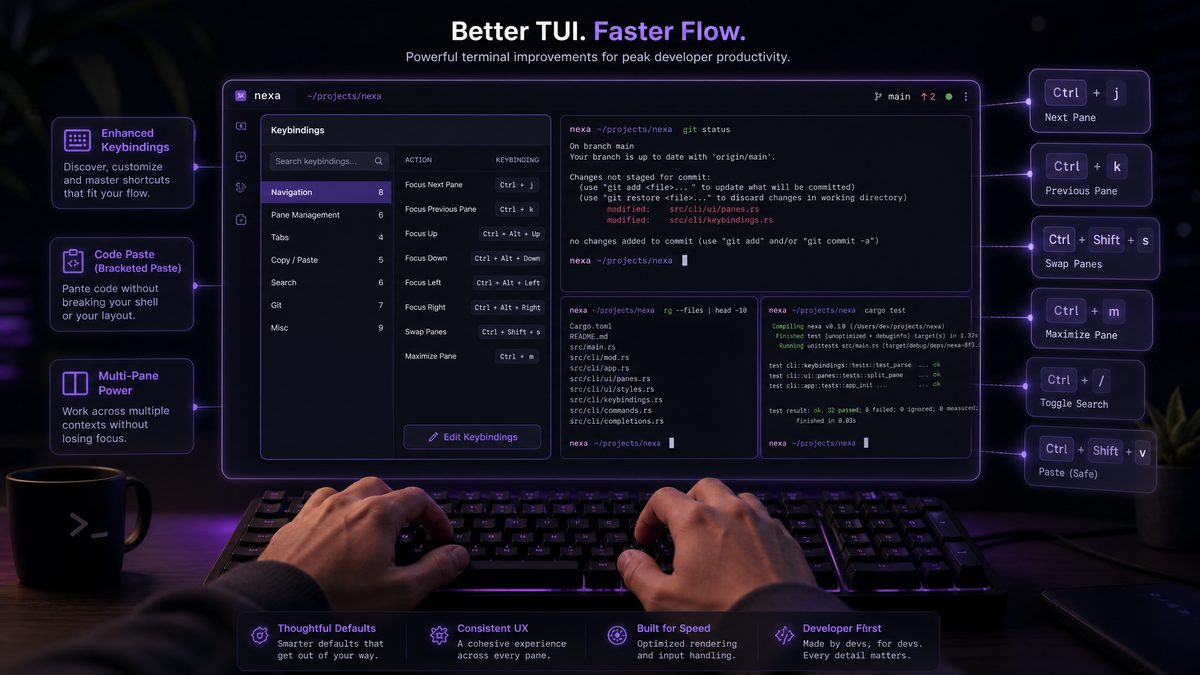
TUI Keybindings and Menu Pasting Improvements
The TUI improvements in the June 2026 update are less architecturally significant than Goal Mode or multi-agent workflows, but they have an outsized impact on day-to-day productivity for developers who use Codex interactively. The previous TUI had accumulated significant usability debt, particularly around keyboard navigation and the friction involved in pasting complex content into prompts.
Access 40,000+ AI Prompts for ChatGPT, Claude & Codex — Free!
Subscribe to get instant access to our complete Notion Prompt Library — the largest curated collection of prompts for ChatGPT, Claude, OpenAI Codex, and other leading AI models. Optimized for real-world workflows across coding, research, content creation, and business.
New Default Keybindings
The keybinding system has been completely redesigned with a modal editing model inspired by Vim. The TUI now has three modes: Normal (for navigation and command execution), Type (for entering prompts), and Visual (for selecting and manipulating text in the session). This modal approach allows for a much richer set of keyboard shortcuts without creating conflicts between navigation keys and prompt input.
| Action | Previous Keybinding | New Keybinding | Mode |
|---|---|---|---|
| Submit prompt | Enter | Enter (Input) / Ctrl+Enter (Normal) | Input / Normal |
| New session | Ctrl+N | :new (Normal mode command) | Normal |
| Goal Mode toggle | N/A (new) | Ctrl+G | Any |
| Load goal specification | N/A (new) | :goal load [path] | Normal |
| Switch between agents (multi-agent) | N/A (new) | Ctrl+W + number | Any |
| Paste from clipboard (smart) | Ctrl+V | Ctrl+V (with format detection) | Input |
| Paste as code block | N/A (new) | Ctrl+Shift+V | Input |
| Open file in context | Ctrl+F | :file [path] or Ctrl+F | Normal / Any |
| Accept suggestion | Tab | Tab or Ctrl+Y | Normal |
| Reject suggestion | Escape | Escape or Ctrl+N (in Normal mode) | Normal |
| View goal status | N/A (new) | :gs or Ctrl+Shift+G | Normal / Any |
| Plugin menu | Ctrl+P | :plugins or Ctrl+P | Normal / Any |
The keybinding configuration is fully customizable through the ~/.codex/tui_config.yaml file, and the June 2026 update includes migration tooling that automatically converts your existing keybinding customizations to the new format.
Menu Pasting Improvements
The menu pasting system has been completely rewritten to handle the full range of content types that developers actually paste into Codex prompts. The previous system treated all pasted content as plain text, which caused significant problems when pasting code with indentation, JSON with special characters, or error stack traces with ANSI color codes. The new smart paste system performs content type detection and applies appropriate formatting automatically.
When you paste content into a Codex prompt in Input mode, the smart paste system analyzes the content and presents a format selection menu if the content type is ambiguous. For clearly identifiable content types — Python code with consistent indentation, JSON objects, SQL queries, stack traces — it applies the appropriate formatting automatically without prompting. This eliminates the constant manual formatting work that made pasting complex content into Codex prompts tedious.
Credit and Configuration Management Updates
The credit system and configuration management have received substantial updates in June 2026, addressing the operational complexity that accumulated as Codex’s feature set expanded. These changes are primarily relevant for administrators and teams managing Codex deployments at scale.
Credit Allocation and Pooling
The new credit management system introduces hierarchical credit pools that replace the flat per-user credit allocation of previous versions. Organizations now have a top-level credit pool, which can be subdivided into team pools, project pools, and individual allocations. Credits can be moved between pools by administrators, and automatic rebalancing rules can be configured to prevent any single team or project from consuming a disproportionate share of organizational credits.
# credit_management_config.yaml
version: "2026-06"

organization_pool:
  monthly_credits: 10000000
  rollover_policy: "none"  # Credits don't roll over month to month
  overage_policy: "hard_limit"  # Block usage at limit, not soft warning

team_pools:
  - team_id: "platform-engineering"
    monthly_allocation: 2000000
    overage_policy: "notify_and_continue"
    overage_limit_multiplier: 1.2  # Allow 20% overage before hard stop

  - team_id: "product-engineering"
    monthly_allocation: 5000000
    overage_policy: "hard_limit"

  - team_id: "data-engineering"
    monthly_allocation: 1500000
    overage_policy: "hard_limit"

  - team_id: "unallocated"  # Pool for teams without explicit allocation
    monthly_allocation: 1500000
    overage_policy: "hard_limit"

auto_rebalancing:
  enabled: true
  check_interval_hours: 24
  rebalance_threshold: 0.85  # Trigger rebalance when team uses 85% of allocation
  source_pool: "unallocated"
  max_rebalance_amount_per_team: 200000

goal_mode_credit_weights:
  # Goal Mode operations have different credit weights
  sub_goal_planning: 2.0  # 2x base credit weight
  success_criteria_validation: 1.5
  conflict_resolution: 3.0  # Multi-agent conflict resolution is expensive
  browser_context_fetch: 0.5  # Per URL fetched

alerts:
  - trigger: "team_pool_at_80_percent"
    notification: ["team_lead", "engineering_manager"]
  - trigger: "org_pool_at_90_percent"
    notification: ["vp_engineering", "finance_ops"]
Configuration Management and Version Control
All Codex configuration artifacts — goal specifications, browser access policies, plugin manifests, multi-agent workflow definitions, and credit management configurations — are now treated as first-class versioned artifacts. The June 2026 update introduces the Codex Configuration Repository (CCR), a Git-compatible storage system for all configuration artifacts with full history, branching, and diff capabilities.
The CCR integrates with your existing version control infrastructure. You can configure it to sync with a designated Git repository, enabling GitOps workflows for Codex configuration management. Configuration changes go through pull request review just like application code, and the CCR includes a validation pipeline that checks configuration artifacts for correctness before they can be applied to production deployments.
How These Features Transform Enterprise Development Workflows
The features in the June 2026 update don’t just add capabilities — they enable fundamentally different development workflows that would have been impractical or impossible with previous versions. Understanding these workflow transformations is essential for enterprise teams planning how to get maximum value from the update.
The Autonomous Feature Development Workflow
The combination of Goal Mode and multi-agent workflows enables what might be called autonomous feature development: the ability to define a feature requirement at a high level, specify success criteria, and have Codex autonomously decompose, implement, test, and prepare the feature for human review. The human role shifts from writing code to defining requirements, reviewing outputs, and making architectural decisions that require business context.
In practice, this workflow looks like: an engineering manager or senior engineer writes a goal specification for a new feature, including detailed success criteria and constraints. The multi-agent workflow orchestrator decomposes this into parallel workstreams — backend API, database migrations, frontend components, integration tests. Worker agents execute their assigned workstreams, coordinating through shared context artifacts. The orchestrator synthesizes the results, resolves any conflicts, validates all success criteria, and opens a pull request with a structured description of what was implemented and how it meets each requirement.
The human review at the end of this workflow is genuinely different from reviewing AI-generated code in previous paradigms. Because the success criteria have been validated automatically, reviewers can focus on architectural decisions, business logic correctness, and edge cases that the success criteria didn’t capture — rather than spending review time on correctness verification that the automated validation already handled.
The Compliance-First Development Workflow
For organizations in regulated industries, the combination of RLU, Goal Mode constraints, and the analytics dashboard enables a compliance-first development workflow where compliance requirements are encoded as goal constraints and success criteria rather than enforced through manual review. Security rules, accessibility requirements, license compliance, and data handling policies become automated guardrails that are checked continuously throughout development rather than gates at the end of the development cycle.
Migration Guide: Upgrading from Pre-June 2026 Codex Configurations
Organizations running Codex on configurations from before the June 2026 update need to address several breaking changes before upgrading. The migration process is well-documented and the provided tooling handles most of the work automatically, but understanding what’s changing helps you validate that the migration completed correctly.
Breaking Changes
The most significant breaking change is the deprecation of the legacy session configuration format. Sessions defined using the pre-2026 YAML format will not load in the June 2026 version. The migration tool handles this conversion automatically, but you should validate the converted configurations before deploying to production. The legacy format had no concept of goal specifications or success criteria, so the migration tool creates goal specifications that represent the intent of existing session configurations as best it can, with human review flags on any ambiguous conversions.
The plugin API has also changed significantly. Plugins written against the pre-2026 SDK will not run in the June 2026 environment without modification. The primary changes are: the plugin manifest now requires a security declaration, the handler interface has changed to support the new context model, and plugins that accessed session data directly now need to use the new context access API. The migration guide includes a detailed plugin migration checklist and the SDK includes automated migration tooling for common plugin patterns.
# Run the automated migration tool
codex-enterprise migrate \
  --source-version "2025.12" \
  --target-version "2026.06" \
  --config-dir "/etc/codex" \
  --plugin-dir "~/.codex/plugins" \
  --output-dir "/tmp/codex-migration-output" \
  --validate \
  --dry-run  # Remove this flag to apply changes

# Review migration report
cat /tmp/codex-migration-output/migration-report.json

# Apply migration after review
codex-enterprise migrate \
  --source-version "2025.12" \
  --target-version "2026.06" \
  --config-dir "/etc/codex" \
  --plugin-dir "~/.codex/plugins" \
  --output-dir "/tmp/codex-migration-output" \
  --validate \
  --apply
Migration Validation Checklist
- Verify all existing session configurations have been converted and load without errors in the new TUI
- Test each plugin against the new SDK — run the plugin test suite with the 2026.06 runtime
- Validate that existing API integrations work with the new API version (the 2026.06 API is backward compatible with 2025.x API calls, but new features require the updated client library)
- Confirm that credit allocations have been correctly migrated to the new hierarchical pool structure
- Verify that the analytics dashboard is receiving data from all expected sources
- If using RLU, validate attestation key generation and registration with OpenAI’s licensing service
- Test the browser access policy against your organization’s approved domain list
- Validate that the CCR is correctly syncing with your Git repository
Best Practices for Enterprise Codex Governance
The June 2026 update significantly expands the governance surface for enterprise Codex deployments. Organizations that establish clear governance frameworks now will avoid the technical debt and security incidents that come from deploying powerful AI tools without adequate oversight structures.
Goal Specification Governance
Treat goal specifications as engineering artifacts that require the same review and approval processes as architectural decision records. Establish a library of approved goal specification templates for common task types, and require that novel goal specifications be reviewed by a senior engineer before being used in production workflows. The CCR’s GitOps integration makes this straightforward — goal specification changes go through pull request review just like application code.
Define organization-wide constraint templates that encode your standard engineering requirements — coding standards, security rules, compliance requirements — and require that all goal specifications include these standard constraints. This ensures that Codex-generated code consistently meets your organization’s standards regardless of which team or individual created the goal specification.
Multi-Agent Workflow Governance
Multi-agent workflows require additional governance attention because they can make a large number of changes to your codebase in a short time. Establish clear policies about which types of changes require human review before being committed, and configure the workflow output settings to create draft pull requests rather than ready-to-merge pull requests for any workflow that modifies more than a defined number of files or touches critical system components.
The pause_and_notify conflict resolution strategy should be the default for any workflow that modifies database schemas, public APIs, or security-sensitive code. The cost of a brief human review pause is trivial compared to the cost of resolving a conflict that was resolved incorrectly by the orchestrator.
Credit Governance
Establish credit budgets at the team and project level before deploying the June 2026 update broadly. Use the analytics dashboard’s projected spend feature to calibrate initial allocations based on historical usage patterns, then review and adjust allocations monthly based on actual consumption. The overage notification system should be configured to alert team leads when they reach 70% of their monthly allocation — early enough to adjust behavior before hitting hard limits.
Security Governance
The Browser Access Policy should be configured conservatively initially and expanded based on demonstrated need. Start with a tight allowlist of approved domains and require a formal request process for adding new domains. Review the browser access audit logs weekly in the first month after deployment to identify any access patterns that indicate misuse or misconfiguration.
For RLU deployments, establish a quarterly attestation key rotation policy and ensure that the rotation process is documented and tested before it’s needed in an emergency. The attestation key is the root of trust for your RLU deployment — losing it or having it compromised requires a full redeployment, which is disruptive enough that prevention is strongly worth the effort.
Plugin Governance
Establish a plugin review process for both internal plugins and marketplace plugins. Internal plugins should go through a security review that checks the security declaration against the actual plugin code — ensuring that plugins don’t request more permissions than they need and that the declared permissions accurately reflect what the plugin does. Marketplace plugins should be reviewed against the vendor’s security report before deployment, with particular attention to data handling and network access declarations.
Maintain a plugin inventory that tracks which plugins are deployed, which teams use them, what versions are running, and when they were last reviewed. The CCR’s versioning capabilities make maintaining this inventory straightforward if you manage plugin configurations through the CCR.
Looking Forward: What the June 2026 Update Signals
The architectural direction of the June 2026 update is clear: OpenAI is building Codex into a platform for autonomous engineering work, not just an AI pair programmer. Goal Mode, multi-agent workflows, and the supporting governance infrastructure collectively represent the foundation for a development model where AI systems handle the implementation of well-specified requirements while human engineers focus on requirements definition, architectural decision-making, and validation of AI-generated outputs.
This trajectory has significant implications for how enterprises should be investing in their engineering capabilities. The skills that become more valuable in an AI-assisted development environment — requirements specification, architectural thinking, security analysis, validation design — are different from the skills that are partially automated by these tools. Engineering leaders who understand this shift and invest accordingly will be better positioned to capture the productivity benefits of the June 2026 update and the more capable versions that will follow.
The governance frameworks you establish now will also compound in value as these tools become more capable. Organizations that have mature Codex governance in place — clear policies, automated enforcement, comprehensive audit trails, well-calibrated human oversight — will be able to safely extend more autonomy to AI systems as that autonomy becomes technically feasible. Organizations that deploy these tools without governance infrastructure will find themselves either limiting their use of the tools to preserve safety or accepting risks that will eventually manifest as incidents.
The June 2026 enterprise update is a significant milestone in the maturation of AI-assisted development. The features are genuinely powerful, the governance infrastructure is genuinely enterprise-grade, and the migration path from previous versions is well-supported. Organizations that invest the time to deploy these capabilities thoughtfully will see substantial returns on that investment in engineering velocity, code quality, and operational efficiency.
Author: Markos Symeonides | chatgptaihub.com | Enterprise AI Technology Coverage
