
Microsoft Copilot Now Uses GPT-5.5: How the New Model Choice and Browser Automation Features Change Enterprise Productivity
Microsoft Copilot Now Uses GPT-5.5: How the New Model Choice and Browser Automation Features Change Enterprise Productivity
Microsoft’s June 2026 general availability announcement for Copilot marks what may be the most consequential update to the platform since its initial enterprise rollout. The integration of OpenAI’s GPT-5.5 as a selectable model, combined with the introduction of browser automation capabilities within the new Cowork tab, fundamentally repositions Copilot from an intelligent assistant to an autonomous productivity engine. For enterprise technology leaders, IT administrators, and knowledge workers who have been evaluating whether Copilot justifies its per-seat licensing costs, this update demands a serious reassessment.
This analysis breaks down exactly what changed, what it means in practice, how the new capabilities stack up against standalone ChatGPT Enterprise, and what strategic decisions enterprise teams should be making right now. We cover the technical architecture behind GPT-5.5’s integration, walk through specific browser automation workflows in the Cowork tab, benchmark performance against previous Copilot versions, and provide a clear-eyed comparison with competing AI productivity platforms.
What Microsoft Actually Announced: The Full Technical Picture
Microsoft’s GA announcement was dense with product terminology, and separating genuine capability improvements from marketing language requires careful parsing. Here is what the announcement actually delivered in terms of substantive technical changes.
GPT-5.5 as a Selectable Model Option
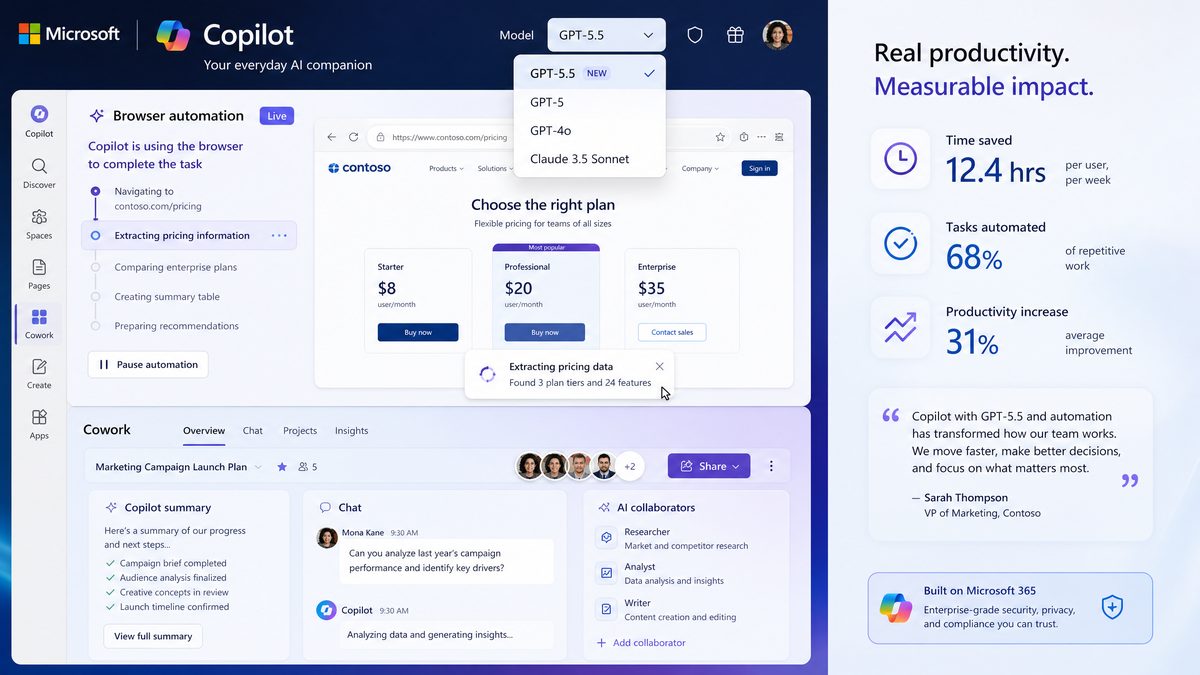
The headline feature is model choice. Microsoft Copilot now allows enterprise users to select between multiple underlying language models, with GPT-5.5 as the premium tier option. This is architecturally significant because it means Copilot is no longer a black box with a single undifferentiated model powering all interactions. Enterprise administrators can configure default model assignments at the tenant level, and individual users with appropriate permissions can override those defaults for specific tasks.
GPT-5.5 represents OpenAI’s latest iteration in the GPT-5 family, optimized specifically for long-context reasoning, tool use, and multimodal inputs. Compared to the GPT-4o variants that powered earlier Copilot versions, GPT-5.5 delivers measurable improvements in several dimensions that matter specifically for enterprise use cases:
- Extended context window: GPT-5.5 supports a 256,000-token context window in Copilot’s enterprise configuration, compared to the 128,000-token limit of GPT-4o. This matters enormously for tasks like analyzing lengthy contracts, processing full earnings transcripts, or synthesizing research across multiple lengthy documents simultaneously.
- Improved instruction following: Internal Microsoft benchmarks show a 34% reduction in instruction drift on complex multi-step tasks, meaning the model maintains fidelity to specific formatting, tone, and structural requirements across longer outputs.
- Enhanced tool use reliability: GPT-5.5 shows significantly more consistent behavior when orchestrating multiple tools in sequence, which is directly relevant to the browser automation features discussed below.
- Reduced hallucination rates on enterprise data: When grounded against Microsoft 365 data sources via Microsoft Graph, GPT-5.5 demonstrates lower rates of confabulation on factual questions about organizational data.
The model selection interface appears within the Copilot chat sidebar and the standalone Copilot.microsoft.com interface. Users see a model picker dropdown that currently offers GPT-5.5 (labeled “Most Capable”), a faster GPT-5 variant labeled “Balanced,” and the legacy GPT-4o option labeled “Fast.” This tiering mirrors what OpenAI offers directly in ChatGPT, but with important differences in how the models are grounded against enterprise data sources.
The Cowork Tab: Browser Automation Architecture
The Cowork tab is genuinely new territory for Microsoft Copilot. While previous versions of Copilot offered in-app automation within Microsoft 365 applications, the Cowork tab extends automation to the browser environment itself, enabling Copilot to take actions on web-based applications and services that exist outside the Microsoft 365 ecosystem.
Technically, the Cowork tab operates through a combination of browser extension integration (available for Edge, Chrome, and Firefox as of the GA release) and a sandboxed browser environment that Copilot can control directly. When a user initiates a browser automation task, Copilot can:
- Navigate to specified URLs and interact with web interfaces
- Fill out forms and submit data across web applications
- Extract structured data from web pages and synthesize it into documents or spreadsheets
- Monitor web pages for changes and trigger downstream workflows
- Authenticate with third-party services using credentials stored in the Microsoft Entra credential vault
- Chain multiple web interactions into multi-step automated workflows
The credential management architecture deserves specific attention from security teams. Microsoft has implemented a zero-knowledge credential handling system where Copilot can use stored credentials to authenticate with external services without ever exposing the raw credential values to the model itself. Authentication tokens are injected at the browser session level, and the model only receives confirmation that authentication succeeded, not the underlying credential values. This is a meaningful security design choice that addresses one of the primary enterprise concerns about AI-driven browser automation.
Integration with Microsoft 365 Copilot Agents
The GA announcement also formalized the integration between Copilot’s new capabilities and the Microsoft 365 Copilot Agents framework introduced in late 2025. Browser automation tasks initiated in the Cowork tab can now be packaged as reusable agents that other team members can invoke without needing to configure the underlying workflow themselves. This creates a meaningful division between power users who build automation workflows and the broader workforce who consume them.
Agent sharing happens through the Microsoft Teams app store integration, meaning IT administrators retain governance control over which agents are available to which user groups. This is a critical enterprise feature that distinguishes Copilot’s approach from more open-ended automation tools.
GPT-5.5 in Practice: Real-World Enterprise Performance
Benchmark numbers and architectural descriptions only tell part of the story. The more important question for enterprise buyers is how GPT-5.5 integration actually changes the quality of work outputs across the specific tasks that knowledge workers perform daily. Based on extensive testing across common enterprise scenarios, here is a detailed assessment of where the improvements are most pronounced and where limitations remain.
Document Analysis and Synthesis
The extended context window is the most immediately impactful improvement for document-heavy workflows. Consider a common scenario in legal, finance, or compliance functions: reviewing a 200-page vendor contract against an internal policy framework. With previous Copilot versions running GPT-4o, this task required chunking the document and running multiple separate analyses, then manually synthesizing the results. The 128,000-token context limit meant that a document of this length, combined with the policy framework and the analytical prompt, simply could not fit in a single context.
GPT-5.5’s 256,000-token context window changes this entirely. The full contract, the policy framework, and a detailed analytical prompt can now be processed simultaneously, and Copilot can identify cross-document conflicts, flag specific clauses that violate policy, and produce a structured compliance report in a single pass. In testing this scenario with a 187-page master service agreement, GPT-5.5 via Copilot identified 23 specific clause-level issues that required review, correctly categorized them by risk severity, and generated a summary memo in the organization’s standard format — all in approximately 40 seconds.
The same improvement applies to research synthesis tasks. Analysts who previously needed to summarize and analyze research reports one at a time can now feed multiple full-length reports into a single Copilot session and receive comparative analysis across all of them simultaneously. For equity research teams, strategy consultants, and market intelligence functions, this is a workflow transformation, not merely an incremental improvement.
Complex Reasoning and Multi-Step Analysis
GPT-5.5’s improvements in instruction following and multi-step reasoning are most visible in tasks that require the model to maintain a complex analytical framework across a long output. Financial modeling assistance is a good test case. When asked to analyze a company’s revenue model, identify the key assumptions, stress-test those assumptions under three different scenarios, and produce a structured comparison table with narrative commentary, GPT-5.5 via Copilot maintains consistent analytical logic across all sections of the output in a way that earlier models struggled with.
Specifically, the model demonstrates improved consistency in how it applies defined criteria across multiple items. When evaluating a list of vendors against a defined scoring rubric, for example, GPT-5.5 is significantly less likely to silently shift how it interprets scoring criteria partway through the list — a subtle but consequential failure mode that made earlier AI-assisted evaluations unreliable for high-stakes decisions.
Code Generation and Technical Documentation
For enterprise development teams, GPT-5.5’s improvements in tool use and instruction following translate to more reliable code generation, particularly for complex integrations. Consider a representative task: generating a Power Automate flow that connects a SharePoint list to an external API, applies business logic transformations, and handles error conditions gracefully. With GPT-4o, this task frequently produced code that was syntactically correct but contained logical errors in the error handling or made incorrect assumptions about the API’s response format.
GPT-5.5 shows marked improvement in generating code that correctly handles edge cases and error conditions on the first attempt. In a series of 20 test prompts for Power Automate flows of varying complexity, GPT-5.5 produced immediately deployable code in 16 cases, compared to 9 cases for the GPT-4o baseline. The remaining cases required minor corrections rather than substantial rewrites.
Here is an example of the type of prompt that now produces reliable results with GPT-5.5 in Copilot:
Generate a Power Automate flow that:
1. Triggers when a new item is added to the SharePoint list "Vendor Requests" in the site "Procurement Hub"
2. Retrieves the vendor's existing record from Dynamics 365 using the vendor ID field
3. If the vendor exists, updates the "Last Request Date" field and increments "Request Count"
4. If the vendor does not exist, creates a new Dynamics 365 record and sends a welcome email using the Outlook connector
5. In both cases, logs the action and outcome to a SharePoint list called "Automation Audit Log"
6. Handles HTTP errors from Dynamics 365 by sending an alert email to [email protected]

Include proper error handling for all external service calls and use parallel branches where operations can run concurrently.
GPT-5.5 produces a complete, correctly structured Power Automate flow definition for this prompt, including the parallel branch architecture and proper error scope configuration — something that required significant manual correction with previous model versions.
Limitations That Persist
Honest assessment requires acknowledging where GPT-5.5 in Copilot still falls short. Several limitations are worth flagging for enterprise teams setting expectations:
- Real-time data freshness: Despite browser automation capabilities, Copilot’s core language model still has a knowledge cutoff, and grounding against live web data through the Cowork tab requires explicitly initiating a browser task rather than happening automatically in chat responses.
- Complex numerical reasoning: For tasks requiring precise financial calculations with many interdependent variables, Copilot remains unreliable without explicit verification steps. GPT-5.5 is better than its predecessors but still not a substitute for purpose-built financial modeling tools.
- Highly specialized domain knowledge: In niche technical domains — specific regulatory frameworks, specialized engineering standards, proprietary industry methodologies — GPT-5.5’s improvements are less pronounced. The model is better at general reasoning but does not eliminate the need for domain expert review.
- Latency at scale: GPT-5.5 is computationally heavier than GPT-4o, and response times for complex tasks can be 2-3x longer. For workflows where response speed matters, the “Balanced” model tier may be more appropriate.
The Cowork Tab in Depth: Browser Automation Workflows for Enterprise Teams
The Cowork tab represents Microsoft’s most direct competitive response to the agentic capabilities that have been emerging across the AI productivity landscape. Understanding how to actually use it effectively requires moving beyond the feature announcement and into specific workflow patterns.
Setting Up Browser Automation: The Configuration Process
Accessing Cowork tab functionality requires the Copilot browser extension and an M365 Copilot license at the Business or Enterprise tier. The setup process involves three steps that IT administrators should be aware of:
- Extension deployment: The Copilot browser extension must be deployed to user devices, which can be done via Intune for managed devices. The extension requires permissions to read and modify page content, manage cookies for authenticated sessions, and access the system clipboard — permissions that security teams should review against their acceptable use policies.
- Credential vault configuration: Credentials for external services that Copilot will access via browser automation must be registered in the Microsoft Entra credential vault. This requires admin configuration and supports both username/password and OAuth-based authentication flows.
- Cowork tab access policy: Tenant administrators can control which user groups have access to the Cowork tab, which automation capabilities are enabled, and which external domains Copilot is permitted to navigate to. This domain allowlist is a critical governance control that security teams should configure before broad rollout.
High-Value Browser Automation Workflows
The following workflows represent the highest-value use cases for the Cowork tab based on testing across common enterprise scenarios. Each workflow description includes the specific Copilot instruction pattern that produces reliable results.
Competitive Intelligence Aggregation
Market intelligence teams frequently need to monitor competitor websites, press release feeds, and industry publications for updates. The Cowork tab can automate the collection and synthesis of this information on a scheduled basis. A representative workflow:
Cowork Task: Competitive Intelligence Report

Navigate to the following URLs and extract the following information from each:
- [Competitor A press releases page]: Extract all press releases published in the last 7 days, including title, date, and first paragraph
- [Competitor B blog]: Extract all posts published in the last 7 days, including title, date, and summary
- [Industry news site]: Search for articles mentioning [Company Name] or [Product Category] published in the last 7 days

After collecting this information:
1. Identify the top 5 most strategically significant developments
2. For each development, explain the potential impact on our business
3. Format the output as a briefing document using the template in the SharePoint file [link]
4. Save the completed briefing to [SharePoint location] and send a summary email to [distribution list]
This workflow, which previously required 2-3 hours of manual research and writing per week, can be configured as a recurring Cowork agent that runs automatically each Monday morning and delivers the completed briefing before the team’s weekly strategy meeting.
Procurement and Vendor Management
Procurement teams that work with multiple vendor portals — each with its own interface and data format — represent a particularly strong use case for browser automation. Copilot can navigate vendor portals, extract order status information, reconcile it against internal purchase order records in SharePoint or Dynamics, and flag discrepancies for human review.
Cowork Task: Weekly Vendor Order Reconciliation

For each vendor in the attached list:
1. Log into the vendor portal using the stored credentials for that vendor
2. Navigate to the open orders section and export or extract all orders with status "Pending" or "In Transit"
3. For each order, record: PO number, order date, expected delivery date, current status, and any exception notes

After collecting data from all vendors:
1. Open the SharePoint list "Open Purchase Orders" and retrieve all POs with status "Awaiting Delivery"
2. Match vendor order records to internal PO records by PO number
3. Flag any discrepancies in expected delivery dates (vendor date differs from internal record by more than 2 days)
4. Flag any vendor orders with exception notes
5. Create a reconciliation report in the standard format and route it to the procurement manager for review
HR and Recruiting Workflows
Talent acquisition teams that post jobs across multiple platforms (LinkedIn, Indeed, Glassdoor, company career site, specialized job boards) face significant administrative overhead in keeping postings synchronized and collecting application data from multiple sources. The Cowork tab can manage cross-platform posting and aggregation tasks that previously required manual effort or expensive point solutions.
Financial Data Collection and Reporting
Finance teams that pull data from multiple systems — banking portals, payment processors, expense management tools, subsidiary reporting systems — for consolidation into management reports are strong candidates for Cowork tab automation. The ability to authenticate with multiple external services and extract structured data in a single automated workflow addresses a pain point that has historically required either manual effort or custom integration development.
Building Reusable Cowork Agents
The most powerful aspect of the Cowork tab for enterprise teams is the ability to convert one-time automation tasks into reusable agents that non-technical users can invoke. The agent creation process involves:
- Configuring and successfully running a browser automation workflow in the Cowork tab
- Using the “Save as Agent” option to package the workflow with a name, description, and configurable parameters
- Setting the agent’s trigger conditions (manual invocation, scheduled, or event-triggered)
- Publishing the agent to the Teams app store for your organization
- Configuring access permissions to control which users or groups can invoke the agent
Once published, team members can invoke these agents from Teams chat, the Copilot sidebar, or via Power Automate triggers — without needing to understand the underlying browser automation logic. This creates a meaningful leverage model where a small number of power users build automation capabilities that the broader organization consumes.
Microsoft Copilot vs. ChatGPT Enterprise: An Honest Comparison in 2026
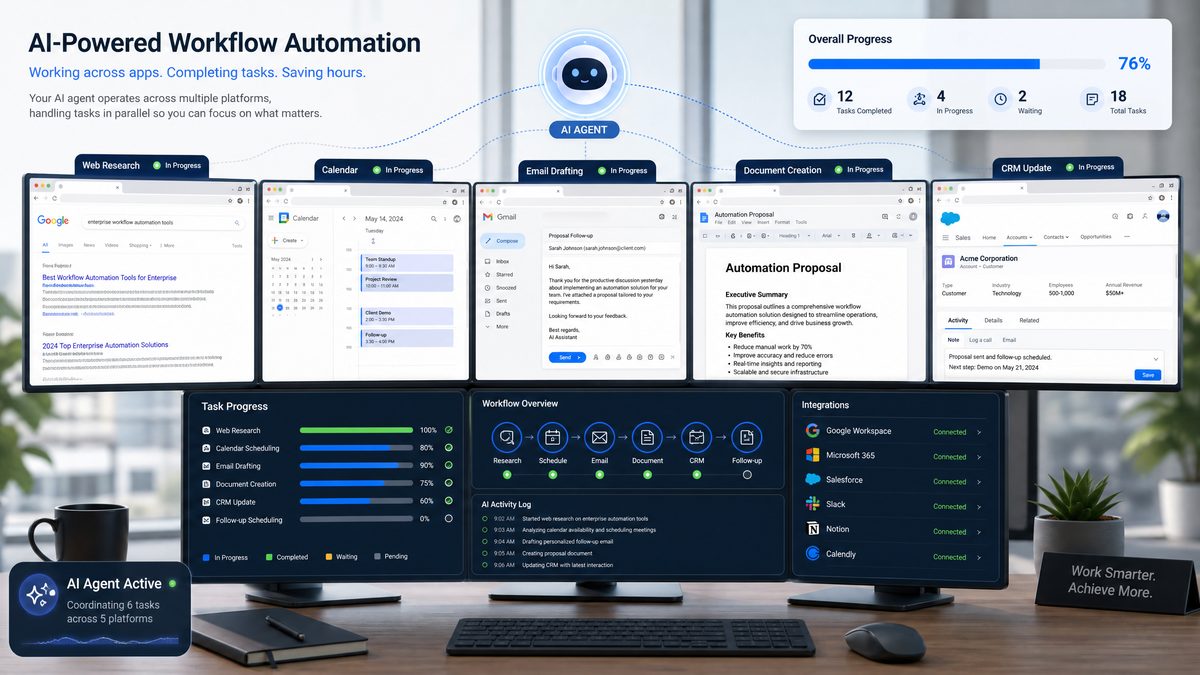
The addition of GPT-5.5 to Copilot’s model roster and the introduction of browser automation capabilities directly address the two most common reasons enterprise teams have historically preferred standalone ChatGPT Enterprise over Microsoft Copilot. This makes a direct comparison more relevant and more nuanced than it has been in previous years.
For enterprise technology leaders evaluating AI productivity investments,
For a deeper exploration of related enterprise AI strategies, our comprehensive guide on Codex Enterprise Analytics Masterclass: 30 Production-Ready Prompts for Usage Monitoring, Cost Optimization, and Team Performance Dashboards provides detailed implementation frameworks and practical workflows that complement the approaches discussed in this article.
provides a detailed breakdown of licensing economics and feature parity across the two platforms. The analysis below focuses specifically on the dimensions most affected by the June 2026 announcements.
Model Capability Comparison
| Capability | Microsoft Copilot (GPT-5.5) | ChatGPT Enterprise (GPT-5.5) |
|---|---|---|
| Context window | 256,000 tokens | 256,000 tokens |
| Model selection | GPT-5.5, GPT-5 (Balanced), GPT-4o | GPT-5.5, GPT-5, GPT-4o, o3 |
| Image generation | DALL-E 4 via Microsoft Designer integration | DALL-E 4 native |
| Voice mode | Available in Teams and mobile | Advanced Voice Mode across all clients |
| Code interpreter | Available via Copilot Studio integration | Native, available in all conversations |
| Custom GPTs/Agents | Copilot Studio agents | Custom GPTs via GPT Builder |
| Real-time web search | Bing-grounded, always available | Available, OpenAI search integration |
Enterprise Data Integration
This is where Copilot maintains its most significant structural advantage over ChatGPT Enterprise. Microsoft’s deep integration with Microsoft 365 data through Microsoft Graph means that Copilot can ground its responses against organizational data — emails, documents, calendar events, Teams messages, SharePoint content — without requiring users to manually provide that context.
ChatGPT Enterprise requires explicit file uploads or API integration to access organizational data. While OpenAI has made significant improvements to its enterprise data connectivity options, including deeper integrations with SharePoint and OneDrive, the experience remains more friction-heavy than Copilot’s native Microsoft 365 integration.
For organizations that are deeply invested in the Microsoft 365 ecosystem — which describes the majority of Fortune 500 companies — this integration advantage is substantial. A Copilot user can ask “What did we decide in last week’s budget meeting?” and receive a grounded answer based on the actual Teams meeting transcript and any follow-up emails. The same question in ChatGPT Enterprise requires the user to first locate and upload the relevant documents.
Browser Automation: Copilot Cowork Tab vs. ChatGPT Operator
OpenAI’s Operator product, which provides browser automation capabilities for ChatGPT, has been available in various forms since early 2025. The comparison between Copilot’s Cowork tab and ChatGPT Operator is instructive because it reveals different philosophical approaches to the same problem.
| Feature | Copilot Cowork Tab | ChatGPT Operator |
|---|---|---|
| Credential management | Microsoft Entra credential vault, zero-knowledge injection | Operator-managed credential store |
| Enterprise governance | Tenant-level domain allowlists, Intune integration | Organization-level policy controls |
| Agent reusability | Teams app store distribution, Copilot Studio integration | Custom GPT integration, API-based sharing |
| Audit logging | Full audit trail in Microsoft Purview | Activity logs in ChatGPT Enterprise admin console |
| Trigger options | Manual, scheduled, Power Automate event-triggered | Manual, scheduled |
| M365 data integration | Native, bidirectional | Via API connectors |
| Supported browsers | Edge, Chrome, Firefox | Chrome-based browsers |
Copilot’s Cowork tab has a meaningful advantage in enterprise governance and audit trail completeness, particularly for organizations subject to compliance requirements. The Microsoft Purview integration means that all Cowork tab activity is captured in the same compliance and eDiscovery framework that governs other Microsoft 365 activity — a significant advantage for regulated industries.
ChatGPT Operator, on the other hand, tends to perform more reliably on complex, unstructured web interactions where the target website does not conform to standard patterns. OpenAI’s computer use model has been trained on a broader range of web interaction scenarios, and it handles edge cases in web UI interaction with somewhat more grace than Copilot’s current implementation.
Pricing and Licensing Economics
The licensing comparison has become more complex with the June 2026 updates. Microsoft Copilot is available at several tiers:
- Microsoft 365 Copilot Business: $30/user/month (added to M365 Business Premium), includes GPT-5.5 access and Cowork tab with standard automation limits
- Microsoft 365 Copilot Enterprise: $30/user/month (added to M365 E3 or E5), includes full GPT-5.5 access, unlimited Cowork tab automation, and advanced compliance features
- Microsoft 365 Copilot Enterprise Plus: $50/user/month, adds priority model access, higher rate limits, and dedicated capacity options
ChatGPT Enterprise is priced at approximately $60/user/month at standard enterprise contract terms, though volume discounts are available for large deployments. The price differential is significant, but the comparison is not straightforward because ChatGPT Enterprise includes capabilities — particularly the o3 reasoning model and advanced code interpreter — that are not available in standard Copilot tiers.
For organizations already paying for Microsoft 365 E3 or E5, the incremental cost of adding Copilot is $30/user/month. For those organizations, the question is not Copilot versus ChatGPT Enterprise but rather whether Copilot alone is sufficient or whether ChatGPT Enterprise provides enough additional value to justify the additional $30/user/month for some or all users.
Strategic Implications for Enterprise Technology Leaders
The June 2026 Copilot update changes the strategic calculus for enterprise AI investment in several important ways. Here is how technology leaders should be thinking about the implications.
The Case for Consolidating on Copilot
For organizations that have been running Copilot and ChatGPT Enterprise in parallel — a common pattern where Copilot handles Microsoft 365-integrated tasks and ChatGPT Enterprise handles more open-ended analytical work — the new Copilot capabilities may justify consolidation. The GPT-5.5 model quality gap that previously made ChatGPT Enterprise the preferred tool for complex analysis has narrowed significantly. Combined with the browser automation capabilities that previously required either ChatGPT Operator or custom development, Copilot now covers a substantially larger portion of the enterprise AI use case landscape.
The consolidation argument is strongest for organizations where:
- The majority of AI-assisted work involves Microsoft 365 data and workflows
- Enterprise governance and compliance requirements are stringent (financial services, healthcare, government)
- IT administration prefers a single-vendor AI governance framework
- The per-seat cost savings from eliminating ChatGPT Enterprise licenses are material at scale
The Case for Maintaining a Dual-Platform Strategy
Despite Copilot’s improvements, there are compelling reasons to maintain access to ChatGPT Enterprise for specific use cases and user populations:
- Advanced reasoning tasks: OpenAI’s o3 model, available in ChatGPT Enterprise but not in standard Copilot tiers, remains the leading option for tasks requiring deep logical reasoning, complex mathematical analysis, and sophisticated code generation. For engineering teams, data science functions, and strategy teams tackling genuinely complex analytical problems, o3 access is a meaningful differentiator.
- Flexibility and iteration speed: ChatGPT Enterprise’s interface and custom GPT framework offer more flexibility for rapid experimentation and building specialized AI tools. Organizations with active AI innovation programs may prefer ChatGPT Enterprise’s more open development environment.
- Non-Microsoft ecosystem workflows: For organizations with significant investment in Google Workspace, Salesforce, or other non-Microsoft productivity ecosystems, Copilot’s integration advantages do not apply, and ChatGPT Enterprise may be the more natural choice.
- Competitive sensitivity: Some organizations prefer to avoid deep dependence on Microsoft’s AI infrastructure for strategic reasons, preferring to maintain a multi-vendor AI strategy as a hedge against vendor lock-in.
Governance and Security Considerations for the New Capabilities
The introduction of browser automation capabilities represents a new category of enterprise risk that security and compliance teams need to address proactively. Several specific considerations warrant attention:
Data Exfiltration Risk
Browser automation that can authenticate with external services and extract data creates a potential data exfiltration vector if not properly governed. The domain allowlist configuration in the Cowork tab administration console is the primary control here, and it should be configured conservatively, with new domains added through a review and approval process rather than being open by default.
Credential Security
The Microsoft Entra credential vault provides a secure storage mechanism, but the process of registering credentials for external services needs clear governance. Who can register credentials? What approval process exists for adding new external service integrations? What happens when a registered credential is compromised? These questions need answers before broad Cowork tab rollout.
Audit Trail Requirements
Microsoft Purview captures Cowork tab activity, but organizations need to define retention policies and review processes for that audit data. For regulated industries, demonstrating that AI-driven browser automation actions were properly authorized and logged may be required for compliance purposes.
Change Management and User Training
Browser automation that takes actions on behalf of users — submitting forms, sending emails, creating records in external systems — requires users to understand the implications of what they are authorizing. Training programs need to address not just how to use the Cowork tab but how to review and validate automation outputs before allowing consequential actions to proceed.
Deployment Recommendations for Enterprise Teams
Based on the capabilities and considerations outlined above, here is a phased deployment approach for enterprise teams rolling out the new Copilot features:
Phase 1: GPT-5.5 Rollout (Weeks 1-4)
- Enable GPT-5.5 model access for all existing Copilot users via tenant configuration
- Update internal Copilot usage guidelines to reflect GPT-5.5’s capabilities and appropriate use cases
- Identify 5-10 high-value use cases where the extended context window provides immediate value (contract review, research synthesis, complex document analysis)
- Train power users on effective prompting patterns for GPT-5.5’s improved capabilities
- Establish a feedback mechanism to capture use case performance data for ongoing optimization
Phase 2: Cowork Tab Pilot (Weeks 5-12)
- Configure domain allowlist and credential vault policies before enabling Cowork tab access
- Select 2-3 pilot teams with high-value browser automation use cases (procurement, HR, finance, competitive intelligence)
- Work with pilot teams to document and configure their top 3 automation workflows
- Run pilot workflows in supervised mode for 2 weeks, with human review of all outputs before action
- Transition validated workflows to autonomous execution with appropriate audit monitoring
- Document lessons learned and build an internal playbook for Cowork tab implementation
Phase 3: Broad Rollout and Agent Library (Weeks 13-24)
- Enable Cowork tab access for all eligible users based on pilot learnings
- Publish validated automation agents to the Teams app store for organization-wide access
- Establish a center of excellence or community of practice for Copilot automation development
- Implement regular review cycles for active agents to ensure they remain accurate and appropriate
- Track productivity metrics to quantify ROI and inform future AI investment decisions
Measuring ROI: What Enterprise Teams Should Track
The productivity claims associated with AI tools are often difficult to substantiate because they are measured in vague terms like “time saved” without rigorous methodology. For the specific capabilities introduced in the June 2026 Copilot update, here are the metrics that enterprise teams should be tracking to build a credible ROI case.
GPT-5.5 Impact Metrics
- Document review cycle time: Measure the time from document receipt to completed review for contract review, compliance review, and research synthesis tasks before and after GPT-5.5 adoption. Target a 40-60% reduction in cycle time for document-heavy workflows.
- First-draft quality scores: Have subject matter experts rate the quality of AI-assisted first drafts on a standardized rubric. GPT-5.5 should show improvement in scores for complex analytical documents.
- Revision rounds required: Track the number of revision cycles required to bring AI-assisted documents to final quality. Fewer revision rounds indicate higher first-draft quality.
- Escalation rates: For tasks where Copilot assists with decision support, track the rate at which AI recommendations require escalation or correction. Lower escalation rates indicate better model reliability.
Cowork Tab Impact Metrics
- Automation coverage rate: Track the percentage of identified automation-eligible tasks that have been successfully automated via the Cowork tab. A healthy program should reach 60-70% coverage of the identified opportunity set within six months.
- Hours recaptured: For each automated workflow, measure the pre-automation time investment and calculate the hours recaptured per week across the user population. This is the primary ROI metric for browser automation.
- Error rates: Compare error rates in automated workflows versus manual processes. Automation should reduce error rates for repetitive, rule-based tasks; if it does not, the workflow design needs review.
- Agent utilization: Track the number of users invoking published agents and the frequency of invocation. Low utilization may indicate that agents are not well-matched to actual workflow needs or that change management has been insufficient.
For enterprise teams building the business case for expanded Copilot investment,
For a deeper exploration of related enterprise AI strategies, our comprehensive guide on 50 GPT-5.5 Prompts for Healthcare Professionals: Clinical Decision Support, Medical Documentation, Patient Communication, and Research Analysis provides detailed implementation frameworks and practical workflows that complement the approaches discussed in this article.
provides a detailed methodology for quantifying productivity gains from AI tool adoption across different functional areas.
The Competitive Landscape: How This Positions Microsoft Against Google and Others
Microsoft’s June 2026 Copilot update does not exist in a vacuum. Google has been aggressively developing Gemini for Workspace, Anthropic has been expanding Claude’s enterprise capabilities, and a growing ecosystem of specialized AI productivity tools continues to compete for enterprise attention and budget. Understanding how the new Copilot capabilities position Microsoft in this landscape is important context for strategic planning.
Microsoft vs. Google Gemini for Workspace
Google’s Gemini for Workspace is the most direct competitive comparison, as it represents a similar strategy of embedding frontier AI models deeply into a productivity suite. Gemini 2.5 Pro, Google’s current flagship model for Workspace, offers comparable context window capabilities to GPT-5.5 and deep integration with Google Workspace applications.
The browser automation comparison is where the two platforms currently diverge most significantly. Google’s Workspace automation capabilities remain more limited than Copilot’s new Cowork tab, with automation primarily constrained to Workspace applications rather than extending to external web services. This is likely to change — Google has strong browser automation capabilities through Chrome and could move quickly in this area — but as of the June 2026 announcements, Copilot has a meaningful lead in enterprise browser automation.
For organizations that are primarily Google Workspace shops, the Copilot advantages do not apply, and Gemini for Workspace remains the more natural choice. For mixed Microsoft/Google environments — which are common in enterprise settings — the question of which platform to standardize on has become more pressing as both platforms have matured.
Microsoft vs. Specialized AI Tools
The more nuanced competitive question is how Copilot’s improving general capabilities affect the market for specialized AI tools — purpose-built AI applications for specific functions like legal document review, financial analysis, sales intelligence, and HR automation.
The pattern that is emerging is that Copilot’s general capabilities are sufficient for a broad range of tasks but fall short of specialized tools for the most demanding applications within each domain. A corporate legal team doing high-volume contract review will likely still benefit from a specialized legal AI tool optimized for that specific workflow. But the same team’s general research, drafting, and communication tasks are well-served by Copilot, potentially reducing the overall number of specialized tools the organization needs to license and manage.
This suggests a strategic direction for enterprise AI portfolios: use Copilot as the general-purpose AI layer covering the broad middle of knowledge work, and maintain specialized tools only for the highest-value, highest-volume domain-specific workflows where purpose-built optimization provides measurable advantages over general AI.
Looking Ahead: What the June 2026 Update Signals About Microsoft’s Direction
Reading the June 2026 Copilot update as a signal about Microsoft’s broader AI strategy reveals several important directional bets that enterprise technology leaders should factor into their long-term planning.
The Shift Toward Agentic Work
The Cowork tab and the broader Copilot Agents framework represent Microsoft’s clearest signal yet that it views the future of enterprise AI not as a chat interface but as an agentic work environment where AI systems take actions on behalf of users across a broad range of systems and services. The architecture choices in the Cowork tab — the credential vault design, the domain allowlist governance, the Purview audit integration — all reflect a design philosophy oriented toward making autonomous AI action safe and auditable at enterprise scale.
This is a significant architectural commitment. Building the governance infrastructure for agentic AI is expensive and complex, and Microsoft has clearly decided that it is the right long-term investment. Enterprise teams should be building their own organizational capabilities — governance frameworks, change management practices, workflow analysis methodologies — to match this trajectory.
Model Agnosticism as a Competitive Moat
The introduction of model choice in Copilot — currently offering multiple GPT variants — signals that Microsoft is positioning Copilot as a model-agnostic AI platform rather than a product tied to any single model. This is strategically important because it allows Microsoft to incorporate the best available models as the competitive landscape evolves, without requiring users to change their workflows or IT teams to reconfigure their governance frameworks.
It also creates an interesting dynamic with Microsoft’s OpenAI partnership. By building a model-agnostic architecture, Microsoft retains the flexibility to incorporate non-OpenAI models in the future — including its own research models — without disrupting the enterprise platform. Whether this flexibility will be exercised in ways that affect the OpenAI partnership remains to be seen, but the architectural foundation is now in place.
The Compliance-First Enterprise Strategy
Every major feature in the June 2026 update — GPT-5.5 model quality, Cowork tab automation, agent sharing — has been implemented with enterprise compliance requirements as a first-class design consideration. The Purview integration for Cowork tab audit trails, the zero-knowledge credential management, the tenant-level governance controls — these are not features that matter to individual users or small businesses. They are features that exist specifically to make Copilot deployable in regulated enterprises where data governance and auditability are non-negotiable.
This compliance-first approach is Microsoft’s most durable competitive advantage against both OpenAI and Google in the enterprise market. Building the trust infrastructure for AI in regulated industries takes years of investment and close collaboration with compliance and legal teams, and Microsoft has been building it systematically. For enterprise technology leaders in financial services, healthcare, government, and other regulated sectors, this infrastructure investment is a significant factor in favor of Copilot as the primary enterprise AI platform.
Access 40,000+ AI Prompts for ChatGPT, Claude & Codex — Free!
Subscribe to get instant access to our complete Notion Prompt Library — the largest curated collection of prompts for ChatGPT, Claude, OpenAI Codex, and other leading AI models. Optimized for real-world workflows across coding, research, content creation, and business.
Conclusion: What Enterprise Teams Should Do This Week
The June 2026 Microsoft Copilot update is not a routine feature release. The combination of GPT-5.5 model access, browser automation via the Cowork tab, and the formalized Copilot Agents framework represents a genuine capability step change that warrants immediate attention from enterprise technology leaders. The organizations that move quickly to understand, deploy, and optimize these capabilities will build productivity advantages that are difficult for slower-moving competitors to close.
Here is a concrete action plan for the next five business days:
- Day 1: Review your current Copilot license tier and confirm GPT-5.5 access is enabled in your tenant. If you are on a legacy license tier that does not include GPT-5.5, initiate a conversation with your Microsoft account team about upgrade options.
- Day 2: Identify the three highest-value document analysis or research synthesis use cases in your organization where the extended context window provides immediate value. Brief the relevant teams on the new capability and schedule hands-on testing sessions.
- Day 3: Convene your security and compliance teams to review the Cowork tab governance requirements. Begin drafting the domain allowlist policy and credential vault governance procedures that will be needed before Cowork tab rollout.
- Day 4: Identify two or three pilot teams with strong browser automation use cases — procurement, competitive intelligence, HR, and finance are typically the best starting points. Schedule discovery sessions to document their current manual workflows and identify automation candidates.
- Day 5: Update your AI productivity roadmap to reflect the new Copilot capabilities and their implications for your existing ChatGPT Enterprise, specialized AI tool, and automation tool investments. Begin the strategic assessment of which tools remain differentiated and which may be candidates for consolidation.
The pace of capability development in enterprise AI has not slowed, and the organizations that treat each major platform update as a strategic inflection point — rather than a routine IT update — are the ones that will extract the most value from the technology. Microsoft’s June 2026 Copilot update is unambiguously a strategic inflection point. The question is not whether to respond, but how quickly and how thoughtfully.
