
OpenAI’s Codex Expansion Beyond Code: How the Desktop App Is Becoming a Universal Productivity Platform for Writers, Researchers, and Project Managers
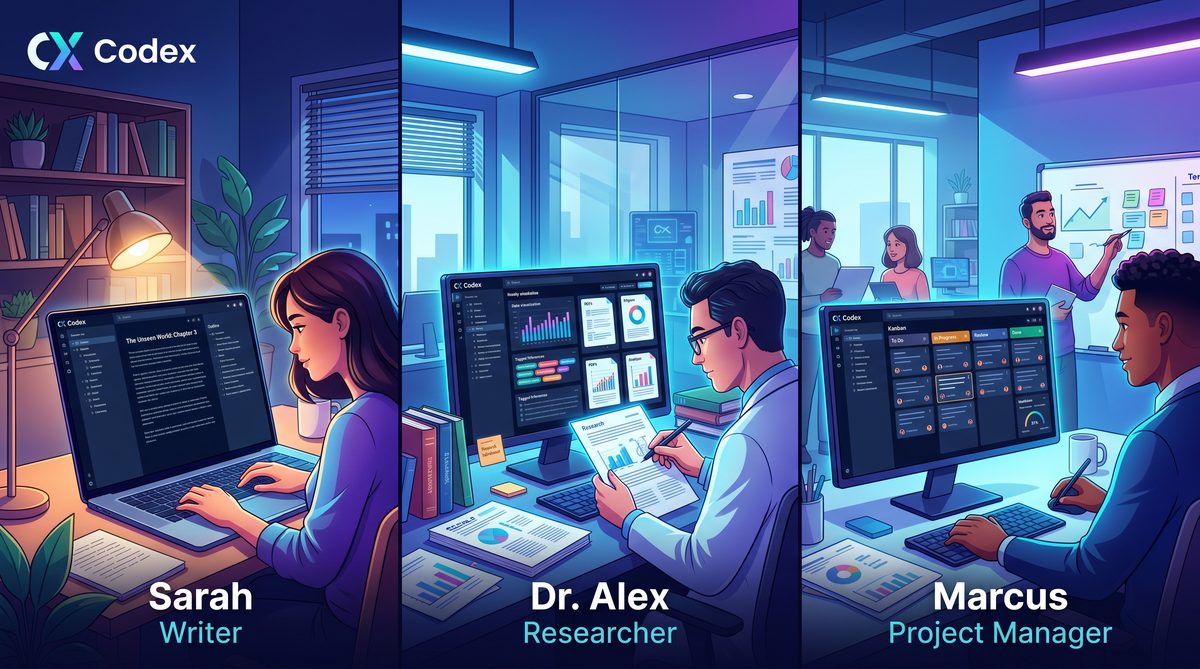
Expanding OpenAI Codex Desktop for Non-Developers: A Practical Guide for Writers, Researchers, and Project Managers
OpenAI Codex, traditionally framed as a developer-centric toolkit for code generation and automation, has matured into a desktop-class application with deep native OS integration, advanced terminal and file-system capabilities, and persistent background agents. This article reframes Codex as a powerful platform for non-technical knowledge workers—writers, researchers, and project managers—demonstrating concrete workflows, comparative analysis versus standard ChatGPT, and long-term implications for the future of knowledge work.
Overview: What the Codex Desktop App Brings to Non-Developers
The Codex desktop app is no longer merely an environment for writing scripts or prototyping back-end logic. It is an application layer with direct hooks into the operating system: file-system access with granular permissions, integrated terminals, clipboard and window management, scheduled or event-driven background agents, and local caching that improves offline productivity. For non-developers, these capabilities translate into practical advantages that unlock new workflows which were previously fragmented or required engineering assistance.
At a conceptual level, the differences between a web chat interface and a locally integrated desktop tool are significant. A web chat is stateless and isolated from user files unless explicit upload is supported; the desktop app can be granted tightly scoped access to folders, run commands locally for transformation tasks, and persist agents that monitor directories or network resources. These affordances reduce friction for tasks like iterative manuscript editing, reproducible research data wrangling, and multi-stakeholder program tracking.
Below we will explore three foundational pillars that power these new workflows: native OS integration, advanced terminal and file-system access, and background agents. Each pillar will be followed by concrete, step-by-step workflows for the three primary non-technical personas: writers, researchers, and project managers.
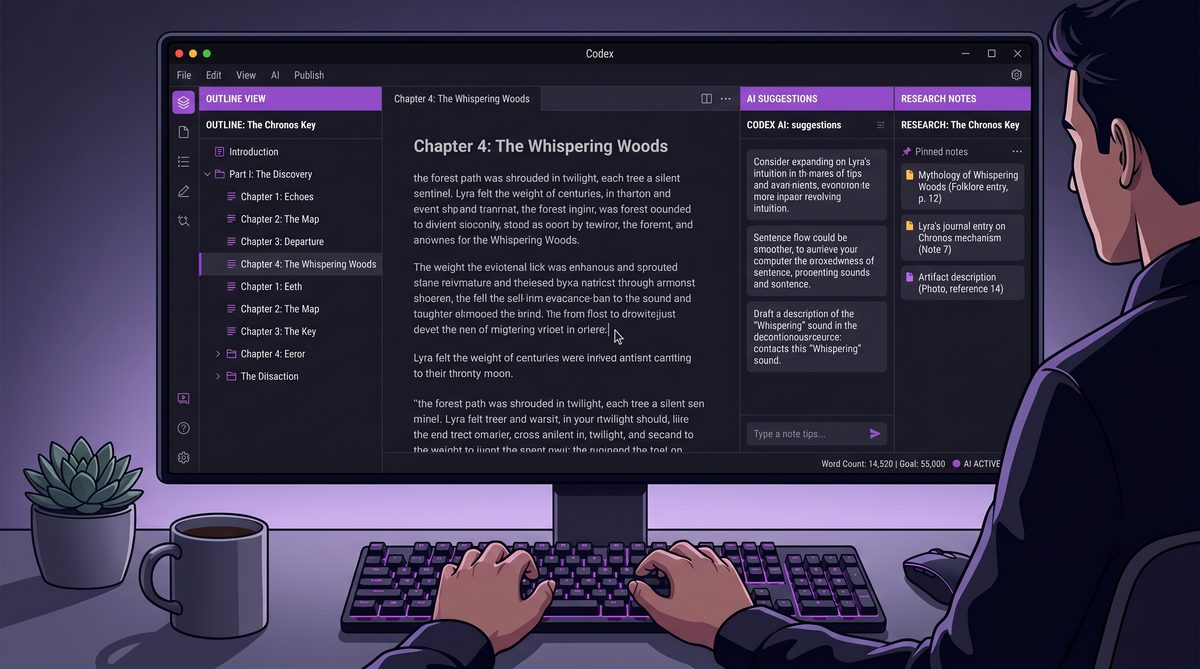
Before we proceed, a quick orientation: this article assumes the desktop Codex app exposes a permission model where a user can grant access to specific directories and run limited shell operations. It also assumes the app can persist “agents”—lightweight background tasks with configurable triggers and resource access. These are the capabilities that enable the workflows described below.
Native OS Integration: Why It Matters for Knowledge Work
Operating system level integration is not merely convenience. For knowledge workers, the ability to manipulate native files, interact with local applications, and react to system events transforms how work is orchestrated. The desktop Codex app can integrate with these signals in four practical ways:
- Direct file access and versioned editing — Open local manuscripts, research notebooks, or spreadsheets, apply transformations, and write revisions back to disk while preserving metadata and version history.
- Clipboard and window orchestration — Extract text from the active window, consolidate notes from multiple apps, and place refined content back into the exact context the user was working in.
- Notifications and scheduling — Trigger reminders or generate status snapshots on schedule, or when specific files change, enabling asynchronous accountability without manual polling.
- Local resource utilization — Use local compute and caches to run heavier prompt chains without network latency and to provide reproducible contexts for audits or reviews.
These integrations dramatically reduce the cognitive overhead of knowledge work. Writers no longer need to upload drafts to a web service; researchers can run data pre-processing where the data lives; project managers can build dashboards that update when local artifacts change. These are not hypothetical improvements—these are process accelerants that cut feedback latency and reduce cross-system friction.
Because the model runs in a desktop context, it can also respect enterprise controls and local privacy policies. For teams with sensitive documents or compliance requirements, configuring file-scope permissions and local-only agents prevents data from leaving the user’s device while still benefiting from intelligent automation.
Advanced Terminal and File-System Access: Practical Uses for Non-Developers
Terminal and file-system access are often seen as developer-only terrain. The Codex desktop app reframes them as accessible tools for structured, auditable transformations. Here is how non-developers can use these capabilities safely and effectively.
1. Structured Batch Edits and Formatting
Writers frequently need bulk transformations: change citation style across a manuscript, normalize headings across multiple files, or reformat code examples. With file-system access, Codex can:
- Scan a directory for target files (e.g., .md, .docx, .tex).
- Open each file, apply a transformation pipeline (clean whitespace, standardize references, reflow paragraphs), and write changes atomically to a new branch or timestamped copy.
- Produce a human-readable diff and a summary report describing the edits for editorial review.
2. Reproducible Data Preprocessing for Researchers
Researchers working with datasets can delegate routine preprocessing tasks to the desktop app. Codex can execute repeatable command-line steps, keep a transcript of actions, and store a configuration file that encodes the preprocessing pipeline. Example steps:
- Detect raw data files in a specified folder.
- Run data validation scripts to flag missing values or inconsistent formats.
- Apply transformation commands (CSV normalization, date parsing) and save intermediate artifacts with descriptive names.
- Generate a reproducible script and a README that documents the pipeline for collaborators.
3. Project-Wide Status Snapshots for Project Managers
Project managers often juggle disparate documents: roadmaps, meeting notes, risk registers. With file-system and terminal access, Codex can:
- Index project folders to extract key fields (due dates, owners, statuses).
- Run consistency checks and flag stale documents.
- Produce a consolidated status report or Gantt-style summary that can be exported to PM tools or shared as a PDF.
4. Low-Code Terminal Tasks via Safe Templates
Non-developers do not need to write shell scripts from scratch. The desktop app can provide verified templates for common operations that run through a permission approval UI. A template might ask for minimal user input (select folder, choose target file type, confirm operation) and then execute an idempotent command sequence, logging all activity for review.
5. Safety, Auditability, and Reversibility
Because operations modify local files and run terminal commands, auditability is mandatory. The Codex app should support:
- Dry-run previews showing diffs before applying changes.
- Automatic backups or snapshots.
- Signed manifests describing what an agent performed and why.
Together these features enable non-developers to harness the power of the terminal and file-system without exposing them to irreversible risk.
Background Agents: Persistent Automation for Busy Professionals
Background agents are lightweight, persistent processes that can perform tasks on triggers such as file changes, scheduled intervals, or external events (calendar updates, new email threads). For knowledge workers, agents are the mechanism that bridges single interactions into continuous workflows.
Agent Typology and Use Cases
- Monitoring agents — Watch a research folder and run quality checks when new datasets arrive; notify the team and create a ticket when anomalies are found.
- Summarization agents — Periodically summarize new meeting notes into a digest for stakeholders, highlighting decisions and action items.
- Digest and escalation agents — Detect overdue tasks across documents and escalate to stakeholders with a suggested remediation plan.
- Personal productivity agents — Keep a rolling “daily brief” that compiles next-day priorities from calendar events, unread email summaries, and open task lists.
Design Principles for Non-Developer Agents
When designing agents for non-technical users, the following principles make them both useful and safe:
- Least privilege — Agents should ask for the minimum permissions required and explain why.
- Transparency — Maintain human-readable logs and explainable decisions for every action an agent takes.
- Reversible actions — Support checkpoints and safe rollbacks to restore the workspace to a prior state.
- Configurable thresholds — Allow users to set sensitivity and frequency so agents don’t overwhelm or act prematurely.
Example Agent: The Editorial Assistant
Consider an editorial assistant agent for a writer working on a long-form report. Configuration steps:
- Grant the agent read/write access to the manuscript folder.
- Define triggers: save or new commit in the folder.
- Specify tasks: run style-check rules, update a change log, produce a one-paragraph summary of changes, and push a notification to the author’s preferred channel.
- Review the proposed diffs in a weekly digest and accept or reject changes.
These agents reduce context switching: instead of manually checking each file and running separate tools, an agent performs the routine work and surfaces only the decisions that require human judgment.
Concrete Workflows: Writers, Researchers, and Project Managers
The following subsections provide detailed, step-by-step workflows optimized for non-technical users. Each workflow includes goals, preconditions, a sequence of actions using Codex desktop features, expected outputs, and review checkpoints.
Workflow for Writers: Rapid Drafting, Source Management, and Structural Editing
Goal: Reduce iteration time on long-form drafts while maintaining traceable edits and consistent voice across sections.
Preconditions
- Manuscript folder with chapter files (.docx, .md, or .txt).
- Optional style guide file (e.g., preferred voice, terms to avoid).
- Codex desktop app installed and granted a scoped read/write permission to the manuscript folder.
Sequence
- Start a new “Editorial Session” and provide a brief description of intent: tone, audience, and draft state.
- Use the “Context Snapshot” feature to ingest the current chapter files and style guide into a working context. Codex will create a local transient workspace that references files without copying everything unnecessarily.
- Run a targeted prompt to “Generate a 200-word alternative intro for Chapter 3 that maintains a neutral professional voice and preserves the key points.” Codex returns one or more options side-by-side with annotated notes describing which lines were changed and why.
- Accept an option; Codex writes changes to a new file version and stores a manifest entry explaining the transformation.
- Run a “Global Consistency Check”: Codex scans all chapters for terminology mismatches, inconsistent dates, and citation formats, producing a prioritized action list. For each item, Codex suggests exact edits and highlights the affected snippets.
- Use an “Editorial Agent” to watch new saves and create a rolling change log and weekly summary for collaborators or editors.
Expected Outputs and Reviews
- Versioned manuscript files with time-stamped backups.
- Human-readable change logs and diffs for editorial approval.
- Annotations that rationalize edits in plain language for collaborators who prefer contextual transparency.
Why This Works for Non-Developers
Writers benefit because Codex brings automation to repetitive tasks while retaining editorial control. The desktop app’s file system access means changes never need to leave the writer’s environment, which is crucial for privacy and continuity. Templates and agent presets remove the need for scripting knowledge, and diffs/backups protect against unwanted modifications.
Workflow for Researchers: Data Hygiene, Reproducibility, and Collaborative Notebooks
Goal: Make data preprocessing and documentation reproducible, traceable, and accessible to non-programmer collaborators.
Preconditions
- A designated data folder with raw and processed subfolders.
- Institutional policies that specify allowed local access for the app.
- Codex granted read permissions with optional ability to run safe, template-based commands.
Sequence
- Define a “Data Import Template” that lists expected file formats and initial validation checks. The template is presented as a guided form rather than raw code.
- Run the template against new data files. Codex executes the template in dry-run mode first, producing an audit of potential issues (missing headers, unexpected encodings, outlier values).
- Accept or tweak transformations via a friendly UI (e.g., check a box to trim whitespace, pick a date format from a dropdown). Codex executes these operations and saves intermediate artifacts into a timestamped folder.
- Codex generates a reproducible “pipeline script” in plain-text pseudo-commands and a human-readable README that documents every transformation step, including parameters and rationales.
- Use an agent to monitor the raw data folder and automatically preprocess new files according to the approved template; the agent also creates a pull request-like artifact for manual review if the changes are non-trivial.
Expected Outputs and Reviews
- Processed datasets with metadata and a reproducible pipeline description.
- Audit logs and validation reports for each ingest.
- Collaboration-ready notebooks that link to processed artifacts and include plain-language explanations of transformations.
Why This Works for Non-Developers
Researchers who are not fluent in scripting can still perform rigorous preprocessing. The Codex app abstracts the command line into templates and forms, while preserving reproducibility through generated scripts and README documents. The agent-based monitoring reduces latency between data arrival and readiness for analysis.
Workflow for Project Managers: Consolidation, Risk Detection, and Status Automation
Goal: Consolidate scattered project artifacts into actionable status reports and proactive risk mitigations with minimal manual aggregation.
Preconditions
- Project folder(s) or shared drives with roadmaps, meeting notes, and task lists.
- Permission to read and index these folders; write access is optional for generating summary docs.
Sequence
- Run a “Project Index” routine that scans the selected folders, extracts key metadata (owners, deadlines, statuses), and builds a normalized project registry.
- Run cross-document consistency checks to surface mismatches in dates, owners, or conflicting scope statements.
- Generate a one-page executive summary: headline risks, upcoming milestones within two weeks, and newly surfaced decisions. Codex provides a draft email and a slide-ready summary that the PM can adjust and send.
- Activate a “Health Watch” agent that triggers when a document with the keyword “risk” is updated, or when a milestone date is modified. The agent sends a digest and suggested remediation steps, using templates for escalation that include recommended owner assignments and timelines.
Expected Outputs and Reviews
- Normalized project registry and a living status dashboard.
- Automatic meeting prep briefs and follow-up action lists.
- Escalation templates populated with data from the project registry for rapid communication.
Why This Works for Non-Developers
Project managers frequently perform aggregation tasks that are perfectly automatable. The Codex desktop app offers those automations with visible, auditable steps and safe agent behaviors. Because the app integrates with local documents and schedules, it reduces the manual toil of status collection and allows PMs to spend time on stakeholder management and decision-making.
For PMs wanting a richer prompt library tuned to project management scenarios—covering stakeholder updates, risk escalations, sprint retrospectives, and capacity planning—the internal resource
Product managers working alongside operations teams can leverage complementary AI prompting strategies for cross-functional alignment. Our collection of 50 GPT-5.5 prompts specifically designed for product managers covers roadmap planning, feature prioritization frameworks, competitive analysis templates, and stakeholder communication scripts that help PMs translate operational data into strategic product decisions. 50 GPT-5.5 Prompts for Product Managers.
offers a curated set of prompts and templates. That companion article provides direct prompt examples and contextual guidance which integrate seamlessly with Codex desktop workflows: use those prompts to populate agent templates, compose status emails automatically, or scaffold meeting agendas from the live project registry. By combining the prompt library with Codex’s native automation, PMs can reduce manual composition time and standardize communications across teams.
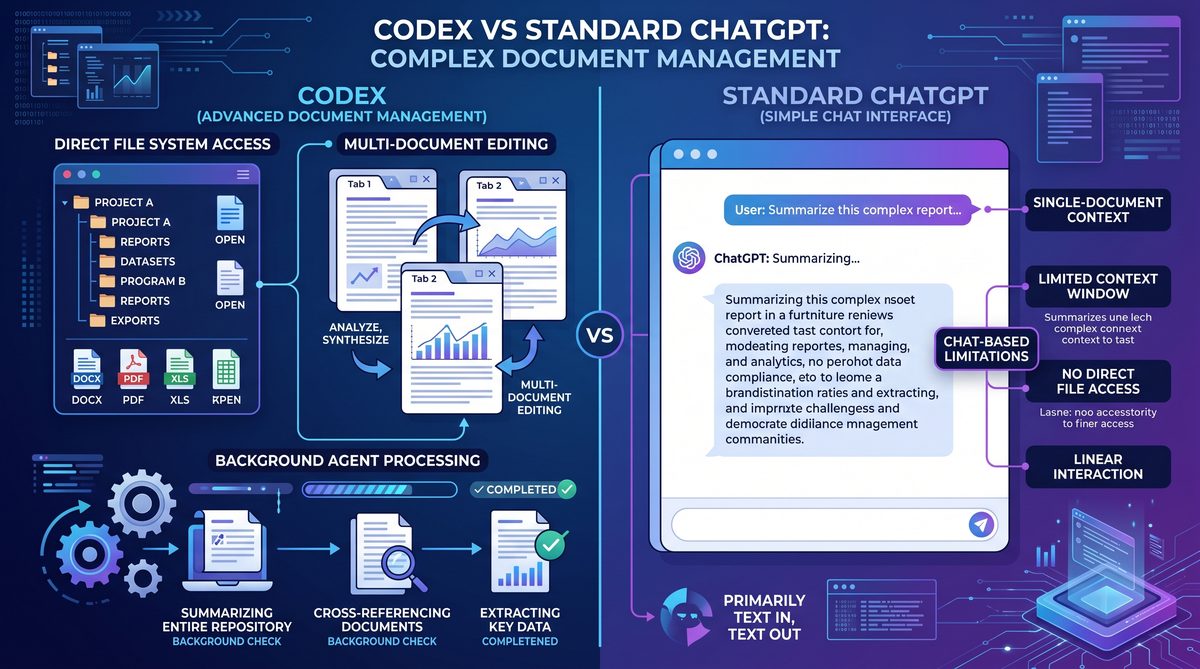
Comparative Analysis: Codex Desktop vs Standard ChatGPT for Complex Document Management
Users often ask whether the desktop Codex app is a meaningful improvement over the standard ChatGPT web interface for document management and knowledge workflows. The answer depends on the use case. Below is a comparative analysis focusing on capabilities that matter to non-developers.
1. File Access and Locality
ChatGPT (web) requires explicit uploads or copy-paste to work with document content. Codex desktop can be granted scoped access to local directories, allowing continuous workflows where the model can reference and operate on files without repeated manual transfers. For sensitive or large documents—datasets, legal contracts, or proprietary reports—local access avoids the friction and exposure of re-uploading content repeatedly.
2. Terminal and Command Execution
ChatGPT does not run local shell commands. The Codex desktop app can execute safe terminal tasks in a controlled environment, enabling batch transformations, reproducible preprocessing, and scripted exports. This is critical when working with documents that require structured post-processing (e.g., converting LaTeX to Word, compiling code examples, or running data validation scripts).
3. Background Agents and Automation
ChatGPT is request/response oriented: you send a prompt and receive a reply. Only external orchestration systems can create persistence. The Codex desktop app natively supports agents that persist state and act on triggers. This means knowledge workflows can be automated end-to-end within the user’s device: automated digests, watchlists, and continuous validation—things that are cumbersome via a web chat alone.
4. Auditability and Reproducibility
Codex’s local execution produces artifacts (manifests, diffs, and generated pipeline scripts) that are stored alongside documents, improving reproducibility. Web chats are often ephemeral unless a separate logging mechanism is used; even then, linking the model’s decisions to local file changes requires manual bookkeeping.
5. Collaboration and Accessibility
ChatGPT’s web interface is widely accessible and familiar. For collaborators who prefer browser-based workflows or who lack permission to install desktop software, web chat remains valuable. The Codex desktop app complements rather than replaces ChatGPT: use ChatGPT for quick ideation and Codex for operationalized, reproducible work that interacts with local resources.
6. Security and Compliance
Security posture favors the desktop app when data residency or offline operation is required. Because Codex can be configured to operate within local policies and can avoid sending sensitive data off device, it is often the better choice for regulated environments. Conversely, for non-sensitive tasks that prioritize ease of use and cross-device access, ChatGPT remains simpler.
Example Comparative Scenarios
- Editing a classified report — Codex desktop allows edits on-device with versioned backups and audit logs. ChatGPT would require careful copying and potentially temporary cloud exposure.
- Generating meeting summaries — Both tools can summarize, but Codex agents can auto-generate, store, and distribute summaries triggered by local file changes or new meeting notes saved to disk.
- Preprocessing large datasets — Codex desktop can run pre-processing locally with reproducible scripts; ChatGPT cannot execute local commands and would need a developer to translate instructions into runnable scripts.
In short, ChatGPT is ideal for conversational tasks and lightweight drafting, while Codex desktop is designed for integrated, reproducible, and auditable workflows that interact with the OS. Non-developers gain the most value when they need continuous automation, local file handling, and transparent change records.
Implementation Guidance: Onboarding, Governance, and Best Practices
Adopting a powerful desktop tool requires organizational and individual practices to ensure safety, productivity, and consistency. Below are recommended steps and guardrails for teams integrating the Codex desktop app into knowledge workflows.
Onboarding Steps
- Identify high-value pilot scenarios where Codex is likely to deliver measurable time savings (e.g., editorial rounds, dataset ingestion, weekly project reporting).
- Define a permission and scope model. Start with read-only access for the first pilot cohort and expand to limited write access after maturity checks.
- Provide non-developer templates and agent presets for common tasks so users do not need to design automations from scratch.
- Train users on interpreting logs/diffs and on rollback procedures to build confidence in the system’s reversibility.
Governance and Security
- Enforce least-privilege permissions for agents and workspace contexts.
- Maintain an approval workflow for any automations that will modify production artifacts.
- Keep cryptographic manifests or signed logs of agent activity to enable audits.
- Segment sensitive data into protected folders that require additional clearance or local-only operation modes.
Operational Best Practices
- Begin with dry-runs and diff previews, and require human sign-off for mass edits affecting many files.
- Use naming conventions and directory templates so agents can operate predictably (e.g., /incoming, /processed, /manuscripts/drafts).
- Standardize the content of generated READMEs that document transformations to make onboarding easier for new collaborators.
- Rotate and archive agent configurations periodically to avoid “automation debt” where old agents create surprising outputs on new document formats.
Monitoring and Metrics
Measure adoption and impact by tracking:
- Time saved per task (editorial rounds, preprocessing runs, status consolidation).
- Reduction in manual errors or inconsistencies detected post-automation.
- User satisfaction and trust metrics based on acceptance/rejection rates of automated changes.
Prompting Patterns and Templates for Non-Developers
Non-technical users benefit from well-crafted prompting patterns that map intent into reliable outputs. Below are reusable patterns and a short catalog tailored to writers, researchers, and PMs.
General Patterns
- Context-first: Start by telling Codex what documents and rules it can read; follow with the specific action and constraints (e.g., preserve citations, do not change quotations).
- Preview-and-confirm: Request a dry-run or summary of proposed changes before asking the system to write files.
- Explain decisions: Ask Codex to annotate edits with a plain-language rationale to aid reviewers.
- Rollback request: Include a final step that details how to revert changes, making reversibility explicit.
Writer-Focused Templates
- Rewrite prompt: “Given the following chapter files and style guide, produce three alternative intros for Chapter 2 that use an active voice, simplify sentence structure, and avoid jargon. Show the edits inline and produce a short rationale for each change.”
- Consistency prompt: “Scan all chapters for inconsistent terminology and present a table of found terms with suggested canonical replacements and the locations where they appear.”
Researcher-Focused Templates
- Data validation prompt: “Validate these CSV files against these schema rules. Flag rows that violate the schema and provide a suggested cleaning operation, including a command-line recipe to implement it.”
- Notebook scaffold prompt: “Generate an analysis notebook skeleton that documents each preprocessing step, links to processed datasets, and includes a short interpretation of expected outcomes.”
PM-Focused Templates
- Status digest prompt: “From the project registry, produce a one-page status summarized by milestone, risk level, and required actions. Prioritize items that are delayed or owned by multiple stakeholders.”
- Escalation prompt: “Draft a concise escalation email for a missed milestone, including proposed remediation steps and a suggested timeline for next check-in.”
These templates can be saved as agent presets and combined with the internal prompt resource
The expansion of Codex beyond code represents a natural evolution of the platform’s capabilities for knowledge workers. Our analysis of how Codex is transforming non-technical roles examines the AI-powered research workflows, automated analysis pipelines, and document generation capabilities that are enabling marketing teams, legal departments, and executive assistants to achieve developer-level productivity with natural language instructions. Codex for Knowledge Work: How OpenAI’s Productivity Platform Is Transforming Non-Technical Roles.
which explains how to operationalize prompts into background agents and integrated workflows. That resource provides case studies and mappings between high-level knowledge tasks and the exact agent configurations and permission scopes required to run them safely. Use it as a playbook to translate the strategic goals of your team into reproducible automated workflows inside the Codex desktop environment.
Long-Term Implications: How Codex Desktop Can Reshape Knowledge Work
The integration of intelligent desktop automation into everyday knowledge work has far-reaching implications. Below are the most critical shifts to anticipate and plan for.
1. Role Evolution and Skill Priorities
Non-technical professionals will increasingly need fluency in designing prompts, validating model outputs, and configuring agent behavior. The technical skills required will shift from programming to orchestration: understanding data formats, permissions, and explainability. Organizations should invest in “automation literacy” training focused on these skills.
2. Reduced Latency in Collaboration
Automations that generate drafts, summaries, and status updates shorten feedback loops. Faster iteration cycles can lead to accelerated decision-making, but they also require processes to prevent premature consensus or audit gaps. Effective governance and logging practices become strategic assets.
3. New Quality Assurance Practices
As models perform more routine work, QA shifts from validating exact outputs to validating pipelines and decision-making heuristics. This includes sampling-based audits, randomized diff checks, and periodic reviews of agent thresholds and prompts.
4. Democratization of Automation
When non-developers can configure safe automations, creative problem-solving expands across the organization. This can unlock innovation at scale but also introduces risks around duplication, divergent standards, and “automation sprawl.” A central registry of agent templates and shared prompts helps maintain coherence.
5. Data Privacy and Compliance Tensions
Local desktop automation eases data residency concerns, but organizations must still manage user-level permissions and ensure agents do not inadvertently exfiltrate sensitive data via integrations (email, cloud sync). Policies and technical controls need to be aligned, with regular compliance checks.
6. Knowledge Retention and Institutional Memory
Codex agents that produce READMEs, transformation manifests, and decision rationales contribute to institutional memory. Over time, a repository of agent logs and generated artifacts becomes a searchable ledger of decisions and document lifecycles—valuable for onboarding, audits, and counterfactual analyses.
Future Considerations and Areas for Product Development
Product teams building desktop AI assistants should prioritize these capabilities to maximize value for non-developers:
- Visual pipeline editors — Drag-and-drop interfaces that let users compose file watchers, transformation blocks, and notification steps without writing code.
- Governed template marketplaces — Curated, auditable templates maintained by internal teams or trusted vendors that non-technical users can trust and deploy.
- Explainability-first agents — Agents that provide step-by-step rationales for each edit, with links to the exact policy or prompt that guided the action.
- Cross-device synchronization with access controls — Securely sync agent configurations and manifests across devices while respecting device-level permissions and data residency rules.
These product improvements reduce the cognitive barriers that non-developers currently face and make advanced automation safer and easier to adopt at scale.
Access 40,000+ AI Prompts for ChatGPT, Claude & Codex — Free!
Subscribe to get instant access to our complete Notion Prompt Library — the largest curated collection of prompts for ChatGPT, Claude, OpenAI Codex, and other leading AI models. Optimized for real-world workflows across coding, research, content creation, and business.
Closing: Practical Steps to Start Today
To begin leveraging the Codex desktop app in non-technical roles, follow this pragmatic rollout path:
- Choose a single, well-bounded pilot: a writer’s manuscript process, a research data ingest pipeline, or a project status digest.
- Define clear acceptance criteria: what saved time or improved quality looks like, and how the output will be reviewed.
- Start with read-only access and agent dry-runs. Iterate until confidence is established, then expand permissions and agent responsibilities.
- Document every agent and template in a shared registry with owner, purpose, and rollback instructions.
- Measure outcomes and adjust templates, then scale to adjacent processes.
The first pilot should also reference available resources for non-developers. For teams seeking a strategic playbook and case studies on organizational adoption and the transformation of knowledge work, the companion resource
The expansion of Codex beyond code represents a natural evolution of the platform’s capabilities for knowledge workers. Our analysis of how Codex is transforming non-technical roles examines the AI-powered research workflows, automated analysis pipelines, and document generation capabilities that are enabling marketing teams, legal departments, and executive assistants to achieve developer-level productivity with natural language instructions. Codex for Knowledge Work: How OpenAI’s Productivity Platform Is Transforming Non-Technical Roles.
provides deeper analysis and practical examples. It maps organizational roles to agent designs and explains governance patterns that have succeeded in real deployments.
With disciplined rollout and clear governance, the Codex desktop app can be a generational productivity tool that extends beyond developers to become a staple of modern knowledge work. It reduces manual drudgery, enables reproducibility, and fosters richer documentation and audit trails—preserving the human judgment that remains essential even as automation takes on the repetitive work.
