
Codex for Knowledge Work: How OpenAI’s Productivity Platform Is Transforming Non-Technical Roles with AI-Powered Research, Analysis, and Automation

Codex for Knowledge Work: How OpenAI’s Productivity Platform Is Transforming Non-Technical Roles with AI-Powered Research, Analysis, and Automation
OpenAI’s Codex productivity platform has quickly moved from a developer-first toolset into an indispensable utility for knowledge workers. With more than 5 million weekly active users and an expanding cohort of non-developers—now roughly 20% of the active base—Codex is being used for more than code generation. Marketing analysts, HR teams, finance professionals, product managers, legal counsels, and sales operations are using Codex to create reports, synthesize research, automate repetitive workflows, and speed up decision cycles. This article dissects how Codex empowers non-technical users, explains its core architecture and features like role-specific plugins, Codex Sites, and Annotations, and provides detailed case studies and operational guidance for enterprise adoption.
Why This Moment Matters: From Code Assist to Knowledge Platform
Historically, large language models (LLMs) and AI assistants were positioned as developer accelerants: they autocomplete code, triage bugs, and scaffold services. Codex retains that DNA but now sits atop a set of productivity features that deliberately target knowledge work. The result: a spectrum of capabilities that allow a marketing manager to produce a first-draft market analysis in minutes, let a financial analyst automate periodic reconciliations, or enable an HR lead to screen resumes and draft interview guides — all without writing a single line of code.
Two concurrent trends drove this transition. First, the maturation of retrieval-augmented generation (RAG), embeddings, and hybrid search made it feasible to provide accurate, contextual responses derived from an organization’s own documents. Second, an extensible plugin ecosystem and in-product building blocks gave non-developers a low-code way to wire data sources, define workflows, and create repeatable templates. Codex bundles both: on one hand it offers LLM-inference optimized for utility and interactivity; on the other, a marketplace and site-level primitives that uncover practical ROI across non-technical functions.
How Knowledge Workers Use Codex: Workflows, Outputs, and Productivity Gains
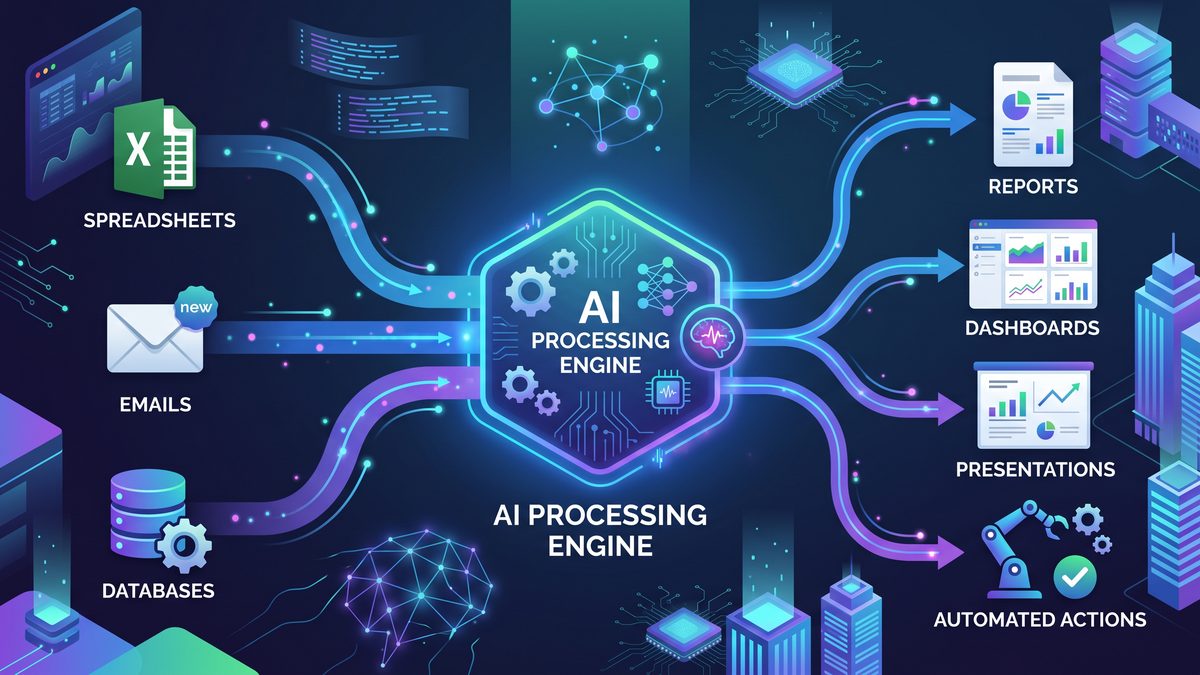
Non-technical use cases fall into a few repeated patterns: research synthesis, analytical augmentation, document and slide generation, and workflow automation. Each pattern manifests differently across roles, but the underlying mechanics — collecting context, retrieving relevant knowledge, generating artifacts, and optionally invoking external systems — are the same. Below are concrete, role-agnostic capabilities that illustrate how knowledge workers are using Codex day-to-day.
- Rapid research and literature review: Users upload papers, reports, and internal docs. Codex performs semantic search across these assets via embeddings and delivers concise executive summaries, gap analyses, and prioritized reading lists.
- Report and presentation synthesis: Teams convert bullet lists, meetings, and data extracts into slide decks and written reports. Codex can follow templates (slide structure, tone, citations) and produce production-ready outputs that require minimal editing.
- Data exploration and lightweight analytics: Non-technical analysts connect spreadsheets or BI extracts; Codex generates charts, performs statistical comparisons, and highlights outliers using natural language prompts. It can also generate SQL queries or spreadsheet formulas, with the user pasting these into tools if direct connectors are not available.
- Automation of repetitive tasks: Calendar scheduling, candidate screening, contract triage, and outreach sequences are created with visual workflows and templates. Codex can populate email templates, assemble context-specific attachments, and trigger downstream actions via integrations.
- In-context Q&A and annotations: By annotating documents and building Codex Sites, knowledge teams create a living knowledge base where the LLM answers questions grounded in the annotated corpus, with citation links back to sources.
These capabilities map into measurable KPIs: time-to-first-draft, reduction in manual data preparation, auditability of automated decisions, and cross-functional collaboration throughput. Later sections explore real-world case studies with metrics and implementation steps.
Under the Hood: Architecture and Core Patterns That Make Non-Developer Productivity Possible
Codex’s appeal to non-technical users stems from the productization of several underlying AI engineering patterns. Understanding them helps both practitioners and IT architects evaluate risk, govern deployment, and optimize outcomes. The primary building blocks are:
- Embeddings & Semantic Indexing: Documents, spreadsheets, and other content are converted into dense vectors (embeddings). These vectors power nearest-neighbor retrieval so the LLM receives only the most relevant context, reducing hallucination and improving accuracy.
- Retrieval-Augmented Generation (RAG): The LLM is used as a synthesizer while the retrieval system provides facts. RAG combines the generative power of the model with deterministic facts from the organization’s indexed content.
- Tooling & Function Calling: Non-developers interact with built-in tools (e.g., spreadsheet manipulation, email drafting, slide templates). Through abstraction layers, Codex exposes these actions as buttons or pre-configured function calls that the platform executes on behalf of the user.
- Role-Specific Plugin Layer: Plugins provide curated connectors, domain logic, and prompts tuned for particular functions (e.g., legal clause extraction or financial reconciliation). Each role-specific plugin encapsulates a set of templates, retrieval heuristics, and automation sequences that simplify complex tasks.
- Low-Code Automation & Integration Canvas: Visual workflows map triggers (calendar events, file uploads, CRM changes) to actions (document generation, notification, API calls). The canvas lets non-developers compose multi-step automations without writing code.
- Sites & Annotation Service: Codex Sites offer a way to host and navigate curated knowledge repositories. The annotation layer provides structured metadata (highlights, Q&A, tags, named entities) that enhance retrieval relevance and make RAG outputs auditable.
These components are stitched together with enterprise controls: identity and access management, encryption at rest and in transit, observability, and consent-aware data ingestion. Below, we’ll explore how role-specific plugins and the Codex Sites/Annotations combination accelerate adoption and reduce friction for non-technical users.
The Six Role-Specific Plugins: Purpose, Design, and Behavioral Guarantees
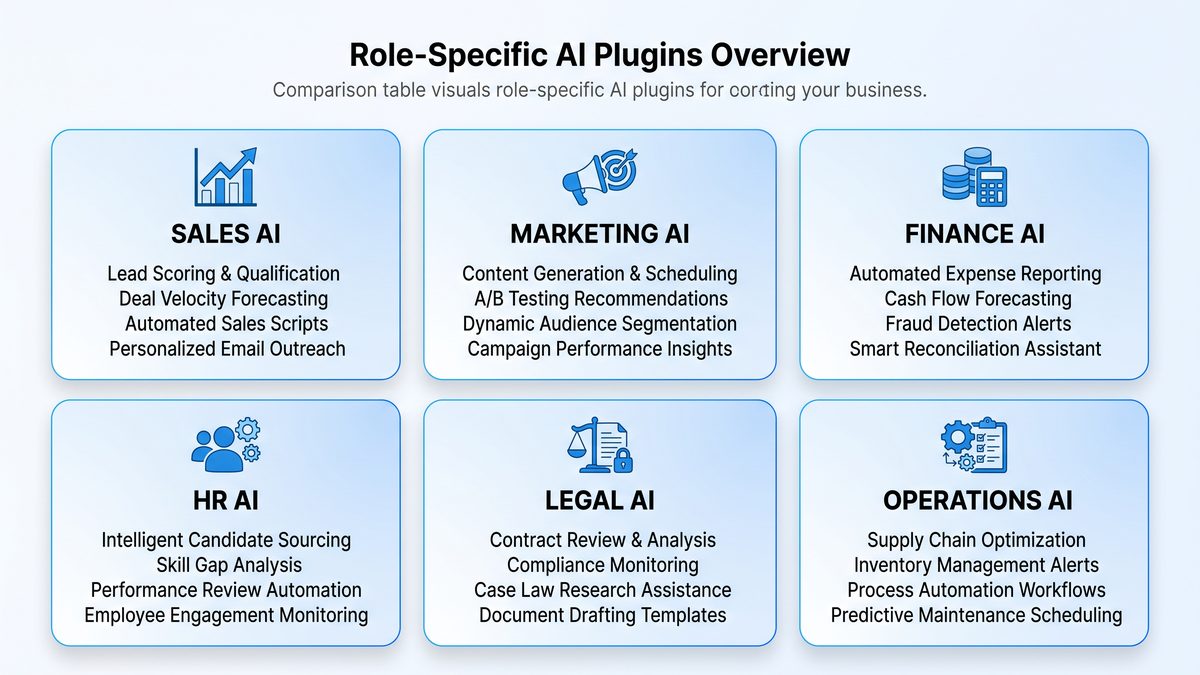
Codex ships with six role-specific plugins designed to cover the highest-impact knowledge work functions. Each plugin offers curated prompt templates, retrieval heuristics, connectors to common SaaS products, and pre-built automation recipes. The plugins are:
- Marketing Strategist Plugin
- Sales Enablement Plugin
- Financial Analyst Plugin
- HR & Talent Plugin
- Legal Ops Plugin
- Product & PM Plugin
Each plugin balances simplicity for non-technical users with extensibility for IT and power users. For instance, the Marketing Strategist Plugin includes slide and brief templates, competitive analysis heuristics, and connectors to Google Analytics and social listening tools. The Financial Analyst Plugin contains reconciliation patterns, formula generation for spreadsheets, and connectors to common ERP exports.
| Plugin | Primary Use Cases | Key Capabilities | Typical Data Sources | Automation Templates | Security / Compliance Controls |
|---|---|---|---|---|---|
| Marketing Strategist | Campaign briefs, audience research, slide decks | Canonical templates, competitor synthesis, content calendar generator | GA4, CRM campaign data, semantic web crawls, brand docs | Quarterly launch kit, creative brief pipeline, approval flow | Scoped data access, content versioning, brand guideline enforcement |
| Sales Enablement | Pitch generation, objection handling, prospect research | Call scripts, personalized outreach, playbook extraction | CRM records, call transcripts, product docs | New lead nurture, RFP response starter, demo prep | Redaction, PI detection, CRM permission mapping |
| Financial Analyst | Periodic reporting, variance analysis, reconciliations | Spreadsheet formulas, anomaly detection, narrative generation | ERP exports, spreadsheets, GLs | Monthly close automation, cash flow narrative, GL reconcile | Data masking, audit trails, read-only connectors |
| HR & Talent | Resume screening, interview guides, onboarding docs | Candidate scoring, role fit assessments, offer letter drafts | Applicant tracking systems, internal role descriptions, assessments | Interview prep automation, candidate feedback consolidation | PII redaction, consent tracking, privacy-preserving retrieval |
| Legal Ops | Contract triage, clause extraction, compliance checks | Clause taxonomy, precedent retrieval, risk scoring | Contract repositories, policy docs, regulatory texts | Contract intake routing, NDAs baseline, obligation tracking | Document provenance, non-answer suppression, legal review gates |
| Product & PM | Roadmap synthesis, user research summary, PRD drafting | Feature spec templates, stakeholder mapping, release notes | User feedback systems, analytics events, design docs | Feature brief automation, retro summary, release checklist | Access scoping by product team, IP protection controls |
The table above summarizes the plugins’ intended roles and the guardrails that keep outputs reliable. A typical enterprise chooses two or three of these plugins as pilot candidates and expands after demonstrating measurable value.
Codex Sites: Turning Content into Actionable Knowledge Repositories
One of the most transformative features for non-technical teams is Codex Sites. A Codex Site is a curated knowledge surface: think of it as a managed intranet page plus a semantic index. Teams publish internal playbooks, research, presentations, legal templates, and SOPs to Sites, which are then automatically indexed and enriched with structured metadata. There are three functional layers that make Sites powerful:
- Ingestion & Connectors: Sites ingest documents from multiple sources (Drive, SharePoint, Confluence, local uploads). Connectors can be configured by non-engineers using OAuth flows with role-based access. Files are normalized into text, cleaned, and passed to an embedding service for indexing.
- Annotation & Enrichment: When documents are ingested, automated annotation pipelines extract named entities, clauses (for legal), KPIs (for finance), and themes (for marketing). Users can also add manual highlights and Q&A pairs to provide explicit ground truth for the retrieval system.
- Query Surface & Access Controls: The Site provides a natural-language query interface. Users can ask questions and get answers that include citations (with document anchors), suggested actions (e.g., “create slide deck”), and direct links back to the source. Admins control access at the Site or document level, including read-only modes and time-limited access for contractors.
Codex Sites close the loop between discovery and action. A product manager, for example, can query a Site for previous decisions about a feature, get an annotated timeline, and then have Codex auto-populate a PRD draft with citations. Non-technical teams benefit because Sites make knowledge discoverable and trustworthy while preserving governance boundaries.
Annotations: Structured Context that Improves RAG and Auditability
Annotations are what take a collection of documents and make them truly useful in a high-stakes enterprise setting. In Codex, annotations are not simple highlights; they are structured metadata layers applied to documents that transform unstructured text into queryable facts. Typical annotation types include:
- Claim/Fact Tags: Identify sentences or paragraphs that represent discrete claims or metrics (e.g., “Q4 revenue: $7.2M”). These are later surfaced as verifiable facts in responses.
- Roles & Responsibility Tags: Mark who is responsible for a given deliverable or decision to enable action routing and accountability.
- Q&A Pairs: Curated question-and-answer annotations that prime the LLM for accurate responses about the document.
- Clause & Entitlement Tags: For legal and procurement documents, tag terms and obligations for rapid extraction and compliance checks.
- Data Source & Timestamp: Add provenance information, which is critical for time-sensitive domains like finance and legal.
Annotations improve retrieval precision because the indexer can weight annotated sections higher during similarity search. They also help create an auditable trail: every fact used in a generated output can be traced back to a specific annotation, document, and user edit. This is particularly important for regulated industries where decisions require an evidentiary chain.
Plug-and-Play Automation: Low-Code Workflows that Non-Technical Users Actually Build
Low-code automation can mean a lot of things, but Codex focuses on real-world constructs that non-technical users understand: triggers, context, actions, and conditions. Visual flow editors allow users to bind inputs (a new resume upload, a CRM opportunity stage change, a weekly data dump) to outputs (email templates, slide generation, row edits in a spreadsheet). The magic happens where the LLM injects intelligence into those flows:
- Contextual Decision Nodes: The LLM evaluates inputs (e.g., candidate skill matching, transaction anomalies) and emits structured outputs (scores, tags). Those outputs can then control branching logic.
- Templated Generation Nodes: Generate documents, emails, or slides from templates with placeholders that Codex fills using available context.
- External Actions: Call external APIs, update CRMs, post to Slack, or create tasks in project management tools. Function calling enables these integrations to be deterministic and observable.
For a non-technical user, building an automation looks like drawing a flowchart and selecting options from dropdowns. Under the hood, Codex compiles that flow into a reliable sequence of API calls and LLM prompts, with retry logic and logging for observability. Importantly, administrators can opt into human-in-the-loop steps for contentious decisions to avoid full automation without oversight.
Real-World Case Studies: Non-Technical Automation That Delivers Business Impact
Below are extended case studies demonstrating how non-developers use Codex to automate workflows. Each case includes the business problem, a step-by-step explanation of the implementation using Codex features, and quantitative outcomes when available.
Case Study A: HR — Candidate Screening and Interview Kit Automation
Problem: A mid-sized enterprise receives 3,000 applications per quarter for engineering and product roles. Recruiters were spending hours per week screening CVs and assembling interview kits for hiring managers.
Solution Architecture:
- Ingestion: CVs are uploaded to a shared folder (Drive). A Codex Site is configured as the ‘Talent Site’ with the HR & Talent plugin enabled.
- Annotation: An automated pipeline extracts named entities (skills, companies, roles) and PII markers. The HR team adds weightings to scoring criteria via a simple form (e.g., “Python: required”, “Kubernetes: preferred”).
- Embedding & Indexing: Each CV and cover letter is embedded and indexed with annotations. Similarity search is tuned for role relevance.
- Flow: A low-code flow triggers on new CV upload. Codex runs a scoring LLM that returns a match score, top-3 strengths, and suggested interview questions. Scores below threshold generate an auto-reject message via the ATS; scores above threshold create an interview kit document and notify the hiring manager in Slack.
- Human Review: For borderline cases (score 60–75), the flow stops and assigns a human reviewer (recruiter) to make a final call.
Implementation Details:
- Scoring prompt design uses a calibration dataset of past hires to normalize scores. Non-technical HR staff tune the prompt via a UI that maps outcomes to numerical thresholds.
- PII redaction is enforced before summarization, with redaction logs stored separately for compliance.
- Auditability: Each decision is logged with citations: the resume line and highlighted annotations that justified the score.
Outcomes:
- Time-to-screen per candidate reduced from ~8 minutes to ~90 seconds.
- Recruiters reallocated ~30% of their time to candidate engagement activities.
- Quality-of-hire (first-year retention) improved by ~6% after prompt calibration.
Case Study B: Marketing — Competitive Landscape Report and Slide Generation
Problem: The product marketing team needed a quarterly competitive landscape deck. The previous process involved manual data pulls, drafting slide decks, and multiple rounds of review, taking roughly two weeks per quarter.
Solution Architecture:
- Codex Site: A Marketing Site aggregates competitor whitepapers, press releases, product pages, and internal win/loss notes. The Marketing Strategist plugin is enabled.
- Annotations: The team annotates key competitor claims, pricing statements, and product differentiators. They also seed Q&A pairs for common comparison questions.
- RAG Prompting: A template prompt instructs Codex to produce a slide outline with speaker notes, charts showing feature parity, and suggested messaging for sales enablement.
- Automation: The team configures a “Quarterly Competitive Deck” flow. When the marketing ops lead clicks “Generate”, Codex retrieves relevant annotated evidence, generates slides, outputs them into Google Slides, and notifies stakeholders for review.
Implementation Details:
- Slide templates include data placeholders that Codex fills. When structured data is required for charts, Codex writes a snippet of spreadsheet formulas and populates a linked sheet.
- Review flow includes a human-in-loop approval step where legal can red-flag any potentially defamatory claims before finalizing.
- Versioning: Each generated deck is versioned against the Site’s source docs so reviewers can trace claims back to annotated sentences.
Outcomes:
- Deck production time dropped from ~10 business days to <24 hours (including review).
- Marketing’s output cadence increased by 3x, enabling more responsive positioning.
- Alignment between marketing and sales improved due to standardized, citation-backed messaging.
Case Study C: Finance — Monthly Close Acceleration and Narrative Automation
Problem: Month-end close required significant manual reconciliation, narrative drafting, and cross-team validation. The finance team spent a week compiling reconciliations and two days writing the executive narrative.
Solution Architecture:
- Data Sources: GL exports, Excel reconciliations, and ERP extracts are ingested into a Codex Site configured for finance.
- Annotation: Bookkeepers annotate reconciliation rules and routine adjustments. The Financial Analyst plugin houses formula patterns and anomaly detection heuristics.
- Automation: A low-code flow triggers on the final GL upload. Codex performs preliminary reconciliations, flags exceptions, generates the executive narrative, and creates a list of action items for accounting.
- Human-in-the-loop: Flagged exceptions are routed to subject matter experts for verification before inclusion in the final close package.
Implementation Details:
- Reconciliation logic is expressed in deterministic rules (matching invoices to payments) with LLM-assisted fuzzy matching for ambiguous cases.
- Codex writes reconciliation summaries and populates a slide deck for the CFO with charts and root-cause analysis for significant swings.
- Audit trails: every narrative statement links back to the GL line items and reconciled documents.
Outcomes:
- Close time shortened by 33% (from seven days to five days).
- Draft narrative time reduced from two days to two hours.
- Exception resolution improved through faster routing and richer contextual documentation, reducing rework downstream.
Case Study D: Legal Ops — Contract Intake, Triage, and Clause Library Automation
Problem: Legal operations were overwhelmed with contract intake: triaging NDAs, evaluating supplier contracts, and extracting key obligations consumed too much lawyer/hourly time.
Solution Architecture:
- Ingestion: Contracts uploaded to a dedicated Legal Site are parsed into text and split into clauses for granular retrieval.
- Annotation: Legal ops annotate common clause types (indemnity, termination, data protection) and set risk thresholds.
- Plugin Use: The Legal Ops plugin runs clause extraction, produces a risk score, and routes high-risk documents to senior counsel.
- Automation: For low-risk NDAs, Codex auto-populates countersigned copies using templated fields and triggers storage in the contract management system.
Implementation Details:
- Clause taxonomy is collaboratively curated. Non-lawyer business owners can tag clauses via a simple UI; lawyers validate the taxonomy to ensure soundness.
- Legal reviewers use the annotation links to jump directly to clauses that influenced the risk decision, speeding review cycles.
- Compliance: Redaction and non-answer suppression prevent Codex from producing speculative legal advice for high-risk items. Human review gates are enforced for those cases.
Outcomes:
- Time to triage NDAs reduced from 48 hours to under 2 hours.
- Lawyer hours spent on routine contract review dropped by 40%.
- Contract repository completeness increased because auto-archiving ensured contracts were captured consistently.
Case Study E: Sales — Prospect Research and Personalized Outreach at Scale
Problem: Sales reps lacked time for personalized research. A manual approach limited outreach to templated messages, which produced low engagement.
Solution Architecture:
- Codex Site: The Sales Site indexes public corporate filings, LinkedIn summaries, and internal win notes.
- Annotations: Reps add battlecards and key insights; the Sales Enablement plugin surfaces playbooks for each persona.
- Automation: A “Personalized Outreach” flow takes a list of leads, uses the site to retrieve relevant insights, drafts individualized email sequences, and pushes them to a CRM cadence.
Implementation Details:
- Cadences are parameterized. Codex fills variables (company milestone, competitor mention) per lead and provides a one-click “send suggestion” for reps.
- Performance tracking connects to the CRM and iteratively tunes messaging templates based on reply rates.
Outcomes:
- Open and reply rates increased by double digits in pilot accounts.
- Time spent on prospect research per lead fell from 20 minutes to under 5 minutes.
- Conversion-to-opportunity improved due to more relevant messaging.
Design Patterns and Technical Implementation Notes for Non-Developers
Bridging the gap between non-technical product owners and backend engineers requires intentional design patterns. These patterns let non-technical staff build robust automations without compromising security or reliability.
- Template-First Approach: Expose high-quality templates for common outputs (executive summary, slide deck, contract memo). Templates reduce prompt drift and preserve organizational voice.
- Annotation-as-Policy: Use annotations not only for relevance but also as policy flags (e.g., “requires legal review”). This reduces the need for ad hoc rules in workflows.
- Role-Bound Builders: Low-code builders should be surfaced per role with constrained options. For example, marketing builders expose branding-related toggles; legal builders expose clause taxonomies.
- Observability and Feedback: Capture model inputs, selected sources, and outputs in an immutable log. Offer a one-click feedback button to correct hallucinations or misinterpretations and feed that into retraining cycles.
- Graduated Automation: Start with human-in-the-loop. Move to full automation only after establishing stable correctness metrics and review policies.
Governance, Security, and Regulatory Considerations
Enterprises must operationalize controls around any system that automatically synthesizes or acts on corporate information. Codex includes many of these features out-of-the-box, and organizations should enforce them consistently:
- Access Controls & RBAC: Sites and plugins must respect enterprise identity providers (OIDC, SAML). Role-based access limits who can read or write to sensitive sites.
- Data Residency & Encryption: Ensure embeddings and logs are stored per organizational compliance needs. Codex supports region-specific storage and encryption protocols to meet jurisdictional demands.
- Audit Trails: All automated actions and LLM outputs should be logged with source citations, timestamps, and actor context. This is non-negotiable for regulated sectors.
- Privacy & Redaction: PII should be detected and redacted or handled by specialized workflows. Annotations can mark which content is privacy-sensitive and prevent it from being used in autosummarization.
- Bias and Testing: Regularly validate prompts and model outputs for demographic bias or systematic misclassification. Codex provides testing harnesses to run prompts against annotated test suites.
- Human Oversight Policies: Define which decisions require human approval. Implement gating in automation flows and enforce reviewer rotations to limit fatigue-based errors.
Operational Playbook: Rolling Out Codex to Non-Technical Teams
Adopting Codex is as much about change management as it is about technology. The following playbook condenses lessons from high-performing enterprises:
- Identify Pilots with High ROIs: Choose workflows where time savings are measurable and risk is manageable (e.g., marketing deck generation, HR screening).
- Assemble Cross-Functional Teams: Each pilot needs a product owner (domain expert), an AI-savvy operations person, and one IT/governance partner for access and security.
- Curate Training Data & Templates: Assemble the best historical artifacts to seed Sites, and create a small set of templates to constrain early prompts.
- Define Success Metrics: Time-to-output reduction, accuracy vs. human baseline, human hours saved, and compliance metrics.
- Start Human-in-the-Loop: Keep a human reviewer on automated outputs until confidence budgets are met.
- Iterate Prompts & Workflows: Use logs and user feedback to refine prompts and templates. Codex’s in-product metrics help find drift and error patterns.
- Scale with Governance: Expand plugin enablement and Site exposure only after governance checkpoints are satisfied.
Cost and Performance Considerations
Enterprises should treat Codex usage like any other cloud service, balancing latency, inference cost, and model fidelity. Optimizations include:
- Context Window Optimization: Use retrieval to limit the prompt size. Only pass the most relevant chunks rather than whole documents.
- Caching & Determinism: Cache deterministic outputs (e.g., template-filling) and use lower-cost models for routine tasks while reserving higher-quality models for synthesis and critical decisions.
- Batching: For bulk operations (e.g., morning resume screening), batch requests to reduce overhead.
- Observability-driven Optimization: Monitor token usage by flow and analyze the cost-per-output to determine where templates can be tightened.
Extensibility: When Teams Need More Than the Out-of-the-Box Plugins
There are three pathways when out-of-the-box plugins or Sites aren’t enough:
- Parameterize Plugins: Non-developers can often tune heuristics, templates, and thresholds via admin UIs without writing code.
- Custom Plugin Scaffolding: For specialized integrations, engineering teams can create new plugins that conform to the Codex plugin API. These plugins encapsulate connectors, additional function calls, and domain-specific prompt libraries.
- Hybrid Models: For highly regulated tasks, teams pair deterministic microservices (for calculations or policy checks) with Codex for narrative synthesis. The microservices handle the ground truth, and Codex provides a human-friendly interface.
Non-technical teams typically begin with parameterization and move to scaffolding only when economics justify engineering effort.
Ethics, Explainability, and the Need for Evidence-Based Outputs
Codex’s enterprise adoption hinges on its ability to provide explainable outputs. For knowledge workers, “why” matters as much as “what.” Two features make outputs defensible:
- Grounded Answers with Citations: RAG ensures answers are anchored to source documents. Each statement in a generated artifact includes a pointer to the annotated piece of content, enabling verification and dispute resolution.
- Model Decision Logs: Every inference that affects an automation decision is logged along with the retrieval context and prompt. These logs facilitate post-hoc audits and support compliance reporting.
Organizations should also implement review policies: flagging hallucinations, requiring human sign-off for high-impact outputs, and maintaining a feedback loop into training and annotation pipelines.
Where Codex Fits Relative to Other Enterprise AI Tools
Codex is not a drop-in replacement for specialized BI tools, full-stack automation platforms, or dedicated contract analysis suites. Instead, it functions as a convergence layer that brings LLM-driven synthesis and low-code automation into everyday productivity workflows. It excels at:
- Rapid synthesis across heterogeneous internal and public data
- Generating communication artifacts (reports, slides, email sequences)
- Automating repeatable decision patterns with transparent provenance
For heavy-duty analytics, teams still use data warehouses and BI tools; for complex legal reasoning and litigation, firms may rely on expert systems. But Codex fills a broad middle ground: the 80% of knowledge work that is too structured for pure creativity and too unstructured for rigid tooling.
Future Directions: What to Expect from Codex and the Productivity Layer
The trajectory for Codex and similar productivity platforms includes three likely developments over the next 12–24 months:
- Finer-Grained Role Customization: Plugins will become more parameterizable with company-specific presets and industry templates (e.g., healthcare consent forms). This lowers the bar for non-technical users to adopt domain-savvy automations.
- Tighter BI & Data Warehouse Integration: Live connectors to warehouses and BI tools will enable Codex to query large datasets directly for real-time analysis while preserving governance and query cost controls.
- Hybrid Reasoning Architectures: More deterministic microservices will be composed with generative layers to meet auditable decision requirements—for example, strictly separating fact retrieval from narrative generation in regulated workflows.
These evolutions will reinforce Codex’s role as an orchestrator of knowledge and action across the enterprise, making it easier for non-technical roles to access AI-augmented productivity safely and predictably.
Checklist: Getting Started with Codex for Non-Technical Teams
For practitioners ready to pilot Codex with non-developers, here is a pragmatic checklist:
- Choose a pilot team and define 2–3 concrete workflows with measurable outcomes.
- Set up a Codex Site and ingest canonical documents.
- Enable the appropriate role-specific plugin and select matching templates.
- Create an annotation run and seed the Site with Q&A and taxonomies.
- Configure a low-code flow, start with human-in-the-loop, and instrument logs.
- Run a short calibration phase with domain experts and collect feedback.
- Review security, access control, and compliance metrics with IT and legal.
- Measure outcomes and iterate on templates, thresholds, and annotations.
Access 40,000+ AI Prompts for ChatGPT, Claude & Codex — Free!
Subscribe to get instant access to our complete Notion Prompt Library — the largest curated collection of prompts for ChatGPT, Claude, OpenAI Codex, and other leading AI models. Optimized for real-world workflows across coding, research, content creation, and business.
Conclusion: Democratizing Knowledge Work with Responsible Automation
Codex is changing the contours of knowledge work by enabling non-technical professionals to leverage advanced AI without requiring engineering expertise. By combining role-specific plugins, Codex Sites, and a robust annotation layer, the platform converts disparate corporate knowledge into actionable, auditable workflows. The transition is not without challenges: governance, bias testing, and cost controls are critical. But when implemented thoughtfully—with human-in-the-loop safeguards and clear success metrics—Codex delivers tangible time savings, improved decision quality, and new scales of cross-functional collaboration.
For enterprises, the question is no longer whether to adopt AI-assisted productivity tools; it is how to adopt them responsibly and at scale. Codex, with its ecosystem of plugins and knowledge primitives, offers a pragmatic path forward: it reduces friction for non-technical users while giving IT the control and observability they need. The net effect is an elevation of knowledge work — faster research, clearer narratives, and smarter automation — all grounded in the organization’s authoritative sources.
To explore practical next steps, review internal documentation on governance, follow the pilot playbook above, and start with a narrow but high-impact use case. Codex’s momentum suggests that the next wave of productivity gains will come from redefining what knowledge workers can accomplish in a single day, not a single week.
Knowledge workers leveraging Codex for non-technical tasks can amplify their output by combining platform capabilities with well-structured prompts designed for their specific role. For a deeper exploration of this topic, see our comprehensive guide on Best ChatGPT Prompts for writing, which provides actionable frameworks and implementation strategies for enterprise teams.
The automation capabilities within Codex extend naturally to workflow orchestration, where teams can build end-to-end processes without engineering support. For a deeper exploration of this topic, see our comprehensive guide on 5 Battle-Tested Prompts for developers in 2026, which provides actionable frameworks and implementation strategies for enterprise teams.
