
Codex Sites Tutorial: Build, Refine, and Deploy Complete Websites by Describing Your Vision
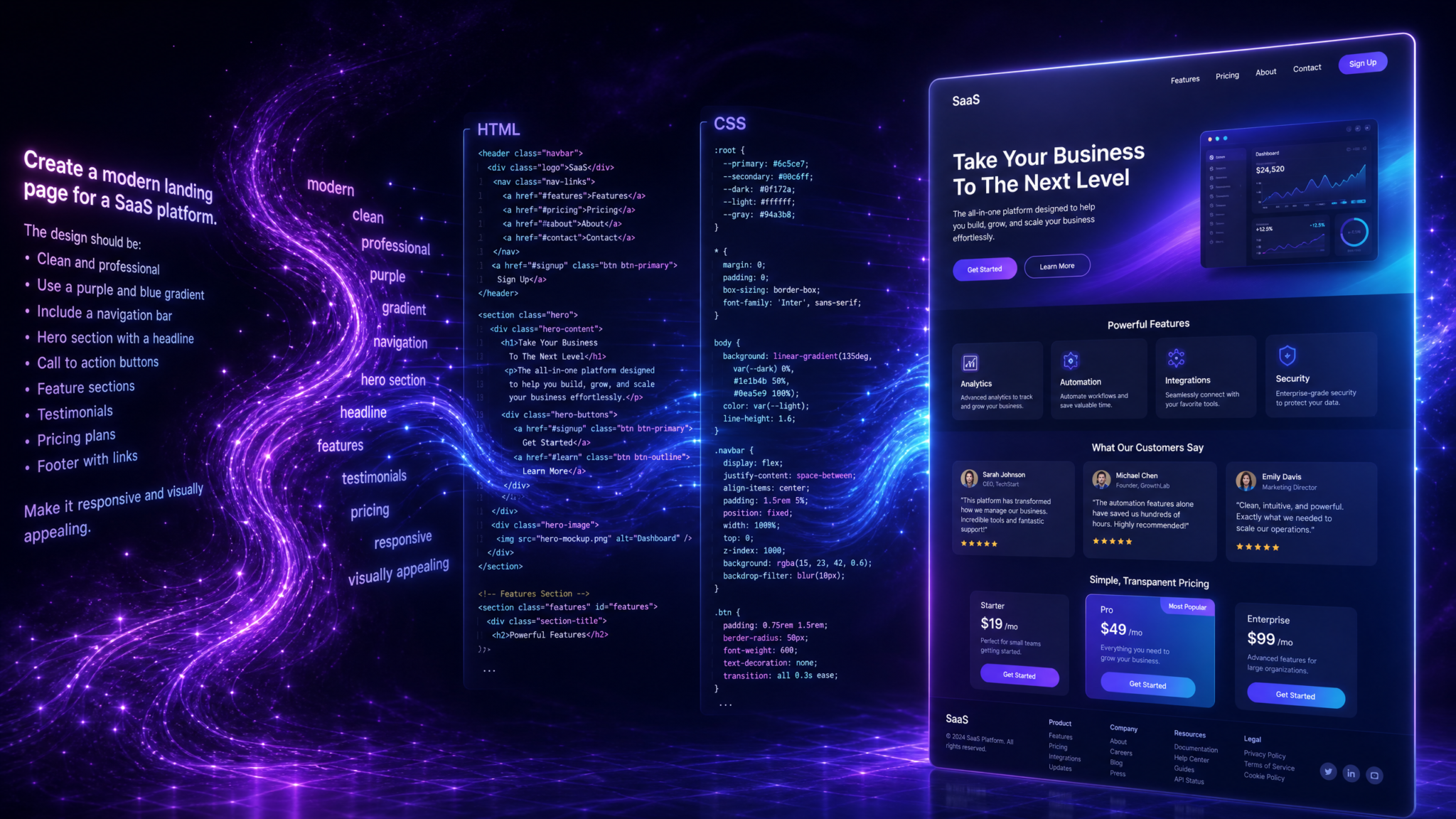
Codex Sites is a transformative capability introduced in the July 2026 Codex update. It enables anyone—especially non-coders using the broader ChatGPT Work ecosystem—to describe the kind of website they want in plain language and receive a fully functional, responsive, and deployable site in return. Beyond one-shot generation, Codex Sites supports conversational, iterative refinement: you can adjust layout, visuals, content, interactivity, and deployment settings through dialogue, rather than manipulating code directly. For those who do want more control, Codex Sites is built on Codex’s mature coding competencies; you can inspect, validate, and direct the underlying implementation without being forced to write a single line.
This tutorial is a comprehensive, step-by-step guide to producing professional-quality websites with Codex Sites. You will learn how to clarify your goals before you start, craft effective descriptions that lead to superior first drafts, review and evaluate Codex’s output, iterate and refine the design, add interactivity like forms and lightboxes, and finally deploy your site to a secure URL or custom domain. We will also walk through advanced topics—from analytics and SEO to content governance and performance—so that the site you publish is not only beautiful but also measurable, compliant, and fast.
If you have never shipped a site before, you will find pragmatic checklists throughout to keep your project on track. If you are experienced, you will discover patterns to drive higher-quality outputs in fewer turns, as well as ways to leverage Codex Sites as a high-speed prototyping partner that can then be hardened for production.
By the end of this tutorial, you will be able to create a multi-page, responsive site with clear navigation, refined typography and spacing, consistent theming, accessible components, interactive behaviors, and a robust deployment pipeline—all by conversing with Codex Sites.
What Are Codex Sites?
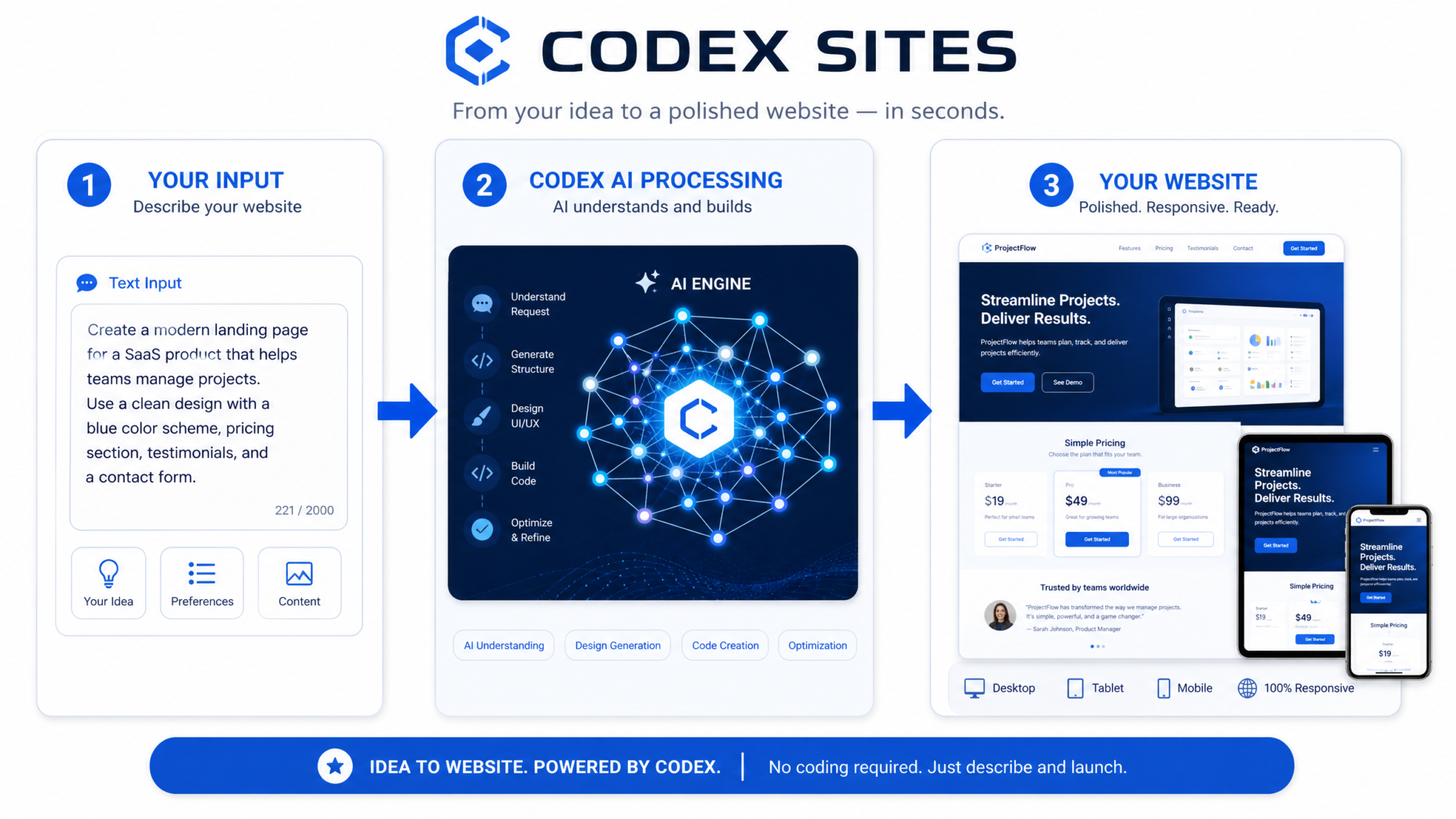
Codex Sites is a feature within the ChatGPT Work ecosystem that turns natural language descriptions into production-ready websites. Rather than composing HTML, CSS, and JavaScript by hand, you describe intent and constraints—your audience, tone, brand palette, information architecture, required components—and Codex generates a complete, responsive site that you can preview, refine, and deploy, all in one continuous conversation. The system integrates tightly with Codex’s established code-generation capabilities but abstracts the raw code away so that non-technical users can focus on outcomes, not syntax.
Think of Codex Sites as a conversational compiler for the web: it translates your specifications, expressed in plain English (or your preferred language), into a coherent site with pages, sections, navigation, assets, components, interactions, and deployment configuration. You can treat the result as a living artifact; when you ask for changes, Codex updates the implementation while maintaining internal consistency—renaming links when you rename pages, retheming buttons when you change the accent color, recalculating typographic rhythm when you adjust the base font size, and so on.
Key Capabilities at a Glance
- Natural-language authoring: Describe your site, and Codex Sites creates the structure, components, styles, and copy.
- Iterative refinement: Use conversational turns to adjust layouts, images, copy, accessibility, and behavior.
- Responsive design: All breakpoints, grids, and fluid typescales are generated to work across devices.
- Interactive elements: Menus, tabs, accordions, carousels, forms, modals, and lightboxes can be requested and configured by description.
- Content strategy awareness: Specify voice, tone, length constraints, and conversion goals for copy generation.
- Deployment built-in: Publish to a secure URL with one command, then connect a custom domain and SSL.
- Governance-friendly: Request accessibility checks, performance budgets, and style tokens; Codex enforces and reports.
- Code transparency: Ask Codex to show or export underlying HTML/CSS/JS or component code for auditing and handoff.
How Codex Sites Fits Into ChatGPT Work
ChatGPT Work provides shared workspaces, collaboration controls, and enterprise features so teams can coordinate knowledge and automate workflows. Codex Sites adds website production to that toolkit, making it possible for non-coders—marketers, product managers, founders, educators—to go from concept to live site without waiting on engineering bandwidth. The result is a faster path from idea to impact, while still permitting developers to step in whenever deep customization or integration is required.
Why Use Codex Sites Instead of Hand Coding?
Hand-coding remains powerful for edge cases and heavy custom integrations. However, many sites share repeatable patterns: hero sections, feature grids, testimonials, pricing tables, blog archives, docs navigation, contact forms. Codex Sites automates these patterns, freeing you to focus on messaging, brand coherence, and conversion. Additionally, Codex Sites enforces a baseline of accessibility, semantics, and performance that is easy to erode under deadline pressure when coding manually.
| Task | Conversational Flow in Codex Sites | Typical Hand-Coded Effort | Risk if Rushed |
|---|---|---|---|
| Create responsive layout | “Use a 12-column grid, 72px max gutter, and stack sections cleanly on mobile.” | Define grid CSS, test breakpoints, reconcile overlap issues | Layout shifts, unreadable text at small sizes |
| Generate consistent styles | “Base font 18px, scale 1.25, accent #5B7CFA, soft gray backgrounds.” | Create tokens, theme variables, apply across components | Inconsistent palette, mismatched font sizes |
| Add a contact form | “Add a 4-field contact form with validation and a thank-you modal.” | HTML form, client validation, submission endpoint, modal logic | Broken submissions, no validation, spam |
| Deploy site | “Publish to a staging URL, then map my domain.” | Set up hosting, CI/CD, HTTPS, DNS | Downtime, mixed content, DNS errors |
Prerequisites and Setup
While Codex Sites is designed for non-technical users, a little preparation dramatically improves results. Use this checklist to ensure you start with clear goals and required assets.
Access and Workspace Preparation
- Confirm ChatGPT Work access: Ensure your account has access to Codex Sites within your ChatGPT Work plan. If you are part of a team, verify that you have permission to create and publish web projects.
- Create or select a workspace: Use a workspace dedicated to your website project. Organize assets (logos, images, copy drafts) in shared folders so collaborators can reference them during the conversation with Codex.
- Define roles: If multiple people will review drafts, decide who owns messaging, visual style decisions, accessibility review, and deployment approvals.
Brand and Content Inputs
- Brand kit: Have a vector logo (SVG preferred), brand colors (primary, secondary, neutrals), and typography preferences (or favorite references) ready. If you have a style guide, summarize the essentials in a short prompt snippet.
- Voice and tone: Write 3–5 adjectives for your brand voice (e.g., “approachable, technical accuracy, light humor”) plus 2–3 sample paragraphs that embody the tone. Codex can match these patterns when generating copy.
- Primary goals: List the outcomes you want (e.g., newsletter signups, demo requests, documentation discoverability, product trial). Prioritize them so the layout can emphasize the right CTAs.
- Information architecture: Sketch the top-level navigation and 5–10 pages you expect: Home, Product, Pricing, Docs, Blog, About, Contact. You can always change names; clear starting intent is key.
- Assets: Collect hero images, product screenshots, headshots, testimonials, downloadable PDFs, and any legal text (privacy policy, terms).
Technical Settings You Might Need Later
- Custom domain credentials: Access to your domain registrar to add DNS records (A, AAAA, or CNAME).
- Analytics account: Be ready with a tracking ID if you plan to connect external analytics. If you do not have one, Codex can still provide built-in traffic and performance metrics.
- Forms handling: Decide whether to use Codex-managed submissions (stored in your workspace) or forward to an external endpoint or email.
- Compliance: Note any required legal banners (cookies), data retention rules, or accessibility standards (e.g., WCAG 2.2 AA) you must meet.
Step 1: Describing Your Site
Great outputs come from great inputs. In Codex Sites, your “brief” is a message you write to describe your site. You do not have to be verbose; what matters is clarity about objectives, audience, brand identity, page structure, and functional requirements. You can always iterate, but a strong first description gives Codex the best context to assemble a coherent draft on the first pass.
Structure Your Initial Description
Use the following pattern to cover the essentials:
- Purpose and audience: Who is this for, and what should they do?
- Brand identity: Voice, color palette, typography direction, visual references if any.
- Navigation and pages: Top-level nav labels and the most important pages or sections.
- Key components: Hero, features grid, testimonials, pricing table, FAQ, blog highlights, contact form.
- Constraints and must-haves: Accessibility target, performance budget, compliance notices, legal text.
- Content hints: If you have sample copy, paste it; if you prefer Codex to generate, give guidance on length and tone.
- Interactivity: Forms, tabs, carousels, hover effects, modals, sticky nav, search.
- Deployment intent: Staging first or immediate production, custom domain timeline.
Example Initial Description
Build a responsive marketing site for a B2B SaaS product called "Streamline".
Audience: operations leaders at mid-size companies.
Primary goal: drive demo requests and newsletter signups.

Brand: professional, confident, friendly. Colors: deep blue primary (#0D2B6B),
electric teal accent (#1EE5C0), warm gray neutrals. Prefer a geometric sans
typeface, 18px base, 1.25 modular scale.

Pages and nav: Home, Product, Pricing, Customers, Resources (Blog + Guides),
About, Contact.

Components: prominent hero with illustration, 3x3 features grid with icons,
customer logos ribbon, 3 testimonials, pricing with monthly/annual toggle,
FAQ accordion, demo request form (name, work email, company size),
newsletter signup in footer.

Interactivity: sticky nav on scroll, animations under 200ms, accessible modals,
client-side validation for forms with clear errors.

Constraints: aim for WCAG 2.2 AA, under 2.5s LCP on 4G, privacy policy and cookie notice.

Deployment: generate a staging URL; we will connect a custom domain after approvals.
Paste a brief like this into Codex Sites. You can attach your logo and a few candidate images if available, and ask Codex to harmonize them into the design system.
Bringing Brand Tokens Into the Conversation
Codex Sites can work from design tokens—named color, type, and spacing variables that ensure consistency. You can describe tokens in natural language, but if you have a structured set, you can paste it for Codex to absorb and apply. Even if you do not have predefined tokens, Codex will infer a consistent theme from your description.
{
  "color": {
    "primary": "#0D2B6B",
    "accent": "#1EE5C0",
    "bg": "#FFFFFF",
    "text": "#1C1C1C",
    "muted": "#F3F5F9"
  },
  "typography": {
    "baseSizePx": 18,
    "scale": 1.25,
    "headingFont": "Geometric Sans",
    "bodyFont": "System UI"
  },
  "spacing": {
    "unit": 8,
    "sectionY": 12,
    "containerMaxWidthPx": 1200
  },
  "effects": {
    "radius": 8,
    "elevation": [0, 1, 2]
  }
}
If you do not have fonts licensed, ask Codex to use suitable libre fonts and note your preferences for fallbacks. The advantage of tokens is that when you later ask for “tighter vertical rhythm” or “less aggressive radii,” Codex adjusts the whole system coherently.
Prompt Patterns That Lead to Better First Drafts
- State the conversion goal clearly. Example: “Primary CTA is ‘Request a Demo’, secondary is ‘See Pricing’.”
- Specify content density. Example: “Use concise copy—2–3 short paragraphs per section, no walls of text.”
- Describe imagery direction. Example: “Abstract geometric illustrations, no stock people photography.”
- Call out accessibility and performance early. Example: “Ensure sufficient color contrast and lazy-load non-critical media.”
- Define SEO metadata briefly. Example: “Title ≤ 60 chars, meta description ~155 chars, H1 must include ‘workflow automation’.”
Step 2: Reviewing the Generated Output
After you submit your description, Codex Sites generates a complete site draft. You will receive a preview with pages, navigation, content, and interactions ready to evaluate. This is your opportunity to steer codex toward your preferences before investing in a lot of content edits.
What to Check First
- Information architecture: Does the navigation reflect your mental model? Are dropdowns justified or can items be top-level?
- Visual hierarchy: Are the most important sections above the fold? Do headings and CTAs stand out without shouting?
- Brand alignment: Are colors, typography, and iconography on-brand? Request adjustments if not.
- Copy fit: Does the generated copy match your tone and precision level? Mark lines that feel off and ask for rewrites.
- Responsiveness: Toggle breakpoints. Ensure no cropped images or orphaned headings.
- Accessibility: Check color contrast, focus states, link underlines, semantic headings (H1–H3 order).
- Performance: Ask for a performance snapshot and address large payloads, unoptimized images, or overuse of animations.
Requesting a Structured Review From Codex
You can ask Codex Sites to self-audit the draft against your stated constraints. This yields a corrective action list and evidence that improvements were applied.
Run a quick audit of the draft:
- Verify WCAG 2.2 AA contrast ratios and focus order.
- Simulate mobile on a 360px viewport and a 3G/4G connection.
- Flag any images > 200KB on initial load; convert to responsive formats.
- Confirm H1 appears once per page; H2/H3 sequence is logical.
- Evaluate copy against the brand voice; propose three lines to tighten.
Codex will reply with an itemized audit and apply safe, requested updates. You can then zoom into any area for fine-grained control (“Make H2 sizes one step smaller on mobile,” “Reduce hero padding on large screens,” “Make the CTA buttons’ iconography more subtle”).
Locking the Direction With a Design Snapshot
Once you like the overall direction, ask Codex to “lock” a design snapshot. This preserves the current token set and structural decisions so that further iterations do not drift inadvertently. You can later create named snapshots (e.g., “Launch Day v1.0”) to facilitate rollbacks and controlled testing.
Comparing Variants
Codex Sites can create side-by-side variants—useful for exploring alternative hero treatments or pricing layouts. Provide specific comparison axes so differences are meaningful rather than random.
Create two variants of the Home hero:
A) Bold color block background with diagonal accent, left-aligned text, CTA pair stacked.
B) Clean white background, centered text, subheading smaller, CTA pair inline, add subtle motion to illustration.

Keep all typography and spacing tokens identical between variants for a fair comparison.
Review the variants at multiple widths. Tell Codex which elements from each to merge, or choose one to continue refining.
Step 3: Iterating and Refining
Iteration is the heart of Codex Sites. Because you can articulate goals in natural language, you should focus on describing the change rather than prescribing specific code. Codex will update the implementation while maintaining global consistency.
Refining Layout and Spacing
Use simple directives to adjust balance and rhythm:
- “Increase vertical whitespace between sections by 16px on desktop, keep mobile tighter.”
- “Constrain hero text to 9–11 words per line for readability.”
- “Make feature cards equal height with consistent icon sizes and labels.”
- “Limit maximum content width to 1100px for better line length.”
Codex will translate these into token or component adjustments (e.g., section padding, container max width, grid gap), and apply them across pages so details remain consistent.
Elevating Typography
Clarity and rhythm often separate amateur and professional sites. Ask for typographic improvements explicitly:
- “Switch body font to an accessible humanist sans; keep headings geometric.”
- “Reduce H1 size by one scale step on mobile, maintain contrast.”
- “Increase line-height for paragraphs to 1.6 for dense sections.”
- “Use oldstyle numerals in pricing to blend with text.”
- “Tighten letter-spacing for all-caps labels to -0.02em.”
Strengthening Accessibility
Codex Sites targets WCAG 2.2 AA by default, but you can push further or specify exceptions for brand reasons (ideally with alternatives). Ask for concrete tests and result summaries:
Run an accessibility pass:
- Ensure keyboard-only navigation works for all menus and dialogs.
- Add visible focus indicators with a 3:1 contrast ratio minimum.
- Add ARIA roles only where necessary; prefer semantic HTML.
- Verify form labels and describe error messages.
- Generate an accessibility report summarizing checks and remaining risks.
When Codex identifies tradeoffs (e.g., a brand color that fails contrast on small text), request alternatives like a darker variant for text and lighter variant for backgrounds. Codex will keep your original accents for decorative elements while ensuring readable text everywhere.
Editing Copy and Microcopy
Beyond long-form sections, microcopy affects friction and conversion: button labels, error messages, placeholders, confirmation banners. Ask Codex to propose microcopy variations, then choose the most aligned ones:
Rewrite microcopy for clarity and brevity. Examples:
- "Request a Demo" - keep
- "See Pricing" - switch to "Compare Plans"
- Form errors: make them specific and polite
- Newsletter success: "You're in! Check your inbox for a welcome note."
Tone: confident but friendly; avoid jargon.
Codex will regenerate labels and messages consistently, ensuring states (default, hover, active, disabled) are updated across components.
Managing Media
Media choices carry emotional weight and performance implications. Instruct Codex to optimize media while maintaining brand fidelity:
- “Replace stock people photos with abstract product-centric illustrations.”
- “Convert hero image to responsive sources (WebP/AVIF) with blur-up placeholder.”
- “Cap animation durations to 200ms; disable motion for prefers-reduced-motion users.”
Ask for a media inventory that lists each asset, file size, dimensions, format, and placement so you can spot outliers.
Governance, Versioning, and Approvals
Codex Sites allows you to work in controlled steps. When you reach a “reviewable” iteration, request an approval-ready preview, including a changelog since the last snapshot and a diff of major structural or token changes. This gives stakeholders confidence that revisions are deliberate and traceable.
Step 4: Adding Interactivity
Interactivity transforms a static marketing page into an engaging experience and a channel for conversion or support. With Codex Sites, you describe interactive behavior and Codex wires up the underlying code and state management. When feasible, keep your instructions at the level of user intent and constraints; Codex will choose patterns that are accessible and performant.
Common Interactive Components You Can Add by Description
- Navigation: sticky headers, dropdown menus, hamburger toggles with focus trapping.
- Content reveal: accordions, tabs, tooltips with appropriate ARIA semantics.
- Media: carousels with swipe support and pause-on-hover; lightboxes for images and videos.
- Forms: contact, newsletter, quote request forms with validation, spam protection, and thank-you states.
- Modals: announcements, cookie notices, sign-up prompts with keyboard dismissal and overlay click handling.
- Search: site search with instant results for blog/docs; fallback to a results page.
Describing Form Behavior and Validation
Form quality directly affects conversion. Specify fields, validation rules, error copy, and submission handling clearly.
Add a "Request a Demo" form:
Fields:
- Full Name (required, 2+ words)
- Work Email (required, must be corporate domain; no free email providers)
- Company Size (required, select: 1-10, 11-50, 51-200, 201-1000, 1000+)
- Comments (optional, 300 char max)

Behavior:
- Validate on blur and on submit. Show inline errors and aria-live summaries.
- Disable submit button until required fields pass validation.
- On success, show a modal: "Thanks! We'll be in touch within 1 business day."
- On failure, keep inputs and highlight only invalid fields; never clear user input.

Spam protection:
- Include a time-to-complete check and a hidden honeypot field.
- Rate limit by IP to 5 attempts per minute.

Submission:
- Store in Codex-managed submissions and send an email notification to [email protected].
Codex will wire the validation and manage submission flow as described. If you prefer a custom backend, state the endpoint format, method, and headers so Codex can integrate it while hiding the plumbing.
Specifying Interactions With Natural-Language “Event Stories”
For non-form interactions, describe user stories, triggers, and outcomes succinctly. Codex will implement them with accessible patterns.
Lightbox for product screenshots:
- Trigger: click on any image in the "Gallery" section.
- Behavior: open a modal with keyboard focus trapped, ESC to close, overlay click closes.
- Content: show the image with caption pulled from alt text.
- Performance: preload the next and previous images for smooth navigation.
- Accessibility: announce "Image X of Y" via aria-live on open.
Controlling Animation and Motion
Animations should clarify—not distract. Provide guardrails:
- “Use 150–200ms for UI transitions; materialize elements with slight scale/opacity.”
- “Respect prefers-reduced-motion: disable non-essential animations and avoid parallax.”
- “Use easing that feels quick but gentle (e.g., cubic-bezier(0.2, 0.8, 0.2, 1)).”
Performance-Aware Interactivity
Ask Codex to monitor the addition of interactive components so that performance budgets remain intact.
Keep interactivity light:
- Avoid heavy JS bundles; prefer native behavior and small utilities.
- Defer non-critical scripts; hydrate components only when they enter the viewport.
- Ensure total JS remains under 150KB compressed on initial load.
Optionally Inspecting Under-the-Hood Code
While Codex Sites abstracts implementation details, you can ask to see underlying code for auditing, handover, or integration. For example, request the markup and script for a single component to verify semantics and event handling. Codex can export files or show representative snippets inline.
<!-- Sample markup for an accessible accordion (for inspection only) -->
<section aria-label="FAQ" class="accordion">
  <h3><button aria-expanded="false" aria-controls="faq-1" id="btn-faq-1">How does billing work?</button></h3>
  <div id="faq-1" role="region" aria-labelledby="btn-faq-1" hidden>
    <p>You can choose monthly or annual plans with discounts for annual billing.</p>
  </div>
</section>

<script>
  document.querySelectorAll('.accordion button').forEach(btn => {
    btn.addEventListener('click', () => {
      const expanded = btn.getAttribute('aria-expanded') === 'true';
      btn.setAttribute('aria-expanded', String(!expanded));
      const panel = document.getElementById(btn.getAttribute('aria-controls'));
      panel.hidden = expanded;
    });
  });
</script>
You do not need to write this code in Codex Sites; it is provided here as an example of what you can request to inspect. The important point is that you can validate semantics and accessibility when desired.
Step 5: Deploying Your Site
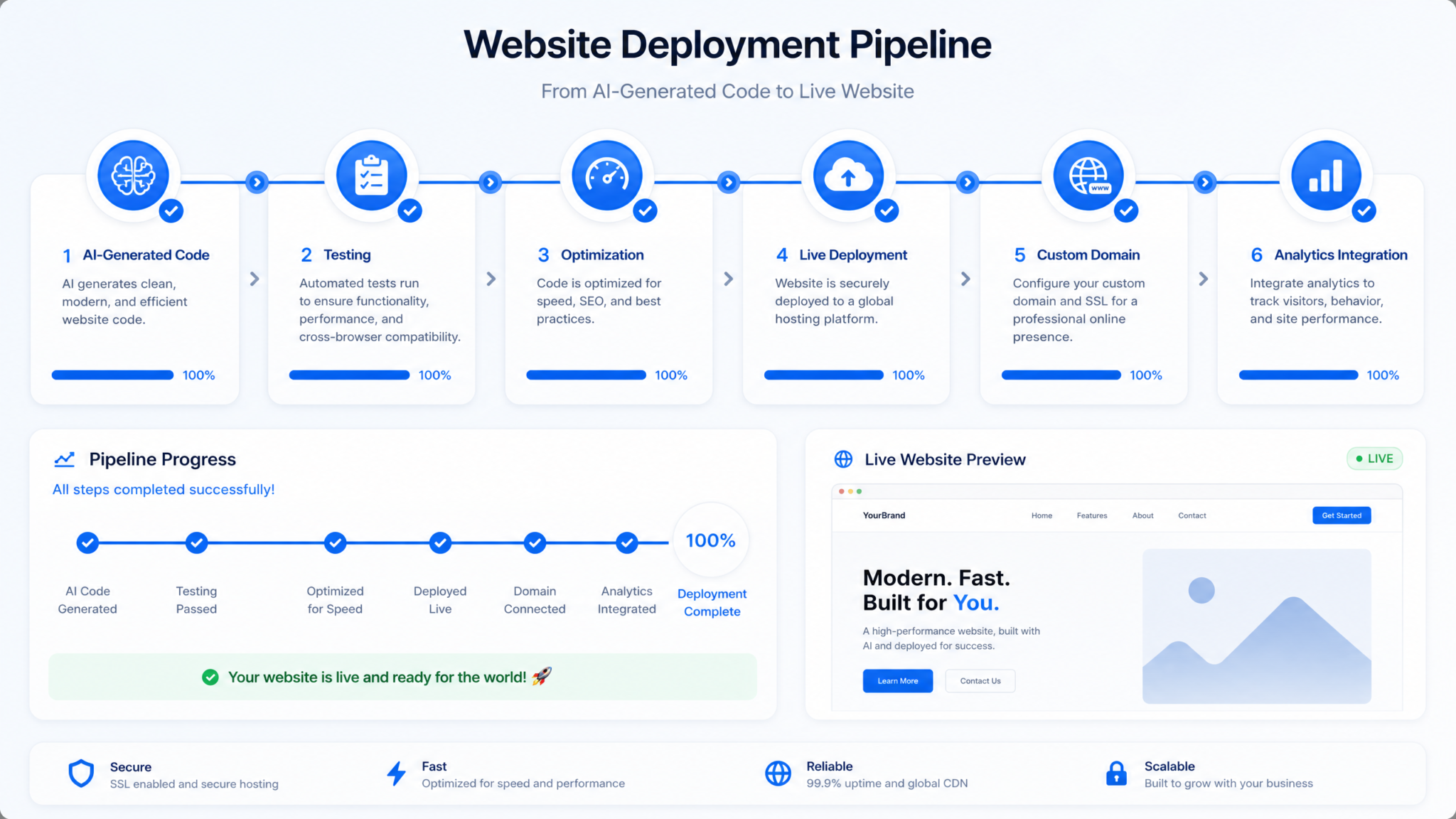
Codex Sites supports direct deployment from the conversation. You can publish to a secure, shareable staging URL or promote to production and connect a custom domain. Include deployment requirements in your prompts to reduce back-and-forth and to ensure Codex configures caching, headers, and SSL appropriately.
Staging vs Production
| Environment | Use Case | Access | Caching/Headers | Common Actions |
|---|---|---|---|---|
| Staging | Internal review, QA, stakeholder approvals | Shareable link; optional password | Shorter cache TTL, verbose error headers | Collect feedback, run audits, snapshot design |
| Production | Public availability | Custom domain, enforced HTTPS | Optimized caching, compression, immutable asset URLs | Monitor analytics, iterate with care, rollbacks if needed |
Publishing to a Staging URL
Publish this site to a staging URL with the following:
- Basic auth: user "review", password "board-2026" (temporary).
- Disable indexing with robots meta and /robots.txt.
- Generate a preflight report: accessibility, performance, SEO metadata check.
- Share the link and report summary in this thread.
Codex will produce a staging URL and run checks. Circulate the link to your team and embed deadlines. When sign-off is obtained, proceed to production deployment.
Connecting a Custom Domain
To use your own domain, you will add DNS records at your registrar. Codex Sites will provide values to create a CNAME or A/AAAA record, then validate ownership and provision SSL certificates. The following is a typical flow; always follow the exact records Codex provides for your project.
- Choose domain or subdomain: e.g., www.example.com or marketing.example.com.
- Ask Codex to prepare domain mapping: “Map www.example.com and redirect root to www; enable HTTPS.”
- Codex returns DNS instructions: usually a CNAME for “www” pointing to your Codex site host, plus apex A/AAAA if you want root domain support.
- Enter DNS records in your registrar dashboard.
- Inform Codex: “Records added” so Codex can verify propagation and issue SSL.
- Test: Visit the domain; verify HTTPS, canonical redirects, and no mixed content.
If you need zero-downtime cutover from an existing site, request a staged switchover plan with TTL reductions and health checks.
Edge and Caching Controls
Codex Sites configures sensible defaults, but you can request overrides for advanced scenarios:
- Static assets: “Set immutable caching for hashed assets to 1 year.”
- HTML: “Cache HTML for 5 minutes at edge; enable stale-while-revalidate.”
- Security headers: “Add strict CSP with self-hosted assets; enable HSTS.”
Rollback and Versioning
Keep at least one stable snapshot ready for rollback. Ask Codex to tag production releases semantically (v1.0.0, v1.0.1) with a changelog. If a regression surfaces, instruct Codex to roll back to a known-good release while you investigate.
Advanced Tips: Custom Domains, Analytics, SEO
Beyond deploying your first version, you will want to professionalize your presence with a custom domain, meaningful analytics, and search discoverability. Codex Sites supports all of this through conversation-driven configuration.
Custom Domains: Patterns and Pitfalls
Use a subdomain for marketing or product microsites, reserving the apex for your main site unless Codex Sites is your primary host. For example, “www.example.com” or “product.example.com.” When mapping the apex, be aware that some registrars limit CNAME at apex; in that case, Codex will suggest ALIAS/ANAME or A/AAAA records.
- Plan redirects: Decide canonical host (usually “www”) and set 301 redirects to it to avoid duplicate content.
- TLS: Confirm SSL is provisioned and auto-renewed. Ask Codex to enforce HTTPS and HSTS for security.
- DNS TTL: Lower TTLs before cutover to speed propagation; raise again after stability is confirmed.
- Email deliverability: If you add forms that send email from your domain, align SPF/DKIM/DMARC policies where relevant.
Analytics: Measuring What Matters
Define what “success” means and instrument those events. Codex Sites can capture basic metrics out of the box—page views, bounce rates, device mix, core web vitals. For richer insights, connect your analytics platform by providing a tracking ID or snippet. You can also request event tracking for specific CTAs and forms.
Set up analytics:
- Add our tracking ID: GA4-EXAMPLE-123.
- Track the following events:
  * demo_request_submitted (fields: company_size, source)
  * newsletter_subscribed (fields: referrer)
  * pricing_toggle_used (field: plan_viewed)
- Define a conversion for demo_request_submitted.
- Anonymize IPs and respect "Do Not Track".
Ask Codex for a dashboard summary weekly, or subscribe to milestone alerts (“Notify us if demo requests drop more than 20% week-over-week”). Keep an eye on web vitals in production; LCP and CLS affect both UX and SEO.
SEO: Technical and Content Foundations
Codex Sites can generate and manage the SEO plumbing for you. Be explicit about your targets and constraints so the system knows what to optimize for.
- Metadata: Provide page-specific titles and meta descriptions. Ask Codex to enforce length targets.
- Headings: Ensure one H1 per page; use H2/H3 to reflect structure, not styling.
- URLs: Request clean slugs from your nav labels; preserve historical slugs by mapping 301 redirects if migrating.
- Sitemaps and robots: “Generate sitemap.xml and a robots.txt allowing indexing for production; disallow on staging.”
- Structured data: Ask Codex to add JSON-LD for Organization, Product, FAQ, or Article where relevant.
- Performance: Keep payloads small, images responsive, and scripts deferred; search engines reward speed.
| SEO Element | What to Ask Codex Sites | Quality Check |
|---|---|---|
| Title/Meta | “Set concise titles <= 60 chars and meta descriptions ~155 chars, include primary keyword.” | No truncation in SERP previews; unique per page |
| Headings | “Ensure H1 includes ‘workflow automation’ on the Home page; logical H2/H3 nesting.” | One H1; no skipped levels |
| Structured Data | “Add FAQPage schema to the FAQ section and validate.” | Rich result test passes; no errors |
| Redirects | “301 redirect /old-pricing to /pricing; update internal links.” | No 404s; canonicalization correct |
Content Strategy With AI Assistance
Codex can help outline and draft articles, case studies, and documentation that fit your brand voice. Provide topic clusters and desired internal linking structure. Ask Codex to avoid content cannibalization by mapping primary and secondary keywords per page and to produce canonical tags when relevant.
Security and Compliance
Request a security baseline for production: strict Content Security Policy, HTTPS redirects, cookie flags (Secure, HttpOnly, SameSite), and privacy banners if you collect data. If your region has specific rules (e.g., GDPR), ask Codex to set appropriate consent flows and data retention defaults.
Common Pitfalls and Solutions
Even with Codex Sites smoothing the path, certain missteps can lead to inefficiencies or quality issues. Anticipate them with this playbook.
Pitfall 1: Vague Initial Descriptions
Symptom: The first draft feels off-brand or misaligned with your goals.
Solution: Sharpen your brief with the structure in Step 1. Provide sample copy, concrete brand tokens, and explicit goals. If you are unsure about visuals, give references or disqualifiers (“avoid playful gradients”). Ask Codex to regenerate with the new context and compare variants.
Pitfall 2: Over-Specifying Layout Too Early
Symptom: You dictate pixel-level choices before the overall structure is right, causing churn.
Solution: First validate information architecture, hierarchy, and tone. Then refine spacing and motion. Keep early directives high-level; save micro-adjustments for after a design snapshot.
Pitfall 3: Ignoring Accessibility Until Late
Symptom: You discover contrast or keyboard issues near launch.
Solution: Ask for an accessibility audit immediately after the first draft. Set WCAG targets and have Codex enforce them with automated tests and manual checks for complex components.
Pitfall 4: Heavy Images and Scripts
Symptom: Slow LCP, janky scroll, poor mobile experience.
Solution: Direct Codex to convert images to modern formats with responsive srcsets, lazy-load below-the-fold media, and enforce a JavaScript budget. Review the performance report before deploying.
Pitfall 5: Unclear CTAs and Microcopy
Symptom: Users do not take the desired actions despite traffic.
Solution: Iterate on microcopy and layout. Ask Codex for A/B-ready variants of headlines and CTA text. Track conversions in analytics to quantify impact.
Pitfall 6: DNS Misconfiguration During Domain Mapping
Symptom: Some users see the old site, others see the new one; SSL errors appear.
Solution: Lower TTLs in advance of cutover, confirm records match Codex instructions, and wait for propagation. Ensure SSL is provisioned before announcing the switch. Ask Codex to validate canonical redirects.
Pitfall 7: Insufficient Governance for Teams
Symptom: Conflicting edits, unclear approvals, accidental overwrites.
Solution: Use snapshots and labeled checkpoints. Designate approvers and narrate changes in the thread. Ask Codex to generate a changelog before each deployment.
Pitfall 8: Overuse of Animation
Symptom: Distracting motion and motion-sickness complaints.
Solution: Set a motion policy: short, subtle transitions; honor prefers-reduced-motion; no parallax by default. Ask Codex to audit animations and remove any that do not serve comprehension.
Pitfall 9: Broken Internal Links After Page Renames
Symptom: 404s or inconsistent nav labels after renaming pages.
Solution: Ask Codex to globally update links and slugs when pages are renamed. Generate a redirect map for legacy URLs, and rerun link integrity checks.
Pitfall 10: Not Using Variants to Decide
Symptom: Endless back-and-forth on subjective visual choices.
Access 40,000+ AI Prompts for ChatGPT, Claude & Codex — Free!
Subscribe to get instant access to our complete Notion Prompt Library — the largest curated collection of prompts for ChatGPT, Claude, OpenAI Codex, and other leading AI models. Optimized for real-world workflows across coding, research, content creation, and business.
Solution: Commission 2–3 focused variants with specific comparison criteria. Evaluate quickly, merge the best parts, and snapshot.
Troubleshooting Matrix
| Issue | Likely Cause | Ask Codex To | Success Criteria |
|---|---|---|---|
| Mobile text too small | Base size or scale too small | “Increase body size to 18px, bump scale to 1.25 on mobile.” | Readable paragraphs, better legibility scores |
| Slow first paint | Large hero image; blocking scripts | “Optimize hero with AVIF srcset, defer non-critical JS.” | LCP under 2.5s on 4G |
| Inconsistent button styles | Missing or misapplied tokens | “Normalize button variants using tokens; rebuild from design system.” | Unified hover/active/disabled states |
| Form spam | Bots bypassing simple checks | “Add honeypot, time-to-complete checks, and rate limiting.” | Reduced spam submissions |
| SEO cannibalization | Overlapping content topics | “Map keywords per page; add canonicals; suggest content split.” | Clear topical focus; stable rankings |
Putting It All Together: A Complete Workflow Example
Let’s run through a realistic end-to-end flow, stitching together the techniques above into a repeatable process that you can adapt for any site type.
1) Kickoff and Brief
In your ChatGPT Work workspace, start a Codex Sites project and post your initial description, brand tokens, and assets. Flag must-have constraints: WCAG target, performance budget, and deployment plan. Request a first draft with a staging URL.
2) First Draft Review
Examine navigation, hero messaging, section ordering, and visual hierarchy. Ask for a structured audit (accessibility, performance, SEO). Capture your change requests in bullet points and ask Codex to apply them in one sweep, then snapshot the design.
3) Variant Exploration
Commission two hero variants and one pricing variant with specific differences. Choose the best elements or pick a winner. Merge, then snapshot as “Direction Locked.”
4) Copy and Microcopy Edits
Direct Codex to rewrite key sections to tighten language, reduce jargon, and align tone. Provide final legal text. Confirm form validation messages and success states reflect your brand voice.
5) Interactivity and Performance
Add interactive components: FAQ accordion, demo request form, lightbox for screenshots. Ask Codex to enforce the JS budget and to lazy-load non-critical media. Validate motion policies and accessibility for all interactions.
6) SEO and Analytics
Provide the target keywords per page; request optimized titles, metas, and structured data. Connect analytics with required event tracking and define conversions. Generate sitemap.xml and robots.txt rules for production and staging.
7) Final QA and Stakeholder Review
Publish to staging with basic auth and no indexing. Share the link, report a concise changelog, and collect approvals. If requested, export code snapshots for internal audits.
8) Production Deployment and Domain Mapping
Promote to production. Map the custom domain, enforce HTTPS, and set canonical redirects. Monitor analytics and core web vitals post-launch.
9) Post-Launch Iteration
Run A/B tests on headlines or CTA text by asking Codex to create controlled variants. Continue refining based on analytics. Maintain a stable release branch for rollbacks.
Practical Prompt Library
Below is a grab bag of prompts you can adapt directly in your Codex Sites conversation to handle common needs without reinventing the wheel.
Design System and Theming
Adopt a design system approach:
- Elevation: 0/1/2 levels, subtle shadows only on surfaces above bg.
- Radius: 8px on controls, 16px on cards, 0 on nav bars.
- States: define tokens for hover, focus, active, disabled across controls.
- Density: compact on desktop tables, comfortable elsewhere.
Please generate a token sheet and apply globally.
Navigation and IA
Restructure the navigation:
- Replace "Resources" with "Learn" containing Blog, Guides, Webinars.
- Move "Customers" into "About".
- Add a "Docs" top-level link with a 2-level sidebar on docs pages.
- Ensure breadcrumb navigation on Guides and Docs.
Content and Tone
Rewrite Home page copy for clarity:
- Make the headline benefit-led; avoid buzzwords.
- Keep paragraphs under 80 words.
- Add 3 customer-proof points as a compact list.
- Replace "Next-gen" phrasing with concrete capabilities.
Components and Interactions
Add a testimonials carousel:
- 3–5 testimonials, each with quote, name, title, company logo.
- Auto-advance every 6s with pause-on-hover and focus.
- Include dots and next/prev buttons; keyboard-accessible.
- Reduce motion for prefers-reduced-motion users.
Performance and Quality
Enforce a performance budget:
- Initial HTML < 50KB, CSS < 80KB, JS < 150KB compressed.
- Largest image on initial viewport < 150KB.
- Defer non-critical scripts; inline critical CSS under 10KB.
- Report current numbers and what changed after optimizations.
SEO and Analytics
SEO pass for the Pricing page:
- Title includes "Pricing" + brand; meta description with value prop.
- Add FAQPage schema for billing questions.
- Ensure only one H1; convert extra H1s to H2.
- Register outbound click tracking on "Contact Sales" CTA.
Quality Gates and Checklists
Before each deployment, run through these quality gates. Ask Codex Sites to generate a report that answers each item with evidence or links to the relevant preview state.
Accessibility Gate
- Keyboard: All interactive elements are reachable and operable.
- Focus: Visible indicators, logical order, no traps.
- Contrast: Text and UI components meet AA; large text exceptions documented.
- Semantics: One H1 per page, ARIA used sparingly and correctly.
- Media: Alt text provided; captions for videos; motion reduced on request.
Performance Gate
- LCP under 2.5s on mid-tier mobile; TBT low; CLS under 0.1.
- Images optimized with responsive srcsets and modern formats.
- Critical CSS inlined; non-critical assets deferred.
- JS budget respected; no render-blocking third-party scripts.
SEO Gate
- Titles and meta descriptions present and unique.
- Open Graph and Twitter Card metadata set for shareability.
- Sitemap.xml and robots.txt configured per environment.
- Canonical tags correct; redirects mapped and tested.
Content Gate
- Copy adheres to voice and tone guidelines.
- Microcopy reviewed for clarity and inclusiveness.
- Legal pages present and linked in footer.
- CTAs prioritized and unambiguous.
Security Gate
- HTTPS enforced; HSTS enabled.
- Strong CSP without inline script allowances unless necessary.
- Cookies flagged Secure/HttpOnly and minimal by default.
- Form data handling meets your privacy policy.
Frequently Asked Questions
Do I need to know how to code to use Codex Sites?
No. You can build and deploy an entire site by describing your requirements and preferences. Codex handles the implementation details. If you want to inspect or export code for compliance or handoff, you can request it, but it is not required.
How many iterations does it usually take to get a site ready?
Most teams reach a production-ready version in 3–6 focused iterations when they start with a clear brief and make decisional progress each round. Variant exploration speeds up subjective choices.
Can Codex Sites integrate with my existing backend or CMS?
For many public-facing sites, Codex Sites manages content and submissions internally. For custom data connections or complex backends, describe your integration needs and data formats; Codex can generate the glue needed behind the scenes while keeping your conversational flow intact.
What about multi-language sites?
Ask Codex to generate localized variants and a language switcher. Provide translations if you have them; otherwise, request machine-generated drafts and schedule human review. Ensure hreflang tags are included and that routing respects locale preferences.
How does Codex handle accessibility?
Codex Sites targets WCAG 2.2 AA and can audit for common pitfalls. Ask for specific checks and it will produce a report and apply fixes. Complex components are generated with appropriate semantics and keyboard support.
Case Study Pattern: From Idea to Production in a Week
Here is a condensed playbook you can mirror for your own project timeline:
- Day 1: Write the brief. Provide brand tokens, assets, and goals. Ask for the first draft and an audit.
- Day 2: Approve direction. Commission variants for hero and pricing. Lock a snapshot.
- Day 3: Polish copy and microcopy. Add forms and interactivity. Enforce performance budgets.
- Day 4: SEO and analytics configuration. Generate sitemaps, structured data, and events.
- Day 5: Stakeholder review on staging. Triage feedback; finalize legal content.
- Day 6: Production deployment. Map custom domain and enforce security headers.
- Day 7: Post-launch monitoring. Plan A/B tests and content expansion.
Exporting and Handover
If you intend to hand the project to a development team or a vendor, ask Codex for an export that includes the site map, design token manifest, component library documentation, and representative code. Provide a short implementation notes file that explains rationale for key decisions (e.g., breakpoints, motion rules) and any pending to-dos.
Prepare a handover package:
- Sitemap with URL slugs, nav structure, and redirects.
- Token manifest: colors, type scale, spacing, radii, shadows.
- Component inventory with usage guidance and accessibility notes.
- SEO checklist with current titles/metas and schema types used.
- Performance budget and current metrics.
- Deployment notes: environments, domain mapping, headers.
Governance and Lifecycle Management
Websites evolve. Treat your Codex Sites project as a living system with periodic reviews. Quarterly, schedule a quality pass that revisits analytics insights, SEO standings, accessibility conformance, and brand adjustments. Maintain a backlog of improvements and iterate with Codex in controlled releases.
Change Management
- Use snapshots for releases and hotfixes.
- Keep a visible changelog with dates and intent.
- Test redirects and links after structural changes.
- Renew content that ages quickly—pricing, product screenshots, customer logos—at set intervals.
Conclusion
Codex Sites, launched in the July 2026 Codex update, brings website creation into the conversational era. Within the broader ChatGPT Work ecosystem for non-coders, it fuses Codex’s established coding strengths with a natural-language interface that abstracts away implementation details. You describe what you want; Codex constructs a responsive, accessible, performant site that you can refine through dialogue and deploy directly from the same thread.
Success with Codex Sites mirrors success in any design discipline: clear goals, crisp constraints, and disciplined iteration. By front-loading intent—brand voice, target audience, information architecture—and by embracing structured reviews and snapshots, you get to a polished result quickly. Interactivity, analytics, and SEO do not require context switches or custom tooling; you request them, Codex wires them up, and you keep moving.
Whether you are a solo founder launching a product page or a marketing team orchestrating a multi-page site under tight deadlines, Codex Sites shortens the path from idea to impact. Use the prompt patterns, checklists, and safeguards in this tutorial to build confidently, measure effectively, and iterate responsibly.
For a deeper exploration of this topic, our comprehensive article on The Big Prompt Engineering Story: What July 13’s News Means for Developers provides detailed analysis, practical examples, and implementation strategies that complement the concepts discussed in this section.
For a deeper exploration of this topic, our comprehensive article on 35 ChatGPT-5.6 Work Prompts for Enterprise Automation Connectors provides detailed analysis, practical examples, and implementation strategies that complement the concepts discussed in this section.
For a deeper exploration of this topic, our comprehensive article on 15 Battle‑Tested Prompts for Developers in 2026 [Copy/Paste Templates, Benchmarks, and Deployment Tips] provides detailed analysis, practical examples, and implementation strategies that complement the concepts discussed in this section.
