
The Complete Guide to ChatGPT Work Mode vs Codex Mode — When to Use Each, Feature Differences, and Productivity Workflows

The Definitive Guide to Chat Mode vs Work/Codex Mode in the Unified ChatGPT App (2026)
Published: July 17, 2026 | Author: Markos Symeonides
This guide distills how OpenAI’s unified ChatGPT app now operates across two distinct yet interoperable modes: Chat Mode for conversational reasoning, ideation, and content work; and Work/Codex Mode for autonomous task execution, code generation, multi-file refactoring, and production-grade automation. Whether you are an individual power user or leading an engineering team, you will learn how to choose the right mode, switch and share context between them, and design hybrid workflows that multiply your productivity.
Executive Summary
- Chat Mode specializes in interactive reasoning, brainstorming, research, summarization, drafting, and rapid Q&A. It excels when humans stay in the loop.
- Work/Codex Mode specializes in structured execution of code and multi-step jobs: repository-wide edits, test runs, data pipelines, scheduled automations, and API-driven ops in a controlled environment.
- Handoffs between modes preserve context, cite sources, and optionally attach artifacts (files, repos, datasets) and permissions (scoped secrets) so work can safely continue without re-prompting.
- Costs differ by mode: Chat Mode primarily consumes tokens; Work/Codex Mode charges for compute minutes, tool calls, storage I/O, and optionally GPU time. Use the right mode for the right workload to control spend.
- Teams gain change review, run logs, reproducible environments, and role-based access in Work/Codex; and memory, shared prompts, and content templates in Chat.
Overview: Why OpenAI Split the Unified App into Two Modes
OpenAI’s trajectory with code and productivity tooling has evolved across several milestones:
- 2021–2022: The original OpenAI Codex (derived from GPT-3) popularized code generation inside editors and the API. As coding demand surged, so did unmet needs for multi-file edits, running tests, and integrating with CI/CD.
- 2023: Code capabilities moved into general-purpose GPT-4 variants as the standalone Codex API was sunset; developers increasingly expected agents that could do work, not just suggest text.
- 2024: GPT-4o (May 2024) unified text, vision, and audio with fast responses, and improved code reliability in chat. Reasoning-model families (e.g., “o” line) emerged with improved tool use and chain-of-thought planning.
- 2025–2026: The unified ChatGPT app formalized two distinct modes:
- Chat Mode for conversational cognition, literature review, ideation, drafting, tutoring, and collaborative problem solving.
- Work/Codex Mode for execution-oriented tasks: multi-file refactors; repo operations; running linters, tests, and formatters; data wrangling; calling external APIs and orchestrating long-running jobs with checkpoints.
The split addresses a simple truth: thinking and doing benefit from different UX and runtime constraints. In Chat, you want rapid, steerable dialog and rich multimodal input. In Work/Codex, you want deterministic jobs, idempotent runs, dependency isolation, auditable logs, and guardrails for repositories and infrastructure. OpenAI’s design reflects this division of labor while preserving a shared core: one account, one billing system, shared artifacts, and smooth handoffs between the two modes.
For readers building advanced workflows, we also recommend reviewing adjacent foundations like retrieval, function/tool calling, and evaluation frameworks.
For additional context on related AI capabilities and workflows, our comprehensive resource on How to Migrate from the OpenAI Assistants API to the Responses API: A Complete Developer Guide with Code Examples provides practical guidance and implementation strategies that complement the techniques discussed in this article.
Chat Mode Deep Dive: What It Does, Strengths, and Ideal Use Cases
Chat Mode is the conversational front door to the unified app. It’s where human-in-the-loop problem solving shines: you ask, it answers; you steer, it adapts. While it can write code snippets, its environment is intentionally lightweight to keep latency low, preserve your creative control, and reduce accidental side effects.
Core Capabilities in Chat Mode
- Conversational Reasoning: Iterative, explainable back-and-forth with controllable tone and structure. Excellent for breaking down problems before any automation runs.
- Multimodal Input: Text, image uploads (diagrams, screenshots), and in many orgs, audio and short video explainers converted to text for analysis. GPT-4o’s multimodal strengths are especially impactful here, launched in May 2024 with updates through 2025 for higher-fidelity image understanding.
Understanding the cost implications of these features requires familiarity with OpenAI’s current tier structure. Our detailed breakdown in The Complete Guide to ChatGPT Pricing in 2026 — Free, Go, Plus, Pro, Business, and Enterprise Compared compares every subscription option, usage limits, and value proposition to help you choose the right plan for your workflow.
- Lightweight Tool Use: Web browsing, document retrieval from connected drives, in-chat tables and charts, and function calling to simple internal tools (e.g., calculators, knowledge lookups). Great for research and synthesis.
- Memory and Style Controls: Opt-in memory of preferences (formatting, tone, reading level), reusable prompt snippets, and chat templates for briefs, reports, and emails.
- Snippet-Grade Coding: Generate scripts or explain code, then copy-paste into your editor. For heavy lifting, hand off to Work/Codex Mode.
- Grounded Summarization: Chat Mode can cite sources from your connected repositories, drives, or URLs and produce references inline.
Strengths of Chat Mode
- Speed and Steerability: Fast responses tuned for dialog, with low friction to pivot the task.
- Human Oversight: You stay in charge—no long-running jobs or unintended repository edits.
- Low Cognitive Load: One message at a time. Great for clarifying requirements before automation.
- Excellent for Content: Outlines, drafts, rewrites, translations, and editorial polish.
Ideal Use Cases for Chat Mode
- Brainstorming and Ideation: Generate hypotheses, user stories, design options, A/B test ideas.
- Research and Synthesis: Literature reviews with citations, stakeholder summaries, risk assessments.
For additional context on related AI capabilities and workflows, our comprehensive resource on The Big AI Coding Agents Story: What July 16’s News Means for Developers provides practical guidance and implementation strategies that complement the techniques discussed in this article.
- Writing and Editing: Blog posts, PRDs, emails, grant applications, documentation, changelogs.
- Quick Questions: “What’s the complexity of this approach?” “Summarize this error log.” “Draft a Slack update.”
- Code Explanation: Explain stack traces, suggest fixes, outline an algorithm; then hand off to Work/Codex for execution and verification.
Models Typically Available in Chat Mode (2024–2026)
- GPT-4o family (2024 →): High-quality, fast, multimodal chat with strong code explanations and structured outputs.
- Reasoning-capable “o” models (2025 →): Enhanced tool use and planning for complex instructions, used conservatively in Chat to keep latency manageable.
- Lightweight mini models: For low-cost, high-speed drafts, internal notes, and high-volume Q&A.
Which exact models appear in your tenant depends on your plan and admin toggles. For deep code or automation, you will often prefer Work/Codex Mode where code-specialized variants and extended context windows are available.
For additional context on related AI capabilities and workflows, our comprehensive resource on The Big Prompt Engineering Story: What July 13’s News Means for Developers provides practical guidance and implementation strategies that complement the techniques discussed in this article.
Work/Codex Mode Deep Dive: Autonomous Task Execution, Code Generation, and Multi-File Operations
Work/Codex Mode is the app’s execution engine. Think of it as a reproducible, sandboxed workspace where the AI can edit multiple files, run tools, execute tests, call APIs, and ship results—under your policies and approvals. It’s the spiritual successor to the original Codex, updated for 2026 engineering standards.
What Makes Work/Codex Mode Different
- Artifact-Centric: Operates on concrete assets (repos, folders, data tables, cloud resources) mounted into a job workspace.
- Deterministic Runs: Jobs produce logs, diffs, artifacts, and exit statuses. You can re-run with the same inputs to reproduce results.
- Scoped Permissions: Fine-grained access to Git hosts, package registries, secrets, databases, cloud resources, and web APIs. All access is explicit, auditable, and revocable.
- Multi-File Editing: The AI can open, search, refactor, and write changes across a repository using project-wide context and language servers.
- Tooling and Tests: Linters, formatters, build systems, unit/integration tests, codegen tools, and data utilities run inside the workspace.
- Long-Running and Scheduled Jobs: Execute pipelines that can outlive a chat session, with checkpoints, resumability, and notifications.
Typical Models and Runtimes in Work/Codex Mode
- Code-specialized LLMs: Models tuned for code synthesis, repository reasoning, and tool planning. They trade a bit of conversational flair for deterministic edits and robust function calling.
- Extended Context Windows: Larger token/context budgets for understanding big codebases and long config files.
- Reasoning Enhancers: Planning-time boosts or multi-pass deliberation for complex refactors and migrations.
- Execution Sandboxes: Containerized Linux environments with language runtimes (Node, Python, Java, Go, Rust), build tools, and package managers.
Multi-File Operations: How They Work
In Work/Codex Mode, the model interacts with a workspace API that exposes:
- Read/Write Files: Stream files, diff, patch, and create branches.
- Search/Index: Build a cross-file index and symbols table for accelerated queries.
- Refactor Actions: Batch rename, move, extract methods, update imports, and codemods.
- Build/Test: Run project commands, capture logs, and parse test results for targeted fixes.
- Pull Requests: Open PRs/MRs with summaries, checklists, and linked issues.
Example: Repository-Wide TypeScript Migration
# codex.task.yaml
name: ts-migrate-to-esm
description: "Migrate Node project from CommonJS to ESM with lint/test enforcement"
mounts:
  - repo: github.com/acme/webapp
    ref: main
    write: branch
    branch: feat/esm-migration
tools:
  - run: "npm ci"
  - run: "npm run lint"
  - run: "npm test -- --reporter json -o reports/test.json"
  - run: "node scripts/codemods/cjs-to-esm.js"
policies:
  maxRuntimeMinutes: 90
  reviewers:
    - [email protected]
  approvalsRequired: 1
outputs:
  - path: "reports/test.json"
  - pr: true
notify:
  - slack: "#build-refactors"
This job definition (authored by you in Chat or directly in Work/Codex) gives the AI authority to propose code changes, enforce lint/tests, and open a PR with logs. The job is idempotent and can be re-run after feedback.
Example: Python Refactor Triggered by a Handoff
# chat-handoff.json
{
  "summary": "Refactor data loading to support parquet and s3 URIs",
  "inputs": {
    "repo": "gitlab.com/org/data-ingest",
    "branch": "main"
  },
  "constraints": {
    "must_pass_tests": true,
    "update_docs": true
  },
  "secrets": ["S3_READONLY_TOKEN"]
}
When you hand off from Chat Mode, the summary, constraints, and scoped secrets are attached. Work/Codex uses them to plan and execute without re-asking for basics.
Programmatic Multi-File Edit Example (Python)
# Pseudocode for an SDK that exposes editor-like primitives
from openai_work import Workspace

ws = Workspace(repo="github.com/acme/etl", branch="feat/parquet")
index = ws.index()  # Build symbols and references

# Locate CSV-only loaders
for path in index.find(pattern="*loader*.py"):
    src = ws.read(path)
    if "pd.read_csv(" in src and "read_parquet(" not in src:
        new = src.replace("pd.read_csv(", "pd.read_parquet(")
        ws.write(path, new)

# Update docs
docs = ws.read("README.md")
ws.write("README.md", docs + "\n\nAdded Parquet support with S3 URIs.\n")

# Run tests and open PR
result = ws.run("pytest -q --maxfail=1")
if result.exit_code == 0:
    ws.open_pr(title="Add Parquet + S3 support", reviewers=["[email protected]"])
else:
    ws.comment_pr(body=f"Tests failing:\n{result.tail(2000)}")
Autonomous Task Execution with Guardrails
- Plans and Checkpoints: Jobs produce a plan that you can inspect; long tasks checkpoint so they can resume after outages.
- Approvals and Review: Require 1–2 human approvals before write actions (branch pushes, merges, issue transitions) proceed.
- Secrets and Policies: Vault-managed secrets injected at runtime; allowlists restrict outbound network domains.
- Observability: Structured logs, tool traces, file diffs, test artifacts, and cost telemetry per run.
Feature Comparison: Chat Mode vs Work/Codex Mode
| Dimension | Chat Mode | Work/Codex Mode |
|---|---|---|
| Primary Purpose | Conversational reasoning, research, writing, quick Q&A | Structured execution: code, pipelines, multi-file edits, automations |
| Models | GPT-4o family; fast chat models; selected reasoning models | Code-specialized, extended-context, reasoning-enhanced variants |
| Context Window | Optimized for dialog; sufficient for multi-page docs | Large; optimized for project-wide context and long configs |
| Tool Access | Web browse, retrieve docs, light function calling | File system, shells, package managers, test runners, CI hooks, API clients |
| Execution | Short, stateless replies; no persistent jobs | Long-running, resumable jobs with checkpoints |
| Outputs | Text, images, tables, small code snippets | Branches, PRs, binaries, datasets, dashboards, scheduled automations |
| Collaboration | Share chats, prompt templates, style memory | Run logs, approvals, reviewers, reproducible environments |
| Cost Model | Tokens per message; low tool overhead | Compute minutes, tool calls, storage I/O, optional GPU time |
| Best For | Brainstorming, research, writing, quick explanations | Software development, data processing, automation, complex multi-step tasks |
When to Use Chat Mode
Brainstorming
Use Chat for divergent thinking, problem framing, generating alternatives, and refining acceptance criteria. Ask it to list risks, unknowns, and a plan for validation. Keep the conversation open-ended until you reach a crisp definition worth automating.
Research
Invite Chat to survey sources, annotate quotes, and synthesize conclusions with citations. Let it maintain a living outline that can become your report or design doc. When the research stabilizes, attach the outline and hand off to Work/Codex to implement the proof-of-concept or run evaluations.
For additional context on related AI capabilities and workflows, our comprehensive resource on How to Migrate from the OpenAI Assistants API to the Responses API: A Complete Developer Guide with Code Examples provides practical guidance and implementation strategies that complement the techniques discussed in this article.
Writing
Drafts, rewrites, translation, and polish are Chat’s bread and butter. It can enforce house style guides, propose titles and abstracts, and adapt to persona. For documentation that must stay synchronized with code, hand off to Work/Codex to open PRs that update READMEs and docstrings together.
Quick Questions and Explanations
For debugging or reviews, paste a stack trace or code snippet and ask “What likely caused this?” or “Explain this function.” Chat will provide hypotheses and possible fixes. When ready to try a fix, capture the outcome you want in a handoff to Work/Codex.
When to Use Work/Codex Mode
Software Development
- Refactors and Migrations: Introduce TypeScript, move to ESM, swap logging frameworks, or migrate ORM models across modules—atomically, with tests.
- Feature Scaffolding: Create new services, endpoints, or UI components, wire up telemetry, and open a PR with tests and docs.
- Security and Reliability Fixes: Bulk dependency updates, secret rotation, SAST/DAST findings triage with codemods.
Data Processing
- Wrangling and Validation: Clean CSVs/Parquet, add schema checks, deduplicate, and publish to a data warehouse.
- ETL/ELT Pipelines: Generate Airflow/Prefect flows, run them on a schedule, and notify on anomalies.
- Experimentation: Run notebooks in headless mode and persist figures and metrics.
Automation
- CI/CD Augmentation: Auto-fix lint and style violations on PRs, regenerate API clients when OpenAPI specs change, sync docs.
- Backoffice RPA: Scrape permitted intranet pages/APIs, reconcile records, and file tickets with structured attachments.
- Incident Ops: Parse alerts, run playbooks, summarize logs, open incidents with pre-filled context.
Complex Multi-Step Tasks
When tasks require branching logic, external API calls, and stateful retries, Work/Codex Mode offers plans, checkpoints, and policy enforcement. You can view the job plan, approve critical steps, and let it continue unattended.
Switching Between Modes: Handoffs and Shared Context
The handoff mechanism is central to the unified experience. From any Chat thread, you can “Create Work/Codex Task” and choose what to send:
- Conversation Summary: Condensed rationale, constraints, and decisions.
- Artifacts: Attach files, datasets, or repositories with read/write scopes.
- Secrets: Select only the minimal tokens needed (e.g., GitHub app installation ID, S3 read-only token).
- Checkpoints: Provide any saved plans or partial code drafts from Chat.
When a Work/Codex run finishes, it can post back into the originating chat with a summary, diffs, PR links, test results, and cost metrics. In many teams, the chat thread becomes the canonical place to discuss the run and request changes before merging.
How Context Sharing Works
- References, Not Dumps: Instead of copying the entire chat history, a handoff references specific messages and artifacts to keep context focused and cost-effective.
- Provenance: Each artifact includes a pointer back to the chat message that created or attached it. This enables traceability and review.
- Access Boundaries: Work/Codex jobs cannot read arbitrary chat memory; they only see what is explicitly attached.
CLI Handoff Example
# Pseudocode CLI to create a handoff from a chat to a Work/Codex task
chat export --thread <THREAD_ID> --select messages:45-60,attachments \
| work create --task codex.task.yaml --attach - \
  --secret S3_READONLY_TOKEN --repo github.com/acme/webapp:rw \
  --notify slack:#build-refactors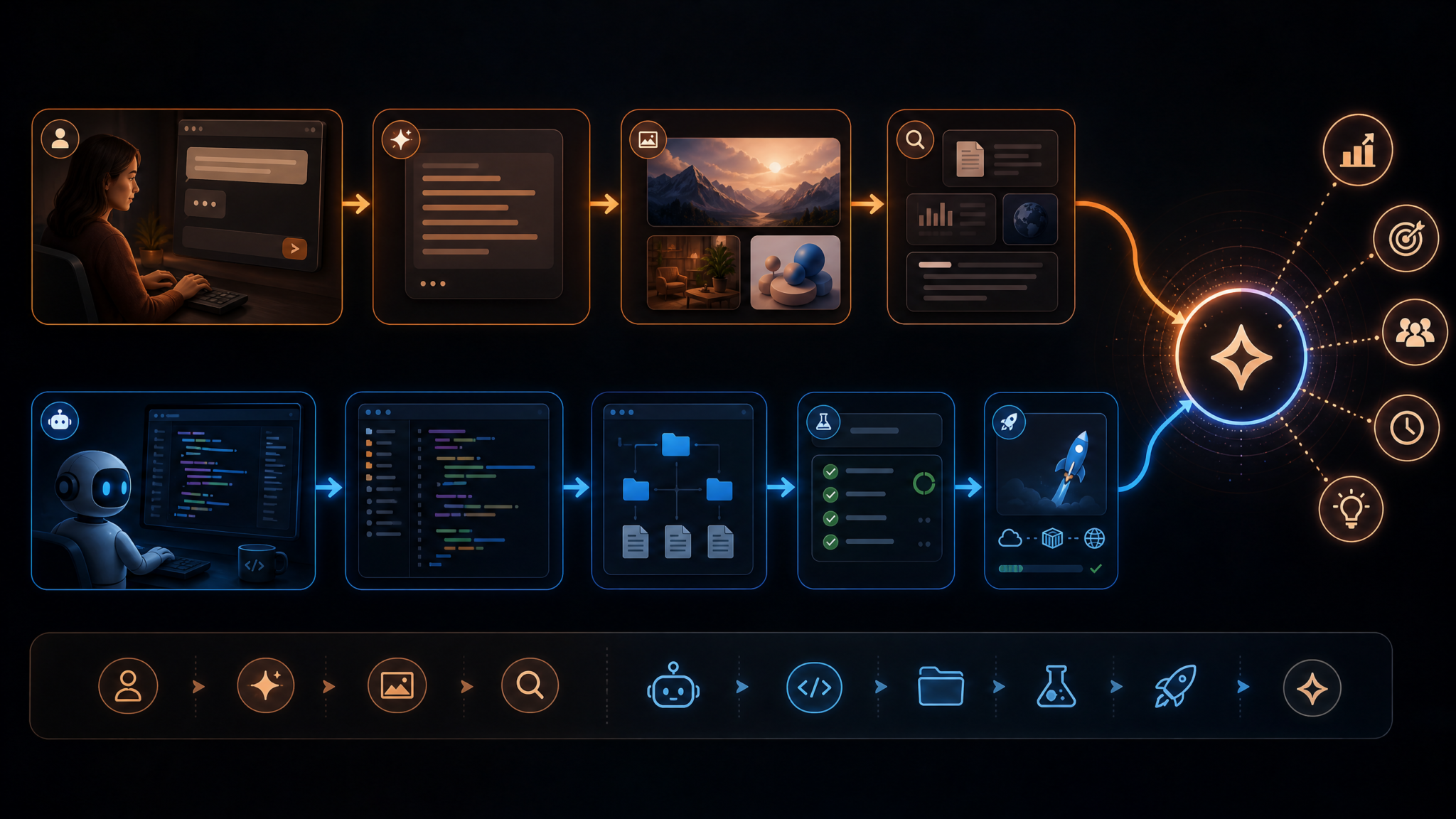
Productivity Workflows that Combine Both Modes
Workflow 1: Design in Chat, Implement in Work/Codex
- Chat: Draft a design spec, get alternatives, compare trade-offs, and finalize acceptance criteria.
- Handoff: Attach the spec as a PDF/Markdown plus the target repository and a new branch name.
- Work/Codex: Scaffold code, write tests, run linters, and open a PR with a self-review checklist.
- Chat: Review the PR summary, ask questions, and request minor changes. Work/Codex applies updates and pushes again.
Workflow 2: Data Cleanup from Chat to Scheduled Job
- Chat: Paste a sample dataset and outline cleanup rules.
- Work/Codex: Implement a cleaning script, run on a sample, and show diffs and summary stats.
- Chat: Approve the approach and ask for scheduling daily at 02:00 UTC.
- Work/Codex: Provision a scheduled run, store logs, and message a channel on failure.
Workflow 3: Incident Response
- Chat: Summarize an alert and ask for potential root causes.
- Work/Codex: Run log queries, compare recent deployments, create a ticket, and prepare a rollback PR if appropriate.
- Chat: Provide human judgment and communicate status to stakeholders.
Workflow 4: Compliance-Ready Docs
- Chat: Draft a policy based on regulatory text; request compliance checklists.
- Work/Codex: Update code-level controls (e.g., secret rotation intervals) and generate traceable audit artifacts.
- Chat: Publish an executive summary and Q&A for internal training.
Understanding the cost implications of these features requires familiarity with OpenAI’s current tier structure. Our detailed breakdown in The Complete Guide to ChatGPT Pricing in 2026 — Free, Go, Plus, Pro, Business, and Enterprise Compared compares every subscription option, usage limits, and value proposition to help you choose the right plan for your workflow.
Cost Implications: How Each Mode Consumes Credits
Understanding cost mechanics helps you deploy the right mode at the right time. While exact pricing varies by plan and region, the structural differences are stable:
| Cost Component | Chat Mode | Work/Codex Mode |
|---|---|---|
| Core Meter | Tokens in/out (model-dependent) | Compute minutes (per vCPU/GPU class) + tokens for planning |
| Tool Calls | Low; web and retrieval calls billed minimally | Per-invocation for shells, test runs, builds, connectors |
| Storage I/O | Negligible (chat attachments) | Billed for workspace snapshots, artifacts, and logs beyond free tier |
| Network Egress | Minimal | Metered for large downloads/uploads to external services |
| Scheduling | N/A | Additional fee for managed schedules/cron with SLAs |
Rule of thumb: If you are chatting and iterating on ideas or small code snippets, stay in Chat Mode. The moment you need to run tools, touch multiple files, or open a PR, switch to Work/Codex. This minimizes both cognitive and monetary overhead.
Cost-Saving Tips
- Front-load clarity in Chat: Flesh out requirements so Work/Codex can run fewer iterations.
- Use sample data: Validate with small subsets before running full pipelines.
- Cache dependencies: In Work/Codex, enable dependency caching between runs to shorten build times.
- Set runtime caps: Define
maxRuntimeMinutesand alerts for long-running tasks. - Choose the right model class: Not every task needs the largest reasoning model; code-tuned mid-tier often suffices for routine edits.

Team Collaboration Features in Each Mode
Chat Mode Collaboration
- Shared Chats and Templates: Seed your org with prompts for design reviews, commit messages, or incident updates.
- Style Memory: Standardize tone, formatting, and disclaimer text across teams.
- Content Approvals: Optional reviewers for externally-facing content before export or publishing.
Work/Codex Mode Collaboration
- Run Logs and Annotations: Comment on specific steps, link to code diffs, and tag reviewers.
- Protected Actions: Require approvals for write operations (branch push, PR open/merge, ticket transitions).
- Reproducible Environments: Pin base images, language versions, and toolchains to ensure consistent runs across the team.
- Audit Trails: Detailed provenance: who attached which secret, who approved, what changed where.
Integration with External Tools and APIs
Modern enterprises expect the AI to meet them where they work: source control, issue trackers, CI/CD, data warehouses, and comms platforms. Work/Codex Mode connects via managed integrations and per-job secrets, while Chat Mode can invoke lighter read-only connectors for research.
Common Integrations
- Source Control: GitHub, GitLab, Bitbucket—via org-managed apps with least-privilege scopes.
- Project Tracking: Jira, Linear, Azure Boards—for issue updates, subtask creation, and status changes.
- CI/CD: GitHub Actions, GitLab CI, CircleCI—trigger pipelines and parse build artifacts.
- Data: S3, GCS, Azure Blob; BigQuery, Snowflake, Databricks—read/write with service accounts and IAM policies.
- Docs and Drives: Google Drive, Notion, Confluence—retrieve and update docs alongside code changes.
- Comms: Slack, Teams—post run summaries, request approvals, deliver alerts.
Example: Declaring an External API Tool
# codex.tools.yaml
tools:
  - name: openweather
    type: http
    baseUrl: https://api.openweathermap.org
    auth:
      scheme: query
      keyRef: OPENWEATHER_TOKEN
    allow:
      - GET /data/2.5/weather
      - GET /data/2.5/forecast
    rateLimit:
      perMinute: 60
policies:
  networkAllowlist:
    - api.openweathermap.org
    - <your-internal-api>.corp
With a spec like this attached to a Work/Codex run, the model can fetch weather data within strict bounds and without ever seeing the raw token value.
Decision Framework: Choosing the Right Mode
At-a-Glance Flowchart
Start
 ├─ Is the goal a conversation (ideas, research, writing, Q&A)?
 │    └─ Yes → Chat Mode
 │
 ├─ Do you need to edit multiple files, run tests, or call build tools?
 │    └─ Yes → Work/Codex Mode
 │
 ├─ Is this a one-off snippet with no side effects?
 │    └─ Yes → Chat Mode
 │
 ├─ Will this task run on a schedule or require long runtime/checkpoints?
 │    └─ Yes → Work/Codex Mode
 │
 └─ Unsure?
      ├─ Start in Chat to clarify scope
      └─ Handoff to Work/Codex once plan is stable
Decision Matrix
| Scenario | Indicators | Recommended Mode | Notes |
|---|---|---|---|
| Create a project brief | Unclear scope; need options | Chat | Iterate until acceptance criteria are explicit |
| Refactor across modules | Multi-file, tests, PR | Work/Codex | Attach repo with branch write; require approval |
| Summarize research | Source citations; narrative output | Chat | Use retrieval connectors for evidence |
| Data pipeline backfill | Long run, checkpoints, alerts | Work/Codex | Schedule with SLAs and budgets |
| Explain a stack trace | One-off guidance | Chat | Handoff only if code changes are needed |
| Automate dependency updates | Recurring, repo-wide | Work/Codex | Nightly job with PRs and release notes |
Real-World Scenarios and Recommendations
Scenario A: Introduce Feature Flags Across a Monorepo
Problem: A product team needs to roll out feature flags across services for safer releases.
Approach:
- Chat: Align on a flagging library, naming, scope, and kill-switch policy. Generate a rollout plan per service.
- Work/Codex: Implement code scaffolding, add guards, update config, and open PRs for each service with a dashboard link.
- Chat: Summarize the rollout plan for stakeholders.
Recommendation: Use Work/Codex with approvals to prevent broad unintended changes. Tests should assert both paths (flag on/off).
Scenario B: Migrate Python 3.9 → 3.12 with Packaging Overhaul
Problem: You need a version bump plus switch to pyproject.toml and modern tooling.
- Chat: Draft a compatibility checklist and risk matrix.
- Work/Codex: Update Dockerfiles, toolchain, dependency pins, and CI matrix; run the full test suite.
- Chat: Review failures and ask for fix strategies; hand back to Work/Codex for patches.
Recommendation: Preserve reproducibility with pinned base images and lockfiles; require at least one reviewer.
Scenario C: Sales Ops Lead Requests CRM Clean-Up
Problem: Deduplicate accounts and standardize country codes in the CRM.
- Chat: Define matching heuristics and edge cases with the business owner.
- Work/Codex: Run a dry-run job against a snapshot; produce a diff report and rollback script.
- Chat: Get sign-off; schedule periodic runs.
Recommendation: Keep production credentials read-only until the heuristics are validated; then enable write scope with approvals.
Scenario D: Marketing Needs a Microsite by Friday
Problem: A landing page with A/B copy, lead form integration, and analytics must go live fast.
- Chat: Draft messaging and visual hierarchy.
- Work/Codex: Scaffold site in your static framework, integrate consent and analytics, deploy a preview, and open a PR.
- Chat: Iterate on copy and imagery; request minor style tweaks via small Work/Codex patches.
Recommendation: Keep content iteration in Chat; lock down Work/Codex deploy steps with approvals and environment protections.
Scenario E: Compliance Update Requires Systematic Log Redaction
Problem: New policy mandates redaction of PII across logs.
- Chat: Identify PII patterns and draft a validation plan.
- Work/Codex: Update middleware, add redaction rules, regenerate docs, run privacy tests, and enforce in CI.
- Chat: Publish an internal announcement with Q&A.
Recommendation: Use Work/Codex to open PRs and attach test evidence to your compliance ticketing system.
Scenario F: Data Scientist Needs Feature Extraction at Scale
Problem: Extract engineered features from a large corpus nightly for a model retrain.
- Chat: Define the feature schema and sample transformations.
- Work/Codex: Create a scalable job with checkpoints; store artifacts; alert on drift.
- Chat: Summarize results for the weekly modeling sync.
Recommendation: Optimize costs by sampling first; align on SLAs before scheduling.
Tips for Power Users: Shortcuts, Custom Configs, and Advanced Patterns
Keyboard Shortcuts
| Action | Shortcut (Windows/Linux) | Shortcut (macOS) |
|---|---|---|
| Toggle Chat ↔ Work/Codex | Ctrl + M | Cmd + M |
| Quick Handoff | Ctrl + Shift + H | Cmd + Shift + H |
| Open Attachment Picker | Ctrl + U | Cmd + U |
| Run Last Task | Ctrl + R | Cmd + R |
| Search Files in Workspace | Ctrl + P | Cmd + P |
Custom Configurations
- Run Profiles: Create profiles for “fast-draft,” “deep-refactor,” or “data-heavy” that set model size, runtime caps, and cache strategy.
- Policy Bundles: Predefine approval rules, network allowlists, and secret sets by team or repo.
- Artifact Retention: Tune log and artifact retention to control costs while keeping enough history for audits.
Patterns for Reliable Automation
- Plan-Then-Execute: Require a plan artifact; only after human approval can the job run write actions.
- Test-First Edits: Ask Work/Codex to generate tests before refactors to catch regressions.
- Guarded Secrets: Provide the narrowest set of secrets per job; rotate them regularly.
- Small Batches: Split massive refactors into per-service or per-module batches to simplify review.
Useful Prompting Patterns for Handoffs
Task: "Add CSV to Parquet support for S3 URIs"
Constraints:
- Must pass all tests
- Update README with examples
- No new third-party dependencies
Artifacts:
- Repo: github.com/acme/etl (branch write)
- S3 token: READONLY
Definition of Done:
- PR with summary, checkboxes, and benchmark table
- 2 reviewers assigned
Post-Run:
- Comment test results to originating chat
- If failures, propose a targeted fix plan
Example: Evaluations Before and After Refactors
# codex.eval.yaml
name: "search-relevance-eval"
inputs:
  repo: github.com/acme/search
  dataset: s3://acme-eval/queries-2026-06.parquet
metrics:
  - ndcg@10
  - click@5
plan:
  - run: python tools/retrieval_eval.py --in <dataset> --out out/metrics.json
  - parse: out/metrics.json
  - compare: baseline=artifacts/baseline.json new=out/metrics.json
policies:
  approvalsRequired: 1
  maxRuntimeMinutes: 30
Coupling refactors with evaluations is a best practice. Chat can interpret the evaluation report and help you decide to merge or revert.
Putting It All Together: A Model of Collaborative AI Work
The two-mode design is a practical recognition that ideation and execution are different activities. In Chat, you refine intent and capture rationale; in Work/Codex, you execute with guardrails and reproducibility. The bridge between them—handoffs—carries not just files but also decisions and responsibilities. For teams, this yields auditability and reliability; for individuals, it keeps you in flow without context switching across tools.
To deepen your mastery of crafting prompts, tool specs, and evaluation jobs that consistently outperform baselines, see our related deep dives.
For additional context on related AI capabilities and workflows, our comprehensive resource on The Big Prompt Engineering Story: What July 13’s News Means for Developers provides practical guidance and implementation strategies that complement the techniques discussed in this article.
FAQ
Is Work/Codex Mode just Chat with bigger context?
No. While both use LLMs, Work/Codex adds a controlled execution environment, tool runtimes, multi-file editing APIs, approvals, and observability. It’s designed for doing work on artifacts, not only producing text.
Can I start in Work/Codex Mode without using Chat first?
Yes. If your task is already well-specified (e.g., “Run nightly dependency updates” or “Convert project to ESM”), you can start directly in Work/Codex. Many teams still prefer to draft a short spec in Chat to reduce iteration cycles.
What happens to my secrets during a handoff?
They are referenced, not copied. You choose which secrets to grant. Work/Codex can use them during the run but cannot exfiltrate or display raw values. All usage is logged and revocable.
How do I control costs on large refactors?
Split work into batches, enable dependency caching, cap runtime, and pick a code-specialized model sized for the task. Validate on a sample first, then scale.
Can Work/Codex open PRs without human approval?
Admins can require approvals for write actions. In most orgs, opening a PR is permitted but merging requires at least one reviewer. Configure policies per repo or team.
Does Chat Mode support browsing and citations?
Yes, with browsing and retrieval connectors. Ask it to include citations with source titles and dates, and to create an appendix of references.
What if a Work/Codex run fails midway?
Runs checkpoint state and logs. You can resume after fixing an issue, or roll back changes if any write steps executed before the failure.
Can I schedule Work/Codex tasks?
Yes. You can set cron-like schedules with SLAs, budgets, and notification policies. Scheduled jobs appear in your runs dashboard with history and costs.
Access 40,000+ AI Prompts for ChatGPT, Claude & Codex — Free!
Subscribe to get instant access to our complete Notion Prompt Library — the largest curated collection of prompts for ChatGPT, Claude, OpenAI Codex, and other leading AI models. Optimized for real-world workflows across coding, research, content creation, and business.
Final Recommendations
- Default to Chat when the problem is ambiguous, narrative-heavy, or likely to change. Refine requirements first.
- Switch to Work/Codex when you need deterministic, auditable execution on files, data, or APIs.
- Invest in handoff quality: A good summary, constraints, and artifacts will cut your iteration and spend in half.
- Codify policies: Approval rules, allowlists, and secret scopes turn AI from “risky assistant” into “reliable teammate.”
- Measure outcomes: Tie Work/Codex tasks to tests, metrics, and dashboards so improvements are provable.
The unified app’s two-mode architecture is not a constraint—it’s the shortest path from idea to impact. Dial in your workflow, and let each mode do what it does best.
