
ChatGPT Plans Compared August 2026: Free vs Go vs Plus vs Pro vs Team vs Enterprise — Complete Tier Analysis
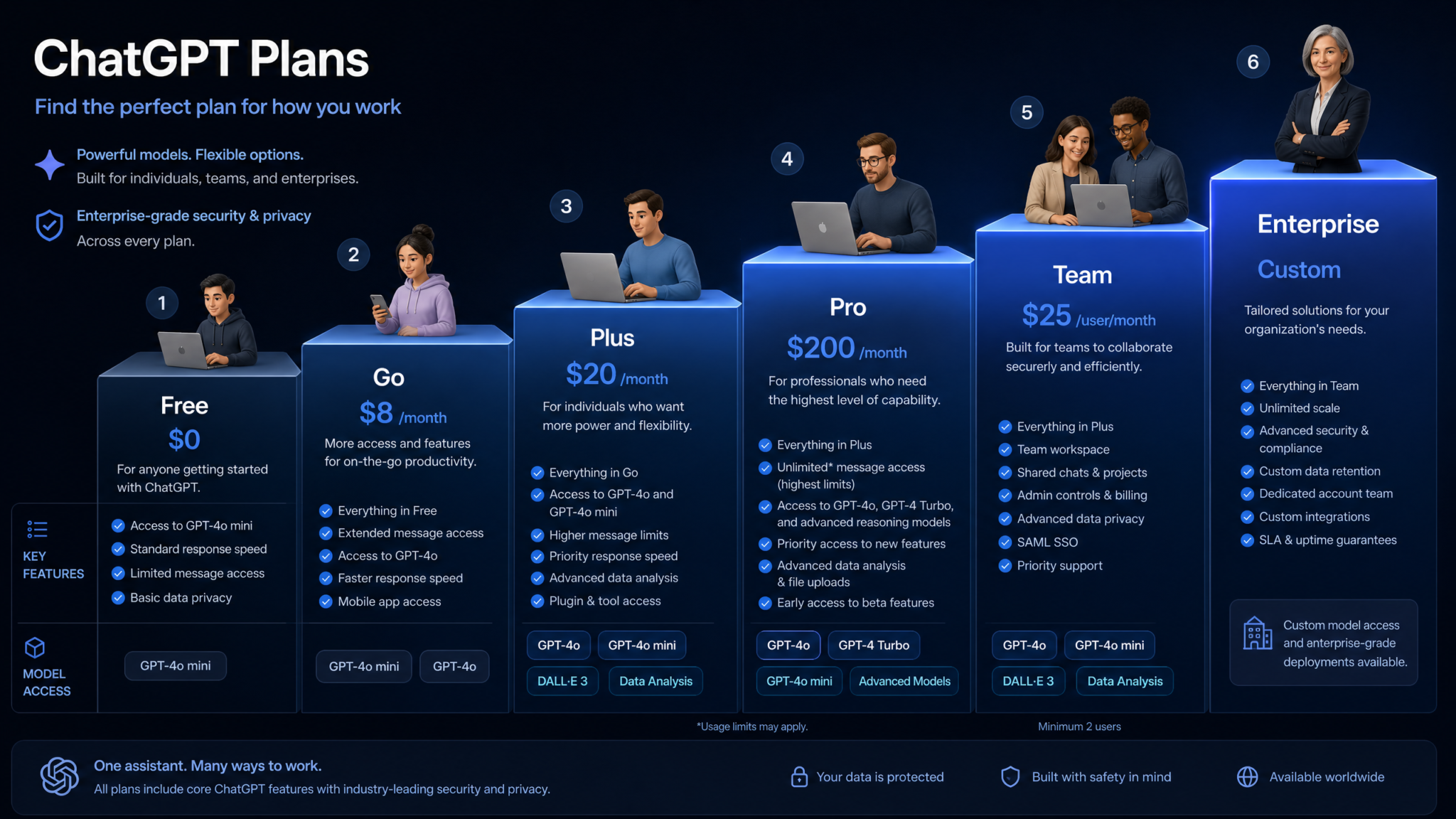
Every ChatGPT subscription tier dissected in full — model access, usage caps, hidden features, and a persona-based decision framework to help you choose exactly the right plan for August 2026.
Last Updated: | Reading Time: ~24 minutes | Author: ChatGPT AI Hub Editorial Team
OpenAI’s subscription lineup has never been more complex — or more capable. As of August 2026, ChatGPT spans six distinct tiers, from a genuinely powerful free offering built on GPT-5.6 Luna all the way up to a enterprise-grade platform with custom security controls, audit logs, and dedicated infrastructure. The gap between tiers is no longer just about raw message limits; it now reflects meaningful differences in model intelligence, tool availability, collaboration features, and compliance tooling. If you signed up for a plan even six months ago and haven’t revisited that decision, this guide is for you.
1. What Changed in August 2026 — The Biggest Free Tier Upgrade Yet
August 2026 marks one of OpenAI’s most consequential product decisions since the original launch of ChatGPT Plus in early 2023: unlimited text messaging is now available on the free tier. This is not a promotional period, not a weekend experiment, and not restricted to specific regions. Every user on the free plan — regardless of geographic location — can now send unlimited text-based messages powered by GPT-5.6 Luna, OpenAI’s most efficient frontier model to date.
To understand why this matters, consider that as recently as January 2026, free users were capped at 40 messages per day using GPT-5o. The jump to unlimited GPT-5.6 Luna access is roughly equivalent to giving every internet user free access to what was, eighteen months ago, a paid-tier capability. This is a deliberate strategic move: OpenAI is competing aggressively with Google’s Gemini Advanced free integrations and Anthropic’s Claude Free tier, both of which have significantly expanded their complimentary access in 2026.
The second major August 2026 change is the introduction of the Think button — a one-click reasoning mode that activates extended chain-of-thought processing on any message — rolling out to all tiers including Free. Previously, thinking/reasoning modes were gated behind Plus and above. The Think button in its free form uses a lighter reasoning pass (roughly equivalent to what Pro users called “standard reasoning” in 2025), but it is nonetheless a meaningful capability addition for students, casual users, and anyone who needs the model to work through a problem step by step.
Summary of August 2026 Changes
- Free tier: Unlimited text messages on GPT-5.6 Luna (previously 40/day limit lifted permanently)
- Free tier: Think button enabled (light reasoning mode)
- Go tier (new): Introduced at $8/month as an entry point between Free and Plus
- Plus tier: Upgraded default model to GPT-5.6 Sol from GPT-5.5 Horizon
- Pro tier: o3-pro now included at no additional cost (was $30 add-on through Q1 2026)
- Team tier: Shared memory pools and team-wide custom instructions launched in general availability
- Enterprise: SOC 2 Type II renewal and new EU AI Act compliance module shipped
The Go tier deserves particular attention. At $8/month, it fills a real market gap: users who need more than the free tier’s file and image generation limits, but who don’t require the full model intelligence of Plus. It is positioned as the right plan for light professional users, students wanting file uploads, or hobbyists who generate images regularly. ChatGPT Go vs Plus Detailed Comparison
2. All Six ChatGPT Tiers at a Glance
Before diving into granular details, here is a high-level orientation of all six plans currently offered as of August 2026:
| Plan | Monthly Price | Primary User | Core Model | Best For |
|---|---|---|---|---|
| Free | $0 | General public | GPT-5.6 Luna | Everyday Q&A, writing, unlimited text chat |
| Go | $8/month | Light professional users | GPT-5.6 Luna + select Sol access | File uploads, moderate image gen, expanded tools |
| Plus | $20/month | Power users, professionals | GPT-5.6 Sol | High-volume work, advanced reasoning, full tools suite |
| Pro | $200/month | Researchers, heavy users | GPT-5.6 Sol + Terra + o3 + o3-pro | Unlimited everything, cutting-edge model access |
| Team | $25/user/month | Small–mid teams (2–149 users) | GPT-5.6 Sol | Shared workspaces, team memory, admin controls |
| Enterprise | Custom | Large organizations (150+ users) | GPT-5.6 Sol + Terra + o3 | SSO, compliance, dedicated infrastructure, SLA |
Pricing listed is per individual account on monthly billing. Annual billing provides roughly 17% savings on Go, Plus, and Pro. Team and Enterprise are billed annually by default, with monthly options available at a 20% premium for Team.
3. Model Access by Tier: GPT-5.6 Luna, Sol, Terra, o3, and o3-pro Explained
One of the most consequential differences between ChatGPT tiers in August 2026 is which underlying model you actually get to use. OpenAI now maintains a portfolio of specialized models under the GPT-5.6 umbrella, each tuned for different performance-cost profiles. Understanding the model hierarchy is essential to evaluating whether your current plan is genuinely serving your needs.
GPT-5.6 Luna
Luna is OpenAI’s efficiency-optimized model in the 5.6 generation. It is the model powering the free tier’s unlimited text access, and for good reason: Luna delivers exceptional performance per compute unit. In independent benchmarks published by ML Commons in July 2026, Luna scored within 11% of Sol on standard writing, summarization, and general reasoning tasks — a gap that most casual users will never notice in practice. Luna is trained specifically for low-latency responses, which makes it feel faster and more conversational than heavier models. Its primary limitations are in multi-step mathematical reasoning, long-context document synthesis beyond 50,000 tokens, and highly specialized STEM tasks.
GPT-5.6 Sol
Sol is the flagship model for Plus and Team subscribers and represents OpenAI’s best balance of capability, speed, and cost. Sol was trained on a substantially expanded scientific and technical corpus relative to Luna, and it shows: Sol outperforms Luna by 23% on graduate-level STEM benchmarks and by 31% on long-document synthesis tasks in the same ML Commons evaluation. Sol is the model most professional users — developers, content creators, consultants — will spend the majority of their time with. It is capable, fast, and contextually sophisticated.
GPT-5.6 Terra
Terra is a specialized model introduced in June 2026 and currently available only to Pro and Enterprise subscribers. Terra is fine-tuned for deep technical domains: advanced coding, scientific paper generation, complex mathematical proofs, and multi-agent system design. Terra runs slower than Sol and Luna — response latency is roughly 2.3× that of Sol — but for tasks where output quality matters more than speed, Terra is meaningfully superior. Enterprise users working in genomics, financial modeling, and advanced engineering have reported Terra as transformative for their workflows. GPT-5.6 Terra Technical Capabilities Deep Dive
o3 (Reasoning Model)
The o3 model family continues OpenAI’s tradition of separate reasoning-focused architectures. Unlike the GPT-5.6 series, o3 uses extended internal chain-of-thought processing before producing any output, which makes it exceptionally accurate on problems requiring logical deduction, legal analysis, strategic planning, and mathematical verification. o3 access at full depth is available on Pro and Enterprise; Plus users get limited o3 access (approximately 50 queries/month with standard reasoning depth). The Think button on Free and Go tiers uses a distilled version of o3’s reasoning architecture layered on top of Luna, not the full o3 model.
o3-pro
o3-pro is the highest-capability model OpenAI currently offers through ChatGPT. It applies maximum reasoning depth, multiple internal verification passes, and is capable of spending up to several minutes on a single response to ensure correctness. o3-pro is available exclusively on the Pro tier (unlimited) and was previously a $30/month add-on through Q1 2026. As of August 2026, it is included in Pro at no additional cost. Enterprise clients with custom contracts may negotiate o3-pro access. o3-pro is not available on Free, Go, Plus, or Team.
| Model | Free | Go | Plus | Pro | Team | Enterprise |
|---|---|---|---|---|---|---|
| GPT-5.6 Luna | ✅ Unlimited | ✅ Unlimited | ✅ Available | ✅ Available | ✅ Available | ✅ Available |
| GPT-5.6 Sol | ❌ | ⚡ Limited (80/month) | ✅ High limits | ✅ Unlimited | ✅ High limits | ✅ High limits |
| GPT-5.6 Terra | ❌ | ❌ | ❌ | ✅ Unlimited | ❌ | ✅ Limited |
| o3 (Standard) | ❌ (Think button lite only) | ❌ (Think button lite only) | ⚡ 50 queries/month | ✅ Unlimited | ⚡ 50 queries/month | ✅ High limits |
| o3-pro | ❌ | ❌ | ❌ | ✅ Unlimited | ❌ | 🔧 Negotiated |
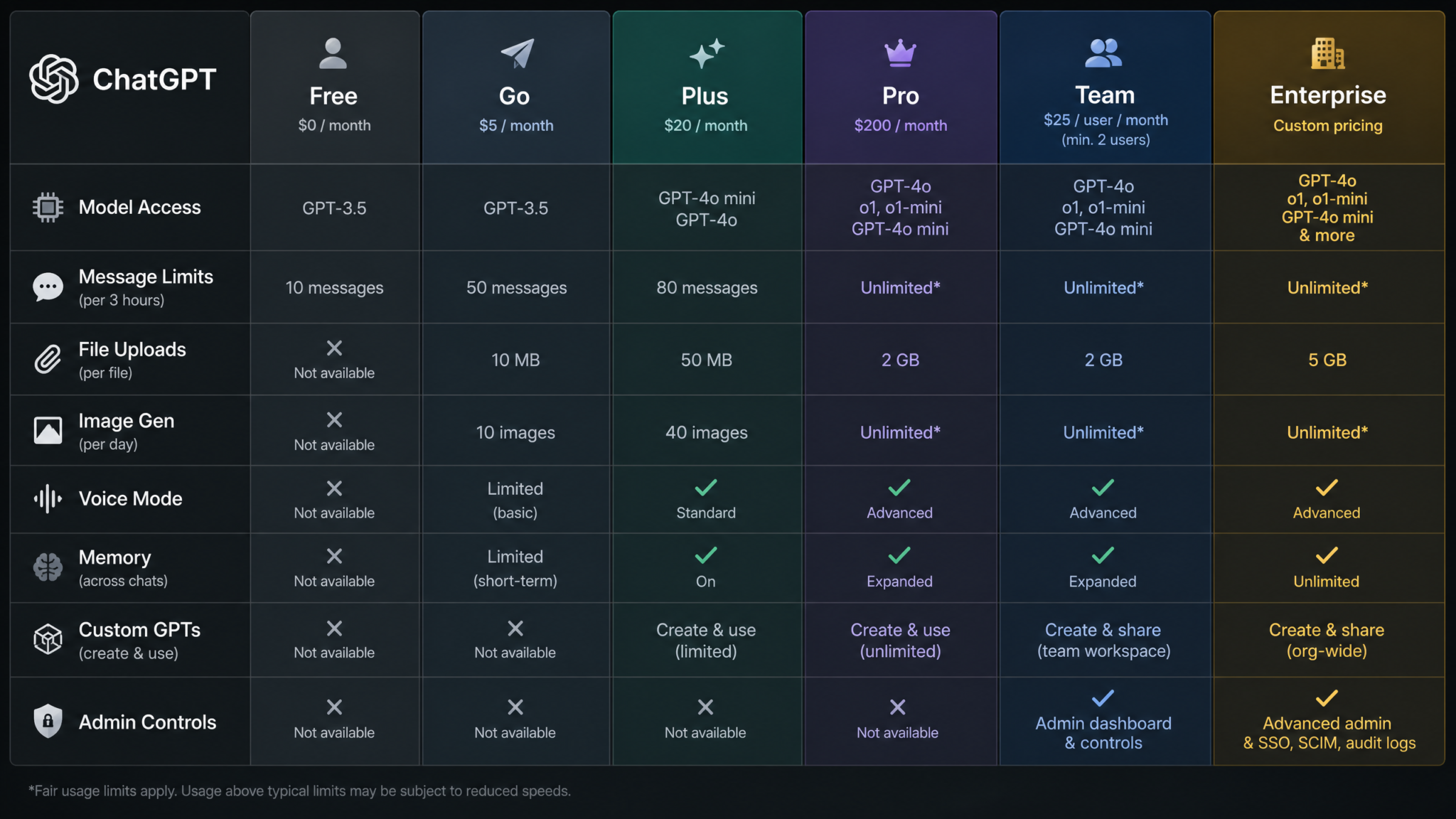
4. Master Feature Comparison Table
The following table covers every significant feature across all six tiers. Features are grouped by category for clarity. A ✅ indicates full access, ⚡ indicates limited or partial access, and ❌ indicates the feature is not available on that tier.
| Feature | Free | Go | Plus | Pro | Team | Enterprise |
|---|---|---|---|---|---|---|
| Core Messaging | ||||||
| Text messaging (GPT-5.6 Luna) | ✅ Unlimited | ✅ Unlimited | ✅ Unlimited | ✅ Unlimited | ✅ Unlimited | ✅ Unlimited |
| Think button (reasoning) | ✅ Lite mode | ✅ Lite mode | ✅ Full mode | ✅ Max mode | ✅ Full mode | ✅ Full mode |
| Context window | 32K tokens | 64K tokens | 128K tokens | 256K tokens | 128K tokens | 256K tokens |
| File & Document Handling | ||||||
| File uploads (PDFs, docs) | ⚡ 3/day | ⚡ 20/day | ✅ 80/day | ✅ Unlimited | ✅ 80/day | ✅ Unlimited |
| Max file size per upload | 10 MB | 25 MB | 100 MB | 500 MB | 100 MB | 1 GB |
| Data Analysis (code interpreter) | ❌ | ⚡ 10/month | ✅ High limits | ✅ Unlimited | ✅ High limits | ✅ Unlimited |
| Image Generation (DALL-E 5) | ||||||
| Image generations | ⚡ 2/day | ⚡ 30/month | ✅ 100/month | ✅ Unlimited | ✅ 100/month per user | ✅ Unlimited |
| HD image resolution | ❌ | ⚡ 10/month | ✅ Included | ✅ Included | ✅ Included | ✅ Included |
| Image editing (inpainting) | ❌ | ❌ | ✅ Available | ✅ Available | ✅ Available | ✅ Available |
| Voice & Audio | ||||||
| Voice mode (Advanced) | ⚡ 10 min/day | ⚡ 30 min/day | ✅ 5 hours/month | ✅ Unlimited | ✅ 5 hours/month | ✅ Custom SLA |
| Custom voice profiles | ❌ | ❌ | ✅ 3 profiles | ✅ Unlimited profiles | ✅ 3 profiles/user | ✅ Team-wide profiles |
| Video (Sora Integration) | ||||||
| Video generation (Sora) | ❌ | ❌ | ⚡ 5 videos/month (720p, 10s) | ✅ 50 videos/month (4K, 60s) | ⚡ 5 videos/month per user | ✅ Custom allocation |
| Customization & Memory | ||||||
| Persistent memory | ✅ Basic (500 memories) | ✅ Basic (500 memories) | ✅ Extended (5,000 memories) | ✅ Full (unlimited) | ✅ Individual + shared pool | ✅ Individual + org-wide pool |
| Custom GPTs (create) | ❌ (use only) | ⚡ 5 GPTs | ✅ Unlimited | ✅ Unlimited | ✅ Unlimited + team sharing | ✅ Private org GPT store |
| System-level custom instructions | ✅ Basic | ✅ Enhanced | ✅ Full | ✅ Full + saved profiles | ✅ Team defaults + individual | ✅ Org-wide + department-level |
| Web & Tools Access | ||||||
| Web browsing | ⚡ Limited | ✅ Full | ✅ Full | ✅ Full | ✅ Full | ✅ Full (with policy controls) |
| Code execution (sandbox) | ❌ | ⚡ Limited | ✅ Full | ✅ Full + extended runtime | ✅ Full | ✅ Full + isolated env |
| Plugin / connector integrations | ❌ | ⚡ 3 connectors | ✅ Unlimited | ✅ Unlimited + priority API | ✅ Team connector library | ✅ Custom enterprise connectors |
| Team & Admin Features | ||||||
| Shared workspaces | ❌ | ❌ | ❌ | ❌ | ✅ Up to 20 workspaces | ✅ Unlimited workspaces |
| SSO / SAML | ❌ | ❌ | ❌ | ❌ | ❌ | ✅ Full SSO / SAML 2.0 |
| Audit logs | ❌ | ❌ | ❌ | ❌ | ⚡ Basic (30-day retention) | ✅ Full (365-day retention) |
| Data not used for training | ❌ (opt-in only) | ✅ Default off | ✅ Default off | ✅ Default off | ✅ Default off | ✅ Contractually guaranteed |
| Priority & Support | ||||||
| Response priority (peak hours) | Standard | Enhanced | High | Highest | High | Dedicated |
| Customer support | Community only | Email (72h SLA) | Email (24h SLA) | Priority email (4h SLA) | Priority email (4h SLA) | Dedicated CSM + phone |
5. Usage Limits Deep Dive: Messages, Files, Images, Voice, and Video
Raw feature tables tell you whether something is available, but they can obscure the practical reality of day-to-day usage. Let us break down the limits that actually matter in real workflows.
Text Messages
As of August 2026, unlimited text messaging on Luna is available on every tier. However, the type of messaging diverges significantly when you invoke premium models. On Plus and Team, Sol access has a high but finite monthly ceiling — OpenAI describes this as “generous limits” and does not publish an exact number publicly. Based on community tracking and OpenAI’s published fair-use policy, Plus users can realistically send approximately 1,500–2,000 Sol messages per month before encountering rate-limiting during peak demand windows. For most professionals working standard hours, this ceiling is never reached. Heavy users — those running multi-turn research sessions, automated workflows, or bulk document analysis — will notice the limits.
Pro users with unlimited Sol access never encounter these ceilings, and Pro is also the only tier with unlimited o3 and o3-pro access, which are inherently slower and therefore metered differently from speed-optimized models.
File Uploads
The free tier’s three-file-per-day limit is one of the most frequent reasons users upgrade. If your work involves regular document review, contract analysis, research synthesis, or data imports, the free limit will feel constraining within a week. Go’s 20-file daily limit handles moderate professional use. Plus and above comfortably accommodate even high-volume document workflows. The more important consideration at the Plus level is file size: the 100 MB limit accommodates most business documents but will block users trying to analyze large video files, full academic datasets, or high-resolution image batches. Pro’s 500 MB per file limit largely removes this constraint.
Image Generation
DALL-E 5 (integrated into ChatGPT) produces dramatically higher quality outputs than any prior generation, which makes the image generation limits more impactful for creative professionals. Free’s two images per day is adequate for occasional experimentation; it is not adequate for professional creative workflows. Go’s 30 images per month averages to approximately one per day — fine for a blogger adding one header image to a daily post, but insufficient for a designer or marketing team. Plus’s 100 per month covers most individual creative professionals. Pro’s unlimited generation is specifically valuable for anyone whose work involves iterative creative exploration — concept art, brand identity development, editorial illustration.
Voice Mode
Advanced Voice Mode, which provides real-time conversational AI with nuanced emotional tone and interruption handling, is time-capped on all tiers below Pro. Free’s 10 minutes per day sounds limiting but is actually sufficient for brief daily use — a morning briefing, a quick dictation session, a short language practice exercise. Go’s 30 minutes per day handles regular light professional use. Plus’s 5 hours per month (approximately 10 minutes per working day) is the tier where voice starts feeling like a genuine work tool rather than a feature you have to ration. Pro’s unlimited voice access is transformational for users who want to use ChatGPT as an ambient work companion — dictating documents, thinking out loud through problems, conducting extended research conversations.
Video Generation (Sora)
Sora integration within ChatGPT is among the newest features and currently only activates at Plus and above. Plus users receive five videos per month at 720p resolution with a maximum clip length of 10 seconds — sufficient for social media experiments and simple explainer content but nowhere near enough for serious production work. Pro users get 50 videos per month at 4K resolution with clips up to 60 seconds, which begins to approach genuine production utility. Video generation remains the most compute-intensive capability in ChatGPT and the most capacity-constrained. Sora Video Generation Guide for ChatGPT Pro Users
6. Tier-by-Tier Breakdown
Free ($0/month) — Now Genuinely Capable
The August 2026 free tier is the most capable free AI offering publicly available from any major provider. GPT-5.6 Luna at unlimited text access delivers performance that, for most everyday tasks, is indistinguishable from what paid users experienced on GPT-4 as recently as mid-2024. The Think button in lite mode adds a dimension of reasoning that free users simply did not have access to before.
What works brilliantly on Free: Writing assistance, editing, brainstorming, Q&A, coding help for common languages and frameworks, language learning, recipe creation, planning, and conversational tasks of essentially unlimited depth. The Think button particularly shines for logical puzzles, exam prep, and structured planning.
Where Free hits walls: Three file uploads per day is the most immediate practical bottleneck. The 32K token context window means you cannot paste a full research paper or long contract into a single conversation. Two image generations per day rules out any serious creative workflow. Ten minutes of daily voice mode means it is supplementary rather than central. No access to Sol, Terra, o3, or o3-pro means users working on complex technical problems are missing meaningful capability. And critically, data privacy defaults to opt-in: your conversations may be used for training unless you manually navigate to Settings > Data Controls and toggle this off.
Who should stay on Free: Students using ChatGPT primarily for writing feedback and studying. Casual users who chat with AI occasionally. Anyone trying ChatGPT for the first time. People in regions where the $8–$20/month cost is a meaningful expense.
Go ($8/month) — The Smart Upgrade for Light Professionals
Go is genuinely new as of August 2026 and fills a gap that has frustrated users for years: the jump from free to $20/month Plus felt too steep for users who only needed incremental improvements. At $8/month (or approximately $6.67/month billed annually), Go provides:
- 20 file uploads per day (vs. 3 on Free)
- 25 MB max file size (vs. 10 MB on Free)
- 30 image generations per month with 10 HD images included
- 64K context window (doubles the free tier’s capacity)
- 30 minutes of advanced voice mode daily
- 80 Sol model messages per month (for tasks that benefit from Sol’s higher capability)
- Data not used for training by default
- Full web browsing access
- Up to 5 custom GPTs you can create and save
- 3 third-party connector integrations
- Limited code interpreter access (10 sessions/month)
The data privacy default flip alone is worth noting. On Free, you must actively opt out of training data usage. On Go and above, your data is protected by default. For anyone using ChatGPT for work — even casually — this matters.
Who Go is right for: Freelance writers or editors who upload documents occasionally. Students at universities handling papers and research materials. Bloggers who generate a handful of images per month. Small business owners who need ChatGPT for occasional professional tasks but cannot justify $20/month. Users who want full web browsing without committing to Plus.
Where Go falls short: The 80 Sol messages per month sounds like a lot until you realize that a substantive work session — drafting and revising a complex document, for instance — can consume 20–30 messages easily. Code interpreter at 10 sessions/month is barely enough for a data analyst’s weekly workflow. No Sora video access. No image inpainting. No o3 reasoning (only the Think button lite using Luna).
Plus ($20/month) — Still the Best Value for Most Professionals
Plus has been the primary paid tier since 2023, and despite the introduction of Go, it remains the recommendation for the majority of professional users in August 2026. The upgrade to GPT-5.6 Sol as the default model is significant: Sol’s 23% advantage over Luna on technical benchmarks and 31% advantage on long-document tasks will be immediately apparent to anyone doing substantive professional work.
What Plus delivers that Go does not:
- GPT-5.6 Sol as the default model with high monthly limits
- 128K context window — handles most full-length documents
- 80 file uploads per day at 100 MB each
- 100 image generations per month with unlimited HD resolution
- Full DALL-E 5 inpainting and editing tools
- 5 hours of advanced voice mode monthly
- 5 Sora video generations per month
- Full code interpreter access
- Unlimited custom GPT creation
- Up to 50 o3 reasoning queries per month
- Unlimited third-party connector integrations
- Three custom voice profiles
- Full Think button mode (not just lite)
The o3 access at 50 queries per month is new since the June 2026 update and represents a significant value addition to Plus. Fifty o3 queries is roughly 2–3 per working day — sufficient for using o3 strategically on the hardest problems you encounter without reserving it only for the most exceptional cases. How to Get the Most Value from ChatGPT Plus in 2026
The case against Plus: If you primarily use ChatGPT for text-based work and rarely need file uploads, image generation, or voice, you may be paying $12/month more than necessary versus Go. Conversely, if you are hitting Plus’s Sol message limits — which power users absolutely can — Pro becomes a more rational investment than it might initially appear.
Pro ($200/month) — For Users Who Cannot Afford Limits
At $200/month, Pro is genuinely expensive — it represents a $2,400/year commitment. But the framing that matters is this: Pro is designed for users whose work output directly and measurably exceeds the cost of the subscription. A researcher who writes one fewer grant application revision. A developer who ships features two weeks faster. A consultant who delivers a strategy report that would have required three days of analyst time. In these contexts, $200/month is not a personal technology subscription cost; it is a business investment with a calculable return.
What Pro adds that no other tier below Enterprise provides:
- Unlimited Sol and Luna messages — no throttling, no monthly caps
- Unlimited Terra access — the deep-technical model unavailable elsewhere
- Unlimited o3 access — full reasoning depth, no monthly query budget
- Unlimited o3-pro access — maximum capability, included since August 2026
- 256K context window — handle entire codebases, full manuscript drafts, complete legal case files
- 500 MB per file upload, unlimited uploads daily
- Unlimited image generation at any resolution
- 50 Sora video generations/month at 4K, 60-second clips
- Unlimited advanced voice mode
- Unlimited custom voice profiles
- Extended code execution runtime — sandbox sessions can run for up to 30 minutes (vs. 5 minutes on Plus)
- Think button in Max mode — maximum reasoning depth and iteration
- Priority access at all times — no degraded performance during peak demand
The inclusion of o3-pro in Pro at no additional cost as of August 2026 effectively makes Pro a stronger value proposition than it was in Q1 2026, when the same plan cost $170/month but required a separate $30/month add-on for o3-pro access.
Team ($25/user/month) — Collaboration Without Enterprise Overhead
Team sits at an interesting position in the lineup: it provides meaningful organizational features — shared workspaces, team memory pools, shared custom GPTs, and basic admin controls — without requiring the six-figure annual contracts and procurement cycles typical of Enterprise. At $25/user/month (billed annually), a team of five pays $1,500/year total, which compares favorably to five individual Plus subscriptions at $1,200/year while adding genuine collaboration value.
The August 2026 general availability launch of team-wide shared memory pools is the most significant new Team feature. Teams can now create shared memory contexts — allowing the AI to maintain awareness of project backgrounds, team terminology, recurring clients, and shared preferences across all team member conversations. A marketing team, for instance, could create a shared memory that includes brand guidelines, tone preferences, target audience profiles, and campaign goals, ensuring every team member starts from a consistent AI context.
Team plan also includes:
- Minimum 2 seats, maximum 149 seats
- Admin dashboard with user management and seat provisioning
- Basic audit logs with 30-day retention
- Shared Custom GPT library accessible to all team members
- Data excluded from training for all users by default
- Up to 20 shared workspaces
- Team-wide custom instruction defaults (with individual override capability)
- Priority access at Plus level
Where Team falls short of Enterprise: No SSO or SAML, which makes it unsuitable for organizations with strict identity management requirements. No formal SLA or dedicated customer success management. 30-day audit log retention is insufficient for many compliance frameworks (HIPAA, SOC 2, and ISO 27001 typically require 90–365 days). No Terra or o3-pro model access.
Enterprise (Custom Pricing) — Compliance, Control, and Scale
Enterprise pricing is negotiated directly with OpenAI’s sales team and typically structured as annual contracts starting around $60–$80/user/month for organizations with 150+ seats, with volume discounts at 500+ and 1,000+ seat thresholds. Some specialized organizations with large seat counts and custom infrastructure requirements have reported effective per-seat rates as low as $30/month after negotiation.
The Enterprise tier is not primarily about AI capability — it is about organizational trust, compliance, and control. The features that distinguish Enterprise are entirely in the admin and security layer:
Access 40,000+ AI Prompts for ChatGPT, Claude & Codex — Free!
Subscribe to get instant access to our complete Notion Prompt Library — the largest curated collection of prompts for ChatGPT, Claude, OpenAI Codex, and other leading AI models. Optimized for real-world workflows across coding, research, content creation, and business.
- SAML 2.0 and SSO — integrates with Okta, Azure AD, Google Workspace, and custom IdPs
- 365-day audit log retention with full query and response logging, exportable in structured formats
- EU AI Act compliance module — launched August 2026, includes automated AI usage documentation for regulatory reporting
- SOC 2 Type II certification — renewed July 2026, covering ChatGPT Enterprise infrastructure
- HIPAA Business Associate Agreement (BAA) available
- Private org-wide GPT store — deploy custom GPTs to your entire organization without public visibility
- Department-level custom instruction defaults — HR department gets different AI context defaults than engineering team
- Isolated code execution environments — sensitive code runs in network-isolated sandboxes
- Dedicated customer success manager
- Priority phone support with defined response SLAs
- Contractually guaranteed data non-training
- Unlimited workspaces with granular permission controls
- Custom data retention policies
- API access to ChatGPT capabilities for custom internal application development
For regulated industries — healthcare, financial services, legal, government — Enterprise is not a luxury tier; it is the only tier where ChatGPT is even permissible for use with sensitive data. The HIPAA BAA alone makes Enterprise the de facto requirement for any healthcare organization that wants AI assistance with patient-adjacent work. The EU AI Act compliance module, launched in August 2026, is particularly timely given the enforcement phase of the Act now in full effect.
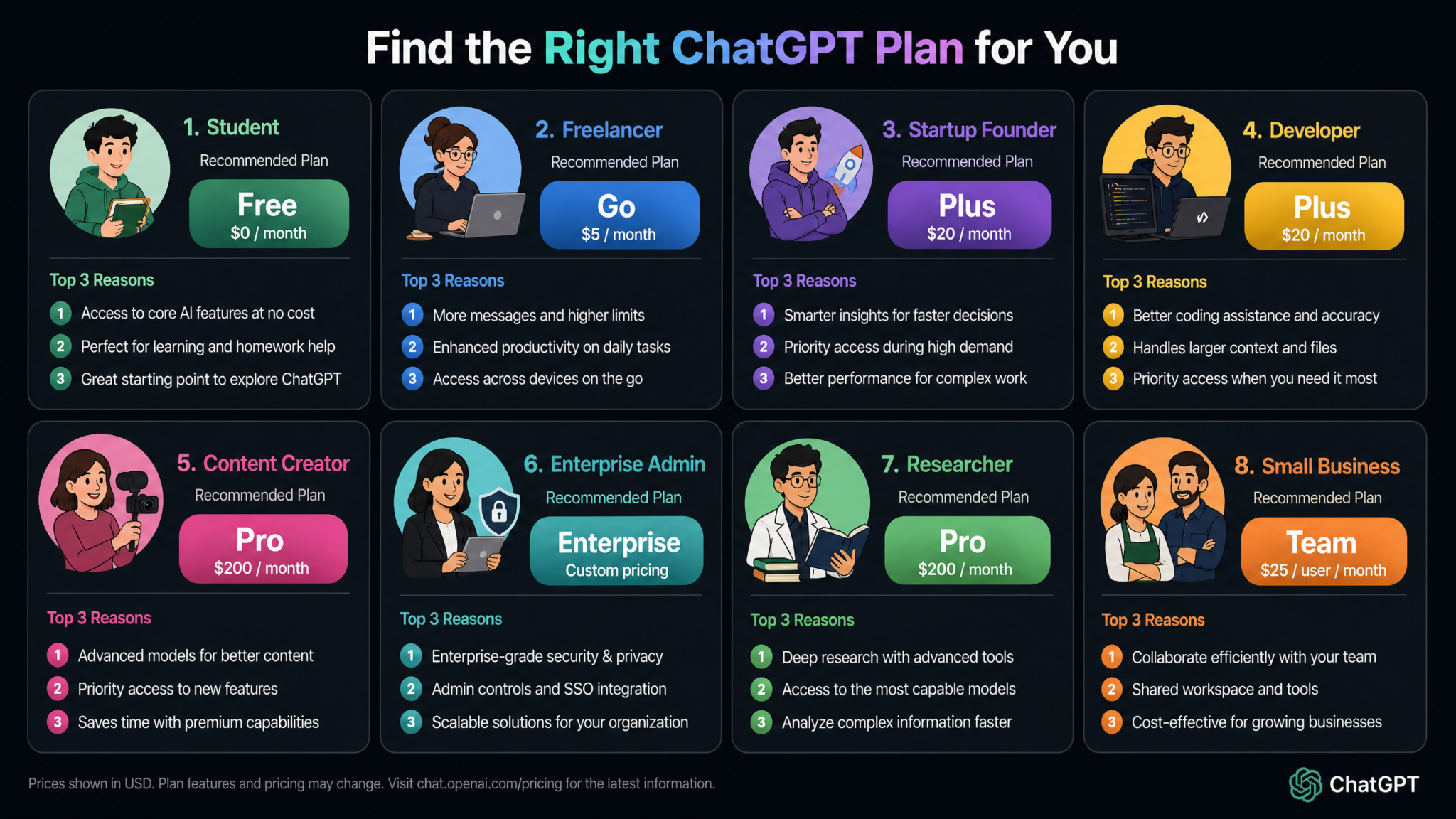
8. Decision Framework: 8 User Personas
Abstract feature comparisons only go so far. The most useful question is: which plan is right for someone like me, doing work like mine? Here is a structured analysis for eight common user archetypes.
Persona 1: The Student
Profile: Undergraduate or graduate student using ChatGPT for essay writing, exam preparation, literature reviews, problem set assistance, and coding assignments.
Primary needs: Writing quality, reasoning capability, file upload for PDFs, context length for long documents.
Recommended tier: Free or Go.
Reasoning: The unlimited text messaging and Think button on Free covers the vast majority of student use cases well. Luna performs excellently on writing and standard STEM problems. If you regularly need to upload papers, readings, or textbooks for analysis, Go at $8/month unlocks 20 file uploads daily and a 64K context window — more than sufficient for academic work. Plus is only warranted for doctoral researchers or students doing advanced quantitative work who benefit from Sol’s technical depth.
Persona 2: The Freelance Writer or Content Creator
Profile: Writes articles, scripts, social content, or email newsletters professionally. Uses AI for drafting, editing, ideation, and research.
Primary needs: Writing quality, long context for document editing, image generation for headers, voice for dictation.
Recommended tier: Plus.
Reasoning: Sol’s writing quality is meaningfully better than Luna for nuanced, stylistically sophisticated content. The 100 images per month covers most content illustration needs. The 5-hour voice allocation enables meaningful dictation workflows. The 128K context window handles full-length articles with room for extensive back-and-forth refinement. If your primary use is text-only writing with no image needs, Go is a reasonable cost-conscious alternative.
Persona 3: The Software Developer
Profile: Full-stack or backend developer using AI for code generation, debugging, code review, architecture planning, and documentation.
Primary needs: Code quality (Sol or Terra), long context for codebase analysis, code interpreter, o3 reasoning for architecture problems.
Recommended tier: Plus for most; Pro for architects and senior engineers.
Reasoning: Sol’s coding capability is substantially better than Luna for complex, production-grade code. Plus’s code interpreter at unlimited sessions and 128K context handles most development workflows. The 50 o3 queries per month are particularly valuable for architecture reviews and debugging hard logic errors. For developers who need to analyze large codebases (Pro’s 256K context and unlimited file uploads are decisive) or who work on AI systems and need Terra’s depth, Pro justifies its cost quickly.
Persona 4: The Startup Founder
Profile: Early-stage founder wearing many hats — writing pitch decks, analyzing competitive landscapes, drafting contracts, planning product roadmaps, creating marketing content.
Primary needs: Versatility, high message volume across many domains, image generation for brand and pitch materials, document analysis.
Recommended tier: Plus, with consideration of Pro if productivity is a competitive bottleneck.
Reasoning: Founders tend to use ChatGPT very broadly and at high volume. Plus’s Sol model handles the range of tasks well. The unlimited custom GPT creation allows founders to build specialized tools for their specific business context — a competitive research GPT, a pitch reviewer GPT, a customer email drafter. If you are in a particularly AI-intensive phase (fundraising, product launch, rapid scaling), the productivity insurance of Pro may generate returns well above $200/month. Consider Pro for a quarter rather than a year.
Persona 5: The Data Scientist or Researcher
Profile: Works with large datasets, statistical modeling, literature synthesis, and technical report writing. May work in academia or applied research.
Primary needs: Terra model for deep technical tasks, long context for paper analysis, code interpreter with extended runtime, unlimited o3 for mathematical verification.
Recommended tier: Pro.
Reasoning: Researchers are the archetypical Pro user. Terra’s specialization in scientific reasoning and mathematical precision is meaningful for this persona. The 30-minute code execution sessions enable legitimate data processing and model training workflows. The 500 MB file upload limit accommodates real datasets. And unlimited o3 access means you can verify every methodological decision against the most rigorous reasoning model available. For a researcher billing at professional rates, Pro pays for itself with a single saved day of work per month.
Persona 6: The Small Business Owner
Profile: Runs a business with 1–5 employees. Uses ChatGPT for customer communications, product descriptions, internal SOPs, marketing copy, and basic financial analysis.
Primary needs: Reliable writing quality, occasional file uploads, data privacy default, some image generation for marketing.
Recommended tier: Go or Plus depending on volume.
Reasoning: The data privacy default on Go and above is particularly important for business use — you do not want customer information or business strategy going into model training. Go handles light professional business use well. If you are generating marketing images regularly, drafting substantial documents daily, or needing extended voice interactions (customer script practice, for instance), Plus is the right step up.
Persona 7: The Enterprise Technology Administrator
Profile: IT or security leader responsible for deploying AI tools across a large organization. Concerns include data governance, compliance, access control, and cost management.
Primary needs: SSO, audit logs, data non-training guarantees, compliance certifications, org-wide policy enforcement.
Recommended tier: Enterprise. No other tier is appropriate.
Reasoning: SSO alone is a hard requirement for most organizations with enterprise security postures. The audit log retention, HIPAA BAA availability, and EU AI Act compliance module are not nice-to-haves; they are legal and risk management necessities. The ROI calculation for Enterprise should be measured in compliance risk reduction and legal exposure, not purely in productivity output.
Persona 8: The Marketing Team Manager (5–20 Person Team)
Profile: Manages a marketing team using AI for content production, campaign planning, ad copywriting, market research, and creative development.
Primary needs: Shared workspaces, team-wide brand context (memory pools), consistent AI behavior across team members, custom GPTs for recurring marketing tasks.
Recommended tier: Team.
Reasoning: The shared memory pools, team custom GPT library, and shared workspaces are precisely designed for this use case. Team ensures that every marketer on your team has the same brand context, tone guidelines, and target audience parameters baked into their AI interactions by default — eliminating the inconsistency that comes from ten different individuals maintaining ten different custom instruction sets. At $25/user/month for a team of ten, the annual cost is $3,000 — less than one day of a mid-level marketing consultant. Setting Up ChatGPT Team Plan for Marketing Departments
9. Cost-Per-Value Analysis
Evaluating ChatGPT plans on sticker price alone misses the analytical point. The right question is: what is the per-unit cost of the capabilities you actually use? Here is a structured way to think about value relative to cost.
| Tier | Monthly Cost | Cost Per Working Day | Break-Even Productivity Gain Needed | Typical ROI Profile |
|---|---|---|---|---|
| Free | $0 | $0 | N/A | Pure gain — limited capability |
| Go | $8 | $0.36 | ~4 minutes of professional time saved per day | Very high for light professionals |
| Plus | $20 | $0.91 | ~11 minutes of professional time saved per day | High for most professionals |
| Pro | $200 | $9.09 | ~55 minutes of professional time saved per day | High for heavy users, researchers |
| Team (10 users) | $250 total | $1.14/user | ~14 minutes saved per user per day | High when team coordination value is counted |
| Enterprise (100 users) | ~$6,500/month est. | $2.95/user | ~36 minutes saved per user per day | Depends heavily on use case intensity and compliance value |
The break-even calculation above assumes a billing rate or effective hourly value of $75/hour (approximately a $156K annual salary, or a freelance rate of $75/hour). Adjust the calculation for your own hourly value: at $150/hour, the break-even for Plus is only 5.5 minutes per day. At $40/hour, it is approximately 30 minutes per day — still very achievable for anyone using ChatGPT meaningfully in their work.
The critical insight from this analysis is that Go is almost certainly underpriced relative to its value for the target audience. Four minutes of saved professional time at nearly any billing rate covers the entire monthly subscription. OpenAI is clearly pricing Go as a funnel entry point toward Plus, accepting below-market pricing in exchange for subscription acquisition and habit formation.
Pro’s break-even of 55 minutes per day sounds like a lot, but for users who deploy ChatGPT intensively — running research sessions, generating extensive creative content, building and iterating on complex systems — it is a very achievable threshold. The users for whom Pro is genuinely a bad value are those who are attracted by the “unlimited everything” framing but do not actually use the platform at the volume where limits matter.
10. Migration Guide: Moving Between Tiers Without Losing Your Work
Changing your ChatGPT subscription tier is administratively simple but carries non-obvious risks of losing custom work if done without preparation. Here is a structured migration guide for each common transition scenario.
Upgrading from Free to Go or Plus
Upgrading is the simplest migration. Your conversation history, any custom GPTs you have created (within Free tier limits), and your memory bank all carry forward automatically. The upgrade is effective immediately upon payment; you do not need to start a new session. One action to take immediately upon upgrading to Plus or above: navigate to Settings > Memory and expand your memory entries. The new extended memory limit (5,000 entries on Plus vs. 500 on Free) means you should consider re-prompting the AI to build a richer memory context now that you have the capacity for it.
Upgrading from Plus to Pro
Again, all data carries forward. The key actions when upgrading to Pro are activating the Think button’s Max mode (it defaults to Full mode even after upgrade) and exploring Pro’s saved system prompt profiles feature, which is not available on Plus. If you have been using custom instructions on Plus, migrate those into named profiles in Pro so you can switch contexts fluidly. Also: immediately explore the GPT-5.6 Terra model for any technical work you have been doing on Sol — the quality difference for advanced coding and scientific tasks is immediately apparent.
Downgrading from Pro to Plus
Downgrading takes effect at the end of your current billing cycle. Before downgrading, export your conversation history (Settings > Data Controls > Export Data) since any o3-pro or Terra conversations will still be readable but no longer interactive at that model level. Memory carries forward. Custom GPTs carry forward. Your saved system prompt profiles will be archived rather than deleted, so if you upgrade back to Pro within 90 days, they are recoverable. The biggest practical impact of downgrading is the return of Sol’s message limits — if you have built workflows that rely on very high Sol volume, audit those before downgrading.
Transitioning from Individual Plus to Team Plan
This is the most complex migration. Individual Custom GPTs do not automatically transfer to the team’s shared library — you must manually publish each one to the team space from the GPT editor. Memory does not transfer from individual Plus accounts to a new Team workspace; team members start with their individual memories intact but shared pools begin empty. Before launching Team, designate an admin (ideally someone familiar with prompt engineering) to build the foundational shared memory entries and team-wide custom instruction defaults that will govern every team member’s AI context from day one.
Practical checklist for Team migration:
- Export all individual conversation histories before initiating the Team workspace
- Identify the 10–20 most valuable Custom GPTs from individual accounts and plan which team member will rebuild or publish each one to the team library
- Draft your team-wide custom instructions collaboratively — brand voice, project context, communication style guidelines
- Create shared memory pools in the first week of Team access, starting with brand, product, and client context
- Set up at least one shared workspace per active project before inviting team members
Moving from Team to Enterprise
Treat this move as a governance and change-management project rather than a routine subscription upgrade. Inventory shared GPTs, workspace content, memory entries, custom instructions, integrations, and account owners. Assign an owner to each item and decide what should be migrated, rebuilt, archived, or retired.
Document identity requirements, retention policies, access roles, support expectations, and internal approval rules before contract review. Run a limited pilot with representative users, validate the workspace configuration, and retain exports of critical material until the migration has been verified.
11. Final Verdict and Quick-Pick Recommendations
The right tier is the least expensive option that removes a recurring constraint from your actual workflow. Do not upgrade for capabilities you may use someday, and do not remain on a lower tier when its limits repeatedly interrupt paid work.
- Choose Free for everyday text-based tasks when file, image, voice, and advanced-model limits rarely interrupt you.
- Choose Go for light professional use when Free limits get in the way but Plus capacity is more than you need.
- Choose Plus when writing, coding, research, document analysis, or content production is part of your regular work.
- Choose Pro when advanced workloads or recurring usage limits cost more in lost time than the higher subscription price.
- Choose Team when several people need shared context, centralized administration, and consistent working practices.
- Choose Enterprise when identity management, contractual controls, compliance review, support commitments, and organization-wide governance determine the purchase.
If the choice remains unclear, track a month of real usage. Record which limits interrupt work, which capabilities provide measurable value, and how much time the subscription saves. That evidence will produce a better decision than comparing feature lists alone.
