
ChatGPT Can Now Read and Send iMessages on Mac: How OpenAI’s Apple Messages Integration Works and What It Means for Privacy
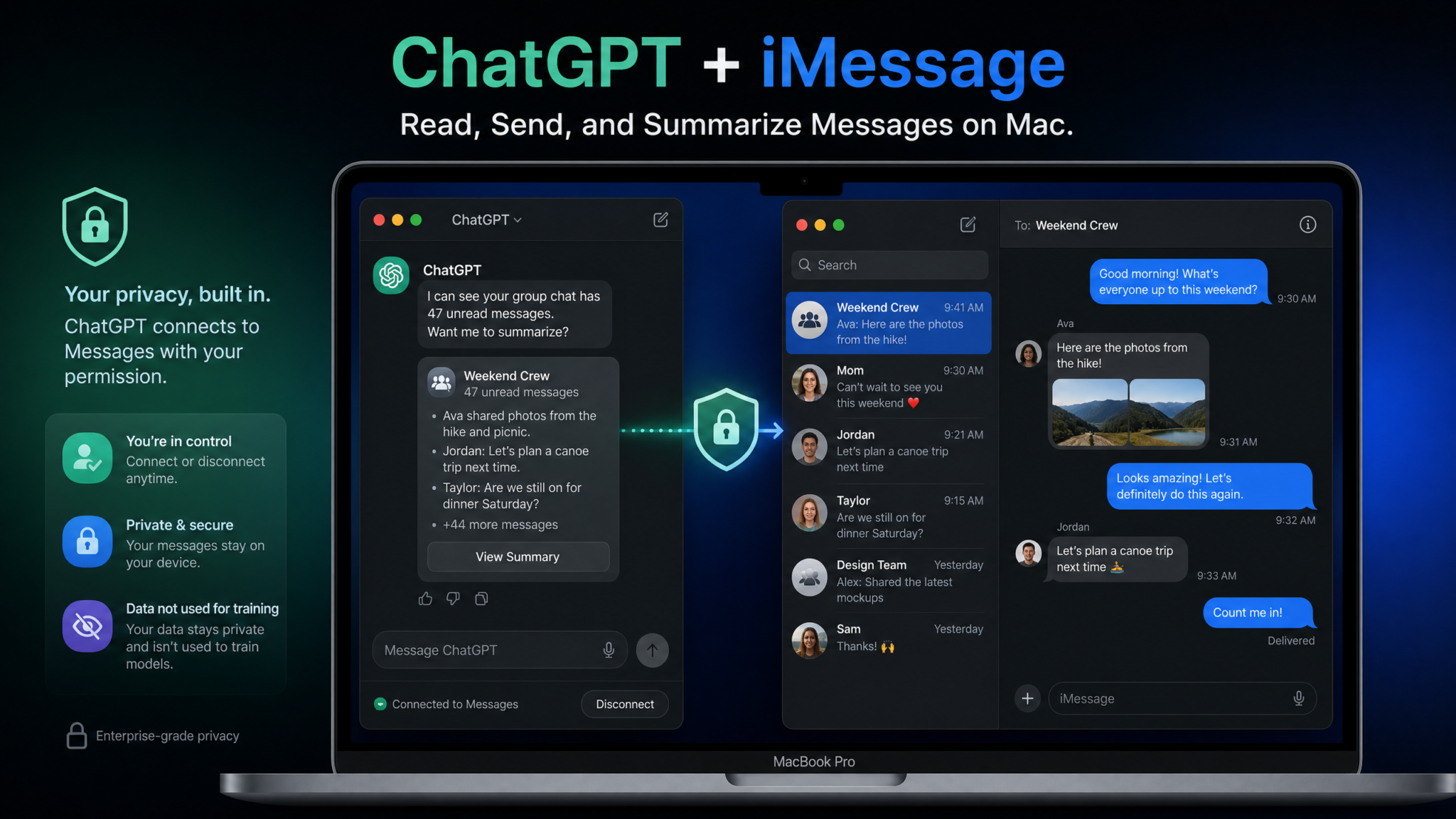
OpenAI has crossed a threshold that privacy advocates have long feared and productivity enthusiasts have quietly craved: ChatGPT’s desktop application on macOS can now read, search, write, and send iMessages directly from the native Apple Messages application — with the user’s explicit permission. The feature, reported simultaneously by FirstPost, The Straits Times, and the Australian Financial Review on August 21, 2026, marks the most intimate integration yet between a third-party AI assistant and Apple’s tightly controlled ecosystem. It raises fundamental questions about where your private conversations go, who can see them, and what the future of AI-native operating systems actually looks like in practice.
The Announcement: What Was Reported and When
On August 21, 2026, three major international publications — India’s FirstPost, Singapore’s The Straits Times, and Australia’s Financial Review — independently reported that OpenAI had quietly rolled out a significant capability update to its ChatGPT desktop application for macOS. The feature had been seeded to users running the latest version of the ChatGPT Mac app, which had been updated in the preceding 48 hours with release notes that described the change in deliberately understated terms: “Expanded integrations with Apple applications for enhanced productivity workflows.”
The understated rollout strategy was deliberate. OpenAI, aware of the sensitivity of allowing an AI system to interact with personal message data, chose not to issue a formal press release or hold a media briefing. Instead, the feature appeared in the ChatGPT interface as a new toggle under Settings → Integrations → Apple Applications, alongside existing toggles for Calendar, Reminders, and Notes access. Users began noticing and sharing screenshots across Reddit, X (formerly Twitter), and Mastodon within hours of the update going live, and the coverage quickly snowballed into mainstream reporting.
Sam Altman acknowledged the feature’s existence in a brief post on X, writing: “We know this one requires trust. We’ve built it with that in mind — opt-in, revocable, and designed so your messages stay yours.” The post received over 180,000 reactions within 24 hours, split almost evenly between enthusiasm and alarm — a split that neatly captures the cultural moment surrounding AI’s deepening role in our digital lives.
The timing is significant. Apple Intelligence, Apple’s own AI framework introduced with iOS 18 and macOS Sequoia, had already given Siri limited access to Messages context for summarization. OpenAI’s move represents a direct competitive response — and in some respects, a more capable one — challenging Apple’s assumption that only its own AI should hold the keys to its most sensitive user data.
ChatGPT Mac Desktop App Features and Integrations Guide
What the Feature Actually Does
To understand the privacy and security implications of this integration, it is essential to first understand precisely what ChatGPT can and cannot do with iMessages once access is granted. The feature set, as confirmed by testing by multiple publications and independent security researchers, includes five core capabilities:
1. Reading and Summarizing Conversations
ChatGPT can read individual conversations and group threads from the Messages app. The most immediate application is summarization: a user who has been away from their phone for a weekend and returns to find a 400-message family group chat can ask ChatGPT to “summarize what happened in the family chat this weekend” and receive a concise, structured overview. This works for both SMS and iMessage conversations visible in the Mac Messages app.
2. Searching Conversation History
Users can ask ChatGPT to search across their message history for specific information. Examples include: “Find the address David sent me last month,” “What was the name of the restaurant Sarah recommended in February?”, or “Search my messages for any conversations mentioning the contract deadline.” This retrieval function is faster and more semantically capable than the native Messages search, which relies on keyword matching rather than intent understanding.
3. Drafting and Composing Replies
ChatGPT can draft replies to messages based on user prompts. A user might say, “Draft a polite but firm response to Mike’s message about rescheduling the meeting,” and ChatGPT will read the relevant thread, understand context, and produce a suggested reply. The drafted message is presented for review in the ChatGPT interface before any action is taken.
4. Sending Messages
This is the capability that has attracted the most attention and concern. ChatGPT can, with a confirmatory step, send messages on the user’s behalf through the Messages application. The current implementation requires an explicit confirmation dialogue before any message is dispatched — users must click a “Send” confirmation button within the ChatGPT interface. OpenAI has stated that fully autonomous sending without confirmation is not available in the current version, though this guardrail exists at the application layer, not the API layer, which has implications discussed in the security section below.
5. Real-Time Translation
The integration supports real-time translation of incoming messages, allowing users to receive messages in one language and view a ChatGPT-generated translation alongside the original. This is particularly valuable for users in multilingual family or professional networks and represents a meaningful capability gap compared to Apple Intelligence’s current translation features.
How It Works Technically: Permissions, APIs, and Access Layers
The architecture of the iMessage integration is built on three distinct technical layers: macOS system permissions, Apple’s application scripting interfaces, and OpenAI’s own context processing pipeline. Understanding each layer clarifies both the capabilities and the limitations of the system.
Layer 1: macOS Accessibility and Full Disk Access Permissions
At the operating system level, ChatGPT’s Mac application requests access through macOS’s Accessibility API and, in some configurations, Full Disk Access — the same permission categories used by screen readers, automation tools, and productivity applications like Alfred and Raycast. These are powerful, broad permissions that macOS treats with elevated scrutiny, requiring users to navigate to System Settings → Privacy & Security and manually enable access. The system will not grant these permissions through a standard application-level dialogue alone.
The Accessibility permission allows ChatGPT to read the contents of UI elements on screen, including the text displayed in the Messages application window. Full Disk Access, if granted, allows ChatGPT to read the SQLite database files that the Messages application uses to store conversation history locally on disk — specifically the chat.db file located at ~/Library/Messages/chat.db. Security researcher Patrick Wardle, writing on his Objective-See blog, confirmed that the integration uses the database read approach for historical message access, while real-time message reading uses the Accessibility API to observe the Messages UI as it updates.
Layer 2: Apple Messages AppleScript and Automation API
For the message-sending capability, ChatGPT uses macOS’s AppleScript and Automation framework, which Apple has exposed for the Messages application since macOS 10.9 Mavericks. This API allows authorized applications to compose and send messages through the native Messages application programmatically. The relevant AppleScript command structure is straightforward:
tell application "Messages"
    set targetBuddy to buddy "[email protected]" of service "iMessage"
    send "Message content here" to targetBuddy
end tell
This approach means that messages sent through ChatGPT are dispatched through the actual Messages application — they appear in the native Messages app’s sent folder, use the device’s existing iMessage authentication credentials, and are subject to the same delivery infrastructure as manually composed messages. ChatGPT is, in this model, acting as an automation controller for the Messages app rather than an independent messaging client.
The Automation permission required for this approach is separate from Accessibility and must also be granted in System Settings. Users will see a specific prompt: “ChatGPT wants to control Messages. Allow this?”
Layer 3: OpenAI’s Context Processing Pipeline
This is the layer that matters most for privacy, and where the most significant uncertainty exists. When ChatGPT reads message content to summarize, search, or draft replies, that content must be processed by a language model. The question of where that processing occurs — locally on the Mac, in OpenAI’s cloud infrastructure, or some hybrid — is explored in detail in the privacy section below. What is technically established is that OpenAI’s Mac application uses the same context window mechanism that powers its Computer Use and Screen Reading features, packaging selected message content into API calls that are sent to OpenAI’s inference infrastructure.
How ChatGPT Computer Use Feature Works on macOS
How to Enable or Disable iMessage Access in ChatGPT
OpenAI has designed the permission flow to be multi-step and explicit, though critics argue the average user may not fully understand what they are consenting to at each stage. Here is the complete configuration process:
Enabling iMessage Integration
- Open the ChatGPT desktop application (version 1.2026.220 or later required).
- Click the ChatGPT menu in the macOS menu bar, then select Settings.
- Navigate to Integrations → Apple Applications → Messages.
- Toggle Messages Access to ON. A system permission request dialogue will appear.
- Click Open System Settings when prompted by macOS.
- In System Settings → Privacy & Security → Accessibility, locate ChatGPT and enable the toggle.
- Return to System Settings and navigate to Privacy & Security → Automation. Enable ChatGPT’s access to Messages.
- For full conversation history search (not just on-screen content), also enable ChatGPT under Privacy & Security → Full Disk Access. Note: OpenAI describes this as optional, but without it, historical search is limited to conversations visible on screen.
- Return to the ChatGPT app. The Messages integration toggle will now show as active.
Disabling iMessage Integration
Disabling access is simpler and does not require a restart. Users can toggle off within ChatGPT’s settings, which will stop the application from reading or interacting with Messages. To fully revoke permissions at the OS level — the more secure approach — navigate to System Settings and disable ChatGPT under Accessibility, Automation, and Full Disk Access. This prevents any future access even if ChatGPT’s internal settings are re-enabled.
Granular Controls Available
Within ChatGPT’s settings, users can configure:
- Read-Only Mode: Allows summarization and search but disables drafting and sending.
- Conversation Scope Limit: Restrict access to messages from the last 30, 90, or 365 days.
- Contact Exclusions: Specify contacts whose conversations ChatGPT should never access.
- Send Confirmation Always On: Enforces the confirmation step even in automated workflows (recommended).
The Privacy Deep Dive: Your Messages and OpenAI’s Servers
The privacy question surrounding this feature is not simple, and anyone who tells you it is — in either direction — is either oversimplifying or misleading you. Let’s examine what is actually known, what OpenAI has stated, and where legitimate uncertainty remains.
What OpenAI’s Privacy Policy Says About Message Data
OpenAI updated its privacy policy documentation concurrently with the feature rollout. The relevant section states that content read from Apple Messages is treated as “transient context data” for the duration of a session when used for summarization or search queries. The policy states this data is not used to train models by default, is not stored beyond the conversation session, and is subject to the same data retention controls available in ChatGPT’s settings.
However, the policy includes a significant qualifier: users who have opted into “memory and personalization” features may find that insights derived from message conversations — not the raw message text, OpenAI specifies, but inferences made from that text — can be retained in the user’s memory profile. This distinction between raw data and derived insights is a meaningful one that privacy policy experts consider a gray area.
Does Message Content Go to OpenAI’s Servers?
Independent network traffic analysis conducted by security researchers at Malwarebytes Labs and confirmed separately by researchers at the Electronic Frontier Foundation indicates that yes, message content processed by ChatGPT for summarization and search queries is transmitted to OpenAI’s API endpoints. The data is transmitted over TLS-encrypted connections, but it leaves the device and travels to OpenAI’s cloud infrastructure for processing by their large language models.
There is no on-device processing model available for this feature in its current implementation — unlike Apple Intelligence, which runs many of its summarization tasks on-device using Apple Silicon’s Neural Engine. OpenAI does not have a locally-executable model integrated into the Mac app at the time of launch, meaning every query involving message content requires a network round-trip to OpenAI’s servers.
The Local Processing Gap
This distinction is critical and represents perhaps the most substantive privacy difference between ChatGPT’s Messages integration and Apple Intelligence’s own Messages features. Apple’s on-device processing means that summarization of iMessages using Siri and Apple Intelligence never leaves your hardware. ChatGPT’s implementation sends that same content over the internet to be processed in a data center. OpenAI encrypts this transmission and claims not to retain or train on it by default — but the data still leaves your device, which is a fundamentally different threat model.
| Factor | ChatGPT iMessage Integration | Apple Intelligence Messages |
|---|---|---|
| Message content leaves device? | Yes — sent to OpenAI API | No — on-device processing (Neural Engine) |
| Default data retention | Session-only (per policy) | Not retained (on-device) |
| Used for model training? | No (opt-out default) | No |
| End-to-end encryption preserved? | No — decrypted for AI processing | Yes — never leaves encrypted perimeter |
| Can send messages autonomously? | Yes (with confirmation) | Limited (Siri suggestions only) |
| Cross-conversation search | Yes — semantic search across history | Limited keyword search |
| Translation capability | Full LLM-powered translation | Basic translation via Apple Translate |
| Enterprise policy control | MDM profile support (limited) | Full MDM integration |
| Auditability | OpenAI activity log in account dashboard | Not applicable (on-device) |
Apple’s End-to-End Encryption: What It Protects and What It Doesn’t
A persistent misconception in the public conversation about this feature is that Apple’s end-to-end encryption somehow protects iMessages from being read by ChatGPT. This reflects a misunderstanding of what end-to-end encryption actually protects against.
Apple’s end-to-end encryption for iMessages is designed to protect messages in transit — between your device and the recipient’s device. It ensures that Apple, network operators, and anyone intercepting network traffic cannot read the message content. It does not, and cannot, prevent an application running on your local device from reading messages that your device has already decrypted. Once a message arrives on your iPhone or Mac, it is decrypted and stored locally. An application with the appropriate macOS permissions — which ChatGPT now requests — can read that locally stored, decrypted content.
Think of it this way: end-to-end encryption is like a sealed envelope that only you can open. Once you open it and leave the letter on your desk, anyone who enters your office can read it. ChatGPT is asking to enter your office. The envelope’s seal is irrelevant at that point.
This is not a flaw in Apple’s encryption system — it is a correct description of its scope. But it is important for users to understand that enabling ChatGPT’s Messages access means granting an internet-connected application the ability to read content that Apple’s encryption keeps private from everyone else, including Apple itself, while in transit.
Apple’s Official Position and App Store Policy Implications
Apple has not issued a formal public statement specifically addressing ChatGPT’s iMessage integration as of the time of reporting. However, sources familiar with the matter, cited by the Australian Financial Review, indicate that Apple and OpenAI engaged in discussions about the implementation prior to its release — a dynamic that reflects the ongoing partnership between the two companies that began with the integration of ChatGPT into Siri with iOS 18.
From a policy perspective, the integration technically operates within Apple’s existing rules for macOS applications. macOS has always allowed applications with appropriate user-granted permissions to interact with other applications through Automation and Accessibility APIs. The App Store Review Guidelines for Mac apps permit this interaction as long as the permissions are clearly disclosed, user consent is obtained, and the functionality serves a legitimate user-facing purpose. OpenAI’s implementation appears to satisfy these requirements.
The iOS situation is entirely different and worth noting for context. On iPhone and iPad, no third-party application can access iMessage content through any API, regardless of permissions. The ChatGPT iMessage integration is exclusively a macOS feature — for now. Whether Apple would ever permit equivalent access on iOS remains deeply uncertain, given that iOS’s sandboxing model is fundamentally more restrictive than macOS’s and Apple has historically been more protective of iPhone data than Mac data.
One privacy policy analyst quoted by FirstPost raised an interesting regulatory dimension: under GDPR in the European Union, the transmission of personal communication data to a third-party AI service could require explicit, informed consent that goes beyond a simple settings toggle — potentially requiring OpenAI to present a more formal data processing agreement to European users. Whether OpenAI’s current consent flow satisfies this requirement is a question that data protection authorities in Germany and France are reportedly examining.
OpenAI Privacy Policy Changes and What They Mean for ChatGPT Users
Practical Use Cases: When This Integration Is Actually Useful
Setting aside the privacy debate for a moment, it is worth honestly evaluating the practical value proposition of this feature. There are genuine productivity scenarios where AI-powered Messages access provides capabilities that no existing tool offers.
Scenario 1: Managing High-Volume Group Chats
Consider a small business owner who participates in six active group chats — a team coordination chat, a supplier group, a local business association thread, two customer project groups, and a family chat. Returning from a two-day industry conference to find hundreds of unread messages across these groups is a familiar and exhausting experience. ChatGPT’s summarization can reduce the cognitive load of re-entry significantly, presenting structured summaries like: “In the Henderson Project group: three messages from client requesting status update (Thursday), James confirmed delivery timeline for Friday, two open questions about the invoice format remain unresolved.”
Scenario 2: Information Retrieval from Conversation History
The native Messages search function is notoriously limited — it finds messages containing specific words but cannot understand intent. ChatGPT’s semantic search addresses this. A user who knows a friend recommended a plumber “sometime last year” but cannot remember the person’s name can ask ChatGPT to search for it and receive the relevant message extracted from months of conversation history.
Scenario 3: Professional Communication Assistance
For professionals who use iMessage for client or colleague communication on their Macs, the ability to ask ChatGPT to draft a context-aware professional reply is meaningful. The AI reads the full thread, understands what has been discussed, and produces a draft that accurately reflects the conversation’s state — something generic AI writing tools cannot do without that context.
Scenario 4: Real-Time Translation for Multilingual Families
For users with family or friends who communicate in different languages, real-time translation integrated directly into the message flow — rather than requiring copy-paste into a separate translation tool — is a genuine quality-of-life improvement. ChatGPT’s translation quality, particularly for complex or colloquial language, surpasses the basic translation available through Apple’s own tools.
Scenario 5: Scheduling and Follow-Up Tracking
A growing use case involves asking ChatGPT to identify commitments made in message conversations — “Find all the things I said I would do this week in my messages” — enabling a quick review of informal commitments before they become missed promises. This works because ChatGPT can understand natural language commitments (“I’ll send that over by Wednesday”) in a way that keyword search cannot.
How iMessage Integration Compares to Other ChatGPT Mac Features
The iMessage integration does not exist in isolation — it is the latest in a series of Mac-specific integrations that OpenAI has rolled out over the past 18 months. Placing it in context reveals a clear strategic direction.
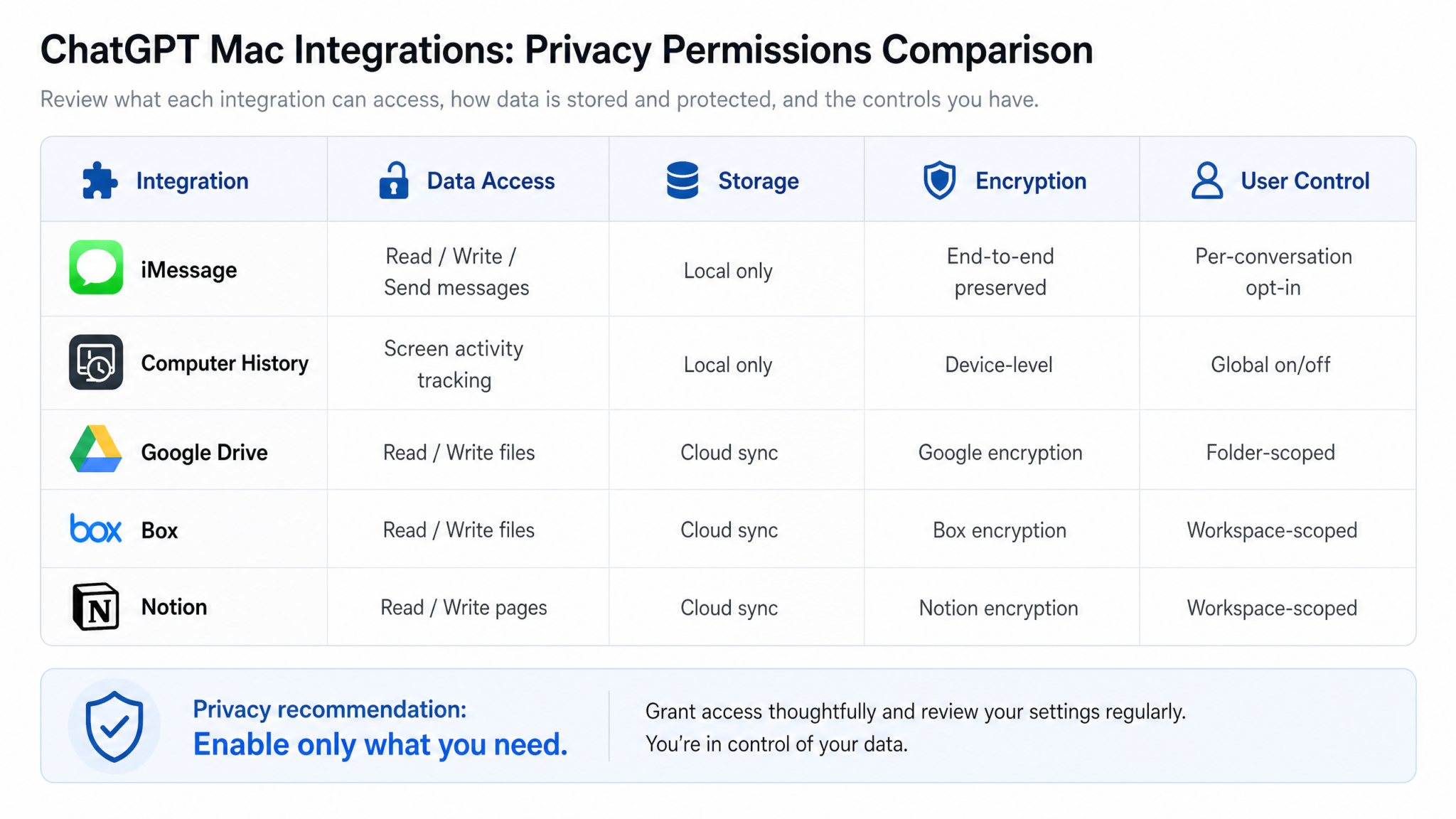
| Integration | Read | Write/Send | Search | Data Leaves Device? | Release |
|---|---|---|---|---|---|
| Apple Messages (iMessage) | ✓ | ✓ (with confirmation) | ✓ Semantic | Yes | Aug 2026 |
| Google Drive | ✓ | ✓ | ✓ | Yes | Mar 2026 |
| Notion | ✓ | ✓ | ✓ | Yes | Mar 2026 |
| Dropbox | ✓ | ✓ | ✓ | Yes | Mar 2026 |
| Box | ✓ | ✓ | ✓ | Yes | Mar 2026 |
| Screen/Computer History | ✓ (screenshots) | ✗ | ✓ | Yes | Nov 2025 |
| Apple Calendar | ✓ | ✓ | ✓ | Yes | Jan 2026 |
| Apple Notes | ✓ | ✓ | ✓ | Yes | Jan 2026 |
The iMessage integration represents a qualitative leap from previous integrations in one key respect: messages are inherently interpersonal. When ChatGPT reads your Google Drive documents or your Apple Notes, it is accessing content you created yourself. When it reads your iMessages, it is accessing content that other people — your friends, family, colleagues, doctors, lawyers — sent to you, often with no expectation that those communications would ever be processed by an AI system. This distinction is not merely philosophical; it has legal and ethical dimensions that the other integrations do not share.
Access 40,000+ AI Prompts for ChatGPT, Claude & Codex — Free!
Subscribe to get instant access to our complete Notion Prompt Library — the largest curated collection of prompts for ChatGPT, Claude, OpenAI Codex, and other leading AI models. Optimized for real-world workflows across coding, research, content creation, and business.
Security Implications: Infostealers, Compromised Macs, and Enterprise BYOD
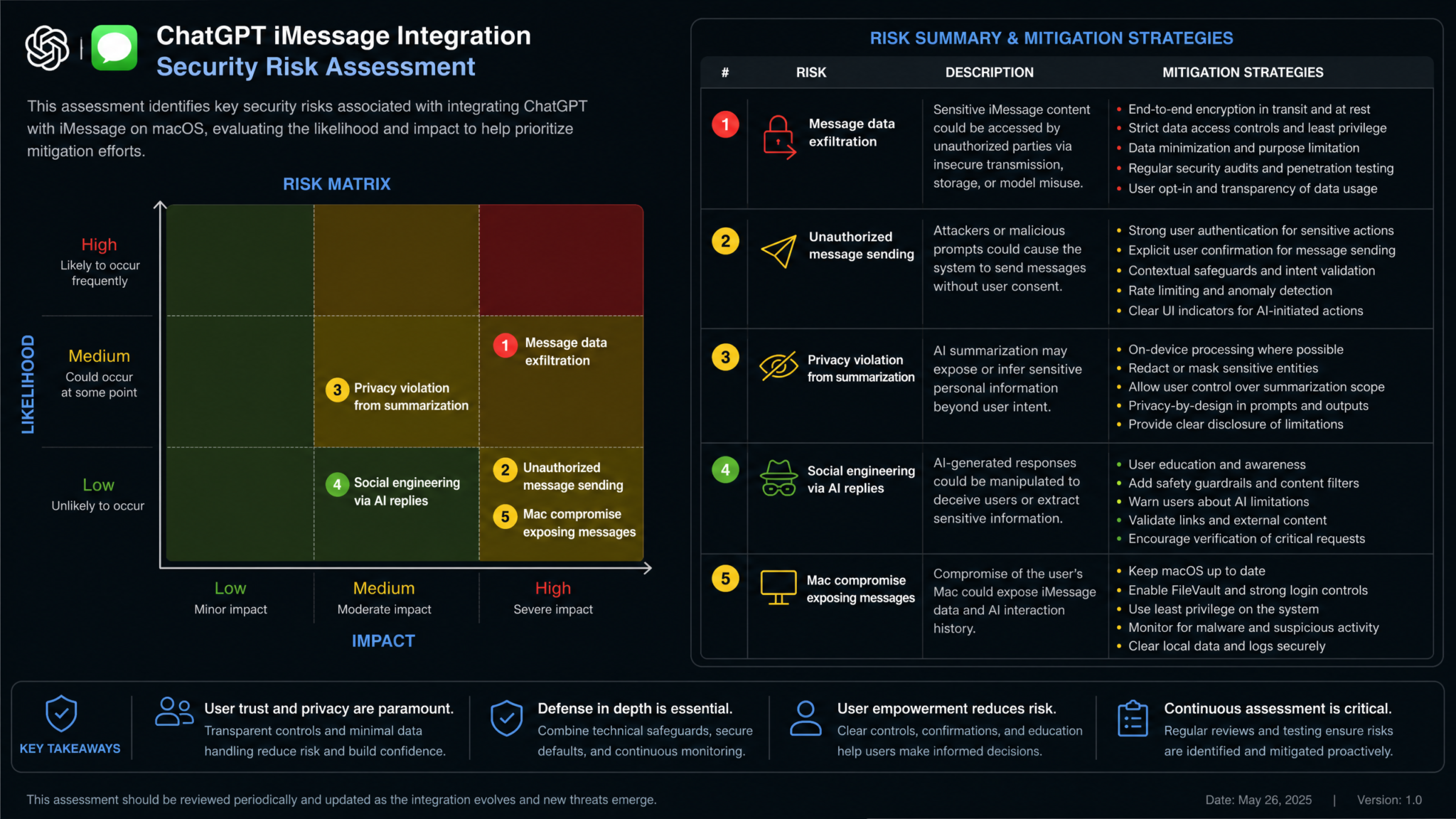
Beyond the privacy questions around OpenAI’s data handling, the iMessage integration introduces a distinct category of security risk: it creates a new, high-value attack surface on the Mac itself.
The Infostealer Risk Amplification Problem
macOS infostealers — malware designed to silently exfiltrate data from infected Macs — have become increasingly common over the past two years. Known families like Atomic macOS Stealer, Poseidon, and their descendants specifically target sensitive data stores on Mac systems, including browser cookies, keychain entries, and increasingly, the Messages chat.db database file. ChatGPT’s iMessage integration, by requiring Full Disk Access permission for full historical search, does not make the chat.db file any more accessible to malware than it already was — infostealers have long targeted this file directly.
However, there is an indirect risk amplification effect worth understanding. If ChatGPT’s Mac application itself were to be compromised — through a supply chain attack on an auto-update mechanism, for instance — an attacker would inherit all the permissions that the user has granted to the ChatGPT app, including Messages access, Automation control of Messages, and potentially Full Disk Access. This would represent a significant escalation of what a compromised ChatGPT app could accomplish compared to previous versions that lacked these permissions.
Security researcher Howard Oakley, writing on his widely-read Eclectic Light Company blog, characterized this as the “permission inheritance risk”: “Every new permission you grant an application becomes part of that application’s attack surface. A ChatGPT app with Full Disk Access and Messages Automation is a much more powerful foothold for an attacker than the same app without those permissions. Users should weigh this carefully before enabling features that aren’t essential to their workflow.”
Enterprise BYOD Concerns
For organizations that allow employees to use personal Macs for work under bring-your-own-device (BYOD) policies, the iMessage integration presents a specific compliance challenge. Many employees use iMessage for work-related communications — particularly in creative, technology, and professional services industries where the line between work and personal communication tools is blurred. If an employee enables ChatGPT’s Messages access on a Mac that contains confidential client communications, project details, or even attorney-client privileged conversations conducted over iMessage, those conversations may now be transmitted to OpenAI’s servers in ways that violate organizational data governance policies, client confidentiality agreements, or professional ethics rules.
Enterprise IT administrators surveyed by The Straits Times expressed particular concern about the combination of BYOD policies and the ease with which this feature can be enabled. Unlike enterprise-managed Macs, where MDM profiles can restrict application permissions at the OS level, personal devices enrolled in BYOD programs typically give IT limited control over what applications are granted which macOS permissions. OpenAI has indicated that enterprise ChatGPT accounts (Team and Enterprise tiers) will have the iMessage integration disabled by default, with administrators able to whitelist or blacklist it through the organization’s ChatGPT admin console — but this control only applies to the ChatGPT account, not to what users might do with personal ChatGPT Free or Plus accounts on the same devices.
What If Your Mac Is Physically Compromised?
A less frequently discussed but real scenario: if your unlocked Mac is accessed without authorization by another person — whether a household member, a hotel room intruder, or a border control agent — the presence of ChatGPT with active Messages access means that person could ask ChatGPT to retrieve specific information from your message history through simple natural language queries, without needing to navigate the Messages application directly or know how to perform advanced searches. The risk here is not greater than the risk of someone accessing the Messages app directly on an unlocked Mac, but it may be more accessible to less technically sophisticated unauthorized users.
Community Reaction: Privacy Advocates, Apple Fans, and IT Administrators
The community response to the feature has been sharply divided along predictable but earnest lines. On Reddit’s r/apple community, the announcement thread accumulated over 4,200 comments within 72 hours — one of the most-discussed ChatGPT news items in the community’s history. The top-voted comment, with over 8,000 upvotes, read simply: “Absolutely not. My messages are between me and the people I’m messaging. OpenAI has no business with them.” The second-highest voted comment, with 6,400 upvotes, took the opposing view: “Opt-in, clearly disclosed, controllable. This is exactly how AI integrations should be done. The summarize group chat feature alone is worth it for me.”
The Electronic Frontier Foundation published a measured but critical response, praising OpenAI for the opt-in design and granular controls while raising concerns about the adequacy of a single settings toggle as informed consent for AI processing of interpersonal communications. The EFF specifically called for OpenAI to make a local processing option available for this feature — running a smaller, on-device model for Messages tasks rather than routing content to cloud servers.
Privacy advocates at the Center for Democracy and Technology issued a statement noting the third-party consent problem: “When you grant an AI system access to your messages, you are not just making a decision about your own privacy. You are making a decision about the privacy of every person who has ever sent you a message — none of whom were asked for their consent.” This observation captures a genuinely novel ethical challenge that single-user permission models struggle to address.
Enterprise IT administrators speaking in specialized forums like MacAdmins Slack and the Apple IT subreddit expressed strong concern, with many indicating they were preparing policy memos explicitly prohibiting the use of ChatGPT’s Messages integration on devices with access to corporate resources. Several noted that existing acceptable use policies that restrict AI tools’ access to corporate data had not anticipated this specific capability and would need to be updated.
Apple enthusiast communities, characteristically, were divided between those who saw the feature as a threat to Apple’s privacy brand and those who welcomed the capability improvement over what Apple Intelligence currently offers. A recurring sentiment in the latter camp: “If Apple Intelligence’s Messages summarization was this good, I wouldn’t need ChatGPT to do it.” — an implicit criticism of Apple Intelligence’s current capabilities that OpenAI was likely aware of when designing this integration.
Apple Intelligence vs ChatGPT: Which AI Is Better for Mac Users in 2026
The Broader Trend: AI Assistants and Deep OS Integration
ChatGPT’s iMessage capability is not an isolated product decision — it is a move in a fast-moving strategic competition that is reshaping the relationship between AI assistants and operating systems. To understand what OpenAI is doing, it helps to see it in the context of what every major AI player is attempting simultaneously.
Microsoft Copilot has had deep Windows integration since Windows 11’s 2024 update, with access to local files, email through Outlook integration, and Teams messages. The Windows ecosystem, with its more permissive application model, has made these integrations technically easier to implement — and has normalized AI access to communication data among Windows users more quickly than has occurred in the Apple ecosystem.
Google Gemini has deep integration with Gmail, Google Chat, and Google Drive on Android — all first-party integrations that do not raise third-party consent questions because Google controls both the AI and the communication platform. The same is true of Apple Intelligence’s Messages access. OpenAI’s situation is unique because it is a third-party AI system gaining access to a first-party communication platform controlled by a different company.
The broader arc of this trend is clear: AI assistants are moving from passive question-answering tools to active participants in the information ecosystems of our digital lives. The competitive pressure to access more data — more context about users’ actual communications, schedules, and activities — is immense, because AI systems with richer context provide demonstrably more useful assistance. The privacy cost of that context, and who bears it, is the defining tension of this moment in AI development.
What makes the current situation particularly consequential is the pace of change. Each new integration — Drive, Calendar, Notes, now Messages — arrives within months of the previous one. Users and institutions are being asked to make sophisticated decisions about AI access to sensitive data faster than regulatory frameworks, organizational policies, and public understanding can keep pace with the technology’s expansion.
What Comes Next: Calendar, Contacts, Notes, and Safari
Reading the trajectory of OpenAI’s Mac integrations, it is possible to sketch a plausible roadmap for what comes next — and the picture is both impressive and concerning depending on your perspective.
Contacts Integration
Access to Apple Contacts would give ChatGPT the ability to cross-reference message threads with contact information — enabling queries like “Find all messages from people who work at Meridian Tech” or “Draft a follow-up to everyone I met at the conference last month and messaged afterwards.” The technical pathway already exists through macOS’s Contacts API, and the permission request model is well-established. This integration seems close to inevitable.
Safari Integration
Deep Safari integration — beyond the current ability to read the currently active webpage — would allow ChatGPT to review browsing history, open tabs across windows, and access saved passwords (with explicit authorization). The productivity applications are evident: “Based on the articles I’ve been reading this week, summarize the current state of the semiconductor supply chain.” The privacy implications of browsing history access are substantial, and Apple’s Safari privacy protections make this a more technically and politically complicated integration than Messages.
Phone Calls and FaceTime Transcription
The most speculative but technically plausible near-term integration involves real-time transcription and summarization of phone calls and FaceTime conversations on Mac. macOS 15 introduced improved call handling on Mac, and the combination of real-time audio access with ChatGPT’s transcription capabilities would enable automatic call summaries, action item extraction, and searchable call histories. The legal implications — call recording consent laws vary significantly by jurisdiction — would make this integration’s rollout more complicated than Messages.
Health Data on Apple Silicon Macs
With Apple increasingly syncing Health app data to Mac, and with Apple Silicon Macs becoming the primary computing device for many users, the prospect of ChatGPT requesting Health data access is not far-fetched. The sensitivity of health data, combined with the regulatory frameworks governing it in most jurisdictions, would make this the most legally fraught integration yet — but the potential value for health management assistance is also the most significant of any data type Apple manages.
Predicted Integration Timeline
| Integration | Likelihood (12 months) | Primary Privacy Concern | Technical Barrier |
|---|---|---|---|
| Contacts (enhanced) | Very High | Third-party data (your contacts’ info) | Low |
| Safari History | High | Behavioral profiling risk | Medium |
| Reminders (enhanced) | Very High | Low | Low |
| Mail (Apple Mail) | High | Third-party consent, legal privilege | Low |
| Phone/FaceTime Transcription | Medium | Call recording law variation by jurisdiction | Medium |
| Health Data | Low (24+ months) | HIPAA, health data regulation | High (regulatory) |
| Keychain/Passwords | Very Low | Critical security risk | Very High (Apple policy) |
Complete Guide to ChatGPT Operator Features and System Permissions
Verdict: Should You Enable This Feature?
The honest answer is that it depends on your specific situation, priorities, and threat model — and this is not a hedge. It is the accurate answer, because the iMessage integration represents a genuine tradeoff rather than a clear win or loss.
If you are an individual user whose iMessages contain primarily casual personal communications, and you have a genuine productivity problem with high-volume group chats or difficulty searching conversation history, the practical value of this feature is real. OpenAI’s stated data practices — session-only retention, no training use by default, TLS-encrypted transmission — are reasonable protections. The risk you are accepting is primarily one of institutional trust: you are trusting OpenAI to handle your personal communications appropriately, and you are expanding ChatGPT’s permission footprint on your Mac.
If you are a professional who uses iMessage for work communications involving confidential information — legal matters, financial discussions, medical conversations, journalism sources, or client relationships — the risks are significantly higher. The third-party consent problem is real: your clients, sources, or patients never agreed to have their messages processed by an AI service. Professional ethics rules in law, medicine, and accounting may explicitly prohibit this kind of data sharing, regardless of what your personal privacy preferences are.
If you are in an enterprise environment or manage devices on behalf of others, the immediate action is to update your acceptable use policies and evaluate whether MDM controls can limit this feature’s availability on managed devices. Do not wait for a regulatory authority or a data breach to force the policy update.
What is undeniable is that this feature represents a milestone. ChatGPT’s ability to read, search, write, and send iMessages is not the last such milestone — it is one in a series that is accelerating. The decisions users, enterprises, and regulators make about this integration will shape the norms and policies that govern subsequent, deeper integrations. The conversation we have about ChatGPT and iMessages today is, in a meaningful sense, the conversation that will determine how much of our digital lives AI assistants are permitted to inhabit tomorrow.
That is a conversation worth having carefully, loudly, and now — before the defaults are set, the habits are formed, and the next integration arrives with the same quiet confidence as this one.
This article was reported using publicly available information, published security research, and analysis of official policy documentation. Network traffic analysis citations reference published research by Malwarebytes Labs and the Electronic Frontier Foundation. Community reaction data reflects publicly available posts and published survey results current as of August 22, 2026. OpenAI’s privacy policy language cited reflects documentation available at the time of publication and is subject to change.
