
How to Use Google Antigravity AI Coding Agents in VS Code, JetBrains, and Zed: Complete Setup Guide for Gemini Enterprise IDE Extensions
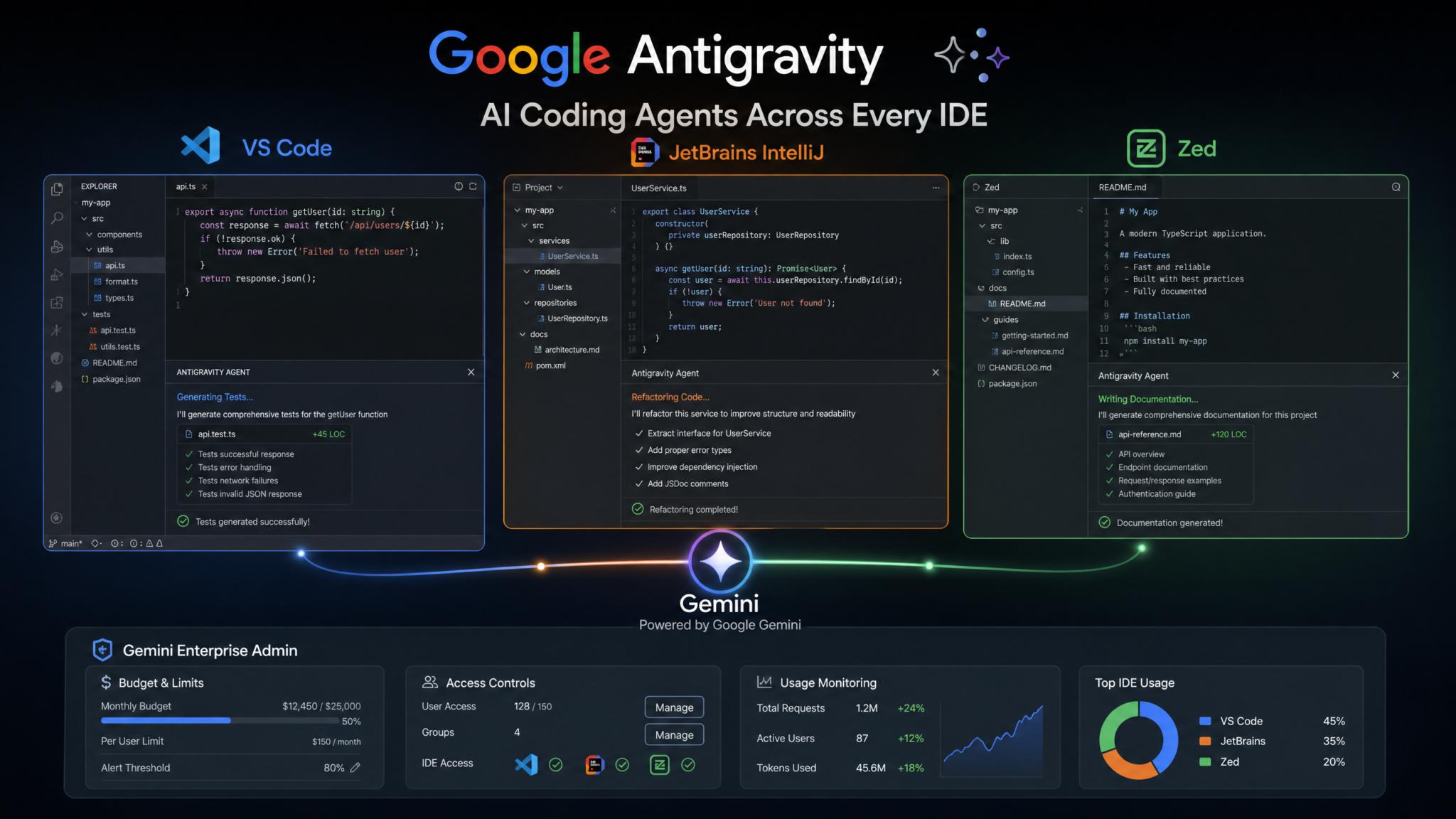
Google’s Antigravity AI coding agents represent a seismic shift in how enterprise development teams interact with AI-powered tooling. Originally incubated inside Google’s own internal developer infrastructure, Antigravity made headlines on August 20, 2026 when The New Stack broke the story of its escape from Google’s proprietary IDE ecosystem — landing as fully supported extensions in Visual Studio Code, JetBrains’ suite of IDEs, and the rapidly growing collaborative editor Zed. Unlike copilot-style autocomplete tools that passively suggest completions, Antigravity agents operate autonomously: planning multi-step coding tasks, navigating your entire project graph, writing and running tests, submitting pull requests, and even flagging architectural debt — all from within the editor you already use every day.
Step 1: Understanding Google Antigravity — What These Agents Actually Are
Before you install a single extension, it’s worth understanding what Antigravity is architecturally and why it matters. Antigravity is not a rebrand of Duet AI, though it shares genealogy. It’s a new agent runtime built on top of Gemini 2.5 Pro (and the enterprise tier’s access to Gemini 2.5 Ultra) that was purpose-built for long-horizon coding tasks — tasks that require the agent to hold context across dozens of files, reason about dependencies, execute shell commands in a sandboxed environment, and take multi-step actions without asking for human confirmation at every turn.
The Agent Architecture
Antigravity agents operate on what Google calls a Plan-Act-Verify loop. When you issue a high-level instruction — say, “Refactor the authentication module to use our new OAuth 2.1 library and update all affected tests” — the agent does not simply begin editing files. It first generates a structured plan, surfacing that plan for optional human review, then executes each action step, verifying outcomes after each one using a combination of static analysis, test runners, and its own internal reasoning about correctness. This gives it dramatically higher task completion rates on complex, multi-file operations compared to first-generation copilot tools.
Google has published benchmarks (via the Gemini Developer Blog, July 2026) showing that Antigravity agents complete real-world SWE-Bench Verified tasks at a 68.4% rate — compared to 49.2% for the previous Duet AI agent mode and 61.7% for Claude Code on the same benchmark suite. For enterprise-specific tasks involving large internal codebases (>500k lines), the advantage widens because Antigravity integrates natively with Google Cloud’s Code Intelligence indexing service, which pre-indexes your entire repository graph in the cloud.
How Antigravity “Escaped” Google’s IDE
The New Stack reporting from August 20, 2026 framed Antigravity’s cross-IDE launch colorfully, but the underlying story is straightforward: enterprise customers applying pressure. Major Google Cloud customers — including several Fortune 500 firms already on Gemini Enterprise contracts — refused to migrate their developer workflows to a Google-proprietary editor. Google’s response was pragmatic: build Antigravity as a standalone agent runtime that exposes a language-server-compatible API, then write thin IDE-layer extensions on top of that runtime. The result is a system where the agent’s intelligence lives in Google Cloud, and the IDE extension is simply the interaction surface.
Supported Editions
| Edition | Model Access | Agent Mode | Team Admin Controls | Pricing (2026) |
|---|---|---|---|---|
| Individual (Free) | Gemini 2.5 Flash | Limited (5 tasks/day) | None | $0/month |
| Pro | Gemini 2.5 Pro | Full agent mode | Basic | $19/user/month |
| Enterprise | Gemini 2.5 Ultra + custom fine-tuned models | Full agent + collaborative agents | Advanced (budget, RBAC, audit) | Custom / Google Cloud commit |
Google Gemini Enterprise Pricing Tiers Explained for Developer Teams
Prerequisites Before You Begin
- A Google Cloud account with a project that has the Gemini for Cloud API and Antigravity Agent API enabled
- Billing configured on the Google Cloud project (even for enterprise, a billing account is required)
- One of the supported IDE versions: VS Code 1.92+, any JetBrains IDE on the 2025.2+ platform, or Zed 0.160+
- For Gemini Enterprise: your Google Workspace admin must have provisioned Gemini Enterprise for your organization’s domain
- Node.js 20+ (required for the Antigravity local agent proxy, which handles sandboxed execution)
Step 2: Setting Up Google Antigravity in VS Code
VS Code is the most fully featured Antigravity host as of the initial release, which makes sense given Microsoft and Google’s expanding cloud partnership. The extension ships with a bundled language server, a dedicated agent sidebar panel, and deep integration with VS Code’s native terminal and source control APIs.
Installing the Antigravity Extension
Open VS Code and navigate to the Extensions panel (Ctrl+Shift+X / Cmd+Shift+X). Search for Google Antigravity — the publisher is verified as google.com. Install the extension. You will be prompted to install a companion package, the Antigravity Local Proxy, which handles secure tunneling between your editor and the cloud agent runtime. Accept this installation; it requires Node.js 20+ and installs globally via npm.
Alternatively, install from the command line:
code --install-extension google.antigravity
After installation, you’ll see a new Antigravity icon in the VS Code activity bar — a stylized upward-pointing vector (the “escaped gravity” motif from the branding).
Authenticating with Google Cloud
Antigravity uses Google Cloud Application Default Credentials (ADC) for authentication. You have two paths:
- OAuth (recommended for individual developers): Click the Antigravity icon and choose Sign in with Google. A browser window opens, you authorize via your Google account, and a credential is stored in
~/.config/gcloud/application_default_credentials.json. - Service Account (recommended for enterprise/CI environments): Configure a service account JSON key and set the environment variable
GOOGLE_APPLICATION_CREDENTIALSto its path. Enterprise admins typically push this via a workspace settings policy.
You can verify authentication is working by opening the VS Code Command Palette (Ctrl+Shift+P) and running Antigravity: Verify Connection. You should see a green status indicator and your project ID displayed.
Configuring Gemini Enterprise in VS Code Settings
Open your workspace .vscode/settings.json and add the following configuration block:
{
  "antigravity.project": "your-gcp-project-id",
  "antigravity.location": "us-central1",
  "antigravity.model": "gemini-2-5-ultra",
  "antigravity.agentMode": true,
  "antigravity.agentConfirmationLevel": "plan-only",
  "antigravity.indexing.enabled": true,
  "antigravity.indexing.excludePatterns": [
    "**/node_modules/**",
    "**/.git/**",
    "**/dist/**"
  ],
  "antigravity.sandbox.enabled": true,
  "antigravity.sandbox.allowNetworkAccess": false,
  "antigravity.maxConcurrentAgents": 2,
  "antigravity.budgetAlert.tokenLimit": 500000,
  "antigravity.budgetAlert.notifyOnExceed": true
}
The agentConfirmationLevel setting is critical for enterprise deployments. Options are "every-action" (agent pauses before every file write), "plan-only" (agent shows its plan and asks once, then executes autonomously), and "autonomous" (fully autonomous, no interruptions). Most teams start with "plan-only" during onboarding.
Enabling Agent Mode and Running Your First Task
With agent mode enabled, open any project folder and click the Antigravity panel. You’ll see a task input field labeled Describe a task for your agent. For a first test, try something safe and bounded:
“Audit all TypeScript files in /src/api for missing JSDoc comments on exported functions. Generate the missing comments following our existing documentation style. Do not modify any logic.”
The agent will display its plan — which files it will inspect, what pattern it will use to detect missing documentation, how it will infer style from existing examples — and then await your confirmation (if you’re using "plan-only" mode). After you click Execute Plan, watch the agent work in real time. Each file it edits appears in the source control diff view immediately. The agent log panel shows its internal reasoning steps, which is invaluable for debugging unexpected behavior.
Step 3: Setting Up Antigravity in JetBrains IDEs
The Antigravity plugin for JetBrains IDEs supports IntelliJ IDEA (Community and Ultimate), PyCharm (Community and Professional), WebStorm, GoLand, Rider, and CLion — essentially the full JetBrains IDE lineup on the 2025.2+ platform. The plugin is a single package that adapts its UI to the host IDE’s language tooling, so a Python developer in PyCharm gets Python-specific agent behaviors (PEP compliance checks, pytest integration) while a JavaScript developer in WebStorm gets ESLint-aware refactoring.
Plugin Installation
Navigate to Settings / Preferences → Plugins → Marketplace and search for Google Antigravity. Install the plugin and restart the IDE. Alternatively, download the .zip plugin distribution from your Google Cloud Console under Antigravity → Downloads → JetBrains Plugin (useful in air-gapped environments) and install via Install Plugin from Disk.
After restart, you’ll find a new Antigravity tool window in the right-hand gutter, and a new Agent menu item in the top navigation bar.
Authentication in JetBrains
JetBrains authentication mirrors the VS Code flow with one addition: JetBrains IDEs can use the Google Cloud Plugin (if already installed) as a shared credential source. If you’ve already authenticated the Google Cloud Plugin for deploying to GKE or App Engine, Antigravity can reuse those credentials automatically. Navigate to Settings → Google Antigravity → Authentication and select Use Google Cloud Plugin credentials.
For enterprise deployments using service accounts, add to your project’s idea.properties file (or configure via the Settings UI):
antigravity.credentials.type=service_account
antigravity.credentials.path=/etc/gcloud/sa-key.json
antigravity.project.id=mycompany-dev-platform
antigravity.location=europe-west4
Workspace and Module Settings
JetBrains IDEs have a richer project model than VS Code — with the concept of modules, SDK configurations, and run configurations — and Antigravity’s JetBrains plugin takes advantage of this. In Settings → Antigravity → Project Settings, you can:
- Bind the agent to specific modules: Limit agent access to the
backend-servicemodule, excludinglegacy-paymentsthat’s under a code freeze. - Configure test runner integration: Tell the agent which run configurations map to unit tests, integration tests, and end-to-end tests. The agent will automatically execute the appropriate test suite after refactoring tasks.
- Set code style profiles: Point the agent to your project’s
.editorconfigor IntelliJ code style XML. Generated code will conform to your style profile without additional prompting. - Database schema access: In IntelliJ Ultimate with database tools configured, Antigravity can read your connected database schema and generate entity classes, repository implementations, and migration scripts that are schema-aware.
PyCharm-Specific Configuration
For Python projects in PyCharm, add the following to your project’s pyproject.toml:
[tool.antigravity]
model = "gemini-2-5-ultra"
agent_mode = true
python_version = "3.12"
test_framework = "pytest"
type_checker = "mypy"
linter = "ruff"
confirmation_level = "plan-only"
exclude = ["migrations/", "vendor/", ".venv/"]
PyCharm’s Antigravity plugin reads this configuration directly, meaning team members who clone the repo get consistent agent behavior without manual configuration steps.
WebStorm and JavaScript/TypeScript Projects
WebStorm’s Antigravity integration adds one notable feature not present in other IDEs: component graph awareness. For React, Vue, and Angular projects, the agent builds an internal model of your component hierarchy and state management layer. When you ask it to refactor a component, it understands which child components are affected, which state selectors need updating, and which tests reference the component’s props interface. This makes large React-to-Next.js migrations significantly more reliable than prompt-level approaches.
Step 4: Setting Up Antigravity in Zed
Zed’s Antigravity integration is the most architecturally interesting of the three, primarily because Zed’s collaborative editing model creates possibilities that single-user editors can’t match. Zed’s multiplayer architecture means that Antigravity agents can participate in collaborative sessions as first-class participants — appearing alongside human developers in the collab panel, operating in their own named cursor, and having their edits visible in real time to the entire session.
Zed Version and Extension Requirements
You’ll need Zed 0.160 or later. Check your version with zed --version or via the Zed → About menu. Install the Antigravity extension from Zed’s extension library:
# Via Zed's built-in extension manager
# Open: Zed → Extensions → Search "Google Antigravity"
# Or via CLI:
zed extension install google-antigravity
Zed Configuration File
Zed uses a single JSON configuration file at ~/.config/zed/settings.json. Add the Antigravity configuration block:
{
  "antigravity": {
    "enabled": true,
    "project": "mycompany-eng-platform",
    "location": "us-central1",
    "model": "gemini-2-5-pro",
    "agent_mode": true,
    "confirmation_level": "plan-only",
    "collaborative_mode": {
      "enabled": true,
      "agent_display_name": "Antigravity Agent",
      "show_reasoning": true,
      "allow_parallel_agents": false
    },
    "channel_integration": {
      "enabled": true,
      "post_task_summaries": true,
      "summary_channel": "eng-ai-activity"
    }
  }
}
Channel Integration: Agent Activity in Zed Channels
Zed’s channel system — the persistent, threaded communication layer built into the editor — integrates with Antigravity in a way that turns agent activity into a team-visible event stream. When channel_integration.enabled is true and post_task_summaries is true, the agent posts a structured summary to the configured channel after each completed task. A typical summary looks like this:
[Antigravity Agent — Task Complete]
Task: Migrate authentication middleware from express-jwt to our new @mycompany/auth-sdk v3
Files Modified: 14 files across /src/middleware and /src/routes
Tests Updated: 38 unit tests updated, 2 new integration tests added
Tests Passing: 247/247
PR Draft: feat/auth-sdk-v3-migration
Token Usage: 184,320 input / 42,800 output
Duration: 4m 22s
This creates a natural audit trail and makes AI-assisted work visible to the team without requiring developers to manually report what the agent did.
Collaborative Agent Sessions in Zed
Zed’s most distinctive Antigravity feature is the collaborative agent session. Join a Zed collab session with a colleague, then invoke the agent via the Command Palette (Cmd+Shift+P → Antigravity: Start Collaborative Task). Both you and your colleague can see the agent’s cursor and edits in real time. Either participant can pause the agent, suggest a plan modification, or take over manual control of any file the agent is editing. This hybrid human-AI pair programming model is something neither VS Code nor JetBrains currently support at this level of integration.
Zed Editor AI Integration Features Compared to VS Code Copilot
Step 5: Gemini Enterprise Admin Controls
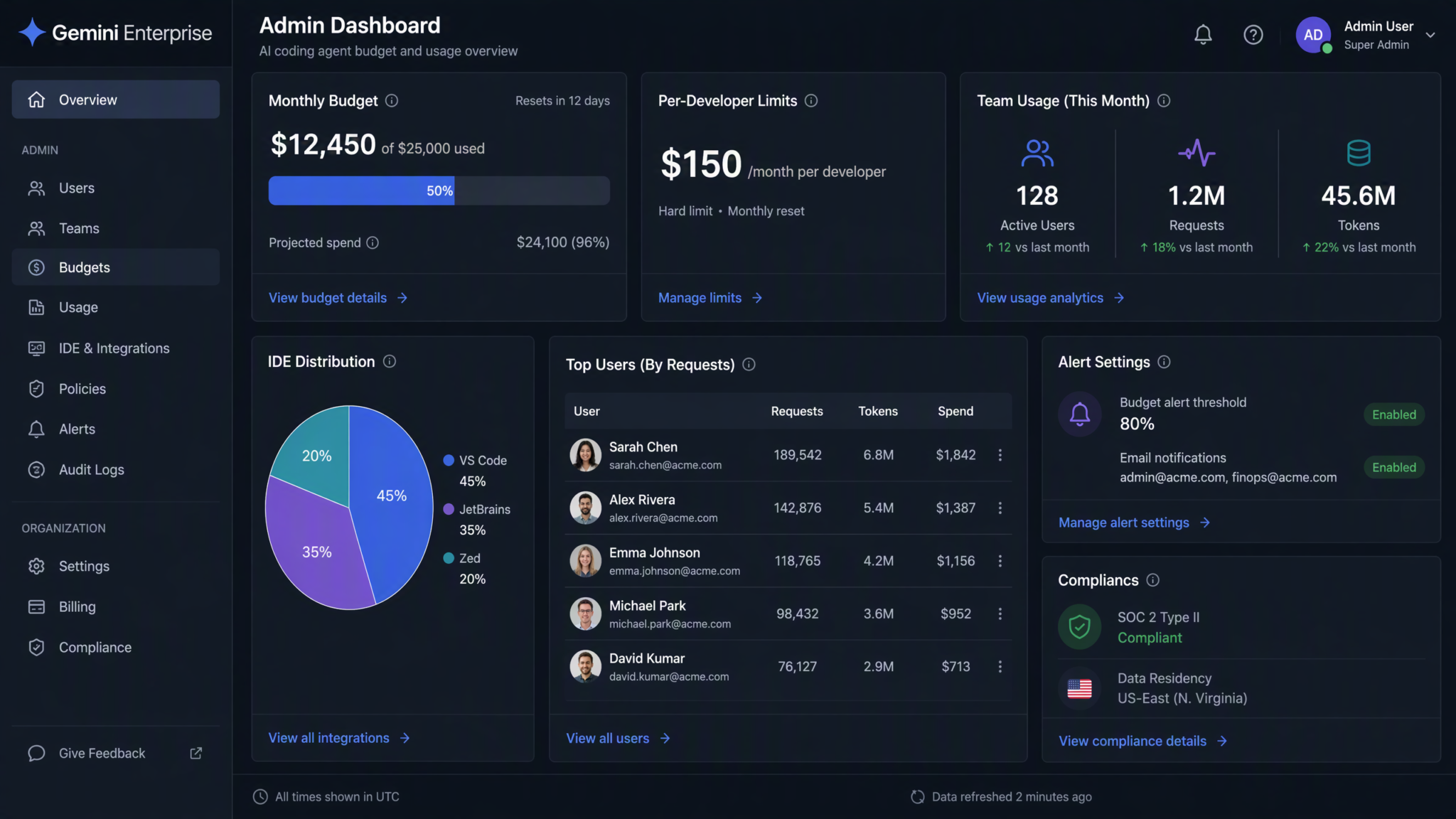
For organizations on Gemini Enterprise, Antigravity unlocks a comprehensive admin control plane accessible via the Google Cloud Console under Gemini for Google Cloud → Antigravity → Admin. These controls let platform teams govern AI usage with the same rigor they apply to cloud resource consumption — which is exactly what enterprise procurement teams and CISOs require before approving organization-wide rollout.
Developer Budget Limits
Budget limits in Antigravity are denominated in tokens (not dollars, which fluctuate with pricing changes). Set per-developer daily and monthly token budgets:
# antigravity-policy.yaml — applied via gcloud CLI
apiVersion: antigravity.googleapis.com/v1
kind: AgentPolicy
metadata:
  name: engineering-default-policy
spec:
  budgetLimits:
    dailyTokenLimit: 2000000      # 2M tokens/day per developer
    monthlyTokenLimit: 40000000   # 40M tokens/month per developer
    alertThresholdPercent: 80     # Alert at 80% consumption
    onExceedAction: "throttle"    # Options: throttle, block, alert-only
  modelAccess:
    allowedModels:
      - "gemini-2-5-pro"
      - "gemini-2-5-ultra"
    defaultModel: "gemini-2-5-pro"
    requireApprovalForUltra: false
  agentPermissions:
    maxConcurrentAgents: 3
    allowAutonomousMode: true
    allowNetworkAccess: false
    allowExternalApiCalls: false
    allowPRCreation: true
    requirePlanApproval: true
Apply this policy via:
gcloud antigravity policies apply \
  --policy-file=antigravity-policy.yaml \
  [email protected] \
  --project=mycompany-eng-platform
Role-Based Access Controls
Antigravity defines four predefined IAM roles that you can assign at the organization, folder, or project level:
| IAM Role | Capabilities | Typical Assignee |
|---|---|---|
roles/antigravity.user |
Run agent tasks, view own usage | Individual developers |
roles/antigravity.powerUser |
All user capabilities + autonomous mode + Ultra model | Senior engineers, tech leads |
roles/antigravity.policyAdmin |
Create/update agent policies, view team usage dashboards | Platform engineering team |
roles/antigravity.admin |
Full control including billing, model configuration, audit log access | CTO, DevEx lead, CISO |
Model Selection and Custom Fine-Tuning
Enterprise customers on Google Cloud’s AI Platform can fine-tune Gemini 2.5 Pro on their internal codebase and then configure Antigravity to use the fine-tuned model endpoint. This is particularly valuable for organizations with large amounts of proprietary framework code or non-standard patterns. Configure the custom model endpoint in the Admin Console or via policy YAML:
modelAccess:
  allowedModels:
    - "projects/mycompany-eng-platform/locations/us-central1/models/gemini-ft-internal-v2"
    - "gemini-2-5-pro"
  defaultModel: "projects/mycompany-eng-platform/locations/us-central1/models/gemini-ft-internal-v2"
Usage Monitoring and Dashboards
The Antigravity Admin Console provides real-time dashboards showing: token consumption by developer, by team, and by project; task success and failure rates; most common task types; average task duration; and estimated monthly cost at current consumption rates. All usage data can be exported to BigQuery via the standard Cloud Logging pipeline, enabling custom dashboards in Looker or Grafana.
Compliance Settings
For regulated industries, Antigravity Enterprise offers several compliance-critical controls:
- Data Residency: Restrict all inference to specific Cloud regions (e.g., EU-only for GDPR compliance)
- Code Confidentiality: Enable Ephemeral Processing Mode — code sent to the agent is processed in memory only, never persisted to Google’s training pipeline
- Audit Logging: Every agent action (file read, file write, test execution, PR creation) is logged to Cloud Audit Logs with developer identity, timestamp, and full action payload
- VPC Service Controls: Restrict Antigravity API access to calls originating from within your organization’s VPC perimeter
- CMEK: Use Customer-Managed Encryption Keys for any temporary data stored during multi-step agent tasks
Google Cloud AI Security Controls for Enterprise Development Teams
Step 6: Using Antigravity Agents — Autonomous Workflows with Real Examples
With setup complete, this section covers the primary agent workflows and how to prompt them effectively. The quality of your task descriptions matters enormously — not because vague prompts fail entirely, but because precise prompts consistently yield better-scoped plans and require fewer correction cycles.
Autonomous Multi-File Editing
Multi-file editing is where Antigravity’s advantage over simpler copilot tools is most apparent. Here’s an example of a realistic enterprise task:
Task prompt:
“We’re upgrading our internal logging library from @mycompany/logger v2 to v3. The v3 API changes: (1)
logger.warn()is nowlogger.warning(), (2) the first argument to all methods must now be a structured object with amessagekey rather than a raw string, (3)logger.child()is deprecated — uselogger.withContext()instead. Update all usages across the /src directory. Do not touch files in /src/legacy. Run the test suite after completing changes.”
The agent will: scan all TypeScript/JavaScript files in /src excluding /src/legacy, build a map of all logging call sites, categorize them by the type of change required, execute the edits in batches (showing you diffs), and then trigger your configured test runner. A task of this scope — typically a half-day of careful find-and-replace work for a human developer — completes in 6–12 minutes, with a PR-ready diff at the end.
Access 40,000+ AI Prompts for ChatGPT, Claude & Codex — Free!
Subscribe to get instant access to our complete Notion Prompt Library — the largest curated collection of prompts for ChatGPT, Claude, OpenAI Codex, and other leading AI models. Optimized for real-world workflows across coding, research, content creation, and business.
Test Generation
Antigravity’s test generation goes beyond simple unit test scaffolding. Point it at a module and specify your testing standards:
Task prompt:
“Generate comprehensive tests for /src/services/invoiceService.ts. Use Jest and our mock factory pattern from /src/__mocks__/factories. Cover: all exported functions, error paths including database connection failures, edge cases for zero-amount invoices and invoices with more than 1000 line items, and integration with the TaxCalculator service. Target 90%+ coverage on this file.”
The agent reads the source file, infers dependencies, examines your existing test files to learn your team’s testing conventions, generates the test file, runs it, and iterates on any failures before presenting the final result. The pattern-learning from existing tests is a key differentiator — generated tests feel like they were written by a team member who has read your codebase, not a generic AI that has read testing documentation.
Refactoring with Architectural Awareness
For larger refactoring tasks, you can invoke the agent in architectural analysis mode first — a read-only phase where it maps your codebase structure and surfaces a refactoring recommendation before making any changes:
Task prompt:
“Analyze the /src/data-access layer. Identify any violations of the Repository pattern we use (as described in /docs/architecture/data-access.md). Propose a refactoring plan but do not execute it yet — show me the plan first.”
This produces a structured report listing each violation by file and function, the proposed correction, and an estimated risk level (low/medium/high) based on how many other modules depend on the code being changed. You can then approve the full plan, approve individual items, or ask the agent to modify its approach before execution.
Automated Code Review
Antigravity can perform code review as a pre-commit or pre-PR check. Configure it as a git hook in your repository:
#!/bin/bash
# .git/hooks/pre-push
# Antigravity code review gate

antigravity review \
  --diff HEAD~1..HEAD \
  --checks security,performance,style,test-coverage \
  --model gemini-2-5-pro \
  --project mycompany-eng-platform \
  --fail-on-severity high \
  --output review-report.json

if [ $? -ne 0 ]; then
  echo "Antigravity review found high-severity issues. See review-report.json"
  exit 1
fi
The review output is structured JSON that can feed into GitHub Actions, GitLab CI, or any other CI system. Issues are categorized by type (security, performance, maintainability, test coverage) and severity, with specific file-and-line references and concrete fix suggestions.
Documentation Generation
Documentation generation at scale is one of the most immediately high-value use cases for Antigravity in teams with existing codebases. A practical approach:
Task prompt:
“Generate comprehensive API documentation for all public methods in the /src/api directory. Use the OpenAPI 3.1 format for REST endpoints and JSDoc for TypeScript utility functions. Use the existing documentation in /docs/api/auth.md as a style reference. Write the output to /docs/api/generated/ without overwriting any files that already have manually written documentation.”
The agent identifies which files have existing documentation, skips them, and generates documentation for the undocumented files. For REST endpoints defined with Express or Fastify route handlers, it infers request/response shapes from TypeScript types and existing test assertions. The quality is high enough that most teams adopt the output with minor editing rather than treating it as a first draft requiring substantial rewriting.
AI Documentation Generation Best Practices for Large Codebases
Step 7: Antigravity vs. Codex vs. Claude Code — Full Feature Comparison
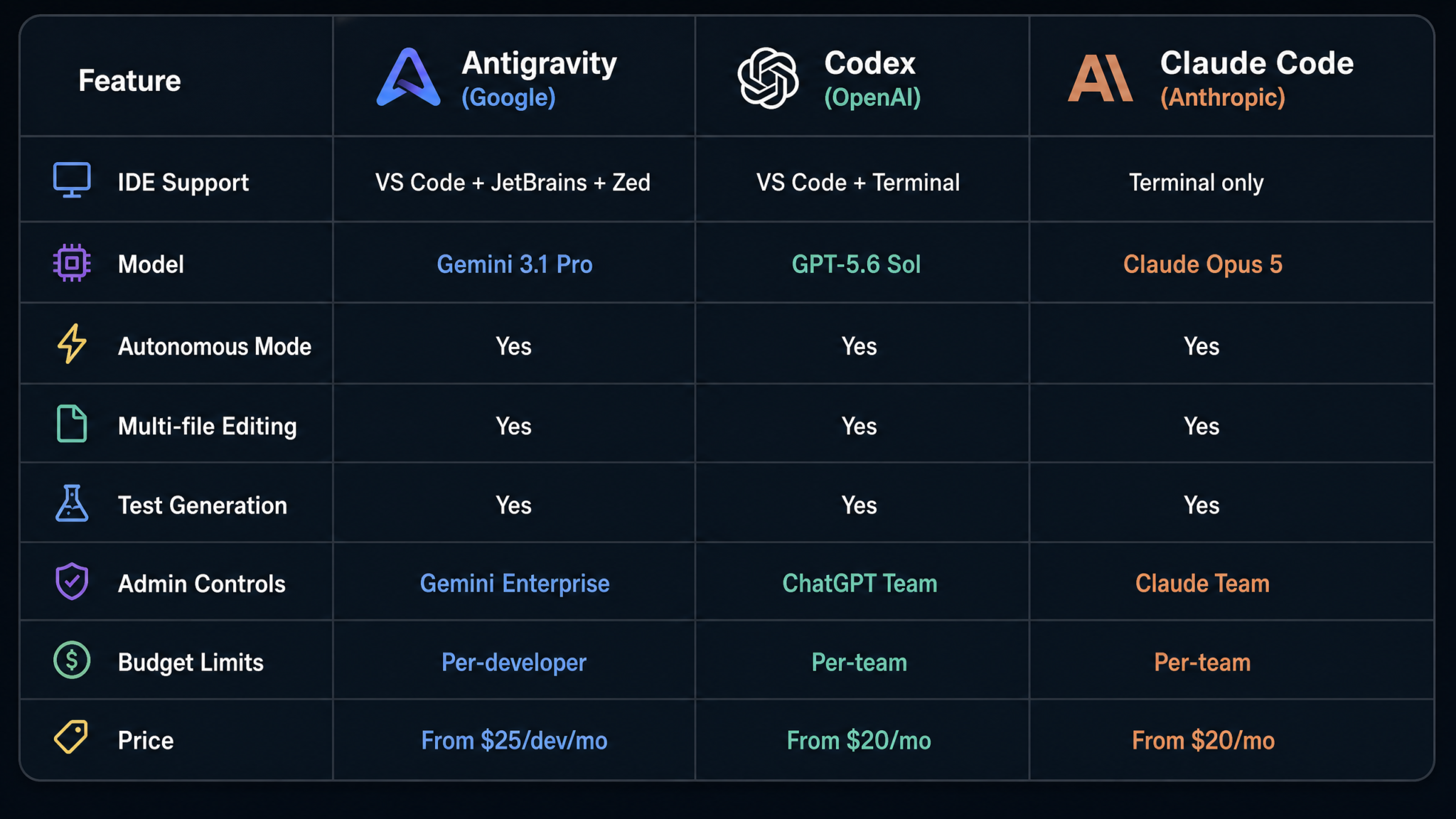
With three major autonomous coding agents now competing for enterprise adoption, the choice between Google Antigravity, OpenAI Codex CLI (Codex 4), and Anthropic Claude Code v3 is one of the most consequential tooling decisions a platform engineering team can make in 2026. Each has genuine strengths and meaningful limitations. Here’s the data.
Feature Matrix
| Feature | Google Antigravity | OpenAI Codex 4 | Anthropic Claude Code v3 |
|---|---|---|---|
| IDE Support | VS Code, JetBrains, Zed | VS Code, Cursor, Windsurf | VS Code, JetBrains, Vim/Neovim |
| Agent Mode | ✅ Full (Plan-Act-Verify) | ✅ Full | ✅ Full |
| Multi-File Editing | ✅ Unlimited scope | ✅ Up to 100 files/task | ✅ Unlimited scope |
| Test Execution in Sandbox | ✅ Full sandbox | ✅ Full sandbox | ✅ Full sandbox |
| PR Creation | ✅ GitHub, GitLab, Bitbucket, Cloud Source Repositories | ✅ GitHub, GitLab | ✅ GitHub, GitLab, Bitbucket |
| Custom Fine-Tuning | ✅ (Gemini fine-tuning on Vertex AI) | ✅ (OpenAI fine-tuning) | ❌ (Not available as of Sept 2026) |
| Enterprise Admin Console | ✅ Full (GCP Console) | ✅ (OpenAI Platform) | ✅ (Anthropic Console) |
| Per-Developer Budget Controls | ✅ Token-level granularity | ✅ Dollar-based budgets | ⚠️ Team-level only (not per-developer) |
| Collaborative Agent Mode | ✅ (Zed only) | ❌ | ❌ |
| Codebase Indexing | ✅ Cloud-side via Code Intelligence | ⚠️ Local embedding only | ✅ Cloud-side indexing |
| Data Residency Controls | ✅ Full region selection | ⚠️ US only (as of Sept 2026) | ✅ US and EU |
| CMEK Support | ✅ | ❌ | ❌ |
| VPC Service Controls | ✅ | ❌ | ❌ |
SWE-Bench Verified Performance (September 2026)
| Agent | SWE-Bench Verified Score | Median Task Time | Large Codebase (>500k LOC) Score |
|---|---|---|---|
| Google Antigravity (Ultra) | 68.4% | 4m 18s | 71.2% |
| Anthropic Claude Code v3 | 61.7% | 3m 52s | 58.4% |
| OpenAI Codex 4 | 59.3% | 5m 04s | 54.1% |
| Google Antigravity (Pro) | 57.8% | 3m 31s | 61.3% |
Antigravity’s advantage in the large codebase category is attributable to the cloud-side Code Intelligence indexing. When the agent can query a pre-built semantic index of your entire repository rather than relying on local context windows, it makes significantly fewer errors related to missing imports, incorrect function signatures, or duplicate symbol names across modules.
Pricing Comparison (Enterprise Tier, September 2026)
| Provider | Enterprise Pricing Model | Estimated Cost per Developer/Month | Included Context Window |
|---|---|---|---|
| Google Antigravity Enterprise | Committed use discount via GCP spend (1yr/3yr) | $45–$120 (varies by model mix) | 2M tokens (Ultra) |
| Anthropic Claude Code Enterprise | Per-seat + token consumption | $35–$95 | 200K tokens |
| OpenAI Codex Enterprise | Per-seat + API token consumption | $40–$110 | 128K tokens |
Pricing comparisons at the enterprise level are always difficult because GCP committed use discounts can dramatically reduce effective Antigravity costs for organizations already spending significantly on Google Cloud. If your organization has a >$500k/year GCP commitment, Antigravity Enterprise’s effective cost can fall well below $45/developer/month through negotiated pricing adjustments.
When to Choose Each Tool
- Choose Antigravity if: Your team uses JetBrains IDEs or Zed; you need CMEK or VPC Service Controls for compliance; you have a large monorepo (>500k LOC) where codebase indexing matters; you’re already on Gemini Enterprise; you want per-developer budget controls at token granularity; or you want the option to fine-tune on your internal codebase.
- Choose Claude Code if: Your team prioritizes speed and Claude’s instruction-following quality for complex reasoning tasks; you’re on VS Code and already invested in Anthropic’s tooling; you don’t require CMEK or VPC controls; budget is a constraint and Claude Pro’s pricing works at your scale.
- Choose Codex 4 if: Your team is heavily invested in OpenAI’s platform; you primarily use GitHub Copilot and want agent mode as an extension of that investment; you use Cursor or Windsurf as your primary editor.
Claude Code vs GitHub Copilot Enterprise: Which AI Coding Tool Wins for Teams in 2026
Step 8: Team Deployment Best Practices
Rolling out Antigravity to an engineering organization requires the same change management discipline you’d apply to any significant tooling change — arguably more, because AI agents that autonomously edit code are a higher-stakes intervention than a new linter or CI platform. Organizations that approach this rollout thoughtfully see adoption rates above 80% within 90 days. Those that push it out with a “here’s the extension, install it” approach often see low adoption, expensive misuse incidents, and frustrated developers who distrust the tool after an early bad experience.
Phase 1: Pilot (Weeks 1–4)
Select a pilot group of 8–15 developers who are enthusiastic about AI tooling and represent a cross-section of your team’s languages and project types. Set conservative agent policies for the pilot:
- Confirmation level:
plan-onlyfor everyone - Model: Gemini 2.5 Pro (not Ultra — reserve Ultra for cases where Pro is insufficient, to control costs during the learning phase)
- PR creation disabled initially (agents produce diffs, humans create PRs)
- Daily token budget: 1M tokens/developer
- Excluded paths: Any files marked with
# DO NOT MODIFY: AI-RESTRICTEDfile headers
Run a structured 30-minute onboarding session covering: what agent mode is and isn’t, how to write effective task descriptions, how to read and validate agent plans before approving, and what to do when an agent produces unexpected output. Keep a shared Zed channel or Slack channel where pilot participants post interesting agent sessions and discuss what worked and what didn’t.
Phase 2: Controlled Expansion (Weeks 5–10)
Based on pilot feedback, refine your agent policy configuration and expand to 30–50% of your engineering organization. In this phase:
- Enable PR creation for developers who request it (not as default)
- Introduce the Antigravity code review hook as an optional pre-commit check
- Begin tracking agent task success rates using the Admin Console dashboards
- Run a monthly “Antigravity Office Hours” session where developers can ask questions and share interesting use cases
- Identify power users who are getting exceptional results and ask them to document their prompting strategies in your internal wiki
Phase 3: Full Rollout (Weeks 11–16)
Full organization rollout with adjusted policies based on what you’ve learned. At this stage, most organizations differentiate policies by role:
# Senior engineers / tech leads
confirmation_level: plan-only
autonomous_mode_allowed: true
model: gemini-2-5-ultra
daily_token_limit: 3000000
pr_creation: enabled

# Mid-level engineers
confirmation_level: plan-only
autonomous_mode_allowed: false
model: gemini-2-5-pro
daily_token_limit: 2000000
pr_creation: enabled

# Junior engineers / interns
confirmation_level: every-action
autonomous_mode_allowed: false
model: gemini-2-5-pro
daily_token_limit: 1000000
pr_creation: disabled  # Human review required before PR
Governance Framework
Establish clear organizational policies — documented in your engineering handbook — covering:
- Attribution policy: How do you attribute code written by an agent? Most organizations adopt a convention like a
co-authored-by: antigravity-agentgit trailer on agent-assisted commits, enabling future analysis of agent-written code proportions. - Review requirements: Agent-generated PRs should require at least one human code reviewer, just as human-authored PRs do. Do not create a second-class review process for agent PRs — that increases the risk of AI-introduced bugs reaching production.
- Restricted zones: Define which directories, files, or modules agents are never permitted to edit. Typical examples: cryptographic key handling code, compliance-critical data processing pipelines, infrastructure-as-code that controls production resources.
- Incident response: Define what happens when an agent task goes wrong — produces broken code, creates an unintended PR, consumes an unusually large token budget. Have a clear escalation path and a budget alert threshold that triggers human review.
- Training data opt-out confirmation: Confirm with your Google account team that your Enterprise contract includes the standard data processing addendum prohibiting code sent to Antigravity from being used for model training. This should already be in your Gemini Enterprise contract but verify explicitly.
Cost Management at Scale
At 100+ developers, Antigravity costs can reach $5,000–$15,000/month depending on usage intensity. Manage this proactively:
- Set team-level budgets in addition to per-developer limits. A team with 12 developers each allowed 2M tokens/day has a theoretical daily team budget of 24M tokens — cap the team collectively at 15M tokens/day to prevent runaway costs if everyone runs large tasks simultaneously.
- Monitor the Admin Console’s task type breakdown. If documentation generation is consuming 40% of your team’s token budget, consider running those tasks during off-peak hours when you’re less likely to want the budget available for active coding.
- Use Gemini 2.5 Pro as the default and reserve Ultra for tasks that genuinely benefit from the larger model. In practice, Pro handles most routine tasks (test generation, small refactors, documentation) at equivalent quality to Ultra. Ultra’s advantage is clearest on complex multi-file architectural changes and tasks requiring sophisticated reasoning about business logic.
- Export token usage data to BigQuery and build a cost-per-developer dashboard in Looker. Make this visible to engineering managers so cost awareness is distributed across the organization rather than concentrated in the platform team.
Measuring Return on Investment
Track the following metrics before and after Antigravity rollout to quantify ROI for finance and leadership stakeholders:
| Metric | How to Measure | Typical Improvement (Industry Data) |
|---|---|---|
| Time to complete defined coding tasks | Ticket cycle time from in-progress to PR-ready | 30–50% reduction |
| Test coverage delta per PR | Coverage reports in CI | +12–18 percentage points on agent-assisted PRs |
| Documentation completeness score | Static analysis tools measuring JSDoc/docstring coverage | +40–60% improvement |
| PR review cycle time | Time from PR open to first review | 15–25% reduction (fewer review iterations on cleaner code) |
| Code smell density | SonarQube or equivalent static analysis | 20–35% reduction over 6 months |
Training Resources
Google provides official Antigravity training through several channels:
- Google Cloud Skills Boost: The “Antigravity Agent Fundamentals” and “Antigravity for Enterprise Administrators” learning paths, each approximately 4–6 hours, are available to all Gemini Enterprise customers at no additional cost.
- Google Developer Expert sessions: Your Google Cloud account team can arrange quarterly “Antigravity Best Practices” sessions with a Google Developer Expert familiar with your industry vertical.
- Internal champions program: Identify 2–3 developers in your pilot who become your internal Antigravity champions. Give them dedicated time (typically 20% for 3 months) to build internal documentation, run training sessions, and be the first point of contact for team questions.
The single highest-leverage training investment is teaching developers to write precise, scoped task descriptions. An agent given a vague instruction (“clean up the user module”) will produce unpredictable results. An agent given a precise instruction with explicit scope, success criteria, and constraints will consistently produce usable output. Building this skill across your engineering organization takes 4–8 weeks of deliberate practice but compounds dramatically over time.
Conclusion
Google Antigravity represents a genuine architectural advancement in AI-assisted development tooling. Its escape from Google’s proprietary IDE ecosystem — delivering first-class support for VS Code, JetBrains, and Zed simultaneously — signals that the AI coding agent market is maturing from novelty to enterprise infrastructure. The Plan-Act-Verify loop, cloud-side codebase indexing, collaborative agent sessions in Zed, and Gemini Enterprise’s comprehensive admin controls combine to create a tool that can operate reliably inside the governance, compliance, and cost management frameworks that enterprise engineering organizations require.
The setup work is front-loaded: getting authentication, indexing, sandbox configuration, and policy files right takes several hours of careful work. But once that foundation is in place, the agent workflows covered in this guide — multi-file refactoring, test generation, code review, documentation — begin delivering measurable productivity gains almost immediately. The teams that will realize the largest returns are those that invest equally in the technical setup and the organizational practices: training developers to prompt effectively, establishing clear governance policies, and building the measurement systems to demonstrate value to stakeholders.
Start with the pilot group, learn what works for your codebase and team culture, and expand deliberately. The 16-week rollout framework in this guide is a starting point, not a rigid prescription. Your specific constraints — compliance requirements, codebase characteristics, team experience with AI tooling — will shape the right path for your organization. What doesn’t change is the underlying opportunity: a well-configured Antigravity deployment, used by a well-trained team, is a meaningful force multiplier for engineering output.
AI Coding Agent Governance Frameworks for Enterprise Engineering Organizations
