
How to Embed Codex in an Internal Operations Dashboard with App-Server, MCP Tools, Streaming, and Human Approvals
Introduction
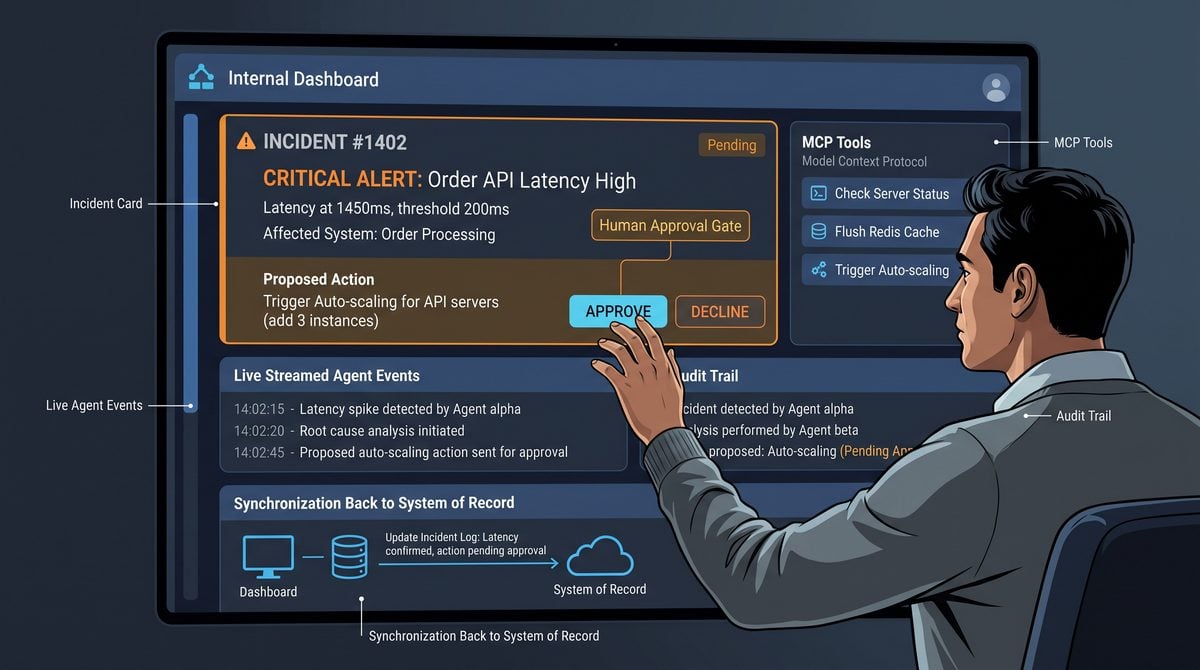
This tutorial walks through a practical, production-ready pattern for embedding Codex into an internal operations dashboard that must safely and audibly drive mutations in downstream systems. The objective is not a speculative integration; it is grounded in the three-layer Codex integration model described by OpenAI — the codex exec execution layer, the official SDK surface, and a hosted app-server that owns application context. We will use those layers to implement streamed conversations, narrowly scoped machine-executable tools (MCP tools), human approval gates before any mutation, and robust synchronization back to your system of record.
Rather than demonstrating a single code sample that assumes a particular SDK signature, this section defines the architecture and patterns you will replicate in your own stack: how the harness and app-server manage conversation state and streaming events, how tools are sandboxed and constrained, how approvals are modeled and surfaced to operators, and how to handle cancellation, retries, and immutable audit logs. The tutorial emphasizes practical operational concerns — idempotency, least privilege, auditability, and UX for partial results — so teams can implement a resilient, observable integration for real-world workflows.
Table of Contents
- 1. Introduction, reader outcome, Table of Contents, and reference architecture (this section)
- 2. Implementing the harness: conversation state, streaming, and turn management
- 3. Building and securing MCP tools: sandboxing, scoping, and invocation patterns
- 4. Approvals, synchronization, and reliability: audit logs, retries, and system-of-record updates
Reader outcome
After completing this tutorial series you will be able to design and implement an internal operations dashboard that:
- Hosts Codex-powered conversational assistants that stream partial results and execution events to the dashboard UI.
- Exposes a small set of narrowly scoped, auditable MCP tools that perform specific operational actions; tools run in sandboxes with clear ACLs and logging.
- Enforces human approvals for any operation that mutates a system of record, with a deterministic approval workflow and immutable audit trails.
- Supports cancellation, retry, and reconciliation strategies that preserve idempotency and ensure final-state synchronization with the system of record.
- Provides granular observability for each turn: streamed events, tool invocations, approvals, and commit/rollback decisions.
These outcomes map to implementation responsibilities your engineering team will own: the app-server and harness for orchestration, the tool runners for execution and sandboxing, and the UI and workflow engine for presenting approvals and operational state.
Complete reference architecture
The reference architecture decomposes the system into six primary layers: Client UI, App-Server (application-owned context), Harness (conversation and execution manager), Codex execution plane (codex exec + SDK), MCP Tool Runners (sandboxed executors), and System of Record plus Audit Store. Each layer has focused responsibilities so you can reason about failure modes, security boundaries, and observability paths.
Architecture diagram (conceptual)
User UI
  └─ Websocket / Streaming Channel ──> App-Server (owns session & context)
        └─ Harness (conversation state, streaming, approvals)
              ├─ Codex Exec / SDK (model interaction & tool orchestration)
              ├─ MCP Tool Runners (sandboxed, limited-scope actions)
              └─ Approval Engine / Workflow (human gates)
        └─ System of Record (SOR) & Audit Store (immutable events)
Component responsibilities
| Component | Primary responsibilities | Key operational concerns |
|---|---|---|
| Client UI (dashboard) | Stream user messages & receive partial execution events; present approval UI; show audit trail | Low-latency streaming, optimistic UI state, clear error/rollback UX |
| App-Server | Owns authenticated session, application context (business entities), and API to the harness; persists conversation metadata | Session authorization, context injection, request validation, rate limiting |
| Harness | Manages conversation state across turns, orchestrates streamed execution events, enforces approval policies, mediates tool invocation | Turn consistency, partial-state streaming, backpressure handling |
| Codex execution plane (codex exec + SDK) | Runs language-model reasoning and provides primitives for tool calls, streamed outputs, and execution control | Latency, token usage, interpreted tool invocation consistency |
| MCP Tool Runners | Execute narrowly scoped commands (query, mutate, escalate) in sandboxed environments with strict ACLs and instrumentation | Least-privilege credentials, timeouts, resource limits, result sanitization |
| Approval Engine / Human Workflow | Manages pending mutations requiring human signoff, assigns reviewers, records decisions, and emits commit/rollback signals | Auditability, role-based access control, notification delivery |
| System of Record (SOR) & Audit Store | Final authoritative data, append-only audit log of AI-driven decisions and human approvals, reconciliation layer | Immutability, tamper evidence, searchable audit indices |
Event and data flow patterns
The harness implements a stream-forwarding pattern: every conversational turn produces a stream of structured events rather than a single opaque response. Streams include semantic events such as “thought” or “plan” for transparency, “tool_request” and “tool_event” for each invocation step, “approval_required” when a mutation is imminent, and “commit” or “abort” events after approval decisions.
Example event sequence (high-level):
1. User -> App-Server: "Close incident INC-123 and notify owner."
2. App-Server -> Harness: start turn with app context (incident record)
3. Harness -> Codex: prompt + context, receive streamed tokens and tool invocations
   - Stream: model suggests "Check incident status" -> emits tool_request(GetIncident)
   - Tool_runner returns current incident data as tool_event
   - Model composes plan and emits tool_request(CreateChangeTicket) (mutation)
4. Harness inspects pending mutations and emits approval_required event to UI + Approval Engine
5. Human reviewer approves -> Approval Engine emits approval_granted
6. Harness directs Tool Runner to execute CreateChangeTicket (or uses transactional SOR API)
7. Tool returns success -> Harness emits commit and writes audit record to Audit Store; SOR updated
8. App-Server notifies UI with final result and immutable audit id
Design patterns for key concerns
- Stream-first UX: Deliver partial results and tool invocation events over a streaming transport so operators can observe intermediate reasoning and cancel if needed.
- Operation tokens and idempotency: Assign an operation ID for each tool invocation or mutation request. Use idempotency keys in tool runners and SOR calls so retries are safe and replayable.
- Audit-forward commits: Every approval decision and tool execution appends an immutable audit record before the SOR mutation is applied, enabling post-hoc reconciliation if a commit fails.
- Narrowly scoped MCP tools: Each tool implements a single, well-documented capability (for example: QueryTicket, UpdateTicketStatus, SendNotification). Tools accept strongly typed inputs and return structured outputs to make automatic validation reliable.
- Approval policy enforcement in the harness: The harness evaluates whether a pending tool call requires human approval based on rule sets (entity sensitivity, operation type, estimated impact) and emits explicit approval_required events to the Approval Engine.
Security, sandboxing, and least privilege
For operational safety, design each MCP tool to run in a constrained environment with minimal privileges. Credentials for performing mutations should be scoped narrowly and rotate regularly. Tool runners must enforce execution timeouts and network egress constraints to prevent data exfiltration. Authentication and authorization checks must occur both at the app-server layer (to limit which users can initiate turns) and inside the Approval Engine (to limit who can sign off on commits).
Design principle: make every external change require an auditable chain of events that ties the user intent, the model reasoning, the tool execution, and the human approval into a single, queryable transaction record.
Operational observability
Instrument the harness and tool runners to emit structured logs and metrics: per-turn latency, model token usage, tool invocation latencies, approval wait-times, commit success/failure counts, and cancellation rates. Correlate all emitted telemetry with the operation ID so you can trace the lifecycle from user input to final SOR state. Store the audit trail in an append-only store with indexes for reviewer, entity id, operation id, and timestamps.
This reference architecture provides the blueprint we will implement in steps: the next sections show how to implement the harness and streaming, then how to package and secure MCP tools, and finally how to wire approvals, retries, cancellation, and synchronization to the system of record.
Within How to Embed Codex in an Internal Operations Dashboard with App-Server, MCP Tools, Streaming, and Human Approvals, the Conversation State Best Practices decision connects directly to Codex CLI 0.144 Arrives — New Writes Approval Mode, MCP Auth, and Multi-Agent Concurrency Controls. That linked article specifically examines codex CLI 0.144 Arrives — New Writes Approval Mode, MCP Auth, and Multi-Agent Concurrency Controls, giving teams concrete background for applying the present article’s Conversation State Best Practices recommendations without duplicating this workflow’s scope.
Prerequisites and implementation: app-server session lifecycle, backend gateway, identity and tenant binding, event streaming, and realistic TypeScript or Python examples
This section lists the operational prerequisites and then walks through the practical implementation patterns for an internal operations dashboard that hosts Codex-driven workflows. The implementation notes focus on the app-server session lifecycle, a hardened backend gateway that binds identity and tenant context, and an event-streaming model that supports streamed execution, cancellation, retries, human approvals, and audit logging. The examples use idiomatic TypeScript and Python patterns to illustrate how these pieces fit together; they are intentionally implementation patterns rather than exact SDK signatures.
Within How to Embed Codex in an Internal Operations Dashboard with App-Server, MCP Tools, Streaming, and Human Approvals, the App-Server Best Practices decision connects directly to How to Use MCP Tool Search in OpenAI Codex: Setting Up Dynamic Tool Discovery for AI Agents. That linked article specifically examines use MCP Tool Search in OpenAI Codex: Setting Up Dynamic Tool Discovery for AI Agents, giving teams concrete background for applying the present article’s App-Server Best Practices recommendations without duplicating this workflow’s scope.
Prerequisites
- Identity and tenant directory: SSO or an identity provider that emits stable user IDs and tenant IDs, plus a mapping for service accounts the app-server uses.
- Policy decision point (PDP): a central or embedded service that evaluates role-based rules for tool invocation, approvals required, and tenant permissions.
- Event broker or streaming transport: a component that supports ordered, durable streams (for example, a message broker with partitioning and replay semantics or a WebSocket/SSE fronting a persistent store).
- MCP tool registry: a server-side registry that defines each tool’s allowed inputs, output schema, scope, and runtime sandbox policy. Tools should be narrowly scoped and authorized per-tenant or per-role.
- Audit store: an immutable append-only log for all session events, approvals, and state transitions. The audit store must be queryable for compliance and incident review.
- Human approval UI and queue: a separate approval dashboard where designated approvers can inspect diffs, approve or reject, and attach rationale. The app-server will pause session execution until a decision is recorded.
App-server session lifecycle
The app-server is the single authoritative coordinator for session state. A session represents one conversation or work orchestration that may span multiple turns and tool runs. A robust session lifecycle model makes it easier to implement streaming, cancellation, retries, and approvals.
Recommended lifecycle states:
- INITIALIZED — session record created, context bound, no execution started.
- RUNNING — the harness or Codex exec is actively producing events or tool invocations.
- AWAITING_APPROVAL — execution paused because a mutation requires human consent.
- CANCELLED — a user or policy cancelled the session; cleanup initiated.
- COMPLETED — the session finished successfully and final outputs were synchronized back to the system of record.
- FAILED — an unrecoverable error occurred; error details stored in audit.
Keep session state compact but authoritative: store the current state, a monotonic sequence number for events, a pointer to the last streamed offset, the approval request id (if any), and the id of the worker handling active execution. Use the session record as the single source of truth for reconciliation and retries.
// TypeScript-style session interface (illustrative)
interface Session {
  id: string;
  tenantId: string;
  userId: string;
  state: 'INITIALIZED' | 'RUNNING' | 'AWAITING_APPROVAL' | 'CANCELLED' | 'COMPLETED' | 'FAILED';
  sequence: number;            // monotonic event counter
  lastStreamOffset?: string;   // durable cursor into event stream
  approvalId?: string;         // if awaiting approval
  workerId?: string;           // identifier of executing process
  createdAt: string;
  updatedAt: string;
}

// Python equivalent (illustrative)
from dataclasses import dataclass
from typing import Optional

@dataclass
class Session:
    id: str
    tenant_id: str
    user_id: str
    state: str
    sequence: int
    last_stream_offset: Optional[str] = None
    approval_id: Optional[str] = None
    worker_id: Optional[str] = None
    created_at: str = ''
    updated_at: str = ''
Backend gateway responsibilities
The backend gateway enforces tenant and identity policies before any call reaches the harness or Codex execution layer. Responsibilities of the gateway include authentication, tenant binding, request authorization, token or ephemeral credential minting for MCP tools, rate and concurrency limiting, and emission of audit events.
Key functions the gateway must perform:
- Authenticate the incoming request and bind the request to a stable user identity and tenant id.
- Consult the PDP for whether the requested operation (or the requested tool) is allowed for that identity and tenant.
- Create or resume a session record with the app-server and attach a short-lived execution token that is valid only for that session and specific MCP tool scopes.
- Emit an initial audit event describing the session creation and attached policies.
- Forward approved interactions to the app-server/harness via a controlled channel, applying rate limits and concurrency quotas to prevent noisy neighbors from affecting other tenants.
In code, keep the gateway lean — it should not perform long-run orchestration. It acts as a policy and admission point that returns session metadata and ephemeral execution credentials to the app-server worker that will manage the stream.
// TypeScript-style pseudo-handler (pattern)
async function startSession(req, res) {
  const identity = authenticateRequest(req);
  const tenantId = bindTenant(identity);
  const allowed = await pdp.check(identity, tenantId, req.body.intent);
  if (!allowed) return res.status(403).send({ error: 'not authorized' });

  const session = await sessionStore.create({ tenantId, userId: identity.id, state: 'INITIALIZED' });
  const ephemeralToken = mintEphemeralToken({ sessionId: session.id, scopes: ['tool:read'] });

  audit.log({ type: 'SESSION_CREATED', sessionId: session.id, tenantId, userId: identity.id });
  return res.json({ sessionId: session.id, token: ephemeralToken });
}
Identity and tenant binding
Identity binding maps the caller’s identity and organizational context into a compact runtime credential set the app-server uses for making decisions. Do not pass raw upstream tokens to downstream systems. Instead, issue ephemeral credentials scoped to a session and to narrowly defined MCP tools. This prevents cross-tenant leakage and makes it straightforward to revoke access by terminating the session’s token.
Use a small binding model such as:
| Field | Description |
|---|---|
| tenantId | Stable tenant identifier used for isolation and resource scoping. |
| principalId | User or service account ID that originates the request. |
| roles | List of effective roles for policy checks (e.g., operator, approver, auditor). |
| sessionId | Session-scoped identifier used for ephemeral credential issuance and audit correlation. |
Within How to Embed Codex in an Internal Operations Dashboard with App-Server, MCP Tools, Streaming, and Human Approvals, the Event Streaming Patterns decision connects directly to Codex MCP Integration Masterclass: 30 Production-Ready Prompts for Building Enterprise Connectors and Tool Orchestration. That linked article specifically examines codex MCP Integration Masterclass: 30 Production-Ready Prompts for Building Enterprise Connectors and Tool Orchestration, giving teams concrete background for applying the present article’s Event Streaming Patterns recommendations without duplicating this workflow’s scope.
Event streaming: envelope, ordering, and replay
Streaming is the lifeblood of a dashboard that shows incremental model outputs, tool invocation events, and approval prompts. Design your event envelope to be compact, versioned, and idempotent. Each event should include:
- sessionId — to correlate events to a session
- sequence — a monotonic sequence number assigned by the authoritative writer
- eventType — a small enum (e.g., modelOutput, toolInvocation, approvalRequested, approvalDecision, stateTransition, audit)
- payload — versioned JSON payload containing the event body
- timestamp and source worker id
Ordered delivery is important so the UI can render a coherent transcript. Implement checkpointing where the client periodically acknowledges the last sequence number it has processed. Keep the stream durable so that a reconnect can resume from the last acknowledged offset.
// Example event envelope (illustrative)
{
  "sessionId": "s-123",
  "sequence": 42,
  "eventType": "toolInvocation",
  "payload": { "tool": "mcp.updateInventory", "input": { /* redacted */ } },
  "timestamp": "2026-xx-xxT...Z",
  "workerId": "worker-b-7"
}
Backpressure and large outputs: if the model emits a very long text or an artifact, stream it in chunks with explicit chunk sequence numbers inside the envelope. For long-running tool runs, emit progress events and preserve a final result event that contains an integrity hash so the client can request a re-stream or retry if an integrity check fails.
TypeScript example: session coordination and streaming
The following TypeScript-style example sketches an app-server worker that starts a session, attaches to a harness stream, forwards events to connected WebSocket clients, and transitions to AWAITING_APPROVAL when the harness signals a mutation that must be approved.
// Sketch: session worker pattern (illustrative)
async function sessionWorker(sessionId, harnessClient, wsClients) {
  await sessionStore.update(sessionId, { state: 'RUNNING', workerId: myWorkerId });

  const stream = harnessClient.openEventStream({ sessionId });
  for await (const evt of stream) {
    // persist and forward
    await audit.append(evt);
    forwardToWebsocketClients(wsClients, evt);

    // some tool invocation requires approval
    if (evt.eventType === 'approvalRequested') {
      await sessionStore.update(sessionId, { state: 'AWAITING_APPROVAL', approvalId: evt.payload.approvalId });
      // pause processing until approval decision is recorded
      await waitForApprovalDecision(evt.payload.approvalId);
      const decision = await approvalStore.getDecision(evt.payload.approvalId);
      if (decision === 'approved') {
        await harnessClient.resume({ sessionId, approvalId: evt.payload.approvalId });
        await sessionStore.update(sessionId, { state: 'RUNNING' });
      } else {
        await harnessClient.cancel({ sessionId, approvalId: evt.payload.approvalId });
        await sessionStore.update(sessionId, { state: 'CANCELLED' });
        break;
      }
    }

    if (evt.eventType === 'final') {
      await sessionStore.update(sessionId, { state: 'COMPLETED' });
      break;
    }
  }
}
Python example: gateway, approvals, and synchronization
The Python example shows a gateway endpoint that creates a session and enqueues an approval request. It also sketches how to synchronize a final result back to a system of record after approval.
# Sketch: gateway endpoint for mutation that requires approval (illustrative)
from fastapi import FastAPI, Request, HTTPException

app = FastAPI()

@app.post("/mutate")
async def mutate(req: Request):
    identity = authenticate(req)  # returns principal id and tenant id
    allowed = await pdp.check(identity, "mutate:resource")
    if not allowed:
        raise HTTPException(status_code=403, detail="forbidden")

    session = await session_store.create(tenant_id=identity.tenant_id, user_id=identity.user_id)
    # create approval request used by the worker to pause execution
    approval = await approval_queue.enqueue(session_id=session.id, payload=req.json())
    await audit.log({"type": "MUTATION_REQUESTED", "sessionId": session.id, "approvalId": approval.id})
    return {"sessionId": session.id, "approvalId": approval.id}

# Elsewhere: after approval workflow approves:
async def finalize_and_sync(session_id, result):
    # reconcile with system of record; ensure idempotent sync
    success = await system_of_record.apply_change(session_id, result)
    await audit.log({"type": "SYNC_PERFORMED", "sessionId": session_id, "result": "ok" if success else "failed"})
Audit log model and operational notes
Treat the audit log as the immutable timeline of the session. Each entry should include the actor (user/service), the action, the session id, and any policy decisions. Retain enough context for a reviewer to reconstruct the request and the approval rationale, but redact or tokenise any sensitive input data according to your compliance controls.
Operational practices to follow:
- Make session tokens short-lived and revocable so termination is immediate on suspicious activity.
- Implement worker heartbeats and automatic reclamation of sessions left in RUNNING state by a dead worker.
- Provide idempotent retry endpoints and use the session sequence to deduplicate repeated events from the harness.
- Expose explicit cancellation and retry operations in the app-server API; document expected guarantees for each operation.
Within How to Embed Codex in an Internal Operations Dashboard with App-Server, MCP Tools, Streaming, and Human Approvals, the Codex internal operations automation decision connects directly to How to Set Up Codex Computer Use on Windows — Remote Desktop Automation, Task Scheduling, and Workflow Integration. That linked article specifically examines set Up Codex Computer Use on Windows — Remote Desktop Automation, Task Scheduling, and Workflow Integration, giving teams concrete background for applying the present article’s Codex internal operations automation recommendations without duplicating this workflow’s scope.
MCP Tool Design, Approval Gates, Sandboxing, and Robust Synchronization
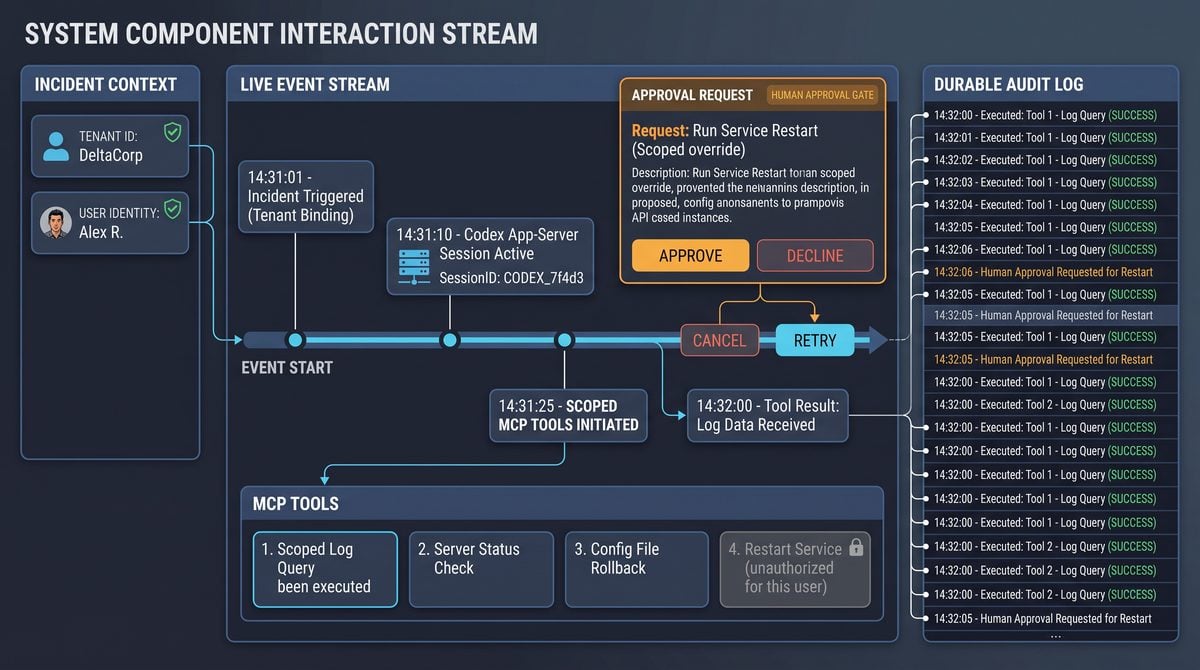
In an internal operations dashboard that permits the assistant to propose or orchestrate changes, the design of Minimal Capability Provider (MCP) tools, explicit approval gates, and strong sandboxing are the guardrails that keep automation safe and auditable. Treat every MCP tool as a narrowly scoped, permissioned microservice with a formal contract: an input schema, a precise list of allowed side effects, timeouts, and an auditable execution record. The app-server should be the only runtime that can execute a mutating MCP call against production systems; the Codex-harness or assistant runtime can only request tool invocations through a signed intent envelope that the app-server validates against policy and the human-approval state.
Within How to Embed Codex in an Internal Operations Dashboard with App-Server, MCP Tools, Streaming, and Human Approvals, the app-server session lifecycle decision connects directly to Codex Workflow Automation Masterclass: 30 Production-Ready Prompts for Building Multi-Step Pipelines, Scheduled Reports, and Cross-Platform Integrations. That linked article specifically examines codex Workflow Automation Masterclass: 30 Production-Ready Prompts for Building Multi-Step Pipelines, Scheduled Reports, and Cross-Platform Integrations, giving teams concrete background for applying the present article’s app-server session lifecycle recommendations without duplicating this workflow’s scope.
MCP Tool Design: Contracts, Scopes, and Safety
Start by defining each MCP tool as a typed contract. The contract should specify:
- Input schema and semantic validation rules: required fields, allowed ranges, and exact enumerations of resource identifiers.
- Side-effect descriptor: a machine-readable description of actions (for example, “create-user”, “modify-firewall-rule”) so approvals and audit logs can categorize the request before execution.
- Authorization scope: which roles, tenants, or feature flags permit the invocation.
- Maximum execution time, concurrency caps, and quotas to prevent runaway operations.
- Observable outputs: the structure of success and error responses, including a deterministic execution id that the app-server persists for idempotency and replay.
Represent the contract as a schema in your configuration service or policy store. That schema is the single source of truth the app-server uses to validate incoming tool intents. When the assistant requests a tool call, the harness validates the request against the schema and rejects or normalizes it before forwarding it to the app-server. Every request should include an idempotency token and a human-readable rationale that becomes part of the audit trail.
Approval Gates and Human-in-the-Loop Flow
Approval gates separate intent generation from mutating execution. Implement a two-phase flow:
- Intent creation: the assistant produces a signed “intent” payload describing the requested operation, serialized input, idempotency token, estimated impact, and side-effect descriptor. The app-server persists the intent as an immutable record and emits a “pending-approval” event onto the operation stream so the UI and approvers can see the request in real time.
- Approval resolution: a human approver inspects the intent, associated context (logs, diffs, preview), and the policy rules. The approver can approve, reject, request changes, or escalate. The decision is recorded with a strong identity claim (who, when, rationale) and a TTL for the approval. Only once an approval record exists and is valid will the app-server transition the intent to execution.
Implement granular approvals: read-only changes may be auto-approved under certain conditions (low-risk, quota-limited), while destructive or high-impact operations require explicit human approval. For transparency, present both the original assistant justification and derived safety metadata (policy matches, impacted resources, ownership) alongside the approval UI. Persist approvals as part of the immutable operation record so audit and compliance can reconstruct both intent and consent.
Sandboxing, Simulated Execution, and Safe Previews
Before committing to production, provide simulated execution in a sandbox that mirrors production constraints without making real mutations. A sandbox can be:
Access 40,000+ AI Prompts for ChatGPT, Claude & Codex — Free!
Subscribe to get instant access to our complete Notion Prompt Library — the largest curated collection of prompts for ChatGPT, Claude, OpenAI Codex, and other leading AI models. Optimized for real-world workflows across coding, research, content creation, and business.
- Local replay with mocked external services where the app-server returns deterministic responses based on recorded fixtures;
- Staging environment with the same schemas and APIs but isolated data and network access;
- Dry-run mode in the app-server that computes the planned changes, including diffs, and returns an actionable preview without side effects.
Expose a “preview” step in the approval flow showing the exact changes and a risk score based on static rules and historical execution data. The preview should include enough context for the approver to validate correctness (config diffs, example payloads, affected tenants, and a timeline of when changes will be applied). Sandboxing also enables automated tests and policy checks to run against the intent—these checks can produce blocking or advisory signals for the approver.
Architect sandbox execution so it is reproducible and deterministic: feed the simulator with the same input schema and seed data the production run will use. Record the simulator’s trace as part of the operation record so post-approval discrepancies between simulated and real execution can be analyzed.
System-of-Record Synchronization and Idempotency
Synchronizing back to the system of record (SoR) is critical for eventual consistency between assistant-driven operations and your canonical data. Use a write-intent-first pattern: persist the intent and approval state in your SoR before attempting mutating calls. The subsequent execution phase should be an idempotent operation on the SoR, keyed by the persisted intent id or a provided idempotency token.
Design idempotency with these principles:
- Store the operation intent as an authoritative record that includes the idempotency token and current execution state (pending, running, succeeded, failed).
- When executing, check for an existing completed record with the same token; if found, return the stored result instead of performing the operation again.
- For non-idempotent underlying APIs, implement deduplication at the app-server: if an earlier execution partially succeeded, consider compensating actions or use a compare-and-swap on the SoR to prevent double-applying changes.
- Persist final outputs and any external change identifiers (e.g., system-assigned ids) against the intent record for reconciliation and later retries.
A two-phase commit is often unnecessary; instead use event-sourced state transitions with strong ordering guarantees and replayable events. Emit a stream entry for every transition so downstream reconciler services can ensure the SoR converges to the expected state.
Observability and Audit Trail
Observability is multi-dimensional: streaming events for UI feedback, structured audit logs for compliance, metrics for operational health, and distributed traces for latency analysis. For each operation include:
- Correlation id propagated across assistant-harness → app-server → MCP tool → external API.
- Structured audit records that capture intent, approval decision, executor identity, timestamps, and diffs between previous and resulting state.
- Real-time streamed events that provide incremental status updates during execution so the dashboard can display per-step progress.
- Metrics such as operation latency, failure rate by tool, approval wait time, and queue depth; expose these to your monitoring stack with alerting thresholds.
{
  "operation_id": "op_12345",
  "tool": "modify-firewall",
  "intent": {"rules": [...]},
  "approval": {"approver_id": "user_42", "decision": "approved", "timestamp": "..."},
  "execution": {"started_at": "...", "ended_at": "...", "status": "succeeded", "external_ids": ["fw-6789"]}
}
Include immutable audit logs stored outside of the app-server’s ephemeral storage — use a write-once append-only store or an audit database with append-only constraints so logs cannot be modified after the fact. Index logs by operation id, approver, tenant, and resource id to support fast reconstruction and compliance queries.
Failure Recovery: Cancellation, Retries, and Compensation
Failure is inevitable. Design explicit states and transitions for cancellation, retries, partial failures, and compensation. A robust state machine for an operation should include at minimum: pending, approved, executing, succeeded, failed, cancelled, and compensating. Emit both the state transitions and an explanation payload with each event.
For retries, distinguish between transient and permanent errors:
- Transient errors (rate limits, network timeouts) can be retried automatically with a capped backoff and jitter. Each retry must be recorded with a sequence number so retries are visible in the audit log.
- Permanent errors (validation failure, permission denied) should immediately surface to approvers with remediation instructions rather than retrying.
Cancellation semantics must be precise. A cancellation request updates the intent state and attempts a best-effort stop of ongoing operations. For external APIs where cancellation is impossible to guarantee, the app-server should run a compensating workflow that attempts to revert changes or create a corrective intent for manual approval.
Use a dead-letter queue for operations that exhausted retries or encountered unrecoverable states. Provide a reconciler service that periodically inspects stale operations, compares SoR state with expected outcomes, and either resumes retries, opens a human review ticket, or initiates compensations. The reconcilers should be idempotent and operate on the persisted intent record.
Practical Patterns and Example Snippets
The following patterns are illustrative. They avoid claiming exact SDK shapes and instead show how to structure callsites and error handling.
// Pseudocode: submit intent and wait for approval
const intent = {
  id: generateId(),
  tool: "modify-config",
  payload: { key: "featureX", value: "on" },
  idempotency_token: generateToken(),
  rationale: "Enable feature X for tenant 99"
};
storeIntent(intent); // persist as immutable
emitEvent("intent.created", intent); // stream for UI and approvers

// Later, once approval state is valid:
try {
  const execution = await appServer.executeIntent(intent.id);
  // store execution result and external ids
  persistExecutionResult(intent.id, execution);
  emitEvent("intent.succeeded", { id: intent.id, result: execution });
} catch (err) {
  recordFailure(intent.id, err);
  if (isTransient(err)) scheduleRetry(intent.id);
  else emitEvent("intent.failed", { id: intent.id, reason: err.message });
}
For idempotency, store an index of idempotency_token → intent_id. When a new request arrives with a matching token, return the existing intent or execution output rather than creating a duplicate.
Checklist: Operational Safety for MCP Tools
| Area | Minimum Requirements |
|---|---|
| Tool Contract | Input schema, side-effect descriptor, timeouts |
| Authorization | Role/tenant scope, feature flags, approval requirements |
| Approval | Two-phase flow with immutable approval record and TTL |
| Sandbox | Deterministic dry-run and staging simulation |
| Idempotency | Stored intent idempotency token and execution dedupe |
| Observability | Correlation ids, streamed events, structured audit logs |
| Failure | Retries policy, compensations, dead-letter handling |
Best practice: never allow an assistant-created intent to bypass the app-server’s approval validation and SoR persistence. All mutating operations must flow through a persisted intent, pass sandbox checks, and record an approver identity before production execution.
End-to-end Relay Workflow, Deployment Checklist, Security Testing, Cost Controls, Troubleshooting, Phased Rollout, and Conclusion
End-to-end Relay-style Workflow
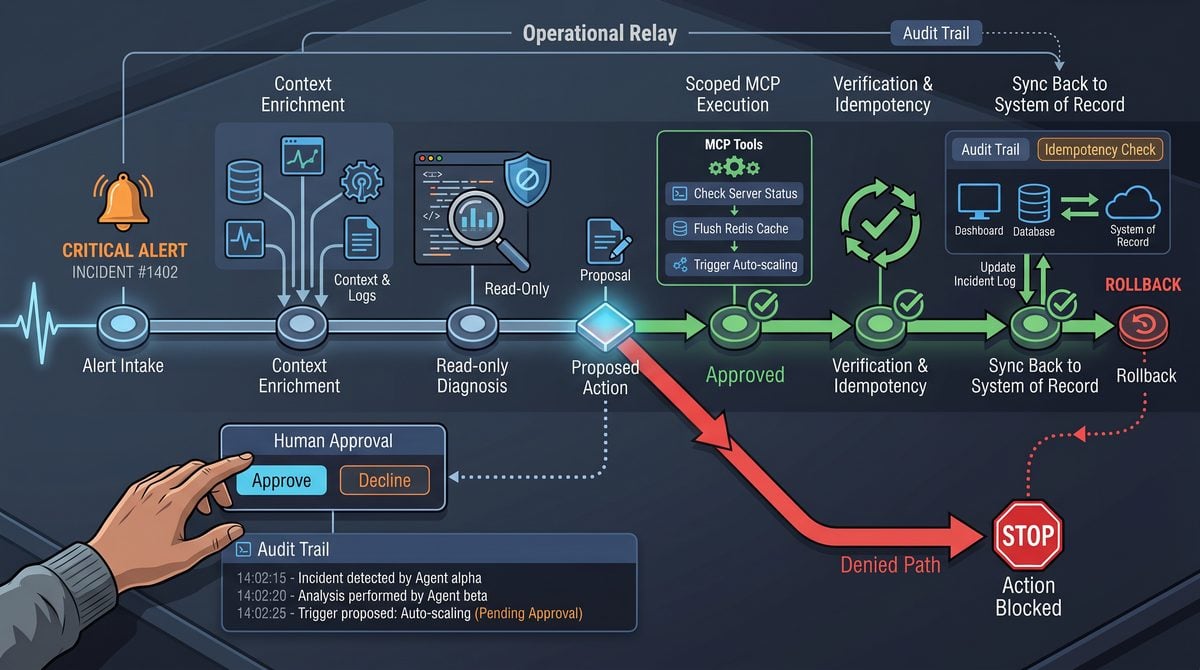
The Relay-style workflow for an internal operations dashboard connects a user-facing UI, an application-owned app-server, Codex runtime layers (codex exec and the official SDK), and a set of narrowly scoped MCP tools under a harness that enforces approvals, sandboxing, and streaming. The primary purpose of Relay is to present a sequence of deterministic, observable, and interruptible interactions: user intent → intent parsing → tool invocation proposals → approval gating → execution → confirmation and synchronization back to the system of record (SoR).
A typical Relay execution path includes these logical steps. First, the UI posts a user intent to the app-server along with session and tenant context. The app-server creates or advances a session and begins a streaming session with the Codex SDK so that partial outputs and actions can be emitted as events. The harness intercepts proposals for tool usage from codex exec, converts them into structured tool-call candidates, and enqueues them for human approval where required by policy. Once a candidate receives approval, a controlled runner executes the MCP tool in a sandboxed environment. Execution progress and any side effects are streamed back through the app-server to the UI and appended to the audit log. After successful execution, the app-server performs an idempotent synchronization step to update the SoR and emits a final confirmation event to the UI.
Illustrative event stream sequence
  // High-level event sequence (conceptual)
  1. UI -> app-server: { sessionId, user, tenant, intent }
  2. app-server -> Codex SDK: start session, include application-owned context
  3. Codex -> app-server: partial outputs, tool-call proposals (streamed)
  4. app-server/harness: convert proposals -> approval tasks (if policy)
  5. Human approver -> app-server: approve/reject
  6. app-server -> tool-runner: execute approved tool in sandbox
  7. tool-runner -> app-server: execution events, logs, artifacts (streamed)
  8. app-server -> SoR: idempotent apply, then emit audit event
  9. app-server -> UI: final status and transcript
Embedding streaming at every handoff ensures responsiveness and observability: the UI shows partial generation transcripts and tool call proposals as they appear; the harness produces discrete, timestamped approval tasks; and the execution runner streams stdout/stderr, structured output, and exit codes. This pattern makes it straightforward to cancel long-running runs, re-run with amended instructions, or replay a session from the audit log for debugging or compliance.
Within How to Embed Codex in an Internal Operations Dashboard with App-Server, MCP Tools, Streaming, and Human Approvals, the App-Server Session Lifecycle decision connects directly to OpenAI’s Codex Expansion Beyond Code: How the Desktop App Is Becoming a Universal Productivity Platform for Writers, Researchers, and Project Managers. That linked article specifically examines openAI’s Codex Expansion Beyond Code: How the Desktop App Is Becoming a Universal Productivity Platform for Writers, Researchers, and Project Managers, giving teams concrete background for applying the present article’s App-Server Session Lifecycle recommendations without duplicating this workflow’s scope.
Deployment Checklist
Use a checklist-driven deployment to ensure correctness across configuration, observability, and policy enforcement. The following checklist is operational and prescriptive; adapt the items to your environment and compliance posture.
| Area | Action | Validation |
|---|---|---|
| Configuration | Centralize secrets, API keys, tenant bindings, and feature flags in a secrets manager and CI environment. | Secrets rotated, no secrets in source, environment parity between staging and prod. |
| Identity & Access | Enforce least-privilege roles for app-server, tool runners, and human approvers. Use short-lived credentials for tool execution. | Role matrix verified, access reviews completed, and ephemeral credentials tested. |
| Streaming & Persistence | Provision durable event brokers for streamed events, with retention sufficient for replay. Ensure audit logs are write-once and tamper-evident. | Event replay verified from broker to app-server; audit integrity checks pass. |
| MCP Tools & Sandboxing | Deploy tool runners in constrained compute (cgroups, containers, or serverless) with network egress control and resource quotas. | Tool-level sandbox tests run, resource limits enforced under load. |
| Approvals | Define approval policies and integrate a lightweight human-approval UI that emits cryptographic signing of approval decisions where required. | Approval workflow exercised in staging, signatures logged in audit trail. |
| Monitoring | Instrument latency, error rates, token consumption, approval queue depth, and SoR synchronization failures. | Alerting thresholds configured and tested with simulated failures. |
| Rollback & Backups | Implement schema versioning and transactional rollback strategies for SoR updates. Back up audit logs off-cluster. | Rollback procedure rehearsed and backups restored in staging. |
Security Testing and Hardening
Security testing must cover the entire surface: model proposals, tool-runner isolation, approval integrity, streaming channels, and the SoR synchronization pathways. Focus tests on the most likely ways a malicious or erroneous model output could cause unintended changes.
- Threat modeling: catalog trust boundaries between UI, app-server, Codex runtime, harness, tool runners, human approvers, and SoR. Define acceptable failure modes for each boundary and mitigation strategies for privilege escalation and data exfiltration.
- Fuzz and adversarial testing: feed adversarial prompts and malformed tool proposals into the Codex layer and validate that the harness never auto-executes tools without approval, even if the model attempts to escalate privileges or exfiltrate credentials in generated tool arguments.
- Sandboxing validation: run tool runners under constrained identities, assert no outbound network access except to whitelisted endpoints, and ensure filesystem access is limited to ephemeral working directories. Use automated policy enforcement (e.g., eBPF or OS-level policies) to detect attempted escapes.
- Approval integrity: cryptographically sign approval events (for example, use asymmetric keys or HMACs) to prevent tampering and to enable post-hoc verification of who approved what and when. Include signatures and approver IDs in audit logs.
- Penetration testing and code reviews: include both whitebox reviews of harness and runner code and blackbox tests that simulate compromised model outputs and insider threats.
Cost Controls and Operational Limits
Streaming and tool execution can become costly if not bounded. Establish layered cost-controls to manage token usage, compute spend, and human approver time.
- Token and request quotas: enforce per-tenant and per-session limits on token consumption. Reject or throttle requests that exceed daily or monthly budgets, and provide informative error messages and dashboard metrics that explain why a request was blocked.
- Sampling and caching: for high-frequency intents that require similar outputs, consider caching Codex responses or using a small, deterministic parser to handle trivial operations without model calls. For audit and training data, sample streams rather than retaining every event at full fidelity.
- Bounded streaming and early-exit heuristics: allow the app-server to signal early truncation of the generation stream when a proposal is already acceptable or when resource budgets are hit. Surface a compact candidate instead of full transcript when appropriate.
- Approver queue management: limit the number of outstanding approvals per approver and offer automated fallback policies (e.g., escalation to a supervisor or delayed execution) to prevent approval queue growth from causing operational debt.
Troubleshooting and Debugging Patterns
When an execution fails or behaves unexpectedly, a structured debugging approach dramatically shortens mean time to resolution. Collect and correlate the right artifacts: session transcript, model proposal objects, approval decisions, tool-runner logs, SoR synchronization attempts, and brokered event traces.
- Reproduce deterministically: replay the session from the audit broker using the exact application-owned context and the same idempotency token. If the harness or model is non-deterministic, capture the seed and all input metadata to aid reproduction.
- Inspect proposal validation: confirm that the harness correctly parsed proposals and that the approval task contained the full, unaltered proposal. If the tool was executed despite a rejected approval, investigate signing and enforcement paths.
- Examine runner artifacts: collect stdout/stderr, exit codes, and sandbox resource limitations. Check for timeouts, OOM kills, or missing environment variables that could cause partial mutations.
- Idempotency and retry handling: verify idempotency tokens are honored by both the app-server and SoR. When retries create duplicate side effects, implement stronger deduplication at the SoR or introduce an explicit two-phase commit for high-risk operations.
- Monitor metrics: align alerts with top failure classes — tool-runner crashes, approval latency spikes, SoR sync errors, or broker lag. Use synthetic transactions that exercise approval and execution flows to detect regressions proactively.
Phased Rollout and Operational Readiness
A phased rollout minimizes blast radius and enables tuning of approvals, cost controls, and operator procedures before wide release. Use progressive exposure strategies and clearly defined success criteria at each phase.
- Internal alpha: limit to a small set of trusted operators and low-impact tools. Focus the alpha on observability: verify that streamed proposals, approval tasks, and audit entries are complete and accurate. Require manual intervention at every critical step.
- Internal beta: expand the user set and enable more productive tools while keeping strict per-tenant budgets and approval SLAs. Start collecting user feedback on approval UX, tooling ergonomics, and false-positive/false-negative behaviour from the harness.
- Canary production: route a small percentage of production traffic through the new pipeline. Monitor cost metrics, approval throughput, and SoR synchronization success. Prepare automated rollback playbooks if critical thresholds are exceeded.
- Full rollout: gradually increase traffic while keeping feature flags available for rapid disablement of any component. Confirm training material for approvers, runbooks for operators, and a schedule for rotating short-lived credentials.
Conclusion
Building a secure, observable, and cost-conscious internal operations dashboard around Codex requires careful orchestration between streamed model outputs, a robust app-server harness, narrowly scoped MCP tools, human approval gates, and resilient SoR synchronization. The Relay-style pattern delivers determinism and auditability by treating every model-proposed action as a candidate that must be validated, approved, and executed under constrained conditions.
Successful deployments prioritize strong sandboxing, cryptographically verifiable approvals, and layered cost controls; they also exercise replayability and synthetic testing to catch regressions. Use the deployment checklist, security testing approaches, and phased rollout strategy above to reduce risk and produce a reliable operational experience.
