
Epic vs Healthcare Public Data in ChatGPT and Codex: EHR Context, Public Evidence, Permissions, and HIPAA Boundaries


Two healthcare plugin paths, two different trust problems
OpenAI’s September 2026 healthcare plugin rollout separates a problem that healthcare teams often blur in practice: using AI to reason over an authorized patient chart is not the same operational activity as using AI to search public healthcare evidence. The Epic plugin and the Healthcare Public Data plugin may both appear inside ChatGPT and Codex workflows, but OpenAI describes them as separate paths with separate eligibility, setup, permissions, and privacy boundaries. That separation matters because the first path depends on patient-specific EHR authorization, while the second path depends on evidence retrieval from official public sources that must not receive protected health information.
The practical reason for two paths is straightforward: healthcare work routinely alternates between “what is true for this patient?” and “what does the public evidence or public administrative record say?” A clinician preparing for a visit may need medication history, recent labs, problem-list changes, and encounter context from an EHR. A research coordinator may need trial criteria from ClinicalTrials.gov, medication label language from DailyMed, or publication evidence from PubMed. A pharmacy team may need to verify a normalized drug concept through RxNorm or compare label warnings with formulary policy. Combining these needs into one undifferentiated connector would create avoidable privacy and governance risk, especially if patient identifiers were sent to systems intended only for public-source lookup.
OpenAI’s own framing reinforces this split. Healthcare Public Data is described as a read-only plugin for eligible ChatGPT for Clinicians users in the United States that searches nine public healthcare sources for research, clinical trials, medication information, Medicare data, and provider records. OpenAI states that it does not access patient charts. The Epic plugin, by contrast, is a separate read-only plugin for eligible ChatGPT for Healthcare and HIPAA-enabled Enterprise workspaces, and it can bring authorized patient information into ChatGPT only after administrator configuration, individual Epic sign-in, and enforcement of the user’s existing patient-chart permissions.
This article focuses on that selection decision rather than treating the plugins as interchangeable “healthcare search.” The right choice depends on whether the task requires identifiable patient context, public evidence, or a controlled combination where patient context remains inside an approved workspace and public-source queries are stripped of PHI. Clinicians, researchers, pharmacy teams, administrators, security leaders, and builders using Codex should treat the distinction as a design constraint, not a preference toggle. A workflow that starts with a patient chart has different legal, audit, access-control, and verification requirements from a workflow that starts with a public clinical-trial registry or medication database.
For ChatGPT for Healthcare, ChatGPT Health Launches: How OpenAI’s Medical Records Integration Changes Personal Healthcare in 2026 is the most relevant adjacent resource. The ChatGPT Health launch article examines medical-record integration and personal-health implications, providing background for the private clinical-context side of this comparison.
For Healthcare AI Data Sources, GPT-5.5 Prompts for Healthcare: Clinical Decision Support and Medical Research is the most relevant adjacent resource. The GPT-5.5 healthcare prompting guide shows how clinical support and medical-research questions differ, reinforcing the need to choose a patient record or a public evidence source deliberately.
The core distinction: patient-chart context versus public-source evidence
The Epic plugin is designed for authorized EHR context. OpenAI describes it as providing read-only access to authorized patient information, with existing patient-chart permissions enforced. In practical terms, the plugin’s value is not that it “knows medicine” in the abstract; its value is that it can help a permitted user review patient-specific chart information such as history, changes, and appointment-relevant context inside an approved deployment. Because the content may include PHI, OpenAI states that organizations must confirm an applicable Business Associate Agreement and approved workspace configuration before using Epic with protected health information.
The Healthcare Public Data plugin is designed for public-source evidence. OpenAI says it connects to nine official public sources, including ClinicalTrials.gov, CMS Coverage, RxNorm, DailyMed, and PubMed. Its intended use cases include comparing trial eligibility criteria, verifying medication label information and warnings, and combining research, trials, and Medicare coverage evidence for planning. Its boundary is equally important: OpenAI states that Healthcare Public Data is read-only, does not access patient charts, and must not receive protected health information. A team should not paste a patient name, date of birth, medical record number, member number, or similar identifier into a public-data query.
Both plugins are read-only, but “read-only” does not mean “same risk.” Read-only Epic access can still expose patient data to a user and to the approved healthcare workspace context, so it requires administrator setup, individual sign-in, and inherited chart permissions. Read-only public-data access may avoid EHR exposure, but it creates a different risk if users insert PHI into prompts directed at public sources. The correct control is therefore not merely preventing writes; it is routing the right kind of input to the right connector and blocking patient identifiers from public-source workflows.
| Decision point | Epic plugin | Healthcare Public Data plugin |
|---|---|---|
| Primary context | Authorized patient-chart information from Epic, according to OpenAI’s description. | Official public healthcare sources for research, trials, medications, Medicare data, and provider records. |
| Patient-chart access | Yes, when configured and when the user has existing chart permissions. | No. OpenAI states it does not access patient charts. |
| PHI handling | Requires an applicable BAA and approved HIPAA-enabled workspace configuration before use with PHI. | Must not receive PHI; a workspace BAA does not convert public providers into a PHI destination. |
| Availability described by OpenAI | Eligible ChatGPT for Healthcare and HIPAA-enabled Enterprise workspaces; not individual ChatGPT for Clinicians accounts. | Eligible ChatGPT for Clinicians users in the United States. |
| Administrative setup | Organization-specific configuration, plugin policy, individual Epic sign-in, and inherited EHR permissions. | Workspace or user eligibility and app/plugin enablement; installing the plugin does not automatically connect every app. |
| Operational fit | Visit preparation, chart review, patient-history summarization, and change identification by authorized users. | Evidence lookup, trial screening logic, medication-label verification, coverage research, and population-health planning without PHI. |
Why the separation is necessary for HIPAA-aware operations
Healthcare privacy rules and enterprise controls do not operate at the level of a generic “AI session.” They depend on who the user is, what data is being processed, what system receives the data, what agreements are in place, and whether the use is authorized for that workspace. OpenAI’s source materials state that ChatGPT for Healthcare includes role-based access, single sign-on, and audit logs, and that with an applicable Business Associate Agreement and approved configuration, customers can use ChatGPT Work, Codex, apps, and plugins in a HIPAA-compliant workspace. That statement should be read as a deployment condition, not as blanket permission to send PHI anywhere a plugin can search.
The highest-risk mistake is to treat public evidence retrieval as if it were covered by the same PHI pathway as an EHR connector. OpenAI explicitly warns not to send protected health information to public sources. This is not a cosmetic warning; it changes how prompts, automations, templates, and staff training must be designed. A safe public-data prompt might ask, “Summarize current DailyMed warnings for metformin extended-release and cite the label sections used.” An unsafe public-data prompt would include a named patient’s medication list, age, date of birth, medical record number, and diagnosis timeline, then ask the public plugin to evaluate eligibility or coverage.
The Epic path has the opposite failure mode: assuming that because the plugin can read authorized chart context, it can expand access or execute EHR actions. OpenAI describes Epic access as read-only and governed by existing patient-chart permissions. It cannot be treated as a way to update records, place orders, send patient messages, or bypass a user’s normal chart access. For administrators, that means deployment review should cover not only whether the connector is enabled, but also whether users understand that generated outputs remain drafts or decision support artifacts requiring professional verification and standard clinical workflows.
Operational rule: use the Epic plugin when the task requires authorized patient-specific chart context inside an approved healthcare workspace; use Healthcare Public Data when the task requires public evidence and can be performed without PHI. If a workflow needs both, separate the steps, remove patient identifiers from public-source queries, and require human verification before clinical, research, pharmacy, or administrative action.
How each stakeholder should frame the choice
Clinicians should begin with the clinical question. If the question is “What changed in this patient’s chart since the last visit?” the Epic plugin is the relevant path, assuming the clinician’s organization has configured it, the clinician signs in through Epic, and the patient chart is within that clinician’s existing permissions. If the question is “What does PubMed or DailyMed say about this intervention, label warning, or evidence base?” Healthcare Public Data is the relevant path, provided the prompt does not include PHI. Clinicians should verify AI-generated summaries against the chart, source documents, and local policy before acting.
Researchers should separate cohort or patient-screening logic from public eligibility research. Healthcare Public Data can help interpret public trial criteria from ClinicalTrials.gov or summarize publications from PubMed, but it should not receive identifiable subject data. If a research workflow needs to compare a real patient or participant against eligibility criteria, the PHI-containing step belongs in an approved, appropriately governed environment, and the public-source query should be reduced to non-identifying criteria extraction. The useful pattern is “retrieve public criteria first, then apply them inside the approved patient-data workflow,” not “paste identifiable data into a public-source search.”
Pharmacy teams should treat the public plugin as a source-verification assistant, not as a patient-specific prescribing system. OpenAI’s examples include verification of medication labels and warnings, which fits tasks such as checking DailyMed label language, resolving RxNorm concepts, or comparing medication information against public references. When the question turns into patient-specific medication reconciliation, renal dosing review, allergy evaluation, or adverse-event assessment, teams must rely on authorized clinical systems, patient-specific records, and pharmacist or clinician judgment. This article is operational education, not medical advice, and all medication-related outputs require verification against the underlying sources and local standards.
Administrators should map plugin enablement to governance artifacts. For Epic, that includes confirming the applicable BAA, approved workspace configuration, organization-specific FHIR/OAuth setup, plugin policy, individual Epic account connection, and alignment with existing chart-access controls. For Healthcare Public Data, that includes confirming eligibility, deciding which apps are enabled, educating users that no separate source-organization account is required where OpenAI says the public plugin supports access, and enforcing the rule that public-source prompts must not contain PHI. The administrative checklist should treat installation, access, and permitted data types as separate approvals.
Security and compliance leaders should focus on data routing, auditability, and exception handling. The Epic workflow needs controls around who can connect, what patient-chart permissions apply, how audit logs are reviewed, and what happens when a user asks for an action the read-only plugin cannot perform. The public-data workflow needs prompt templates, PHI-detection training, and clear escalation steps when a user needs to combine evidence with patient-specific information. Security teams should also account for Codex usage, because developers and analysts may build repeatable evidence workflows that call plugins; those workflows must preserve the same PHI boundary as interactive ChatGPT use.
Where Codex changes the operational question
Codex introduces a builder and automation dimension to the same decision. A developer might use Codex to draft scripts, create internal tools, or prepare repeatable workflows that query public healthcare sources, organize citations, or compare retrieved evidence against non-identifying criteria. That can be appropriate for Healthcare Public Data when the inputs remain public or de-identified according to the organization’s policy. The risk is that an automation can scale a bad routing decision: one unsafe template that includes patient identifiers in public-source prompts can repeat the error across many cases.
For Epic-connected workflows, Codex should be treated as operating inside the same approved workspace and permission boundary described by OpenAI, not as a separate route around EHR controls. If a supported deployment allows ChatGPT or Codex to work with authorized Epic context, the workflow still inherits read-only behavior and existing chart permissions. A developer should not design an agent or script that assumes it can write back to the chart, place orders, message patients, or access records beyond the connected user’s permissions. Human review is especially important where generated code, summaries, or analyses could influence clinical operations.
Recommended routing pattern for mixed workflows:

1. Define the question:
   - Patient-specific chart question → Epic path, if approved and authorized.
   - Public evidence question → Healthcare Public Data path, without PHI.

2. Strip identifiers before public-source lookup:
   - Remove names, dates of birth, MRNs, member IDs, addresses, phone numbers, and visit-specific identifiers.
   - Convert patient-specific facts into non-identifying clinical criteria only when permitted by policy.

3. Retrieve and cite public evidence:
   - Use the relevant public source, such as ClinicalTrials.gov, DailyMed, RxNorm, PubMed, or CMS Coverage.
   - Preserve source names, dates accessed if required by policy, and quoted criteria or label sections.

4. Apply evidence inside the governed workflow:
   - Bring public criteria back to the approved clinical, research, or pharmacy process.
   - Require clinician, pharmacist, researcher, or administrator verification before action.
The selection problem is therefore not “Epic versus public data” in the sense of one being better. It is a routing and governance problem. Epic is for authorized patient-chart context in an approved healthcare environment. Healthcare Public Data is for public evidence that must be queried without PHI. Mature deployments will need both, but they should be connected to different policies, different prompt patterns, different review steps, and different audit expectations.
Operational comparison: eligibility, setup, data flow, and authority
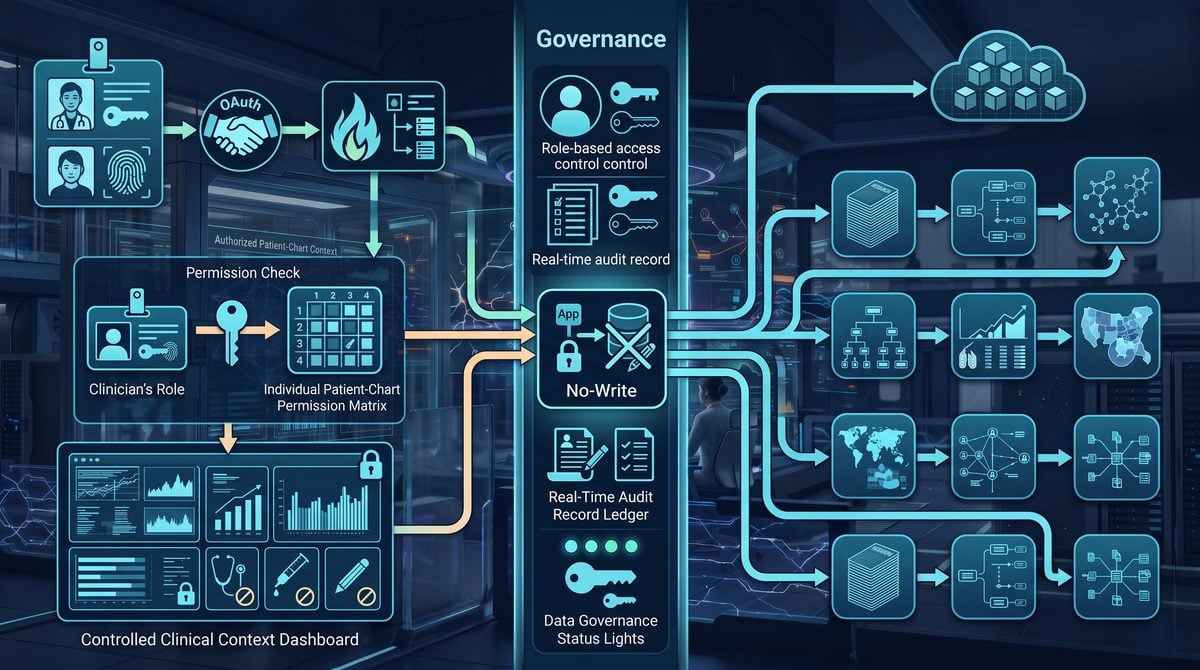
OpenAI describes the Epic plugin and Healthcare Public Data plugin as separate healthcare data paths, not two modes of the same connection. The practical consequence is that administrators should evaluate them with different control questions: Epic asks whether a specific workforce member may retrieve authorized patient-chart context inside an approved workspace, while Healthcare Public Data asks whether a user may query public healthcare sources without exposing protected health information. That distinction determines eligibility, setup effort, permitted inputs, audit expectations, and whether the output can be treated as patient-specific context or only as public evidence that still requires verification.
| Decision area | Epic plugin | Healthcare Public Data plugin |
|---|---|---|
| Primary purpose | Bring authorized EHR context into ChatGPT or Codex for patient-history review, change identification, and appointment preparation, according to OpenAI. | Search public healthcare sources for research, clinical trials, medication information, Medicare data, and provider records. |
| Eligibility | Available for approved ChatGPT for Healthcare and HIPAA-enabled Enterprise workspaces; not available to individual ChatGPT for Clinicians accounts. | Available to eligible ChatGPT for Clinicians users in the United States, with workspace and app access governed separately. |
| Data origin | Authorized Epic patient-chart information exposed through organization-specific configuration. | Nine official public-source apps; OpenAI examples include ClinicalTrials.gov, CMS Coverage, RxNorm, DailyMed, and PubMed. |
| PHI handling | May involve protected health information only when the organization has confirmed an applicable Business Associate Agreement and approved workspace configuration. | Must not receive PHI, including patient names, dates of birth, medical record numbers, member numbers, or other identifying patient details. |
| Permissions model | Inherits the clinician’s existing patient-chart permissions after individual Epic sign-in; it does not expand chart access. | Uses public sources and does not require source-organization accounts, but installing the plugin does not automatically enable or connect each app. |
| Write actions | Read-only; cannot update records, place orders, message patients, or otherwise perform chart actions. | Read-only; cannot modify public source records, submit trial data, change coverage records, or update medication references. |
| Audit posture | ChatGPT for Healthcare includes audit logs, role-based access, and single sign-on, according to OpenAI; organizations still need internal monitoring policies. | Auditability depends on the eligible ChatGPT or workspace context and plugin governance; public-source use should still be logged when it supports clinical, research, or operational decisions. |
Eligibility: individual public evidence access versus approved institutional EHR access
The eligibility split is the first operational gate. OpenAI says Healthcare Public Data is available to eligible ChatGPT for Clinicians users in the United States and can be used to search nine public healthcare sources. That makes it a better fit for evidence lookups, trial discovery, medication-label verification, coverage research, provider-record checks, and population-health planning where the prompt can be framed without patient identifiers. The user should still verify any cited evidence against the underlying source, because the plugin retrieves public material rather than creating a clinical determination.
Epic has a narrower institutional requirement. OpenAI says the Epic plugin is for eligible ChatGPT for Healthcare and HIPAA-enabled Enterprise workspaces, and the source notes explicitly state that it is not available to individual ChatGPT for Clinicians accounts. The reason is operational rather than cosmetic: an Epic connection depends on an approved workspace, administrator configuration, organization-specific FHIR/OAuth setup, plugin policy, individual Epic sign-in, and preexisting patient-chart permissions. A clinician who can use public data in ChatGPT does not thereby have a patient-chart connector.
For procurement teams, the decision rule is straightforward: if the workflow needs actual chart context, treat it as an institutional EHR integration project; if the workflow needs public evidence only, treat it as a governed public-data research capability. A workspace Business Associate Agreement alone does not convert public sources into PHI-authorized services, and access to a public-data app does not imply Epic access. Teams comparing deployment paths should document this distinction in their intake form before approving pilots, because the safest configuration for one path may be unsafe for the other.
Account setup and connection sequence
The Epic setup sequence contains more enterprise dependencies because the connector reaches into an EHR permission environment. Based on OpenAI’s help guidance, the organization must configure the plugin, establish the FHIR/OAuth connection for its Epic environment, set an appropriate plugin policy, and require each user to sign in with an Epic account. The user’s access is then constrained by existing patient-chart permissions, which means a physician, nurse, analyst, or administrator should not receive new chart rights merely because ChatGPT or Codex is available.
- Administrator approval: Confirm the workspace is an approved ChatGPT for Healthcare or HIPAA-enabled Enterprise environment and that the organization has the required contractual and configuration basis before any PHI use.
- Technical configuration: Configure the Epic plugin through the organization-specific FHIR/OAuth path and align it with the organization’s plugin policy.
- User connection: Require the clinician or authorized workforce member to sign in to Epic individually rather than relying on a shared or generic account.
- Permission validation: Test with users who have different chart scopes to verify that the plugin inherits existing access instead of broadening it.
- Operational monitoring: Use available audit logs and internal review procedures to detect unusual access patterns, unsupported requests, or prompt designs that attempt to exceed read-only use.
Healthcare Public Data has a different setup profile. OpenAI states that it uses public-source apps and does not require separate accounts with the source organizations, but plugin availability and app access are governed separately. Administrators should not assume that installing the plugin automatically enables or connects every app. A practical rollout should verify which of the nine public apps are enabled, which user groups may call them, whether ChatGPT and Codex have the same access policy, and whether any workspace policy restricts the use of public-source tools in temporary, saved, or shared workflows.
The account distinction matters in Codex as much as in ChatGPT. A developer may use Codex to draft scripts, test retrieval logic, summarize public evidence, or prepare analysis artifacts, but the data source still controls the compliance boundary. Codex connected only to Healthcare Public Data should not be given patient-specific prompt text, CSV exports containing identifiers, screenshots of charts, or synthetic-looking examples derived from a real patient unless the organization has independently determined that no PHI is present. Codex connected to Epic belongs inside the approved healthcare workspace and must remain bound to the same user, permission, and audit model as the clinical ChatGPT experience.
Data origin: chart context is not public evidence
Epic data originates from authorized patient charts. OpenAI’s release materials frame this as EHR context that can support patient-history review, identification of changes, and appointment preparation. That makes Epic useful when the workflow depends on medication history, encounter context, problem lists, notes, or other chart-derived information that the clinician is already permitted to access. It also means the output may be shaped by chart completeness, documentation conventions, local configuration, and the specific permissions of the signed-in user.
Healthcare Public Data originates from public sources rather than patient records. OpenAI identifies nine official public sources and gives examples including ClinicalTrials.gov for trial information, CMS Coverage for Medicare coverage information, RxNorm for normalized medication terminology, DailyMed for medication labels, and PubMed for biomedical literature. These sources can support a clinician, researcher, or operator who needs evidence, terminology, label language, coverage context, or provider-record information, but they do not answer the question, “What is true for this patient’s chart?” unless a human separately compares public evidence with authorized clinical data in the correct system.
Operational warning: Do not use Healthcare Public Data as a workaround for missing EHR access. If the prompt requires a patient name, date of birth, medical record number, member number, encounter identifier, insurance member detail, or chart excerpt, the prompt is not a public-data query and should not be sent to public-source apps.
A safe evidence workflow separates public retrieval from patient application. For example, a clinician may ask Healthcare Public Data to retrieve public label warnings from DailyMed and related biomedical literature from PubMed, then verify the retrieved material directly against the cited sources. If the clinician later applies that evidence to a patient, the patient-specific comparison should occur in the authorized clinical workflow, not by pasting PHI into the public-data plugin. This separation protects the patient privacy boundary and reduces the risk of mixing public evidence with unapproved patient disclosure.
PHI boundaries and HIPAA-aware deployment
OpenAI explicitly warns not to send protected health information to public sources. That warning is not limited to obvious identifiers such as full names or medical record numbers; teams should also treat dates of birth, member numbers, rare-disease narratives, appointment details, screenshots, and copied chart text as unsafe for public-data prompts unless privacy counsel and compliance policy have determined otherwise. A prompt like “Find trials for a 47-year-old woman with this exact genomic report and ZIP code” can become identifying even without a name, so prompt templates should be reviewed before clinical deployment.
Epic’s PHI boundary is different but not automatic. OpenAI says customers can use ChatGPT Work, Codex, apps, and plugins in a HIPAA-compliant workspace with an applicable Business Associate Agreement and approved configuration. That statement should be operationalized as a checklist, not treated as a blanket permission. Before using Epic with PHI, the organization should confirm the workspace type, BAA status, plugin approval, SSO or identity posture, audit-log review process, retention settings, user training, and incident-response escalation path.
For administrators building a policy matrix, the conservative rule is: public-source tools are for de-identified or non-patient-specific evidence questions; Epic is for authorized patient-chart context inside an approved healthcare workspace. If a user wants to combine both, the workflow should use public data to gather evidence without PHI, then use Epic only where the signed-in user has legitimate chart access. The model should not be used as a place to merge uncontrolled patient exports with public research results unless the organization has approved that exact data flow.
Read-only behavior and unavailable actions
Both plugins should be understood as read-only, but read-only means different things in each environment. For Epic, read-only means the plugin can retrieve authorized patient information but cannot update the medical record, place orders, send patient messages, write notes, change medications, schedule visits, or perform other EHR actions. This matters for clinical safety because a generated plan, draft summary, or suggested next step is not an executed clinical action and should not be treated as one.
For Healthcare Public Data, read-only means the plugin searches and retrieves public-source information but does not modify the underlying public records. It cannot enroll a patient in a trial, change a ClinicalTrials.gov record, edit a DailyMed label, alter RxNorm terminology, update Medicare coverage information, or correct provider records. If a public source appears outdated or inconsistent, the appropriate response is to verify against the source’s official page and follow the source organization’s correction process, not to assume the plugin can repair the record.
Clinicians and operators should therefore design prompts around retrieval, comparison, summarization, and checklist generation rather than action execution. A safe Epic prompt asks for a concise review of authorized chart changes before an appointment and asks the clinician to verify the cited chart sections. A safe public-data prompt asks for evidence from specified public sources and requests source names, publication details, label sections, or coverage references for verification. An unsafe prompt asks either plugin to “send the patient a message,” “update the medication list,” “place the order,” or “document this in the chart.”
Permissions, FHIR/OAuth, and source accounts
Epic permissions are user-specific and chart-specific. OpenAI says the plugin enforces existing patient-chart permissions after individual Epic sign-in, which means administrators should test it with realistic roles rather than only with superusers. A physician with access to one patient panel, a covering clinician with time-limited access, and an analyst without direct care privileges may have materially different access outcomes. The FHIR/OAuth setup should preserve those differences and should be reviewed whenever the organization changes Epic roles, break-glass policy, or workspace plugin assignments.
Healthcare Public Data does not require separate accounts with the source organizations, which simplifies user setup but removes an important misconception: public-data access is not the same as authenticated participation in those source systems. A user can retrieve information from a public source without having a ClinicalTrials.gov sponsor account, a PubMed publisher role, or a CMS administrative role. That design supports evidence discovery, but it does not grant submission, editing, enrollment, attestation, or official communication privileges.
Plugin availability and app access are also separate controls. An enterprise administrator may allow the Healthcare Public Data plugin but restrict specific apps, user groups, or contexts according to workspace policy. Similarly, an Epic plugin may be configured for the organization but unavailable to a particular user who lacks Epic sign-in, chart permissions, or workspace authorization. A deployment runbook should therefore contain two checks for every support ticket: whether the plugin is enabled at the workspace level, and whether the specific app, account, or chart permission is available to the user.
Auditability and accountability
OpenAI says ChatGPT for Healthcare includes role-based access, single sign-on, and audit logs. Those controls are most relevant to Epic because Epic use may involve PHI and patient-specific chart retrieval. Administrators should define what events are reviewed, who reviews them, how long alerts are retained, and how suspicious use is escalated. Examples include repeated attempts to access patients outside a user’s panel, prompts requesting unavailable actions, or attempts to paste chart context into public-data tools.
Healthcare Public Data should still be auditable when used for clinical operations, research workflows, reimbursement analysis, or product decisions. Even without PHI, public evidence can influence decisions about trial screening, medication-information review, coverage analysis, provider directories, or population-health planning. Teams should preserve the prompt, sources queried, citations returned, date of retrieval, user, and verification notes when the output supports a consequential decision. The audit question is not only “Was PHI exposed?” but also “Which public evidence was relied on, and was it checked against the underlying source?”
A practical governance pattern is to require source-grounded output for both plugins. Epic outputs should point the clinician back to chart locations or retrieved chart context that the clinician can verify in the EHR. Public-data outputs should name the public source and provide enough detail for direct verification in ClinicalTrials.gov, CMS Coverage, RxNorm, DailyMed, PubMed, or another enabled public app. When a response lacks verifiable grounding, the safest action is to ask for source references or repeat the search with narrower source targeting before acting on the result.
Deployment fit by team type
Clinicians generally need Epic when they are preparing for a patient encounter, reviewing interval changes, or summarizing authorized chart context. They need Healthcare Public Data when they are checking external evidence, medication labels, trial criteria, coverage context, or literature. The boundary is not the clinician’s identity; it is the data in the prompt. A clinician can misuse a public plugin by entering PHI, and a non-clinician can be properly excluded from Epic if they lack patient-chart permissions.
Researchers and clinical-trial teams should prefer Healthcare Public Data for initial public trial discovery, eligibility-language comparison, publication review, and medication-reference checks that do not include identifiable patient details. If they need to compare public criteria against actual patients, that comparison must occur through approved clinical or research systems with the required permissions, consent posture, and privacy review. OpenAI’s public-data examples support trial-eligibility comparison, but the safe implementation is to compare public criteria against appropriately governed data rather than pasting patient identifiers into public apps.
For Epic EHR AI Integration, Understanding ChatGPT Health: How to Connect Apple Health and Medical Records for AI-Powered Wellness Insights is the most relevant adjacent resource. The Apple Health and medical-records guide explores how authorized personal health information enters AI workflows, offering an adjacent comparison to organization-managed Epic access.
Recommended routing rule for support desks and workflow builders:

IF the request contains patient identifiers, chart excerpts, encounter details, or a need to summarize a specific patient's record:
    Route to the approved Epic workflow only if the user has workspace authorization, Epic sign-in, and chart permission.
    Do not route to Healthcare Public Data.

ELSE IF the request asks for trials, medication labels, literature, Medicare coverage, provider records, or other public evidence:
    Route to Healthcare Public Data if the relevant public app is enabled.
    Require verification against the underlying source before operational use.

ELSE IF the request asks to place an order, send a message, update a record, enroll a patient, or change a public record:
    Reject as unsupported by these read-only plugins.
    Direct the user to the appropriate EHR, trial, administrative, or source-system workflow.
Founders and operators should avoid packaging either plugin as autonomous clinical infrastructure. The Epic plugin supplies authorized context but does not execute care actions, and Healthcare Public Data supplies public evidence but does not create patient-specific medical advice. Product requirements should specify human review, source verification, unsupported-action handling, PHI routing, and audit retention before any pilot. A demo that works with synthetic examples is not sufficient evidence that the production workflow respects chart permissions, public-source boundaries, and HIPAA obligations.
Workflow routing: what belongs in the chart, what belongs in public evidence

The safest operational pattern is to route each task by data type before anyone opens a plugin. If the task depends on a specific patient’s chart, recent encounters, medication history, allergies, problem list, notes, or longitudinal record, it belongs in the Epic plugin inside an approved ChatGPT for Healthcare or HIPAA-enabled Enterprise workspace, subject to administrator configuration, individual Epic sign-in, and the user’s existing patient-chart permissions. If the task depends on public medical evidence, trial listings, medication labels, CMS coverage information, Medicare data, or provider records, it belongs in Healthcare Public Data, which OpenAI describes as a read-only set of nine public-source apps that does not access patient charts.
For Clinical AI Workflow Design, The Enterprise Guide to GPT-5.5 Instant for Healthcare: Clinical Applications, Safety Protocols, and Implementation Strategies is the most relevant adjacent resource. The enterprise healthcare guide covers clinical applications, safety protocols, and implementation strategy, helping teams place Epic and public-data tools inside a governed workflow rather than treating either as a standalone answer engine.
Operational rule: use Epic to summarize or interrogate authorized patient-specific chart context; use Healthcare Public Data to retrieve public evidence without identifiers; combine the outputs only in a human-reviewed clinical or administrative workflow where the public query was formulated without PHI and the chart review remains inside the approved workspace.
Decision matrix for common healthcare workflows
| Workflow | Primary plugin | Why this route fits | Data that must stay out | Human verification step |
|---|---|---|---|---|
| Patient-history review | Epic | The task depends on authorized EHR context such as encounters, problems, medications, allergies, notes, and timeline details. | Do not move chart excerpts into Healthcare Public Data. | Clinician verifies the summary against the underlying chart before relying on it. |
| Change detection since a prior visit | Epic | OpenAI describes Epic use cases including identifying changes and preparing for appointments from read-only chart context. | Do not send patient-specific dates, lab values, diagnoses, or identifiers to public sources. | Reviewer checks each detected change against chart sections and source timestamps. |
| Visit preparation | Epic, with optional public evidence in a separate step | Chart context supports patient-specific preparation; public sources can support generic guideline, trial, label, or coverage research when queried without PHI. | No patient identity, MRN, DOB, appointment time, or chart narrative in public queries. | Clinician separates chart-derived issues from public evidence and documents only verified conclusions. |
| Medication-label verification | Healthcare Public Data | OpenAI cites RxNorm and DailyMed among public sources and gives medication label and warning verification as an example. | No patient medication list, allergy list, renal function, pregnancy status, or personal history in the public prompt. | Clinician or pharmacist compares the retrieved label text with the patient chart in the approved system. |
| Clinical trial search | Healthcare Public Data, with Epic used only to review eligibility facts separately | ClinicalTrials.gov is a public source; trial discovery can be performed from diagnosis and eligibility concepts without identifiers. | No names, dates of birth, MRNs, exact appointment data, rare identifiable histories, or copied chart notes. | Research staff verifies trial status, criteria, location, and patient-specific eligibility through approved processes. |
| Coverage research | Healthcare Public Data | OpenAI identifies CMS Coverage as a public source for coverage evidence and Medicare-related research. | No member number, subscriber information, claim identifiers, or patient-specific benefit details. | Billing, utilization management, or clinical staff confirm applicability with payer-specific policy and current documentation. |
| Facility comparison | Healthcare Public Data | Facility and Medicare data are public-record tasks, not chart-access tasks, when performed at the organization, geography, or service-line level. | No referral notes, patient address, discharge plan, or identifiable care-transition details. | Operations team validates public records against current facility websites, contracts, and internal network status. |
| Provider identification | Healthcare Public Data | Provider records are public-source material; the task can identify clinicians or organizations by specialty, geography, or public record attributes. | No patient referral reason tied to an identifiable individual, member ID, or chart-derived narrative. | Care team confirms availability, network status, credentials, and patient preference through approved channels. |
Patient-history review: keep the prompt inside the EHR boundary
A patient-history review should start with the Epic plugin only when the organization has approved the integration and the clinician has already connected an Epic account with the necessary chart permissions. A useful instruction is specific about the clinical purpose and the time horizon, for example asking for a read-only summary of major diagnoses, recent encounters, current medications, allergies, and unresolved follow-ups relevant to tomorrow’s appointment. The user should ask the system to cite or point back to chart locations where possible, then verify the summary in the EHR before using it in care planning.
Example — Epic-only prompt for authorized chart context:
Summarize the patient history relevant to the upcoming cardiology follow-up. Focus on active problems, recent encounters, medication changes, allergies, pending tests, and unresolved follow-up items. Do not draft orders, messages, or treatment decisions. Organize the output as chart-derived observations that I must verify in Epic.
This workflow should not call Healthcare Public Data because the user is asking about a specific patient. If the clinician later needs public evidence about a medication label, trial concept, or coverage question, that should become a separate public-data query stripped of identifiers and chart narrative. The separation reduces the risk that a convenient research step becomes an improper PHI disclosure.
Change detection and visit preparation: separate patient deltas from evidence lookups
Change detection is one of the clearest Epic-centered workflows because the question is comparative: what has changed since the last visit, discharge, referral, or care-plan review? The plugin’s value is not that it makes a clinical judgment automatically, but that it can help organize read-only chart context for human review. A safe output format is a table with columns for “possible change,” “chart source,” “date or encounter,” and “verification needed.” That format helps clinicians avoid treating generated summaries as a substitute for the record.
Visit preparation can benefit from both plugin families, but only if the steps are staged. First, use Epic to identify chart-specific issues: recent medication changes, pending results, active referrals, or questions raised in prior notes. Second, if a public evidence question arises, rewrite it without identifiers. For example, instead of asking a public source about “this 72-year-old patient from Dr. Smith’s clinic with the following chart history,” ask a general evidence question such as, “Find current public medication label information for drug X and summarize warnings that clinicians commonly verify before prescribing.” The clinician then compares that public evidence with the patient chart inside the approved clinical workflow.
Medication-label verification: public label first, patient application second
Medication-label verification is a Healthcare Public Data workflow when the task is to inspect public drug identifiers, labels, warnings, or terminology. OpenAI identifies RxNorm and DailyMed as included public sources, and its examples include verification of medication labels and warnings. The prompt should name the medication or ingredient and request source-grounded output, but it should not include the patient’s medication list, allergy list, lab values, pregnancy status, diagnoses, or adverse-event history.
Example — Healthcare Public Data prompt without PHI:
Using the available public medication sources, verify the current label information for [medication name or ingredient]. Summarize labeled warnings, contraindications, and terminology mappings that a clinician or pharmacist should check against the patient chart. Include the public source names used and note any uncertainty.
The second step belongs to the clinician, pharmacist, or approved care team member. They compare the public label information with the patient’s chart inside Epic or the organization’s approved systems. This article is educational and operational, not medical advice; medication decisions require professional review of the current label, the full patient record, institutional policy, and applicable clinical standards.
Trial search: use public criteria, then verify eligibility under approved processes
Clinical trial search is a natural fit for Healthcare Public Data because ClinicalTrials.gov is a public source and OpenAI explicitly cites trial-eligibility comparison as an example. The privacy hazard is that trial matching often tempts users to paste detailed patient histories into a public query. A safer workflow abstracts the research question: condition, intervention class, age range if non-identifying, geography at a broad level, and high-level inclusion or exclusion concepts. Avoid names, exact dates, rare combinations that could identify the patient, or copied chart text.
When both plugins are useful, run the chart review and the trial search as separate tasks. Epic can help an authorized clinician or research coordinator identify candidate facts in the chart, such as diagnosis category or prior treatment exposure, subject to permissions. Healthcare Public Data can then search public trial records using a de-identified eligibility profile. The combined decision should happen outside the public prompt: staff verify trial status, site availability, eligibility criteria, consent requirements, and patient-specific facts through approved research and clinical processes.
Coverage research, facility comparison, and provider identification: public operations with private follow-through
Coverage research should usually begin with Healthcare Public Data because CMS Coverage and Medicare-related sources are public evidence domains. A compliant prompt asks for public policy language, coverage criteria, documentation themes, or population-level planning evidence. It should not include a patient’s member number, claim identifier, subscriber information, or a chart-derived narrative. The output is not a benefits determination; it is research material that billing, utilization management, or clinical teams must verify against the current payer, plan, and case-specific documentation.
Facility comparison is also public-first when the task concerns facility records, service availability, Medicare data, or operational benchmarking from public sources. The prompt can compare facilities by geography, service category, public quality fields available through the plugin, or Medicare-related records. It should not include a patient’s address, discharge plan, family contacts, or referral note. If the comparison is for an individual discharge or referral, the care team should perform the patient-specific step inside approved systems and document the final decision under organizational policy.
For Healthcare Data Privacy, OpenAI’s Healthcare Gambit: Privacy, Trust, and the Future of AI-Powered Personal Medicine is the most relevant adjacent resource. The healthcare privacy analysis examines trust, sensitive-data exposure, and personal-medicine risks, adding context to the strict separation between protected chart data and public-source searches.
Where both plugins fit without improper data mixing
The highest-value workflows often use both plugin families, but not in a single blended prompt that sends chart facts into public data. In a pre-visit oncology planning scenario, an authorized clinician might use Epic to summarize recent treatment history and unresolved questions, then separately use Healthcare Public Data to search public trial records for a condition and treatment category without identifiers. The clinician compares the two outputs manually, verifies trial criteria, and records any appropriate next steps through approved clinical workflows.
In a medication safety scenario, a pharmacist might use Healthcare Public Data to retrieve DailyMed label warnings for a drug and RxNorm terminology mappings, then use Epic to inspect the patient’s actual medication list, allergies, and relevant chart context. The public query contains only the medication name or ingredient; the patient-specific assessment stays in the EHR-connected workspace. The resulting recommendation, if any, should be reviewed under institutional medication-management procedures and should not be treated as an automated prescribing action.
In a coverage and care-navigation scenario, an operations team might ask Healthcare Public Data for CMS coverage material or Medicare facility information, while an authorized care team member separately uses Epic to understand a patient’s documented care needs. The team should not paste the patient’s chart into the public coverage prompt. Instead, it should convert the public-data result into a checklist of documentation elements that a qualified staff member verifies against the chart and payer requirements.
Codex workflow design: useful for process artifacts, not unsupervised clinical decisions
Codex can be useful when the organization wants repeatable workflow artifacts: prompt templates, validation checklists, source-citation requirements, de-identification checks, test cases for internal tooling, or pull requests that improve an approved clinical operations application. The same separation rules apply. A Codex task that calls Healthcare Public Data should be treated as a public-evidence workflow and must not include PHI. A Codex task that uses Epic requires the approved HIPAA-enabled configuration, administrator setup, individual sign-in, and existing chart permissions, and it remains read-only with respect to the EHR.
A practical control is to encode “source class” at the top of every reusable workflow: Epic chart context, public healthcare evidence, or combined with separated stages. Each workflow should define allowed inputs, prohibited inputs, required verification, and the human owner who signs off. That design mirrors OpenAI’s broader AI-native workflow pattern of reusable skills, persistent context where appropriate, tool-enabled execution, tests, and human review, while preserving clinical accountability and privacy boundaries.
Governance blueprint for an Epic-enabled ChatGPT deployment
Administrators should treat the Epic plugin as an institutional integration, not as an individual productivity add-on. OpenAI describes Epic access as available only for approved ChatGPT for Healthcare and HIPAA-enabled Enterprise workspaces, with read-only access to authorized patient information after administrator configuration, individual Epic sign-in, and enforcement of existing patient-chart permissions. That sequence matters: workspace eligibility and policy come first, identity and OAuth connection come second, and chart access remains governed by the health system’s existing EHR authorization model.
The Healthcare Public Data plugin should be governed separately because it searches public sources and, according to OpenAI, does not access patient charts. A workspace BAA or enterprise contract should not be interpreted as permission to paste patient names, dates of birth, medical record numbers, member IDs, appointment details, or free-text chart excerpts into public-source lookups. The operating rule is simple: Epic-connected workflows may use approved EHR context inside the approved workspace; public evidence workflows must use de-identified, non-PHI questions and must be verified against the cited source records.
Operational warning: Do not use Healthcare Public Data as a workaround for EHR access. If a workflow depends on a specific patient’s chart, route it through the approved Epic integration and the organization’s clinical access controls. If a workflow depends on PubMed, ClinicalTrials.gov, RxNorm, DailyMed, CMS Coverage, Medicare, or provider-record evidence, keep the query free of PHI and validate the output against the underlying public source.
Administrator prerequisites before enabling Epic
The first administrative decision is whether the workspace, use case, and users are eligible. OpenAI’s healthcare materials state that ChatGPT for Healthcare includes role-based access, single sign-on, and audit logs, and that customers can use ChatGPT Work, Codex, apps, and plugins in a HIPAA-compliant workspace when there is an applicable Business Associate Agreement and approved configuration. Administrators should document the specific workspace, user groups, plugin policy, intended use cases, and whether protected health information will be processed before any production connection is attempted.
| Prerequisite | Governance question | Required action |
|---|---|---|
| Workspace eligibility | Is this an approved ChatGPT for Healthcare or HIPAA-enabled Enterprise workspace? | Confirm eligibility with the account owner and retain the approval record with the deployment documentation. |
| BAA and configuration | Does the organization have an applicable Business Associate Agreement and approved workspace configuration for PHI? | Legal, compliance, security, and clinical operations should approve the use case before production use. |
| Plugin policy | Which users or groups may use the Epic plugin, Healthcare Public Data, or both? | Separate Epic access from public-source access so PHI-handling rules can be enforced and audited. |
| Identity | How will workforce identity, SSO, and role-based access be mapped into the workspace? | Align workspace roles with existing job functions and remove access when employment, department, or privileges change. |
| Clinical sign-off | Which outputs may inform workflow, and which require independent clinician verification? | Write review rules that require verification in the source chart or public source before clinical action. |
FHIR base URL, OAuth, and read-scope planning
Epic setup requires organization-specific FHIR and OAuth configuration. At a minimum, administrators should know the correct FHIR base URL for the environment being connected, the OAuth client configuration required by the organization’s Epic deployment, and the redirect or authorization flow requirements supplied through the official integration process. These details should be handled as production integration assets, not copied into tickets or prompts. Test and production environments should be clearly separated so pilot users do not accidentally validate workflows against the wrong chart context.
Read scopes should be planned at the category level before implementation teams discuss exact configuration values. Common read-only planning categories may include patient demographics, encounters, medications, allergies, problems, observations or laboratory results, procedures, immunizations, documents, or notes, depending on the organization’s approved use case and Epic configuration. The governance decision is not “enable everything because it is read-only”; it is “grant the minimum chart categories needed for the defined workflow, then confirm that existing patient-chart permissions still determine which records each signed-in user can retrieve.”
OAuth consent and individual sign-in are central controls. OpenAI’s Epic help material describes individual Epic sign-in as required, which means a shared service identity should not be treated as the normal clinical-user pattern for patient-context retrieval. Each clinician or authorized workforce user should connect their own Epic account through the approved flow, and the organization should make clear that ChatGPT does not expand the user’s underlying EHR privileges. If the user cannot see a patient or chart element in Epic under existing policy, the integration should not be expected to make it available.
Recommended pre-production validation sequence:
1. Confirm approved workspace, BAA status, and plugin eligibility.
2. Verify the correct FHIR base URL and OAuth configuration for the target environment.
3. Enable the Epic plugin only for a pilot group with documented clinical roles.
4. Have each pilot user complete individual Epic sign-in.
5. Test read-only retrieval only for patients and chart areas the user is already authorized to view.
6. Confirm attempts outside the user’s chart permissions do not return unauthorized context.
7. Review logs, support workflows, and incident procedures before expanding access.
RBAC, chart permissions, and least-privilege operations
Role-based access control should be layered rather than collapsed into a single “healthcare AI access” group. Workspace RBAC governs who can use ChatGPT features, plugin policy governs which apps are available, Epic identity governs the EHR connection, and existing chart permissions govern the patient records available to the signed-in user. Administrators should document these layers because access reviews become ambiguous when a user can open ChatGPT, use Codex, access public evidence, and connect Epic under different policy surfaces.
Least privilege should be applied to people, apps, and workflows. A population-health analyst who needs public Medicare, provider, coverage, or literature evidence may not need Epic access. A clinician preparing for a visit may need Epic read access but should not paste chart excerpts into Healthcare Public Data. A developer using Codex to prepare operational scripts or integration documentation may need repository permissions but should not receive production patient context unless the organization has explicitly approved that use in the HIPAA-enabled workspace and the underlying access is necessary.
Access reviews should include terminated users, users who changed departments, temporary staff, contractors, and clinicians whose privileges changed. The review should compare identity-provider groups, ChatGPT workspace membership, plugin access, Epic account status, and EHR role assignments. A clean review produces an exception list with owners and deadlines; an unsafe review merely confirms that “the tool is read-only” without checking whether the person still needs the chart context.
For HIPAA Compliant ChatGPT Deployment, How to Build Enterprise Data Loss Prevention Policies for ChatGPT and Codex: Complete Implementation Guide is the most relevant adjacent resource. The enterprise DLP implementation guide details controls for sensitive prompts and connected services, complementing the BAA, RBAC, audit, and eligible-functionality checks required for regulated healthcare deployment.
BAA boundaries and eligible-functionality controls
OpenAI explicitly warns organizations not to send protected health information to public sources and requires confirmation of an applicable Business Associate Agreement and approved workspace configuration before using Epic with PHI. Administrators should translate that into a written routing policy. If the prompt contains identifiable patient data or chart-derived details, it belongs only in approved HIPAA-configured functionality. If the prompt goes to Healthcare Public Data, it should be formulated as a public evidence question without patient identifiers or private chart facts.
| Scenario | Allowed route | Control to document |
|---|---|---|
| Visit preparation using a specific patient’s recent history | Approved Epic plugin workflow in the eligible workspace | Individual Epic sign-in, existing chart permission, clinician verification in the chart |
| Medication label or warning lookup without patient identifiers | Healthcare Public Data, such as DailyMed or RxNorm where available | No PHI in the prompt; verify against the cited public source |
| Clinical trial criteria exploration for a general condition | Healthcare Public Data using non-identifying criteria | Do not include patient name, date of birth, MRN, or unique clinical narrative |
| Code or workflow automation involving operational artifacts | Codex in the approved workspace if the organization permits the use case | Repository permissions, test requirements, human review, and no unauthorized PHI exposure |
Eligible functionality should be listed in the deployment record rather than assumed from the workspace name. The record should state whether ChatGPT, Codex, apps, plugins, file handling, or other features are approved for PHI under the organization’s configuration. If a function is not approved, users should be trained to treat it as non-PHI even when they are inside an enterprise workspace. This prevents the common failure mode where a compliant core workspace is used correctly, but an adjacent app, connector, or export path is used without approval.
Logs, audit review, and retention decisions
OpenAI states that ChatGPT for Healthcare includes audit logs, and Epic deployments also operate inside the organization’s EHR audit and identity environment. Administrators should decide in advance which logs answer which questions: workspace logs may help identify user activity in ChatGPT, EHR logs may help identify chart access, identity logs may show authentication events, and ticketing or security logs may document incident handling. No team should assume that one log source alone provides a complete clinical, privacy, and security narrative.
Retention policies should be aligned with legal, compliance, clinical, and security obligations before go-live. The organization should decide how long audit logs, administrative approvals, access-review artifacts, training attestations, incident records, and pilot evaluation notes are retained. If conversations, prompts, outputs, or saved artifacts are retained under workspace settings, users need clear instructions about what may be saved, what must be copied back to the system of record, and what should be discarded after verification. Do not rely on informal user memory for retention boundaries.
Audit review should be practical enough to run repeatedly. A useful monthly review might sample Epic plugin users, verify that they remain in approved roles, check whether public-data prompts were used without PHI, compare access against department rosters, and review any reports of inaccurate, incomplete, or unverifiable outputs. A high-risk review should be triggered by employment termination delays, suspected credential compromise, unusual chart-access patterns, patient complaint, or evidence that users are pasting PHI into public-source workflows.
Rollout checklist for administrators and clinical operators
- Define approved use cases. Separate patient-chart workflows, public-evidence workflows, and developer or operations workflows so each has a data boundary and owner.
- Confirm contract and workspace status. Verify the applicable BAA, HIPAA-enabled or ChatGPT for Healthcare configuration, and the specific functionality approved for PHI.
- Configure identity and RBAC. Map identity-provider groups, workspace roles, plugin access, and offboarding procedures to existing workforce processes.
- Prepare Epic integration details. Validate the FHIR base URL, OAuth prerequisites, environment separation, and read-scope categories through the official implementation path.
- Require individual Epic sign-in. Instruct users that their own Epic account and existing chart permissions determine available patient context.
- Limit public-data use to non-PHI prompts. Train users that Healthcare Public Data searches public sources and must not receive identifiable patient information.
- Write verification rules. Require clinicians and analysts to verify outputs against the source chart, public evidence record, policy, or coverage source before action.
- Validate read-only expectations. Confirm users understand that the Epic plugin cannot update records, place orders, message patients, or expand chart access.
- Test logging and escalation. Run a tabletop incident involving mistaken PHI entry, incorrect output, access mismatch, and urgent plugin disablement.
- Start with a monitored pilot. Expand only after reviewing access, workflow value, user training completion, log visibility, and exception handling.
Conclusion: govern the boundary, not just the tool
The safe deployment pattern is to keep Epic, Healthcare Public Data, and Codex in their proper lanes. Epic supplies read-only, permission-bound chart context for authorized users in approved healthcare workspaces. Healthcare Public Data supplies read-only public evidence and must not receive PHI. Codex can help with process artifacts, code, tests, and operational automation, but it should not be allowed to bypass clinical review, repository permissions, or privacy rules. The administrator’s job is to make those lanes visible in configuration, training, logs, and escalation procedures.
A strong rollout does not promise that AI output is final, complete, or clinically sufficient. It gives users a faster way to assemble chart context or public evidence while preserving the duties that already exist in healthcare operations: verify against the record, apply professional judgment, document in the system of record when appropriate, and protect patient information according to approved policy. If a proposed workflow cannot identify its data source, permission model, verification step, and retention rule, it is not ready for production.
Access 40,000+ AI Prompts for ChatGPT, Claude & Codex — Free!
Subscribe to get instant access to our complete Notion Prompt Library — the largest curated collection of prompts for ChatGPT, Claude, OpenAI Codex, and other leading AI models. Optimized for real-world workflows across coding, research, content creation, and business.
Useful Links
- OpenAI product release notes — official release-note source for healthcare plugin availability and related ChatGPT updates.
- OpenAI: healthcare organizations can connect EHR and industry data to ChatGPT — overview of Epic context, Healthcare Public Data, and healthcare workspace positioning.
- OpenAI Help: Using Healthcare Public Data in ChatGPT and Codex — official guidance for public-source healthcare research workflows and PHI restrictions.
- OpenAI Help: Using the Epic plugin with ChatGPT and Codex — official guidance for Epic setup, individual sign-in, read-only behavior, and chart-permission boundaries.
- OpenAI Help: ChatGPT for Healthcare — official workspace information, including role-based access, single sign-on, audit logs, and HIPAA-related configuration context.
