
ChatGPT Enterprise Deployment Playbook: How to Roll Out AI Across Your Organization Without Losing Control
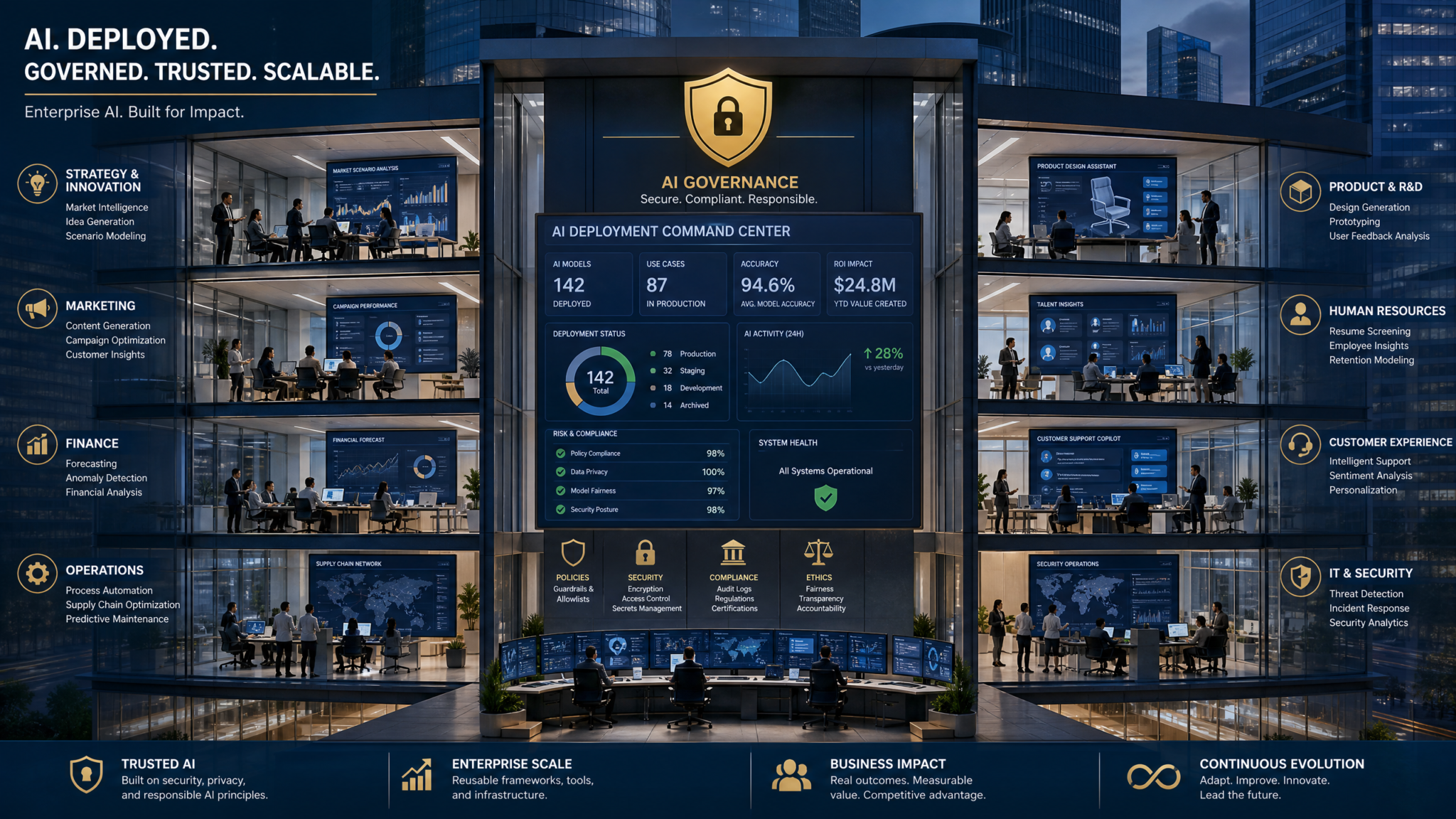
Rolling out ChatGPT Enterprise across a mid-to-large organization is not a plug-and-play exercise — it is a strategic initiative that touches every layer of your technology stack, compliance posture, and organizational culture. Companies that treat it as a simple software procurement end up with shadow AI usage, compliance gaps, ballooning costs, and employees who either over-rely on the tool or refuse to use it at all. The organizations that get it right build a deployment architecture before the first license is provisioned, establish governance before the first prompt is sent, and measure outcomes before the first renewal conversation. This playbook gives you the exact framework to do that — covering every technical, operational, and human dimension of a successful enterprise ChatGPT rollout.
Understanding the ChatGPT Enterprise Architecture
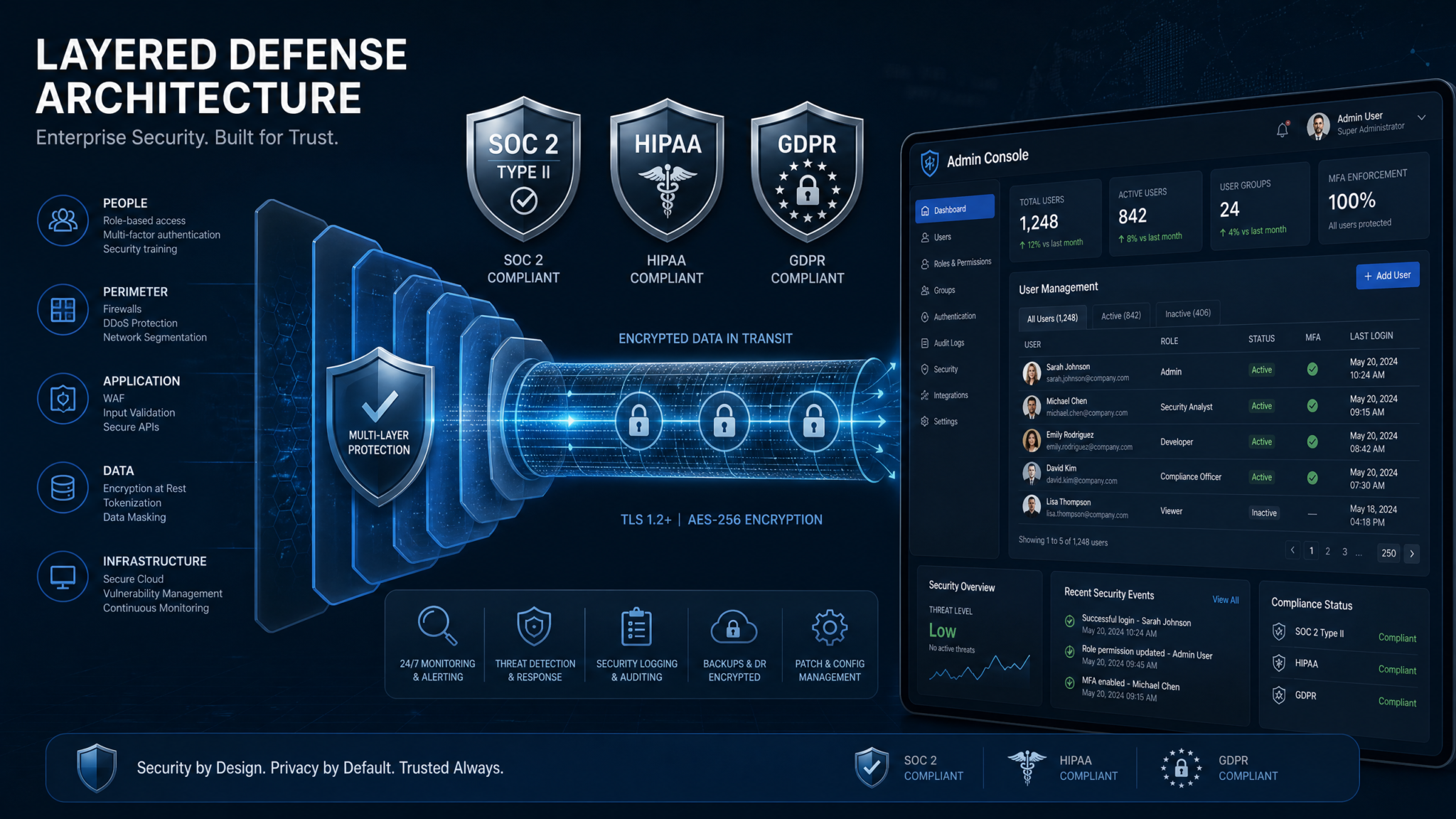
Before you configure a single setting, your team needs a precise understanding of what ChatGPT Enterprise actually provides at the infrastructure level. Unlike the consumer product or ChatGPT Team, the Enterprise tier gives you a dedicated workspace that is logically isolated from OpenAI’s shared infrastructure. Your conversations are not used to train OpenAI’s models, inputs and outputs are encrypted in transit (TLS 1.2+) and at rest (AES-256), and you get a 128,000-token context window — roughly 300 pages of text — as standard. These are not marketing claims; they are contractual commitments backed by OpenAI’s enterprise data processing agreement (DPA), which you should obtain and review with your legal team before signing.
The admin console is your central command layer. It exposes controls for user provisioning, workspace configuration, custom GPT management, usage analytics, domain verification, and SSO configuration. Understanding the hierarchy is critical: you have the organization-level settings that apply to all users, workspace-level settings for specific departments or business units, and user-level settings that individual employees can modify within the boundaries you define. Many IT teams make the mistake of treating the admin console as a set-it-and-forget-it configuration panel — in practice, it requires ongoing governance attention as OpenAI releases new features, often on a monthly cadence.
The API access layer is separate from the ChatGPT Enterprise interface but deeply connected to your governance strategy. If your developers are also consuming the OpenAI API directly through your enterprise agreement, you need unified visibility across both surfaces. Usage from the ChatGPT interface and usage from API calls flow through different billing and monitoring pipelines, which creates blind spots if your governance framework only monitors one channel. Establish from day one whether your enterprise agreement covers API access, and if so, configure API keys under your organizational account with project-level scoping rather than issuing personal API keys to individual developers. For a deeper look at how API access integrates with custom workflows, see The Complete ChatGPT API Integration Masterclass: Building Production Applications with the Responses API in 2026.
Building Your Governance Framework
Governance is the skeleton of your entire deployment. Without it, you have an expensive tool that employees use inconsistently, that exposes you to compliance risk, and that generates no measurable business value. Your governance framework needs to address four dimensions: policy, process, people, and technology controls.
Policy Layer
Your AI use policy needs to be more specific than “use AI responsibly.” It should define acceptable use cases by department, prohibited use cases with concrete examples, data classification rules that determine what can and cannot be entered into ChatGPT, the review process for AI-generated content before it is used in external communications, and the escalation path when employees are uncertain whether a use case is permitted. Critically, your policy must address the difference between using ChatGPT for drafting and ideation versus using it for final decision-making in regulated contexts — these are fundamentally different risk profiles.
For regulated industries, your policy must explicitly address which data categories are off-limits. Protected Health Information (PHI) under HIPAA, Personally Identifiable Information (PII) under GDPR, payment card data under PCI-DSS, and material non-public information (MNPI) under securities regulations all require explicit prohibition and technical enforcement, not just policy statements. The policy document itself should be versioned, reviewed quarterly, and require employee acknowledgment through your HR system.
Process Layer
Governance processes define how decisions are made about AI usage over time. You need a cross-functional AI governance committee that meets at minimum monthly and includes representatives from IT, Legal, Compliance, HR, and at least two business unit leads. This committee is responsible for reviewing new use cases, approving custom GPT deployments, reviewing usage analytics for anomalies, and updating policy as the technology and regulatory landscape evolves.
Establish a formal use case intake process. When a department wants to deploy a custom GPT or integrate ChatGPT into a workflow, they should submit a use case proposal that includes the business objective, data types involved, user population, expected volume, and success metrics. The governance committee reviews this against your policy framework and either approves, approves with conditions, or rejects. This process prevents the proliferation of ungoverned AI applications while creating a documented audit trail — which is exactly what regulators and auditors will ask for.
Technology Controls Layer
Your technology controls enforce your policy at the system level, removing reliance on individual employee judgment for compliance-critical restrictions. The admin console provides several enforcement mechanisms: you can disable the ability for users to share conversations externally, restrict which GPT models are available, prevent users from connecting third-party plugins or external data sources without admin approval, and configure data retention policies. These controls should be configured before any user is onboarded, not added retroactively.
Security, Compliance, and Regulatory Alignment
ChatGPT Enterprise’s compliance posture is strong relative to consumer AI tools, but “strong” does not mean “automatic.” You still need to configure it correctly and integrate it into your existing compliance program. Here is a precise breakdown of the major compliance frameworks and what ChatGPT Enterprise’s architecture means for each.
SOC 2 Type II
OpenAI maintains SOC 2 Type II certification for ChatGPT Enterprise, which means an independent auditor has verified that their security controls — covering security, availability, and confidentiality — operate effectively over time. You should request the latest SOC 2 report under NDA as part of your vendor due diligence. Review the report for any exceptions noted by the auditor, and assess whether the complementary user entity controls (CUECs) — the security controls that OpenAI expects you to implement on your side — are actually in place in your environment. Common CUECs include access control management, SSO enforcement, and monitoring of privileged access.
HIPAA Compliance
OpenAI will sign a Business Associate Agreement (BAA) with ChatGPT Enterprise customers, which is the contractual prerequisite for using any service with PHI under HIPAA. However, signing a BAA does not automatically make your ChatGPT deployment HIPAA-compliant — it means you and OpenAI have defined your respective responsibilities. Your obligations include ensuring that only workforce members with a legitimate need to access PHI use ChatGPT for healthcare-related tasks, implementing technical safeguards to prevent unauthorized PHI entry (such as DLP controls discussed below), conducting a HIPAA risk analysis that includes ChatGPT as a covered system, and training all users who may encounter PHI on their obligations under the minimum necessary standard.
In practice, most healthcare organizations should take a conservative approach: use ChatGPT Enterprise for administrative tasks, policy drafting, coding assistance, and research synthesis, but implement strict technical controls to prevent the entry of patient identifiers. Even with a BAA in place, the safest posture is to treat ChatGPT as a no-PHI zone unless you have a specific, reviewed use case that justifies the risk and you have implemented compensating controls.
GDPR Compliance
For organizations operating in or serving EU residents, GDPR compliance requires a Data Processing Agreement (DPA) with OpenAI — which is available and should be executed before deployment. You also need to conduct a Data Protection Impact Assessment (DPIA) for any ChatGPT use case that involves processing personal data at scale or processing special category data. The DPIA must document the purpose of processing, necessity and proportionality, risks to data subjects, and the measures you are taking to mitigate those risks.
GDPR’s data minimization principle has direct implications for your prompt engineering guidelines: train employees to avoid including personal data in prompts unless it is strictly necessary for the task. Your data retention configuration in the admin console should align with your GDPR retention schedules. If you receive a data subject access request (DSAR) or erasure request that touches data that may have been entered into ChatGPT, you need a documented process for how you respond — this is an area where many organizations have significant gaps.
Data Loss Prevention (DLP) Configuration
Native DLP within ChatGPT Enterprise is limited — the platform does not currently offer content-scanning of prompts before they are sent. This means your DLP enforcement needs to happen at the network or endpoint layer. If you have an existing DLP solution (Microsoft Purview, Forcepoint, Symantec DLP, Zscaler), configure policies that monitor traffic to the ChatGPT Enterprise domain and alert or block when patterns matching your sensitive data categories are detected. Common patterns to monitor include credit card numbers, Social Security Numbers, patient identifiers, and internal document classification markers.
For organizations without a mature DLP stack, a pragmatic interim approach is to configure your proxy or CASB (Cloud Access Security Broker) to log all traffic to ChatGPT Enterprise, and use that log data to conduct periodic manual or automated reviews for sensitive data patterns. This is not as robust as real-time blocking, but it creates an audit trail and enables you to detect and respond to policy violations. Pair this with mandatory training on data classification and prompt hygiene — employees who understand why the restriction exists are significantly more likely to comply with it.
SSO, SCIM Provisioning, and Identity Management
Identity management is where many enterprise deployments introduce their first significant security gap. If you are not enforcing SSO, you have employees creating personal OpenAI accounts that sit outside your governance framework, potentially using personal email addresses, and accessing the tool without your MFA policies applying. Enforcing SSO through your identity provider (IdP) — whether that is Okta, Azure Active Directory, Ping Identity, or another provider — is non-negotiable for any organization with more than 50 employees.
ChatGPT Enterprise supports SAML 2.0 and OIDC for SSO. The configuration process involves setting up an application in your IdP, configuring the assertion attributes (at minimum: email, name, and department), and validating the SSO flow before enabling it for all users. Once SSO is enforced, employees who attempt to access ChatGPT Enterprise with a personal account will be redirected to your IdP login flow — they cannot bypass it. This also means that when an employee is offboarded and their IdP account is disabled or deleted, their ChatGPT Enterprise access is immediately revoked, which is a critical security control.
SCIM (System for Cross-domain Identity Management) takes your identity management a step further by automating user provisioning and deprovisioning. With SCIM configured, when you add a new employee to a specific group in your IdP (for example, “ChatGPT-Users”), they are automatically provisioned in ChatGPT Enterprise with the appropriate workspace assignment and role. When they leave, deprovisioning happens automatically. For organizations managing hundreds or thousands of users, manual provisioning is not just inefficient — it is a security risk, because manual processes have manual errors, and those errors often manifest as access that persists beyond employment.
Configure your SCIM integration to push group membership from your IdP, and map those groups to ChatGPT Enterprise workspaces. For example, your “Legal-Department” group in Azure AD maps to the Legal workspace in ChatGPT Enterprise, which has specific custom GPTs and usage policies configured for legal work. This mapping creates a clean, auditable relationship between your HR system (which drives IdP group membership) and your ChatGPT Enterprise access controls.
Team Workspace Management and Custom GPTs for Departments
The workspace architecture is where ChatGPT Enterprise moves from a generic productivity tool to a tailored business platform. Each workspace can have its own custom GPTs, usage policies, and member roster. The key design decision is how granular to make your workspace structure — too many workspaces creates administrative overhead and fragments your analytics; too few means you cannot provide department-specific customization.
A practical workspace structure for a 500-1000 person organization typically looks like this: a company-wide workspace that all employees belong to, containing general-purpose custom GPTs and company-wide policies; department-specific workspaces for functions with distinct needs (Legal, Finance, Engineering, Marketing, HR, Customer Success); and project-specific workspaces for major initiatives that require specialized AI tools and need to be sunset when the project ends. This three-tier structure balances customization with administrative manageability.
Building Custom GPTs That Actually Get Used
Custom GPTs are the highest-leverage feature in ChatGPT Enterprise for driving adoption and ROI. A well-built custom GPT is not just a GPT with a custom system prompt — it is a purpose-built tool that understands your company’s context, follows your workflows, uses your terminology, and produces outputs in your formats. Here is how to build custom GPTs that departments will actually use instead of defaulting to the generic ChatGPT interface.
For the Legal department: build a contract review GPT that has your standard contract templates as knowledge base documents, understands your preferred positions on common clauses, and outputs its analysis in a structured format that maps to your contract review checklist. The system prompt should specify the jurisdiction, your company’s risk tolerance, and the output format. Include instructions to flag any clause that deviates from your standard positions and to provide a recommended redline. For more advanced custom GPT development techniques, see The Complete Guide to ChatGPT’s New Custom GPTs Interface: How the Updated Plugin Menu, MCP Connectors, and Action Icons Transform Enterprise AI Workflows.
For the Finance department: a financial analysis GPT that understands your chart of accounts, can interpret your internal financial reporting formats, and is configured to never output specific financial figures without caveating that the output requires human review and sign-off. The knowledge base should include your accounting policies, your fiscal year calendar, and definitions of your internal KPIs.
For Customer Success: a customer communication GPT trained on your brand voice guidelines, your product documentation, and your escalation procedures. Configure it to always recommend escalation to a human for complaints involving refunds above a certain threshold, legal threats, or data privacy concerns.
For Engineering: a code review GPT configured with your coding standards, your preferred libraries and frameworks, your security requirements (OWASP Top 10 awareness, no hardcoded credentials, etc.), and your documentation standards. This GPT can dramatically reduce code review cycle times while enforcing consistency.
| Department | Custom GPT Use Case | Key Knowledge Base Documents | Critical System Prompt Instructions |
|---|---|---|---|
| Legal | Contract Review Assistant | Standard contract templates, preferred positions playbook, jurisdiction-specific guidelines | Flag deviations from standard positions; always recommend attorney review for final execution |
| Finance | Financial Analysis Assistant | Chart of accounts, accounting policies, KPI definitions, reporting templates | Never present financial figures as final without human review caveat; flag unusual variances |
| HR | Policy & Benefits Navigator | Employee handbook, benefits documentation, leave policies, escalation procedures | Always direct employees to HR Business Partner for individual circumstances; never provide legal advice |
| Engineering | Code Review & Standards Assistant | Coding standards, security requirements, preferred libraries, documentation templates | Flag security vulnerabilities explicitly; note when recommendations deviate from team standards |
| Marketing | Brand Voice & Content Assistant | Brand guidelines, tone of voice guide, product positioning, competitor do-not-mention list | Always stay within approved brand voice; flag any claims that require legal review |
| Customer Success | Customer Communication Assistant | Product documentation, escalation procedures, SLA terms, known issues log | Escalate to human for refund requests, legal threats, and data privacy concerns |
Usage Monitoring, Cost Controls, and Analytics
ChatGPT Enterprise pricing is seat-based rather than consumption-based, which simplifies budgeting but does not eliminate the need for usage monitoring. You still need visibility into who is using the tool, how they are using it, which custom GPTs are getting traction, and whether usage patterns suggest compliance risks or training gaps. The admin console provides usage analytics at the organization and workspace level, including active users, conversation volume, and custom GPT usage — but you need to actively review these metrics, not just collect them.
Set up a monthly usage review cadence as part of your governance committee meetings. The metrics to track are: monthly active users as a percentage of provisioned seats (low adoption rates signal training or change management issues), custom GPT usage by department (low usage of department-specific GPTs suggests the GPTs are not solving real problems), conversation volume trends (sudden spikes may indicate a viral use case or a compliance incident), and user retention (employees who use ChatGPT in their first week but stop using it in week two or three need targeted intervention).
For organizations that also consume the OpenAI API, cost controls are critical. API usage is consumption-based, and without hard limits, a single developer running an automated process against the API can generate thousands of dollars in charges overnight. In the OpenAI platform, configure spending limits at the project level — set a soft limit that triggers an email alert and a hard limit that stops API calls. Assign each team or application its own API key (or, better, its own project) so you can attribute costs accurately. Review API usage logs weekly during the first three months of deployment, then monthly once usage patterns stabilize.
Create a cost attribution model that maps ChatGPT Enterprise seats and API costs to business units. Even though Enterprise is seat-based, showing each department head the cost per active user in their team creates accountability and drives adoption — nobody wants to be the department head whose team is paying for seats that nobody uses. This attribution model also forms the foundation of your ROI calculation.
Measuring ROI Across Departments
ROI measurement for AI tools is notoriously difficult because the value is largely in time savings and quality improvements, not direct revenue generation. But “difficult” does not mean “impossible,” and organizations that do not measure ROI will struggle to justify renewal costs and expansion. Here is a structured approach to ROI measurement that works across departments.
Start with time-to-task measurements for high-frequency use cases. Before deployment, benchmark how long specific tasks take without AI assistance — a first draft of a contract, a response to a customer inquiry, a code review, a financial variance analysis. After deployment, measure the same tasks with AI assistance. The time delta, multiplied by the loaded hourly cost of the employee and the frequency of the task, gives you a direct productivity value. For a legal team that drafts 50 contracts per month and saves 2 hours per contract, at a loaded cost of $150/hour, that is $15,000 per month in productivity value from a single use case.
Quality improvements are harder to quantify but equally important. Track error rates, revision cycles, and customer satisfaction scores for AI-assisted outputs versus non-AI-assisted outputs. If your customer success team’s AI-assisted responses have a 15% lower escalation rate than non-AI-assisted responses, that has a measurable value in reduced senior employee time and improved customer retention.
| Department | Primary ROI Metric | Measurement Method | Typical Value Range |
|---|---|---|---|
| Legal | Hours saved on contract drafting and review | Time tracking before/after; task completion surveys | 1.5–3 hours per contract |
| Engineering | Code velocity; reduction in review cycles | Sprint velocity metrics; PR cycle time in Git analytics | 15–30% reduction in PR cycle time |
| Customer Success | Response time; escalation rate reduction | Ticketing system analytics; CSAT scores | 20–40% reduction in first response time |
| Marketing | Content production velocity; agency cost reduction | Content calendar completion rate; agency spend comparison | 30–50% reduction in first-draft time |
| Finance | Hours saved on reporting and analysis | Time tracking; report turnaround time | 2–4 hours per reporting cycle |
| HR | Time saved on policy queries; job description creation | HR ticket volume; hiring manager satisfaction surveys | 1–2 hours per job requisition |
Training, Change Management, and Adoption
The technical deployment is the easy part. The hard part is getting 500 or 5,000 employees to change how they work. Change management for AI tools is different from change management for traditional software because the tool’s value is not self-evident — employees need to see specific, relevant examples of how it improves their work before they will invest the time to learn it. Generic “here is how ChatGPT works” training sessions produce low adoption. Department-specific, use-case-specific training sessions produce high adoption.
Structure your training program in three layers. The first layer is a mandatory 30-minute organization-wide orientation covering your AI use policy, data classification rules, what is and is not permitted, and how to report concerns. This is compliance training, not capability training, and should be completed before any employee is provisioned access. The second layer is department-specific capability training — 60-90 minute sessions run by a combination of your IT team and a department champion who has been pre-trained and can demonstrate real use cases from their own workflow. The third layer is role-specific advanced training for power users who will build custom GPTs, integrate the API into workflows, or serve as department AI champions going forward.
Access 40,000+ AI Prompts for ChatGPT, Claude & Codex — Free!
Subscribe to get instant access to our complete Notion Prompt Library — the largest curated collection of prompts for ChatGPT, Claude, OpenAI Codex, and other leading AI models. Optimized for real-world workflows across coding, research, content creation, and business.
Identify and invest in AI champions in each department. These are not necessarily the most senior people — they are the people who are most curious about the technology, respected by their peers, and willing to invest personal time in building expertise. Give them early access, dedicated training time, and recognition. Their peer-to-peer influence will drive adoption more effectively than any top-down mandate. For guidance on developing effective prompting skills that you can train your champions on, see The Complete Prompt Engineering Stack for 2026: 7 Tools Evaluated.
Address resistance proactively. In most organizations, 20-30% of employees will have significant concerns about AI — fears about job displacement, distrust of AI outputs, or philosophical objections. These concerns are legitimate and should not be dismissed. Create a formal feedback channel for AI-related concerns, ensure leadership communicates clearly about the role of AI as a productivity tool rather than a replacement, and share concrete examples of employees using AI to do more interesting, higher-value work rather than being replaced by it. Unaddressed resistance does not disappear — it manifests as non-adoption, workarounds, and eventually, shadow AI usage on personal accounts outside your governance framework.
Phased Rollout Timeline Template
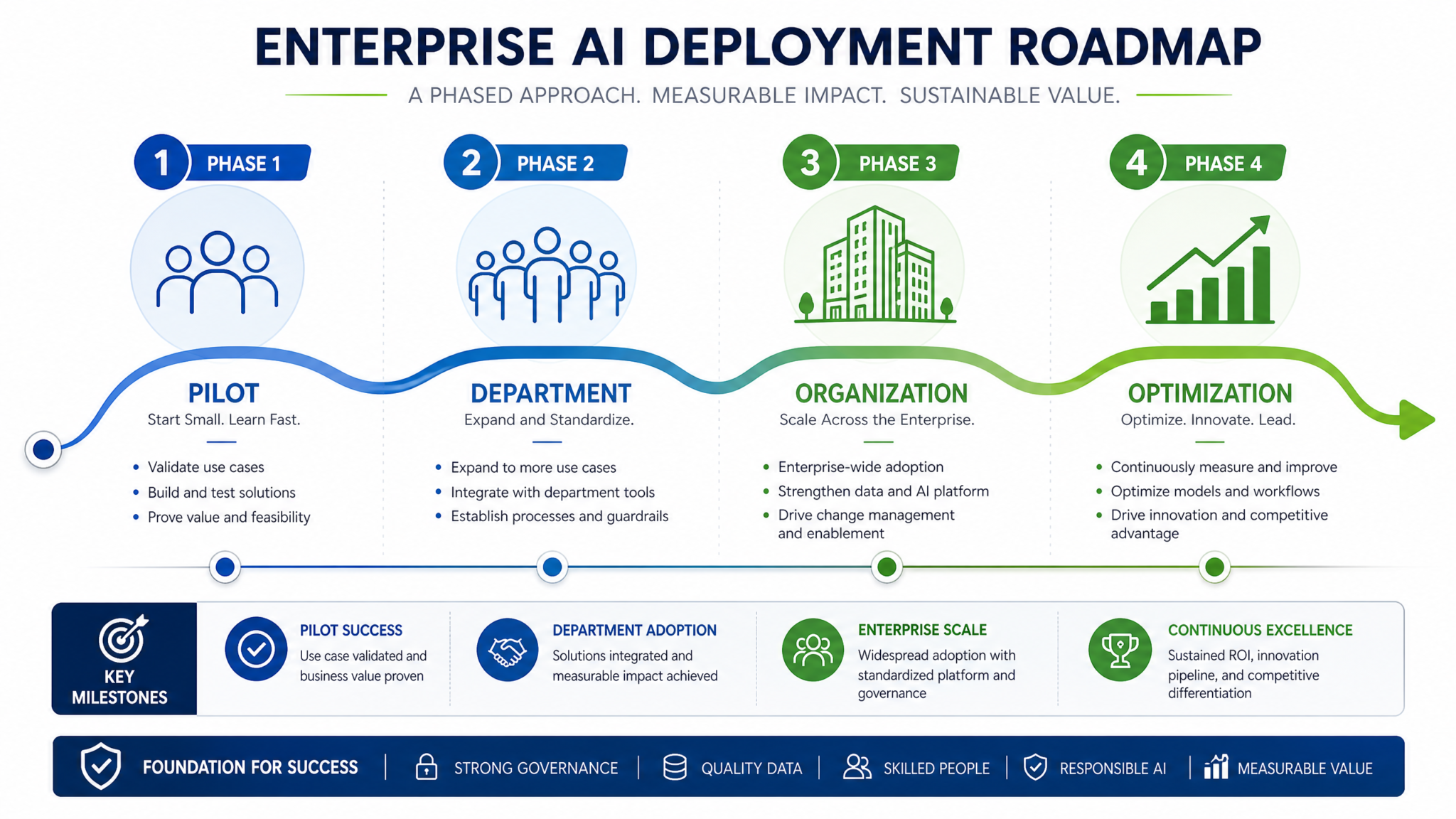
A structured phased rollout reduces risk, enables learning, and creates organizational momentum. Here is a proven 16-week deployment timeline that you can adapt to your organization’s size and complexity.
Phase 1: Foundation (Weeks 1-4)
- Week 1: Execute enterprise agreement and DPA/BAA as applicable; assign internal project owner and governance committee; request SOC 2 report and complete vendor security assessment
- Week 2: Configure admin console — domain verification, SSO integration, SCIM provisioning, workspace structure, baseline usage policies; conduct security configuration review with InfoSec team
- Week 3: Draft and approve AI use policy; configure DLP controls in proxy/CASB; develop training materials; identify department champions (target: 1 per major department)
- Week 4: Conduct champion pre-training; deploy to pilot group (20-30 users across 3-4 departments); establish baseline metrics for ROI measurement
Phase 2: Pilot and Learning (Weeks 5-8)
- Week 5-6: Pilot group active usage; daily check-ins with champions; collect feedback on use cases, friction points, and policy questions; begin building department-specific custom GPTs based on pilot learnings
- Week 7: Review pilot usage analytics; identify top use cases by department; refine custom GPTs based on user feedback; update AI use policy based on questions that arose during pilot
- Week 8: Pilot review meeting with governance committee; approve expansion plan; finalize department-specific training materials; prepare IT helpdesk for increased support volume
Phase 3: Controlled Expansion (Weeks 9-12)
- Week 9-10: Expand to 30-50% of planned user base, prioritizing departments with highest-value use cases; conduct department-specific training sessions; deploy finalized custom GPTs to department workspaces
- Week 11: First formal usage review with governance committee; assess adoption rates, compliance incidents, and early ROI indicators; adjust training approach based on data
- Week 12: Address identified issues; refine custom GPTs based on usage data; prepare full rollout communications
Phase 4: Full Deployment and Optimization (Weeks 13-16)
- Week 13-14: Complete provisioning of all planned users; conduct remaining department training sessions; publish internal AI resource hub (policy, training materials, custom GPT catalog, FAQ)
- Week 15: Full deployment usage review; first ROI measurement against baselines; identify top-performing use cases for case study development; plan advanced training for power users
- Week 16: Post-deployment review with executive sponsors; present ROI findings; establish ongoing governance rhythm; plan Phase 2 use cases (API integrations, advanced custom GPTs, workflow automation)
Common Pitfalls and How to Avoid Them
After observing dozens of enterprise AI deployments, certain failure patterns emerge with remarkable consistency. Knowing them in advance is the most efficient way to avoid them.
Pitfall 1: Deploying Without a Data Classification Policy
The most common compliance gap is deploying ChatGPT Enterprise before employees have clear guidance on what data they can and cannot enter. Without this guidance, employees default to their own judgment — which means some will be overly cautious and underutilize the tool, while others will enter sensitive data that should never leave your controlled environment. Before the first user is provisioned, publish a clear, concrete data classification guide that maps your data categories to explicit ChatGPT usage rules: “Confidential financial data: never enter into ChatGPT. Internal operational data: may be entered with PII removed. Public information: unrestricted use.”
Pitfall 2: Building Custom GPTs Without User Input
IT teams and governance committees often build custom GPTs based on their assumptions about what departments need, then wonder why adoption is low. Custom GPTs built without input from the actual users they are designed for almost always miss the mark on workflow fit, terminology, and output format. Involve department representatives in the design process from the beginning — even a 30-minute workshop with 3-4 users to understand their highest-frequency, highest-friction tasks will dramatically improve the relevance of what you build.
Pitfall 3: Treating Adoption as a Launch Event
Many organizations invest heavily in a launch event — communications, training sessions, executive endorsement — and then move on to the next initiative, assuming adoption will sustain itself. It will not. AI tool adoption follows a curve: initial enthusiasm, a dip when the novelty wears off and the learning curve becomes apparent, and then sustained adoption only for users who have found genuine workflow value. Plan for ongoing engagement: monthly tips and use case spotlights, quarterly training refreshers, champion recognition programs, and regular communication about new features and use cases. The organizations with the highest long-term adoption treat it as a continuous program, not a one-time deployment.
Pitfall 4: Ignoring the Shadow AI Problem
If your ChatGPT Enterprise deployment is too restrictive — too many prohibited use cases, too much friction in the provisioning process, too slow in responding to department requests — employees will route around it. They will use personal ChatGPT accounts, Claude, Gemini, or other AI tools on personal devices or through personal accounts that sit completely outside your governance framework. This is worse than no AI governance at all, because you have the illusion of control without the reality. Monitor for shadow AI usage through your DLP and CASB tools, and when you find it, treat it as a signal that your governance framework is too restrictive rather than as a disciplinary matter. Understanding the full landscape of AI tools your employees might use is critical — ChatGPT Work vs Claude Cowork: The Definitive 2026 Comparison for Enterprise Teams provides context on what employees are likely to turn to if your deployment creates too much friction.
Pitfall 5: Failing to Establish a Feedback Loop
Governance committees that make decisions about AI policy without ongoing input from users make increasingly disconnected decisions over time. Establish a formal feedback mechanism — a dedicated Slack channel, a monthly survey, or a quarterly focus group — that gives users a direct line to the governance committee. The best source of intelligence about what is working, what is not, and where the policy has unintended consequences is the people using the tool every day. This feedback loop also serves as an early warning system for compliance incidents: employees who have a clear channel for raising concerns are far more likely to report a potential policy violation than employees who feel that the governance structure is adversarial.
API Access Management for Developer Teams
For organizations where engineering teams are consuming the OpenAI API in addition to the ChatGPT Enterprise interface, API access management deserves its own governance attention. The risks are different from the ChatGPT interface: API access enables automated, high-volume processing of data, which amplifies both the value and the compliance risk. A single poorly-designed automation that processes customer records through the API can create a GDPR incident at machine speed.
Structure your API governance around projects. In the OpenAI platform, create a separate project for each application or team that consumes the API. Assign project-level spending limits, generate project-scoped API keys (never use the organization master key in production applications), and configure usage monitoring alerts. Require developers to document the data types their application processes through the API as part of your use case intake process — this documentation becomes the basis for your DPIA and your audit trail.
Implement API key rotation as a standard practice. API keys should be rotated at minimum every 90 days, and immediately upon any suspected compromise or employee departure. Store API keys in your secrets management system (HashiCorp Vault, AWS Secrets Manager, Azure Key Vault) rather than in environment variables or source code — this is a basic security hygiene requirement that many teams still fail to follow. Conduct quarterly audits of all active API keys, identify any keys associated with departed employees or decommissioned projects, and revoke them immediately.
Rate limiting and retry logic in your API-consuming applications is both a cost control measure and a reliability requirement. Without proper rate limiting, a bug in an application can exhaust your API quota and generate unexpected charges. Implement exponential backoff with jitter in all API calls, set application-level rate limits well below your API tier’s limits to create headroom, and build circuit breakers that disable API calls if error rates exceed a threshold. These are standard distributed systems patterns that apply with particular force to API-based AI integrations where costs scale directly with call volume.
Ongoing Governance and Continuous Improvement
The governance framework you build at deployment is a starting point, not a finished product. The AI landscape is evolving at a pace that makes quarterly policy reviews a minimum requirement. OpenAI releases significant new capabilities — new models, new context window sizes, new multimodal features, new API endpoints — on a monthly cadence. Each new capability may have compliance implications that your existing policy does not address, and each new capability represents a potential use case that could generate significant value for your organization.
Build a structured process for evaluating new capabilities as they are released. When OpenAI announces a new feature, your governance committee should assess it against a standard framework: What are the potential business use cases? What are the data handling implications? Does it require policy updates? Does it require new technical controls? Can it be enabled for all users, or should it be restricted to specific workspaces or roles? This evaluation should happen within 30 days of a new feature’s release — organizations that take 6 months to evaluate new capabilities consistently fall behind competitors who have a more agile governance process.
Annual comprehensive reviews should assess the entire deployment against your original objectives. Have you achieved the ROI targets you projected? Are the custom GPTs you built in the first deployment cycle still aligned with current workflows, or have they become stale? Are there departments that have not adopted the tool and need targeted intervention? Are there new departments or use cases that should be brought into the program? Are there regulatory changes that require policy updates? This annual review is also the right time to benchmark your deployment against industry peers and emerging best practices — the field of enterprise AI governance is developing rapidly, and the practices that were state-of-the-art 12 months ago may be significantly behind current standards.
Measuring the maturity of your AI governance program over time is as important as measuring the ROI of individual use cases. A governance maturity model for enterprise AI typically progresses through stages: ad hoc (no formal governance, reactive responses to incidents), defined (documented policies, basic controls), managed (active monitoring, regular reviews, measurable outcomes), and optimized (continuous improvement, proactive risk management, governance as a competitive advantage). Most organizations that deploy ChatGPT Enterprise start at the ad hoc or defined stage — the goal of your governance program is to reach the managed stage within 12 months and the optimized stage within 24 months. For a detailed look at how enterprise AI capabilities are evolving, see OpenAI’s Enterprise Ecosystem in 2026: How ChatGPT Team, Business, and Enterprise Tiers Are Reshaping Corporate AI Adoption.
Frequently Asked Questions
How long does a typical ChatGPT Enterprise deployment take from contract signing to full rollout?
For organizations with 100-500 users, a well-executed deployment following a phased approach typically takes 12-16 weeks from contract signing to full rollout. Larger organizations (1,000+ users) should plan for 20-24 weeks to accommodate the additional complexity of multi-region deployments, more extensive compliance reviews, and larger-scale training programs. The most common cause of deployment delays is not technical configuration — SSO and SCIM setup typically takes 1-2 weeks — but governance and policy development, which requires cross-functional alignment that takes time to achieve. Organizations that begin policy development and governance committee formation before the contract is signed consistently achieve faster, smoother deployments.
What is the difference between ChatGPT Enterprise and the OpenAI API for enterprise use cases?
ChatGPT Enterprise is a managed SaaS product with a user interface designed for knowledge workers — it includes the admin console, custom GPT builder, workspace management, and usage analytics. The OpenAI API is a programmatic interface designed for developers building applications or automating workflows. Most organizations need both: ChatGPT Enterprise for employees who use AI interactively as part of their daily work, and the API for engineering teams building AI-powered features into products or internal tools. The governance requirements are different for each — ChatGPT Enterprise governance focuses on user access, data classification, and custom GPT management; API governance focuses on key management, rate limiting, cost controls, and application-level security review. Your enterprise agreement should clarify whether both are covered under the same contract and DPA.
How should we handle employees who use personal ChatGPT accounts for work purposes?
Shadow AI usage — employees using personal AI accounts for work tasks — is a compliance and security risk that should be addressed through a combination of technical controls and policy. On the technical side, configure your proxy or CASB to monitor and potentially block access to consumer ChatGPT (chat.openai.com) from corporate devices and networks, while ensuring that ChatGPT Enterprise (your enterprise domain) remains accessible. On the policy side, your AI use policy should explicitly prohibit entering company data into personal AI accounts and explain the reasons — data privacy, compliance, and the fact that personal accounts do not have the contractual protections of your enterprise agreement. Pair the prohibition with a clear path for employees to request access to ChatGPT Enterprise if they do not already have it — shadow AI is often a symptom of provisioning delays or access barriers, not malicious intent.
How do we measure whether our ChatGPT Enterprise investment is generating ROI?
ROI measurement requires baseline data collected before deployment and outcome data collected after. Before deployment, benchmark the time required for high-frequency, high-value tasks in each department — contract drafting, code review, customer response, financial analysis. After deployment, measure the same tasks with AI assistance and calculate the time delta. Multiply the time savings by the loaded hourly cost of the employees involved and the frequency of the task to get a direct productivity value. Supplement this with quality metrics (error rates, revision cycles, customer satisfaction) and strategic value indicators (new capabilities enabled, speed to market improvements, competitive differentiation). Present ROI findings to executive sponsors at 90 days post-deployment, 6 months, and annually. Organizations that do not measure ROI consistently find that AI budgets are the first to be cut in cost reduction exercises — measurement is not just about accountability, it is about protecting the program.
What are the most important admin console settings to configure before onboarding any users?
Before provisioning a single user, configure the following in the admin console: (1) SSO enforcement — ensure no user can access the platform without going through your IdP; (2) domain verification — verify your corporate domain so that all accounts associated with your email domain are captured in your organization; (3) external sharing restrictions — disable the ability for users to share conversation links externally until you have assessed whether this is appropriate for your use case; (4) plugin and external connection policies — restrict third-party integrations to those that have been reviewed and approved; (5) workspace structure and custom GPT deployment permissions — determine which users can create and publish custom GPTs versus which can only use them; (6) usage analytics access — configure which administrators have access to usage data and at what granularity. These six settings establish the security and governance baseline that all subsequent configuration builds on.
Written by Markos Symeonides, ChatGPT AI Hub. This guide is updated regularly to reflect the latest ChatGPT Enterprise features and enterprise AI governance best practices.
