
What Are ChatGPT’s Personal Finance Features
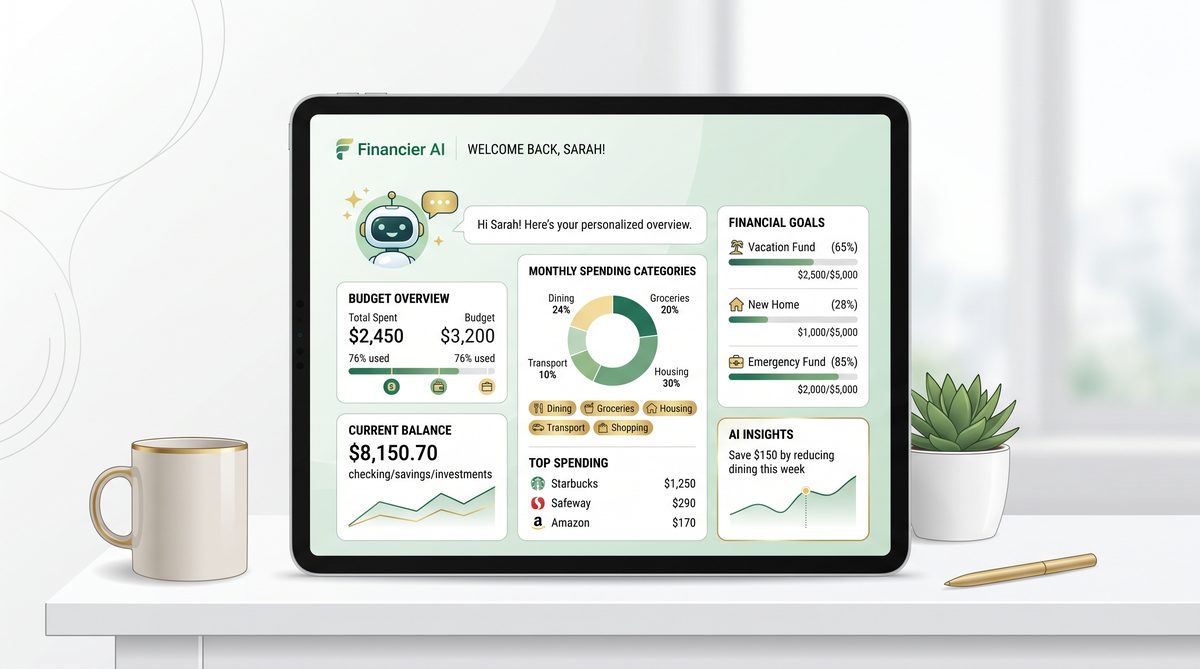
On May 15, 2026, OpenAI officially launched an innovative personal finance experience integrated directly into ChatGPT, exclusively available to Pro users based in the United States. This new suite of features represents a significant step forward in AI-driven financial management by enabling users to securely connect their financial accounts and receive personalized, actionable insights tailored to their unique financial situations.
Secure Financial Account Integration via Plaid
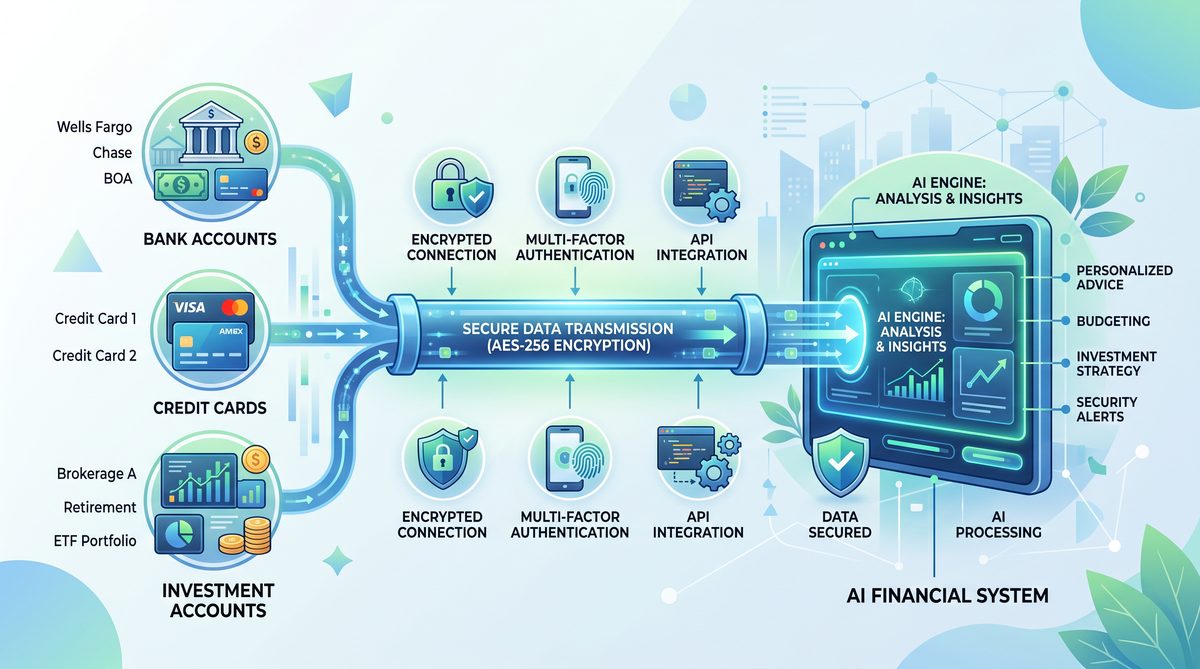
At the core of ChatGPT’s personal finance capabilities is its seamless integration with Plaid, a leading financial data aggregator known for its robust security standards and extensive coverage of financial institutions. Users can link various types of accounts, including bank accounts, credit cards, and investment portfolios, within ChatGPT’s interface. This connection is established through Plaid’s secure API, which uses tokenization and encryption protocols to ensure sensitive financial data is protected at every step.
For example, a user might connect their checking and savings accounts from a major U.S. bank, along with credit card statements and brokerage accounts, to provide ChatGPT with a comprehensive view of their finances. This unified access allows ChatGPT to analyze real-time financial data without users needing to manually input transactions or balances, significantly enhancing ease of use and accuracy.
Comprehensive Budgeting and Spending Analysis
Once accounts are linked, ChatGPT leverages advanced natural language processing combined with financial data analytics to examine spending patterns across categories such as groceries, dining, utilities, transportation, and discretionary expenses. The AI identifies trends, unusual spending spikes, and recurring charges, providing users with detailed breakdowns of where their money is going.
For instance, ChatGPT can highlight that a user spends 20% more on dining out in the past month compared to their typical monthly average, or that subscriptions totaling $50 per month have accumulated unnoticed over several months. Users can then request customized budget recommendations to curb overspending or optimize savings goals.
Personalized Financial Planning and Goal Tracking
Beyond basic budgeting, ChatGPT’s personal finance features support forward-looking financial planning. Users can set specific objectives such as saving for a down payment on a home, paying off credit card debt within a defined timeframe, or building an emergency fund covering six months of expenses. ChatGPT utilizes its memory capabilities to track progress toward these goals over time, offering timely reminders, motivational insights, and adaptive advice based on evolving financial behaviors.
For example, if a user aims to save $10,000 in 12 months, ChatGPT can calculate the required monthly savings amount and recommend adjustments to discretionary spending to stay on track. Should unexpected expenses arise or income fluctuate, the AI recalibrates the plan dynamically, ensuring users maintain realistic and achievable financial roadmaps.
Leveraging ChatGPT Memory for Tailored Advice
A distinguishing feature of this new personal finance experience is its integration with ChatGPT’s memory system, which enables ongoing personalization beyond a single session. By remembering user preferences, financial goals, and past interactions, ChatGPT can provide continuity in advice and insights. This approach enhances user engagement and helps build a more nuanced understanding of individual financial circumstances over time.
For instance, if a user previously indicated a preference for conservative investment strategies or expressed concerns about credit card debt, ChatGPT will factor these priorities into future recommendations without needing repetitive inputs. This persistent memory facilitates a more intuitive and human-like financial advisory experience.
Summary of Key Features
| Feature | Functionality | Benefit |
|---|---|---|
| Secure Account Linking (Plaid Integration) | Connects bank, credit card, and investment accounts securely | Provides comprehensive, real-time financial data access |
| Spending Analysis & Budgeting | Analyzes transactions to categorize spending and identify trends | Helps users manage expenses and optimize budgets effectively |
| Financial Goal Tracking | Sets and monitors savings, debt repayment, and investment goals | Supports disciplined financial planning and progress assessment |
| Personalized Insights via ChatGPT Memory | Remembers user preferences and past data for tailored advice | Delivers context-aware, continuous financial guidance |
Overall, ChatGPT’s personal finance features offer a powerful, AI-driven toolkit designed to empower users with deeper financial awareness, smarter budgeting, and strategic planning capabilities. By merging secure financial data connectivity with personalized AI insights, OpenAI is redefining how individuals can interact with and manage their money through conversational intelligence.
In the following sections of this tutorial, we will walk through the step-by-step process of setting up these features, optimizing your financial data connections, and effectively leveraging ChatGPT to enhance your personal financial health.
Author: Markos Symeonides
Prerequisites and Eligibility
To leverage ChatGPT’s new personal finance features effectively, users must meet certain prerequisites and eligibility criteria established by OpenAI. These requirements ensure users can securely connect their financial accounts and benefit from the full capabilities of the platform’s budgeting, spending analysis, and financial planning tools. Understanding these criteria before attempting setup will streamline the onboarding process and maximize the personalized insights ChatGPT can provide.
Availability: Geographic and Subscription Constraints
As of its launch on May 15, 2026, the personal finance experience within ChatGPT is available exclusively to ChatGPT Pro subscribers based in the United States. This geographic limitation is primarily due to regulatory and compliance considerations around financial data access and privacy. Non-US users and those on the free tier of ChatGPT currently cannot access these features, although OpenAI has indicated plans to expand availability in the future.
The Pro subscription, priced at $20 per month as of mid-2026, grants enhanced performance and priority access to new features, including personal finance tools. Users must have an active Pro subscription linked to their OpenAI account to unlock the personal finance interface within the ChatGPT application.
Secure Financial Account Integration via Plaid
A core component of ChatGPT’s personal finance functionality is its integration with Plaid, a widely trusted financial data aggregator. Plaid acts as the secure intermediary that connects ChatGPT to users’ various financial institutions, including banks, credit card issuers, and investment platforms.
To connect accounts, users will be prompted to authenticate via Plaid’s secure interface, which supports multi-factor authentication and bank-grade encryption protocols. Plaid supports thousands of financial institutions across the US, including major banks like Chase, Bank of America, Wells Fargo, as well as popular investment platforms such as Fidelity and Robinhood.
It is important to note that only institutions supported by Plaid can be connected at this time. While Plaid covers the majority of large and regional banks, some smaller credit unions or niche providers may not yet be compatible. Users should verify their institutions are supported during the setup process.
Eligible Account Types for Connection
ChatGPT’s personal finance tools allow users to link multiple types of financial accounts, creating a comprehensive view of their financial health. Eligible account types include:
- Checking and Savings Accounts: Enables tracking of income deposits, regular expenses, and available balances.
- Credit Cards: Allows categorization of spending, monitoring of credit utilization, and alerts for upcoming payments.
- Investment Accounts: Supports tracking of portfolio performance, asset allocation, and dividend income.
- Loans and Mortgages: Facilitates monitoring of outstanding balances, payment schedules, and interest expenses.
This diversity in account types ensures ChatGPT can provide detailed spending analyses, budget recommendations, and goal tracking that reflect a user’s entire financial ecosystem.
User Data Privacy and Security Requirements
Given the sensitive nature of financial data, OpenAI has implemented stringent privacy and security protocols. Users must explicitly consent to share their financial data through the Plaid connection. All data transmission is encrypted end-to-end, and stored data is protected using advanced encryption standards compliant with industry regulations such as SOC 2 and GDPR where applicable.
Moreover, ChatGPT’s memory feature, which personalizes advice based on past interactions, is designed to handle this financial data with additional care. Users can review and manage stored information via their account settings, including options to delete financial data or disconnect accounts at any time.
Technical Requirements for Setup
To ensure a smooth setup experience, users should confirm the following technical prerequisites:
- Latest Version of ChatGPT Application: Whether using the web, desktop, or mobile app, users should run the latest version to access the personal finance features and Plaid integration.
- Stable Internet Connection: Required for secure authentication and data synchronization with financial institutions.
- Device Compatibility: Supported on Windows, macOS, iOS, and Android platforms. The interface is optimized for both desktop and mobile devices.
Users encountering issues during account linking should verify their device meets these requirements and consider temporarily disabling ad blockers or firewalls that may interfere with the Plaid authentication process.
Linking Financial Data to AI-Powered Insights
Once connected, ChatGPT’s AI leverages the aggregated financial data to offer personalized recommendations. This capability builds upon foundational concepts of artificial intelligence in natural language processing and memory management, enabling contextual and dynamic financial advice. For those interested in the underlying technology that powers this personalized engagement, our article on AI Memory and Contextual Learning in Conversational Agents provides an in-depth exploration The Complete Guide to OpenAI’s Trusted Access for Cyber Program: Eligibility, Setup, and Workflow Integration.
In summary, users must be US-based Pro subscribers with supported financial accounts to unlock ChatGPT’s personal finance features. Ensuring compliance with these prerequisites will facilitate a secure, seamless setup, empowering users to harness advanced AI-driven financial insights tailored to their unique circumstances.
Step-by-Step Setup: Connecting Your Financial Accounts
With ChatGPT’s new personal finance features officially launched on May 15, 2026, Pro users in the United States now have the ability to securely link their financial accounts through an integrated Plaid connection. This integration is the backbone of ChatGPT’s capability to provide real-time budgeting assistance, spending analysis, and personalized financial planning. In this section, we will guide you through the entire process of connecting your financial accounts, ensuring you can leverage ChatGPT’s full potential for managing your finances effectively and securely.
Understanding Plaid Integration and Security
Plaid is a widely used financial technology platform that securely connects user bank accounts, credit cards, and investment accounts to third-party applications without exposing sensitive login credentials. When you connect your accounts via Plaid within ChatGPT, your financial data is encrypted and transmitted directly to OpenAI’s servers with strict compliance to industry-standard security protocols such as TLS encryption and multi-factor authentication.
This means ChatGPT never stores your banking passwords; instead, it receives tokenized access to your transactional data, which it uses exclusively for budgeting, spending pattern analysis, and personalized financial insights. OpenAI’s privacy policies and compliance with regulations like the California Consumer Privacy Act (CCPA) further ensure your data is handled responsibly.
Step 1: Access the Finance Tab in ChatGPT Pro
Once you have confirmed your Pro membership and are located in the US, your ChatGPT interface will display a new “Finance” tab in the sidebar navigation. Click on this tab to begin the account linking process. You will be presented with a brief overview of the personal finance features and a button labeled “Connect Your Financial Accounts.”
At this stage, ChatGPT will remind you about the security measures in place and ask for your consent to proceed with account linking. This consent is essential, as it authorizes ChatGPT to access your transaction data for analysis and advice generation. OpenAI emphasizes transparency, so you can review the data access permissions granted to ChatGPT at any time under your account settings.
Step 2: Select and Link Your Financial Institutions
After consenting, you will be redirected to the Plaid interface, where you can search for your bank, credit card issuer, or investment platform from a comprehensive list that supports thousands of institutions across the United States. For example, you can connect accounts from major banks like Chase, Bank of America, Wells Fargo, as well as credit card providers like American Express or investment accounts from Fidelity and Vanguard.
When you select your institution, Plaid will prompt you to enter your login credentials securely. Depending on your bank’s security protocols, you may also need to complete multi-factor authentication, such as a one-time code sent via SMS or email. Once authenticated, Plaid establishes a secure connection and retrieves your account details, including balances, transaction history, and account types.
You can link multiple accounts across different categories, such as:
- Checking and savings accounts
- Credit cards
- Investment and retirement accounts
- Loans and mortgages
Linking a diverse range of accounts enhances ChatGPT’s ability to provide a holistic view of your financial health.
Step 3: Review and Categorize Your Accounts
Once your accounts are connected, ChatGPT will automatically categorize your accounts and recent transactions using Plaid’s categorization algorithms. For instance, it will identify expenses such as groceries, utilities, dining, and subscriptions. However, you have the option to manually adjust categories or merge similar transactions to improve accuracy.
This step is crucial for effective budgeting and spending analysis. For example, if ChatGPT misclassifies a recurring gym membership as “Miscellaneous,” you can reassign it to “Health & Fitness” to get more precise insights and budget recommendations in that category.
Step 4: Enable ChatGPT Memory for Personalized Insights
To fully utilize ChatGPT’s personalized financial advice capabilities, you need to enable the Memory feature. Memory allows ChatGPT to retain information about your connected accounts, spending habits, and financial goals over time, enabling it to detect patterns and offer tailored recommendations.
For example, if ChatGPT notices a steady increase in dining out expenses over several months, it can proactively suggest budgeting adjustments or alternative meal planning strategies. Similarly, it can track progress towards your savings goals by analyzing your income and spending trends.
Enabling Memory is done from the settings menu under the Finance tab, where you can also control what data ChatGPT remembers and for how long, ensuring you maintain control over your information.
Step 5: Confirm and Start Using Financial Features
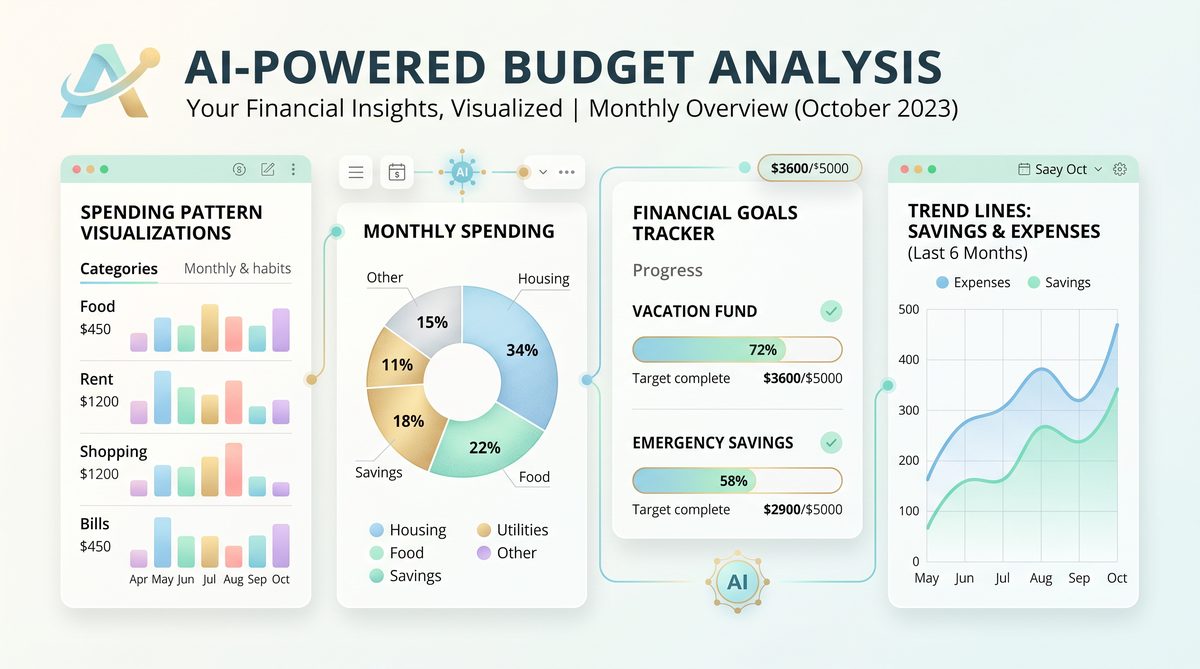
After completing these steps, ChatGPT will confirm successful account linkage and present an overview dashboard summarizing your net worth, recent spending, and budget status. From here, you can start interacting with ChatGPT using natural language queries such as:
- “Show me my spending breakdown for last month.”
- “Create a budget to reduce my dining expenses by 20%.”
- “How much have I saved toward my emergency fund goal?”
ChatGPT will use your connected account data to generate accurate, real-time responses and actionable financial advice.
Summary Table: Account Connection Steps
| Step | Description | Key Points |
|---|---|---|
| 1. Access Finance Tab | Open ChatGPT Pro and navigate to the Finance tab to start linking accounts. | Consent to data access; ensure eligibility. |
| 2. Link Accounts via Plaid | Select your financial institutions and authenticate securely. | Supports banks, credit cards, investments; multi-factor authentication. |
| 3. Review & Categorize | Verify and adjust transaction categories for accurate budgeting. | Customize categories; improve analysis precision. |
| 4. Enable Memory | Allow ChatGPT to remember your financial data for personalized advice. | Control data retention settings; gain tailored insights. |
| 5. Confirm & Use Features | Review dashboard and start interacting with ChatGPT for financial management. | Access spending reports, budgeting tools, goal tracking. |
Using ChatGPT for Budget Analysis and Spending Insights
Once you have successfully connected your financial accounts to ChatGPT via the Plaid integration, you can unlock powerful tools for budget analysis and spending insights. ChatGPT’s personal finance features leverage advanced AI algorithms and your financial data to deliver detailed breakdowns of your income, expenses, and savings habits. This section explains how to utilize these features effectively to gain comprehensive visibility into your financial health and make informed decisions.
Analyzing Spending Patterns
ChatGPT automatically categorizes your transactions across linked accounts—such as checking, savings, credit cards, and investment portfolios—into common categories like groceries, utilities, dining, entertainment, transportation, and more. The AI uses natural language processing and transaction metadata to accurately classify expenses, even detecting merchant-specific spending trends.
For example, if you frequently dine out or order takeaway, ChatGPT will highlight this pattern and quantify monthly or weekly expenditures in this category. It can also compare your spending across categories over time, identifying areas where expenses have increased or decreased significantly. Users receive personalized notifications such as, “Your dining expenses increased by 15% last month compared to the previous three months,” helping to raise awareness of changing habits.
Moreover, ChatGPT’s memory feature allows it to learn your financial behavior and preferences over time, enabling more relevant and contextual insights. For instance, if you typically allocate a fixed budget to entertainment but deviate during holiday seasons, ChatGPT will adjust its recommendations accordingly and remind you when you approach or exceed set limits.
Creating and Managing Budgets
One of the most practical uses of ChatGPT’s personal finance experience is its ability to help you create tailored budgets based on your actual income and spending history. After analyzing your cash flow and categorized expenses, ChatGPT suggests realistic budget targets for each spending category. You can customize these budgets further by adjusting limits or adding new categories to suit your financial goals.
Once budgets are set, you can ask ChatGPT to track your progress in real time. For example, you might query, “How am I doing on my grocery budget this month?” and receive an immediate update on your current spending against the target. ChatGPT also proactively alerts you if you are at risk of overspending in any category before the month ends, allowing you to take corrective action early.
Additionally, ChatGPT supports budgeting for irregular expenses such as annual insurance premiums, car maintenance, or holiday gifts by smoothing these costs over several months, preventing sudden financial strain. This dynamic budgeting approach helps maintain consistent cash flow and avoids surprises.
Tracking Financial Goals and Insights
Beyond budgeting, ChatGPT assists in setting and monitoring broader financial goals such as building an emergency fund, saving for a down payment, or paying down debt. By integrating data from all connected accounts, including investments and loans, ChatGPT provides a holistic view of your financial position and progress toward goals.
For instance, if you set a goal to save $5,000 in six months, ChatGPT will calculate the monthly savings required and track your actual savings contributions. It can then offer personalized advice to optimize your spending or recommend reallocating funds from discretionary categories to reach your target faster.
ChatGPT’s AI can also generate insightful reports summarizing your financial activity over chosen periods, highlighting trends such as increases in discretionary spending or improvements in savings rate. These reports offer a foundation for strategic financial planning and informed discussions with your financial advisor.
For users interested in the intersection of AI and finance, ChatGPT’s ability to remember personal data and adapt its advice over time exemplifies the growing role of personalized AI agents in financial management. This capability aligns closely with broader topics in AI-driven decision support systems and machine learning personalization strategies, which you can explore in detail in our dedicated article on AI personalization techniques ChatGPT Now Manages Your Money: OpenAI Launches Personal Finance Tools With Bank Account Integration.
Security and Privacy Considerations
It is important to note that all financial data shared with ChatGPT is handled with robust security protocols. OpenAI utilizes end-to-end encryption and strict data access controls to ensure that your sensitive information remains confidential. The Plaid integration only permits read-only access to transaction data, meaning ChatGPT cannot move funds or initiate payments.
Users retain full control over their connected accounts and can disconnect them at any time through the ChatGPT interface. This transparency and user control are critical to maintaining trust while benefiting from AI-driven financial insights.
| Feature | Description | Benefits |
|---|---|---|
| Spending Categorization | Automatic classification of transactions into detailed categories | Identifies spending habits, highlights trends, enables targeted budgeting |
| Budget Creation & Tracking | Personalized budget recommendations based on historical data with real-time progress tracking | Helps control spending, prevents overspending, smooths irregular expenses |
| Financial Goal Monitoring | Goal-setting and progress tracking across accounts and assets | Encourages disciplined saving and debt reduction, offers strategic advice |
| Personalized Insights & Alerts | AI-generated notifications and reports tailored to user behavior | Enhances financial awareness, supports proactive money management |
Advanced Features: Goal Tracking and Financial Planning
Leveraging Goal Tracking for Financial Success
One of the standout capabilities of ChatGPT’s personal finance features is its comprehensive goal tracking system. After securely connecting your financial accounts via Plaid, ChatGPT can monitor your progress against specific financial objectives such as saving for a home, paying down debt, or building an emergency fund. The system allows you to define both short-term and long-term goals with customizable parameters like target amount, deadline, and priority level.
For example, if you set a goal to save $10,000 for a down payment within 18 months, ChatGPT continuously analyzes your cash flow, spending habits, and income patterns to recommend an achievable monthly savings target. It then tracks your actual progress, providing weekly updates and alerts if you fall behind schedule, as well as celebrating milestones to keep you motivated. The integration with ChatGPT’s memory means your unique financial behavior and preferences are factored into these recommendations, making them more tailored and realistic compared to generic budgeting apps.
Users can also visualize their goals through dynamic charts that highlight progress trends and projections. These visual tools are invaluable for understanding how adjustments in spending or income can accelerate or delay goal achievement. By combining real-time financial data with AI-driven insights, ChatGPT empowers you to stay accountable and focused on your financial priorities.
Comprehensive Financial Planning with AI Assistance
Beyond goal tracking, ChatGPT’s advanced financial planning features act as a virtual financial advisor, synthesizing your entire financial landscape. This includes income streams, recurring expenses, investment portfolios, credit utilization, and debt obligations. By accessing this aggregated data, ChatGPT can generate personalized financial plans designed to optimize wealth accumulation and minimize risk.
For instance, the AI can analyze your investment accounts to suggest rebalancing strategies that align with your risk tolerance and timeline. It can identify opportunities to reduce high-interest debt faster by reallocating discretionary spending or suggest adjustments in your budget to increase retirement contributions. Furthermore, ChatGPT can forecast your net worth trajectory over the coming years based on current saving and spending patterns, helping you understand the long-term impact of your financial decisions.
One particularly valuable aspect is scenario modeling. You can explore “what-if” scenarios—such as increasing your monthly savings by 10%, paying off a credit card early, or changing your investment allocation—and ChatGPT will simulate the potential outcomes for your financial goals. This interactive planning enables proactive decision-making and greater confidence in your financial roadmap.
Security and Privacy in Advanced Features
Given the sensitive nature of financial data, security remains a cornerstone of ChatGPT’s personal finance capabilities. All connections via Plaid are encrypted end-to-end, and OpenAI’s infrastructure adheres to rigorous compliance standards including SOC 2 and GDPR. Users maintain control over which accounts are linked and can revoke access at any time directly through the ChatGPT interface.
Moreover, ChatGPT’s memory functionality is designed with privacy in mind; personal financial information used for goal tracking and planning is stored securely and isolated from other AI interactions unless explicitly authorized by the user. This ensures that personalized advice is both accurate and confidential.
Integrating AI-Powered Insights into Broader Financial Strategies
The advanced goal tracking and financial planning features offered by ChatGPT represent a significant evolution in AI-driven personal finance management. They complement traditional tools by offering dynamic, personalized, and adaptive advice that evolves with your financial situation. For tech professionals and business leaders, understanding how AI can augment financial decision-making is critical. ChatGPT’s approach exemplifies the practical application of AI memory and data integration, a concept explored in depth in another article on our site that discusses AI personalization techniques and their implications for user engagement and trust ChatGPT Reaches 900 Million Weekly Users in Q1 2026: What the Growth Data Tells Us.
In summary, by harnessing ChatGPT’s advanced features, users gain a powerful ally in managing complex financial goals and developing robust, adaptive financial plans. The seamless integration of data analysis, goal tracking, and AI-driven forecasting transforms raw financial information into actionable insights, helping you achieve financial wellness with confidence and precision.
Privacy and Security Considerations
As ChatGPT’s new personal finance features enable users to connect sensitive financial accounts and leverage AI-driven insights for budgeting, spending analysis, and financial planning, understanding the privacy and security implications is paramount. OpenAI has integrated industry-standard security protocols and privacy controls to protect user data, but users must also remain informed and proactive to safeguard their financial information.
Data Protection Through Plaid Integration
The financial account connections within ChatGPT’s personal finance experience are facilitated by Plaid, a leading fintech infrastructure provider trusted by thousands of financial apps worldwide. Plaid acts as a secure intermediary, allowing users to link their bank accounts, credit cards, and investment accounts without sharing login credentials directly with OpenAI.
- Tokenization: When you connect an account, Plaid uses tokenization to replace sensitive account credentials with a secure digital token. This means OpenAI never receives your actual banking login information.
- Encryption: All data transmitted between your device, Plaid, and OpenAI is encrypted using TLS (Transport Layer Security) protocols, ensuring that data in transit cannot be intercepted or tampered with.
- Read-Only Access: The permissions granted are strictly read-only, meaning ChatGPT can access transaction data, balances, and account details but cannot initiate transfers or payments.
By relying on Plaid’s established security framework, ChatGPT minimizes the risk of unauthorized access or data breaches, while providing seamless and secure financial data integration.
ChatGPT Memory and Data Usage
One distinctive aspect of ChatGPT’s personal finance feature is its use of ChatGPT memory to provide personalized and contextual advice based on your financial data over time. This memory allows the AI to retain relevant financial information between sessions to create tailored budgeting tips, spending alerts, and goal tracking updates.
However, this persistent memory raises important privacy considerations:
- Data Storage: Financial data and insights derived from linked accounts are stored in encrypted form on OpenAI’s servers. OpenAI applies strict access controls and auditing to prevent unauthorized internal access.
- User Control: Users can review, edit, or delete their memory data at any time via ChatGPT’s settings. This control allows users to manage which financial information is retained and for how long.
- Purpose Limitation: The stored data is exclusively used to enhance the personal finance experience and is not shared with third parties for advertising or other unrelated purposes.
Users should carefully manage their memory settings and be aware of the information they choose to retain to ensure their financial privacy aligns with their comfort level.
Regulatory Compliance and User Rights
OpenAI’s personal finance features operate within the regulatory framework applicable to financial data handling in the United States, including compliance with:
- Gramm-Leach-Bliley Act (GLBA): Mandates financial institutions to protect consumers’ personal financial information, influencing the security practices of fintech providers like Plaid and OpenAI.
- California Consumer Privacy Act (CCPA): Provides California residents with rights to access, delete, and control their personal data, rights which OpenAI extends to all users.
- Federal Trade Commission (FTC) Guidelines: Emphasize transparent privacy policies and robust data security measures for consumer financial applications.
Users benefit from these protections but should also stay informed about their data rights and periodically review OpenAI’s privacy policy and terms of service for updates related to personal finance features.
Best Practices for Users to Enhance Security
While OpenAI and Plaid implement strong security measures, users play a critical role in maintaining the confidentiality and integrity of their financial data. Recommended best practices include:
- Enable Two-Factor Authentication (2FA): Activate 2FA on your OpenAI account and on your financial institutions’ accounts for an additional layer of security.
- Use Strong, Unique Passwords: Avoid password reuse across platforms to reduce the risk of credential compromise.
- Regularly Review Connected Accounts: Periodically audit the financial accounts linked to ChatGPT and revoke access to any no longer needed.
- Monitor Financial Statements: Keep an eye on bank and credit card statements for any suspicious or unauthorized transactions that could indicate a security breach.
- Limit Memory Retention: Customize ChatGPT’s memory settings to store only the minimum necessary financial data for your use case.
By following these guidelines, users can maximize the benefits of ChatGPT’s personal finance tools while minimizing risks associated with digital financial data management.
Summary Table: Privacy and Security Features Overview
| Aspect | Details | User Action Required |
|---|---|---|
| Plaid Integration | Tokenized, encrypted, read-only access to financial accounts | Ensure account credentials are secure; review permissions |
| ChatGPT Memory | Encrypted storage of personalized financial data for ongoing advice | Manage memory settings; delete or edit stored data as needed |
| Data Encryption | TLS encryption for data in transit; encrypted storage at rest | No direct user action; maintain secure devices and networks |
| Regulatory Compliance | Adheres to GLBA, CCPA, and FTC privacy guidelines | Review privacy policies; understand data rights and controls |
| User Security Practices | Account 2FA, strong passwords, regular account audits | Implement 2FA; use unique passwords; monitor accounts |
Tips for Getting the Most From AI Financial Analysis
Maximizing the benefits of ChatGPT’s personal finance features requires a strategic approach that leverages both the AI’s analytical capabilities and your unique financial context. Since the system integrates securely with your bank accounts, credit cards, and investment portfolios via Plaid, it can provide highly personalized, data-driven insights. However, to fully capitalize on these capabilities, consider the following best practices that enhance accuracy, relevance, and actionable value.
1. Maintain Up-to-Date and Comprehensive Account Connections
ChatGPT’s AI financial analysis depends heavily on the breadth and freshness of your financial data. Connecting all relevant accounts — including checking, savings, credit cards, loans, and investment accounts — ensures a holistic view of your financial landscape. For example, linking only your checking account might miss critical spending or debt patterns that appear in credit card statements or investment withdrawals.
Regularly review your connected accounts for any changes, such as new credit cards, closed accounts, or updated login credentials, to prevent data sync interruptions. The AI uses real-time transaction data to analyze spending patterns and budget adherence, so stale or incomplete data can lead to inaccurate recommendations.
2. Use Categorization and Transaction Tags to Refine AI Insights
While ChatGPT employs sophisticated machine learning models to automatically categorize transactions, users can improve analysis precision by manually verifying and adjusting categories within the app interface. For example, if a recurring payment for a subscription service is misclassified under “Miscellaneous,” correcting it to “Entertainment” or “Subscriptions” will help the AI identify spending trends more accurately.
Additionally, creating custom tags for transactions—such as “Work Expenses,” “Medical,” or “Gifts”—enables tailored budgeting and goal tracking. These tags allow ChatGPT to generate nuanced reports and insights that reflect your unique financial priorities, rather than generic spending categories.
3. Leverage Goal-Setting Tools with Specific, Measurable Objectives
ChatGPT’s financial planning features support goal tracking for diverse objectives, including emergency fund accumulation, debt payoff schedules, or investment milestones. To maximize effectiveness, define goals with clear quantitative targets and deadlines. For instance, setting a goal to “Save $5,000 for a home down payment within 12 months” allows the AI to create precise monthly savings targets and monitor progress.
Furthermore, update your goals as your financial situation evolves. Adjusting for changes such as salary increases, unexpected expenses, or shifts in priorities enables ChatGPT to recalibrate budgets and recommendations dynamically, providing ongoing, relevant guidance.
4. Regularly Engage with Spending and Budget Reports
Consistent review of ChatGPT-generated reports empowers proactive financial management. Allocate time weekly or monthly to analyze spending summaries, budget adherence, and alerts for unusual activity. For example, the AI might highlight an uptick in dining out expenses that could be curtailed to meet savings targets.
Utilize ChatGPT’s conversational interface to ask specific questions, such as “Which categories exceeded budget this month?” or “How can I reduce discretionary spending?” Prompt engagement encourages deeper understanding and more informed decision-making.
5. Use Scenario Analysis for Major Financial Decisions
ChatGPT’s advanced planning capabilities allow you to simulate “what-if” scenarios to assess potential impacts on your finances. For instance, before taking on a new loan, you can ask the AI to model monthly payment effects on your cash flow and budget. Similarly, it can project how increasing retirement contributions might affect short-term liquidity and long-term goals.
Scenario analysis helps mitigate risks by providing foresight into financial consequences, enabling smarter choices backed by AI-powered projections.
6. Prioritize Data Privacy While Enabling Personalized Memory
ChatGPT’s memory functionality enhances personalization by retaining context across sessions, allowing it to recall your financial preferences and history. While this improves advice relevance, it is crucial to manage memory settings carefully to protect sensitive information. Review and customize memory options regularly, deleting any data you no longer want the AI to retain.
OpenAI employs robust encryption and privacy protocols, but users should also adopt best practices such as enabling two-factor authentication (2FA) on financial accounts and using strong, unique passwords to safeguard linked accounts.
Summary Table: Key Tips for Optimizing AI Financial Analysis
| Tip | Description | Example |
|---|---|---|
| Maintain Comprehensive Connections | Link all relevant financial accounts and keep them updated for accurate analysis. | Connecting checking, credit cards, and investment accounts ensures full spending visibility. |
| Refine Transaction Categorization | Manually verify and tag transactions to improve AI spending pattern recognition. | Reclassifying a miscategorized subscription expense enhances budget accuracy. |
| Set Specific Financial Goals | Define measurable, time-bound goals to enable precise planning and tracking. | Saving $5,000 for a home down payment within 12 months. |
| Engage Regularly with Reports | Review AI-generated insights frequently to stay on top of financial health. | Weekly budget review identifies overspending in dining out category. |
| Utilize Scenario Analysis | Simulate financial decisions to understand potential impacts before acting. | Modeling effects of a new loan on monthly cash flow and budget. |
| Manage Privacy Settings | Control AI memory retention and secure linked accounts to protect data. | Deleting outdated financial data from ChatGPT memory after goal completion. |
By implementing these tips, you can harness the full power of ChatGPT’s AI-driven personal finance tools, transforming raw financial data into actionable, personalized insights. This approach fosters smarter budgeting, goal achievement, and overall financial wellbeing.
Author: Markos Symeonides
Access 40,000+ AI Prompts for ChatGPT, Claude & Codex — Free!
Subscribe to get instant access to our complete Notion Prompt Library — the largest curated collection of prompts for ChatGPT, Claude, OpenAI Codex, and other leading AI models. Optimized for real-world workflows across coding, research, content creation, and business.
