
From Coding Assistant to Business Autopilot: How Teams Are Using Codex’s New Workspace Features in Production
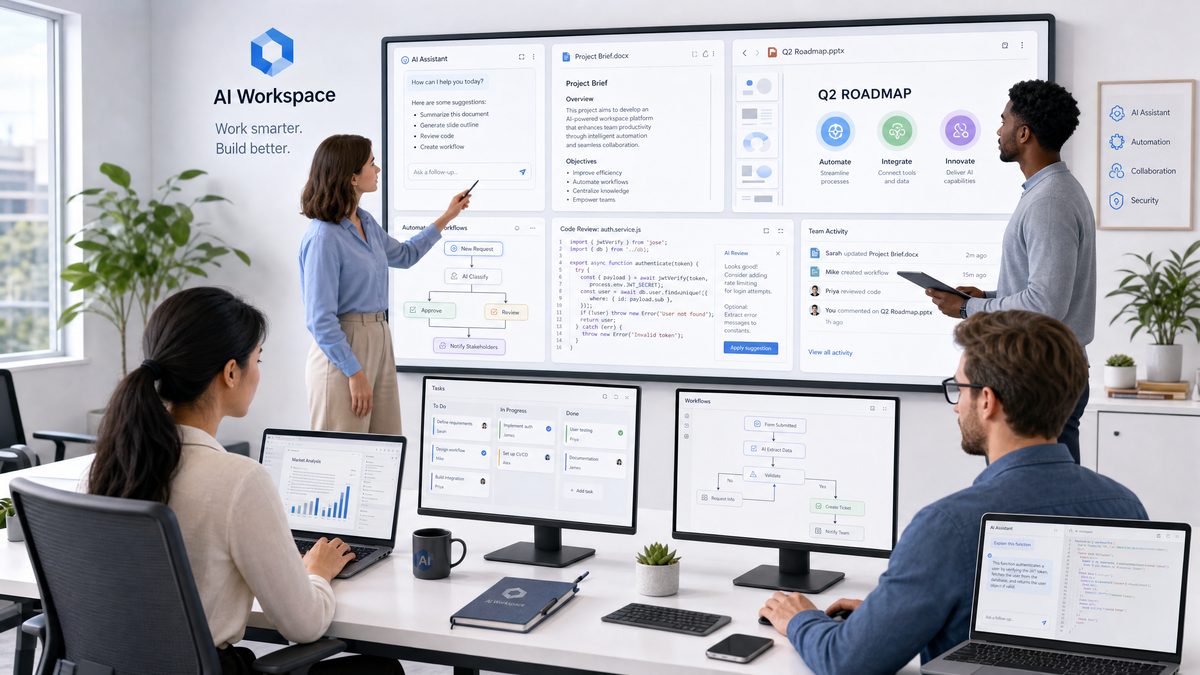
In the rapidly evolving landscape of artificial intelligence, OpenAI’s Codex has emerged as a transformative tool for developers, enabling intelligent code generation and automation. Originally conceived as a powerful coding assistant, Codex has recently been augmented with innovative workspace features, including a built-in browser and the ability to use a computer, which have elevated its utility from mere code suggestion to full-fledged workflow automation. This case study explores how diverse teams across industries have integrated Codex’s new workspace capabilities into their production environments, effectively turning it into a business autopilot that streamlines complex processes and drives operational efficiency.
These advancements mark a significant milestone in the evolution of AI-powered development tools, shifting the paradigm from static code generation to dynamic, context-aware automation that interacts with real-world systems and data. As Codex now bridges the gap between natural language understanding and practical execution within complex environments, teams are leveraging it not only for coding but for orchestrating entire business processes.
Evolution of Codex: From Code Generation to Workflow Automation
Background and Origins of Codex
OpenAI Codex is an AI system designed to understand and generate code based on natural language inputs. Built on GPT-3’s architecture and fine-tuned with vast datasets of public source code, Codex rapidly gained popularity for its ability to assist developers in writing code snippets, debugging, and generating entire functions. Initially deployed as a coding assistant embedded in environments like GitHub Copilot, Codex’s core strength was accelerating software development cycles by converting human intent into working code.
To understand Codex’s impact, it’s essential to appreciate the technical foundation of its architecture. Codex leverages a transformer-based neural network architecture that excels in natural language understanding. By training on billions of lines of code across several programming languages, Codex developed a contextual awareness of coding conventions, libraries, and idiomatic patterns. This training enables it to predict and generate syntactically correct and semantically meaningful code fragments in response to descriptive prompts.
For example, a developer can input a prompt like "Write a Python function to merge two sorted lists", and Codex can generate a precise implementation, often requiring minimal correction or refinement. This capability drastically reduces the cognitive load on developers, allowing them to focus on higher-level design and problem-solving.
Limitations of Early Codex Models
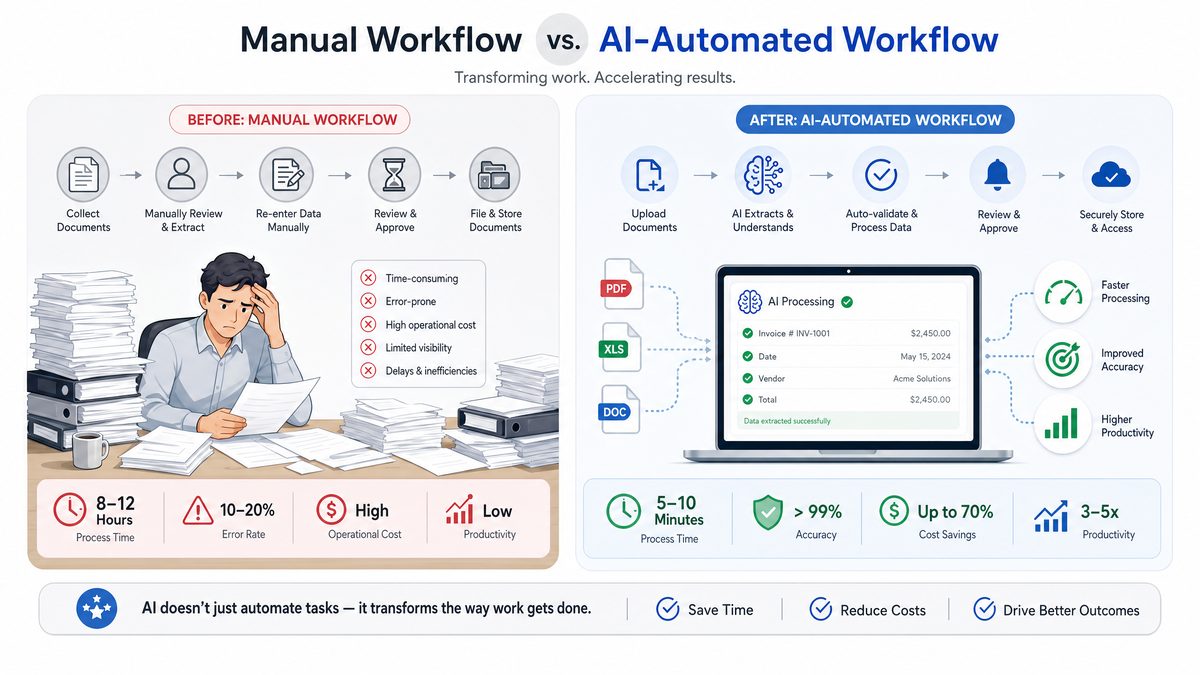
While the original Codex models were groundbreaking, their capabilities were confined primarily to code generation within isolated prompts. They lacked persistent memory, real-time interaction with external data sources, and the ability to operate within broader software environments. This limited their applicability for automating end-to-end workflows that required dynamic decision-making, integration with web services, or continuous state management.
To illustrate, early Codex iterations could generate scripts or code snippets but could not autonomously fetch updated information from the internet or maintain state across multiple interactions. For instance, generating a script to analyze stock prices was possible, but Codex could not execute the script to fetch live market data or update the analysis in real time without manual intervention. This constraint meant that while helpful, Codex remained a reactive tool rather than a proactive agent.
Introduction of Workspace Features
Recognizing these limitations, OpenAI introduced new workspace features that significantly expanded Codex’s capabilities:
- Built-in Browser Integration: Allowing Codex to access and retrieve real-time data from the web, perform research, and interact with online services.
- Computer Use Capabilities: Enabling Codex to execute commands, manipulate files, and interact with local or cloud-based operating environments.
- Persistent Contextual Awareness: Providing Codex with the ability to maintain state across interactions, facilitating complex multi-step workflows.
These features transformed Codex from a reactive coding assistant into a proactive agent capable of managing entire business processes autonomously.
By integrating these workspace features, Codex now operates as a hybrid AI system combining language understanding with real-world operational capabilities. This transition mirrors the broader AI trend towards agents that not only reason and generate content but also perceive, act, and adapt in dynamic environments.
Technical Foundations of the New Workspace
At a technical level, these enhancements are underpinned by a modular architecture that integrates Codex’s language understanding with external APIs and sandboxed environments. The built-in browser is implemented using a secure headless browsing framework, providing Codex with DOM-level access to websites. The computer use interface leverages virtualized shell environments that Codex can command safely. Persistent memory is managed through context windows and external databases that track ongoing tasks. This architecture facilitates seamless interaction between language models and computational resources without compromising security or performance.
The modular design enables flexible extension and integration with enterprise systems. For example, the browser module abstracts away website rendering complexity, exposing a clean API for Codex to perform actions like querying search engines, interacting with forms, or scraping data tables. Meanwhile, the computer use module provides an isolated environment where Codex can execute scripts, manage files, and trigger cloud services safely.
Table 1 below summarizes key components of the Codex workspace architecture:
| Component | Description | Functionality | Security Measures |
|---|---|---|---|
| Language Model Core | GPT-3 based Codex model | Natural language understanding and code generation | Model sandboxing, prompt filtering |
| Built-in Browser Module | Headless browser with DOM access | Real-time web data retrieval and interaction | Content security policies, domain whitelisting |
| Computer Use Module | Virtualized shell and file system | Command execution, file manipulation, process automation | Isolated containers, permission management |
| Persistent Memory Layer | Context manager and external storage | Maintains session state and task history | Encrypted storage, access audit logs |
Historical Context: AI in Software Automation and the Rise of Codex
The journey toward AI-assisted software development spans decades, beginning with early expert systems designed to assist programmers. Early tools such as code completion in IDEs evolved from simple syntax-based suggestions to more context-aware systems.
By the 2010s, machine learning models began to influence code generation, but limitations in model capacity and training data restricted performance. With the advent of large language models like GPT-3, trained on massive code corpora, the landscape shifted dramatically.
Codex represents a culmination of this evolution, harnessing breakthroughs in natural language processing (NLP) and deep learning to create a versatile AI coding assistant. Its new workspace features further push the boundary by enabling real-time interaction and autonomous execution, heralding a new era of AI-driven software automation.
Real-World Applications: Teams Leveraging Codex Workspace in Production
Case Study 1: Automating Financial Reporting for a Global Consultancy
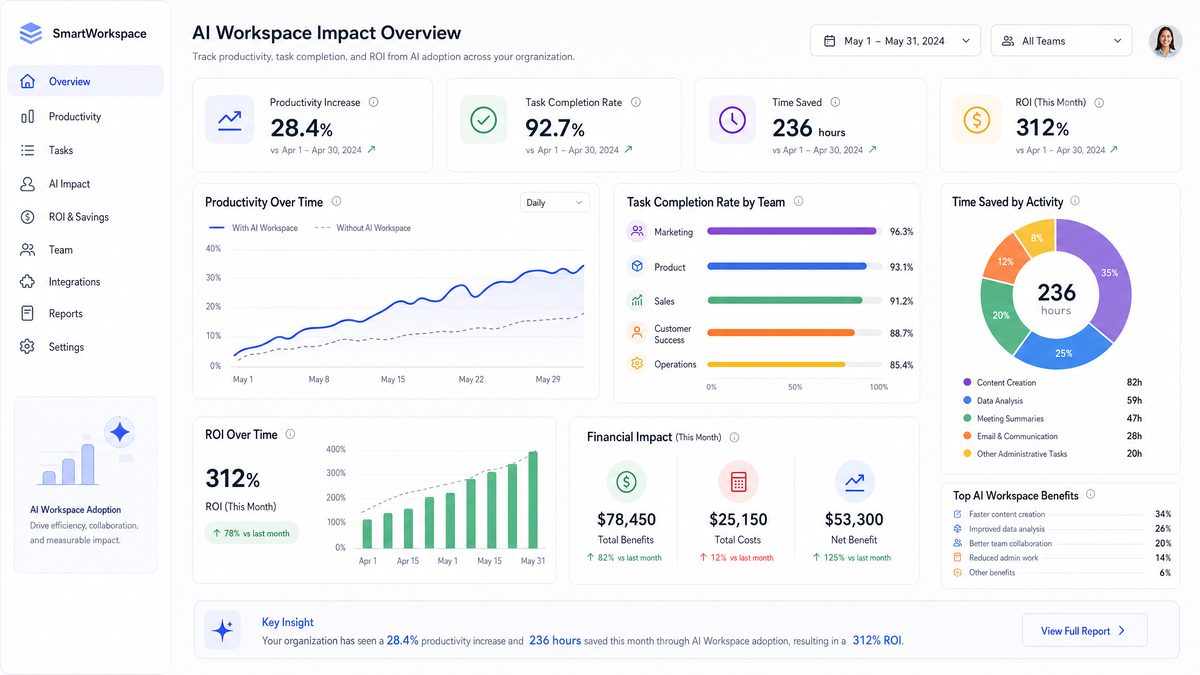
A multinational financial consultancy integrated Codex’s workspace features to automate its monthly financial reporting process. Previously, this process involved manual data extraction from multiple sources, spreadsheet updates, and report generation—tasks that consumed hundreds of human hours each month.
- Problem: Time-consuming manual compilation of financial data from client databases and public economic indicators.
- Solution: Codex was deployed with browser capabilities to access real-time economic data and APIs connected to internal financial databases. It used computer use features to manipulate spreadsheets, generate visualizations, and format reports automatically.
- Outcome: The team reduced reporting time from two weeks to less than 48 hours, improved accuracy by eliminating manual errors, and freed analysts to focus on strategic insights rather than data wrangling.
For example, Codex automated the integration of macroeconomic indicators from government websites, cross-referencing these with client portfolio data stored in secured cloud databases. It generated pivot tables and charts in Excel, applying consistent formatting and annotations. Analysts could then review and interpret the results directly, significantly accelerating decision-making.
Case Study 2: Streamlining Customer Support with Automated Ticket Resolution
An enterprise SaaS provider harnessed Codex’s new features to create an AI-powered support assistant. The assistant can autonomously browse internal knowledge bases, analyze customer tickets, and execute remediation scripts on customer environments.
- Problem: High volume of repetitive customer issues requiring manual intervention and lengthy resolution times.
- Solution: Codex accesses ticket histories and documentation through its browser integration. It then uses computer commands to reset services, adjust configurations, or escalate issues automatically when necessary.
- Outcome: Customer satisfaction scores improved significantly, support costs were reduced by 35%, and resolution times dropped by 60%.
By integrating with the company’s ticketing system API, Codex could classify tickets using NLP techniques, match them to relevant knowledge base articles, and apply corrective actions such as service restarts or cache clears. Escalations were triggered only when automated remediation failed, ensuring human agents focused on complex cases.
Case Study 3: E-Commerce Workflow Automation
A mid-sized e-commerce company deployed Codex to automate inventory management and order processing workflows. Codex uses browser access to monitor supplier websites for stock levels and pricing changes, automatically updating internal systems and triggering procurement orders.
- Problem: Manual monitoring of supplier sites and inventory spreadsheets led to stockouts and delayed order fulfillment.
- Solution: Codex’s browser capabilities scrape supplier data daily, while computer use functions update inventory systems and initiate purchase orders when thresholds are met.
- Outcome: Inventory accuracy improved by 25%, stockouts decreased by 40%, and overall order fulfillment speeds increased.
Codex employed web scraping techniques to extract product availability and pricing from multiple supplier portals, normalizing heterogeneous data formats. It then cross-referenced this data with sales velocity metrics stored in internal databases to forecast reorder points dynamically. The automation not only improved operational efficiency but also enabled better supplier negotiations through timely data insights.
Case Study 4: Software Development Acceleration in a Startup
A technology startup integrated Codex into their development pipeline, leveraging workspace features to automate testing, deployment, and monitoring. Codex reads commit messages, runs test suites, deploys successful builds, and monitors system logs for anomalies using its computer use capabilities.
- Problem: Manual deployment and monitoring slowed release cycles and risked missing critical issues.
- Solution: Codex automates CI/CD pipeline steps, integrating with version control systems and cloud infrastructure APIs.
- Outcome: Deployment frequency doubled, bug detection improved, and developer productivity increased substantially.
Codex parsed commit messages to infer the scope and urgency of changes, selectively running relevant test suites to optimize resource use. Upon passing tests, Codex triggered deployment scripts on cloud infrastructure, followed by continuous log monitoring using pattern recognition to detect anomalies early. This closed-loop automation reduced manual overhead and enhanced software quality.
Technical Deep Dive: How Codex’s Workspace Features Enable Business Autopilot
Built-in Browser: Real-Time Data Access and Interaction
One of the most revolutionary additions to Codex is its native browser capability. This feature allows Codex to perform the following functions:
- Dynamic Data Retrieval: Codex can execute web searches, scrape structured and unstructured data, and interact with web applications.
- Contextual Understanding: By analyzing web content in real time, Codex can make informed decisions based on the latest information, a critical advantage over static datasets.
- Automated Web Tasks: Codex can fill out forms, submit queries, and navigate interactive websites, enabling automation of complex web-based workflows.
These capabilities allow teams to delegate research, monitoring, and data collection tasks to Codex, drastically reducing manual labor.
From a technical perspective, the built-in browser operates with a headless Chromium instance controlled via an API that exposes page elements and events to Codex. This setup allows the model to interpret page structures (such as tables, forms, buttons), simulate user interactions, and extract information programmatically. For example, Codex can navigate a multi-step login process, handle CAPTCHAs with integrated third-party services, and proceed to scrape protected content.
Computer Use: Command Execution and File Manipulation
Codex’s ability to use a computer extends the AI’s practical utility by enabling it to interact with local or remote operating systems securely:
- File System Access: Codex can create, read, update, and delete files based on task requirements.
- Command Line Operations: It can execute shell commands to install software, run scripts, or configure environments.
- Process Automation: Codex can orchestrate multi-step processes involving various software tools, integrating disparate systems seamlessly.
This functionality empowers Codex to act autonomously in operational environments, effectively functioning as a virtual system administrator or automation engineer.
For instance, in a typical scenario, Codex might receive a prompt to deploy a new web server. It would then:
- Check system prerequisites using shell commands.
- Download and install necessary packages.
- Configure server settings by editing configuration files.
- Start the server process and verify its status.
- Log deployment results and notify stakeholders.
This level of operational autonomy reduces the need for human intervention in routine IT tasks, accelerating deployment cycles and minimizing errors.
Persistent Context and Memory
Traditional language models are limited by their prompt context windows, making sustained task management challenging. The Codex workspace addresses this through:
- Session Persistence: Maintaining conversational and operational context across extended interactions.
- State Tracking: Monitoring task progress, dependencies, and results to adapt actions dynamically.
- Integration with External Storage: Leveraging databases or cloud storage for durable memory beyond session limits.
This persistent awareness is essential for automating workflows that require conditional logic, iterative refinement, or multi-step execution.
Consider an example where Codex is tasked with managing a multi-day financial audit process. It must remember which data sources have been validated, which reports have been generated, and what outstanding tasks remain. By maintaining state, Codex can resume operations seamlessly after interruptions and coordinate complex sequences without losing context.
Security and Compliance Considerations
Deploying Codex with elevated privileges raises important security concerns. OpenAI and teams using Codex have implemented rigorous safeguards:
- Sandboxed Execution: All computer use commands run in isolated environments to prevent unauthorized system changes.
- Access Controls: Strict permission management ensures Codex can only access necessary resources.
- Audit Logging: Comprehensive logging of Codex actions supports traceability and compliance.
- Data Privacy: Sensitive data is handled with encryption and limited exposure to the AI model.
These measures enable organizations to leverage Codex’s power responsibly while mitigating risks.
To further illustrate, organizations deploy multi-layered security architectures where Codex operates within containerized environments monitored by security information and event management (SIEM) systems. Role-based access controls (RBAC) restrict Codex’s permissions, and all actions are logged with cryptographic integrity checks. Additionally, data masking techniques ensure that confidential information is obfuscated during AI processing, aligning with GDPR and HIPAA compliance requirements.
Impact and Future Implications of Codex Workspace in Business Automation
Transforming Workforce Dynamics
The automation capabilities of Codex’s new workspace features are reshaping the nature of work across sectors. By taking over repetitive and data-intensive tasks, Codex frees human workers to focus on creative, strategic, and interpersonal activities. This shift promotes higher-value work while reducing burnout and error rates. However, it also necessitates reskilling and adaptation to hybrid workflows where humans and AI collaborate seamlessly.
Workforce transformation driven by Codex includes:
- Augmentation: Humans and AI working together, with Codex handling routine tasks and humans providing oversight and strategic input.
- Reskilling: Employees learning to design, monitor, and optimize AI-driven workflows.
- New Roles: Emergence of AI coordinators and automation specialists bridging technical and domain knowledge.
Enabling Agile and Scalable Operations
Businesses empowered by Codex can respond more rapidly to changing market conditions and customer needs. Automated workflows execute consistently and at scale, ensuring operational resilience. For startups and SMEs, Codex lowers the barriers to sophisticated automation previously available only to large enterprises with dedicated engineering teams.
Key operational benefits include:
- Rapid Deployment: Quick setup of automated processes without extensive custom coding.
- Scalability: Cloud-native architecture enables scaling automation from small to large workloads.
- Resilience: Automated error detection and recovery reduce downtime.
Driving Innovation Through AI-Augmented Decision Making
Codex’s ability to synthesize information from diverse sources and act autonomously accelerates innovation cycles. Teams can prototype, test, and deploy new processes faster, while Codex continuously monitors and optimizes performance. This creates a feedback loop of continuous improvement driven by AI insights.
For example, in product development, Codex can automate data gathering from user feedback, analyze feature usage statistics, and propose iterative design changes, thus shortening innovation cycles and improving responsiveness to market demands.
Challenges and Considerations for the Future
Despite its promise, widespread adoption of Codex’s advanced workspace features entails challenges:
- Ethical Use: Ensuring Codex’s automation respects ethical guidelines and avoids unintended harm.
- Reliability: Maintaining robust error handling and fallback mechanisms for mission-critical operations.
- Transparency: Providing clear explanations of Codex’s actions to maintain user trust.
- Integration Complexity: Harmonizing Codex workflows with legacy systems and organizational processes.
- User Acceptance: Overcoming resistance by demonstrating value and building confidence in AI decisions.
- Regulatory Compliance: Navigating evolving legal frameworks around AI use and data management.
Addressing these challenges will be key to unlocking Codex’s full potential as a business autopilot.
Future Roadmap and Potential Enhancements
OpenAI is actively developing enhancements to Codex’s workspace, including:
- Expanded API Integrations: Broader connectivity with enterprise software suites and cloud platforms.
- Improved Multi-Modal Capabilities: Incorporation of visual and audio inputs for richer context comprehension.
- Advanced Reasoning and Planning: Enhanced support for complex decision trees and adaptive workflows.
- Collaborative Workspaces: Enabling multiple users and AI agents to interact and co-manage projects.
- Explainability Features: Tools to trace AI decision pathways and provide human-readable justifications.
- Enhanced Security Protocols: Integration of zero-trust architectures and AI-specific threat detection.
These developments promise to further entrench Codex as an indispensable business automation tool.
Comparative Analysis: Codex Workspace vs Traditional Automation Tools
| Feature | Codex Workspace | Traditional Automation Tools |
|---|---|---|
| Programming Paradigm | Natural language driven, AI-assisted code generation and execution | Rule-based scripting, manual coding |
| Data Access | Real-time web browsing and API integration | Predefined data sources, limited dynamic access |
| Workflow Complexity | Supports multi-step, conditional, and adaptive workflows with persistent context | Primarily linear or manually configured branching |
| Human Interaction | Interactive collaboration with AI, conversational commands | Primarily batch or scheduled tasks |
| Security | Sandboxed execution, fine-grained permissions, audit logs | Varies widely; often less integrated security models |
| Scalability | Cloud-native, scalable via AI orchestration | Dependent on infrastructure and manual scaling |
| Adaptability | Learns from interactions, adapts workflows dynamically | Static automation scripts, require manual updates |
| Ease of Use | Natural language prompts reduce barrier to entry | Requires specialized scripting knowledge |
Integrating Codex Workspace into Your Organization: Best Practices
Assessing Use Cases and Readiness
Start by identifying repetitive, data-intensive, or error-prone workflows that can benefit from AI automation. Evaluate existing infrastructure for compatibility with Codex’s workspace features and plan pilot projects that demonstrate value quickly.
- Map out business processes and highlight bottlenecks.
- Identify integration points with existing data sources and APIs.
- Assess team skillsets and identify training needs.
- Define success metrics such as time saved, error reduction, and user satisfaction.
Building Cross-Functional Teams
Successful deployment requires collaboration between developers, domain experts, and operations staff. Training teams to understand Codex’s capabilities and limitations fosters effective human-AI collaboration.
- Include AI specialists to design and monitor workflows.
- Engage business analysts to translate requirements into automation tasks.
- Involve security teams early to address compliance.
- Establish feedback loops to capture user experiences and improve workflows.
Implementing Security Protocols
Define access controls, monitor AI actions, and enforce compliance policies. Regularly audit automated workflows and incorporate fail-safe mechanisms to handle exceptions.
- Use role-based access control (RBAC) to limit permissions.
- Implement audit trails and real-time monitoring.
- Set up anomaly detection to flag unusual AI behavior.
- Develop rollback procedures to recover from errors.
Monitoring and Continuous Improvement
Track performance metrics, user feedback, and error rates. Use this data to iteratively refine automation scripts and expand Codex’s role in business processes.
- Establish dashboards to visualize key performance indicators (KPIs).
- Conduct regular reviews of AI outputs and decisions.
- Incorporate user feedback to improve usability.
- Plan incremental rollout of new features based on learnings.
Leveraging
Manufacturing represents one of the most compelling use cases for AI workspace adoption; our case study on how Nexen Tire transformed operations with ChatGPT Enterprise shows how a traditional manufacturer integrated AI across their entire value chain: How Nexen Tire Transformed Core Operations with ChatGPT Enterprise.
for Seamless Integration
Utilize internal resources and documentation to align Codex automation with existing systems, ensuring smooth interoperability and knowledge sharing.
Collaboration platforms, internal wikis, and code repositories can serve as focal points for sharing best practices, troubleshooting guides, and automation templates, facilitating faster onboarding and adoption.
Future Perspectives: The Next Frontier for Codex and AI-driven Automation
Integration with Internet of Things (IoT) and Edge Computing
As IoT devices proliferate, Codex’s workspace features could extend to orchestrate edge devices, enabling real-time, localized automation in manufacturing, logistics, and smart environments. This would require enhancements in low-latency execution and distributed control paradigms.
Advancements in Explainable AI (XAI) for Codex
To foster trust and regulatory compliance, Codex will likely incorporate explainability modules that provide detailed rationale for its actions, decision paths, and predicted outcomes, helping users audit and understand AI-driven workflows.
Multi-Agent Collaboration and AI Ecosystems
Future iterations may enable multiple Codex agents to collaborate, negotiate, and share tasks across complex workflows, simulating human team dynamics and enabling scalable, decentralized automation ecosystems.
Human-Centered AI Design
Development will focus on enhancing user experience by refining natural language interfaces, providing interactive debugging tools, and enabling customizable automation templates tailored to diverse organizational needs.
Potential Challenges and Mitigation Strategies
As Codex’s role grows, challenges such as AI bias, over-reliance on automation, and evolving cybersecurity threats will intensify. Proactive strategies including continuous bias auditing, human-in-the-loop frameworks, and adaptive security models will be essential.
Conclusion: The Dawn of AI-Driven Business Autopilot
OpenAI’s Codex has transcended its origins as a coding assistant to become a versatile automation engine powered by its new workspace features. By enabling real-time web interaction, computer command execution, and persistent context awareness, Codex empowers organizations to automate complex workflows end-to-end. The case studies presented illustrate tangible benefits across industries—from financial services to customer support and e-commerce—demonstrating Codex’s transformative impact in production environments.
As Codex continues to evolve, it heralds a future where AI-driven business autopilots handle routine and intricate tasks alike, augmenting human capabilities and driving unprecedented operational efficiency. Organizations that embrace this technology today position themselves at the forefront of innovation and competitiveness.
For teams seeking to explore Codex’s full potential, integrating its workspace features thoughtfully and securely will be essential. The journey from coding assistant to business autopilot is well underway, promising a new paradigm in intelligent automation.
Discover more insights and practical guidance by exploring the detailed documentation and community resources available at
The transition from using Codex as a chat tool to building systematic workflows mirrors a broader industry shift; our guide on turning one-off prompts into repeatable pipelines provides the methodology for converting ad-hoc AI interactions into reliable business processes: From Chat To System: Turning One-Off Prompts Into Repeatable Pipelines.
Access 40,000+ AI Prompts for ChatGPT, Claude & Codex — Free!
Subscribe to get instant access to our complete Notion Prompt Library — the largest curated collection of prompts for ChatGPT, Claude, OpenAI Codex, and other leading AI models. Optimized for real-world workflows across coding, research, content creation, and business.
Useful Links
- OpenAI Codex Official Blog
- OpenAI Codex API Documentation
- GitHub Copilot Overview
- Fetch API Documentation (for Web Data Retrieval)
- Business Process Automation – Wikipedia
- OWASP Top Ten Security Risks
- AI in Business Automation (IBM)
- Automation and the Future of Work – McKinsey
- How AI Is Transforming Business Automation – Forbes
- How to Automate Business Processes with AI – TechRepublic
