
How Knowledge Workers Use OpenAI Codex for Productivity: A Comprehensive Guide

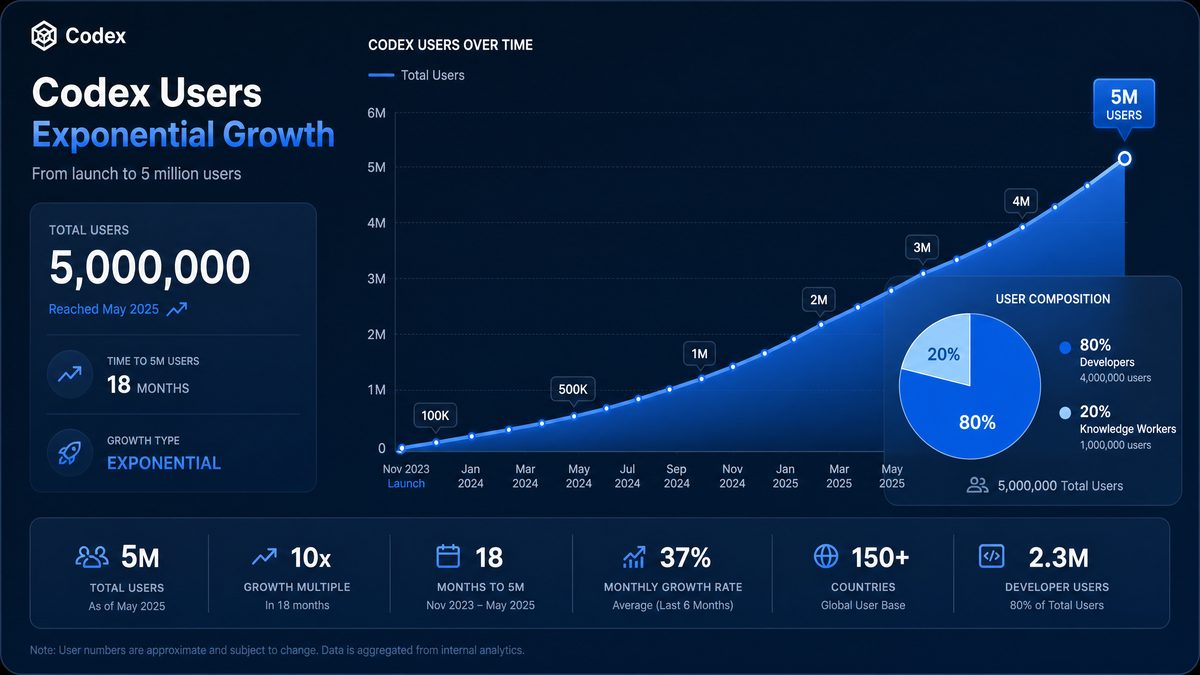
OpenAI Codex has rapidly evolved into a transformative tool not just for developers but increasingly for knowledge workers—professionals who harness information and expertise to generate value across diverse business functions. According to OpenAI’s landmark report, “The Next Era of Knowledge Work” (June 2, 2026), Codex now boasts over 5 million weekly active users, with knowledge workers comprising 20% of this user base. This segment is growing three times faster than developers, underscoring a profound shift in how non-technical professionals leverage AI to enhance productivity, creativity, and collaboration in their daily tasks.
This guide explores the multiple dimensions through which knowledge workers use OpenAI Codex to augment their workflows. From automating complex report generation to streamlining data analysis and crafting polished presentations, Codex acts as a versatile AI assistant capable of parallel task execution and deep contextual understanding. We will examine specific use cases across finance, data science, operations, and human resources, provide detailed step-by-step workflows, and share practical tips for maximizing efficiency with simultaneous AI-driven processes.
Beyond immediate task automation, Codex is reshaping the knowledge worker’s role by reducing friction points such as information retrieval and coordination, enabling professionals to undertake more ambitious projects and expand their career horizons. This comprehensive guide is designed to equip knowledge workers and organizational leaders with the insights and actionable strategies to fully harness OpenAI Codex’s capabilities in their environments.
Real-World Case Study: How a Financial Analyst Enhanced Workflow Efficiency with OpenAI Codex
To illustrate the practical impact of OpenAI Codex on knowledge workers, consider the experience of Emily Chen, a senior financial analyst at a multinational investment firm. Emily faced the perennial challenge of rapidly synthesizing large volumes of quarterly financial data to produce actionable insights for portfolio managers. Traditionally, this process involved manually creating complex Excel models, drafting detailed reports, and preparing presentation decks—tasks that consumed over 20 hours per reporting cycle.
By integrating OpenAI Codex into her workflow, Emily automated key components of her analysis. She used Codex to generate dynamic Excel formulas and macros that recalculated projections based on real-time market data feeds. Codex also assisted in drafting narrative sections of her reports by summarizing trends and anomalies detected in datasets, significantly reducing the time spent on writing and editing. Additionally, Codex helped create visually compelling PowerPoint slides with data visualizations and key insights formatted according to corporate branding standards.
The results were striking: Emily reduced her report generation time from 20 hours to under 6 hours per cycle, enabling her to focus more on strategic interpretation and client engagement. Moreover, the consistency and accuracy of her reports improved, as Codex minimized human errors in calculations and ensured standardized language across documents. This case exemplifies how Codex empowers knowledge workers to elevate their productivity and impact by automating repetitive, detail-oriented tasks while augmenting cognitive functions.
Comparative Analysis: OpenAI Codex vs. Traditional Automation Tools for Knowledge Workers
| Feature | OpenAI Codex | Traditional Automation Tools | Impact on Productivity |
|---|---|---|---|
| Task Flexibility | Adapts to varied tasks across domains including code generation, natural language processing, and data manipulation | Typically limited to predefined workflows or scripting within specific applications | Enables broader scope of automation, reducing task-switching overhead |
| Ease of Use | Natural language prompts allow non-technical users to generate complex outputs without coding knowledge | Requires programming or advanced scripting skills to customize tasks | Lowers barrier to entry, expanding AI benefits to a wider user base |
| Integration | Seamlessly integrates with multiple platforms via APIs and plugins | Often siloed within specific software environments (e.g., Excel macros, RPA bots) | Facilitates unified workflows and reduces manual data transfer |
| Learning Curve | Shorter—users learn prompt engineering and iterative refining | Longer—users must learn scripting languages and debugging techniques | Accelerates adoption and rapid prototyping of solutions |
| Maintenance | AI model updates and improvements managed by provider | User responsible for maintaining and updating scripts and automation logic | Reduces ongoing workload and risk of obsolescence |
| Output Quality | Generates human-like, context-aware content including code, reports, and summaries | Outputs are deterministic but often lack contextual nuance or natural language fluidity | Improves clarity, engagement, and precision of deliverables |
This comparison underscores Codex’s unique value proposition for knowledge workers: the ability to automate complex, multidisciplinary tasks without requiring deep technical expertise, thereby unlocking substantial productivity gains and qualitative improvements in work outputs.
Advanced Tips and Best Practices for Maximizing OpenAI Codex Productivity
To achieve optimal results with OpenAI Codex, knowledge workers should adopt advanced strategies that leverage the AI’s full potential. First, invest time in mastering prompt engineering—crafting clear, specific, and context-rich prompts significantly improves output relevance and accuracy. For example, when generating a financial model formula, explicitly specify the data range, calculation type, and desired output format.
Second, incorporate iterative refinement into your workflow. Use Codex’s responses as a foundation rather than final deliverables, and iteratively request clarifications or enhancements. This approach is particularly effective when working on narrative content or complex code snippets, allowing you to tailor outputs closely to your needs.
Third, combine Codex with complementary tools such as version control systems and collaborative platforms. For instance, integrating Codex-generated scripts into Git repositories facilitates traceability and team collaboration, while using it alongside cloud-based document editors enables seamless real-time co-authoring and AI-assisted revisions.
Fourth, maintain a repository of reusable prompt templates and code snippets tailored to your domain and common tasks. This habit accelerates task initiation and ensures consistency across projects. Regularly update this repository based on lessons learned and emerging best practices.
Finally, stay informed about updates to Codex’s capabilities and API features. OpenAI frequently enhances model performance and adds new functionalities, which can unlock additional productivity opportunities. Participating in user communities and professional forums can also provide insights, troubleshooting help, and innovative use cases discovered by peers.
OpenAI Codex and the Knowledge Worker Landscape in 2026
OpenAI Codex, originally developed as a code generation engine, has transformed into a robust AI assistant platform that empowers knowledge workers across industries. Its rapid adoption—reaching over 5 million weekly active users—reflects a broader trend of AI democratization, where tools once reserved for technical experts are now accessible and invaluable to non-developers. Knowledge workers represent a significant and rapidly expanding segment of this user base, growing at three times the rate of developers, illustrating the broad applicability of Codex beyond programming.
Knowledge workers utilize Codex primarily for tasks that involve manipulating large sets of data, composing complex documents, synthesizing research, and generating polished deliverables. Key application areas include:
- Report generation: Automating the drafting and formatting of business, financial, and research reports.
- Spreadsheet automation: Creating formulas, pivot tables, and data visualizations without manual coding.
- Presentation creation: Designing slide decks with coherent narratives and data-driven insights.
- Contract drafting: Assisting legal and procurement teams with generating and reviewing contract language.
- Data analysis: Parsing datasets, performing statistical tests, and summarizing findings.
The fastest growing tasks among knowledge workers using Codex are data analysis, research synthesis, and knowledge artifact creation—highlighting an increasing reliance on AI for complex cognitive workflows that traditionally required manual effort and domain expertise.
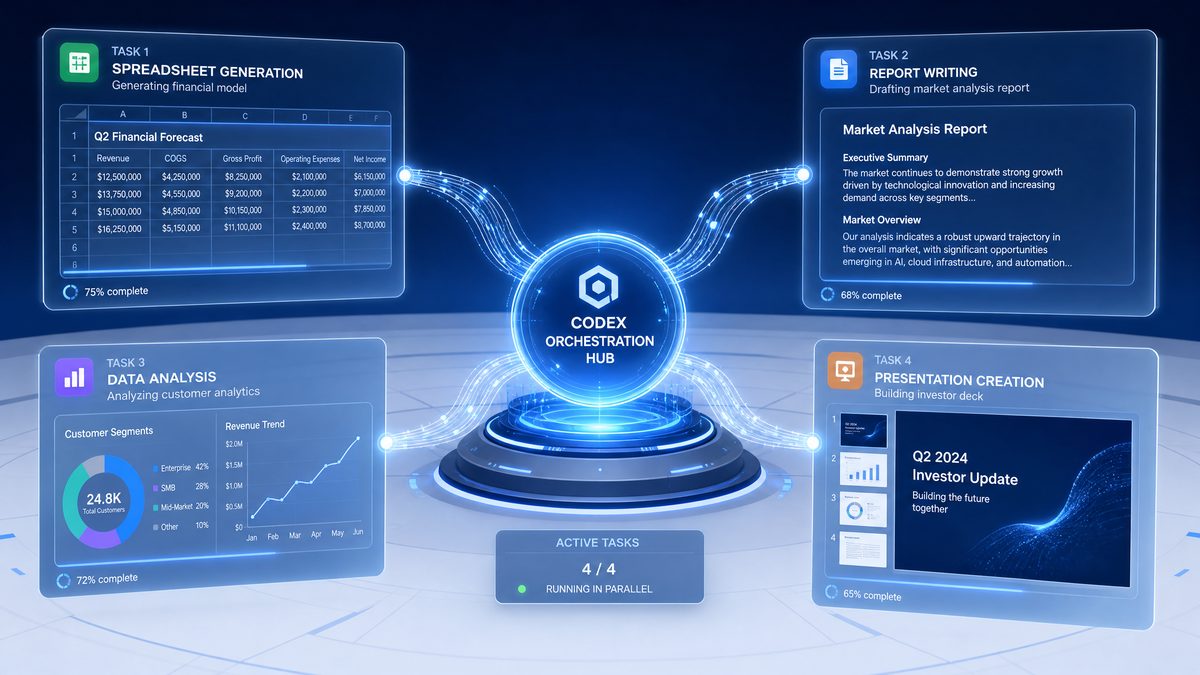
Codex’s ability to manage parallel task execution further enhances productivity by enabling users to run multiple workflows simultaneously, thus reducing bottlenecks and optimizing time management. This capability is critical for knowledge workers who often juggle several projects and deadlines.
How Different Knowledge Worker Roles Leverage OpenAI Codex
The utility of Codex spans a wide range of professional functions. Below, we examine how various knowledge worker roles uniquely benefit from Codex’s AI-driven capabilities.
Finance Teams
Finance professionals use Codex to automate routine but detail-intensive tasks such as budgeting, forecasting, and variance analysis. Codex can generate complex Excel formulas, automate financial modeling, and draft narrative explanations of financial results. By integrating Codex into financial workflows, teams reduce manual errors and accelerate the reporting cycle.
For example, a finance analyst might input raw quarterly data and prompt Codex to:
- Create dynamic pivot tables summarizing revenue streams.
- Generate written commentary interpreting key financial trends.
- Suggest scenario-based forecasts based on historical data patterns.
Data Scientists and Analysts
While many data scientists are developers, an increasing number of data analysts and business intelligence professionals without coding backgrounds now use Codex. The AI helps with data wrangling, generating SQL queries, writing scripts for data visualization, and summarizing statistical analyses.
Codex enables rapid prototyping by translating natural language queries into executable code, allowing analysts to focus on interpreting results rather than programming. For instance, an analyst might ask Codex to “generate a Python script to calculate the correlation between sales and marketing spend,” and receive a fully functional, annotated script.
Operations Teams
Operations professionals leverage Codex for process documentation, workflow automation, and resource allocation analyses. Codex assists in creating SOPs (Standard Operating Procedures), automating email responses, and generating reports to identify inefficiencies.
With Codex’s parallel execution capabilities, operations managers can run multiple scenario analyses simultaneously—for example, comparing supply chain outcomes under different vendor contracts—thereby accelerating decision-making.
Human Resources (HR)
HR teams use Codex for drafting job descriptions, analyzing employee engagement survey data, and automating repetitive communications such as interview scheduling and onboarding checklists. Codex’s natural language processing capabilities enhance the quality and consistency of written materials, while its data analysis functions help HR professionals gain actionable insights from workforce metrics.
For instance, Codex can generate a summary report of employee sentiment extracted from open-text survey responses, highlighting key themes and potential areas for intervention.
Step-by-Step Workflows for Common Knowledge Work Tasks Using OpenAI Codex
To maximize Codex’s potential, knowledge workers benefit from structured workflows that integrate AI assistance seamlessly into their daily routines. Below are detailed, stepwise workflows for prevalent tasks.
1. Automating Report Generation
- Data Collection: Gather raw data sources such as spreadsheets, databases, or survey results.
- Prompt Preparation: Formulate clear instructions for Codex, specifying report type, key metrics, and required sections.
- Initial Draft: Use Codex to generate the textual content, including executive summaries, method descriptions, and results interpretation.
- Data Integration: Instruct Codex to embed tables, charts, and visualizations derived from the data.
- Review and Edit: Validate the AI-generated content for accuracy and relevance; make necessary edits.
- Formatting: Request Codex to apply consistent formatting styles, headers, footers, and pagination.
- Finalization: Export the report to desired formats (PDF, Word) and distribute.
This workflow drastically reduces the manual labor involved in complex report assembly and ensures consistency across documents.
2. Spreadsheet Automation and Analysis
- Input Data: Load datasets into spreadsheet software.
- Define Objectives: Specify analysis goals such as trend identification, forecasting, or anomaly detection.
- Generate Formulas: Use Codex to create advanced formulas, conditional formatting rules, and pivot tables.
- Automate Tasks: Request macros or scripts for repetitive actions like data cleaning.
- Visualize Data: Command Codex to generate charts and dashboards tailored to analytical needs.
- Interpret Results: Ask Codex to produce natural language summaries explaining key insights.
3. Presentation Creation
- Outline Development: Provide Codex with a presentation topic and audience profile to generate an initial outline.
- Slide Content: Use Codex to draft slide text, bullet points, and speaker notes.
- Data Integration: Incorporate relevant charts, graphs, and tables generated by Codex or imported from reports.
- Design Suggestions: Request slide design recommendations including color schemes and layouts.
- Review and Finalize: Edit and polish the presentation, ensuring clarity and flow.
4. Contract Drafting and Review
- Template Selection: Provide Codex with standard contract templates or clauses.
- Custom Clause Generation: Instruct Codex to draft specific clauses tailored to deal terms or compliance requirements.
- Review for Consistency: Ask Codex to highlight inconsistencies or missing elements.
- Summarize Key Terms: Generate executive summaries of contract obligations and deadlines.
- Finalize Document: Format contract and prepare for electronic signature or distribution.
5. Data Analysis and Research Synthesis
- Data Import: Load datasets or research documents into Codex-compatible interfaces.
- Query Formulation: Pose natural language questions or hypotheses to Codex.
- Code Generation: Obtain scripts for data cleaning, statistical tests, or visualization.
- Interpretation: Receive detailed explanations of findings and contextual insights.
- Report Creation: Generate comprehensive summaries, charts, and citations formatted for publication or internal use.
Tips for Running Multiple Codex Tasks Simultaneously
One of Codex’s standout capabilities for knowledge workers is the ability to handle parallel task execution. This feature is especially useful when managing complex, multi-component projects or when time is constrained. Here are expert tips for optimizing concurrent Codex workflows:
- Segment Tasks Clearly: Break down large projects into discrete tasks with specific prompts to avoid confusion or overlap.
- Use Task Queues: Employ Codex’s built-in task management features or integrate with workflow tools to queue and prioritize AI requests.
- Monitor Output Quality: Regularly review interim outputs to catch errors early and refine instructions as necessary.
- Leverage Multimodal Inputs: Combine text, data files, and visual references in prompts to enhance context and accuracy across tasks.
- Automate Triggering: Use APIs or scripting to automate task initiation based on preceding task completions or external events.
- Maintain Version Control: Track changes and iterations of AI-generated content systematically to ensure traceability.
By carefully orchestrating parallel Codex tasks, knowledge workers can exponentially increase throughput and reduce turnaround times without sacrificing quality.
Reducing Friction in Knowledge Work with OpenAI Codex
Codex addresses three primary friction points that traditionally slow knowledge work: information retrieval, work coordination, and deliverable production.
Finding Information Efficiently
Knowledge workers often spend significant time searching through documents, databases, or emails for relevant information. Codex streamlines this by understanding natural language queries and quickly extracting or summarizing pertinent data. For example, a project manager can ask Codex to “find all references to Q2 budget adjustments in the last 10 reports,” saving hours of manual review.
Access 40,000+ AI Prompts for ChatGPT, Claude & Codex — Free!
Subscribe to get instant access to our complete Notion Prompt Library — the largest curated collection of prompts for ChatGPT, Claude, OpenAI Codex, and other leading AI models. Optimized for real-world workflows across coding, research, content creation, and business.
Coordinating Work Across Teams
Collaboration friction arises from miscommunication and disjointed workflows. Codex facilitates coordination by generating meeting agendas, producing shared status updates, and automating task assignments based on team inputs. Its ability to synthesize multiple inputs into coherent, actionable outputs helps keep teams aligned and projects on track.
Producing High-Quality Deliverables
Deliverables such as reports, presentations, and contracts must meet high standards of clarity and professionalism. Codex’s natural language generation and formatting capabilities reduce the effort required to produce polished documents. By automating repetitive writing and formatting tasks, knowledge workers can focus on strategic content refinement and decision-making.
Career Impact: Empowering Knowledge Workers to Expand Their Roles
The integration of Codex into knowledge work is not only transforming daily workflows but also reshaping career trajectories. By automating routine tasks and augmenting cognitive capabilities, Codex enables knowledge workers to take on more ambitious projects and assume expanded roles within their organizations.
Key career impacts include:
- Increased Capacity: By offloading time-consuming tasks, professionals can allocate effort to higher-value activities such as strategic planning, innovation, and cross-functional leadership.
- Skill Augmentation: Codex acts as an AI collaborator that enhances writing, data analysis, and research skills, enabling workers to deliver outputs traditionally requiring specialized expertise.
- Role Evolution: Knowledge workers are transitioning into hybrid positions that blend domain expertise with AI fluency, such as AI-enabled business analysts or AI coordinators.
- Competitive Advantage: Mastery of Codex and similar AI tools becomes a differentiator in the job market, opening pathways to promotions and new opportunities.
Organizations that encourage knowledge workers to adopt and develop proficiency with Codex benefit from more agile, innovative, and empowered teams capable of meeting the accelerating pace of business challenges.
Comparison of OpenAI Codex Usage Across Knowledge Work Domains
| Domain | Primary Use Cases | Typical Tasks | Codex Benefits |
|---|---|---|---|
| Finance | Budgeting, Forecasting, Reporting | Formula generation, narrative drafting, scenario analysis | Accuracy, speed, error reduction |
| Data Science & Analytics | Data Cleaning, Visualization, Statistical Analysis | Code generation, query formulation, insight summaries | Ease of coding, rapid prototyping, clarity |
| Operations | Process Documentation, Workflow Automation | SOP creation, resource planning, report generation | Process consistency, multitasking, faster decisions |
| Human Resources | Recruitment, Employee Engagement, Compliance | Job descriptions, sentiment analysis, communication automation | Improved communication, insight extraction, time savings |
Example: Using Codex to Automate a Financial Report in Excel
// Sample prompt to Codex for Excel automation
// "Generate a pivot table summarizing revenue by product category from the data in Sheet1,
// then create a chart of monthly sales trends, and write a summary paragraph of key insights."

Sub GenerateFinancialReport()
    Dim ws As Worksheet
    Set ws = Worksheets("Sheet1")

    ' Create pivot table
    Dim pc As PivotCache
    Dim pt As PivotTable
    Set pc = ActiveWorkbook.PivotCaches.Create(SourceType:=xlDatabase, SourceData:=ws.UsedRange)
    Set pt = pc.CreatePivotTable(TableDestination:=Worksheets("Report").Range("A3"), TableName:="RevenuePivot")

    With pt
        .PivotFields("ProductCategory").Orientation = xlRowField
        .PivotFields("Revenue").Orientation = xlDataField
        .PivotFields("Month").Orientation = xlColumnField
    End With

    ' Create chart
    Dim chartObj As ChartObject
    Set chartObj = Worksheets("Report").ChartObjects.Add(Left:=300, Width:=400, Top:=50, Height:=250)
    chartObj.Chart.SetSourceData Source:=pt.TableRange2
    chartObj.Chart.ChartType = xlLineMarkers

    ' Generate summary (to be manually adjusted)
    MsgBox "Report generated: Review pivot table and chart for accuracy. Summary: Revenue trends show growth in Q2 led by ProductCategory A."
End Sub
Integrating OpenAI Codex into Your Knowledge Work Environment
To successfully implement Codex in knowledge work, organizations should consider the following steps:
- Identify High-Impact Use Cases: Focus on repetitive, time-intensive tasks where automation can yield quick wins.
- Train Knowledge Workers: Provide training on effective prompt engineering and Codex capabilities tailored to specific roles.
- Establish Governance: Define guidelines for AI use to ensure data privacy, ethical considerations, and output quality.
- Integrate with Existing Tools: Embed Codex into commonly used software platforms such as Microsoft Office, Google Workspace, and CRM systems.
- Measure Impact: Track productivity metrics, error rates, and employee satisfaction to evaluate ROI and refine usage.
By embedding Codex thoughtfully into knowledge work, organizations can unlock significant efficiency gains while empowering employees to focus on strategic priorities.
Conclusion
OpenAI Codex is redefining productivity for knowledge workers by extending AI’s benefits beyond software developers into the realms of finance, data analysis, operations, and human resources. Its ability to automate complex, multistep tasks, execute workflows in parallel, and generate high-quality outputs dramatically reduces friction in knowledge work. As a result, knowledge workers can handle more ambitious projects, expand their roles, and deliver greater value to their organizations.
With Codex’s adoption accelerating, it is critical for knowledge workers and their organizations to develop proficiency with AI-driven workflows and integrate Codex seamlessly into daily operations. This will ensure they remain competitive and agile in the rapidly evolving digital workplace. For further insights and practical strategies on integrating AI into professional workflows, explore our resources on
OpenAI has expanded Codex capabilities significantly with role-specific plugins designed for enterprise workflows. Our comprehensive analysis in Codex Plugins Prompts Masterclass: Data Analytics, Sales, and Creative Production examines how these specialized tools transform data analytics, sales operations, and creative production pipelines for teams adopting AI-augmented workflows.
Understanding the cost structure of AI coding tools is essential for enterprise budget planning. Our detailed breakdown in Complete Guide to OpenAI Codex Pricing in 2026: Rate Cards, Credits, and Cost Optimization covers rate cards, credit systems, and optimization strategies that help organizations maximize their return on AI investment.
Enterprise teams running on AWS infrastructure can now access OpenAI models directly through their existing cloud setup. Our step-by-step walkthrough in How to Access OpenAI Codex on Amazon Bedrock: Complete Enterprise Setup Guide covers IAM configuration, SDK integration, and production deployment patterns for Amazon Bedrock.
.
