
Codex Record and Replay: How OpenAI’s Screen Recording Feature Turns Workflows Into Reusable AI Automation Skills
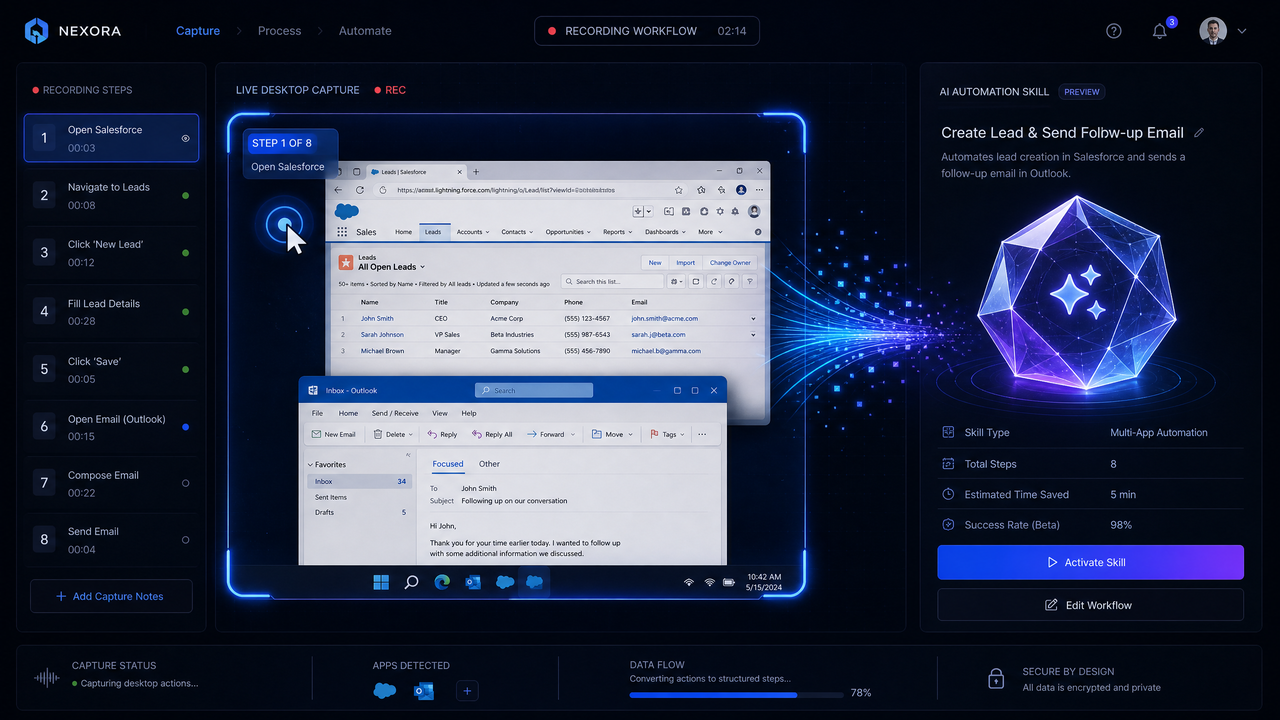
Table of Contents
- What Launched on July 1, 2026
- Why It Matters for Workflow Automation
- How Codex Record & Replay Works
- Use Cases for Non‑Developers
- Implications for the Future of Automation
- How It Compares to Traditional RPA
- Getting Started: Recording, Editing, and Running Skills
- Developer Integration: APIs, Events, and Observability
- Performance Metrics, Reliability, and Cost
- Known Limitations and Risk Mitigation
- Market Context and Strategic Outlook
- Quick FAQs
What Launched on July 1, 2026
On July 1, 2026, OpenAI introduced Codex Record & Replay, a native screen recording capability that captures real user workflows across desktop and web applications and converts them into reusable automation skills. The feature ships as part of the ChatGPT Desktop app and ChatGPT Workspace, with an accompanying Codex Skills API for programmatic import, editing, and execution. In effect, tasks that once required specialized scripting or robotic process automation (RPA) development can now be taught to an AI by demonstration—no explicit coding required.
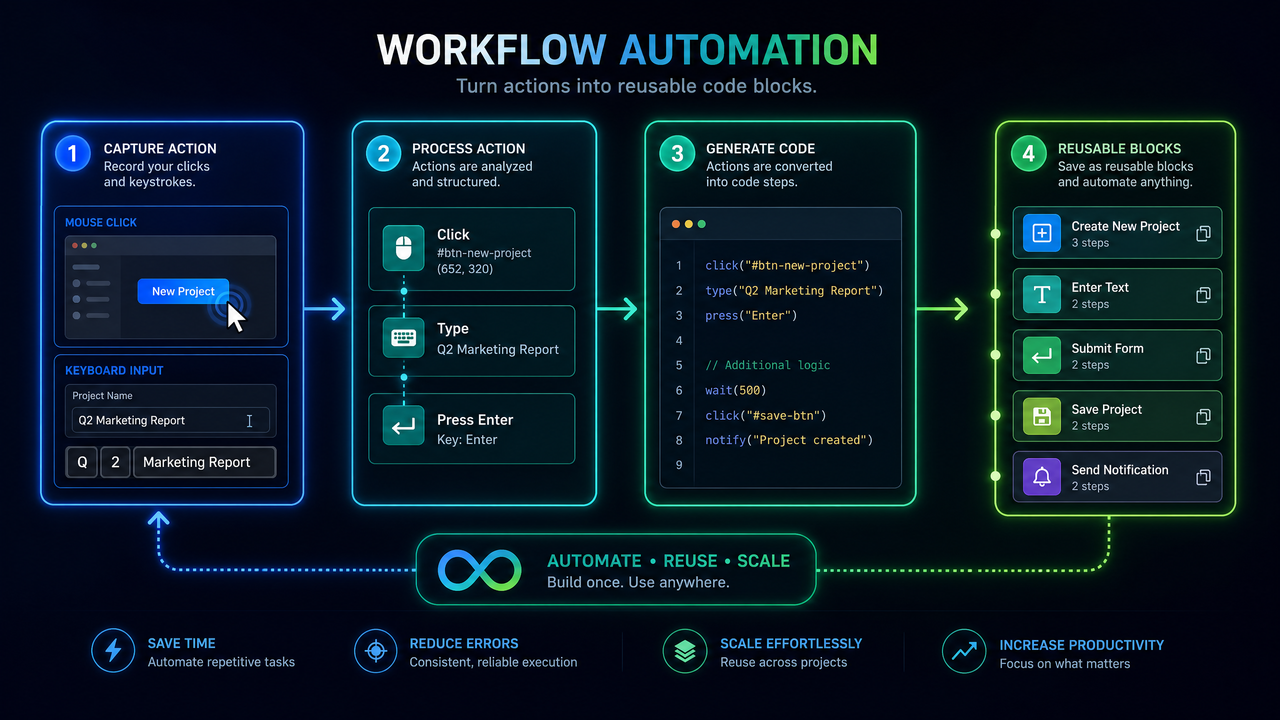
At the heart of the launch is a recorder that observes clicks, keystrokes, file interactions, copy/paste, and browser navigation, while simultaneously collecting semantic context (screen text, control labels, page structure) to build a durable, replayable action graph. After the recording, Codex generalizes the sequence into a parameterized skill that can accept inputs—like an invoice number or a customer email—and re-run the workflow safely and consistently. The output is a sharable, versioned asset that teams can schedule, embed in workflows, or call via API.
OpenAI positions Record & Replay not as a replacement for developer-built automations but as a force-multiplier that addresses the long tail of processes that are too specific, too ephemeral, or too low-volume to justify engineering investment. For organizations already experimenting with
For a deeper exploration of enterprise AI governance and compliance tools, our comprehensive guide on How Enterprise AI Governance Is Evolving in 2026 provides detailed strategies, practical examples, and implementation patterns that complement the techniques discussed in this article.
, the launch provides a concrete bridge between autonomous agent intent and reliable, human-grade UI execution.
Why It Matters for Workflow Automation
Most business workflows still live in the gaps between systems: spreadsheets, browser tabs, internal portals, PDFs, and email threads. These brittle seams are where knowledge workers spend hours each week reformatting data, transferring values, or reconciling records. Until now, capturing that work in a maintainable automation required technical expertise and long delivery cycles. Codex Record & Replay takes a different tack: it harnesses the user’s own hands-on demonstration to generate both the automation specification and its tests, then wraps the result in guardrails so that teams can run it safely.
The implications are significant. Non-developers can now automate tasks themselves, while IT retains visibility and control through governance, reviews, and audit logs. Developers can jump in where needed to extend or harden automations using APIs and data connectors, but they are no longer the bottleneck for every low-level process improvement. Compared to legacy RPA, which depends heavily on deterministic selectors and brittle scripting, Codex uses LLM-powered semantic anchors and self-healing strategies to weather UI changes and content variability.
For technical leaders, the launch signals a maturation of UI automation into a first-class component of enterprise AI stacks—complementing integration-centric iPaaS and API-driven microservices with a pragmatic, end-user-led approach to orchestration and execution.
How Codex Record & Replay Works
The Capture Layer: Events, Context, and Privacy
Record & Replay starts with a multi-channel capture layer engineered for fidelity and privacy. During a recording, the agent collects:
- UI events: clicks, hovers, focus changes, text inputs, shortcuts, drag-and-drop
- Visual context: on-screen text, control labels, bounding boxes, z-index order, color contrast
- Structural context: DOM trees for web apps; accessibility trees for native apps where available
- Application metadata: process names, window titles, URLs, navigation events
- Clipboard and file interactions: copied text, saved files, opened documents (with opt-in redaction)
- Network hints: page loads, frame transitions, offline detection, latency spikes
Privacy and security are first-order considerations. The recorder supports configurable redaction policies: masked fields for passwords and tokens, domain-level blocking (e.g., banking portals), and “pause capture” hotkeys. Screen regions tagged as sensitive are never included in the semantic model; instead, the graph stores an abstract placeholder and provides hooks to supply secrets at runtime via a secure vault. Enterprise tenants can enforce data loss prevention (DLP) rules that short-circuit recording or replay whenever policy violations are detected.
Representation: From Timeline to Skill Graph
Raw recordings are noisy. Codex condenses them into a structured representation optimized for re-use: a skill graph. This is a directed acyclic graph (DAG) of actions and conditions, annotated with:
- Targets: UI elements referenced by multi-modal anchors (selector sets, text embeddings, geometry)
- Preconditions: screen states, navigation guards, and data presence checks
- Parameters: externalized variables inferred from typed values during recording
- Effects: expected outcomes such as “row added,” “file downloaded,” or “status updated”
- Assertions: checkpoints that can fail fast if the environment does not match expectations
To produce this graph, Codex performs sequence analysis that groups low-level events into higher-order intents. A flurry of keystrokes in a search bar becomes “Search for {query} and wait for results count > 0.” A click-and-drag to select a table range becomes “Select column C rows 2..N.” By abstracting these patterns, the graph is resilient to incidental variation—like typing speed, pixel alignment, or transient pop-ups—and remains amenable to parameterization.
Targets are the crux of UI automation brittleness. Here, Codex supplements CSS/XPath with semantic anchors: embeddings of visible text, ARIA labels, proximity to other labeled controls, and even bitmap signatures for iconography. During replay, it resolves a target by fusing these signals and scoring candidates, which allows the system to survive modest visual or structural changes in the UI.
Parameterization and Generalization
After recording, Codex analyzes constants you entered—like a customer ID, a date range, or a product SKU—and suggests promoting them to typed parameters. You can accept, rename, and annotate these parameters. The editor then offers to generate example inputs (test cases) by sampling historical values from your workflow, redacting any sensitive content. The result is a reusable skill that can run with different inputs while preserving the intent and safety constraints you demonstrated.
Generalization extends beyond values. The system can suggest loops (“repeat for each row in the spreadsheet”), conditionals (“if the invoice is overdue, send a reminder”), and alternative paths (“if login requires 2FA, open authenticator app”). You can confirm or disable these suggestions in the editor. For mixed data work (like reconciling invoices from PDFs and emails), you can specify lightweight parsing rules or point Codex to a knowledge base for entity extraction, an area where
For a deeper exploration of data analysis prompts for SQL generation and dashboards, our comprehensive guide on 35 ChatGPT-5.5 Prompts for Data Analysts provides detailed strategies, practical examples, and implementation patterns that complement the techniques discussed in this article.
can enhance reliability by grounding the model on sanctioned references.
Replay Engine, Adapters, and Self-Healing
During execution, the replay engine orchestrates intent-level actions across target applications. It includes adapters for:
- Browsers: Chrome, Edge, Safari, and WebView-based apps with DOM access
- Desktop apps: Windows, macOS, and Linux via accessibility APIs and native driver shims
- Files and system: file I/O, downloads, printing, clipboard, and OS dialogs
- SaaS connectors: where APIs exist, Codex can short-circuit a UI step with a direct API call
Self-healing is a flagship capability. If a selector fails, Codex falls back to semantic anchors; if those fail, it tries to re-locate the target via layout heuristics or OCR. When the environment has meaningfully changed (e.g., the app has a redesigned navigation), Codex pauses and asks for guidance, optionally proposing a fix. Accepted fixes can be auto-committed as a new minor version of the skill, with a diff of the graph and updated tests. This feedback loop learns from real-world variance without silently drifting away from user intent.
Performance-wise, Codex pipelines load-wait heuristics with deterministic guards to keep latency predictable. Instead of blindly sleeping after a click, it waits for explicit state transitions (network idle, DOM mutation, title change) or for assertions to pass (results count > 0). For workflows that can partially use APIs (e.g., exporting a report via REST rather than UI clicks), Codex stitches best-of-both runs to reduce fragility and speed up execution.
Governance, Safety, and Approvals
Enterprises need controls. Codex supports workspace-level governance:
- Role-based access control: who can record, edit, approve, execute, or schedule skills
- Data boundaries: prohibit capture on protected domains or apps; require DLP checks on outputs
- Approval workflows: require human sign-off before running skills that touch PII or financials
- Secret management: use organization vaults; never embed secrets in skills; inject at runtime
- Audit trails: immutable logs of recordings, edits, runs, and environmental context
When a run requires elevated permissions or crosses boundaries (e.g., accessing HRIS data), Codex can request just-in-time approvals via Slack, Teams, or email. Approvers see a summary of the intended actions, affected systems, and diff from the last approved version, along with sample inputs and outputs for test runs.
Packaging, Versioning, and Distribution
Every recording compiles to a signed skill package with metadata: name, description, parameters, permissions, scopes, and run-time hints. Packages are versioned semantically (major/minor/patch) and can be published to a workspace catalog. Teams can subscribe to skills, embed them into ChatGPT Workflows, trigger them via webhooks, or call them from custom systems through the Codex Skills API. Administrators can mandate reviews before publication or promotion to production scopes.
Because skills are first-class assets, they participate in CI: run synthetic tests nightly against staging apps, validate selectors and semantics, and send alerts when assertions fail. This tightens the loop between end-user-created automations and enterprise-grade reliability.
Use Cases for Non‑Developers
Codex Record & Replay empowers subject-matter experts to capture the nuance in their daily tasks without waiting in an engineering queue. Here are concrete scenarios across functions where non-developers can achieve immediate lift.
Finance and Accounting
- Invoice triage and posting: Walk Codex through downloading invoices from a vendor portal, parsing key fields, matching them to purchase orders in an ERP, and posting accruals. Parameterize by vendor, date range, and business unit. Configure an approval step for exceptions above a threshold.
- Expense audits: Record a review flow that opens flagged transactions, checks policy compliance in a shared knowledge base, and sends short, templated messages to employees requesting receipts. Automate weekly digests for managers.
- Revenue operations: Automate creation of invoices for subscription renewals by navigating billing dashboards, exporting CSVs, normalizing them in a spreadsheet, and uploading to the accounting system.
HR and People Operations
- Onboarding sequences: From generating offer letters to provisioning accounts across HRIS, ITSM, and identity providers, capture the exact steps your team takes. Insert human approvals for equipment orders or exception cases.
- Background checks and document verification: Orchestrate vendor portals and internal trackers; ensure PII is redacted and handled under least-privilege policies.
- Benefits changes: Batch-update dependent information, export confirmations, and file them to a secure repository, with a daily summary to HR leadership.
Customer Support
- Case enrichment: Record the steps to fetch customer entitlements from multiple back-office tools, summarize recent interactions, and append the details to a CRM case.
- RMA processing: Teach Codex to create RMAs in supplier portals, print labels, and notify customers. Insert a checkpoint for serial number validation to minimize errors.
- Community moderation: Capture triage patterns—identify duplicate issues, link to known solutions, and post a standardized response—and schedule runs to keep forums tidy.
Sales and Marketing
- Lead enrichment: Record a web research flow across LinkedIn, company sites, and enrichment tools; standardize titles and industries; inject results into your CRM.
- Campaign QA: Walk through checking UTM tags, landing page forms, and email rendering across clients; flag deviations and generate bug tickets with screenshots.
- Pricing updates: Apply changes across multiple storefronts and marketplaces; validate that user-visible prices and backend SKUs match.
Operations and Logistics
- Vendor portal reconciliation: Pull inventory levels from suppliers, compare against reorder points in a spreadsheet, place purchase orders, and send confirmations.
- Shipment tracking: Aggregate statuses from carriers, normalize to SLA metrics, and post summaries in Slack channels with outlier alerts.
- Compliance attestations: Navigate regulatory portals, upload required documents, and archive receipts for audits.
Research and Product Management
- Competitive monitoring: Capture weekly checks of competitor pricing pages, release notes, and support forums; auto-summarize changes and propose counter-moves.
- Usability QA: Re-run canonical journeys (sign-up, upgrade, cancel), capture timings and errors, and report regressions with annotated screenshots.
- Data collection: Assemble datasets from public dashboards and PDFs with light parsing and human spot checks along the way.
In each case, non-developers stay in control. They demonstrate the workflow once. Codex turns it into a skill. Teams then run that skill on demand, schedule it, or wire it to event triggers—backed by approvals and audits when needed.
Implications for the Future of Automation
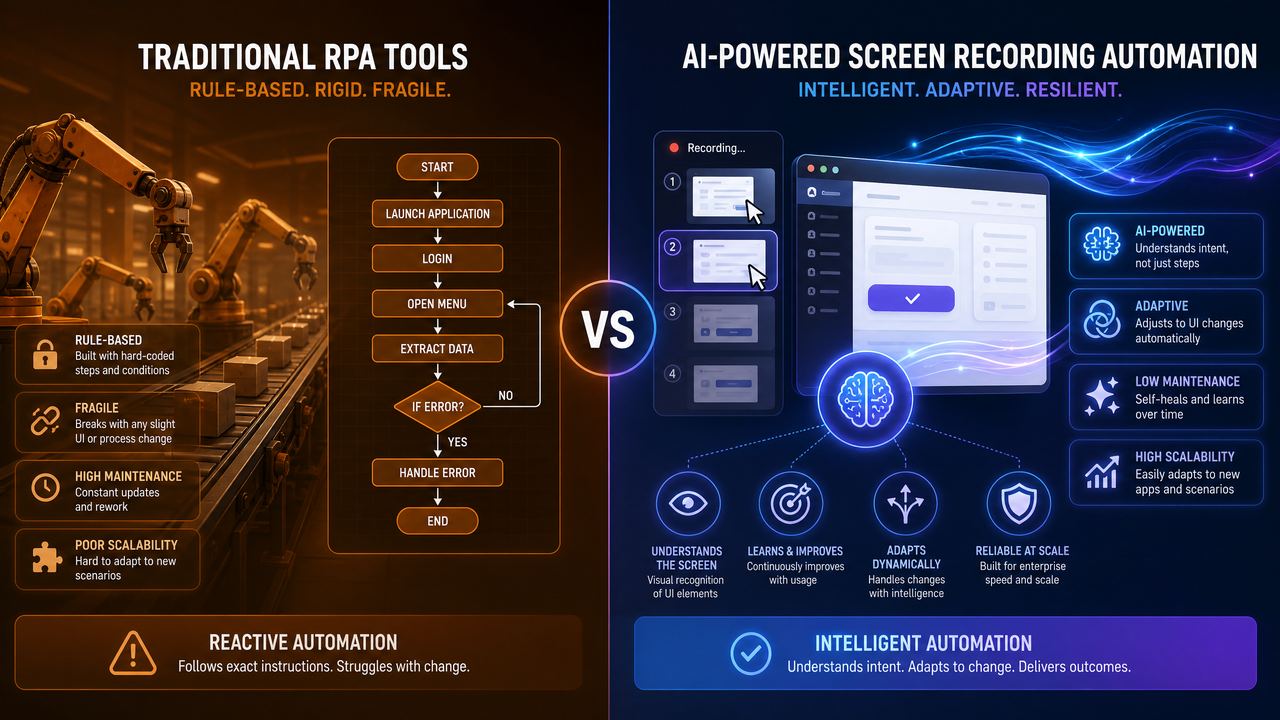
Codex Record & Replay opens a new path for automating the long tail of knowledge work. Historically, two approaches dominated: top-down integration (build APIs, standardize data models, deploy iPaaS flows) and bottom-up scripting (macros, AutoHotkey, custom RPA). The former yields durability but demands time and engineering. The latter scales with enthusiasm but falters at governance and resilience. Codex aims to hybridize—combining the ease of “show, don’t code” with enterprise-grade controls and semantic robustness.
The most important shift is organizational. With a recorder and a governance backbone, automation becomes a participatory sport. Subject-matter experts capture processes while IT curates and secures them. Developers spend their time not on rote UI scripting but on strengthening core systems, exposing APIs, and building reusable connectors that Codex can leverage automatically. Automation stops being a parallel IT activity and becomes a capability that saturates day-to-day work.
On the technology front, the coupling of multi-modal perception (reading screens like a human) with action planning (choosing robust, parameterized steps) creates a tight foundation for agentic systems. An agent’s plan can now resolve to a concrete, tested sequence drawn from a library of human-taught skills. Conversely, skills can call agents for judgments—“is this document fraudulent?”—then resume deterministic UI control. The line between “macro,” “workflow,” and “agent” is blurring in productive ways.
How It Compares to Traditional RPA
Record & Replay invites comparison with RPA platforms that have been automating UIs for over a decade. The differences are equal parts architectural and experiential.
Where Codex Excels
- Teaching by demonstration: Users don’t have to learn a visual IDE or a scripting DSL. They perform the task; Codex learns it and offers sane defaults for parameters and tests.
- Semantic robustness: Targets are not bound solely to brittle selectors; Codex fuses text, structure, layout, and embeddings to locate elements through moderate UI changes.
- LLM-powered generalization: The system proposes loops, conditionals, and reusable parameters automatically; it can parse unstructured inputs like PDFs or emails on the fly.
- Self-healing: When a step fails, Codex can propose a fix with a human confirmation loop, cutting mean time to repair dramatically.
- Integrated governance: Approvals, DLP, secret vaults, and audit logs are built into the same surface users inhabit, not bolted on via separate consoles.
- Agent compatibility: Skills are callable from and composable with agent frameworks, unifying autonomous reasoning with deterministic execution.
Where RPA Still Wins
- Deep legacy systems: Mainframes, terminal emulators, and unusual Citrix setups may still work better with mature RPA connectors tailored to those environments.
- Determinism-first compliance: Some regulated processes demand fully deterministic scripts and formal verifications that LLM-powered self-healing might complicate.
- Very high-volume straight-through processing: Highly optimized RPA pipelines, reinforced by APIs, may be marginally faster where UI is negligible and variance is near zero.
Total Cost of Ownership
Codex reduces the time-to-first-automation dramatically. Maintenance costs hinge on environment churn and how much self-healing you accept. In early pilots, teams report spending more time curating inputs and approval rules than repairing broken flows—an encouraging inversion of typical RPA maintenance burdens. For many organizations, the blended approach will win: use Codex to address the long tail and prototype new automations quickly; promote the most valuable and stable ones to API-based integrations or harden them with custom connectors.
Getting Started: Recording, Editing, and Running Skills
This section walks through the lifecycle: record, edit, test, publish, and run. It also includes sample code to integrate with back-end systems. While the concrete APIs may evolve, the patterns below reflect how teams are already using Codex Skills in practice.
1) Enable and Configure
- Install the latest ChatGPT Desktop app with Codex Record & Replay enabled.
- In your workspace admin console, set capture policies (redaction, blocked domains), secret vault integration, and approval thresholds.
- Add your test/staging environments to allow safe dry-runs before production runs.
2) Record a Workflow
- Open the Codex Recorder, name your task, and press Record.
- Perform your workflow naturally. Use the “Pause” hotkey around sensitive inputs; Codex will insert placeholders for secrets.
- Stop recording. Review the generated skill graph and parameters suggested by Codex.
3) Edit and Parameterize
- Promote hard-coded values to parameters with types (string, number, date, file, enum).
- Add assertions (e.g., “results table has at least one row”) and preconditions (“must be signed in”).
- Structure loops or conditionals if Codex did not infer them automatically.
- Add tooltips and descriptions so teammates understand how to use the skill.
When you tune prompts or parsing rules for unstructured steps, apply the same rigor you would to any LLM-powered component. Document contexts and constraints, and keep examples close at hand. Teams that practice disciplined
For a deeper exploration of building production REST APIs with Codex prompts, our comprehensive guide on The Codex API Development Playbook provides detailed strategies, practical examples, and implementation patterns that complement the techniques discussed in this article.
tend to produce more robust and reusable skills.
4) Test
- Run the skill against a staging environment with multiple test cases.
- Inspect the run log, screenshots, and any diffs Codex produced for self-healed steps.
- Fix issues, then lock the version for publication.
5) Publish and Govern
- Publish a version to your workspace catalog.
- Assign scopes and permissions. Require approvals for sensitive runs.
- Add the skill to a Workflows canvas or expose it via a webhook for external triggers.
6) Run and Monitor
- Trigger on demand, on a schedule, or on an event (e.g., a new row in a spreadsheet).
- Watch for alerts when assertions fail; approve or decline proposed self-healing diffs.
- Feed improvements back into a new minor version and roll out updates gradually.
Sample Skill Definition (JSON)
Below is a representative JSON schema of a simple recorded skill that logs into a portal, searches by invoice number, and exports a PDF. It mixes UI actions with one API shortcut to fetch metadata quickly.
{
  "name": "InvoiceLookupAndExport",
  "version": "1.2.0",
  "description": "Search for an invoice in the vendor portal and export a PDF copy.",
  "parameters": [
    {"name": "invoice_number", "type": "string", "required": true},
    {"name": "vendor", "type": "enum", "values": ["acme", "globex"], "required": true},
    {"name": "output_dir", "type": "file", "required": true}
  ],
  "preconditions": [
    {"type": "urlPattern", "value": "https://portal.<vendor>.com"},
    {"type": "session", "value": "authenticated", "fallback": "LoginSequence"}
  ],
  "steps": [
    {
      "id": "navigateHome",
      "type": "ui.navigate",
      "target": {"url": "https://portal.<vendor>.com/dashboard"},
      "assert": [{"type": "textPresent", "value": "Welcome"}]
    },
    {
      "id": "searchInvoice",
      "type": "ui.input",
      "target": {
        "textAnchor": "Search",
        "selectors": ["input[name='q']", "input#search"],
        "embeddingHint": "invoice search field"
      },
      "value": "{{invoice_number}}"
    },
    {
      "id": "submitSearch",
      "type": "ui.click",
      "target": {
        "textAnchor": "Search",
        "selectors": ["button[type='submit']"],
        "embeddingHint": "submit search"
      }
    },
    {
      "id": "waitResults",
      "type": "ui.waitFor",
      "assert": [
        {"type": "domCount", "selector": "table.results tbody tr", "gte": 1}
      ]
    },
    {
      "id": "apiMetadata",
      "type": "api.call",
      "when": {"type": "domTextContains", "selector": "table.results", "value": "{{invoice_number}}"},
      "config": {
        "method": "GET",
        "url": "https://api.<vendor>.com/invoices/{{invoice_number}}",
        "auth": "secrets.vendor_api_key"
      },
      "assign": {"meta": "$.response"}
    },
    {
      "id": "exportPdf",
      "type": "ui.click",
      "target": {"textAnchor": "Export PDF", "embeddingHint": "download invoice"},
      "waitForDownload": true,
      "saveTo": "{{output_dir}}/{{invoice_number}}.pdf"
    }
  ],
  "assertions": [
    {"type": "fileExists", "path": "{{output_dir}}/{{invoice_number}}.pdf"}
  ],
  "approvals": [
    {"scope": "production", "required": true, "reason": "Accesses vendor portal data"}
  ],
  "secrets": ["vendor_api_key"],
  "metadata": {
    "owner": "[email protected]",
    "tags": ["finance", "invoices", "export"],
    "createdBy": "alice",
    "changelog": "v1.2 adds API metadata fetch to reduce UI steps."
  }
}
Programmatic Execution: Python
The following example demonstrates how a back-end service could trigger a Codex skill execution and poll for completion. Endpoint names are representative and may differ in your environment; consult your workspace’s developer console for authoritative details.
from openai import OpenAI
import time
import os

client = OpenAI()

# Import a skill package (JSON as shown above)
with open("invoice_skill.json", "r") as f:
    skill_spec = f.read()

# Create or update a skill
skill = client.codex.skills.upsert(
    name="InvoiceLookupAndExport",
    body=skill_spec
)

# Execute the skill with parameters
run = client.codex.runs.create(
    skill_id=skill.id,
    parameters={
        "invoice_number": "INV-2026-071",
        "vendor": "acme",
        "output_dir": "/mnt/shared/invoices"
    },
    environment="staging",    # or "production" if approved
    priority="normal"
)

print("Run id:", run.id)

# Poll for completion
while True:
    status = client.codex.runs.get(run.id)
    if status.state in ("succeeded", "failed", "requires_approval"):
        break
    time.sleep(2)

if status.state == "requires_approval":
    # Your org might route approvals via Slack or a console.
    print("Awaiting approval:", status.approval_url)
elif status.state == "succeeded":
    print("Artifacts:", status.artifacts)   # e.g., downloaded files, logs
else:
    # Retrieve diagnostics and propose a fix
    diag = client.codex.runs.diagnostics(run.id)
    print("Failure:", diag.summary)
    if diag.proposed_fix:
        print("Proposed fix:", diag.proposed_fix.diff)
Programmatic Execution: Node.js
import OpenAI from "openai";

const client = new OpenAI();

async function runSkill() {
  const skill = await client.codex.skills.upsert({
    name: "InvoiceLookupAndExport",
    body: await (await fetch("https://example.com/invoice_skill.json")).text(),
  });

  const run = await client.codex.runs.create({
    skill_id: skill.id,
    parameters: {
      invoice_number: "INV-2026-072",
      vendor: "globex",
      output_dir: "/mnt/shared/invoices",
    },
    environment: "production",
    priority: "high",
    notify: ["[email protected]"]
  });

  console.log("Run:", run.id);

  let state = "queued";
  while (!["succeeded", "failed"].includes(state)) {
    const info = await client.codex.runs.get(run.id);
    state = info.state;
    await new Promise(r => setTimeout(r, 2000));
  }

  const report = await client.codex.runs.report(run.id);
  console.log("Summary:", report.summary);
  console.log("Artifacts:", report.artifacts);
}

runSkill().catch(console.error);
Webhook-based Approvals
For runs that require human sign-off, you can wire a simple webhook to your chat system to present approvers with a standardized summary and a one-click approve/decline. Below is a minimal Express.js sketch.
import express from "express";

const app = express();
app.use(express.json());

app.post("/codex/approval", async (req, res) => {
  const { run_id, summary, diff, scope } = req.body;
  // Format and send to Slack/Teams...
  console.log("Approval requested for run:", run_id, "scope:", scope);
  console.log("Summary:", summary);
  console.log("Diff:", diff);

  // Respond with 200 to acknowledge receipt
  res.status(200).send({ ok: true });
});

// Endpoint Codex calls when approver clicks "Approve"
app.post("/codex/approval/decision", async (req, res) => {
  const { run_id, decision } = req.body;
  // Forward to Codex to continue or abort the run
  // POST /v1/codex/runs/{run_id}/decision { decision: "approve" | "decline" }
  res.status(200).send({ ok: true });
});

app.listen(3000, () => console.log("Approval webhook listening on 3000"));
Developer Integration: APIs, Events, and Observability
Codex Record & Replay is designed for end users, but it does not exclude developers. In fact, the best results often come from pairing user-taught skills with developer-provided augmentation: connectors, data validators, and observability pipelines.
Composing with Existing Systems
- API shortcuts: Where your systems expose read/write APIs, register a connector that lets Codex bypass fragile UI steps. This improves speed and reliability while preserving the skill’s high-level intent.
- Data validation: Add pre- and post-conditions that call internal services for sanity checks (“invoice exists,” “SKU active,” “user has entitlements”).
- Triggers: Fire skills in response to system events (new ticket, S3 upload, CRM stage change) through webhooks or message queues.
Observability and Run Analytics
Each run emits structured events with timestamps, step IDs, targets, retries, self-healing attempts, screenshots, and artifacts. Stream these events to your observability stack to build dashboards for success rates, median latency, and hot spots. Tie a run’s trace ID to downstream system logs to build end-to-end visibility.
# Example: Fetch run events and stream to stdout (Python)
from openai import OpenAI
client = OpenAI()

run_id = "run_abc123"
events = client.codex.runs.events(run_id=run_id, stream=True)

for ev in events:
    print(f"[{ev.timestamp}] {ev.level} {ev.step_id} {ev.message}")
CI for Skills
Treat high-value skills like code. Write unit-like tests with canned inputs; run them nightly against staging environments; gate production promotions on green test suites. Because skills are versioned, you can pin consumers to a stable version while you iterate. When a self-healed patch is proposed, require tests to pass before auto-merge.
Performance Metrics, Reliability, and Cost
Effective automation programs define and track a few core metrics. Codex exposes these in dashboards and via APIs so leaders can measure ROI and identify friction.
- Time-to-first-skill: Median minutes from recording start to first successful test run. In early adopters, this sits between 15–45 minutes for simple flows and 1–2 hours for mixed UI/API tasks.
- Median run latency: Time from trigger to completion, broken down by step. Skills that lean on API shortcuts show 30–60% faster execution than pure UI flows.
- First-run success rate: Percentage of runs that complete without human intervention. Self-healing can lift this by 10–25 points in volatile environments, with approvals gating risky changes.
- Maintenance effort: Number of proposed self-heals vs. approved changes; mean time to repair (MTTR) when manual intervention is needed.
- Coverage: Number of active skills by department and process category; ratio of automated vs. manual runs for target tasks.
Cost modeling should account for both platform consumption and human time saved. Three levers shape consumption: UI runtime (compute and capture), LLM tokens (planning, self-heal, parsing), and storage (artifacts and logs). You can often reduce LLM load by caching stable subplans and using deterministic assertions to minimize retries. The biggest savings arise when non-developers can autonomously author and maintain low-to-medium complexity automations, freeing engineers to focus on integrations that compound value across the organization.
Known Limitations and Risk Mitigation
No automation tool is perfect. Codex Record & Replay includes capabilities to mitigate, but teams should plan for the following realities.
- Highly dynamic UIs: Apps that radically recompose DOMs or rely on canvas rendering strain semantic anchors. Pair with API shortcuts or request stable test IDs from app owners.
- 2FA and device locks: Multi-factor flows and OS-level permission prompts can require human presence or dedicated policies. Codex can pause and resume gracefully with human-in-the-loop approvals.
- Multi-monitor, varying DPI: Surface scaling can skew geometry-based anchors. Lock recording and replay to consistent DPI profiles where possible; prefer text and structure anchors.
- Legal and compliance boundaries: Recording and replaying in regulated apps may require explicit vendor permissions and internal legal review. Use domain blocks and approvals aggressively.
- Shadow IT risk: Empowered users can create powerful automations quickly. Counter with catalogs, reviews, and transparent run analytics so that automation stays visible and safe.
Market Context and Strategic Outlook
Record & Replay lands at a pivotal moment. Agent frameworks are maturing, LLMs are growing more reliable under guardrails, and enterprises are normalizing AI governance. Traditional RPA vendors have already moved to embrace AI for document understanding and exception handling, while low-code platforms blur into automation at the edges. By making “teach by doing” native to the AI assistant many employees already use, OpenAI shortens the distance between intent and execution.
Expect three shifts over the next 12–24 months:
- Shift-left automation: Operations and finance teams become first-line automation authors, with IT as a safety net and force-multiplier.
- Composable skills libraries: Organizations build catalogs of vetted skills—small, reliable building blocks that agents and humans can orchestrate into larger processes.
- API backfilling: The most frequently used and valuable UI automations will push product teams to expose APIs, shrinking the surface that requires UI control and improving overall reliability.
In parallel, expect richer multi-modal reasoning to close remaining gaps: reading complex dashboards, understanding image-only controls, and making subtle business judgments. As those gaps close, the boundary between “assistive macro” and “autonomous workflow” will continue to fade.
Quick FAQs
Is Codex Record & Replay only for web apps?
No. It supports both web and desktop applications via a mix of DOM access, accessibility APIs, and vision-based anchors. For unsupported or legacy environments, you can fall back to connectors or limit scope to web-accessible portions of your process.
How do we prevent credentials from leaking into recordings?
Use the “Pause” hotkey or preconfigured redaction rules for login fields. Secrets are represented as placeholders and injected at runtime from your organization’s secret vault with audit trails. Redacted pixels are never ingested into the semantic model.
What happens when the UI changes?
Codex attempts to self-heal using semantic anchors and heuristics. If it proposes a change, it pauses for approval. Approved changes become a new version, with diffs and tests updated. For breaking changes, you can edit the skill in the visual editor or re-record a subset of steps.
Can we integrate with our CI/CD?
Yes. Skills are versioned and testable. You can run nightly tests against staging, require approvals, and pin consumers to specific versions. Run analytics and diffs can be exported to your observability and compliance stacks.
Where do agents fit in?
Agents can call skills for deterministic execution and, conversely, skills can invoke agents for judgment calls or free-form parsing. This closes the loop between reasoning and action, improving reliability of end-to-end automations. To align agent prompts with your skill inventory, maintain a skill registry and surface it to your agent planner via tools metadata.
Appendix: End-to-End Example – Weekly KPI Scraper
To make the concepts concrete, here is an end-to-end outline of a non-developer-friendly automation: assembling a weekly KPI deck by pulling numbers from three dashboards and a CSV in email, then posting a summary to Slack and archiving artifacts.
Teach Codex the Flow
- Record: Open Dashboard A (web), filter for “this week,” copy KPI; repeat for Dashboard B; download CSV from Dashboard C; open Excel, compute a ratio; paste results into a slide template; export to PDF.
- Parameterize: Date range (default “this week”), output folder, team channel.
- Assertions: Each dashboard count present; CSV row count > 0; slide deck contains three KPI text boxes.
- Approvals: None for staging; require team lead approval for production runs.
Skill Snippet (YAML)
name: WeeklyKPICollector
version: 0.3.0
parameters:
  - name: date_range
    type: enum
    values: ["this-week", "last-week", "custom"]
  - name: output_dir
    type: file
  - name: slack_channel
    type: string
steps:
  - id: dashA
    type: ui.navigate
    target: { url: "https://dash.a.example.com" }
  - id: filterA
    type: ui.select
    target: { textAnchor: "Date Range" }
    value: "{{date_range}}"
  - id: readA
    type: ui.captureText
    target: { textAnchor: "Total Sessions" }
    assign: { sessions: "$.text" }
  - id: dashB
    type: ui.navigate
    target: { url: "https://dash.b.example.com" }
  - id: readB
    type: ui.captureText
    target: { textAnchor: "Active Users" }
    assign: { users: "$.text" }
  - id: dashC
    type: ui.navigate
    target: { url: "https://dash.c.example.com" }
  - id: exportCSV
    type: ui.click
    target: { textAnchor: "Export CSV" }
    waitForDownload: true
    saveTo: "{{output_dir}}/kpi.csv"
  - id: compute
    type: spreadsheet.compute
    script: |
      open "{{output_dir}}/kpi.csv"
      ratio = column("conversions").sum() / column("visits").sum()
      save "{{output_dir}}/kpi_out.csv"
    assign: { ratio: "$.ratio" }
  - id: slide
    type: ui.template.fill
    target: { file: "kpi_template.pptx" }
    fields:
      sessions: "{{sessions}}"
      users: "{{users}}"
      ratio: "{{ratio}}"
    exportPdf: "{{output_dir}}/kpi.pdf"
  - id: slack
    type: connector.slack.post
    config:
      channel: "{{slack_channel}}"
      text: "Weekly KPIs — Sessions: {{sessions}}, Users: {{users}}, Conv Ratio: {{ratio}}"
      attachments:
        - "{{output_dir}}/kpi.pdf"
assertions:
  - type: fileExists
    path: "{{output_dir}}/kpi.pdf"
approvals:
  - scope: "production"
    required: true
    reason: "External posting to Slack channel"
Trigger on a Schedule
# Nightly schedule (cron-like) via API
POST /v1/codex/schedules
{
  "skill_id": "WeeklyKPICollector",
  "cron": "0 8 * * MON",
  "parameters": {
    "date_range": "last-week",
    "output_dir": "/mnt/kpi",
    "slack_channel": "#ops-weekly"
  },
  "environment": "production",
  "approvals": { "auto_request": true }
}
With this pattern, a team lead can approve the Monday run on their phone and receive the KPI deck minutes later, without any developer needing to wire up multiple vendor APIs or brittle scripts.
Closing Thoughts
Codex Record & Replay is not a silver bullet, but it is a decisive step toward making automation something everyone can participate in. By learning from demonstrations, enforcing governance, and blending semantic resilience with explicit assertions, it transforms everyday screenwork into reliable, shareable skills. For developers and technical managers, the question is no longer whether to embrace UI automation, but how to curate, secure, and scale it as an integral part of the AI-enabled enterprise. Organizations that master these practices will move faster, spend less time on swivel-chair toil, and build a durable foundation for the next wave of AI agents, workflows, and human-in-the-loop systems.
Access 40,000+ AI Prompts for ChatGPT, Claude & Codex — Free!
Subscribe to get instant access to our complete Notion Prompt Library — the largest curated collection of prompts for ChatGPT, Claude, OpenAI Codex, and other leading AI models. Optimized for real-world workflows across coding, research, content creation, and business.
As your catalog of skills grows, treat it like any critical codebase: version it, test it, govern it, and document it. And remember that the best automations are not those that never fail, but those that fail safely, propose fixes transparently, and improve with every run. That is where Codex Record & Replay shines—and where the future of practical, participatory automation is headed.
For teams planning adoption, start small: pick a few high-frequency, low-risk tasks, record them, and validate the gains. Use the insights to formalize your governance model and to identify opportunities for deeper integration over time. As you scale, keep your agents and your skills in sync by maintaining a shared registry and by documenting clear contracts between reasoning steps and deterministic actions. This is the operating model that will carry modern organizations into an era where human expertise and AI execution are not competing forces, but complementary strengths woven into the fabric of daily work.
Finally, don’t overlook the cultural dividend. Inviting non-developers to author automations unleashes creativity, gives teams ownership over their tools, and shortens the loop from idea to impact. Pair this energy with the right guardrails and developer partnerships, and you will find that the distance between an insight on Tuesday and a measurable result on Friday gets a lot shorter.
For adjacent techniques and patterns that strengthen recorded skills—like grounding and library design—consider aligning with your internal knowledge systems and model tuning practices so that the AI’s reading and action-taking share the same source of truth. When the same facts that inform your answers also guide your clicks, consistency rises and drift falls. This is where the line between “recorded macro” and “enterprise capability” blurs productively—and where combining Codex with curated knowledge and planning pays compounding dividends.
Organizations that invest early in this discipline will build a strategic advantage: a living library of automation skills authored by the people who know the work best, governed by the people who keep the lights on, and executed by systems that never tire. That is a credible vision for the next chapter of AI in the enterprise.
As you explore, keep a running list of candidate processes, key risk controls, and integration touchpoints. Share your early wins broadly to build momentum. And build a small, cross-functional “automation guild” to own the practice—ops leads, IT governance, security, and a developer or two. With that foundation, Codex Record & Replay won’t just reduce toil; it will reshape how your organization designs and delivers work.
For cross-pollination with adjacent initiatives like assistant tooling and knowledge retrieval, align your patterns and libraries so that skills and assistants use common conventions for parameters, secrets, and resource access. The closer your abstractions match, the less friction you will feel when composing complex, multi-step automations from smaller, well-understood building blocks. In our experience, this alignment is as much process as technology—and it pays off quickly in predictability and speed.
To deepen your architecture across decision-heavy flows, evaluate when to blend deterministic steps with judgement calls and knowledge lookups. For example, insert structured review steps when thresholds are crossed, and use grounded retrieval for policy checks to make approvals auditable and explainable. These patterns prevent brittle all-or-nothing automations and make it easier to extend skills over time as your business changes.
And if you are building a strategy for agentic systems, bring your skills catalog into the planning loop early. Let agents call known-good skills for repeatable parts of a task, then focus your agent development on the parts that truly require reasoning and adaptation. This not only improves reliability; it also constrains the agent’s degrees of freedom to safe, explainable paths—an approach that pays dividends in governance and trust as adoption scales.
With Codex Record & Replay, the distance between “show the AI what you do” and “the AI can do it for you” has never been shorter. The next frontier is not merely more powerful models, but better ways to harness them into the grain of everyday work. On that front, this launch is a meaningful leap forward.
As a final practical note, keep a small backlog of skills that should “graduate” from UI replay to API-first implementations as value and stability prove out. That promotion path ensures your automation portfolio stays healthy: quick wins captured by recording, and long-term backbone processes solidified with integrations. Codex’s ability to mix both styles in a single skill gives you flexibility during the journey.
In short: capture the work as it is done; govern it like software; evolve it toward stable interfaces; and let a new class of automation—and automators—emerge across your organization.
For teams building an internal automation community of practice, pair your Codex rollout with shared templates, naming conventions, and “golden skills” that illustrate best practices. Keep a curated “getting started” catalog to lower time-to-first-skill for new contributors, and establish lightweight review norms that scale with usage. Above all, measure and celebrate outcomes—hours returned, error rates reduced, and cycle times shortened—to maintain momentum and executive sponsorship.
When you look back a year from now, the measure of success won’t only be how many tasks Codex runs. It will be how many people, across how many teams, feel empowered to improve their own work—and how confidently your organization can say yes to change. That is the opportunity this launch unlocks.
For adjacent reading on agent design patterns and orchestration that complement recorded skills, see resources on structured tool use and policy design in modern assistants—topics closely linked to how you will compose and govern your growing skills catalog alongside your conversational systems and planning layers.
And for teams that maintain structured knowledge bases, align your skill design with your indexing and retrieval strategies so that facts and policies remain consistent when the system both “reads” and “acts.” This reduces drift and builds trust. Lessons from retrieval grounding translate directly into more predictable automation, particularly in flows that touch policy, compliance, or finance.
As you operationalize these practices, a common vocabulary between assistants, skills, and data systems becomes the thread that keeps everything coherent. Establish it early and keep it lean. Your future automation scale will thank you.
Finally, if you are benchmarking vendors and architectures, include Codex Record & Replay alongside your RPA and low-code evaluations. Calibrate on resilience to UI changes, ease of authoring, governance depth, and total time-to-value. In many cases, the optimal architecture will weave Codex-taught skills with API-centric integrations and event-driven orchestration—giving you durable building blocks that can be reassembled as your business evolves.
For organizations that get this right, automation will cease to be a project and become a property of the work itself—continuously taught, continuously governed, and continuously improved.
That is a worthy north star.
For a deeper exploration of building AI-powered search from query understanding to ranking, our comprehensive guide on Building AI-Powered Search with GPT-5.5 Instant provides detailed strategies, practical examples, and implementation patterns that complement the techniques discussed in this article.
