
How Codex Remote Is Transforming Mobile‑First Development Workflows
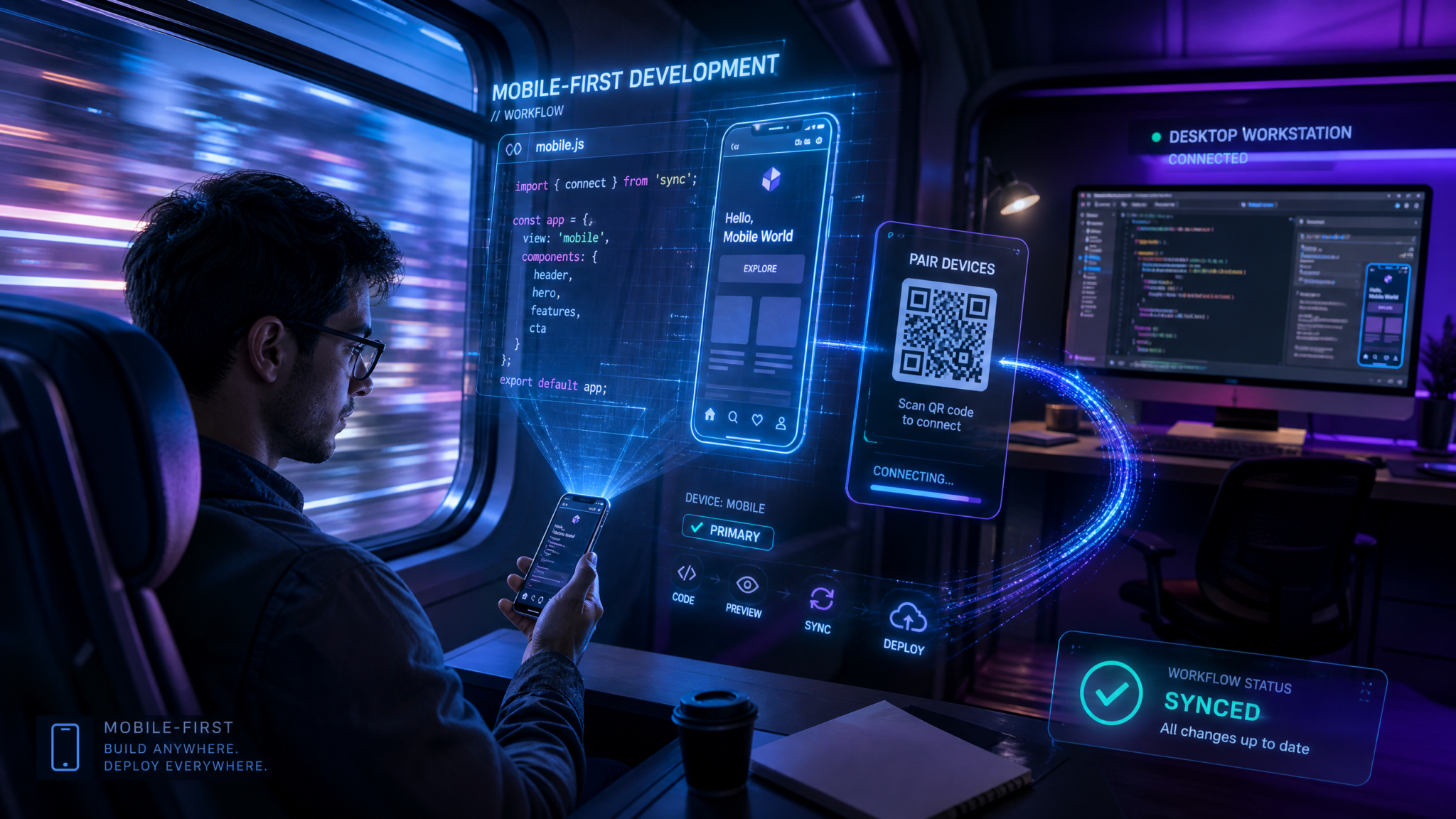
Mobile is no longer a novelty in software development—it is a control surface, a collaboration plane, and, increasingly, the primary way developers orchestrate work across heterogeneous compute. Codex Remote’s general availability (GA) for Enterprise and Education workspaces raises the ceiling on what “mobile-first” can mean in practice: from the ChatGPT mobile app, developers can start or continue work on a connected Mac or Windows host, review progress, and approve actions without opening a laptop. Under the hood, authenticated one-to-one QR pairing anchors trust in hardware-bound keys. In the cloud, a new DigitalOcean Droplet Workspace plugin provisions on-demand environments with opinionated SSH configuration, while improved video rendering for SSH projects and strengthened mobile connection reliability address two persistent pain points of remote development—visual fidelity and resilience.
This featured deep dive takes a rigorous look at how Codex Remote is changing real-world workflows. We map the mobile-first vision to concrete mechanisms, unpack how QR pairing works, illustrate commute coding and emergency hotfix scenarios, examine the DigitalOcean plugin in detail, compare Codex Remote to VS Code Remote and JetBrains Gateway, and explore enterprise deployment patterns and trade-offs. Along the way, we call out known limitations, practical workarounds, and what “ambient development” might look like next.
The Mobile‑First Vision for Development
For decades, developer tooling assumed a desk: a large monitor, a reliable wired network, and near-infinite power and compute. But modern work oscillates between contexts—walking into a meeting, commuting on a train, stepping out for a coffee—where pulling out a laptop introduces friction and delay. The phone is the device that is always reachable. It’s not a perfect substitute for a workstation, but it is the ideal orchestrator of distributed compute. Codex Remote leans into that asymmetry: put heavy workloads on the host; use mobile as a secure intent and review channel.
Reducing the Latency of Intent
Most developer actions begin as intent: kick off a build, switch a feature flag, approve a code generation step, tail logs, or merge a patch. The bottleneck is often not compute time, but the latency between intention and action. Mobile-first workflows minimize this latency. A push notification prompts a glance; a single tap approves a queued action; a brief annotation unblocks a teammate. Codex Remote’s mobile surface consolidates live status, approval prompts, and short-form interactions that are high-leverage precisely because they’re low-effort.
Designing for Constraints: Phones as Deliberate Interfaces
Phones are constraint engines. Small screens, touch input, battery sensitivity, intermittent networks—each constraint forces clarity. Codex Remote doesn’t try to replicate a 4K IDE on a 6-inch display. Instead, it abstracts “jobs” (build, test, deploy), “states” (running, pending, failed), and “approvals” (apply migration, run data backfill). For code edits, the mobile app focuses on short diffs, quick fixes, and context-managed inserts rather than full refactors. This design makes the whole system more explicit and automatable, even on desktop, because human approval checkpoints are first-class.
Mobile + AI Is Multiplicative
AI-generated code and mobile presence are complementary. On mobile, you guide an agent rather than micromanage it: set goals, review candidate changes, approve or reject suggested refactors. This human-in-the-loop pattern benefits from Codex Remote’s authenticated approvals, which supply the guardrails that mobile screens necessitate. For a broader discussion, see
For a deeper exploration of this topic, our comprehensive article on Claude Code Automation: How to Automate Tasks Hands-Free with AI provides detailed implementation strategies, real-world benchmarks, and step-by-step workflows that complement the techniques discussed in this section.
What’s New in Codex Remote GA
Codex Remote is now generally available for Enterprise and Education workspaces, with a feature set tuned for production use and campus rollouts:
- Mobile-to-host continuity: From the ChatGPT mobile app, start or continue work on a connected Mac or Windows host. The host runs the heavy lifting; the phone directs and reviews.
- Progress review and approvals: Monitor long-running tasks and approve queued actions from your phone. These approvals are cryptographically bound to device pairings.
- Authenticated one-to-one QR pairing: A direct, device-bound trust establishment step between the mobile device and a host—no shared links, no broadcast discovery.
- Pairing persistence since June 8: Connections used since June 8 remain paired; older connections need re-pairing to align with GA credential formats.
- Sign-out behavior: Signing out of the mobile app turns off Remote Control without removing pairings. Pairings remain stored, ready to reactivate upon sign-in.
- DigitalOcean Droplet Workspace plugin: Provision a Droplet, configure SSH, and connect it as a remote workspace within minutes. Tune cost, security, and lifecycle via templates.
- Improved video rendering for SSH projects: Clearer previews and smoother frame delivery in remote sessions that rely on SSH, with better behavior under fluctuating bandwidth.
- Mobile connection reliability improvements: Smarter transport selection, faster reconnects, and more robust keepalives across hostile Wi‑Fi and cellular networks.
The shift from beta to GA matters less for badges than for battle-hardening. In enterprise and education environments, the failure modes—unexpected disconnects, ambiguous permissions, hard-to-debug pairing edge cases—must be engineered out. This release’s pairing persistence cutoff date, predictable sign-out semantics, and connection improvements address precisely those operational rough edges.
Feature Summary at a Glance
| Capability | GA Behavior | Why It Matters |
|---|---|---|
| Workspace Availability | Enterprise and Education workspaces | Enables SSO, policy control, audit, and campus lab scenarios |
| Host Platforms | Mac and Windows | Coverage across most developer laptops and desktops |
| Pairing | Authenticated one-to-one QR pairing | Reduces social engineering surface, device-binds trust |
| Pairing Persistence | Connections used since June 8 remain paired | Predictable migrations; explicit re-pairing for older links |
| Sign-Out Semantics | Turns off Remote Control without removing pairings | Operational safety without user friction |
| Cloud Plugin | DigitalOcean Droplet Workspace | Fast, cost-conscious remote environments with sane SSH defaults |
| SSH Video Rendering | Improved preview clarity and smoothness | Better UX for TUI/GUI previews and remote demos |
| Mobile Reliability | Improved reconnects, transport fallbacks | Fewer interruptions on variable mobile networks |
How QR Pairing Works Under the Hood
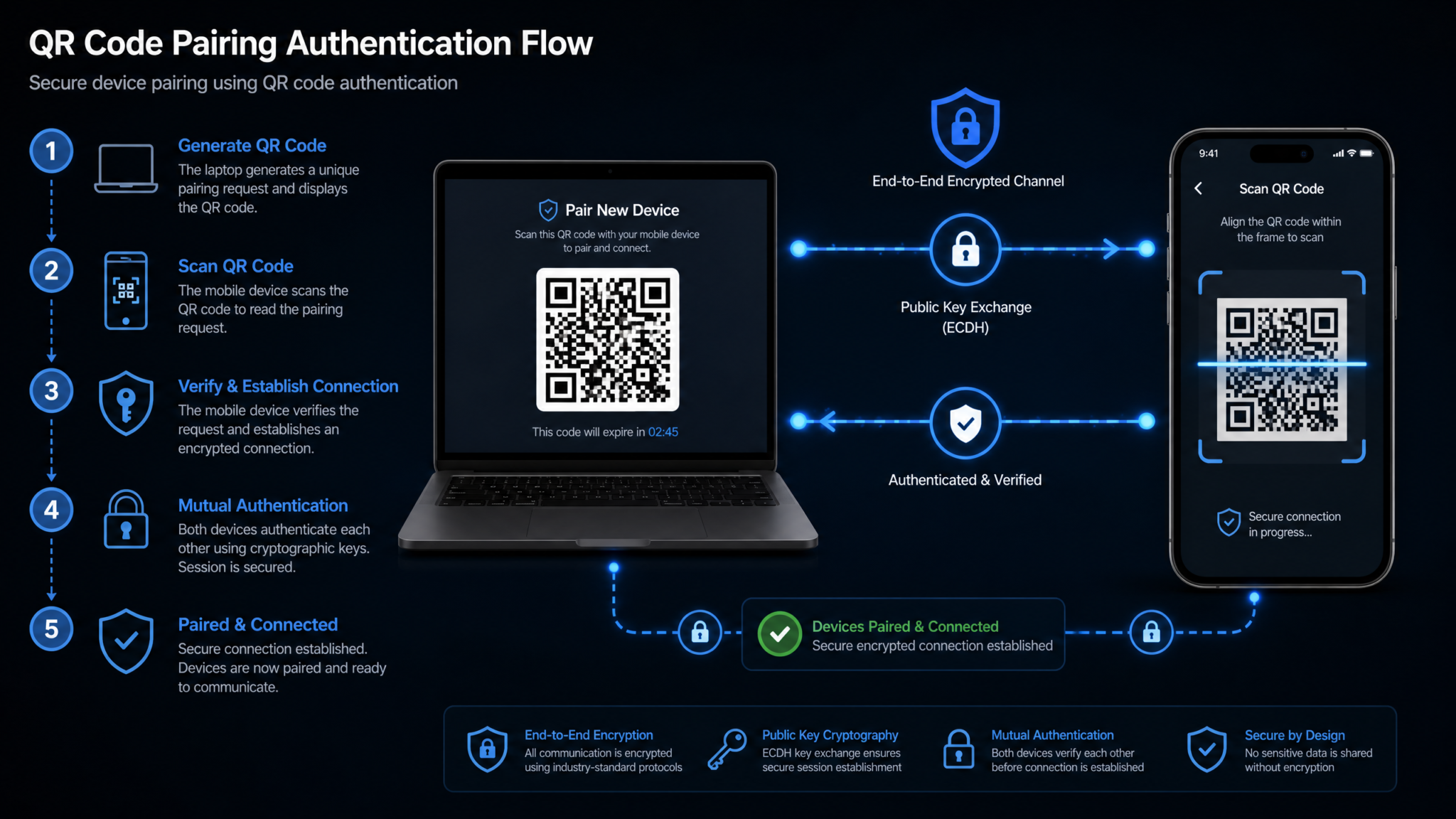
Codex Remote’s one-to-one QR pairing is more than convenience. It is the root-of-trust that binds a human’s phone, a specific host, and a workspace identity. Understanding this flow clarifies how approvals are secured and why pairings persist across sign-outs.
Actors and Keys
- Mobile device: Runs the ChatGPT mobile app. Stores a device-bound asymmetric keypair inside the OS-provided secure enclave/keystore. Presents workspace identity via SSO or enterprise auth.
- Host agent: A lightweight process on Mac or Windows that exposes a local pairing endpoint, brokered through a short-lived local session code displayed as a QR. Hosts maintain their own device keys for attestation.
- Codex control plane: Verifies workspace membership, enforces policy, and brokers initial signaling for connections. Data plane media/control may go peer-to-peer or via relay based on reachability.
The QR encodes an ephemeral enrollment token and rendezvous information. Scanning it with the authenticated mobile app binds the mobile’s key to the host’s key, scoped to a single workspace. No other device can use that pairing record because the private keys never leave secure storage.
Pairing Flow
- The host agent renders a QR that encodes: an enrollment nonce, the host’s public key fingerprint, and a time-bounded pairing URL.
- The mobile app scans the QR. It presents the user’s workspace identity, generates an ephemeral ECDH key, and initiates a mutually authenticated handshake with the host via the control plane.
- Both sides perform ECDH to derive a shared session key, validate workspace policy, and then store a pairing record referencing long-term device keys.
- The control plane issues a device-bound pairing certificate stating “Device A may initiate Remote Control to Host B for Workspace W,” with expiry/rotation policy.
Subsequent connections use this stored relationship. This is why connections used since June 8 remain paired: their pairing records conform to the GA certificate format and rotation cadence. Older pairings lack necessary claims and must be re-paired. Importantly, when you sign out of the mobile app, Remote Control is disabled because the app can no longer present your workspace identity. But the pairing record remains, so when you sign back in, you don’t need to scan again.
Transport and NAT Traversal
Once paired, Codex Remote negotiates the best available transport:
- Preferred: Peer-to-peer QUIC (HTTP/3) with forward-secure encryption, if NAT and firewall conditions allow.
- Fallback: TURN-relayed QUIC or TLS over TCP when direct traversal fails.
- Keepalives and fast resume: Aggressive but battery-aware keepalives maintain liveness under mobile OS backgrounding; session state survives transient radio handoffs.
All transports incorporate TLS with certificate pinning to the control plane and key confirmation to the paired host. Clipboard sync, file transfer, and screen/control streams are multiplexed over the same secure session with priority scheduling to favor control/approval messages under load.
Pairing Record Anatomy
Enterprises frequently ask what is “on disk” after pairing. While exact schemas are implementation-specific, a pairing record will look conceptually like this:
{
  "workspace_id": "w_12345",
  "host_id": "host_f63a",
  "host_pubkey_fingerprint": "SHA256:Wk3r8F...",
  "device_id": "dev_a19b",
  "device_pubkey": "Ed25519:7qLd...",
  "pairing_cert": {
    "issuer": "codex-control",
    "subject": "dev_a19b->host_f63a",
    "claims": {
      "workspace": "w_12345",
      "scopes": ["remote_control", "approve_actions"]
    },
    "not_before": "2024-06-08T00:00:00Z",
    "not_after": "2025-06-08T00:00:00Z",
    "signature": "MEUCIQ..."
  },
  "policy_hash": "b9e...f1a",
  "created_at": "2024-06-08T12:34:56Z",
  "last_used_at": "2026-07-12T17:23:01Z"
}
Revocation lists are enforced by the control plane. If a device is lost, revoking its device_id or certificate invalidates all pairings it holds without touching the host.
Host Agent Configuration
Host agents typically expose a minimal configuration surface so that enterprises can enforce policy. A representative config might include allowed workspaces, approved device types, and transport constraints:
# codex-remote-agent.yaml
workspace: w_12345
allow_pairing: true
allowed_device_os:
  - iOS
  - Android
transport:
  prefer_quic: true
  allow_relay: true
clipboard:
  direction: request-only # mobile can request paste, cannot auto-sync
approvals:
  require_biometric: true
logs:
  level: info
  redaction: strict
Logging is careful to exclude secrets. Pairing events log only high-level metadata (time, device OS, workspace) and never raw keys or tokens.
Sign-Out, Pairing Persistence, and Operational Edge Cases
- Sign-out: Disables Remote Control. Pairing records remain. Upon re-authentication, connections can resume without re-pairing.
- Device replacement: New phone, new device key—requires re-pairing. Old pairings can be revoked in one action.
- Host rebuilds: Reinstalling the OS or rotating host keys invalidates host_id; mobile will prompt to re-pair, preventing silent key substitution.
- June 8 cutoff: Any connections used since June 8 already hold GA-compliant pairing certs and remain valid.
Real‑World Workflows Unlocked by Codex Remote
The value of mobile-first tooling is in the friction it removes in daily life. Below are scenarios that demonstrate Codex Remote’s practical impact.
Commute Coding: Start the Day Before You Sit Down
You’re on a train with spotty connectivity. Your laptop is in your bag, but you want to validate last night’s dependency upgrades and kick off a test matrix. With Codex Remote, you tap into your paired Mac at home or a remote Droplet workspace:
- Open the mobile app’s Workspaces tab; select your paired Mac host.
- Tap “Resume last session” to see logs from the dependency upgrade branch.
- Approve the “generate lockfile and vendor modules” action queued by your AI assistant.
- Trigger a smoke test and a subset of integration tests, configured as quick-run jobs.
- By the time you reach the office, your laptop session shows green runs and a prepared diff for review.
This workflow is resilient to network variability because the heavy work never leaves the host. The mobile app opportunistically syncs logs and approvals; if you enter a tunnel, the host continues running. Reconnect is fast due to improved mobile connection handling.
Meeting Approvals: Keep Projects Moving Without a Laptop
Engineering managers and senior ICs often act as throughput multipliers. Waiting to approve environment migrations, code mods, or schema changes can block a team for hours. With authenticated approvals on mobile, unblock without lowering the bar for safety:
- Review a generated refactor diff in a condensed, side-by-side view optimized for phone screens.
- Tap “Approve with biometric,” satisfying a policy that requires biometric confirmation for destructive actions.
- Observe a live tail of CI logs via the improved SSH video rendering path for TUI-based test dashboards—smooth enough to catch regressions at a glance.
Approvals are not mere buttons; they are identity assertions cryptographically bound to your paired device and logged with provenance. This is stronger than a link-click in email and more auditable for enterprises.
Emergency Hotfixes: Respond in Minutes From Anywhere
Production incidents don’t wait for your desk. A brittle feature flags check failed in the latest rollout; your SLO is sliding. Codex Remote provides a secure, rapid path from alert to mitigation:
- Pager notification arrives. Open the incident runbook shortcut in the mobile app.
- Tap into your paired Windows host that has privileged bastion access. Session resumes instantly due to connection reliability improvements and preserved state.
- Run a pre-baked patch script. Approve escalation with a step-up policy that requires biometric plus offline TOTP.
- Verify metrics in a low-bitrate live preview over SSH with improved rendering; confirm error rate drops.
- Commit the hotfix to a temporary branch; spin off a postmortem task list.
Every step is recorded in the audit log with device and pairing identifiers. Even on cellular, the flow is reliable because control/approval packets are prioritized over bulk data, and the transport can flip from QUIC to TLS mid-session without user intervention.
Cross‑Platform Continuity: iOS/Android to Mac/Windows
It is common to pair multiple hosts: a personal Mac Mini for heavy builds, a Windows workstation tied into enterprise resources, and a cloud Droplet for sandboxing. Codex Remote’s model treats them as peers. Switch between them from your phone based on current need—GPU compilation on Mac, PowerShell automation on Windows, ephemeral tests on a Droplet. Each pairing is one-to-one and authenticated; switching requires no extra auth hoops after initial enrollment.
CLI Snippets You’ll Actually Use on Mobile
Many mobile interactions are single taps, but when you need to run commands through your host, having concise aliases helps. Below are representative snippets you might trigger from mobile command palettes or Quick Actions:
# Trigger smoke tests and short integration suite
make test-smoke && make test-int-short

# Apply database migration in staging with preflight check and approval prompt
scripts/dbmigrate --env=staging --preflight --require-approval

# Launch canary deploy and watch logs in low-bitrate mode
deploy --env=canary --watch --render=ssh-low

# AI-assisted code mod with explicit review gate
codex-ai-codemod --module=http --proposal --output=pr --require-approval
On mobile, these commands are often wrapped in policies: running “dbmigrate” triggers an approval modal; “deploy” requests a second factor if scoped to production targets.
DigitalOcean Droplet Workspace Plugin: A Deep Dive
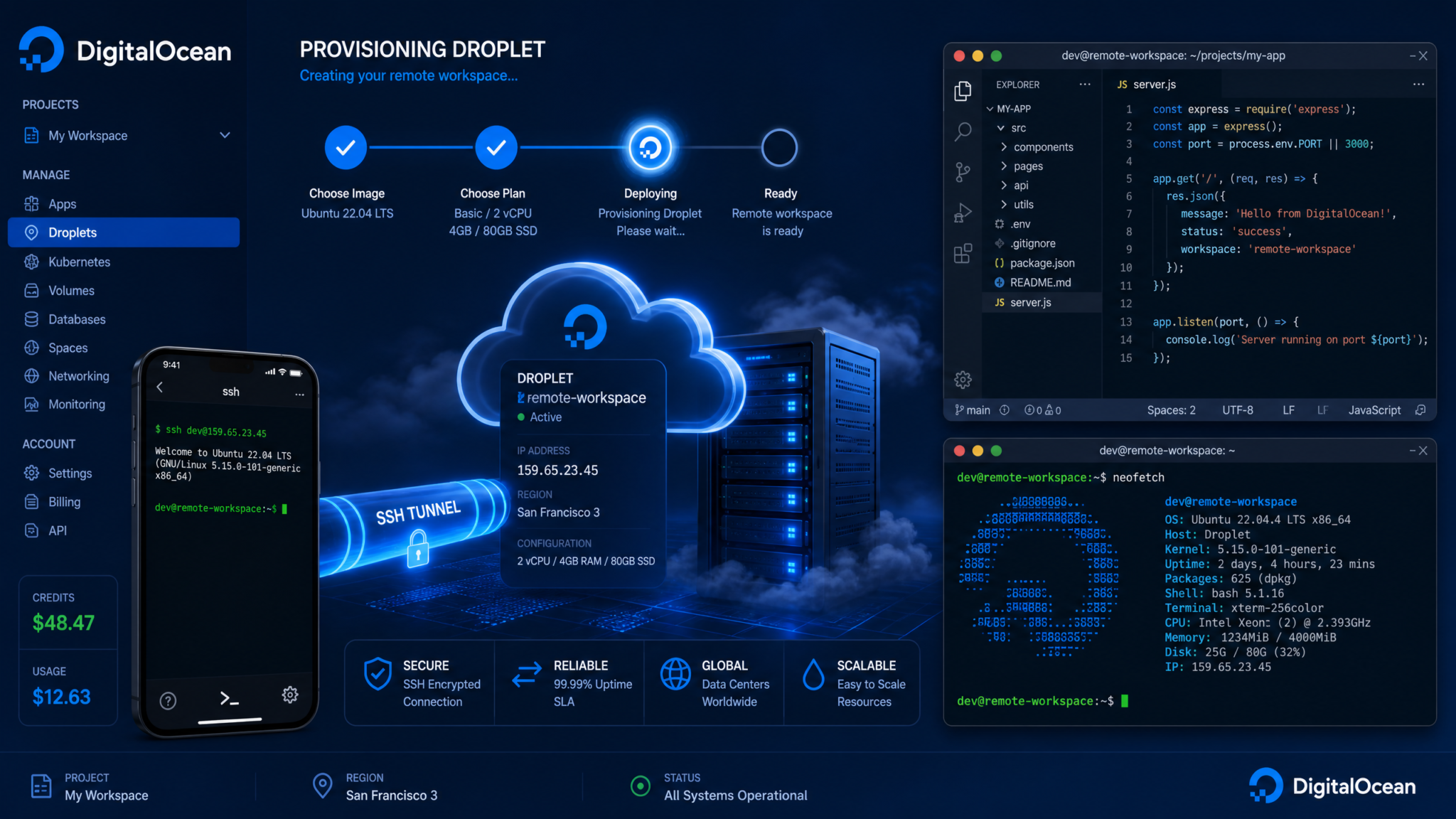
The DigitalOcean Droplet Workspace plugin is designed for teams who want right-sized, disposable compute without bespoke infrastructure. It standardizes how to provision a Droplet, configure SSH, and link it as a remote workspace accessible from mobile or desktop. The emphasis is on speed, cost control, and secure defaults.
Provisioning a Droplet Workspace
With the plugin installed, provisioning typically involves selecting a template, choosing a region, and defining a lifecycle policy. Under the hood, the plugin uses DigitalOcean’s API to create a Droplet, inject SSH keys, and run a bootstrap script via cloud-init that installs the Codex workspace agent, language runtimes, and optional dev container tooling.
# Example: Provision a Droplet workspace for a Node/Go monorepo
codex remote do create \
  --name team-a-monorepo \
  --region nyc3 \
  --size s-2vcpu-4gb \
  --image docker-20-04 \
  --ssh-key ~/.ssh/id_ed25519.pub \
  --template node-go \
  --auto-shutdown 120m
The plugin returns connection details and the workspace appears in your Workspaces list. If you’ve paired your phone, you can immediately direct tasks there from mobile.
Cloud‑Init and Bootstrap
For transparency and customization, teams often maintain their own cloud-init. A sane default for a Linux-based Droplet might include base packages, language toolchains, and the Codex agent:
#cloud-config
package_update: true
packages:
  - git
  - build-essential
  - curl
  - unzip
runcmd:
  - curl -fsSL https://get.docker.com | sh
  - curl -fsSL https://download.example.com/codex-agent.sh | bash
  - usermod -aG docker $USER
  - sysctl -w net.ipv4.tcp_keepalive_time=30
  - sysctl -w net.ipv4.tcp_keepalive_intvl=10
  - sysctl -w net.ipv4.tcp_keepalive_probes=3
write_files:
  - path: /etc/codex/workspace.yaml
    owner: root:root
    permissions: '0644'
    content: |
      workspace: w_12345
      labels:
        - do
        - team-a
      approvals:
        require_biometric: true
The Codex agent registers with the control plane and the Droplet advertises itself as a remote workspace for your organization, subject to policy.
SSH Configuration and Security Posture
SSH is the lingua franca of remote dev. The plugin configures SSH with strict defaults: key-based auth only, restricted users, and optional jump host integration.
# ~/.ssh/config fragment generated by the plugin
Host team-a-monorepo
  HostName 157.230.45.123
  User devops
  PreferredAuthentications publickey
  IdentityFile ~/.ssh/id_ed25519
  ServerAliveInterval 30
  ServerAliveCountMax 3
  Compression yes
  ProxyCommand none
For private repositories or sensitive workloads, consider placing the Droplet behind a VPC and accessing it via WireGuard or Tailscale. The plugin supports adding a bootstrap step to join a mesh network, then advertising a private IP for Codex Remote sessions. This can reduce exposure while preserving reachability.
Lifecycle and Cost Control
Cost-control is a common motivator for ephemeral workspaces. The plugin supports time-based auto-shutdown, idle timers, and snapshot policies:
# codex-do-template.yaml
name: node-go
image: docker-20-04
size: s-4vcpu-8gb
region: nyc3
idle_shutdown_minutes: 90
snapshot_on_destroy: true
labels:
  - do
  - ephemeral
bootstrap:
  cloud_init: ./cloud-init-node-go.yaml
Students and EDU labs benefit even more: schedule windows ensure droplets power up for classes and shut down afterward, while snapshots preserve state between sessions.
Connecting a Droplet as a Remote Workspace
Once provisioned, the Droplet registers itself with your workspace. Pairing happens between your phone and the control plane; the Droplet trusts the workspace and the host agent broker relays. From mobile, you can assign jobs to the Droplet, tail logs, and approve actions. On desktop, you can open a full IDE session if needed—Codex Remote doesn’t lock you into one modality.
Operational Tips
- Pin images: Avoid drift by pinning base image digests and package versions in cloud-init to ensure reproducible environments.
- Network hygiene: If you must open SSH to the public internet, restrict by IP ranges or use single-use firewall rules during provisioning then close down.
- Secrets: Use cloud metadata or sealed secrets for injecting credentials. Never bake secrets into images.
- Scaling: For teams, create a pool of pre-warmed droplets and assign them dynamically per session to reduce cold start times.
Improved Video Rendering for SSH Projects
Remote development over SSH is often text-first, but real projects routinely need richer visuals: TUI dashboards, browser previews tunneled to the host, or lightweight GUI tools. Historically, rendering these streams over variable mobile connections was fragile. Codex Remote’s GA includes a revamped pipeline that reduces jitter, improves font rendering, and stabilizes frame pacing—particularly noticeable on phones that frequently shift between Wi‑Fi and cellular.
What Changed
- Adaptive bitrate tuned for small surfaces: Prioritizes crisp text and motion stability over raw resolution, which suits terminal UIs and code diffs.
- Sub-frame input coalescing: Aggregates touch/scroll events to reduce visible input lag without overloading the channel.
- Transport-aware congestion control: Integrates transport telemetry (RTT variance, loss) into rendering decisions, preventing oscillation.
While the term “video rendering” might evoke media players, here it refers to the composite stream of terminal frames, lightweight canvas updates, and optional web preview surfaces. The net effect is that on-the-go reviews and demos feel less brittle.
Mobile Connection Reliability Improvements
Mobile networks defeat naive assumptions about sockets. Radios sleep; NATs expire; captive portals hijack traffic. Codex Remote’s GA includes connection-handling improvements:
- Fast session resume: The client caches authenticated session parameters and renegotiates quickly after brief outages without replay risk.
- Path probing: Parallel probes pick the healthiest route (Wi‑Fi vs cellular) on reconnection with minimal stall.
- Smart keepalives: Adjust cadence based on OS background status to keep sessions alive without draining battery or tripping aggressive NAT timeouts.
Users experience fewer “silent stalls” and “stuck reconnecting” states—small quality-of-life fixes that add up when you rely on mobile as a primary interface.
Security Architecture and Threat Model
Security is not the absence of features; it’s their careful composition. Codex Remote’s architecture is explicitly centered on device-bound trust and least privilege.
Authentication and Authorization
- Workspace identity: Users authenticate via enterprise SSO (SAML/OIDC) or EDU identity providers. Sessions inherit workspace policy.
- Device-bound pairing: Mobile and host bind public keys during QR pairing; approvals and control actions must originate from a paired device.
- Scoped approvals: Actions declare required scopes; policies can demand biometrics, step-up MFA, or peer review for high-risk scopes (e.g., production data writes).
Transport Security and Data Flow
- End-to-end encryption: Control and content streams are encrypted; relay nodes cannot decrypt payloads.
- Clipboard and file movement: Enterprises can set one-way clipboard (request-only) or full disable; file transfers can be policy-gated or logged.
- Screen redaction: Sensitive fields in previews can be server-side redacted before rendering, protecting secrets even from the mobile display surface.
Auditing, Revocation, and Sign-Out Semantics
- Audit trails: Every approval includes device_id, pairing_cert fingerprint, and policy snapshot hash. This ensures forensic integrity even if policies change later.
- Revocation: Lost devices can be revoked centrally, invalidating all pairings. Host compromise can be mitigated by rotating host keys, forcing re-pairing.
- Sign-out: Turns off Remote Control immediately while preserving pairing records for user convenience. This separation respects both security and ergonomics.
Comparison: Codex Remote vs VS Code Remote vs JetBrains Gateway
Remote development is a crowded space. Codex Remote’s differentiation is its mobile-first pairing and approval model, but that doesn’t mean it replaces IDE-centric remoting. The right tool depends on context.
| Dimension | Codex Remote | VS Code Remote | JetBrains Gateway |
|---|---|---|---|
| Primary Focus | Mobile-first orchestration and approvals; cross-host continuity | IDE-first remote editing via SSH/containers | IDE-first, server-side IntelliJ backend |
| Pairing | One-to-one QR pairing between phone and host | Host discovery via SSH/URI; no mobile pairing | Gateway to code server; no mobile pairing |
| Mobile App Role | Start/continue work, review, approve actions | Limited (extensions exist, not core) | Limited companion mobile presence |
| Approvals | Cryptographically bound to paired device; policy gated | Not a core construct | Not a core construct |
| Cloud Integration | DigitalOcean Droplet Workspace plugin | Dev Containers, Codespaces (separate offering) | JetBrains Space (separate offering) |
| Host Platforms | Mac, Windows (plus Linux via cloud plugin) | Any SSH/containers | Any server running IntelliJ backend |
| SSH Rendering | Improved video rendering for SSH projects | Terminal rendering; web preview via port forwarding | IDE backend renders; SSH incidental |
| Connection Reliability | Mobile-specific reconnect and transport fallbacks | Desktop-oriented; fewer mobile optimizations | Desktop-oriented; fewer mobile optimizations |
| Enterprise Controls | Workspace policy on approvals, clipboard, pairing | Extensions, policies via enterprise config | Policies via Space/IDE management |
Practically speaking, many organizations will use Codex Remote alongside an IDE-focused remote dev tool. Codex Remote handles the in-between moments—kickoff, oversight, approvals—while IDE remoting remains the default for deep editing sessions on a laptop. For more landscape context, see
For a deeper exploration of this topic, our comprehensive article on The Complete AI Tools Stack for 2026: 10 Tools Evaluated provides detailed implementation strategies, real-world benchmarks, and step-by-step workflows that complement the techniques discussed in this section.
Enterprise and Education Deployment Considerations
GA status implies readiness for policy, compliance, and scale. Below are patterns we see in successful enterprise and EDU deployments.
Identity, Policy, and MDM
- SSO integration: Connect your IdP (SAML/OIDC). Enforce step-up MFA for high-risk approval scopes.
- Device compliance: Use MDM to require passcode, biometric, and OS version minimums on mobile; enforce disk encryption and antivirus on hosts.
- Pairing policy: Restrict pairing to managed devices only; auto-revoke pairings when MDM compliance is lost.
{
  "workspace": "w_12345",
  "policies": {
    "pairing": {
      "require_managed_device": true,
      "max_pairings_per_user": 3
    },
    "approvals": {
      "prod_deploy": {
        "biometric": true,
        "mfa": "totp",
        "peer_review": 1
      }
    },
    "clipboard": {
      "direction": "request-only"
    }
  }
}
Network and Zero Trust
- Firewall rules: Allow egress to Codex control plane and TURN relays; permit QUIC (UDP/443) and TLS (TCP/443). Block unwanted inbound to hosts; initiate sessions outbound.
- Inspection caveats: TLS termination and content inspection can break end-to-end guarantees; if required, use allowlists and SNI filters rather than MITM.
- Zero Trust: Gate host agents behind identity-aware proxies; tie host registration to device posture checks.
| Component | Protocol | Port | Direction | Notes |
|---|---|---|---|---|
| Control Plane | TLS | 443/TCP | Egress | Auth, signaling |
| Data Plane | QUIC | 443/UDP | Egress | Preferred media/control |
| TURN Relay | TLS/QUIC | 443/TCP/UDP | Egress | Fallback traversal |
| SSH (Droplet) | TCP | 22 | Egress | From agent to Droplet if used for setup |
Education: Labs and BYOD
Campus labs can turn old desktops into powerful remote hosts accessible from students’ phones. Key patterns:
- Time-boxed access: Pairings expire at term end; re-pair at the start of the next class.
- Template droplets: Pre-provision DO droplets for courses; snapshot at milestones; enforce auto-shutdown.
- BYOD safety: Encourage pairing from managed student devices; require biometric approvals to reduce account sharing.
Rollout and Support
Large organizations benefit from staged rollout:
- Pilot: 10–20 developers across platforms; collect pairing edge cases and network constraints.
- Expand: Add team by team; integrate with CI and on-call workflows.
- Enterprise: Turn on policies for approvals and clipboard; integrate audit export to SIEM.
Support teams should receive a concise runbook:
# Support Runbook (Excerpt)
Symptom: "Stuck reconnecting" on cellular
Action: Verify UDP/443 egress; force TLS fallback in app settings; check carrier NAT.

Symptom: "Host appears unpaired after OS reinstall"
Action: Host key changed. Ask user to re-pair; verify old host key revoked.

Symptom: "Approvals blocked"
Action: Check policy requires biometric; confirm device supports and is enrolled.
For procurement and IT governance, highlight how sign-out disables Remote Control without removing pairings—user-friendly with a clear mitigation path if a device is lost (revoke pairing centrally).
For deeper capabilities such as SSO scopes, SIEM export, and advanced policy tuning, see
For a deeper exploration of this topic, our comprehensive article on How A Major SaaS Startup Used Claude Code to Ship Features 10x Faster: A 2026 Case Study provides detailed implementation strategies, real-world benchmarks, and step-by-step workflows that complement the techniques discussed in this section.
Developer Testimonials and Scenarios
Below are anonymized composites that map to common patterns.
“My morning merges are done by the time I sit down.” — Staff Engineer, Fintech
Flow:
- During commute, resumes host session, reviews two small PRs with diffs sized for mobile.
- Approves an AI-generated log normalization change after verifying test green.
- By arrival, the branch is merged and smoke tests have run in staging.
Why Codex Remote: Intent-to-action latency is minutes, not hours; approvals are secure and auditable.
“We shaved hours off hotfix cycles.” — SRE Lead, SaaS
Flow:
- On-call receives pages during dinner; opens mobile app.
- Connects to Windows host with bastion access; applies feature flag rollback script.
- Watches TUI dashboard over improved SSH rendering; signals all-clear.
Why Codex Remote: Rapid access, no laptop needed, strong approval chain.
“Students don’t fight for lab seats anymore.” — Course Instructor, University
Flow:
- Pairs classroom desktops with managed iOS/Android devices at semester start.
- Schedules DO droplets for projects; students can continue on phones while commuting.
- Pairings auto-expire at term end; droplets snapshotted for next cohort.
Why Codex Remote: Resource flexibility, predictable costs, minimal support burden.
Limitations and Practical Workarounds
Every tool has trade-offs. Codex Remote is optimized for orchestrating and reviewing work from mobile, not replacing a full IDE on a phone. Recognize limitations and deploy mitigations.
Screen Real Estate and Editing Depth
Limitation: Phones are poor for sweeping refactors and multi-file edits.
Workarounds:
- Favor chunked code mods generated by assistants, with explicit review gates.
- Use external keyboards or tablets when possible for moderate edits.
- Reserve full IDE tasks for laptop sessions; let mobile queue and approve.
Multi‑Monitor and High‑Fidelity Previews
Limitation: Complex UIs previewed over SSH on a phone are cramped.
Workarounds:
- Use mobile-optimized preview modes (adaptive bitrate and zoomed panes).
- Split previews into purposeful slices (logs in one session, metrics in another).
Network and Enterprise Proxies
Limitation: Some enterprise networks block UDP/443 or use aggressive timeouts.
Workarounds:
- Allow TLS fallback; ensure TCP/443 is permitted to control and relay endpoints.
- For long approvals, keep sessions active via periodic lightweight heartbeats.
- Coordinate with network teams to permit QUIC where possible for best experience.
Battery and Backgrounding
Limitation: Mobile OSes suspend background tasks and throttle network aggressively.
Workarounds:
- Use fast-resume sessions; avoid leaving streams open unnecessarily.
- Configure notifications for state changes (job done, approval needed) to avoid polling.
Re‑Pairing Legacy Connections
Limitation: Pairings unused before the June 8 cutoff will not persist in GA.
Workarounds:
- Proactively communicate the re-pairing requirement; schedule a maintenance window.
- Offer a one-click re-pair flow that preserves host settings but refreshes certs.
Host Security Posture and Privilege
Limitation: If hosts are over-privileged, a compromised session could be dangerous.
Workarounds:
- Adopt least-privilege on hosts; use JIT elevation gated by approvals and MFA.
- Segment production from development; use bastions and audited breaks-glass paths for emergencies.
Tooling Ecosystem Compatibility
Limitation: Some plugins and GUIs assume a desktop IDE context.
Workarounds:
- Prefer CLI-first workflows on hosts; reserve GUI interactions for when on desktop.
- Use headless test runners and web previews translated into mobile-readable summaries.
The Future of Ambient Development
Ambient development is the idea that coding work hums along across devices, surfaces, and contexts, with humans dipping in to steer and verify. Codex Remote’s GA elements—mobile approvals, QR pairing, ephemeral cloud workspaces—are stepping stones toward a world where intent, policy, and compute converge seamlessly.
Agent‑Orchestrated Loops With Human Checkpoints
AI agents will increasingly run tests, generate patches, and propose rollouts by default. The human role concentrates in setting goals, defining policy, and reviewing outcomes. On mobile, this becomes a steady stream of high-signal approvals and rejections, each backed by cryptographic provenance. This creates a defensible compliance posture while accelerating delivery. For teams evaluating alternatives, map these loops against your stack and existing
For a deeper exploration of this topic, our comprehensive article on The Complete AI Tools Stack for 2026: 10 Tools Evaluated provides detailed implementation strategies, real-world benchmarks, and step-by-step workflows that complement the techniques discussed in this section.
Contextual Presence and Proactive Surfacing
Presence is more than online/offline. In ambient development, the system infers “intent windows” (between meetings, during commute) and surfaces actionable items sized to fit those windows. It may also defer heavyweight prompts until you’re on Wi‑Fi or plugged in. Codex Remote’s mobile improvements and approvals are compatible with that trajectory.
Compute as Inventory
With the DigitalOcean plugin and similar integrations, compute becomes inventory. You don’t “spin up a server”; you “assign a workspace” from a pool. Snapshots and templates make environments fungible. Mobile becomes your inventory scanner—approve, assign, recycle.
Enterprise Guardrails as Enablers
Paradoxically, tighter guardrails enable broader adoption. Pairing policies, scope-bound approvals, and sign-out semantics let enterprises say “yes” to mobile-first participation without sacrificing control. The fewer exceptions, the faster the rollouts.
Getting Started: A Pragmatic Checklist
Here’s a concise, operations-friendly path to trial and expand Codex Remote in your organization.
Phase 1: Pilot
- Enable Codex Remote for a test Enterprise or EDU workspace.
- Install the host agent on a Mac and a Windows machine; generate QR codes.
- On mobile, sign in and pair devices via QR. Confirm pairing records appear.
- Run simple tasks from mobile: tail logs, run unit tests, approve a non-destructive change.
# Verify pairings from host agent CLI
codex-remote pairings list
# Output shows device_id, last_used_at, workspace_id
Phase 2: Cloud Workspaces
- Install the DigitalOcean plugin. Configure credentials in a restricted scope.
- Create a template and bootstrap a Droplet workspace.
- Connect from mobile; run test matrices and web previews.
# Install plugin and create a template
codex remote plugins install digitalocean
cat > codex-do-template.yaml <<EOF
name: node-go
image: docker-20-04
size: s-2vcpu-4gb
region: nyc3
idle_shutdown_minutes: 60
bootstrap:
  cloud_init: ./cloud-init-node-go.yaml
EOF

# Provision
codex remote do create --template node-go --name pilot-ws
Phase 3: Policy and Scale
- Integrate SSO; define approval scopes and MFA/biometric requirements.
- Set clipboard policy; configure audit export to SIEM.
- Roll out team by team; monitor support tickets and iterate.
# Example policy enforcement via admin CLI
codex admin policy set --workspace w_12345 --file policy.json

# Export audit logs
codex admin audit export --since "2026-07-01" --format jsonl > audit.jl
Re‑Pairing Legacy Connections
If your organization has long-idle pairings predating the June 8 cutoff, plan a one-time re-pairing push:
- Notify users: “Connections used since June 8 remain paired; older ones need re-pairing.”
- Provide a re-pair flow link and a support channel.
- Optionally pre-generate QR codes for lab machines in EDU contexts.
Practical Architecture Patterns
Host Topologies
- Personal Host + Cloud Burst: Use your workstation for day-to-day builds; burst to a Droplet for test matrices.
- Team Host Pool: A shared pool of Windows and Mac hosts in a lab for specialized toolchains.
- All Cloud: Standardize on cloud workspaces via the DigitalOcean plugin; hosts are stateless.
Approval-Driven Pipelines
Restructure pipelines to align with mobile approvals:
- Split jobs into “prepare” (compute-heavy, non-destructive) and “apply” (destructive). Only “apply” requires approval.
- Attach previews and summaries sized for mobile: risk diff, metrics deltas, rollback plan.
- Enforce biometric on “apply” in production; allow single-tap for “prepare” everywhere.
# Example CI step with approval gate (pseudocode)
steps:
  - name: prepare_migration
    run: scripts/migrate --prepare --out preview.sql
  - name: approve_apply
    uses: codex/approval@v1
    with:
      scope: prod_db_apply
      requires:
        biometric: true
        mfa: totp
  - name: apply_migration
    if: steps.approve_apply.result == 'approved'
    run: scripts/migrate --apply preview.sql
Frequently Asked Questions
Do I need to re‑pair after signing out?
No. Signing out turns off Remote Control without removing pairings. After signing back in, your device can resume control, subject to workspace policy.
Which host OS versions are supported?
Current Mac and Windows versions are supported. For Linux, use the DigitalOcean plugin or similar cloud integrations to host your remote environment and connect via Codex Remote.
What about pairs created before June 8?
Connections used since June 8 remain paired; older ones need re-pairing. This ensures all pairings carry GA-compliant certificates and policy bindings.
How does Codex Remote compare with Codespaces/Space?
Codespaces and JetBrains Space are full IDE-in-cloud experiences. Codex Remote complements them by making mobile orchestrations, reviews, and approvals first-class. Many teams use both.
Operational Hardening Checklist
- Rotate host keys quarterly; monitor for unexpected host key changes.
- Enforce biometric approvals for destructive scopes; export approval logs to SIEM.
- Limit clipboard direction and file transfer based on data classification.
- Audit pairings monthly; revoke stale devices or unknown hosts.
- Validate egress rules for QUIC and TLS; document TLS fallback behavior.
- Standardize cloud-init for Droplets; pin images and versions.
Tuning for Performance
Host: CPU, I/O, and Caching
- Enable build caches (ccache, Gradle cache, pnpm store) on hosts for repeat jobs triggered from mobile.
- Use NVMe scratch disks for ephemeral Droplets; mount caches on persistent volumes if needed.
Network: Throughput vs. Interactivity
- Favor interactivity for mobile sessions: set low-latency mode, which prioritizes control messages and text over large artifact transfers.
- Offload artifact uploads to CI systems rather than streaming them through the mobile session.
Rendering: SSH Optimizations
- Choose fonts optimized for small screens; enable ligatures only if they aid readability.
- Use preview modes that cap frame rates to save battery while preserving smoothness.
Governance, Risk, and Compliance Notes
Enterprises with strict GRC obligations should document how Codex Remote supports their controls:
- Access control: Pairing proves device possession; SSO proves identity; approvals prove consent and intent.
- Change management: Approval artifacts tie changes to individuals and devices, improving traceability.
- Data protection: Clipboard and file transfer policies prevent uncontrolled exfiltration; screen redaction reduces accidental disclosure.
- Incident response: Revocation and sign-out semantics allow swift disabling of control without destructive resets.
Integrating With Team Practices
Standups and Async Reviews
Codex Remote fits naturally into async standups: team members can record short updates, attach job statuses, and request approvals, all consumable on mobile. Approvers get a queue sized to the device, steadily draining blockers.
Pairing and Mentorship
One-to-one pairing creates strong device identity. For mentorship, have juniors propose changes and seniors review and approve from mobile, with policies preventing direct changes without review in sensitive areas.
On‑Call and Runbooks
Codex Remote integrates with incident tooling by linking runbook steps to mobile-approvable actions. Embed “Open in Codex Remote” links in runbooks to reduce context-switch overhead.
Edge Cases and Troubleshooting Patterns
Captive Portals
Symptom: Session establishes, then stalls. Workaround: Open a browser to trigger captive portal login; once cleared, Codex Remote’s fast-resume re-establishes sessions.
Dual SIM Devices
Symptom: Intermittent reconnects when switching carriers. Workaround: Lock a session to a preferred path in app settings; disable automatic handoffs if stability matters more than throughput.
Corporate VPNs
Symptom: QUIC blocked; TLS allowed. Workaround: Force TLS fallback; request network exemptions for relay endpoints for best UX.
Reference: Sample Policies and Config
# policy.json
{
  "pairing": {
    "require_managed_device": true,
    "max_pairings_per_user": 2
  },
  "approvals": {
    "deploy_prod": { "biometric": true, "mfa": "totp", "peer_review": 1 },
    "apply_migration": { "biometric": true, "mfa": "totp" },
    "delete_data": { "biometric": true, "mfa": "totp", "peer_review": 2 }
  },
  "clipboard": { "direction": "request-only" },
  "file_transfer": { "enabled": false }
}
# host-agent.service (systemd on Windows via NSSM/macos via launchd equivalent)
[Unit]
Description=Codex Remote Host Agent
After=network.target

[Service]
ExecStart=/usr/local/bin/codex-remote-agent --config /etc/codex/workspace.yaml
Restart=on-failure
Environment=CODEx_LOG_LEVEL=info

[Install]
WantedBy=multi-user.target
Synthesis: Why This GA Release Matters
Codex Remote’s GA for Enterprise and Edu workspaces is not just a stability declaration. It encodes pragmatic design choices: secure, one-to-one QR pairing to anchor trust; a mobile app that executes the high-leverage parts of development—start, steer, inspect, approve—without pretending to replace a workstation; and a cloud plugin that makes ephemeral compute sane. Improvements to video rendering for SSH projects and mobile connection reliability are the unsung work that makes the visible features feel solid. Together, these shifts make mobile-first development a credible default for more moments in the day.
Access 40,000+ AI Prompts for ChatGPT, Claude & Codex — Free!
Subscribe to get instant access to our complete Notion Prompt Library — the largest curated collection of prompts for ChatGPT, Claude, OpenAI Codex, and other leading AI models. Optimized for real-world workflows across coding, research, content creation, and business.
Actionable Takeaways
- Adopt a mobile-first mindset for orchestrating work. Let hosts compute; let phones approve.
- Use QR pairing aggressively but govern it: limit to managed devices, audit monthly, and revoke liberally.
- Restructure pipelines into “prepare” and “apply” to align with mobile approvals.
- Leverage the DigitalOcean Droplet Workspace plugin to create disposable, cost-controlled environments.
- Document network requirements; enable QUIC where possible; ensure TLS fallback works.
- Train teams on sign-out semantics: it turns off Remote Control without removing pairings—useful both for safety and convenience.
Closing Thoughts
Development has always expanded to fill new surfaces. Terminals led to IDEs, which bled into browsers, which now compress back into phones. Codex Remote’s GA shows how to embrace that compression without sacrificing velocity or safety: authenticated one-to-one QR pairing for trust; mobile approvals for human agency; cloud workspaces for scale; and quiet engineering in the transport and rendering stack that earns reliability. As ambient development matures, the best tools won’t make your phone a tiny workstation; they’ll make your workstation feel present wherever you are.
