
The Codex Desktop Integration Playbook — 10 Prompts for Multi-Repo Projects, PR Review, and Inline Code Editing
Codex in the ChatGPT Desktop App: A Tactical Playbook with 10 Expert Prompts for Multi‑Repo Engineering
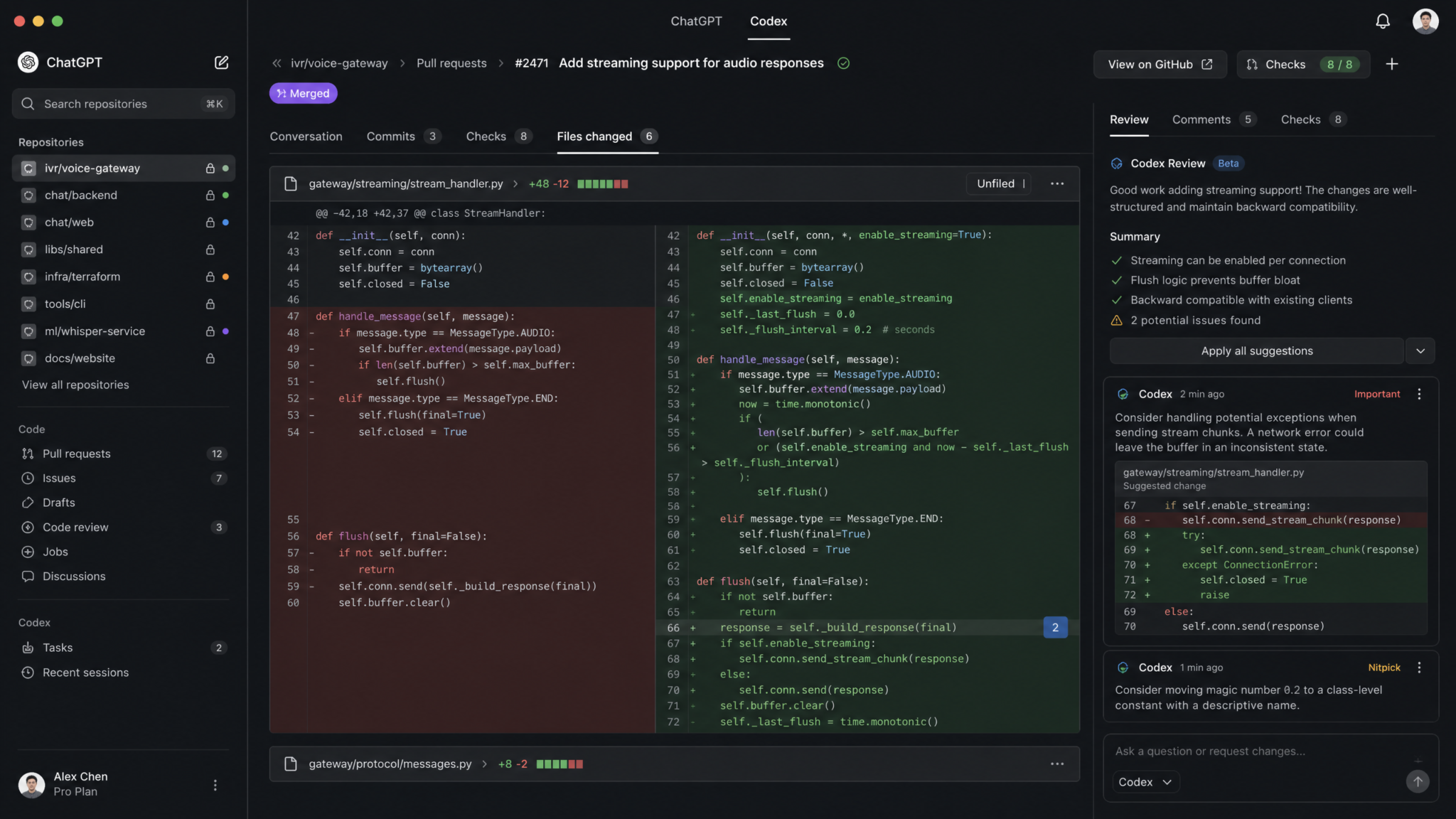
Codex now ships directly inside the ChatGPT desktop app for macOS and Windows, elevating day-to-day engineering from chat-based assistance to an end-to-end, context-aware development surface. This playbook distills proven workflows into 10 expert prompts designed for multi-repository development, cross-repo analysis, and rapid, reliable code review and change management. You will learn how to set up multi-repo projects, review pull requests with inline annotations, refactor code across files with preview, and generate test suites, documentation, security audits, performance analyses, and release notes—all without leaving the desktop app. The included prompt templates are engineered to exploit key capabilities: direct Markdown and code editing in the app, inline annotations, Codex-powered revisions of selected content, GitHub PR sidebars with diffs and reviewer feedback, cross-repository workspaces, faster Computer Use with GPT‑5.6, and consolidated plugin management in Settings.
What’s New and Why It Matters
- Inline code and Markdown editing: Select a block of code or documentation and ask Codex to revise it in place. This reduces round-trips between editors and the assistant.
- Inline annotations: Add comments and issue links directly alongside specific lines or blocks, preserving context and intent for future readers.
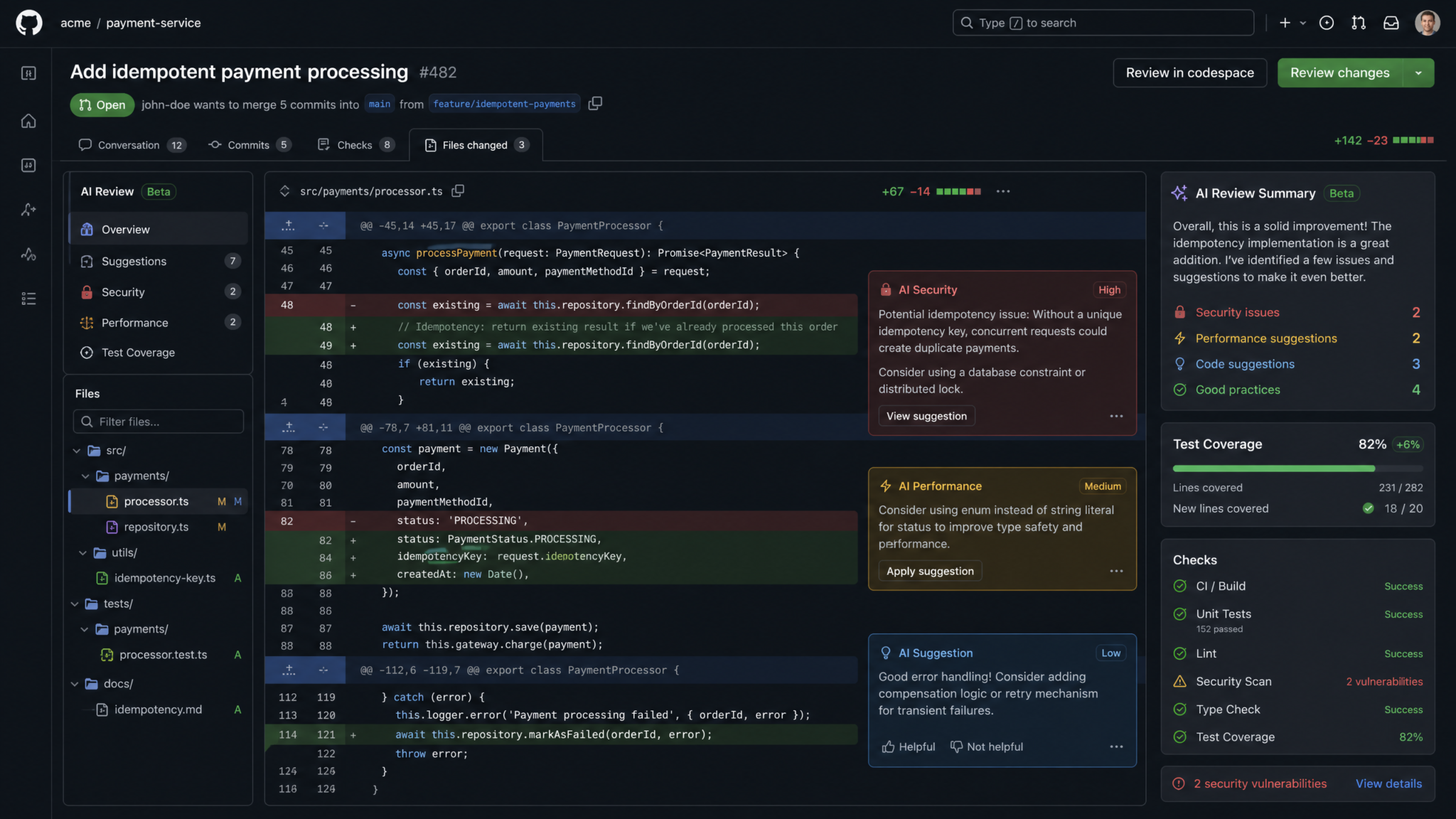
- PR review in the sidebar: Load a pull request with full diff and reviewer feedback beside the conversation. You can request targeted reviews, summarize discussions, and propose commit-ready patches.
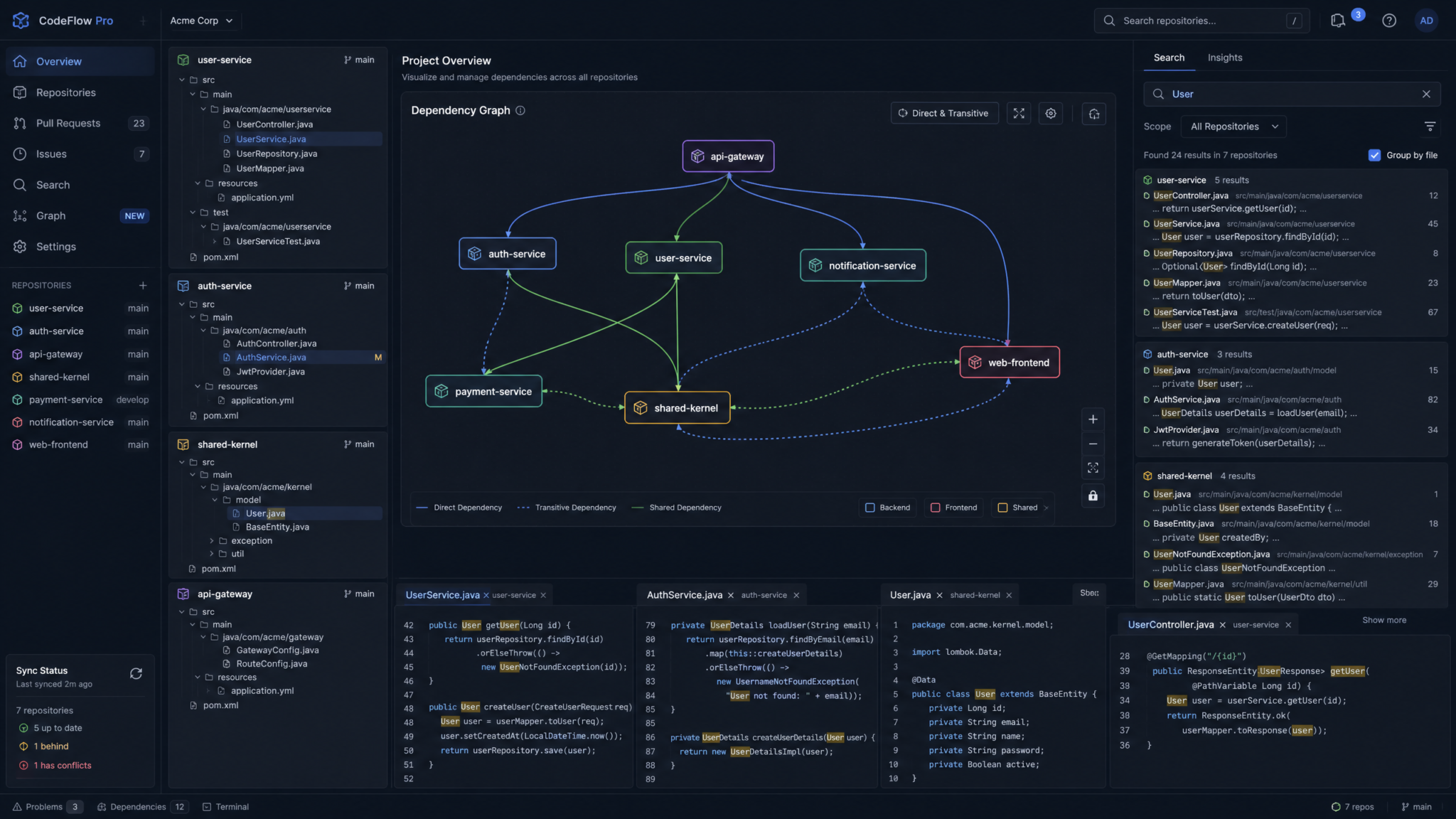
- Multi-repo projects: Aggregate multiple repositories under a single project to map dependencies, enforce standards, and coordinate changes in lockstep.
- Computer Use with GPT‑5.6: Faster, more responsive actions when searching local clones, running lightweight commands, or staging change previews under your supervision.
- Plugin management in Settings: Centralized controls reduce friction and help standardize org-wide configurations.
How to Use This Playbook
Each of the 10 prompts includes: the exact prompt text you can paste into ChatGPT, configuration tips for the desktop app, the expected output so you can validate success criteria, and a pragmatic real-world scenario to ground the workflow. Use them as-is, or adapt with variables like repository URLs, branch names, and ticket references. For advanced patterns, see the remarks following each prompt.
Prerequisites and Setup
- ChatGPT desktop app installed on macOS or Windows with Codex enabled.
- GitHub account connected to the app (Settings → Accounts → GitHub). Grant read and PR review permissions; write access if you want Codex to propose commit patches or open PRs on your behalf.
- Local clones or remote access to repositories you’ll include in your multi-repo project.
- Validated access to CI logs and artifacts for more accurate performance/test analyses.
- Security scanning tools (optional, but recommended) surfaced via Settings → Plugins, which have moved to Settings for unified management.
Project Model: Working Across Repositories
In the desktop app, create a “Project” and add multiple repositories (local paths and/or GitHub URLs). Codex builds a mental model across codebases—source sets, module boundaries, dependency graphs—allowing it to perform cross-repo tasks like dependency impact analysis and refactoring cascades. Keep repository roots flat at the project level to avoid ambiguous discovery, and ensure your .gitignore, build files, and dependency manifests are up to date to help Codex infer structure.
Power Prompting Inside the Desktop App
- Use selection-based revisions: Select code/Markdown, right-click, and ask Codex to “Revise” using a precise instruction. Codex will propose diffs you can accept or refine.
- Leverage inline annotations to create durable context. When you annotate a line, that intent is available to future Codex sessions in the same project.
- In PR review, reference specific hunks by file and line to get targeted feedback or patch proposals.
- Use structured output formats (JSON, YAML, tables) for machine-friendly results that you can feed into scripts or CI comments.
For extended techniques and orchestration strategies, see
For a deeper exploration of this topic, our comprehensive article on How to Use the Ralph Wiggum Loop for Autonomous Coding with Codex provides detailed implementation strategies, real-world benchmarks, and step-by-step workflows that complement the techniques discussed in this section.
The 10 Expert Prompts
Prompt 1: Multi-Repo Project Setup and Navigation
Goal: Initialize a multi-repository workspace, establish navigation landmarks, and create a concise project map for ongoing work inside the ChatGPT desktop app.
Prompt Text
Act as a senior build and tooling engineer inside the ChatGPT desktop app. We are configuring a multi-repository project for day-to-day development and PR review.

Inputs:
- Repositories (local or remote):
  1) {{repo_a_path_or_url}}  (Language: {{lang_a}}, Build: {{build_a}})
  2) {{repo_b_path_or_url}}  (Language: {{lang_b}}, Build: {{build_b}})
  3) {{repo_c_path_or_url}}  (Language: {{lang_c}}, Build: {{build_c}})
- Primary branch: {{main_branch}}
- Active feature branches: {{feature_branches_csv}}
- Issue tracker: {{tracker_link}}
- High-level goals:
  - Cross-repo navigation and code search
  - Consistent build and test entrypoints
  - Prepare for PR reviews in the sidebar with annotations

Tasks:
1) Build a multi-repo map:
   - For each repo: root path, primary modules/packages, entrypoints, and test directories.
   - Link explicitly recognized dependency edges (A depends on B’s module X, etc.).
   - Identify build/test commands and how to run them (locally or via Computer Use), including prerequisites.

2) Define navigation anchors and search scopes:
   - Suggest canonical file paths to bookmark (e.g., main service entrypoints, HTTP routers, data access layers, integration tests).
   - Provide recommended semantic search queries for common intents (e.g., “where is config merged?”, “JWT validation pipeline”, “retry policy code”).

3) Standardize operational conventions:
   - Repo-level scripts for build, test, lint, and type-check.
   - A table describing each command, scope (repo or project), inputs, outputs/artifacts, and expected runtime.

4) Output:
   - A compact project map.
   - A “Getting Started” checklist for new contributors.
   - A short “Daily Routine” guide for using the PR sidebar, inline annotations, and selection-based revisions to iterate quickly.

Use concise bullets and a table for commands. Keep results deterministic and directly actionable.
Configuration Tips
- In Settings → Project, add each repository path or GitHub URL; enable “Work across repositories in one project.”
- Turn on “Inline annotations” and “Allow selection-based revisions” to streamline contextual edits.
- Enable Computer Use with GPT‑5.6 for faster local file search and scripted checks; keep actions manual-approval to maintain control.
- In Settings → Plugins (moved into Settings), toggle language servers or linters if you want Codex to surface signals during browsing.
Expected Output
- A hierarchical map of repositories with module boundaries and dependency edges.
- Bookmarks for key files and directories; suggested semantic search patterns for common diagnostics.
- A tabular overview of build/test commands with scope and artifacts.
- Clear onboarding and daily workflow guidance for using the PR sidebar and inline tools.
Real-World Scenario
Your team merges two backend services and a shared library under a single project. New contributors struggle to locate service bootstrap code, shared HTTP middlewares, and integration test harnesses across repos. This prompt produces a living project map, standardized commands, and “how to work here” guardrails. Afterward, Codex can route you directly to relevant files and propose consistent scripts for all repos.
Prompt 2: Cross-Repository Dependency Analysis
Goal: Trace logical and runtime dependencies across repositories, including APIs, modules, types, and build-time linkages, so you can assess change impact and plan coordinated modifications.
Prompt Text
You are an architecture analyst working within a multi-repo project inside the ChatGPT desktop app. Perform a cross-repository dependency analysis.

Inputs:
- Repos in scope: {{repo_list}}
- Dependency manifests: {{paths_to_manifests_or_build_files}}
- Known inter-repo APIs or integration points: {{api_docs_or_folders}}
- Recent changes affecting dependencies (commits/PRs): {{links_or_refs}}

Tasks:
1) Build a dependency graph:
   - Identify edges: call sites, imports, package references, and API dependencies between repos.
   - Classify edges by type (build-time, runtime, optional/feature-flagged).
   - Flag brittle edges (e.g., reflection-based coupling, transitive types).

2) Impact assessment:
   - If module X or API Y changes, which repos and files are likely affected?
   - Provide “blast radius sets” grouped by severity and likelihood.
   - Note owner teams and the recommended notification/channel for each set (if available from CODEOWNERS or repo metadata).

3) Risk mitigation:
   - Suggest contract tests and compatibility shims where changes are imminent.
   - Offer a migration plan with a phased rollout (e.g., dual-write, header gating, versioned endpoints).

4) Output:
   - A concise graph (textual adjacency list) and an “impact table” with columns:
     [Source] [Target] [Edge Type] [Risk] [Mitigation] [Owner] [CI Signal(s)]
   - Followed by a stepwise change plan with checkpoints.

Keep the output deterministic and easily copyable into an issue tracker or PR discussion.
Configuration Tips
- Ensure all repositories are included in the project and indexed; open manifests like package.json, go.mod, pom.xml, Cargo.toml, build.gradle, or requirements.txt.
- Use the PR sidebar to load referenced PRs. Codex can align change intent with dependency surfaces.
- Enable “Show reviewer feedback with diff” so your analysis incorporates prior concerns about coupling and API drift.
Expected Output
- A dependency graph across repos with edge categorization.
- Blast radius groupings, owner mappings, and mitigation actions.
- An ordered change plan with contract tests and rollout tactics.
Real-World Scenario
Before promoting a breaking schema update in the shared data model repository, you need to quantify its effects on two services and a CLI tool. The dependency analysis highlights transitive usage of removed fields, proposes migration shims, and sequences PRs to minimize downtime. You paste the “impact table” into a coordinating epic and reference it in each PR.
Prompt 3: Inline Code Review with Contextual Annotations
Goal: Perform targeted code review at the line and hunk level using inline annotations, capturing rationale and linking to issues or docs directly from within the desktop app.
Prompt Text
Act as a principal engineer conducting an inline code review using the ChatGPT desktop app’s PR sidebar and annotations.

Inputs:
- PR: {{pr_link_or_id}}
- Review scope: specific files/hunks: {{file_and_line_refs}}
- Primary concerns: {{security, correctness, architecture, docs, tests}}
- Organization style: Prefer high-signal, low-noise comments with actionable suggestions.

Tasks:
1) Annotate the specified lines and hunks with:
   - Clear issue statements
   - Rationale grounded in code context and existing style guides
   - Concrete remediation steps (including small code snippets where helpful)

2) Propose “Revise Selection” instructions for the author to apply within the app.
3) Identify if any annotations should be consolidated into a single blocking comment with a checklist.

4) Output:
   - Inline-ready annotations grouped by file and line range.
   - A short “blocking vs non-blocking” summary.
   - One selection-based revision command per major concern (ready to run in-app).

Keep commentary crisp; minimize generalities; refer to specific identifiers and links where possible.
Configuration Tips
- Open the PR in the sidebar and enable “reviewer feedback alongside diff” to see prior human comments, ensuring Codex complements rather than duplicates feedback.
- Use selection-based revise to transform code on the spot. Codex respects the selection context and proposes safe diffs.
- If a comment needs an action item, add an annotation with a checkbox-style TODO so it persists in context.
Expected Output
- Line-level annotations with rationale and fixes.
- A clear separation of blocking and non-blocking issues.
- Ready-to-run “Revise Selection” snippets to accelerate author iteration.
Real-World Scenario
During a refactor PR, an innocuous variable shadowing bug slips into a hot path. This prompt creates a precise annotation at the offending line, explains the risk with examples, and supplies a revision instruction. The author selects the block and accepts the generated patch in seconds.
Prompt 4: PR Review Automation with Structured Feedback
Goal: Generate a structured, standardized PR review that your team can paste into GitHub or use within the app, including severity tags, rationale, and suggested patches.
Prompt Text
As an automated reviewer inside the ChatGPT desktop app, produce a structured PR review with categorized findings and proposed patches.

Inputs:
- PR: {{pr_link_or_id}}
- Repo: {{repo_name}}
- Review policy: {{link_or_summary}} (style, tests, docs, performance, security)
- Focus areas: {{e.g., API contracts, error handling, migration notes}}
- Risk appetite: {{conservative|balanced|aggressive}}

Tasks:
1) Summarize the PR intent and scope from title, description, and diff.
2) Generate findings categorized as:
   - BLOCKER: must-fix before merge
   - RECOMMENDED: fix during this PR if feasible
   - OPTIONAL: follow-up issue acceptable
3) For each finding, provide:
   - Rationale grounded in the diff and codebase conventions
   - Proposed code changes (inline patch or function-level sketch)
   - Test or doc updates required
4) Output as JSON and a readable summary:
   {
     "pr": "...",
     "summary": "...",
     "findings": [
       {"severity": "BLOCKER", "file": "...", "lines": "x-y", "issue": "...", "rationale": "...", "suggestion": "...", "tests": ["..."], "docs": ["..."]}
     ],
     "ready_to_apply_patches": true|false
   }
Keep the JSON valid and the prose concise. Ensure suggestions are consistent with the repo’s language and style.
Configuration Tips
- Turn on “Show reviewer feedback with diff” so Codex can reconcile its suggestions with human feedback.
- If your org mandates a standard review JSON format, paste a sample in the prompt and ask Codex to conform exactly.
- Use the app’s ability to open code blocks and accept patches in place to quickly apply low-risk fixes.
Expected Output
- A deterministic JSON review artifact with categorized findings.
- A human-readable summary for quick triage.
- Patch-ready suggestions consistent with repository conventions.
Real-World Scenario
You maintain a monorepo governed by explicit review policies. Rather than starting from scratch, Codex generates a JSON artifact you post as a PR comment and also attaches as a build artifact. Engineers process BLOCKERs first, then RECOMMENDED, with traceability into tests and docs.
For adjacent workflows, see
For a deeper exploration of this topic, our comprehensive article on Claude Code Automation: How to Automate Tasks Hands-Free with AI provides detailed implementation strategies, real-world benchmarks, and step-by-step workflows that complement the techniques discussed in this section.
for a survey of automation patterns and policy conformance.
Prompt 5: Refactoring Across Multiple Files with Preview
Goal: Drive a coordinated refactor across files and repositories, with a preview of changes and a rollback plan, using Codex’s in-app editing and annotations.
Prompt Text
You are a refactoring assistant operating in a multi-repo ChatGPT desktop project. Plan and preview a cross-file refactor, then produce patch-ready diffs.

Inputs:
- Scope:
  - Repositories: {{repo_list}}
  - Target symbol(s) or API(s): {{symbols}}
  - Affected files (if known): {{paths}}
- Constraints:
  - Preserve public API signatures unless migration steps are provided.
  - Keep commits small and logically grouped.
  - Maintain test pass rates; add missing tests if coverage will drop.

Tasks:
1) Inventory usages of the target symbol(s) or API(s) across repos; group by call pattern.
2) Propose a refactor plan:
   - Stepwise changes with commit messages
   - For each step, expected risk and manual verification notes
3) Generate preview diffs (unified format) with file headers:
   --- a/path
   +++ b/path
   @@ context @@
   <changed lines>
4) Produce a rollback plan and a “verification checklist” for reviewers.

5) Output:
   - “Plan” section (bulleted)
   - “Diff Previews” section (multiple files)
   - “Rollback & Verification” section
Ensure the diffs are minimal and readable. Reference linters or formatters if reflow is needed.
Configuration Tips
- Use selection-based revisions to apply small diffs to open files. For broad changes, ask Codex to stage patch sets for manual review.
- Enable Computer Use with GPT‑5.6 if you want Codex to run local grep, basic build, or formatter checks under your approval for faster feedback loops.
- Annotate risky hunks with intent so future reviewers understand context without reopening the conversation.
Expected Output
- Discovery of symbol usages across repos and grouped call patterns.
- A sequenced plan with commit messages and risk notes.
- Readable unified diff previews, ready to apply piecemeal.
- A rollback and verification game plan.
Real-World Scenario
Your team wants to replace a brittle date parser used in three services and a CLI. Codex inventories call sites, proposes a progressive replacement with adapter shims, generates minimal diffs per file, and outlines the verification. You apply each patch in-app with selection-based confirmation, leveraging inline annotations for context.
Prompt 6: Documentation Generation from Code Changes
Goal: Automatically generate or update documentation based on a PR’s code changes and commit messages, formatted for your docs site or README, and embedded directly in the app’s Markdown editor.
Prompt Text
Act as a developer-docs lead. Generate documentation updates derived from code changes and commit intent.

Inputs:
- PR: {{pr_link_or_id}}
- Docs style guide: {{link_or_summary}}
- Target docs locations:
  - README updates: {{paths}}
  - API reference sections: {{paths}}
  - Migration notes: {{paths}}
- Output format: Markdown sections with front-matter (if needed)

Tasks:
1) Summarize the change intent and user-facing effects.
2) Identify public APIs, CLI flags, config fields, and migration steps that changed.
3) Draft Markdown updates with:
   - Clear headings
   - Before/After snippets where appropriate
   - Version/Date tags and cross-links
4) Generate inline annotations indicating where to insert content in existing docs files.
5) Output:
   - “Doc Diffs”: proposed insertions/edits (code-fence or diff style)
   - “Release Note Snippets”: short, standardized lines for the changelog

Keep language precise; no marketing fluff; emphasize behaviors and constraints.
Configuration Tips
- Open target Markdown files in the desktop app and use selection-based revise to apply Codex’s suggested changes.
- Turn on “Inline annotations” to mark doc insertion points with stable anchors.
- If you manage docs in a separate repo, include it in the multi-repo project. Codex can align PR changes with docs destinations.
Expected Output
- Concise Markdown with version tags and cross-links.
- Before/After examples illustrating behavior changes.
- Changelog-ready release note lines extracted from the PR.
Real-World Scenario
A configuration schema changed in the backend, adding a new timeout parameter and deprecating an older field. Codex detects the public-facing impact and inserts accurate updates in the README and API docs, with migration notes and crisp examples. You approve the Markdown edits inline.
Prompt 7: Test Generation for Modified Code Paths
Goal: Automatically suggest unit and integration tests aligned to the PR’s diff, including edge cases, mocks, and fixtures. Apply tests inline and validate with Computer Use where appropriate.
Prompt Text
You are a test strategist inside the ChatGPT desktop app. Generate targeted tests for code changes in this PR.

Inputs:
- PR: {{pr_link_or_id}}
- Language/test framework: {{e.g., Python/pytest, JS/Jest, Go/testing, Java/JUnit}}
- Test layout conventions: {{paths and naming}}
- Coverage goals: {{min thresholds or files}}
- CI hints: {{links to failing/passing checks}}

Tasks:
1) Identify modified functions/methods and affected control flows.
2) Enumerate test cases:
   - Happy path
   - Boundary/edge inputs
   - Failure modes and exception handling
   - Concurrency/timeouts if relevant
3) Generate test files or test methods with:
   - Realistic fixtures/mocks
   - Minimal coupling to implementation details
   - Clear assertions and naming
4) Propose placement paths and file names consistent with repo conventions.
5) Output:
   - Test snippets (ready to paste/apply inline)
   - A short matrix mapping changed functions → test cases
   - Optional: a “run locally” command list (no auto-run unless approved)

Be concise and idiomatic for the language and framework.
Configuration Tips
- Open the modified files and test directories side-by-side in the desktop app. Use selection-based revise to insert test scaffolds.
- Enable Computer Use with GPT‑5.6 to run focused test commands after you approve them; expect faster feedback loops on small scopes.
- If coverage reports are available, paste key lines or open the artifact so Codex can target uncovered branches.
Expected Output
- Concrete test functions with fixtures and correct imports.
- A coverage-oriented test matrix aligned to the diff.
- Run commands you can approve and execute for quick validation.
Real-World Scenario
After adding retry logic to a network client, Codex generates unit tests exercising jitter, backoff ceilings, and terminal failure cases. It also proposes an integration test harness using a local mock server. You accept the tests inline and optionally run them with Computer Use.
Prompt 8: Security Audit of PR Changes
Goal: Conduct a quick but rigorous security review of a PR, scanning for input validation weaknesses, injection risks, insecure defaults, authorization gaps, secret leakage, and dependency vulnerabilities across repos.
Prompt Text
Act as an application security reviewer. Perform a scoped security audit of the PR using context from the multi-repo project.

Inputs:
- PR: {{pr_link_or_id}}
- Threat model focus: {{e.g., authz, data exfiltration, SSRF, RCE}}
- Policy references: {{org security checklist links}}
- Sensitive modules/paths: {{paths, e.g., auth middleware, crypto, serialization}}
- Dependency change manifests: {{lockfiles or build files}}

Tasks:
1) Enumerate risks introduced or exacerbated by the diff:
   - Input validation and encoding
   - Dangerous deserialization or reflection
   - Query construction or template rendering hotspots
   - Secrets handling and logging of sensitive values
   - Dependency upgrades/downgrades with known CVEs
2) Propose concrete mitigations and code fixes with small, reviewable diffs.
3) Produce a “Security Review” section per file with:
   - Findings
   - Severity (High/Med/Low)
   - CWE references (if applicable)
   - Code-level patches
4) Output:
   - A JSON artifact:
     {
       "pr": "...",
       "summary": "...",
       "findings": [
         {"file": "...", "lines": "x-y", "severity": "High", "issue": "...", "cwe": "CWE-...", "patch": "...", "followups": ["..."]}
       ],
       "dependencies": [{"name": "...", "from": "x", "to": "y", "risk": "..." }],
       "policies_checked": ["..."]
     }
   - A concise, human-readable summary for the PR thread.

Ensure patches respect language idioms and existing project conventions.
Configuration Tips
- Open security-sensitive files with inline annotations turned on so mitigation advice stays attached to relevant lines.
- Include dependency lockfiles in your project so Codex can cross-check known CVEs. If you use third-party scanners, surface their summaries via Settings → Plugins.
- Ask Codex to output both JSON and human-readable summaries; post JSON into your security board if you track findings programmatically.
Expected Output
- Concrete, file-scoped findings with severity grading and CWE references.
- Patches for risky constructs and safer defaults.
- Dependency risk notes aligned to lockfile changes.
Real-World Scenario
A templating change introduces unsanitized rendering of user input. Codex flags the sink, supplies an escaping patch, and links the fix to the project’s security checklist. It also detects a transitive downgrade in a HTTP library with an open CVE. You apply the patch inline and escalate the dependency change for a team decision.
Prompt 9: Performance Impact Analysis of Code Changes
Goal: Anticipate and measure the performance implications of code changes using static reasoning over diffs, configuration awareness, benchmarks, and light local runs approved via Computer Use.
Prompt Text
You are a performance engineer. Analyze the performance impact of this PR and propose targeted measurements.

Inputs:
- PR: {{pr_link_or_id}}
- Hot paths and SLIs: {{links or files}}
- Benchmarks or profiling scripts: {{paths}}
- Environment notes: {{staging constraints, data samples}}

Tasks:
1) Identify potential performance hazards or wins in the diff:
   - Allocations, copies, string building, N+1 queries
   - Synchronization/locks, contention points
   - I/O and network call patterns, retry behavior
   - Algorithmic complexity changes
2) Propose microbenchmarks or load tests targeting changed areas.
3) Provide run recipes:
   - Commands to execute locally (optional, behind approval)
   - Input data subsets or fixtures
   - Expected outputs/metrics and thresholds
4) Output:
   - “Hypotheses” with rationale tied to lines in the diff
   - “Experiments” with steps and expected results
   - “Mitigations” if thresholds will be breached

Use concise bullets; include code snippets for benchmarks where practical.
Configuration Tips
- Load existing benchmark scripts and profiling outputs into the app to ground the analysis.
- Enable Computer Use with GPT‑5.6 for quick, focused microbenchmark runs after your approval.
- Annotate hot-path files with “perf anchors” so future PRs inherit context automatically.
Expected Output
- Line-referenced performance hypotheses with clear risk/win framing.
- Runnable benchmark or load-test harness snippets.
- Proposed mitigations and acceptance thresholds for merge criteria.
Real-World Scenario
A PR adds JSON schema validation to a parsing function on a hot ingest path. Codex highlights allocation pressure, proposes a pooled decoder or schema precompilation, writes a microbenchmark scaffold, and outlines acceptance thresholds. You approve a quick run locally to validate the hypothesis before merge.
Prompt 10: Release Notes Generation from PR History
Goal: Produce accurate, deduplicated release notes from a set of merged PRs across repositories, tagged by component, user-facing impact, migration requirements, and links.
Prompt Text
Act as a release manager. Generate release notes from PR history across repositories.

Inputs:
- Repositories: {{repo_list}}
- Version range or milestone: {{vX.Y.Z or date range}}
- Labels for inclusion/exclusion: {{e.g., user-facing, bug, breaking-change}}
- Docs/changelog destination: {{paths or repo}}
- Format: Markdown with sections and a short TL;DR

Tasks:
1) Aggregate merged PRs in the range, deduplicate by topic, and exclude non-user-facing if specified.
2) Categorize entries:
   - New features
   - Improvements
   - Bug fixes
   - Breaking changes (with migration guidance)
   - Security notes (if any)
3) Generate:
   - TL;DR summary (bullet list)
   - Detailed sections with PR links, credit to authors
   - “Upgrade Notes” with config or API migration steps
   - “Known Issues” with workarounds
4) Output:
   - Markdown suitable for CHANGELOG.md and release pages
   - Optionally a JSON index with structured metadata per entry

Ensure accuracy; avoid duplicating issues across repos; link cross-repo changes cohesively.
Configuration Tips
- Open the changelog file in the desktop app and let Codex insert the generated section via selection-based revise.
- Include multiple repositories in the project so Codex can align PRs and collapse duplicates.
- If your org uses labels for user-facing changes, specify them in the prompt to filter the set deterministically.
Expected Output
- Release notes in clean Markdown with accurate PR links and author attributions.
- A crisp TL;DR and an “Upgrade Notes” section that users can apply immediately.
- An optional JSON index to feed internal dashboards.
Real-World Scenario
Building a quarterly release from four service repos and a shared SDK has historically yielded inconsistent release notes. Codex consolidates the PR histories, collapses duplicates, flags breaking changes, and writes both a succinct summary and deep details. You approve and commit the Markdown directly from the app.
Hands-On Guidance: Executing with the Desktop App
Using Selection-Based Revisions Effectively
Selection-based revise is the fastest path from observation to fix. Highlight the smallest sensible code or Markdown region; keep your instruction crisp; and prefer patch-style outputs. If Codex proposes larger edits, ask it to break them into smaller, logically-sequenced hunks. Annotations near the selection will be incorporated as context, reducing the chance of stylistic drift.
Inline Annotations as a Knowledge Substrate
Inline annotations capture intent exactly where it matters. Use them to document “why” behind a refactor or a non-obvious workaround. Future Codex sessions within the same project will digest these annotations, which helps keep recommendations consistent with the project’s evolving standards and tradeoffs.
PR Sidebar Discipline
- Load the PR first, then state your review goals. This allows Codex to weight the diff and reviewer feedback for relevant guidance.
- Ask for structured outputs—JSON for machine tracking, Markdown for PR threads. Structured artifacts lower cognitive load and enable automation.
- Keep severity separation clear; enforce a norm where BLOCKERs must be resolved in the PR while OPTIONAL items can be follow-ups.
Speeding Up with Computer Use (GPT‑5.6)
Computer Use is faster with GPT‑5.6, which is especially helpful for quick searches, running a single test file, or formatting a patch before submission. Keep operational guardrails: require manual approval for any command, and scope each action tightly. A good pattern is “Plan → Preview → Approve → Execute → Summarize.”
Settings: Plugin Management and Tools
Plugin management has moved into Settings. Centralize linters, formatters, and security scanners there. This ensures Codex can reference their outputs while you stay in one place. Avoid redundancy: if a CI system already enforces a linter, configure Codex to use it for advice but not to produce conflicting formats.
Deep-Dive Examples and Patterns
Example: Structured JSON Review and Patch Application
This sample demonstrates how an automated review might be serialized and then applied via selection-based revise. Although JSON output cannot directly apply patches, maintaining a predictable structure allows Codex to generate and apply the necessary patches when you paste relevant JSON sections back as instructions.
{
  "pr": "service-a#1247",
  "summary": "Adds request-level caching with configurable TTL; minor refactors in handler pipeline.",
  "findings": [
    {
      "severity": "BLOCKER",
      "file": "src/cache/cache_middleware.ts",
      "lines": "88-117",
      "issue": "Cache key omits user role; risk of privilege bleed.",
      "rationale": "Key should include role or derived authz scope for role-based content.",
      "suggestion": "Include role in composite key and document rationale.",
      "tests": ["should vary cache by role", "should not serve admin content to user role"],
      "docs": ["docs/config.md#cache-key-derivation"]
    },
    {
      "severity": "RECOMMENDED",
      "file": "src/handlers/search.ts",
      "lines": "45-63",
      "issue": "Unbounded concurrency in parallel fetches.",
      "rationale": "Risk of saturating downstream when cache misses spike.",
      "suggestion": "Limit concurrency (e.g., p-limit or semaphore) and add retry caps.",
      "tests": ["should cap concurrent requests at configured limit"]
    }
  ],
  "ready_to_apply_patches": true
}
Once produced, you might ask: “Apply the BLOCKER suggestion to src/cache/cache_middleware.ts lines 88–117.” Codex will focus on that selection and propose a safe diff. Accept changes inline, re-run targeted tests with Computer Use if needed, and close the review loop inside the app.
Example: Unified Diff Preview for a Multi-File Refactor
Codex can generate a diff preview, letting you inspect the exact changes before applying them. Keep diffs minimal and logically grouped.
--- a/src/time/parse.go
+++ b/src/time/parse.go
@@
-func ParseDate(s string) (time.Time, error) {
-    return time.Parse(time.RFC3339, s)
-}
+func ParseDate(s string) (time.Time, error) {
+    // Use a stricter parser with precompiled layout to reduce allocs
+    layout := time.RFC3339
+    t, err := time.Parse(layout, s)
+    if err != nil {
+        return time.Time{}, fmt.Errorf("invalid date: %w", err)
+    }
+    return t, nil
+}

--- a/src/ingest/reader.go
+++ b/src/ingest/reader.go
@@
- ts, _ := time.Parse(time.RFC3339, rec.Timestamp)
+ ts, err := ParseDate(rec.Timestamp)
+ if err != nil {
+    return fmt.Errorf("timestamp parse failed: %w", err)
+ }
You can accept these hunks individually, and Codex will keep annotations near the modified lines to preserve rationale for future maintainers.
Example: Performance Microbenchmark Scaffold
// Go example: benchmark for ParseDate impact
func BenchmarkParseDate(b *testing.B) {
    inputs := []string{
        "2024-12-01T12:34:56Z",
        "2025-01-05T00:00:00Z",
        "not-a-date",
    }
    for i := 0; i < b.N; i++ {
        _, _ = ParseDate(inputs[i%len(inputs)])
    }
}
After pasting into the appropriate file, approve a “go test -bench=ParseDate -benchtime=2s” run via Computer Use for quick validation.
Strategy: From Prompts to Process
Adopt a Two-Lane Review Model
- Lane 1: Automated structure (Prompts 4 and 8). Produce JSON artifacts for policy checks and security reviews; post results in the PR and archive in your security or quality dashboards.
- Lane 2: Targeted human feedback (Prompt 3). Provide nuanced, high-signal suggestions with inline annotations and selection-based patches.
Bundle Changes with Documentation and Tests
Every behavior change should ship with doc and test updates. Use Prompts 6 and 7 to attach artifact generation to code change events. Codex then serves as a safety net: if a PR modifies a public API without a corollary doc/test change, it will surface the gap.
Plan Cross-Repo Work as a Series of Small, Verified Steps
With multi-repo projects, codify changes into slices. Prompt 2 generates a dependency analysis; Prompt 5 proposes a staged plan with rollback. Maintain a living “change ledger” in annotations or a shared Markdown file inside the project, making it easy for new contributors to understand the path and status.
Keep Your Prompts Deterministic
- Provide repository paths, branch names, and issue links upfront.
- Specify output formats (JSON/Markdown), and ask Codex to keep them strict.
- When requesting patches, name files and line ranges to localize edits.
Governance and Risk Management
- Record-blocking criteria explicitly in your prompts to ensure consistent enforcement.
- Use inline annotations to mark accepted risks with context and expiry (e.g., “temporary workaround; remove by v1.7”).
- Treat Computer Use like a scalpel: small, reversible actions with human approval at each step.
For broader organizational frameworks and ROI analysis, see
For a deeper exploration of this topic, our comprehensive article on Setting Up GPT-5 Pro for Indie Shipping — Complete Developer Walkthrough provides detailed implementation strategies, real-world benchmarks, and step-by-step workflows that complement the techniques discussed in this section.
Operational Playbook Details
Repository Indexing and Search
When you add repositories to a project, confirm that core manifests and documentation exist at conventional locations. Codex uses these anchors to infer structure and speed navigation. For example, a Python project without a clear test layout may cause misaligned suggestions; including a tests/ directory with conventional naming improves outcomes.
Branch Hygiene and Context Windows
- Limit the scope of active feature branches in your prompt; Codex reasons best with a clear target branch and a handful of relevant branches.
- Summarize long PR descriptions; Codex will capture the gist without drowning in extraneous history.
- If the PR diff is extremely large, ask Codex to segment by directory or component and iterate in slices.
Inline Diff Etiquette
- Apply the smallest possible patch that solves the issue; resist rewriting surrounding code unless necessary.
- Maintain the code’s local idioms. If imports, null checks, or logging follow a specific pattern, preserve it.
- Add brief comments for non-obvious refactors so future readers understand intent.
Security and Compliance Hooks
- When Codex proposes mitigation patches, validate against your security checklist and any language-specific hardening guides.
- If you find a dependency with a known CVE, open a separate PR with a minimal upgrade and clear rollback plan; avoid coupling with large refactors.
- Link security annotations to issues and include the CWE reference to make triage easier.
Performance Guardrails
- Codex can hypothesize performance impacts based on diffs, but always sanity-check with targeted microbenchmarks or selective profiling.
- Prefer specialized data structures over generalized convenience APIs in hot paths.
- Annotate wins and regressions near the code; future PRs inherit that context.
Prompt Variations and Extensions
Prompt 2 (Dependency Analysis) — Versioned Contracts
Extend the analysis by requesting a “versioned contract matrix” correlating endpoints or exported types with downstream consumers and their minimum compatible versions. This helps coordinate progressive rollouts without cross-repo lockstep merges.
Prompt 4 (Structured PR Review) — Policy Injection
Paste your org’s explicit review rubric into the prompt to make the review enforceable. Example: “Every new endpoint must include authz checks, rate limiting, and error shape conformance. Provide code pointers or patches if missing.” Codex will grade against this rubric and propose fixes inline.
Prompt 5 (Refactor) — Semantic Rename Campaigns
For API renames, ask for a “rename campaign” plan: symbol inventory, batch changes grouped by module, and verification steps. Codex will generate diffs in manageable chunks and a rollback plan keyed to commit hashes.
Prompt 6 (Docs) — Multi-Channel Outputs
Request both Markdown for CHECKLOGE/README and a JSON index your docs site ingests. This ensures consistency across developer docs and user-facing release feeds.
Prompt 7 (Tests) — Mutation Tests and Negative Cases
Ask Codex to propose mutation-style tests or negative cases that target common failure modes for the changed components. This bolsters confidence for high-risk merges.
Prompt 8 (Security) — Defense in Depth
Include a section prompting Codex to add defense-in-depth recommendations like input size limits, strict deserialization whitelists, and timeouts. These can be left as TODOs if out of scope for the current PR but documented via annotations.
Prompt 9 (Performance) — Budget-Based Merge Gates
Define explicit budgets (latency, throughput, memory) in your prompt and ask Codex to recommend reject/accept gates for PRs. This keeps performance guardrails explicit and uniform.
Prompt 10 (Release Notes) — Contributor Credits
Include a “credits style” section in the prompt to generate consistent author attributions and sponsor acknowledgments. Codex will add a Contributors section automatically.
Reference Table: Prompts to Outcomes
| # | Capability | Primary Output | Where to Use in App | Best Paired With |
|---|---|---|---|---|
| 1 | Multi-repo setup | Project map, commands table, onboarding checklist | Project workspace | 2 (deps), 5 (refactor) |
| 2 | Cross-repo dependency analysis | Dependency graph, impact table, change plan | Project + PR sidebar | 5 (refactor), 8 (security) |
| 3 | Inline code review | Annotations, revise commands | PR sidebar + inline editor | 4 (automation), 7 (tests) |
| 4 | Automated PR review | JSON review + summary + patches | PR sidebar | 3 (inline), 6 (docs) |
| 5 | Cross-file refactor with preview | Plan + unified diff previews | Project editor | 2 (deps), 7 (tests) |
| 6 | Docs from code changes | Markdown updates + changelog snippets | Inline Markdown editor | 4 (review), 10 (release notes) |
| 7 | Test generation | Test files/methods + matrix + run recipes | Editor + optional Computer Use | 3 (inline review), 5 (refactor) |
| 8 | Security audit | JSON findings + mitigations + patches | PR sidebar + annotations | 2 (deps), 4 (review) |
| 9 | Performance analysis | Hypotheses + benchmarks + mitigations | PR sidebar + Computer Use | 5 (refactor), 7 (tests) |
| 10 | Release notes | Markdown + JSON index | Docs editor | 6 (docs), 4 (automation) |
Advanced Tactics with Multi-Repo Projects
Semantic Scopes and Anchors
Define consistent anchors for Codex—e.g., “service entrypoints,” “domain models,” “adapters,” “ports,” “integration tests.” Use annotations to label files with these roles. Codex will then retrieve or propose changes with these semantic layers in mind, especially valuable for cross-repo refactors.
Coordinated Rollouts
For changes requiring multiple PRs across repos, prompt Codex for a “rollout choreography”: a list of PRs with order, gating criteria, and verification per step. Consider embedding the choreography in a shared Markdown within the project so every participant can align without repeated context sharing.
Blended Human-AI Review
Use Codex to generate scaffolding—structured findings, suggested patches—and let human reviewers make judgment calls. The desktop app’s inline editor accelerates this blend: accept low-risk patches immediately and leave complex decisions to maintainers.
Reducing Flake and Drift
When Codex proposes edits that might affect formatting or imports, ask it to include explicit formatter or linter invocations as part of the suggestion. With GPT‑5.6’s faster Computer Use, approving a quick “lint-fix only” pass is practical and reduces CI churn.
Troubleshooting and Anti-Patterns
Symptoms of Poor Prompting
- Overly broad suggestions unrelated to your repo: tighten scope by naming files, functions, and policies.
- Patch proposals that reformat large files: ask for minimal, line-scoped diffs and include formatter constraints.
- Inconsistent severity grading: supply a rubric and ask Codex to adhere to it.
Context Limits and Workarounds
- For very large diffs, iterate by directory or topic; ask for summaries, then drill into details.
- Keep PR descriptions succinct but precise; Codex leverages headlines and bullet points effectively.
- Use annotations to keep long-running context in the code rather than in the chat alone.
Security Tool Conflicts
- If Codex and your scanner disagree, include the scanner’s output in the prompt and ask for a reconciliation with references.
- When in doubt, prefer the stricter rule; treat differences as a chance to clarify policy in code and docs.
Appendix: Copy-Ready Prompt Templates
Template: Minimal Refactor with Verification
Refactor goal: {{goal}}
Scope: {{files_or_symbols}}
Constraints: minimize changes; preserve behavior; add inline comments if non-obvious.

Tasks:
1) Show a 3-step plan with commit messages.
2) Provide minimal diffs for each file.
3) Add a verification checklist and a quick rollback plan.
Output: "Plan", "Diffs", "Verify", "Rollback".
Template: Policy-Enforced Review
Enforce the following policy for PR {{id}}:
- Tests required for new public functions
- Docs updated if config changes
- Error handling must avoid panics and include context
Output JSON:
{"summary":"...", "compliance":[{"rule":"tests","status":"pass|fail","notes":"..."}, ...], "patches":[...]}
Template: Cross-Repo Migration
We are migrating API {{old}} -> {{new}} across repos {{list}}.
Produce:
- Inventory of call sites
- A phased plan (n steps)
- Minimal diffs per step
- Contract tests and fallback shims
- Rollback strategy
Output: structured bullets + diff previews.
Template: Security Hotspot Scan
Scan PR {{id}} for hotspots:
- Input handling and encoding
- Deserialization
- Sensitive logging
- AuthN/Z enforcement
- Dependency CVEs
Output:
- JSON findings with severity and CWE
- Patches for critical hotspots
- Follow-up tickets if out of scope
Template: Performance Gate
Assess PR {{id}} against budgets:
- p95 latency: {{ms}}
- Memory: {{MB}}
- Throughput: {{rps}}
Provide:
- Hypotheses mapped to lines
- Microbenchmarks or load scripts
- Mitigations if any budget is exceeded
Output: "Hypotheses", "Experiments", "Mitigations".
FAQ: Working with Codex in the Desktop App
How do I keep Codex’s edits small and safe?
Use selection-based revise on the minimal required region and request unified diffs. For larger changes, ask for a stepwise plan and apply patches one hunk at a time.
How can I ensure Codex respects our style?
Include your style guide in the prompt or open it in the project so Codex can cite examples. Ask for patches that conform to your formatter and linter; Codex will adapt to the repository’s idioms.
What’s the best way to review big PRs?
Segment the review by component or file family. Ask Codex to produce summaries for each segment with BLOCKER/RECOMMENDED/OPTIONAL categories. Then dive into blocking items with inline annotations and patch proposals.
Can Codex help with flaky tests?
Yes. Ask for “flakiness diagnosis” with hypotheses and targeted reruns. Approve Computer Use to perform deterministic reruns, log captures, or seed fixes under your supervision.
Do I need plugins for everything?
No. Many workflows work out-of-the-box. However, centralizing linters, security scanners, and doc generators in Settings ensures Codex can reference their outputs. Balance utility with noise; avoid duplicating tools that already run in CI.
End-to-End Example: From PR to Release Notes
Step 1: Load and Summarize the PR
Open the PR in the sidebar. Ask for a 200-word summary with a list of potentially risky areas. Confirm the scope is correct and adjust if necessary.
Step 2: Inline Annotations and Patches
Use Prompt 3 to create high-signal annotations. Apply any safe patches via selection-based revise. For non-trivial changes, request minimal diffs with clear commit messages.
Step 3: Tests and Docs
Invoke Prompt 7 to generate targeted tests. Combine with Prompt 6 for doc updates. Apply both in the in-app editor and approve a quick test run via Computer Use.
Step 4: Security and Performance Gates
Run Prompt 8 for a security sweep and Prompt 9 for performance hypotheses and microbenchmarks. Approve minimal local runs if helpful.
Step 5: Merge and Generate Release Notes
After merge, use Prompt 10 to generate release notes. Insert into CHANGELOG.md via selection-based revise, and tag the release.
Quality Bar: What “Good” Looks Like
Review Quality
- Findings map to explicit lines and functions with precise rationale.
- Patches are minimal and adhere to style; tests prove intent.
- Security recommendations cite CWE or policy references where relevant.
Docs Quality
- Docs tell users what changed, why, and how to upgrade—no fluff.
- Before/After examples and migration notes are concrete and verified.
- Release notes deduplicate cross-repo changes and credit contributors.
Performance Rigor
- Hypotheses anchored in code lines; benchmarks validate or falsify them.
- Acceptance thresholds pre-declared; mitigations provided if breached.
- Annotations record wins and tradeoffs to guide future PRs.
Access 40,000+ AI Prompts for ChatGPT, Claude & Codex — Free!
Subscribe to get instant access to our complete Notion Prompt Library — the largest curated collection of prompts for ChatGPT, Claude, OpenAI Codex, and other leading AI models. Optimized for real-world workflows across coding, research, content creation, and business.
Checklist: Daily Workflow in the Desktop App
- Open project with all relevant repositories included.
- Load PR in sidebar; scan reviewer feedback and CI signals.
- Run Prompt 4 for a structured review; convert BLOCKERs into inline annotations (Prompt 3).
- Apply small patches with selection-based revise; annotate rationale.
- Generate tests (Prompt 7) and docs (Prompt 6) as needed.
- Perform security sweep (Prompt 8) and perf check (Prompt 9) for risky changes.
- Approve minimal Computer Use actions for validation where helpful.
- On merge, produce release notes (Prompt 10) and update changelogs.
Conclusion
With Codex embedded in the ChatGPT desktop app, engineering teams can move from diffuse, tool-juggling workflows to a single, contextual environment that spans code, docs, tests, security, performance, and release management. The 10 prompts in this playbook are designed to be immediately actionable, deeply technical, and scalable across multi-repository projects. By combining inline annotations, selection-based revisions, the PR sidebar with reviewer feedback, faster Computer Use powered by GPT‑5.6, and centralized plugin management in Settings, you can raise the quality bar while reducing cycle time—from the first code review comment to the final release note entry.
